

EU’s top court upholds $2.7 billion fine against Google
Written on September 10, 2024 at 2:42 pm, by admin

The European Union’s highest court has confirmed a record $2.7 billion (€2.4 billion) fine against Google for anti-competitive practices related to its Shopping service.
Details. The fine, initially imposed in 2017, was upheld by the EU Court of Justice today.
- Google was accused of favoring its own price-comparison service in search results, disadvantaging competitors.
- Google appealed the case to help circumvent potential similar fines and demands for change around other types of “vertical search” results such as maps/local, travel and other categories.
- The court ruled that Google’s conduct was “discriminatory” and fell outside the scope of fair competition.
Why we care. While Google has already made changes to comply with the 2017 decision, this ruling could lead to further adjustments in how Google shares data, algorithm transparency and more, impacting how advertisers strategize and spend their budgets.
What they’re saying:
- Google: “We are disappointed with the decision… This judgment relates to a very specific set of facts.” They then continued with noting that they had made changes to comply with the European Commissions decision in 2017.
- BEUC (European Consumer Organization): “The Court has confirmed that Google cannot unfairly deny European consumers access to full and unbiased online information.”
Courtesy of Search Engine Land: News & Info About SEO, PPC, SEM, Search Engines & Search Marketing
Category seo news | Tags:
Social Networks : Technorati, Stumble it!, Digg, de.licio.us, Yahoo, reddit, Blogmarks, Google, Magnolia.
Google tightens verification for lawyers in Local Services Ads
Written on September 10, 2024 at 2:42 pm, by admin
Google is implementing new identity verification requirements for lawyers using Local Services Ads.
Why we care. This change aims to protect both businesses and consumers from impersonation and fraud in legal service advertisements. However, this could be an extra hurdle that some businesses may not be willing to prioritize.
Key details.
- Deadline: Nov. 15.
- Who’s affected: Law firms and practices using Local Services Ads.
- New requirement: Identity checks for business owners, senior partners and featured professionals.
How it works.
- Evident, Google’s partner, will email lawyers on Sept. 16.
- Lawyers have 30 days to complete the identity verification.
- Verified identities will be cross-checked with professional license information.
What’s next.
- Business owners must update email addresses for all featured professionals by Sept. 16.
- Each professional needs a unique email address for individual case generation.
First seen. This communication from Google started this week. Anthony Higman, founder and CEO of ADSQUIRE, shared the letter he received from Google on LinkedIn:

Bottom line. Failure to complete verification by the deadline could result in ads being suspended, potentially impacting law firms’ online visibility and client acquisition.
Courtesy of Search Engine Land: News & Info About SEO, PPC, SEM, Search Engines & Search Marketing
Category seo news | Tags:
Social Networks : Technorati, Stumble it!, Digg, de.licio.us, Yahoo, reddit, Blogmarks, Google, Magnolia.
Google vs. DOJ: Why Google’s ‘hundreds of competitors’ claim doesn’t add up
Written on September 10, 2024 at 2:42 pm, by admin
With Google’s antitrust jury trial underway, Google claimed the U.S. Department of Justice has a “narrow view” of the ad tech market and that advertisers and publishers have many alternatives. However, the evidence suggests otherwise.
Google’s misleading claim of “hundreds of competitors.”
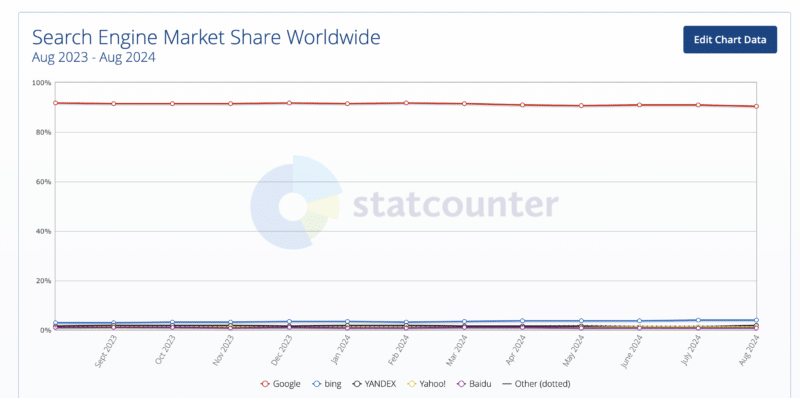
- While many ad tech providers exist, Google dominates key market segments such as ad exchanges, ad networks and demand-side platforms.
- Though Google has competitors in the most basic sense of the word (i.e., there are other players in search), the gap between their share of the market and the second largest (Microsoft) is vast and has been for many years.
Advertisers and publishers don’t truly have free choice.
- Research shows the majority of digital ad spend flows through Google’s ad tech stack, limiting choices.
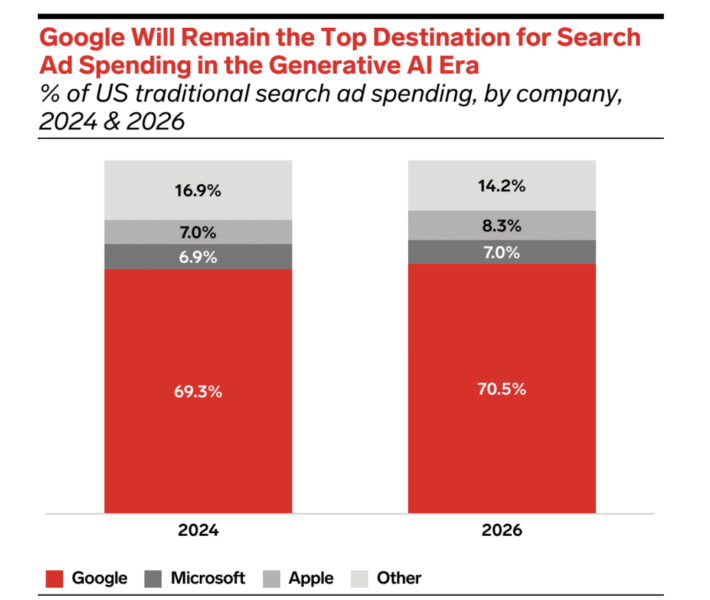
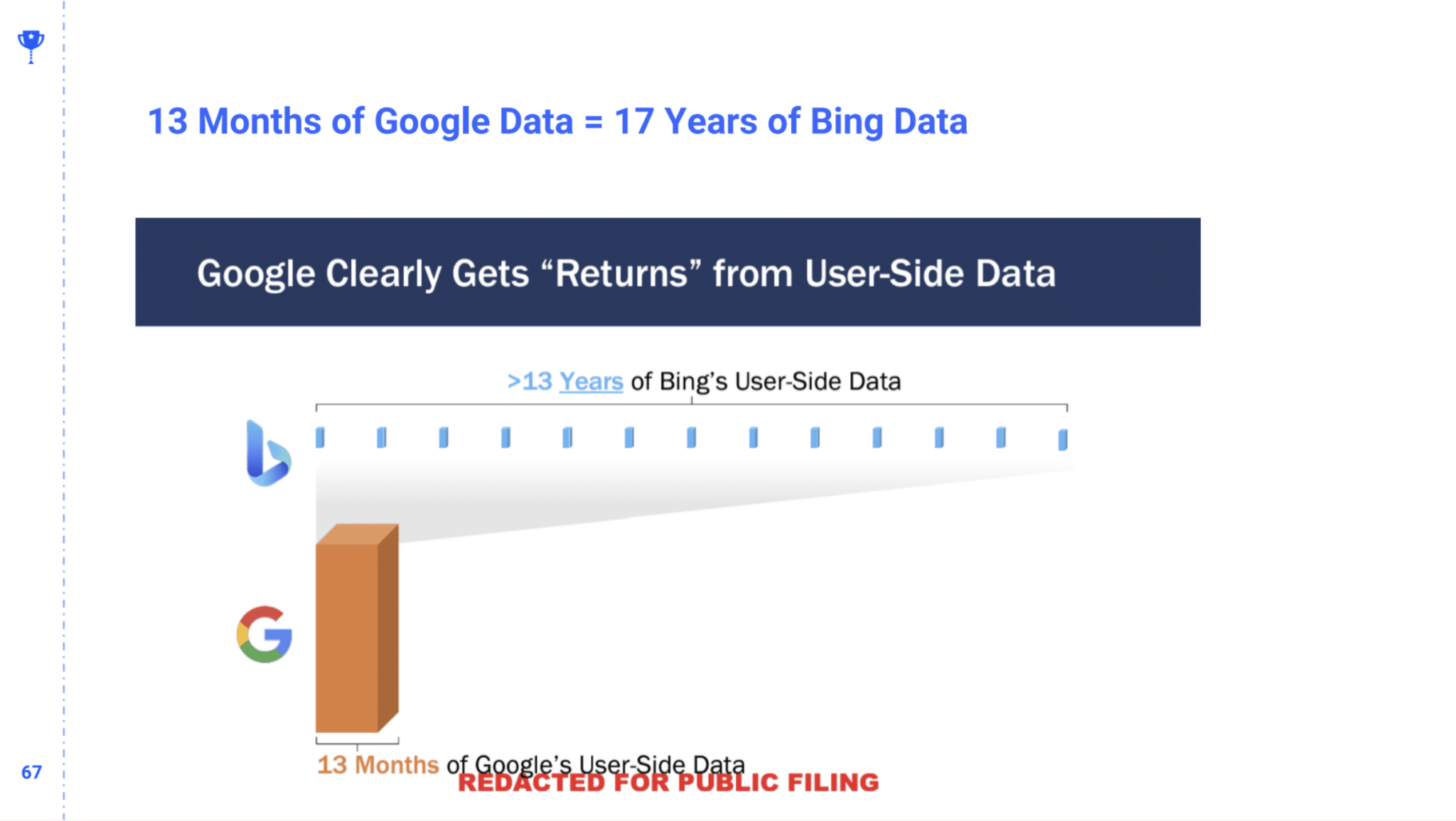
- Michael King of IPullRank presented in a recent SMX conference how it would take 17 years to collect the data Google get in 13 months.
Buying online ads isn’t cheap.
- Several reports this year have shown that advertising costs increased:
- Google search CPCs up 9%, pushing ad spend up 17% – leading to brands looking to diversify their ad spend.
- Report: Google Search CPC up 13% YoY; ad spend growth slowing – where retail alone saw a 5 yr 50% increase in CPC
- Search ad costs rise, conversion rates decline again in 2024 – where CPCc increased across 60% of industries
I asked some experts to discuss this blog post in which Google argued that:
- There are several other ad tech companies that compete in the space.
- Ad buyers mix and match tools with rivals; therefore, they don’t get all the fees.
- Their fees are lower than the industry average.
- Small businesses will be hurt the most by this case.
Robert Brady founder of Righteous Marketing, said Google is presenting a masterclass of painting oneself in a positive light:
- “The only statement I specifically disagree with is in the second to last paragraph where Google says ‘The ability to buy online ads cheaply and simply…’ Most searches with commercial intent (the ones SMBs want to put their ad on) are not cheap and Google Ads is not a simple platform anymore.
- “What Google doesn’t say is much more salient. They fail to mention their utter dominance of search, which is where you get search intent data.
- “That advantage, having 80%+ of the internet’s search intent data, is what puts every other piece of Google’s ads tools at a significant advantage against even large competitors like Microsoft. And as long as Google can leverage that search intent data in all their other products, they’ll own this industry.”
However Sam Tomlinson, EVP and Director of Digital Strategy of Warschawski, pointed out several issues with the DOJ’s case:
- He claims this to be an issue with market definition: “Honestly, Google is right on their market definition point. The relevant market should be digital advertising , not some ridiculous thing like “Non-product text based ads” — it would be absurd to say that Amazon has a monopoly on “eCommerce consumer retail”
- He doesn’t believe it is possible to assess what Google’s fees are: “[It’s] very difficult to assess Google’s fees vs. those charged by others due to the sheer volume of points in the value chain where fees can be added, often in non-transparent ways.”
- He thinks SMBs will lose if the DOJ wins SMBs: “End result to SMBs? Probably right, to be honest. That’s not what the ‘Google = evil’ people want to think, but the reality is that breakups would come with massive incremental costs that would be passed onto advertisers.”
Tomlinson said he thinks the system will get healthier if the DOJ wins, but that it will be a painful process:
- “Long run, we’ll probably get a healthier, more transparent ecosystem, but the short term pain to advertisers (and by extension, publishers) is going to be brutal.”
Between the lines. Google portrays itself as an enabler of the free and open internet, but the DOJ argues its ad tech dominance does the opposite – it limits choice, increases costs and harms publishers.
What’s next. The trial will test whether Google’s defiant claims hold up against the DOJ’s evidence of anticompetitive practices. A positive outcome for the DOJ, as Tomlinson noted, could reshape the digital advertising landscape.
Courtesy of Search Engine Land: News & Info About SEO, PPC, SEM, Search Engines & Search Marketing
Category seo news | Tags:
Social Networks : Technorati, Stumble it!, Digg, de.licio.us, Yahoo, reddit, Blogmarks, Google, Magnolia.
Future of AI in content marketing: Key trends and 7 predictions
Written on September 9, 2024 at 11:41 am, by admin

Artificial intelligence (AI) is changing the game in many industries and content marketing is no different.
As we dive deeper into the digital age, AI’s influence on how we create, share and optimize content is only growing.
This article will examine some of the key trends shaping the future of AI in content marketing and expert predictions on how these technologies are set to transform the way brands connect with their audiences.
Marketing AI is already here
The future of content marketing is here, and it’s powered by AI.
Marketing AI is most prominent in a new technology known as content intelligence.
Content intelligence platforms use machine learning algorithms to:
- Analyze massive datasets of content.
- Provide insights that can be used to improve all aspects of content marketing.
This data-driven approach to content marketing helps businesses create more effective campaigns.
Here are some more ways that AI is now used in content marketing:
Generative AI for content marketing
Creating engaging and informative content is essential for any successful marketing strategy.
However, producing high-quality content consistently can be time-consuming and resource-intensive.
This is where generative AI tools like ChatGPT are revolutionizing the content creation process.
Marketers can use AI to generate:
- Blog posts.
- Social media updates.
- Website copy.
- Email marketing campaigns.
This allows marketing teams to scale their content production efforts and free up time to focus on more strategic initiatives.
Hyper-personalized marketing
Consumers today expect personalized experiences. They are more likely to engage with brands that offer content and offers relevant to their interests and needs.
AI can analyze vast amounts of customer data to identify patterns and preferences. This data can then be used to create highly personalized marketing campaigns that deliver the right message to the right person at the right time.
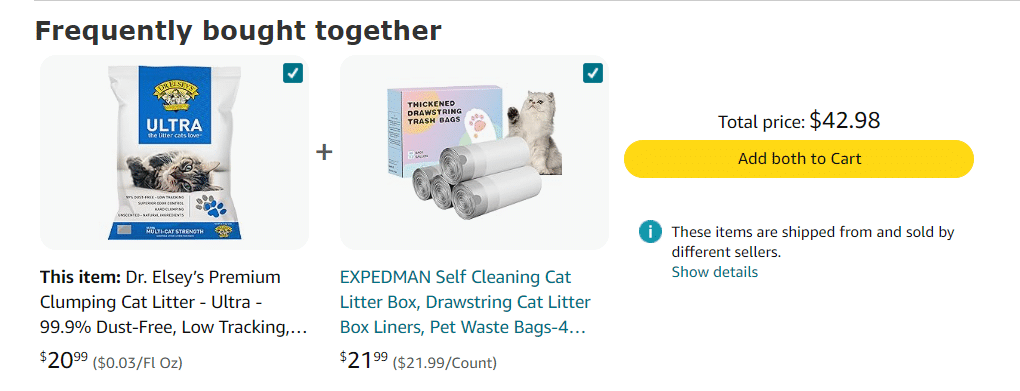
Amazon is a leading example of effective hyper-personalization. If you search for cat litter and click on a product, Amazon will automatically show a “Frequently Bought Together” section related to that search.
Predictive analytics for data-driven decisions
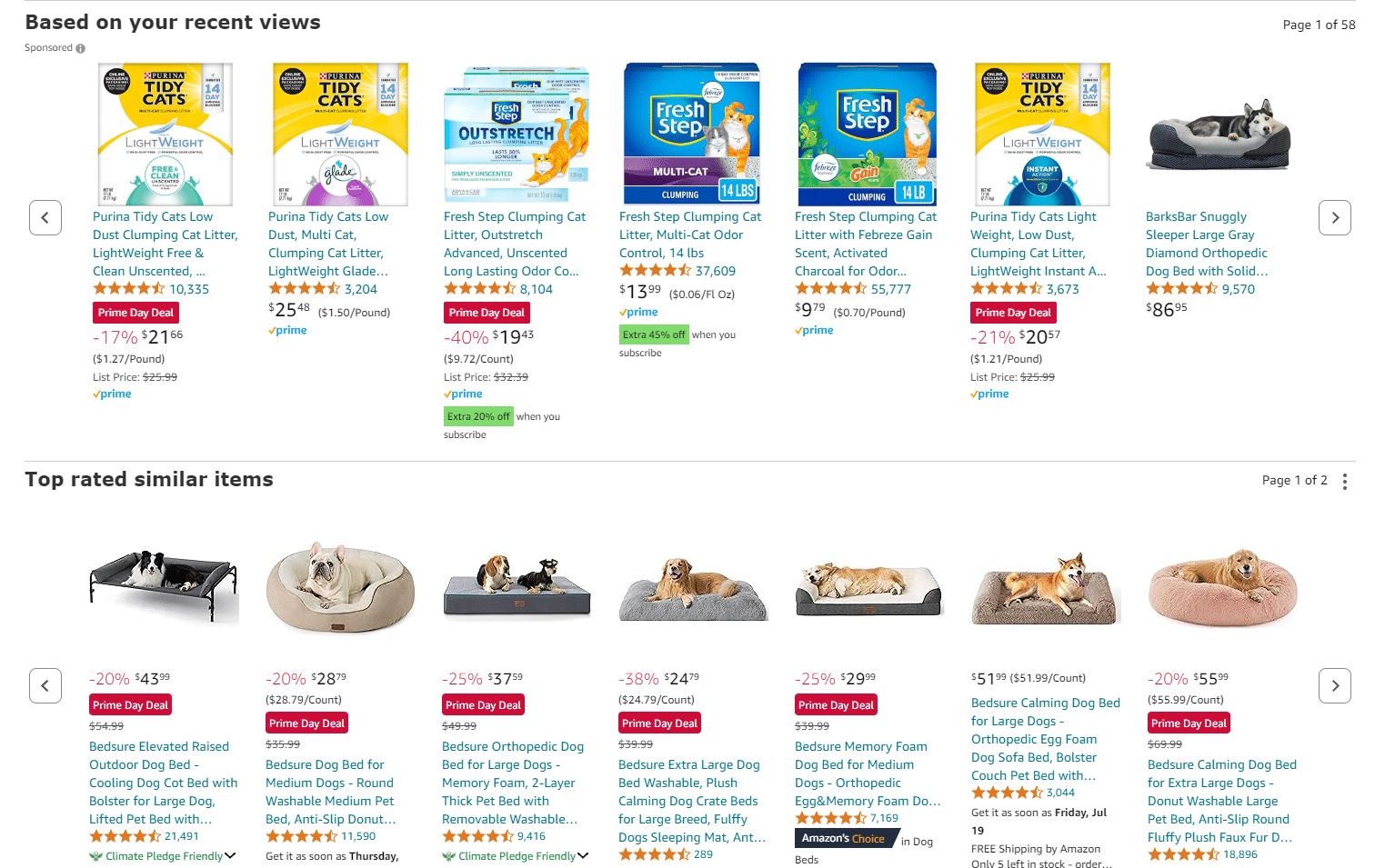
AI-driven predictive analytics lets you move beyond past data (e.g., website activity, purchase history and engagement) to predict outcomes, which is valuable for making informed decisions on inventory, marketing budgets and product development.
Again, Amazon is the perfect example of leveraging predictive analytics to help customers easily find what they’re looking for.
Enhanced customer experience
AI is allowing customers to experience brands in some cool ways.
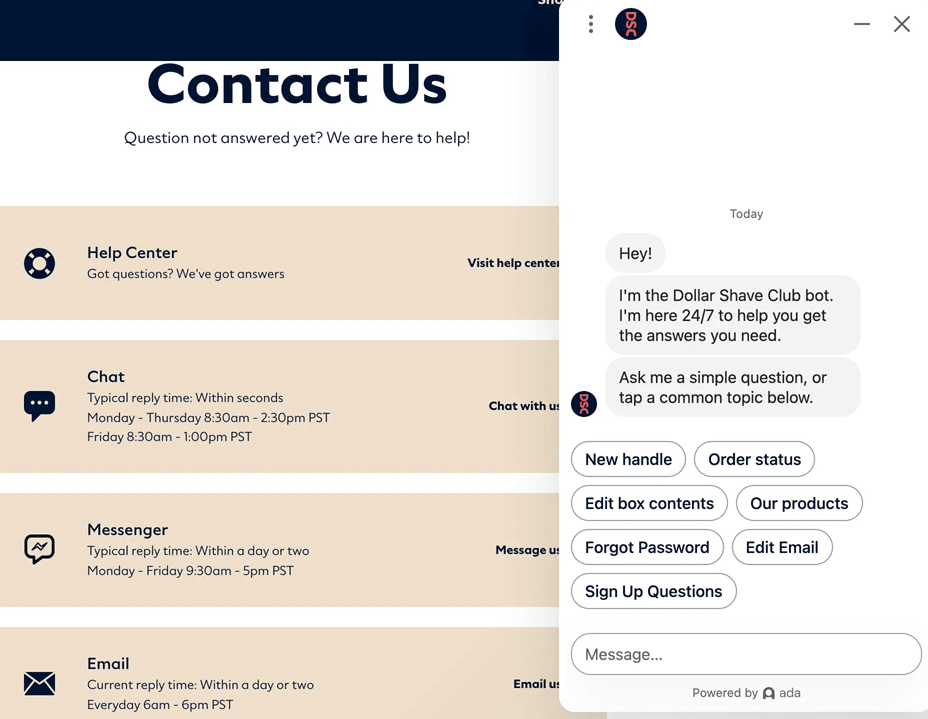
Take AI-powered chatbots, for example. These smart assistants offer personalized and efficient customer support 24/7.
Whether you have a question at midnight or need help early in the morning, chatbots provide real-time answers tailored just for you.
Here’s how Dollar Shave Club uses AI to handle customer queries:
But it doesn’t stop there. AI is also shaking things up with interactive content. Imagine getting content that feels like it was made just for you – because it was!
AI can create dynamic, personalized experiences that keep you engaged and connected with the brand.
Plus, AI is super helpful in gathering feedback and insights. It can spot trends and determine what people want by analyzing customer interactions.
This means companies can keep improving their products and services, making sure they’re always meeting your needs.
In short, AI is making customer experiences more personal, efficient and engaging, helping brands build stronger relationships with their audiences.
Voice search optimization
With the rise of virtual assistants like Siri, Alexa and Google Assistant, more and more people are using their voices to search for information.
One of the main ways AI is helping is by analyzing voice search patterns. Unlike traditional text searches, voice searches are usually more conversational and natural-sounding.
AI tools analyze these patterns to show what questions people ask and the language they use. This lets you adjust your content to fit natural speech, improving your chances of appearing in voice search results.
AI is also great at helping with SEO for voice search. It can suggest long-tail keywords and phrases commonly used in voice queries and even help optimize website structure and metadata to be more voice-search friendly.
By using AI to fine-tune your content and SEO strategies, you can ensure content is easily discoverable by voice search users.
Augmented reality
With augmented reality (AR), we can deliver immersive experiences.
For example, customers can see how furniture looks in their homes or try on clothes virtually, helping them make confident decisions and boosting sales and satisfaction.
For example, the “#TakeATaste Now” campaign allowed consumers to grab a bottle of Coca-Cola Zero Sugar straight from digital screens via AR and claim the real soda at a nearby Tesco store.

Another great thing about AR is how it enhances storytelling and brand engagement. You can use AR to bring your brands to life in unique and memorable ways.
For instance:
- A cosmetics company might use AR to let customers try on different makeup looks virtually.
- Or a travel company might create an AR app that lets users explore destinations from their living rooms.
These interactive experiences capture attention and create a deeper connection between the brand and its audience.
7 expert predictions in marketing AI
What’s in store for the future of content marketing? Let me share with you seven predictions from the experts.
1. Media democratization
The barriers to entry for content creation have been steadily eroding for years.
Blogs challenged traditional media, self-publishing platforms disrupted the book industry, podcasts offered an alternative to radio and YouTube gave everyone a shot at video stardom.
This democratization of media empowers individuals and smaller organizations to compete with established players in the content marketing landscape.
This shift is driven by several factors, including:
- Lower production costs: Powerful yet affordable software and equipment have made high-quality content creation accessible to almost anyone.
- Direct audience access: Social media and other online platforms allow creators to reach their target audiences directly, bypassing traditional gatekeepers.
- Increased demand for niche content: As consumers grow tired of generic, mass-produced content, there’s a growing appetite for specialized and authentic voices.
This means embracing the power of user-generated content and influencer marketing and creating a strong brand voice across various platforms.
It’s about building communities and fostering engagement rather than simply broadcasting messages.
2. Raising the bar in content generation
The rapid evolution of generative AI tools has injected the content marketing world with a potent mix of excitement and anxiety.
While many marketers are understandably wary of AI’s disruptive potential, its transformative impact on content creation is undeniable.
As AI-powered content generators become increasingly sophisticated, they are poised to establish a new benchmark for quality.
This means content marketers will need to adapt their strategies to stand out in a landscape saturated with AI-generated content.
Simply churning out “good enough” content will no longer suffice. Instead, marketers must strive for excellence in every piece of content they produce.
Here’s how AI-generated content is raising the bar:
- Increased content volume: AI can generate vast amounts of content quickly and efficiently, flooding the digital landscape. This means marketers must produce exceptional content to capture their audience’s attention.
- Improved content quality: AI content generators constantly learn and improve, producing increasingly high-quality content often indistinguishable from human-written content. To compete, marketers need to create original, insightful and engaging content that provides real value to their target audience.
- More personalized content: AI-driven hyper-personalization will continue to become a game-changer, moving far beyond the generic “recommended for you” suggestions. Imagine receiving emails that address you by name, recommend products based on your past purchases, and even offer exclusive discounts tailored to your shopping habits. This level of personalization fosters a stronger emotional connection with customers, leading to increased engagement, brand loyalty and higher conversion rates.
3. Generative AI will take over some SEO traffic
One of the biggest impacts of generative AI on content marketing is its potential to reshape how people search for information online.
Instead of turning to a traditional search engine like Google and clicking through the SERP listing, users can get answers directly from AI chatbots like ChatGPT and Gemini.
This shift in user behavior could lead to a decline in organic search traffic, impacting the effectiveness of traditional SEO strategies.
This change necessitates adapting content strategies for brands that rely heavily on organic search to drive traffic and leads.
Creating high-quality content optimized for specific keywords will have less impact if users don’t click through from search engine results pages.
However, this doesn’t mean that SEO is dead. Instead, it highlights the importance of a multi-faceted content marketing strategy that goes beyond simply targeting keywords.
Dig deeper: How AI will affect the future of search
4. AR/VR support in marketing
Tech-savvy millennials are driving the adoption of augmented reality (AR) and virtual reality (VR) technologies, revolutionizing customer experiences with immersive engagement that captivates.
- AR enhances the real world by layering digital elements onto it, often through smartphone cameras.
- In contrast, VR creates fully immersive, interactive digital environments accessed through headsets, blocking out the physical world.
This technology offers unprecedented opportunities for marketers to connect with their audience in new and exciting ways.
5. The rise of chatbots and social bots
AI-powered chatbots and social bots are transforming how brands connect with their audiences.
Automating and enhancing customer interactions boost engagement and streamline marketing efforts.
Chatbots provide 24/7 customer service, handling high volumes of queries with instant responses, issue resolution and personalized recommendations.
In social media marketing, social bots automate tasks like responding to comments, tracking brand mentions, and monitoring conversations.
This allows marketing teams to focus on strategy and creative content. These AI tools are essential for managing brand presence and improving customer interactions in the digital age.
6. Mobile content is king
As AI evolves, its ability to analyze user behavior on mobile devices will become even more sophisticated, allowing you to deliver hyper-personalized experiences in real time.
Imagine a world where a customer walking by a coffee shop receives a push notification for a discount on their favorite latte – all powered by AI analyzing their location data and past purchase behavior.
The future of marketing is mobile and AI is the key to unlocking its full potential.
7. Changing job roles in marketing
AI is going to shake up marketing jobs in some pretty interesting ways.
As AI takes over routine tasks like crunching data, generating basic content and sorting customer segments, marketers will have more time to focus on the fun stuff – strategy, creativity and building relationships.
Marketers will work with AI, using its data-driven insights to brainstorm ideas, fine-tune campaigns and personalize customer experiences. This partnership between AI and human creativity is set to make our marketing efforts more innovative and effective.
While AI will do much of the heavy lifting, it will also open up new opportunities for us to think strategically, get creative and lead with ethics in the marketing world.
Dig deeper: Why AI can’t replace authentic client relationships
Embracing the future of marketing With AI
An O’Reilly survey revealed that 67% of marketing teams actively use AI, and 26% plan to incorporate it soon. This signifies a major shift in the marketing landscape, with AI tools poised to reshape job roles across the industry.
While some marketers fear AI might replace them, the reality is far more nuanced.
AI is not here to eliminate jobs but to augment them, freeing marketers from repetitive tasks and empowering them to focus on strategic initiatives.
This evolution will require marketers to adapt and acquire new skills to thrive in an AI-driven environment.
Courtesy of Search Engine Land: News & Info About SEO, PPC, SEM, Search Engines & Search Marketing
Category seo news | Tags:
Social Networks : Technorati, Stumble it!, Digg, de.licio.us, Yahoo, reddit, Blogmarks, Google, Magnolia.
The DESCRIBE framework for effective YouTube descriptions
Written on September 9, 2024 at 11:41 am, by admin
Brands today live in a multi-platform world.
In this article, you will learn:
- Why brands need to get ready for a multi-platform environment.
- How YouTube plays into this.
- How YouTube descriptions can be used to carry meaning and relevance.
- How to use the DESCRIBE framework to improve your description generation.
Welcome to a multi-platform environment
When Facebook launched, many expected the social media platform would compete with Google in search.
Since then, many other social media platforms and discussion boards have emerged – from Instagram to TikTok, from YouTube to Reddit, from Medium to Soundcloud or Pinterest.
All of them have a search box.
All of them might be platforms users use to search for information, people, brands and products.
Generative AI has been changing the landscape even more lately, introducing powerful generative AI into existing platforms and new tools: ChatGPT, Perplexity, Claude, Gemini, Copilot and Grok, to name a few.
Typical social media sites have their own data sets largely based on users’ content.
Generative AI models, however, leverage large language models (LLMs) that are trained using content from all over the web.
This is why it is critical for your marketing to stay on top of your brand’s presence across your audience’s major platforms.
Let me re-introduce you to YouTube
While everybody knows YouTube, many forget that it is one of the largest search engines and also among the top social media platforms worldwide.
If you think about how often you go directly to the video streaming platform to search for something in particular, you will undoubtedly understand its relevance as a tool for information retrieval.
And YouTube keeps growing:
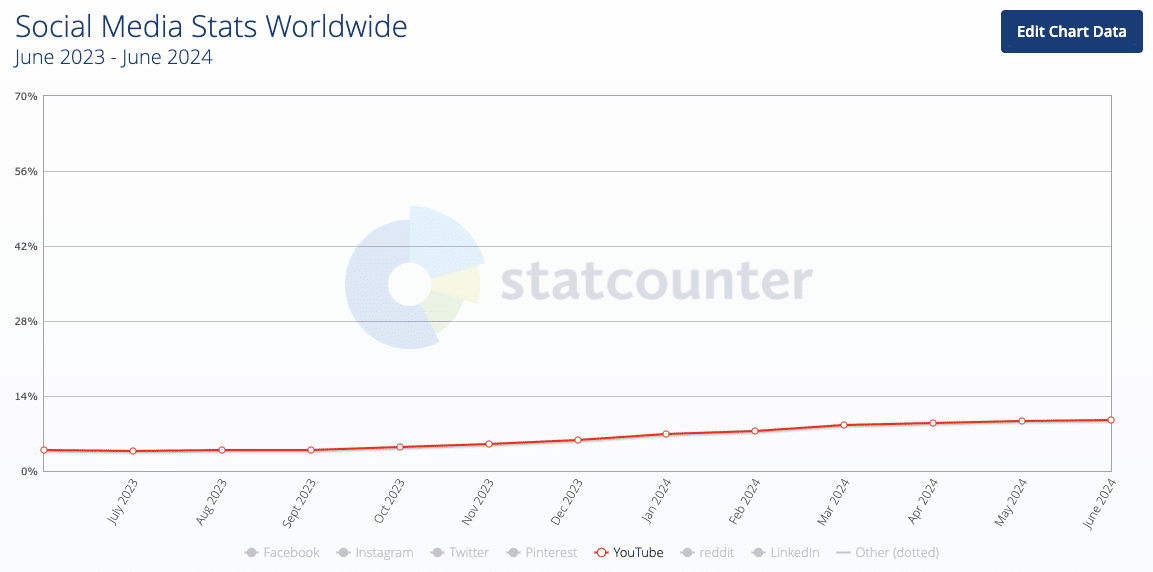
Audience-platform research across different industries suggests YouTube is one of the most important platforms people use.
As a result, a brand’s reputation heavily depends on the content hosted on the platform:
- A bad product review video might show up when somebody searches for your product
- A video comparison between your course and a competitor’s program could drive people to alternative products.
- A poorly performing video on your own channel might get your prospects to reconsider whether they want to do business with you.
But before you now think of recording more and better videos, let’s discuss a very often component of YouTube that’s often overlooked:
The descriptions.
YouTube descriptions: Those little texts that nobody reads?
Countless times, you can come across YouTube channels with tens of thousands, sometimes even millions of subscribers.
Many of them have one thing in common…
They pay little or no attention to their video descriptions.
While affiliates are used to populate their descriptions with affiliate links of their equipment, tools or suppliers, many businesses just fill the description box with a one-line summary or a link to their website.
But how could your YouTube descriptions support your brand in a generative AI world?
The value of YouTube descriptions to help train LLMs, at least at first glance, might be questionable, given the fact that it is clearly against YouTube’s Terms of Service to scrape content from the platform, making it impossible for third-party platforms to train their models on YouTube’s data:
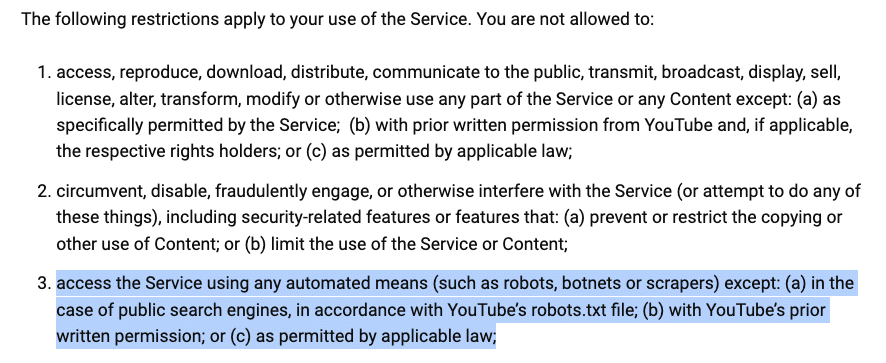
However, we know that OpenAI is often reported to have most likely been scraping YouTube to train its model, “Sora.”
If the Google leak has taught us one thing, it is that big tech giants might ignore the rules and use all the data they can (hello, Chrome clickstream data).
YouTube descriptions might also be valuable for AI training, and at least help Google produce better AI Overviews about your brand.
In addition, optimizing video descriptions on the streaming platform will help your videos to get more views.
But how do you write descriptions that set your videos and brand up for success?
The DESCRIBE framework for better descriptions
I’m a big fan of frameworks to structure repeatable processes.
For YouTube, we have developed the DESCRIBE framework, which can help you create YouTube descriptions that will set your videos up for success and support your brand’s online reputation.
Here is an actionable list of elements regarding each part of DESCRIBE:
- Detailed content summary.
- Engage with calls to action.
- Search engine optimization.
- Consistent branding.
- Relevant links.
- Interactive elements.
- Build trust with transparency.
- Evaluate and adapt.
Detailed content summary
- Provide a clear, concise and context-rich summary of the video content. ChatGPT or Claude might help you achieve this by removing the fluff of a video transcription and shorten it to the minimum.
- Consider listing key takeaways.
Engage with calls to action
- Include questions or prompts to foster interaction.
- Direct viewers to additional resources or related content.
- Encourage viewers to like, share, comment and subscribe.
Search engine optimization
- Use relevant keywords naturally throughout the description.
- Confirm your title also contains at least 1-2 context-relevant keywords.
- Incorporate hashtags to increase discoverability and connect your video with broader topics.
Consistent branding
- Maintain a consistent brand voice and messaging.
- Include branded elements like your brand name and a tagline you usually use.
- Ensure descriptions align with the overall brand strategy.
Relevant links
- Add links to related videos, your website and social media profiles.
- Add a link to the personal brand website of your speaker(s).
- Link to playlists to keep viewers engaged on your channel.
Interactive elements
- Use timestamps to create an interactive viewing experience.
- Encourage viewers to engage with polls or comments.
Build trust with transparency
- Disclose any sponsorships or affiliate links.
- Credit sources and collaborators.
Evaluate and adapt
- Monitor performance using YouTube Analytics.
- Track metrics like click-through rates, watch time and viewer retention.
- Regularly update descriptions based on performance data and audience feedback.
A handy template
To make this more actionable, here is a template that you or your team can copy and paste:
 Video Summary
[Video Title]
[Provide a clear, concise summary of the video content in 2-3 sentences]
00:00 – Introduction [List key sections with timestamps]
 Timestamps
XX:XX – Conclusion
 Key Takeaways
- [Bullet point 1]
- [Bullet point 2]
- [Bullet point 3]
 Relevant Links
- Related video: [Link]
- Our website: [Link]
- Speaker’s website: [Link]
- [Your Brand Name] playlist: [Link]
 Join the Conversation
What did you think about [specific topic from the video]? Share your thoughts in the comments below!
 Stay Connected
Don’t forget to like, share and subscribe to stay updated on our latest content!
Follow us on social media:
- Instagram: [@YourHandle]
- Twitter: [@YourHandle]
- Facebook: [Your Page]
 [Optional] Poll
[Include an engaging poll question related to the video content]
 Transparency
[If applicable] This video contains sponsored content. [Specific disclosure]
Sources and collaborators:
- [List any sources or collaborators]
#[Hashtag1] #[Hashtag2] #[Hashtag3]
[Your Brand Name] | [Your Tagline]
Applying the DESCRIBE framework
In a multiplatform environment, as a brand, you need to optimize each platform your audience might be using to discover your products.
YouTube has been growing as a social network and search engine for years.
By applying the suggested DESCRIBE framework, your videos will be found more often, and both engines and users will find helpful data points around your brand.
Courtesy of Search Engine Land: News & Info About SEO, PPC, SEM, Search Engines & Search Marketing
Category seo news | Tags:
Social Networks : Technorati, Stumble it!, Digg, de.licio.us, Yahoo, reddit, Blogmarks, Google, Magnolia.
How to boost audience engagement: Top strategies and techniques
Written on September 9, 2024 at 11:41 am, by admin

Too many brands and content creators focus on driving audience growth and lose sight of maintaining engagement.
Capturing attention is one thing, but retaining attention and building engagement are greater challenges. Ultimately, it costs more to acquire a customer than to keep one.
Let’s examine proven strategies and techniques for boosting audience engagement and exploring methods for building a community around your brand.
Ensure a quality customer experience
First and foremost, we must ensure that customers have a quality experience from the start.
This is founded on building trust early, then reinforced through exceptional customer service and a seamless onboarding process.
Next, ensure you are checking in on customers outside of billing cycles. Gather feedback and resolve issues quickly.
This commitment to a seamless and superior customer experience is the foundation of boosting engagement and retaining customers.
Personalized approach to rewarding customers
Once a customer is acquired, it’s essential to understand and quantify that customer’s lifetime value. This can then be used to reward customers and build relationships based on segmentation.
Dividing an audience into distinct groups allows a business to tailor content, incentives and products and services that best suit their needs, interests and behaviors.
Implementing reward systems
We all love to earn badges and get that gold star.
Gamification is a powerful tool to boost audience engagement to increase your audience’s time and effort investment.
Playing on our need for achievement, earning badges, points, stickers or even monetary bonuses can drive engagement.
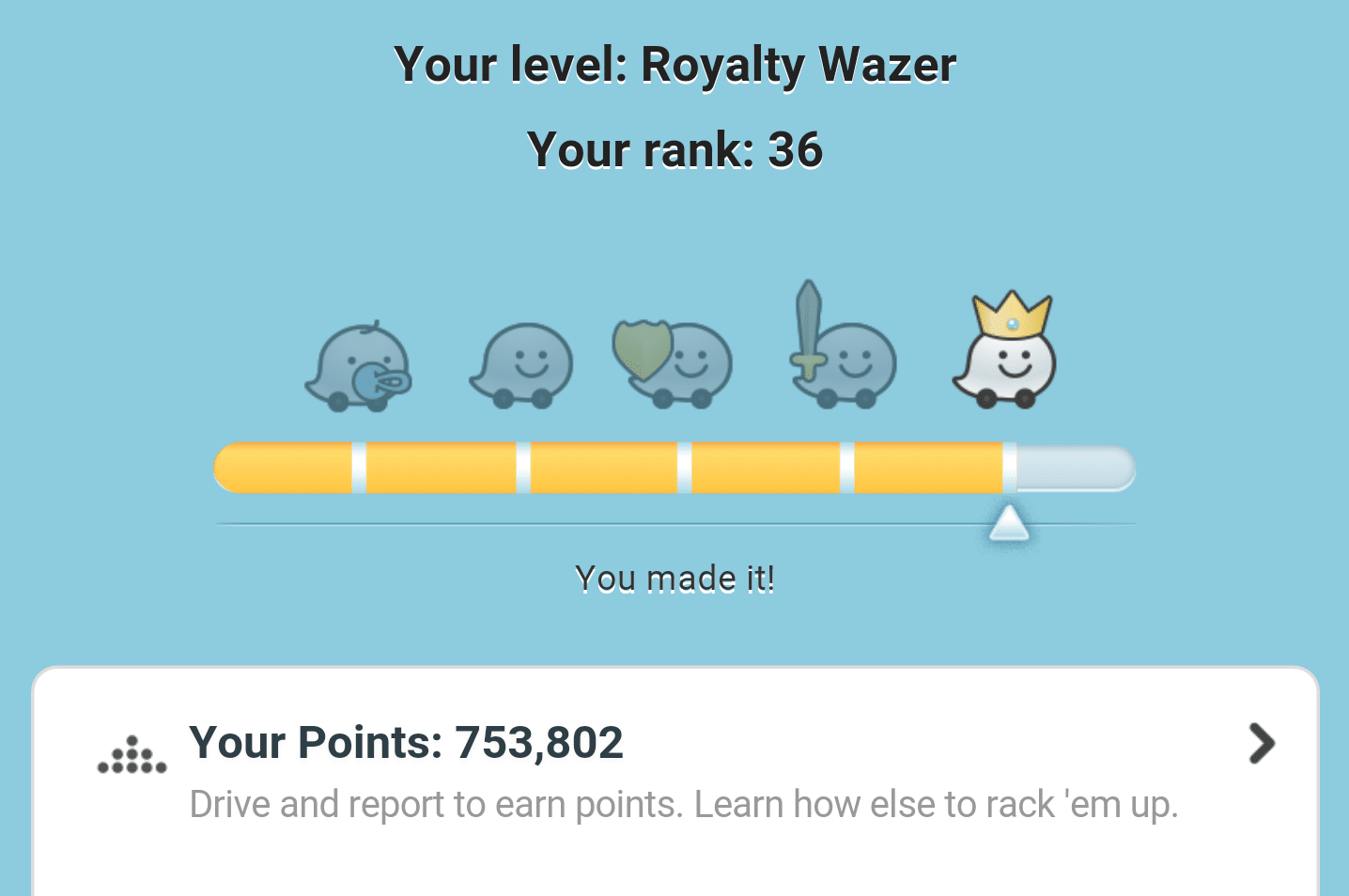
- Earn badges: The navigation app Waze creates a hierarchy of users based on points.
- Earn points for purchases: Starbucks’ app rewards customers with points for purchases, which can later be redeemed for products.
- Advocacy and referral bonuses: Create compelling referral bonuses for customers to.
- Access exclusive content: Access exclusive content, giveaways, discounts or coupons.
Creating challenges and competitions
Challenges and competitions add an element of excitement and friendly rivalry to user experiences.
Think Peloton’s leaderboard or even Duolingo’s language learning challenges. These challenges and competitions create a sense of competition and community.

Using progress tracking
Use progress bars to motivate your audience to stay engaged.
An example is LinkedIn’s profile strength indicator or their new weekly sharing tracker. The weekly sharing tracker motivates users to post, comment and contribute to articles.
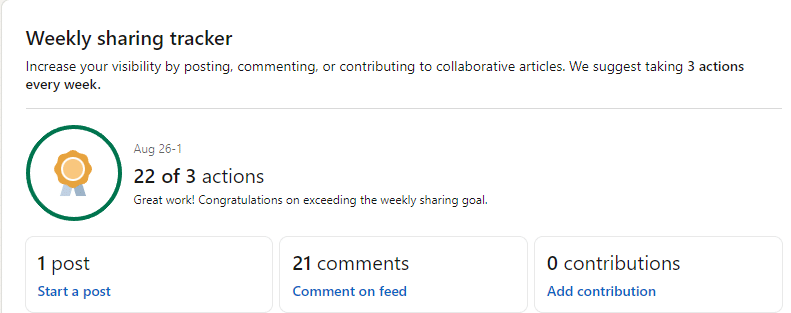
These gamification techniques can improve audience engagement and foster loyalty. Also, just because you don’t have an app doesn’t mean you can’t implement a gamification element.
These could be earning badges as users in an online community, a loyalty program where you earn points or discounts or earn rewards based on desired behaviors, such as the All-State Safe Driver Discount.
Interactive content strategies
Live polls and surveys
These are powerful tools to boost audience engagement. They appeal to the innate human desire to communicate and connect, turning passive viewers into active participants.
Live polls can drive immediate interaction and have been shown to increase engagements by up to 40% compared to traditional surveys.
Polls are also great resources for engaging content.
- Create an editorial calendar of polls to engage your audience.
- Use interactive elements in video conferencing or virtual event platforms.
- Keep polls clear, concise and relevant to the audience’s interests.
Quizzes and contests
Quizzes and contests are excellent tools to captivate audiences and reinforce learning.
They serve as powerful lead magnets but also to increase engagement and opportunities for existing customers.
Up to 91% of posts received more than 1,000 comments were Instagram contests, per a Tailwind study. Additionally, contests held with partners generated 79% more engagement than solo contests.
Contests can also be a good opportunity to increase user-generated content (UGC) and help boost SEO.
Dig deeper: 5 behavioral strategies to make your content more engaging
Building a community around your brand
Building a brand community is a powerful strategy for fostering loyalty, reducing marketing costs and generating innovative ideas directly from customers.
A brand community goes beyond customers who simply purchase its products to communities of fans who interact and share experiences that increase their affinity for the brand.
Creating online communities
Online forums provide an excellent platform for larger communities to discuss shared interests related to the brand.
For instance, Spotify’s community forum allows users to talk about music they love, share new artists and discuss playlists centered around their music streaming platform.

Communities and forums can also improve your search engine results, as users often seek content from these discussion boards.
Dig deeper: SEO for user activation, retention and community
Hosting virtual events
Virtual events and webinars have become a trusted way for creators and brands to connect with members, share content and build a strong, resilient community.
These events offer several advantages:
- Reduced costs compared to in-person events.
- Greater flexibility for attendees.
- Improved accessibility for all participants.
Popular virtual event formats include webinars, summits, conferences and product launches.
For example, some brands host quarterly social events for entrepreneurs and founders to connect and learn from each other, extending the impact through content capture.
Encouraging user discussions
Brands can encourage user discussions by:
- Responding promptly to questions and creating discussion posts.
- Using social media platforms to interact with the community.
- Creating exclusive groups on platforms like Facebook or LinkedIn.
With these strategies, brands can create vibrant communities that drive loyalty, advocacy and long-term success.
Using video for engagement
Video is an incredibly powerful medium for human connection.
Videos can be used throughout the customer lifecycle, from serving as longtail awareness to tutorials and education to driving loyalty.
To get started, understand your audience and create different variations of your content. Then, measure audience engagement, learn and iterate.
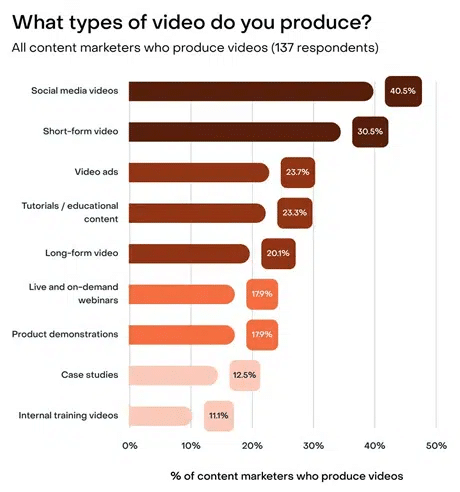 Source: “Why video is key to building brand identity and engagement,” Search Engine Land
From attention to retention: Proven ways to boost audience engagement
Remember, engagement is an ongoing effort that requires creativity, consistency and a deep understanding of your audience’s needs and behaviors.
When done right, these efforts will lead to sustained growth, stronger customer relationships and long-term success for your brand.
Customer retention and engagement are not one-time events but continuous journeys that require intentional and consistent care and nurturing of your customers.
Courtesy of Search Engine Land: News & Info About SEO, PPC, SEM, Search Engines & Search Marketing
Category seo news | Tags:
Social Networks : Technorati, Stumble it!, Digg, de.licio.us, Yahoo, reddit, Blogmarks, Google, Magnolia.
Google Ads to deprecate enhanced CPC for Search and Display Ads
Written on September 7, 2024 at 5:37 am, by admin
Google Ads will phase out the option to use enhanced cost-per-click (eCPC) for new Search and Display campaigns starting in October.
Key dates:
- October: eCPC option removed for new campaigns.
- March 2025: All remaining eCPC campaigns transitioned to Manual CPC.
Why we care. ECPC is the most light touch of automated bid strategies, so it allowed you to dip your toe into automated bidding without giving Google full control by just working toward a conversion target. Google is taking that away. If you haven’t started testing which fully automated bid strategies work for your campaigns, now is the time. This change will impact how you manage your Search and Display campaigns.
Options. Google introduced enhanced CPC in 2010 as a Smart Bidding strategy to optimize bids based on conversion likelihood. However, newer machine learning options like Maximize conversions (with optional target CPA) and Maximize conversion value (with optional target ROAS) offer more automated tools to improve performance.
First seen. Anthony Higman shared the email he received from Google about this update on X.
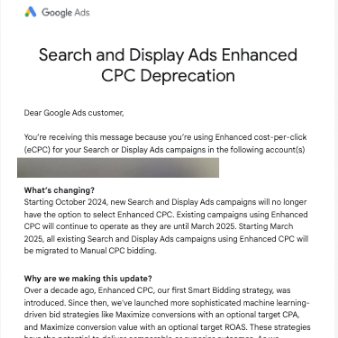
Zoom out. The shift to more advanced automated bidding strategies signals Google’s push toward greater reliance on machine learning and possible introduction of more automated bidding strategies.
Courtesy of Search Engine Land: News & Info About SEO, PPC, SEM, Search Engines & Search Marketing
Category seo news | Tags:
Social Networks : Technorati, Stumble it!, Digg, de.licio.us, Yahoo, reddit, Blogmarks, Google, Magnolia.
YouTube Studio adds new website visits goal for promotions
Written on September 7, 2024 at 5:37 am, by admin
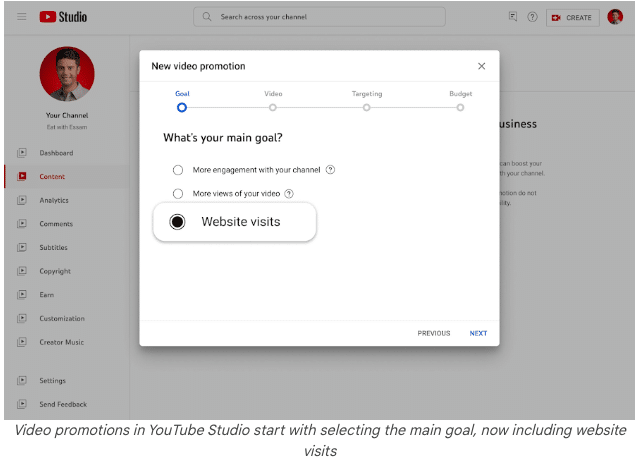
YouTube rolled out a new “website visits” goal in YouTube Studio’s promotions feature. This goal allows creators to drive traffic directly to their websites while growing their channel’s audience and video views.
Why we care. This update makes it easier for you to turn video views into website visits, helping to promote products or services directly from your channel. By targeting specific countries and languages, you can streamline ads for optimal results.
The details:
- Creators can set up video promotions within YouTube Studio by choosing from three goals: audience growth, video views or website visits.
- Ads appear in formats like Shorts, in-feed, and skippable in-stream, labeled as “Sponsored.”
- It’s important to note that any engagement from these ads doesn’t contribute to YouTube Partner Program eligibility.
Bottom line: The new website visits goal gives creators an easy-to-use tool for expanding business footprint beyond YouTube.
Courtesy of Search Engine Land: News & Info About SEO, PPC, SEM, Search Engines & Search Marketing
Category seo news | Tags:
Social Networks : Technorati, Stumble it!, Digg, de.licio.us, Yahoo, reddit, Blogmarks, Google, Magnolia.
Google Ads tightens rules on Gambling Certification recertification
Written on September 6, 2024 at 2:37 am, by admin
Google Ads will enforce stricter rules starting in November under its Circumventing Systems policy, specifically targeting advertisers in the Gambling and Games sector.
Advertisers with a Gambling and Games certification must undergo recertification if their business has significantly changed since their original certification.
Why we care. This update means that any significant changes to an advertiser’s product offerings, regulatory compliance, or licensing must be reported and could trigger the need for recertification. Failure to do so will be considered a serious violation, leading to immediate suspension of your Google Ads account.
The details. Material changes that require recertification include any alterations to products that don’t align with the original certifications, changes in compliance with regulations, or updates to licensing status.
However, changes to an advertiser’s address or payment methods are not considered material for this purpose.
Bottom line. Google is cracking down on compliance with its Gambling and Games policy. Advertisers in this sector must ensure their certifications are up-to-date to avoid severe penalties, including permanent account suspension.
Courtesy of Search Engine Land: News & Info About SEO, PPC, SEM, Search Engines & Search Marketing
Category seo news | Tags:
Social Networks : Technorati, Stumble it!, Digg, de.licio.us, Yahoo, reddit, Blogmarks, Google, Magnolia.
Google Ads won’t appear on parked domains for new accounts by default
Written on September 6, 2024 at 2:37 am, by admin
Google Ads will automatically opt new accounts out of serving ads on parked domains, starting in October.
A parked domain is basically a placeholder web address. It’s been registered, but typically it has little or no content and sometimes shows ads.
Why we care. This update allows advertisers to avoid wasting budget on low-value ad placements, ensuring ads are shown on websites that better align with their target audience and brand messaging.
Key benefits.
- Save money: Avoid spending on ads that may not reach relevant users.
- Increase relevance: Ensure ads are displayed on sites that reflect your brand.
- More control: Gain flexibility by choosing specific ad placements.
What Google is saying. Google sent out a letter to advertisers yesterday, informing them of this new “Content Suitability” setting. Serge Nguele shared the letter he received on LinkedIn:
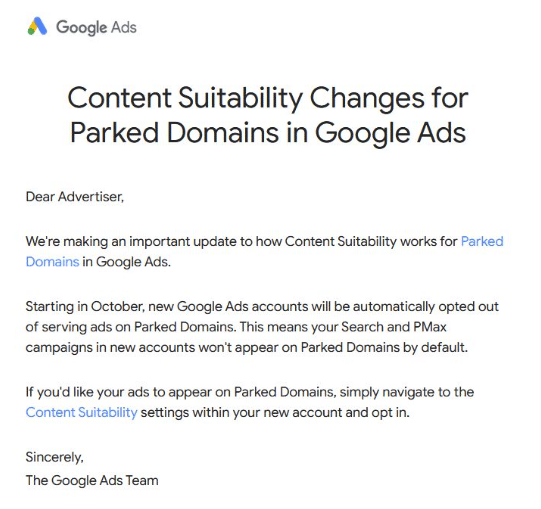
How to opt back in. Advertisers who want to serve ads on parked domains can opt in by navigating to Content Suitability settings in Google Ads.
Bottom line. This update gives advertisers more control and helps improve ad efficiency and relevance by managing where ads are placed.
Courtesy of Search Engine Land: News & Info About SEO, PPC, SEM, Search Engines & Search Marketing
Category seo news | Tags:
Social Networks : Technorati, Stumble it!, Digg, de.licio.us, Yahoo, reddit, Blogmarks, Google, Magnolia.