

The Kanban approach to efficient PPC campaign management
Written on July 17, 2024 at 10:23 am, by admin

Have you ever found yourself in one of the following situations?
- A stakeholder asks you the exact date that you adjusted the Target ROAS for a specific campaign, and you have to comb through the Change History to track it down.
- You have difficulty recalling your projects and explaining your value during performance review time.
- You forget to check in proactively to see how a new set of ad copy is performing after a few weeks.
- You consistently miss campaign launch deadlines, and you’re not sure why.
These issues may not all have the same solution, but I’d argue that a top-tier tracker that helps you stay organized and makes it simpler to report to stakeholders will essentially eliminate these problems.
You don’t need an expensive certificate in project management to help manage your own work in a way that makes sense and sets you up for success.
If you’re without a project management tool or find your company’s chosen tool isn’t serving you, I’d like to introduce you to the Kanban board for PPC and other paid media digital channels.
This board-based tool is baked into several free project management tools, such as Monday.com, Trello and Asana.
Originally developed in the manufacturing sector, Kanban boards have evolved into excellent tools for personal productivity and project management.
This article will explore how Kanban boards can revolutionize your approach to PPC and other paid channels, enhancing your work tracking and organizational skills.
Understanding Kanban boards
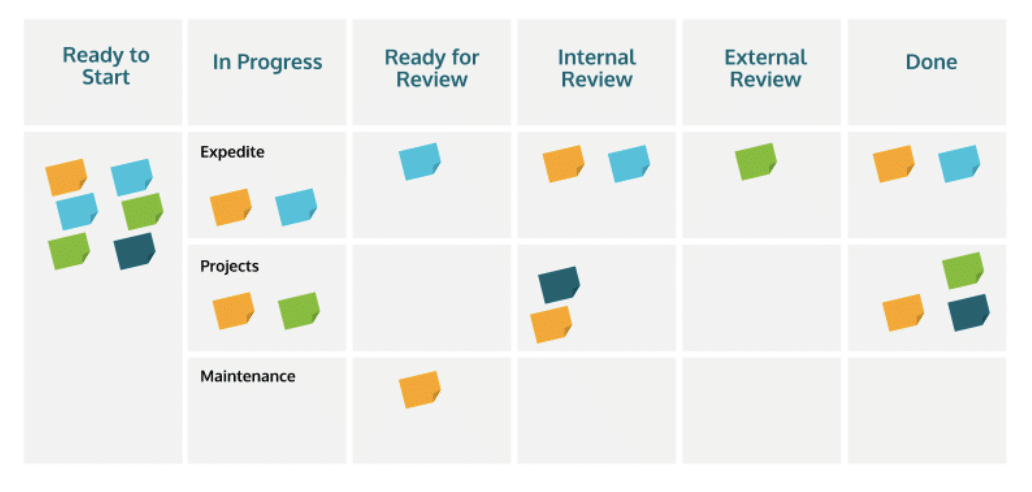
You’ve likely seen a Kanban board in the wild; it consists of columns and cards.
 Source: LinkedIn
Each column represents a stage in the workflow, such as To Do, In Progress, In Review and Completed. The cards in these columns represent individual tasks that need to be addressed.
This powerful system’s simplicity is its strength. It allows you to visualize your workload and manage tasks more effectively. One of the key benefits of Kanban boards is the visual clarity they provide regarding tasks and their progress.
Seeing all tasks laid out in front of you makes it easier to track progress and identify bottlenecks. Since about 65% of us are visual learners, it’s beneficial to use a tool that leverages this.
The flexibility of Kanban boards means they can be tailored to fit your particular workflow, making them ideal for the diverse tasks involved in PPC/SEM.
Another key advantage of Kanban boards is the boost in focus. They essentially force you to only pay attention to the tasks at hand and avoid overwhelm.
By breaking down larger projects into small, manageable tasks, you can concentrate on one thing at a time, reducing the mental load and ultimately increasing your own efficiency.
The structured approach that Kanban boards require not only helps in completing tasks more effectively but also in planning and prioritizing future work, such as following up on how past optimizations are performing.
Setting up a Kanban board for PPC tasks
When setting up a Kanban board for PPC and other paid channels, the first step is to tailor the columns to your specific workflow.
Kanbans are most effective when they’re relevant and specific to you and how your company gets work done.
To start, break down your work into single tasks, from beginning to end.
For example, the creation of a new campaign might be broken out thusly:
- Keyword research
- Stakeholder sign-off on settings and targeting recommendations
- Ad creation
- Assets received
- Customer list uploaded to platform
- Review by manager
- One week check-in and optimizations
- Four-week audit
- Report results
Once these tasks are identified, you can create relevant columns that reflect the stages of your workflow and assign deadlines and priorities to help you manage your time and ensure you’re working on the most important stuff first.
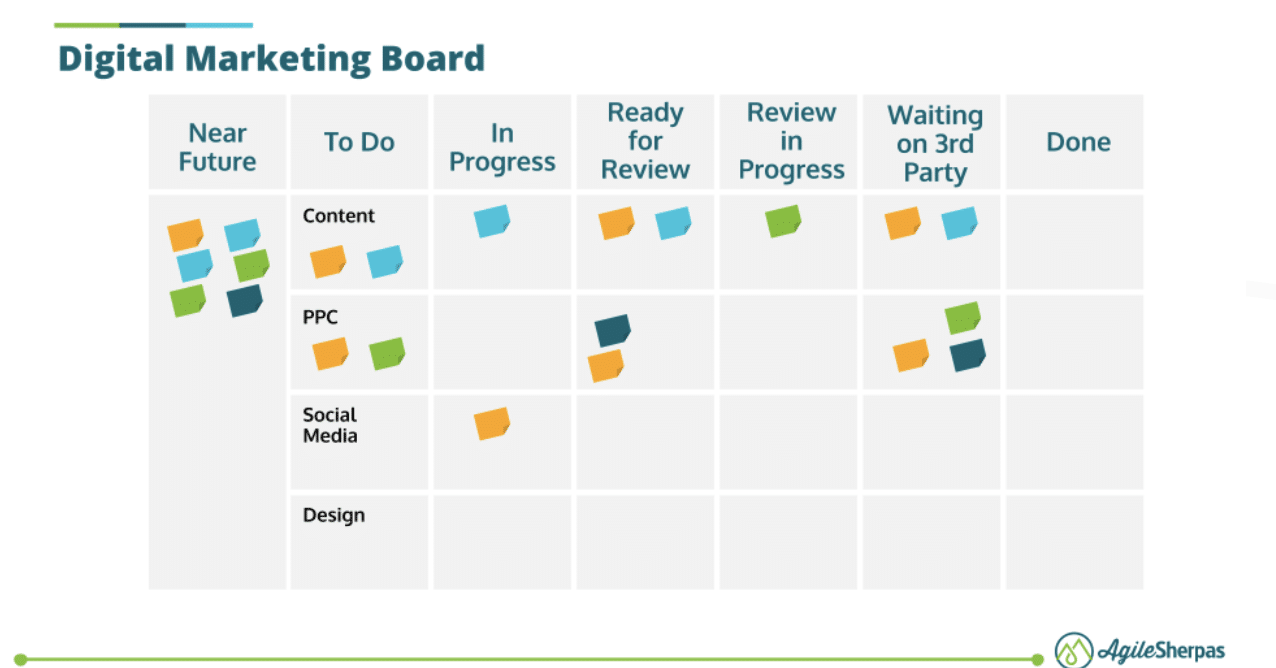 Source: AgileSherpas
Columns such as “In Progress” can be an extremely effective strategy for avoiding overwork caused by multiple stakeholders who don’t keep track of how much work they’re requesting from you.
Limiting the number of tasks in the “In Progress” column at any time prevents you from becoming overwhelmed and ensures that each task receives the attention it needs.
Columns such as Internal or External Review can help you get an idea of where bottlenecks often occur, while your Done column can help you communicate your value and accomplishments to your own manager during Performance Reviews.
Dig deeper: PPC management checklist: Daily, weekly and monthly reviews
Daily workflow with Kanban boards
Kanban boards are only useful if you use them, which is why it’s essential to integrate them into your daily routine.
Ideally, your Kanban board should reflect your work utterly, meaning you shouldn’t need to check multiple apps or locations to get an idea of what you need to work on on any given day.
Start each day by reviewing the board. Assess what needs to be done and move tasks across columns as progress is made.
In addition to viewing your board regularly, you also need to update and review it regularly to maintain its effectiveness. At the end of each day, take a few minutes to review what you’ve accomplished and update the status of your tasks.
Weekly reviews can help you adjust your plans and strategies based on the progress made and ensure that your workflow is still aligned with your goals.
Implement Kanban boards to boost your PPC productivity
Kanban boards offer numerous benefits for organizing and managing PPC tasks.
By providing visual clarity, flexibility and a structured approach to task management, they can significantly enhance your productivity and the efficiency of your campaigns by helping you stay organized.
Whether you’re just starting with Kanban or looking to refine your current system, these boards can (and should!) be tailored to fit your unique workflow.
Don’t be afraid to begin with a simple setup. Build the habit of starting and ending your day with your board.
You can evolve your board over time as you become more comfortable with the system and make changes to tasks and columns that reflect how you, as an individual, handle your work.
Regularly review and update your board to ensure it remains aligned with your goals and priorities.
May I suggest adding an “Audit Kanban board Set-Up” task in your to-do column with a due date of two weeks from now?
I guarantee the ongoing optimization of your personal workflow will lead to better results in your campaigns.
Dig deeper: How to improve PPC campaign performance: A checklist
Courtesy of Search Engine Land: News & Info About SEO, PPC, SEM, Search Engines & Search Marketing
Category seo news | Tags:
Social Networks : Technorati, Stumble it!, Digg, de.licio.us, Yahoo, reddit, Blogmarks, Google, Magnolia.
How to become a recommended solution provider on Google entity lists
Written on July 16, 2024 at 7:20 am, by admin

In this article, you will learn how to leverage the eight main factors that will get your company (or yourself) explicitly recommended by Google’s knowledge algorithms in search.
The target (and the key performance indicator) is that your named entity is included in the “best of” entity lists on Google search – a list of solutions Google explicitly recommends to users.
If you successfully implement this strategy for Google’s “best of” entity lists, you will also dominate recommendations from Google Gemini, Microsoft Copilot, ChatGPT, Perplexity and other AI assistive engines.
What is a ‘best of’ entity list in Google search?
A “best of” entity list in Google search is a list in the search results answering user search queries that explicitly or implicitly ask Google to provide its “opinion” about the top solution providers for a specific topic, field or problem.
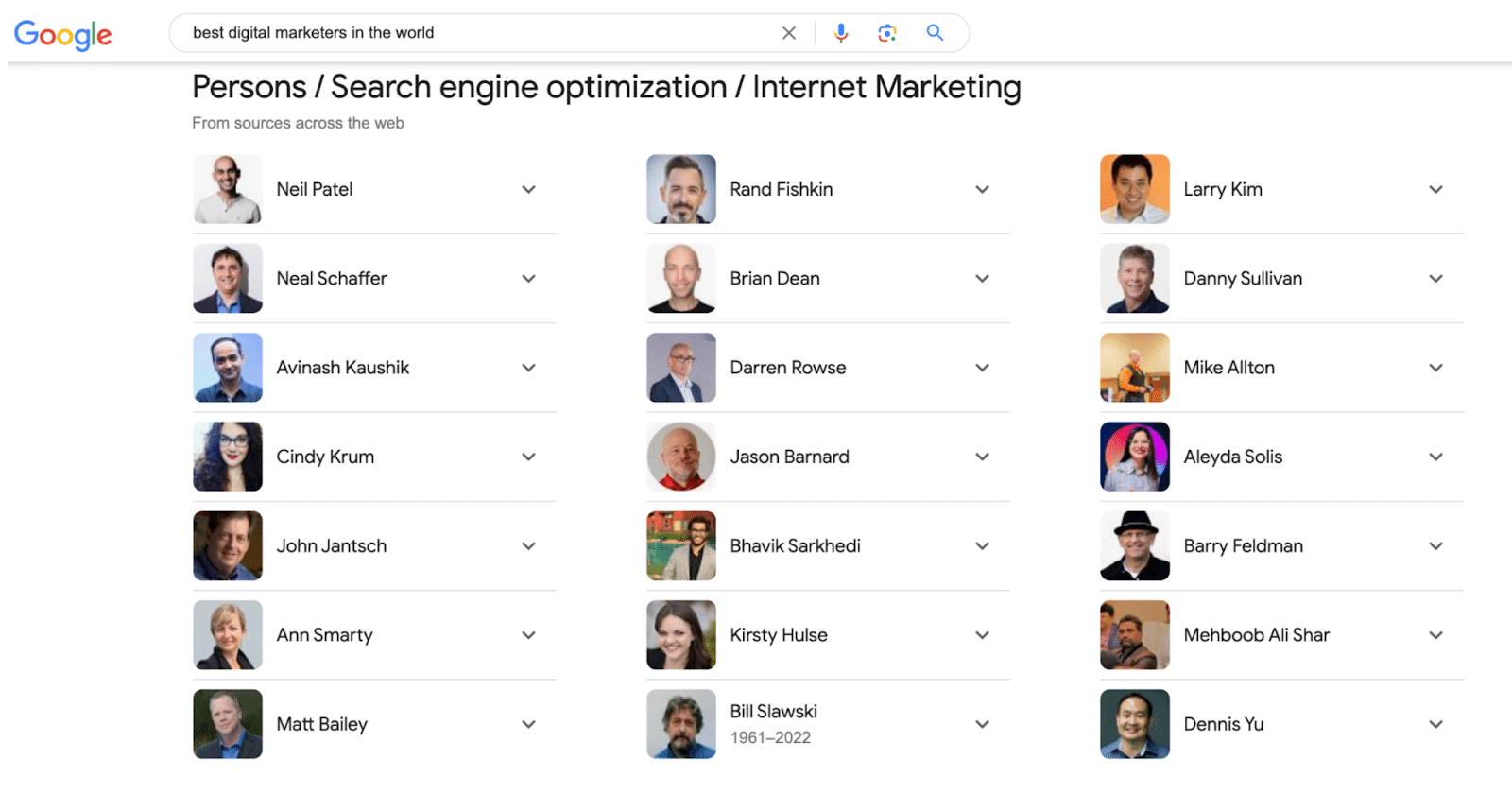
Google’s approach to answering a “best of” query has changed significantly. Google has traditionally presented someone else’s opinion of “the best” in the form of blue links, videos and lists in featured snippets.
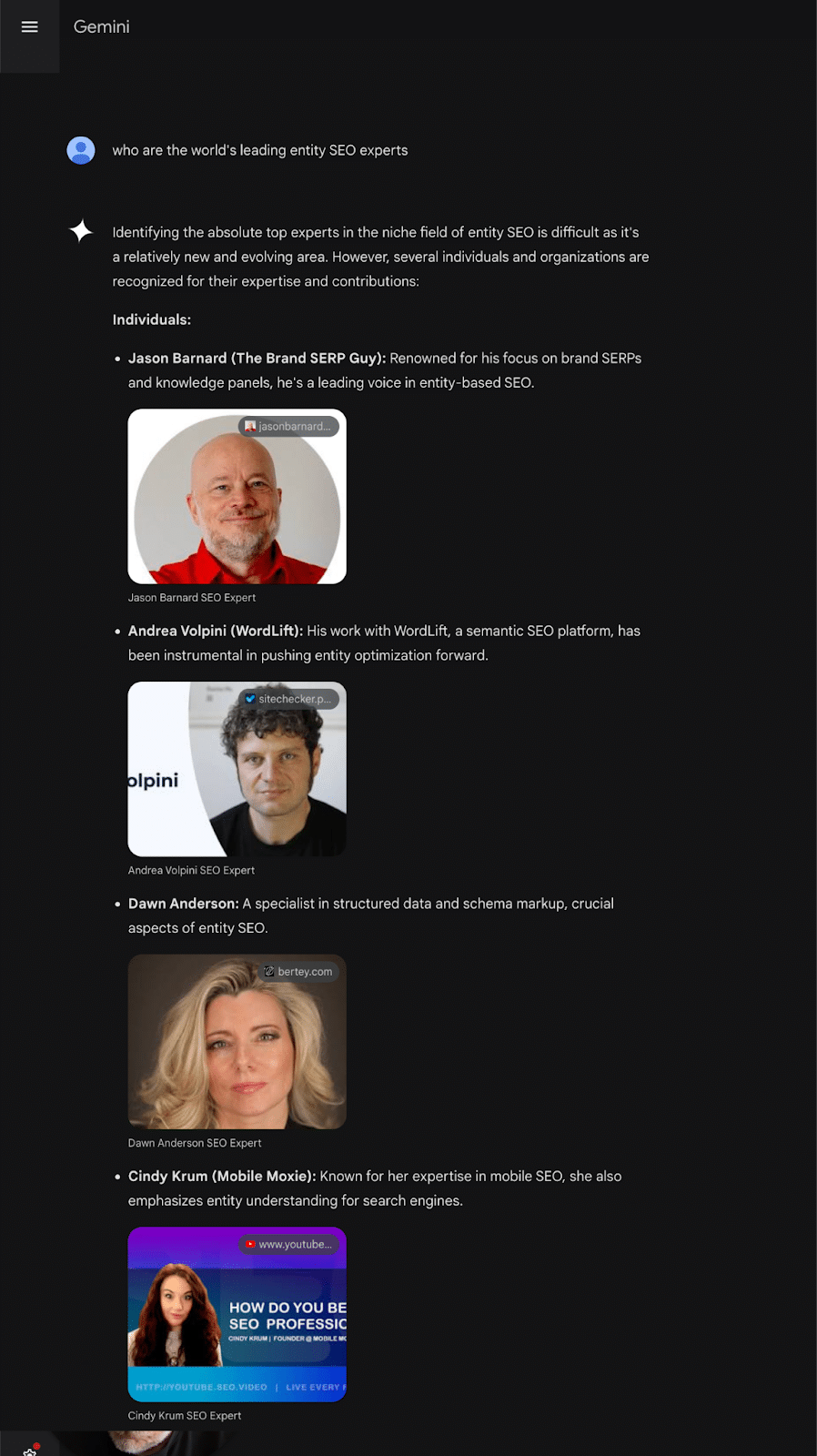
Today, Google search and Gemini have their own opinion based on their algorithmic assessment of “the best.”
The result is no longer based on simple links and keywords. It is an amalgamation of multiple third-party sources, large language models, the Knowledge Graph and its algorithmic evaluation of the N-E-E-A-T-T credibility of the possible solution providers.
Why is it essential to be included in ‘best of’ entity lists in Google search?
Before reading the rest of this article, focus on this simple and powerful idea: People use Google because they trust it to be the most efficient way to find the best solution to their problems.
That means Google is a recommendation engine. Its sole aim is to recommend the best, most efficient solution to the user’s problem.
SEO boils down to this. Every tactic you implement to rank on Google attempts to convince it to recommend you to its users as the preferred solution provider.
Google’s role as a recommendation provider and the scale of its influence make it far and away the most important “influencer” you can possibly imagine. Every day, it has billions of hyper-niche conversations with users who trust its advice and will follow its recommendations.
Entity lists are Google’s explicit recommendations for the best solutions to users’ problems and where Google becomes a trusted advisor and direct “influencer.”
Entity lists are replacing blue links, universal search and featured snippets as the prime spots for “best of” queries in Google search. That is a great short-term SEO win for you.
Entity lists are the foundation for your future SEO
The future of search is grounded on Knowledge Graphs (machine-readable knowledge repositories).
Being “understood” and included in Google’s Knowledge Graph is your only long-term hope of participating in the conversation with AI assistive engines.
Entity lists are a great KPI today because the presence of your entity in these lists demonstrates the following things.
- Understandability: Google has understood who you are, what you do and who you serve
- Credibility: Google’s positive assessment of your E-E-A-T (N-E-E-A-T-T) credentials
- Deliverability: You are sufficiently omnipresent across the relevant digital ecosystem for Google to take you seriously as a solution it can confidently recommend.
They are also a great predictive KPI since your presence in “best of” entity lists demonstrates that you have nailed understandability, credibility and deliverability.
This indicates that you are on track with strategies targeting assistive search features (such as AI Overviews and Microsoft Copilot) and assistive engines (like ChatGPT and Google Gemini).
The way Google recommends has changed over the years
When I started in SEO in 1998, being Google’s top choice meant ranking first in the search results.
With the introduction of universal search, the opportunities expanded as Google began recommending the best videos, images, local businesses, news and more.
‘Best of’ featured snippets
More recently, featured snippets (a.k.a. position zero) became a more explicit recommendation.
For “best of” queries, Google often uses featured snippets, pulling a list from a single page on a website that it feels answers the user’s request for an explicit list of “the best.”
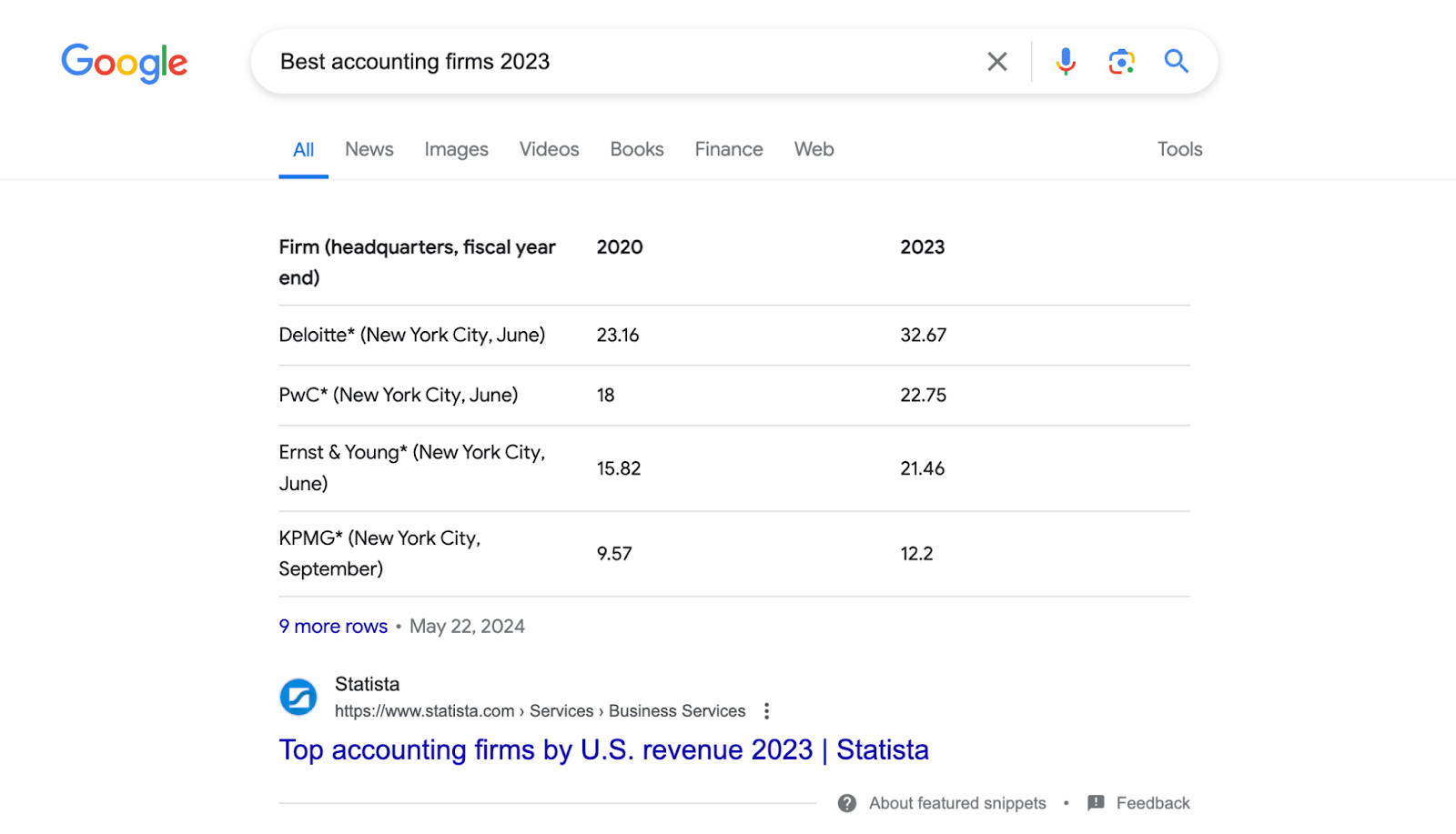
The SEO strategy to be listed on Google search in a featured snippet “best of” list is simple: get your entity included in relevant lists curated by an expert, industry blog or even on your website.
Luckily for all of us, the simple featured snippet strategy of earning a place in a human-curated list is one of the eight levers you can use for entity lists. But it is no longer a standalone solution.
‘Best of’ entity lists
Google’s introduction of entity lists has changed the game. Google is now compiling its own list of the best in the market, explicitly recommending specific solutions to its users.

This article provides additional insights into how they are built, strategies you can implement and key performance indicators (KPIs) you can show your boss or client.
Featured snippets still work, but not for long
When the query becomes too specific, and Google cannot compile the list itself from knowledge, Google reverts to featured snippets. Featured snippets will become increasingly rare as Google grows its Knowledge Graph.
For example, as Google confidently understands the revenue for the accountancy firms in Canada, it will compile its own list and present an entity list rather than this featured snippet:
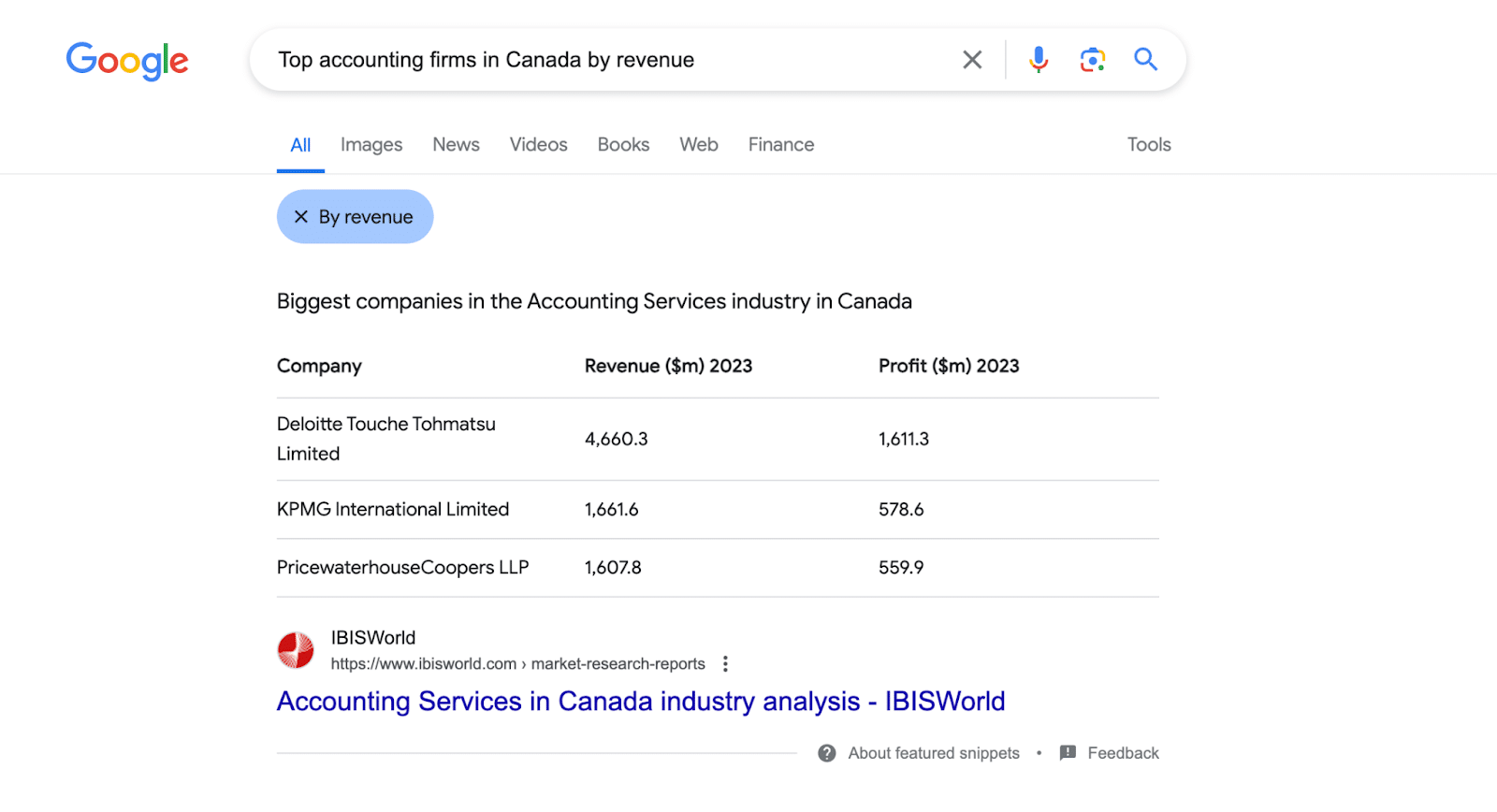
Google has proactively presented the filter “By revenue” because the algorithms understand that users find this attribute useful.
You can be sure that Google’s knowledge algorithms are actively looking to add this information to its Knowledge Graph for as many firms as possible to replace the featured snippet with their own list (and keep the user on the SERP).
How can I be included in a ‘best of’ entity list in Google search?
Using the strategies and tactics I explain in this article, you can be included in a “best of” entity list in a Google search today and “best of” conversations in assistive/answer engines tomorrow.
These simple, timeless strategies focus on delivering top value to your audience and clearly communicating that to Google and other Big Tech AI algorithms.
By consistently sharing facts about yourself and demonstrating your competitive edge across your digital presence, you can convince both your audience and search engines that you are the best solution.
Consistently showcasing your dominant position within your market ensures you always win the game, whether with your human audience or Google.
One challenge we all face when optimizing for Knowledge Graphs, LLMs and AI knowledge algorithms is the lack of KPIs. You probably feel that you are flying blind, which can be frustrating.
However, numerous KPIs are available to gain insights into what the AI “thinks,” identify the next steps and track your progress. I will provide a simple visual KPI for each of the eight levers.
Note: The KPIs described in this article are simple visual representations. In my company, we track data at scale and base our KPI on our 2 billion+ data points.
How to optimize for ‘best of’ entity lists
The following approach and principles may also work for assistive engines, LLMs and Knowledge Graphs.
- Get a Knowledge Panel for your entity.
- Communicate as many attributes as possible (revenues, country, number of employees, etc.).
- Get users talking about you.
- Get included in as many industry/expert “best of” lists.
- Build association with relevant topics.
- Build relationships with relevant entities.
- Improve and communicate your E-E-A-T credibility.
- Build niche notability (taking E-E-A-T to a new level with N-E-E-A-T-T).
Implementing all eight levers will help you appear in relevant “best of” entity lists and be recommended by assistive engines and search features.
1. Get a Knowledge Panel for your entity (person or corporation)
The prerequisite for being included in any list of entities (such as “Best of,” “Related” or “People also search for”) is to be explicitly recognized as a named entity in one of Google’s Knowledge Graphs.
Start by securing a Knowledge Panel on Google for your entity. Without explicit recognition in a Knowledge Graph, you’re not even in the game.
I cannot emphasize enough that if you don’t successfully complete this step and build an information-rich Knowledge Panel, the rest won’t work.
If you already have a Knowledge Panel, you must focus on building Google’s confidence in its understanding: the more confident it is, the more likely it will add you to an entity list.
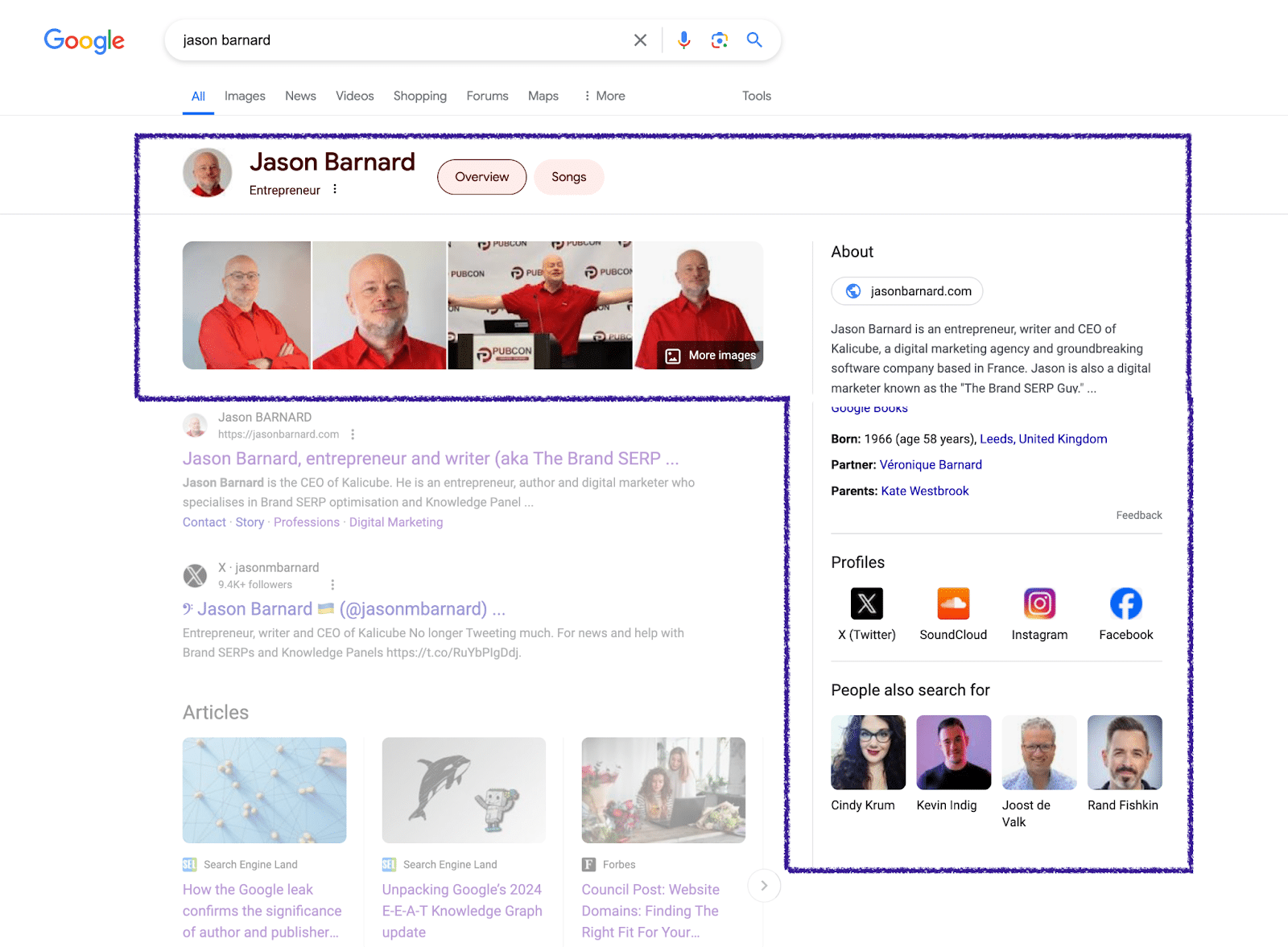
The KPI for this foundational step is having a Knowledge Panel for the entity.
The KPI for confidence in understanding is that the Knowledge Panel reliably triggers the brand SERP over the years, like mine.
2. Communicate as many attributes as you can
The more attributes you can feed into Google’s “brain,” the better. The more attributes Google understands, the more lists it will include you in.
Use the filter pills at the top of search results to identify the best candidates: revenues, country, number of employees, etc.


You can feed attributes into the Knowledge Graph by stating them clearly on your entity home in the form of semantic triples and structured data and ensuring the information you provide is corroborated by multiple authoritative sources online.
Warning: More corroboration is not necessarily better. Clarity of communication, accuracy of information and relevancy of the source are key.
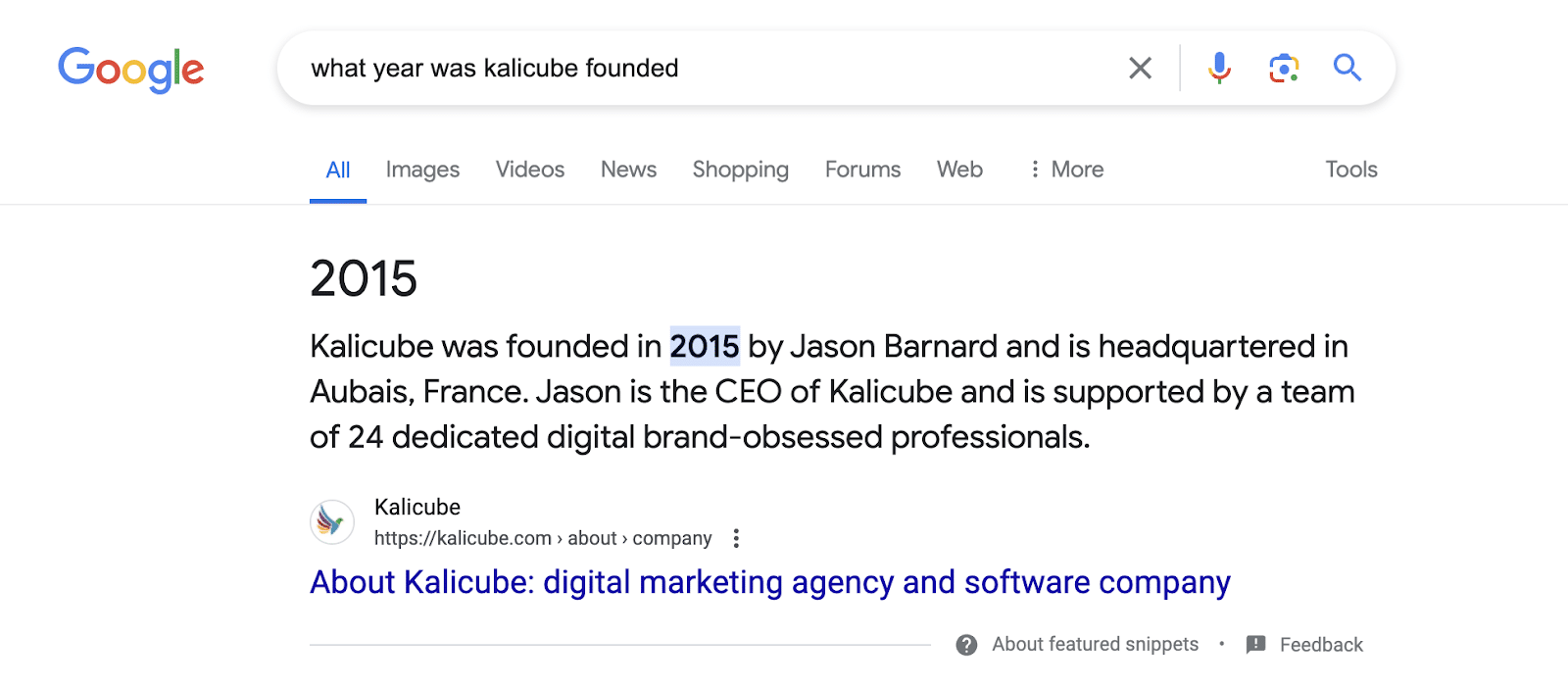
Some good KPIs for this are attributes appearing in the Knowledge Panel (in my personal Knowledge Panel above: date of birth, partner, mother) and the featured snippet and knowledge results for attribute-focused search queries:
3. Get users talking about you
For years, Google has been extracting masses of hyperspecific information from user-generated content (UGC):
- Client reviews.
- Forums.
- User feedback on your website.
- Social media.
- Tutorials.
- Blog posts.
- Fan sites.
The list goes on and on.
If Google is confident it understands your entity (see the Knowledge Panel KPI above), then Google will probably figure out the user is talking about you.
Your audience’s information can be used to understand additional attributes and relationships. That means UGC is a powerful way to feed Google’s knowledge algorithms.
Warning: Be prudent. The danger is that users are unreliable and can muddy the waters with inaccurate information or contribute to a bad reputation with negative comments and reviews (which can exclude you from the “best of list”).
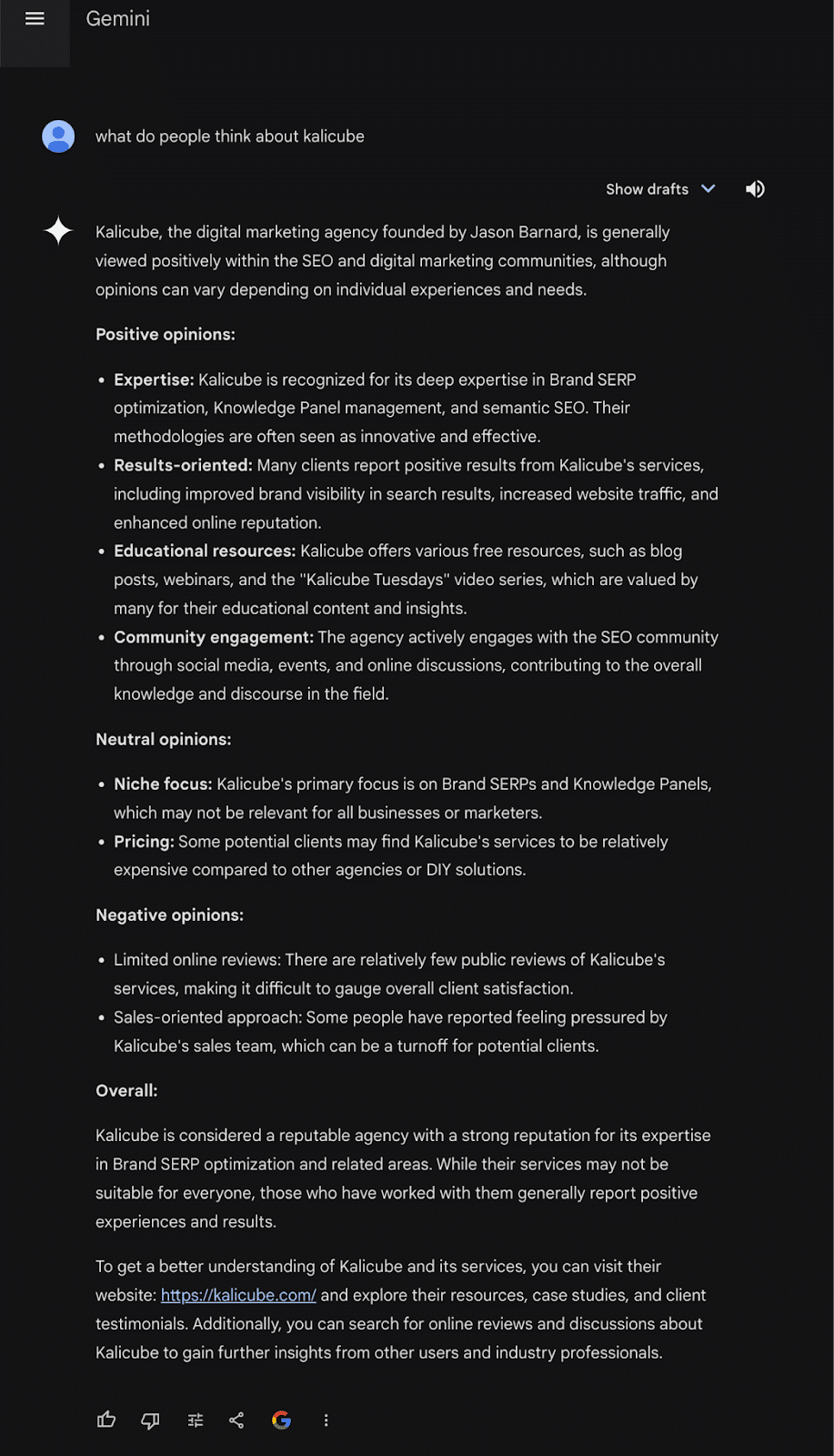
A simple KPI is the accuracy, verbosity and sentiment of Gemini’s reply to the question “What do people think about {brand}?”
4. Get included in as many industry / expert ‘best of’ lists
The more your entity appears in relevant lists from authoritative sources in your industry, the better it will perform in Google’s entity lists.
Additionally, lists focusing on specific attributes such as year, company size, number of employees, country or state will enhance performance in filtered lists on Google alongside general lists.
This strategy has the bonus of landing you some featured snippets, a fantastic short-term win to showcase to your client or boss.
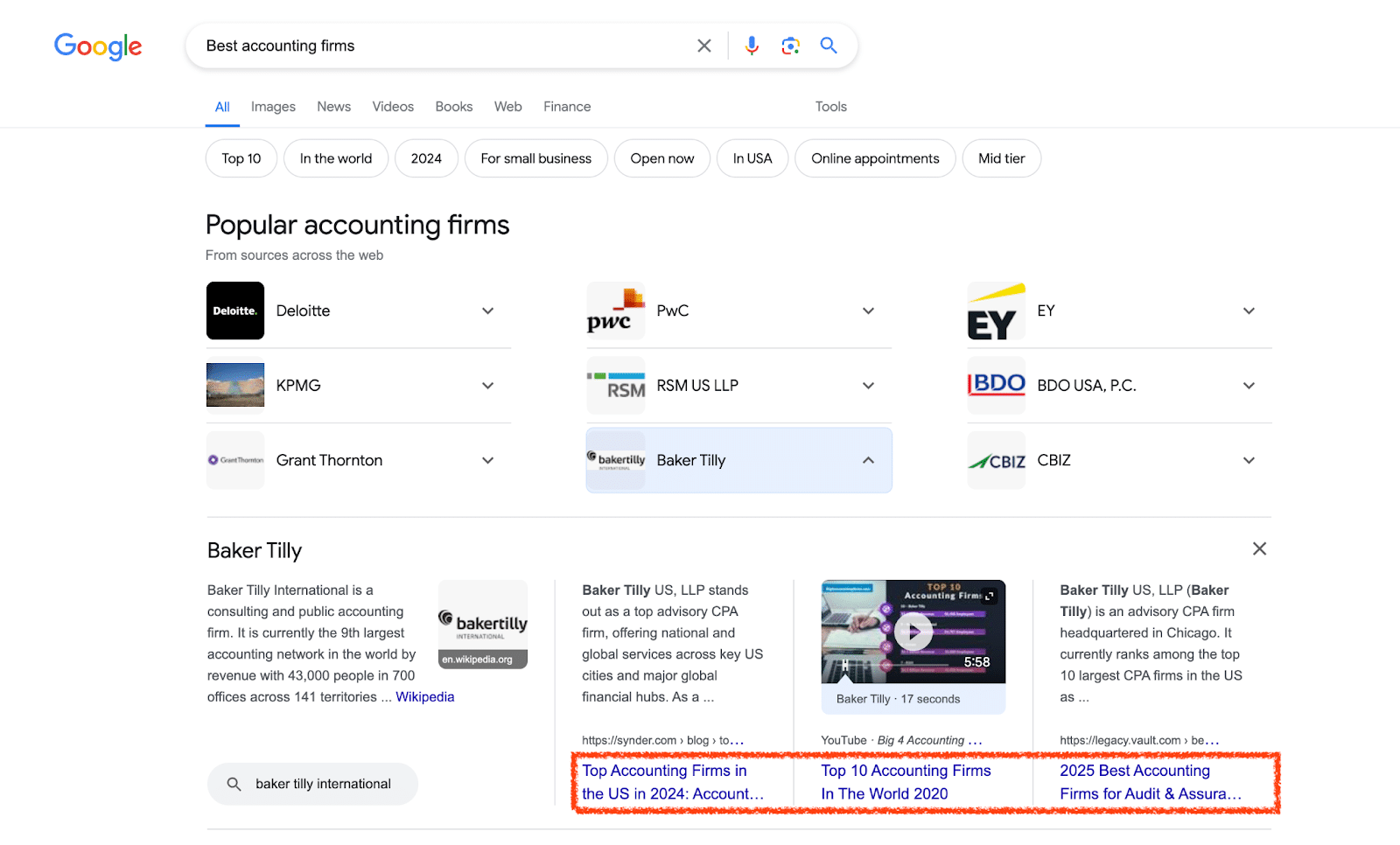
A KPI for “best of” lists is the lists themselves and also seeing them in your entity list entry like this:
5. Build association with the topics that are highly relevant to the target lists
Work intentionally to ensure that Google associates your named entity with the topic that triggers relevant Entity lists.
To achieve this, publish topically relevant content on your entity home (i.e., website) and other platforms where you can directly post, such as LinkedIn, YouTube and Medium. Ensure the content comprehensively covers core topical concepts of your named entity.
Engage in topically relevant guest posting, social media interactions and participation in hyper-focused forums like Reddit to strengthen Google’s association with your entity and the topic in its Knowledge Graph.
A simple KPI here is the associated topics in Google images.

Another is the AI Overviews results for the query “{brand} topics.”

6. Build relationships with the entities in your target lists
Barnacling will help you get your entity into relevant entity lists.
If Google already understands and appreciates entities within your industry, any association with them will help you in that niche.
Identify prominent entities with whom you have a relationship (the closer, longer, stronger, the better) and then communicate your relationships with them to Google.
To communicate these relationships to Google, create content on your entity home website highlighting these connections.
Clearly indicate the type of relationship (e.g., partnership), its strength (e.g., long-term collaboration) and its closeness (e.g., direct involvement).
Link this content to relevant and authoritative third-party websites that corroborate the relationship. The ultimate and most powerful signal is when the target entity confirms the relationship on its Entity Home website.
Building relationships with the entities on relevant entity lists is another strategy. Networking with other entities makes sense from a networking and business perspective and will pay off handsomely – with or without Google.
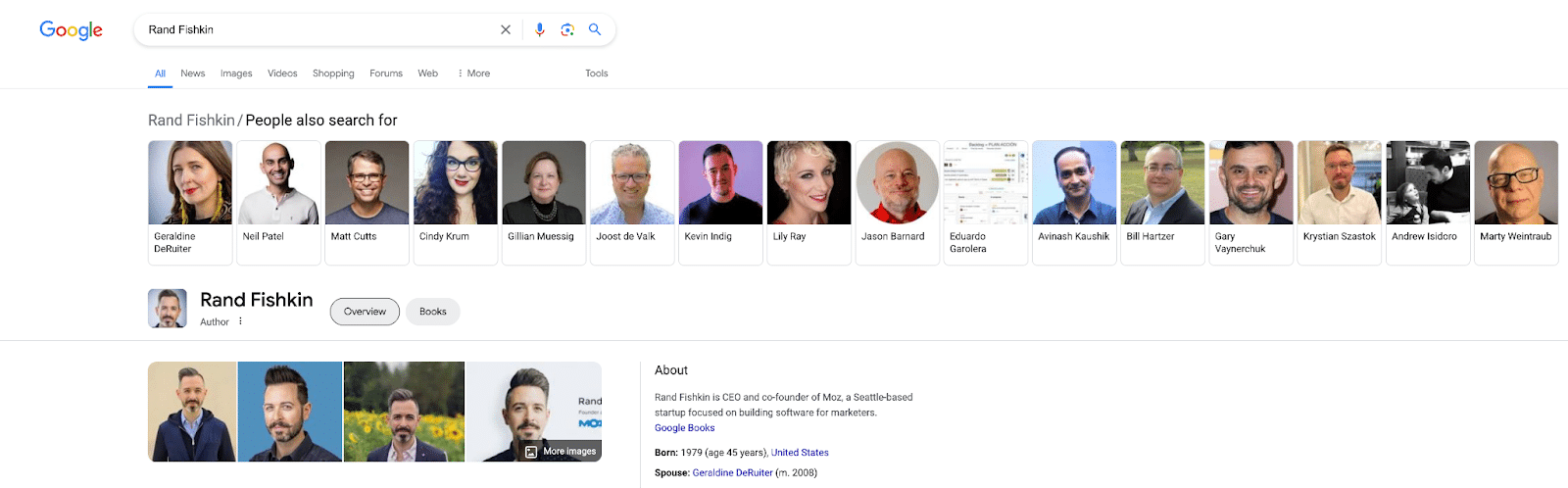
A good KPI for this is “People also search for” (yours and theirs).
7. Improve and communicate your E-E-A-T credibility
When Google understands that you are an expert, experienced, authoritative and trustworthy within your industry (and topic), it is confident it can safely recommend you as a solution for its users and include you in a “best of” entity list, which is a no-brainer.
To ensure Google “gets” how E-E-A-T (in)credible you are, ensure that your website and all of your digital ecosystem clearly showcase your expertise, experience, authoritativeness and trustworthiness.
Clearly express information that supports your claim to be expert, experienced, authoritative and trustworthy.
Then, encourage your peers, clients and audience to corroborate and confirm through social media, reviews, testimonials, articles, etc.
Your KPI is the sentiment and accuracy of the brand SERP, the quality of the results for the search query “{brand} reviews” and the sentiment of Gemini’s reply to the question “What do you think about {brand}”, like this:
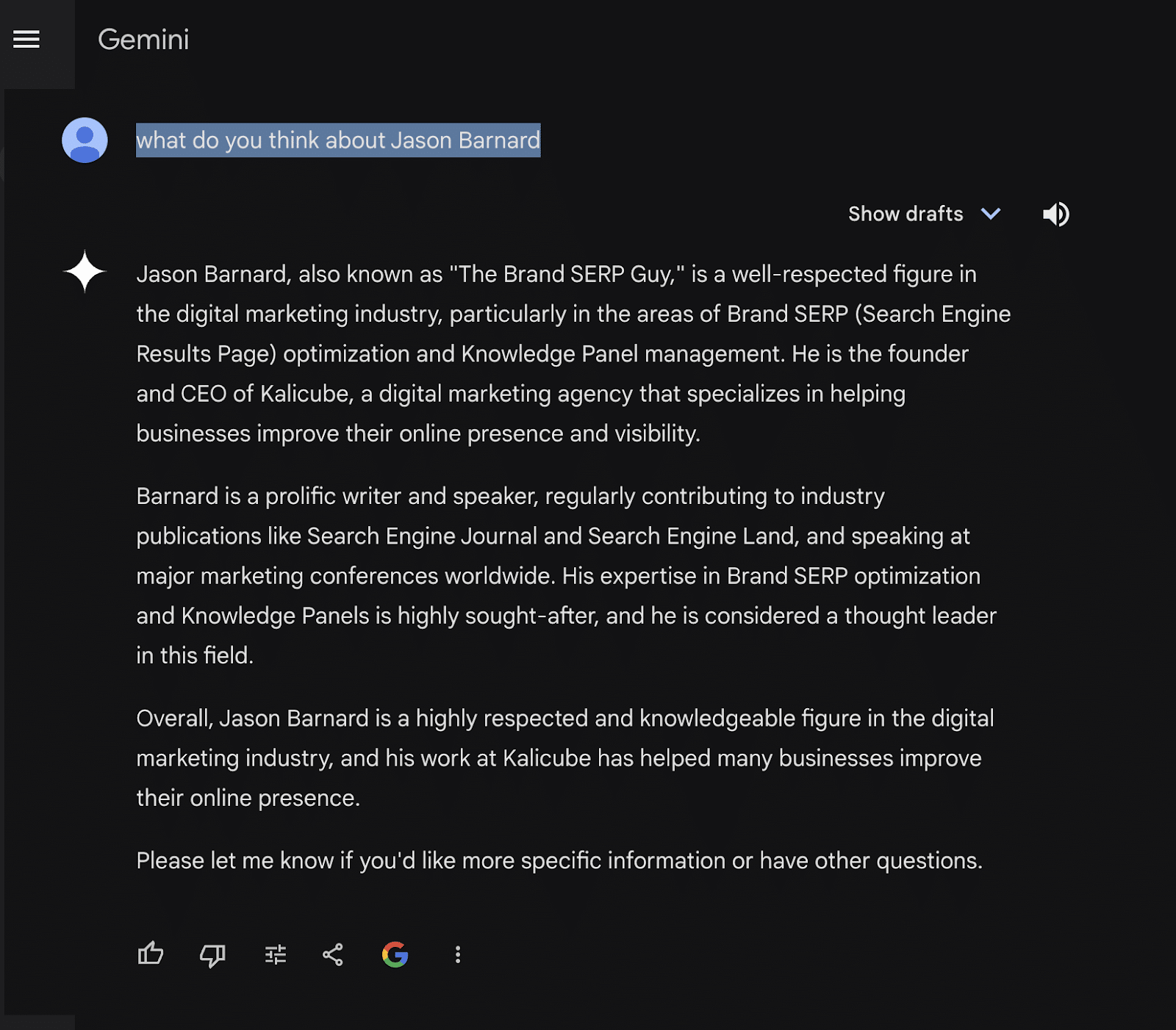
Notice the terms “well-respected,” “sought-after” and “thought leader.” Does your named entity get that enthusiastic treatment?
8. Build niche notability
Niche fame will get you to the top of every relevant list that is valuable to your business. Neil Patel gets first place in almost all lists of the best / leading / top digital marketing experts because he is famous.
Google doesn’t talk about notability as a signal. Still, our internal data clearly shows that niche notability is incredibly powerful in assistive Engine results, be it Gemini, Copilot, ChatGPT, Perplexity or any other.
To build niche notability, put your entity out there front and center.
Engage in online activities like social media, paid ads and guest posting while participating in offline events.
(Obviously, Google doesn’t see anything offline, so be sure to bring these offline activities online by sharing them on social media, adding information to your website, making videos, etc.)
Ultimately, being famous will increase the volume of branded searches, so you can use that as your KPI for notability.
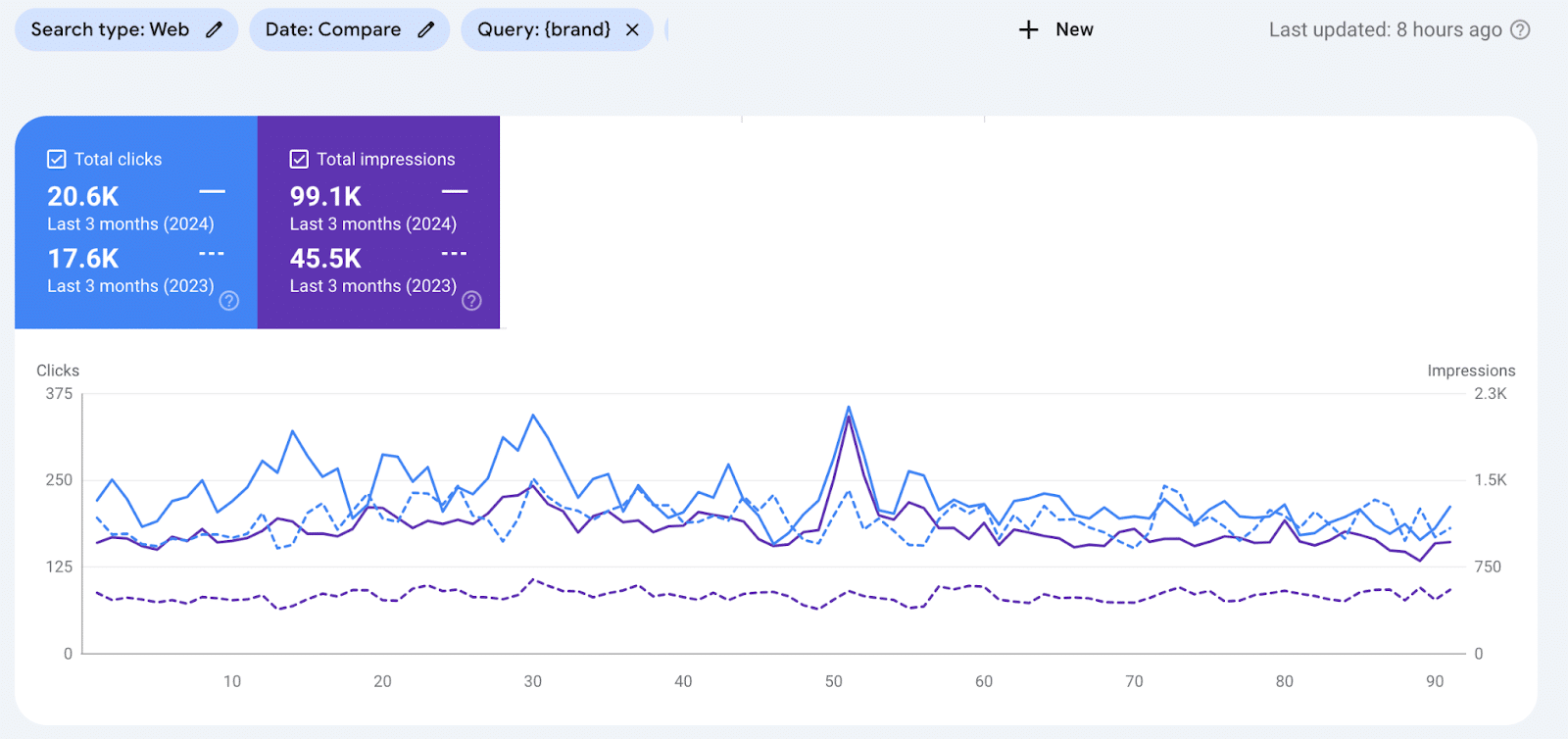
Entity optimization is the future of SEO
If you implement these eight strategies for a named entity, you have a great chance of dominating your niche.
Without confident understanding (represented by a Knowledge Panel on the brand SERP) you are not in the game.
If you cannot demonstrate N-E-E-A-T-T credibility, then Google (or other AI engines) cannot recommend you as a solution provider.
Your inclusion in relevant “best of” entity lists on Google search today demonstrates that you have nailed the three keys to modern SEO: understandability, credibility and deliverability.
Traditional SEO is now only one-third of a modern SEO strategy. 2024 will prove to be a watershed where the three-tiered approach to SEO I have championed over the years becomes the norm.
Entity lists are a great “win” you can get today. A place in an entity list will impress your client or boss and showcase your skills for next-level entity optimization.
It is a KPI that demonstrates that you are ready for the future of SEO (or AIO or whatever you want to call it). Here are your next steps:
- Start with a Knowledge Panel (understanding).
- Build Google’s appreciation on top of that using E-E-A-T (credibility).
- Become the omnipresent reference Google cannot ignore (deliverability).
Courtesy of Search Engine Land: News & Info About SEO, PPC, SEM, Search Engines & Search Marketing
Category seo news | Tags:
Social Networks : Technorati, Stumble it!, Digg, de.licio.us, Yahoo, reddit, Blogmarks, Google, Magnolia.
How to start an SEO program from scratch in the AI age
Written on July 16, 2024 at 7:20 am, by admin

I’ve been getting an insane amount of questions lately from clients – actually, marketers in general – about SEO priorities in the wake of the big leak and the launch of AI Overviews.
I’ve been in SEO for nearly 20 years and can’t remember anything to match it, even when Panda came out.
Some of those inquiries have been from brands looking to start an SEO program from scratch, which I think is the cleanest way to look at what matters right now.
This article covers how I advise people on starting new SEO programs in the AI age, looking at:
- How to define an SEO strategy.
- How to build an SEO approach.
- The skills needed to thrive.
How to define an SEO strategy
I’ll start by saying any silos that might exist in your SEO vision should disappear immediately.
Technical SEO, content, UX, links – they’re all very much under the same umbrella now and that umbrella is growth marketing. It’s the entire experience.
Google is essentially trying to recreate the web in a single dashboard, so you need to think about SEO in that capacity. Consider the different types of search results.
AI Overviews represent a huge change, but Google has also introduced “People also ask,” featured snippets, etc. Every search is different, and that changes by vertical/intent.
Speaking of building your brand, the Google algorithm leak made it clear that both brand authority and the authority of your authors and experts are important.
And “important” now doesn’t just mean “you’ll show up higher on the SERPs”; it means you have a better shot at showing up on a breadth of options Google presents to the user.
There’s not just one set of tasks and mechanics you have to master to get Google traffic. You must understand your vertical, the intent behind the search and how to structure data.
Moreover, we’re not just considering Google. Great SEO programs will also include Quora, Reddit, TikTok, user forums, etc., in their planning because those platforms are great places for building your brand.
Your strategy has to include the following:
- Customer research and understanding.
- Analyzing the intent behind keywords and addressing it in your content.
- Recognizing the types of content only you (and not AI) can provide – expert opinions, proprietary research and data, etc.
- Brand-building for both your organization and its authors/spokespeople.
Not to be overlooked: you need to make sure your tracking and reporting are set up to surface insights on where and how users are finding you and what they’re doing once they reach your site.
This was always true of SEO, but with things in such a state of flux, the teams best positioned to succeed will have resources to answer the questions of what’s changing, what’s working and what needs to be adjusted.
Dig deeper: Search everywhere optimization: 7 platforms SEOs need to optimize for beyond Google
How to build an SEO approach in the AI age
If you were referencing “how to build an SEO program” resources from 2014, you’d take the following approach:
- Build thousands of pages to rank for millions of keywords.
- Junk up the airwaves with mass-produced content that manages to get impressions and clicks.
- Buy and/or trade links and farm out tons of mediocre guest posts/earned content to boost your rankings.
If you’re thinking that doesn’t make sense for actually attracting customers and building a great brand, well, you’re spot on.
Today, good SEOs are prioritizing metrics like engagement and impact on pipeline and revenue, not just impressions and rankings.
Given that, a good approach to start with is:
- Create dozens to hundreds of best-in-class pages that provide authentic value and insights for users looking to solve their problems – which may include presenting various solutions, not just yours.
- Keep those pages fresh and current and look for ways to evolve the content as user needs change.
- Build your brand and your experts’ brands on non-Google platforms like TikTok, Reddit and industry-specific forums.
- Conduct proprietary research and craft thought leadership that builds your brand while signaling to industry professionals and journalists that your content should be used as a resource.
Dig deeper: Navigating the AI wars: Winning SEO strategies for brands
The skills needed in SEO’s AI age
Broadly, today’s SEO is less about knowing SEO tricks (e.g., putting a pipe between phrases in your title tag!) and more about good marketing. It might not change the tasks required, but it changes the objective of the tasks.
For example, you definitely still need people who can do keyword research. Still, keyword research today includes customer understanding that informs you of the intent behind the keyword – and how to address it with your content.
The more complex the field of SEO gets, the more valuable it is to have the perspective of experience and the ability to gather and synthesize data and act accordingly. In other words, the ability to see through chaos and adapt as needed will be extremely valuable.
Broadly, make sure your team has the skills to build better, more intuitive content to get people to your website in one way or another and, once they’re there, give them a great experience to deepen their engagement with your brand.
Mastering modern SEO in the AI age
Some people may be throwing up their hands and calling this the death of SEO and it might indeed be the death of SEO as we came to know it. But that means it’s giving rise to another way (or ways) to engage with your users.
Remember that anytime there’s a macro-level disruption, there’s an opportunity to gain ground by adapting more quickly and effectively than your competitors.
In the case of brand-new SEO programs, that means building a strategy based on everything we know today – and prioritizing the ability to flex based on what we learn tomorrow.
Dig deeper: Modern SEO: Packaging your brand and marketing for Google
Courtesy of Search Engine Land: News & Info About SEO, PPC, SEM, Search Engines & Search Marketing
Category seo news | Tags:
Social Networks : Technorati, Stumble it!, Digg, de.licio.us, Yahoo, reddit, Blogmarks, Google, Magnolia.
How AI is reshaping the content creator industry
Written on July 16, 2024 at 7:20 am, by admin

Major tech companies have been rushing to develop their own AI models, dramatically altering the digital landscape. Goldman Sachs predicts that the content creator industry will reach half a trillion dollars by 2027.
The evolution of a new digital landscape can bring opportunities and challenges. Daron Acemoglu, an economics professor from MIT, has analyzed past industrial revolutions and highlighted that technological progress is not inherently beneficial; its impact depends on its direction and the institutions shaping it.
This article will:
- Explore the current state of the content creator industry.
- Highlight the consequences of large tech companies’ rushed use of AI.
- Examine the rise of AI-generated content spam and scams.
- Provide strategies for reassessing digital businesses in the AI era to achieve long-term sustainable growth through ethical AI practices.
Tech companies and their AI models
Historically, there has been a balanced cooperation between content creators and large tech companies like Google and Meta.
For example, creators would produce content for Google in exchange for visibility and traffic, which allowed authors to monetize it through ads and affiliate links.
The launch of ChatGPT ignited an innovation race, prompting Google, Meta and Microsoft to hastily release their own AI applications. These applications significantly transformed the digital landscape, though not always in everyone’s best interest.
Creativity and accuracy
These generative AI models have been trained on content created on the web by individuals, and the content generated by these machines re-elaborates someone else’s creativity and lacks any recognition or attribution.
In addition, those models are subject to hallucination due to “an inherent feature” of how these models are developed. They are trained on large datasets that can contain inaccuracy and cannot always distinguish between facts and sarcasm.
These models, like AI Overviews from Google and Meta AI, are slowly taking over the interaction between content creators and their audiences, creating a digital space that will soon lack innovation and genuine creativity.
Unfortunately, the news industry is not united in its response. While some authors and news media are fighting back with lawsuits against AI, others are establishing contract agreements for fair use of content.
AI-generated content spam and scams
Large companies are not the only ones using this new technology irresponsibly. Independent bad actors have been inundating the digital space with low-quality and misleading articles.
So much regurgitated material has been created to game the search algorithm that Google had to launch the core and spam updates to clean the web of useless information.
While intended to combat spam and improve search quality, Google’s algorithm updates have had unintended consequences for many website owners and publishers, mainly smaller and independent ones.
These updates have led to a significant drop in traffic for many websites, forcing some to lay off staff and face potential closure.
Your content is not useful
Some SEO experts blamed small creators’ unhelpful content for their devastating drop in traffic and revenue. Discussions were focused on improving content to recover the lost traffic.
However, after six months, no website has recovered.
Google’s algorithm favored its platforms, such as AI Overview answers (with no links back to small creators), websites with established brands and forums like Reddit and Quora, regardless of the quality of content.
Analysis has shown that the general drop in traffic to small independent sites was not caused by the unhelpfulness of their content but by an overall drop in click-through rates.
SparkToro’s 2024 Zero-Click Search Study found that:
- In the EU, out of every 1,000 Google searches, only 374 lead to clicks on websites outside of Google’s platforms.
- In the U.S., this number is 360.
- Almost 30% of all clicks go to Google-owned platforms like YouTube, Google Images, Google Maps, Google Flights, Google Hotels and the Google App Store.
It looks like we are moving toward an AI-generated web, where financial rewards and incentives for original content creation are fading away.
Financial market forces
Demand and supply shape a market’s economic development. AI has generated an oversupply of content, which has dropped demand and, therefore, financial reward.
Advertising networks have also been impacted by revenue reduction, and as a reaction, they are restricting the ability of AI-generated mass content sites to monetize with ads.
Mediavine and Raptives are perfecting their site approval system to identify and reject spam websites early on. They aim to protect and safeguard original content creators and promote their value-added.
However, the drop in traffic and ad revenue is still not deterring bad actors from spamming and scamming. They still make money by selling courses and books to the naïve public on “how to make easy money by mass-producing content with AI.”
Scammers are already finding ways to exploit Google’s new algorithm.
Multiple profiles are created in Quora to upvote their links artificially. Applications like ReplyGuy use AI to develop comments on Reddit that subtly promote specific products or websites.
Reassessing a digital business in the AI era
The rapid advancement of AI technologies is transforming the digital content creation landscape, necessitating a re-evaluation of traditional business models.
Large tech companies and digital content creators must adapt to these changes to stay competitive and sustainable.
However, as Acemoglu found in previous industrial revolutions, technology produces growth when invested to improve productivity, not to cut costs to automate production.
Shareholders vs. stakeholders
Instead of waiting for legislative regulations to shape and dictate the ethical use of AI, large tech companies should focus on the long-term interests of all stakeholders.
Their strategy should benefit society, including creators and users, instead of solely focusing on short-term returns to shareholders and top management compensation.
By prioritizing the open web in their decision-making, these companies can empower smaller voices and ensure a rich and engaging landscape of human-created content for users.
This approach promotes a more inclusive digital landscape and upholds the integrity and diversity of online information and creativity.
A new diverse digital creator business
By integrating AI ethically, content creators can enhance their performance, improve content quality and foster long-term growth.
Using AI for enhanced workflow and efficiency
AI can streamline many repetitive tasks, freeing up time for creators to focus on more strategic and creative activities.
By automating data analysis, research and content formatting, AI tools enhance workflow efficiency, allowing creators to produce high-quality content more quickly and consistently.
Leveraging AI for data-driven content strategies
AI’s capability to analyze audience data and engagement metrics enables creators to develop data-driven content strategies.
Identifying trending topics and popular content formats allows creators to tailor their content to meet audience preferences, resulting in greater reach and impact.
This approach ensures relevant and engaging content, fostering a deeper connection with the audience.
Ensuring AI applications prioritize user experience and authenticity
While AI can significantly enhance content production, it is crucial to prioritize user experience and authenticity.
Creators should use AI to augment their unique value propositions rather than replace human elements entirely.
By maintaining a focus on authenticity and genuine engagement, creators can build a trustworthy online presence that resonates with their audience.
Adapting content to different channels
AI can help creators repurpose content for different channels and their audiences.
Video content has been more resistant to changes. YouTube, Facebook, Instagram and TikTok are offering different ways to monetize content.
AI can help streamline video creation and retrieve several shorts and Reels from long videos. Creators can multiply their traffic sources, improve their brand awareness and grow their audience into real fans.
Ethical AI usage helps build trust and credibility with audiences. By ensuring that AI-generated content is used responsibly and transparently, creators can foster a positive reputation and establish themselves as reliable sources of information.
Unlocking sustainable growth in the content creator industry
The use of AI in the content creator industry is shaping a new form of digital reality. While everyone understands this new technology’s potential benefits, no one can predict the future.
To benefit society as a whole, large industry players like Google, Microsoft and Meta should shift their focus from optimizing short-term returns for shareholders to maximizing value for all stakeholders, including users, independent content creators and news outlets.
Independent content creators face significant challenges, including declining organic reach, evolving search engine algorithms and the rise of AI-generated content.
Looking for shortcuts and using AI to game the system can only bring uncertain short-term success and feed bad actors in their scam practices.
As a content creator, you will be more successful by adopting ethical AI practices and innovating responsibly to ensure a positive impact on your audience.
These efforts will build trust, foster sustainable audience growth and ensure long-term success in the dynamic digital landscape.
Courtesy of Search Engine Land: News & Info About SEO, PPC, SEM, Search Engines & Search Marketing
Category seo news | Tags:
Social Networks : Technorati, Stumble it!, Digg, de.licio.us, Yahoo, reddit, Blogmarks, Google, Magnolia.
Maximizing profits: Strategies for earning through loyalty programs by Comarch
Written on July 16, 2024 at 7:20 am, by admin

Loyalty programs significantly enhance your company’s financial well-being. Beyond simply rewarding returning customers, a strategically designed loyalty program can unlock multiple revenue streams that greatly benefit your brand. So, how do these programs actually generate income? Let’s delve into the key methods they employ to engage customers, boost sales, and ultimately increase your profitability.
What makes a successful loyalty program?
A well-designed and carefully calculated loyalty program can be a game changer for brands looking to maximize their return on investment through customer engagement. Loyalty programs have evolved beyond simple points systems to sophisticated, data-driven strategies that leverage technology and personalized experiences. These programs aren’t just about rewarding repeat business — they’re strategic tools that cultivate lasting relationships with customers, fostering a sense of connection and value.
The information collected from these programs facilitates targeted marketing, optimizes advertising expenditures and enhances overall customer satisfaction. In essence, a well-implemented loyalty program is not merely a cost, but an investment that yields substantial returns through increased customer retention and long-term profitability.
Revenue streams from loyalty programs
Membership fees
The growing trend of loyalty programs has introduced various models, with paid loyalty programs becoming particularly prominent. These programs offer brands an effective way to enhance customer retention by requiring an upfront investment from customers. In return, customers receive exclusive benefits, rewards and sometimes special resources akin to subscription services.
Paid programs present multiple fee structures to cater to different customer preferences and needs. A common model is the annual subscription, where customers pay a fixed yearly fee to access exclusive benefits throughout their membership period. This approach provides both customers and companies with predictability, ensuring consistent revenue and sustained engagement. Another popular model is tiered membership, where customers can select from different levels of membership based on their preferred benefits and budget. This tiered system allows for customization and personalization, encouraging customers to upgrade for additional perks and rewards. These fee structures not only generate revenue but also boost customer satisfaction by offering flexibility and value.
Increased customer spending
Loyalty programs play a critical role in incentivizing customers to spend more with a brand. By offering exclusive rewards, discounts or points for purchases, these programs create a sense of value and appreciation. The prospect of earning rewards motivates customers to choose a particular brand over competitors, especially when they are close to reaching a reward threshold.
Moreover, loyalty programs can incorporate tiered membership levels, where increased spending unlocks premium benefits, motivating customers to spend more to reach the next tier. Additionally, the psychological impact of these programs fosters a sense of reciprocity and loyalty to the brand, encouraging customers to keep purchasing to maintain their status and enjoy continuous rewards.
Enhanced retention
Loyalty programs provide measurable financial benefits that directly impact revenue, particularly through increased “captive” revenue resulting from reduced customer churn and member inactivity. When customers feel appreciated by a program, they tend to remain engaged and loyal, leading to a higher retention rate. This improved customer lifetime value translates into ongoing revenue from repeat purchases and continued participation in the program. Additionally, loyal customers often become brand advocates, sharing positive experiences and attracting new customers, which further boosts the program’s revenue potential.
Supporting this, Zippia reports that a 5% improvement in customer retention can lead to a profit increase of 25% to 95%, highlighting the significant impact of repeat customers. Returning customers account for approximately 65% of total sales and the cost of retaining customers is six to seven times lower than acquiring new ones.
Cross-selling and upselling
Loyalty programs serve as powerful tools for enhancing upsell and cross-sell initiatives through the invaluable data they collect from members. By tracking purchase histories, preferences, and engagement patterns, these programs provide companies with actionable insights into individual customer behaviors and interests. Armed with this data, you can tailor personalized offers and recommendations that resonate with each member’s unique buying habits and preferences.
For instance, a fashion brand can use a loyalty member’s purchase history to recommend complementary clothing items or outfit upgrades, thereby increasing the chances of additional sales. Furthermore, loyalty programs deepen the customer-brand relationship by rewarding continued support, which builds trust and encourages customers to explore new products. Ultimately, the strategic use of member data allows you to boost incremental revenue by successfully upselling and cross-selling relevant products and services to an engaged audience.
Cost savings
Loyalty programs are not only a money maker, they are also a money saver. They play a pivotal role in expense reduction through their ability to deliver targeted promotions based on collected customer data, reducing unnecessary marketing and advertising spend. By understanding individual preferences and purchase histories, you can tailor promotions to loyal customers who are more likely to respond, reducing the need for broad, less effective marketing campaigns.
In addition, these programs help improve the efficiency of inventory management and sales strategies by providing insight into demand patterns and customer behavior. Armed with this data, companies can optimize inventory levels, minimize out-of-stocks, and strategically allocate resources to meet the demands of their most valuable customers. Ultimately, loyalty programs not only promote customer retention, but also drive cost savings by ensuring that marketing efforts and inventory management strategies are targeted and executed efficiently.
Innovative monetization pathways
Innovative ways to monetize loyalty programs are increasingly embracing emerging trends such as gamification and the potential of cutting-edge technologies such as augmented reality (AR), virtual reality (VR) and beyond. Gamification brings fun and engagement to loyalty programs by incorporating game-like elements such as challenges, rewards, and levels that encourage repeat interactions and purchases. In addition, the integration of AR and VR technologies opens up exciting possibilities for enhancing the loyalty program experience. Customers using AR to unlock exclusive virtual rewards, or engaging with VR to explore immersive brand environments that offer unique benefits and incentives – augmented or virtual, these initiatives become a reality.
These technologies have the power to transform loyalty programs into dynamic, interactive platforms that not only drive brand loyalty, but also create new revenue streams through enhanced engagement and monetizable virtual experiences. As you continue to innovate in this space, the fusion of gamification and advanced technologies promises to redefine the monetization potential of loyalty programs in exciting and unprecedented ways.
Key takeaways
Loyalty programs generate revenue through multiple avenues, serving as comprehensive revenue drivers. These include membership fees, increased customer spending, enhanced retention, cross-selling and upselling opportunities, cost savings, and the use of innovative technologies like AR and VR.
Continuous innovation is essential to keep pace with changing consumer preferences and technological advancements, ensuring that loyalty programs remain relevant, effective, and valuable. This ongoing commitment to innovation not only supports revenue growth but also strengthens customer relationships and maintains a competitive edge over time.
Interested in exploring the profitability of loyalty programs further? Learn how to determine ROI and transform your loyalty program into a revenue center in our detailed publication on the subject. Download “The ROI of a Loyalty Program” e-book and discover the secrets to measuring customer loyalty.
Courtesy of Search Engine Land: News & Info About SEO, PPC, SEM, Search Engines & Search Marketing
Category seo news | Tags:
Social Networks : Technorati, Stumble it!, Digg, de.licio.us, Yahoo, reddit, Blogmarks, Google, Magnolia.
Amazon’s AI shopping assistant Rufus is live for all U.S. customers
Written on July 12, 2024 at 10:19 pm, by admin

Amazon rolled out its AI-powered shopping assistant, Rufus, to all U.S. customers in its mobile app.
Why it matters. This move signals Amazon’s push into AI-assisted shopping, potentially transforming how consumers interact with ecommerce platforms.
How it works.
- Rufus uses a specialized large language model (LLM) trained on Amazon’s product catalog, customer reviews and web data.
- Customers can ask questions about products, comparisons and buying considerations.
- The AI can provide suggestions for specific tasks or projects.
Why we care. Rufus may change how shoppers discover and research products, potentially altering the customer journey and how it allows advertisers to target customers on Amazon ads.
By the numbers.
- Tested across “tens of millions of questions” during beta.
- Available to Amazon’s entire U.S. customer base.
Key features. Rufus offers:
- Product recommendations and comparisons.
- Insights from customer reviews and expert analysis.
- Updates on fashion trends and the latest tech.
- Assistance with past and current orders.
Yes, but. Early tests show Rufus doesn’t always provide accurate information and its recommendations are limited to Amazon’s catalog.
What’s next. Amazon plans to continue improving Rufus over time.
Courtesy of Search Engine Land: News & Info About SEO, PPC, SEM, Search Engines & Search Marketing
Category seo news | Tags:
Social Networks : Technorati, Stumble it!, Digg, de.licio.us, Yahoo, reddit, Blogmarks, Google, Magnolia.
Hidden Google tool reveals GA4 and Google Ads discrepancies
Written on July 11, 2024 at 7:17 pm, by admin

Google Analytics 4 (GA4) contains a concealed report that allows users to compare conversions exported to Google Ads and explains discrepancies between the platforms.
Why we care. This hidden feature provides advertisers with a valuable tool to reconcile differences in conversion data, potentially improving campaign accuracy and performance.
How to access:
- Start with your standard GA4 property URL
- Append “/advertising/key-event-differences” to the URL
- The full URL should resemble: “https://analytics.google.com/analytics/web/#/p153293282/advertising/key-event-differences“
First seen. We first came across this from Brais Calvo Vázquez’s LinkedIn who showed us the shortcut that allows us to see this report:
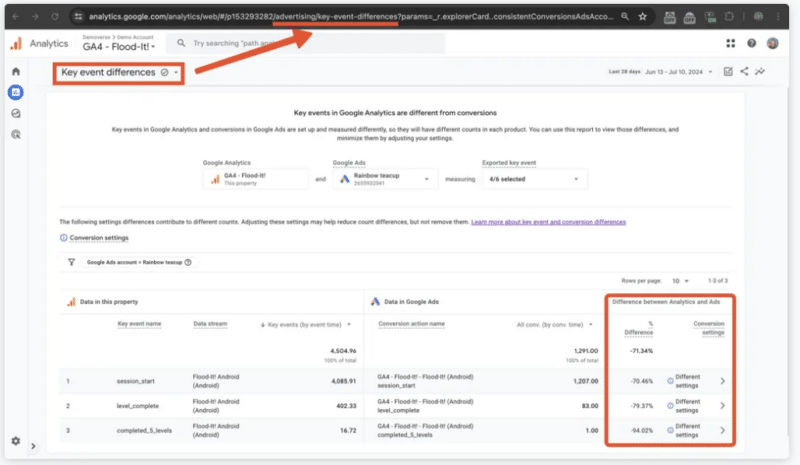
Yes, but. The report isn’t accessible for all GA4 properties.
Between the lines. The renaming of “conversions” to “key events” in GA4 was meant to eliminate discrepancies with Google Ads. The report‘s hidden status may be due to its potential contradiction of this goal.
The big picture. Some users report seeing this feature for over a year, suggesting extended development or testing.
What to watch. Whether Google will officially release this tool or continue to keep it hidden, given its usefulness to marketers in reconciling data inconsistencies.
Courtesy of Search Engine Land: News & Info About SEO, PPC, SEM, Search Engines & Search Marketing
Category seo news | Tags:
Social Networks : Technorati, Stumble it!, Digg, de.licio.us, Yahoo, reddit, Blogmarks, Google, Magnolia.
No deal: Alphabet won’t acquire HubSpot after all
Written on July 11, 2024 at 7:17 pm, by admin

Alphabet’s rumored deal to acquire HubSpot is shelved, sources told Bloomberg (subscription required). Alphabet reportedly walked away from the deal weeks ago, according to Reuters.
- “Parties didn’t get to due-diligence stage in deal talks,” Bloomberg reported.
Early rumors about the talks seemed to solidify at the end of May, when CNBC’s David Faber reported the companies continued to have discussions and an all-stock deal was on the table.
Why we care. Rumors that Alphabet was considering a HubSpot acquisition began in April. Alphabet reportedly made significant strides in discussions to acquire HubSpot by May. But it seems like it’s not going to happen here in July. In the meantime, HubSpot users were either wondering what it would mean for a central part of their marketing stack, or maybe just ignoring it all.
Whatever the truth of any of the rumors, HubSpot’s shares moved up and down like a yo-yo at each twist of the story. Maybe things will settle down now?
Courtesy of Search Engine Land: News & Info About SEO, PPC, SEM, Search Engines & Search Marketing
Category seo news | Tags:
Social Networks : Technorati, Stumble it!, Digg, de.licio.us, Yahoo, reddit, Blogmarks, Google, Magnolia.
Google AI Overviews only show for 7% of queries, a new low
Written on July 11, 2024 at 7:17 pm, by admin

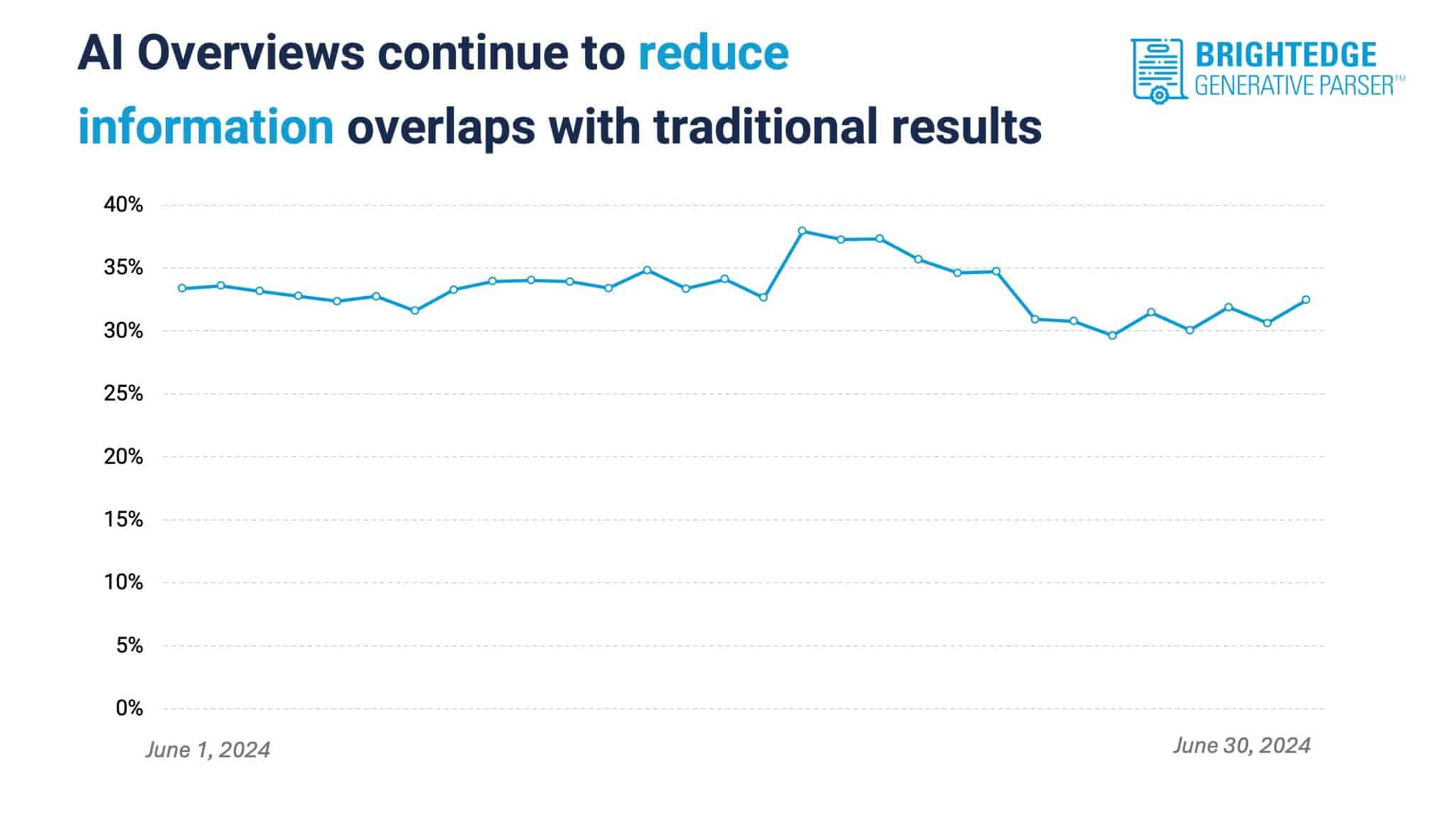
Google’s AI Overviews now appear less than 7% of the time. This is one of 10 noteworthy findings from a new analysis of AI Overviews.
- This trend or less visibility for AI-generated answers started in mid-April, when the number of Google Search results without SGE jumped to 65%, up from 25%.
- Google then announced the rollout of AI Overviews in the U.S. at Google I/O in May, and the trend continued. AI Overviews only showed for 15% of queries.
- We next saw multiple examples of incorrect and dangerous AI-generated answers, such as Google suggesting people drink urine and eat rocks. Google promised to improve AI Overviews.
This data was shared with Search Engine Land by enterprise SEO platform BrightEdge and its BrightEdge Generative Parser, which has been tracking and monitoring AI Overviews (and formerly Search Generative Experience) since late last year.
AI Overviews drop. Google continued to reduce the presence of AI Overviews in June – dropping from 11% to 7% of queries, according to BrightEdge. However, there was also a slight increase in AI Overviews in mid-June before the big drop.
Here’s a screenshot showing the drop:

Education, entertainment, ecommerce. The presence of AI Overviews remained stable in many industries – but these three were not among them.
- For education queries, AI Overviews dropped from 26% to 13%.
- For entertainment queries, AI Overviews fell from 14% to nearly 0%.
- For ecommerce queries, AI Overviews decreased from 26% to 9%.
AI Overviews real estate shrinks. AI Overviews take up less pixel space on top of Google’s search results than ever. They are now 13% smaller, on average, according to BrightEdge.
Less duplication in AI, Classic search results. Google is less frequently citing the same sources in AI Overviews that appear in Classic Search. This is because Google is leaning into its concept of “Let Google do the searching for you” where Google brings in information that anticipates relevant follow-up queries.
Search query patterns. Search intent plays a role in whether AI Overviews appear:
- Increases: “Best,” (+50%) “what is,” (+20%), “how to” (+15%) and “symptoms of” (+12%) queries are more often to trigger an AI Overviews
- Decreases: “Vs” (-20%), brand-specific (-15%), general product (-14%) and lifestyle-related (-12%) queries trigger AI Overviews less often.
UGC loses visibility in AI Overviews. Reddit and Quora lost a staggering number of AI Overviews citations – 85.71% and 99.69%, respectively, in June. Google must have recognized that these popular user-generated sites are unreliable sources of trustworthy information (at least for AI Overviews).

Less comparisons. Google cut in half the number of product comparison tables it showed in AI Overviews. This decline started June 1.
Less product viewers and carousels. Product viewers and carousels are two AI Overviews features that appear “significantly less” often in AI Overviews, BrightEdge reported. This decrease also started in early June.
Less lists. Ordered and unordered lists, which at one time were the most common SGE module, now appear “less often,” according to BrightEdge. This could be related to Google attempting to reduce the amount of space AI Overviews occupy.
More financial warnings. Google increased the number of financial warnings by 10% in June. Google already had a similar warning for healthcare queries.
Why we care. AI Overviews continue to be an area of extreme interest for SEOs, publishers and content creators because the search feature upends the traditional model of Classic Search. Since the arrival of SGE and AI Overviews, there have been huge concerns about Google making it harder or near impossible for some websites to get organic search traffic.
Even though AI Overviews are less visible overall, we don’t expect AI Overviews to go away. Google has told us it will continue to evolve in this direction and that it is resulting in more searches. Though Google has yet to share any data to back up this vague claim.
The report. BrightEdge continues to monitor and share updates as part of its AI Overviews guide.
Courtesy of Search Engine Land: News & Info About SEO, PPC, SEM, Search Engines & Search Marketing
Category seo news | Tags:
Social Networks : Technorati, Stumble it!, Digg, de.licio.us, Yahoo, reddit, Blogmarks, Google, Magnolia.
Amazon expands ad offerings for non-Amazon sellers
Written on July 11, 2024 at 7:17 pm, by admin

Amazon rolled out a new beta feature for businesses that don’t sell products on its platform, allowing them to generate leads through display ads across Amazon’s vast network.
Why we care. Amazon’s new lead generation ad type gives advertisers the opportunity to expand their customer base and tap into Amazon’s data-rich environment, even if they don’t sell products on the platform.
How it works. The new lead generation ads allow customers to sign up for information directly within the ad creative, without leaving the website they’re browsing.
- Ads appear across Amazon’s properties, including the homepage and product detail pages, as well as owned sites like Twitch and IMDb, and third-party destinations.
- Placements are automatically optimized based on targeting tactics and desired outcomes.
First seen. We first were alerted to this update by Jeffrey Cohen on LinkedIn:
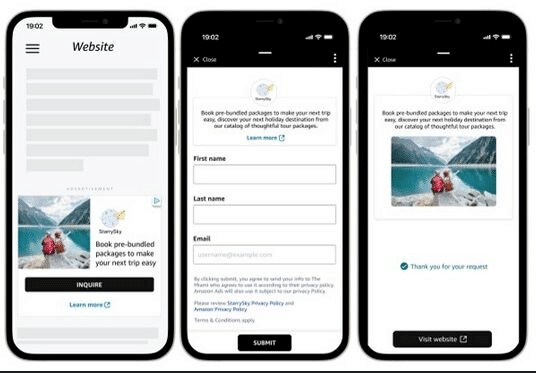
What came before. Amazon began exploring solutions for non sellers last year. Search Engine Land contributor Navah Hopkins, who wrote about the beta solution, confirmed that it’s now available for everyone and that before now customers weren’t able to fill out a lead form.
The big picture. Amazon is leveraging its extensive network and billions of user signals to help non-Amazon sellers engage with potential customers.
- This feature aims to level the playing field for businesses of all sizes, allowing them to tap into Amazon’s rich data ecosystem.
What’s next. Interested businesses can contact their Amazon Ads Product Development Manager (PDM) for details on accessing this beta feature through the Ad console.
Between the lines. This move signals Amazon’s push to compete more aggressively in the broader digital advertising space, beyond its own ecommerce platform.
Courtesy of Search Engine Land: News & Info About SEO, PPC, SEM, Search Engines & Search Marketing
Category seo news | Tags:
Social Networks : Technorati, Stumble it!, Digg, de.licio.us, Yahoo, reddit, Blogmarks, Google, Magnolia.