

Microsoft Advertising introduces Performance Max brand lists
Written on July 18, 2024 at 1:23 pm, by admin
Microsoft Ads is rolling out a new feature called “brand lists” for Performance Max (PMax) campaigns. It promises more control over your brand image and ad visibility.
Brand lists allow advertisers to exclude their ads from appearing alongside specific brands, potentially improving ad relevance and return on ad spend (ROAS).
How it works.
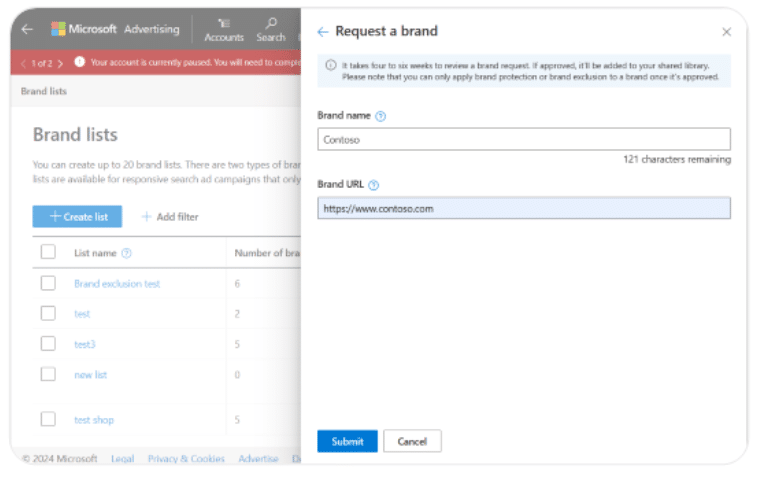
- Advertisers can create up to 20 brand lists.
- They can add brands from a predefined list or request specific brands to be added.
- Brand exclusion can be applied to prevent ads from serving on branded search queries.
Why we care. This PMax feature offers advertisers more control over the sites and searches they see their ads against. It allows advertisers to avoid association with competitors or brands that don’t align with their values.
Key features.
- Covers misspellings automatically.
- Includes an editorial review process for brand requests.
- Takes 4-6 weeks for brand requests to be reviewed.
Between the lines. This move signals Microsoft’s efforts to compete with Google Ads by offering more granular control over ad placements.
What they’re saying. Microsoft touts the benefits as helping advertisers “mitigate risks” and “display ads with relevant content.”
The big picture. As digital advertising becomes more complex and automated, platforms are introducing more tools for brand safety and ad targeting precision.
Courtesy of Search Engine Land: News & Info About SEO, PPC, SEM, Search Engines & Search Marketing
Category seo news | Tags:
Social Networks : Technorati, Stumble it!, Digg, de.licio.us, Yahoo, reddit, Blogmarks, Google, Magnolia.
Microsoft Advertising introduces Performance Max brand lists
Written on July 18, 2024 at 1:23 pm, by admin
Microsoft Ads is rolling out a new feature called “brand lists” for Performance Max (PMax) campaigns. It promises more control over your brand image and ad visibility.
Brand lists allow advertisers to exclude their ads from appearing alongside specific brands, potentially improving ad relevance and return on ad spend (ROAS).
How it works.
- Advertisers can create up to 20 brand lists.
- They can add brands from a predefined list or request specific brands to be added.
- Brand exclusion can be applied to prevent ads from serving on branded search queries.
Why we care. This PMax feature offers advertisers more control over the sites and searches they see their ads against. It allows advertisers to avoid association with competitors or brands that don’t align with their values.
Key features.
- Covers misspellings automatically.
- Includes an editorial review process for brand requests.
- Takes 4-6 weeks for brand requests to be reviewed.
Between the lines. This move signals Microsoft’s efforts to compete with Google Ads by offering more granular control over ad placements.
What they’re saying. Microsoft touts the benefits as helping advertisers “mitigate risks” and “display ads with relevant content.”
The big picture. As digital advertising becomes more complex and automated, platforms are introducing more tools for brand safety and ad targeting precision.
Courtesy of Search Engine Land: News & Info About SEO, PPC, SEM, Search Engines & Search Marketing
Category seo news | Tags:
Social Networks : Technorati, Stumble it!, Digg, de.licio.us, Yahoo, reddit, Blogmarks, Google, Magnolia.
Google under investigation in Italy over user consent practices
Written on July 18, 2024 at 1:23 pm, by admin

Italian competition watchdog AGCM launched an investigation into Google’s user consent practices for ad profiling.
Why it matters. This probe highlights growing scrutiny of Google and the data practices of Big Tech in Europe, especially under new regulations like the Digital Markets Act (DMA).
Details:
- The investigation focuses on how Google obtains consent to link user activity across its services (e.g., Search, YouTube, Chrome, Maps) for ad targeting.
- AGCM suspects Google of “unfair commercial practices” in its consent requests.
- Concerns include inadequate, incomplete, and potentially misleading information provided to users.
- The regulator questions whether users are fully informed about the “real effect” of consenting to account linking.
Why we care. If Google is forced to change its consent practices, it could limit the data available for ad targeting, potentially reducing the effectiveness of campaigns. For example, cost per acquisition could increase. This could then lead advertisers having to be more strategic with where they spend then budget.
Context. Google is subject to the EU’s Digital Markets Act (DMA) as a designated “gatekeeper” platform.
- The DMA requires gatekeepers to obtain user consent before processing personal data for advertising or combining data across services.
Between the lines. This investigation by Italy’s regulator appears to address concerns not yet covered by the European Commission’s ongoing DMA probe into Google.
What to watch. The outcome of this investigation could have implications for how tech giants design consent flows and communicate data practices to users across the EU.
Courtesy of Search Engine Land: News & Info About SEO, PPC, SEM, Search Engines & Search Marketing
Category seo news | Tags:
Social Networks : Technorati, Stumble it!, Digg, de.licio.us, Yahoo, reddit, Blogmarks, Google, Magnolia.
Google under investigation in Italy over user consent practices
Written on July 18, 2024 at 1:23 pm, by admin
Italian competition watchdog AGCM launched an investigation into Google’s user consent practices for ad profiling.
Why it matters. This probe highlights growing scrutiny of Google and the data practices of Big Tech in Europe, especially under new regulations like the Digital Markets Act (DMA).
Details:
- The investigation focuses on how Google obtains consent to link user activity across its services (e.g., Search, YouTube, Chrome, Maps) for ad targeting.
- AGCM suspects Google of “unfair commercial practices” in its consent requests.
- Concerns include inadequate, incomplete, and potentially misleading information provided to users.
- The regulator questions whether users are fully informed about the “real effect” of consenting to account linking.
Why we care. If Google is forced to change its consent practices, it could limit the data available for ad targeting, potentially reducing the effectiveness of campaigns. For example, cost per acquisition could increase. This could then lead advertisers having to be more strategic with where they spend then budget.
Context. Google is subject to the EU’s Digital Markets Act (DMA) as a designated “gatekeeper” platform.
- The DMA requires gatekeepers to obtain user consent before processing personal data for advertising or combining data across services.
Between the lines. This investigation by Italy’s regulator appears to address concerns not yet covered by the European Commission’s ongoing DMA probe into Google.
What to watch. The outcome of this investigation could have implications for how tech giants design consent flows and communicate data practices to users across the EU.
Courtesy of Search Engine Land: News & Info About SEO, PPC, SEM, Search Engines & Search Marketing
Category seo news | Tags:
Social Networks : Technorati, Stumble it!, Digg, de.licio.us, Yahoo, reddit, Blogmarks, Google, Magnolia.
Google under investigation in Italy over user consent practices
Written on July 18, 2024 at 1:23 pm, by admin
Italian competition watchdog AGCM launched an investigation into Google’s user consent practices for ad profiling.
Why it matters. This probe highlights growing scrutiny of Google and the data practices of Big Tech in Europe, especially under new regulations like the Digital Markets Act (DMA).
Details:
- The investigation focuses on how Google obtains consent to link user activity across its services (e.g., Search, YouTube, Chrome, Maps) for ad targeting.
- AGCM suspects Google of “unfair commercial practices” in its consent requests.
- Concerns include inadequate, incomplete, and potentially misleading information provided to users.
- The regulator questions whether users are fully informed about the “real effect” of consenting to account linking.
Why we care. If Google is forced to change its consent practices, it could limit the data available for ad targeting, potentially reducing the effectiveness of campaigns. For example, cost per acquisition could increase. This could then lead advertisers having to be more strategic with where they spend then budget.
Context. Google is subject to the EU’s Digital Markets Act (DMA) as a designated “gatekeeper” platform.
- The DMA requires gatekeepers to obtain user consent before processing personal data for advertising or combining data across services.
Between the lines. This investigation by Italy’s regulator appears to address concerns not yet covered by the European Commission’s ongoing DMA probe into Google.
What to watch. The outcome of this investigation could have implications for how tech giants design consent flows and communicate data practices to users across the EU.
Courtesy of Search Engine Land: News & Info About SEO, PPC, SEM, Search Engines & Search Marketing
Category seo news | Tags:
Social Networks : Technorati, Stumble it!, Digg, de.licio.us, Yahoo, reddit, Blogmarks, Google, Magnolia.
Survey: Search marketers less happy with their jobs vs. last year
Written on July 18, 2024 at 1:23 pm, by admin

Search marketers are less satisfied with their jobs than they were a year ago, according to a new Search Engine Land survey.
Why we care. Search marketing continues to be a rewarding career. However, any job comes with a variety of challenges and responsibilities that were beyond the scope of the 2024 Search Engine Land Career and Salary survey. But what is clear from our data is that job unhappiness increased.
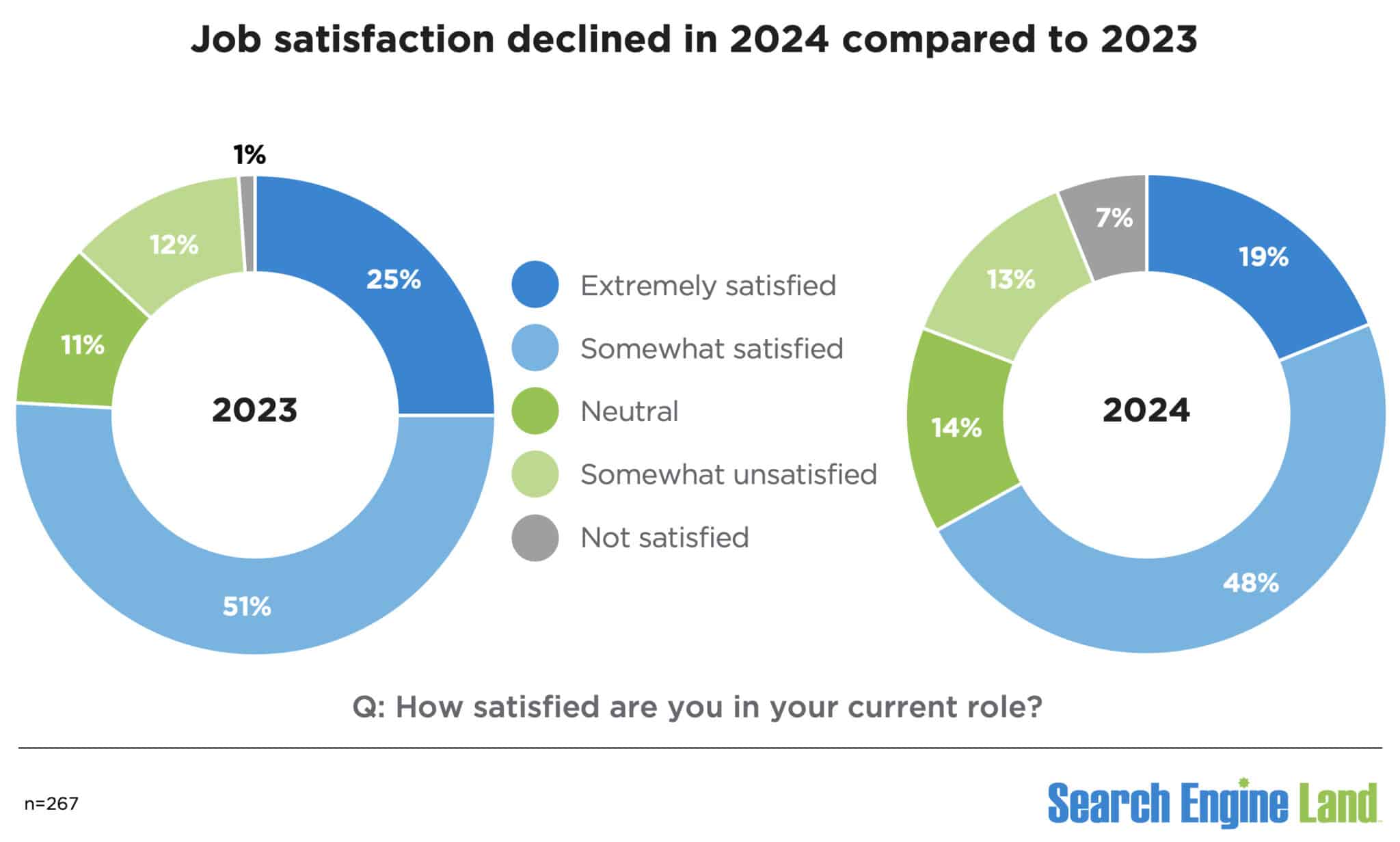
Job satisfaction decline. While 67% of search marketers are extremely or somewhat satisfied with their job, this number is down from 76% a year ago.
- 19% are extremely satisfied (down from 25% in 2023).
- 48% are somewhat satisfied (down from 51% in 2023).
Job dissatisfaction also increased to 20%, up from 13% a year ago.
- 13% are somewhat unsatisfied (up from 12% in 2023).
- 7% are not satisfied (up from 1% in 2023).
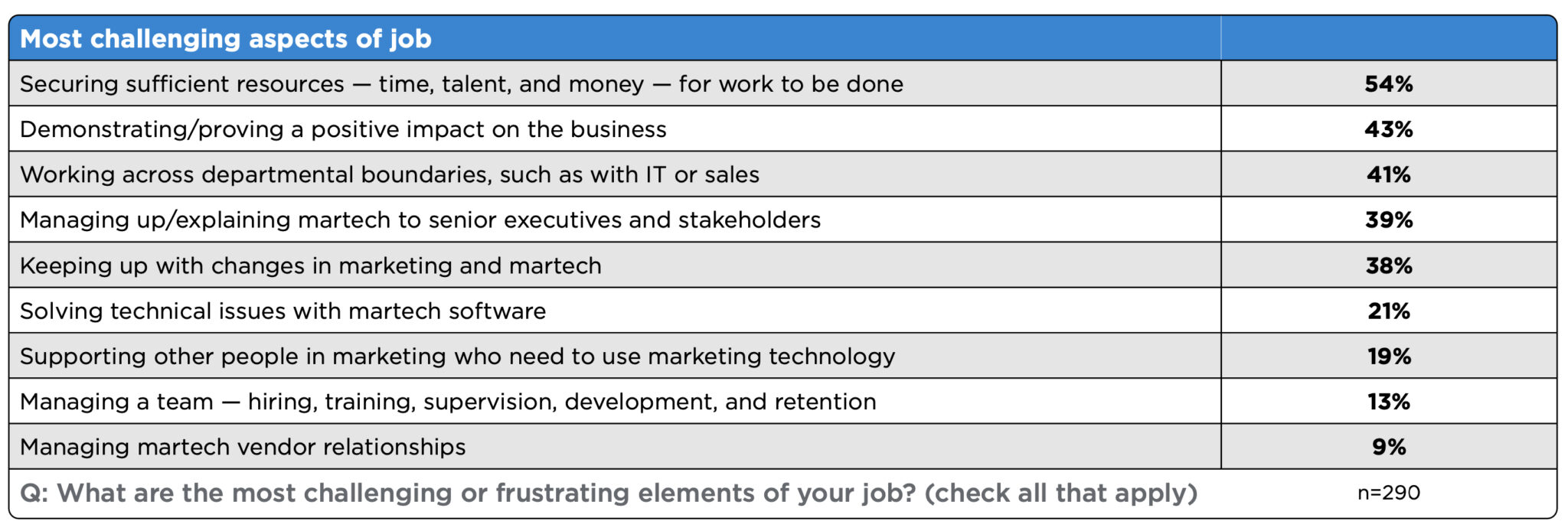
Search marketing challenges. The most frequently cited challenge is securing sufficient resources – time, talent and money – according to 54% of respondents.
- Demonstrating and proving a positive business impact was a significant challenge for 43% of respondents.
- Cross-departmental collaboration was a challenge for 41% of respondents.
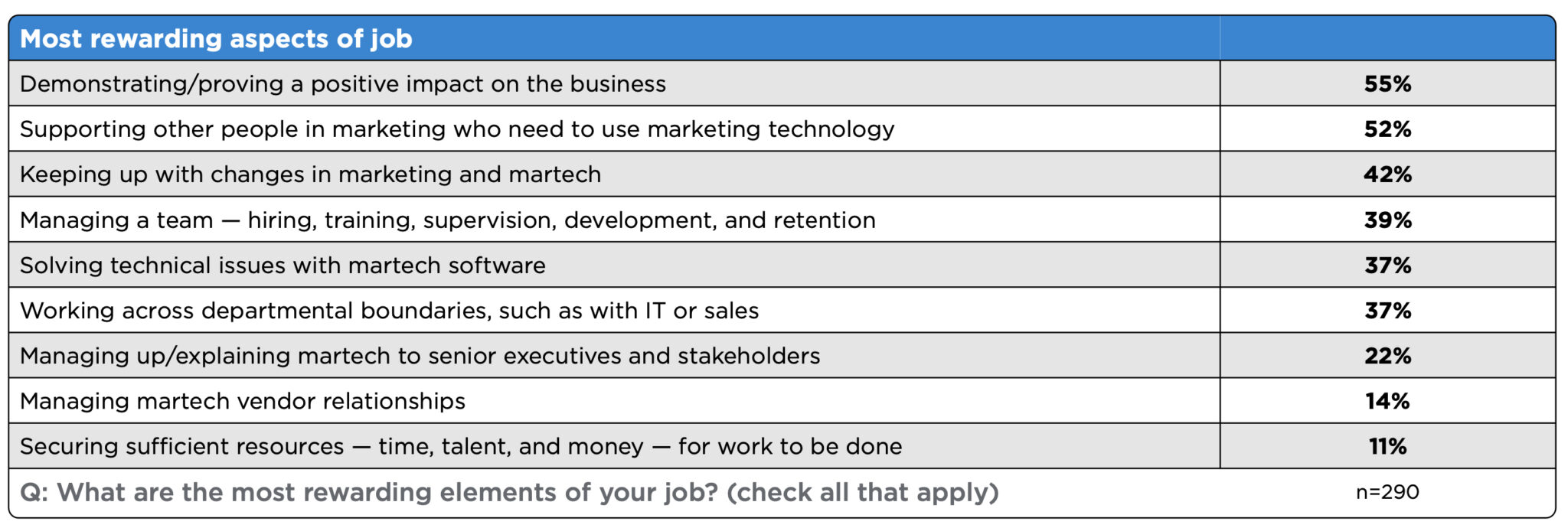
Most rewarding aspects of search marketing. For 55% of respondents, demonstrating and proving a positive business impact was the most rewarding aspect of their job.
- 52% of respondents found supporting colleagues to leverage technology rewarding.
- 42% found keeping up with industry changes in marketing and martech innovations and trends rewarding.
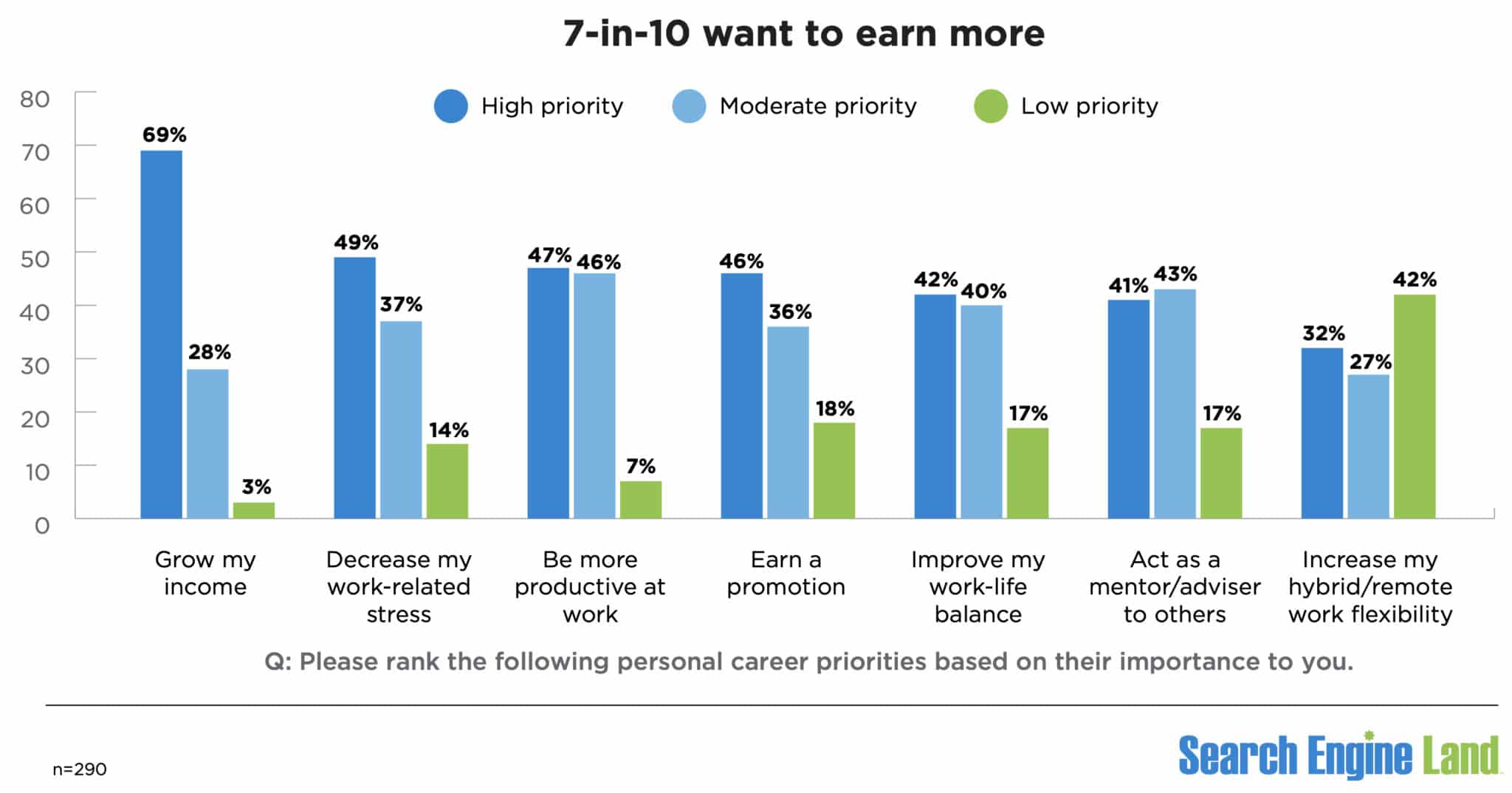
Career priorities. What do search marketers want? Growing their income was the highest priority for 69%. Unsurprisingly, 97% rated “grow my income” as either a high or moderate priority.
Three other personal career high priorities were:
- Decreasing work-related stress: 49%.
- Being more productive at work: 47%.
- Earning a promotion: 46%.
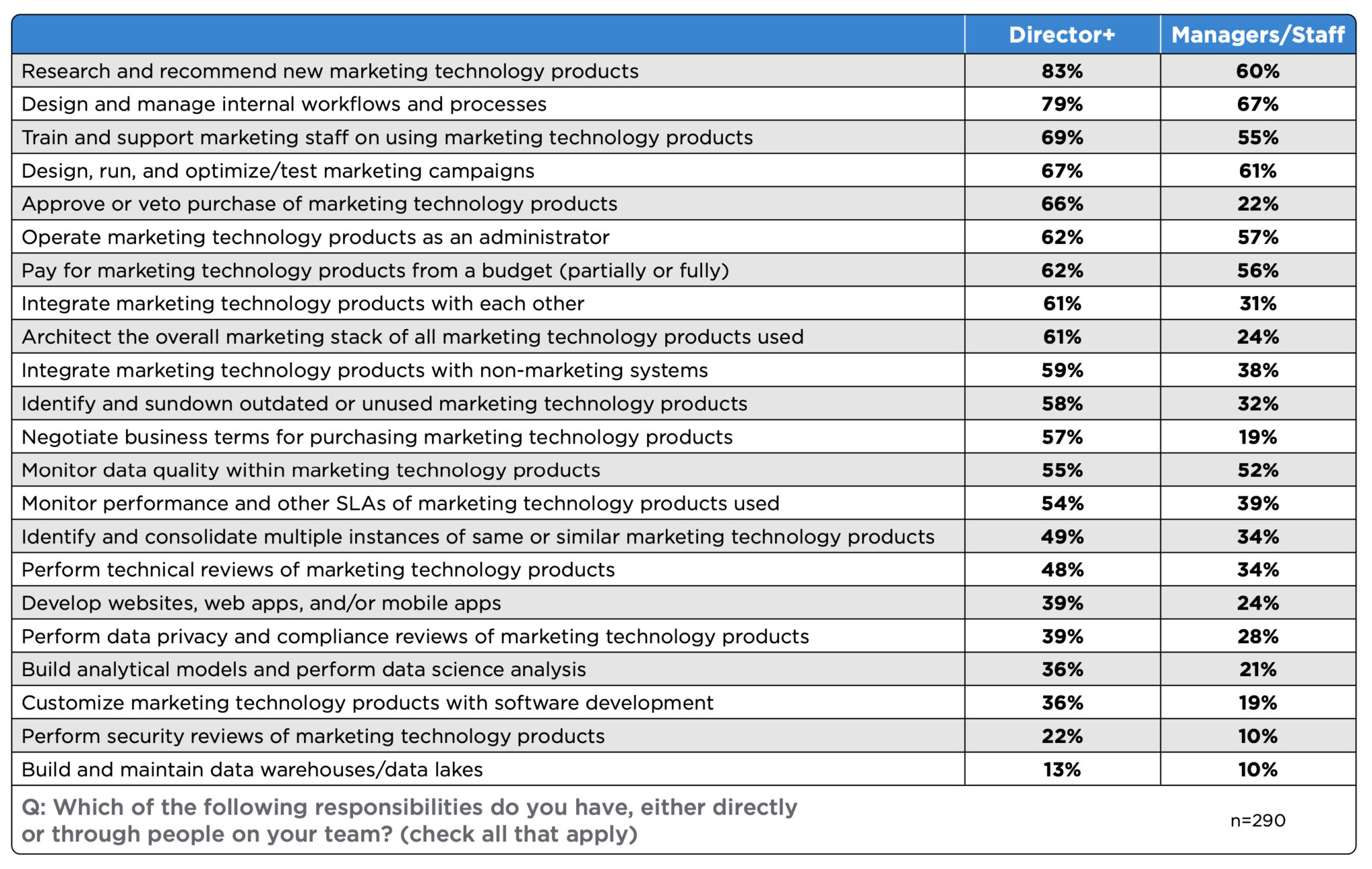
Key responsibilities of search marketers. At the director-level and higher positions (i.e., director, senior director, VP, SVP, C-suite), 81% said researching and recommending new marketing technology products was their top responsibility.
The top responsibility for 67% of managers/staff was designing and managing internal workflows and processes.
Other responsibilities that fell to the majority of search marketers of all levels were:
- Training and supporting marketing staff on using marketing technology products.
- Designing, running and optimizing/testing marketing campaigns.
- Operating marketing technology products as an administrator.
- Integrating marketing technology products with each other.
- Monitoring data quality within marketing technology products.
Here’s the full list of responsibilities we asked about:
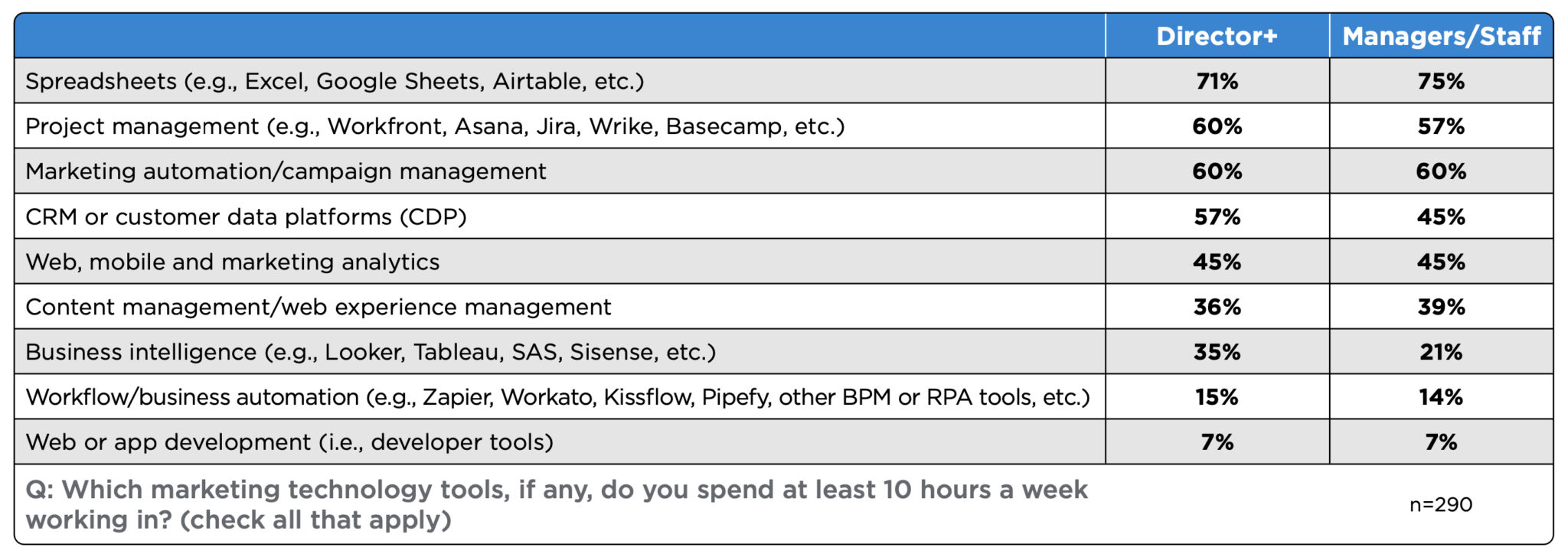
High usage of spreadsheets. A significant majority of directors+ (71%) and managers/staff (75%) spend at least 10 hours a week working in spreadsheets (e.g., Excel, Google Sheets, Airtable). As was the case a year ago, spreadsheets continue to be a fundamental tool for search marketers.
Also of note:
- Project management tools (e.g., Workfront, Asana, Jira, Wrike, Basecamp) are used consistently by directors+ (60%) and managers/staff (57%).
- Directors+ and Managers/staff reported equal usage (60%) of marketing automation and campaign management tools.
Methodology. Our survey results are based on responses from 291 individuals in North America (79%) and Western Europe (21%). Due to the limited number of respondents, other regions were excluded. We used the “median” results for salaries to filter out values that might skew the results.
The 2024 Search Engine Land Salary and Career Survey was conducted between December and February. Invitations to take the survey were amplified on and by Search Engine Land. The survey included more than 20 questions related to career roles, salary, technology, job satisfaction and challenges/frustrations. Respondents were also asked to reveal their age and gender.
Courtesy of Search Engine Land: News & Info About SEO, PPC, SEM, Search Engines & Search Marketing
Category seo news | Tags:
Social Networks : Technorati, Stumble it!, Digg, de.licio.us, Yahoo, reddit, Blogmarks, Google, Magnolia.
AI and Google advertising: What’s next?
Written on July 18, 2024 at 1:23 pm, by admin
AI is impacting every aspect of Google, including SEO and Google Ads.
In a recent article in Search Engine Land, Anna Crowe masterfully discussed the impact of generative AI on SEO. It’s a great article, and I encourage you to read it if you haven’t already.
I want to expand on what Crowe wrote, focusing on AI’s impact on Google advertising, both now and in the future.
The impact of generative AI on search volume and CTRs
One of the most startling findings in Crowe’s article is that AI is increasing Google search volume, but organic listings aren’t benefiting from that increase.
Crowe estimates that search volume is up 6 times searches per day (thanks to AI), yet AI is leading to a 60% decrease in average CTR.
This, in turn, could lead to a 30% reduction in organic traffic.
In Crowe’s words, “Every single website is going to feel the pain.”
Why aren’t organic listings benefiting from the increased search volume? Because organic listings are being moved further down the SERPs than ever before.
Google’s introduction of AI Overviews on SERPs is one of the main contributors to this phenomenon.
If you haven’t seen them yet, here’s what these AI Overviews look like on SERPs:
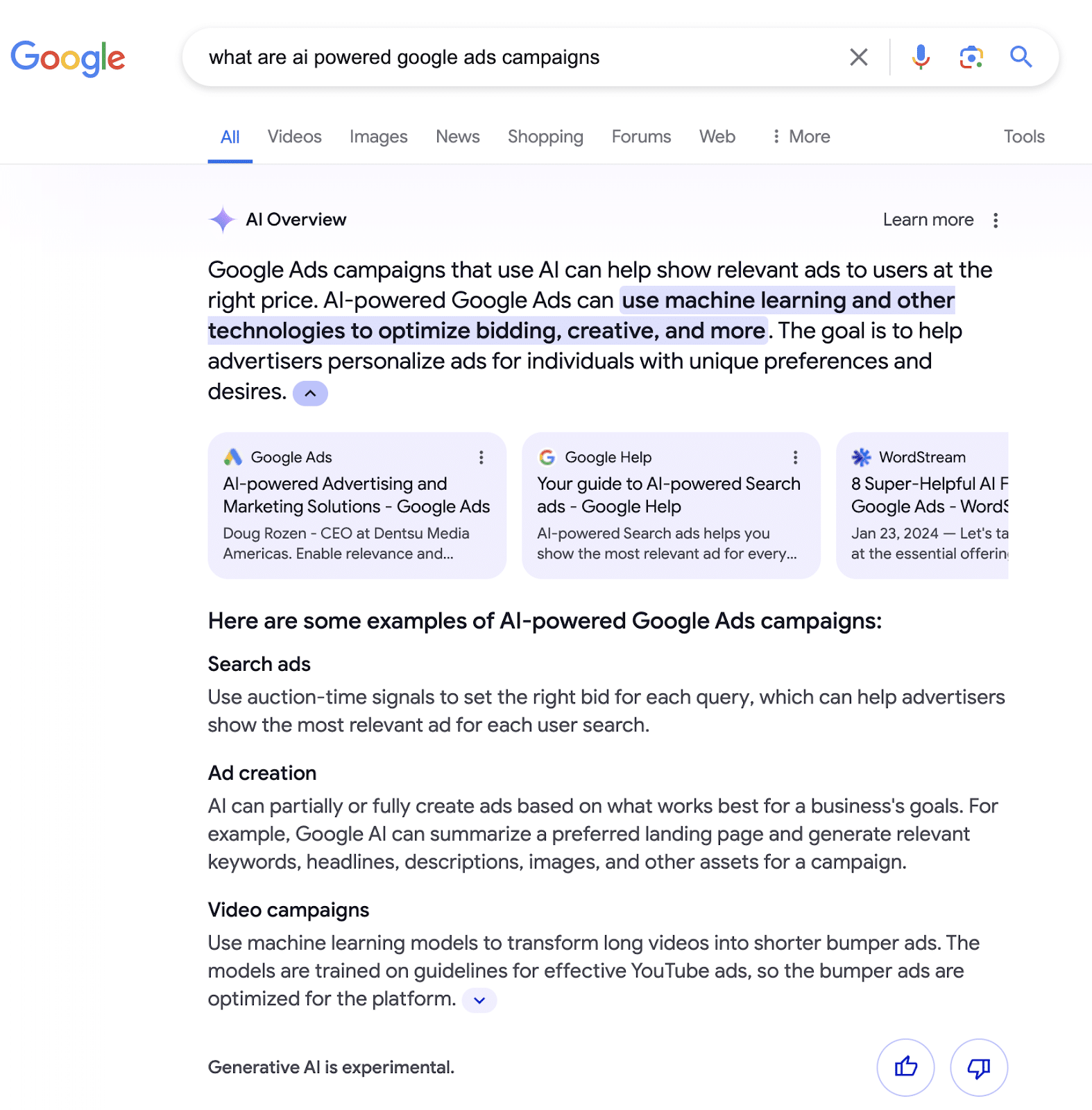
As of this writing, AI Overviews have been rolled out only to U.S.-based searchers.
As you can see, AI Overviews push organic results further down the page. Consequently, organic listings – even those with top search rankings – can fall below the fold.
Given this placement, it’s not surprising that traffic to these sites is dropping.
The impact of AI Overviews on advertisers
The situation on the advertising side of the equation looks quite different.
Crowe reports that we will start seeing ad placements above AI Overviews and put them at the top of SERPs.
This prime placement of ads on SERPs isn’t too surprising, given that advertising is an important revenue source for Google. Why wouldn’t they reserve that prime real estate for advertisers?
It’s also possible (although I’m just speculating) that the “cards” that contain organic links at the bottom of AI Overviews might someday be replaced with ads.
With these changes, two questions are top of mind for Google advertising professionals:
- Will businesses increase their Google Ads budgets to take advantage of these new opportunities?
- Will businesses that have invested heavily in SEO shift some of their budgets to Google advertising?
The impact of AI on CPC
Crowe also speculates that we may see a drop in CPCs with these additional ad placements (a.k.a. “ad inventory”).
While I agree it’s possible, it’s not something I’m counting on – or even all that excited about, to be honest.
I feel this way for two reasons:
- High CPCs are a pain point for most advertisers, and everyone has a different perception of what qualifies as a high CPC. Every PPC pro has seen that annoying $100 click within an account that averages $10 per click. But we get over the sting pretty quickly as long as conversions are coming in at a good pace and the account is performing well overall.
- Even if CPCs do decrease, where will we find them? I have a hunch they’ll be found in Performance Max and Demand Gen campaigns – not Search campaigns. Performance Max and Demand Gen already have more ad placement options than search ads have now – and, from where I stand – often have lower CPCs. Any decrease in CPCs probably won’t manifest in search.
Are search keywords getting a second life?
Advertisers have witnessed a steady decline in the power of standalone keyword targeting over the past few years, and many advertising pros (myself included) predict that this trend will continue.
With AI-driven campaign types on offer, such as Performance Max and Demand Gen, standalone keyword-based traditional search advertising seemed to be on its way out.
But now, I’m starting to think that keywords are rising from the dead for two reasons:
- If organic traffic drops 30%, as suggested, search ads have the opportunity to capture that drop.
- Google recently announced improvements to search ads query matching and brand controls – it’s the kind of love we haven’t seen for search in a while.
Ginny Marvin, Ads Product Liaison at Google, outlined these changes in a recent LinkedIn post.
These updates include automatically including misspellings in negative keyword lists and allowing brand inclusions and exclusions across additional campaign types – they’re updates we’ve wanted for years!
Success lies in mastering all aspects of your Google Ads program
What does all of this mean for Google advertisers?
This means that to be successful, you need to master all aspects of your Google Ads program, from Search to Performance Max to Display ads and more.
Even more importantly, you need to know how to integrate all of the targeting options, ad formats and campaign types to achieve peak performance.
To be more specific, here are six recommendations to stay ahead of the AI curve.
1. Make sure you’re current on match types
Broad match isn’t what it was a few years ago.
The “new” broad match is dramatically different. It’s so different that it’s too bad Google didn’t give it a new name.
Today’s broad match uses contextual signals and other signals, such as keywords in the ad group, landing page, user search behavior and user location, to understand intent.
Dig deeper: What to know about PPC keyword research tools and match types
2. Make sure you’re current on Google campaign formats
With Google’s commitment to AI, you can be sure that AI-driven campaigns like Performance Max aren’t going anywhere.
If you haven’t already, add a Performance Max to the mix and see how it affects account performance.
Get familiar with the pros and cons of this format and how it will interact with your current search keyword-targeted campaigns, as it will only become more important.
3. Stay committed to using the best combination of keyword match types and campaign types
Your best-performing combination might include Performance Max, or it might not. The only way to know for sure is to test.
Don’t let biases or preconceived ideas get in the way of bringing in more targeted traffic. It’s not a question of whether Search is better than Performance Max or vice versa. It’s a question of what works best for every Google Ads program.
4. Don’t even try to copy and paste strategies
Abandon the idea that you can copy and paste a successful strategy from one campaign to another. It’s not so simple.
We’ve repeatedly found that strategies that work well in one account may differ dramatically from those that work well in another – even when the accounts provide similar services or products in the same industry.
5. Invest in original, high-quality content
Crowe points out in her article that Google is facing an indexing crisis. The amount of content that Google has to crawl and index is growing exponentially – thanks, in part, to AI-generated content.
As a result, Google might not even try to index all content, starting with content that’s generic.
To quote Crowe again, “Today, the best way to get your content seen by Google is through content written with experience and opinion. AI cannot write based on experience.”
Dig deeper: PPC landing pages: How to craft a winning post-click experience
6. Remember, you are a marketer first
All of this may sound overwhelming, but it’s not really.
Ever since I started in Google advertising, oh so many years ago, I’ve always approached it with a marketing-first mindset. My primary focus is always on how we can use a client’s Google Ads account to achieve the goals of the marketing teams we support.
It’s a focus that my team and I continue to maintain today.
Whenever we encounter accounts that are overworked, over-targeted and over-tinkered, we start with the fundamentals.
We start by asking, “How is this ad program supporting the company’s goals?” or even, “Does this ad program support the company’s goals at all?” Often, it does not.
It’s a straightforward approach, but you’d be amazed at how well it works. We strip things down and laser-focus on aligning the advertising of the client’s product/service with the client’s business and marketing goals.
How we achieve that alignment may be a little different than before with the introduction of AI, but the basics still apply.
AI may have created new challenges. But the solution remains the same.
Reason for optimism
I’ll leave you with one final note of optimism.
Even though Google is eager to keep people on its pages as long as possible, that doesn’t mean your website will become obsolete anytime soon.
No matter how well information is presented on the SERPs, users still need to go to your site to talk to you about your service or product (for now, at least). You still have plenty of opportunities to engage with them and win them over on your own home turf.
However, as mentioned above, it is more important than ever to ensure that your website is well-designed and has the content you need to engage and convert leads.
This is just the beginning of AI and Google Ads
There’s no question that AI is changing Google Ads in many important ways and will continue to do so.
That’s why all of the predictions and recommendations I’ve written about above are just for this moment.
A month from now, a year from now, we’ll need to reconsider keyword management and how it relates to account strategies once again.
Because generative AI will continue to evolve – and how people use it will evolve along with it.
Courtesy of Search Engine Land: News & Info About SEO, PPC, SEM, Search Engines & Search Marketing
Category seo news | Tags:
Social Networks : Technorati, Stumble it!, Digg, de.licio.us, Yahoo, reddit, Blogmarks, Google, Magnolia.
Survey: Search marketing gender pay gap is widening
Written on July 17, 2024 at 10:23 am, by admin

Men earn an average of 36% more than women in search marketing in 2024, according to a new Search Engine Land survey.
While there is less of a gender pay gap disparity in senior positions, there is still a disparity.
Additionally, women were more likely to have changed jobs or received promotions more recently than men. And men and women are similarly satisfied with their current role, the survey revealed.
Why we care. People should receive equal compensation for equal work, regardless of gender. However, Search Engine Land’s 2024 Salary and Career Survey indicates that isn’t happening. The gap between salaries for men and women in search marketing hasn’t closed. Rather, pay inequality has widened.
Men earn 36% more than women. Men earned an average of $130,000 in 2024 (vs. $105,250 in 2023) while women earned an average of $95,000 in 2024 (vs. $83,265 in 2023).
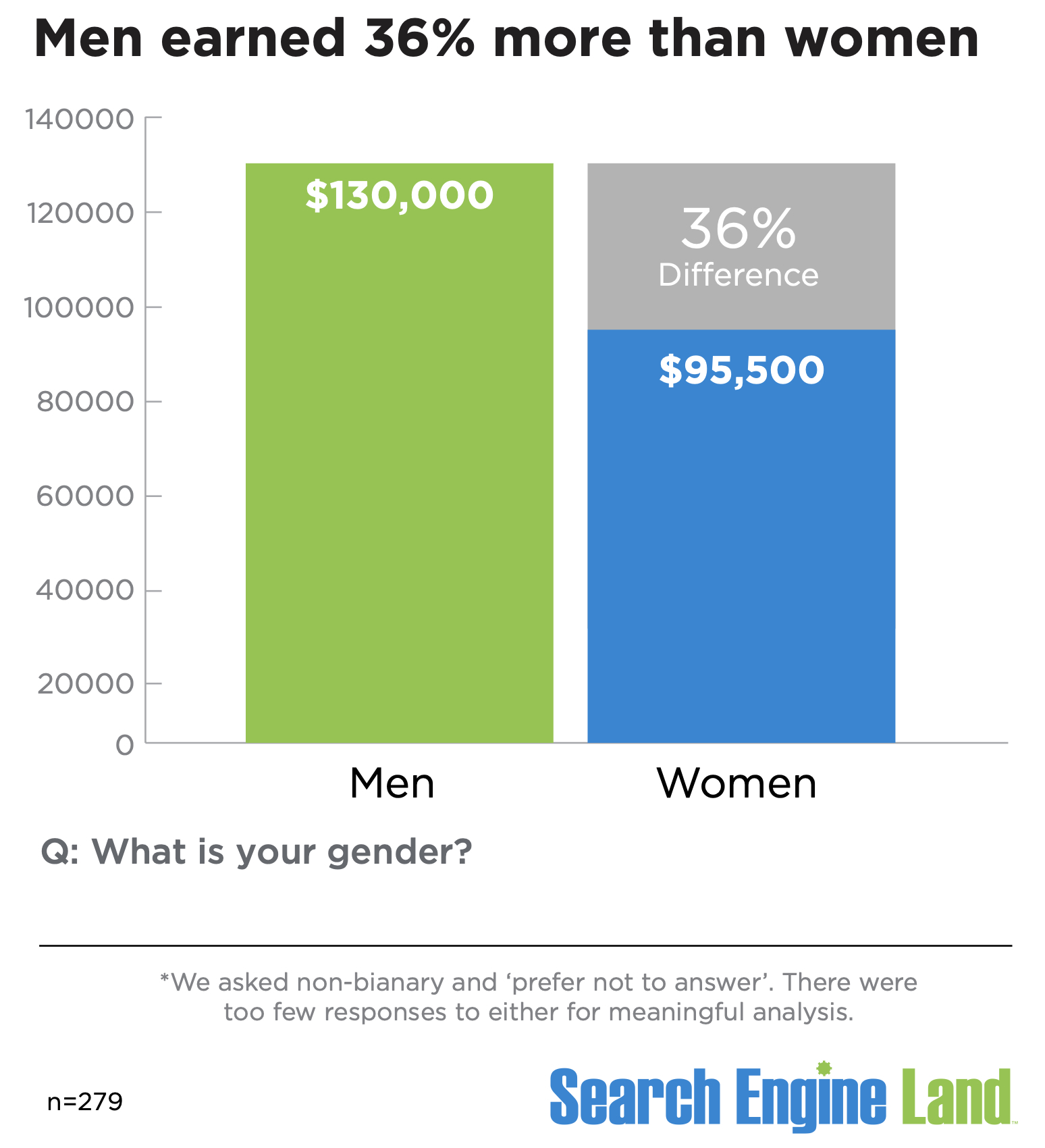
- That means men earn $34,500 (or 36%) more, on average, than women in search marketing, according to our survey.
- Men earned 26% more than women in 2023.

- For context, in the U.S., full-time working women are paid roughly 82% to 84% of what men earn. That means the disparity we see here is more than double the U.S. average.
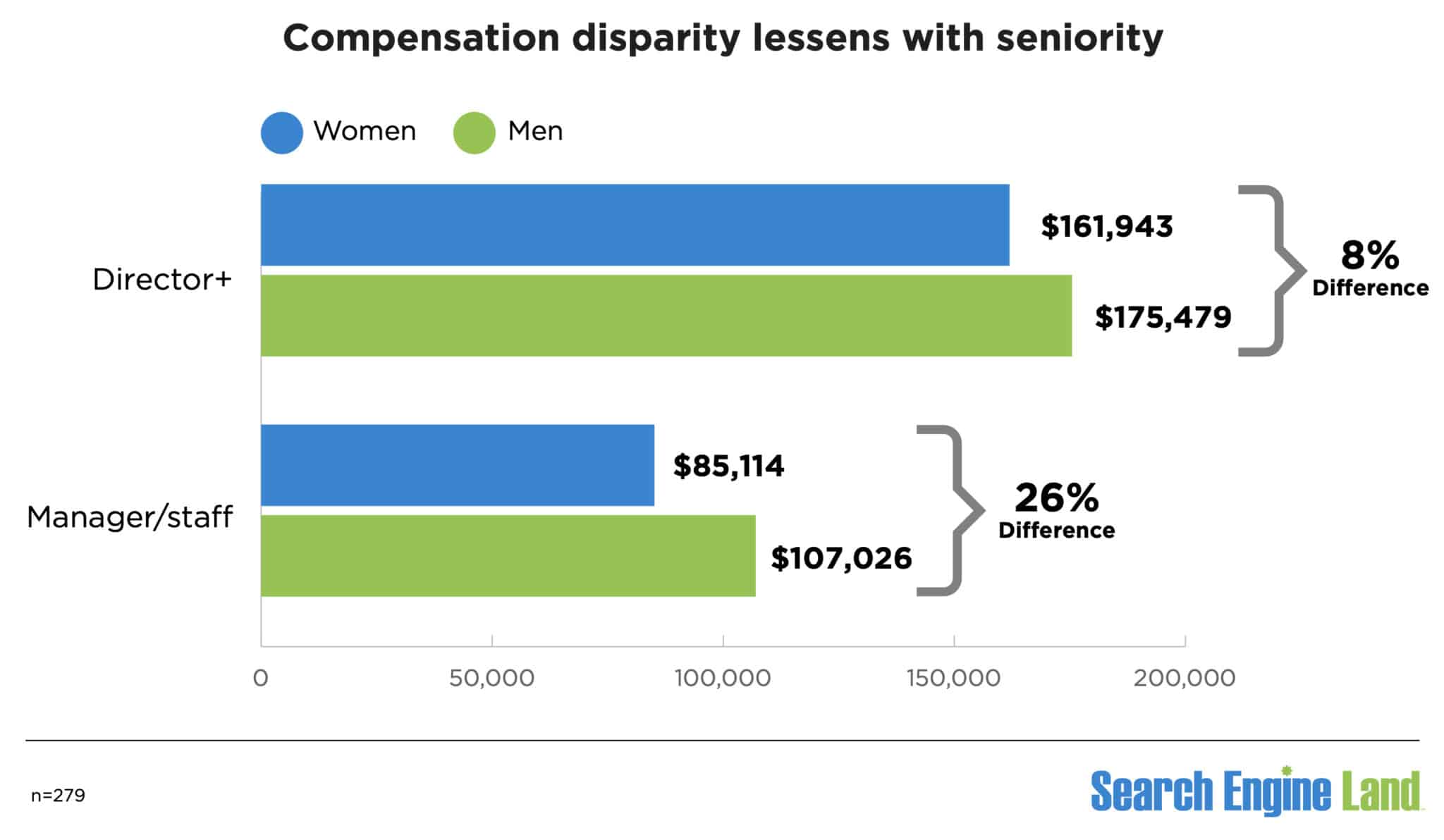
Men in senior positions earn 8% more than women. The search marketing pay gap is less pronounced in senior positions.
- For director-level and higher positions (i.e., director, senior director, VP, SVP, C-suite), there is an 8% pay difference – $175,479 for men compared to $161,943 for women in 2024.
- For manager and staff positions, there is a 26% pay difference ($107,026 for men, $85,114 for women).
Job changes and promotions. 38% of women were promoted or changed jobs in the past 12 months, compared to 25% of men.
- 15% of women and men reported changing jobs or getting a promotion in the past six months.
- Another 23% of women changed jobs or were promoted within the past year, compared to 10% of men.
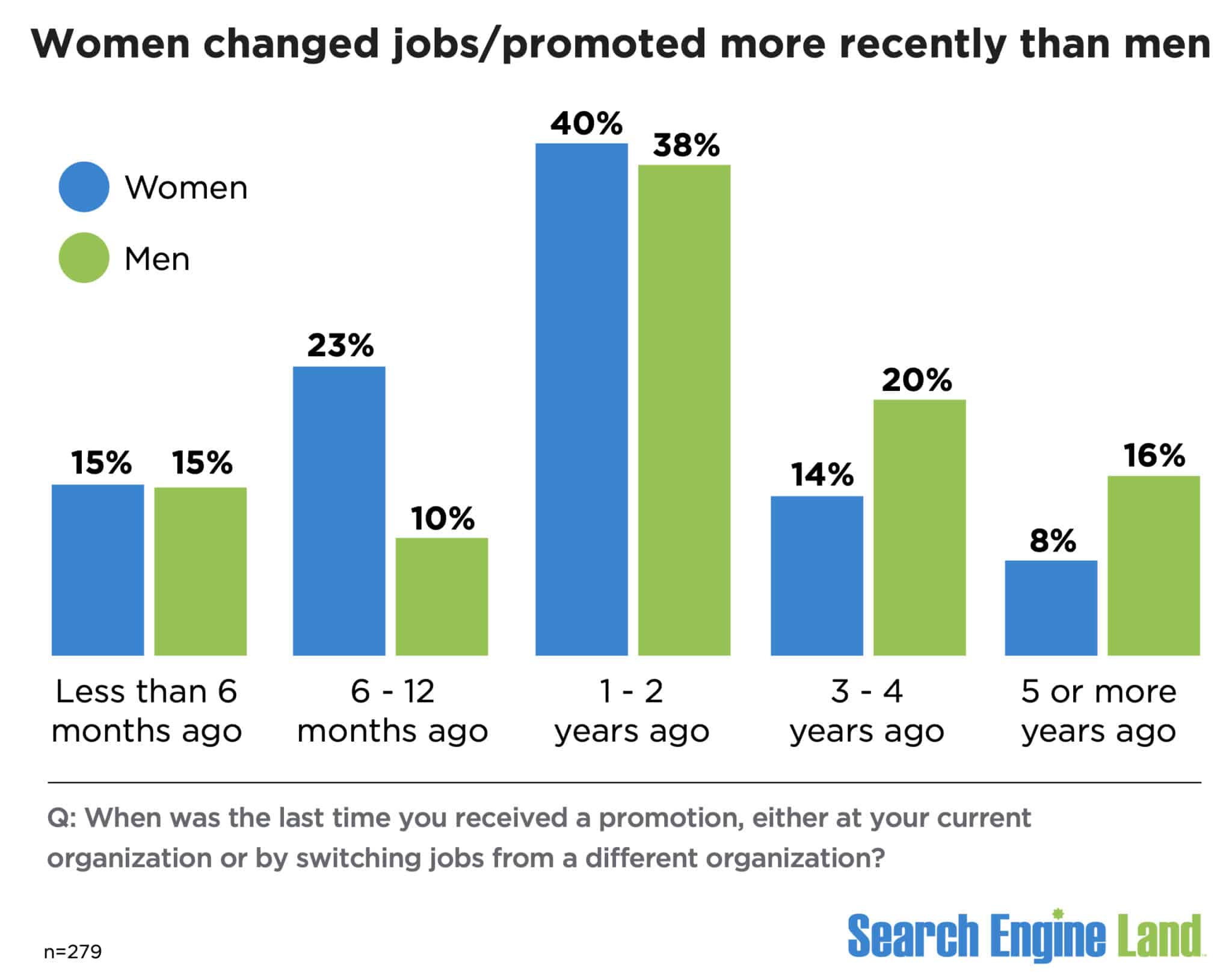
Job satisfaction. Women are slightly more satisfied with their current roles. A majority of men and women reported being either extremely or somewhat satisfied with their roles:
- Extremely satisfied: 20% of men; 18% of women.
- Somewhat satisfied: 45% of men; 50% of women.
However, compared to last year, both men and women are less satisfied with their roles. In 2023, 24% of men and 27% of women said they were extremely satisfied, while 56% of men and 45% of women were somewhat satisfied.
Men and women were equally neutral about their roles – 14% – while 22% of men said they were somewhat or not satisfied with their roles, compared to 18% of women:
- Men: 10% not satisfied; 12% somewhat unsatisfied.
- Women: 5% not satisfied; 13% somewhat unsatisfied.

Methodology. Our survey results are based on responses from 291 individuals in North America (79%) and Western Europe (21%). Due to the limited number of respondents, other regions were excluded. We used the “median” results for salaries to filter out values that might skew the results.
The 2024 Search Engine Land Salary and Career Survey was conducted between December and February. Invitations to take the survey were amplified on and by Search Engine Land. The survey included more than 20 questions related to career roles, salary, technology, job satisfaction and challenges/frustrations. Respondents were also asked to reveal their age and gender.
Courtesy of Search Engine Land: News & Info About SEO, PPC, SEM, Search Engines & Search Marketing
Category seo news | Tags:
Social Networks : Technorati, Stumble it!, Digg, de.licio.us, Yahoo, reddit, Blogmarks, Google, Magnolia.
Google tightens AdMob policies, reshaping ad placement rules
Written on July 17, 2024 at 10:23 am, by admin

Google announced significant updates to its AdMob policies, set to take effect this month, aimed at improving clarity and transparency for publishers.
These changes will impact how and where ads can be placed within apps, particularly in private communication spaces, affecting publishers’ monetization strategies.
Key changes:
- “Ads on Dynamic Content” policy replaced with “Ads in Private Communications” policy
- “Personalized Advertising” policy moved from Behavioral Policies to Publisher Policies
Why we care. The new “Ads in Private Communications” policy will limit where ads can appear, potentially reducing some inventory in messaging-heavy apps. Advertisers may also need to change their strategies to reach users in apps with significant private messaging components.
Details:
- Ads in Private Communications:
- Prohibits ads on screens primarily focused on private communication.
- Includes direct messages, live chats, video-chats, and private chatrooms.
- Personalized Advertising:
- Moved to ensure consistent policy experience across all publishers.
- Emphasizes rules for personalized ad serving to protect privacy and prevent discrimination.
Between the lines. These refinements reflect Google’s efforts to adapt to evolving digital communication trends and increasing privacy concerns.
Bottom line. Publishers should review these updates to ensure future compliance and adjust their monetization strategies accordingly.
Courtesy of Search Engine Land: News & Info About SEO, PPC, SEM, Search Engines & Search Marketing
Category seo news | Tags:
Social Networks : Technorati, Stumble it!, Digg, de.licio.us, Yahoo, reddit, Blogmarks, Google, Magnolia.
5 ways to incorporate trends into your SEO content strategy
Written on July 17, 2024 at 10:23 am, by admin
Trending topics represent popular or emerging points of discussion online. In SEO, trends are opportunities to connect with a wider audience when they are most engaged.
A trend-led SEO approach can increase brand awareness and advocacy, setting your content apart from competitors’ often homogeneous strategies.
Trends offer a unique edge, allowing brands to deliver distinctive and timely content. Here are five ways to leverage trends within your SEO content strategy to stand out.
1. Create timely, trend-relevant content and deliver during interest peak
Keywords and their “monthly search volumes” are useful but highly competitive.
In contrast, trends offer a less crowded landscape. It requires more work and disrupts the typical workflow agencies and brands have become accustomed to leveraging. Most brands probably won’t even know a term is trending.
Create top-quality content that captures immediate audience interest, leading to increased traffic due to lower competition. Social search supports this, as you can appear on social media instantly, with algorithms rewarding quick responses.
In a world where a Google SERP is being democratized with Reddit content, TikTok results, YouTube videos and more, if you create content on social search platforms, it’s likely that this content could feature on a traditional SERP alongside any website content.
How to do it
Identify and monitor emerging trends and relevant trends that are showing growth. I like to use Glimpse alongside Google Trends, but you could also turn to Exploding Topics.
When a trend reaches a favorable position and you believe the opportunity is worth time investment in creating content (this will vary from brand to brand), look at where the trend is exploding.
“Channel breakdown” will show where the trend is emerging. Create content there first and support it with content on preferred channels if there is interest there, too.
Explore video content, blog content and imagery/infographics. Create whichever execution will assist the target audience most effectively, create this first and recycle/repurpose this as appropriate.
When you have discovered a trend, attempt to deliver a content solution within a couple of hours, especially when leveraging social search platforms. If resource is an issue, swap out the content you had planned for that day and create the trend piece first.
Example
Let’s turn attention to the health and wellbeing industry, a space where products and trends emerge constantly.
Glimpse shows that “intermittent fasting” is trending after a celebrity used it to get in shape for a Marvel film. A brand can create a video series on this trend, covering how to start, benefits and pros and cons, using the actor as a case study.
2. Re-optimize existing content for emerging and trending keywords
As you get familiar with trend tools, you’ll see that most track keywords and show related trends. Check for emerging trends related to your existing content and update it accordingly.
If a page is already ranking well, these updates can quickly boost its performance, offering a dual benefit of maintaining and improving rankings.
How to do it
Keyword research remains essential in the strategy phase to determine what content to create. However, you can enhance it by mapping trends to your keywords.
This helps optimize content to align with current trends. You might update an H1 or optimize a section in an H2, depending on the situation.
Example
An agency partner created a dashboard to monitor the top 100 queries where we rank. We noticed a trending term similar to an existing keyword but slightly different.
To capitalize on the trend, we decided to optimize our content to include the new term. However, we must ensure that the potential reach of the trending term is greater than the current keyword’s monthly search volume (MSV); otherwise, the change won’t be beneficial.
3. Identify and plan content for recurring trends
The two previous points require much of the reactive element of “proactive reactivity.”
However, another approach can be leveraged when it comes to trends: identifying trends that reoccur at specific times of the year – a.k.a. proactivity.
Here, we can utilize historical data to discover patterns in the trajectory of a trend, predicting when trends will resurface and planning content strategy accordingly.
Leveraging keyword seasonality is familiar to content strategists. However, predicting when trends will resurface is more complex and requires a deep understanding of the topic or an effective forecasting model like Exploding Topics.
How to do it
There is nothing fancy here. We must head to the data and look for the signals and signs it shows us. This could be a review of historic traffic around a topic and/or a look at historical engagement spikes.
Or, we can leverage trends tools to look for those recurring peaks and when they occur throughout the year.
Tools will allow you to set alerts based on growth, meaning you could set a parameter of x% growth year over year and be notified when this occurs. If you set this at a moderate level, you would then be ahead of the expected peak and can create content accordingly.
Example
This one is a simple one to think about. Imagine a retailer, they will often see spikes in searches for gift ideas during the Christmas period (seasonality).
To take this further, they may see specific product trends during this period which can be tracked (trend).
4. Trends for wider activity, such as digital PR and influencer marketing
Trending means something is widely popular or a constant topic of online discussion. This online buzz is valuable for publishers, as trending terms attract high visibility and media attention.
By combining trends, content, and newsjacking, brands can gain attention and insert themselves into the conversation.
Connecting digital PR with emerging trends can help gain links, build authority, and increase revenue through media attention.
Additionally, influencers discussing trending topics can amplify a brand’s message. If influencers and publishers share similar audiences, endorsements can further boost visibility, combining the benefits of both approaches.
How to do it
Use tools like Glimpse, Exploding Topics and Google Trends to identify trends relevant to an industry. Ensure these trends align with the brand’s messaging, their community and wider audience interests.
Write press releases highlighting the brand’s involvement or expertise alongside any influencer partner in a trending topic. Use data, quotes from industry experts, and case studies to make the pitch more compelling and make it more likely to see pick-up.
Monitor the news for breaking stories related to an industry and head to a trends tool to see if the insight findings quickly create content or statements that tie into this narrative.
Use influencer marketing platforms to find influencers who have engaged audiences in the trending topics you’ve identified. Look at their content, engagement rates and audience demographics to ensure a good fit.
Research and use trending hashtags and keywords in posts and influencer collaborations to reach a broader audience.
5. Create drive trends
Brands can leverage trend data at a category level to explore signals of what users are interested in and what is trending at the meta level before driving content around a related product. This essentially creates a trend that would become exclusive or synonymous with a brand.
This has been made popular by cosmetic brands and fashion brands alike, who can create Dupe trends or piggyback their products upon existing trends.
Once a brand has established a trend, it’s hard for competitors to jump aboard without it being obvious they’ve copied and trust me, users will recognize and call this out.
Where communities tend to be very loyal and vocal, it’s possible to foster their advocacy and engagement and drive a trend upward.
A brand can use user-generated content (UGC) to give the developing trend credibility and early traction as the trend is established and the brand looks to spread the trend organically.
Finally, where brands cannot develop their own trend, they may look to grow an emerging trend on a different platform.
If a brand recognizes that a trend is yet to explode upon TikTok but is emerging on Instagram, there could be an opportunity to be an early creator of the trend on TikTok and drive the trend there (with less competition).
How to do it
Explore and participate in forums, social media groups or online communities where people can discuss, share and contribute to the emerging trends and the ones you want to drive or create.
Engage with this community regularly to keep the momentum going. This includes owned social media channels and the comments sections on this content.
Organize webinars, live Q&A sessions (TikTok excels for this type of content), workshops or conferences that focus on content and the trends you want to “get over.” Use these events to provide in-depth information, answer questions and build excitement and hype.
Encouraging an audience to create and share content related to a brand and its offering will result in content that eventually drives a trend forward, as UGC is developed on that topic, too.
Example
A clothing brand may recognize a meta-level category trend explosion around “Retro ’90s Fashion” and related terms as they start to emerge.
As a supplier of football kits during the 1990s, they may opt to drive the trend of “Retro Football Shirts” and recreate their iconic products from the ’90s for their community – at a time when nostalgia is also excelling.
UGC creators begin to share their collections of retro football kits, showing their favorite designs and shirts and discussing potential outfit combinations to incorporate retro kits into modern streetwear fashion.
The trend explodes, and demand for the brand’s new collection of retro reissue football kits is high.
From reactive to proactive: Incorporating trends in SEO content
By creating timely, trend-relevant content, re-optimizing existing content, planning for recurring trends, leveraging trends for wider activities and even driving trends, a brand can stand out and engage with audiences in meaningful ways.
Why follow the crowd in creating the same content strategy (albeit with a different TOV) as competitors, lead the industry and truly connect with a community?
Proactively integrating trends into SEO content strategy efforts is one way to achieve this.
Courtesy of Search Engine Land: News & Info About SEO, PPC, SEM, Search Engines & Search Marketing
Category seo news | Tags:
Social Networks : Technorati, Stumble it!, Digg, de.licio.us, Yahoo, reddit, Blogmarks, Google, Magnolia.