

4 things to learn about paid search from The North Face
Written on June 16, 2022 at 4:05 pm, by admin
Managing a large international brand is hard work. Especially when that brand is multi-channel (sold direct and through retailers, online and through individual branded stores).
I was thinking about these challenges recently and wanted to choose a brand and deep dive into how they handle their search campaigns.
The marketing demands of these brands can be difficult when you balance all the stakeholders, internally and externally. So, let’s take a look at 4 things you can learn in search from one of my favorite brands in this situation, The North Face:
- Own Local – blocking and tackling when you have stores
- Strong organic to help fund or offset paid search
- Branded search – watch the competition
- Getting the website right
To be clear: I have never worked with The North Face as a brand and I don’t know anyone who works there, so I have no insider information. This article is from an outside point of view and how I would assess their performance if I were to be in a business development pitch for their business.
1. Own local – blocking and tackling when you have stores
Brands that have their own locations would prefer customers to shop directly with them. They can control the experience, don’t have to compete with other brands, and can take home the biggest margins.
The first thing brands should do is ensure their location data (Google Business Profile) is as accurate and up to date as possible. Even though e-commerce has grown, its offline sales are still 80% of total e-commerce sales.
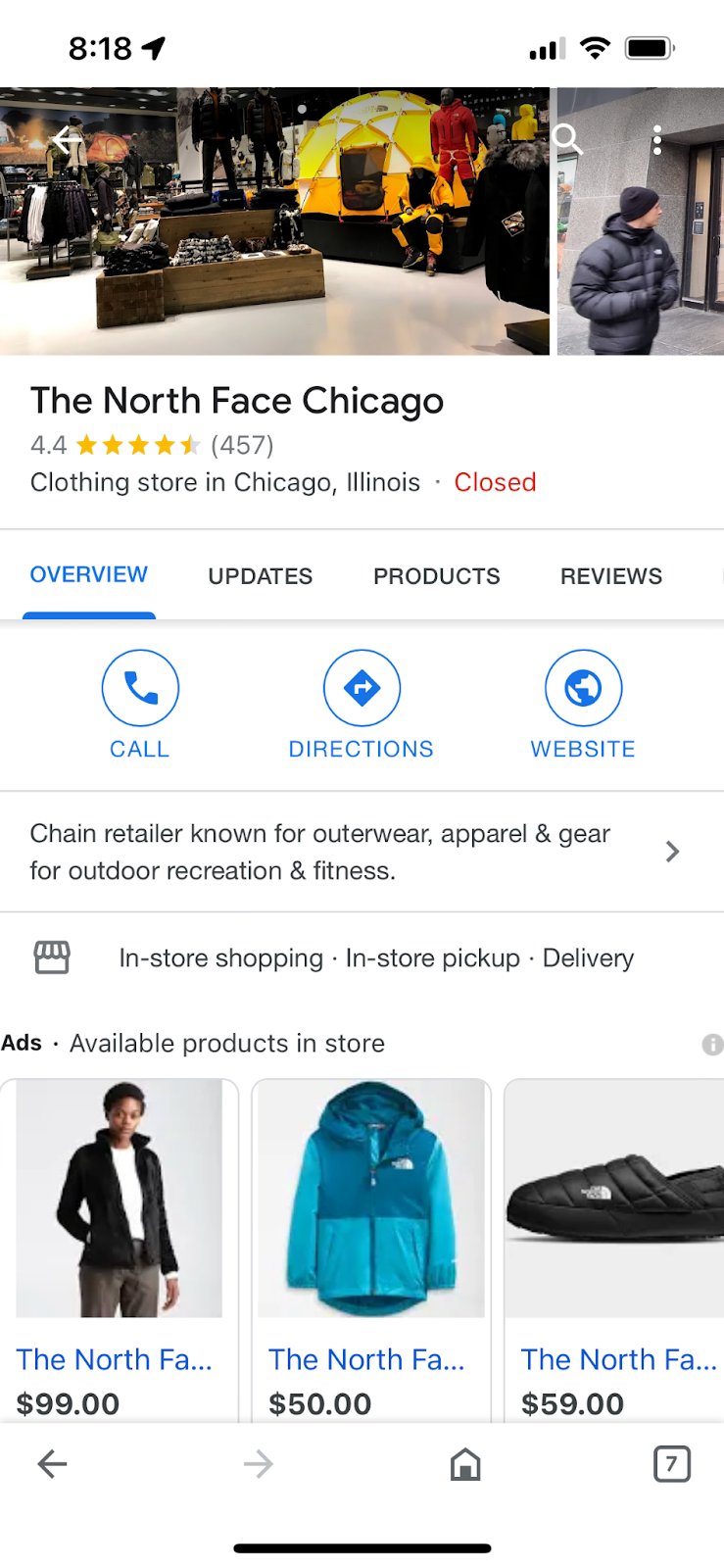
The North Face does a great job of maximizing its listings. All details are completed, and they are supplemented with ads focused on what’s available in the store.
The key to optimization is to ensure you have ownership of all your locations and that the information in those listings is consistent across the web. There are a ton of great resources available on Search Engine Land here to help you maximize this channel.
2. Strong organic rankings to help offset competitive paid search
In retail, many brands find themselves in a negative or low ROI for non-branded keywords. It’s a competitive space and getting your conversion rates high enough to drive a positive ROI for non-brand alone is tough.
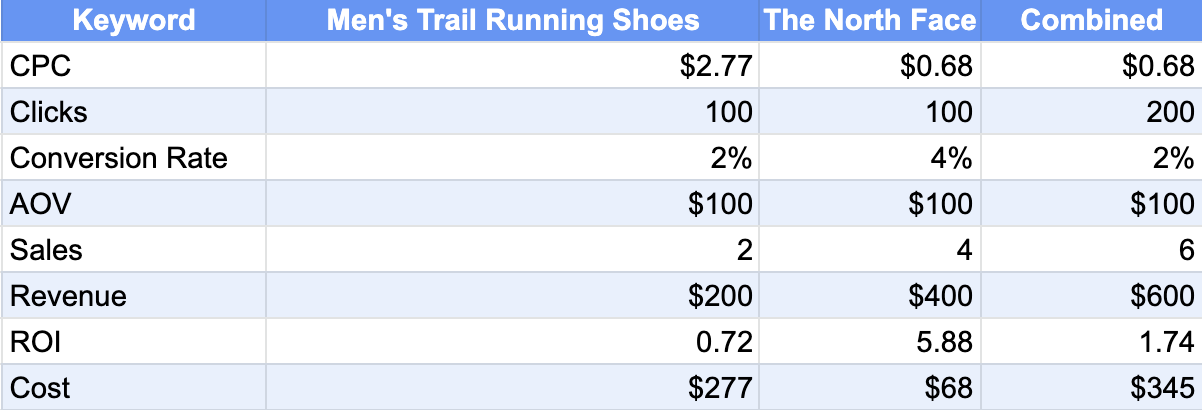
Below is just one example. I took the keyword costs for “men’s trail running shoes” and did a quick model assuming a 2% conversion rate. The ROI is negative.
Obviously, there are assumptions here that could be altered to get this to be higher (AOV, Conversion rates), but it’s in the ballpark. So brands will roll up their paid search into a portfolio that includes branded terms. This is one way to show a positive ROI on paid search and one I agree with.
The other approach is to have a strong organic traffic flow. Then you can offset lower ROI for volume by looking at the search program as a whole.
The North Face does a nice job with its organic rankings. Take a look at some data points against some other competitors to see what I mean. The North Face has a paid-to-organic traffic rating of 1.75%. This is the lowest in the group.
However, they have the most organic keywords ranked, and the second highest amount of keywords ranked in the top 3 organically (only outpaced by Canada Goose which has about a third of the total ranking keywords).
The North Face has worked to make sure their organic rankings are strong so that when they do participate in paid they can win and the total portfolio looks strong.

3. Branded search – watch the competition
Branded search is something that is a never-ending discussion with brands.
Should you be bidding on it? Should you let organic listings handle it?
I’ve been a part of tests for the last 15+ years on this topic. There is no one-size-fits-all answer (for what it’s worth: I think you should bid on branded terms).
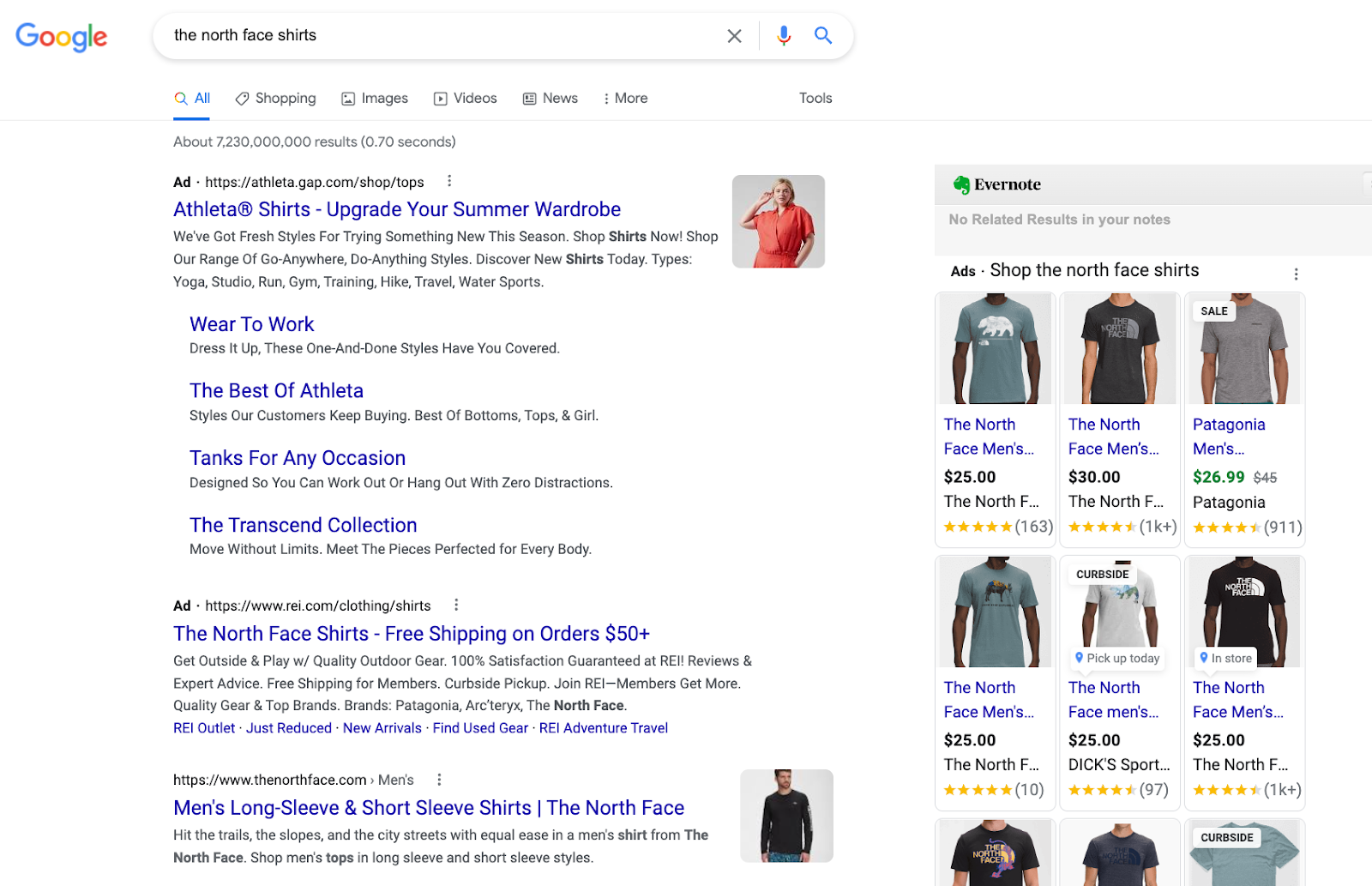
The North Face is a good example of why. It appears to me that they bid on their branded terms sometimes, but not always.
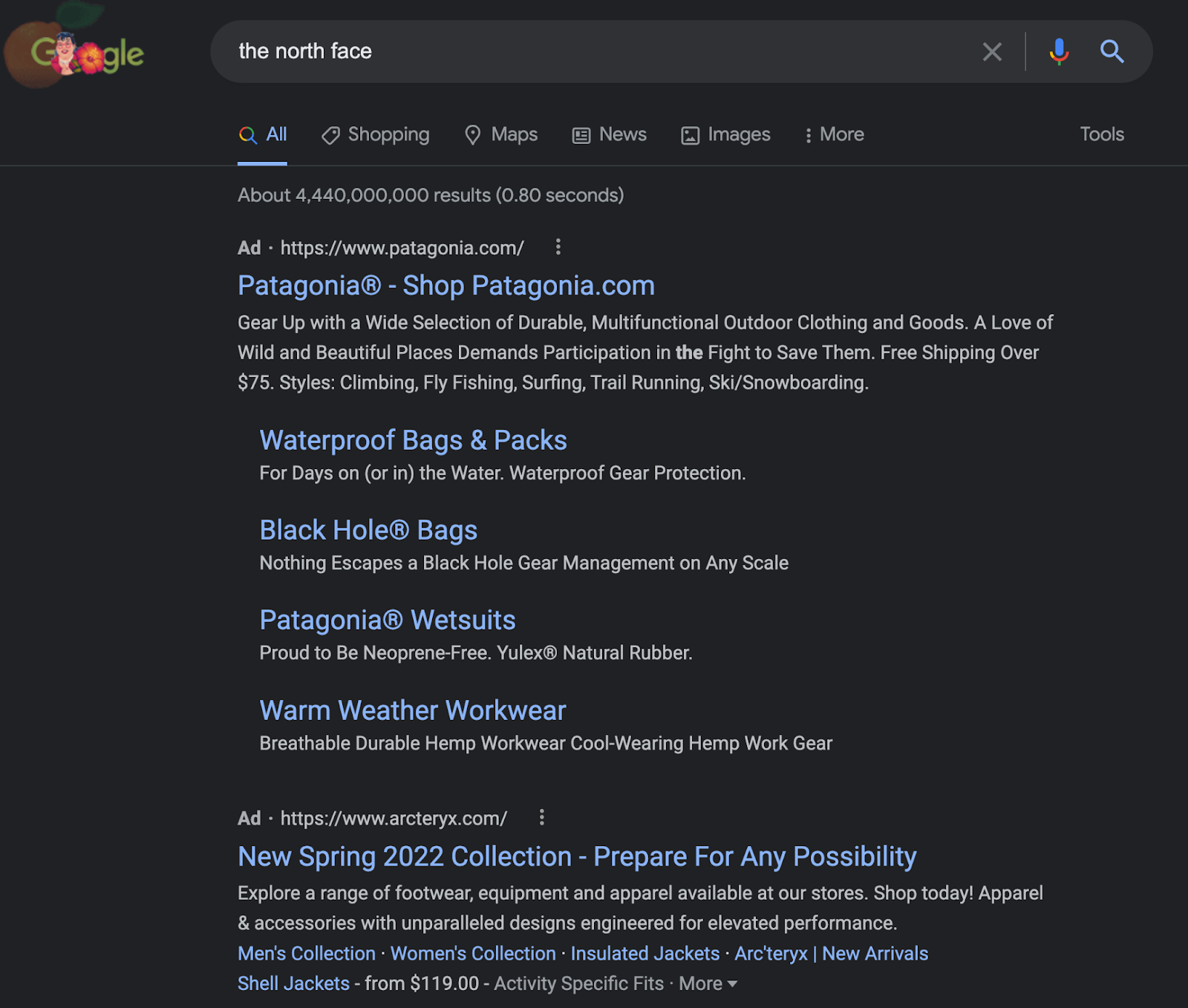
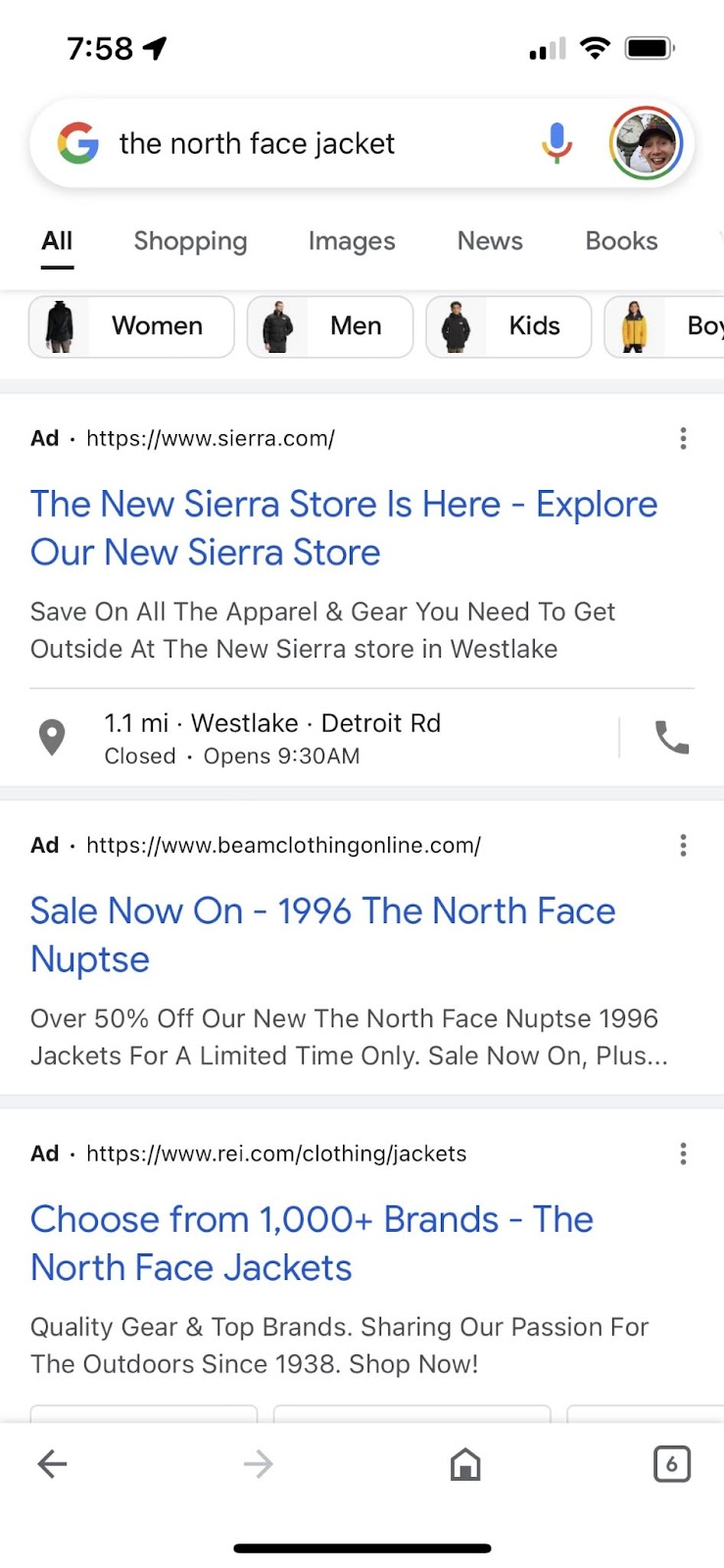
For The North Face, this is more of a defensive strategy. I found lots of examples where brands like Patagonia, The Gap, and REI were bidding on their brand.
If a customer is typing in your branded name into the search results and comes up on another brand, they’ll probably search until they find you. However, this isn’t true 100% of the time.
When you see the examples below, you know that other brands feel like they can squeeze out some sales and increase their own brand awareness. In this case, I feel like The North Face is giving too much up to their competitors and could be more aggressive here.
4. Getting the website right
Even though when it comes to search a lot of the interaction and decision-making is on the keyword side. But you still need a strong website to make it all go.
For SEO, that means strong content and a crawlable and highly performant site. For paid search, that means landing pages that tie to your search terms and can convert at a rate that exceeds the bid prices.
This isn’t easy to do. However, The North Face does a very nice job in this area.
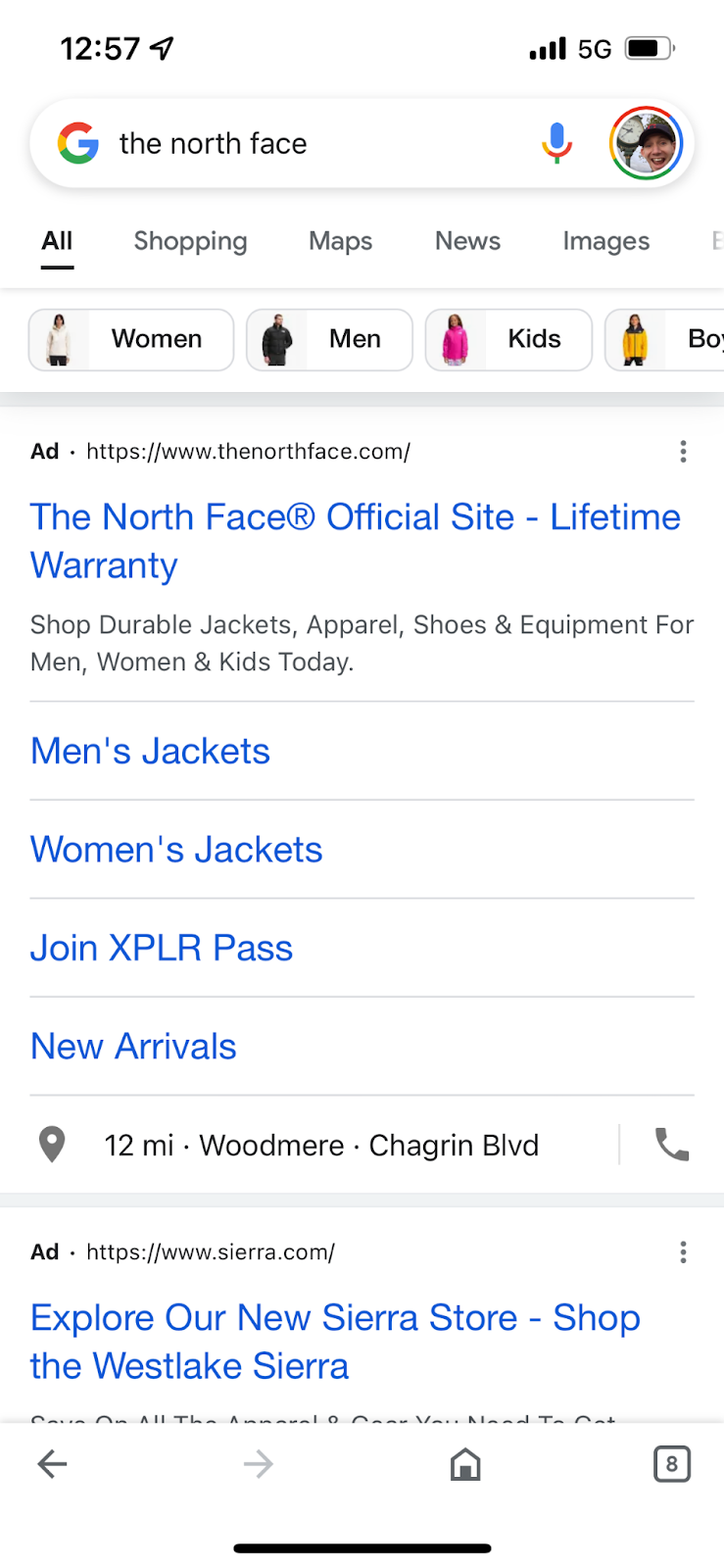
We discussed earlier how well they do from an organic perspective. On the paid side they also do a very nice job.
All the keywords map to the proper landing page. They maximize the use of ad copy to include all the proper callout extensions and site links. It’s very well done.

After writing this and doing some research, I’m reminded how tough it is to judge from afar. There are so many business nuances that make the decisions brands are making unique to them.
Sure, we can all bid on “trail running shoes,” but it’s really the conversion rates, AOV and broader business objectives that determine if that’s the right thing for your business.
Overall, I think The North Face has some opportunities to improve, but generally gets it more right than wrong.
Hopefully, this article gives you some perspective on your business and how you might view your competitors.
The post 4 things to learn about paid search from The North Face appeared first on Search Engine Land.
Courtesy of Search Engine Land: News & Info About SEO, PPC, SEM, Search Engines & Search Marketing
Category seo news | Tags:
Social Networks : Technorati, Stumble it!, Digg, de.licio.us, Yahoo, reddit, Blogmarks, Google, Magnolia.
Microsoft to implement advertiser identity verification
Written on June 16, 2022 at 4:04 pm, by admin
To combat digital payment fraud and online scams, Microsoft is implementing a new advertiser identity verification program.
Rising threats. The pandemic has changed the way many businesses cater to consumers and transact online. Not surprisingly, this has also caused an increase in the presence of fraud and scams. To crack down on these efforts, Microsoft is introducing its advertiser identity verification program.
Launch. A spokesperson for Microsoft told us “We’ve already been running a limited test for several months. This next phase will expand to a small number of countries and verticals, but comprehensive release (ramp up and timing) is still being determined. In the future, we’ll enable all advertisers to verify proactively, but for now, we’re curating participation.”
The program will be available in Australia, Brazil, Canada, France, Germany, India, the Netherlands, Poland, Mexico, Spain, Sweden, Switzerland, Ukraine, the United Kingdom, and the United States.
Facebook recently implemented a two-factor authentication program to help protect user accounts. Google also has its own required verification program which users have 30 days to initiate and complete.
How it works. Microsoft has taken steps to ensure that the identity verification process is simple and automated. Advertisers will use government-issued, photograph-included personal identity documents or business-related documents issued by appropriate regulatory authorities to complete the process.
Microsoft Advertising will request advertiser identity verification for one or more of your accounts via email. You will have 30 days from receipt to complete verification-related tasks.
What Microsoft says. In a blog post released today, Microsofts Neha Garg & Sandeep Krishnan said “This is one of our key investments to enhance digital advertising safety, which we hope to accomplish in partnership with our advertisers. We encourage all our advertisers to complete this process to fight misleading ads and deter bad actors. We’ll continue to use our machine-learning algorithms and systems alongside the domain knowledge of our human experts to further enhance this program.”
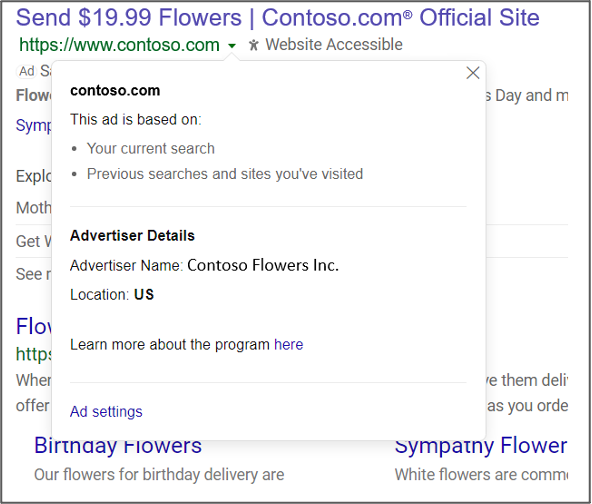
When a searcher views an advertisers details, they will see the following information.
Identity verification help. You can read the official help documentation here.
Why we care. Microsoft advertisers should complete the verification requirements as quickly as possible to avoid interruptions in their ad delivery.
The post Microsoft to implement advertiser identity verification appeared first on Search Engine Land.
Courtesy of Search Engine Land: News & Info About SEO, PPC, SEM, Search Engines & Search Marketing
Category seo news | Tags:
Social Networks : Technorati, Stumble it!, Digg, de.licio.us, Yahoo, reddit, Blogmarks, Google, Magnolia.
Using digital PR to earn links and rank for your target keywords
Written on June 16, 2022 at 4:04 pm, by admin
So what comes first, the chicken or the egg?
Links continue to be an important organic search ranking factor. However, Google frowns on “link building” and states that the best way to build links is to create great content.
If you build it, they will come. But how will they find you if you don’t rank, to begin with?

Ideally, when your site starts gaining authority and ranking well, your pages will start showing up in the SERPs, and you’ll gain links naturally.
However, you can’t achieve this without some initial outreach and digital PR.
Let’s review the steps to create a digital outreach campaign.
Preparation
You’ll need to do some prep work before starting outreach.
Browser extensions
Install the following extensions to your Chrome browser:
Select outreach personas
You’ll need to determine who will be your outreach coordinator and make sure they have a strong social media presence.
From having a good bio and profile image to having active social profiles, it’s important that they are credible and trustworthy to elicit answers.
Make sure your outreach persona has:
- Credible email (e.g., name@company.com)
- Active social profiles
- A personal website
- Strong LinkedIn profile
- Examples of published content
- Company email signature
All of these are signs of authority and will influence whether people open and answer the emails.
Select outreach targets
What pages should be promoted to receive inbound links? What keywords/anchor text should be used for the links?
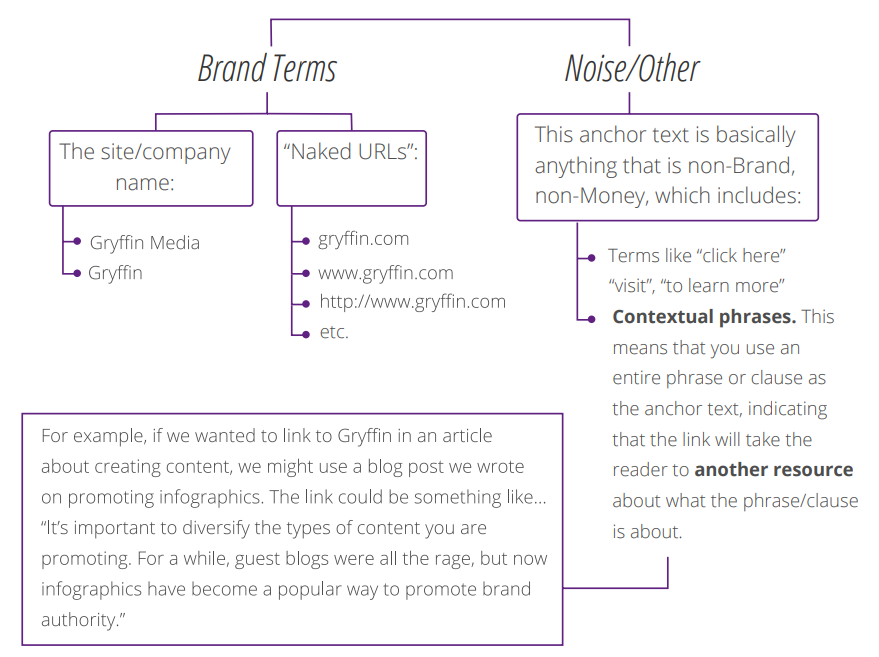
In the past, it was common to build links using keywords in the anchor text. This can result in link penalties, so it’s important to vary your URL/Anchor text combinations to avoid being on the receiving end of manual action from Google.
It’s important to use a combination of brand terms, noise anchors and miscellaneous words for inbound links.
You should continuously track your pages and keywords using a tool (e.g., Semrush or Google Search Console) to identify potential targets for link building.
You can select pages that are trending up, keywords that are within striking distance, as well as keywords that are sliding in rankings.
Build your outreach list
The first step is to create a list of potential sites to reach out to.
Use sites from your content research
During your topic and audience research, you probably came across many sites that discussed relevant topics about your industry. In addition to adding all of these sites to your list of potential target sites, use tools like BuzzSumo to further expand that list.
Using search operators to find sites on Google
The goal here is to uncover sites that have shared similar content in the past. To do so, you want to use search operators to build queries that will uncover the types of sites you need.
For example, for a site that offers online degrees, you could start off with broad keywords like “education,” “college,” and “online universities.” You’ll then want to qualify those terms by adding search operators, such as “education” + “infographics.”
Knowing how to search will greatly impact the effectiveness of your outreach campaign, so it’s definitely worth spending the time to gain more in-depth knowledge on how to use search operators.
Here are some ways to use search operators to turn up great outreach opportunities:
Quotation marks (”…”) for exact-match searches.
- “guest author”
- “write for us”
- “submit”
The tilde (~…) before a word to generate similar topics and ideas.
Inurl:guest-___ tends to yield good results, as many sites put “Guest Post/Blog/Writer/etc” in the title of the post, which ends up appearing in the URL.
The full search terms might come out looking like this:
• “guest post” “real estate”
• “write for us” real estate ~auction
• “foreclosures” inurl:guest-post
• ~home auctions “guest blog”
Now that you know how to find keywords, it’s time to start using them!
Create a spreadsheet with potential link opportunities
By using BuzzSumo and searching Google with search operators, you’ll be able to create a list of potential sites to reach out to and pitch your content.
Once you have collected and added them all to a spreadsheet, your next step will be to verify the quality of these sites to ensure that they have strong authority metrics.
You want to look at:
- Semrush:
- Authority Score
- # of Keywords Ranking
- Organic Traffic
- Majestic:
- Trust Flow: A number predicting how trustworthy a page is
- Citation Flow: A number predicting how influential a URL might be based on how many sites link to it
If you don’t check these metrics, you may waste valuable time and resources contacting and writing for sites that won’t help your link profile.
This is where your Chrome browser extensions can help by placing this information at your fingertips.
Find contact information
Now that you’ve added the metrics and have modified your list of target sites to make sure they are qualified, you’ll want to look for contact information.
Don’t stop by going to the “Contact Us” page. Look for other contact info such as direct email addresses, social media profiles and possibly even WHOIS info. You have to be thorough in this step.
Sending an email to the main site’s contact form may mean that your request ends up in the customer service department, or worse, their spam folders, where it doesn’t get forwarded to the right people.
Without trying to spend too much time navigating around the site, look carefully for their contributor guidelines and add the URL to your spreadsheet for tracking purposes. For example, there may not be a page for contributors, but perhaps the Twitter profile for the editor may be listed on the site, so you can use Twitter to contact the editor directly.
Writing pitch letters
People receive a lot of junk in their email, and many sites are constantly receiving requests for guest posting from humans and spambots alike. For this reason, it’s crucial that your pitch letters stand out and showcase transparency.
Here are some of the elements that help pitch letters stand out:
- Try to keep your letter brief and easy to read/scan
- Personalize the letter wherever possible
- Be friendly and approachable – small talk goes a long way. People want to know you’re a real person, not a robot sending auto-generated emails
- Use perfect grammar – you can’t offer to contribute to other sites and use poor grammar. Double and triple-check your grammar!
- Link to examples of your work, preferably articles posted on authoritative domains.
Now let’s discuss the letter itself:
FROM: Use a company email address to make your email more credible and trustworthy.
SUBJECT: Short, catchy subjects will draw the “open”
BODY: Now, you need to mix all of the elements discussed above into the email:
It’s important to spend enough time crafting these outreach letters to have a chance to succeed.
Start outreach
Using email marketing tools such as Mailchimp or ActiveCampaign is not an effective way to send outreach emails. Many will go to the spam folder or will cause your email server to be banned.
Instead, use your email server or Gmail to send out your outreach emails. This is why it’s important to be thorough and meticulous in the steps above.
With a list of target sites and email templates, start sending out emails and marking the date that you sent the emails in a spreadsheet so you can keep track of what sites were contacted and when.
Once you start receiving responses to your emails, it’s easy for your inbox to become absolute chaos.
Methodical organization is key at this stage to keep all conversations moving forward.
Label emails
When you receive a response, go ahead and label your emails. Here are examples of labels you could use:
- Interested
- Not Interested
- Pay to Post
This way, you can separate emails that require responses and move the ones that don’t need responses to a different folder.
Categorize positive responses
Create a folder and/or label for all of the positive responses. Some of the folders can be:
- Send Topic Ideas
- Accepted Topic
- Ready for Content
- Submitted
- Published
Now that everything is labeled and organized, you can actually take the actions required for each conversation. These will require sending topic ideas to people who accepted your request, ordering content with your writers, and sending follow-up emails.
Topic ideas
From the first email response, you need to cultivate a relationship with other website owners.
When they respond and agree to accept an article, the first step is to spend some time on their site, becoming familiar with the type of content they share. What is the site’s theme? Who is their target audience?
You’ll need to spend some time researching so that the title you pitch will be relevant, interesting and appealing to their audience.
The ideas you pitch should also include something thematically relevant to your target landing page and keywords so that the link placement to your site is natural.
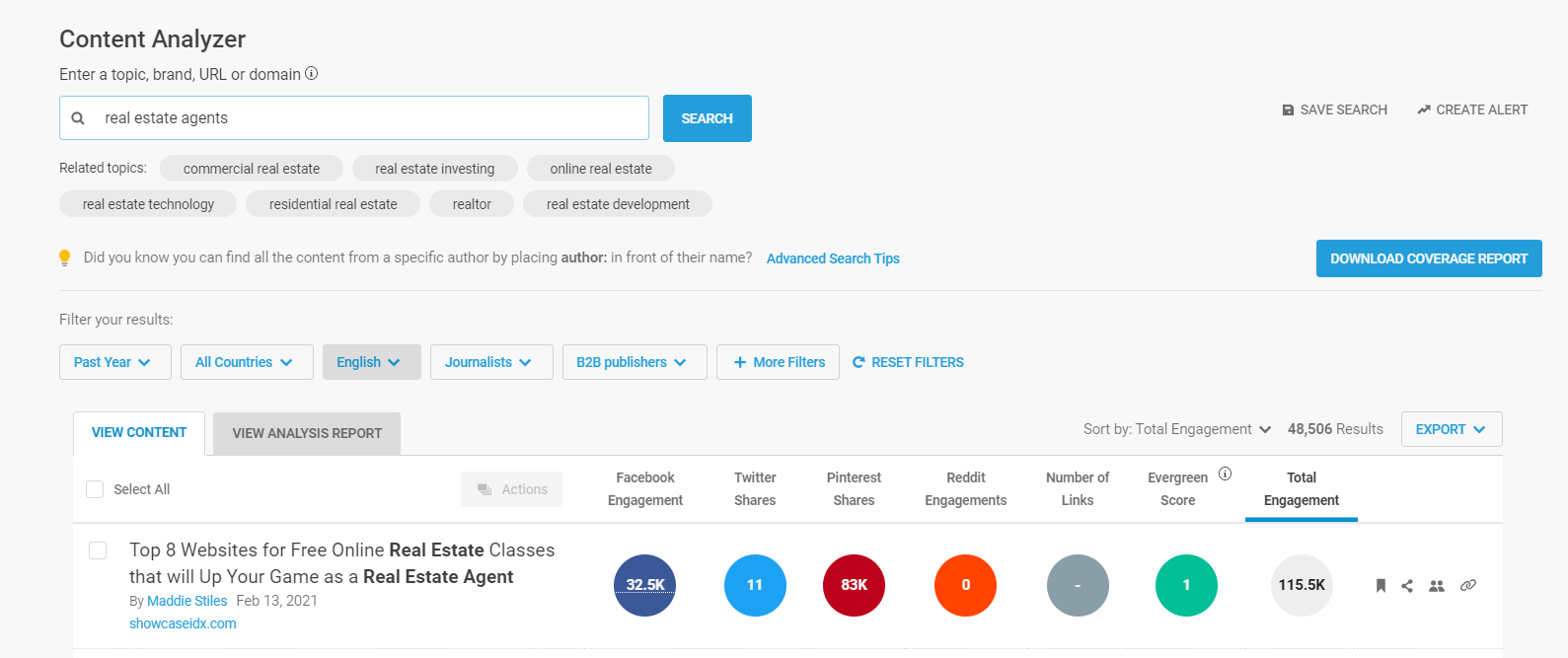
If you use BuzzSumo, you can try searching multiple relevant keywords, and BuzzSumo will sort the articles by total shares, which can help you surface the content that resonates with their audience.
Deliver content
As soon as the target site approves your topic, it’s time to get your article written. You may have a dozen open conversations taking place simultaneously; it’s important that you get your content written and sent to the site in a timely manner, or you may lose the chance of getting published.
Ideally, your articles should be at least 750 words long, include a link to your site and to other relevant authoritative sites, and contains a couple of links to other relevant pages of the target’s site.
Add optimized images and cite their source!
Following up
When you send articles to be published to other websites, you may need to send a few follow-ups to make sure the target sites received and has all the information they need. You may want to create a task or reminder for yourself to follow up a few times until the article goes live.
Sometimes, you may not hear from the site owner, but if you review the site, your article may already be published.
If you don’t hear back from them, it could be that the article wasn’t relevant, and they preferred to drop the communication. Or it could be they went on vacation or got busy, and your emails drowned in their inbox.
Send out 2-3 follow-ups, and if you don’t hear back after that, you can mark your article as available and pitch it to a different site.
Promoting your published content
Getting content published on other sites can be an arduous process, but gaining editorial placements in targeted, authoritative is worth it!
Now, you’ll want to promote your published article.
Share the article in your social media profiles and tag the site where your article was published.
If you have a budget for content promotion, consider boosting the post with Facebook ads to increase the readership and traffic to your article.
You can also use each published content piece as “social proof” when pitching other sites.
Influencers and media
Influences have two things that every brand needs:
- An audience
- Credibility
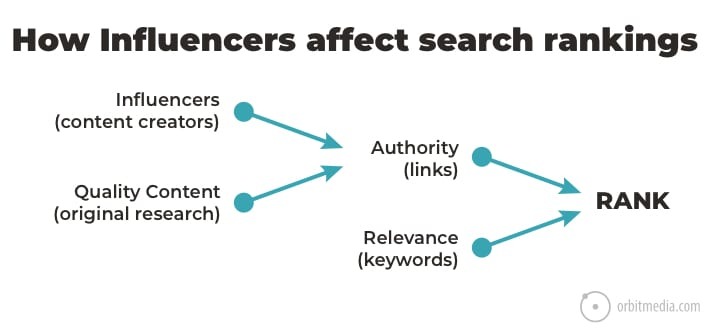
Consumers have learned to trust influencers and follow their recommendations, and guess what? So does Google.
Working with influencers can be a powerful way to gain authoritative links and citations, as well as gain social proof and increase brand awareness. These links and mentions will diversify your link profile and improve your site’s authority score.
Let’s go through the steps toward creating and implementing an influencer marketing strategy:
Identify relevant influencers
- Investigate the metrics of each influencer
- Study their profiles for relevance to your brand identity
Develop your influencer marketing strategy
- Determine your budget and potential incentives
- Develop campaign KPIs
- Create a campaign brief, including any relevant assets such as social media images and sample posts
Pitch influencers
- Reach out to influencers with an effective pitch letter
- Track conversations with your influencers (make sure you respond in a timely manner)
Track the results of your campaign
- Potential KPIs to track include impressions, clicks, transactions, audience growth and newsletter signups.
Now that you have the inside scoop on influencer marketing, it’s time to get researching!
Finding influencers and media contacts
- Research: You can use tools (e.g., BuzzSumo, Traackr, Izea) to create a database of possible influencers to contact.
- Create a connection: Before sending them a pitch, you should consider following them on social media and liking or commenting on their content. This way, your name will become visible in their feed before you contact them
- Personalize your pitch: When you do reach out, make sure you send them a personal email, so it’s obvious you’re not sending an automated email to a million people.
- Agreement: Once you’ve talked to the influencer and negotiated an agreement, we highly recommend getting the details and deliverables signed to create accountability. Some influencers may ask for a payment, others for product and others can become affiliates.
Adding authoritative links and citations to your backlink profile can have a substantial impact on your site’s visibility.
Digital PR
You should always be thinking about producing unique content that will be of genuine benefit to your audience and industry.
Some ways of producing this content include:
- Conducting surveys: You can use SurveyMonkey or Google Surveys to run surveys and share your findings with graphs and metrics and share these with the media.
- Sharing industry research: Track patents being published in your industry and share them and discuss the potential benefits and impact.
- White papers and e-books: Write comprehensive white papers or e-books delving into specific topics in your niche.
Once you produce these assets, you can promote them using outreach and work with influencers to help you extend the reach of these assets.
It’s a powerful way to earn media mentions and coveted links.
Track your progress
Track your outreach efforts by looking at your backlink profile periodically and seeing how your authority score changes over time.
What links have had a significant positive impact on your score? What is your link velocity? Are you continuously earning more links than you’re losing?
It’s important to keep a close eye so you can amplify your strengths and overcome weaknesses in your link profile.
The post Using digital PR to earn links and rank for your target keywords appeared first on Search Engine Land.
Courtesy of Search Engine Land: News & Info About SEO, PPC, SEM, Search Engines & Search Marketing
Category seo news | Tags:
Social Networks : Technorati, Stumble it!, Digg, de.licio.us, Yahoo, reddit, Blogmarks, Google, Magnolia.
Search marketers agree: automation the least favorite part of PPC
Written on June 15, 2022 at 1:02 pm, by admin
Whether you love it or hate it, PPC is a part of digital marketing that just isn’t going away any time soon. I’ve been working in PPC for over 10 years and I’ve seen it all. ETA’s, RSA’s, cost-per-touch? (looking at you, Apple), broad match modifiers (RIP), and attribution to name just a few of the most recent changes.
Earlier this month we asked you “What’s your least favorite part of PPC?”
We received an overwhelming number of answers ranging in everything from Google support to agencies (no offense taken), to clients with unrealistic expectations. But one answer stuck out: Google automation.
Let’s dive in.
Automation can be your best friend or a nightmare. Learning how to navigate and find a balance between machine learning and manual management has been on a lot of marketers’ minds lately. (Did you catch Brad Geddes keynote on day 2 of SMX Advanced?)
Here’s what you said:
- “Google’s movement toward AI & machine learning which is ultimately taking away decision-making and control away from advertisers. While it may make sense for some advertisers to have more automation, for others who have the desire, knowledge, and resources there’s a strong case to continue with manual orchestration and intervention of accounts. Studies we’ve performed have already shown less desirable results with the match-type updates and introduction of RSAs. It truly feels as though these initiatives by Google are driven by their agenda to increase advertiser spending.”
- “Constantly having control of what we’re doing taken away through automation.”
- “Everything becoming more automated, broad targeting, less insight in data and overall less control over your campaigns.”
- “Gradual loss of control over targeting over the years. Search engines introducing changes that will clearly harm performance but selling them to advertisers as “upgrades.”
- “Giving all control to Google with Smart bidding, dynamic ads, and lack of reporting while also seeing prices increase year over year!”
- “Google forcing automation on those of us that don’t want it.”
- “My biggest frustration is consistent pressure to relinquish control of performance to the platforms by adding automation features and broadening our targeting.
- “I believe in algorithms I do. But the idea that we should start new campaigns with broad match keywords, on an automated bidding strategy, with ad copy made up by a robot and just trust it will work is silly and demonstrably false based on even the limited amount of search term data we get. It makes it really hard to trust anything Google puts out, and especially difficult to trust the reps who are pretty obviously bonused based on acceptance rates of automation features. Our job is to feed the system data, make sure it’s the right data, then from there allow the algorithms to uncover additional value we can’t see, based on what we tell it is valuable to us.”
- “Automated bidding is all or nothing – I want to turn off certain targeting and use automated bidding at the same time. But I can’t and SA360 hasn’t learned when a targeting option truly performs terribly in my account. I know when that is and I should be able to turn off devices or select dayparting/DOW targeting and have it work from there instead of having to switch to manual bidding.”
- “These days my least favorite part of PPC is the forced automation. It is designed for high volume, particularly e-commerce, accounts and it just does not work the same way for low conversion volume accounts. It is really frustrating to have fewer and fewer options available to manage these types of accounts successfully. The reduced access to data that is part of automation is also frustrating. Platforms are showing us less and expecting us to “just trust the machine learning”. Well, I’ve seen the query reports (with the data we can still see!) and I don’t trust the machine learning a whole lot based on what I see there.”
- “The constant push for automation by Google and Bing reps. I get it, it’s their job to grow revenue for Google and Microsoft. We’ve used automated bidding, and it works for some products…until it starts eating away at itself and we have to go back to manual bidding to fix performance.”
- “Google forcing their automation on every account. Some of it is good, but others just don’t work in certain circumstances and is clearly a money generator for them.”
- “The constant drive to push automated bidding. I only work with local businesses for lead gen and the recommendations are rarely relevant. Related, is that they bypass the agency to talk to the customer who doesn’t understand so it constantly undermines me.”
Google support. Many of the answers we received specifically named Google support as lacking when it comes to offering help. As hard as they may try, most times they miss the mark.
- “Google reps that just tell you to apply everything from the Recommendations tab and offer no additional insight or guidance. I don’t need a call to tell me to look at the Recommendations tab and I’ll apply recommendations that are appropriate, not just to improve a nonsense account score.”
- “Google’s lack of transparency and their account managers chasing me to increase daily budgets!”
- “My least favorite part in PPC are the Google Representatives that keep calling you even in the middle of the night. Although, there are times that their advice make sense but most of the time it will just drain your budget. They’re just very annoying to be honest. I get more sensible recommendations on Facebook Groups than their Representatives.”
- “The constant calls from Google reps offering solutions which invariably make my campaign’s performance worsen. The calls and emails are non-stop. It’s borderline harassment, and even though I’m in Europe so can normally take advantage of privacy laws to stop this sort of thing, Google seems to be above those laws and carries on regardless, even when I’ve asked them to stop.”
- “Google Ads reps. Bad advice.”
- “Google Reps pestering to apply auto recommendations.”
- “Dealing with Google reps who are more concerned with increasing Google’s bottom line than your results.”
We’re starting to see a trend here.
But Google isn’t the only offender when it comes to paid advertising. Facebook and Microsoft make a cameo also.
- “Facebook Ads has become frustratingly difficult to perform with too many issues, policies and useless pathetic chat support.”
- “The fact we have little to no say on the future of it. Google, Facebook, Microsoft, et. al. sort of do whatever they want with many changes coming down the pipeline looking more like ways to make these companies more money by taking control out of our hands.”
- “Weird changes made by Facebook. Explaining the ever-changing landscape to prospects who just can’t seem to wrap their heads around the fact that online advertising isn’t the cheap alternative.”
- “Ads that I have run a million times before are suddenly not approved by Facebook and get rejected. I appeal and get them back, but seriously, what happened?”
- “The changes to the interfaces are too often, Google screwing with match types and Facebook changing their targeting options make long-term methods impossible to develop.”
What about clients? Agencies unite when it comes to managing client expectations.
- “Explaining to each client how Google works when it comes to “learning mode”– each client seems so worried about week-over-week performance when everyone knows that is not a good true gauge of performance especially when you make large changes to the account. And explaining learning mode is like wasting time to clients. They don’t understand no matter how you dumb it down.”
- “Clients who don’t understand how marketing works. Asking to run “brand awareness” in Google Search, and running a remarketing campaign with a “max impressions” type of reach strategy.”
- “Small budgets! Oftentimes, the smaller the budget, the more precious the dollars are to the client, which in turn means the need of results that are rarely possible to achieve. Especially for industries with high Search CPCs… $500 doesn’t go far, even if $500 is a lot of money for a small business. Options end up feeling like (1) miracles, (2) disappointment, or (3) turning down small budget prospects.”
- “The client.” (LOL)
- “I work for an agency. My least favorite part of PPC is telling clients that they can’t get 100 HVAC clients with a $2,000 monthly budget when the weather is mild. They can complain all day long and that still won’t change the fact that they are asking for a miracle and cheap…sorry not sorry.”
- “Most of my clients are great, but the constant flow of emails/calls is exhausting and takes so much time away from the work I actually like to do – testing and optimizing.”
More least favorites. While these didn’t quite fit in any category, we thought they deserved an honorable mention.
- “The lack of options for B2B targeting. This is true across all platforms except LinkedIn. There are countless, niche targeting options for B2C, and a scant few for B2B – and those that do apply to B2B are so generic they don’t perform well. Also, match rates for first-party audiences are horrible – 10-15% in some cases. So using first-party data isn’t really a solution either.”
- “Piecing together the data to determine how the ads are performing and make adjustments. I have yet to come across a platform that’s intuitive, or even straightforward to use. Second least favorite (related) issue is tracking conversions, which also seems to be far more complex than it needs to be.”
- “My least favorite part about PPC is attribution. Everyone working in PPC is having or have had to prove the value of what we do and that is becoming more difficult to do without being able to complete attribute our work to overall goals.”
- “There are several things but my least favorite part is the human factor from clients to devs. Alternatively, it’s conversion tracking because neither GTM nor Google’s Consent-Mode are GDPR compliant in their current form.”
- “Simply not cost-effective.”
- “Trying to explain to the clients that PPC is an omnichannel approach. The PPC campaigns contribute to online sales, but also for offline sales.”
- “The theft by bots and competitors.”
Why we care. It’s nice to know that we’re not alone when we get frustrated with our jobs. Whether we work for agencies or in-house marketing teams, we all face similar issues and concerns. It’s important in marketing (now more than ever), to adapt to changes, but that doesn’t make them any less maddening.
The post Search marketers agree: automation the least favorite part of PPC appeared first on Search Engine Land.
Courtesy of Search Engine Land: News & Info About SEO, PPC, SEM, Search Engines & Search Marketing
Category seo news | Tags:
Social Networks : Technorati, Stumble it!, Digg, de.licio.us, Yahoo, reddit, Blogmarks, Google, Magnolia.
Webinar: Protect your PPC spend against ad fraud
Written on June 15, 2022 at 1:02 pm, by admin

By 2023, the global cost of digital advertising fraud will reach $100 billion. Invalid traffic and fraud are consuming your budget, leaving you with few genuine leads and poor advertising ROI.
Learn how to verify advertising engagements and proactively block invalid traffic with ad fraud expert Adam French, who will share his insights into creating better outcomes for digital advertising efforts. He will also discuss how organizations can deploy end-to-end protection and detection capabilities to maximize ROI.
Register today for “Protect Your Paid Advertising Spend Against Ad Fraud and Invalid Traffic,” presented by TrafficGuard.
The post Webinar: Protect your PPC spend against ad fraud appeared first on Search Engine Land.
Courtesy of Search Engine Land: News & Info About SEO, PPC, SEM, Search Engines & Search Marketing
Category seo news | Tags:
Social Networks : Technorati, Stumble it!, Digg, de.licio.us, Yahoo, reddit, Blogmarks, Google, Magnolia.
Apple’s ad business may reach $6 billion by 2025
Written on June 15, 2022 at 1:02 pm, by admin
JP Morgan lead analyst Samik Chatterjee thinks Apple could bring in $6 billion in revenue from mobile advertising in 2025.
Market projections. According to Apple Insider, the mobile advertising market is expected to exceed $400 billion in 2024, which is about a 33% increase from the $288 billion it claimed in 2021.
Privacy concerns and speculations. The release of iOS14 and the introduction of App Tracking Transparency (ATT) caused a supposed $10 billion in lost revenue for Meta. Chatterjee mentions in the article that this change “drove headwinds for incumbent advertising platforms,” and we can’t help but wonder if this was Apple’s plan all along.
Chatterjee goes on to predict that the headwinds will lead to a reallocation of advertising funds – many of which will be spent on Apple Search Ads, which directly benefits their advertising business and revenue.
Earlier this month we reported on a new pricing model for Apple’s search campaigns, Cost Per Tap (CPT). The new model will replace the less popular CPM campaign standard, and reflect the typical cost-per-click model that advertisers are familiar with on other platforms such as Google and Facebook. This change could be an early indication that Apple has big plans for its ad network.
The future of Apple advertising. There is no word on whether Apple has plans to implement an audience network. However, given their large network of users, it wouldn’t be completely out of their wheelhouse. The largest slice of the Apple pie, however, still comes from Apple Search Ads, which Chatterjee says will account for about $4.1 billion in revenue in 2025.
Why we care. The implementation of iOS14 didn’t stop Apple from tracking our data, it just stopped them from sharing it. Given Chatterjee’s ad revenue predictions, we wonder if Apple really prioritizes privacy and customer experience, or if they have other plans to take over the digital ad landscape. With 825 million paid subscriptions and a user base of over 1 billion, they certainly have the leverage.
The post Apple’s ad business may reach $6 billion by 2025 appeared first on Search Engine Land.
Courtesy of Search Engine Land: News & Info About SEO, PPC, SEM, Search Engines & Search Marketing
Category seo news | Tags:
Social Networks : Technorati, Stumble it!, Digg, de.licio.us, Yahoo, reddit, Blogmarks, Google, Magnolia.
How to find the balance between creativity and automation in PPC
Written on June 15, 2022 at 1:02 pm, by admin
Day 2 of SMX Advanced 2022 has kicked off and this morning’s keynote by Brad Geddes was all about leveraging automation in your ad campaigns.
Geddes is a PPC expert and co-founder of Adalysis, and the author of “Advanced Google AdWords,” the most advanced book ever written about Google’s advertising program. Geddes has worked with many of the world’s leading companies in managing and perfecting their PPC management and workflows.
Where is the balance?
In his keynote, Geddes went into great detail on the difference between humans and machines, what their strengths are, and how they can work together to create a winning ad campaign.
“Google and Microsoft aren’t taking away your control,” Geddes said. “They’re giving you more management options. You don’t have to fight the machine, but your job is to find the balance.”
So what is the difference?
Realizing what humans and machines do well and playing to those strengths is key. Humans are really good at:
- Creativity
- Strategy
- Storytelling
- Reacting quickly to market changes
- Auditing the machine
- Empathy
Machines, on the other hand, are really good at:
- Math
- Bidding
- Statistical significance
- Finding lookalike audiences
- Inputting repeatable data like reports
- Conversations from human-driven inputs like chatbots
Referencing recent PPC survey results, Geddes reminded us that ad managers are happy with the results when it comes to scripts and bidding. Managers have neutral feelings when it comes to RSAs, data-driven attribution, and local campaigns.
Not surprisingly, managers are generally unhappy with automation surrounding discovery campaigns, the insights tab and auto-applied recommendations.
All in all, machines are really good with numbers, but not with insights and intent. That’s where humans come in.
Is anyone surprised? I didn’t think so.
What do we want? Balance of data insights combined with a machine’s ability to crunch numbers and make predictable outcomes!
When do we want it? Now!
Using guardrails
Geddes described guardrails as boundaries advertisers put around automation.
Google doesn’t always get it right and adding guardrails helps advertisers “leverage automation within our own framework of tolerance and profitability.” Geddes goes into depth on how to use these to fine-tune your campaigns.
A few of the most common guardrails are:
- Negative keywords
- N-gram analysis
- Negative audiences
Let’s talk strategy
One of the most important takeaways in Geddes’ keynote is how to address key parts of your funnel with proper messaging and measurement.
How is the message changed based on previous user interaction? Is there cross-channel integration to consider?
But how do you create a plan around keywords, audiences and landing page experience?
The right campaign builds for almost any account size & type
Consider your campaign type, budget and strategic goals. Then think about your strategy.
Geddes explained the exact campaign builds he uses for his own accounts which include:
- Search or display
- Custom audiences
- Exact or phrase match – or broad match with a lot of data
- Lightly pinned RSAs
Complications with strategy or campaign type (such as smart shopping or video) require additional considerations. However, as Geddes explained, this campaign build can work for everyone and uses several types of automation at the same time.
When should we override the automation
Geddes said that in reality, especially with RSAs, we have more control than we think. We aren’t forced to use machine learning. Account success is based upon KPIs, not on how much automation you’re using.
Don’t undervalue humans
Sometimes you want full automation, but Geddes laid out some considerations before diving in.

But wait, there’s more
There’s so much more to Geddes’ excellent keynote. Check it out for yourself – it’s not too late to register for SMX Advanced. Simply register for free here to watch the full keynote on-demand.
And there’s still plenty of time to experience the rest of this year’s 100% free and virtual edition of SMX Advanced. Register today to watch all the other great SEO and PPC sessions on the agenda today – and ask your questions of the speakers in our live Overtime Q&A.
The post How to find the balance between creativity and automation in PPC appeared first on Search Engine Land.
Courtesy of Search Engine Land: News & Info About SEO, PPC, SEM, Search Engines & Search Marketing
Category seo news | Tags:
Social Networks : Technorati, Stumble it!, Digg, de.licio.us, Yahoo, reddit, Blogmarks, Google, Magnolia.
5 tips to develop authoritative content for Google and searchers
Written on June 14, 2022 at 9:57 am, by admin
Day 1 of SMX Advanced 2022 opened today with a keynote by Jaimie Clark, VP of SEO at Centerfield. It was packed full of insights around creating authoritative content that Google ranks and searchers need.
The Wirecutter migration: SEO + content + rebrand
Before Clark joined Centerfield, she worked at the New York Times. In 2016, New York Times Co. bought The Wirecutter, a product recommendation site.
She led the migration of thewirecutter.com to nytimes.com/wirecutter in 2020. This migration resulted in Wirecutter doubling its search traffic within a year.
But two years of SEO work preceded the migration. And it started with a new mission: to help people effortlessly choose and buy the stuff they need to live a better life.
How they did this:
- Thorough reporting that got to the right answer.
- A hard focus on solving reader problems (not heroing products).
- Making actionable recommendations and communicating as a human would.
- Prioritizing long-term reader trust.
Here are five tips Clark shared during her SMX Advanced keynote on how to develop authoritative content for Google and searchers.
1. Focus on depth, not breadth
Clark said Wirecutter had a “mile-wide, inch-deep approach” to product reviews.
But their content strategy shifted in 2018 to go a mile deep. They started creating:
- Top-level pages: These acted as a collection of summaries for specific guides and related use cases. These pages were linked to mid-level pages for more in-depth analysis.
- Mid-level pages: These went deep on specific use cases or types of products.
- Supporting content: These included blog posts, how-tos and news. Meant to add breadth and depth of topical coverage by answering frequently searched for questions and linking to other pages when it made sense.
2. Build topical authority
One of Wirecutter’s goals was to own search results for the term “vacuums.” They had about five reviews on different types of vacuums (handheld, cordless, robot, steam, stick).
Clark said they looked at search data to find additional use cases to identify and fill content gaps. They also researched comparisons and supporting content people were searching for.
“And we always updated the topics page – the ‘best vacuum’ page, to link to and address each of those use cases as anything underneath was updated,” Clark said.
3. Have a purpose
There should be a clear, user-centric reason why a page or website was created.
That purpose can be singular or multifaceted.
By Google’s definition, each page should have a clear beneficial or helpful purpose for users, Clark said.
Questions to ask yourself:
- What is the main purpose of any given page on your site?
- Who do you expect to be on the page?
- What are they looking for when they get there?
- How do they expect to see the content formatted?
“We don’t want to help one random person make one decision. Instead, we wanted people to really Wirecutter their homes,” Clark said. “Helping them discover what they needed day to day, bigger picture, longer-term, tied to the largest events in their lives.”
4. Present content in the most useful way
You should make clear what’s more important by the way you present your content. You should then lead people deeper for people to dive into specific use cases as needed.
There are two main categories of content:
- Main content: Should directly help a page achieve its purpose. This can be text, images, tables, videos or any other page features that help someone understand what the purpose is and actually achieve the goal.
- Supplementary content. Should help users find and navigate the main content. Supplementary content should not distract the user from the main content.
5. Demonstrate your E-A-T
Here’s how Wirecutter approached E-A-T:
Expertise
Structured data was added to author pages to reinforce that Wirecutter’s content was written by experts or enthusiasts who demonstrated expertise in a specific space.
Author pages started with a paragraph up top, with details about the writer:
- How long they have been covering a subject.
- Their background.
- Why they are qualified to talk about the topic.
The pages also included social media links (e.g, LinkedIn), an email contact and a feed of their latest articles.
Authoritativeness
These are the “tried-and-true” on-page elements for how Wirecutter generally structured its pages:
- Introduction: This provides an overview of the process and results in one paragraph. It’s meant to be a condensed form of the hours spent researching and testing. This paragraph always included a link to the product buy page to make it easy for people to make a decision.
- How we picked: This details the criteria and features evaluated. These types of elements are especially important in light of Google’s Product Review updates.
Wirecutter also preserved the original publishing date timestamps, using schema. Why?
They believed this way to demonstrate longevity and make sure Google understood that even though the page moved to a new location, it is the same authoritative piece of content that was first written by the same person years earlier.
Trustworthiness
This is a measure of two things:
- Accuracy: You can use an Update box to call out if something is out of stock or if some information has changed. This helps show that your page provides the most up-to-date information.
- Transparency: How do you recommend products? How do you test products? You want people to trust you. So you have to explain why they should.
Register now for SMX Advanced
Missed Clark’s keynote live? No worries! Simply register for free here to watch Clark’s full keynote on-demand.
And there’s still plenty of time to experience the rest of this year’s 100% free and virtual edition of SMX Advanced. You can watch all the other great SEO and PPC sessions on the agenda today and tomorrow – and ask your questions of the speakers in our live Overtime Q&A.
The post 5 tips to develop authoritative content for Google and searchers appeared first on Search Engine Land.
Courtesy of Search Engine Land: News & Info About SEO, PPC, SEM, Search Engines & Search Marketing
Category seo news | Tags:
Social Networks : Technorati, Stumble it!, Digg, de.licio.us, Yahoo, reddit, Blogmarks, Google, Magnolia.
New shopping links for Google AdSense
Written on June 14, 2022 at 9:57 am, by admin
There’s a new Labs feature in town for Google AdSense called shopping links.
What are shopping links. Shopping links are placed in your page’s main content by hyperlinking existing words. Whenever Google detects a shoppable product mention, users will be shown shopping ads for that product.
Where will shopping links show. Google will only place shopping links on pages where there are detectable product mentions. Since this is a new lab feature, Google will limit the amount of traffic enabled to view shopping links to 10%.
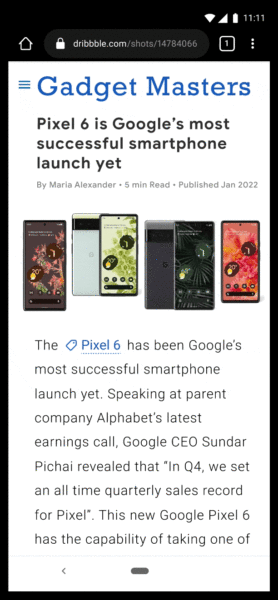
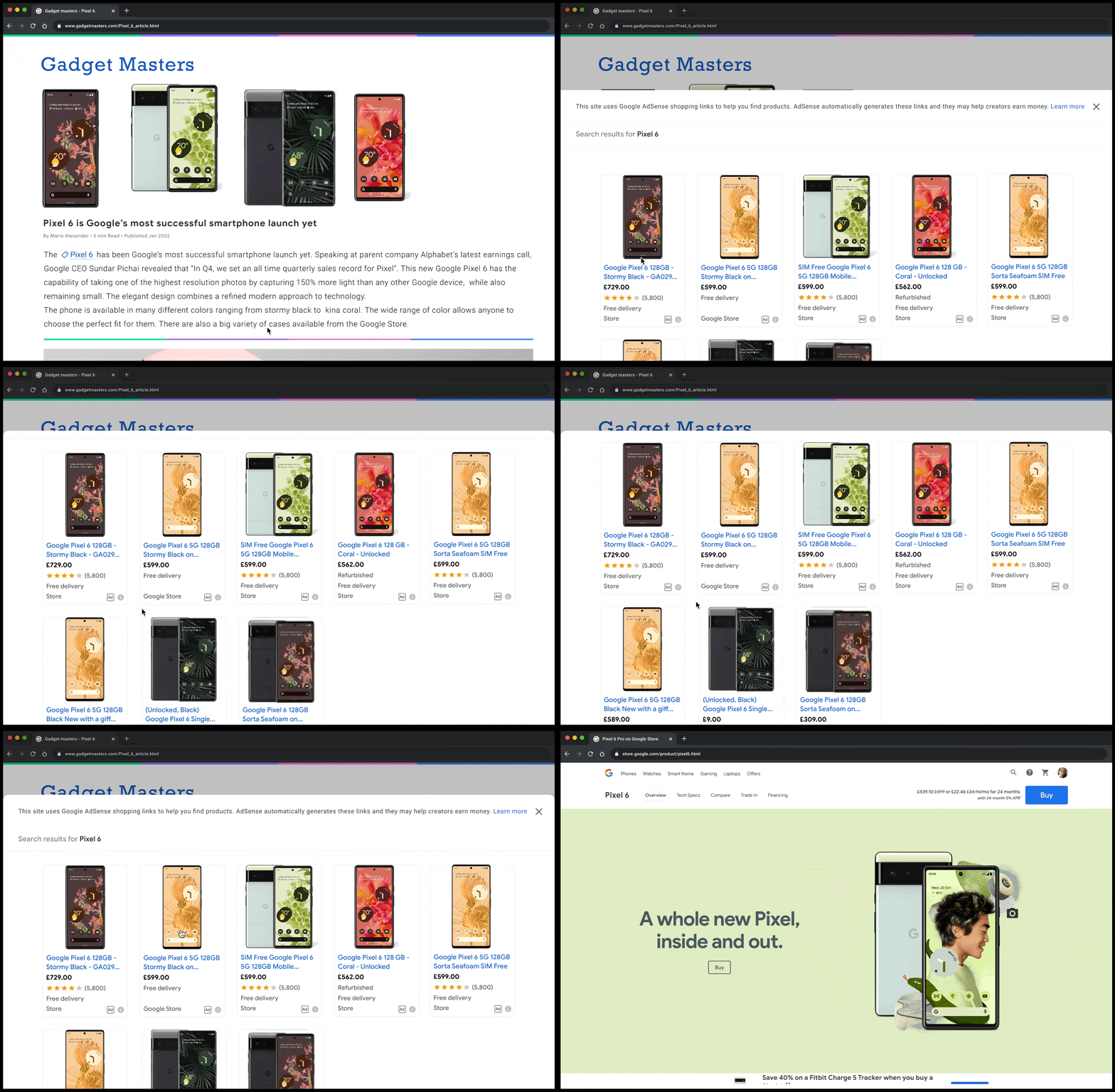
Opt-out. You can opt-out of showing shopping links by going to your AdSense account > Optimization > Labs and turning off shopping links.
Find out more. You can read the full help doc here.
Why we care. Advertisers using AdSense will now have another way of monetizing their website. Since only 10% of content will be linked to shopping ads, the new feature shouldn’t be overly intrusive, but advertisers should still keep an eye out for irrelevant links and unrelated results.
The post New shopping links for Google AdSense appeared first on Search Engine Land.
Courtesy of Search Engine Land: News & Info About SEO, PPC, SEM, Search Engines & Search Marketing
Category seo news | Tags:
Social Networks : Technorati, Stumble it!, Digg, de.licio.us, Yahoo, reddit, Blogmarks, Google, Magnolia.
Should your business ever take a break from doing SEO?
Written on June 14, 2022 at 9:57 am, by admin

For so many reasons it can be tempting to stop doing SEO for a period of time – maybe it’s budget, maybe you’ve had a bad experience with your SEO vendor or maybe you’re not seeing the results you thought you’d see.
When that happens, should you take a break from SEO? And if you do, what are the consequences?
The answer: SEO is a marathon, not a sprint
SEO is like running a marathon. If you stop because you tire easily, your competitors will pass you. The longer you take a break, the further ahead the competition – and it might be hard to catch up.
Of course, no one is forcing you to do SEO. But you must consider what you are up against before you make a decision to stop spending time and money on it.
What you are up against is 12 changes to Google Search on average each day, millions of competitors per keyword and website maintenance that if not done will result in a poor-quality site, making it even harder to rank.
That’s why the secret to SEO success is endurance. SEO can only stop if Google quits changing things and all your competition goes away.
Three reasons you shouldn’t stop doing SEO
Here are three things to consider before you take a break from your SEO:
1. There’s an average of 12 changes to search per day
It’s no secret that Google is always updating its search engine. In 2020 alone, Google ran over 600,000 experiments that “resulted in more than 4,500 improvements to Search.” That’s an average of 12 changes per day, folks.
Some changes are minor, some are major. Some are announced, many fly under the radar. (You can see how many Google updates SEOs are talking about, here.)
In all cases, tracking and understanding how these changes impact a website is not a core competency of most businesses. So, you need SEO expertise.
And that is why SEOs spend countless hours testing and analyzing Google changes so their clients or employers can benefit from that knowledge.
If you quit SEO suddenly, your website will not likely stay afloat in the Google storm for very long.
2. You have millions of competitors – yes, millions!
Try doing any search in Google and see how many results show up. Literally any query can have millions or billions of results. Those are your competitors online.
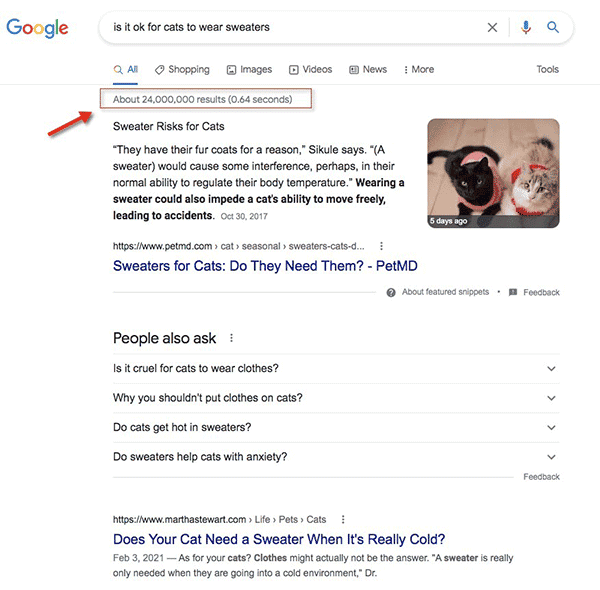
Out of those millions of results, your content somehow needs to show up on page one. And if you want even more clicks, your content needs to be among the first few results on the page.
We analyzed data from three recent studies on search results position and click-through rate, and across the board, position one always gets the most clicks:
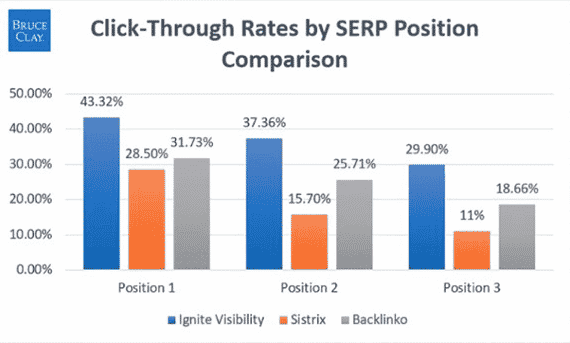 Click-through rates analysis from three studies by Ignite Visibility, Sistrix and Backlinko
Add to that the fact that you need to be an expert on the different search verticals (like Google Images, for example) and all the search features that show up on page one – not just the 10 blue links – to effectively compete.
Every day that you pause your SEO is a day your competition can spend money and resources to get ahead.
Given that it can take five to seven months to start seeing the results you want from SEO, that is time you can’t afford to waste. (Plus, some keywords take even longer to rank; it took us two years to help a client rank No. 1 for “games”).
Maintaining your website is a full-time job
While it’s true that quality websites can build value over time in the form of links and traffic, you cannot set it and forget it in SEO.
You need to maintain both the technology that drives your website and the content on it regularly. And how often depends on what type of website you have and what type of content there is.
For example, if you have what Google calls “your money or your life” content, you will need to review it and refresh it regularly.
Consider also that every site will need technical SEO fixes on a regular basis to ensure it is operating at peak performance for search engines and end-users. Think: servers, content delivery networks, content management systems, pages crawling issues, etc.
Remember that Google said in its Search Quality Rater Guidelines that “unmaintained/abandoned ‘old’ websites or unmaintained and inaccurate/misleading content is a reason for a low Page Quality rating.”
Because Google cares that websites are up-to-date and offer a good experience, if you stop SEO, you risk impacting your ability to rank.
Final thoughts
When businesses want to take a break from SEO, it’s often because they aren’t seeing the results they want. And that is usually due to other factors like budget constraints, hiring the wrong SEOs or even mismatched expectations.
If you budget 5% to 10% of your revenue, though, and you work with the right SEO vendor, you should be able to get the results you want. And those results typically end up in more revenue to the business.
When SEO is driving revenue, stopping SEO is rarely a question that any business ponders. If you treat SEO as an essential marketing activity for the life of your business, you will often win the marathon. If you give up, you lose.
The post Should your business ever take a break from doing SEO? appeared first on Search Engine Land.
Courtesy of Search Engine Land: News & Info About SEO, PPC, SEM, Search Engines & Search Marketing
Category seo news | Tags:
Social Networks : Technorati, Stumble it!, Digg, de.licio.us, Yahoo, reddit, Blogmarks, Google, Magnolia.