

Google adds LGBTQ+ owned attribute to business profiles
Written on June 22, 2022 at 7:32 am, by admin
Google has announced it has added a new attribute to Google Business Profiles for LGBTQ+ owned businesses. This new attribute can be added within your verified Google Business Profile and it makes it easier to find LGBTQ+ owned businesses in their own community.
What the attribute looks like. Here is what the new LGBTQ+ owned attribute looks like in a business listing in Google Maps or Google Search:

How to add the attribute. Here are the steps to add this attribute to your Google Business Profile:
- Go to your Business Profile. Learn how to find your profile.
- Select Edit profile
Business information.
- Near the top, select the More tab.
- Select the category you want to change.
- Next to the attribute, select Yes or No.
- When you’re finished updating your attributes, select Save.
Other attributes. Yelp has had this type of attribute since May 2021, this is another case of where Google is playing catch up to Yelp. In 2018, Google introduced family-led (which is no longer available), veteran-led and women-led attributes, in 2020 Google added black-owned attributes and in 2021 Google added a latino-owned attribute in business profiles.
One note, Google did have the LGBTQ+ Friendly and Transgender Safespace back in 2020, this new attribute is more objective and is designed to just highlight LGBTQ+ business owners much like Black-owned and Latino-owned attributes do
Pride month. Google added that the “LGBTQ+ community represents nearly 8% of the American population, with 20% of Gen Z identifying as a member of the community. As the number of LGBTQ+ individuals increase, so does our presence and prominence in our communities. In fact, there are 1.4 million LGBTQ-run companies in the U.S., accounting for $1.7 trillion a year in revenue too. Over the past decade, Google has partnered with the National LGBT Chamber of Commerce (NGLCC) and 30 local affiliate chambers to support and grow LGBTQ+ owned businesses and organizations. Today, Grow with Google’s partnership with the NGLCC has helped thousands of LGBTQ+ owned businesses grow their digital skills and thrive online. As we celebrate Pride, it’s important to remember visibility and representation are critical, all year round. A flag in the window of a small business has the power to bring queer folks together, to celebrate our joy, honor our history, and fight for our diverse community. It’s our hope that this attribute will allow business owners to celebrate their identity and community with the world.”
Why we care. Attributes like these can help generate visibility for your profile, so if you qualify for any of these Business Profile attributes, you should add them to your profile – and at least test it out. Businesses need to leverage any advantage they can to help grow their revenue and their customer base. Plus, it is nice to see Google to continue to promote diversity.
The post Google adds LGBTQ+ owned attribute to business profiles appeared first on Search Engine Land.
Courtesy of Search Engine Land: News & Info About SEO, PPC, SEM, Search Engines & Search Marketing
Category seo news | Tags:
Social Networks : Technorati, Stumble it!, Digg, de.licio.us, Yahoo, reddit, Blogmarks, Google, Magnolia.
Finding weird stuff (FWS) is part of SEO
Written on June 22, 2022 at 7:32 am, by admin
I have a gift: an innate ability to find weird stuff in SEO.
As an SEO professional, this ability can be both a blessing and a curse.
A blessing, because I can typically figure out what makes one website rank above another. A curse, because I would spend many hours, including many late nights, studying search results and looking at stuff for so long that it led to what I called “brain aches.”
Never heard of FWS? That’s because it’s a new initialism, of my creation. Yes, you are witnessing SEO history right now.
Ready to FWS? Here are a few things you can do when approaching a new prospect or project.
FWS
In all of the years of running SEO initiatives and employing SEOs, I have found that there are many who have a talent in content strategy, Information architecture/taxonomy, or perhaps even deep technical analysis.
As much as we may try to create the perfect process documentation for SEO efforts, there will always be one-off issues. Challenges that you won’t find on checklists.
Sometimes, finding weird stuff may unlock the key to SEO success.
So let us account for time for FWS in our SEO scopes. We need a set amount of time for research and discovery, even a few hours each month, for a project.
Convincing a client to agree to “research” (pulling threads and following the trail) can be difficult.
So, assuming that you can convince the powers-that-be that FWS is necessary, what are some ways we might learn how to think differently and find those nuggets that might lead to SEO success?
The site: query
You can learn a lot about a website by performing this simple task. Type site: into Google, followed by whichever domain it is that you want to review.

Then, repeat this exercise with the www version:

Now, in this case, Searchengineland.com resides on just that, no www. So, you would expect the “www” query to return zero results if everything is as it should be. And that is correct – zero results for www.
But I cannot count the number of times I have discovered unknown subdomains for companies. Sometimes even some great/old content was heavily linked to and was about to be washed away in the next redesign.
We now needed to think about how we might incorporate a refreshed version of that content and redirect those URLs so that we maintained the link value and perhaps even recaptured some search traffic (rankings) that existed years ago.
Another common occurrence is finding .pdf content that no one cared about.
When you’re reviewing your analytics to determine the performance of your SEO efforts, you are likely to be unaware of the amount of traffic coming to .pdf pages hosted on your website because they lack analytics tracking.
However, if you were to run a Semrush report and filter those results by .pdf, you may find that you are ranking for some pretty significant keywords and have no visibility into the traffic.
In many cases, you may find that by converting these .pdfs into HTML pages, you can accomplish a few things:
- Analytics tracking for these ranked pages.
- A more consistent user experience, with a fully built page, complete with site navigation, etc.
- Ability to update these pages and optimize them; perhaps also link out from these pages to other relevant pages.
Review the history of a website
Too often, I’ve seen people jump into an SEO initiative and “optimize what’s there” rather than dig into a website’s history to see what used to be there.
Case in point (real-world example) – I was recently approached by a prospect who had lost a significant amount of their organic search traffic over the past year. A routine that I’ve always followed is to generate an Organic Research report via Semrush, filter to remove brand keywords and look at the All-Time trends.
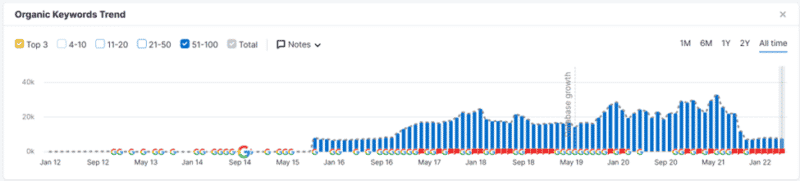
You can see quite easily the significant dip.
The next step is copying this report, pasting it into a separate tab, and start comparing URLs.
In this case, the prospect had gone through a redesign. Rather than recreating the successful pages, they (under the guidance of a “SEO consultant”) decided to turn those pages into a section of a page (ie: category#page-name.html).
By using the Wayback Machine (archive.org), I was able to see exactly what these pages looked like previously and illustrate to the prospect – in very plain terms – why it is that things fell off a cliff.
Google search the brand
Another tactic I use to FWS is to search a company’s name and click through some of the results.
Several times when doing this, I have found official company domains that I didn’t recognize. In other words, the company had changed domains for their company and just parked the old domain.
For those interested in link building, this could be a quick fix. This is why my agency has a standard domain portfolio analysis procedure. We want to know every domain that our client owns so that we might understand how (or if) these domains are being used.
With this domain research, you may also learn about their affiliations with other companies.
Did a company purchase them in the past? Did they purchase companies in the past?
Drill down on this and you may find opportunities beyond the specific project you’re working on.
Perhaps other companies within their “network” require SEO assistance, too? Maybe they should be consolidating domains/websites to form a powerhouse of a website rather than two (or more) weaker websites?
Other places to FWS
- Check robots.txt and XML sitemaps. You’ll often find pages that shouldn’t be on the site or publicly available.
- Crawl the site and compare it to the sitemaps. You’ll often find orphaned pages or important pages that have fewer internal links than they deserve
- Google Search Console – signs of unknown content appearing on the site in the Coverage > Indexed, not submitted in sitemap report.
- Google Search Console > Settings > Crawl Stats – signs of previous hacks and unknown content.
- Reading through Page Speed Insights and looking at the source code – you’ll sometimes find things like JS, CSS, or images being served multiple times or tracking pixels that are no longer in use.
- Link profile – it can uncover link networks or bad link strategies such as random blog commenting or efforts of the previous agency, where they may have exploited WordPress vulnerabilities to create links.
- DNS – if you can get a list of their DNS zone files, you’ll often find references to sub-brands, prior acquisitions, micro sites, or other marketing and product initiatives.
Set aside some scheduled time to find weird stuff
I believe that good SEO goes beyond knowing how to use the tools of the trade well, conducting keyword research, competitive analysis and the like.
Being inquisitive is an important aspect of SEO.
We need time to think about, consider and find weird “stuff.”
It can often be that there are valuable finds if we allow ourselves the time to think creatively.
The post Finding weird stuff (FWS) is part of SEO appeared first on Search Engine Land.
Courtesy of Search Engine Land: News & Info About SEO, PPC, SEM, Search Engines & Search Marketing
Category seo news | Tags:
Social Networks : Technorati, Stumble it!, Digg, de.licio.us, Yahoo, reddit, Blogmarks, Google, Magnolia.
Microsoft launches Cash back promotions for product ads
Written on June 22, 2022 at 7:32 am, by admin
Microsoft Ads is now offering Cash back promotions to drive more sales and conversions for online retailers.
How it works. The new feature is a Microsoft-run cash back program for the US on product ads. The goal of the program, Microsoft says “is to drive incremental sales and return on ad spend (ROAS) growth for advertisers and retailers.”
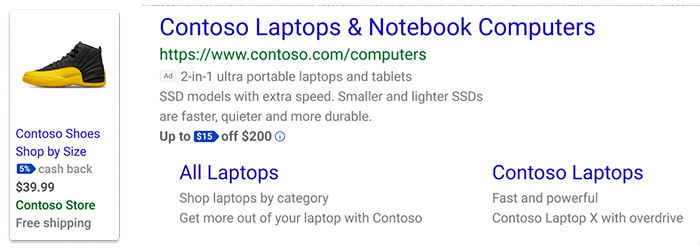
When a user clicks on an ad that features a Cash back promotion, they will have 24 hours after the click to complete the purchase. Microsoft will automatically attribute the purchase to the click and process the cash back.
All Cash backs are managed by Microsoft and users can redeem their rewards through the Microsoft Cash backs dashboard.
The Cash back promotions are served for eligible campaigns if and when the AI determines that it will bring in value. They do not give any indication of the criteria the AI will use to determine where it will serve the promotion.
What Microsoft says. Microsoft claims that the increased performance will outweigh the cost of the program. If they cannot deliver on performance, the AI will not serve the promotion. However, in the blog post announcement today, Microsoft says the cost per click (CPC) you’re charged will increase nominally to accommodate the cost of optimizing the program.
The goals of Cash back promotions. According to Microsoft, the goals of the new Cash back promotions are:
- Grow sales efficiently by incentivizing users with the right value of savings to drive conversions.
- Optimize savings to users’ needs by showing them deals for products they care about, thereby increasing efficiency.
- No effort is required because Microsoft uses your existing campaign setup. Microsoft also handles all optimizations and post-purchase inquiries.
Setting up Cash back promotions. Microsoft claims that there are no additional set up steps required to serve Cash back promotions. Microsoft handles all optimizations, payouts, and user inquiries. They do, however, require that you have purchase conversions set up, as well as a bid strategy that is “optimized for growing conversions and conversion values.” As if retailers would have less. They also suggest “a budget to have the headroom to accommodate any increase in volume.” Though, they give no further guidelines on what that budget is.
Read more about Cash back promotions. You can read the full post here.
Why we care. Though this is a Microsoft-run program, online retailers are paying for it through increased CPC’s. If the Microsoft AI can differentiate between low and high-value sales, and drive traffic accordingly, seems like a great way to get more clicks and conversions. However, we have yet to see if the increased CPC will make the program worthwhile.
The post Microsoft launches Cash back promotions for product ads appeared first on Search Engine Land.
Courtesy of Search Engine Land: News & Info About SEO, PPC, SEM, Search Engines & Search Marketing
Category seo news | Tags:
Social Networks : Technorati, Stumble it!, Digg, de.licio.us, Yahoo, reddit, Blogmarks, Google, Magnolia.
Revamped Google News design goes live with top stories, local news and personalized articles
Written on June 22, 2022 at 7:32 am, by admin
Google has launched the new version of Google News today on its 20th year anniversary of Google News. The new design, which we caught Google testing a month ago, brings forward Top stories, Local news and personalized picks to the forefront of the Google News home page, Google said.
Local news. You can now find a local news box at the top right of the Google News home page. It makes it easier for you to find local news from your community that matters to you. There is a new filter button to add multiple locations to your local news section, so you can find local news about communities you love but no longer currently live in. Google said this helps with local news publishers gain more exposure and traffic from Google.
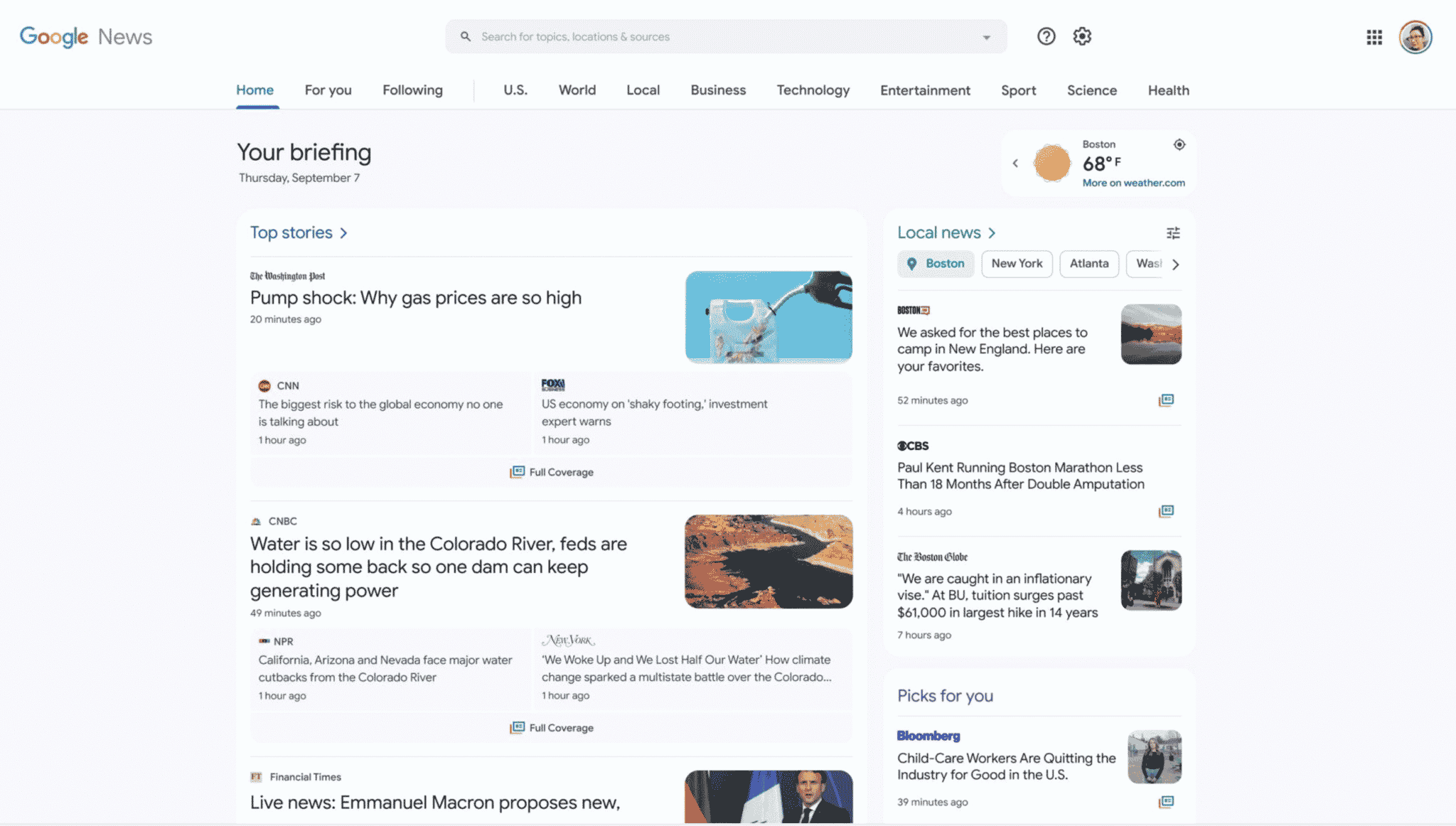
Customize Google News. You can now also customize the topics that appear in Google News for you by clicking on the customize button. There you can add, remove or reorder topics with the slider feature.


Improved fact check. Google has also improved the Face Check section in Google News by providing more context, the original claim, independent organization assessments, adding the About This Result and more.
Back in Spain. 8 years after Google shut down Google News in Spain due to Spanish law, Google has finally brought back Google News in Spain. We knew this was coming and today is the day where Google News works again fully in Spain. Google said “this is a result of a new copyright law and we hope that the return of Google News to Spain helps more people and more news, from more places, and helps publishers and new readers.”
Why we care. As we said when we saw the redesign test, whenever Google releases a new design or user interface in Google Search or Google News, that can impact ones visibility and clicks to their web site. So keep these user interface tests in mind when understanding any risks or rewards you might see in the future with Google News interface changes.
For those in Spain, they can now access Google News without any restrictions.
Also, Google News officially launched on September 22, 2002, so we are not exactly at the 20 year mark but close to it.
The post Revamped Google News design goes live with top stories, local news and personalized articles appeared first on Search Engine Land.
Courtesy of Search Engine Land: News & Info About SEO, PPC, SEM, Search Engines & Search Marketing
Category seo news | Tags:
Social Networks : Technorati, Stumble it!, Digg, de.licio.us, Yahoo, reddit, Blogmarks, Google, Magnolia.
Drive performance and better digital customer experiences
Written on June 21, 2022 at 4:29 am, by admin

Intelligent linking is a critical component in delivering personal, seamless experiences that drive higher engagement and performance across all channels.
Bench Metrics, available on AWS Marketplace, solves growing gaps in attribution with predictive modeling capabilities that match important in-app events to the channels and campaigns that drove them. Using Bench Metrics links behind your marketing communications delivers a better customer experience, driving better performance.
Bench Metrics seamlessly integrates your app into every customer journey, adding new value to offline and online touch points.
Bench Metrics provides the leading deep linking and attribution platform, offering solutions unifying user experience and measurement across all devices and channels. The data from all your marketing is easily exported to a single database where it can be utilized for downstream personalization efforts and multi-touch attribution reporting. With the power of Bench Metrics, marketers see increased engagement, higher conversions, and better retention.
Join Michelle Lerner, senior director, business development at Bench Metrics and AWS, for a special conversation and hands-on solution demonstration.
You will learn:
- About major challenges Customer Service Agents are facing today
- How Bench Metrics can help your organization
- An on-demand demo of the solution in practice
Speaker Bio
Michelle brings over 13 years of start-up experience to Bench Metrics and is particularly passionate about cultivating strategic and meaningful relationships with channel partners. She’s a marathon runner, devoted dog mom to rescue dog Maurice, and is on a mission to find the best burrito in NYC.
The post Drive performance and better digital customer experiences appeared first on Search Engine Land.
Courtesy of Search Engine Land: News & Info About SEO, PPC, SEM, Search Engines & Search Marketing
Category seo news | Tags:
Social Networks : Technorati, Stumble it!, Digg, de.licio.us, Yahoo, reddit, Blogmarks, Google, Magnolia.
How to measure the value of SEO with CTR
Written on June 21, 2022 at 4:29 am, by admin
“I see clients, again and again, having to evaluate the value of making this [SEO] change over that change at the ticket level,” said Jessica Bowman, enterprise SEO consultant and author of Executive SEO Playbook, in her presentation at SMX Advanced.
While all SEO tasks are important for the success of your site, there’s a key distinction that should be drawn: those that have the potential to increase revenue, and those that are designed to prevent revenue decreases. SEOs who fail to differentiate these types of tasks often find themselves burnt out and unable to show how their work impacts the bottom line.
“What usually happens is SEO managers fall into this whirlpool of trying to build a positive revenue case for all of the tickets they have,” said Avinash Conda, director of organic growth at Williams Sonoma Inc., in the same presentation. “But that’s not something you need to be applying to all of the tickets.”
Marketers need to prioritize those tickets/tasks that will prove the most SEO value. But they must also choose which metrics should be reported.
According to Bowman and Conda, detailing click-through-rate (CTR) metrics for your brand’s target keywords is a simple yet effective way to prove your SEO efforts are worthwhile.
Data needed to measure SEO’s effect on CTR
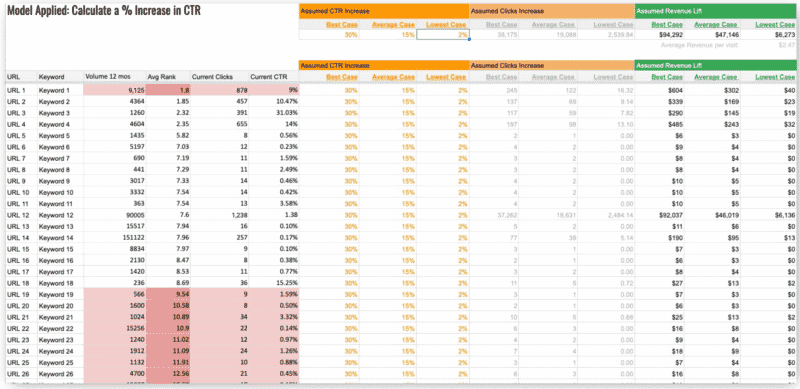
To set up the template SEO impact on CTR, Conda suggested marketers first collect a list of specific URLs.
“This could be a subsection of the site, a folder on the site, or just a list of URLs which are impacting,” he said. “The second [step] is to get the list of keywords mapped to these URLs.”
This basic information will serve as the foundation for the formulas on the spreadsheet (see the template below).
 Source: Jessica Bowman and Avinash Conda
To ensure your team gets the CTR metrics it needs, SEOs should also consider adding the following data from Google Search Console (past 12 months) for the URL/keyword combinations:
- Total impressions.
- Average rank.
- Total clicks.
- Current CTR.
Once this data is added to the template, the formulas will help you calculate the increases in CTR and forecast fiscal-year growth from search. However, there are a few additional manual inputs marketers will need to include to ensure it functions correctly:
- The list of URLs the SEO task will impact.
- The list of keyword(s) each URL is targeting.
- Assumed CTR increases based on high- and low-ranking keywords.
- The average revenue per visit.
Using the CTR template
Marketers can use a template like this to calculate assumed CTR, clicks and revenue increases. This is a great way to connect URLs/keywords to your organization’s bottom line, helping teams better predict the impact of these efforts.
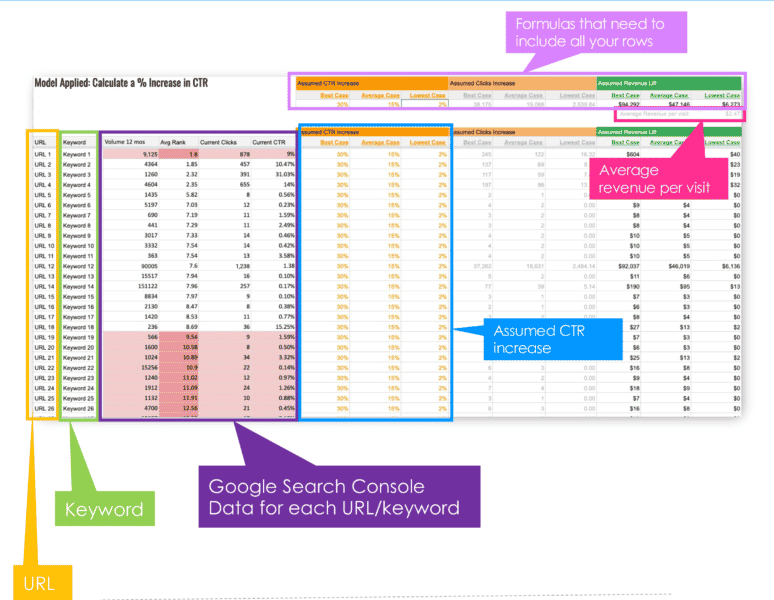 Source: Jessica Bowman and Avinash Conda
However, as most search marketers probably know, not every aspect of SEO value can be measured in such a clear-cut fashion.
“There are a few tasks which cannot be quantified on a traffic level,” Conda said. “Site speed [tasks] are a good example … We know they are going to have a positive impact on traffic because site speed is a big ranking factor, but I don’t think we’re there yet in terms of coming up with [quantifiable] methodologies.”
Trying to forecast traffic using CTR in such a scenario might not be the most effective plan. In these cases, Conda recommends estimating SEO gains with conversion rates.
For instance, a Portent study found sites with 1-second load times had a conversion rate that was three times higher than sites that loaded in five seconds. Tying less quantifiable SEO tasks to important metrics like this can go a long way in proving their value.
Still, CTR is a solid metric SEOs can use to show the value of their work, especially if the data is made accessible using templates like Conda and Bowman’s.
“This model is a straightforward way to see the updates we are making, which we know for a fact will have a direct impact on rankings,” Conda said.
Watch Jessica Bowman and Avinash Conda’s full SMX Advanced presentation
Not registered for SMX Advanced? Get your free pass here.
Already registered for SMX Advanced? Log in here.
The post How to measure the value of SEO with CTR appeared first on Search Engine Land.
Courtesy of Search Engine Land: News & Info About SEO, PPC, SEM, Search Engines & Search Marketing
Category seo news | Tags:
Social Networks : Technorati, Stumble it!, Digg, de.licio.us, Yahoo, reddit, Blogmarks, Google, Magnolia.
The LinkedIn Funny emoji is here
Written on June 17, 2022 at 7:08 pm, by admin
LinkedIn has finally added one of the most requested features. The Funny emoji started rolling out to LinkedIn users at some point in the last couple of hours.
What it looks like. It is a blue laughing face. Here’s what the new reaction looks like:

Why LinkedIn is adding it. Because LinkedIn users have been requesting it more than anything else from the platform. And LinkedIn has become incredibly good about listening to its users and giving them what they want.
If only more companies gave their user bases what they actually wanted instead of not – while shoving lame, minor UI enhancements or features nobody wanted or asked for. Granted, the Funny emoji is a tiny feature, but the ability to make lots of your users happy can be priceless. It can be the difference between loyalty and abandonment.
Reaction on LinkedIn. Joy. And lots of Funny emojis everywhere.
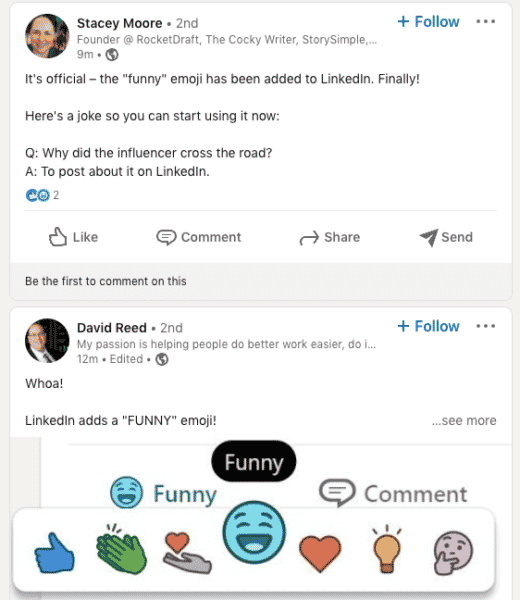
Why we care. LinkedIn has generally been thought of as a professional social network. But it’s not all serious anymore. There is some seriously funny content published on LinkedIn. Now brands, marketers and creators who post funny content can earn the appropriate reaction. Good, humorous content can get some excellent engagement, and engagement leads to greater visibility on the network.
The post The LinkedIn Funny emoji is here appeared first on Search Engine Land.
Courtesy of Search Engine Land: News & Info About SEO, PPC, SEM, Search Engines & Search Marketing
Category seo news | Tags:
Social Networks : Technorati, Stumble it!, Digg, de.licio.us, Yahoo, reddit, Blogmarks, Google, Magnolia.
Spotify commits to brand safety for podcasts
Written on June 17, 2022 at 7:08 pm, by admin
Spotify has partnered with Integral Ad Science (IAS) to create a brand safety framework for podcasts. The technology will be the first of it’s kind across a digital landscape where safety precautions currently exist for video, but not audio.
The technology uses episode-level transcription technology to help advertisers exclude topics that don’t align with their brand.
What Spotify says. In a blog post Spotify adds “As podcasts have grown from a niche to mainstream medium, so has the need for consistent, well-established brand safety guidelines and technology.” Podcast ad revenue surpassed $1 billion in 2021 and is forecast to almost triple to more than $4 billion in 2024.
Understanding audio safety. Spotify and IAS will launch efforts to help the audio industry understand what tools and resources are needed to deliver brand safety. They’ll also develop reporting tools aimed at giving advertisers greater transparency into where their ads are being heard.
The new technology will be powered by Spotify’s first-party data and verified by IAS’ independent analysis solutions – which adopt the Global Alliance for Responsible Media’s (GARM) guidelines. Spotify announced last year that they were the first audio partner to join GARM, helping to define what brand safety is for audio.
Prospective timeline. There is no word yet on when the new safety solutions will launch. You can read the announcement here.
Why we care. In a world of automation, advertisers crave control. Spotify and IAS’ efforts aim to provide transparency into the platform and provide safety for brands, beginning with third-party podcasts in the audience network.
The post Spotify commits to brand safety for podcasts appeared first on Search Engine Land.
Courtesy of Search Engine Land: News & Info About SEO, PPC, SEM, Search Engines & Search Marketing
Category seo news | Tags:
Social Networks : Technorati, Stumble it!, Digg, de.licio.us, Yahoo, reddit, Blogmarks, Google, Magnolia.
Pinterest introduces Idea ads and paid partnership tools
Written on June 17, 2022 at 7:08 pm, by admin
Pinterest has launched a new ad format – Idea ads – and a new partnership tool allowing creators to tag brand partners in their content.
Idea ads. The new Idea ads follow a similar format to Idea pins, which were launched last year. Similarly, Idea ads are an immersive, multi-page format designed for advertisers “to showcase ideas in action.” When shoppers click on the ads they’re taken to the brand’s website to view relevant information.
What the Idea ads look like:
The paid partnership tool. This allows brands to partner with Pinterest creators. The partnership allows large brands to collaborate with Pinterest’s community of creators and connect with their audiences.
With the paid partnership tool, brands can review the tag and approve (or deny) the content. Brands will benefit from the authenticity of the creator’s content. Brands can also promote the creator’s content as their own Idea ad with paid partnership across Pinterest.
Early adopters. An early launch of these tools showed that brands who worked with creators saw 38% higher brand awareness, and 37% higher Pin awareness. A few brands that saw success with this program in the U.S. are Gatorade and Scotch Brand.
Gatorade. Gatorade’s goals were to help its audience stay interested and engaged. To do this, they launched an Idea ads with paid partnership campaign on Pinterest. By teaming up with popular fitness creators, they created ads providing workout inspiration, and reminders to stay hydrated. As a result, they saw 34 million impressions, 99k clicks to their feed.
“Handing over the creative power to a Pinterest creator allowed for an authentic moment of fitness that could only come from that creator. It made our ads feel new, natural and engaging.” — Johanna Lugo, Marketing Assistant Manager, Gatorade.
Scotch Brand. Scotch had a goal to create a hands-on approach to back-to-school shopping. They wanted to showcase ads for making supplies like pencil holders, teachers’ gifts, and more. They found popular search terms related to crafts and created kid-friendly how-to videos using Scotch tape. The results were a 64% lower cost per impression than their initial goal, and a 4x higher click-through rate than their average benchmarks.
Outside of the U.S., brands like Coty Canada and M.A.C Cosmetics have also seen promising results.
The new formats and tools are now available in more than 30 countries. You can read the full blog post announcement here.
Why we care. Pinterest hasn’t really been on anyone’s radar lately. The development and launch of these new features was quite a surprise. Creators looking to monetize their social media content should take note. However, the results coming from the early tests show benefits to larger, already well-known brands, but what about the creators? It would be nice to see more credit given to the people who made Pinterest what it was pre-ad platform – a place to come for ideas and inspiration.
I can’t help but feel like this is another way for large brands to take advantage of smaller creators. Using them to build effective ad campaigns aimed at audiences they weren’t able to reach through traditional means. It sounds rather familiar. Either way, we’ll be watching.
The post Pinterest introduces Idea ads and paid partnership tools appeared first on Search Engine Land.
Courtesy of Search Engine Land: News & Info About SEO, PPC, SEM, Search Engines & Search Marketing
Category seo news | Tags:
Social Networks : Technorati, Stumble it!, Digg, de.licio.us, Yahoo, reddit, Blogmarks, Google, Magnolia.
Google testing new featured snippet layouts
Written on June 16, 2022 at 4:05 pm, by admin
Google has recently been testing new formats, layouts and interfaces for its featured snippet slot in the search results. Generally, Google shows a single source for a featured snippet but since 2018 Google has occasionally shown multifaceted featured snippets for some queries.
Many featured snippets. Google is testing showing many featured snippets, more than one, more than two – but up to four different featured snippets. Here are some tests spotted by William Alvarez on Twitter and Brodie Clark on Twitter – showing this in action.
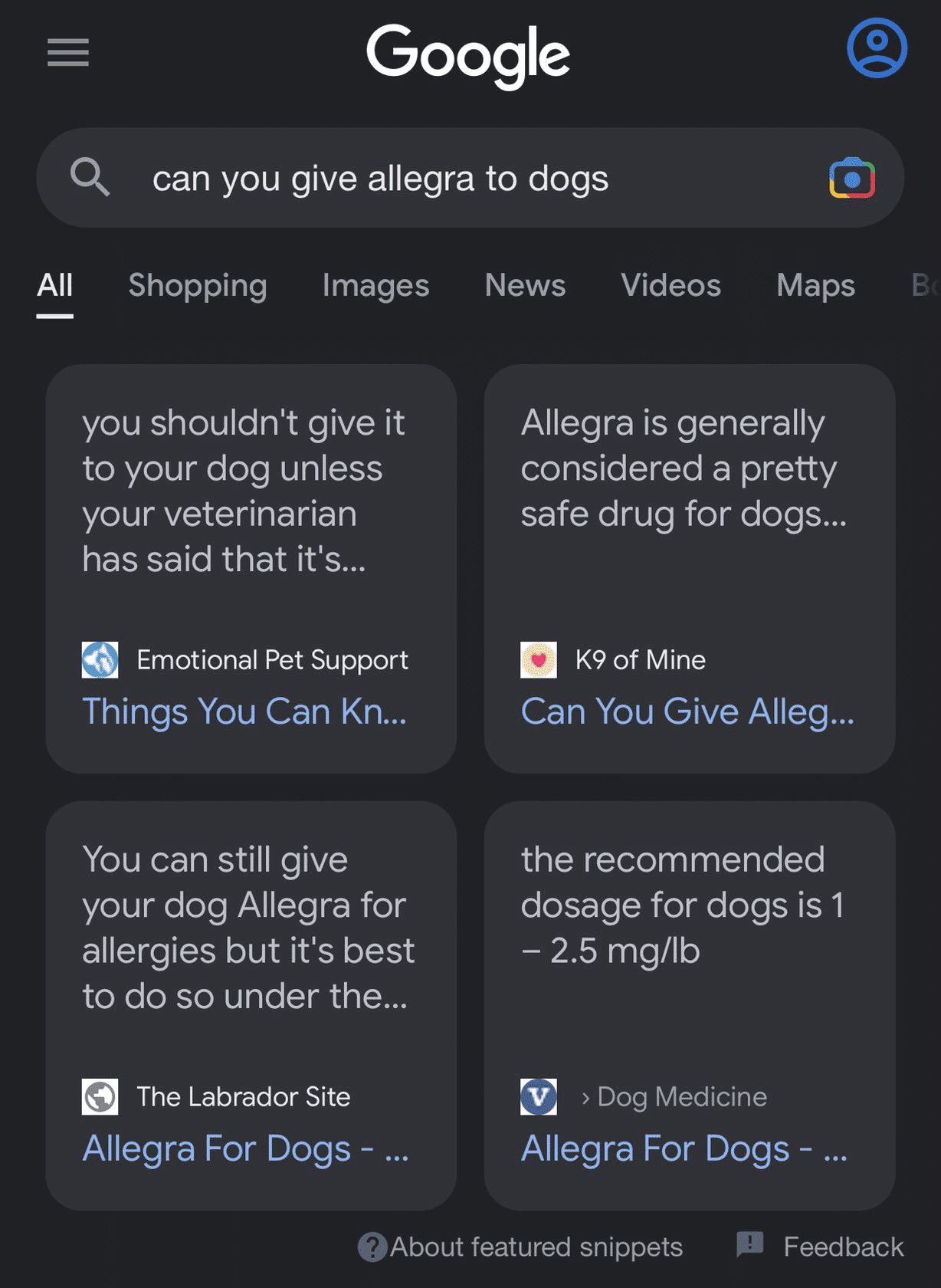 Card Style Google Featured Snippets
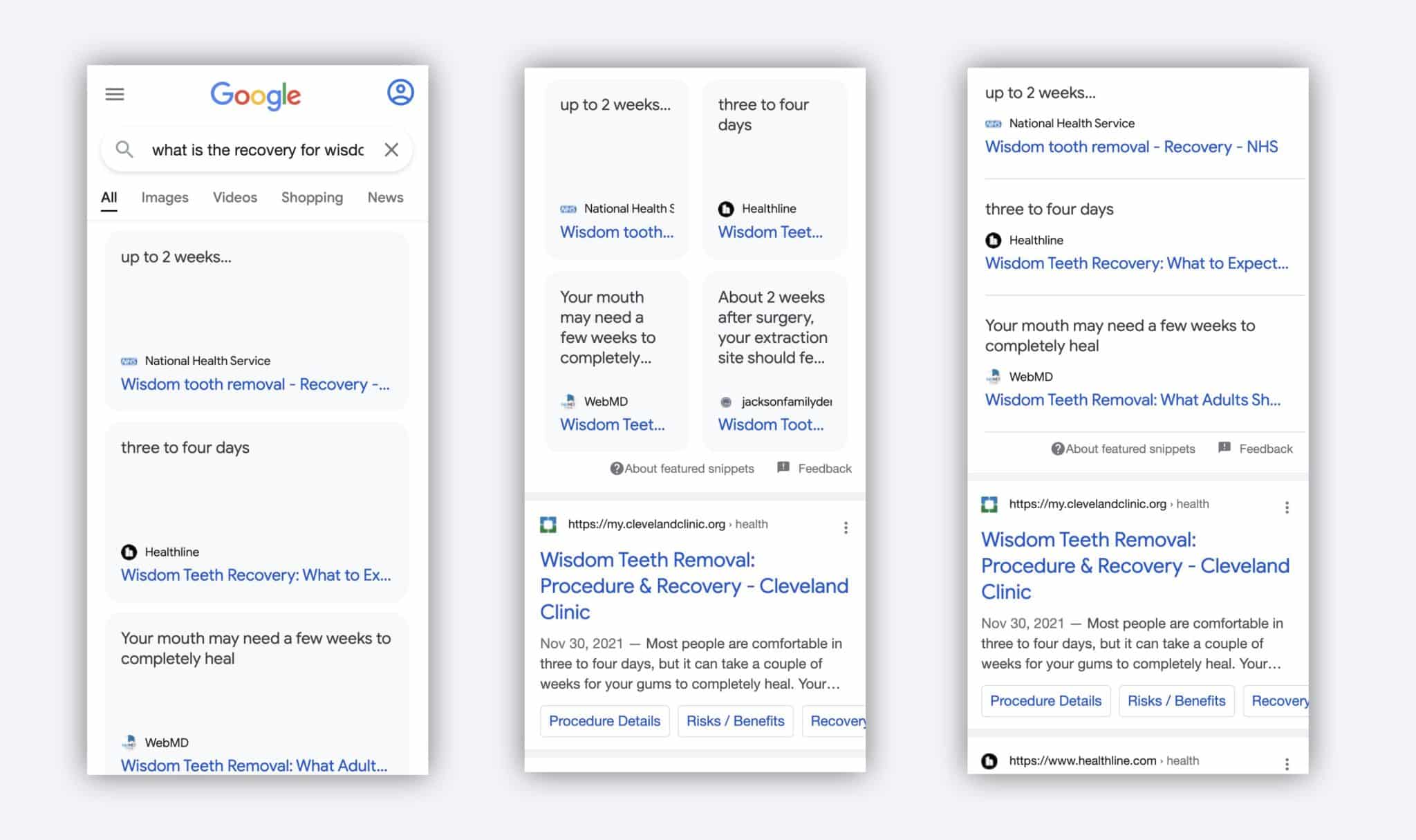 Block and list view Google Featured Snippets
Why we care. Generally, Google will show a single site or source for a featured snippet. But when Google begins to show two or more sources in the featured snippet position – the “position zero” location – that can change how valuable that position is for site owners and SEOs.
These interface tests are worth keeping an eye on because the featured snippet position is one that is generally sought after to achieve by most SEOs and site owners. Changing the design, showing more than one featured snippet, can all impact your click through rate on that position and ultimately your traffic and conversions driven from Google Search.
The post Google testing new featured snippet layouts appeared first on Search Engine Land.
Courtesy of Search Engine Land: News & Info About SEO, PPC, SEM, Search Engines & Search Marketing
Category seo news | Tags:
Social Networks : Technorati, Stumble it!, Digg, de.licio.us, Yahoo, reddit, Blogmarks, Google, Magnolia.