

3 valuable Google Analytics 4 reports for SEOs
Written on August 23, 2022 at 9:28 am, by admin
As an analyst, marketer, or SEO, you probably have some go-to reports you are used to looking at in Google Analytics. You may have them bookmarked or have memorized the three or four clicks you need to get the right report from Universal Analytics.
Now that it will soon become Google’s default analytics tool, let’s look at how to create three common and useful reports for SEO in Google Analytics 4.
1. Traffic acquisition report
This one is quick and straightforward – only one click in the GA4 interface will get you the Traffic acquisition report, aka the session acquisition report (there is acquisition by both user and session in GA4).
Here’s where you can quickly analyze the different channels bringing traffic to your site.
In the reporting UI, you’ll find this report under Life cycle > Acquisition > Traffic Acquisition.
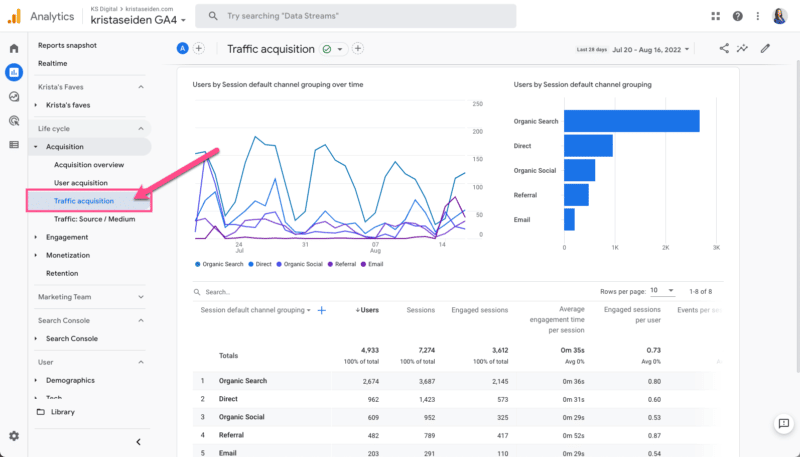
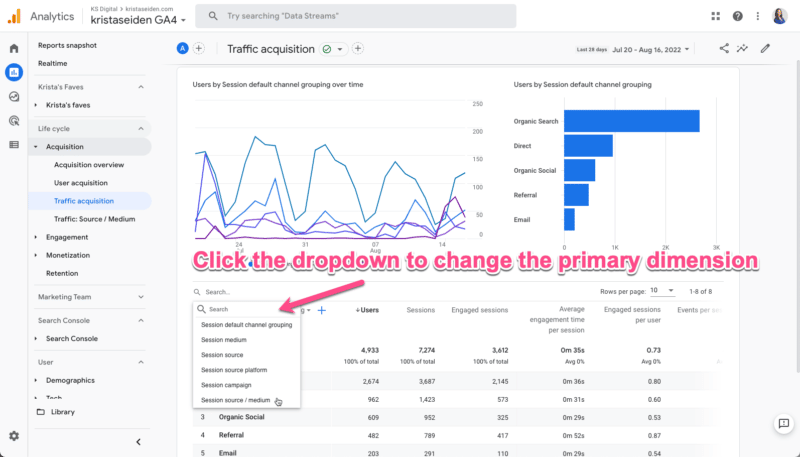
Note that this report initially defaults to use the Session default channel grouping as the primary dimension. Still, you can change this to a different view of traffic acquisition if preferred.
For example, you can select Session source / medium which was a default report in the UA navigation.
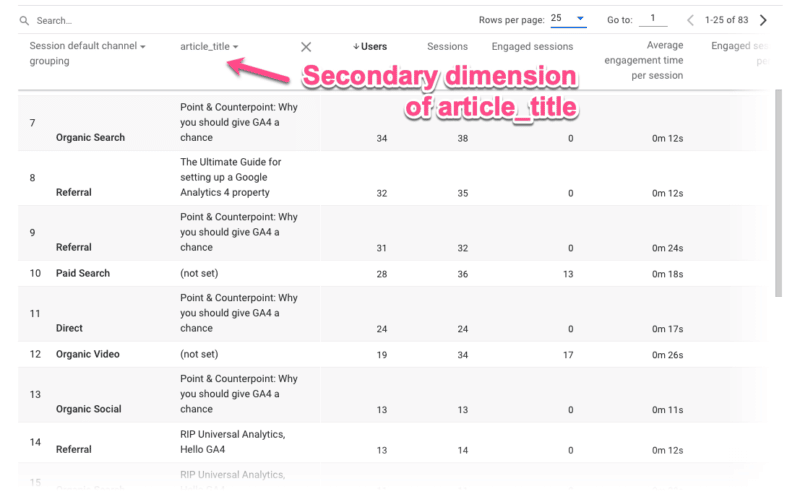
You can also break this report down by additional dimensions, including custom dimensions.
Let’s say you collect custom dimensions on your blog for things like article title, article tag, article date, and so on. This then gives me the ability to analyze article performance by channel.
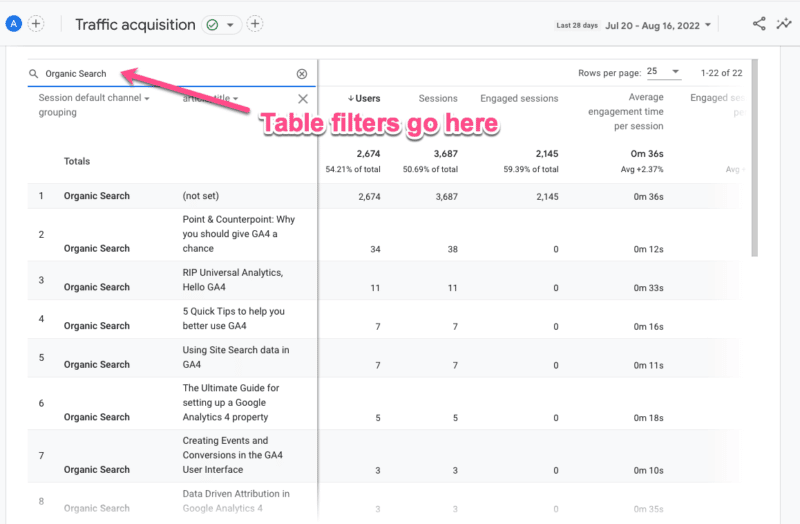
Finally, you can use the filter box above the table if you want to filter this report for just Organic Search as a channel.
Note that the filter box currently references both the primary and secondary dimensions. Unlike UA, there is not (yet) the ability to filter on a single dimension in a table.
2. Google Search Console reports
If you are using the Google Search Console integration (and you should be!), you will have a new collection of reports available to publish to your reporting navigation menu.
Once you have this setup, you’ll see two reports:
- The Google organic search traffic report.
- The Queries report.
Note that in my screenshot below, I’ve renamed these reports (via the customization feature) to be a bit more meaningful to me, so they are called “SC: Organic Keywords” and “SC: Landing Page.”
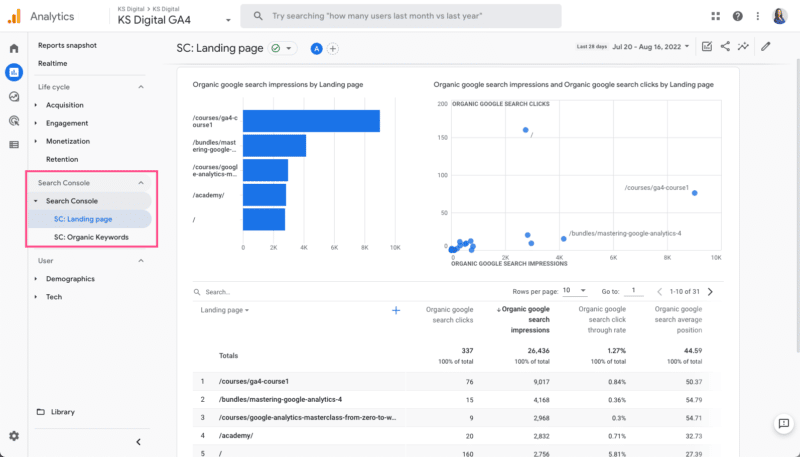
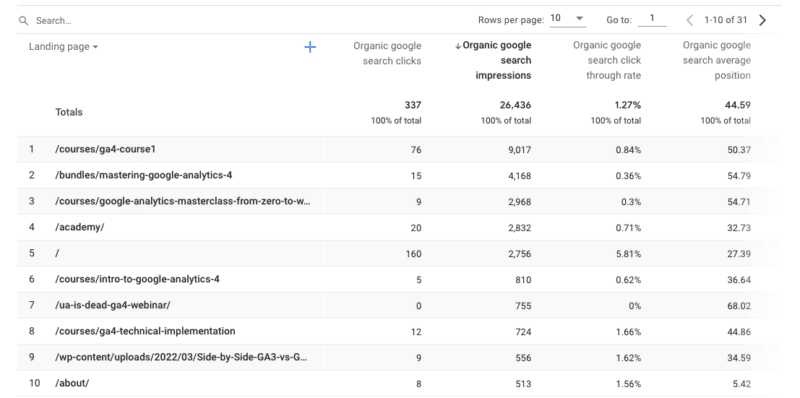
These reports show pretty much what you’d expect. The Landing page report displays SEO-specific metrics such as:
- Organic Google search clicks.
- Organic Google search impressions.
- CTR.
- Avg Position.
The Queries/keyword report shows the same metrics against the actual search query (as opposed to the Landing page in the previous report).
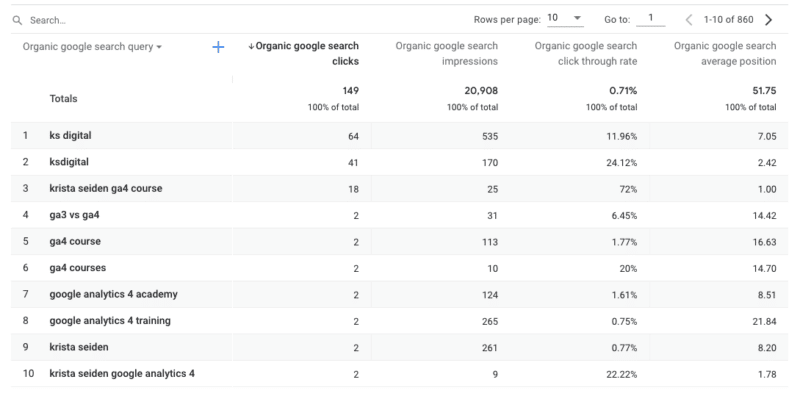
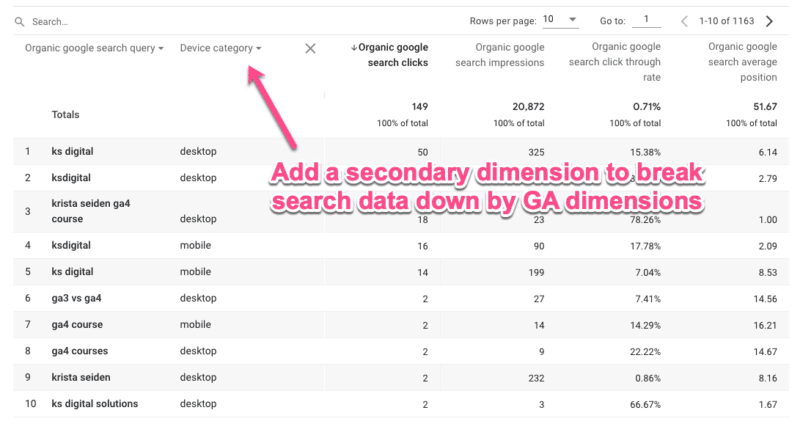
While these reports won’t replace your GSC data, they are a nice addition to GA4, especially when you add secondary dimensions of web traffic when analyzing organic search data.
For example, I can break down my search queries by Device category.
3. SEO landing page report
I saved the best for last – building a customized SEO landing page report.
In a previous article, I covered a quick 10-step process for creating a landing page report in GA4. The landing page dimension is available out of the box, but there isn’t (yet) an out-of-the-box report specifically for landing pages, so you’ll need to create it yourself.
Now, I want to show you how to tailor your landing page report to just show organic traffic.
Sure, you could just add either default channel grouping or source / medium to your current landing page report. But taking a few moments to further customize will save you that click and allow you to then break down your SEO landing page report by an additional dimension in the reporting UI.
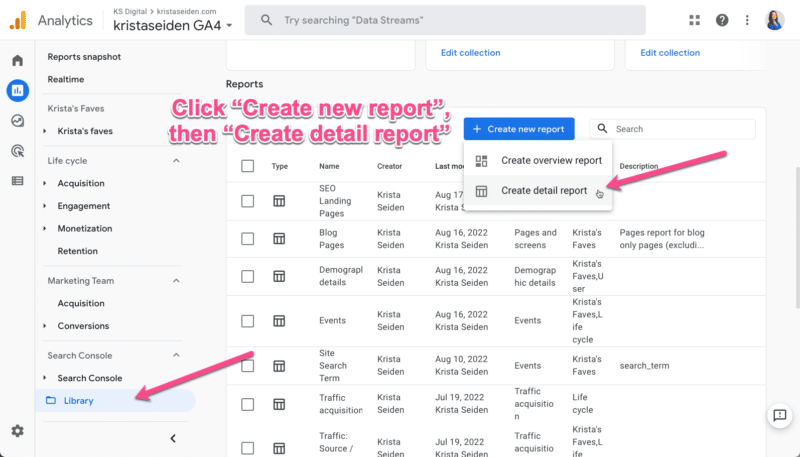
Step 1: Via the Library section, create a new detail report.
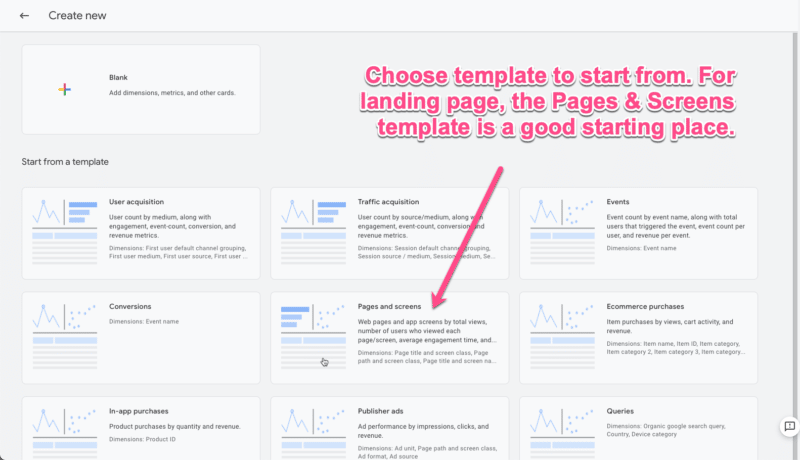
Step 2: Next, you’ll need to choose a template to start from. You can select a blank template or one of the pre-populated templates. These will all start as a copy of the basic report for the subject area.
For example, the Traffic acquisition template will be a copy of the Traffic acquisition report. For this scenario, we’ll start with the Pages and screens template.
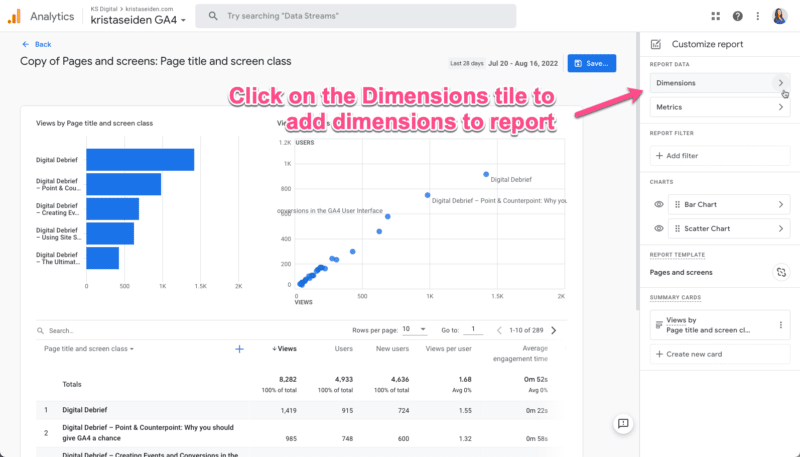
Step 3: Once in the report template, click on the Dimensions tile in the upper right corner to select additional dimensions to add to the primary dimension column.
Then click Add dimension.
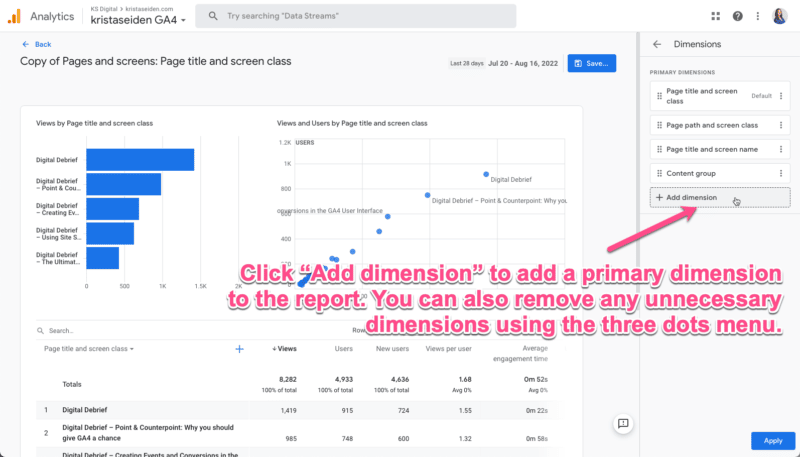
From the dropdown list, choose Landing page.
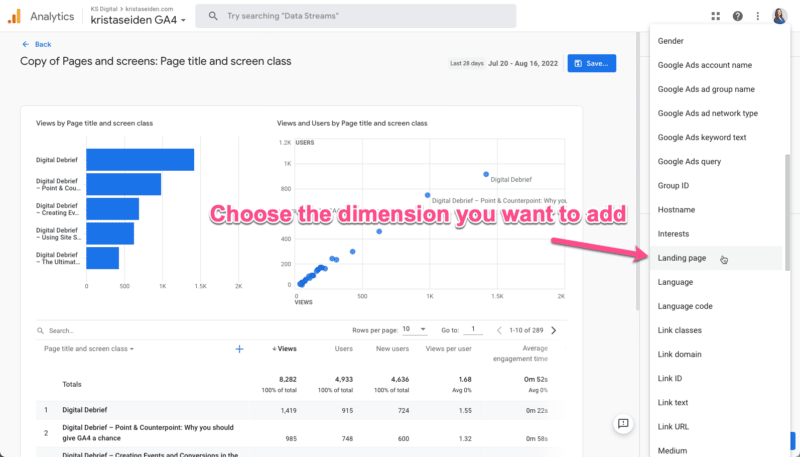
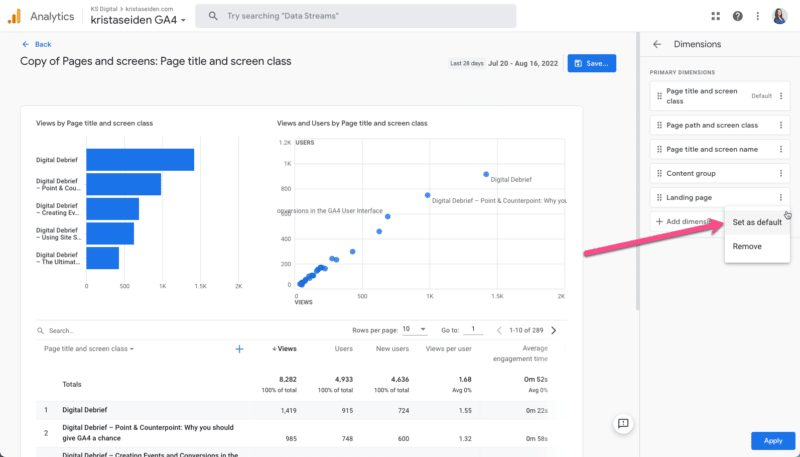
Step 4: Once you’ve added the Landing page dimension, you’ll want to make it the primary dimension in the report.
To do so, click the three dots menu and select Set as default. Then click Apply to save changes.
Step 5: Now comes the fun part (everything up until now was just a walk-through of making the landing page report from scratch!).
We’re going to use a brand new feature in GA4 called Report filter to filter this landing page report to only show us data that came from organic traffic.
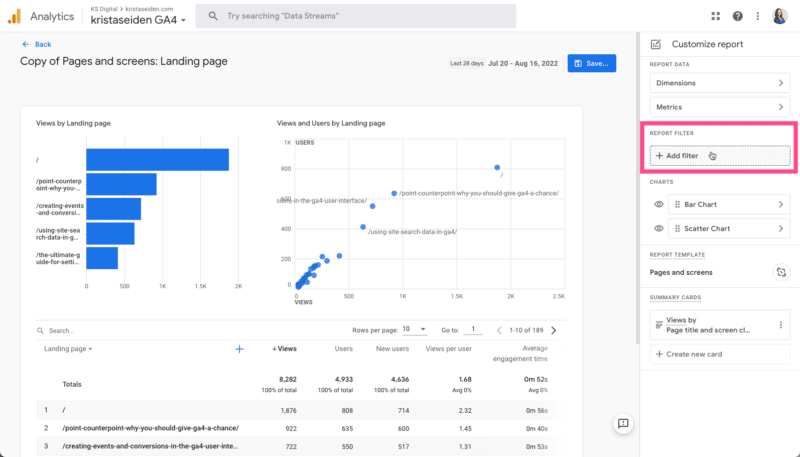
Step 6: When you click the Add filter button, you’ll find a condition builder for your filter settings. For this particular filter, we want to:
- Choose Include, which acts as an include-only operator.
- Select the dimension we want to filter on. In this case, the Session default channel grouping. Then select from a dropdown list which channels to include. We’ll choose only Organic Search.
Hit OK and apply.
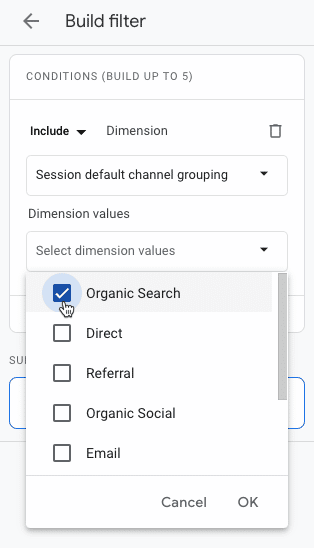
This will now filter the landing page report to only show traffic that has come from organic search.
A couple of other quick things I like to do with custom reports is to change the visuals. I prefer to hide the scatter plot and change the bar chart to a line graph. You can do this in the Charts section of the editor.
Once you’re done, save the report and give it a name. I’ll call this one my “SEO Landing Pages report.”
You’ll also know this is a filtered report because it shows a little filter icon in the upper left-hand corner of the report.
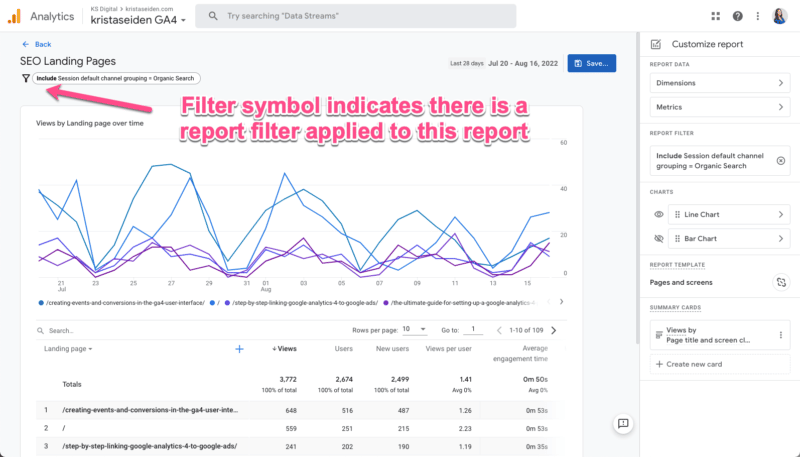
Don’t forget to add this new report to one of your report collections in the Library so it will appear in your left-side navigation bar.
Hopefully, these quick examples of common SEO reports are a helpful way for you to get more familiar and comfortable with GA4.
The post 3 valuable Google Analytics 4 reports for SEOs appeared first on Search Engine Land.
Courtesy of Search Engine Land: News & Info About SEO, PPC, SEM, Search Engines & Search Marketing
Category seo news | Tags:
Social Networks : Technorati, Stumble it!, Digg, de.licio.us, Yahoo, reddit, Blogmarks, Google, Magnolia.
Debunking the 4 myths of consumer data privacy that are holding marketers back
Written on August 23, 2022 at 9:28 am, by admin

Four years after the launch of GDPR and one year after Apple’s App Tracking Transparency release, marketers are still grappling with the reality of the privacy-first era as it turns the marketing “best practices” of the last decade on its head and exposes a level of uncertainty.
In this on-demand webinar, BlueConic’s COO and President, Cory Munchbach, was joined by Forrester Analyst and guest speaker, Stephanie Liu, to debunk 4 myths of consumer data privacy that are holding marketers back.
The presentation covers:
- The spectrum of consumer preferences about their data privacy
- What you can change about your marketing operation to adapt
- How marketers use a customer data platform (CDP) to support a mutual value exchange between the business and the consumer
The post Debunking the 4 myths of consumer data privacy that are holding marketers back appeared first on Search Engine Land.
Courtesy of Search Engine Land: News & Info About SEO, PPC, SEM, Search Engines & Search Marketing
Category seo news | Tags:
Social Networks : Technorati, Stumble it!, Digg, de.licio.us, Yahoo, reddit, Blogmarks, Google, Magnolia.
How Google uses NLP to better understand search queries, content
Written on August 23, 2022 at 9:28 am, by admin
Natural language processing opened the door for semantic search on Google.
SEOs need to understand the switch to entity-based search because this is the future of Google search.
In this article, we’ll dive deep into natural language processing and how Google uses it to interpret search queries and content, entity mining, and more.
What is natural language processing?
Natural language processing, or NLP, makes it possible to understand the meaning of words, sentences and texts to generate information, knowledge or new text.
It consists of natural language understanding (NLU) – which allows semantic interpretation of text and natural language – and natural language generation (NLG).
NLP can be used for:
- Speech recognition (text to speech and speech to text).
- Segmenting previously captured speech into individual words, sentences and phrases.
- Recognizing basic forms of words and acquisition of grammatical information.
- Recognizing functions of individual words in a sentence (subject, verb, object, article, etc.)
- Extracting the meaning of sentences and parts of sentences or phrases, such as adjective phrases (e.g., “too long”), prepositional phrases (e.g., “to the river”), or nominal phrases (e.g., “the long party”).
- Recognizing sentence contexts, sentence relationships, and entities.
- Linguistic text analysis, sentiment analysis, translations (including those for voice assistants), chatbots and underlying question and answer systems.
The following are the core components of NLP:
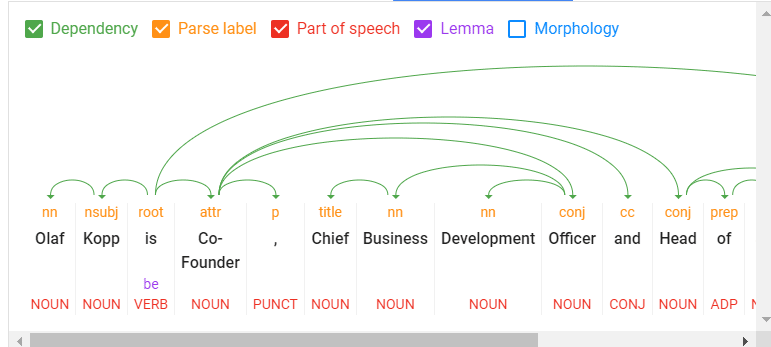 A look into Google’s Natural Language Processing API
- Tokenization: Divides a sentence into different terms.
- Word type labeling: Classifies words by object, subject, predicate, adjective, etc.
- Word dependencies: Identifies relationships between words based on grammar rules.
- Lemmatization: Determines whether a word has different forms and normalizes variations to the base form. For example, the base form of “cars” is “car.”
- Parsing labels: Labels words based on the relationship between two words connected by a dependency.
- Named entity analysis and extraction: Identifies words with a “known” meaning and assigns them to classes of entity types. In general, named entities are organizations, people, products, places, and things (nouns). In a sentence, subjects and objects are to be identified as entities.
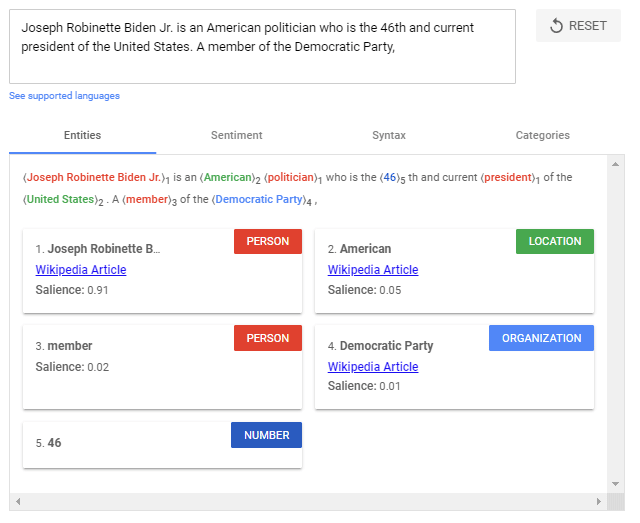 Entity analysis using the Google Natural Processing API.
- Salience scoring: Determines how intensively a text is connected with a topic. Salience is generally determined by the co-citation of words on the web and the relationships between entities in databases such as Wikipedia and Freebase. Experienced SEOs know a similar method from TF-IDF analysis.
- Sentiment analysis: Identifies the opinion (view or attitude) expressed in a text about the entities or topics.
- Text categorization: At the macro level, NLP classifies text into content categories. Text categorization helps to determine generally what the text is about.
- Text classification and function: NLP can go further and determine the intended function or purpose of the content. This is very interesting to match a search intent with a document.
- Content type extraction: Based on structural patterns or context, a search engine can determine a text’s content type without structured data. The text’s HTML, formatting, and data type (date, location, URL, etc.) can identify whether it is a recipe, product, event or another content type without using markups.
- Identify implicit meaning based on structure: The formatting of a text can change its implied meaning. Headings, line breaks, lists and proximity convey a secondary understanding of the text. For example, when text is displayed in an HTML-sorted list or a series of headings with numbers in front of them, it is likely to be a listicle or a ranking. The structure is defined not only by HTML tags but also by visual font size/thickness and proximity during rendering.
The use of NLP in search
For years, Google has trained language models like BERT or MUM to interpret text, search queries, and even video and audio content. These models are fed via natural language processing.
Google search mainly uses natural language processing in the following areas:
- Interpretation of search queries.
- Classification of subject and purpose of documents.
- Entity analysis in documents, search queries and social media posts.
- For generating featured snippets and answers in voice search.
- Interpretation of video and audio content.
- Expansion and improvement of the Knowledge Graph.
Google highlighted the importance of understanding natural language in search when they released the BERT update in October 2019.
“At its core, Search is about understanding language. It’s our job to figure out what you’re searching for and surface helpful information from the web, no matter how you spell or combine the words in your query. While we’ve continued to improve our language understanding capabilities over the years, we sometimes still don’t quite get it right, particularly with complex or conversational queries. In fact, that’s one of the reasons why people often use “keyword-ese,” typing strings of words that they think we’ll understand, but aren’t actually how they’d naturally ask a question.”
BERT & MUM: NLP for interpreting search queries and documents
BERT is said to be the most critical advancement in Google search in several years after RankBrain. Based on NLP, the update was designed to improve search query interpretation and initially impacted 10% of all search queries.
BERT plays a role not only in query interpretation but also in ranking and compiling featured snippets, as well as interpreting text questionnaires in documents.
“Well, by applying BERT models to both ranking and featured snippets in Search, we’re able to do a much better job helping you find useful information. In fact, when it comes to ranking results, BERT will help Search better understand one in 10 searches in the U.S. in English, and we’ll bring this to more languages and locales over time.”
The rollout of the MUM update was announced at Search On ’21. Also based on NLP, MUM is multilingual, answers complex search queries with multimodal data, and processes information from different media formats. In addition to text, MUM also understands images, video and audio files.
MUM combines several technologies to make Google searches even more semantic and context-based to improve the user experience.
With MUM, Google wants to answer complex search queries in different media formats to join the user along the customer journey.
As used for BERT and MUM, NLP is an essential step to a better semantic understanding and a more user-centric search engine.
Understanding search queries and content via entities marks the shift from “strings” to “things.” Google’s aim is to develop a semantic understanding of search queries and content.
By identifying entities in search queries, the meaning and search intent becomes clearer. The individual words of a search term no longer stand alone but are considered in the context of the entire search query.
The magic of interpreting search terms happens in query processing. The following steps are important here:
- Identifying the thematic ontology in which the search query is located. If the thematic context is clear, Google can select a content corpus of text documents, videos and images as potentially suitable search results. This is particularly difficult with ambiguous search terms.
- Identifying entities and their meaning in the search term (named entity recognition).
- Understanding the semantic meaning of a search query.
- Identifying the search intent.
- Semantic annotation of the search query.
- Refining the search term.
NLP is the most crucial methodology for entity mining
Natural language processing will play the most important role for Google in identifying entities and their meanings, making it possible to extract knowledge from unstructured data.
On this basis, relationships between entities and the Knowledge Graph can then be created. Speech tagging partially helps with this.
Nouns are potential entities, and verbs often represent the relationship of the entities to each other. Adjectives describe the entity, and adverbs describe the relationship.
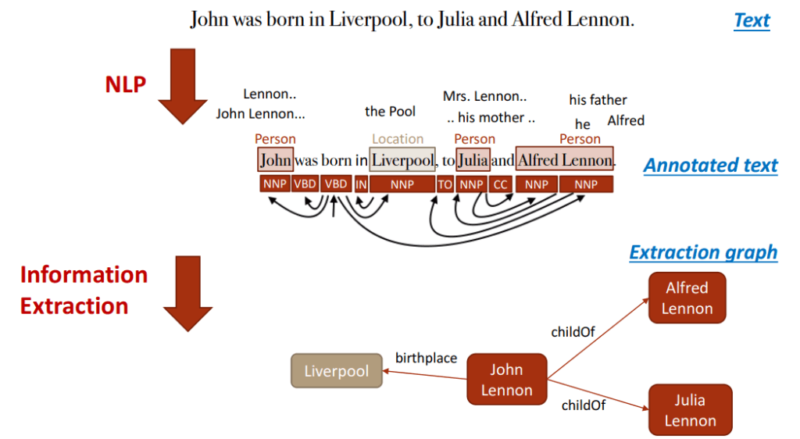 Example of NLP building a Knowledge Graph: Mining Knowledge Graphs from Text (WSDM 2018).
Google has so far only made minimal use of unstructured information to feed the Knowledge Graph.
It can be assumed that:
- The entities recorded so far in the Knowledge Graph are only the tip of the iceberg.
- Google is additionally feeding another knowledge repository with information on long-tail entities.
NLP plays a central role in feeding this knowledge repository.
Google is already quite good in NLP but does not yet achieve satisfactory results in evaluating automatically extracted information regarding accuracy.
Data mining for a knowledge database like the Knowledge Graph from unstructured data like websites is complex.
In addition to the completeness of the information, correctness is essential. Nowadays, Google guarantees completeness at scale through NLP, but proving correctness and accuracy is difficult.
This is probably why Google is still acting cautiously regarding the direct positioning of information on long-tail entities in the SERPs.
Entity-based index vs. classic content-based index
The introduction of the Hummingbird update paved the way for semantic search. It also brought the Knowledge Graph – and thus, entities – into focus.
The Knowledge Graph is Google’s entity index. All attributes, documents and digital images such as profiles and domains are organized around the entity in an entity-based index.
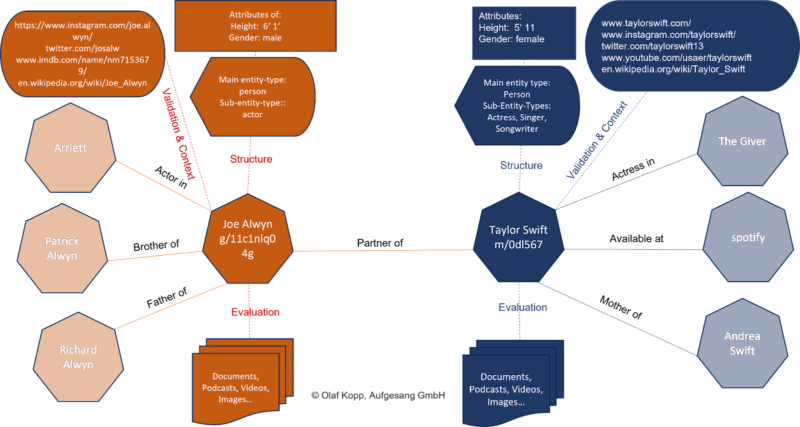
The Knowledge Graph is currently used parallel to the classic Google Index for ranking.
Suppose Google recognizes in the search query that it is about an entity recorded in the Knowledge Graph. In that case, the information in both indexes is accessed, with the entity being the focus and all information and documents related to the entity also taken into account.
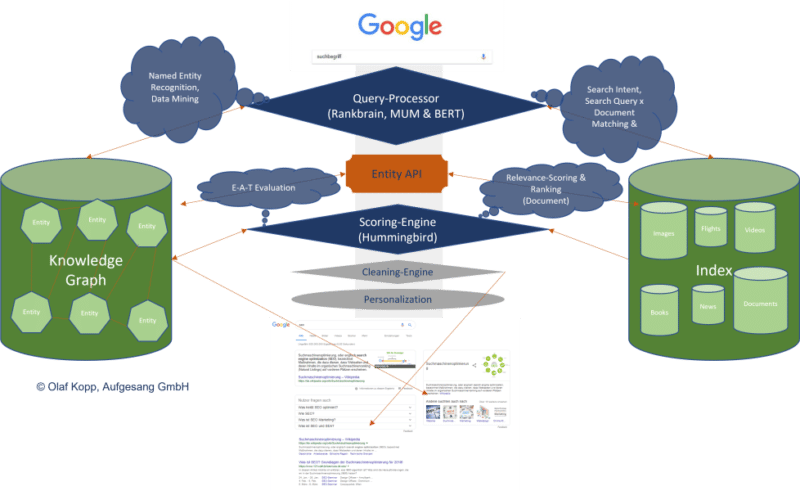
An interface or API is required between the classic Google Index and the Knowledge Graph, or another type of knowledge repository, to exchange information between the two indices.
This entity-content interface is about finding out:
- Whether there are entities in a piece of content.
- Whether there is a main entity that the content is about.
- Which ontology or ontologies the main entity can be assigned to.
- Which author or which entity the content is assigned.
- How the entities in the content relate to each other.
- Which properties or attributes are to be assigned to the entities.
It could look like this:
We’re just starting to feel the impact of entity-based search in the SERPs as Google is slow to understand the meaning of individual entities.
Entities are understood top-down by social relevance. The most relevant ones are recorded in Wikidata and Wikipedia, respectively.
The big task will be to identify and verify long-tail entities. It is also unclear which criteria Google checks for including an entity in the Knowledge Graph.
In a German Webmaster Hangout in January 2019, Google’s John Mueller said they were working on a more straightforward way to create entities for everyone.
“I don’t think we have a clear answer. I think we have different algorithms that check something like that and then we use different criteria to pull the whole thing together, to pull it apart and to recognize which things are really separate entities, which are just variants or less separate entities… But as far as I’m concerned I’ve seen that, that’s something we’re working on to expand that a bit and I imagine it’ll make it easier to get featured in the Knowledge Graph as well. But I don’t know what the plans are exactly.”
NLP plays a vital role in scaling up this challenge.
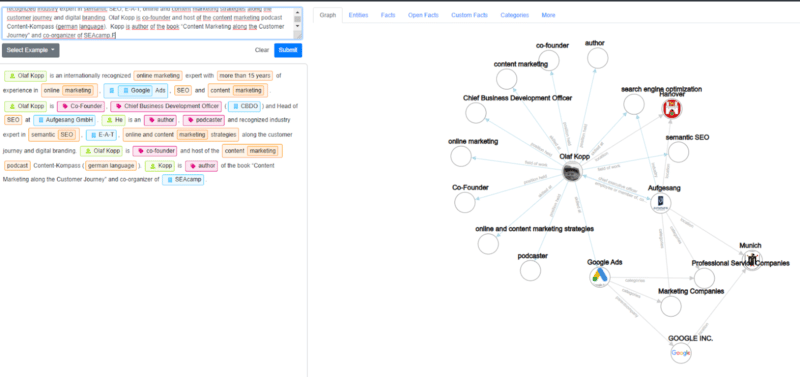
Examples from the diffbot demo show how well NLP can be used for entity mining and constructing a Knowledge Graph.
NLP in Google search is here to stay
RankBrain was introduced to interpret search queries and terms via vector space analysis that had not previously been used in this way.
BERT and MUM use natural language processing to interpret search queries and documents.
In addition to the interpretation of search queries and content, MUM and BERT opened the door to allow a knowledge database such as the Knowledge Graph to grow at scale, thus advancing semantic search at Google.
The developments in Google Search through the core updates are also closely related to MUM and BERT, and ultimately, NLP and semantic search.
In the future, we will see more and more entity-based Google search results replacing classic phrase-based indexing and ranking.
The post How Google uses NLP to better understand search queries, content appeared first on Search Engine Land.
Courtesy of Search Engine Land: News & Info About SEO, PPC, SEM, Search Engines & Search Marketing
Category seo news | Tags:
Social Networks : Technorati, Stumble it!, Digg, de.licio.us, Yahoo, reddit, Blogmarks, Google, Magnolia.
Google’s helpful content update: What should we expect?
Written on August 22, 2022 at 6:18 am, by admin
The new helpful content update sounds like a big deal.
Google has given us a list of questions to consider to determine whether our sites are designed to help people, or rather, created to do well on search engines.
If the latter is the case, you may find yourself hit with a sitewide signal that makes it difficult to rank.
If this update has a strong impact, which I believe it will, we may be in for another shakeup in the world of SEO like we had following the launch of Penguin 10 years ago.
If you have focused more on SEO efforts than creating content for humans to benefit from, this could strongly affect your site. It still remains to be seen how powerful this ranking signal is.
Does it affect all sites that use SEO?
Google was careful to note in their blog post that this update does not invalidate following SEO best practices.
They say, “SEO is a helpful activity when it’s applied to people-first content” and link to their SEO starter guide. Google is not against search engine optimization.
This update is geared toward sites that have gamed the system, creating content that isn’t super helpful to people but still ranking well because of SEO rather than on the merit of the content on the site.
Is it a penalty?
Google is careful in its wording regarding whether this is a penalty.
It’s not a manual action. You won’t see it listed in Google Search Console. It’s not a spam action.
We are to call it a “signal”. This is one of the many ranking signals Google describes in their documentation on How Search Works.
If that signal is applied to your site, it likely will feel like a penalty.
The good news is that you can get this classification removed from your site if you can improve your content.
The part of Google’s algorithm that classifies sites for this update will be running continuously.
If the algorithms see that your site’s content has shifted to be helpful to searchers, the strength of the signal may be reduced, or even lifted completely.
This announcement reminds me of the early days of Google’s Penguin and Panda algorithms.
Today these algorithms are baked into the core algorithm, but initially, they were filters that were applied to affected sites.
Sites with unnatural links (Penguin) or low-quality content (Panda) would have a filter applied that suppressed ranking.
If those sites cleaned up their link profile or improved the quality of their content then they had a chance at seeing recovery the next time Google ran a Penguin or Panda update.

It sounds like the helpful content classifier will have a similar effect in that sites affected will suffer some degree of sitewide ranking suppression and eventually can have that suppression lifted. But there are some significant differences:
- The helpful content classifier runs in real-time, continually. This means that new sites created just for SEO should have the signal applied right from the start. Also, existing sites can be affected when the amount of content created for SEO purposes exceeds a threshold.
- Sites will be impacted over the course of a few months and to different degrees depending on the amount of unhelpful content found. Google won’t run specific updates during which sites recover. Rather, if the classifier determines that content has changed to now be deemed helpful to searchers and has remained that way for a few months, the weight of the deranking signal will be reduced or even lifted.
What is people-first content?
This is what Google wants us to focus on. But what is it?
I’ll share my thoughts on each of the questions they say to ask ourselves about our content.
“Do you have an existing or intended audience for your business or site that would find the content useful if they came directly to you?”
Something I’ve often said to clients when trying to explain content quality is, “Would this content still exist if it wasn’t for search engines?”
A local business would still want to educate its customers on their services.
The National Kidney Foundation would still publish content to educate patients and doctors.
Would you still create the content you are creating if search hits from Google did not exist?
“Does your content clearly demonstrate first-hand expertise and a depth of knowledge (for example, expertise that comes from having actually used a product or service, or visiting a place)?”
This should not be new to us!
Google’s blog post on what site owners should know about core updates has a whole section of questions to ask ourselves in regards to expertise.
Knowing your topic is important.
I feel Google has started to promote first-hand expertise with recent product review updates.
Many that were affected by the July 2022 product review update were sites that lacked legitimate first-hand expertise in using the products they were recommending.
For the majority (if not all) of the sites I reviewed that were affected by this update, there was a sitewide demotion.
“Does your site have a primary purpose or focus?”
The search quality evaluator guidelines teach Google’s quality raters that it is important to determine a page’s purpose.
Is it designed to share information? Or to sell products? Or perhaps to entertain?
Why does your site exist? How are you trying to help people?
It is important that the purpose of your content’s existence is clear.
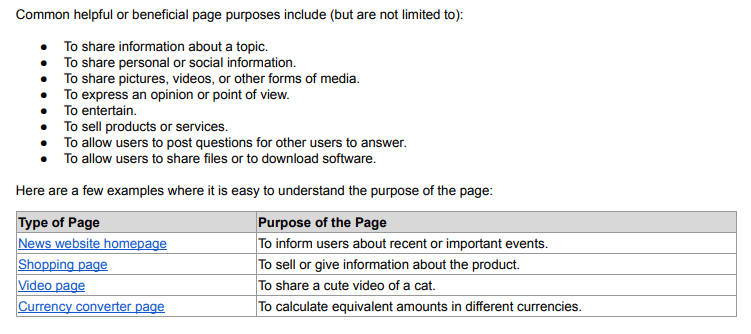 From section 2.2 of the search quality evaluator guidelines: What is the purpose of a webpage?
I think that many people who have created sites that are created with SEO efforts foremost in mind will rationalize that their content is created to inform people.
If you’re unsure, I encourage you to review the next two questions:
- After reading your content, will someone leave feeling they’ve learned enough about a topic to help achieve their goal?
- Will someone reading your content leave feeling like they’ve had a satisfying experience?
Google wants to present searchers with information that fully meets their needs.
How do I know if my content is built for search engines first?
Once again, Google has given us some questions to ask.
When I read these, it feels to me that this update could have a large impact on what we see in the search results.
If these questions apply to your content, you may find that your site is classified sitewide as being created primarily for search engines.
“Is the content primarily to attract people from search engines, rather than made for humans?”
I expect some content may lie on a spectrum. Google says the signal is weighted and that “[s]ites with lots of unhelpful content may notice a stronger effect.”
Super spammy sites with little actual benefit to searchers should be hit strongly.
Sites with some content created primarily with SEO in mind that also have content that is helpful will be impacted, but not as strongly.
It is important to remember that the sitewide effect means the good content on your site will also be affected by this update if Google deems you worthy of the classification.
“Are you producing lots of content on different topics in hopes that some of it might perform well in search results?”
Many of the sites affected by the July 2022 product reviews update were review sites that reviewed almost any product out there. There was little focus other than “we review products.”
I expect we’ll see declines in many sites because they are writing on as many topics as they can rather than focusing on what is important to their users.
“Are you using extensive automation to produce content on many topics?”
I wonder whether this line is geared toward sites writing their content mostly with AI content-generating tools.
AI-generated content can often rank well because it contains many of the words search engines use to determine relevancy.
But a person can usually tell when content is AI-written and not created by an actual human. If you are creating content by automated means, you may find yourself on Google’s radar.
“Are you mainly summarizing what others have to say without adding much value?”
This makes me think about review sites that aggregate Amazon listings and slightly re-word them. It will be interesting to see if other types of aggregator sites are hit as well.
“Are you writing about things simply because they seem trending and not because you’d write about them otherwise for your existing audience?”
I do think that it is still acceptable to write on trending topics provided they are what your audience wants to read.
But if the focus of your site is simply to capitalize on new trends, I expect you may be affected.
“Does your content leave readers feeling like they need to search again to get better information from other sources?”
The quality rater guidelines instruct the raters to determine to what extent content meets a searcher’s needs:
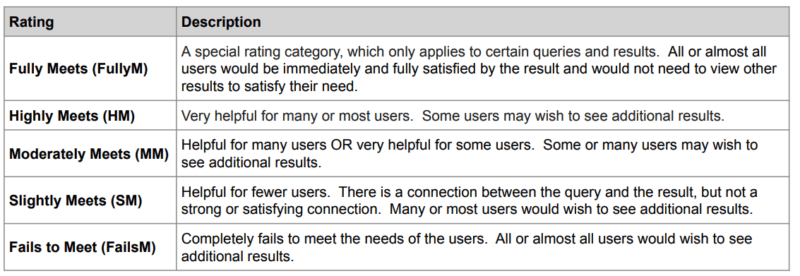
It is becoming increasingly more important to determine what your readers’ intent is when they come to your site.
And are you fully satisfying their needs? Would they need to go elsewhere for more information after reading your content?
“Are you writing to a particular word count because you’ve heard or read that Google has a preferred word count? (No, we don’t).”
I have seen blog posts that advise that content below a certain word count will be considered thin by Google which is not the case. Sometimes short content actually helps the searcher more.
I suppose this question is written to dissuade sites from writing massive articles covering everything there is to know about a topic on one single page (unless it is meeting the need of searchers who want to read a thorough essay on a subject).
This may seem like it contradicts Google’s advice to fully meet the needs of a searcher.
If tasked with creating content on buying a lawn mower, many SEOs are conditioned to produce the most thorough article on lawn mowers possible.
Let’s say a searcher typed, “best lawn mower.”
Do they really need an article that explains “What is a lawn mower?,” “Types of lawn mowers” and also “How to start a lawn mower”?
Having those words on the page historically has helped search engines understand that the page is relevant to lawn mowers.
However, the searcher’s intent, in this case, is to get help in deciding which mower to buy, not to learn everything there is to know on the subject.
A shorter article may be what is more helpful to a searcher in this situation.
“Did you decide to enter some niche topic area without any real expertise, but instead mainly because you thought you’d get search traffic?”
I’ve seen a real rise lately in discussions about operating “niche sites.”
I do think some of these will survive, provided the writer really is passionate about the niche and can write on relevant topics from a point of personal experience.
But if you’ve picked a niche primarily based on your ability to rank for that content, rather than out of a passion for covering that topic, you may find Google does not reward you.
“Does your content promise to answer a question that actually has no answer, such as suggesting there’s a release date for a product, movie, or TV show when one isn’t confirmed?”
This seems like a specific question and is pretty straightforward.
Is recovery possible?
If your site is classified as being built primarily for search engines, you will likely see a significant decline in search traffic over the next few months.
Google says that sites that are affected will indeed be able to work to get the classifier removed and possibly recover their rankings.
It is important to remember that if Google sees enough SEO content on your site, the sitewide signal will also impact the remainder of the content on your site as well.
As such, you will need to identify where the problems are and work aggressively to repair them if you want to rank at all.
Here is what I will be recommending to sites that come to us for help after being affected by this update although we’ll adapt our advice as more information becomes available:
- Identify which content on the site could be construed as being created for search engines rather than humans.
- Determine whether that content can be improved upon to Google’s satisfaction, or whether it should be noindexed/removed from the site.
- Find ways to produce content that goes above and beyond when it comes to being helpful to searchers. This may include adding more user-generated content, first-hand photos or videos, etc.
- Compare competitor pages that continue to rank well to see if we can understand what content Google is rewarding as inspiration on how to improve our content.
- Work on improving E-A-T for the site to help make it more obvious to Google’s algorithms that the site has and also is known for having expertise on the topics it covers.
- Clarify what the purpose or focus of each page is (and ensure that this purpose is first and foremost meant to help people).
- In some cases, know when to cut losses and move on. I believe that some sites that are hit by this update may not be able to recover without extensive and possibly unattainable changes.
Conclusions
Prior to the launch of this update, Google reached out to several SEOs, myself included, to discuss its release. They wanted to make it clear that this is not an attack on SEO.
Good SEO can help people-first content perform even better.
It sounds to me like there is the potential for this update to have a strong impact on many sites that have invested heavily in SEO.
I am looking forward to participating in and watching the discussions on changes that the SEO community is seeing once this update is live. I hope you fare well!
The post Google’s helpful content update: What should we expect? appeared first on Search Engine Land.
Courtesy of Search Engine Land: News & Info About SEO, PPC, SEM, Search Engines & Search Marketing
Category seo news | Tags:
Social Networks : Technorati, Stumble it!, Digg, de.licio.us, Yahoo, reddit, Blogmarks, Google, Magnolia.
Cookieless case studies: How brands are seeing a 9X lift in CTR
Written on August 22, 2022 at 6:18 am, by admin

The cookieless future is here (despite what Google says). If you haven’t found an identity solution, it’s time.
We’re doing our part at Lotame, to ensure marketers, agencies and publishers are prepared and ready to conquer the cookieless future. With hundreds of campaigns launched across the globe, Lotame’s identity solution, Panorama ID, is proving that advertising on the open web is sustainable, profitable, and privacy safe.
“We’ve done our due diligence and trust Lotame Panorama ID. The predictive cookieless solution is delivering fantastic results for our leading brand portfolio in terms of scale across the open web and cost-efficiency. We’re well-positioned to grab the cookieless future by the horns — in fact, we already are!” – Miles Pritchard, managing partner, OMD – EMEA.
See the results for yourself in this collection of cookieless case studies. Access it now to see the success stories of marketers and agencies around the world including how:
- Banana Boat achieved 94% VCR in first cookieless video vampaign
- Luxury car brand saw 2X more cost-efficient engagement
- Dr. Martens sees 9X increase in CTR
Access the collection of Cookieless Case Studies Around the World now!
The post Cookieless case studies: How brands are seeing a 9X lift in CTR appeared first on Search Engine Land.
Courtesy of Search Engine Land: News & Info About SEO, PPC, SEM, Search Engines & Search Marketing
Category seo news | Tags:
Social Networks : Technorati, Stumble it!, Digg, de.licio.us, Yahoo, reddit, Blogmarks, Google, Magnolia.
How GA4, data modeling and Google Ads work together
Written on August 22, 2022 at 6:18 am, by admin
There’s a lot going on in the world of Google Analytics 4 right now, as July 1 continues to get closer.
Earlier this month, Google introduced a new, more flexible tag built to work seamlessly with GA4 and Google’s suite of ad platforms, including Google Ads.
Google might have indirectly acknowledged that advertisers have a lot to process when it recently announced that cookies will have a longer shelf life on Chrome than previously reported.
This article will break down how paid search marketers need to approach the analytics shift:
- The philosophy.
- The differences and how to adjust.
- The timing for migrating.
- And a reporting workaround to replace some insights you’d otherwise lose in moving from UA to GA4.
A new age of marketing analytics
iOS14, CCPA, GDPR – all of these acronyms have put fear in the hearts of marketers over the past few years.
Collectively, they’ve moved the marketing world into an age of user privacy by severely reducing things like automatic cookie tracking and in-app activity tracking in marketers’ data portfolios.
To make up for losing reliable data collection mechanics and tying actions back to specific users, Google is moving quickly to a future of data modeling.
Essentially, the search engine uses AI to fill in data gaps left by privacy regulations, browser limitations and obscured cross-device behavior.
Data modeling in GA4 doesn’t include any offsite data unless you take the effort to implement it (more on that in a bit), but it does include all sources of traffic and engagement, not just Google sources.
One attribute of Google’s analytics shift is that it’s designed to be flexible and should be relatively easy to adapt depending on how the landscape shifts.
GA4 relies heavily on first-party data, which is something you own and will always be able to access.
It’s a more flexible, customizable reporting setup than UA (which is both good and bad in that you need more resources to set it up, but it’s got a lot more potential for rich insights).
Combine that with the new tag, which doesn’t require nearly as much code or customization, and you can see that Google is setting up a future where marketers will be able to self-serve to get all kinds of data that can help them optimize their campaigns.
One big data difference: Events vs. Goals
If you’re making Google Ads decisions based on data like sessions and pageviews, it’s time to shift your strategy.
GA4 is replacing those with Events, which means secondary metrics like bounce rate (as we know it), time on site, and pages per session won’t be available to you for much longer.
Instead, GA4 is introducing new metrics including “Engaged sessions”, which at this point can mean anything from a session longer than 10 seconds to a session that ended in a conversion to a session where the user bounced back and forth between screens.
As I see it, that can be directionally useful in determining whether a channel has a relatively high or low proportion of engaged users.
Another new metric, which I consider about as significant, is “User engagement,” which Google describes as “the average length of time that the app was in the foreground or the website focused on the browser.”
Other differences in data
When you’re preparing to migrate your audiences from UA to GA4, know that not all dimensions will translate.
For instance, “session”-related dimensions like next page path won’t port over because GA4 is measuring sessions differently.
That said, GA4 is built to let you customize the dimensions you find important, so you’ll be able to recreate those insights on your own.
One more change to note, while we’re on the topic of audiences, is that GA4 is limiting each property to 100 audiences, a huge reduction from UA’s cap of 2,000.
I’ve personally never pulled more than 200 audiences per property, but if you have, say, a ton of remarketing audiences built around GA metrics, you may have to consider paying for GA360. (If I had to guess, I’d say this won’t be a widespread issue, or Google wouldn’t have been so aggressive about curtailing the limit.)
Next steps: 3 things paid search marketers can do now
1. Decide on a full data picture
Overall, marketers should be orienting their analytics around business outcomes, not just a conversion firing on a page.
It’s smart to start measuring in terms of things like revenue and how much you can attribute to advertising.
For that, no matter how good your setup in either GA4 or Google Ads, you need to integrate offline conversion data and make sure your CRM data is part of the puzzle.
I’m currently setting up testing how effective it is to import offline conversion data into GA4 via device ID or user ID.
My suspicion is that it won’t be perfect yet, and there will be data gaps, but the exercise of setting up the different data sources will pay off over time as the data modeling improves.
2. Get your migration on
Marketers don’t like change any more than the average bear, but there’s no sense in putting off the inevitable.
The sooner you set up GA4, the sooner you’ll be able to get a relatively clean year-over-year comparison in 2023.
The issue won’t rear its head immediately. You want to set it up now so you won’t have a data gap for Q4 2023.
You could still compare GA4 to UA data next year if you really found yourself in a pickle, but you’d have to do a lot of work in Data Studio, and it wouldn’t be apples to apples.
So set it up now to get all the Q4 data for YoY’s sake.
3. Set up new reporting
One benefit of digging into GA4 now is that you’ll be able to scope out the reports you need to re-build.
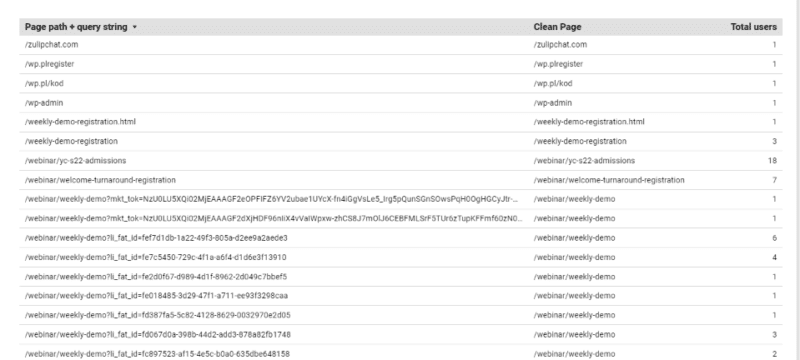
I noticed pretty quickly, for instance, that you can’t create rules in GA4 to remove non-Google UTM tracking (like HubSpot parameters), so you need to get Data Studio involved to clean up a landing page report so you’re not muddling through thousands of rows (each unique parameter breaks out a page).
GA4 won’t let you strip tracking info from URLs and then calculate CVR, whether based on users or views. But doing this cleanup allows you to see top-converting LPs, for paid traffic or all traffic.
So instead of this legacy view:
…you get something a lot more useful:
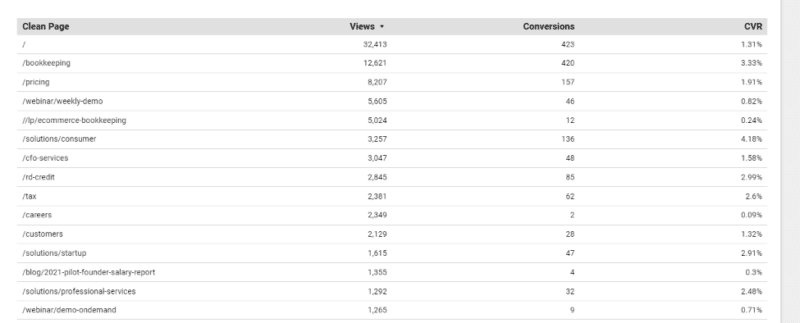
To create the clean landing page view:
- Select Add Dimension > Create Field.
- RegEx and enter
REGEXP_REPLACE(Page path + query string,'\\?.+', '')in the formula field. - Pull in Views and Conversions.
- Create a calculated field for your conversion rate. I used Views and Conversions (Conversions/Views).
I guarantee that’s the tip of the iceberg… the more we play around, the more we’ll realize we’re either missing or have the opportunity to improve in GA4.
The saga continues…
As you can tell, we’re still learning about the full capability of GA4 and how to reflect it in Google Ads campaigns.
Over the coming months, as the July 1, 2023 deadline approaches and more marketers muster up the courage to start the transition to GA4, I expect more best practices to circulate.
The post How GA4, data modeling and Google Ads work together appeared first on Search Engine Land.
Courtesy of Search Engine Land: News & Info About SEO, PPC, SEM, Search Engines & Search Marketing
Category seo news | Tags:
Social Networks : Technorati, Stumble it!, Digg, de.licio.us, Yahoo, reddit, Blogmarks, Google, Magnolia.
Google Search Console’s video indexing report now live for all
Written on August 22, 2022 at 6:18 am, by admin
In May, Google teased a new video indexing report in Google Search Console, then in July the report started to roll out to some properties, the search company announced. Now, the report is fully live for all properties where Google can detect video on the site, the company just announced on Twitter.
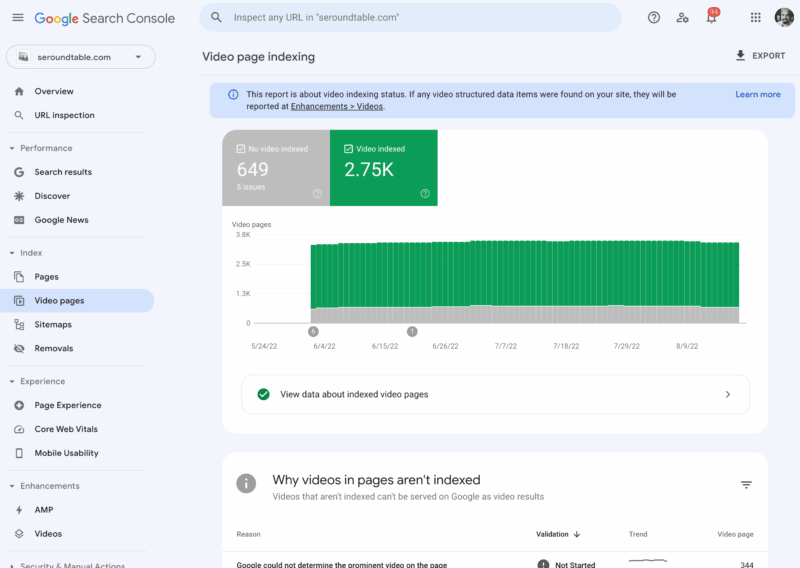
What is the video indexing report. The video indexing report shows how many indexed pages on your site contain one or more videos, and how many of those pages a video could be indexed. Google said the report can help you understand the performance of your videos on Google, and identify possible areas of improvement.
What it looks like. Here is a screenshot of this report for one of my sites in Google Search Console:
Google’s announcement. Here is the tweet where Google announced this:
We have completed the roll out of the Search Console Video index report – if Google detects videos on your site, this report will appear on the left navigation bar in the coverage section. We hope this will help you understand how your videos perform on Search!
https://t.co/XfQO5q42md
— Google Search Central (@googlesearchc) August 22, 2022
When the report shows. Google said if Google detects videos on your site, the Video indexing report will appear on the left navigation bar in the coverage section. If Google has not detected a video on your website, you will not see the report.
What it tells you. The report shows the status of video indexing on your site. It helps you answer the following questions:
- In how many pages has Google identified a video?
- Which videos were indexed successfully?
- What are the issues preventing videos from being indexed?
In addition, if you fix an existing issue, you can use the report to validate the fix and track how your fixed video pages are updated in the Google index, Google explained.
URL Inspection tool for video pages. Google also also enhanced the URL Inspection tool to allow you to check the video indexing status of a specific page. When inspecting a page, if Google detected a video in it, you will see the following in the results:
- Details such as the video URL and the thumbnail URL.
- The page status showing whether the video was indexed or not.
- List of issues preventing the video from being indexed.
Why we care. If you host videos on your site or embed videos on your site, you will want to check out this report to see if there are ways to improve those videos or help other videos to show up in Google Search. Videos are an important aspect of search traffic and visibility in Google Search.
There are a lot more details on this new report in this Google help document.
The post Google Search Console’s video indexing report now live for all appeared first on Search Engine Land.
Courtesy of Search Engine Land: News & Info About SEO, PPC, SEM, Search Engines & Search Marketing
Category seo news | Tags:
Social Networks : Technorati, Stumble it!, Digg, de.licio.us, Yahoo, reddit, Blogmarks, Google, Magnolia.
Google Helpful Content Update
Written on August 20, 2022 at 12:08 am, by admin
Granular Panda
Reading the tea leaves on the pre-announced Google “helpful content” update rolling out next week & over the next couple weeks in the English language, it sounds like a second and perhaps more granular version of Panda which can take in additional signals, including how unique the page level content is & the language structure on the pages.
Like Panda, the algorithm will update periodically across time & impact websites on a sitewide basis.
Cold Hot Takes
The update hasn’t even rolled out yet, but I have seen some write ups which conclude with telling people to use an on-page SEO tool, tweets where people complained about low end affiliate marketing, and gems like a guide suggesting empathy is important yet it has multiple links on how to do x or y “at scale.”
Trashing affiliates is a great sales angle for enterprise SEO consultants since the successful indy affiliate often knows more about SEO than they do, the successful affiliate would never become their client, and the corporation that is getting their asses handed to them by an affiliate would like to think this person has the key to re-balance the market in their own favor.
My favorite pre-analysis was a person who specialized in ghostwriting books for CEOs Tweeting that SEO has made the web too inauthentic and too corporate. That guy earned a star & a warm spot in my heart.
Profitable Publishing
Of course everything in publishing is trade offs. That is why CEOs hire ghostwriters to write books for them, hire book launch specialists to manipulate the best seller lists, or even write messaging books in the first place. To some Dan Price was a hero advocating for greater equality and human dignity. To others he was a sort of male feminist superhero, with all the Harvey Weinstein that typically entails.
Anyone who has done 100 interviews with journalists see ones that do their job by the book and aim to inform their readers to the best of their abilities (my experiences with the Wall Street Journal & PBS were aligned with this sort of ideal) and then total hatchet jobs where a journalist plants a quote they want & that they said, that they then attributes it to you (e.g. London Times freelance journalist).
There are many dimensions to publishing:
- depth
- purpose
- timing
- audience
- language
- experience
- format
- passion
- uniqueness
- frequency
Blogs to Feeds
For a long time indy blogs punched well above their weight due to the incestuous nature of cross-referencing each other, the speed of publishing when breaking news, and how easy feed readers made it to subscribe to your favorite blogs. Google Reader then ate the feed reader market & shut down. And many bloggers who had unique things to say eventually started to repeat themselves. Or their passions & interests changed. Or their market niche disappeared as markets moved on. Starting over is hard & staying current after the passion fades is difficult. Plus if you were rather successful it is easy to become self absorbed and/or lose the hunger and drive that initially made you successful.
Around the same time blogs started sliding people spent more and more time on various social networks which hyper-optimized the slot machine type dopamine rush people get from refreshing the feed. Social media largely replaced blogs, while legacy media publishers got faster at putting out incomplete news stories to be updated as they gather more news. TikTok is an obvious destination point for that dopamine rush - billions of short pieces of content which can be consumed quickly and shared - where the user engagement metrics for each user are tracked and aggregated across each snippet of media to drive further distribution.
Burnout & Changing Priorities
I know one of the reasons I blog less than I used to is a lot of the things I would write would be repeats. Another big reason was when my wife was pregnant I decided to shut down our membership site so I could take my wife for a decently long walk almost everyday so her health was great when it came time to give birth & ensure I had spare capacity for if anything went wrong with the pregnancy process. As a kid my dad was only around much for a few summers and I wanted to be better than that for my kid.
The other reason I cut back on blogging is at some point search went from a endless blue water market to a zero sum game to a negative sum game (as ad clicks displaced organic clicks). And in such an environment if you have a sustainable competitive advantage it is best to lean into it yourself as hard as you can rather than sharing it with others. Like when we had an office here our link builders I trained were getting awesome unpaid links from high-trust sources for what backed out to about $25 of labor time (and no more than double that after factoring in office equipment, rent, etc.).
If I share that script / process on the blog publicly I would move the economics against myself. At the end of the day business is margins, strategy, market, and efficiency. Any market worth being in is going to have competition, so you need to have some efficiency or strategic differentiators if you are going to have sustainable profit margins. I’ve paid others many multiples of that for link building for many years back when links were the primary thing driving rankings.
I don’t know the business model where sharing the above script earns more than it costs. Does one launch a Substack priced at like $500 or $1,000 a month where they offer a detailed guide a month? How many people adopt the script before the response rates fall & it offsets the costs by more than the revenues? My issue with consulting is I always wanted to over-deliver for clients & always ended up selling myself short when compared to publishing, so I just stick with a few great clients and a bit of this and that vs going too deep & scaling up there. Plus I had friends who went big and then some of their clients who were acquired had the acquirer brag about the SEO, that lead to a penalty, then the acquirer of the client threw the SEO under the bus and had their business torched.
When you have a kid seeing them learn and seeing wonderment in their eyes is as good as life gets, but if you undermine your profit margins you’d also be directly undermining your own child’s future … often to help people who may not even like you anyhow. That is ultimately self defeating as it gets, particularly as politics grow more polarized & many begin to view retribution as a core function of government.
I believe there are no limits to the retributive and malicious use of taxation as a political weapon. I believe there are no limits to the retributive and malicious use of spending as a political reward.
Margins
The role of search engines is to suck as much of the margins as they can out of publishing while trying to put some baseline floor on content quality so that people would still prefer to use a search engine rather than some other reference resource. Google sees memes like “add Reddit to the end of your search for real content” as an attack on their own brand. Google needs periodic large shake ups to reaffirm their importance, maintain narrative control around innovation, and to shake out players with excessive profit margins who were too well aligned with the current local maxima. Google needs aggressive SEO efforts with large profits to have an “or else” career risk to them to help reign in such efforts.
You can see the intent for career risk in how the algorithm will wait months to clear the flag:
Google said the helpful content update system is automated, regularly evaluating content. So the algorithm is constantly looking at your content and assigning scores to it. But that does not mean, that if you fix your content today, your site will recover tomorrow. Google told me there is this validation period, a waiting period, for Google to trust that you really are committed to updating your content and not just updating it today, Google then ranks you better and then you put your content back to the way it was. Google needs you to prove, over several months - yes - several months - that your content is actually helpful in the long run.
If you thought a site were quality, had some issues, the issues were cleaned up, and you were still going to wait to rank it appropriately … the sole and explicit purpose of that delay is career risk to others to prevent them flying to close to the sun - to drive self regulation out of fear.
Brand counts for a lot in search & so does buying the default placement position - look at how much Google pays Apple to not compete in search, or look at how Google had that illegal ad auction bid rigging gentleman’s agreement with Facebook to not compete with a header bidding solution so Google could maintain their outsized profit margins on ad serving on third party websites.
Business ultimately is competition. Does Google serve your ads? What are the prices charged to players on each side of each auction & how much rake can the auctioneer capture for themselves?
The Auctioneer’s Shill Bid - Google Halverez (beta)
That is why we see Google embedding more features directly in their search results where they force rank their vertical listings above the organic listings. Their vertical ads are almost always placed above organics & below the text AdWords ads. Such vertical results could be thought of as a category-based shill bid to try to drive attention back upward, or move traffic into a parallel page where there is another chance to show more ads.
This post stated:
Google runs its search engine partly on its internally developed Cloud TPU chips. The chips, which the company also makes available to other organizations through its cloud platform, are specifically optimized for artificial intelligence workloads. Google’s newest Cloud TPU can provide up to 275 teraflops of performance, which is equivalent to 275 trillion computing operations per second.
Now that computing power can be run across:
- millions of books Google has indexed
- particular publishers Google considers “above board” like Reuters, AP, the New York Times, the Wall Street Journal, etc.
- historically archived content from trusted publishers before “optimizing for search” was actually a thing
… and model language usage versus modeling the language usage of publishers known to have weak engagement / satisfaction metrics.
Low end outsourced content & almost good enough AI content will likely tank. Similarly textually unique content which says nothing original or is just slapped together will likely get downranked as well.
Expect Volatility
They would not have pre-announced the update & gave some people some embargoed exclusives unless there was going to be a lot of volatility. As typical with the bigger updates, they will almost certainly roll out multiple other updates sandwiched together to help obfuscate what signals they are using & misdirect people reading too much in the winners and losers lists.
Here are some questions Google asked:
- Do you have an existing or intended audience for your business or site that would find the content useful if they came directly to you?
- Does your content clearly demonstrate first-hand expertise and a depth of knowledge (for example, expertise that comes from having actually used a product or service, or visiting a place)?
- Does your site have a primary purpose or focus?
- After reading your content, will someone leave feeling they’ve learned enough about a topic to help achieve their goal?
- Will someone reading your content leave feeling like they’ve had a satisfying experience?
- Are you keeping in mind our guidance for core updates and for product reviews?
As a person who has … erm … put a thumb on the scale for a couple decades now, one can feel the algorithmic signals approximated by the above questions.
To the above questions they added:
- Is the content primarily to attract people from search engines, rather than made for humans?
- Are you producing lots of content on different topics in hopes that some of it might perform well in search results?
- Are you using extensive automation to produce content on many topics?
- Are you mainly summarizing what others have to say without adding much value?
- Are you writing about things simply because they seem trending and not because you’d write about them otherwise for your existing audience?
- Does your content leave readers feeling like they need to search again to get better information from other sources?
- Are you writing to a particular word count because you’ve heard or read that Google has a preferred word count? (No, we don’t).
- Did you decide to enter some niche topic area without any real expertise, but instead mainly because you thought you’d get search traffic?
- Does your content promise to answer a question that actually has no answer, such as suggesting there’s a release date for a product, movie, or TV show when one isn’t confirmed?
Some of those indicate where Google believes the boundaries of their own role as a publisher are & that you should stay out of their lane. 
Barrier to Entry vs Personality
One of the interesting things about the broader scope of algorithm shifts is each thing that makes the algorithms more complex, increases barrier to entry, and increases cost ultimately increases the chunk size of competition. And when that is done what is happening is the microparasite is being preference over the microparasite. Conceptually Google has a lot of reasons to have that bias or preference:
- fewer entities to police (lower cost)
- more data to use to police each entity (higher confidence)
- easier to do direct deals with players which can move the needle (more scale)
- if markets get too consolidated Google can always launch a vertical service & tip the scale back in the other direction (I see your Amazon ad revenue and I raise you free product listing ads)
- the macroparasites have more “sameness” between them (making it easier for Google to create a competitive clone or copy)
So long as Google maintains a monopoly on web search the bias toward macroparasites works for them, as people can not see what they do not see & do not know what does not exist, or what exists but is hidden to them.
I think when people complain about the web being inauthentic what they are really complaining about is the algorithmic choices & publishing shifts that did away with the indy blogs and replaced with with the dopamine feed viral tricks and the same big box scaled players which operate multiple parallel sites to where you are getting the same machinery and content production house behind multiple consecutive listings. They are complaining about the efforts to snuff out the microparasite also scrubbing away personality, joy, love, quirkiness, weirdness, and the stuff you would not typically find on content by factory order websites.
Let’s Go With Consensus Here!
The above leads you down well worn paths, rather than the magic of serendipity & a personality worn on your sleeve that turns some people on while turning other people off.
Text which is roughly aligned with a backward looking consensus rather than at the forefront of a field.
If you believe this effort will enhance info literacy, and that it represents evolved search, you’re an idiot.
Sharyl Attkisson gave us the head’s up that they’d push censorship controls as “media literacy” several years ago.— john andrews (@johnandrews) August 13, 2022
History is written by the victors. Consensus is politically driven, backward looking, and has key messages memory holed.
Did he just say that? Yep. pic.twitter.com/gu9Fk7t1Sv— Kevin Sorbo (@ksorbs) August 18, 2022
Some COVID-19 Fun to “Fact” Check
I spent new years in China before the COVID-19 crisis hit & got sick when I got back. I used so much caffeine the day I moved over a half dozen computers between office buildings while sick. I week later when news on Twitter started leaking of the COVID-19 crisis hit I thought wow this looks even worse than what I just had. In the fullness of time I think I had it before it was a crisis. Everyone in my family got sick and multiple people from the office. Then that news COVID-19 crisis news came out & only later when it was showed that comorbidities and the elderly had the worse outcomes did I realize they were likely the same. Then after the crisis had been announced someone else from the office building I was in got it & then one day it was illegal to go into the office. The lockdown where I lived was longer than the original lockdown in Wuhan.
The reason the response to the COVID-19 virus was so extreme was huge parts of politically interested parties wanted to stop at nothing to see orange man ejected from the White House. So early on when he blocked flights from China you had prominent people in political circles calling him xenophobic, and then the head of public health in New York City was telling you it was safe to ride the subway and go about your ordinary daily life. That turned out to be deadly partisan hackery & ignorance pitched as enlightenment, leading to her resignation.
Then the virus spreads wildly as one would expect it to. And draconian lockdowns to tank the economy to ensure orange man was gone, mail in voting was widespread, and the election was secured.
I actually appreciate Sam Harris for saying this out loud. This is what the vast majority of the anti Trump crowd believes, but most of them won’t say it. At least when it’s said, you can see it for what it is.pic.twitter.com/NmOqshoZlS— Dave Smith (@ComicDaveSmith) August 18, 2022
Some of the most ridiculous heroes during this period wrote books about being a hero. Andrew “killer” Cuomo had time to write his “did you ever know that I’m your hero” book while he simultaneously ordered senior living homes to take in COVID-19 positive patients. Due to fecal-oral transmission and their poor outcomes his policies lead to the manslaughter of thousands of senior citizens.
You couldn’t go to a funeral and say goodbye because you might kill someone else’s grandma, but if you were marching for social justice (and only social justice) that stuff was immune to the virus.
Ron DeSantis on public health experts making an exception to lockdowns for George Floyd protests: “That’s when I knew these people are a bunch of frauds”
pic.twitter.com/PzjPc80Q3g— Benny Johnson (@bennyjohnson) August 5, 2022
Suggesting looking at the root problems like no dad in the home is considered sexist, racist, or both. Meanwhile social justice organizations champion tearing down the nuclear family in spite of the fact that “mandatory collectivism has ended in misery wherever it’s been tried.”
Of course the social justice stuff embeds the false narrative of victimhood, which then turns many of the fake victims into monsters who destroy the lives of others - but we are all in this together. Absolutely nobody could have predicted the rise of murder & violent crime as we emptied the prisons & decriminalized wide swaths of the criminal code. Plus since many criminal codes are ignored people stop reporting lesser crimes, so the New York Times can tell you not to worry overall crime is down.
In Seattle if someone rapes you the police probably won’t even take a report to investigate it unless (in some cases?) you are a child. What are police protecting society from if rape is a freebie that doesn’t really matter? Why pay taxes or have government at all?
What Google Wants
The above sidebar is the sort of content Google would not want to rank in their search results.
They want to rank text which is perhaps factually correct, and maybe even current and informed, but done in such a way where you do not feel you know the author the way you might think you do if you read a great novel. Or hard biased content which purports to support some view and narrative, but is ultimately all just an act, where everything which could be of substance is ultimately subsumed by sales & marketing.
“The best relevancy algorithm in the world is trumped by preferential placement of inferior results which bypasses the algorithm.”
I was a fool to dismiss Aaron for years as a cynic. He was an oracle, not a conspiracy theorist: https://t.co/V68vIXXNPI— Rand Fishkin (@randfish) November 20, 2019
The Market for Something to Believe In is Infinite
Each re-representation mash-up of content in the search results decontextualizes the in-depth experience & passion we crave. Each same “big box” content factory where a backed entity can withstand algorithmic volatility & buy up other publishers to carry learnings across to establish (and monetize) a consensus creates more of a bland sameness.
That barrier to entry & bland sameness is likely part of the reason the recent growth of Substack, which sort of acts just like a blog did 15 or 20 years ago - you go direct to the source without all the layers of intermediaries & dumbing down you get as a side effect of the scaled & polished publishing process.
Courtesy of SEO Book.com
Category seo news | Tags:
Social Networks : Technorati, Stumble it!, Digg, de.licio.us, Yahoo, reddit, Blogmarks, Google, Magnolia.
What is helpful content, according to Google
Written on August 20, 2022 at 12:08 am, by admin
Google’s new helpful content update is meant to reward content that is written for humans.
So how exactly does Googe define “helpful content”?
In short, according to Google, helpful content:
- Is created for a specific audience.
- Features expertise.
- Is trustworthy and credible.
- Meets the want(s) or need(s) of the searcher.
This is important to know because your definition of “helpful content” is likely different from Google’s.
Here’s everything we know about what Google considers helpful content.
What is helpful content?
What follows is all the guidance and questions Google has provided to assess whether your content is helpful, around the helpful content (HCU), product review (PRU), core (CU) and Panda updates (PU).
Google’s guidance around helpful content generally breaks down into four areas. Helpful content:
1. Is created for a specific audience
- Do you have an existing or intended audience for your business or site that would find the content useful if they came directly to you? (HCU)
- Does your site have a primary purpose or focus? (HCU)
- Is the content primarily to attract people from search engines, rather than made for humans? (HCU)
- Are you producing lots of content on different topics in hopes that some of it might perform well in search results? (HCU)
- Are you using extensive automation to produce content on many topics? (HCU)
- Does the content seem to be serving the genuine interests of visitors to the site or does it seem to exist solely by someone attempting to guess what might rank well in search engines? (CU)
- Are you writing about things simply because they seem trending and not because you’d write about them otherwise for your existing audience? (HCU)
- Are you writing to a particular word count because you’ve heard or read that Google has a preferred word count? (No, we don’t). (HCU)
- Evaluate the product from a user’s perspective. (PRU)
2. Features expertise
- Is this content written by an expert or enthusiast who demonstrably knows the topic well? (CU)
- Does your content clearly demonstrate first-hand expertise and a depth of knowledge (for example, expertise that comes from having actually used a product or service, or visiting a place)? (HCU)
- Does the content provide insightful analysis or interesting information that is beyond obvious? (CU)
- If the content draws on other sources, does it avoid simply copying or rewriting those sources and instead provide substantial additional value and originality? (CU)
- Is the content mass-produced by or outsourced to a large number of creators, or spread across a large network of sites, so that individual pages or sites don’t get as much attention or care? (CU)
- Does the content provide substantial value when compared to other pages in search results? (CU)
- Are you mainly summarizing what others have to say without adding much value? (HCU)
- Did you decide to enter some niche topic area without any real expertise, but instead mainly because you thought you’d get search traffic? (HCU)
- Demonstrate that you are knowledgeable about the products reviewed – show you are an expert. (PRU)
- Discuss the benefits and drawbacks of a particular product, based on your own original research. (PRU)
- Describe how a product has evolved from previous models or releases to provide improvements, address issues, or otherwise help users in making a purchase decision. (PRU)
- Identify key decision-making factors for the product’s category and how the product performs in those areas (for example, a car review might determine that fuel economy, safety, and handling are key decision-making factors and rate performance in those areas). (PRU)
- Describe key choices in how a product has been designed and their effect on the users beyond what the manufacturer says. (PRU)
- When recommending a product as the best overall or the best for a certain purpose, include why you consider that product the best, with first-hand supporting evidence. (PRU)
3. Is trustworthy and credible
- Would you trust the information presented in this article? (PU)
- Does the content present information in a way that makes you want to trust it, such as clear sourcing, evidence of the expertise involved, background about the author or the site that publishes it, such as through links to an author page or a site’s About page? (CU)
- If you researched the site producing the content, would you come away with an impression that it is well-trusted or widely-recognized as an authority on its topic?
- Does the content have any easily-verified factual errors? (CU)
- Would you feel comfortable trusting this content for issues relating to your money or your life? (CU)
- Does the content provide original information, reporting, research or analysis? (CU)
- Does the content provide a substantial, complete or comprehensive description of the topic? (CU)
- Does the headline and/or page title provide a descriptive, helpful summary of the content? (CU)
- Does the headline and/or page title avoid being exaggerating or shocking in nature? (CU)
- Is this the sort of page you’d want to bookmark, share with a friend, or recommend? (CU)
- Would you expect to see this content in or referenced by a printed magazine, encyclopedia or book? (CU)
- Does the content have any spelling or stylistic issues? (CU)
- Was the content produced well, or does it appear sloppy or hastily produced? (CU)
- Does the content have an excessive amount of ads that distract from or interfere with the main content? (CU)
- Provide evidence such as visuals, audio, or other links of your own experience with the product, to support your expertise and reinforce the authenticity of your review. (PRU)
- Share quantitative measurements about how a product measures up in various categories of performance. (PRU)
- Explain what sets a product apart from its competitors. (PRU)
- Cover comparable products to consider, or explain which products might be best for certain uses or circumstances. (PRU)
- Include links to other useful resources (your own or from other sites) to help a reader make a decision. (PRU)
- Consider including links to multiple sellers to give the reader the option to purchase from their merchant of choice. (PRU)
4. Meets the want(s) or need(s) of the searcher
- After reading your content, will someone leave feeling they’ve learned enough about a topic to help achieve their goal? (HCU)
- Will someone reading your content leave feeling like they’ve had a satisfying experience? (HCU)
- Does your content leave readers feeling like they need to search again to get better information from other sources? (HCU)
- Does your content promise to answer a question that actually has no answer, such as suggesting there’s a release date for a product, movie, or TV show when one isn’t confirmed? (HCU)
- Does content display well for mobile devices when viewed on them? (CU)
- Ensure there is enough useful content in your ranked lists for them to stand on their own, even if you choose to write separate in-depth single product reviews for each recommended product. (PRU)
- Would users complain when they see pages from this site? (PU)
Digging deeper into intent
There are the classic search intents you likely know (informational, navigational, transactional), but also several micro-intents you should think about when creating content.
Google has broken down search behavior into four “moments” in the past:
- I want to know. People searching for information or inspiration.
- I want to go. People searching for a product or service in their area.
- I want to do. People searching for how-tos.
- I want to buy. People who are ready to make a purchase
The QRG breaks down user intent into these categories:
- Know query: To find information on a topic. Some of which are Know Simple queries (i.e., queries that have a specific answer, like a fact, diagram, etc.)
- Do query: When the user is trying to accomplish a goal or engage in an activity.
- Website query: When the user is looking for a specific website or webpage
- Visit-in-person query: Some of which are looking for a specific business or organization, some of which are looking for a category of businesses.
Additionally, search behavior is driven by six needs, according to a 2019 Think With Google article:
- Surprise Me: Search is fun and entertaining. It is extensive with many unique iterations.
- Thrill Me: Search is a quick adventure to find new things. It is brief, with just a few words and minimal back-button use.
- Impress Me: Search is about influencing and winning. It is laser-focused, using specific phrases.
- Educate Me: Search is about competence and control. It is thorough: reviews, ratings, comparisons, etc.
- Reassure Me: Search is about simplicity, comfort, and trust. It is uncomplicated and more likely to include questions.
- Help Me: Search is about connecting and practicality. It is to-the-point, and more likely to mention family or location.
One final way to think about audience intent is Avinash Kaushik’s See, Think, Do, Care framework. Though it’s not “official” Google advice specific to an algorithm update, Kaushik was Google’s Digital Marketing Evangelist when he wrote this.
Google highlights ‘helpful content’ in featured snippets
The term “helpful content” rarely shows up on Google’s documentation. But it does show up on Google’s How Search Works page, in reference to Featured Snippets:
“Featured snippets are where we prominently display a page’s description — what we call a snippet. We use this format when our systems determine it might help people more easily discover what they’re seeking, both from the description and when they click on the link to read the page itself. It’s especially helpful for those on mobile or searching by voice.”
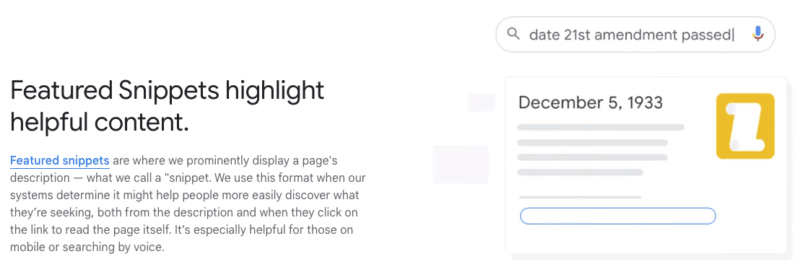
Google wants to help searchers find the answer or information they are looking for as quickly as possible – sometimes without ever leaving the search results page.
Your content should be the best answer that someone is searching for.
In short: helpful content should be the best answer – and provide that answer as quickly as possible.
The post What is helpful content, according to Google appeared first on Search Engine Land.
Courtesy of Search Engine Land: News & Info About SEO, PPC, SEM, Search Engines & Search Marketing
Category seo news | Tags:
Social Networks : Technorati, Stumble it!, Digg, de.licio.us, Yahoo, reddit, Blogmarks, Google, Magnolia.
TikTok announces three new shopping ad features
Written on August 20, 2022 at 12:08 am, by admin
Just one month after TikTok supposedly abandoned plans to bring shopping ads into the US, the social media video platform announced that it’s launching a new commerce ad suite called Shopping Ads. They will be testing three new ad formats including Video Shopping Ads, Catalog LIsting Ads, and LIVE Shopping Ads.
Video Shopping Ads
Video Shopping Ads will be placed in the For You page and allow advertisers to highlight products in their feed TikTok video ads. TikTok says Shopping Ads provide a dynamic experience based on the shoppers intent to purchase. Video Shopping Ads will automatically create a landing page and are available to select advertisers for testing.
Catalog Listing Ads
Catalog Listing Ads allow advertisers to feature their product catalogs across the app and expand their reach. Advertisers can promote their products across shoppable surfaces such as “recommended” or “Related Products.” Catalog Listing Ads are being tested in the US.
LIVE Shopping Ads
LIVE Shopping Ads enable advertisers to direct users from the For You page to their live event so they can join and buy products. LIVE Shopping Ads are being tested where TikTok Shop is available including the UK, Indonesia, Malaysia, the Philippines, Singapore, Thailand, and Vietnam.
What TikTok says. TikTok says that 70% of the users it surveyed said it was easy to make purchases through shopping related ads. 56% of those said TikTok helped them discover new products and brands, and 48% of users expressed an interest in making a purchase through TikTok.
TikTok partners. TikTok has partnered with Smartly.io as their ads & campaign partner. They have also partnered with Productsup for their catalog feed. For commerce, they currently integrate with Shopify, BigCommerce, WooCommerce, and Ecwid.
Why we care. There was no insight into why TikTok changed its mind about bringing shopping ads into the US. After the disastrous launch in the UK, we were convinced that it just wasn’t in the cards. But if you’re an advertiser interested in testing out these new features, check your account for eligibility.
The post TikTok announces three new shopping ad features appeared first on Search Engine Land.
Courtesy of Search Engine Land: News & Info About SEO, PPC, SEM, Search Engines & Search Marketing
Category seo news | Tags:
Social Networks : Technorati, Stumble it!, Digg, de.licio.us, Yahoo, reddit, Blogmarks, Google, Magnolia.