

Google reports issue affecting Impression Share and Auction Insights
Written on September 1, 2022 at 10:12 am, by admin
Google has been experiencing an issue with Auction Insights and Impression Share reporting since August 29.
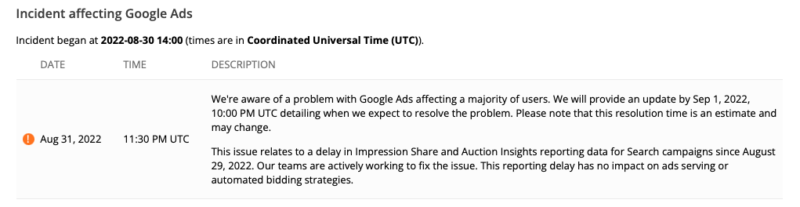
What Google says. Ads Liason Ginny Marvin said in a tweet that their team was working to fix the issue, and there would be no impact on ad serving or bidding strategies.
We're aware of an issue related to a delay in Impression Share & Auction Insights reporting for Search campaigns since 8/29 & are working to fix it. This doesn’t impact ad serving or automated bidding strategies. We’ll have updates here: https://t.co/o5sTGAwBbc
— AdsLiaison (@adsliaison) August 31, 2022
When will the issue be fixed. There is no ETA on when the issue will be fixed. But Google says they will provide an update by September 1. Advertisers can keep checking the status dashboard here.
Why we care. If you’re trying to report on Impression Share or use Auction Insights to manage your campaigns, you may want to wait until the issue has been resolved to prevent false information from affecting your decisions.
The post Google reports issue affecting Impression Share and Auction Insights appeared first on Search Engine Land.
Courtesy of Search Engine Land: News & Info About SEO, PPC, SEM, Search Engines & Search Marketing
Category seo news | Tags:
Social Networks : Technorati, Stumble it!, Digg, de.licio.us, Yahoo, reddit, Blogmarks, Google, Magnolia.
7 tips for transitioning from in-house marketing to agency life
Written on September 1, 2022 at 10:12 am, by admin
Have you been working in an in-house marketing role and considering a switch to agency life?
Agencies are great because you can gain exposure to various types of businesses and learn to optimize against different marketing objectives. But they’re also fast-paced and come with significant differences relative to working in an in-house marketing role.
One of the most significant differences between in-house marketing and agency life is that you may be responsible for several accounts at once and need to focus on time and attention management more than ever.
Making the switch to agency life can be a little intimidating, especially if you’ve been working in-house or focused on one brand for a long time.
The following seven tips can help you hit the ground running so that your agency career is as awesome as you hope it will be.
1. Adhere to the 80/20 rule
One of the most important things in any agency is working quickly and efficiently. It’s helpful to timebox yourself and think about where the 80/20 rule applies. This is where I’ve seen people struggle the most during a transition from corporate life, especially on smaller client accounts where hours are limited.
For example, a client may have a 20-hour-per-month contract, and you have to deliver as much value as possible using those hours. Approach the problem this way – delivering several things at 80% will likely add more value to their business than going 100% on one thing.
For example, you could spend two hours researching keywords to target and get a lot of the information you need or spend five hours and come up with some additional words you may not work on for six months. Think of what else you could do with the extra three hours that might be more valuable than additional keyword research.
Another rabbit hole is doing competitive backlink research. Spend a couple of hours developing an initial target list, but be realistic about what you’ll use over the next few months.
It’s easy to keep digging and lose track of time when something doesn’t have a finite end (like keyword research or reviewing backlinks), so block an hour or two to work on it and then see how you feel about the results.
You’ll want to think about delivering value constantly and consistently. Remember that every day you hold back or delay sharing information is a day that clients can’t move forward in growing their businesses and achieving their goals, so don’t overthink things and aim for “perfect!”
2. Plan your schedule to create room for ad hoc work
Managing simultaneous clients can be daunting for people coming over from in-house marketing roles. I’d recommend blocking meetings out on your calendar with specific tasks assigned to each. It’s even better if you can book recurring meetings at the same time each week to build a rhythm.
For example, “Client A content briefs” every Monday at 2 p.m. or “Client B weekly report” on Wednesday at 3 p.m.
If you can plan out 80% of your time, this should allow you to absorb ad hoc requests from your manager, colleagues, or clients without them getting in the way of completing your projects.
Friday afternoon is a great time to plan out the following week so that you don’t stress about it over the weekend!
3. Get comfortable working with imperfect information
When you work in-house, it’s easy to put things off until you get all the information you need from your colleagues or your research.
However, you have to get comfortable working with imperfect information when you work for an agency. This might include not receiving information about audience demographics, a rough estimate of cost-per-lead targets, or historical performance data.
You will rarely get everything you need from a client. It’s essential to move forward and work around constraints. Waiting for all data will lead to burning through days and weeks on projects that generally already have tight timelines.
Think of your time as perishable inventory or like an unsold hotel room – once the day passes, it’s gone, and there’s no getting it back.
4. Sync with your peers to get up to speed quickly
When you work for an agency, you should get comfortable with the fact that sometimes “and other duties as assigned” may be the biggest part of your job and that you might enter a project or take over a client mid-stream.
Usually, it’s faster to learn about a new industry or client by listening to what your peers have already figured out rather than trying to get up to speed on everything by yourself.
Peers may be able to communicate enough background information in a one-hour call to get you started, where it would otherwise take you hours to dig through all of the original materials or old emails.
This is tougher if the person you’re taking over has already left. In that case, you may want to ask for a copy of an original kick-off document, dig through Slack, or review the past four or five weekly / monthly reports.
5. Respond quickly without dropping other priorities
Offering high-touch service doesn’t mean dropping everything or your existing commitments for ad hoc requests. Responding to an email, text, or Slack immediately can disrupt your workflow – unless it’s a true emergency (like a site outage, broken data feed or similar issue).
While clients (and colleagues) expect that you’ll communicate promptly, don’t confuse offering excellent service with doing the work immediately.
Schedule time to check your email and Slack (or similar) several times throughout the day, and get familiar with sending these types of responses:
- “Got it! When do you need this by?”
- “I can get it to you by the 15th – will that work?”
- “Sure thing. I’m tied up this week but can start on that on Tuesday. Is that okay with you?”
- “Confirming I got your email. Unfortunately, we can’t commit to getting this done in the time frame you need. We’ll do our best but can definitely get it to you by Friday. Please let me know if that will work for you.”
You can preserve your relationships by learning to set realistic timeframes and sticking with your other commitments. Juggling conflicting priorities is tough – make sure you don’t confuse “important” with “urgent.”
If you have multiple emails from clients with different requests, you may want to consolidate the answers into a single email. Consolidating different threads should help reduce the number of responses you get back!
6. Control the conversation by planning
A surefire way to make an impression with your colleagues and clients is to plan ahead. As an in-house marketer, you were likely either just tackling whatever felt most important, getting ready for seasonal spikes, or doing analysis.
Clients will look to you to push them forward in their marketing – that’s why they’ve hired an agency!
Here are a couple of planning opportunities:
- Early in the month, or ahead of it: Ask clients if there are any important product launches, meetings, or conversations that they’ll need help with (i.e., board meeting) so you can plan accordingly
- Build 30-, 60- and 90-day plans and get alignment with clients on tests, projects and initiatives. Plan for most likely scenarios. You can always pull things forward, but it looks worse to push things out.
This also works really well with organizing your schedule – once you have an approved 30-, 60- or 90-day plan, you can block time out on your calendar to get the work done on time.
Plans inspire confidence and let clients know you’re thinking ahead, not just reacting to their requests.
7. Learn to track your time
This is one of the most challenging things for people transitioning into agencies from in-house roles, but it’s important. Time tracking helps agency leaders plan for capacity and staffing, understand client profitability, and bill clients accurately.
I’ve found it easiest to track in real-time, leaving a browser tab with the time tracking tool (e.g., Harvest, Toggl) open next to my email so it’s always visible. But, as I suggested earlier, you can also track your time at the end of the day or week if you block projects out of your calendar.
Agencies also keep an eye on utilization and billable time, so keeping up with time tracking will help ensure you get “credit” for your hard work!
The post 7 tips for transitioning from in-house marketing to agency life appeared first on Search Engine Land.
Courtesy of Search Engine Land: News & Info About SEO, PPC, SEM, Search Engines & Search Marketing
Category seo news | Tags:
Social Networks : Technorati, Stumble it!, Digg, de.licio.us, Yahoo, reddit, Blogmarks, Google, Magnolia.
Webinar: Paid and organic search harmony can skyrocket your results
Written on September 1, 2022 at 10:12 am, by admin

We hear a lot of talk about SEO and Paid Search living together in perfect harmony, side by side on your search engine results page, but how do we?
The cost of unnecessary paid brand clicks quickly adds up. Especially if you’re already dominating your SERP (search engine results page). This can feel like an uphill battle for you and the team as economic sentiment continues in uncertainty and spend efficiency is still top of mind.
Join Gary Galloway, Senior Director of Product Marketing at Adthena, as he covers how you can support growth strategies and help your brand achieve SERP while also decreasing costs
Register today for “Skyrocket your results with organic and paid search harmony,” presented by Adthena.
The post Webinar: Paid and organic search harmony can skyrocket your results appeared first on Search Engine Land.
Courtesy of Search Engine Land: News & Info About SEO, PPC, SEM, Search Engines & Search Marketing
Category seo news | Tags:
Social Networks : Technorati, Stumble it!, Digg, de.licio.us, Yahoo, reddit, Blogmarks, Google, Magnolia.
How video SEO can boost your overall digital marketing strategy
Written on August 31, 2022 at 7:08 am, by admin
When we talk about creating a video strategy, people usually see it as getting found on YouTube. And for good reason – billions of users access the platform every single month.
And then comes an inevitable argument: “I don’t think my product or service is a good fit for YouTube.”
Yet, creating and marketing videos goes far beyond YouTube findability.
Videos can make your content better, your product easier to understand and your brand more credible and relatable. Further, videos continue to receive exposure on Page 1 of Google’s search results for an increasing number of queries.
Even beyond that, a well-shaped video strategy can boost your overall SEO efforts. Here’s how.
1. Deeper understanding of your customers’ buying journeys
Video keyword research allows for discovery regarding which queries your target audience is using when searching for videos.
Knowing how your target audience is searching for related videos can give you a better understanding of their buying journeys, problems they are struggling to solve and tasks they are trying to complete.
When we turn to video content, we tend to look for informational or entertaining content, but we may also be able to uncover content opportunities that naturally solve the customers’ needs best in video format: how-to videos, product demonstrations, comparisons, and so on. A solid marketing strategy should always include both of these parts of buying journeys.
If you compare Google and YouTube auto suggestions, you will notice that YouTube search attracts a specific type of audience. If you search Google for Google Chromebook, for example, the top suggestions will be Google Chromebook laptop, Google Chromebook charger and Google Chromebook price – all three clearly signaling a commercial intent (i.e., start of a buying journey).
Some of YouTube’s top suggestions for Google Chromebook are Google Chromebook won’t turn on and Google Chromebook tutorial for beginners, which reflect an informational intent, possibly for a current owner of the product.
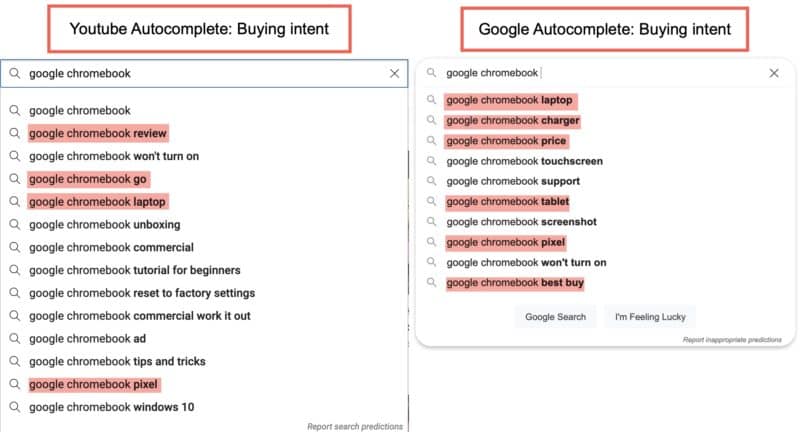
Not all YouTube suggestions have an informational intent, though. Based on YouTube autocomplete, people use the platform to find reviews of products from current customers of the brand, unboxing videos, as well as information on specific models.
And yet, YouTube-driven buying journeys seem to be very different from those that happen in Google, which makes YouTube suggestions such a powerful addition to any keyword research strategy.
A similar pattern applies to Google Video search, which often reveals a different angle or buying journey your target audience may take when researching their options.
Like Google’s regular search, the Google video section generates “related search” suggestions underneath organic search results. Here again, video-related searches differ from those you will see when using Google’s main search showing that people use Google videos for different purposes:
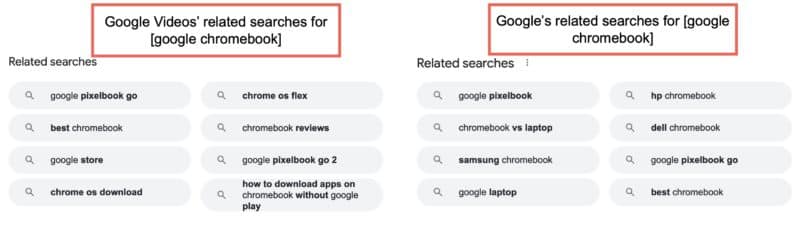
This way, Google Videos’ related searches allow you to discover keywords you’d miss if you were only relying on Google’s regular search results.
To sum up, when you start researching video-driven search queries, you get a better understanding of your target market and where your product may fit in. Your overall SEO strategy becomes better informed than that of your competitors.
Talk about a good way to find new “helpful content” opportunities! 
2. Better on-SERP visibility through video carousels
Google’s search engine results are much more diverse, visual and interactive than they were a decade ago.
These days Google’s SERPs include related images, instant answers, popular questions, and more.
One of the most visible sections is the one that includes related videos.
Videos have gained huge visibility in organic search results, mainly through video carousels.
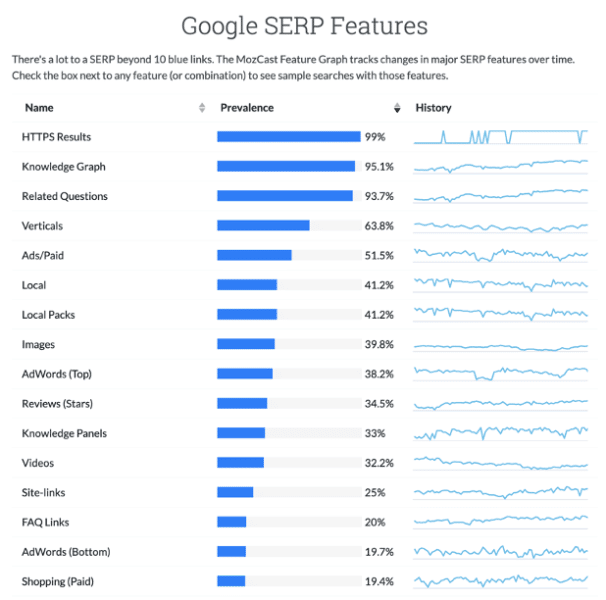
Based on Mozcast data, videos show up in at least 30% of Google’s SERPs:
In many cases, video results are “blended,” i.e., they are included in a standalone section that is not an organic listing but is added within SERPs as a standalone element.
This section is called a video carousel.
What is a video carousel?
A video carousel is a separate search element within Google SERPs that contains related videos.
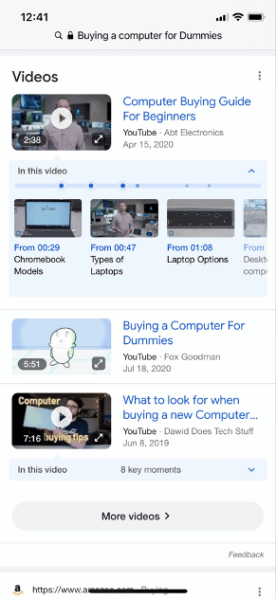
Video carousels are often included on the first page of search results, but the location of the section may vary depending on the specific searcher’s intent.
Sometimes video carousels show up right on top of SERPs: Try searching for “how to tie a tie,” for example. The video-only search snippet and the video carousel dominate the whole above-the-fold part of the screen, especially if you search from a mobile device. For other queries, the section may be included lower on a search result page.
In some cases, YouTube videos are not included into a carousel and simply act as organic results. This is different (a video actually counts towards the ten organic links that are allowed on page one) but still rewarding: You are able to see a huge thumbnail of the video, which is hard to miss, likely increasing the click-through rate for that rank position.
In both cases (carousels and organic results), when accessed from a mobile device, this video can be played right within search results.
In other words, in both of these cases, well-optimized and hence high-ranking videos that are branded provide additional visibility to a brand helping it dominate its target search result pages with more than a single organic listing.
3. More visibility in organic search with video-rich snippets
While YouTube video pages may act as organic listings giving you additional visibility, earning video-rich snippets allows you to get your own page ranked in the same SERPs.
Video rich snippets are enriched organic search results that include a video thumbnail from the page, making the result that much harder to miss:
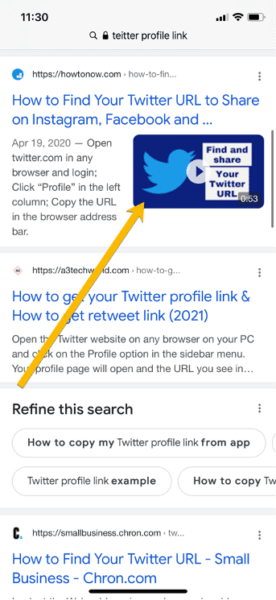
Unlike video carousels that provide brands with indirect exposure (people clicking a video in a carousel normally land on that YouTube page or watch that video right away from within Google’s search result page), video-rich snippets trigger a direct click to your site.
To earn a video-rich snippet, publishers need to embed a video on that page and use video schema.
Another benefit of earning a video-rich snippet is that it creates an expectation: People seeing a video thumbnail and clicking through to a page expect to find a video on that page, so they are more likely to stay on the page and watch the video. This, in turn, increases the probability that they will continue their journeys through the site, engage with your brand more, and dive deeper into the conversion funnel.
Conclusion
A video marketing strategy is more than making your brand or product findable on YouTube. When you start researching video opportunities, you’ll get to understand your audience better and uncover more SEO opportunities. Additionally, you make your brand stand out in search by having your video show up in related carousels, ranking your YouTube page in organic search and/or earning video snippets.
Google has created a lot of opportunities to make your SEO strategy better informed and more diverse by including videos into your digital marketing routine. If you’re unsure where to begin or don’t have the resources to implement a video strategy yourself, a comprehensive video creation and marketing service can help transform your digital presence, improve brand sentiment & trust, and increase sales & conversions across the web.
The post How video SEO can boost your overall digital marketing strategy appeared first on Search Engine Land.
Courtesy of Search Engine Land: News & Info About SEO, PPC, SEM, Search Engines & Search Marketing
Category seo news | Tags:
Social Networks : Technorati, Stumble it!, Digg, de.licio.us, Yahoo, reddit, Blogmarks, Google, Magnolia.
A PPC guide to privacy-focused audience targeting
Written on August 31, 2022 at 7:08 am, by admin
PPC campaign managers have had tight control over their account management, data insights, and optimization tactics for almost two decades. But everything is changing.
Query data is already scarce, keyword match types are blending into an amalgam of broad match, and signal loss continues to impact performance data and audience management.
With campaign types such as Performance Max and the lack of visibility into performance, PPC managers need to utilize every available targeting and optimization tool in their arsenal.
Dedicated audience strategies can provide additional control and specified targeting that delivers results. In my previous article, we reviewed the benefits of a well-defined audience strategy.
Now, let’s review your options for creating and managing privacy-focused audiences for PPC campaigns.
Adjusted timeline for cookie apocalypse
It’s worth noting that your timeline for the cookie apocalypse has been extended. The Google Chrome/Privacy Sandbox Team previously stated that third-party cookies would retire sometime in Q3 of 2023. Now, they have extended that timeline to 2024. According to the announcement from Chrome:
“By Q3 2023, we expect the Privacy Sandbox APIs to be launched and generally available in Chrome. As developers adopt these APIs, we now intend to begin phasing out third-party cookies in Chrome in the second half of 2024.”
Google needed more time to prepare properly for the retirement of cookies. They are still working on the framework for a post-cookie world. Also, with their stock price fluctuations, I think Alphabet (Google’s parent company) did not want to negatively impact the product (Google Ads) which drives close to 80% of their operating revenue.
Whatever the reason might be, the result is still the same: you have more time to plan for the post-cookie world. However, this doesn’t mean that you should stop building your measurement and audience frameworks, because this will happen eventually.
PPC audience-building options
There are a few ways to build your audience data within Google and Microsoft.
PPC platform third-party pixels
The most direct way to build audience data is via each platform’s tracking pixel. Third-party cookies currently have a shelf life of about two years. I encourage you to start creating a new privacy-focused framework. But for now, if you want to rely on tracking pixels, you can – but the clock is ticking.
Google has recently released a new version of the Google Tag. The new version of the universal tag will serve as the core implementation pixel for all Google marketing properties including Google Ads, Google Analytics, and SA360. Currently, you can use Google Ads and Google Analytics to configure your Google Tag.
Microsoft Ads also provides their Universal Event Tracking (UET). This universal tag provides analytics data for websites, such as conversions, sales, and revenue. Also, you can use the UET tag to build audiences within the Microsoft Ads platform.
Direct upload of audience data
Both Microsoft Ads and Google Ads support direct uploads of audience data into their platforms. On both ad platforms, advertisers can upload a CSV file that contains first-party customer data.
Many advertisers are not yet using this method to create audiences in PPC. They are still creating audience segments and remarketing lists based on their website pixels.
As I mentioned, this strategy will work for the next 18-24 months approximately. But advertisers need to start building an audience framework that is durable when cookies are not available.
First-party audience targeting
Once you have audience data propagating into the ad platforms, then you need to create audience segments to target your ads to the right people.
Customer match in Google and Microsoft
Uploading a CSV with your customer data is only the first step in creating an audience strategy.
The PPC platforms use your customer profile data to discover user accounts created within those ecosystems.
- Google Customer Match will match email addresses to corresponding Google Accounts.
- Microsoft Customer Match operates the same way by matching your customer profile attributes to accounts created in their system.
Google Analytics 4 audiences
I’m focusing on Google Analytics 4 (GA4) because Universal Analytics (UA) will sunset on July 1, 2023. Historical analytics data will not transfer into your new GA4 account from UA.
Even if UA remains your source of truth for a while longer, you should start building performance history in GA4 right now.
Audience segments can also be created within GA4. Advertisers can build audiences based on website user behavior tracked in GA4. These audience segments can be ported into Google Ads when the two platforms are connected.
Audience expansion tactics
Once your customer data is populating within the PPC platforms and you have created audience segments based on this data, then you are ready to expand on this foundation.
Similar audiences
Both major PPC platforms provide ‘similar audiences’ segments. Using your existing customer segments, Google and Microsoft will find users with similar habits and browsing histories to your target audience. According to Google:
“Google Ads looks at the recent search activity of the visitors in your remarketing list to help aggregate search behavior of the visitors in your list. Based on this information, the system automatically finds new potential customers whose search behavior is similar to that of people in your remarketing list.”
Similar audiences is a third-party audience since it relies on profile data from the PPC platforms. However, these audiences should be relatively durable even after cookies retire.
The profiles are built on numerous data points based on search history, account profile data, and browsing history that should maintain post-2024.
Affinity and in-market audiences
These two audience types also rely on data from the PPC platforms. These segments:
- Do not need to be built off on first-party audiences.
- Are created from on-platform usage of Google and Bing and should be moderately durable.
In-market audiences refer to individuals who are in the market for a product or service currently. These are usually needs-based or short-term interests that could align with your brand. Often these individuals are actively searching for your product or service but may not have discovered your brand yet.
On the other hand, affinity audiences are usually based on someone’s long-standing passion, interest, and engagement with specific topics.
These two types of audience segments are similar but they do perform differently. If these audience types are not part of your strategy, you should test each to see which works for your campaign.
GA4 predictive audiences
GA4 has some unique capabilities around audiences. One of the interesting features is predictive audiences. These segments blend your onsite audience data with predictive algorithms within GA4 to determine potential actions that users could take.
Here is the current list of available predictive audiences in GA4.
- Likely 7-day churning purchasers.
- Likely 7-day churning users.
- Likely 7-day purchasers.
- Likely first-time 7-day purchasers.
- Predicted 28-day top spenders.
Topics API and the privacy-first future
Topics API is an entirely new way of curating and creating audience segments. This feature is still being beta tested within the Privacy Sandbox. There have been a few cookieless tactics proposed by Google, but I think this has a good shot of making it to the general public.
There are two parts to how Topics API functions:
- Based on your browsing history, Chrome determines topics/interests that represent you and your interests. Topics are kept for only three weeks and old topics are deleted.
- Brands can target specific topics to deliver advertisements to relevant audiences.
According to Google, Topics API is privacy-safe:
“And, by providing websites with your topics of interest, online businesses have an option that doesn’t involve covert tracking techniques, like browser fingerprinting, in order to continue serving relevant ads.”
Hopefully, the algorithms that determine an individual’s topics of interest have improved. Google Ads offered a previous version of topics/interest targeting within the Display Network and performance within those campaigns was usually much weaker than other audience-based targeting options.
Start crafting your first-party PPC audience framework
Advertisers have received an extension on their pixel-based audience strategies. This does not mean you should become complacent when crafting your first-party audience framework.
Keep moving forward toward a framework that is not solely reliant on third-party pixels. PPC managers always want more control over their campaigns and a structured, thoughtful audience framework is the backbone of successful PPC accounts.
The post A PPC guide to privacy-focused audience targeting appeared first on Search Engine Land.
Courtesy of Search Engine Land: News & Info About SEO, PPC, SEM, Search Engines & Search Marketing
Category seo news | Tags:
Social Networks : Technorati, Stumble it!, Digg, de.licio.us, Yahoo, reddit, Blogmarks, Google, Magnolia.
Webinar: Harness first-party data for conversion
Written on August 31, 2022 at 7:08 am, by admin

In order to retain and grow existing customer relationships, leading organizations are betting on first-party data solutions that can drive impact for both acquisition and retention initiatives.
Join ActionIQ and Hearst’s VP of acquisition and conversion as they discuss how Hearst is unlocking value by leveraging its first-party data to drive conversion across both subscriber and e-commerce products.
Register today for “Harness Your First-Party Data For Customer Acquisition & Conversion,” presented by ActionIQ.
The post Webinar: Harness first-party data for conversion appeared first on Search Engine Land.
Courtesy of Search Engine Land: News & Info About SEO, PPC, SEM, Search Engines & Search Marketing
Category seo news | Tags:
Social Networks : Technorati, Stumble it!, Digg, de.licio.us, Yahoo, reddit, Blogmarks, Google, Magnolia.
Google Business Profile guidelines updated to include products
Written on August 31, 2022 at 7:08 am, by admin
Retail businesses can now add in-store products to their Google Business Profile listings.
How it works. When customers search for a Business Profile they can find a products carousel (on the Maps mobile app), or a carousel and “Products” tab if they’re using Google Search.
With the “Products” tab, customers can:
- Click a featured product card to view the product details.
- Click a product category to view an overview.
- Click a product within a product category to view the product details.
- Chat or call you to find out more, or click on the button leading to your website to order online.
- Provide feedback in case there are copyright or legal issues.
How to add products. There are two ways to add products to your Business Profile.
- Manually with the Product Editor
- Use Pointy app with your Point of Sale (POS) system
To preview how products will appear to customers on Google Search, managers can click See it on Google about a minute or two after uploading.
Required guidelines. retailers and advertisers who want to add products to their Business Profiles must follow Shopping Ads policies.
Additionally, Google does not allow regulated products such as:
- Alcohol
- Tobacco
- Gambling
- Financial services
- Pharmaceuticals
- Unapproved supplements
- Health & medical devices
Read more. The new Products section was spotted on Twitter by Stefan Somborac. You can learn more about setting up products on your Google Business Profile here.
Google updated the Guidelines for Business Profiles with a new section: Products.
Google wants you to add product information to your Business Profiles!
Either:
1.) Manually add products with Product Editor (in your Business Profile)
– OR –
2.) Add products using Pointy1/3
— Stefan Somborac (@StefanSomborac) August 30, 2022
Why we care. Allowing shoppers to browse items and prices before walking into a store can help increase visits and sales from both new and returning customers. With the holiday shopping season fast approaching, retailers and advertisers who can add products to their Google Business Profiles, and want increased visibility, should do so as soon as possible.
The post Google Business Profile guidelines updated to include products appeared first on Search Engine Land.
Courtesy of Search Engine Land: News & Info About SEO, PPC, SEM, Search Engines & Search Marketing
Category seo news | Tags:
Social Networks : Technorati, Stumble it!, Digg, de.licio.us, Yahoo, reddit, Blogmarks, Google, Magnolia.
How to optimize PPC reporting for ad creatives
Written on August 30, 2022 at 3:57 am, by admin
Automation has stepped in to take over many of the levers we’ve had in digital advertising. Consequently, we need to shift our attention to optimizing the things we can still control.
Right now, one of the essential tools in our kit is the ability to create and fine-tune our ad creatives.
Having the right creatives in the right places helps brands break through the clutter. It also empowers us to qualify audiences by assessing the proper messaging and combinations of creative elements to target audiences and drive results effectively.
However, simply designing and testing creative pieces is not enough. To squeeze the most value out of each piece, you must:
- Effectively report on the performance of more granular creative elements.
- Analyze what’s working to communicate results.
- Continuously optimize ads for maximum efficiency.
Here’s how to develop a creative reporting strategy for PPC to wow your clients and enable your creative team to do their best work.
1. Identify key creative elements to compare results
Aside from finding out the effectiveness of a single creative piece, stakeholders want to know why something is – or isn’t – working.
Finding these answers requires breaking down different elements of the creative piece and measuring each component’s efficacy.
Some examples of creative elements you might want to consider measuring include:
- Ad type: How are your static ads performing versus video, HTML or other ad formats?
- Primary color: Is your audience more responsive to a specific background?
- Messaging: Does the overarching message of the ad resonate with your audience?
- Product: Are you offering a variety of products across your creative pieces?
- Placement: Where is your creative being shown?
Generally, being able to identify and analyze five to six elements is the sweet spot. Anything more than that, you can run the risk of analysis paralysis and data overload. But, fewer than that won’t tell you much of a story or give you actionable insight.
These elements are not necessarily static or required. For example, if you find that analyzing color doesn’t make much difference to overall performance, consider removing it from your analysis and looking at something else.
2. Analyze performance across elements
To take ad creatives to the next level, brands and marketers must prioritize the cross-analysis of creative elements against each other.
For example, you may find that one of your product offerings is underperforming against the others overall. However, it may be overperforming when combined with a specific product or color scheme.
Digging deeper into this data and gaining these insights is extremely valuable to marketers. It will enable you to communicate what is working and allow the creative team to focus on providing new content that aligns best with what is driving results.
Before you launch your creative initiatives, ensure that you have clearly defined your measurement and performance goals beforehand. This will vary depending on your campaign strategy and platform.
For example, top-of-funnel tactics may measure success by impressions and eyeballs. But, the magic happens when you get performance data from your client that shows which ads and, ultimately, which creatives best drive their lower-funnel metric performance.
3. Develop a clear feedback process for the creative team
With any reporting, the goal of building out creative reporting is to be meaningful and actionable.
Whether the creative team is in-house for your client or you are working with a third-party agency, it is critical to convey your analysis to that team so they can focus on providing new content that aligns best with driving results.
A feedback cycle might look like this:
- Setting up a bi-weekly cadence to review performance.
- Providing the creative team with direct access to your reporting.
- Teaching them how to derive the information they need.
The key to optimizing ad creatives reporting is conveying your intentions to your client and creative partners. You need to show the value of having buy-in for a properly defined feedback and communication process. When a creative reporting strategy is fine-tuned, the results will always speak for themselves.
4. Consider creative fatigue as a factor
One crucial aspect to consider when analyzing and communicating creative results is the ability to identify when creative fatigue is setting in.
What this looks like is up to marketers to quantify. But generally, if something that was performing starts to take a noticeable dip, this can indicate that it’s time to switch things up and provide fresh messaging.
By regularly monitoring your creative performance, you can quickly notice an otherwise unexplained drop in performance week over week and ensure you don’t continue spending valuable budget on stale creative.
The takeaway
With the ever-shifting landscape of the digital advertising world, we need to continually find fresh ways to redefine our roles and demonstrate our utility as marketers.
The ability to dive into the numbers, analyze creative performance and offer robust, concise reporting will ensure you continue to provide tangible value to clients and stay ahead of the competition.
The post How to optimize PPC reporting for ad creatives appeared first on Search Engine Land.
Courtesy of Search Engine Land: News & Info About SEO, PPC, SEM, Search Engines & Search Marketing
Category seo news | Tags:
Social Networks : Technorati, Stumble it!, Digg, de.licio.us, Yahoo, reddit, Blogmarks, Google, Magnolia.
YouTube is testing a new “Promotions” Tab
Written on August 30, 2022 at 3:57 am, by admin
YouTube has added a Promotions Tab to let creators promote their channels and videos without needing to go through the Google Ads Manager.
The new Promotions Tab is within YouTube Studio and is a way to make buying ads easier, versus going through the traditional Google Ads Manager route. If creators have access to the new tool, they’ll find the tab within the Promotions section on the Content Page of Studio.
What YouTube says. YouTube thinks the new Promotions Tab will get a lot more channel managers running quick promotions for their content.
“We’ve heard that creators want more tools to help grow their channel and reach a wider audience, so we are testing a simpler end-to-end workflow in Studio instead of through Google Ads. If you’re in this experiment, you’ll see a new “Promotions” tab in the Content page of Studio.”
Read the announcement. You can read the announcement from YouTube here.
Why we care. The new feature allows channel creators and advertisers to grow their channels without having to deal with Google Ads. However, it’s also a way for YouTube to bring in more ad revenue. Channel creators who didn’t have the knowledge to run channel or video promotions through a complicated platform such as Google Ads can now do so more easily. But creators who are new to the platform should exercise caution, learn Google Ads best practices, and test their Promotions with a small budget before scaling.
Experienced advertisers can also use the Promotions Tab. Though most would likely opt out and stick to the traditional Google Ads method.
The post YouTube is testing a new “Promotions” Tab appeared first on Search Engine Land.
Courtesy of Search Engine Land: News & Info About SEO, PPC, SEM, Search Engines & Search Marketing
Category seo news | Tags:
Social Networks : Technorati, Stumble it!, Digg, de.licio.us, Yahoo, reddit, Blogmarks, Google, Magnolia.
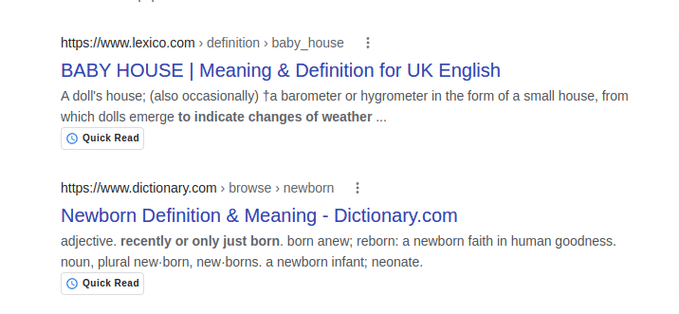
Google tests Quick Read, 5 Min. Read labels in search results
Written on August 30, 2022 at 3:57 am, by admin
Google is testing two new labels in search results:
- Quick Read
- 5 Min. Read.
What it looks like. The labels were shared on Twitter. Here are screenshot of both types, via @Ozaemotion and @lilyraynyc:
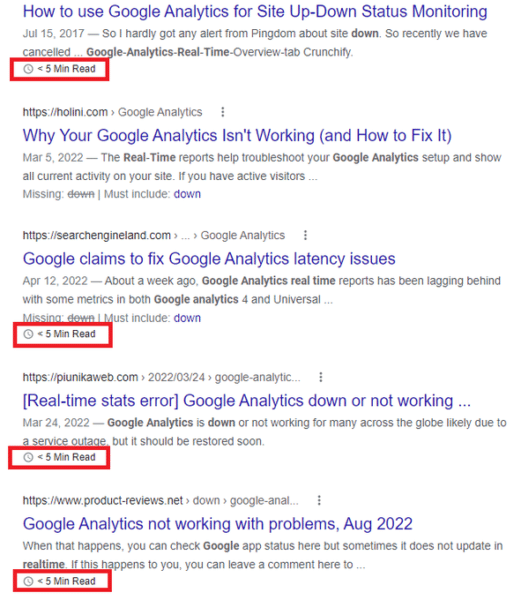
Short content can be helpful content. For nearly a decade, skyscraper content and 10x content have been popular concepts. In short, the idea behind both was that “length is strength.”
Some SEO correlation studies appeared to back up the idea because Page 1 of Google is full of articles at 1,000+ words.
However, word count is not a ranking signal. And searchers have been growing tired of clicking on articles that discuss the entire history of a topic before finding the answer to their question buried somewhere in a 2,000+ word blog post.
Axios has built an entire news strategy around smart brevity.
Does that mean all long-form content is bad? No. In some industries, longer content is good, necessary and acceptable.
There is also no need to revisit your content strategy at this point. Don’t edit or break up all your stories so they have a reading time of 5 minutes or less.
Why we care. Any change Google makes to its SERPs can impact which sites get clicks and traffic, which makes this test one to watch. If this test becomes a feature, it could have a major impact on recipe searches, for example, which are notoriously overstuffed. It also makes sense in places where you’d expect a short answer or definition instead of a novella full of anecdotes and tangents.
The post Google tests Quick Read, 5 Min. Read labels in search results appeared first on Search Engine Land.
Courtesy of Search Engine Land: News & Info About SEO, PPC, SEM, Search Engines & Search Marketing
Category seo news | Tags:
Social Networks : Technorati, Stumble it!, Digg, de.licio.us, Yahoo, reddit, Blogmarks, Google, Magnolia.