

Google is rolling out new campaign and ad group Setup columns
Written on September 8, 2022 at 4:25 am, by admin
Google is slowly rolling out new Setup columns at the campaign and ad group levels.
What is a Setup column. The new Setup column was first noticed by Steve Seeley, who posted about the update on Twitter.
The Setup column includes information about:
- Disapproved ads
- Disapproved keywords
- Eligible ads
- Eligible keywords
- Eligible Responsive Search Ads
- Eligible ad groups
- Responsive search ad-strength details
- Eligible sitelink extensions
- Eligible image extensions
@rustybrick Barry it looks like Google Ads has added a new setup column to the ad groups column options pic.twitter.com/Xupo3tBM4b
— Steve Seeley (@SteveSeeley) September 7, 2022
What Google says. Ads Liason Ginny Marvin commented that the Setup column was available to help advertisers “quickly identify any campaign/ad group setup issues..”
Hi Nicole & Steve, The Setup Columns are new & still rolling out. When available, you’ll find them in Campaigns & Ad Groups tables to help you quickly identify any campaign/adgroup setup issues. More here: https://t.co/PA9ULQNVKH
— AdsLiaison (@adsliaison) September 7, 2022
More Setup column info. You can read more info about the new Setup columns here.
Why we care. This info should help advertisers identify issues in their campaigns and ad groups as well as quickly find images, keywords, and ads that need to be adjusted. If you have access to the new Setup column, you should see it in your settings at the campaign or ad group level.
The post Google is rolling out new campaign and ad group Setup columns appeared first on Search Engine Land.
Courtesy of Search Engine Land: News & Info About SEO, PPC, SEM, Search Engines & Search Marketing
Category seo news | Tags:
Social Networks : Technorati, Stumble it!, Digg, de.licio.us, Yahoo, reddit, Blogmarks, Google, Magnolia.
Webinar: How to choose whether to build or buy with this CDP checklist
Written on September 7, 2022 at 1:22 am, by admin

What’s best for you? A CDP out-of-the-box? Building a customer data solution yourself? There’s merit in both options, and this webinar is here to help you narrow down what’s best for your business.
Register today for “How to Decide to Build or Buy: A Customer Data Management Checklist,” presented by Acquia.
The post Webinar: How to choose whether to build or buy with this CDP checklist appeared first on Search Engine Land.
Courtesy of Search Engine Land: News & Info About SEO, PPC, SEM, Search Engines & Search Marketing
Category seo news | Tags:
Social Networks : Technorati, Stumble it!, Digg, de.licio.us, Yahoo, reddit, Blogmarks, Google, Magnolia.
Google will update ad Destination requirements policy in October
Written on September 7, 2022 at 1:22 am, by admin
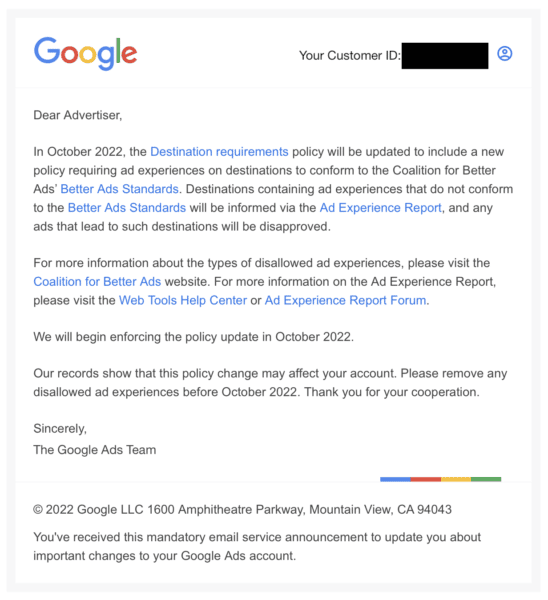
Starting next month, Google will update the Destination requirements policy requiring that ad experiences on destinations to conform to the Coalition for Better Ads Better Ads Standards.
What this means. This means that any ads that don’t conform to the new standards will be disapproved. Advertisers will be notified of disapprovals in the Ad Experience Report.
What Google says. Google made the announcement in an email, indicating that affected accounts may see their ads disapproved and to make adjustments by October. They did not give an exact date.
Advertisers can review destination requirements here.
Why we care. Advertisers who are unsure if their destinations meet the Better Ads Standards should review their accounts and make the necessary changes asap to avoid having ads disapproved.
The post Google will update ad Destination requirements policy in October appeared first on Search Engine Land.
Courtesy of Search Engine Land: News & Info About SEO, PPC, SEM, Search Engines & Search Marketing
Category seo news | Tags:
Social Networks : Technorati, Stumble it!, Digg, de.licio.us, Yahoo, reddit, Blogmarks, Google, Magnolia.
FINAL CHANCE to submit your Search Engine Land Award entry!
Written on September 7, 2022 at 1:22 am, by admin

Winning an industry award is a rewarding, cost-effective way to generate publicity, attract new business, boost team morale, and stand apart from the competition. Enter the 2022 Search Engine Land Awards now for your chance to take home the highest honor in search!
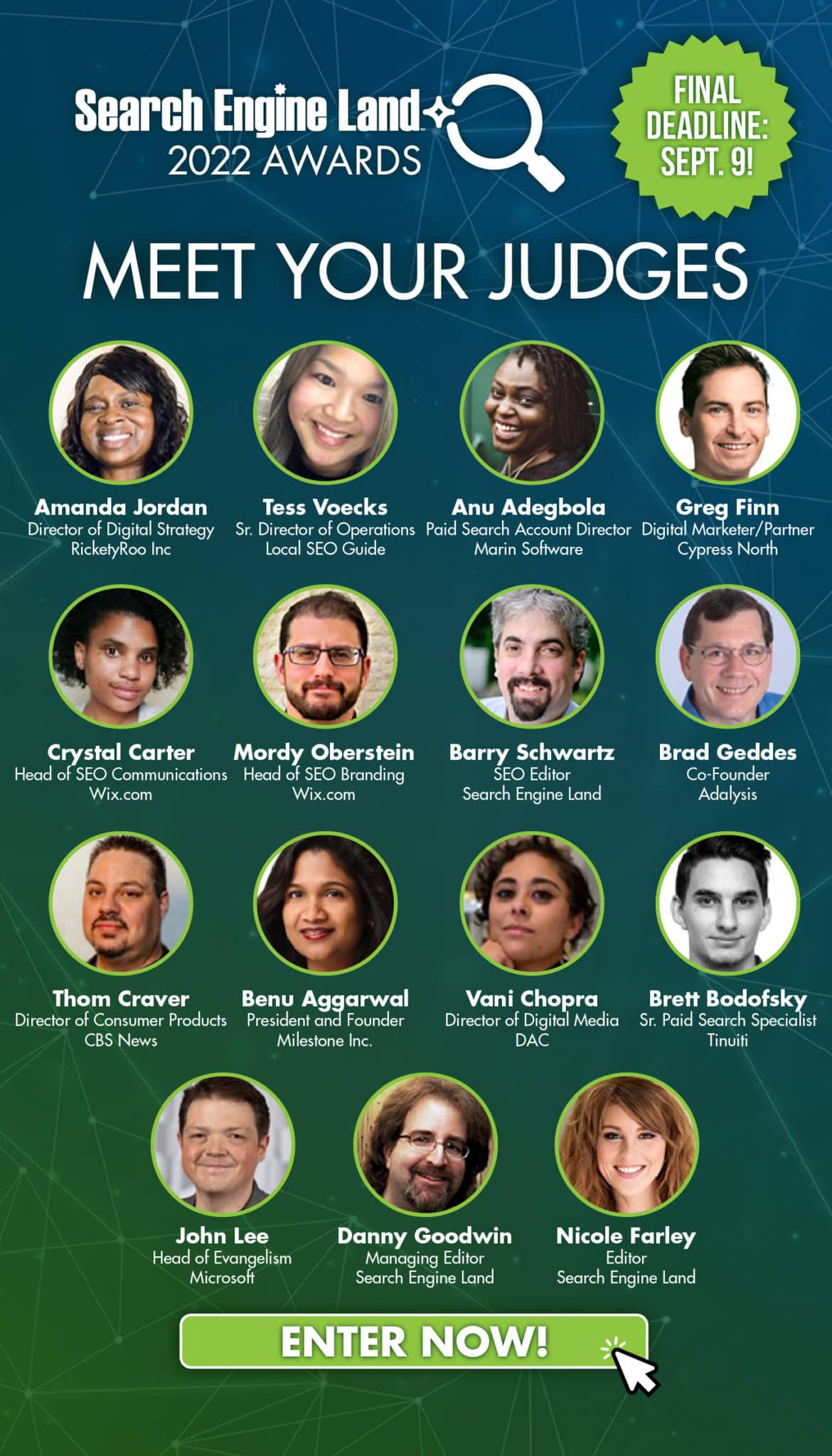
The final deadline is coming up at the end of this week – submit your application by 11:59pm this Friday, September 9 to be considered by our esteemed judging panel, featuring John Lee – Head of Evangelism at Microsoft, Cyrstal Carter – Head of SEO Communications at Wix.com, Thom Craver, Director of Consumer Products at CBS News, and more.
Not sure where to begin? Check out How to craft a winning Search Engine Land Awards entry: Past judges share their advice for insights on what makes a winning application. If you have any other questions, send them our way at awards@searchengineland.com and we’ll get back to you ASAP.
Winners will be announced on October 17 in exclusive coverage on Search Engine Land – the industry publication of record.
Take the first step now by creating your account and exploring the application process. If you have questions, please reach out to us at awards@searchengineland.com.
Best of luck! We look forward to your submission!
The post FINAL CHANCE to submit your Search Engine Land Award entry! appeared first on Search Engine Land.
Courtesy of Search Engine Land: News & Info About SEO, PPC, SEM, Search Engines & Search Marketing
Category seo news | Tags:
Social Networks : Technorati, Stumble it!, Digg, de.licio.us, Yahoo, reddit, Blogmarks, Google, Magnolia.
Bill Slawski’s SEO by the Sea website to live on
Written on September 7, 2022 at 1:22 am, by admin
Bill Slawski recently passed away but his hosting company will continue to ensure his website lives on after the site went offline when the hosting payments were not being processed anymore.
SEO by the Sea. Bill Slawski has published thousands of articles on his SEO by the Sea website, some dating back as far as 2005. The site is known as the most authoritative resource on patents on how search engines work in the space. In fact, he has written countless articles breaking down complex search patents for search marketers and SEOs to understand. The site is referenced by other SEO resources for many many years and will continue to be referenced in the future.
For many in our industry, Slawski was probably best-known for researching, analyzing, interpreting and writing about Google and search-related patents and algorithms at SEO by the Sea. He started the SEO by the Sea blog in June 2005. On SEO by the Sea, Slawski covered it all – from the classics (PageRank, TrustRank, information retrieval) to today (machine learning, the Knowledge Graph, entities).
SEO by the Sea went offline. Earlier this month, his website went offline due to payment not being processed. Of course, with Bill’s passing, he was not able to make payment and the site automatically went offline. After the site went offline, the hosting company heard from the SEO community and that hosting company decided to reactive the site.
SiteGround, the hosting company, wrote on Twitter “We agree that the blog holds significant value for the SEO community, which is why we have reactivated the service. The site should be accessible shortly.”
About Bill Slawski. Slawski did SEO before Google existed. Heck, he did SEO before SEO was even called SEO. He started when all of this online stuff was simply known as internet marketing and web promotion, in 1996. He provided consulting services to help make websites easier to find online, help make them easier to use, and increase conversions and revenue for clients. Throughout his career, Slawski worked on all types of sites – nonprofits, Fortune 500, educational institutions, e-commerce, professional services, consumer goods, B2B and more. Prior to his search marketing career, Slawski earned a Juris Doctor degree and was a legal and technical administrator at the highest level court in Delaware for 14 years. Slawski lived in Carlsbad, California.
Why we care. This treasure trove of information about how search engines and SEO work will remain live, despite Bill’s passing. It is wonderful to report that Bill and his knowledge will continue to live on through his website, SEO by the Sea.
The post Bill Slawski’s SEO by the Sea website to live on appeared first on Search Engine Land.
Courtesy of Search Engine Land: News & Info About SEO, PPC, SEM, Search Engines & Search Marketing
Category seo news | Tags:
Social Networks : Technorati, Stumble it!, Digg, de.licio.us, Yahoo, reddit, Blogmarks, Google, Magnolia.
Google updates privacy threshold for Analytics Search Queries report
Written on September 2, 2022 at 1:13 pm, by admin
Google is updating the privacy threshold for the Search Query report in Universal Analytics, and the Google Ads query, First user Google Ads query, and Session Google Ads query dimensions for the explorations in Google Analytics 4.
What is the privacy threshold. Google announced new privacy thresholds last year, ensuring user anonymity by only reporting on terms that have seen sufficient search volume across all Google searches. They also committed to giving advertisers more data.
What this means. The new thresholds should make what advertisers are seeing in their Google Ads accounts more consistent with what they see in GA4. But Google says that “Due to differences in data models, with this update, search query terms reporting in Universal Analytics will be more limited than Google Ads reports.”
Learn more. You can read the announcement from Google here.
Why we care. The Search Query report has always been a source of data to help advertisers ensure they’re bidding on the right keywords. But if the new standards of privacy thresholds continue to only show keywords with significant search volume, it may no longer be a useful tool.
The post Google updates privacy threshold for Analytics Search Queries report appeared first on Search Engine Land.
Courtesy of Search Engine Land: News & Info About SEO, PPC, SEM, Search Engines & Search Marketing
Category seo news | Tags:
Social Networks : Technorati, Stumble it!, Digg, de.licio.us, Yahoo, reddit, Blogmarks, Google, Magnolia.
Digital customer experience: Solution in focus
Written on September 2, 2022 at 1:13 pm, by admin

Available on AWS Marketplace, Crownpeak helps brands quickly create and deliver digital experiences that build trust and maximize customer lifetime value. Join experts from Crownpeak and AWS for a special conversation and hands-on demonstration.
The post Digital customer experience: Solution in focus appeared first on Search Engine Land.
Courtesy of Search Engine Land: News & Info About SEO, PPC, SEM, Search Engines & Search Marketing
Category seo news | Tags:
Social Networks : Technorati, Stumble it!, Digg, de.licio.us, Yahoo, reddit, Blogmarks, Google, Magnolia.
9 tips for selecting an SEO agency
Written on September 2, 2022 at 1:13 pm, by admin
SEO agencies can vary in terms of their quality of service. That means a large number of brands and organizations have been burned at least once.
Additionally, many agencies look and sound the same – just swap out the logo and branding. Yet, they offer varying levels of depth of experience and expertise.
SEO agencies aren’t one-size-fits-all, and getting into a bad-fit relationship can be costly in terms of both dollars and time lost.
I’ve been involved in this process for a long time as an agency leader. It probably sounds self-serving that I’m writing this article. But, let me be the first to say that I don’t want to work with every brand, and my agency isn’t the right fit for everyone.
Leveraging experiences on the agency side of the table, I have outlined nine tips to help you work through the process of choosing the right fit and right agency for your organization.
1. Develop and define goals
If you haven’t translated organizational, sales and marketing goals down to SEO specifically, now is the time to start thinking about it.
Good agencies will ask you pretty early on what your goals are whether those are tied to ROI, conversions, or whatever your measure of success is. (Beware if someone wants to do SEO for you without getting into the topic.)
It is fair not to know what is possible to expect from SEO without the agency helping with the research. However, do what you can to at least know what ROI looks like for you. That can be in the form of the number of conversions you need or specific actions.
You can also look at any industry benchmarks and your own performance baselines as reference points.
Regardless of what you know or don’t, be clear on what success looks like in making money or achieving your goals. Have as much of it as possible before you start your SEO agency search.
2. Evaluate internal resources
You’re likely looking for an SEO agency because you don’t have the internal SEO expertise or time resources required to succeed. Whatever the case, there will be some level of collaboration or effort by you or your team to have a successful agency partnership.
Even if you have the agency do everything, you’ll need certain time commitments and availability for approvals, oversight, feedback and performance reviews.
In many cases, brands and organizations hold onto additional aspects or have other partners to cover the full spectrum of things that SEO needs, including content, IT, UX and any collaborative elements.
Plan out what your internal team could or should own. Be available to collaborate or utilize the agency or outside partners. This will help you evaluate whether the agency is suitable for all or some aspects you’ll eventually need in the SEO work.
3. Consider your budget
You can hopefully find some budget parameters to work from by taking the combination of goals and knowing what ROI looks like, plus the internal resources or existing partners you can lean on.
Even if you want to hear the first number from the agency, knowing your budget parameters will help you qualify faster and filter the ideal agencies in terms of size, scope, and fit.
For example, if you can get some ballpark pricing quickly and know what arena you’re in, you can move on if it is way above (or concerningly below) your estimated budget.
It’s totally fine not to know. It is even better in many cases to have it tied to an ROI ratio rather than a fixed number – viewing SEO as an investment rather than an expense line item.
Be upfront with that information and inquire about how the agency will help you in any initial strategy or audit steps to understand avenues to hit your goals and the risk for different budget levels and investments.
4. Do your research
As you look at websites, talk to those referring you to potential agencies, or get into any initial outreach, be mindful that specific dimensions matter.
That includes the size of the agency compared to your organization. Or, more importantly, how capable they are of serving your company. The stage of your company’s growth and lifecycle might be another factor to consider.
Agencies can be pure generalists who take on any and all clients who have a dollar to pay them. A few consider different factors that help narrow things a bit, like pricing minimums, focus on particular niches or industries, audiences, conversion types, or even the makeup or structure of your team.
Save time and energy on looking for the right areas that match up with who you are and what you want. Resist pitches from agencies that seem to be out of your league or not in alignment with your focuses.
Great ways to do so include:
- Seeking out case studies, credentials, references and thought leadership content pieces.
- Looking at the mix of clients they work with currently.
Do your homework and be prepared to ask about or challenge any contradictions or mixed messages you see.
5. Have an interview plan
Often, I get a lot of really good questions from prospects I talk with. Other times, I don’t get asked enough, so I end up answering questions I wish were asked or assume that my potential clients want to know.
The more organized you are in the questions you ask, the more objective your comparison can be at the end of the agencies you are considering.
Plan questions related to anything and everything important to you, whether that is tied to:
- Their focus (or aspects of #4 above).
- Their approach.
- Ways you’d work together.
Be prepared, especially if you have some internal resources that will own copy or content, dev, or other things that require a tight partnership and collaboration.
Additionally, know who you’re working with and how cultures align (or don’t).
Have a solid list of questions, plan for who is asking what, and whatever level of notes or scorecard you can. In the end, you can be objective and also go back to your finalist(s) with more profound levels of details you’re seeking to firm up.
6. Evaluate fit
Do your personalities match?
I’m not talking about just you and me, the president who is leading the conversation at this point (or whatever sales or account representative).
I’m talking about between those on your team and the agency’s team who’ll be working together in the trenches.
Assess the fit between teams. Learn about retention rates of employees and stability. Understand what level of transparency to expect. How hands-on will they be?
These aspects, plus agreement on the agency’s approach, are critical. You don’t want to hit a wall or drop off right after the contract is signed or just a few months into an ongoing agreement.
7. Do a gut check
Does something sound too good to be true? Is something off? Is there a red or yellow flag somewhere?
Trust your gut and dig deeper. If you have concerns about how you match up with the agency, validate them. Ask your hard questions.
Don’t move forward if things are off or don’t feel right. That’s a warning sign, and you should trust your instinct to pause and dig deeper.
I’m not saying to run away. Maybe you’re the first client they have had in your niche or industry. That could be OK with the right level of transparency, research approach, and risk tolerance. In some cases, it can be great to go with someone fresh versus the cookie-cutter strategy everyone else in the industry uses.
8. Understand the process
Beyond resource constraints and lack of enough understanding of SEO strategy – communication and mismanaged expectations are among the biggest roadblocks to success.
Every client has a different level of SEO knowledge, awareness of SEO processes, and a grasp of the agency’s unique takes on those things.
We (agency people) can take for granted that not everyone nerds out at the level we do.
Ask, and ask again if you’re unclear on what the process is.
What will it look like in terms of steps from contract to discovery, onboarding, research, strategy, optimization, reporting, communication, timing, and results accountability?
Be clear on it all. Keep asking if you don’t know, and make your notes to get up to speed and have the right level of accountability and expectations for the partnership.
9. Be clear on the agreement terms
Don’t sign something that you haven’t read! If you don’t understand the agreement’s contents, have a lawyer or advisor familiar with SEO look over it.
Beware of long-term agreements, sticky cancellation clauses and work ownership claims. None of those things are wrong, but you want to know what you’re getting into.
Long-term might get you cost savings and commitment from both sides in the relationship. SEO does take time. However, you want to avoid the following scenarios:
- Having your work product, content, or properties to be held hostage.
- Working together a couple of months in only to get hit with change orders.
- Assuming that other areas (such as content, dev updates, CRO, etc.) are covered and part of the agency’s responsibility, only to find out they weren’t.
- Getting into a gray area where they weren’t spelled out.
The ideal scenario is that the relationship is built on trust and accountability, where billings and value stay balanced over time. You don’t have to think about the contract again after signing it.
Conclusion
Selecting the right fit SEO agency is difficult. It can be challenging to get through the clutter of so many sounding alike, find ways to assess the experience and expertise or map out your fit with them.
More than that, it can lead to wasted time, energy and dollars. I don’t want that for you.
Hopefully, the tips I have shared help you prepare for and think about the process in a detailed way to ensure that you find the right fit for you and succeed.
The post 9 tips for selecting an SEO agency appeared first on Search Engine Land.
Courtesy of Search Engine Land: News & Info About SEO, PPC, SEM, Search Engines & Search Marketing
Category seo news | Tags:
Social Networks : Technorati, Stumble it!, Digg, de.licio.us, Yahoo, reddit, Blogmarks, Google, Magnolia.
Google shares 4 examples of how to improve a meta description
Written on September 2, 2022 at 1:13 pm, by admin
Google’s help document on controlling your snippets in search results has added some examples of “bad” and “better” meta descriptions.
The bad. Google advises avoiding these four types of “bad” meta descriptions:
- List of keywords: “Sewing supplies, yarn, colored pencils, sewing machines, threads, bobbins, needles”
- Same description used for every news article: “Local news in Whoville, delivered to your doorstep. Find out what happened today.”
- Doesn’t summarize the page: “Eggs are a source of joy in everyone’s life. When I was a small child, I remember picking eggs from the hen house and bringing them to the kitchen. Those were the days.”
- Too short: “Mechanical pencil“
The better. Google’s examples of better meta descriptions:
- Explains what the shop sells and details like opening hours and location. “Get everything you need to sew your next garment. Open Monday-Friday 8-5pm, located in the Fashion District.”
- Use a snippet from the specific news article: “Upsetting the small town of Whoville, a local elderly man steals everyone’s presents the night before an important event. Stay tuned for live updates on the matter.”
- Summarize the whole page: “Learn how to cook eggs with this complete guide in 1 hour or less. We cover all the methods, including: over-easy, sunny side up, boiled, and poached.”
- Are specific and detailed. “Self-sharpening mechanical pencil that autocorrects your penmanship. Includes 2B auto-replenishing lead. Available in both Vintage Pink and Schoolbus Yellow. Order 50+ pencils, get free shipping.”
The updated document. Google published its documentation on controlling your snippets in search results in October. You can see all the new additions, here.
Why we care. While there is nothing earth-shattering and this is mostly just basic SEO, it’s good to see Google provide some more specific guidance on how to create helpful and descriptive meta descriptions that are more likely to get clicks and traffic. Not that we can ever count on Google to use those meta descriptions, of course.
The post Google shares 4 examples of how to improve a meta description appeared first on Search Engine Land.
Courtesy of Search Engine Land: News & Info About SEO, PPC, SEM, Search Engines & Search Marketing
Category seo news | Tags:
Social Networks : Technorati, Stumble it!, Digg, de.licio.us, Yahoo, reddit, Blogmarks, Google, Magnolia.
Google: Helpful content update isn’t done
Written on September 1, 2022 at 10:12 am, by admin
If you were to play word association game about Google’s helpful content update, what would you say? Dud? Underwhelming? Or something similar?
That seems to be the general consensus so far. The Google helpful content update began rolling out one week ago. Google said it would take two weeks to fully roll out.
“Update isn’t done.” Google Search Liasion Danny Sullivan discussed the helpful content update yesterday in a series of tweets. He reminded us that the update hasn’t been fully rolled out yet and it will continue to be tuned and refined.
“Update isn’t done. It’s also part of a continuing effort, as we’ve explained. We’ll keep refining how it works. Directionally, the guidance we’ve given is what SEOs and creators should be considering.”
And Google’s John Mueller added: “I’d give it a bit more time”
“Updates don’t necessarily mean a big giant shift.” Google’s helpful content update was hyped to be as big as Panda and Penguin were a decade ago. But that hasn’t been the case so far.
“I also get that when we announce an update, there are the memes and the gifs and the jokes and the OMG the sky is falling reactions that can even make me laugh. But updates don’t necessarily mean a big giant shift. If you have good content, you’re generally fine…”
In some cases, that reaction has been warranted. Algorithm updates like Penguin, Panda, and Florida had a huge, detrimental impact on websites and businesses. However, Google didn’t pre-announce any of those updates.
But whenever a major update is pre-announced, people remember that chaos and confusion. That said, a couple of more recent Google updates (“mobilegeddon” and the page experience update) were pre-announced and ended up having a much smaller than anticipated impact.
Google discussed the helpful content update just a few days before launching it, which was hardly enough time to address potential sitewide content issues. Overall, SEOs weren’t overly concerned about the helpful content update.
“Part of a continuing effort.” While we’re a week in and all seems quiet so far, Sullivan reiterated that this is an update you shouldn’t ignore.
“With this helpful content update, as I said before, it’s part of a continuing effort. Directionally, it’s what SEOs and creators should pay attention to. We’ll continue to tune it, refine it. It matters, which is why we’ve spent so much time talking about it.”
And:
“If there hasn’t been any announced update, but you notice a change in traffic, it makes sense to review all our guidelines and advice. And if you find ‘hmm, maybe some of this content I have isn’t meeting what’s advised about helpful content,’ that’s a sign of what to work on.”
Why we care. Google algorithm updates can impact your rankings, traffic and revenue. Google led us to believe that this would have a significant impact. It hasn’t so far (or at least we’re not hearing about a large number of websites being negatively impacted). But this update is one you shouldn’t ignore.
The post Google: Helpful content update isn’t done appeared first on Search Engine Land.
Courtesy of Search Engine Land: News & Info About SEO, PPC, SEM, Search Engines & Search Marketing
Category seo news | Tags:
Social Networks : Technorati, Stumble it!, Digg, de.licio.us, Yahoo, reddit, Blogmarks, Google, Magnolia.