

LinkedIn matched audiences: How to get started
Written on October 10, 2022 at 10:36 pm, by admin
LinkedIn can be a difficult platform to master, but with the right combinations of targeting and messaging brands can see success in generating results.
Matched audiences allow you to reach people who have engaged with your business in some way and go after lists of “dream companies” that you’d like to work with.
This article provides an overview of how you can get started with matched audiences along with tactics for using them in your campaigns.
Types of matched audiences
LinkedIn allows for a variety of first-party and third-party methods to build audiences. Here are the available categories at the time of writing this article:
- Contact lists: Targeting individual people.
- Company lists: Targeting anyone who works for a particular organization.
- Pixel-based retargeting: Reaching anyone who visited select pages on your website.
- Engagement-based retargeting: Based on in-platform activity, such as:
- Single image ad engagement.
- Video ad views.
- Lead form opens/submits.
- Company page engagement.
- LinkedIn event RSVPs.
Guidelines
The absolute minimum size for a matched audience is 300 to be eligible to serve. This means 300 individuals need to be matched in the platform after uploading and processing the list.
You’ll likely see some drop-off with the platform not being able to match every individual in your original document.
The platform will show a match rate after the list has finished syncing, allowing you to double-check your fields if the match rate seems abnormally low.
However, just because you can target as few as 300 people doesn’t mean you should. Larger audiences generally see more efficient CPCs and CPAs, with a threshold of at least 50,000 individuals being ideal.
For company targeting, LinkedIn recommends including a minimum of 1,000 companies.
For contact targeting, LinkedIn recommends a minimum of 10,000 email addresses. If more than one email address matches with the same user, that person will only be included once.
The maximum file size for either type of list is 20MB or 300,000 records.
When uploading a list, use the templates that LinkedIn provides. You can use just the email field for a contact list or the company name field for a company list if wanted, but the more columns you can include, the more accurate you can expect the matching process to be.
Additionally, you’ll have to wait for LinkedIn to finish processing a list before you can target it in your campaigns. Generally, lists will be ready within 48 hours, but occasionally they can take longer.
Finally, some CRMs and automation platforms allow you to sync lists directly. This compatibility, if available, can reduce the lift necessary to get a list in place while also allowing you to keep it refreshed.
Get the daily newsletter search marketers rely on.
<input type=”hidden” name=”utmMedium” value=”” />
<input type=”hidden” name=”utmCampaign” value=”” />
<input type=”hidden” name=”utmSource” value=”” />
<input type=”hidden” name=”utmContent” value=”” />
<input type=”hidden” name=”pageLink” value=”” />
<input type=”hidden” name=”ipAddress” value=”” />
Processing…Please wait.
Layering targeting
Matched audiences can be used in combination with LinkedIn’s other available targeting. Think about ways you can use your own audiences plus additional layers such as company size, job function, seniorities, titles, or others. Just note that you cannot combine contact lists with interests and traits.
For example, you can target a company list layered with job seniorities of Senior level and up if you’re seeking to avoid junior-level individuals.
Or you can retarget people who visited your website and also work for companies with over 500 employees.
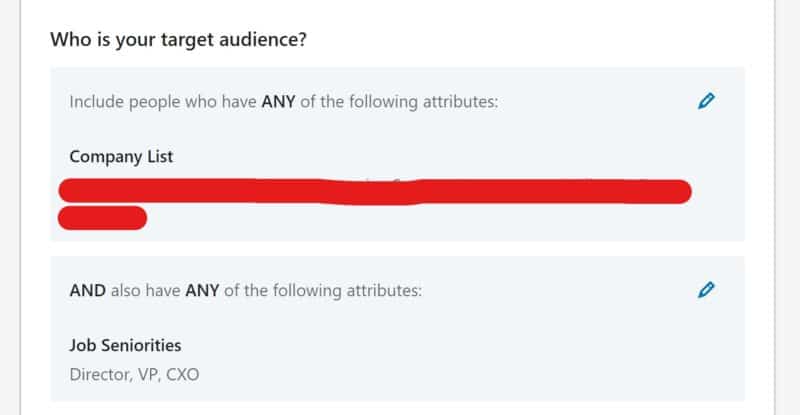
You can use “AND” as well as “OR” targeting when setting up layers. For instance, you can reach people who are members of either list A or list B, and if they also have Director level seniority.
Exclusions
Lists can also be valuable to make sure you’re not wasting spend on individuals you don’t want to target.
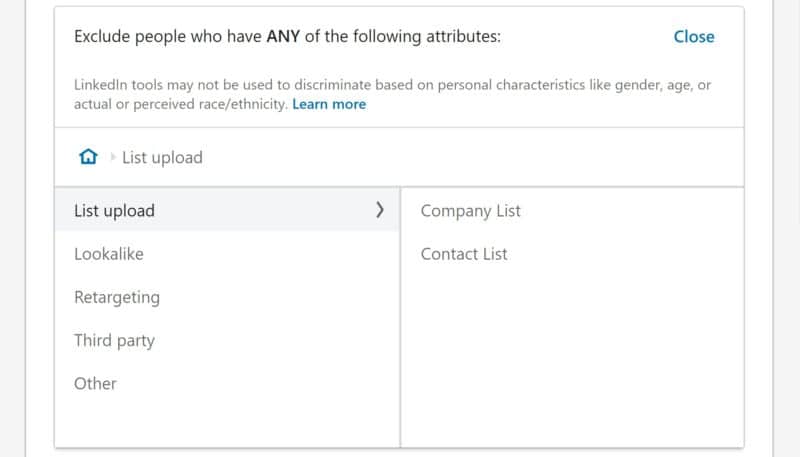
For instance, you can upload a list of your current customers and exclude them from campaigns to avoid reaching them. You also should exclude competitor companies so their employees don’t see your ads.
Website retargeting audiences can come in handy for building exclusions as well.
To gate out job seekers, build an audience based on people who visit your “Careers” page.
If your product offers an online experience, you can exclude people who reach the log-in page as those are likely to be existing customers.
Upselling and ad sequencing
If your brand entails the opportunity to upsell customers on additional levels of service, sync lists of current customers based on their tier or existing plans to then serve ads for new products or services.
For example, users of CRM software could be upsold to add marketing automation features to their existing plans.
You can also plan to put different content in front of people after they complete interactions with your brand.
If you’re using lead forms to promote a downloadable buyer’s guide, you can target people who have filled out the form for the guide and promote an opportunity to request a demo.
By controlling which lists you include and exclude from campaigns, you can effectively set up ad sequencing between campaigns to stagger exposure through the course of the sales funnel.
Lookalike targeting
Once you’ve created a matched audience, you can also make a corresponding lookalike audience. This will find people with similar characteristics to those on a particular list.
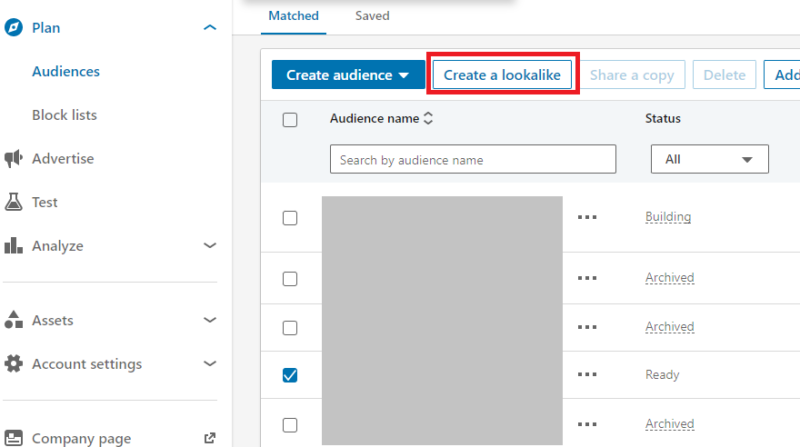
For instance, if you upload a list of current customers, you can then create a lookalike audience that will include people with similar job titles, group membership, interests, etc.
Be sure to test lookalikes in separate campaigns from your original lists so you can segment results, as you can’t isolate the performance of one specific audience within a single campaign.
Getting data from audiences
In addition to campaign targeting, LinkedIn offers some useful analytics features to see details about the individuals in your lists.
To access this information for a contact list you’ve uploaded, navigate to the Audiences section, select an audience, and click the Insights button in the upper right.
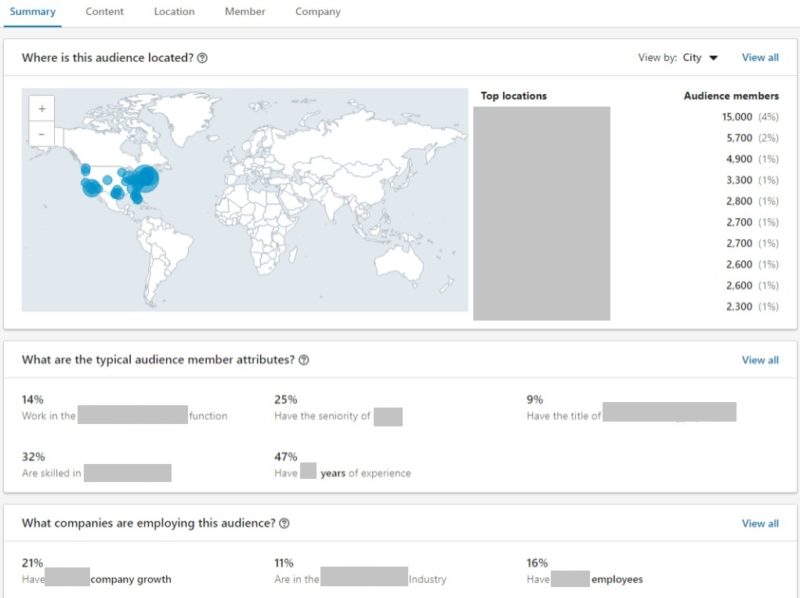
You’ll now see options to view top characteristics, including:
- Interests
- Locations
- Job functions
- Job seniorities
- Years of experience
- Titles
- Companies
- Company size
- Industries
- Growth rates
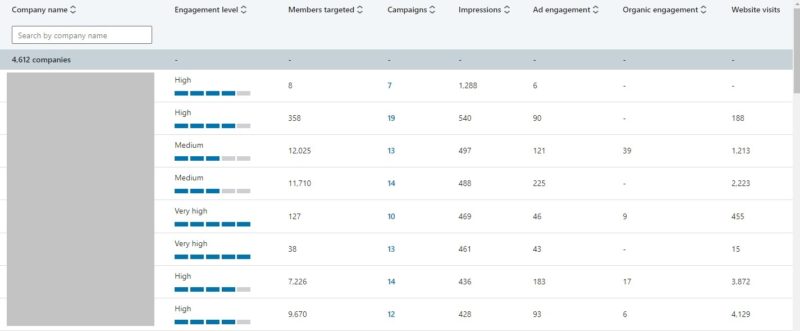
When you select a company list, you’ll see the Company Engagement Report, which shows details on how often people from each company:
- Engaged with ads.
- Engaged organically with your company page.
- Or visited your website.
This report can also be helpful to ensure that your list matched against the proper companies.
If you’ve created website retargeting audiences, you can view similar details by navigating to Analyze > Website Demographics. You can also compare the characteristics of two different audiences.
Start testing audiences
If this article has helped you to identify some matched audiences you haven’t yet tested, start thinking about ways to implement them in your campaigns.
Whether you assemble prospect lists to import into LinkedIn or start building engagement-based audiences to target people who are engaging with your brand, think about content that makes sense for the level of interaction people have had with your brand.
The post LinkedIn matched audiences: How to get started appeared first on Search Engine Land.
Courtesy of Search Engine Land: News & Info About SEO, PPC, SEM, Search Engines & Search Marketing
Category seo news | Tags:
Social Networks : Technorati, Stumble it!, Digg, de.licio.us, Yahoo, reddit, Blogmarks, Google, Magnolia.
Google to offer publisher first-party cookie support
Written on October 10, 2022 at 10:36 pm, by admin
Google has just announced its plans to launch a number of features aimed at helping publishers monetize their websites and increase their emphasis on first-party data relationships. The features include support for ads personalization with publisher first-party cookies in Google Ad Manager and AdSense.
Expanding publisher first-party cookies. Publisher first-party cookies can help publishers deliver relevant ads without tracking users across third-party websites. Publisher first-party cookies have been available to address frequency capping and fraud control previously.
When a publisher allows, Google provides publisher first-party cookies to help improve ad relevance on that specific publisher’s website. The solution uses information from ad interactions that users take on that publisher’s own site. This information cannot be used on any other publisher’s website. The feature also respects people’s ads personalization preferences that they have indicated through AdChoice controls.
Publisher first-party cookies are an especially useful solution for smaller publishers, who may not have the resources or infrastructure to leverage first-party data independently. They require minimal technical work from publishers to use.
The introduction of audience signals. Google announced publisher-provided signals last month to help publishers categorize their first-party data into audience or contextual segments and then share those signals with programmatic buyers. Those signals make it easier for programmatic buyers to “find and purchase audiences based on things like demographics, content interests or purchase intent across multiple sites and apps without tracking people’s activity in apps or across the web.”
What Google says. In a statement to Search Engine Land, Google said:
“As part of a broader suite of tools, we’re helping publishers of all sizes build durable advertising strategies that uphold user trust. This solution is really geared toward supporting the publisher base, especially smaller publishers who may not have as many resources, as they continue to navigate changing privacy expectations.”
Peentoo Patel, Director of Product Management, Google Ad Manager
Launch date. This feature will be available to publishers beginning in November.
Why we care. If you’re a smaller publisher and don’t have the capacity or resources to capitalize on first-party data, this support feature is for you. Additionally, Google’s support of publishers’ use of their first-party data will only enhance their bottom line, as privacy concerns and ad relevance becomes more prevalent.
The post Google to offer publisher first-party cookie support appeared first on Search Engine Land.
Courtesy of Search Engine Land: News & Info About SEO, PPC, SEM, Search Engines & Search Marketing
Category seo news | Tags:
Social Networks : Technorati, Stumble it!, Digg, de.licio.us, Yahoo, reddit, Blogmarks, Google, Magnolia.
8 simple steps to optimize your WordPress site for SEO
Written on October 10, 2022 at 10:36 pm, by admin
A fast website is a crucial part of improving your SEO rank; however, guides will oftentimes give generalized statements of optimization and what it can do for your website, or go in-depth into more technical aspects that might overwhelm some users.
In this article, you will be provided with the most basic steps to improve the performance of your website without getting into the nitty gritty of code.
WordPress websites and optimization
Site speed is more important than ever, end users will leave websites if the load time for pages or assets takes more than a couple of seconds, so every moment counts to capture your audience’s attention and maintain your conversion rate.
One of the most prevalent concerns with a part of the WordPress community is the Content Management System’s (CMS) speed.
This pressure for faster websites was one of the reasons why the Performance Team was created by the community, as there was fear WordPress was falling behind some of its competitors.
While new integrations are being added to WordPress core, the good news is that many of the lightning-fast websites run WordPress as their CMS, and if you are struggling with yours it could be easily fixed with the following tips.
1. Test your site speed often
The first step to improving your website’s speed is to test it to see what can be improved.
There are hundreds of tests to choose from online when checking performance, however, we will focus on Google Web Core Vitals and Lighthouse Reports.
Google Core Web Vitals
Initiated by Google, Core Web Vitals is one of the most important sites for speed tests on the internet currently, giving you information on the different fields that affect your website.
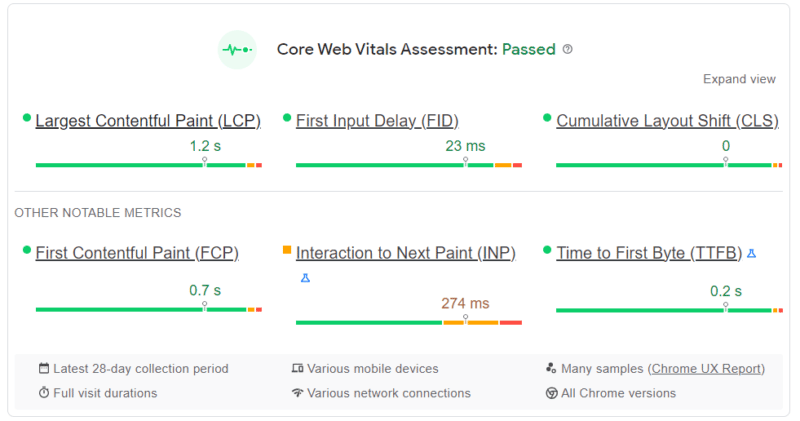
Currently, Core Web Vitals is very focused on user experience, with measurements such as loading performance, interactivity and visual stability; however, it is expressly mentioned that these factors can change in the future.
Lighthouse report
If you are familiar with GTMetrix and other popular free speed test tools, you have been using Lighthouse Report Technology. It is an open-source technology, also by Google, that breaks down your website speed.
Similarly to Web Core Vitals, this report is incredibly thorough and will provide a breakdown of issues that could be slowing down your page, from general performance, accessibility, best practices, and SEO.
2. Change the PHP Version
PHP (Hypertext Preprocessor), is the coding language WordPress is based on. This means as WordPress grows in versions, it will need the latest version of this scripting language.
Thankfully, WordPress has a PHP warning if it believes your current version of the CMS is not compatible or needs a newer version installed.
Currently, it is recommended that you run PHP 8 or PHP 8.1 for a stable version of WordPress, or at the minimum PHP 7.4.
PHP version 7.4 will continue to have security fixes until November 28, 2022. Once a version of software stops receiving security updates, it reaches its “end of life” and is no longer recommended for use.
If your web host does not update your PHP version automatically, you can switch between different versions across sites using cPanel.
3. Choose a host focused on WordPress
Site speed goes deeper than hosting, however, the web host you choose will be the foundation for your website.
A host that is focused on providing you with the best performance for your WordPress site comes down to the server infrastructure.
At InMotion Hosting, we provide our customers with high-performance servers that are fine-tuned for WordPress. Our custom UltraStack configuration is designed to make your server incredibly fast and efficient using NVMe SSD, NGINX, PHP-FPM and Redis. No additional software configuration is necessary for you to see a significant improvement in your WordPress performance.
4. Use a caching plugin
Some of the most popular plugins in the WordPress ecosystem are caching plugins. They are advertised as a sure way to boost your website’s performance, but what do they really do?
In simple terms caching occurs when your computer remembers frequently used data from a website to save time.
This means when you pull up a website, your computer first looks locally to see if it has a recently cached version to view.
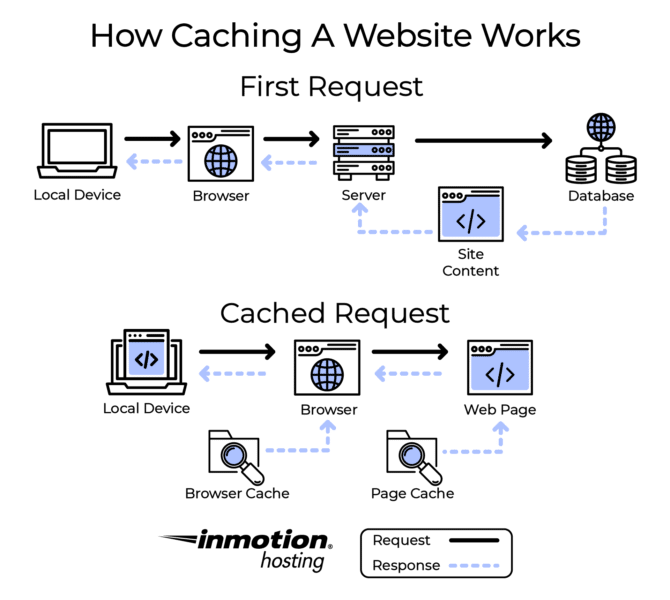
Since WordPress sites are dynamic, every time an end-user requests your website it pulls content from the host. The website will try to load any new data and might be slower because of this.
If you don’t update your website often, using a caching plugin whose main job is to create a static version of your website that can be cached can increase your site’s speed.
These days caching plugins have different ways to increase your performance, from minimizing files to optimizing images and more.
Here are a few popular and free WordPress caching plugins:
- W3 Total Cache: A caching plugin with a large number of options to tailor the caching capabilities of your website. This hosting agnostic plugin improves performance and reduces page load times by offering minification, object caching, database caching, cache-control and more.
- WP Super Cache: This caching plugin from Automatic generates static HTML files from dynamic WordPress files and serves them to site visitors at lightning speeds.
Due to compatibility issues, we do not recommend having more than one caching plugin active at the time, as activating multiple plugins is counterproductive for optimization purposes.
5. Optimize your images
Images can be deceivingly large files. Therefore, when your computer calls for information from the host it can be one of the last things to load.
Optimizing your images can be done before or after the upload then to your website. WordPress supports WebP images which are optimized images introduced by Google that retain the quality of the photo without taking up a lot of space.
Image optimization plugins are also a popular choice for WordPress users. Our recommendations include:
- Performance Lab: The Performance Lab plugin is a great resource to have for WebP image conversion and other optimization settings.
- Smush: One of the most popular plugins in WordPress, Smush automatically compresses and optimizes images as you upload them. You might need to upgrade to premium for bulk editing more than 50 images or compressing files larger than 5MB.
6. Consider lazy loading
Contrary to what their name suggests, lazy loading is a great way to increase your site speed.
A lazy loader will load your content only when it is needed, decreasing the number of asset and server requests to render your website.
Certain optimization plugins now include lazy loading as one of their options, including Jetpack and WP Rocket, though sometimes this perk is offered at a premium price.
7. Use a Content Delivery Network (CDN)
Content Delivery Networks have become a hot topic for web hosting, and for good reason. A CDN is a way for your end-users to access your website at a faster rate due to their servers caching your site data.
Similarly to caching plugins, this helps users load up content without having to request it fresh every time they pull your site.
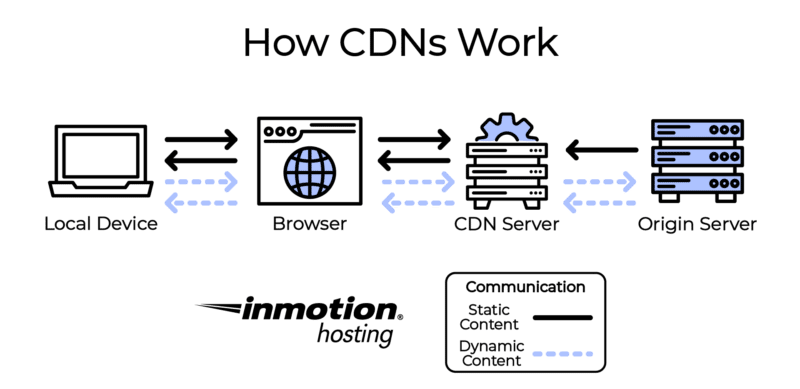
Having a CDN also heightens your website security, and certain brands even have implementations to protect you from DDoS attacks.
If you are interested in a CDN but do not currently have the budget for one, Cloudflare offers a personal account for free, which has access to its CDN services.
8. Optimize your database
The information stored in your database is the heart of your website. It contains all the important WordPress installation details and files from your plugin, pages and even comments users make.
Because of the way WordPress stores data, your database will need optimization. Database tables store things like post revisions, spam comments and deleted posts. These entries take up space and slow your site down.
Removing these unnecessary files can improve your site speed because the tables where the data is stored will be smaller and data will be easier to process for your end users.
Fortunately, you do not have to go through your database manually to optimize it, you can use a plugin such as WP-Optimize with database optimization capabilities.
Continuing your education
If you are interested in learning more about WordPress optimized hosting and how you can improve your website speed and SEO, check out InMotion Hosting’s WordPress Education Channel for further articles and guides.
Final thoughts
Site speed will always be an important factor for SEO. Ensuring that your WordPress site is up to date and optimized will do wonders for your ranking.
Learn more about how WordPress VPS with UltraStack can help improve your WordPress performance.
The post 8 simple steps to optimize your WordPress site for SEO appeared first on Search Engine Land.
Courtesy of Search Engine Land: News & Info About SEO, PPC, SEM, Search Engines & Search Marketing
Category seo news | Tags:
Social Networks : Technorati, Stumble it!, Digg, de.licio.us, Yahoo, reddit, Blogmarks, Google, Magnolia.
9 important features of enterprise SEO platforms
Written on October 10, 2022 at 10:36 pm, by admin
Enterprise SEO platform vendors offer numerous capabilities. These range from keyword research
and rank-tracking to backlink analysis and acquisition, as well as competitive intelligence and content
optimization.
Most of the vendors profiled in Enterprise SEO Platforms: A Marketer’s Guide offer the following core capabilities:
- Keyword research and rank tracking;
- Page-level SEO analysis;
- Content optimization analysis;
- Link (also called backlink) analysis and acquisition/removal;
- Site error detection;
- Organic search traffic market share;
- Competitive analysis;
- International search results and rank tracking;
- Internal cross-linking; and
- APIs for third-party data integration and management, as well as for export to other analysis tools.
Enterprise-level platforms may also provide more extensive link and site audits or analytics that include predictive scoring systems to identify potential opportunities to improve page performance or link authority.
Vendors differentiate by offering more frequent or detailed data updates or content marketing features that sometimes require additional investment. These more advanced capabilities may include, but are not limited to:
- Daily or real-time site crawls.
- Features to manage adjacent fields like PPC or social media marketing.
- Search intent-based analysis, perhaps involving artificial intelligence or machine learning.
- Universal search rankings incorporating featured snippets, knowledge panels, reviews, local packs, images, top stories, video, related questions, carousels, tweets and other dynamic displays.
- Analysis and management of Google Shopping feeds.
- Content marketing analysis and performance tools.
- On-page content quality analysis.
- Competitive intelligence and benchmarking.
- Identification of technical issues that can impact rankings (e.g., broken pages, slow loading pages, content duplication, excessive redirects).
- Cross-device attribution.
Here are nine important features of enterprise SEO platforms.
1. Link analysis and acquisition
Links continue to be one of the most important external or “off-page” signals that can help a website rise in search engine rankings.
Most enterprise SEO platforms provide link analysis (i.e., what sites are linking to yours), link building or removal recommendations via competitive analysis and other reports that reveal opportunities for obtaining links (i.e., what sites should you solicit links from) as part of their base platforms.
2. Keyword research/rank analysis
Keyword research – knowing what terms people use to find your website, how your pages rank for various queries and how you should use those terms in your copy – is a pillar of effective SEO.
Virtually all enterprise SEO platforms provide keyword research tools that allow marketers to discover the ways that consumers search for content, and what keywords are driving traffic for competitors.
Vendors source this data differently, however.
Some vendors license data from point solutions or ISPs, due to Google’s restrictions on scraped data in its terms of use and the percentage of search results that are keyword “(not provided).” Other vendors develop and manage a proprietary database of keyword terms.
As a result, reliable keyword data has become less of a commodity and more expensive.
It’s also important to note that rank analysis has grown increasingly complex as Google has upped its use of more dynamic and visual SERPs.
Marketers are no longer satisfied with a simple numeric designation of how their page ranks for a particular query; they want to know if it’s displayed in a carousel, in a knowledge panel, with sitelinks – or any of the other ways in which crawled content is being displayed on the SERPs.
Brands want a sense of how they’re coming across in search generally, even if the brand-related activity is happening on third-party sites. That’s why providers are coming up with their own proprietary formulas for calculating “share of voice” in search
3. Search intent-based analysis
Google’s search algorithms, often powered by artificial intelligence, are focusing less on keyword
matches and more on search intent.
To counter the lack of keyword data, SEO platform vendors are developing more tools that analyze search intent and predict or recommend the most relevant content that would meet the searcher’s needs.
4. Custom site crawls/audits
With content quality becoming the lynchpin for many marketers’ SEO strategies, site crawls or audits are important tools offered by enterprise SEO platform vendors.
Some platforms offer optimization recommendations for keywords, page structures and crawlability. They often prioritize and assign scores for such factors as HTML title tags, body tags and meta tags.
Many enterprise SEO platforms provide daily site crawls; some feature real-time technical data, while others offer updates on a weekly basis.
Ideally, the tool should be able to crawl the entire site, not just random pages. However, some enterprise sites are so large it’s unrealistic to expect a tool to crawl it in its entirety.
5. Content marketing and analysis
SEO and content marketing have become closely aligned, as Google has raised the content quality bar through artificial intelligence as well as its regular algorithm updates. As a result, relevant, up-todate content has become integral to SEO success.
Many vendors have upgraded the content optimization and content marketing capabilities of their enterprise SEO platforms and expanded the tools’ content marketing features. These include:
- Page management tools or APIs to monitor on-page content and errors.
- Reports on content performance and traffic trends.
- Influencer identification and campaign management.
- Real-time content recommendations.
More advanced platforms perform analysis to help improve the depth and quality of content by performing topical analysis of content and comparing it against the competition to identify potentially important gaps and make recommendations for improvement.
One emerging area in which vendors are investing is the ability to automatically and proactively suggest topics that marketers should create content about – eliminating the need to spend lots of time on analysis. Some even aid in developing the type of content that will show up in queries for target keywords.
6. International search tracking
International search coverage has become a critical capability, as the global economy leads more U.S.-based enterprises to conduct business online and offline in multiple countries and languages.
Virtually all enterprise SEO platforms profiled in this report offer some level of international search coverage that crosses borders, languages and alphabets.
The capabilities include international keyword research, integrating global market and search volume data into the platform, as well as integrating global CPC currency data.
7. Mobile/local analytics
Google’s search engine updates are increasingly focused on improving the mobile/local search user experience.
While mobile-friendly sites are now table stakes in the SEO game, appearance in local listings has become more important in the COVID-19 era, which elevated e-commerce and digital communication among local retailers and restaurants, in part to cope with the demand for BOPIS and curbside delivery.
8. Technical SEO crawling
Tools to identify technical issues that may be hindering ranking performance are very important, given that marketers rank technical SEO fixes as their number one priority. These include things like:
- Slow page load.
- Implementation of schema markup.
- Identification of crawling issues.
- The allocation of crawl budget.
- The flagging of duplicate URL and canonical issues.
9. Cross-device attribution
Recognizing that SEO is just one aspect of a brand’s marketing efforts, and also that search traffic (especially on brand keywords) is influenced by paid media, some vendors are developing capabilities that help marketers determine what marketing initiative is driving site visits or sales.
This is becoming increasingly difficult, however, as third-party cookies are no longer being supported by many companies.
Get the full report on Enterprise SEO Tools here
The post 9 important features of enterprise SEO platforms appeared first on Search Engine Land.
Courtesy of Search Engine Land: News & Info About SEO, PPC, SEM, Search Engines & Search Marketing
Category seo news | Tags:
Social Networks : Technorati, Stumble it!, Digg, de.licio.us, Yahoo, reddit, Blogmarks, Google, Magnolia.
2 new Google Display & Video 360 audience solutions
Written on October 7, 2022 at 1:17 pm, by admin
Google just announced two new updates regarding first-party data and machine learning with Display and Video 360. The two new updates are optimized targeting and Exchange Provided Identifier, also known as EPID.
Optimized targeting
Optimized targeting helps advertisers expand their reach across relevant audiences and increase ROI by finding new and relevant customers likely to convert within their campaign goals. Campaign settings, such as manually-selected audiences including first-party data and Google audiences, influence the machine learning algorithm. Optimized targeting then uses machine learning to expand reach across other relevant groups without relying on third-party cookies.
Optimized targeting reaches the people who are most likely to drive impressions, clicks, or conversions as they are defined and customized by the advertiser.
Early testing. Early tests found that advertisers who used optimized targeting saw a 25% improvement in their campaign objectives when using Google audiences and typically see a 55% improvement when using first-party data.
Launch and availability. Optimized targeting is currently available for YouTube Video Action campaigns and will expand to all display and video campaigns in the coming months. When they are launched, new eligible display and video campaigns will be opted in and will have an option to opt-out.
Get the daily newsletter search marketers rely on.
<input type=”hidden” name=”utmMedium” value=”” />
<input type=”hidden” name=”utmCampaign” value=”” />
<input type=”hidden” name=”utmSource” value=”” />
<input type=”hidden” name=”utmContent” value=”” />
<input type=”hidden” name=”pageLink” value=”” />
<input type=”hidden” name=”ipAddress” value=”” />
Processing…Please wait.
EPIDs
EPIDs provide Display & Video 360 with new signals which will be used to automatically future-proof frequency management tools. In the future, EPIDs will be powering a variety of other marketing use cases in Display & Video 360 with no action required by advertisers.
Expanding on PPIDs. EPIDs expand on PPIDs, which are Publisher Provided Identifiers that became available to use last year. PPIDs allow publishers to send Google Ad Manager a first-party identifier for marketing use cases. The update makes EPIDs available to more exchanges, publishers, or vendors looking to share their first-party identifiers with Display & Video 360’s backend to improve the quality of programmatic ads served on their respective properties.
Launch and availability. EPIDs will be used to inform Display & Video 360 users’ frequency management solutions “in the coming months.”
This will ensure brands can continue avoiding ad repetition while maximizing reach efficiency even when third-party cookies go away. Advertisers won’t have to make any changes in their account since EPIDs will be organically embedded in Display & Video’s technology. Brands and agencies will automatically benefit from EPID when setting frequency goals.
In the near future, EPID will be used as a signal for building Google audience segments in Display & Video 360. This will give advertisers a chance to deliver more personalized ads on publishers’ sites for which EPIDs are received. Down the line, EPID will also help brands unlock other core advertising functionalities, like cross-device reach on a domain by domain basis, and invalid traffic prevention in a privacy-safe way.
Why we care. If you’re a publisher, these changes will allow you to reach more audiences, deliver relevant ads, and ensure that everyone’s information and privacy are kept intact. These programmatic options are steps in the direction of a cookieless future while still allowing you to serve successful programmatic ad campaigns.
The post 2 new Google Display & Video 360 audience solutions appeared first on Search Engine Land.
Courtesy of Search Engine Land: News & Info About SEO, PPC, SEM, Search Engines & Search Marketing
Category seo news | Tags:
Social Networks : Technorati, Stumble it!, Digg, de.licio.us, Yahoo, reddit, Blogmarks, Google, Magnolia.
TikTok releases Photo Mode and 7 new editing tools
Written on October 7, 2022 at 1:17 pm, by admin
TikTok has just announced Photo Mode, as well as seven new editing tools for creators. Let’s take a look.
What’s new. The seven new editing features are now available in the US and most regions globally. These tools allow creators to adjust their clips right in the TikTok platform.
- Edit clips: Stack, trim, and split video clips
- Edit sounds: Cut, trim, and set the duration for sounds
- Edit and position text: More easily edit, position, and set the duration for text
- Add overlays: Add photo and video overlays for picture-in-picture (or video-in-video) stacking
- Adjust video speed: Speed or slow the pace of video clips
- Frame content: Rotate or zoom in and out of frame of individual clips
- Add sound effects. Add musical soundtracks to videos and photo carousels

Photo Mode. If you prefer to post a photo instead of a video, the carousel format will display your still images one right after another. You can also add a musical soundtrack. Viewers to your carousel posts can swipe at their own pace.

Expanded character descriptions. Last month we announced that TikTok was now allowing longer descriptions of up to 2,000 characters. These are now available for both video and Photo Mode content. This allows for both SEO optimization as well as allowing creators to expand their captions to include more information about their content.
Dig deeper. You can read the announcement from TikTok here.
Why we care. Instagram’s plans to double down on Reels had some creators and influencers pretty upset that the Meta platform was trying to be too much like TikTok. So it’s no surprise that TikTok is clapping back in its fight to woo the competition with longer descriptions and a new Photo Mode that looks, well, familiar.
Creators and users may soon be choosing which platform to keep and which one to ditch as the two are starting to look almost identical. Marketers and brands should take advantage of the new tools and features, utilizing both platforms to reach their target markets.
The post TikTok releases Photo Mode and 7 new editing tools appeared first on Search Engine Land.
Courtesy of Search Engine Land: News & Info About SEO, PPC, SEM, Search Engines & Search Marketing
Category seo news | Tags:
Social Networks : Technorati, Stumble it!, Digg, de.licio.us, Yahoo, reddit, Blogmarks, Google, Magnolia.
Facebook Ad Policies have been renamed to Meta Ad Standards
Written on October 7, 2022 at 1:17 pm, by admin
Meta has renamed their Facebook Advertising Policies to Meta Advertising Standards to make them “as useful, transparent and clear as possible.”
What’s changing. Nothing. Meta has made it very clear that they aren’t changing the scope of the policies, nor are they announcing any new ones.
We’re not making any changes to the scope of these policies or how we enforce them, nor are we announcing any new policies. Instead, our goal with this update is to make it easier for people and businesses to access and understand our policies.
Language and consolidation updates. Meta said in some cases they are updating the language for the policies while in others they have streamlined or consolidated them. For example, the Prohibited Financial Products and Services policy now encompasses several previously separate but related policies.
Dig deeper. Meta Advertising guidelines can be found in the Transparency Center. The Community Standards serve as a baseline for the ad policies. Advertisers must adhere to both to be eligible to run ads.
Why we care. Advertisers should adhere to all Meta advertising standards and guidelines. Failure to do so can result in your ad account or profile being banned. If you’re unsure if a certain ad, copy, or landing page meets the criteria, review the policies in full before launching your campaigns.
The post Facebook Ad Policies have been renamed to Meta Ad Standards appeared first on Search Engine Land.
Courtesy of Search Engine Land: News & Info About SEO, PPC, SEM, Search Engines & Search Marketing
Category seo news | Tags:
Social Networks : Technorati, Stumble it!, Digg, de.licio.us, Yahoo, reddit, Blogmarks, Google, Magnolia.
How to choose an enterprise SEO platform
Written on October 7, 2022 at 1:17 pm, by admin

Understanding your current marketing processes, knowing how to measure success and being
able to identify where you are looking for improvements are all critical pieces of the SEO platform
decision-making process.
In this guide you will learn:
- 5 key benefits of enterprise SEO platforms
- How much enterprise SEO platforms cost
- How to make an informed purchase
5 key benefits of enterprise SEO platforms
With thousands, tens of thousands, and even millions of pages, sites, social conversations, images, and keywords to manage and optimize, enterprise SEO has become increasingly complicated and time-consuming.
Using an enterprise SEO platform can increase efficiency and productivity while reducing the time and errors involved in managing organic search campaigns.
More specifically, managing SEO through an enterprise toolset can provide the following benefits:
- Many tools, one interface. Enterprise SEO platforms perform many tasks in one system. A comprehensive dashboard can help your organization monitor SERP rankings and trends, how you measure up to competitors and your share of voice. The integration and prioritization of tasks, reporting and user permissions can offer substantial benefits to enterprise-level SEO operations.
- Intent insights. Because of the search engines’ increased focus on user intent, enterprise-level SEO tool vendors are developing machine learning models that analyze user behavior and site content to help marketers answer searchers’ questions. This information can inform content development strategy –- a critical element given the foundational importance of quality content.
- More efficient management of global operations. Enterprise SEO tools have built-in diagnostics that can be invaluable on a global scale to identify site-wide issues across languages, countries or regions. These tools uncover macro and micro issues with pages, templates and infrastructure.
- Keeping pace with the search engines. SEO software vendors have dedicated teams and engineers to follow frequent search engine algorithm changes and their impact on the SEO reporting required by enterprises. Through education as well as software tool development, a relationship with a quality vendor can give marketers a competitive advantage.
- Automated reporting to provide data in near real-time. Many brands end up trying to put a lot of data in spreadsheets and updating them manually. But that doesn’t provide a complete view of the data. Most enterprise SEO platforms offer highly customized reporting capabilities that are widget- and wizard-driven to make reporting faster and easier. Many also allow for the export of data to business intelligence tools or other analytics software
How much enterprise SEO platforms cost
Licensing an enterprise SEO platform can be a significant investment, particularly for ecommerce or retail brands with hundreds of thousands of SKUs or product pages.
Marketers typically spend tens of thousands of dollars each month in licensing fees. They may also pay for installation and staff training to maximize the value of the platform and its capabilities.
Virtually all enterprise SEO platforms are provided on a software-as-a-service (SaaS) basis (i.e. the vendor makes the software available online and is responsible for all maintenance and system administration).
Enterprise-level pricing models vary and are often customized based on the number of users, sites, keyword rankings, link volume, international coverage and other SEO activities.
How to make an informed SEO platform purchase
Ready to help your organization choose the SEO platform that is the right fit for your business needs and goals? Here are four steps to help.
Step 1: Do you need an enterprise SEO platform?
Deciding whether your company needs an enterprise-level SEO platform calls for the same evaluative steps involved in any software adoption, including a comprehensive self-assessment of your organization’s business needs and resources, staffing, management support and financial resources.
Use the following questions as a guideline to determine the answers.
- Do we have the right human resources in place? Employing people to implement and use SEO platforms is a prerequisite to success. If you have marketing staff, utilizing SEO toolsets can make them more efficient and effective. The vast majority of organic search marketers struggle to justify their SEO budgets. SEO platforms and tools are a key component of helping to keep overall costs down while getting the required work done. Their analytical capabilities can also help SEOs prove the impact of their work on the bottom line.
- Do we have C-level buy-in? Enterprise SEO software can be a five- or six-figure investment annually. It is critical to demonstrate the value of SEO to C-level executives by running pilot test projects and agreeing to a definition of “success” in advance.
- Do we have the right technical resources? Successful enterprise SEO needs dedicated technical resources deployed to it to act on the recommendations and opportunities surfaced by the analytics and reports. With many SEOs reporting a technical backlog as the primary thing hindering their SEO success, allocating resources to this task can be the factor that determines whether an implementation is successful or not.
- Who will own enterprise SEO? Enterprise SEO is commonly placed into marketing, editorial or IT, depending on the nature of the business. Unfortunately, in large companies, it usually ends up with either whoever has the budget or whoever can best articulate the business case. In a best-case scenario, it should be both.
- Can we invest in staff training? It is vital to provide training to technical, design, content and marketing teams, and reinforce it on a regular basis. A successful enterprise SEO implementation will find ways to inject SEO knowledge into existing training programs and identify internal evangelists to broadly distribute the messages. Training needs to be comprehensive, consistent and continuous. Some tool companies include or offer training for an additional fee, so be sure to ask about this.
- To what extent do we need to share reports with non-SEO staff? Some tool providers focus significant development resources on simple interfaces that can be utilized by people in other organizational roles – such as writers or C-suite executives. If this is important to you, make sure you specifically look for this when evaluating possible platforms.
- Have we established KPIs and put a system in place for tracking, measuring and reporting results? It’s important to know upfront what you want your SEO to achieve. Do you want to improve SERP rankings or the time visitors spend on your site? Is conversion – whether a product purchase or whitepaper download – your key objective? Having goals will help you decide if you’re ready to put an enterprise platform to good use, as well as help you decide which tool will best meet your organizational needs.
- How will we measure success? Depending on your site’s monetization strategy, make sure you know how you’ll determine if the rollout of the platform and the successful execution of the established KPIs actually increased sales, conversions, or page views.
- Do we have realistic expectations? It is not uncommon for enterprise SEO efforts to take at least six months to generate tangible results. If SEO is a new initiative within the organization, cultural shifts and workflow processes will need to be implemented and refined. Setting realistic timelines and goals will help build support at all levels of the enterprise.
- Do we have an SEO culture? Many organizations begin to invest in SEO but find that a lack of understanding of SEO across the organization cripples its progress. Broad educational programs are often required to provide consistent performance and results.
Step 2: Identify and contact appropriate vendors
Once you have determined that enterprise SEO software makes sense for your business, spend time
researching individual vendors and their capabilities by doing the following:
- Make a list of all the SEO capabilities you currently have, those that you would like to have, and those that you can’t live without. This last category is critical and will help you avoid making a costly mistake. If you find that one vendor doesn’t offer this “must-have” capability, it’s obviously not a fit. When it comes to international data, it can be cost-prohibitive to track all your markets, so you may want to use an enterprise-level tool to track your most important market, then use simpler tools for secondary markets.
- Take your list of capabilities and then do some research. Many of the vendors profiled in this report also provide whitepapers and interactive tools that can help.
- Narrow your list to those vendors that meet your criteria. Submit your list of the SEO capabilities you’ve identified and set a timeframe for them to reply.
- Decide whether you need to engage in a formal RFI/RFP process. This is an individual preference, however, be sure to give the same list of capabilities to each vendor to facilitate comparison.
The most effective RFPs only request relevant information and provide ample information about your business and its SEO needs. It should reflect high-level strategic goals and KPIs. For example, mention your company’s most important KPIs and how you will evaluate the success of your SEO efforts. Include details about timelines and the existing digital technology you have deployed.
When written properly, an RFP will facilitate the sales process and ensure that everyone involved on both sides comes to a shared understanding of the purpose, requirements, scope, and structure of the intended purchase. From the RFP responses, you should be able to narrow your list down to three or four platforms that you’ll want to demo.
Step 3: Scheduling the demo
Set up demos with your shortlist of vendors within a relatively short timeframe after receiving the RFP responses to help make relevant comparisons.
Make sure that all potential internal users are on the demo call, and pay attention to the following:
- How easy is the platform to use?
- Does the vendor seem to understand our business and our marketing needs?
- Are they showing us our “must-have” features?
- Is the reporting actionable?
Other questions to ask each vendor include:
- How do you calculate search volumes? Knowing how the system treats information types will impact how you ascribe value to certain keyword terms, make decisions about keyword and content choices and affect the ROI of your search marketing efforts. Find out from where raw data is extracted (i.e., analytics, log files, or a proprietary tracking pixel).
- Can this system track millions of searches, visits, site pages, etc.? Knowing whether the
platform is a true enterprise solution or a simple tool that may not scale for your business
needs is crucial. Limits on the numbers of keyword rankings, pages or traffic tracked could
impact your use of the system or significantly increase the cost. - Do you support international search? There are many nuances within international SEO that can mislead even the best SEOs. Find out if the numerator in the calculation of the platform’s average clicks per search or average search volume is normalized for global or local (in that market) search, and whether search ranks are calculated from within the country or remotely. Does their tool make hreflang coding recommendations? Will it manage the page relationship and directional recommendations? The misapplication of international data could impact the ROI of your search marketing efforts.
- How do you track and report universal search results? You will want to know if and where your site was listed on the results page. For example, did your listing appear in web results, the In the News segment, an in-depth article or the video results? That location and reporting feedback helps to quantify strategic and tactical efforts.
- Does your tool help customers understand what competitors do, and derive actionable insights from that? What are the most important features the tool has for providing competitive research? Competitive intelligence is a standard feature for virtually all enterprise SEO platforms – but the scope and cost differ between vendors. Find out what level of data is provided about your competitors and vertical industry, and make sure it fits your requirements.
- How robust and flexible are your reporting options? Different users have different reporting needs. Find out if reports can be customized and automatically delivered to different users and types of users, and whether data can be exported in CSV format.
- Where are the actionable reports? Enterprise tools have dashboards and generous amounts of data but it’s important to understand how (and which) reports can immediately benefit your business. A good sales team will understand your company’s objectives and KPIs and will have reports ready or be able to run them in real-time. This is data that can be handed over to the appropriate teams and promptly acted upon.
- What other meta-information does your system collect that may be made available via API? Being able to trace search traffic data from the front of the funnel all the way to sales data in a CRM or business intelligence (BI) system will help you to more accurately calculate ROI.
- Is there a workflow built in that allows me to coordinate the work of my marketing, content, web development and social media teams across the organization? SEO cannot operate in a silo. A true enterprise platform should provide built-in workflow management that includes task assignment, management and monitoring of completion rates across groups.
- What does the onboarding process entail and how long will it take? What are the training options (i.e., is it online only or will you send people to our location to train us on-site)? Be sure to find out what onboarding and support is included in pricing and what is an add-on.
- What kind of ongoing support and client engagement will your account team provide? How will you gauge our use or non-use of the platform’s features? One of the most common reasons a company transitions out of an enterprise platform is because they don’t use it enough. How do they propose you avoid tool fatigue and checkout for your organization? A vendor should be prepared to address this issue and specifically how the tool creatively engages users and gets them back into the environment.
- What new features are you considering? What are the long-term roadmap and launch dates? The SEO landscape is constantly changing with new features to further leverage digital assets rapidly coming out of Google and Bing. How quickly do they respond to the implementation of new SERP features and begin tracking them? It’s important to understand the level of innovation and the ability to add and track emerging technologies. Knowing a vendor’s new feature release date schedule and its ability to stick to committed timelines is also important. This helps establish long-term trust and an expectation with the vendor that it will always be on the cutting edge of SEO.
Step 4: Check references, negotiate a contract
Before deciding on a vendor, take the time to speak with one or two customer references, preferably someone in a business like yours. The SEO vendor should be able to supply you with several references if you cannot identify them yourself.
Use this opportunity to ask any additional questions and find out more about any topics that weren’t addressed during the demo. Make sure that the person you’ve been referred to is a primary user of the solution.
Consider also asking these basic questions:
- Why did you move to an enterprise SEO platform?
- Why did you select this platform over others?
- Has this platform lived up to your expectations?
- How long did the system take to implement?
- Are you also using additional tools for crawling, page evaluations, competitive analysis, domain and link data?
- Were there any surprises that you wish you’d known about beforehand?
- What was the quality of the training resources and the onboarding process?
- Where have you seen the most success? The biggest challenges?
- Do other teams in your company use the tool? How did you get their buy-in?
- How are you measuring your own success?
- How easy was the set-up process and how long? Did the vendor help?
- How responsive is customer service?
- Has there been any downtime?
- Do you use all the resources provided? If not, which ones and why?
- What is the most useful, actionable (favorite) report the tool generates?
- What do you wish they did differently?
- Why would you recommend this platform?
Although not all vendors require an annual contract, many do. Once you’ve selected a vendor, be sure to get in writing a list of what technology and support are covered in the contract. Ask about what kinds of additional fees might come up.
- Are there charges for custom integrations, if so, how much (and how long will the onboarding take)?
- What is the hourly charge for engineering services, and is there a minimum?
- What partner organizations are available to install and integrate the tool?
- If you need to train a new hire midyear, what will that cost?
- What is the “out” clause?
- Are they open to a trial period with options to exit the contract?
Obtaining the answers upfront – and having them in writing – will ensure fewer surprises and fewer
costs down the road.
Enterprise SEO Platforms: A Marketer’s Guide
Our MarTech Intelligence Report examines the market for SEO platforms and the considerations involved in implementation. The 65-page report reviews the growing market for SEO platforms, plus the latest trends, opportunities and challenges.
Download your free report here: Enterprise SEO Platforms: A Marketer’s Guide (12th edition).
This report was prepared by conducting in-depth interviews with leading vendors and industry experts. Research took place in the first quarter of 2022. These, in addition to third-party research, form the basis for this report.
You can compare 15 leading enterprise SEO software vendors in the full report:
- AgencyAnalytics
- Ahrefs
- Botify
- BrightEdge
- Conductor
- Moz
- Quattr
- Searchmetrics
- Semrush
- seoClarity
- SE Ranking
- Serpstat
- Siteimprove
- Visably
- WebCEO
The post How to choose an enterprise SEO platform appeared first on Search Engine Land.
Courtesy of Search Engine Land: News & Info About SEO, PPC, SEM, Search Engines & Search Marketing
Category seo news | Tags:
Social Networks : Technorati, Stumble it!, Digg, de.licio.us, Yahoo, reddit, Blogmarks, Google, Magnolia.
Google Ad recommendations can now be applied as experiments
Written on October 6, 2022 at 10:08 am, by admin
Curious about a Google ad recommendation but skeptical about its impact on your campaigns? Now, you can apply a recommendation as an experiment by using the Experiments page.
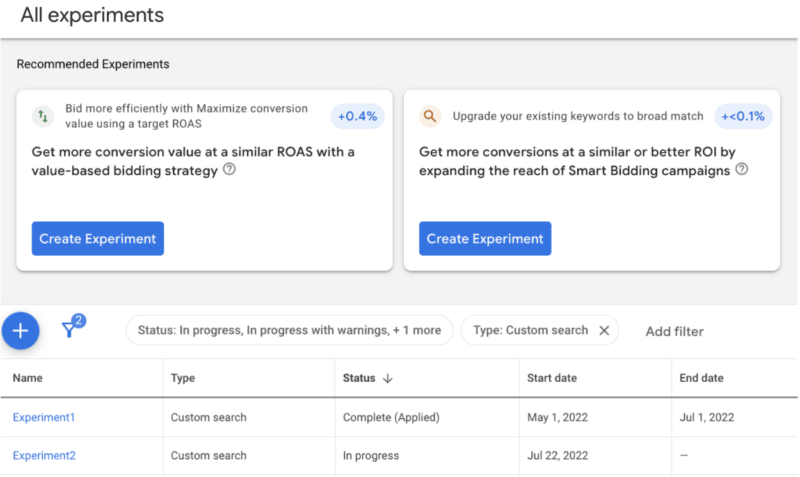
How it works. When you set up an experiment, you can test the recommendation without risking your main campaign’s performance. If the experiment is successful, you can apply the results by converting that experiment to a new campaign or transferring the experiment results to the original one.
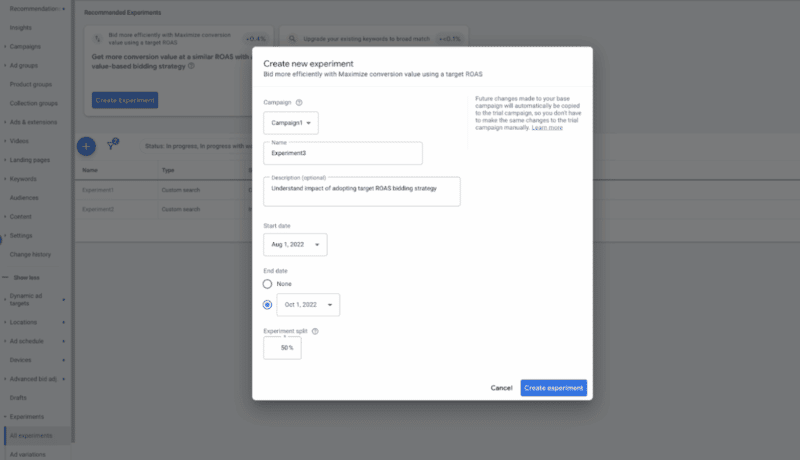
Limited functionality. Right now the feature is only available on broad match and Target ROAS recommendations. In Googles Help doc, they said they’ll continue to roll out additional availability in the coming months.
Best practices. Google recommends following its best practices guide to set up, manage, and optimize your experiments. You can also read the help guide for additional resources.
Get the daily newsletter search marketers rely on.
<input type=”hidden” name=”utmMedium” value=”” />
<input type=”hidden” name=”utmCampaign” value=”” />
<input type=”hidden” name=”utmSource” value=”” />
<input type=”hidden” name=”utmContent” value=”” />
<input type=”hidden” name=”pageLink” value=”” />
<input type=”hidden” name=”ipAddress” value=”” />
Processing…Please wait.
Why we care. Recommendations were recently ranked as one of marketers’ least favorite parts of PPC. From pushy ad reps to recommendations that only served to increase an obscure optimization score, it’s no surprise that marketers are skeptical of the “all or nothing” approach.
This new feature is a great way to find out if some recommendations really could help improve campaign performance. Did Google finally listen to our complaints?
The post Google Ad recommendations can now be applied as experiments appeared first on Search Engine Land.
Courtesy of Search Engine Land: News & Info About SEO, PPC, SEM, Search Engines & Search Marketing
Category seo news | Tags:
Social Networks : Technorati, Stumble it!, Digg, de.licio.us, Yahoo, reddit, Blogmarks, Google, Magnolia.
Google review guidelines say discouraging negative or selectively soliciting positive reviews is not allowed
Written on October 6, 2022 at 10:08 am, by admin
Google updated its policies around contributed local reviews with a new line that now says discouraging or somehow prohibiting negative reviews or selectively soliciting positive reviews is not allowed.
New policy. The new line that was added to the contributed guidelines is “discouraging or prohibiting negative reviews, or selectively soliciting positive reviews from customers.”
Is it new? Most local SEOs say this line is not actually so new, that they all knew that this was not allowed but now Google is making it crystal clear. Colan Nielsen said on Twitter that this is “not really new information but worth noting since Google is being more explicit about it.”
Why we care. Just be careful how you solicit or discourage customers around leaving or not leaving reviews for your local business(es). If you cross the line, it can lead to reviews being removed or even worse, a business ultimately being suspended from Google Search.
The post Google review guidelines say discouraging negative or selectively soliciting positive reviews is not allowed appeared first on Search Engine Land.
Courtesy of Search Engine Land: News & Info About SEO, PPC, SEM, Search Engines & Search Marketing
Category seo news | Tags:
Social Networks : Technorati, Stumble it!, Digg, de.licio.us, Yahoo, reddit, Blogmarks, Google, Magnolia.