

Google Ads to discontinue content targeting for YouTube conversion campaigns in 2023
Written on October 14, 2022 at 7:41 am, by admin
A handful of powerful targeting features will be removed in early 2023 according to a Google Ads help article.
The help article, “Optimize your Video campaign for more conversions” contains a content targeting section that recommends avoiding the addition of content targeting (by keywords, topics or placements) in campaigns.
Furthermore, the article mentions that in early 2023 all existing content targeting settings will be automatically removed “from video campaigns that drive conversions.”
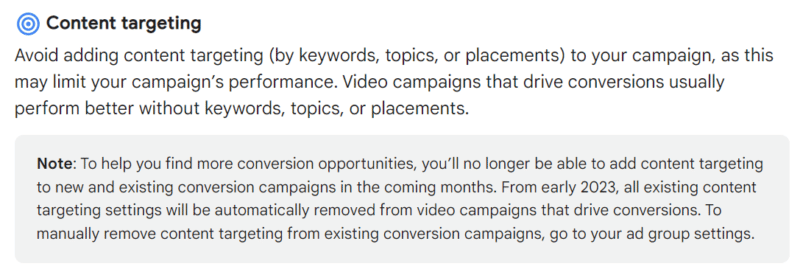
A major blow to targeting? These content targeting options are beloved by many advertisers due to the granularity they provide. Placements could target YouTube Channels, specific videos, video lineups, URLs, Apps, or collections.
With the current targeting, advertisers could match ads to channels/videos to deliver more customized messages to audiences. This change will effectively put an end to the hyper-targeting that made YouTube so appealing for ad dollars.
Another major blow is the loss of keyword targeting on the self-proclaimed 2nd largest search engine in the world. The removal of query targeting on a (video) search engine hurts.
While keywords on YouTube haven’t historically been as powerful as traditional search, it has been a way for advertisers to help answer queries with their video content. There is no doubt that advertisers will need to get more creative in order to hit their target audience.
What will happen to existing campaign when the change occurs? Advertisers running YouTube content targeting campaigns that leverage keywords, topics or placements will have the targeting removed. The article states:
“All existing content targeting settings will be automatically removed from video campaigns that drive conversions.”
We’ve reached out to Google for more clarification on this, but if you are running placement/keyword/topic targeting, this could wreak havoc on your campaigns. Stay tuned for this transition date as you won’t want to have all targeted swept from your accounts.
Why we care. A major benefit of YouTube ads has been the powerful targeting options, many of which will now be removed early next year. For performance marketers, the ability to fine-tune ads to channels or videos will no longer exist nor will the use of keywords on the second-largest search engine. These clearly can’t be chalked up to privacy or PII issues, but rather as a fundamental change away from content targeting options on the network.
If you are running ads using content targeting options, you should stay tuned to updates as those targeting settings will be automatically removed from your campaigns. With less targeting, you’ll reach a larger audience and may spend more on less qualified users.
The post Google Ads to discontinue content targeting for YouTube conversion campaigns in 2023 appeared first on Search Engine Land.
Courtesy of Search Engine Land: News & Info About SEO, PPC, SEM, Search Engines & Search Marketing
Category seo news | Tags:
Social Networks : Technorati, Stumble it!, Digg, de.licio.us, Yahoo, reddit, Blogmarks, Google, Magnolia.
The Comoto Family of Brands accelerates omnichannel marketing with first-party data
Written on October 14, 2022 at 7:41 am, by admin
Retail is an ever-changing industry, but the last few years have been particularly disruptive. The COVID-19 pandemic triggered dramatic shifts in consumer behavior that left many retailers struggling to keep up. These factors, combined with the growing influence of Amazon, increasing consumer privacy regulations and deprecating third-party cookies, are only exacerbating the need for transformation in retail that emphasizes customer relationships.
The companies that have been most successful in adapting to these challenges share one critical commonality: they prioritize the collection and use of privacy-compliant first-party customer data as a competitive asset. The Comoto Family of Brands is one such retailer.
In a recent MarTech session, Comoto’s Dana Green joined BlueConic’s Jackie Rousseau-Anderson to discuss how they are using a customer data platform to unify customer data across multiple brands and systems and activate it across channels to deliver more engaging customer interactions.
Putting data at the heart of customer engagement
As America’s largest power sports aftermarket retailer, Comoto is home to Cycle Gear, J&P Cycles and RevZilla.com. With over 150 stores nationwide and e-commerce sites for all three brands, the company manages a complex ecosystem of customer data housed in a multitude of systems.
“Data has always been foundational to our strategies,” said Green, “but it’s easy to get overwhelmed with the amount of information you have.”
That realization led Comoto on an introspective journey to transform how they access and use customer data to unlock the potential of their marketing channels. BlueConic’s customer data platform (CDP) has been a core component in its transformation.
Choosing the right optimization strategy
When it comes to optimizing their e-commerce sites, Green and her team have traditionally relied on Comoto’s UX and Research teams to provide a testing plan based on qualitative customer research. Using BlueConic’s A/B testing and optimization capabilities, the company can marry qualitative and quantitative methods for a more in-depth understanding of its customers.
“When making big updates to our website, we typically have a theory that we’re looking to improve upon. With BlueConic, we can perform A/B testing on our site to validate the research we’ve done with our customers and supplement it with hard data,” said Green.
She noted that even simple A/B tests could produce some big wins. “Our customers have a true enthusiast culture when it comes to riding, but what they shop for often depends on their riding style. So, we decided to test a shop-by-category module on our homepage that resulted in a very positive incremental lift. Just having the ability to provide someone with a custom experience based on the categories they are most interested in is an easy win for us that has a surprisingly big impact.”
Green and her team have since used BlueConic to ramp up their A/B testing efforts. “We have a lineup of things that we want to test at this point. For the most part, whenever we finished a test, it usually begs another question.” But she also cautions others to start small, as tests can get complicated. To tee up tests for success, she recommends:
- Testing something that’s going to have enough traffic to get a good read on what you’re trying to answer.
- Making sure you’re clear with your hypothesis and what you’re trying to solve.
- Defining clear success metrics.
Moving from touchpoints to journeys
Green and her team have also been able to use the learnings from A/B testing as building blocks for the larger, end-to-end customer experience. “The real power we’ve been working on is transitioning to creating lifecycles. So, not just optimizing our site, but making sure we’re connecting that experience with our other channels,” said Green.
The customer lifecycle orchestration capabilities in BlueConic enable Green and her team to move beyond channel-specific campaign workflows and instead orchestrate cross-channel lifecycle marketing programs that are responsive to each customer’s unique journey based on the real-time, unified customer profile data.
“When we’re sending an email — how are we thinking about the experience in which they’re landing on? Or when a paid ad is driving to the website, what can we do to personalize that experience?”
She also noted that sometimes very seemingly simple components, like adjusting to where somebody lives or their primary interest areas, can be a really compelling way to develop a connection with customers.
“We have a blog called Common Tread that features amazing content. The data available in BlueConic not only enables us to understand how and when consumers engage with us on Common Thread, but also tailor our communications based on their individual interests. If they are an adventure rider and we just posted an article on an adventure bike, for example, we can promote the article and introduce them to the Common Thread experience.”
Operationalizing a CDP
Green noted it’s not enough to simply add a CDP to your business infrastructure and expect to immediately reap the benefits. Like any marketing technology, success (or failure) with a CDP often comes down to an ability to effectively manage change within the organization. For Green, education and communication have been key.
“We achieve some of that just by inviting more folks throughout the business to our quarterly reviews on what we’re working on,” said Green. “We used to be set up so our email and onsite teams would meet separately with BlueConic,” she continued. “Now, we meet together so we can work on our combined strategies across both channels. So just making sure to that the communication between the teams is connected has been a really easy, simple win.”
Since the addition of a CDP also fundamentally changes how companies can and should work, Green stresses the importance of alignment on the goals, use cases (immediate priorities and long-term road map), timing and expected outcomes for a CDP implementation across all levels of the organization.
“Our tech team is very busy with a lot of big priorities, which I’m sure a lot of people can relate to,” she explained. The ability to access the unified, actionable data in BlueConic and use it to create compelling experiences on the site without tapping the tech team has been a huge help for us. That way, we can keep moving and grooving and trying new things without being held up when our tech partners are focused on other priorities.”
For others who are embarking on their own customer engagement transformation journey, Green has some advice: “Just make sure that you pick a partner that’s going to listen to your business problems and what you’re trying to achieve as a business. Only then can you truly unlock the full potential of your investment.”
The post The Comoto Family of Brands accelerates omnichannel marketing with first-party data appeared first on Search Engine Land.
Courtesy of Search Engine Land: News & Info About SEO, PPC, SEM, Search Engines & Search Marketing
Category seo news | Tags:
Social Networks : Technorati, Stumble it!, Digg, de.licio.us, Yahoo, reddit, Blogmarks, Google, Magnolia.
5 ways you’re hurting account performance when it comes to RSAs
Written on October 13, 2022 at 4:41 am, by admin
After years of perfecting ad optimization strategies for expanded text ads (ETAs), advertisers must now re-learn optimization for responsive search ads (RSAs), the new default ad text format on Google since July 2022. Due to their newness, a strong consensus about optimization best practices for RSAs has yet to emerge. But there are known pitfalls we already know to avoid.
Read on if you’d like to learn some of the most common mistakes advertisers make when working with RSAs and how to use PPC management tools like the Google Ads UI or Optmyzr to prevent or fix them.
Automation layering puts humans in charge of improving PPC performance
RSA optimization follows a now familiar pattern where the best results are achieved by leaning into automation rather than fighting it. Here’s the formula for success in the age of PPC automation which Optmyzr’s co-founder Fred Vallaeys shared in his book “Unlevel the Playing Field”:
Machines + humans > machines alone
But with a looming recession and more scrutiny on the performance of digital ads, the humans of PPC are about to become even busier than they already are, and organizations might consider foregoing the significant benefits humans can bring to results and rely on just the automations from the ad engines. But for advertisers who want more results, more profits, and less wasted ad spend, technology can come to the rescue in the form of automation layering.
In automation layering, humans create lightweight automations to regain control of ad engine automations. Automation layers can set safeguards and boundaries or feed first-party data into the sophisticated Google AI that now controls much of what humans used to manage. Together this makes PPC perform better and faster while making fewer costly mistakes. The formula becomes:
Google’s AI automations + human-controlled automation layers > Google’s automations alone
So let’s take a look at five of the most common mistakes we see with RSAs and how to fix them with automation layering.
1. Still relying on uneditable legacy ads
As of shortly before the sunset of ETAs, Optmyzr’s analysis of over 13,000 Google Ads accounts found that a whopping 7.7% of advertisers had never created an RSA yet.
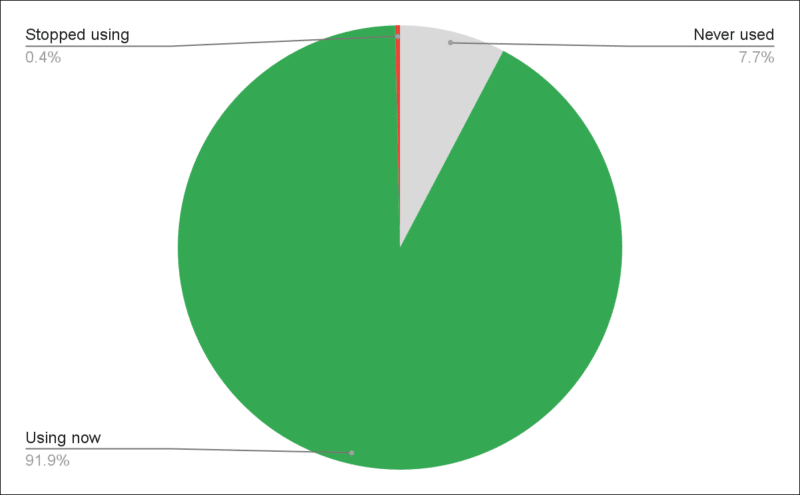 Percentage of accounts that contain responsive search ads. Source: 2022 Optmyzr study of RSA performance of 13,671 randomly chosen Google Ads accounts.
Having only ETAs is risky because once they stop performing as expected, they can’t be optimized. They also can’t be edited to reflect new promotions, something you’ll likely need to do as Q4 promotions ramp up across the industry.
Part of the reason some advertisers still rely on uneditable ETAs is that it can be hard to find ad groups that haven’t made the transition to RSAs yet. Those ad groups simply continue to run and may look fine in reports, obscuring the fact they’re running on outdated ad formats.
To transition your final ad groups to RSAs, scripts can come in handy. Optmyzr has an RSA migration script that downloads all ad groups without RSAs and prefills a bulk sheet with suggested ads. Because they’re in a spreadsheet format, it’s much easier to go through it quickly to make edits before posting them back to Google.
2. Ignoring your history of high-performing campaigns
If you ran search campaigns in Google Ads before RSAs became the default ad type, you’re already ahead of everyone starting now, especially if you also followed a few other best-practice guidelines:
- Use of automated bidding or Smart Bidding
- Proper use of seasonality adjustments
- Offline conversion imports
Older accounts also have a leg up because they have more data, and machines thrive on data to learn patterns.
Advertisers transitioning existing accounts can use their best-performing ETA headlines and descriptions to start new RSAs. This action offers on average a 7% lift in conversions at a similar cost per conversion. This migration can easily be achieved with our RSA migration utility for Google and Microsoft.
3. Testing responsive search ads by conversion rate
The single largest mistake, short of ignoring RSAs completely, is when advertisers treat their RSAs like ETAs during testing. RSAs have the unique ability to adapt what they show to boost their relevance to any search query that comes in. Because they are built to increase relevance on the fly, they have better quality scores and get far more impressions than ETAs.
We found that ad groups with RSAs got 2.1 times more impressions than those with no RSAs. These additional impressions are the reason why modern ad optimization strategies must be revised and brought up-to-date as we’ll illustrate next.
The old way of ad optimization favors the ad that delivers the most conversions per impression. But now that the ads, and not just the keywords, play a large role in determining the potential impressions, impressions themselves must also be factored into the analysis.
Look at the example below, where the ETA ad has a roughly 10% better conversions-per-impression ratio but gets only half the impressions as the RSA. The bottom line is the ETA ad delivers fewer conversions, primarily because it gets so many fewer impressions.
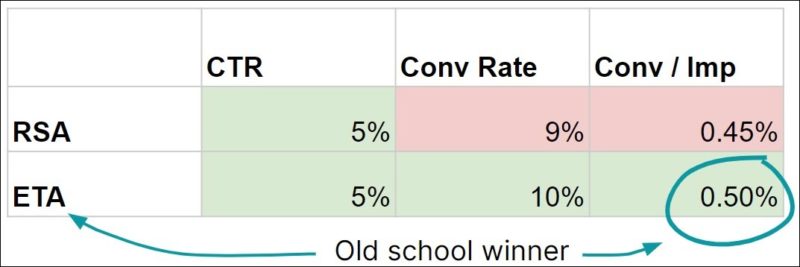
Old way: Focused on conversion rates or conversions per impression
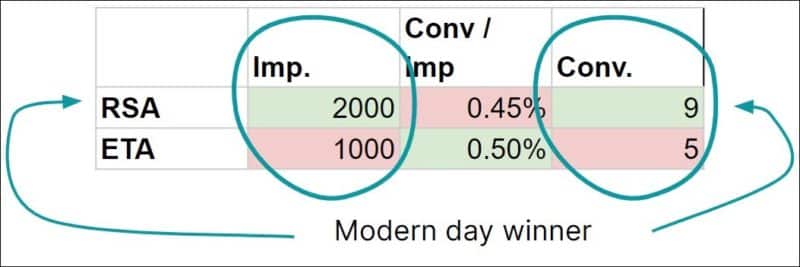
New way: Focused on conversions within CPA or ROAS limits
In Optmyzr, advertisers control the algorithm that decides how A/B ad tests are decided. For example, you can limit the analysis to only compare ads that have similar impression volume. By enabling this power-user feature, you avoid pausing ads with lower conversions per impression that would have gotten more conversions due to their outsize impression volume.
4. Not experimenting with pinning
As we said before, we believe that humans + machines > machines alone. In addition to writing good assets, pinning is another easy way for humans to control the machines.
When pinning is taken to the extreme and one asset is pinned to every location, our study found the highest CTRs and conversion rates.
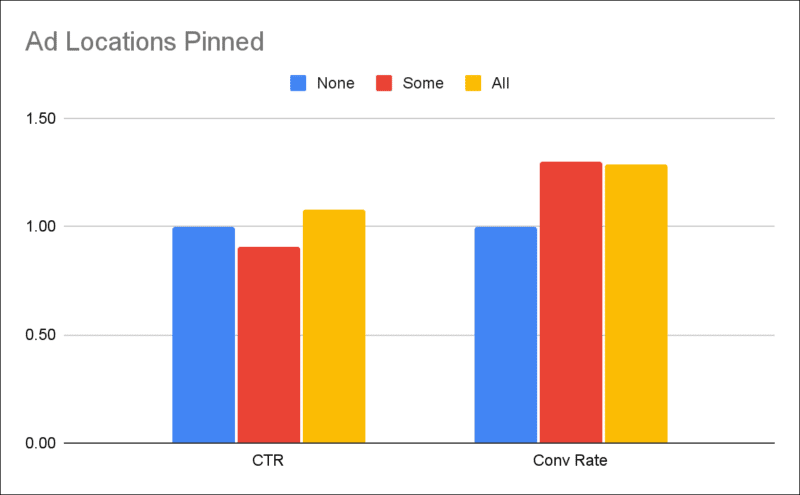
But before you go pin every part of your RSAs, don’t forget that high CTRs and high conversion rates are useless without impressions. The same pinning that produced better CTR and conversion rate is unfortunately responsible for limiting the impressions these ads get.
Google’s machines prefer when you allow them flexibility. In terms of RSAs, we found that the impressions per ad increase as you give the machines more options by adding more assets.
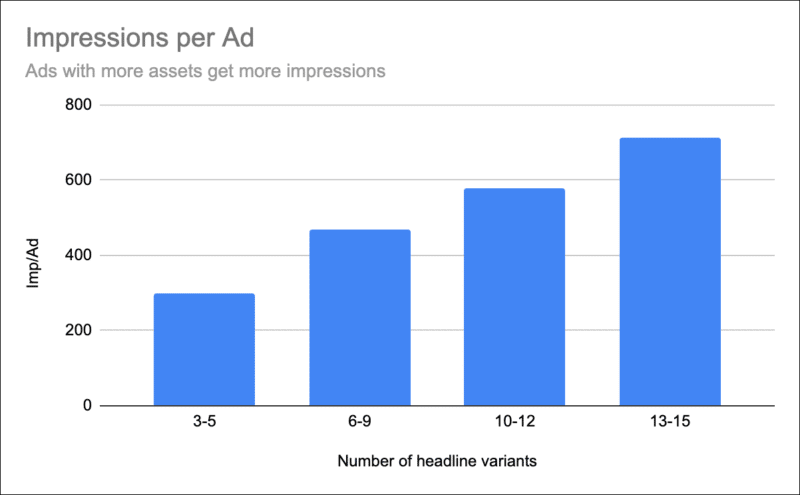
As for the impact of pinning just one asset per location, this leads to significantly fewer impressions for the RSA than when multiple assets are pinned to each location.
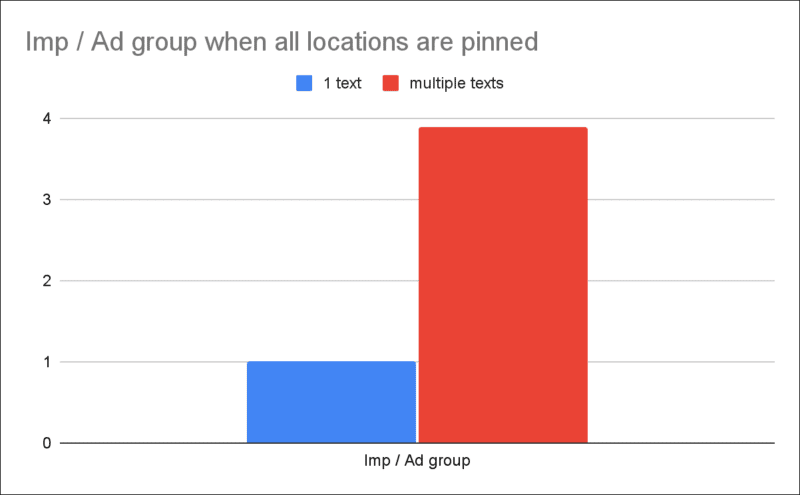
Pinning helps you control the machines, so use it to test ways to balance volume with quality. The best way to get statistically meaningful results is by using Google’s built-in ad variations tool which is part of their experiments framework. Optmyzr users can accelerate their own experimentation by using our Campaign Experiments dashboard to stay on top of all the experiments you run across the many accounts and campaigns you manage.
5. Not pairing RSAs with Smart Bidding and Broad Match
Automation likes it when advertisers remove constraints. We saw this in the data above when impressions soar by simply adding more ad text variations to an RSA. This also holds true for removing other constraints. So when you want more conversions, cautiously loosen up the match types to allow RSAs to show your ads for even more queries.
We’re not recommending a wholesale shift to broad match. Instead, test it while paying close attention to the query data and adding negative keywords as needed. This even works for Performance Max campaigns which can have negative keywords, either by asking your Google rep to add them to the campaign or by adding them to a shared negative list that is associated with the Performance Max campaign.
But loosening the reigns is only effective when you combine multiple tools for an effective automation layering strategy. Specifically, RSAs should be used in conjunction with automated bidding. Automated bidding can lower bids when it shows an RSA for a query with a more tenuous relevance to whatever your business sells.
Let’s illustrate this with an example. With a static $5 max CPC bid, the machine will bid $5 regardless of whether it believes the user is 20% or 80% likely to convert. In the case of the 20% probability, a $5 click means a $25 CPA ($5 / 0.20), whereas with the 80% probability, it’ll be a $6.25 CPA ($5 / 0.8). Smart bidding can account for the difference in conversion probability between different queries and help achieve a more consistent ROAS or CPA.
Conclusion
Google is adding more automations all the time and RSAs can drive incremental conversions at a reasonable cost, especially when complemented by other machine learning capabilities like Smart Bidding.
Optmyzr’s PPC optimization suite is evolving right alongside Google and now offers a full range of capabilities for creating, testing, and optimizing RSA assets and the ad groups/campaigns they run in. If you’d like to try it, take advantage of our free 14-day trial.
To learn more about modern ad optimization, sign up for UnLevel to get access to free RSA-focused content from Anne Bui (Puffer), Zenia Johnson (Outside Inc), Jyll Saskin Gales (Jyll.ca) and many more.
The post 5 ways you’re hurting account performance when it comes to RSAs appeared first on Search Engine Land.
Courtesy of Search Engine Land: News & Info About SEO, PPC, SEM, Search Engines & Search Marketing
Category seo news | Tags:
Social Networks : Technorati, Stumble it!, Digg, de.licio.us, Yahoo, reddit, Blogmarks, Google, Magnolia.
Search Engine Land Awards 2022: Complete finalists list
Written on October 13, 2022 at 4:41 am, by admin
NP Digital leads the way in the 2022 Search Engine Land Awards – the U.S. agency is a finalist in a whopping seven categories.
Two other agencies earning finalist status three times are Rocket Agency (Australia) and Logical Position (U.S.).
Meanwhile, 10 agencies are Search Engine Land Awards finalists two times (AEK Media, Amsive Digital, DAC, GA Agency, Megantic, Milestone Marketing, SEMbyotic, Thrive Digital, VMLY&R, Wpromote)
Small Agency of the Year – SEO and PPC
The competition was fierce in most of our categories – but in these two, the winners were clear. So we couldn’t think of a reason to wait to announce them:
- The winner of the Small Agency of the Year – PPC is … Streamline Results.
- The winner of the Small Agency of the Year – SEO is … ANGA Bangkok Co., Ltd.
Congrats to both agencies!
All the other winners of the 2022 edition of Search Engine Land Awards will be revealed this Monday, Oct. 17.
Meet Search Engine Land 2022 award winners at SMX Next
We will be inviting some of the winners of this year’s awards to join us on Day 1 of SMX Next (Nov. 15). We’ll have two Ask Me Anything-style “Ask the Search Engine Land Award winners” panels – one on the SEO side, moderated by me, and one on the PPC side, moderated by Editor Nicole Farley.
If you haven’t yet, make sure to register for free for SMX Next.
Also: a big thank you to our Search Engine Land Awards sponsor, Microsoft.
The full list of nominees
Best Overall SEO Initiative – Small Business
- AEK Media: Content Always Wins…Allegedly – 220% Traffic Growth for Criminal Law Firm in Sydney
- ANGA Bangkok Co., Ltd.: Magnetic maximising the influx in Search post pandemic for Goldelucks
- How Growth Skills built the first media platform targeting cannabis, CBD and alcohol, leading to over 475% ROI via SEO & Content Marketing
- How Logical Position Married Offsite and Onsite SEO To Increase NV Landscape’s Local Organic Traffic by 150% YOY
- How Mickey Llew helped Menstrual Cups Australia win back first place ranking for a key top generic phase in their industry, on a limited budget.
Best Overall SEO Initiative – Enterprise
- Livestrong and Amsive Digital Flex Their Expertise to Bulk Up Major Organic Gains
- First Citizens Bank Gains a Trusted Partner in CB/I Digital after Impressive Growth in Keyword Ranking, Local Search, and Non-Brand Traffic
- GA Agency: 12 Countries, 4 Fashion Brands: Skyrocketing SEO
- Graphite & BetterUp – Premium Content to Drive +2,000% YoY Growth
- NP Digital: Leveraging SEO & content to help build a brand. How we increased organic search traffic by 561% for Lantern.
Best Commerce Search Marketing Initiative – SEO
- Click Intelligence & Anthem Branding – The Journey from Unranked to Page 1
- GA Agency: 12 Countries, 4 Fashion Brands: Skyrocketing SEO
- How Logical Position Helped Palouse Ranches Increase New Organic Traffic by 211% with Just 4 Keywords
- Milestone Inc Helps Sun Outdoors Triple their Conversions and Online Revenue with a New State-of-the-Art Website that made a significant impact on their visibility on search – locally & organically for their locations
- VMLY&R: Driving Visibility and Conversions Across a Diverse Ecommerce Portfolio
Best Local Search Marketing Initiative – SEO
- How 3Q/DEPT increased leads by 330% for Source Capital Funding via Organic Search
- Comrade Digital Marketing Agency: LASIK Goes Local: Growing Organic Traffic by 400+% for Elective Surgical Practice
- Lastmile Retail: Transforming The Digital Local Customer Experience: T-Mobile x Lastmile Retail
- How Logical Position Married Offsite and Onsite SEO To Increase NV Landscape’s Local Organic Traffic by 150% YOY
- Milestone Inc Helps SpeedPro Drive 93% Increase in Local Listing Views and 39% Increase in Online Leads Revenue with State-of-the-Art Local SEO Strategy
Best B2B Search Marketing Initiative – SEO
- How Advarra Outranked Third Party Reviews For Their Software Category
- Finn Partners: Boosting organic traffic and rankings in a saturated in-car technology market
- How LOCALiQ Increased Its Organic Search Traffic by 289% In Just 8 Months With SEO
- NP Digital: Matching WordPress intent.How we increased organic traffic by 514% for a core Nexcess product offering.
- How Tacomi utilised SEO to gain a 1,930% ROI for BMJ Careers
Agency of the Year – SEO
- Dreamscape Marketing: Enterprise Scale Enterprise Outcomes: Performing a website and digital marketing conversion with speed to meet enterprise needs without sacrificing operations and supporting their rapid growth.
- Megantic: No Pain, All Gains with Supplement Mart’s Shopify Migration
- NP Digital: Leveraging SEO & content to help build a brand. How we increased organic search traffic by 561% for Lantern.
- How Sherlock Communications Delivered a 193% Organic Visitor Increase for Betfair Colombia in a Competitive Industry Sector Using a Content First Strategy
- Wpromote: Flying High: How Wpromote Grew Organic Revenue by 550% for Travelpro
In-House Team of the Year – SEO
- How Razorfish exceeded a client target that others considered impossible
- How the T-Mobile SEO team recruited top in-house talent, accelerating innovation and driving business growth
- UPMC: Driving SEO Growth with a Little Help from our Friends
Best Overall PPC Initiative – Small Business
- How Brandastic established our client as the #1 DTG Printer Brand in North America 2021
- NP Digital: Enhancing SEM strategy to elevate returns. How Mann Lake and NP Digital increased paid search revenue by 87% YoY.
- Primal Malaysia Delivered 323% ROI for Easy Consulting
- How Rise Interactive Scaled Cross-Channel Results with Performance Marketing & Closed Loop Reporting
- How Our Agency Vivid Candi Increased Leads by 800% and Sold Out a 6-Figure Housing Product In 3 Months
Best Overall PPC Initiative – Enterprise
- Healthy Paws & Amsive Digital Making it Rain Search Lift (or cats & dogs)
- Bayer Consumer Health: Increasing In-Store ROAS driven by Search Media by 2-3x for a CPG/OTC Brand!
- How Rocket Delivered 331% leads above target for Noggin via Google Ads
- How SEMbyotic Helped Transform TCS By Growing Revenues 500% During the Pandemic
- VMLY&R: United Rentals: Localization Strategy Increases Yearly Revenue by 71% to $18.6 Million
Best Commerce Search Marketing Initiative – PPC
- Beeby, Clark+Meyler: How The Parking Spot paid search program drove a 39% increase in reservations over pre-pandemic Q2 2019
- Katté & Co and SPOKE – quadrupling non-brand revenue for a fast-growing British men’s clothing brand
- How Mad Fish Digital Leveraged Full-Funnel Strategy and Google’s AI to Deliver a 1,058% ROAS for Schoolhouse Electric
- How Thrive Digital bridged the gap in seasonality and restructured the account by prioritizing product profitability based on regions and automated feed-driven product segmentation. As a result, we reached 342% ROAS, exceeding the client’s target of 278%
- Thrive Digital: How Smith Optics scaled revenue from Google channels 120% YoY by expanding tactics and implementing best practices.
Best Local Search Marketing Initiative – PPC
- Adwise & SPAR – 122% uplift in omnichannel ROAS with hyper local digital advertising strategy
- How DAC helped Aqua-tots drive a 300% increase in store visits
- DAC & StorageMart: Driving occupancy with paid media
- Ovative Group: Local Campaigns Drove over 60% of Duluth Trading’s Store Visit Growth YoY
- How Stella Rising SEM Helped Big Y Pivot to Online Grocery Amidst Consumer Behavior Changes
Best B2B Search Marketing Initiative – PPC
- A mid-funnel mindshift. How ConnectWise and NP Digital increased ROAS of paid search by 100%.
- How SEMbyotic Helped Transform TCS By Growing Revenues 500% During the Pandemic
- How Statwax Scaled a B2B SaaS Unicorn’s Search Ad Spend 20X While Improving Profitability & Customer Growth
- The Media Image & LSEG – Doing More with Less at a Global Scale
- How Workshop Digital Generated 2,400% ROAS for Super Radiator Coils’ with a custom PPC-CRM Feedback Loop
Best Integration of Search Into Omnichannel Marketing
- AEK Media: How an Omnichannel Approach led to 130% Month-on-month Sales Growth in Their First Year Online | Tasman Eco
- Automation & crypto, a perfect match. How NP Digital drove omni-channel success for FTX.
- Rakuten Advertising x Vans Omnichannel Bidding
- Rocket & Rezdy | Scaling Software Sales Globally with Digital
- UPMC: Building upon our Health and Wellness Brand to Deliver Timely Content during COVID-19 Pandemic
Agency of the Year – PPC
- How Adviso Delivered a 50% increase in revenue for SAIL via Search
- Horizon Media: Beating the Headwinds with Localized Profitability
- NP Digital: Dynamic conversion value integration in paid search. Optimizing for global profitability across Tektronix’s complex sales journey.
- Rocket & Rezdy | Scaling Software Sales Globally with Digital
- Wpromote & Intuit QuickBooks: Harnessing First-Party Data to Drive Paid Search Success
In-House Team of the Year – PPC
- BH Breaks the Industry Mold with In-House Solution, Saving $500k in Management Fees
- HSBC UK: How an Newly In-Housed Team Delivered Record-Breaking Growth Within a Year’
- Wiley University Services: In-House Media Team Outperforms Industry Trends by Increasing Leads and Enrollment for University Partners
Search Marketer of the Year
- David Grow, Goodway Group
- Heath Hamilton, Megantic
- Melissa Liu, RPA
- Nicolas Villeneuve, Adviso
- Vandana Kumar, Megantic
The post Search Engine Land Awards 2022: Complete finalists list appeared first on Search Engine Land.
Courtesy of Search Engine Land: News & Info About SEO, PPC, SEM, Search Engines & Search Marketing
Category seo news | Tags:
Social Networks : Technorati, Stumble it!, Digg, de.licio.us, Yahoo, reddit, Blogmarks, Google, Magnolia.
Webinar: Deliver highly-personalized experiences with quality data
Written on October 13, 2022 at 4:41 am, by admin

To achieve the most ROI from your customer data, you need a strong foundation. Creating a precise golden record for each consumer with enriched data, a full contact graph and a full identity graph provides the context your brand needs to differentiate based on CX. Precise data includes both first-party data as well as third-party data to enrich your total understanding of each consumer.
If your brand lacks a pristine golden record for each customer, join John Nash, chief marketing and strategy officer at Redpoint, as he discusses the best steps to get started.
Register today for “Steps to Deliver Highly Personalized Experiences With Quality Data,” presented by Redpoint Global.
Click here to view more Search Engine Land webinars.
The post Webinar: Deliver highly-personalized experiences with quality data appeared first on Search Engine Land.
Courtesy of Search Engine Land: News & Info About SEO, PPC, SEM, Search Engines & Search Marketing
Category seo news | Tags:
Social Networks : Technorati, Stumble it!, Digg, de.licio.us, Yahoo, reddit, Blogmarks, Google, Magnolia.
Google launches new content suitability center in Google Ads
Written on October 13, 2022 at 4:41 am, by admin
Google has launched a new content suitability center in Google Ads where you can manage your suitability settings for all campaigns on YouTube and the Google Display Network.
Google wrote, “previously, managing suitability settings was done in multiple, segregated sections of Google Ads and the experience differed across Google platforms.” “This led to a time-consuming and cumbersome implementation process, along with misconceptions and misuse of the controls. While exclusions can be helpful tools, brands also want to be mindful of the types of content they choose to exclude. Over-exclusion can negatively impact your cost and reach. It can also unintentionally exclude great, brand-safe content or content relevant to diverse communities,” Google added.
New suitability center. The new suitability center in Google Ads allows you to manage the suitability controls under a single point-of-entry. You can use the content suitability center to easily set your suitability preferences for inventory modes and exclusions across YouTube and the Google Display Network.
Here is a screenshot of it:
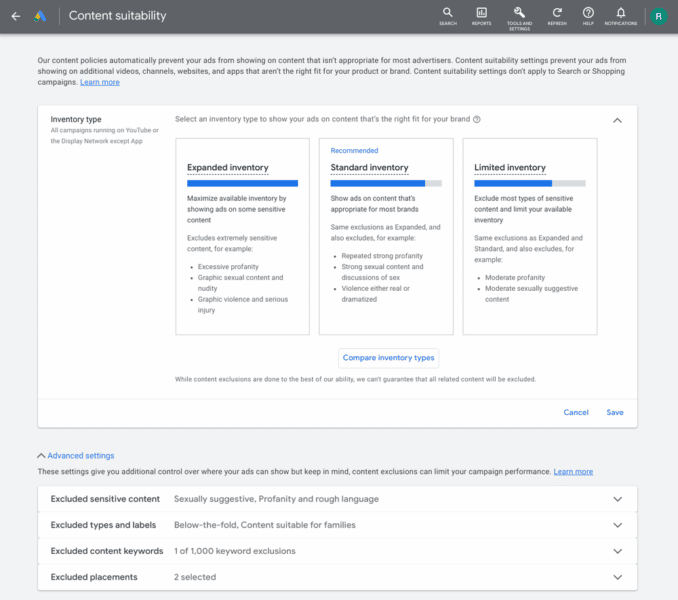
More details. When you enter the new suitability center in Google Ads, you can now select one of the three inventory modes. Inventory modes “cater to your preferences for various sensitive themes, such as profanity, sexual suggestiveness and violence,” Google explained. You can fine-tune additional exclusions from that point. Once you have designated your preferences at the account level, Google Ads will now automatically apply these settings to your future campaigns.
Why we care. This should save you time, reduce errors and improve the management of these controls in a more central place. Google added the company will share more “in the coming months to help you continue to align with what works best for your brand identity and navigate the growing landscape of content.”
The post Google launches new content suitability center in Google Ads appeared first on Search Engine Land.
Courtesy of Search Engine Land: News & Info About SEO, PPC, SEM, Search Engines & Search Marketing
Category seo news | Tags:
Social Networks : Technorati, Stumble it!, Digg, de.licio.us, Yahoo, reddit, Blogmarks, Google, Magnolia.
Alexa users claim Amazon is using voice recordings to target ads
Written on October 12, 2022 at 1:39 am, by admin
Alexa users are suing Amazon over claims that the voice assistant app is targeting users with ads relevant to private recordings of users’ conversations.
The central complaint. The main complaint of Alexa users is that the voice assistant is wrongly using voice recordings captured by Alexa to target ads.
“The central theory of this lawsuit is that Amazon uses Alexa voice recordings (i.e., the captured sound of a user’s voice) to serve interest-based ads to that user. In their complaint, plaintiffs conspicuously never allege facts showing that Amazon uses Alexa recordings to serve interest-based ads (because they have no good-faith basis for that allegation),” the company adds. “The complaint instead uses the intentionally vague term ‘voice data’ for the notion that certain transaction data resulting from Alexa interactions is sometimes used for advertising. Yes, it is, and Amazon widely and clearly discloses that fact.”
U.S. District Court Judge Barbara Rothstein
The plaintiff’s suit. Ohio resident James Gray and Massachusetts resident Scott Horton brought the class-action complaint against Amazon for allegedly using “Alexa-collected voice data” for ad targeting. They raised several claims, including that Amazon violated users’ privacy, and that it engaged in misleading and unfair conduct.
Get the daily newsletter search marketers rely on.
<input type=”hidden” name=”utmMedium” value=”” />
<input type=”hidden” name=”utmCampaign” value=”” />
<input type=”hidden” name=”utmSource” value=”” />
<input type=”hidden” name=”utmContent” value=”” />
<input type=”hidden” name=”pageLink” value=”” />
<input type=”hidden” name=”ipAddress” value=”” />
Processing…Please wait.
What Amazon says. Amazon said “it “is not in the business of selling data,” and doesn’t share Alexa requests with ad networks.
The company added: “Similar to what you’d experience if you made a purchase on Amazon.com or requested a song through Amazon Music, if you ask Alexa to order paper towels or to play a song on Amazon Music, the record of that purchase or song play may inform relevant ads shown on Amazon or other sites where Amazon places ads.”
Amazon urged judge Rothstein to dismiss the lawsuit claiming that even if the allegations were true, there wouldn’t be any proof that the company sed voice recordings for ad purposes.
Amazon also said “If a customer buys dog toys from Amazon, that fact can be used to generate interest-based ads, regardless of whether the customer ordered by typing on amazon.com or speaking a voice command to an Alexa-enabled device,” the company wrote. “But records of the customer’s transactions, whatever the input medium, are different from Alexa voice recordings or transcripts themselves.”
They added “When a customer uses a physical keyboard to make a purchase on amazon.com, the data from that transaction is not ‘derived from’ the customer’s typing, nor would anyone argue that Amazon is ‘using’ that person’s keystrokes,” Amazon argues. “Similarly, if someone types a purchase command into the Alexa app, the transaction data associated with that command is captured and might be used for advertising (as Amazon widely discloses).”
Why we care. With cookies disappearing in 2024, privacy is at the forefront of ad platforms and advertisers’ strategies to deliver relevant ads to an audience that may or may not become harder to reach. But Amazon’s blatant disregard for users’ personal space and private conversations goes beyond cookies and into a realm that’s just plain invasive.
I’ll be curious to see if Amazon is held liable for these claims and what the company does to remedy the situation as users become more aware, and intolerant of privacy abuse.
The post Alexa users claim Amazon is using voice recordings to target ads appeared first on Search Engine Land.
Courtesy of Search Engine Land: News & Info About SEO, PPC, SEM, Search Engines & Search Marketing
Category seo news | Tags:
Social Networks : Technorati, Stumble it!, Digg, de.licio.us, Yahoo, reddit, Blogmarks, Google, Magnolia.
Facebook has rolled out a new Pages experience
Written on October 12, 2022 at 1:39 am, by admin
Facebook has rolled out a new Pages experience they say is ideal for small and medium-sized businesses to build connections with customers and other businesses.
The new Pages layout. The new Pages experience has a more “streamlined layout, easier navigation between your personal profile and business pages, a Professional Dashboard to manage all of your activities quickly in one central location and access to a dedicated Feed to more seamlessly interact with people on Facebook as your business.”
Switching between your business and personal profile can be done by tapping or holding down the top right menu icon.
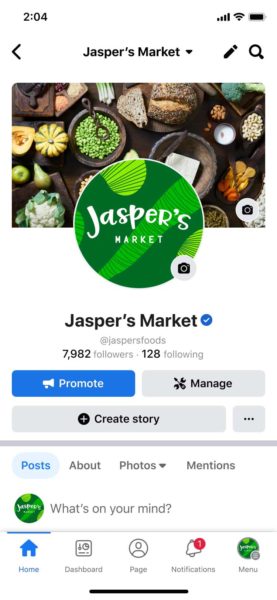
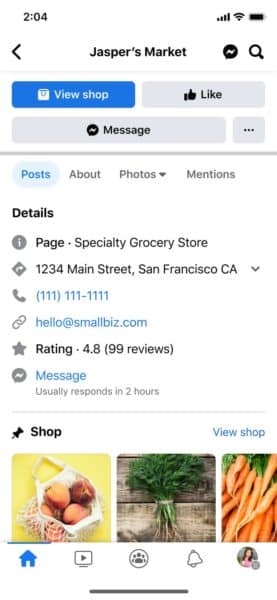
Getting the most out of your Pages. Facebook lays out a few tips to help businesses get the most out of their Pages experience. Let’s dive in.
1. Setting up for success. Complete your basic business profile by adding a profile and cover photo, a description of your business, and contact details like your website, phone number, address and business hours.
Facebook also suggests customizing your page with action buttons and set Page Admins to help you manage it.
2. Grow your audience. Invite friends, family, and existing customers to like your page, post often, and respond to comments to help grow connections.
3. Create better content. Use trending hashtags to get your content discovered by a new and relevant audience. You can also share posts in up to 3 groups and link your Instagram to cross-share to your followers on Instagram. You can also schedule your posts by using the Composer feature.
4. Engage your community. Facebook encourages businesses to engage with the community by joining in on conversations within the business feed and commenting on posts as your page to help build experiences.
5. Safety and security tips. The following safety and security tips can help keep your page secure.
- Set up 2-Factor authentication
- Use comment moderation tools
- Take action on hacked accounts
Dig deeper. You can read the entire announcement from Meta and get more tips on growing your Facebook page here.
Why we care. Love it or hate it, Facebook is still a valuable tool for businesses today. Make sure you’re taking advantage of all of the tools and features available on your page and ensure all of your information is correct and up to date so potential customers can find you.
The post Facebook has rolled out a new Pages experience appeared first on Search Engine Land.
Courtesy of Search Engine Land: News & Info About SEO, PPC, SEM, Search Engines & Search Marketing
Category seo news | Tags:
Social Networks : Technorati, Stumble it!, Digg, de.licio.us, Yahoo, reddit, Blogmarks, Google, Magnolia.
3 new Google travel and tour booking features
Written on October 12, 2022 at 1:39 am, by admin
Google has just announced three new features for travel and tour booking businesses. The new features are aimed at making it easier for people to book tickets and experiences right from Google, as well as giving businesses the ability to connect with potential customers.
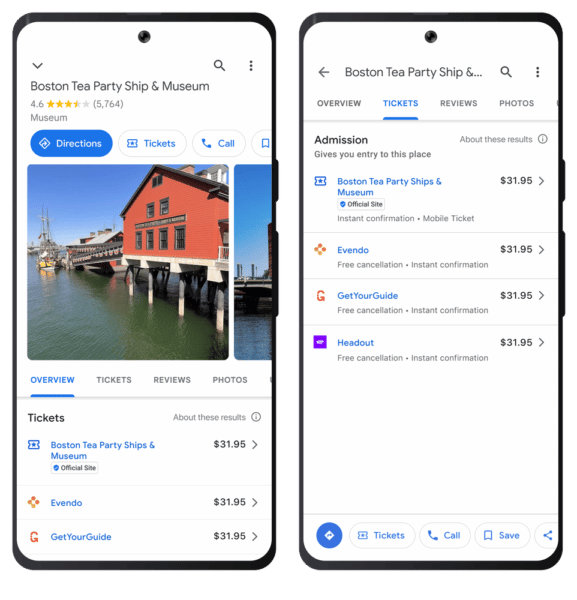
Ticket booking links for attractions. Now available on Maps (mobile & desktop), after first launching on Search in Sept 2021. Visitors can also quickly compare admission prices across different partners.
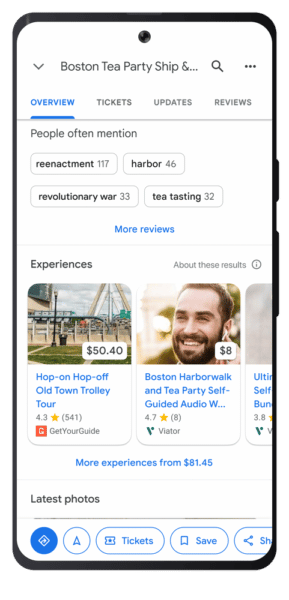
Experiences related to an attraction are now shown separately (e.g. combined Statue of Liberty & Ellis Island tour). This is currently on Search, coming soon to Maps.
In the near future, Google will show ticket booking links on Search/Maps business listings for tour & activity operators (e.g. Joe’s London Bike Tours) just as it is now for attractions.
Edit ticket prices on Google Business profiles. Attraction owners can now edit their ticket prices & booking links directly on their Business Profile (and soon tour & activity operators will have the same option). Previously they had to work through an approved connectivity partner.
Attraction operators can still work with an approved Connectivity Partner to provide travelers with up-to-date information using a data feed if they prefer.
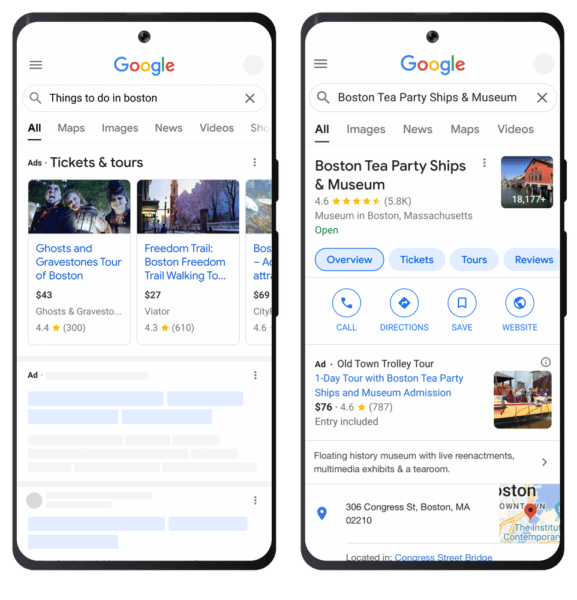
Things to do Ads (also launched Sept 2021). Now surfacing on relevant queries in 24 countries and they can now appear on individual attraction knowledge panels on Search (replacing what would otherwise be a standard text ad)
These ads can be set up using the same data feeds that power the free ticket booking links on Search and Maps.
Get the daily newsletter search marketers rely on.
<input type=”hidden” name=”utmMedium” value=”” />
<input type=”hidden” name=”utmCampaign” value=”” />
<input type=”hidden” name=”utmSource” value=”” />
<input type=”hidden” name=”utmContent” value=”” />
<input type=”hidden” name=”pageLink” value=”” />
<input type=”hidden” name=”ipAddress” value=”” />
Processing…Please wait.
Dig deeper. You can read the announcement from Google and find approved Connectivity Partners here.
Why we care. If you have or manage a business in the travel and tourism industry, you can use these features to find and connect with new customers, edit your prices in real time, and give customers additional options for booking.
The post 3 new Google travel and tour booking features appeared first on Search Engine Land.
Courtesy of Search Engine Land: News & Info About SEO, PPC, SEM, Search Engines & Search Marketing
Category seo news | Tags:
Social Networks : Technorati, Stumble it!, Digg, de.licio.us, Yahoo, reddit, Blogmarks, Google, Magnolia.
GA4. Schema. E-A-T. See the tactic-packed SMX agenda!
Written on October 12, 2022 at 1:39 am, by admin

Actionable search marketing tactics, expert answers to your burning SEO and PPC questions, and engaging discussions with passionate search marketers are a just click away… secure your spot at SMX Next now and join us online, November 15-16, for free!
The agenda is live… be the first to see what’s in store!
Programmed by the Search Engine Land editors, this tactic-rich training features special guest speakers from 1-800-FLOWERS.COM, Inc., M&T Bank, Trupanion, and more exploring the critical search marketing topics and trends, including…
- How to make a smooth transition to GA4
- Understanding and improving your E-A-T
- AI and ML: Setting up your content program for a winning future
- How to stay ahead of Google algorithm updates
- Innovative video marketing trends that drive engagement
- Creating winning Performance Max campaigns for eCommerce
… and that’s just the start. You’ll also unlock two exclusive Google keynote conversations, engage in live Q&A with speakers (Overtime!), enjoy invigorating Coffee Talk meetups, and more.
For more than 15 years, over 150,000 search marketers from around the world have attended SMX to learn performance-enhancing tactics, make game-changing connections, and further their careers.
Don’t miss your opportunity to join them online, November 15-16, 2022! Secure your FREE All Access pass now!
The post GA4. Schema. E-A-T. See the tactic-packed SMX agenda! appeared first on Search Engine Land.
Courtesy of Search Engine Land: News & Info About SEO, PPC, SEM, Search Engines & Search Marketing
Category seo news | Tags:
Social Networks : Technorati, Stumble it!, Digg, de.licio.us, Yahoo, reddit, Blogmarks, Google, Magnolia.