

Google agrees to pay up in 12 year class-action lawsuit
Written on January 5, 2023 at 4:17 pm, by admin
Consumers in a 12-year-long class action lawsuit against Google say that Google shared their queries with third parties without their permission.
What happened. The lawsuit alleged that Google violated both the Stored Communications Act, a federal law that governs access to records held by internet service providers, and state laws in California.
The settlement. Details of the settlement can be found here. In addition to the $23 million payout, which still needs court approval, it also requires Google to provide added disclosures to consumers about the sharing of search terms.
Dig deeper. Read the full announcement from Bloomberg.
Why we care. We’re not sure how or if this will affect advertisers in the future. But privacy issues are still a hot topic as we move into 2023.
The post Google agrees to pay up in 12 year class-action lawsuit appeared first on Search Engine Land.
Courtesy of Search Engine Land: News & Info About SEO, PPC, SEM, Search Engines & Search Marketing
Category seo news | Tags:
Social Networks : Technorati, Stumble it!, Digg, de.licio.us, Yahoo, reddit, Blogmarks, Google, Magnolia.
EU rules that Meta’s ad practices are illegal
Written on January 4, 2023 at 12:10 pm, by admin
Meta has been fined 390 million euros ($414 million) after European Union (EU) regulators found it had illegally forced users to accept personalized ads.
What happened. According to the New York Times, Meta includes language in its terms of service agreement, the very lengthy statement that users must accept before accessing services like Facebook, Instagram and WhatsApp, which effectively means users must allow their data to be used for personalized ads or stop using Meta’s social media services altogether. Since you need to agree to the terms before using the service, users have no choice but to allow to have their data used for ads.
What happens now. Meta has three months to outline how it will comply with the ruling. The decision does not specify what the company must do, but it could result in Meta allowing users to choose whether they want their data used for such targeted promotions.
Having a large number of users opt-out of sharing their data would put Meta’s ad revenue at risk, since the judgment puts 5-7% of it at stake.
There are no such regulations in the US.
Why we care. EU advertisers could be affected, but any changes that Meta makes as a result of the ruling could affect users in the United States; many tech companies apply E.U. rules globally because that is easier to put in effect than limiting them to Europe.
Meta advertisers should be on the lookout, regardless, for any updates and changes to their targeting.
The post EU rules that Meta’s ad practices are illegal appeared first on Search Engine Land.
Courtesy of Search Engine Land: News & Info About SEO, PPC, SEM, Search Engines & Search Marketing
Category seo news | Tags:
Social Networks : Technorati, Stumble it!, Digg, de.licio.us, Yahoo, reddit, Blogmarks, Google, Magnolia.
Twitter is lifting its ban on political, cause-based ads
Written on January 4, 2023 at 12:10 pm, by admin
An announcement by Twitter, on Twitter, says that the company is going to relax its ban on cause-based ads (such as those for climate change or women’s rights). They also plan on lifting their own restricitions on political advertising.
We believe that cause-based advertising can facilitate public conversation around important topics. Today, we're relaxing our ads policy for cause-based ads in the US. We also plan to expand the political advertising we permit in the coming weeks.
— Twitter Safety (@TwitterSafety) January 3, 2023
Political ad bans. In 2019, Twitter banned political ads. Last year they also banned political fundraising and started requiring that accounts belonging to government departments, politicians, and political parties be verified.
Cause-based bans. Their current policy surrounding cause-based ads restricts those that educate, raise awareness, and/or call for people to take action in connection with civic engagement, economic growth, environmental stewardship, or social equity causes. Their help documentation states:
- Advertising should not be used to drive political, judicial, legislative, or regulatory outcomes; however, cause-based advertising can facilitate public conversation around important topics.
- Advertising that uses micro-targeting presents entirely new challenges to civic discourse that are not yet fully understood.
So why the change? Unclear. It’s also unknown exactly what will change with the loosening of the policies outside of what’s mentioned in the tweet. But CEO Elon Musk is getting a reputation for shaking things up, implementing policies, then immediately removing them, and has a special penchant for getting the platform’s largest advertisers to jump ship.
Why we care. I’m not sure if lifting the bans will scare away the little remaining advertisers on the platform, bring any back, or draw in more from less-than-credible sources. But if you’re working for a cause-based organization, this can be good news for you- if you can navigate the platform, get verified, and stand out in a sea of would-be fraudsters, political opposition, and/or corrupt accounts.
The post Twitter is lifting its ban on political, cause-based ads appeared first on Search Engine Land.
Courtesy of Search Engine Land: News & Info About SEO, PPC, SEM, Search Engines & Search Marketing
Category seo news | Tags:
Social Networks : Technorati, Stumble it!, Digg, de.licio.us, Yahoo, reddit, Blogmarks, Google, Magnolia.
Google’s “Remove redundant keywords” recommendations have changed
Written on January 4, 2023 at 12:10 pm, by admin
Advertisers running PPC ads on Google may have woken up to an email this morning outlining its new policy regarding redundant keywords.
What’s changed. The “Remove redundant keywords” recommendations suggest redundant keywords within the same ad groups. You may see the notification at the top right side of your ads dashboard. But starting January 19, the recommendation can include keywords across different match types.
Now, Google will start removing redundant phrase and exact match keywords in favor of broad.
Robert Brady first noticed this and posted it on Twitter.
Check your email. @GoogleAds just changed the "Remove redundant keywords" recommendation to prefer broad match. It will remove a phrase match or exact match keyword if a broad match keyword covers it. #ppcchat
— Robert Brady (@robert_brady) January 4, 2023
Why Google is making the change. In their email, Google said:
Redundant keywords are equivalent to higher-performing keywords or keywords in broader match types. Removing these redundant keywords and consolidating your keywords across match types will help you manage your account more easily. It doesn’t negatively impact your performance, and still allows your ads to appear on the same searches.
Stop auto-apply. You can (and should, IMO) turn off auto-apply recommendations in both Editor and the Ads front end by clicking “disable” in your recommendations section.
Dig deeper. You can review Google’s recommendations guidelines here. If you haven’t received the email from Google, I’ll paste it below.
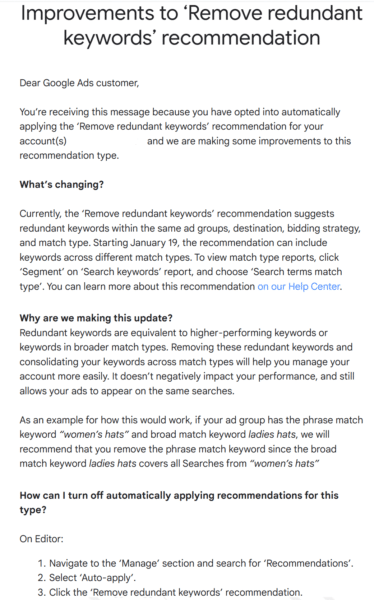
Why we care. This is another attempt by Google to shift accounts to broad-match keywords only. Advertisers and brands should only make the change if they have tested and determined if broad-match keywords work best for their accounts. If you’re unsure bout broad-match, turn off auto-apply and test.
The post Google’s “Remove redundant keywords” recommendations have changed appeared first on Search Engine Land.
Courtesy of Search Engine Land: News & Info About SEO, PPC, SEM, Search Engines & Search Marketing
Category seo news | Tags:
Social Networks : Technorati, Stumble it!, Digg, de.licio.us, Yahoo, reddit, Blogmarks, Google, Magnolia.
A 5-step framework to scale your content operations and SEO
Written on January 4, 2023 at 12:10 pm, by admin
Don’t lie.
Show of hands.
How many times have you uttered the following in the last year alone?
- “I can’t find any good writers.”
- “No one can create content as well as me.”
- “Content marketing / SEO doesn’t work in our niche.”
- “That agency just doesn’t understand our unique POV.”
- “I can’t publish more than X articles/mo without quality dropping.”
Probably all of them at one point. Amiright?
No fingers pointed. I’ve used them all, too.
But here’s the thing you need to recognize about these oft-repeated clichés:
They’re excuses. All of them.
Excuses and lies we tell ourselves to simultaneously:
- Puff up our ego.
- Avoid doing the hard work of learning how to systemize and build processes and delegate effectively.
Here’s why you’re your own worst enemy when it comes to scaling content creation and SEO, and how to solve it so you get back on track ASAP.
You are your own worst SEO enemy – here’s why (and how to fix it)
The truth hurts sometimes.
And when it comes to content operations, the faster you recognize that you’re the problem, the quicker you’ll get to crushing your next revenue target.
Companies often fail to scale because they lack content operational systems that underpin the creativity layered on top.
Instead, too many teams still operate under this false assumption that they’ll luck out and the perfect unicorn writer or marketer or [insert rockstar role here] will fall into their laps, solving all of their problems in one fell swoop.
You know, the ones that just get “it.”
Without ever bothering to figure out what “it” is, or how to document “it,” or how to specifically recruit and train for “it” so that “it” happens like clockwork, 24/7, 365.
Diagnosing this problem is difficult unless you’ve seen it happen before. So here are the clues to look for:
- You routinely hit self-imposed “glass ceilings.” Quality drops like a rock every time you push quantity or volume up.
- Your editors are rewriting everything your writers deliver because it “doesn’t sound right” or “isn’t as good” as they can make it.
- You have constant issues finding new writers because it takes too long for your most expensive and senior people to review writers. So, instead of hiring only the top 1% of candidates, you’re stuck hiring the top 10% and having to weed through the 9% of junk left over).
- Your team members give contradicting feedback to new hires because each would describe subjective elements like voice and tone in completely different ways.
- Your editors spend multiple hours editing one piece because they have to correct basic image formatting or update primary sources, which means their weekly output is only a tiny fraction of what it could or should be.
Does any of this sound familiar yet?
It should.
And the biggest problem is that these surface-level issues sabotage your SEO success by killing output, slaughtering velocity, and maiming morale.
But don’t stress.
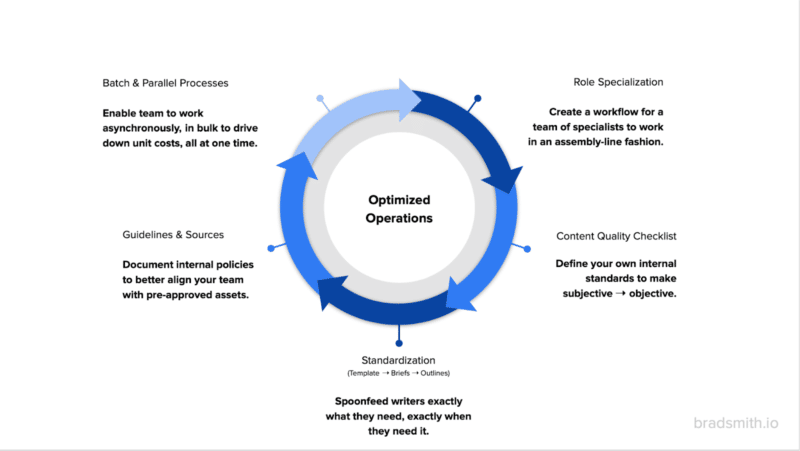
After seeing these issues routinely play out over the last decade (and making the same mistakes ourselves countless times), we’ve been able to come up with a helpful framework to optimize operations.
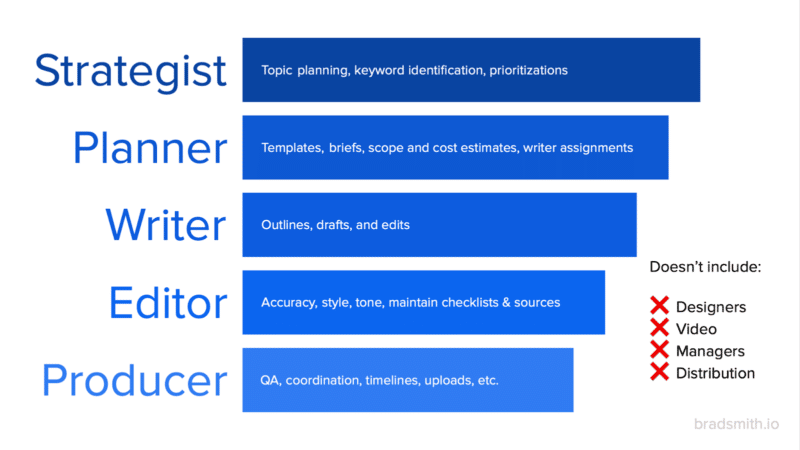
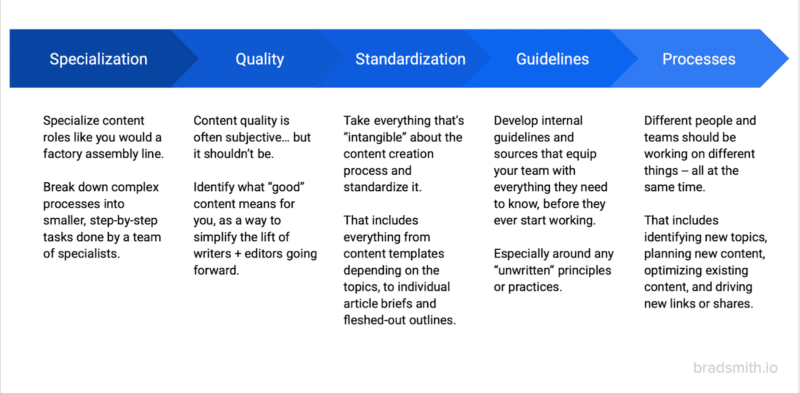
Here’s an overview graphic, and then we’ll dig into each section in detail.
1. Role specialization
The best writers make bad editors and terrible content managers.
Why?
Because the best writers thrive on ingenuity, saying the same thing multiple times in multiple ways.
Editors should be the opposite, in constant pursuit of consistency and uniformity.
Meanwhile, managers are the glue that keeps the other two’s big-picture goals and day-to-day actions aligned.
In other words, completely different skill sets that too many teams try to force into one individual.
It’s the Michael Scott problem. Great paper salesman. Funny television character. Awful regional manager.
Roll back a few centuries, and the solution comes from the unlikeliest of places: the military.
The brigade management system even influenced the organization of professional kitchens.
It provides the flexibility and coordination to create hundreds of items, all in sync, within minutes of each other, so that all of your table’s food comes out simultaneously with different preparations.
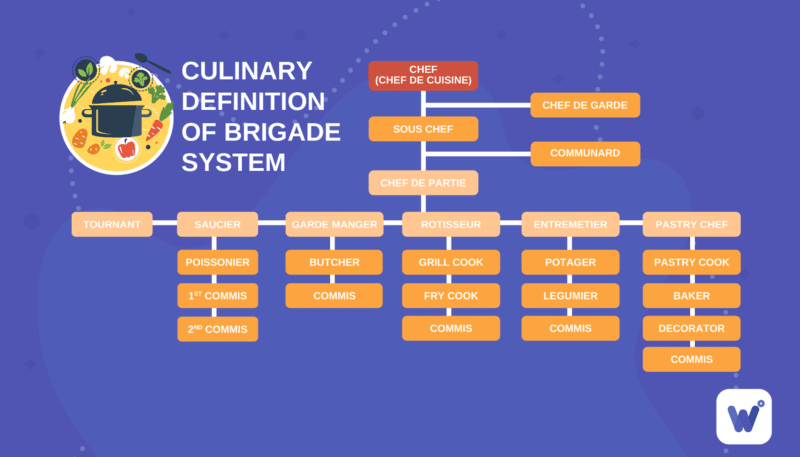
Content teams should be organized in the same fashion.
This starts with separating your writers, editors, and managers.
From there, as you grow in both stature and resources, you continue adding specializations to master each small piece of the much larger content operation machine – like a giant factory assembly line.
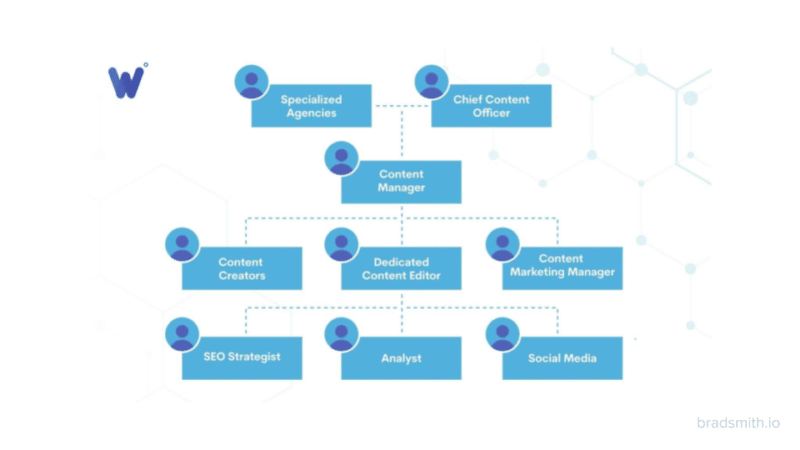
It would help if you also had a well-defined workflow where:
- The strategists work on strategy.
- The planners plan.
- The writers write.
- The editors edit.
- The producers coordinate.
You can add designers, videos, and distribution specialists to the mix as you grow.
Get the daily newsletter search marketers rely on.
<input type=”hidden” name=”utmMedium” value=”” />
<input type=”hidden” name=”utmCampaign” value=”” />
<input type=”hidden” name=”utmSource” value=”” />
<input type=”hidden” name=”utmContent” value=”” />
<input type=”hidden” name=”pageLink” value=”” />
<input type=”hidden” name=”ipAddress” value=”” />
Processing…Please wait.
2. Content quality checklists
This shouldn’t be a trick question, but it often is:
How would you define “good” content?
Everyone talks about the importance of “good” content. Yet, no one can define it the same.
Ask 10 people in your organization, and you’ll get 10 different answers.
As you can expect, that answer is not good enough.
Sorry to be blunt. But the longer you fly without radar keeping you on track, the better your odds of a crash landing.
Documenting a specific quality checklist is the bare minimum that needs to happen right now. Not tomorrow or next week.
And in it, you should define the overall structure of most content, along with the nitty-gritty details for each sub-section – from word counts to source preferences to image criteria.
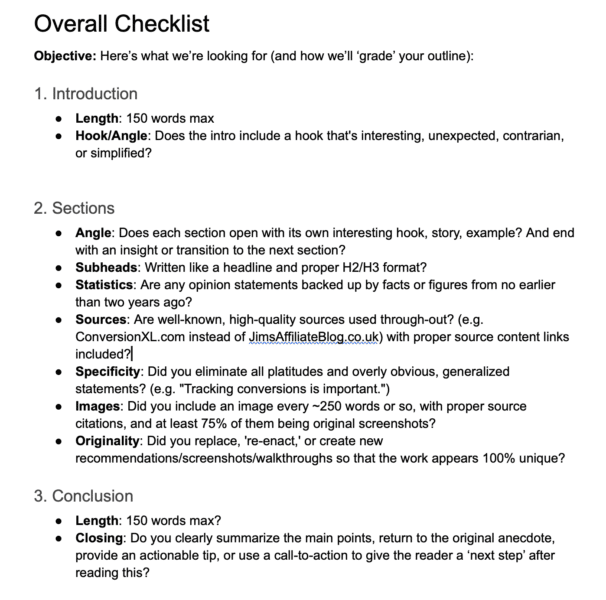
The more fleshed out this starting point, the faster you’ll:
- Train writers.
- Reduce editing time.
- Drive up ROI (better results for less investment).
The second lesson here is to show, don’t tell.
A good example is your acceptable angles.
Be specific, laying out the ones you like or don’t like, and listing resources to show writers, editors, senior management, clients, or whoever, exactly what these things should look like.
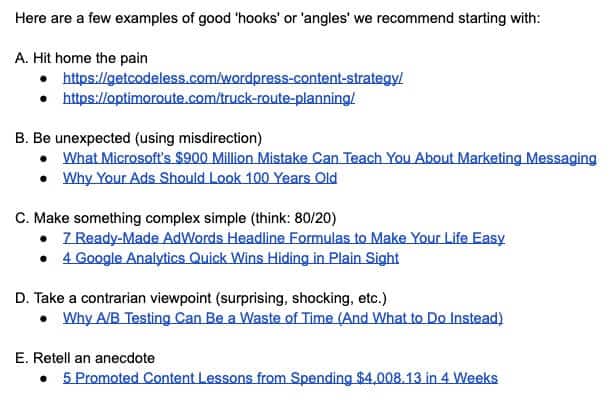
We’re talking OCD levels of organization here because it gets everyone on the same page.
And when everyone is on the same page, your life becomes easier.
Hiring and firing become almost automatic. Everyone knows the expectations and is aligned. The number of dumb questions or stupid arguments evaporates into thin air.
Who knows. You might even get your weekends back to yourself!
The trickle-down effects are magical.
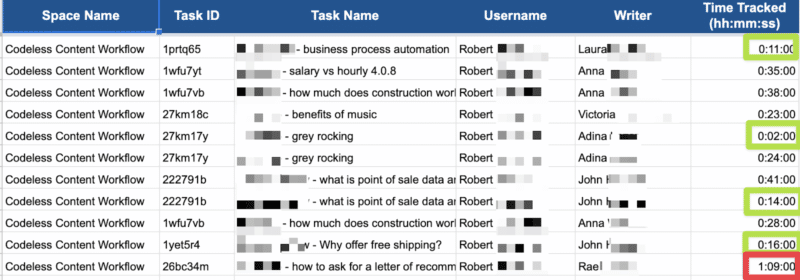
Our senior editors have a one-hour guideline.
They should not spend longer than one hour editing an article. Because if so, that means the writer screwed up. So the problems should be flagged and sent back to them.
Then, we can review an editor’s time across multiple pieces (or clients or writers) and spot operational issues at a moment’s notice.
Too little time spent editing might mean those writers are due a pay increase, while too long spent editing would signal the opposite.
3. Standardized templates, briefs and outlines
Sorry to be the bearer of bad news. But no content or SEO manager can control the results you’re looking for.
Rankings, traffic, leads, and customers are all lagging indicators. They are generated months or even years after doing all the actual work.
That means we need to turn our attention to the leading indicators instead.
Exhibit A. What should you write about?
Well, the answer is whatever people are already looking for!
Analyzing search intent helps you understand what people want to read or learn when they type in a specific query. The good news is that Google literally tells you these answers.
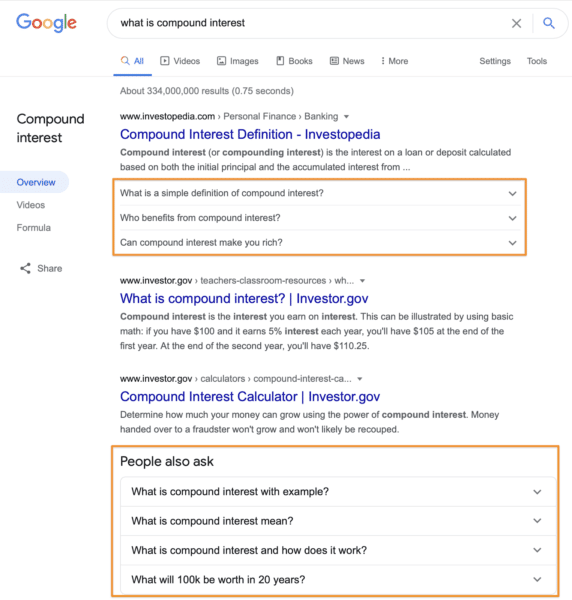
Start with People Also Ask questions after typing in a query:
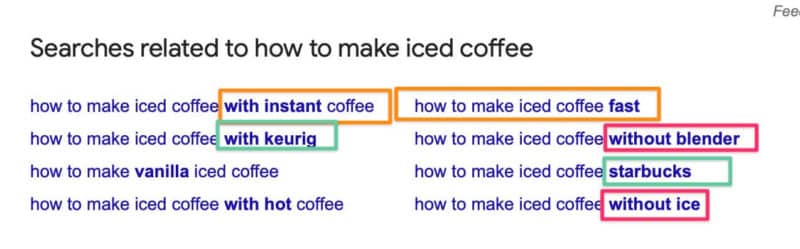
Next, look up Related Searches at the bottom of the SERP to see how the recommendations might line up together to start forming sections with the body of each piece.
You’ll start noticing patterns when you do this a lot across dozens, if not hundreds, of queries in your space.
For instance, check out the Table of Contents from these Investopedia pieces on compound interest and promissory notes.
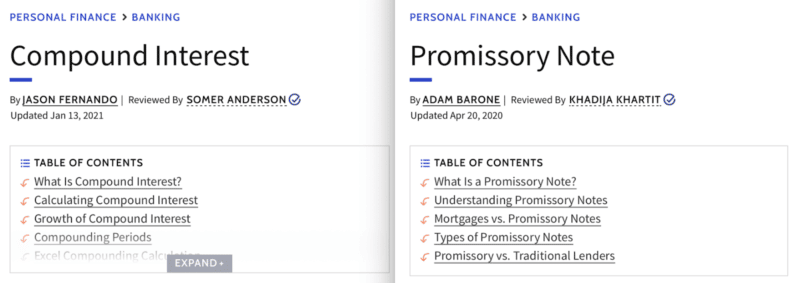
Almost the same structure!
Now, you have your first content template.
These are consistent article structures you can use for different queries (think: “what is…”-style queries that might apply across multiple topics or verticals).
And it also means you can start standardizing article structures across hundreds to thousands.
So if you had 1,000 topics to produce content on over the next year, those could probably be boiled down into 10 groups of 100.
One template now might apply to each of those 10 groups (so 10 templates).
From there, you’ll eventually standardize content briefs, which will form the backbone of your writers’ outlines because they spoon-feed them everything from the subheads to the keywords and even word counts at each stage.
Imagine we’re about to write an article on “content planning.”
Your content brief would be pulled together by referencing all of these different points of information:
- People Also Ask questions.
- Related Searches.
- Reading some of the best content already ranking.
- Semantic keywords from content graders.
- And more.
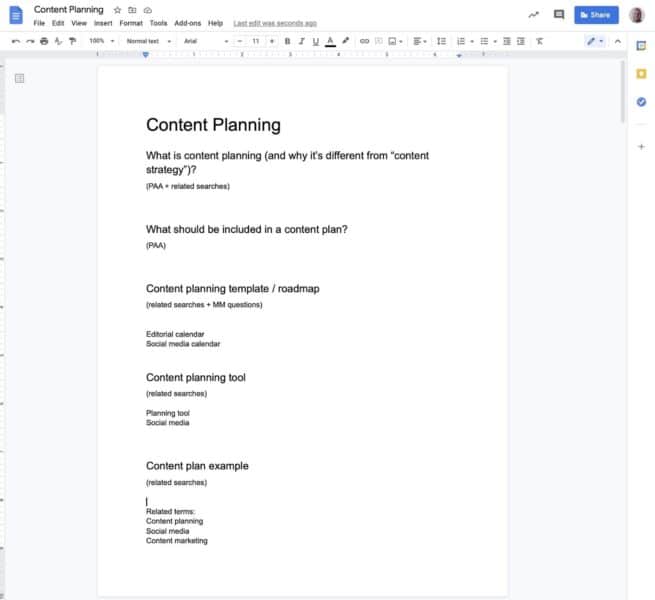
Standardizing the content planning process like this will make your writers love you because they no longer have to stare at a blank white screen trying to conjure up some fluff.
Your editors will love you because they know exactly how the content should look, read, and sound.
Your SEOs or marketers will love you because you’re performing that difficult balancing act of producing interesting content that will still rank well.
And your bosses, clients or whoever is paying the bill will love you because what you initially planned in the early stages is pretty much exactly what the finished product will look like at the end of the day.
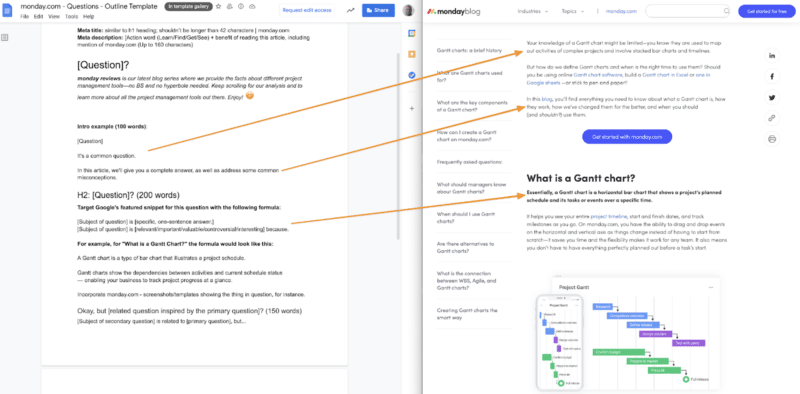
And when you do this consistently over months and years, your ultimate success will be virtually guaranteed.
It’s just a matter of how quickly the Google gods reward your good work.
4. Guidelines and sources
Shades of gray are only for cheesy romance novels and even worse movies.
They have no business in a high-performing content machine.
Take voice and tone preferences. Once again, ask 10 people, and you’ll get ten different answers.
So here’s an easy tip. Sometimes, seeing what you don’t like makes it easier to understand what you do like.
Take the following sentence:

It’s fine. Not great. Kinda generic and boring. But fine.
Now, rewrite that sentence like this:
 “This company is just the latest in a long line to be gobbled up by the massive hosting conglomerate, Endurance International Group (EIG). Or, as it’s also known, Where Good Web Hosts Go to Die.”
Over the top? Probably.
Some might like it, some might not. The vivid language (”gobbled up”) and power words (”Go to Die”) would be great for a conversational or satirical brand, perhaps not for a formal medical one, though.
A good example to model is Mailchimp’s extensive documentation.
From there, you’ll also want to create guides for everything from vocabulary to terminology.
These are the words, phrases or expressions that your brand uses, unique to your point of view on the industry, that would be different than other direct or indirect competitors.
For instance, do you prefer:
- “Profile picture” or “avatar”?
- “Example” or “use case”?
- “Click” or “press”?
It doesn’t matter which one you select. It only matters that you pick one, are consistent, and clear up this gray area for your writing and editing teams.
This supporting documentation should clear up all the intangible or unwritten principles your team already practices – even if they aren’t aware of it.
Last but not least, you should create a list of resources your writers can use, and a list of resources they should not reference (because they have published inaccurate, misleading, confusing, inconsistent, or otherwise untrustworthy information).
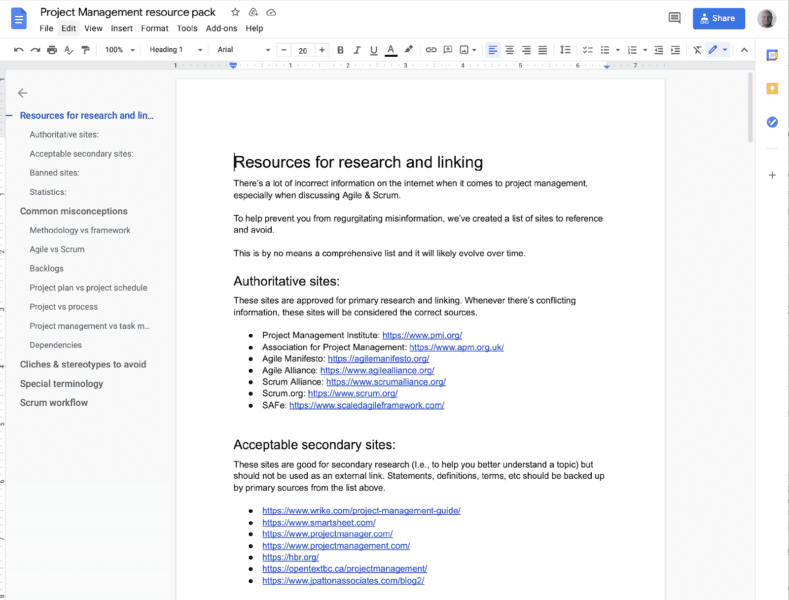
Stamp out all unwritten or intangible items, one by one, day after day, like a big game of Whack-a-Mole, and pretty soon, the only shades of grey left are the questionable kinky ones in your free time.
5. Batch and parallel processes
Let’s end at the beginning.
The brigade system helps professional kitchens deliver multiple dishes to the same table simultaneously, all cooked to perfection.
They do that by working in batch and parallel processes.
Imagine a line cook at the grill. They might be preparing five different cuts of steak for five different tables at five different temperatures with five different cook times.
Sounds exhausting, right?
So exhausting that they can’t also be cooking pastries or prepping salads at the same time. That’s role specialization in step one above.
Now imagine that 10 different people in a kitchen are each doing their own version of this at the same time.
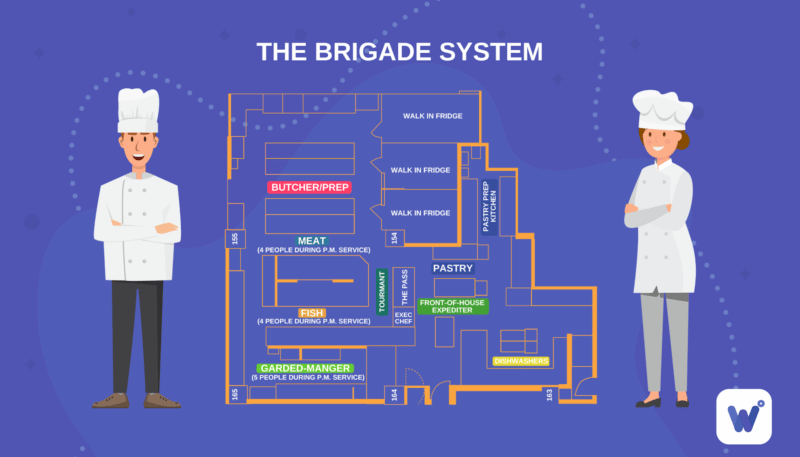
Taking this back to content operations, it means you might have one team of people (writers, editors, SEOs, designers, etc.) working on one content project while at the same time another team of people (writers, editors, SEOs, designers, etc.) is working on another one.
As the leader of this chaos choreography, your job is to have the right teams in place with the right systems so that your output and quality stay high, even if a bunch of people are working on different things simultaneously.
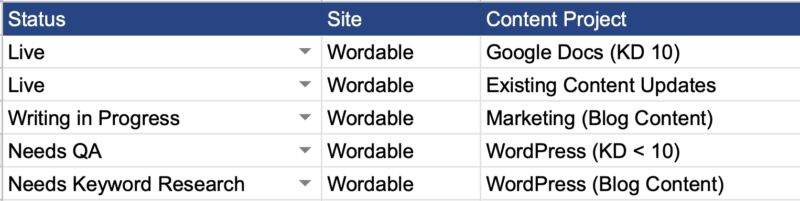
Now, instead of micromanaging or meddling or trying to control every little detail, you can step back and oversee from a high level while still making subtle tweaks along the way to key stages of the assembly line.
Scale content creation and SEO in 5 key steps
Content is subjective at the end of the day.
You might like short, snappy, snarky sentences. But your boss might prefer formal, flowery, and factual.
Ultimately, it doesn’t matter.
The only thing that matters is that you – and the rest of the people you work with – are all on the same page.
This seemingly simple yet little-practiced point often derails content projects daily and sabotages your SEO results over the long term.
Start by optimizing your content operations with the following five steps:
- Specializing roles within your larger production workflow,
- Solidifying quality standards and examples that illustrate each point,
- Standardizing how production should flow from idea to template to brief to finished product,
- Documenting supporting guidelines and sources to clear up intangibles,
- Implementing batch and parallel processes so everyone knows what they should do at every moment.
It isn’t always easy or fun. It’ll take some getting used to.
But it’s ultimately the only way to break through your self-imposed barriers and generate the long-term success you deserve.
The post A 5-step framework to scale your content operations and SEO appeared first on Search Engine Land.
Courtesy of Search Engine Land: News & Info About SEO, PPC, SEM, Search Engines & Search Marketing
Category seo news | Tags:
Social Networks : Technorati, Stumble it!, Digg, de.licio.us, Yahoo, reddit, Blogmarks, Google, Magnolia.
SEO content writing vs. content writing: The key difference
Written on January 3, 2023 at 8:10 am, by admin
SEO content writing, what exactly is it? And how does it differ from typical content writing?
Is SEO content writing better than more traditional content writing?
In this article, we’ll answer these questions and a lot more.
You’ll learn:
- The difference between content writing and SEO content writing.
- Three content tactics that can trump SEO (if deployed correctly).
- Examples of SEO content done well.
- Nine ways to make your SEO content better for humans.
The key difference between SEO content writing and content writing
The difference between SEO content writing and content writing is that SEO content writing is designed to leverage search engines to fuel the discovery of your content. In comparison, content writing is content only created for humans to read.
If you felt like the above was written by a robot, and for a robot – you’re right. It’s a classic example of a paragraph created for SEO.
I can almost hear my Google home mini spitting that out as a response to a question. It isn’t exciting, but it gets to the point.
I’ll make the rest of the article more “by a human, for humans.” But my first statement is correct.
SEO content is written to leverage the code of search engines.
But which is best?
Which is best? SEO content or regular content?
Over the years, I’ve had a fair amount of success with both forms of content.
Today, I write daily on Linkedin and have grown a decent following.
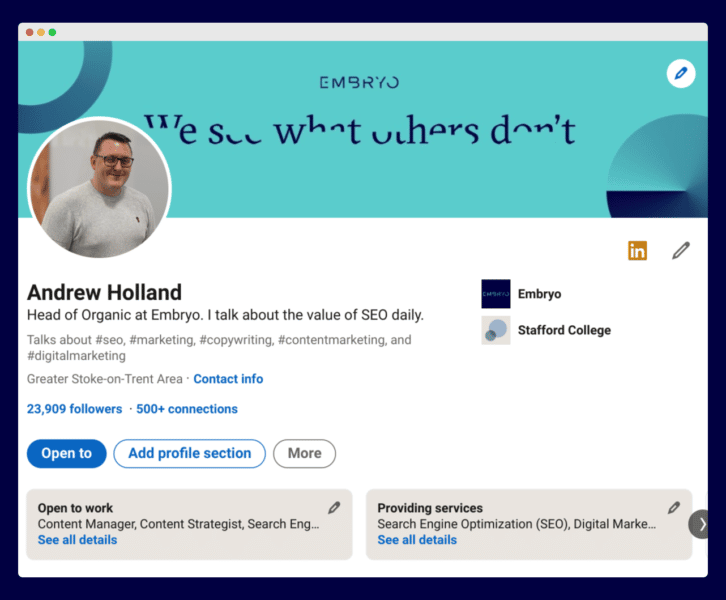
But that’s social content leveraging the platforms’ algorithms.
When I talk about regular content, I talk about blog posts with zero keyword research.
They’re written for a human reader, and if Google finds some keywords, great. But that’s accidental.
Regular content is a brave thing to create. It’s risky and a step into the unknown, and unless you have a promotion strategy, the likelihood is high that no one will ever read your post.
It might be your ideas, theories or passion.
In contrast, SEO content has a purpose – to rank.
The simple idea is that you’re writing this for search engines and humans.
You’re ranking the content so the content can be discovered via organic search.
Unless the content is written only with search engines in mind, you’ll struggle to have your content discovered.
Does that make SEO content better? No.
As we’ll see shortly, an abundance of content sticks its fingers up at search engines and does pretty well.
Get the daily newsletter search marketers rely on.
<input type=”hidden” name=”utmMedium” value=”” />
<input type=”hidden” name=”utmCampaign” value=”” />
<input type=”hidden” name=”utmSource” value=”” />
<input type=”hidden” name=”utmContent” value=”” />
<input type=”hidden” name=”pageLink” value=”” />
<input type=”hidden” name=”ipAddress” value=”” />
Processing…Please wait.
Human leverage: The focus of content
Okay, so you have two types of content. We’ve seen that one leverages search engines.
But what does the regular kind of content leverage?
Humans.
In particular, human attention and human interaction.
Content for search engines tries to do this. Arguably, that’s the fundamental skill of an SEO-focused content writer – trying to write content that is loved by both search engines and humans. And it’s a real challenge.
On the other hand, content writers are not concerned with these things.
They share ideas, news, thoughts, opinions and information of use.
Unconstrained by the needs and wants of search engines, a certain freedom allows them to focus on one thing, to change the reader’s emotional state.
That state might be that they feel that:
- Their ideal future can be realized.
- Their goals are closer.
- They aren’t failing as parents.
- Life can be better.
- Their business can succeed.
Be it entertaining or educating. Angering or mind-altering.
Great content makes emotional change happen – and it can be powerful.
But which type of writing is right for your business?
‘Content bothism’: A secret weapon for marketing success
A good SEO once told me that one of his first SEO tasks is to kill low-traffic pages.
I get that. But low traffic doesn’t mean low use.
Before you kill content, you need to be sure that the content isn’t of use.
You might test this by promoting on social, even spending a bit of money to boost a post. That way you’ll know if the content is useful to your customers.
The thing is, it doesn’t have to be just SEO content or regular content. It should be SEO content and regular content.
“Content bothism” means using both types of content for your website. You can have the best of both worlds. And very often, that’s how you can build a powerful online presence.
So, what types of regular content can you create for people that don’t leverage search?
3 content tactics you can use to leverage humans
Just because search is excellent, it doesn’t mean we throw regular content under the bus.
Once you know how to leverage human readership, you can create content that drives people to your site because it’s brilliant.
Here are three ways to leverage great content.
Variable reward content
Great blogs keep you coming back for more, as you never know what you’ll read on them. This is known as variable reward content.
Social platforms such as TikTok and Instagram leverage variable reward content, but so do great websites.
A great example of this is Tim Ferriss. His blog keeps you coming back for more because you never know what you’ve missed.
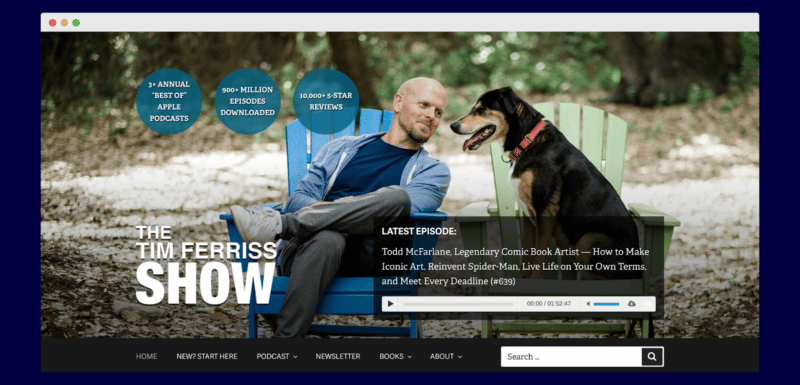
As a business, this kind of content is excellent because people search for you, not find you serendipitously through search.
The aim is simple – to hook the reader and get them coming back to you, time and time again.
User-generated content
Our next tactic is to get people to create the content for you.
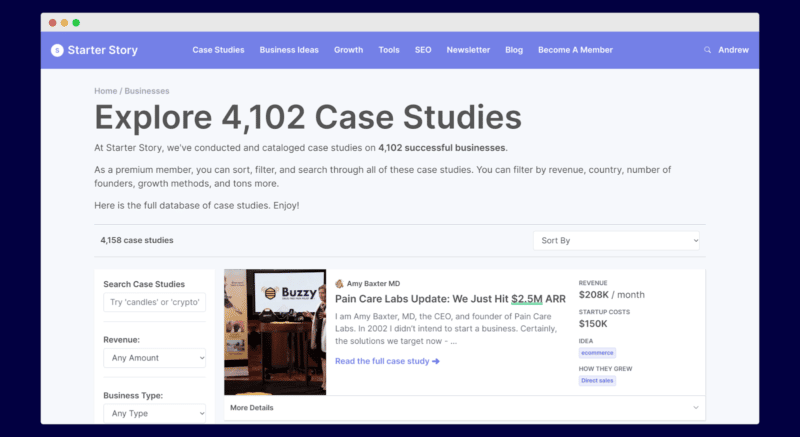
Starter Story has done a super job of doing this.

Through email interviews, their site has hundreds of great start-up stories.
And they haven’t had to write them. This has provided their site with over 4,000 case studies.
Even if you manage to read them all, they keep adding more each week.
None of these are written for search engines, but the volume and the nature of the content are a magnet for readers.
Content curation (with insight)
Content curation is nothing new. Websites have been using content curation for years, and Reddit is arguably the best on the web.
But when you add your unique insight, you tend to create a new version of the content.
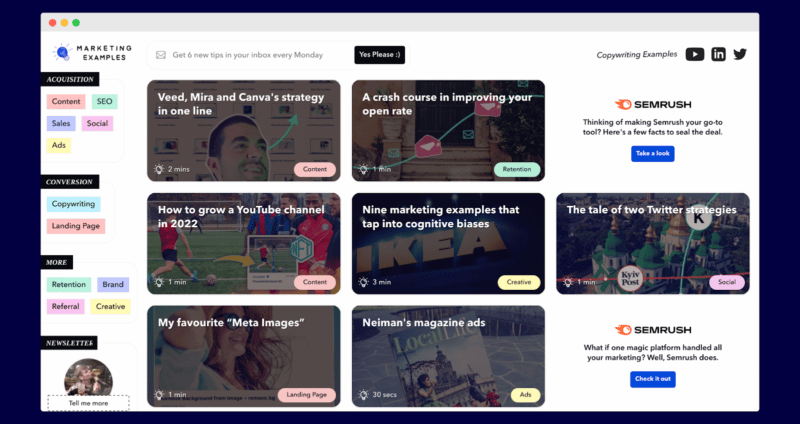
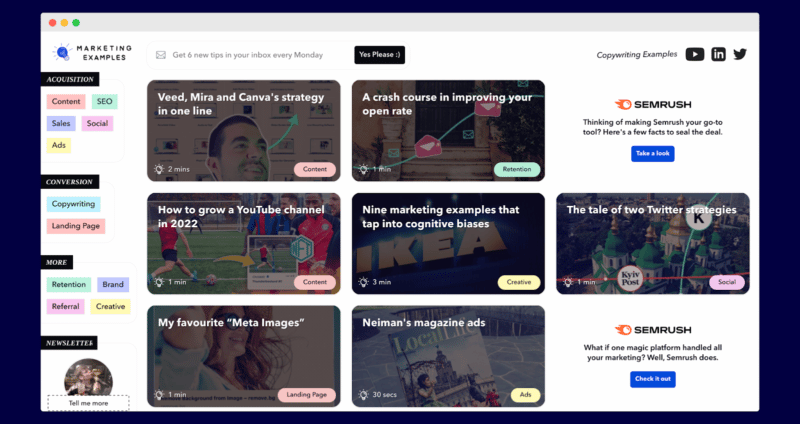
Marketing Examples is an excellent example of this. The best marketing examples are curated in one location, with unique views and images.
But does SEO content have to be dull and robotic?
Not a chance.
SEOs ruined the web – and only SEOs can fix it
We’ve all heard the stories Google is losing market share to TikTok.
We all hate reading an article that is thin and only ranked because of the power of the domain behind it.
Hopefully, recent algorithm updates will change this. But if we want SEO content to be better, SEOs and their content writers need to change this.
So, what do people want from good SEO content?
Good SEO content answers the search query and adds what wasn’t there before.
It’s the proper combination of content writing and SEO content writing. You answer the search query, and then you go beyond.
Seth Godin has some excellent tips for writing blogs that work well.
“Cross out every sentence that could have been written by someone else, every box check, every predictable reference. Now, insert yourself. Your truth and your version of what happens next.”
While we don’t want to cross out every sentence, excellent SEO content must add your unique views, experience and truths.
And if you’re struggling to see examples of this in action, look no further than the Backlinko blog.
Brian Dean created a blog that didn’t just leverage search. It leveraged both humans and search engines.
Dean creates content for search engines and still adds unique angles and experiences.
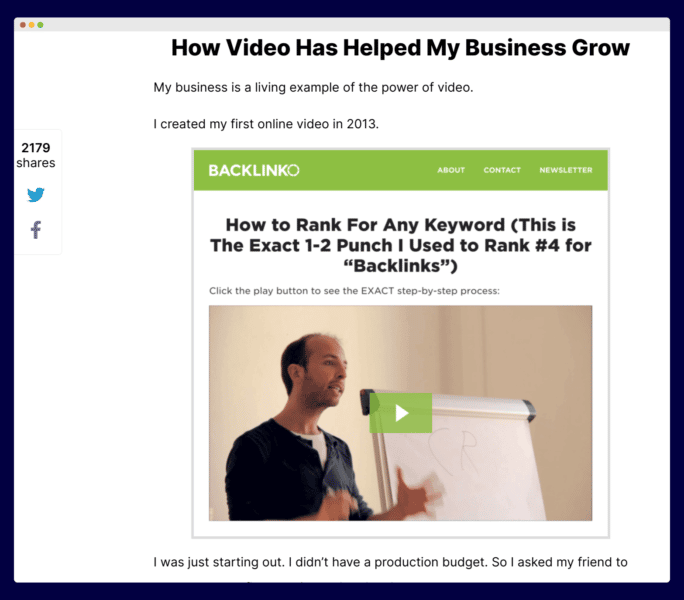
It’s why content UX, content design and the insertion of unique views and experiences matter more than ever.
But others also do this well.
BuzzSumo created an awesome content piece, 18 Examples Of Awesome B2B Content Marketing.
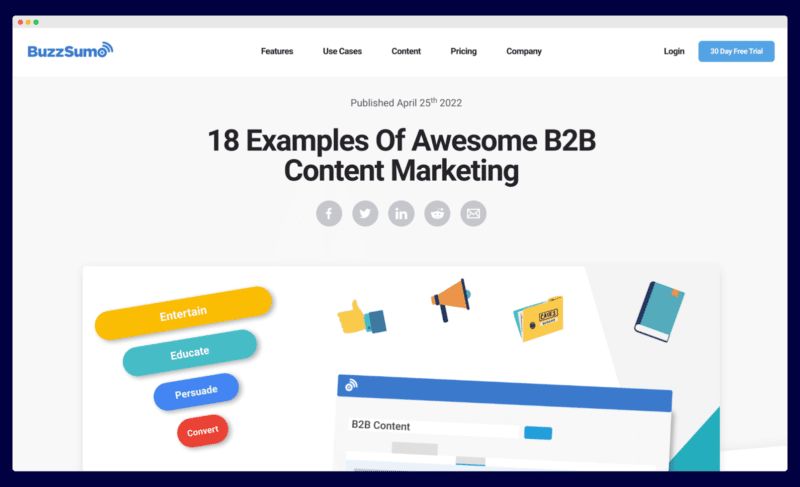
It’s geared toward search and has had some success, but the BuzzSumo team leveraged their own data to produce a great and interesting article.
So, how could you start to make your SEO content stand out?
9 ways to create useful SEO content that humans love
Here are some ways to create helpful content for search engines and humans.
1. Add your own data
We saw how BuzzSumo added its data to create a unique content angle.
What data do you have that you can use?
2. Add design
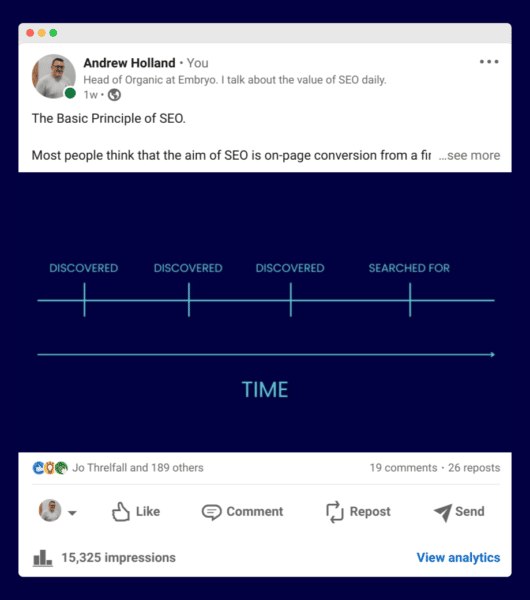
Brian Dean pioneered content design for SEO, but graphics can add a story to your content that you haven’t thought of.
I get a lot of feedback for my simple graphics that help to explain topics.
3. Add facts
Facts make your content legit and reaffirm what you’re trying to say.
You can get these facts from sites such as Statista.
4. Insert videos
Copywriter Ben Settle used to record himself talking on his phone while walking his dog. He’d then sell these insights as upsells for products.
I’m not saying you should do this, but create a short video, post it on YouTube, and embed it on your page.
Perhaps you can explain something further or add a unique angle. Either way, you’re adding things for humans within your SEO content.
5. Add unique H2s (that don’t feature in the SERPs)
Modern web writing can be a tad regurgitated. People use tools such as Frase and Surfer to analyze the SERPs.
To stand out, aim to add something new to the web, not just combine the best H2s and rewrite them.
What H2 can you add? What is the article missing?
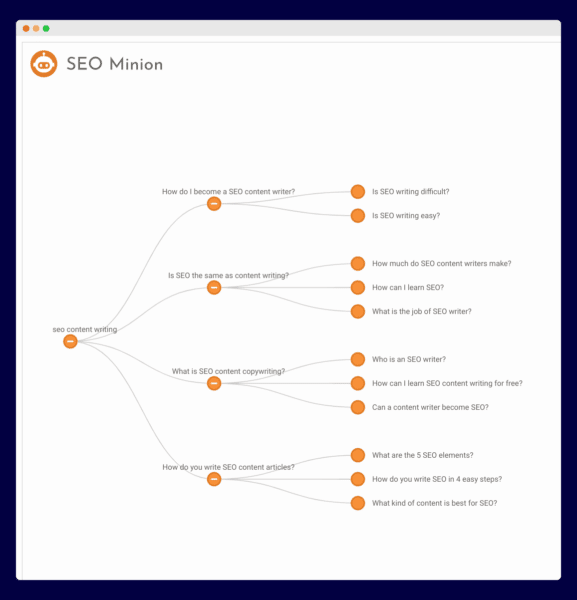
To find out what’s missing, use the SEO Minion Chrome extension, and you can generate relevant People Also Ask questions for any keyword. Then add H2s not listed into your content.
6. Add quick answers
Yes, this is a search issue. We know search loves quick answers.
Today, I wanted to know some brief details about a TV I’m thinking of buying. I just wanted the information quickly. Many other buyers are like this, so try and get to the point.
Quick answers can be placed into boxes on your page to assist readers in finding key information.
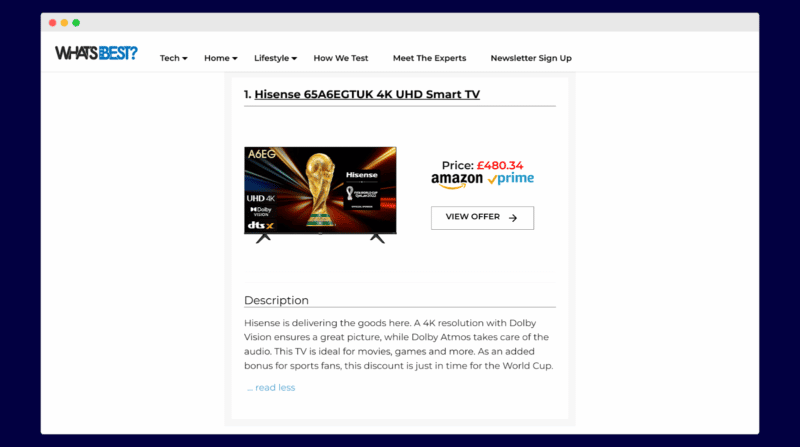
The above page by What’s Best allowed me to scroll through the best TVs and quickly gain information.
Optimize for the fast reader.
7. Add specifications, details and numbers
With AI on the rise, you must add details because that’s what AI can’t add. Ensure you’re adding relevant product and service data within the body of your content.
This content by Quality Comix, which rates the 100 most valuable comics, provides key data that no AI program would have.
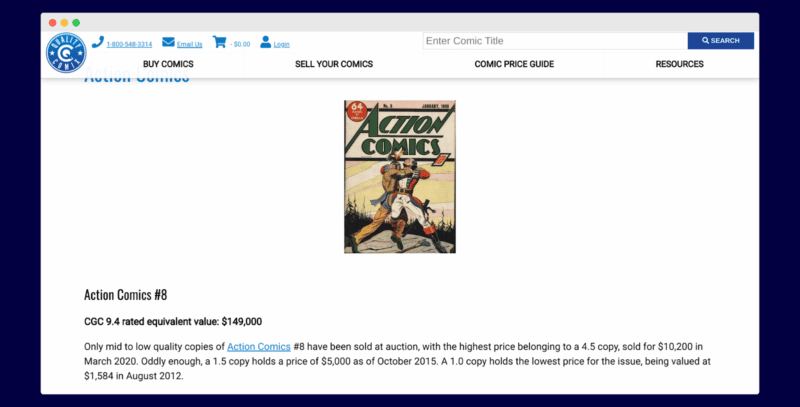
If you’re using AI to aid in content writing, you need to add more elements that it couldn’t have known or covered.
8. Commit to real answers
Experts give accurate answers to real problems. Quora was built on this.
Again, AI is vague while experts commit. If someone asks whether an air fryer is terrible for your health, answer the question firmly, not vaguely.
Backing up your view with factual data helps, too.
9. Get quotes from business leaders
Businesses have business leaders. Get quotes from them, add them to the content and make your content pop.
Make these quotes stand out on the page using design, and you’ll find that it helps your content to read a lot better.
What you should do next
SEO content is restricted to answering questions your customers have.
Content answers the questions that they don’t know to ask.
Both are needed for a successful content strategy.
Remember, your content is probably not good enough for humans if you wouldn’t pay to promote the content. So go and conduct a review of your content.
Is it good enough? Could it be better? If so, go to work and add some of the elements above.
Be brave. Be bold.
That’s the future of both types of content.
The post SEO content writing vs. content writing: The key difference appeared first on Search Engine Land.
Courtesy of Search Engine Land: News & Info About SEO, PPC, SEM, Search Engines & Search Marketing
Category seo news | Tags:
Social Networks : Technorati, Stumble it!, Digg, de.licio.us, Yahoo, reddit, Blogmarks, Google, Magnolia.
SEO content writing vs. content writing: The key difference
Written on January 3, 2023 at 8:09 am, by admin
SEO content writing, what exactly is it? And how does it differ from typical content writing?
Is SEO content writing better than more traditional content writing?
In this article, we’ll answer these questions and a lot more.
You’ll learn:
- The difference between content writing and SEO content writing.
- Three content tactics that can trump SEO (if deployed correctly).
- Examples of SEO content done well.
- Nine ways to make your SEO content better for humans.
The key difference between SEO content writing and content writing
The difference between SEO content writing and content writing is that SEO content writing is designed to leverage search engines to fuel the discovery of your content. In comparison, content writing is content only created for humans to read.
If you felt like the above was written by a robot, and for a robot – you’re right. It’s a classic example of a paragraph created for SEO.
I can almost hear my Google home mini spitting that out as a response to a question. It isn’t exciting, but it gets to the point.
I’ll make the rest of the article more “by a human, for humans.” But my first statement is correct.
SEO content is written to leverage the code of search engines.
But which is best?
Which is best? SEO content or regular content?
Over the years, I’ve had a fair amount of success with both forms of content.
Today, I write daily on Linkedin and have grown a decent following.
But that’s social content leveraging the platforms’ algorithms.
When I talk about regular content, I talk about blog posts with zero keyword research.
They’re written for a human reader, and if Google finds some keywords, great. But that’s accidental.
Regular content is a brave thing to create. It’s risky and a step into the unknown, and unless you have a promotion strategy, the likelihood is high that no one will ever read your post.
It might be your ideas, theories or passion.
In contrast, SEO content has a purpose – to rank.
The simple idea is that you’re writing this for search engines and humans.
You’re ranking the content so the content can be discovered via organic search.
Unless the content is written only with search engines in mind, you’ll struggle to have your content discovered.
Does that make SEO content better? No.
As we’ll see shortly, an abundance of content sticks its fingers up at search engines and does pretty well.
Get the daily newsletter search marketers rely on.
<input type=”hidden” name=”utmMedium” value=”” />
<input type=”hidden” name=”utmCampaign” value=”” />
<input type=”hidden” name=”utmSource” value=”” />
<input type=”hidden” name=”utmContent” value=”” />
<input type=”hidden” name=”pageLink” value=”” />
<input type=”hidden” name=”ipAddress” value=”” />
Processing…Please wait.
Human leverage: The focus of content
Okay, so you have two types of content. We’ve seen that one leverages search engines.
But what does the regular kind of content leverage?
Humans.
In particular, human attention and human interaction.
Content for search engines tries to do this. Arguably, that’s the fundamental skill of an SEO-focused content writer – trying to write content that is loved by both search engines and humans. And it’s a real challenge.
On the other hand, content writers are not concerned with these things.
They share ideas, news, thoughts, opinions and information of use.
Unconstrained by the needs and wants of search engines, a certain freedom allows them to focus on one thing, to change the reader’s emotional state.
That state might be that they feel that:
- Their ideal future can be realized.
- Their goals are closer.
- They aren’t failing as parents.
- Life can be better.
- Their business can succeed.
Be it entertaining or educating. Angering or mind-altering.
Great content makes emotional change happen – and it can be powerful.
But which type of writing is right for your business?
‘Content bothism’: A secret weapon for marketing success
A good SEO once told me that one of his first SEO tasks is to kill low-traffic pages.
I get that. But low traffic doesn’t mean low use.
Before you kill content, you need to be sure that the content isn’t of use.
You might test this by promoting on social, even spending a bit of money to boost a post. That way you’ll know if the content is useful to your customers.
The thing is, it doesn’t have to be just SEO content or regular content. It should be SEO content and regular content.
“Content bothism” means using both types of content for your website. You can have the best of both worlds. And very often, that’s how you can build a powerful online presence.
So, what types of regular content can you create for people that don’t leverage search?
3 content tactics you can use to leverage humans
Just because search is excellent, it doesn’t mean we throw regular content under the bus.
Once you know how to leverage human readership, you can create content that drives people to your site because it’s brilliant.
Here are three ways to leverage great content.
Variable reward content
Great blogs keep you coming back for more, as you never know what you’ll read on them. This is known as variable reward content.
Social platforms such as TikTok and Instagram leverage variable reward content, but so do great websites.
A great example of this is Tim Ferriss. His blog keeps you coming back for more because you never know what you’ve missed.
As a business, this kind of content is excellent because people search for you, not find you serendipitously through search.
The aim is simple – to hook the reader and get them coming back to you, time and time again.
User-generated content
Our next tactic is to get people to create the content for you.
Starter Story has done a super job of doing this.
Through email interviews, their site has hundreds of great start-up stories.
And they haven’t had to write them. This has provided their site with over 4,000 case studies.
Even if you manage to read them all, they keep adding more each week.
None of these are written for search engines, but the volume and the nature of the content are a magnet for readers.
Content curation (with insight)
Content curation is nothing new. Websites have been using content curation for years, and Reddit is arguably the best on the web.
But when you add your unique insight, you tend to create a new version of the content.
Marketing Examples is an excellent example of this. The best marketing examples are curated in one location, with unique views and images.
But does SEO content have to be dull and robotic?
Not a chance.
SEOs ruined the web – and only SEOs can fix it
We’ve all heard the stories Google is losing market share to TikTok.
We all hate reading an article that is thin and only ranked because of the power of the domain behind it.
Hopefully, recent algorithm updates will change this. But if we want SEO content to be better, SEOs and their content writers need to change this.
So, what do people want from good SEO content?
Good SEO content answers the search query and adds what wasn’t there before.
It’s the proper combination of content writing and SEO content writing. You answer the search query, and then you go beyond.
Seth Godin has some excellent tips for writing blogs that work well.
“Cross out every sentence that could have been written by someone else, every box check, every predictable reference. Now, insert yourself. Your truth and your version of what happens next.”
While we don’t want to cross out every sentence, excellent SEO content must add your unique views, experience and truths.
And if you’re struggling to see examples of this in action, look no further than the Backlinko blog.
Brian Dean created a blog that didn’t just leverage search. It leveraged both humans and search engines.
Dean creates content for search engines and still adds unique angles and experiences.
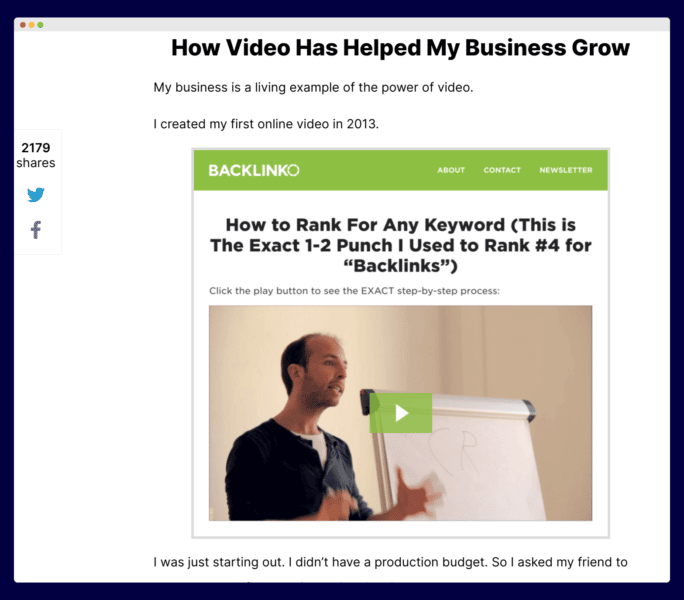
It’s why content UX, content design and the insertion of unique views and experiences matter more than ever.
But others also do this well.
BuzzSumo created an awesome content piece, 18 Examples Of Awesome B2B Content Marketing.
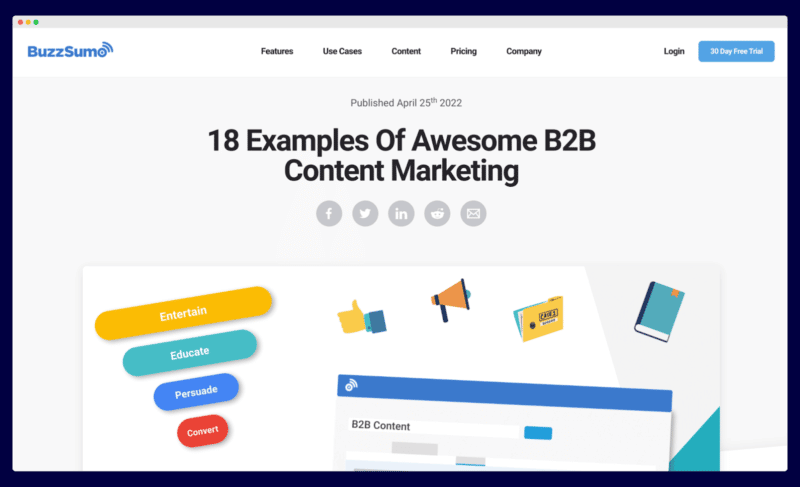
It’s geared toward search and has had some success, but the BuzzSumo team leveraged their own data to produce a great and interesting article.
So, how could you start to make your SEO content stand out?
9 ways to create useful SEO content that humans love
Here are some ways to create helpful content for search engines and humans.
1. Add your own data
We saw how BuzzSumo added its data to create a unique content angle.
What data do you have that you can use?
2. Add design
Brian Dean pioneered content design for SEO, but graphics can add a story to your content that you haven’t thought of.
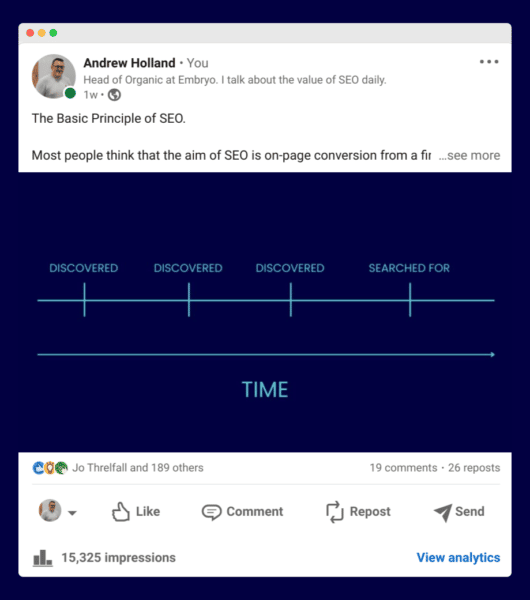
I get a lot of feedback for my simple graphics that help to explain topics.
3. Add facts
Facts make your content legit and reaffirm what you’re trying to say.
You can get these facts from sites such as Statista.
4. Insert videos
Copywriter Ben Settle used to record himself talking on his phone while walking his dog. He’d then sell these insights as upsells for products.
I’m not saying you should do this, but create a short video, post it on YouTube, and embed it on your page.
Perhaps you can explain something further or add a unique angle. Either way, you’re adding things for humans within your SEO content.
5. Add unique H2s (that don’t feature in the SERPs)
Modern web writing can be a tad regurgitated. People use tools such as Frase and Surfer to analyze the SERPs.
To stand out, aim to add something new to the web, not just combine the best H2s and rewrite them.
What H2 can you add? What is the article missing?
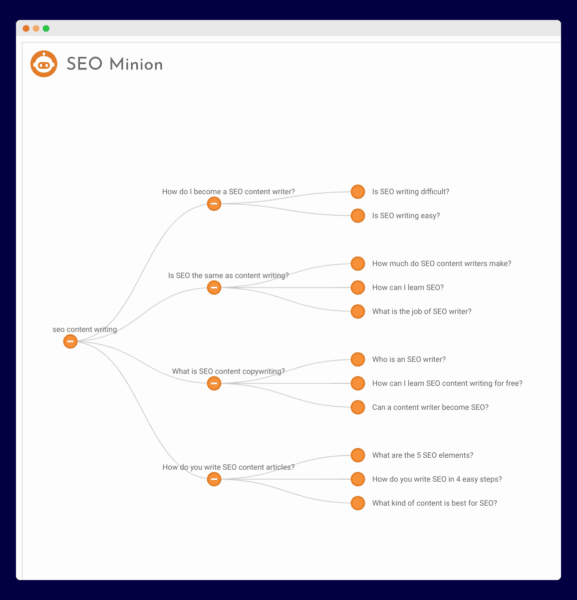
To find out what’s missing, use the SEO Minion Chrome extension, and you can generate relevant People Also Ask questions for any keyword. Then add H2s not listed into your content.
6. Add quick answers
Yes, this is a search issue. We know search loves quick answers.
Today, I wanted to know some brief details about a TV I’m thinking of buying. I just wanted the information quickly. Many other buyers are like this, so try and get to the point.
Quick answers can be placed into boxes on your page to assist readers in finding key information.
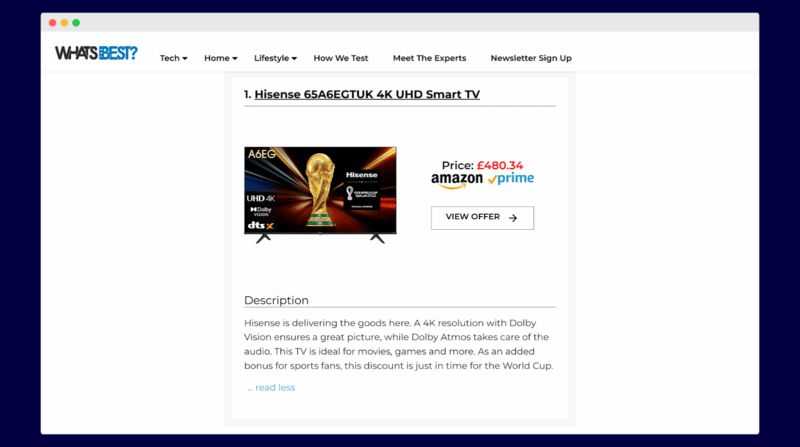
The above page by What’s Best allowed me to scroll through the best TVs and quickly gain information.
Optimize for the fast reader.
7. Add specifications, details and numbers
With AI on the rise, you must add details because that’s what AI can’t add. Ensure you’re adding relevant product and service data within the body of your content.
This content by Quality Comix, which rates the 100 most valuable comics, provides key data that no AI program would have.
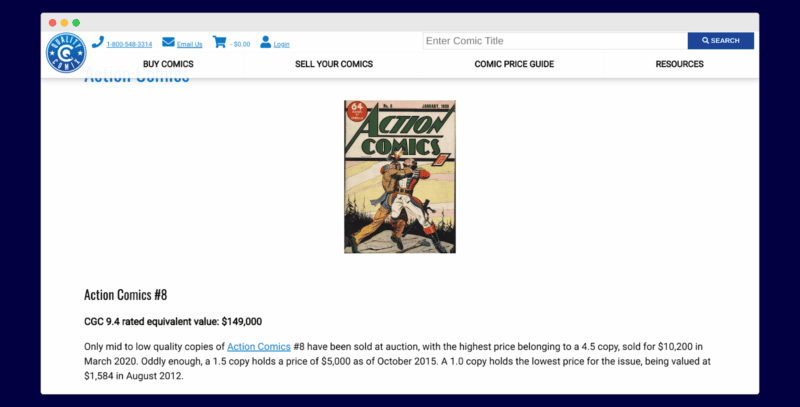
If you’re using AI to aid in content writing, you need to add more elements that it couldn’t have known or covered.
8. Commit to real answers
Experts give accurate answers to real problems. Quora was built on this.
Again, AI is vague while experts commit. If someone asks whether an air fryer is terrible for your health, answer the question firmly, not vaguely.
Backing up your view with factual data helps, too.
9. Get quotes from business leaders
Businesses have business leaders. Get quotes from them, add them to the content and make your content pop.
Make these quotes stand out on the page using design, and you’ll find that it helps your content to read a lot better.
What you should do next
SEO content is restricted to answering questions your customers have.
Content answers the questions that they don’t know to ask.
Both are needed for a successful content strategy.
Remember, your content is probably not good enough for humans if you wouldn’t pay to promote the content. So go and conduct a review of your content.
Is it good enough? Could it be better? If so, go to work and add some of the elements above.
Be brave. Be bold.
That’s the future of both types of content.
The post SEO content writing vs. content writing: The key difference appeared first on Search Engine Land.
Courtesy of Search Engine Land: News & Info About SEO, PPC, SEM, Search Engines & Search Marketing
Category seo news | Tags:
Social Networks : Technorati, Stumble it!, Digg, de.licio.us, Yahoo, reddit, Blogmarks, Google, Magnolia.
How to write an effective About Us page (with 13 examples)
Written on January 3, 2023 at 8:09 am, by admin
An About Us page is an integral piece of content to have on your website.
Every single successful business has one, no matter their industry or what they sell.
After all, every brand has a story – and your About Us page helps you tell yours.
That’s important because, these days, story and connection matter more than ever to customers.
In a Demand Gen survey, 55% of B2B buyers said content that tells a strong, resonating story is what would make them most likely to talk to sales.
Because your About Us page is one of the first places customers will look to find out about your business and story, it’s a foundational page that deserves time and attention to get right.
Let’s talk about it, including how to write an About Us page.
What is an About Us page?
An About Us page isn’t just where you share the story of your brand. It’s also where you tell your customer what you do for them and how you work to meet their needs in that area.
It isn’t so much “Here’s what we’re about,” but more like “Here’s who we are, why we started, and what we can do for you.”
This page can go by many other names, by the way:
- “Our Mission”
- “Our Story”
- “About [brand name]”
- Or simply “About”
An About Us page can include a wide array of information, but the most common sections to include are:
- Who you serve and what you do for them.
- Your brand story/history, including how you got started.
- Your mission and vision for the company.
- Your brand values, what you believe in, and how you uphold those values in your day-to-day operations.
- Mini bios of the people on your team.
- An explanation of your process, how your services work, or how your products are made.
You can include all of these sections, some of them, or just one or two.
It depends entirely on your business type, including your industry, what you sell, and how unique your products/services are.
On top of that, take into account your brand voice as well as what your customers would be interested to know.
As you’ll soon see, some businesses devote one or two short paragraphs to their About page – and that’s it. Others tell a long story of how they were founded, and yet more have multiple pages within their About page wheelhouse.
For example, if your brand is founded on strict environmental or ethical principles, you’ll probably spend more time explaining how you uphold those standards versus a brand that sells a simple, straightforward product.
How does an About Us page help your business and SEO?
We already mentioned that your About Us page is foundational to your website. That’s because customers expect it and look for it whenever they visit a new-to-them brand online.
People generally rank the About Us page as the second-most important element on your site (only contact information is rated higher in importance).
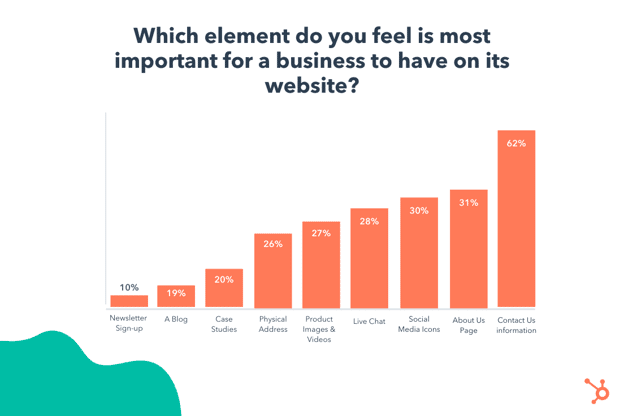
For comparison, it rates higher than product images and videos, live chat, social media icons/links, and even a blog.
That’s reason enough to create a great About Us page. However, there are even more benefits to creating one that might not have crossed your mind.
Brand transparency
Transparency matters to customers. They want to know how you operate, what goes on behind the scenes, and that you’re true to your word.
86% of U.S. consumers believe transparency in business matters now more than ever. To that end, your About Us page sets a standard for your transparency as a company overall.
Sharing values
Customers also want to know that the brands they support share their values.
84% of consumers worldwide said they’re more likely to buy from a brand with values that match their own. Your About Us page is the perfect place to lay out those values and what you stand for.
Connecting with customers
Writing an About page also helps you connect with customers, often during one of their first interactions with your brand.
Reading your story, mission, values, and purpose will help them relate to your company.
Boosting your website’s E-A-T
In terms of SEO, creating an About page isn’t necessarily about ranking the page in search.
Instead, it adds a layer of expertise, authoritativeness, and trustworthiness (E-A-T) to your site by explaining your background, your knowledge, and why you’re uniquely qualified to sell what you sell, offer the services you do, or discuss the topics you publish content about.
Get the daily newsletter search marketers rely on.
<input type=”hidden” name=”utmMedium” value=”” />
<input type=”hidden” name=”utmCampaign” value=”” />
<input type=”hidden” name=”utmSource” value=”” />
<input type=”hidden” name=”utmContent” value=”” />
<input type=”hidden” name=”pageLink” value=”” />
<input type=”hidden” name=”ipAddress” value=”” />
Processing…Please wait.
How to write an About Us page
Struggling to write an About Us page? Not to worry.
Here are the basic steps to write an effective one, including the details you shouldn’t leave out.
Share the ultimate goal or ‘big why’ behind your brand (your mission)
Why does your business exist? Why does it matter? What’s the ultimate problem in your industry you’re trying to solve?
Ultimately, this is your mission, and you should share it on your About Us page. And, if you’re like many businesses that haven’t clearly defined theirs, now is the time.
Why is stating your mission important?
Because a majority of modern consumers – especially Gen Z – want to know that their purchases align with who they are and that the businesses to which they give their dollars care about the things they care about. (Market research from Alter Agents found that 68% of Gen Z and Millennial buyers believe their purchases are indicative of their personalities and concerns.)
Explaining your mission gives your target audience another reason to align themselves with you. Give them your “big why.”
Explain how you help your customers with what you sell
Now it’s time to dive into the deeper specifics of your business on your About Us page. Lay out:
- What you sell: Tell customers what you sell. If your products/services are unique, explain how they work.
- The problems you solve for customers – both tangible and intangible – with what you sell. Examples:
- Tangible: “We help health food brands create and execute smart marketing strategies.”
- Intangible: “We help health food brands make genuine connections with their customers.”
Again, the key here is to keep your explanations customer-focused. Don’t make the mistake of turning your About Us page into one giant brag-fest. Instead, you should be positioning your business in terms of:
- Why the customer should care.
- How they can relate to you.
- How you help them.
Tell your story
It’s a great idea to tell your brand story on your About page, including how/why you got started.
Were your beginnings humble? Did it all start with a seed of an idea? Did you have a novel solution to a big problem you saw happening? Or was your business a happy accident (or a disaster you turned around)?
Finally, don’t forget to tell the story of where you’re going. What do you hope to achieve? What are your biggest dreams for the future of your company?
Introduce your team
In the spirit of transparency, it’s a good idea to share the names and faces behind your business and the role each person plays. (By the way, sharing photos of real people is a great trust-builder. It helps customers see that you’re not just a disembodied logo, a faceless suit, or words on a screen.)
Additionally, including bios for your team or site contributors gives Google clues about authorship and reputation.
Tell them what to do after reading your About Us page
Lastly, give your audience direction on what to do next after they finish reading your About Us page.
A few well-placed calls to action (CTA) will do the trick. For example, include a CTA button at the bottom of the page that sends them to:
- Check out your services/products.
- Read your blog.
- Sign up for your newsletter.
- Or do some other activity that keeps them engaged with your site and content.
13 About Us page examples
Now that you know how to write an About Us page and which sections to include, let’s look at some examples of About pages done right.
1. Oatly
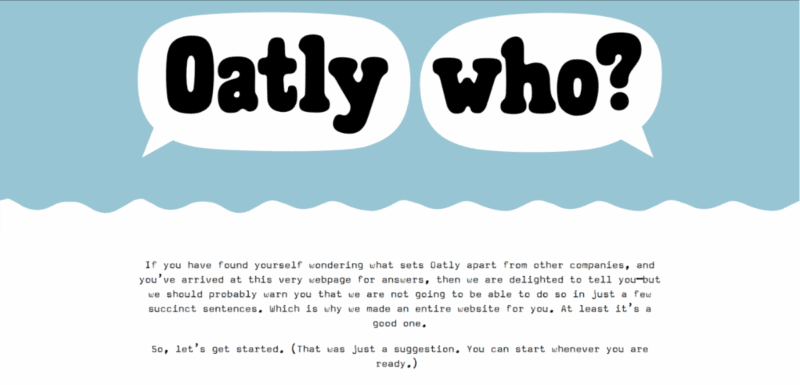
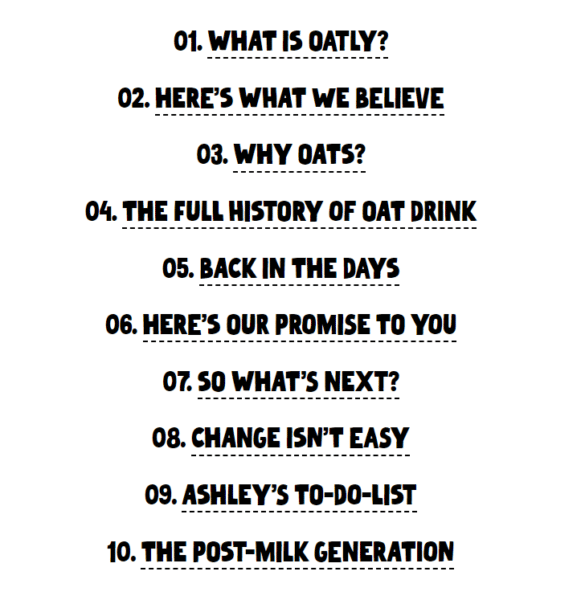
Oatly’s About Us page is a great example of how your brand voice can and should carry over into every piece of your content and website.
Their irreverent tone and devil-may-care attitude are perfectly expressed in every section of this page, which, by the way, still manages to provide a ton of great company information for any curious consumer.
2. NerdWallet
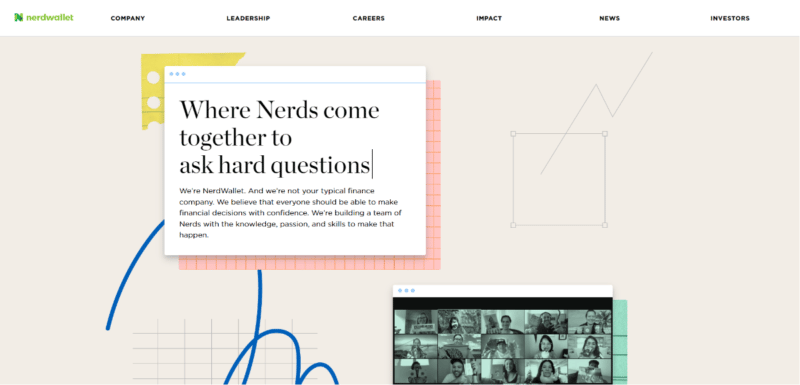
NerdWallet, a financial services company, is a good example of a brand that expanded its About Us page into a multi-page experience, with information covering the company, leadership, impact, and more.
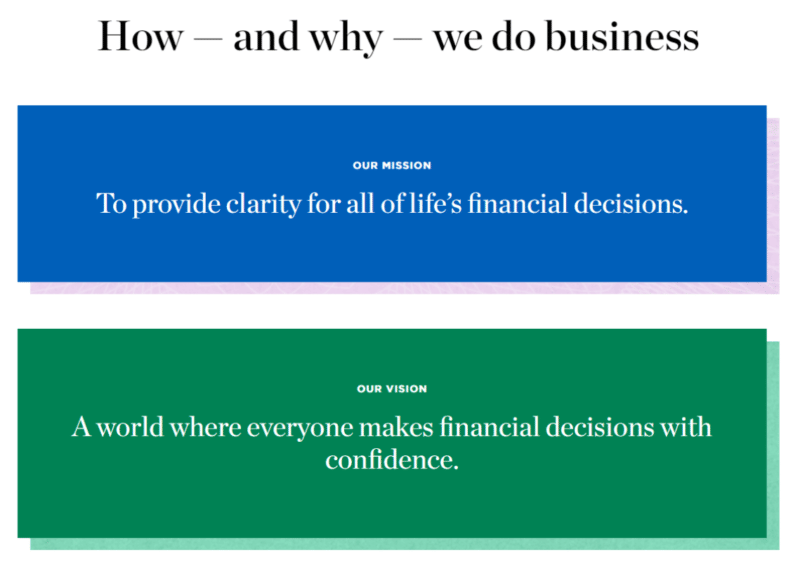
NerdWallet is also a great example of how to state your mission and vision clearly with a focus on the customer.
3. Chronicle Books
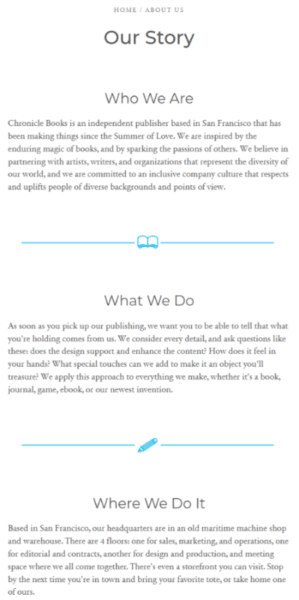
The publisher Chronicle Books has a super simple, text-heavy About page, but it works well due to the clear headlines and charming details added to their story.
For example, the company is headquartered in an old maritime machine shop – sharing that information helps you understand the brand is a little quirky.
4. Healthline
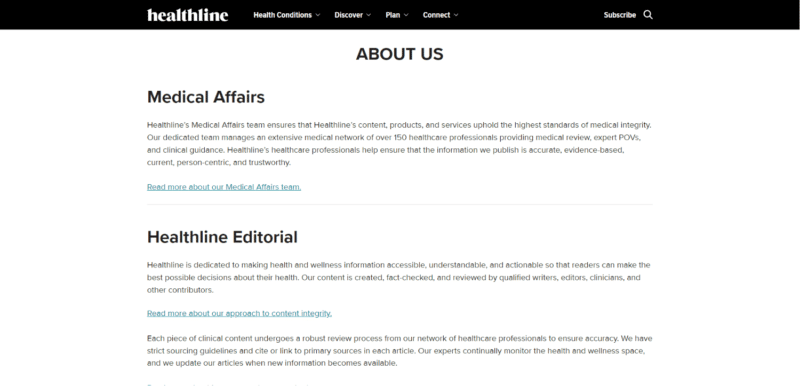
Healthline provides medical information and advice to the masses, so its About page needs some gravitas behind it to help prove they’re a trustworthy source (read: it needs some serious E-A-T).
Sure enough, the page is full of details about how they maintain integrity throughout their content and ensure it stays current and evidence-based.
5. Semrush
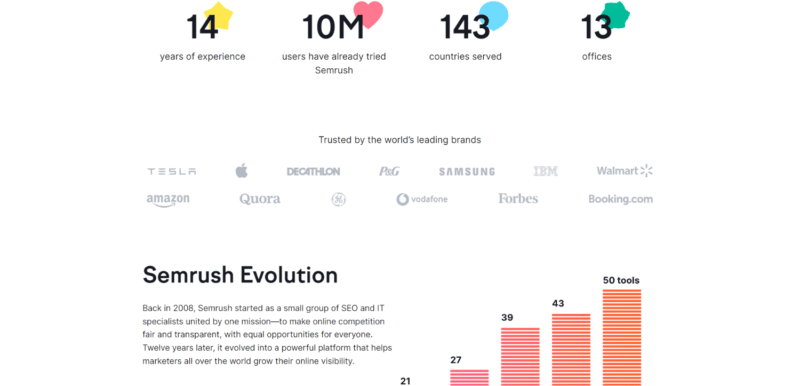
Semrush, the SEO and content marketing tool, is all about data, so their About Us page reflects that.
The company highlights stats and graphs to show how long they’ve been around and how many people trust their tools.
6. Liquid Death
If you’ve never heard of Liquid Death, it’s water packaged in a can. If that sounds weird, well… it kind of is.
Since they have a unique product, you’d think the company would feel the need to explain itself a bit more on its About Us page – but that’s not the case.
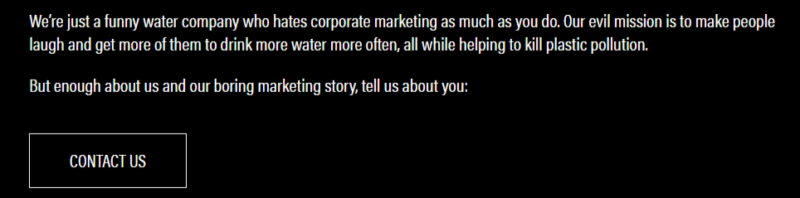
Sometimes, your product speaks for itself, and two paragraphs (including a simply-stated mission) and a “contact us” button are all you need on your About page.
7. Ogilvy
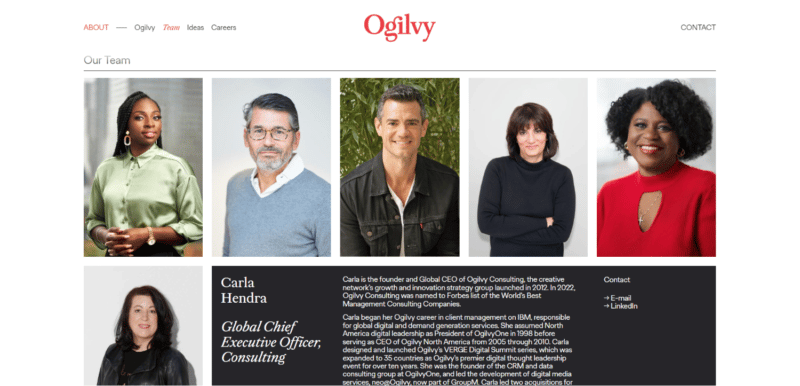
Ogilvy, a high-profile ad, PR, and consulting agency (and the company of the famed ad copywriter David Ogilvy), uses its About page to focus on the talent and diversity of its team.
Since this is a high-performing company that creates ads and other marketing for brands like Netflix and Coca-Cola, that makes sense.
8. Everlane
Everlane, an ethical clothing brand, devotes its About Us page to sharing behind-the-scenes information about how its clothes are made, how they partner with factories ethically, and what materials they use.
Since this is a brand that’s trying to differentiate with ethical practices, they really need to show that in action – and they do.
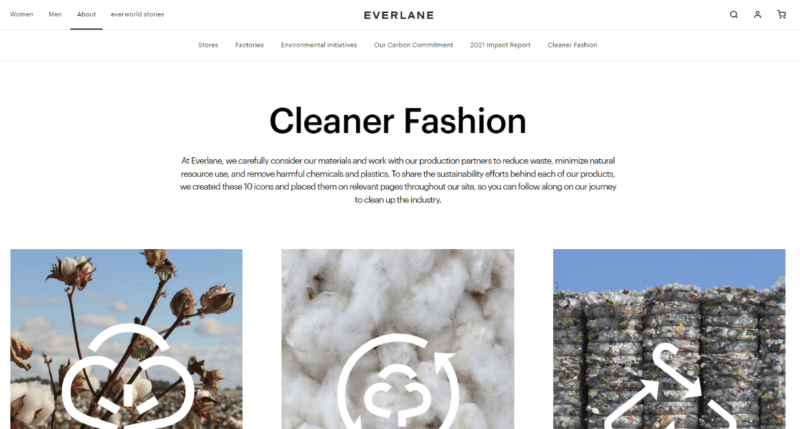
The company also uses separate but connected pages to further explain its environmental initiatives, carbon footprint, and more.
9. LegalZoom
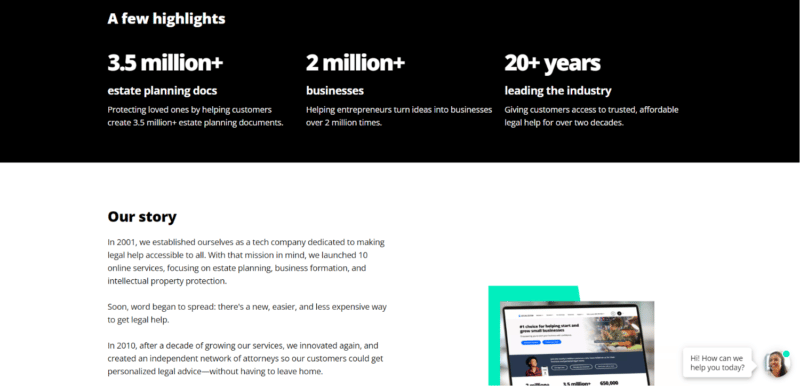
On their About page, LegalZoom provides some impressive data to show their impact over 20 years.
More importantly, the company doesn’t frame their wins in terms of “what we did” but rather how they helped people: “Protecting loved ones,” “Helping entrepreneurs,” and “Giving customers access.”
10. Delish
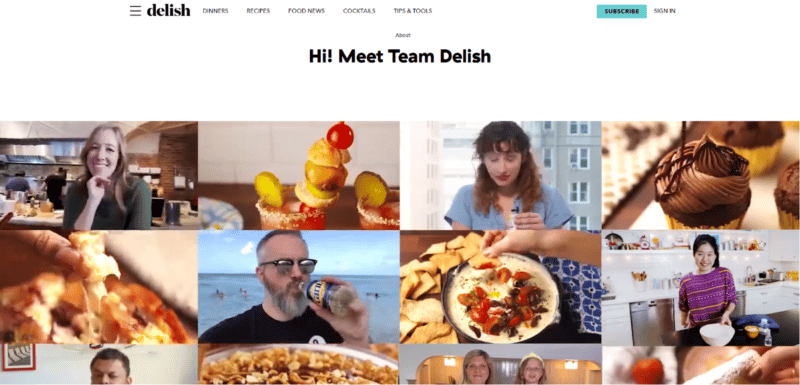
Delish is an epicenter of cooks, chefs, bakers, and foodies sharing recipes and tips, so their About page also centers on the people behind it all.
The first thing you’re greeted with is a grid of gifs of various contributors (and there are a lot of them):
11. Amy Porterfield
Business coach Amy Porterfield’s About page is one long story about how she went from a corporate gig to entrepreneurship, but it also provides proof of why she’s qualified to coach you.
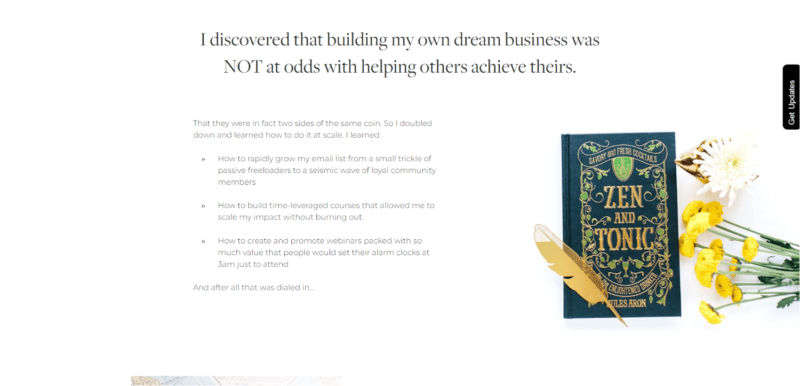
Telling your story like this is a great way to connect with your audience while providing your business background and proof of your expertise.
12. Wild Idea
Wild Idea is a family-owned company and ranch focused on humanely-raising buffalo and restoring prairie grasslands.
As such, their mission and family are prominent parts of their About page, as well as their unique process of “humane field harvest.”
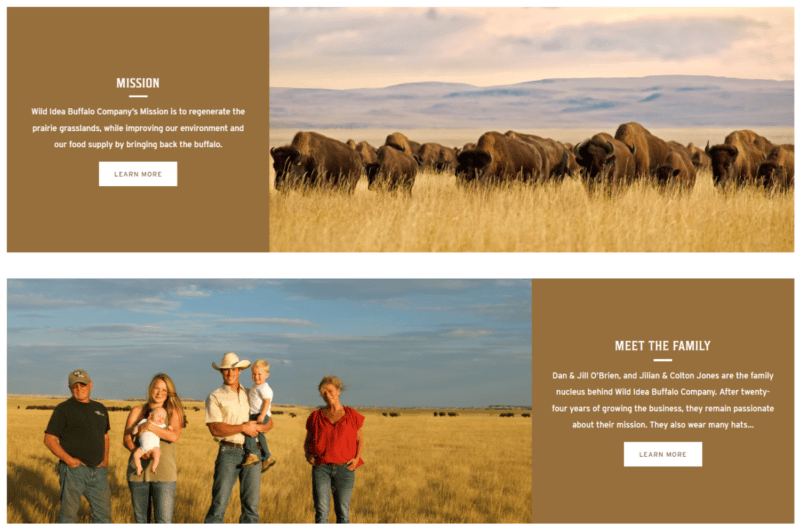
Also note the use of panoramic photos to show off both the prairies and the buffalo herds they manage, as well as their down-to-earth family/founders. The right images can play a huge role in building trust while drawing your audience in.
13. Moleskine
If you’re a journaler, an artist, a writer, or a jotter, you’ve probably heard of Moleskine. Their notebooks are highly regarded, and their suite of About pages (called “The World of Moleskine”) reflects that.
Note how they use titles to imply their history and reputation: “Our Heritage,” “Our Manifesto.”
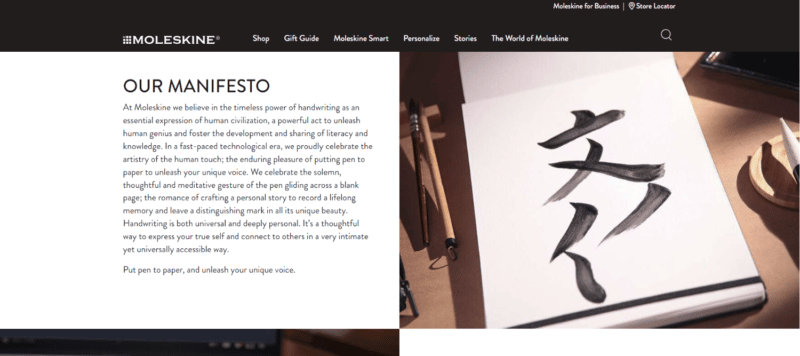
Bonus: If you have a lot of information to share about your company that your audience will care about, take a page from Moleskine and devote multiple website pages to your various company facets.
Write an About Us page to add E-A-T to your website
What’s the common factor tying all of these About Us page examples together?
All of them add necessary proof of expertise, authoritativeness, and trustworthiness (E-A-T) to their respective brand websites.
Where it matters, they add author and creator information, too. (For example, brands who rely on multiple authors across their site have dedicated bios for each of them.)
They answer the questions, “Why does your business exist, and who does it exist to serve?”
And that’s exactly what your About page should do.
Sure, write one because it’s standard practice, but also make sure you write an effective About Us page that will help build trust with your customers and demonstrate why your brand is an authority on what you sell.
Don’t let your About Us page become an afterthought – it’s a foundational website page, and should be created and written strategically.
The post How to write an effective About Us page (with 13 examples) appeared first on Search Engine Land.
Courtesy of Search Engine Land: News & Info About SEO, PPC, SEM, Search Engines & Search Marketing
Category seo news | Tags:
Social Networks : Technorati, Stumble it!, Digg, de.licio.us, Yahoo, reddit, Blogmarks, Google, Magnolia.
How to write an effective About Us page (with 13 examples)
Written on January 3, 2023 at 8:09 am, by admin
An About Us page is an integral piece of content to have on your website.
Every single successful business has one, no matter their industry or what they sell.
After all, every brand has a story – and your About Us page helps you tell yours.
That’s important because, these days, story and connection matter more than ever to customers.
In a Demand Gen survey, 55% of B2B buyers said content that tells a strong, resonating story is what would make them most likely to talk to sales.
Because your About Us page is one of the first places customers will look to find out about your business and story, it’s a foundational page that deserves time and attention to get right.
Let’s talk about it, including how to write an About Us page.
What is an About Us page?
An About Us page isn’t just where you share the story of your brand. It’s also where you tell your customer what you do for them and how you work to meet their needs in that area.
It isn’t so much “Here’s what we’re about,” but more like “Here’s who we are, why we started, and what we can do for you.”
This page can go by many other names, by the way:
- “Our Mission”
- “Our Story”
- “About [brand name]”
- Or simply “About”
An About Us page can include a wide array of information, but the most common sections to include are:
- Who you serve and what you do for them.
- Your brand story/history, including how you got started.
- Your mission and vision for the company.
- Your brand values, what you believe in, and how you uphold those values in your day-to-day operations.
- Mini bios of the people on your team.
- An explanation of your process, how your services work, or how your products are made.
You can include all of these sections, some of them, or just one or two.
It depends entirely on your business type, including your industry, what you sell, and how unique your products/services are.
On top of that, take into account your brand voice as well as what your customers would be interested to know.
As you’ll soon see, some businesses devote one or two short paragraphs to their About page – and that’s it. Others tell a long story of how they were founded, and yet more have multiple pages within their About page wheelhouse.
For example, if your brand is founded on strict environmental or ethical principles, you’ll probably spend more time explaining how you uphold those standards versus a brand that sells a simple, straightforward product.
How does an About Us page help your business and SEO?
We already mentioned that your About Us page is foundational to your website. That’s because customers expect it and look for it whenever they visit a new-to-them brand online.
People generally rank the About Us page as the second-most important element on your site (only contact information is rated higher in importance).
For comparison, it rates higher than product images and videos, live chat, social media icons/links, and even a blog.
That’s reason enough to create a great About Us page. However, there are even more benefits to creating one that might not have crossed your mind.
Brand transparency
Transparency matters to customers. They want to know how you operate, what goes on behind the scenes, and that you’re true to your word.
86% of U.S. consumers believe transparency in business matters now more than ever. To that end, your About Us page sets a standard for your transparency as a company overall.
Sharing values
Customers also want to know that the brands they support share their values.
84% of consumers worldwide said they’re more likely to buy from a brand with values that match their own. Your About Us page is the perfect place to lay out those values and what you stand for.
Connecting with customers
Writing an About page also helps you connect with customers, often during one of their first interactions with your brand.
Reading your story, mission, values, and purpose will help them relate to your company.
Boosting your website’s E-A-T
In terms of SEO, creating an About page isn’t necessarily about ranking the page in search.
Instead, it adds a layer of expertise, authoritativeness, and trustworthiness (E-A-T) to your site by explaining your background, your knowledge, and why you’re uniquely qualified to sell what you sell, offer the services you do, or discuss the topics you publish content about.
Get the daily newsletter search marketers rely on.
<input type=”hidden” name=”utmMedium” value=”” />
<input type=”hidden” name=”utmCampaign” value=”” />
<input type=”hidden” name=”utmSource” value=”” />
<input type=”hidden” name=”utmContent” value=”” />
<input type=”hidden” name=”pageLink” value=”” />
<input type=”hidden” name=”ipAddress” value=”” />
Processing…Please wait.
How to write an About Us page
Struggling to write an About Us page? Not to worry.
Here are the basic steps to write an effective one, including the details you shouldn’t leave out.
Share the ultimate goal or ‘big why’ behind your brand (your mission)
Why does your business exist? Why does it matter? What’s the ultimate problem in your industry you’re trying to solve?
Ultimately, this is your mission, and you should share it on your About Us page. And, if you’re like many businesses that haven’t clearly defined theirs, now is the time.
Why is stating your mission important?
Because a majority of modern consumers – especially Gen Z – want to know that their purchases align with who they are and that the businesses to which they give their dollars care about the things they care about. (Market research from Alter Agents found that 68% of Gen Z and Millennial buyers believe their purchases are indicative of their personalities and concerns.)
Explaining your mission gives your target audience another reason to align themselves with you. Give them your “big why.”
Explain how you help your customers with what you sell
Now it’s time to dive into the deeper specifics of your business on your About Us page. Lay out:
- What you sell: Tell customers what you sell. If your products/services are unique, explain how they work.
- The problems you solve for customers – both tangible and intangible – with what you sell. Examples:
- Tangible: “We help health food brands create and execute smart marketing strategies.”
- Intangible: “We help health food brands make genuine connections with their customers.”
Again, the key here is to keep your explanations customer-focused. Don’t make the mistake of turning your About Us page into one giant brag-fest. Instead, you should be positioning your business in terms of:
- Why the customer should care.
- How they can relate to you.
- How you help them.
Tell your story
It’s a great idea to tell your brand story on your About page, including how/why you got started.
Were your beginnings humble? Did it all start with a seed of an idea? Did you have a novel solution to a big problem you saw happening? Or was your business a happy accident (or a disaster you turned around)?
Finally, don’t forget to tell the story of where you’re going. What do you hope to achieve? What are your biggest dreams for the future of your company?
Introduce your team
In the spirit of transparency, it’s a good idea to share the names and faces behind your business and the role each person plays. (By the way, sharing photos of real people is a great trust-builder. It helps customers see that you’re not just a disembodied logo, a faceless suit, or words on a screen.)
Additionally, including bios for your team or site contributors gives Google clues about authorship and reputation.
Tell them what to do after reading your About Us page
Lastly, give your audience direction on what to do next after they finish reading your About Us page.
A few well-placed calls to action (CTA) will do the trick. For example, include a CTA button at the bottom of the page that sends them to:
- Check out your services/products.
- Read your blog.
- Sign up for your newsletter.
- Or do some other activity that keeps them engaged with your site and content.
13 About Us page examples
Now that you know how to write an About Us page and which sections to include, let’s look at some examples of About pages done right.
1. Oatly
Oatly’s About Us page is a great example of how your brand voice can and should carry over into every piece of your content and website.
Their irreverent tone and devil-may-care attitude are perfectly expressed in every section of this page, which, by the way, still manages to provide a ton of great company information for any curious consumer.
2. NerdWallet
NerdWallet, a financial services company, is a good example of a brand that expanded its About Us page into a multi-page experience, with information covering the company, leadership, impact, and more.
NerdWallet is also a great example of how to state your mission and vision clearly with a focus on the customer.
3. Chronicle Books
The publisher Chronicle Books has a super simple, text-heavy About page, but it works well due to the clear headlines and charming details added to their story.
For example, the company is headquartered in an old maritime machine shop – sharing that information helps you understand the brand is a little quirky.
4. Healthline
Healthline provides medical information and advice to the masses, so its About page needs some gravitas behind it to help prove they’re a trustworthy source (read: it needs some serious E-A-T).
Sure enough, the page is full of details about how they maintain integrity throughout their content and ensure it stays current and evidence-based.
5. Semrush
Semrush, the SEO and content marketing tool, is all about data, so their About Us page reflects that.
The company highlights stats and graphs to show how long they’ve been around and how many people trust their tools.
6. Liquid Death
If you’ve never heard of Liquid Death, it’s water packaged in a can. If that sounds weird, well… it kind of is.
Since they have a unique product, you’d think the company would feel the need to explain itself a bit more on its About Us page – but that’s not the case.
Sometimes, your product speaks for itself, and two paragraphs (including a simply-stated mission) and a “contact us” button are all you need on your About page.
7. Ogilvy
Ogilvy, a high-profile ad, PR, and consulting agency (and the company of the famed ad copywriter David Ogilvy), uses its About page to focus on the talent and diversity of its team.
Since this is a high-performing company that creates ads and other marketing for brands like Netflix and Coca-Cola, that makes sense.
8. Everlane
Everlane, an ethical clothing brand, devotes its About Us page to sharing behind-the-scenes information about how its clothes are made, how they partner with factories ethically, and what materials they use.
Since this is a brand that’s trying to differentiate with ethical practices, they really need to show that in action – and they do.
The company also uses separate but connected pages to further explain its environmental initiatives, carbon footprint, and more.
9. LegalZoom
On their About page, LegalZoom provides some impressive data to show their impact over 20 years.
More importantly, the company doesn’t frame their wins in terms of “what we did” but rather how they helped people: “Protecting loved ones,” “Helping entrepreneurs,” and “Giving customers access.”
10. Delish
Delish is an epicenter of cooks, chefs, bakers, and foodies sharing recipes and tips, so their About page also centers on the people behind it all.
The first thing you’re greeted with is a grid of gifs of various contributors (and there are a lot of them):
11. Amy Porterfield
Business coach Amy Porterfield’s About page is one long story about how she went from a corporate gig to entrepreneurship, but it also provides proof of why she’s qualified to coach you.
Telling your story like this is a great way to connect with your audience while providing your business background and proof of your expertise.
12. Wild Idea
Wild Idea is a family-owned company and ranch focused on humanely-raising buffalo and restoring prairie grasslands.
As such, their mission and family are prominent parts of their About page, as well as their unique process of “humane field harvest.”
Also note the use of panoramic photos to show off both the prairies and the buffalo herds they manage, as well as their down-to-earth family/founders. The right images can play a huge role in building trust while drawing your audience in.
13. Moleskine
If you’re a journaler, an artist, a writer, or a jotter, you’ve probably heard of Moleskine. Their notebooks are highly regarded, and their suite of About pages (called “The World of Moleskine”) reflects that.
Note how they use titles to imply their history and reputation: “Our Heritage,” “Our Manifesto.”
Bonus: If you have a lot of information to share about your company that your audience will care about, take a page from Moleskine and devote multiple website pages to your various company facets.
Write an About Us page to add E-A-T to your website
What’s the common factor tying all of these About Us page examples together?
All of them add necessary proof of expertise, authoritativeness, and trustworthiness (E-A-T) to their respective brand websites.
Where it matters, they add author and creator information, too. (For example, brands who rely on multiple authors across their site have dedicated bios for each of them.)
They answer the questions, “Why does your business exist, and who does it exist to serve?”
And that’s exactly what your About page should do.
Sure, write one because it’s standard practice, but also make sure you write an effective About Us page that will help build trust with your customers and demonstrate why your brand is an authority on what you sell.
Don’t let your About Us page become an afterthought – it’s a foundational website page, and should be created and written strategically.
The post How to write an effective About Us page (with 13 examples) appeared first on Search Engine Land.
Courtesy of Search Engine Land: News & Info About SEO, PPC, SEM, Search Engines & Search Marketing
Category seo news | Tags:
Social Networks : Technorati, Stumble it!, Digg, de.licio.us, Yahoo, reddit, Blogmarks, Google, Magnolia.
This day in search marketing history: January 3
Written on January 3, 2023 at 8:00 am, by admin
Google’s sponsored post campaign forces Google to penalize Google Chrome’s home page
In 2012, Google’s sponsored post campaign to promote its Chrome browser produced posts that violated its guidelines against “thin” content and potentially those against buying links.
A day later, we found out what happened, according to Google. In Google: Yes, Sponsored Post Campaign Was Ours But Not What We Signed-Up For, Google told Search Engine Land:
“Google never agreed to anything more than online ads. We have consistently avoided paid sponsorships, including paying bloggers to promote our products, because these kind of promotions are not transparent or in the best interests of users. We’re now looking at what changes we need to make to ensure that this never happens again.”
Google took manual action, demoting the Google Chrome home page. As a result, searches for [browser] no longer brought up the page.
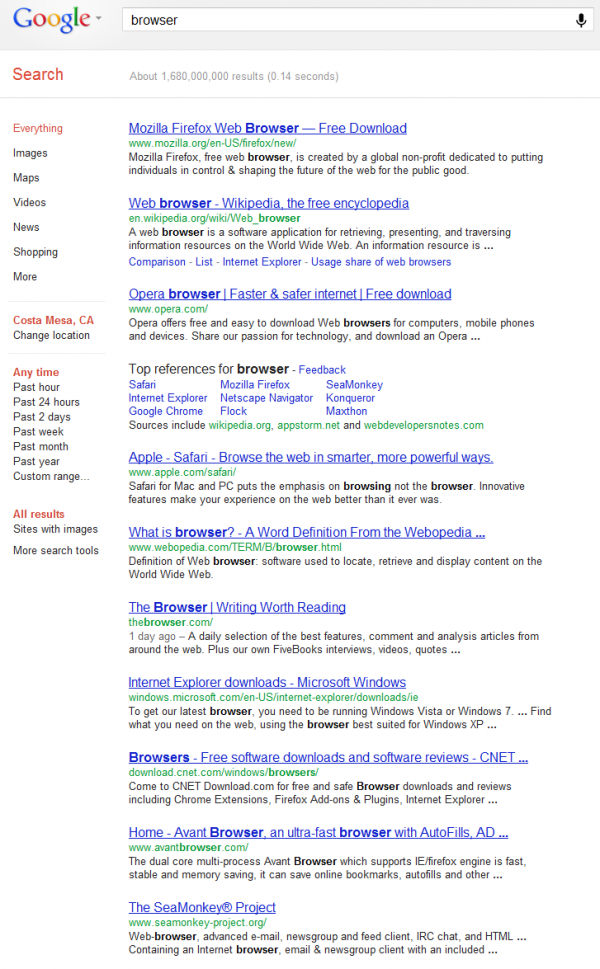
Read all about it in Google’s Chrome Page No Longer Ranks For “Browser” After Sponsored Post Penalty.
Also on this day
Meta will remove targeting options for sensitive topics on Jan. 19
2022: “Health causes,” “sexual orientation,” “religious practices and groups,” and “political beliefs, social issues, causes, organizations and figures,” were among the examples of targeting options slated for deprecation.
Microsoft Advertising launches sweepstakes for advertisers
2020: To enter, advertisers had to complete the Microsoft Advertising Certified Professional (MACP) certification, add a new Microsoft Advertising account, or enroll in the Micorosft Advertising Partner Program.
Get the daily newsletter search marketers rely on.
<input type=”hidden” name=”utmMedium” value=”” />
<input type=”hidden” name=”utmCampaign” value=”” />
<input type=”hidden” name=”utmSource” value=”” />
<input type=”hidden” name=”utmContent” value=”” />
<input type=”hidden” name=”pageLink” value=”” />
<input type=”hidden” name=”ipAddress” value=”” />
Processing…Please wait.
Brands can now buy Walmart sponsored search ads via API partners
2020: Walmart Media Group named four initial advertising partners to support sponsored search campaigns.
Robots.txt tip from Bing: Include all relevant directives if you have a Bingbot section
2019: Frédéric Dubut, a senior program manager at Microsoft working on Bing Search, said when you create a specific section in your robots.txt file for its Bingbot crawler, you should make sure to list all the default directives in that section.
Report: Google exploring sale of Zagat reviews
2018: Google’s parent Alphabet was reportedly considering a sale of reviews publication Zagat. And by March, the deal was done, when The Infatuation bought Zagat.
Search In Pics: Glasshole Receipt, GDG Gingerbread Cookies & Penguin Popper
2014: What people eat at the search engine companies, how they play, who they meet, where they speak, what toys they have, and more.
FTC Closes Google Antitrust Case: “Law Protects Competition Not Competitors,” Not Enough Evidence To Prove “Search Bias”
2013: After 19 months of investigation, political maneuvering, lobbying and intense speculation the FTC has closed its antitrust investigation of Google, which came away largely unscathed from the process.
A Test, Not A Bug: Bing Deep Links To Facebook, eBay, Craigslist Under Google’s Search Result
2013: Bing was changing four of the Deep Links (Bing’s name for what Google calls Sitelinks) under the Google search result and pointing them to completely different domains. See also: Strange Bug In Bing Deep Links Shows Facebook, Craigslist As Part Of Google
Baidu Testing Facial Recognition Search; Similar To Google’s “Search By Image”
2013: The new feature let searchers upload an image of a face and Baidu would then try to return other photos of the same person, with information on the name of the person.
DuckDuckGo Challenges Google On Privacy With DontTrack.us
2011: The illustrated guide showed how Google tracked its users and how DuckDuckGo didn’t.
Italy To Regulate YouTube & Other Video Sites Like TV Stations
2011: YouTube, and parent Google, became considered TV broadcasters in Italy, according to new rules by the Italian Communications Authority (AGCOM). The rules applied equally to other websites providing video content, provided they also ran advertising.
Google Gaining Ground In Smartphone, Browser Markets
2011: Android OS achieved a 25.8% market share, putting it within striking distance of Apple’s iOS, while the Chrome browser reached a major milestone, capturing 10% of the market.
Last Call: Yahoo’s adCenter Transition Tool About To Close
2011: A final reminder for search marketers to move their Yahoo Search Marketing account over to Microsoft adCenter.
With So Much Money Is A Facebook Search Engine Inevitable?
2011: Once upon a time, Facebook was a private company and made only $2 billion a year in advertising.
A Tale Of Three Android Phones: Droid 2, Samsung Fascinate & Google Nexus S
2011: A look at how three different Android cousins performed and measured up against the iPhone.
Traffic Power’s CEO Jailed Over Alleged Foreclosure Scams
2008: Matt Marlon was arrested for allegedly conning homeowners faced with foreclosure to give the company their homes.
The Google Challengers: 2008 Edition
2008: A guide to stealth search start-ups of the time, including Blekko, Powerset, Hakia, Mahalo, Cuill and more.
Ask Sponsored Listings Gives Click Fraud Reimbursements
2008: IAC Search & Media and/or ASK Jeeves advertisers were entitled to a reimbursement for click fraud or other invalid or improper clicks.
Google AdSense Launches Newbie Central
2008: It was a location for new publishers to go and get started with AdSense.
Goodbye, Yahoo Picks
2008: The world said goodbye to Yahoo Picks Of The Week & Picks Of The Day after 12 years.
Ask Mobile Adds “Click To Speak” Directions
2008: The service sent a text link that opens a mobile page with a map and turn-by-turn directions.
ChaCha Goes Mobile With TextChaCha
2008: Social search engine ChaCha introduced a new text-based mobile service called “textChaCha” to answer potentially any question from mobile users.
Yahoo Teams With Dash For In-Car Local Search
2007: In-car navigation provider Dash and Yahoo Local announced a deal to deliver Yahoo Local content via Dash’s portable “Dash Express” device and system.
Google Changes Hiring Process To Meet Job Opening Needs
2007: Google was looking to hire more people, quicker, and have less standards in terms of SAT score and GPA, but with more focus on how the applicant may fit within the company culture and work ethic.
Google & Earthlink Said To Be Near Start Date Of WiFi Network
2007: Google and Earthlink were finally near finalizing an agreement with San Francisco officials to provide free WiFi to the city.
Google Beta Testing Keyword Based AdSense Competitive Filter List?
2007: It appeared that Google was testing a feature that allowed AdSense publishers to block ads from showing via a keyword list.
Intertainer Sues Google For Patent Infringement On Online Video & Audio Distribution
2007: Google, Apple and Napster were all sued by Jonathan T. Taplin’s Intertainer for patent infringement of a 2005 patent that covers commercial distribution of audio and video over the Internet.
YouTube Hiring Advertising Sales Representatives
2007: Google’s YouTube was hiring six advertising sales representatives, all based in different parts of the U.S.
First Results Of Google’s Newspaper Ad Test Published
2007: About 1,000 visitors came from the ad, which generated 70% less page views than the PPC counterpart, 30% less time spent on the site than the PPC counterpart, but the registration rate (his goal) was about the same as the PPC counterpart. Background: Google Newspaper Ads Run Again
Microsoft’s Live.com Advertises On Google
2007: When Microsoft paid to advertise its search engine on a competitor.
Site Diagnostics Bug In Google AdSense Control Panel
2007: A robots.txt error was displaying errors based on Google’s cache URL, not publisher URLs.
Send A Greeting With Google Maps
2007: This fun and cool service let “geeks show they care.”
Best | top | most popular Search Engine Land stories of the year
Early January is a good time to take a final look back at the most popular stories from the past year. Check out what stories earned the most pageviews and social love in prior years:
4 ways data analysis can help you generate new ideas and optimize your content
2022: If your competitors outrank you, there’s probably a good reason for it. At SMX Next, Ashley Segura shared how she uses data analysis to discover those reasons, along with fresh content ideas that can help you close the gap.
Community experts on what successful marketers will do in 2020
- SEOs must focus on intent research practices in 2020 by Frédéric Dubut
- Businesses need to think differently about customer feedback data in 2020 by Adam Dorfman
- How verticalization and zero-click will impact local search in 2020 by Damian Rollison
- Make it easy for search engines to rank your website in 2020 by Fili Wiese
- The consumer decision journey will drive paid search in 2020 by Christi Olson
- Machine learning will free up time to be more strategic with accounts in 2020 by Brooke Osmundson
- Make 2020 the year for ecommerce to get better with the mobile experience by Duane Brown
- A wishlist of improvements for Google My Business in 2020 by Joy Hawkins
- New challenges ahead for attribution with the rise of intelligent tracking prevention by Simon Poulton
- 2020 will be the year to get our data right by Aaron Levy
- Focus on E-A-T to avoid performance problems in 2020 by Lily Ray
- Automation layering is driving PPC so get onboard in 2020 by Frederick Vallaeys
Past contributions from Search Engine Land’s Subject Matter Experts (SMEs)
These columns are a snapshot in time and have not been updated since publishing, unless noted. Opinions expressed in these articles are those of the author and not necessarily Search Engine Land.
- 2019: A simple 3-step framework for improving your technical SEO by Aleh Barysevich
- 2018: How much will privacy regulation disrupt the local search market in 2018? by Wesley Young
- 2017: 17 link resolutions for 2017 by Julie Joyce
- 2017: The fake information epidemic and how it will hurt local search in 2017 by Wesley Young
- 2017: Local SEO is about so much more than tools by Greg Gifford
- 2014: Preparing For The Link Apocalypse That May Or May Not Be Coming by Nate Dame
- 2013: Reporting Multinational SEO Performance: Difficulties & Insights by Chris Liversidge
- 2013: January Survival Tips For Search Marketers: Revisit Your Budget, Rest Up – The Superbowl Is Coming by Siddharth Shah
- 2012: Don’t Fall Into The Made-For-SEO Website Trap by Eric Enge
- 2012: Can New Multilingual Markup Create Advantages For Big Brand Optimisation? by Chris Liversidge
- 2012: Link Building Tool Review: Ontolo by Debra Mastaler
- 2012: Optimize Facebook Open Graph Tags: They Are the 50% by Aaron Friedman
- 2011: The Top 10 Paid Search Features You Might Have Missed In 2010 by Brad Geddes
- 2011: Investigating Google Places Hypocrisy For Address-less Businesses by Chris Silver Smith
- 2011: Looking Ahead: What’s Next In The Evolution Of Local Search? by Eric Enge
- 2008: How SEO Has Evolved Over The Years by Jill Whalen
- 2008: A Smooth Sea Never Made A Skilled Mariner by Bill Slawski
< January 2 | Search Marketing History | January 4 >
The post This day in search marketing history: January 3 appeared first on Search Engine Land.
Courtesy of Search Engine Land: News & Info About SEO, PPC, SEM, Search Engines & Search Marketing
Category seo news | Tags:
Social Networks : Technorati, Stumble it!, Digg, de.licio.us, Yahoo, reddit, Blogmarks, Google, Magnolia.