

Instagram tests Multi-Advertiser ads, cramming four ads into one screen
Written on August 17, 2023 at 11:39 pm, by admin
Instagram is piloting a new ad layout that crams four sponsored posts into one screen.
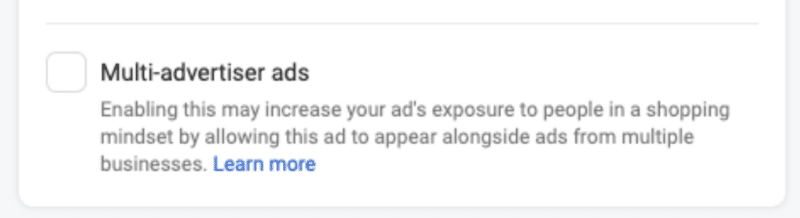
It’s the platform’s latest take on Multi-Advertiser ads, which groups together related sponsored posts from different businesses and serves them to people who have recently shown an interest in related products or services.
The new layout is being displayed between Reels. Advertisers can disable this feature by opting out in Settings.
Why we care. Bombarding Instagram users with so many ads at once may keep CPMs low. However, it could also potentially annoy users, making it harder for brands to capture consumers’ attention, which will negatively impact CTR and ROI.

Not all impressions are equal. While brands may initially see some success with this new ad format, the novelty will wear off and users will eventually opt to skip the content, said Barry Hott, Growth Marketing Consultant and Advisor:
- “Meta’s getting greedy here and trying to squeeze more ad impressions out of their users, particularly on Reels. Great reminder of how all impressions are not equal. I would consider this impression much lower value than a full Reels or Feed ad placement, but it can be used to serve cheap CPMs, more like a right column placement.
- “Lower CPMs on an optimized platform with multiple varied placements are not better for you. When you see lower CPMs, don’t celebrate it, question it.
- “If your attribution setting includes 1-day view, this placement can be used by the system to get more cheap (non-incremental) 1-day view conversions.
- “My bet is this placement will work well for a couple of months before the novelty wears off and users catch on that this interface is solely for them to be served ads and they’ll learn to subconsciously block and skip them.”
The risk of annoying users. Katharine Mckee, digital commerce consultant, raised her concerns over the ad product interrupting the user experience:
- “I would assume that some of this is driven by customer interest. The example may be throwing it off, but all of those [ads in the example] are cheesy/spammy and highly likely to be skipped.
- “It may make sense from a UX perspective to put the seemingly identical things together in one skippable bomb rather than irritating users.
- “Put all the skippable rubbish into one easy-to-ignore slot. I cannot wait to see the ugly reel!”
Get the daily newsletter search marketers rely on.
<input type=”hidden” name=”utmMedium” value=”“>
<input type=”hidden” name=”utmCampaign” value=”“>
<input type=”hidden” name=”utmSource” value=”“>
<input type=”hidden” name=”utmContent” value=”“>
<input type=”hidden” name=”pageLink” value=”“>
<input type=”hidden” name=”ipAddress” value=”“>
Processing…Please wait.
What Instagram is saying. Instagram announced its multi-advertiser format via an announcement in its Help Center:
- “Multi-advertiser ads help people discover and compare products from multiple businesses. This ad unit, available for selected placements on Facebook and Instagram, gives advertisers the opportunity to be discovered by people who have recently shown an interest in related products or businesses.”
- “In the multi-advertiser ad unit, personalized ads from different businesses are shown in a carousel format beneath an ad that a shopper has recently engaged with. An ad for a wedding dress might appear beside another brand’s ad for a wedding cake, for example.”
- “The advertiser decides where the action button within their multi-advertiser ad takes people. At the end of the carousel, an action button links to a feed of ads, where shoppers can explore more related products or services (currently only available on Instagram).”
- “This feature is being gradually introduced and may not be available to you yet.”
The post Instagram tests Multi-Advertiser ads, cramming four ads into one screen appeared first on Search Engine Land.
Courtesy of Search Engine Land: News & Info About SEO, PPC, SEM, Search Engines & Search Marketing
Category seo news | Tags:
Social Networks : Technorati, Stumble it!, Digg, de.licio.us, Yahoo, reddit, Blogmarks, Google, Magnolia.
Only 23% of digital marketers will invest in X in the next 12 months
Written on August 17, 2023 at 11:39 pm, by admin
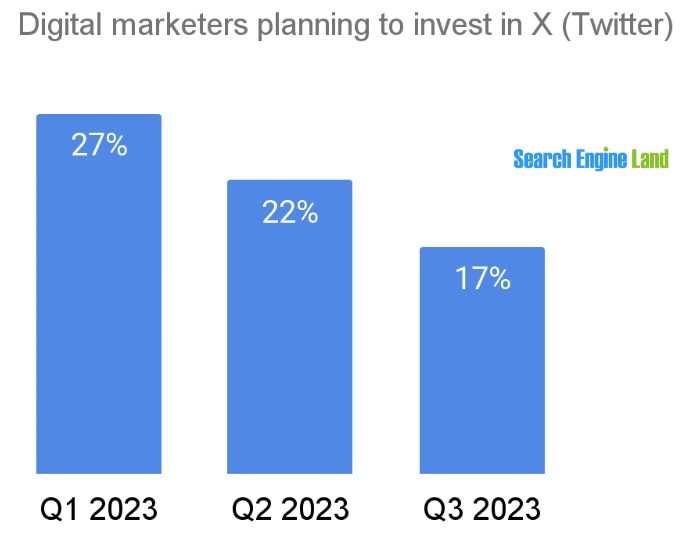
Less than a quarter of digital marketers plan to invest in X, formerly known as Twitter, during the next 12 months, according to a Search Engine Land survey.
And, the percentage of digital marketers investing in X continues to fall rapidly, down from 27% of marketers in Q1 to 17% in Q3 to date.
Where marketers plan to invest. Google (including YouTube) and Meta properties Facebook and Instagram are the platforms most digital marketers will invest in during the next 12 months, 81% and 57%, respectively.
- Forty percent of marketers said they will invest in Microsoft’s LinkedIn business-to-business social media network. Other Microsoft properties, including Bing, will be getting investments from 31% of digital marketers.
- Among the retail media networks tracked, 27% said they planned to invest in Amazon and 11% in Walmart.

About the data. The survey was conducted from January to August 2023. Nearly 1,000 people responded after signing up for the Search Engine Land newsletter.
The post Only 23% of digital marketers will invest in X in the next 12 months appeared first on Search Engine Land.
Courtesy of Search Engine Land: News & Info About SEO, PPC, SEM, Search Engines & Search Marketing
Category seo news | Tags:
Social Networks : Technorati, Stumble it!, Digg, de.licio.us, Yahoo, reddit, Blogmarks, Google, Magnolia.
Brands pause X ad spending after ads serve with pro-Nazi content
Written on August 17, 2023 at 11:39 pm, by admin
Ads from at least 19 brands appeared alongside a pro-Hitler account on X, formerly known as Twitter. Two of those brands have now suspended advertising on the platform. X has now deleted the account.
Why we care. X’s new CEO Linda Yaccarino told CNBC just last week that brands are “protected from the risk of being next to” potentially toxic content and “your ads will only air next to content that is appropriate for you.” Clearly, that’s not the case. X may say its platform is committed to brand safety, but it still has work to do.
What happened. Media Matters for America published this report detailing how X has been placing ads for brands on a verified pro-Adolf Hitler account with thousands of followers. The nonprofit watchdog group also included multiple screenshots showing the promoted posts.
- “The company continues to monetize the openly antisemitic account despite reportedly acknowledging it had violated the platform’s ‘rules against violent speech,’” Media Matters reported.
Unsafe brands. Ads from the following brands were shown alongside the pro-fascist content:
- Action Network
- Adobe
- Amazon
- Atlanta Falcons
- BritBox
- Corn Nuts / Hormel Foods
- FIFA Women’s World Cup
- Fortune
- Gallup
- Gilead Sciences
- MLB
- NCTA-The Internet and Television Association
- Office Depot
- Regal
- Samsung
- Sports Illustrated
- The Athletic / The New York Times Co.
- The Herd with Colin Cowherd / Fox Sports
- USA Today
X loses more brands. Two of these brands – NCTA and Gilead – “immediately paused their ad spending on X,” CNN reported. A spokesperson for NCTA said the company “had opted into X’s brand safety measures including keyword restrictions and limiting its ad placement to the ‘home feed of target audiences.’”
- “We take the responsible placement of NCTA ads very seriously and are concerned that our post about the future of broadband technology appeared next to this highly disturbing content.
- “Brand safety will remain an utmost priority for NCTA, which means suspending advertising on Twitter/X for the foreseeable future and heavily limiting NCTA’s organic presence on the platform.”
The post Brands pause X ad spending after ads serve with pro-Nazi content appeared first on Search Engine Land.
Courtesy of Search Engine Land: News & Info About SEO, PPC, SEM, Search Engines & Search Marketing
Category seo news | Tags:
Social Networks : Technorati, Stumble it!, Digg, de.licio.us, Yahoo, reddit, Blogmarks, Google, Magnolia.
X (Twitter) paywalls XPro (TweetDeck)
Written on August 16, 2023 at 8:36 pm, by admin
X (Twitter) has paywalled XPro (TweetDeck) for both brand and personal accounts.
Users now need to be Blue subscribers to access the tool, which has been rebranded as XPro under Elon Musk’s reign.
Why we care. Some people will feel disgruntled about paying for a tool that has historically been free, so may leave the platform and look for alternatives. This is likely to negatively impact the discoverability of content.
Disappointing. Julie F Bacchini, PPC expert and managing director of PPC Chat, told Search Engine Land that the move would have a significant impact on the marketing community:
- “For Twitter based communities, like PPC Chat, it is a serious blow to community interactivity. PPC Chat has historically been a Twitter based community with lots of activity centered on our community hashtag.”
- “Unfortunately, due to changes in the past six months and culminating with making XPro a paid only feature, we have had to move our weekly chats off of Twitter and onto our other channels.”
- “It also potentially really hampers discoverability of content and like minded follows as it is a lot more difficult to follow lists without a tool like XPro. I get that X is trying to increase its revenue, but putting a historically free tool that really enhanced the Twitter user experience behind a paid subscription is disappointing.”

Final nail in the coffin. Anu Adegbola, PPC expert and founder of PPC Live UK, told Search Engine Land that this change was a disappointing move for the marketing community. She said:
- “TweetDeck was a platform X offered for free – and it didn’t make many updates to it whilst it was free. Yet now they are going to make it a paid service? That is not on!”
- “It was a nice way to organise follows and see multiple groups of follows at once without actually having to follow people – for example, you could just view by lists. This change is going to mean a lot less time on X and people seeing important tweets a lot less.”
- “X has really become a mess lately and this is the final nail in the coffin for me. TweetDeck was essential for me to drown out troll noise and only pay attention to people who I thought were worth paying attention to. This now goes away.”
Why now? X announced that it was going to paywall XPro after rolling out several improvements to its functionality last month. Following the modifications, the platform now supports:
- Full composer functionality
- Spaces
- Video docking
- Polls
- And more
Get the daily newsletter search marketers rely on.
<input type=”hidden” name=”utmMedium” value=”“>
<input type=”hidden” name=”utmCampaign” value=”“>
<input type=”hidden” name=”utmSource” value=”“>
<input type=”hidden” name=”utmContent” value=”“>
<input type=”hidden” name=”pageLink” value=”“>
<input type=”hidden” name=”ipAddress” value=”“>
Processing…Please wait.
How to switch over. X explained that all your saved searches, lists, and columns will carry over to the new XPro. You’ll be prompted to import your columns when you load the application for the first time. However, in order to access the new platform, you will need an X Premium subscription, which starts at $8 a month.
Teams functionality in XPro is still temporarily unavailable, however, X has confirmed that the service will be restored in the coming weeks.
What has X said? X is yet to comment on putting TXPro behind a paywall since initially announcing its plans to do so back in July.
Deep dive. Visit the X Help Center for more information.
The post X (Twitter) paywalls XPro (TweetDeck) appeared first on Search Engine Land.
Courtesy of Search Engine Land: News & Info About SEO, PPC, SEM, Search Engines & Search Marketing
Category seo news | Tags:
Social Networks : Technorati, Stumble it!, Digg, de.licio.us, Yahoo, reddit, Blogmarks, Google, Magnolia.
Google Ads trials enhanced customer service for small businesses
Written on August 16, 2023 at 8:36 pm, by admin
Google Ads will offer enhanced customer service for small businesses as part of a new paid pilot.
A select number of agencies and advertisers have been invited to test the new program, which offers one-on-one support tailored to specific customer needs.
Why we care. Small business owners using the program can get specialized advice faster by using this premium service, which has historically only been accessible to Google Ads’ biggest clients.
What’s next? Google will collect feedback from participants. In time, Google hopes to roll the service out to more small- and medium-sized businesses. A Google spokesperson said:
- “These changes are part of a long-term strategy that we’ll be building on over time, testing, and learning as we go.”
Why now? Google launched the pilot in response to a “common complaint” from small businesses that they more specialized advice from the search engine’s experts, along with ideas for how they can improve their ads campaigns and optimize their budgets – a level of service not provided by Google’s automated self-service system.
Get the daily newsletter search marketers rely on.
<input type=”hidden” name=”utmMedium” value=”“>
<input type=”hidden” name=”utmCampaign” value=”“>
<input type=”hidden” name=”utmSource” value=”“>
<input type=”hidden” name=”utmContent” value=”“>
<input type=”hidden” name=”pageLink” value=”“>
<input type=”hidden” name=”ipAddress” value=”“>
Processing…Please wait.
What has Google said? A spokesperson from Google told Search Engine Land:
- “The paid pilot is intentionally small in scope so we can take feedback and iterate based on what works best for our customers.”
- “As part of this evolution, we’ve made significant upgrades to the Help Center to help customers resolve issues on their own, more easily. This includes multimedia additions, such as videos and GIFs, across articles related to how to edit your campaign settings, edit your bids, and resolve data inconsistencies in Google Ads accounts. We will continue to invest in this area.”
- “Agencies working with customers included in this pilot will also be able to schedule specialized paid support consultations tailored to their clients’ specific needs.”
The post Google Ads trials enhanced customer service for small businesses appeared first on Search Engine Land.
Courtesy of Search Engine Land: News & Info About SEO, PPC, SEM, Search Engines & Search Marketing
Category seo news | Tags:
Social Networks : Technorati, Stumble it!, Digg, de.licio.us, Yahoo, reddit, Blogmarks, Google, Magnolia.
Google: Don’t worry about SEO tool scores
Written on August 16, 2023 at 8:36 pm, by admin
No, you don’t have to worry about scores from SEO tools. Google doesn’t even use scores from some of its own tools (e.g., Lighthouse) for ranking.
That’s according to Google Search Advocate John Mueller, in the latest #AskGooglebot video.
Why we care. Even though Google has said numerous times that Google does not use SEO tool scores (e.g., Domain Authority), it has become a zombie myth (i.e., a myth that just won’t die). Tool scores are not mission-critical SEO metrics. You’re optimizing for Google and search engines – not third-party tool metrics.
Not at all. Google Chrome’s Lighthouse tool is just one example of a tool that will show you performance scores. However, like third-party tools, Google Search doesn’t use Lighthouse scores for ranking.
- “No, Google does not use scores from third-party SEO tools or services. It doesn’t matter whether it’s about a website’s authority or a rating about spamminess, Google doesn’t use these scores at all,” Mueller said
But. Even though Google doesn’t use SEO scores for ranking, Mueller said some of these scores could be useful for finding actual issues.
- “They could help with the next steps, or perhaps even qualify the work that was done. Knowing how to score comes to be is critical in determining whether it makes sense for you.”
The video. Watch Does Google Search use SEO scores? #AskGooglebot
The post Google: Don’t worry about SEO tool scores appeared first on Search Engine Land.
Courtesy of Search Engine Land: News & Info About SEO, PPC, SEM, Search Engines & Search Marketing
Category seo news | Tags:
Social Networks : Technorati, Stumble it!, Digg, de.licio.us, Yahoo, reddit, Blogmarks, Google, Magnolia.
Google Business Profiles to let you manage your social links
Written on August 16, 2023 at 8:36 pm, by admin
Google may soon allow businesses and organizations to manage their social media links that show up on their local listing within Google Search and Google Maps. Google added a new help document on how to manage your social links in Google Business Profiles.
Manage social links in Google Business Profiles. This feature is not fully rolled out to all businesses, yet, but some businesses may be able to login to their Google Business Profile and edit their profile and add or edit their social links within the “edit profile” section of their profile. The Google Business Profile API supposedly supports managing this now, as well.
Here is how add social links:
You can add one link per social media site. For example, you can add one Facebook and one YouTube link to your Business Profile. To add a social media link:
- Go to your Business Profile. Learn how to find your profile.
- Click Edit profile
Business information
- To edit, click Social profiles
.
- In the drop down that opens, select the social media link you would like to add.
- In the web address field, add the link.
- Click Save.
Here is how edit social links:
- Go to your Business Profile. Learn how to find your profile.
- Click Edit profile
- To edit, click Social profiles.
- Update the web address field for the social media link you’d like to update.
- Tip: To find the correct format for social media links, refer to the table above.
- Click Save.
Here is remove add social links:
- Go to your Business Profile. Learn how to find your profile.
- Click Edit profile
- In “Social profiles” next to the profile you want to remove, click Trash
.
- Click Save.
Supported social networks. Here is a list of social networks that is supported:
- TikTok
- X (formerly known as Twitter)
- YouTube
Where social links display. Currently, Google can show social links for a business or organization in the business profile in Google Search and Google Maps. Here is a screenshot of my company’s social links in Google Search, which I have no direct way of managing outside of asking someone at Google to update it manually.

Why we care. Until now, it was very hard to manage these social media links that displayed in your Google business profile listing. But soon, if not now, you should be able to manage those links directly in Google Business Profiles.
Hat tip to Elisabeth Rule for spotting this.
The post Google Business Profiles to let you manage your social links appeared first on Search Engine Land.
Courtesy of Search Engine Land: News & Info About SEO, PPC, SEM, Search Engines & Search Marketing
Category seo news | Tags:
Social Networks : Technorati, Stumble it!, Digg, de.licio.us, Yahoo, reddit, Blogmarks, Google, Magnolia.
Email subject line tips and best practices (with examples!) by Digital Marketing Depot
Written on August 15, 2023 at 5:31 pm, by admin

Your subject line communicates your email’s value to the recipient and encourages them to read further and, potentially, to engage with your brand on a deeper level by responding to your call to action (CTA). A poor subject line is more than just bad: It can contribute to your email being marked as spam, dinging your reputation with your customer and search engines.
That’s why it’s important to focus on your subject lines as an important part of your email marketing campaigns, instead of leaving them as a last-minute item to be completed right before you hit send.
This eBook from Marigold outlines email subject line best practices, and shows some examples of subject lines that really work.
Don’t miss this opportunity to optimize your email marketing strategy! Visit Digital Marketing Depot to download Email Subject Line Tips and Best Practices.
The post Email subject line tips and best practices (with examples!) appeared first on Search Engine Land.
Courtesy of Search Engine Land: News & Info About SEO, PPC, SEM, Search Engines & Search Marketing
Category seo news | Tags:
Social Networks : Technorati, Stumble it!, Digg, de.licio.us, Yahoo, reddit, Blogmarks, Google, Magnolia.
[This week] Actionable search marketing training & live Q&A at SMX
Written on August 15, 2023 at 5:31 pm, by admin

Don’t miss your chance to participate in tactic-rich, expert-led training on your search marketing specialty – and get specific answers to your burning questions: Register now for your choice of live, two-day SMX Master Class – happening online tomorrow and Thursday, August 16-17!
 (Need to convince your boss to let you attend? We’ve got you.)
Each Master Class is loaded with actionable tactics you can implement immediately:
- Supercharge your SEO and PPC efforts with the all-new Generative AI training, featuring Aleyda Solis, Frederick Vallaeys, and more expert instructors
- Make data-driven decisions with Colleen Harris’ Google Analytics 4 training
- Improve rankings and boost visibility with Bruce Clay’s Advanced SEO training
- Drive targeted PPC traffic with Brad Geddes’ Advanced Google Ads training
- Optimize your online presence with Eric Enge’s Technical SEO training
- Boost conversions with Brian Massey’s PPC landing page optimization training
- Reach, engage, and convert new customers with Michael Brenner’s SEO-friendly content marketing training
Attending the Master Classes is a win-win-win:
- Can’t attend live? Instant on-demand access is included with your pass.
- Can’t choose one class? Purchase multiple to save 15% off total registration.
- Attending as a group? Unlock a unique team-building experience and save up to 20% off*
Don’t be left behind. Explore the hottest topics in search alongside industry legends who are ready to answer your specific questions – all from the comfort of your own computer. No travel, no hotel room, no time out of the office.
Secure your spot at one of these exclusive SMX Master Classes for just $299!
Psst… Think you have what it takes to be an “award-winning” search marketer? Enter the 2023 Search Engine Land Awards for your chance to boost team morale, attract new business, and stand apart from the competition!
*Groups of 3-5 save 10%, 6-11 save 15%, and 12 or more save 20%. Email reg@thirddoormedia.atlassian.net. Discounts for different offers cannot be combined.
The post [This week] Actionable search marketing training & live Q&A at SMX appeared first on Search Engine Land.
Courtesy of Search Engine Land: News & Info About SEO, PPC, SEM, Search Engines & Search Marketing
Category seo news | Tags:
Social Networks : Technorati, Stumble it!, Digg, de.licio.us, Yahoo, reddit, Blogmarks, Google, Magnolia.
You can now sign up for Google Demand Gen campaigns, which will replace Discovery ads
Written on August 15, 2023 at 5:31 pm, by admin
The end is near for Google Discovery ads.
You can now sign up for access to Google Ads’ Demand Gen, the new campaign type announced at Google Marketing Live in May.
Once you’re in the beta, your Discovery campaigns will be automatically upgraded to Demand Gen.
All Discovery campaigns should be “upgraded” to Demand Gen by early 2024.
What is Demand Gen beta? “Demand Gen campaigns combine image + video ads in one place and can be used to drive conversions, site visits and actions like sign-up and add-to-cart across YouTube, Discover and Gmail,” Google Ads Liaison Ginny Marvin explained in a thread on X, formerly known as Twitter.
In addition to YouTube Home, Search and Watch Next, Discover, and Gmail, Demand Gen campaigns work across:
- YouTube Shorts.
- YouTube in-stream.
RIP, Discovery ads. Google introduced Discovery ads in 2019.
Why we care. Being able to see how your creative will look across Demand Gen placements is great for advertisers, especially brands with strict compliance and/or brand teams, as PPC expert and SMX speaker Sam Tomlinson points out in an X thread full of reactions and takeaways.

Who is eligible for an upgrade? Right now, all you need is an active Discovery campaign. Google Ads will open Demand Gen campaigns to everyone in October 2023.
How to upgrade. Sign up for the Demand Gen beta via this short form.
New features. Once you sign up for the Demand Gen beta, you can explore these new features:
- Different ad formats in one campaign: You will be able to experiment with a variety of different ad formats, including short-form videos, carousels, portraits, and square images to try to engage your audience more effectively.
- Lookalike segments: This feature will help you find customers similar to those who have already engaged with your brand through a custom-built Seed list. The ability to test from Narrow to Broad also provides the ability to restrain or expand reach.
- Unique goals: Similar to Discovery ads, you can optimize Demand Gen for conversions or use value-based bidding strategies.
- Maximize Clicks bidding: You can use this tool to optimize for site visits and actions, helping to drive high-value customers to your website.
- Ad previews: This feature lets you see how your creatives will look across different surfaces.
- A/B experimentation: Use this feature to optimize placements and find the perfect mix for your campaigns.
What Google is saying. Demand Gen was “built to help advertisers who buy on social platforms find and convert consumers with immersive, relevant, and visual creatives that grab attention and spur action in the right moment,” a Google spokesperson said:
- “Demand Gen drives conversions, site visits, and actions (like sign-ups and adds-to-carts) on our entertainment-focused touchpoints — YouTube, including Shorts, Discover and Gmail.”
- “In the coming months, we’ll share more resources and best practices to help ensure your upgrade process is as smooth as possible.”
Get the daily newsletter search marketers rely on.
<input type=”hidden” name=”utmMedium” value=”“>
<input type=”hidden” name=”utmCampaign” value=”“>
<input type=”hidden” name=”utmSource” value=”“>
<input type=”hidden” name=”utmContent” value=”“>
<input type=”hidden” name=”pageLink” value=”“>
<input type=”hidden” name=”ipAddress” value=”“>
Processing…Please wait.
Timeline. Here’s what’s coming next:
- October: All Discovery campaigns will become eligible to move to Demand Gen. Some Discovery campaigns will automatically migrate to Demand Gen.
- January - March 2024: Google will launch automatic upgrades for all remaining Discovery campaigns.
Google’s announcement. Get ready to upgrade your Discovery ads to Demand Gen
The post You can now sign up for Google Demand Gen campaigns, which will replace Discovery ads appeared first on Search Engine Land.
Courtesy of Search Engine Land: News & Info About SEO, PPC, SEM, Search Engines & Search Marketing
Category seo news | Tags:
Social Networks : Technorati, Stumble it!, Digg, de.licio.us, Yahoo, reddit, Blogmarks, Google, Magnolia.