

Google on ranking updates: Focus on big picture, not individual signals
Written on August 22, 2023 at 11:43 am, by admin
The key to your SEO success is publishing authentic content and thinking about ranking in terms of concepts, rather than individual signals.
That’s according to Googlers Martin Splitt, John Mueller and Danny Sullivan in the latest Search Off the Record episode. The group discussed ranking updates and systems, content, the importance of user-centricity and more.
Why we care. Google’s algorithm is a recipe and we want to know all the ingredients (signals) that will help us rank better and drive more traffic and conversions, no matter what Google says we should do. However, in the chase for SEO success, it remains critical to always provide quality content for your target audience (your users, customers, clients or readers) and make sure you satisfy them first.
The big picture. Many SEOs get obsessed with knowing all the individual search ranking factors. While SEOs try picking everything apart, Mueller said there is a better way:
- “For a lot of the guidance that we have, it’s a lot more now about the bigger picture, because it feels like from a technical point of view, things are often pretty reasonable. And now you really need to get that bigger picture into the right shape, so that when users come, they’re like, ‘Oh, this is actually a helpful site,’” Mueller said.
Because Google’s algorithm is made up of multiple systems, Sullivan advised continuing to focus on the big picture:
- “Know that we’ll just try to share more information, so that you can understand more about the systems that are out there and, you know, hopefully be successful with them.”
Authentic content. The term “authentic” came up a few times during the discussion, with Mueller specifically noting how authentic content can be a differentiator when competing against AI content:
- “But I think now more than ever, having that authentic content that you created because you have
an actual audience in mind that you know would come to it directly, that is your way forward as you try to navigate this world of how ranking systems are evolving with Google,” Mueller said. - “And I think also generally, as we go into this world of AI content and so on, that it will have places
and it’d be useful, but I think the bedrock will be to continue to point people towards authentic information. There’s a big craving for that, and that’s going to be your key to success,” Mueller said.
User-centricity. You should “put yourself in the shoes of someone who arrives at that content and what they’re going to be thinking about,” Sullivan said, adding some helpful context from a personal travel experience:
- “It’s like, I just wanted to know, like, where do I park? How do I get to the place? How long do I need to be there? And that you’ve actually been there,” Sullivan said.
- “… I think more of just sitting back and thinking, ‘If I were a person coming into this, would I actually be satisfied?’ ‘Did I really write this for an actual person, that I’m thinking about my audience?’
- “And if you’re doing that, you really feel like the way you do it works and you’re getting the feedback from your audience that it’s all great. Do it. Just do it. Keep going that way, right?”
The point of SEO is not to dress up pages in the hope it will rank in the first position of Google, Splitt added:
- “… are you trying to make something for your users and make it better, so that even a search engine, which is hopefully a less intelligent being than the people using the website can actually understand the goodness of the page?”
Listen to the episode. Search Off the Record: Let’s talk ranking updates
The post Google on ranking updates: Focus on big picture, not individual signals appeared first on Search Engine Land.
Courtesy of Search Engine Land: News & Info About SEO, PPC, SEM, Search Engines & Search Marketing
Category seo news | Tags:
Social Networks : Technorati, Stumble it!, Digg, de.licio.us, Yahoo, reddit, Blogmarks, Google, Magnolia.
5 ways to improve PPC lead quality
Written on August 22, 2023 at 11:43 am, by admin
Online leads are not all equal. The quality of those leads ultimately matters in driving meaningful business outcomes.
Focusing on high-quality leads in your PPC campaigns increases your return on investment for your marketing dollars.
Additionally, improving lead quality allows salespeople to focus on more promising opportunities, streamline their sales process, and cultivate a loyal customer base.
Here are the tools and strategies you can employ to drive better leads and more ideal customers to your doorstep:
Key 1: Teach Google what a good lead looks like
Google’s ad bidding algorithm is a sophisticated system determining whom to target and how much to pay for a click.
The algorithm considers many factors, such as the bid, the ad and landing page quality, the expected click-through rate, and other historical performance data.
The better quality data you can provide to Google, the better the algorithms will do your bidding (literally).
You can do this by providing Google the following:
- Clean conversion tracking, depending on what clean means for you.
- Customer lists that are filtered for your highest-quality customers while meeting the 1,000-user threshold.
- Conversion values for designating more highly profitable leads from others.
Positive feedback loops
Algorithms like Google’s ad bidding system are designed to continuously improve performance by leveraging a feedback loop. This loop allows the algorithm to learn from past decisions and adjust its strategies for better outcomes.
When the algorithm receives accurate and high-quality initial inputs, it establishes a strong foundation for this learning process. The algorithm can make increasingly precise bidding decisions as it refines its understanding of user behaviors and preferences.
Fueled by the right inputs, this positive feedback loop results in more accurate learnings and better bidding decisions, enhancing campaign effectiveness and improving return on investment.
Key 2: Don’t neglect offline conversion tracking
One of the best practices for improving your PPC lead quality is offline conversion tracking or Enhanced Conversions for Leads.
Offline conversion tracking in Google Ads lets you link online ad interactions with offline actions, like in-store purchases or phone orders.
Doing so better informs Google’s bidding algorithms on what and who to optimize for increased profits and offline sales.
Here’s how it works:
High-quality lead data curation
Compile your online leads that generated revenue offline with an average volume of 30 or more per month and an average lag of 90 days or less.
Consider creating a database of all of the high-quality leads generated, whether they purchased or not. This is recommended because we aim to inform Google of the ideal lead candidates and to generate more of these, whether they become customers or not.
Integration with CRM or database
Next, integrate your offline data with Google Ads. This can be done by collecting and associating a Google Click ID (GCLID) with your leads.
Alternatively, consider using Enhanced Conversions for Leads for less technical and more streamlined implementation.
Ideally, you will have an automatic upload of this data into Google Ads regularly. If you use Salesforce or HubSpot, Google Ads has an easy and direct integration for uploading these offline sales conversions.
Attribution and reporting
Once Google matches the lead with the originating click ID, it can attribute the ads, keywords, campaigns, etc., that drive these valuable offline actions.
You can see reporting on the associated metrics like conversion value, conversion rate, and return on ad spend (ROAS).
Identify optimization opportunities
This data lets you understand which keywords, ads, or campaigns drive the most valuable offline conversions.
These insights will help you to make informed decisions about budget allocation, keywords, ad creatives, and targeting to optimize your campaigns.

Key 3: Exclude low-quality lead sources
Once you can identify what is generating your best-quality leads, you want to use these insights to pull spending away from your low-quality lead sources.
Audience demographics such as age and household income levels will come to light.
For example, you could discover that conversions are from 18- to 24-year-olds but not revenue. Use this discovery to exclude those age demographics from accruing ad spending in your campaigns.
Placement exclusions
Regularly check your placements report for low-quality websites, apps, and YouTube channels where your ads showed.
This can be tedious, but it will allow you to exclude placements that do not align with your brand or match your targeting. This is a great strategy to exclude low-quality lead sources.

Turn off demographics expansion
If you use demographic exclusions to improve lead quality, it is crucial to understand that Video Action campaigns using optimized targeting will ignore these exclusions.
Be sure to submit a request to your Google rep for whitelisting to turn off the demographics expansion.
Get the daily newsletter search marketers rely on.
<input type=”hidden” name=”utmMedium” value=”“>
<input type=”hidden” name=”utmCampaign” value=”“>
<input type=”hidden” name=”utmSource” value=”“>
<input type=”hidden” name=”utmContent” value=”“>
<input type=”hidden” name=”pageLink” value=”“>
<input type=”hidden” name=”ipAddress” value=”“>
Processing…Please wait.
Key 4: Attract high-quality leads who want to do business with you.
How good is your brand at attracting your ideal prospects, and does this high-caliber lead want to work with you?
If you’re facing challenges in attracting quality leads to your brand or would like to improve overall, start by evaluating and enhancing your brand strategy.
Consider refreshing your brand identity, including your website, ads, logos, and colors. Be sure these are all effectively resonating with your desired customers.
Revisit your target audience and ensure your brand’s messaging aligns with their preferences and needs. Clarify your value proposition, highlighting how your brand addresses users’ specific problems.
Last, embrace personalization to connect with different segments of your audience and resonate more deeply.
Examples include personalized landing pages, dynamic website content based on the visitor’s preferences and behavior-based retargeting ads.
Key 5: Disqualify leads before they reach a salesperson
I learned this from Perry Marshall, who has a story from John Paul Mendocha about “racking the shotgun,” and it’s about applying the 80/20 rule to your prospecting.
Ideally, you would disqualify folks before they click on your ad, costing you money. You can apply these other techniques after excluding your low-quality lead sources.
Use price as a disqualifier
Some prospecting strategies include concealing the price. I recommend using it as a disqualifier. You will likely prevent the leads from entering your funnel who cannot afford what you offer.
Disqualify leads with your online form
If displaying your price doesn’t make sense, use your online form to ask a qualifying question about the budget or how much they plan to invest. Doing so allows you to route leads with more profitable follow-up tactics based on their response.
Urgency is another qualifier that can be asked online, such as how significant is this problem they are trying to solve? One way would be to ask for their timeframe.
Alternatively, they can rank the importance of finding a solution from one to five.
Disqualify leads over chat
Similarly to the online form, use chat to help disqualify potential leads just as much as you would try to convert them. Ask the same qualifying questions to identify if your solution doesn’t fit their needs.
Bonus key: Get targeting feedback directly from salespeople
One bonus point for improving your PPC lead quality is getting targeted feedback directly from salespeople.
As PPC marketers, we tend to work in a black box. Getting insights directly from salespeople can help inform our targeting and exclusion strategies.
Not only can this make our direct campaigns more profitable, but sending through more highly qualified leads improves the results for the salespeople, increases retention, enhances your brand reputation, and reduces wasted resources.
Increase lead quality to increase your resources
Improving lead quality can significantly impact a business across various aspects. This impact will be more significant if most of your leads come from PPC sources.
Ultimately, focusing on lead quality can lead to more efficient resource allocation, better customer relationships, increased conversion rates, higher revenue and overall business success.
The post 5 ways to improve PPC lead quality appeared first on Search Engine Land.
Courtesy of Search Engine Land: News & Info About SEO, PPC, SEM, Search Engines & Search Marketing
Category seo news | Tags:
Social Networks : Technorati, Stumble it!, Digg, de.licio.us, Yahoo, reddit, Blogmarks, Google, Magnolia.
The 5 degrees of link relevance
Written on August 22, 2023 at 11:43 am, by admin
SEO is easy enough, in theory. The strategies are obvious if you’ve been around the block.
What’s hard about SEO is the actual execution and implementation. The consistency. On a daily basis.
Nowhere is this more obvious than link building.
This article will explain why.
You’ll also learn how to use the “5 degrees of link relevance” framework to craft the best theoretical strategy and the best path to consistently build high-quality, relevant links over the long run.
The 5 degrees of link relevance
Quickly jot down a list of the “best” and “most relevant” links in your space.
Go ahead. I’ll wait.
- What are their characteristics?
- How are they similar?
Here’s the thing most people misunderstand about link building:
You need both quality and quantity to compete in the most lucrative spaces against online behemoths.
Just one or the other isn’t good enough.
And that poses a problem.
Because it forces you to redefine commonly held preconceptions, like “link relevance,” into a more practical definition.
You see, “relevance” isn’t binary. It’s not black and white.
Yes, it can be completely “not relevant.” A link from a Viagra site is definitely not relevant to an insurance broker.
But beyond that, there are often different “degrees” of relevant links. It’s more of a fluid spectrum, where links can be both “highly” or “slightly” relevant.
And when shooting for scale, you need both!
So let’s break this down even further, using my framework, to show you how to prioritize link relevance based on the strategies and tactics that best suit each.
You’ll see that the bulk of link building strategies and tactics you use should fall into the middle zone vs. getting stuck at either extreme end.

First degree: The ‘most’ relevant, yet often least scalable
When you ask people what the “most relevant” links are in your space, they often give you First Degree answers.
But here’s the problem with those.
Counterintuitively, first-degree links usually aren’t highly scalable.
The most highly relevant sites and SERPs in your space are often bad for link building because they’re:
- Direct or indirect competitors.
- “Pay to play” (advertising and affiliate).
- Nofollowed.
- Unscalable (limited number and likelihood to naturally link).
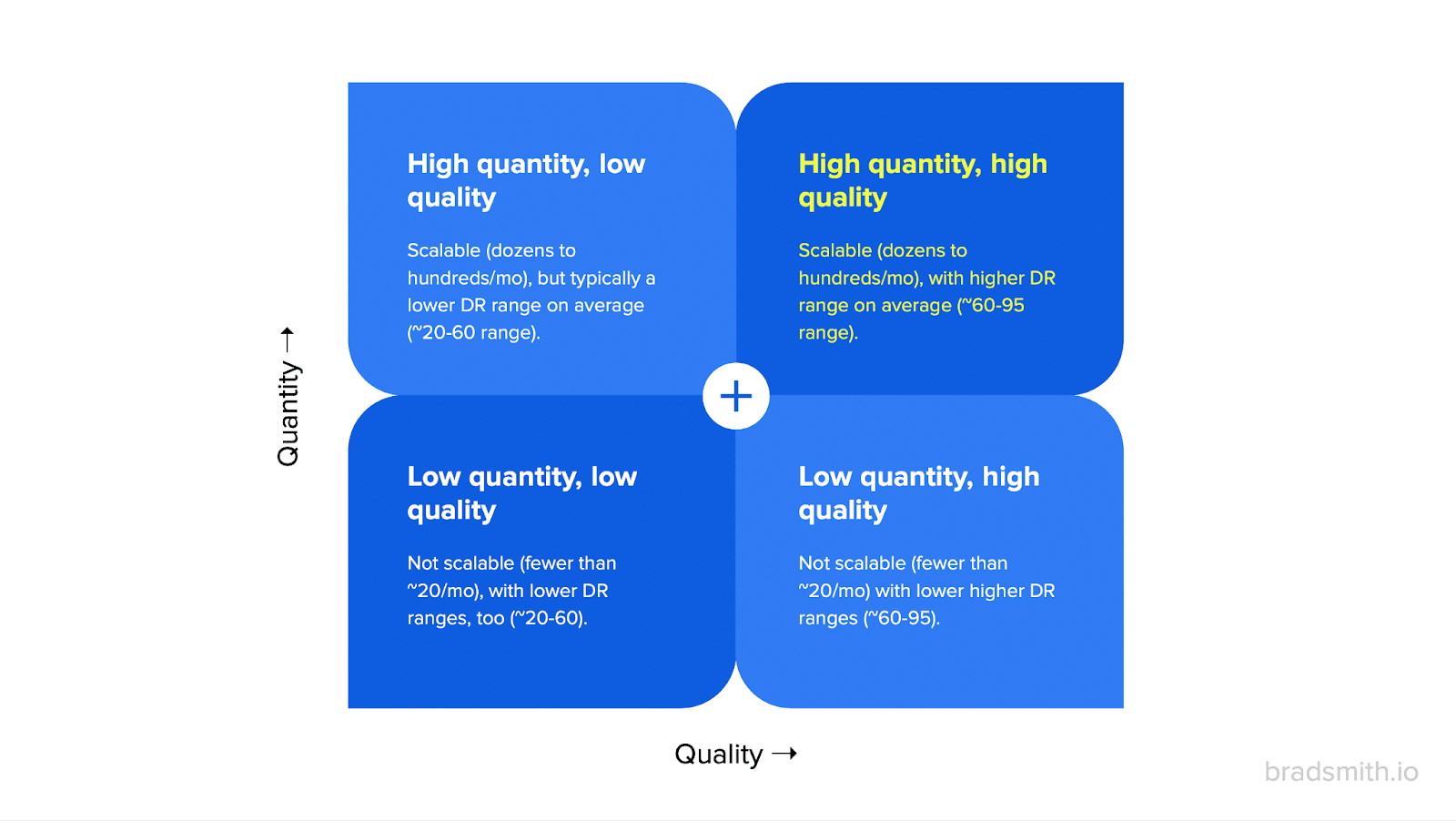
Another way to think of this problem is through the lens of a simple matrix. Each axis balances “quantity” and “quality.”

And first-degree links, while certainly high quality, are very low quantity by definition.
That’s because the sites often ranking at the top of the most competitive SERPs in your space already fall into one of the following categories:
- Competitors won’t link to you.
- Pay-to-play sites are expensive to scale.
- Nofollowed sites have some benefit, but not ideal.
- And they’re “unscalable” by definition.
Unpacking this last point, consider a major media brand like The New York Times.
There’s both a tiny finite number of sites like this, and also, the likelihood of them linking to you (without an eight-figure sponsorship deal) is very, very, very, very, very, very, very, very low.
So, yes. You should look for and get as many of these as possible. For instance, sponsoring a nonprofit in your space is an easy win-win.
But…
There’s only so many of these to go around!
And on a comparison basis, the effective “cost per link” (even if it’s a traditional or flat-fee sponsorship) becomes prohibitively expensive to scale into the thousands (if not tens of thousands of referring domains) needed to compete in the Major Leagues.
For instance, how much do you think this content syndication costs between NerdWallet + CNBC?

No clue. But I also bet it’s significantly more than your company’s entire marketing budget.
So instead of fruitlessly floundering around with major media sites or direct and indirect competitors already ranking, you need to readjust your definition of relevance to become something more easily attainable.
Second degree: Highly relevant and scalable
Second-degree links are high quality, relevant and scalable.
This is your sweet spot!
Second-degree links are topically or thematically relevant and highly scalable (meaning: many sites like these are highly likely to link to you).
Here are a few of the characteristics you’re often looking for:
- Higher DR ranges (70+)
- Lots of traffic
- Credible brands
- Editorial-based
In other words, this is your high-quality and high-quantity focus!
Why is this seemingly semantic difference important?
Because thinking in this fashion helps you uncover the optimal tactics you should be using to get as many of these links as possible!
For instance, generally speaking, certain tactics are better (or worse) to use to reach sites of a certain size (and prestige).
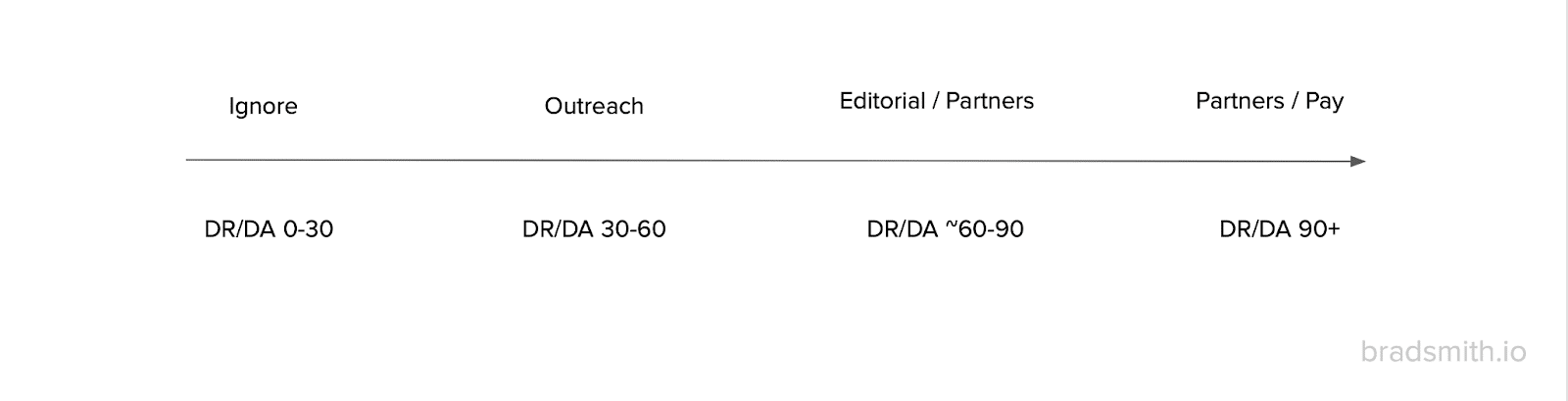
If you broke it down by Domain Rating (DR) or Domain Authority (DA) ranges, it would look something like this:
In other words:
- DR/DA 0-30 sites? Don’t bother actively chasing links.
- DR/DA 30-60: Outreach-based methods tend to scale better in this low-to-medium-tier of sites.
- DR/DA ~60-90: Whereas you’ll often need an editorial-based strategy and partnerships to reach this sweet spot of sites that move the needle.
- DR/DA 90+: And these are your first-degree links above that might be simply unattainable or too expensive (you need good personal relationships or LOTS of $$$).
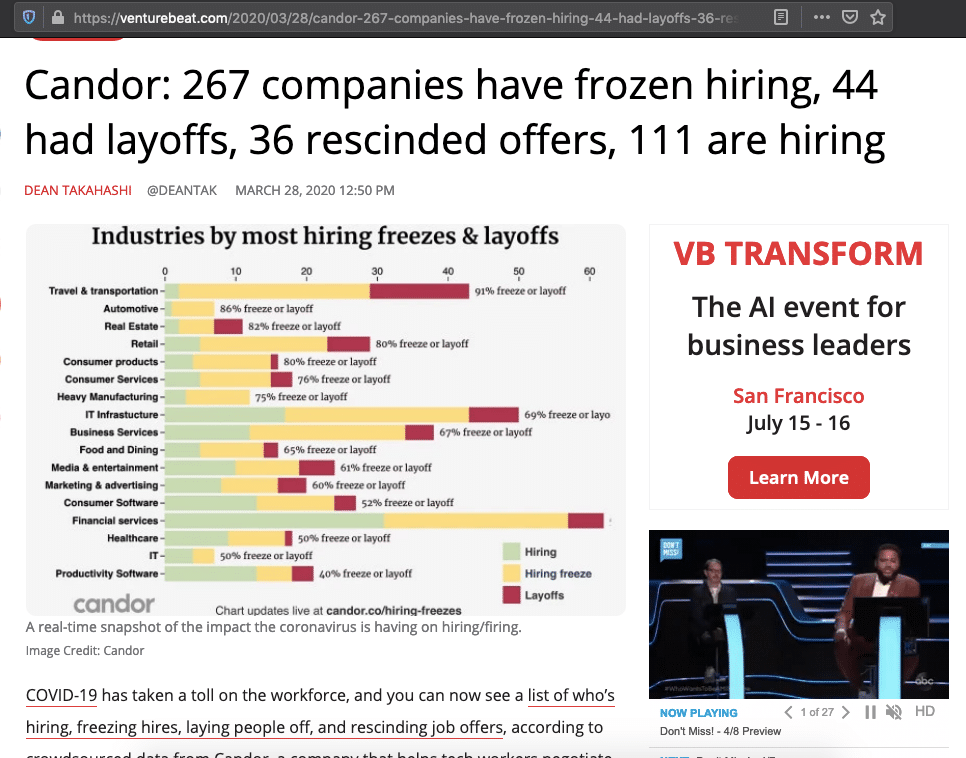
A perfect example of second-degree link building would be Candor’s “Hiring Freezes” link magnet play at the height of COVID-19.
They created a valuable resource, rounding up real-time employment status during an uncertain time:

Then, they leveraged that resource to get attention and visibility and some high-quality links from editorial-based sources like VentureBeat (an industry publication vs. mainstream media).
This strategy has the added bonus of leveraging long-term.
Here’s how:
- Instead of spending more on the expense (or distribution, like cost per link building, CPC of an ad or CPL for affiliates, etc.), you
- Spend more on the asset (the content!), bringing down the effective cost per link or click or lead on the expense side of the balance sheet.
This last point is super important. Write it down.
Because the good news is that most of your competitors will ignore and invert it.
You shouldn’t.
Get the daily newsletter search marketers rely on.
<input type=”hidden” name=”utmMedium” value=”“>
<input type=”hidden” name=”utmCampaign” value=”“>
<input type=”hidden” name=”utmSource” value=”“>
<input type=”hidden” name=”utmContent” value=”“>
<input type=”hidden” name=”pageLink” value=”“>
<input type=”hidden” name=”ipAddress” value=”“>
Processing…Please wait.
Third degree: Audience relevant and still highly scalable
OK, now for the fun section.
Third-degree links are critical in driving quantity during a link building campaign.
The trick is to find enough of them that are still relevant, even though they purposely won’t be the “most” relevant (like the first or second degree examples above).
So here’s how you think about these.
Third-degree links are audience-relevant, even if not directly topically relevant. These can be alternatives to a product or service, too (i.e., an alternative solution to your primary product or service). And they’re still highly valuable and scalable!
Examples here include:
- Mid-to-high DR ranges (50-70)
- Sites with consistent traffic
- Known brands in that niche or vertical, despite not mass market appeal
- They’re directionally relevant to audience or category alternative
Let’s take a step back and think of your buyer’s journey for a second.
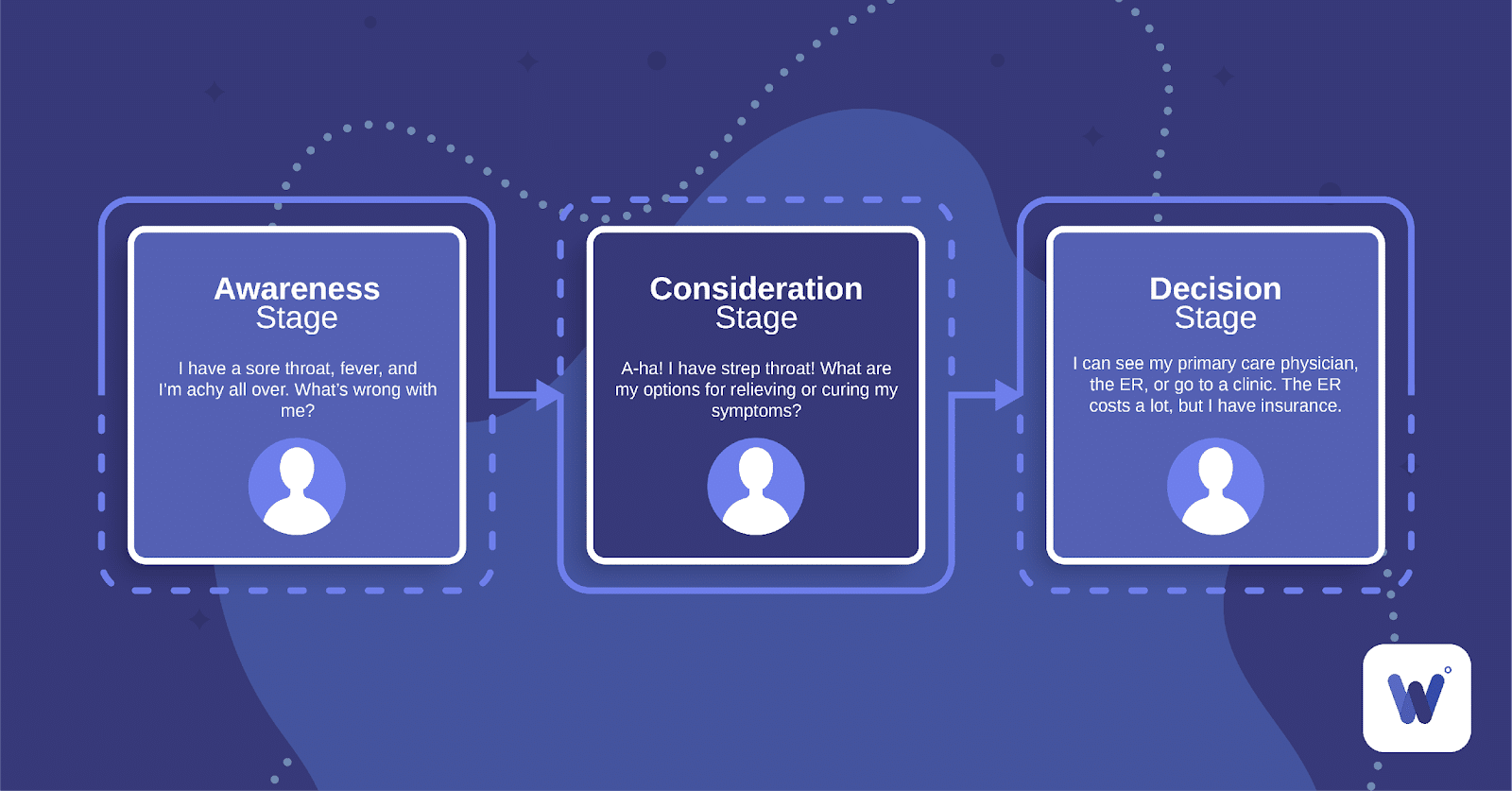
Most first and second-degree links are closer to the bottom of the funnel, focused primarily around who you are or what you do for people (i.e., the product or service you have, the primary audience that needs you right now, etc).
As an example, let’s say you sell Pet Insurance. So most people think “relevant” is something around “insurance” or “people looking for pet insurance.”
Yes. And no.
Again: you have no scale there!
Do you think anyone else talking about “pet insurance” on the internet is likely to link to you? The answer is no, because they’re probably already a direct or indirect competitor.
Plus, it’s super niche.
So instead, you need to move up-funnel.
Ask yourself: What kind of big, active online audiences would buy pet insurance?
Mom blogs!
Are mom blogs “highly relevant” to pet insurance?
- From a classic, old-school, traditional SEO standpoint, maybe not.
- But from a broader marketing and actually revenue-driving position? Yes, of course!
Who do you think spends money on new pets, takes care of existing pets, and spends the bulk of their time taking care of them?
Moms and their kids!
(Stereotypical, I know. But this is still directionally accurate across the world. Moms usually still do most of the hard work with kids and pets.)
So instead of trying to get other insurance companies to review your product – ‘cause, they won’t – you get (or incentivize) mom blogs to talk about your pet insurance.
This gives you a relevant link and can potentially drive more revenue.
The link is audience-relevant, even if it’s not directly relevant to your space or product (insurance).
Most product reviews of all shapes and flavors honestly fall into this category.
An organic skincare brand, then, would target every single “natural,” “sustainable” and “eco-friendly” blog in the world.
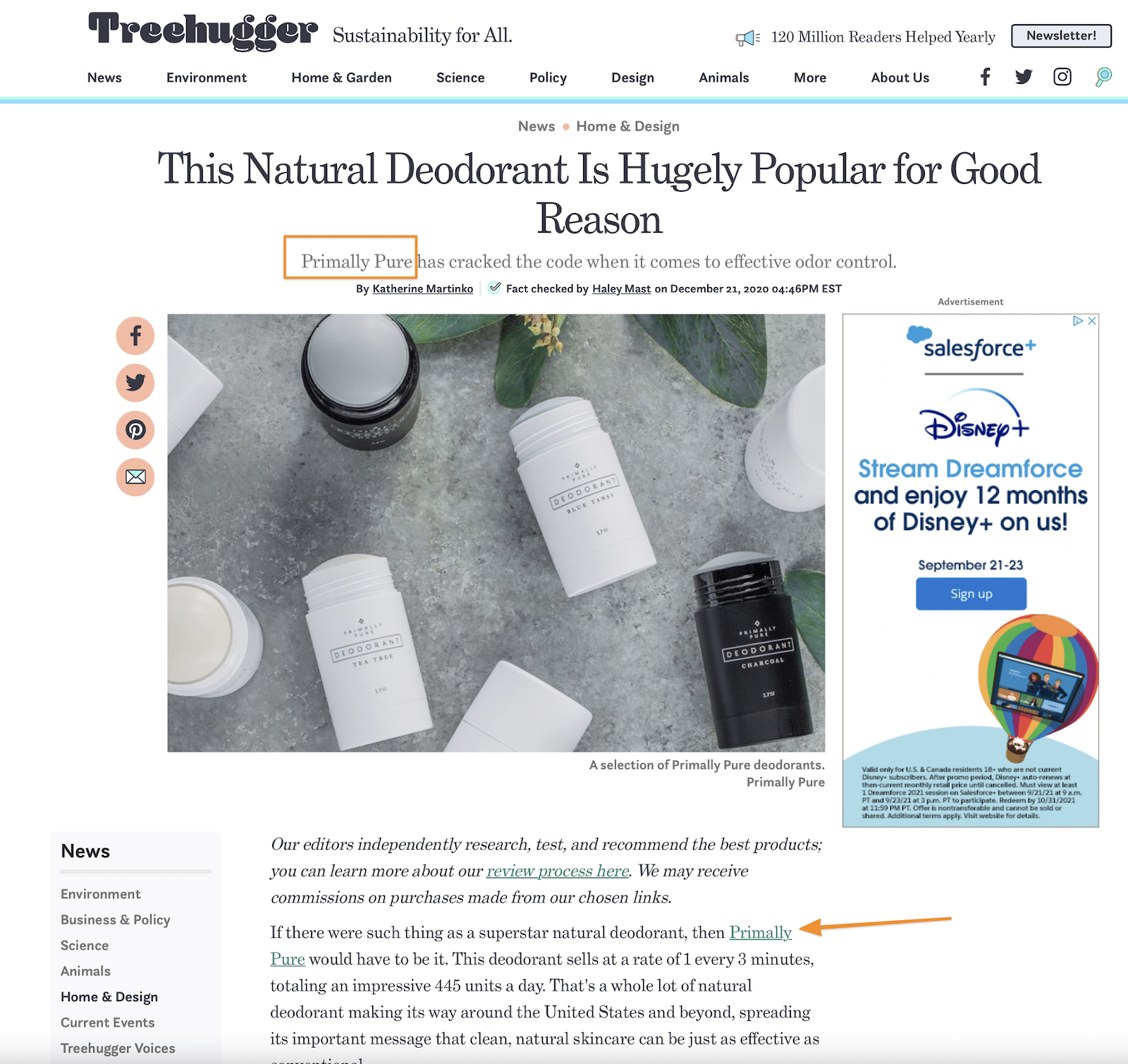
The key with second and third-degree links is to realize:
- These sites don’t need to link to you, so…
- You need to help them first by solving a need they already have.

Uncovering what they need first and then supplying that paves the way to reciprocation.
Fourth degree: Extremely scalable but less relevant
Now we’re moving into the gray area.
On the one hand, fourth-degree links are often extremely scalable. But on the other, they’re usually a lot less relevant, too.
Fourth-degree links are less relevant for audience or theme, or as an alternative to your product or service. Think: links for links sake with no other value.
You can spot these by the following warning signs:
- Sites tend to be lower DR ranges (think: <40)
- Paid-for links (“sponsored” and similar)
- Artificial / abused tactics (scholarships, widget/embeds, and more)
- Other “gray” tactics (second-tier link building, expired domains, etc.)
These are your old-school, SEO 1.0-style tactics. You already know the kind.
Basically, anything that looks like this:
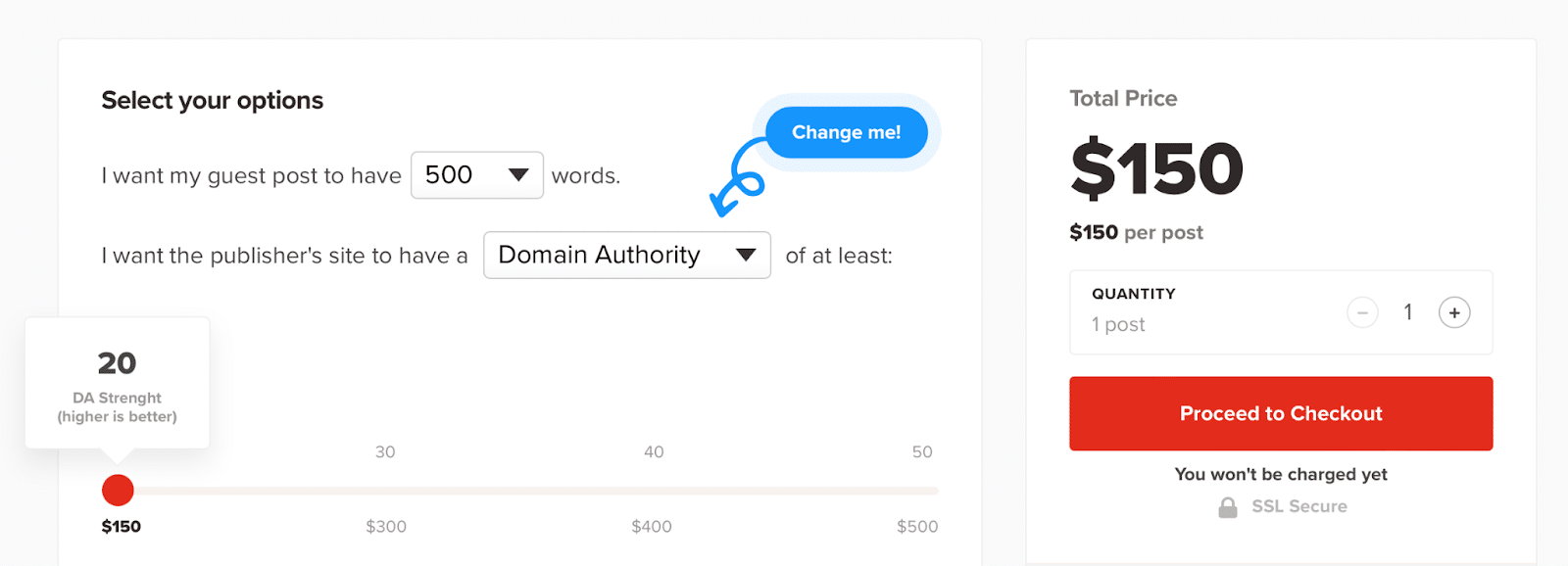
As a general rule, the more scalable a link building tactic, the less desirable (low quality and less relevant) it is.
So.
Should you still use these?
Possibly, yes!
You need both quantity and quality in the long run to succeed.
This real-world acceptance separates the link building pros (who see what actually works) from all the empty, hollow, fauxfluencers out there who never descend their privileged-ivory-tower positions.
So should these 80% of your links?
No! Unless you want to be penalized one day or don’t care about the site long term.
But.
Should these be <10-20% of your links? Sure, why not.
If you reverse-engineered your biggest competitors today, I guarantee you’ll often find a worse ratio.
So keep reality in perspective.
Fifth degree: Not relevant and low quality (yet still extremely scalable)
Last but not least, fifth-degree links (and beyond) are typically very low quality and highly risky (i.e., they are ignored completely or risk penalization through manual action):
These include:
- Outright spam sites
- Vices (Viagra, gambling, etc.)
- DR <20, no traffic sites
- PBNs
These are the ones you avoid like the plague!
Not only because they’re truly “not relevant,” but more importantly because they aren’t likely going to drive you buyers, either.
We don’t really need to beat this dead horse anymore, do we?
The degrees of link relevance
Link relevance is fluid. It’s a sliding scale or spectrum.
So while it’s true that some links are “not relevant,” more common is that links can be “highly” or “mostly” or “slightly” relevant.
And you commonly need all of those to achieve scale!
‘Cause often, the “most” relevant links are also the hardest to get, build, land, or pay for.
If the biggest competitors in your space have tens of thousands of referring domains at minimum (which most lucrative spaces all do), then you can’t be overly picky.
You’ll still need tons and tons of “mostly” relevant and “slightly” relevant links.
These audience-focused ones might seem “less relevant” at first glance.
But they’re also what helps you eventually balance both quantity and quality in the long run.
The post The 5 degrees of link relevance appeared first on Search Engine Land.
Courtesy of Search Engine Land: News & Info About SEO, PPC, SEM, Search Engines & Search Marketing
Category seo news | Tags:
Social Networks : Technorati, Stumble it!, Digg, de.licio.us, Yahoo, reddit, Blogmarks, Google, Magnolia.
SEO KPIs to track and measure SEO success
Written on August 21, 2023 at 8:42 am, by admin
If something can be measured, it can be improved.
By carefully measuring your SEO with metrics that matter to your business, you can understand where you are currently and what value SEO brings to your marketing.
SEO KPIs bridge the gap between your business and marketing objectives and the data available in SEO tools and web analytics.
This article outlines the many SEO metrics and KPIs and how to tailor a set of SEO KPIs to your business.
What are KPIs?
A KPI is a key performance indicator. This is a quantifiable measurement of performance in relation to a specific objective. KPIs help you define targets and milestones and measure progress toward those goals.
What are SEO KPIs?
SEO KPIs are metrics used to measure SEO performance.
Typically, SEO KPIs track visibility or traffic and how it fares in relation to your goals.
Such metrics will quantify traffic from major search engines like Google and Bing and the real-world results of SEO strategies and tactics (leads and sales).
Using SEO KPIs
Careful measurement and tracking provide a control system to ensure your tactics deliver results and your time and effort are spent on productive tasks.
Diligent measurement also provides feedback if your tactics are not working and inform you of how changes in the search landscape or algorithm impact performance.
KPIs can be tiered to provide understandable metrics for all stakeholders. The marketing team will need more detail to ensure time is spent wisely on SEO vs. PPC, but the board may only need to see top-level performance figures.
Tailoring the KPIs to your situation is the key to creating truly useful SEO KPIs.
Objectives and KPIs
Your SEO KPIs should act as an extension of your overall business and marketing goals.
You ensure you aim at relevant goals by considering your SEO goals as an extension of your overall marketing goals. Your SEO KPIs then track performance toward that goal.
The key is in the name (literally and figuratively): KPIs are key performance indicators.
They force you to ask whether your SEO approach drives performance. If not, what can you do about it?
This is really important but all too often overlooked.
SEO can be so complex that you need clear objectives and ways to measure progress toward those goals to ensure your time and effort are spent wisely pursuing the right goals.
SEO KPI Process
The following is a simple process that you can use to determine your SEO goals and KPIs.
Step 1: Determine your SEO goals
The first job is to identify your SEO objectives. What are the important tasks you need to achieve now, in a month, three months, six months and a year?
The SEO goals should connect to established organizational goals, and you should clearly articulate how the SEO goals drive the overall business goals.
I suggest three to five goals initially to keep focus.
You should then define your SEO goals using the SMART goals system.
Alternatively, you can use the OKR approach to objectives and key results detailed in “Measure What Matters” by John Doerr. This simple system was used by Google, Microsoft and many other huge companies to simplify goal-setting to drive massive growth.
The right approach will depend upon your business, but whatever you choose, your goals should be relevant, measurable, achievable and time-bound.
Step 2: Define what you will measure
The next step is to define what you will measure.
Your measurement metrics can be thought of as steps, and each should take you closer to the overall goal. As with the goals, you want, at most, three to five measurement metrics for each goal.
When your goals are achieved, you should be able to measure performance to determine if your strategy here is valid.
Step 3: Decide on the length of your cycle
As a general rule of thumb, SEO metrics are tracked monthly.
There are exceptions to this rule. Keyword rankings may be tracked daily (but reviewed monthly), and you may also want quarterly, bi-yearly and annual reports.
Remember, with SEO, you may only see tangible results like leads and sales when your keywords rank highly and drive traffic. Factor progress toward the goal into your overall cycle length.
Step 4: Review and reflect
The goal is to review each KPI and, ideally, score performance.
- What is working?
- What can you do differently next month?
The purpose of KPIs is to help you review your approach and think critically about what is or is not working.
A highly ranked organic keyword in modern search may not drive the expected traffic numbers.
Think of this as an experiment. Your KPIs are there to test the validity of your hypothesis.
Be flexible, and be ready to adapt and adjust your tactics based on the results.
Example
- Objective: To sell more kitchens.
- KPI 1: Increase rank for kitchen keywords.
- KPI 2: Increase organic traffic on kitchen pages.
- KPI 3: Improve engagement rates.
- KPI 4: Increase organic conversions.
Here we have a simple objective measured with four simple SEO KPIs. This does not have to be complicated!
Following this approach, you will create three to five relevant SEO goals that you can easily measure with three to five SEO KPIs each.
Get the daily newsletter search marketers rely on.
<input type=”hidden” name=”utmMedium” value=”“>
<input type=”hidden” name=”utmCampaign” value=”“>
<input type=”hidden” name=”utmSource” value=”“>
<input type=”hidden” name=”utmContent” value=”“>
<input type=”hidden” name=”pageLink” value=”“>
<input type=”hidden” name=”ipAddress” value=”“>
Processing…Please wait.
Example SEO KPIs
There is no shortage of SEO metrics for tracking your campaigns.
You can find data points from free SEO tools like Google Search Console and Google Analytics to the many commercial SEO tools.
Unfortunately, while we have lots of data in its native format, commercial SEO tools and even Google Analytics often do more to confuse than deliver insight.
The purpose of SEO KPIs is to make those metrics useful.
We do that with the four-step model, where we connect SEO metrics to SEO goals connected to the broader business and marketing goals.
The following is a categorized list of SEO metrics to build your SEO KPIs.
Remember, don’t just blindly use the metrics below. Connect them to your SEO goals in groups of three to five to drive insight and understanding.
1. SEO keywords
First up is the old SEO stalwart of keywords.
Tracking keywords for SEO is complicated nowadays as search results have so many elements.
But it is still important to show progress toward your goals and get a sanity check on how much traffic a given keyword will deliver.
Track keywords for progress and verify your strategy.
Modern search results will include:
- Local pack
- Organic listings
- Featured snippets
- Sitelinks
- Knowledge cards and panels
- Videos
- People also ask
- Video previews
You may also want to consider:
- By location
- By country
- Search Console CTR
- Search Console Average Rank
- Search Console Clicks
- Search Console Impressions
When tracking keywords, combine multiple factors to give the complete picture.
At the very least, track rankings, organic impressions and clicks (from Google Search Console or Bing Webmaster Tool). Depending on the SERP layout, a top 5 keyword can still do very little in actual clicks.
As time progresses, with this level of detail in your keyword KPIs, you will learn what works and what does not, which will feed into your strategy and goal setting.
Tip: Remember rankings are just one factor, and ensure when working on your web design and SEO that the content that ranks is a good fit for the intent behind the keyword!
2. SEO metrics
These are the traditional SEO metrics provided by various SEO tools.
Most of these metrics grew out of the hysteria around Google PageRank and aim to provide a general authority score at a site and page level.
These metrics can be helpful, but they mean very little alone, and they need to be compared to competitor values to provide accurate context.
You should measure that your site’s perceived trust and authority will correlate with an increase in the rank for your main search terms and the amount of organic traffic received.
These metrics are important but do not talk in the language of the business, so their prioritization in your reports will depend upon the stakeholder’s understanding of SEO.
- Majestic Citation Flow
- Majestic Trust Flow
- Majestic Trust and Citation Balance
- Moz Domain Authority
- Moz Page Authority
- Moz Spam Score
Tip: Remember that these specific SEO metrics should be tied to the overarching goals and strategy.
For example, suppose you want to build traffic to your upper-funnel marketing content. In that case, you may want to improve site authority but remember to sanity check improvements against real-world metrics (rankings, traffic, etc).
3. Real-world SEO KPIs
While many SEO KPIs relate to perceived authority and keyword rankings, what really matters is whether this is making a difference.
- Are we getting more traffic? Is that generating more leads?
- Is the cost per lead coming down vs. other channels?
- Are we seeing more branded searches due to raised awareness?
This is where the SEO rubber hits the SERP road, folks, so these metrics are essential.
- Increase in organic traffic
- Increase in the number of pages on the site that generate traffic
- Increase in non-branded search traffic
- Percentage increase in traffic from specific geographic regions
- Organic Impressions (Search Console)
- Organic Click-Through Rate (CTR) (Search Console)
Tip: We would also like to see real-world SEO metrics increase as SEO metrics improve.
This ensures the work you do is helping move the dial rather than just satisfying the whim of an SEO tool.
4. Conversion KPIs
The most important SEO KPI, in most cases, is conversion. Tracking conversions from organic search should be at the top of your list.
These KPIs need to be customized around your specific goals. Some examples here include:
- Conversions from organic search
- Percentage increase in conversion rate
- Organic search conversion rate
- Sales conversions
- Lead conversions
- Downloads
- Email clicks
- Phone number clicks
- Form fills
- Cost per acquisition (CPA)*
Note: Calculating and tracking CPA for organic search allows you to compare the return from organic with other channels. This helps determine if you are spending your precious marketing budget wisely.
Tip: The specifics here really depend on the specifics of your business and your marketing objectives, so ensure you track these in GA4.
5. Engagement KPIs
Google Analytics 4 has three key engagement metrics:
- Average engagement time (over the date range)
- Engaged sessions per user
- Average engagement time per session
Tip: Tracking engagement as a general KPI but also for all channels allows you to evaluate the quality of traffic from SEO vs. PPC, social etc. Again, this helps determine if you are spending your time and efforts on the right tactics!
6. Referral traffic
A solid SEO campaign can impact your business beyond driving more organic traffic.
If content and links are a vital part of your strategy, then this exposure can drive more high-quality referral traffic, so it is prudent to demonstrate the extra value here.
This helps to illustrate how your SEO strategies have multiple marketing benefits.
Often, solid referral traffic can convert at a better rate than organic search traffic, so ignore this at your peril.
- Percentage increase in referral traffic
- Percentage increase in referral conversions
- Percentage increase in engagement metrics (bounce, pages, time)
Tip: The links that will build authority will also drive referral traffic, so factor this into your qualitative measurement.
7. Brand impact
Improved search visibility equates to improved overall visibility – advertising by another name. So we should also look at the increase in branded search traffic and brand mentions and how this correlates to your work.
- Percentage increase in branded search traffic
- Percentage increase in brand mentions
- Visibility on third-party sites *
The visibility on third-party sites is another way for your audience to discover you.
For example, more people will discover me and my business by writing and publishing this article here on Search Engine Land.
If you do this kind of marketing, then ensure you measure the impact.
Tracking how many people search for you by name helps you understand and measure overall recognition. Comparing these values to your main competitors helps you measure relative market awareness.
8. Link building KPIs
Links are still one of the primary drivers of search engine visibility, and links (plus content) are often the main tangible element of a long-term SEO campaign.
Therefore, we must still report on the total number of links from authority sites and those from highly relevant sites. These will generally be pulled from our link wishlist and should be customized around your client’s industry.
- Total links
- Total links gained this time period
- Number of links from authority sites
- Number of links from relevant sites
- Links lost
Tip: To determine the relative value of your link building, compare your link profile with your competitors’ using one of the many SEO tools on the market.
9. Soft conversion KPIs
Leads are vital to your overall digital marketing, yet the classification of leads and the sales funnel gets ever more complex.
As such, we should measure our SEO efforts’ impact on lead generation, whether social signups, newsletter signups or some other download or lead gen specific to your business.
- Percentage increase in newsletter signups
- Percentage increase in social followers/likes and so on
- Business-specific lead generation goals (data sheets, white papers and so on)
Tip: Try to understand the customer journey and the steps required, from awareness and a visit to a paying customer and lifetime value.
SEO may drive most of your email signups, and the email campaigns drive sales. Customize this to your situation and measure what matters.
10. Business objective-specific KPIs
This category is a little more challenging to create a generic example for. However, it’s important from a reporting perspective.
We must do all we can to connect the business strategy with our SEO strategy via KPIs.
Often, the KPIs detailed above will give you what you want here, so this is more of a case of structuring them to align with your goals and reporting them meaningfully.
Remember, the higher-ups may only want a very low-resolution overview, but the marketing team may need more detail.
To provide some direction, if your goal is to build awareness of a new product, then you want to focus on awareness metrics: impressions, average position, keywords, clicks and so forth.
If you want to drive more signups, we want to track the number of people looking at the signup and pricing pages.
If we look at more traditional conversions, we must look at the total number of sales/leads/inquiries.
The point here is that you already have the SEO KPIs, but remember to:
- Frame them around your business objectives.
- Clearly highlight that you are helping move the business forward and not just providing a set of esoteric SEO tracking metrics.
Your SEO work has much more value than simply moving a keyword ranking. It adds real value to the business, reduces marketing costs, builds the brand and more.
Just remember to let the right people know in a way they can understand.
Tip: If you are struggling with how to categorize your SEO KPIs, there are two approaches that we have found helpful over the years.
The first is to group your KPIs along the marketing funnel:
- Awareness.
- Engagement.
- Conversion.
An alternative approach is to use the VQVC model, which stands for:
- Volume.
- Quality.
- Value.
- Cost.
If you are struggling, investigate these options to ensure you build truly insightful SEO KPI reports.
Understanding builds trust and confidence
It is tempting to think of SEO tracking as just another job, but that is underselling things.
You know that your work delivers real value to the business beyond just moving up the search results for a few keywords.
SEO KPIs provide a way to track and demonstrate SEO results and then communicate those improvements so everyone in the business can understand.
Key to this is to structure your goals hierarchically:
- Business Goals > Marketing Goals > SEO Goals
You can then clearly articulate how improvements in SEO metrics lead to improvements in marketing performance which drives business growth.
If you can create hierarchical goals and SEO reporting that feed into tha, then the reporting has real strategic value.
SEO KPIs help you:
- Understand what is working.
- Understand what tactical elements drive results.
- Build a strategic understanding of marketing throughout the business.
SEO reporting then becomes an actual strategic process. This helps develop critical thinking, a problem-solving mentality and a creative approach to your SEO.
The post SEO KPIs to track and measure SEO success appeared first on Search Engine Land.
Courtesy of Search Engine Land: News & Info About SEO, PPC, SEM, Search Engines & Search Marketing
Category seo news | Tags:
Social Networks : Technorati, Stumble it!, Digg, de.licio.us, Yahoo, reddit, Blogmarks, Google, Magnolia.
CTV ad spend hits record-breaking $1 billion in June
Written on August 21, 2023 at 8:42 am, by admin
Connected TV advertising broke records after ad spend reached $1 billion in June, according to a report by ad-research company Vivvix (formerly known as Kantar).
The research investigated how ad dollars are spent across a growing list of streaming platforms, such as Discovery+, Max (formerly HBOMax), Roku, and YouTube.
Growth categories included household supplies and beverages – which rocketed by more than 300% year-over-year. However, verticals like pets, as well as cosmetics and beauty didn’t trend as highly.
The industry milestone, which supports Vivvix’s predictions for the first half of 2023, comes at a time when digital formats account for 70% of total ad spend, in which video is the fastest growing format.
Why we care. This report highlights that the advertising industry recognizes the importance of running campaigns on CTV platforms, and which sectors in particular are increasing their ad spend. It’s important to monitor competitors’ strategies so that you can make informed decisions, respond to trends, capitalize on market opportunities, and maintain a competitive edge in your industry.
Promising forecast for YouTube. YouTube also experienced significant growth in the digital ecosystem, according to the Vivvix report. In June, the Google-owned platform generated $1.4 billion in ad spend across it properties. Based on this performance, Vivvax predicts that ad spend will continue to grow, particularly as non-linear properties continue to capture more viewership.
Looking ahead. CTV advertising is expected to grow by 13.2% globally in 2023 to $25.9 billion, according to GroupM’s mid-year forecast. In the US specifically, CTV advertising is expected to grow by 21.2% year-on-year this year as the majority of Americans continue spending so much time streaming TV every day, reports Insider Intelligence.
Get the daily newsletter search marketers rely on.
<input type=”hidden” name=”utmMedium” value=”“>
<input type=”hidden” name=”utmCampaign” value=”“>
<input type=”hidden” name=”utmSource” value=”“>
<input type=”hidden” name=”utmContent” value=”“>
<input type=”hidden” name=”pageLink” value=”“>
<input type=”hidden” name=”ipAddress” value=”“>
Processing…Please wait.
What has Vivvix said? Andrew Feigenson, CEO of Vivvix, said:
- “This milestone validates the projections on CTV’s ascendency from experimental to a ‘table stakes’ medium. It’s where viewers are increasingly spending their time, and in order to be competitive, brands must play ball on those fields, and understand what competitors are doing on these platforms.”
- “The data really informs brands where the white space is within the video journey as well. We noticed, for example, a dearth of pet brands advertising on Disney+ in June. That signals a real opportunity.”
- “Being able to take a broader view of the video landscape helps advertisers see the strategy their competitors are using across various channels. The shift of ad dollars between new and emerging platforms can make it difficult for advertisers to connect the dots, so it’s important for brands to have access to a wider lens. We are confident that more brands will continue to allocate more of their advertising budgets to CTV and other digital media, which will affect traditional TV advertising.”
- “To give brands the deepest, richest and fullest picture of advertising spend, Vivvix is purpose-built to look across the full spectrum of ad platforms, from linear to digital. We are continually investing in expanding our coverage across all digital media, including CTV, and social video like YouTube. Vivvix gives advertisers a view into more than $162 billion worth of digital ad spend which translates to a deep level of competitor ad campaign visibility.”
Deep dive. Read the Vivvix report in full for more information.
The post CTV ad spend hits record-breaking $1 billion in June appeared first on Search Engine Land.
Courtesy of Search Engine Land: News & Info About SEO, PPC, SEM, Search Engines & Search Marketing
Category seo news | Tags:
Social Networks : Technorati, Stumble it!, Digg, de.licio.us, Yahoo, reddit, Blogmarks, Google, Magnolia.
Setting up event parameters in GA4: Everything you need to know
Written on August 21, 2023 at 8:42 am, by admin
GA4 proves to be an incredibly valuable tool, offering extensive insights into your website’s performance.
While certain metrics and dimensions come pre-configured by the tool, others require partial or custom setup by users.
This is the case with event parameters, which enable us to obtain relevant information about actions taking place on our website.
Although a few of these parameters come pre-defined by GA4, most require proper configuration to ensure accurate data collection.
What are event parameters in GA4?
In GA4:
- Events allow you to measure specific user interactions on a website, such as loading a page, clicking on a link or submitting a form.
- Parameters provide additional information about those events.
For instance, a user views a product or adds an item to the cart.
With event parameters, you can create settings that describe the product they are viewing or the product they are adding to the cart, such as the name, the page, the link, the method or the price.
You can use parameters to create custom dimensions and metrics that will improve how you analyze your website performance.
You can add up to 25 parameters for each event. Event parameter names can have up to 40 characters, and the value assigned to each must be 100 characters or fewer.
Event parameter types in GA4
There are two types of event parameters in GA4, depending on how they are captured by the tool:
- Automatically collected parameters: GA4 automatically captures a set of parameters. Both automatically collected events and enhanced measurement events come with default parameters. However, the latter often requires custom configuration in many cases.
- Custom parameters: These parameters allow you to collect information that is not captured by default. This is applied to recommended events and custom events, where custom configuration is required.
Automatically collected parameters
When you create a GA4 property, the following parameters, which provide supplementary information about the events, are automatically collected by GA4:
- language
- page_location
- page_referrer
- page_title
- screen_resolution
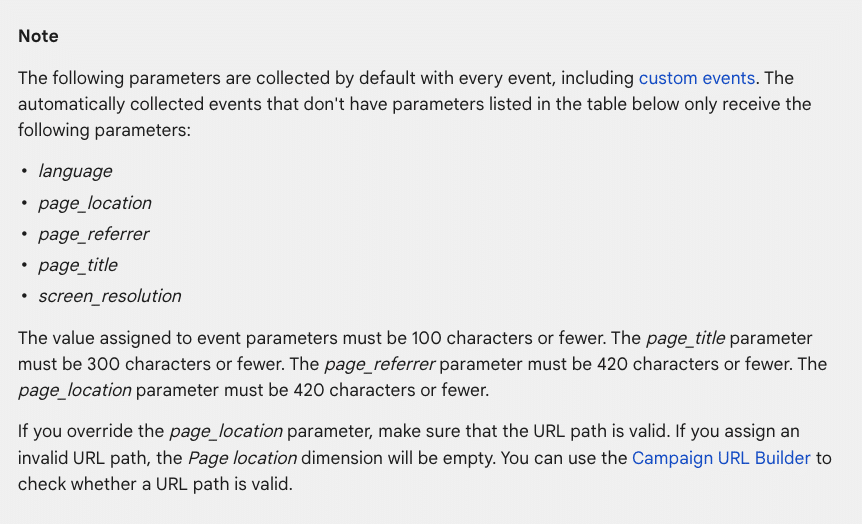
Check the list of automatic parameters provided by GA4 for automatically collected events.
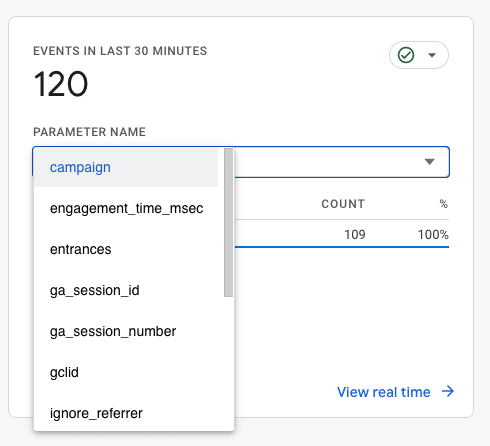
How to view the parameters automatically collected in GA4 reports
To view the automatically collected parameters, you need to go to Reports > Engagement > Events, then click on one of them (e.g., page_view)
Those displayed here are correctly set up and triggered. Otherwise, you will have to do a custom setup.
Custom parameters
Custom parameters allow capturing information that is not collected by default. Depending on the type of event, Google recommends a set of parameters:
- List of parameters for enhanced measurement events.
- List of parameters for recommended events.
As you can see, most of the parameters require personalized configuration.
Customized event parameters can be configured via:
- Google Tag Manager
- GA4
How to configure event parameters via Google Tag Manager
The most recommended option for creating event parameters – whether enhanced, recommended, or customized – is through Google Tag Manager.
To do this, you must follow the next steps to create custom parameters via Google Tag Manager:
First, ensure the GA4 and Google Tag Manager accounts are properly configured and linked.
When creating or configuring event parameters, check the recommended parameters provided by Google for this event:
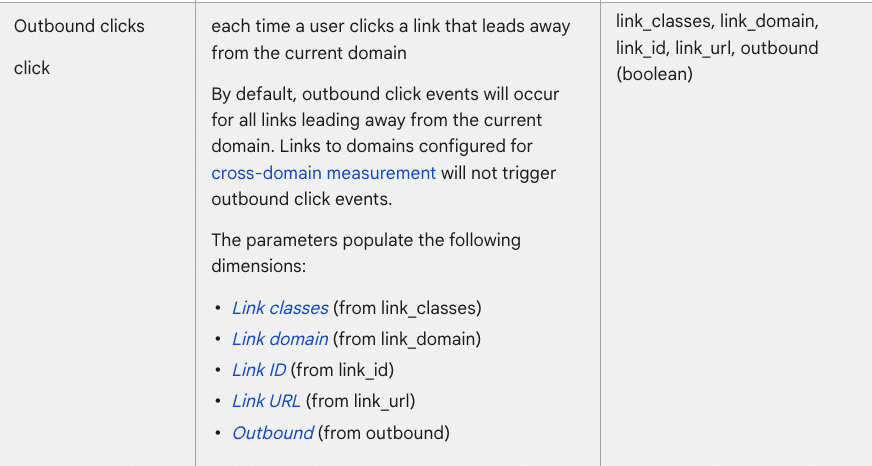
Take into account the parameters you need when configuring the event in Google Tag Manager. For example:
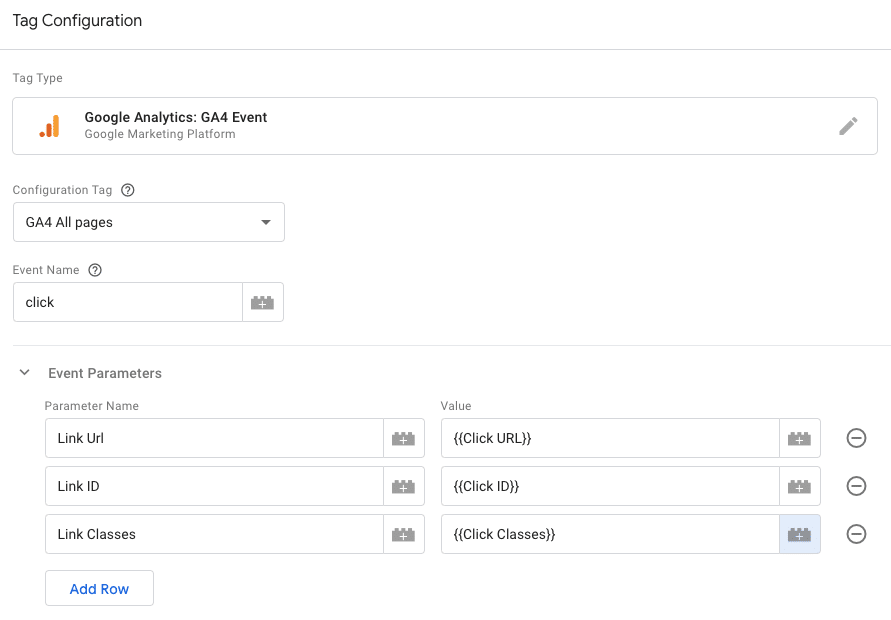
Check out more information about the different dimensions and metrics of GA4 and the different parameters recommended depending on the event.
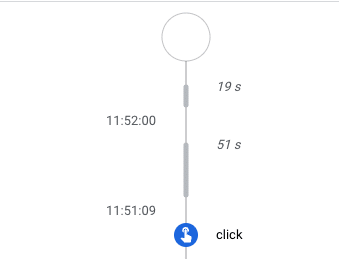
After creating the tag, verify that it is activated successfully through Admin > Debugview:
And also through Google Tag Manager:
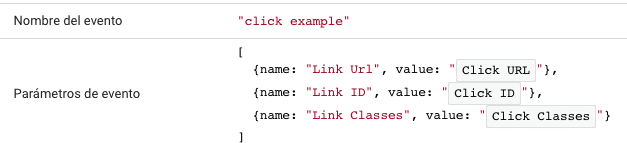

If everything is in order, you need to send these parameters as custom dimensions to link them with each event in GA4, enabling you to analyze the events with the new parameter information.
To achieve this, navigate to Admin > Custom Dimensions > Create custom dimension and create one for each new parameter.
If you skip this step after creating them for the first time, they will not appear in the tool with each event.
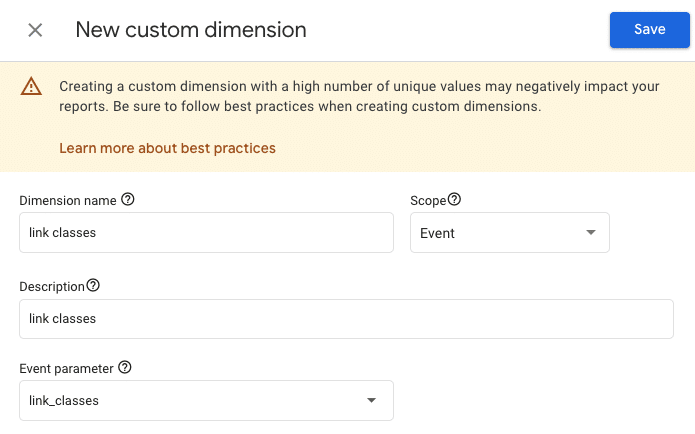
Now you can view the new information for each of your events (Engagement > Events):

In most cases, it may take hours or even days for data to be gathered and displayed.
Get the daily newsletter search marketers rely on.
<input type=”hidden” name=”utmMedium” value=”“>
<input type=”hidden” name=”utmCampaign” value=”“>
<input type=”hidden” name=”utmSource” value=”“>
<input type=”hidden” name=”utmContent” value=”“>
<input type=”hidden” name=”pageLink” value=”“>
<input type=”hidden” name=”ipAddress” value=”“>
Processing…Please wait.
Where to extract the parameter information for each event
Aside from the recommended parameters for each event, you can discover all the parameters included in each website event through Google Tag Manager.
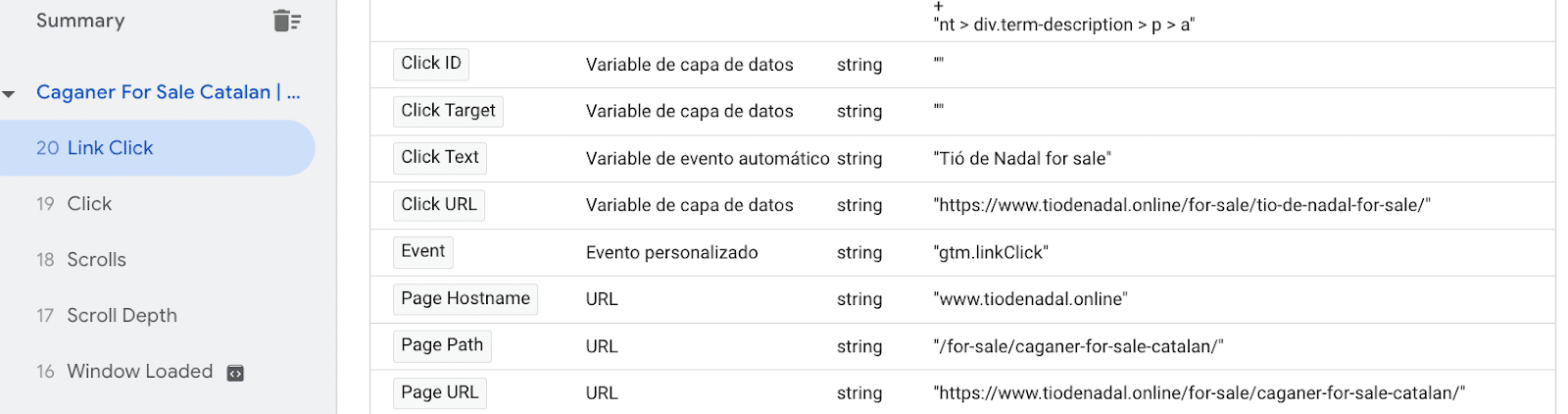
To know all the parameters an event can have, go to Google Tag Manager > Preview. Then, click on the event you want to measure. For example, on a link within your own website.
The variables of the data layer will provide you with all those that are triggered. This will help you identify the different parameters that includes that action within the website.
For example, you can see the following triggered variables for this Link Click. All of them could be set up as parameters:
How to configure event parameters via GA4
Although creating new parameters via Google Tag Manager is strongly recommended, GA4 also allows creating or editing existing event parameters directly within the tool itself.
In cases where the event is automatic or enhanced measurement, you can often do it directly from Custom Dimensions via GA4:
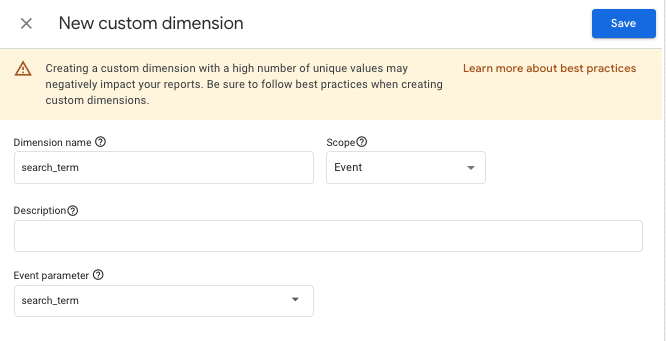

The search_term parameter, for example, will let you find out what users search for in the search box of your own website.
In this case, you can also include the dimension Region to see each region’s most popular searched terms.
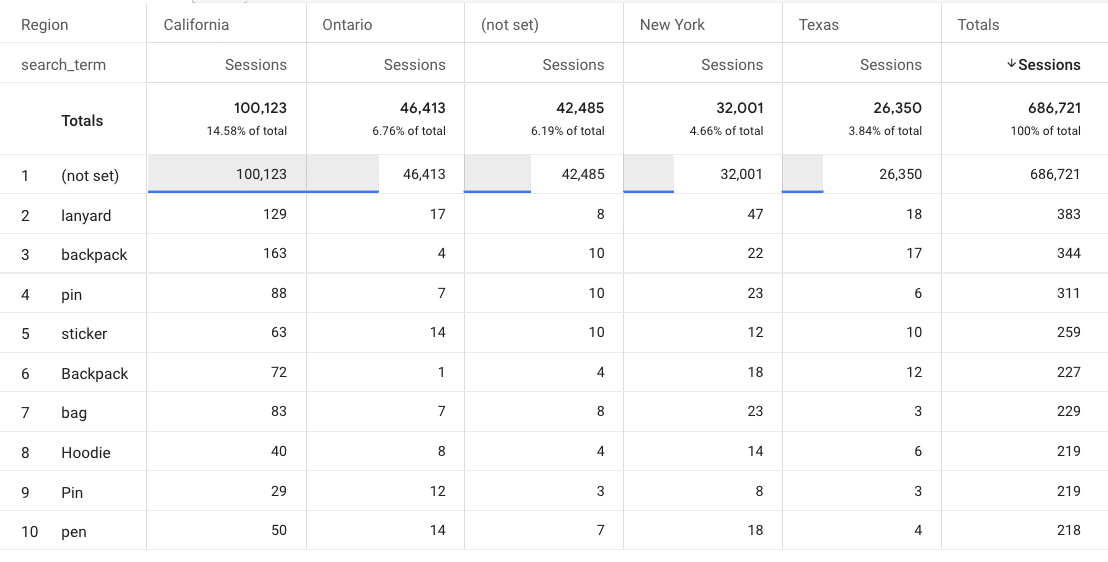
GA4 also provides a series of predefined parameters, which can be modified if the user is interested. This is done in the same area where GA4 allows modifying events.
To do so, go to Admin > Events > Modify Event.

How to create reports to visualize event parameters
If you want to analyze this new information, navigate to Explore > Reports, with the parameters as the dimensions:
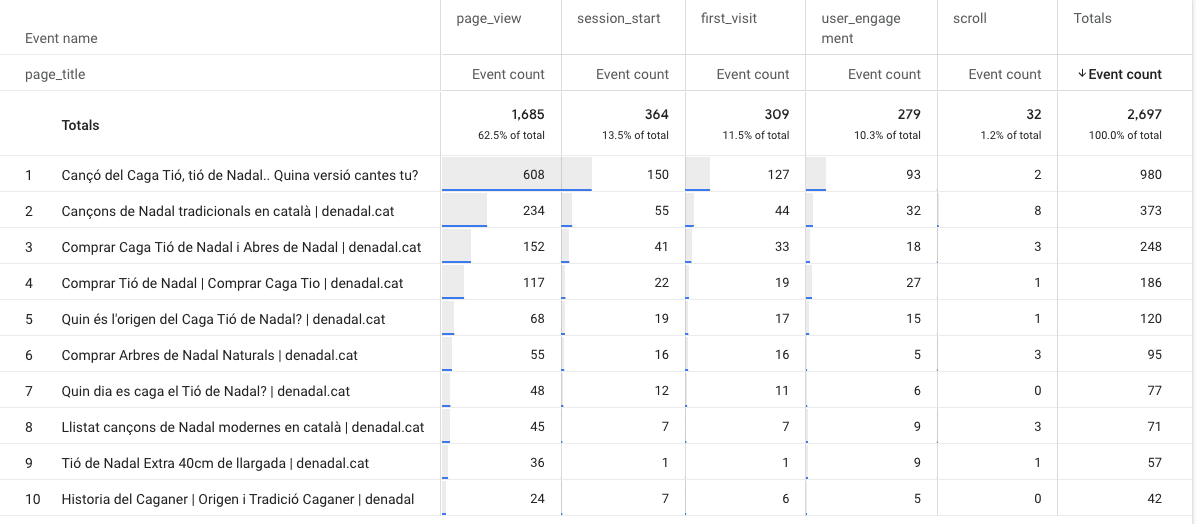
Furthermore, you can incorporate these parameters in Looker Studio reports, enabling you to analyze and examine the information according to specific business objectives and requirements.
For example, the following image shows you through the page_url parameter, in which page the file_download event is happening:

Another example would be the following slide, which shows you specifically, by the form_id event parameter, which form has been submitted specifically on a webpage:

To add the parameters to Looker Studio, it is necessary to include them as dimensions and the events or conversions as metrics.
Setting up event parameters is crucial for a holistic analysis of your website. Parameters let you view website events completely, allowing for a more detailed interpretation.
The post Setting up event parameters in GA4: Everything you need to know appeared first on Search Engine Land.
Courtesy of Search Engine Land: News & Info About SEO, PPC, SEM, Search Engines & Search Marketing
Category seo news | Tags:
Social Networks : Technorati, Stumble it!, Digg, de.licio.us, Yahoo, reddit, Blogmarks, Google, Magnolia.
AI-generated content: To label or not to label?
Written on August 21, 2023 at 8:41 am, by admin
Do you know that a whopping 85.1% of marketers now use AI in their content production workflow?
With the proliferation of AI-generated content, are you obliged to disclose to search engines and readers that a bot created your content?
This is a question many have been asking as the latest AI platforms help people create near-perfect content.
So, is it necessary to label content that’s been produced using AI?
Is this beneficial to publishers and readers?
Those are the questions we’ll be tackling in this article.
What is AI labeling?
AI labeling simply means letting people know if a piece of content was generated using artificial intelligence.
It’s all about marking your content as “AI-generated” so your users know that artificial intelligence played a role in producing it.
The label can be anything like a byline, tag, watermark, etc. that indicates AI produced the content.
Why is this important?
More and more content online is AI-generated. And even if AI didn’t generate it, it may have played a role in research and development.
This is where we cross the muddy waters of whether AI-generated content should be labeled as such so readers know exactly what they’re reading.
From an SEO point of view, what does Google say about AI labeling?
Is AI labeling necessary? Here’s what Google says
Many policymakers, like the European Union, are advocating for AI labeling.
However, Google takes a different stance when it comes to labeling content as AI-generated.
Coming from the biggest search engine, that’s pretty surprising.
More so considering that the search engine giant takes its E-E-A-T standards seriously.
So, how does this fit in with AI-generated content?
- Quality trumps origin: Google values quality content more than it does the originator of the content.
- User experience matters, a lot: Google evangelizes user experience. Labels detract from this.
- Authority plays a huge role: The authority of the website a piece of content is published on and that of its author pull a lot of weight.
What does all this mean for AI-generated content?
From Google’s standpoint, AI labeling isn’t a necessity.
It does not contribute to any of the ranking factors used to determine content quality.
The important thing is to create content that’s useful and optimize it for ranking.
How does Google treat AI-generated content?
One of the questions most asked about AI-generated content is whether Google can detect it.
The simple answer is – yes.
But does it matter?
As we’ve already seen, Google doesn’t mind if content is AI-generated or human-written. All that matters is that your content is written for people first and meets E-E-A-T standards and is in line with the search quality rater guidelines.
This means if your AI-generated content is helpful, then it can rank. The other side of the coin is that human-written content written solely to reach the top of the SERPs won’t rank.
In a nutshell, Google doesn’t really look at the source of the content but rather the quality of the content and the intent behind its creation.
Get the daily newsletter search marketers rely on.
<input type=”hidden” name=”utmMedium” value=”“>
<input type=”hidden” name=”utmCampaign” value=”“>
<input type=”hidden” name=”utmSource” value=”“>
<input type=”hidden” name=”utmContent” value=”“>
<input type=”hidden” name=”pageLink” value=”“>
<input type=”hidden” name=”ipAddress” value=”“>
Processing…Please wait.
AI labeling isn’t necessary, but the human touch is
Since AI labeling isn’t necessary, does that mean you should copy AI-generated text and paste it into your CMS?
Absolutely not!
While AI content writing tools are improving, you still need to add a human touch to every piece of content before publishing.
One reason is that human editors are needed to verify facts, ensuring every piece of content is high-quality and trustworthy. Especially if you’re in a fast-paced industry, these can change pretty quickly, necessitating human fact-checkers.
Another reason you need to add a human touch is that Google’s algorithms and ranking signals are primarily based on human-generated content.
They prioritize natural language in search rankings, and achieving this in AI-generated content takes a human touch.
As AI becomes mainstream, policies may evolve
AI is no longer the future.
It’s here to stay.
And with AI adoption becoming widespread in various industries, including digital marketing, policies and frameworks guiding its use are bound to be revised, especially around ethics, accountability, and transparency in AI applications.
However, transparency will be focused on social media platforms and other platforms that publish a lot of images.
This is to combat misinformation spread through deepfake images and videos. These can be deceptive and harder than written content to verify.
Does this mean you should consider AI labeling?
We’ve looked at AI labeling and what major brands and policymakers think of it.
And we’ve come full circle to the question that brought us down this path – is AI labeling necessary?
This is how I see it:
If you’re publishing AI content with quality in mind and include your human touch in the production process – AI labeling isn’t necessary.
However, there may be some instances in which you may want to consider it depending on the context, topic, and content you’re sharing. It all comes down to good judgment.
The post AI-generated content: To label or not to label? appeared first on Search Engine Land.
Courtesy of Search Engine Land: News & Info About SEO, PPC, SEM, Search Engines & Search Marketing
Category seo news | Tags:
Social Networks : Technorati, Stumble it!, Digg, de.licio.us, Yahoo, reddit, Blogmarks, Google, Magnolia.
IPG Mediabrands tells clients to temporarily pause Google Performance Max campaigns
Written on August 19, 2023 at 2:39 am, by admin
IPG Mediabrands advised its clients to temporarily pause campaigns using Google’s Performance Max.
The company issued a “privacy alert” email in response to allegations in a new report that YouTube ads may have led to improperly tracking children.
Brands using PMax may inadvertently violate the Children’s Online Privacy Protection Act (COPPA) as a result, according to the study conducted by Adalytics.
Why we care. If brands are found to be in violation of COPPA, they may have to pay a significant financial penalty just as YouTube did in 2019 when it spent a record $170 million to settle similar charges.
Have any laws been broken? Under COPPA, online services must get parental consent before collecting data for targeted advertising purposes from children under the age of 13.
Adalytics researchers found the platform serving personalized ads from more than 300 brands on “made for kids” videos. When viewers clicked on these campaigns, they were redirected to the brand’s website, which sometimes resulted in dropping cookies on the user’s browser.
IPG Mediabrands investigates. In response to the findings, IPG Mediabrands conducted its own investigation. They reportedly found that at least one of its clients, which was running an adult-targeted campaign, had its ad feature on a “made for kids” channel.
If a child had clicked on the ad, tracking pixels from the brand’s website would have gathered data from the child as well as their associated ID. This data would then have been shared with Google’s PMax.
IPG Mediabrands, which manages $40 billion in marketing investment worldwide, reportedly concluded that a full investigation was needed to identify the full extent of the impact on its clients.
What has IPG Mediabrands said? A spokesperson for IPG Mediabrands told Search Engine Land that the email was an “early, unapproved draft of an internal-only note that was not reflective of our broader organizational POV. This was retracted. This was not sent to clients.”
The email in question – which was obtained by Business Insider – read:
- “Because placement reporting is not available for PMAX, we recommend that clients temporarily pause PMAX until the efficacy of the above controls are validated on non-PMAX campaigns where placement reporting is available.”
- “Clients should consult with their legal, privacy/infosec, website, and data teams to consider potential exposure, and determine the appropriate process for identifying and removing data potentially collected from children.
For example, advertisers may assess data in their CDPs that originated from YouTube as a traffic source.” - “These recommendations are being made on the basis of the probability of FTC scrutiny, as well as in light of the evidence of waste in advertising investment against unintended audiences.”
What has Google said? Dan Taylor, Google’s Vice President of Global Ads, said the Adalytics study was “flawed”. Addressing the report in a post on X (formerly known as Twitter), he stated:
- “[This is the] 2nd time [Adalytics has] produced faulty research about Google advertising this summer. Here are 6 facts about how we protect kids on YouTube that Adalytics gets completely wrong or ignores.”
- “#1 We don’t personalize ads to kids, ever. And we treat everyone who watches Made for Kids content as a child, regardless of their age.”
- “#2 We built YouTube Kids as a dedicated app designed from the ground up to be a safer experience for kids to explore, with tools for parents and caregivers to guide their journey. The YouTube Kids app has never had personalized ads either.”
- “#3 Made for Kids content has ads but we restrict the types of products that can be advertised: e.g. no ads for video games or media unsuitable for children, no ads about dating and relationship, no ads for food and beverage.”
- “#4 Google does not share with advertisers what content/video a person was watching when they click on an ad. That means advertisers never know if a click came from someone watching Made for Kids content, regardless of their age.”
- “#5 Advertisers, with a single click, can choose to opt out of Made for Kids content. The opt-out, called Content Suitable for Families, prevents advertisers from having their ads run alongside Made for Kids content. Adalytics doesn’t appear to know this.”
- “#6 Cookies ≠ ad personalization. Cookies are permitted under COPPA for statistical reporting, for spam and fraud detection and for frequency capping. They are critical to YouTube creators’ monetization which encourages a rich diversity of content on YouTube.”
- “#7 Though we only just received the report, what we have reviewed shows no violations of our commitments nor privacy policies. Given Adalytics’ last report was debunked by 2 independent organizations, we do not put much stock in the accuracy of their research.”
- “#8 The NYTimes, who was given early access to the report, couldn’t even verify the bulk of Adalytics’ claims. It does not corroborate Adalytics’ accusations and in fact found the opposite: no violation of COPPA, no personalization of ads to kids, and no improper use of cookies.”
- “#9 Adalytics’ report has no substance and tries to make a gotcha when there is none. We offered to meet with them weeks ago and heard crickets. Do they have the credentials and expertise to publish these reports?”
Deep dive. Read Adalytics’ YouTube study in full for more information on its research. Read Google’s official documentation on how ads work on YouTube for supervised accounts for more information.
The post IPG Mediabrands tells clients to temporarily pause Google Performance Max campaigns appeared first on Search Engine Land.
Courtesy of Search Engine Land: News & Info About SEO, PPC, SEM, Search Engines & Search Marketing
Category seo news | Tags:
Social Networks : Technorati, Stumble it!, Digg, de.licio.us, Yahoo, reddit, Blogmarks, Google, Magnolia.
Amazon Sponsored Product ads will now appear on Pinterest, Buzzfeed, and more
Written on August 19, 2023 at 2:39 am, by admin
Amazon Sponsored Product ads will now appear on third-party premium apps and websites.
Pinterest, BuzzFeed, Hearst Newspapers, Raptive and Ziff Davis brands like Lifehacker and Mashable are among the brands that are partnering up with the retail giant to increase reach for its Sponsored Product ad product.
The news comes after Amazon announced a multi-year collaboration with Pinterest to become its first ever third-party advertising partner back in April.
Why we care. Expanding the reach of Amazon Sponsored Product ads means marketers can potentially achieve higher conversion rates and increased return on ad spend, positioning their brands for success in a dynamic digital landscape. The new feature could also help address the attribution issue on Pinterest, which has proved to be a budget-limiting factor for advertisers, as huge discrepancies have previously been reported between the Pinterest dashboard and Google Analytics.

How it works. Amazon will identify users on the third-party platforms that are likely to be interested in your product by analyzing relevant page context, the campaign and cost-per-click parameters that you have already established. It will then display your campaign to this audience.
All ads on the third-party platforms will link back to your Amazon product page, enabling potential customers to easily make a purchase in just a couple of clicks.
Eligibility. Sponsored Products will only appear on third party premium apps and websites if they meet the following criteria:
- The product must be in stock.
- The product includes trusted Amazon shopping attributes such as Prime delivery promise, ratings and accurate pricing information.
Next steps. You don’t need to take any action for your Sponsored Products to appear on third-party premium apps or websites – Amazon will enable this feature automatically for you.
Campaign reporting will be available n the Sponsored Products placement report, which can be downloaded in the report centre.
What has Amazon said? Colleen Aubrey, senior vice president, Amazon Ads Products and Technology, said:
- “Sponsored Products has always been about helping customers discover products they may love.”
- “We’ve been building and evolving Sponsored Products in our store for more than 10 years, leveraging advanced machine learning algorithms to show advertising that’s highly relevant for customers, and therefore highly effective for the advertisers that choose to use it.”
- “We are excited to now apply what we’ve learned about connecting customers and products in meaningful ways to a range of great websites and apps.”
Get the daily newsletter search marketers rely on.
<input type=”hidden” name=”utmMedium” value=”“>
<input type=”hidden” name=”utmCampaign” value=”“>
<input type=”hidden” name=”utmSource” value=”“>
<input type=”hidden” name=”utmContent” value=”“>
<input type=”hidden” name=”pageLink” value=”“>
<input type=”hidden” name=”ipAddress” value=”“>
Processing…Please wait.
What has Pintrest said? Martha Welsh, Chief Strategy Officer at Pinterest, told Search Engine Land:
- “We’re excited to enter this next phase of our third-party partnership with Amazon Ads to bring more shoppable content onto the platform along with a great consumer buying experience. Shopping on Pinterest has never been easier.”
- “Now through our partnership, advertisers on Amazon are able to have their products appear in our search results, making ads on Pinterest even more relevant and actionable.”
- “Shopping is one of the top requests we receive from our users – more than 50% of users say they come to Pinterest to shop – and we’re continuing to deliver more ways to go from inspiration to action. We’re in the early stages of testing right now and seeing encouraging results.”
Deep dive. Read Amazon’s Sponsored Products announcement in full for more information.
The post Amazon Sponsored Product ads will now appear on Pinterest, Buzzfeed, and more appeared first on Search Engine Land.
Courtesy of Search Engine Land: News & Info About SEO, PPC, SEM, Search Engines & Search Marketing
Category seo news | Tags:
Social Networks : Technorati, Stumble it!, Digg, de.licio.us, Yahoo, reddit, Blogmarks, Google, Magnolia.
The new Bing has failed to take any market share from Google after six months
Written on August 17, 2023 at 11:39 pm, by admin
It’s been just over six months since the new AI-powered Bing with Bing Chat launched – but its overall search engine market share remains virtually unchanged globally and in the U.S.
Why we care. When the new Bing launched, it felt like the dawn of an exciting new era in search. Microsoft seemed to have a legitimate chance to erode some of Google’s dominance and become a truly worthy competitor to Google, thanks to its new conversational and generative AI take on search. Unfortunately, that hasn’t happened.
By the numbers. Bing’s U.S. search market share was 6.47% in July, per web analytics service StatCounter.

- In February, when new Bing launched, it’s market share was 6.35%. Bing’s market share peaked at 6.61% in March.
- But Bing’s U.S. market share was typically over 7% in 2022, with a high of 7.82% in November.
Bing’s global search market share was 2.99% in July, per StatCounter.

- The highest Bing’s global search market share has been this year was in January, at 3.03%, a month before new Bing was announced. In 2022, Bing was consistently over 3%.
Microsoft disputes these numbers. A WSJ article today (paywalled, so I’m not linking to it) noted that:
- “[Microsoft] disputed outside data, saying third-party data companies aren’t measuring all the people who are going directly to Bing’s chat page.”
StatCounter said its data takes traffic to and from Bing’s chat into account. Here’s what digital intelligence platform SimilarWeb told me:
- “It’s possible that we’re missing some of the Bing Chat interactions that use an Edge sidebar / extension, but I don’t know how significant that is in the grand scheme of things.”
Yusuf Mehdi, Microsoft’s corporate VP and consumer CMO, told WSJ the company’s internal data shows Bing taking market share from Google, but failed to provide any figures.
- “We’ve made more progress in the last six months than we have in the previous decade or two combined. We’re delighted with our start,” Mehdi said.
This claim seems a bit odd, considering around this time 10 years ago, Bing’s search market share was 17.9%, per comScore.
How Microsoft celebrates six months. Microsoft’s Aug. 7 blog post highlighting the number of chats (1 billion) and images created (750 million), as well as nine quarters of growth for Edge. And it earned them a surprising amount of PR thanks to many publications covering the launchiversary (Search Engine Land was not among those, because there was nothing new to report to you).
More data. I also checked with SimilarWeb and comScore for their latest data on Bing’s lack of growth. Here’s what a SimilarWeb spokesperson told me:
- “We can see a little bit of growth for Bing, but it’s incremental. According to our official rankings for the search engine category, they were the #2 search engine with a little over 2% traffic share in the U.S. as of July, but still at about 1% worldwide.”
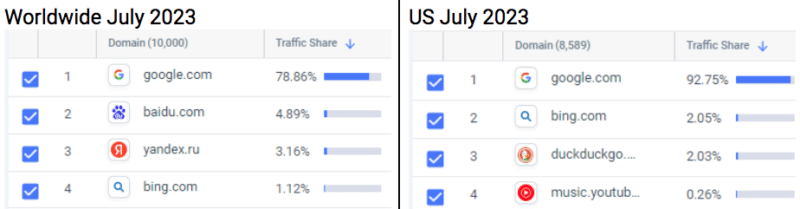
Meanwhile, Bing saw a 6% decline in unique visitors and total visits from February to July, according to data from analytics firm comScore. Bing’s unique visitors and total visits also declined 2% year on year in July.
Dig deeper. Here’s some of our previous coverage of the AI search engine arms race that never actually became a race:
- These 2 charts show Microsoft Bing’s search market share problem
- New Bing attracts new Edge users – who then use Google Search
- The new Bing making (small) gains on Google Search
The post The new Bing has failed to take any market share from Google after six months appeared first on Search Engine Land.
Courtesy of Search Engine Land: News & Info About SEO, PPC, SEM, Search Engines & Search Marketing
Category seo news | Tags:
Social Networks : Technorati, Stumble it!, Digg, de.licio.us, Yahoo, reddit, Blogmarks, Google, Magnolia.