

Google Search Console to release new video page indexing report
Written on May 12, 2022 at 5:04 pm, by admin
A new video page indexing report is coming to Google Search Console in the near future, Dikla Cohen, a Web Ecosystem Consultant at Google, announced at Google I/O today. The new report shows you a summary of all the video pages Google found while crawling and indexing your site.
Video page indexing report. The video page indexing report will be found in Google Search Console, under the “Index” tab, under “video pages.” At the time of writing this, this feature does not seem live yet – but it should be coming soon.
This report shows you a summary of all the video pages Google found while crawling and indexing your site. It will help you:
- See how many video landing pages Google discovered and in how many of them a video was indexed
- Examine reasons for unindexed videos in landing pages
- Use the list of affected video pages URLs to debug and fix issues
- Validate fix to initiate recrawling of known affected URLs
What it looks like. Here are screenshots from the presentation:

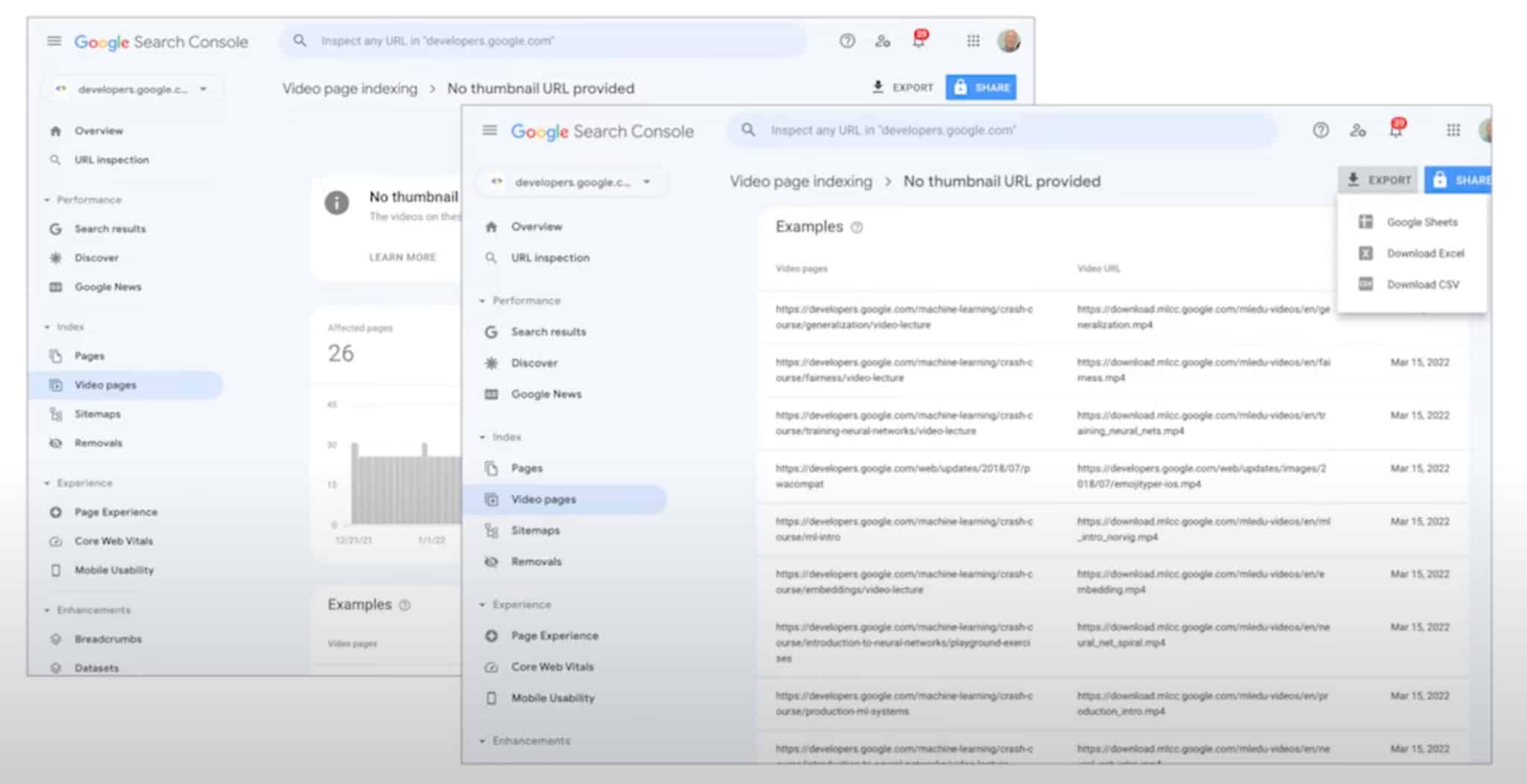
Why we care. Video is an important aspect for many web sites, and these reports will help you discover how important those videos are for you related to Google Search. Google Search Console’s new video indexing reports can help you find indexing issues with your videos and how to debug those issues.
Check back to find out when this report goes live.
The post Google Search Console to release new video page indexing report appeared first on Search Engine Land.
Courtesy of Search Engine Land: News & Info About SEO, PPC, SEM, Search Engines & Search Marketing
Category seo news | Tags:
Social Networks : Technorati, Stumble it!, Digg, de.licio.us, Yahoo, reddit, Blogmarks, Google, Magnolia.
Google Universal Analytics real time metrics now titled “in the last 5 minutes”
Written on May 12, 2022 at 5:04 pm, by admin
Google has updated the title it uses for real time analytics in Universal Analytics 3 to read “in the last 5 minutes.” Previously this section was titled “right now” but with Google Analytics 4 rolling out, Google wanted to make the title more specific to what both are actually displaying.
In the last 5 minutes. Google’s title for the real time metrics was updated to say “in the last 5 minutes” to more accurately describe what UA3’s real time metrics actually displayed. Here is a screenshot of the new title:

Previously, it looked more like this saying “right now” – which is not really right now but in the last 5 minutes.
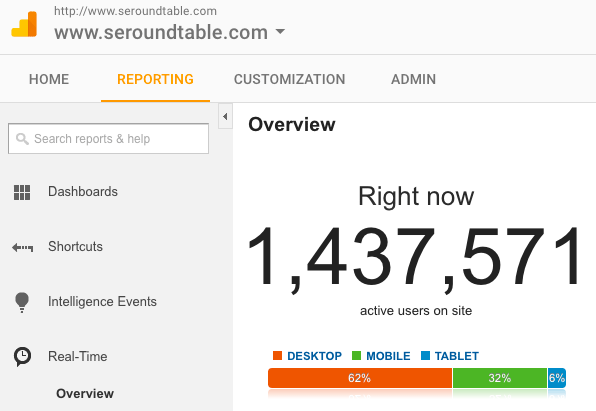
Why the change. We believe Google made this change in order to help communicate why UA3 real time metrics are different from GA4 real time metrics. UA3 real time metrics are based off the last five minutes whereas GA4 real time metrics are based off the last thirty minutes.

Why we care. When you see this change, don’t worry, you are not alone – we are all seeing this title change. But rest assured, the metrics in real time Universal Analytics 3 have not changed. Google is just making it crystal clear that UA3 is measuring the past 5 minutes and GA4 is measuring the past 30 minutes.
Keep in mind, both UA3 and GA4 also measure traffic differently – so even if they both looked at the past 5 minutes, it would show different numbers.
The post Google Universal Analytics real time metrics now titled “in the last 5 minutes” appeared first on Search Engine Land.
Courtesy of Search Engine Land: News & Info About SEO, PPC, SEM, Search Engines & Search Marketing
Category seo news | Tags:
Social Networks : Technorati, Stumble it!, Digg, de.licio.us, Yahoo, reddit, Blogmarks, Google, Magnolia.
You still don’t have marketing security?
Written on May 12, 2022 at 5:03 pm, by admin

Why has ‘marketing security’ become a top priority for modern-day marketers?
Five years ago, if you were to ask a marketer about their security strategy, the likely response would have been sheer confusion. “Bots, proxies, data-center traffic? That’s for the security team to worry about.” In 2022, however, you’d be hard-pressed to find a marketing leader who hasn’t deployed a marketing security strategy. Today, most marketers view fake, automated and malicious traffic as a strategic threat to their operation, compromising efficiency and hurting their bottom line.
27% of website traffic is fake, and it’s killing marketing efficiency
Recent data released by CHEQ across a pool of over 12,000 of its customers revealed that 27% of all website traffic is fake, consisting of botnets, data centers, automation tools, scrapers, crawlers, proxies, click farms and fraudsters. The scale of the “Fake Web” is massive, and marketers are seeing it everywhere. Just this past Super Bowl, 17 billion ad views came from bots and fake users. On Black Friday, a third of online shoppers weren’t real. Affiliate marketers are losing $1.4 billion a year to fraud. Elon Musk recently highlighted concerns over bots overrunning social media and Spotify is reportedly suffering from its own bot problem. Wherever marketers look, the Fake Web is there, and it’s affecting their campaigns, funnels, data and revenue.
Paid marketers without security ‘waste’ thousands of clicks on fake users
Perhaps one of the most visible issues for marketers, especially those running paid user acquisition, is Click Fraud. Bots, click farms and even competitors are draining their ad budgets and severely damaging campaign efficiency. Many advertisers suffer from thousands and even tens of thousands of fake clicks every month, amounting to a massive waste of spend. But it’s not just the wasted spend, it’s also budgets that could have otherwise gone to real paying customers who would have generated actual revenue. In fact, recent data shows that $42 billion is lost each year in revenue opportunities because of this issue.
But the real damage begins when those fake users infiltrate your audiences
Many paid marketers use smart campaigns or audiences to group together users that have either previously shown interest in their products or services or share attributes with users who have. This is helpful for expanding the market they are addressing and reaching new potential buyers. At this point, it might not come as a surprise that bots and fake users can stand in the way of successfully executing this practice as well. When audiences become polluted with malicious human users or invalid bot traffic, marketers end up accidentally re-targeting and optimizing toward fake traffic. If marketing security measures are not put in place, the cycle can continue until audiences are overtaken by bots and no longer share any resemblance to a group of human users that have the ability and intention to convert. If clean audience segments are a priority, then, for many marketers, marketing security is as well.
Fake traffic is also one of the biggest drivers of poor lead quality
Every marketer can relate to the frustration of illegitimate looking inbound leads. Sometimes it’s a fake account or a bogus email address. Sometimes the information looks legitimate but when you research the lead you can’t find the company or individual. But whatever the case is, nothing causes more tension between sales and marketing than bogus leads that waste the sales team’s time and never convert. In fact, poor traffic quality is one the biggest drivers of marketing security adoption today, as teams look to eliminate illegitimate form fills and submissions and prevent them from polluting the sales pipeline.
But perhaps the biggest reason marketers are fighting bots is data quality
Beyond the monetary waste, budget inefficiency, polluted audiences and fake leads, there is one issue that stands above them all, which is perhaps the biggest driver of marketing security adoption – and that issue is data quality. Think about it – organizations spend so much energy, time, effort, resources and money on data management and consumption – expensive BI, analytics and reporting tools, teams of analysts, CDPs and DMPs. All of this so that they can drive better tactical decisions around landing page optimization, audiences and targeting, as well as strategic decisions around budget and channel planning, growth planning and revenue forecasting. When an average of 27% of traffic-in-funnel is fake, all that data is skewed and those decisions are severely compromised. Adding a layer of visibility to detect bots and fake users and gain transparency over their funnels, is becoming an absolute integral part of the modern-day marketer’s role.
More than anything, marketing security is being looked at as an opportunity
Marketers want to eliminate these threats to their operation, but above all, they want to drive better budget efficiency, better leads and higher revenue, and that’s the ultimate goal of marketing security. Eliminating these inefficiencies drives a healthy, clean and transparent funnel that delivers better results. And for these reasons, asking a marketer “what’s your security strategy?” in 2022, is quickly becoming an almost banal question, as Marketing Security quickly becomes an industry standard.
This article was written by Daniel Avital, chief strategy officer, and global head of marketing at CHEQ.
The post You still don’t have marketing security? appeared first on Search Engine Land.
Courtesy of Search Engine Land: News & Info About SEO, PPC, SEM, Search Engines & Search Marketing
Category seo news | Tags:
Social Networks : Technorati, Stumble it!, Digg, de.licio.us, Yahoo, reddit, Blogmarks, Google, Magnolia.
Google reveals new image ranking signal, inclusive schema
Written on May 11, 2022 at 1:55 pm, by admin
Google said it will soon incorporate a new signal into image ranking. Google is also introducing a new type of schema in an attempt to help make its image search results more racially diverse and inclusive.
Google will use MST Scale to rank images. Google said it will be adjusting how it ranks images, using what is called the Monk Skin Tone (MST) Scale. It is a 10-shade scale. It looks like this:
 The Monk Skin Tone Scale includes 10 shades.
The MST scale was created with the help of Dr. Ellis Monk, a Harvard professor and sociologist. Google said the MST Scale is being incorporated into Images search, as well as other image products (e.g., Google Photos). And Google plans to expand it more broadly in the coming months.
Inclusive schema. Google said that creators, brands and publishers can use a new type of schema – inclusive schema – to label their content with attributes like skin tone, hair color and hair texture. Using this schema will help Google better understand what appears within the images.
Content labels coming soon. Google also noted that it wants to create a more representative search experience. As part of that, Google plans to develop a “standardized way to label web content.”
A continuation of image search changes. Google’s push toward image equity began In October 2021, Google told Bloomberg it had updated its algorithms to show more skin tones for a variety of images, ranging from [beautiful skin] to [professional hairstyles] to [happy family].
- “We’ve started to roll out an improvement to Google Images to promote greater skin-tone diversity so more people can find relevant and helpful results,” a Google spokeswoman told Bloomberg. “We’re in the early phases of this effort and are continuing to experiment to provide greater diversity in results.”
Now this effort is being pushed out more widely.
Why we care. Google is pushing to be more inclusive of skin tones in Images and adjusting its ranking algorithm to do so. So if you’re publishing diverse imagery, using this schema will help Google better understand the details within your image content, giving you a higher chance of being found in Google Images.
You can read the full announcement about how Google plans to improve skin tone representation here.
The post Google reveals new image ranking signal, inclusive schema appeared first on Search Engine Land.
Courtesy of Search Engine Land: News & Info About SEO, PPC, SEM, Search Engines & Search Marketing
Category seo news | Tags:
Social Networks : Technorati, Stumble it!, Digg, de.licio.us, Yahoo, reddit, Blogmarks, Google, Magnolia.
Google’s My Ad Center lets users control their ad experience, follow brands
Written on May 11, 2022 at 1:55 pm, by admin
A sleek new My Ad Center experience was announced today at Google’s annual I/O event. It provides users with a handful of options to control the messages being served across selected Google properties.
Google users will be able to dictate:
- Which brands and topics they like.
- The amount of personalization they are comfortable with for their ad customization.
These personalization options can be accessed from within the new My Ad Center experience or directly within the ad itself.

Privacy has been the core issue over the last few years. While Google has focused on offering a variety of solutions, many times they’ve been somewhat hard to navigate to for the unskilled user.
If adopted by consumers, the My Ad Center solution should help to feed Google’s ad serving intelligence while making the user experience better on Google Properties including YouTube, Discover and Search. With third-party data going away, the ability to follow brands will provide critical feedback directly to Google.
Here’s everything we know about My Ads Center from Google I/O:
Follow brands and topics. All Google users will now have the ability to choose the brands and topics most germane to them that they want to see. This is much different than the Topics targeting within the Privacy Sandbox now being tested, as the inputs are dictated directly by the user.
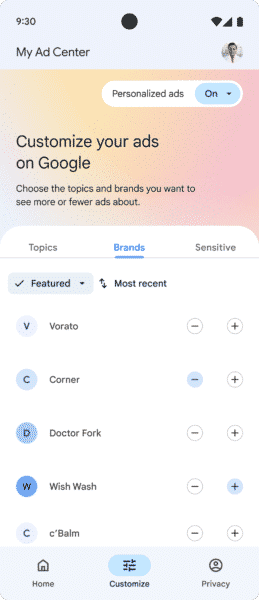
An example provided by Google was that a user interested in a hybrid car may choose this as a topic that they’d be interested in and would be served ads related to that particular topic. This can also work with specific brands that users enjoy
The key difference is that the user would be directly providing Google with the inputs to help drive targeted ads.
Personalization and data source controls. The My Ad Center location will be the go-to source for users looking to limit any/all personalization including age, relationship status, education and demographic data. Users can also limit or opt-out of sensitive ad topics (e.g., gambling, alcohol, dating, weight loss, and pregnancy & parenting) within My Ad Center.
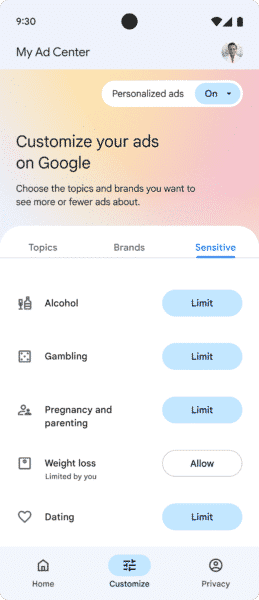
The last personalizable element found in My Ad Center is control over the data sources used. Google users will be able to choose which data sources can be used to personalize ads and which sources should be used across some Google properties (e.g., personalized search, YouTube recommendations). Those inputs come in the form of wanting more or less ads from a topic or brand.
Expanded controls within ads. While My Ad Center is nice, let’s be honest, sometimes people just want to make changes immediately when they are served an ad. Those folks are in luck with expanded controls within ads.
Google users will have the ability to make changes or get targeting clarity directly within the ad itself. The new expanded controls will allow users to like, block or report an ad while also being able to tune the targeting if you’d like to see more or less of the brand or topic shown.
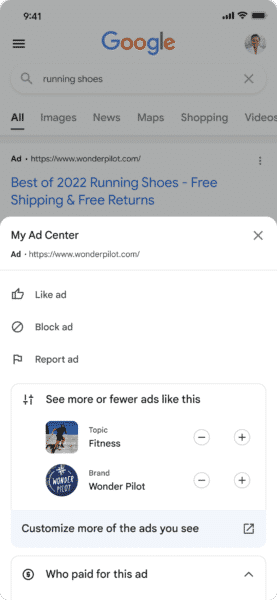
However, the biggest change for advertisers may be the transparency features included directly within the ad controls. The “About this Ad” is being replaced with the new transparency features that should make it more clear as to why users are seeing the ad.
The expanded controls will include transparency features that show who paid for the ad (using Advertiser Identity Verification) and the account categories used to show the specific ad.
In the past users could see “Why this ad” information that would display matching criteria. But the ability to see who paid for the ad is new and important.
Not for the Google Display Network, Gmail or Search Partners (yet). When My Ad Center launches the only supported products will be Google search, YouTube and Google Discover. Upon launch, there will be a second ad settings page separate from the My Ads Center for sites that partner with Off-Google ads (ie the Google Display Network).
The topics or brand updates inputted into the My Ads Center won’t initially be passed to this new second ad settings page. That said, if ad personalization is shut off entirely within My Ads Center that will shut off all personalization across all Google-owned and non-Google-owned properties.
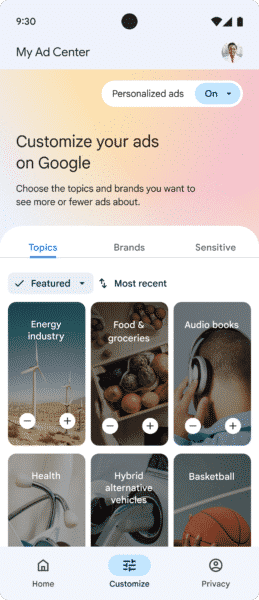
Why we care: My Ad Center looks to be Google’s best effort yet on privacy control. Not only will users be able to see why items are serving from the center, but also from within ads themselves. Most importantly, users will get clarity into who is paying for the ad being served. If you are an advertiser currently trying to hide your information and fly under the radar, look elsewhere as your days are numbered on Google properties.
The addition of brands and topics to follow is a unique feature that could be a future benefit to advertisers. Instead of solely leveraging elements from the Privacy Sandbox like Topics, down the road this may provide Google with first-party user-inputted signals for targeting. However, the success of this option will be tied to adoption. If Google users don’t take the time to provide feedback in My Ads Center, then the value to users (and advertisers) won’t exist.
The post Google’s My Ad Center lets users control their ad experience, follow brands appeared first on Search Engine Land.
Courtesy of Search Engine Land: News & Info About SEO, PPC, SEM, Search Engines & Search Marketing
Category seo news | Tags:
Social Networks : Technorati, Stumble it!, Digg, de.licio.us, Yahoo, reddit, Blogmarks, Google, Magnolia.
Google multisearch to gain near me support
Written on May 11, 2022 at 1:55 pm, by admin
Google is expanding Google multisearch, a search feature Google announced several weeks ago to let you search by image and text at the same time, to support near me types of queries. This will let you find local business in Google Maps and Google Search to see local search results.
What is Google multisearch. Google multisearch lets you use your camera’s phone to search by an image, powered by Google Lens, and then add an additional text query on top of the image search. Google will then use both the image and the text query to show you visual search results.
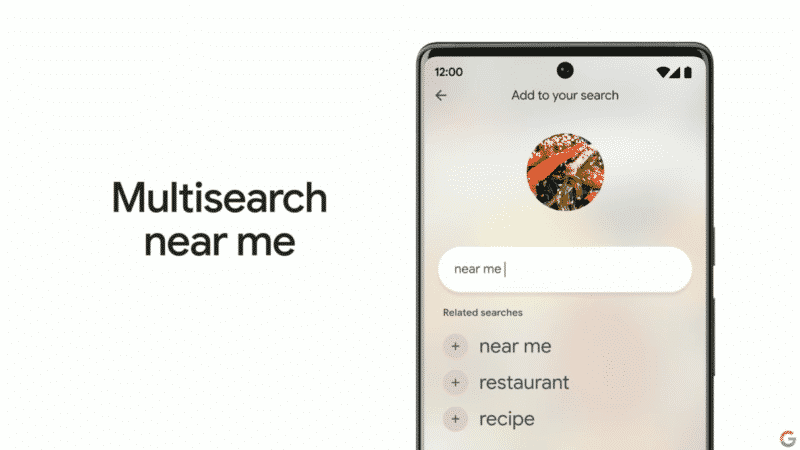
What is near me multisearch. The near me aspect lets you zoom in on those image and text queries by looking for products or anything via your camera but also to find local results. So if you want to find a restaurant that has a specific dish, you can do so.
What multisearch near me looks like. Here is a screenshot followed by a GIF from the Google I/O keynote:

MUM not yet in multisearch. Google made a comment in its blog post saying “this is made possible by our latest advancements in artificial intelligence, which is making it easier to understand the world around you in more natural and intuitive ways. We’re also exploring ways in which this feature might be enhanced by MUM– our latest AI model in Search– to improve results for all the questions you could imagine asking.”
I asked Google if Google multisearch currently uses MUM and Google said no. For more on where Google uses MUM see our story on how Google uses artificial intelligence in search.
Available in US/English. Multisearch is live now and should be available as a “beta feature in English in the U.S.” Google said. But the near me flavor is not going live until later this year, Google said.
Why we care. As Google releases new ways for consumers to search, your customers may access your content on your website in new ways as well. How consumers access your content, be it desktop search, mobile search, voice search, image search and now multisearch – may matter to you in terms of how likely that customer might convert, where the searcher is in their buying cycle and more. This is now even more important for local businesses.
The post Google multisearch to gain near me support appeared first on Search Engine Land.
Courtesy of Search Engine Land: News & Info About SEO, PPC, SEM, Search Engines & Search Marketing
Category seo news | Tags:
Social Networks : Technorati, Stumble it!, Digg, de.licio.us, Yahoo, reddit, Blogmarks, Google, Magnolia.
An SEO guide to audience research and content analysis
Written on May 11, 2022 at 1:55 pm, by admin
How your customers find you can vary significantly. It may be based on their interests, needs or pain points.
Some people may already know exactly what they need and search for that on Google. Others may be just starting the research process. Others may already know what they need and compare to identify the best source to purchase from.
In this stage of your SEO research and planning, you’ll want to identify:
- Target personas
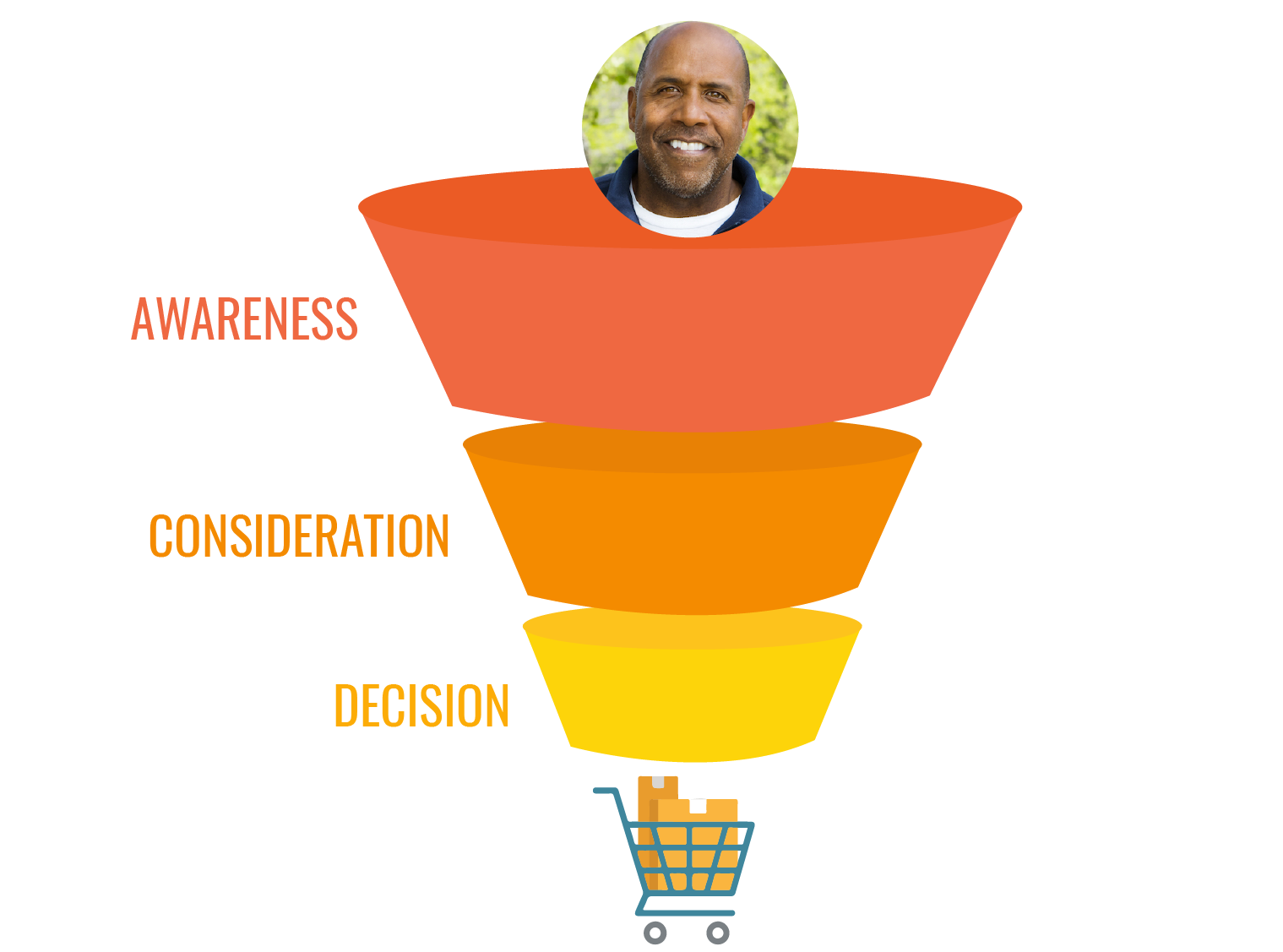
- Buying stages
- Potential keywords
Your goal will be to map your target personas, buying stages and keywords for each persona and buying stage.
Persona research
You can start by using customer service data or information from your Google Analytics demographic details. With this information, you can start creating target personas.
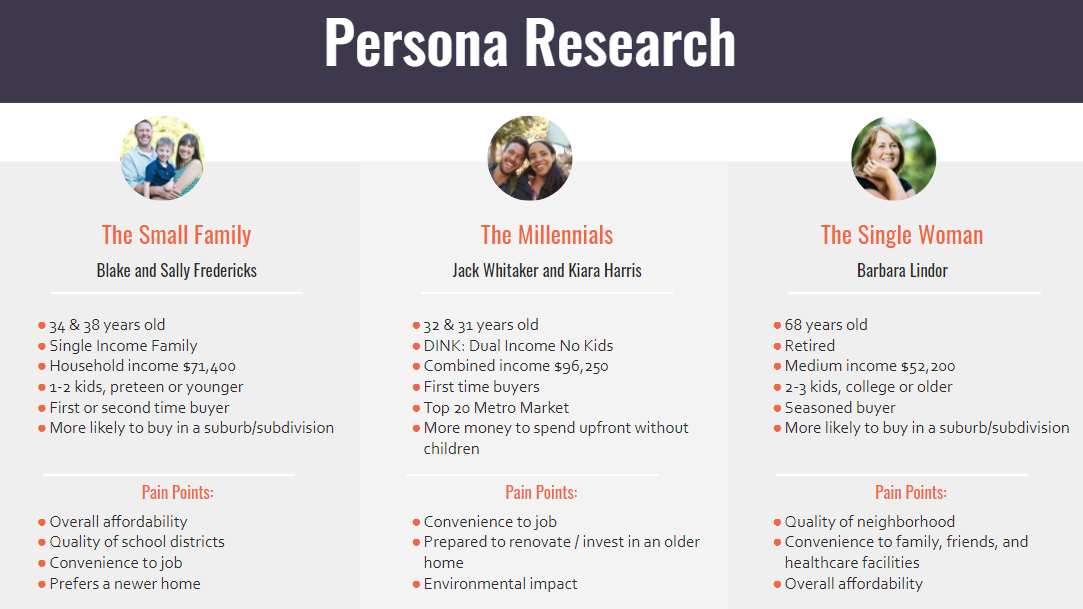
Below is an example of possible target personas for a real estate company.
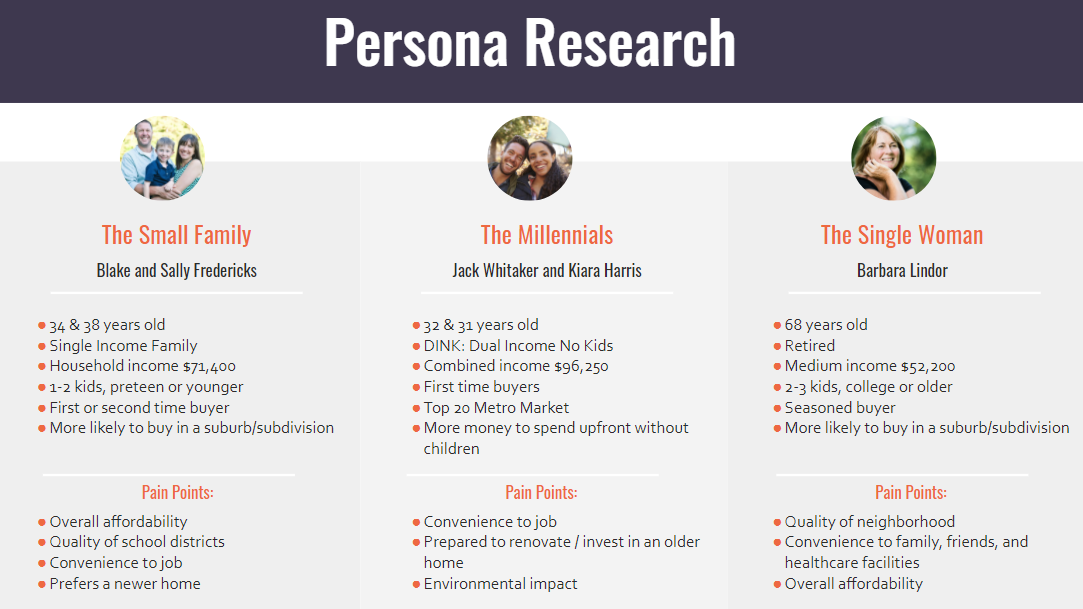
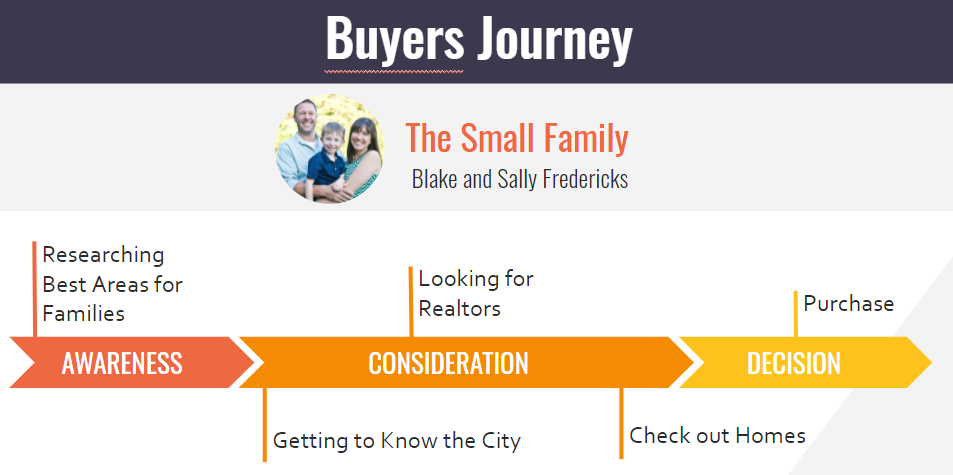
Once you have your personas and ideas of who they are, what they need, and what they are looking for, you’ll want to map out the possible steps they’ll take in their buying journey.
Buyer’s journey
Finally, you can add the possible keywords they’ll search for and map them to the journey.
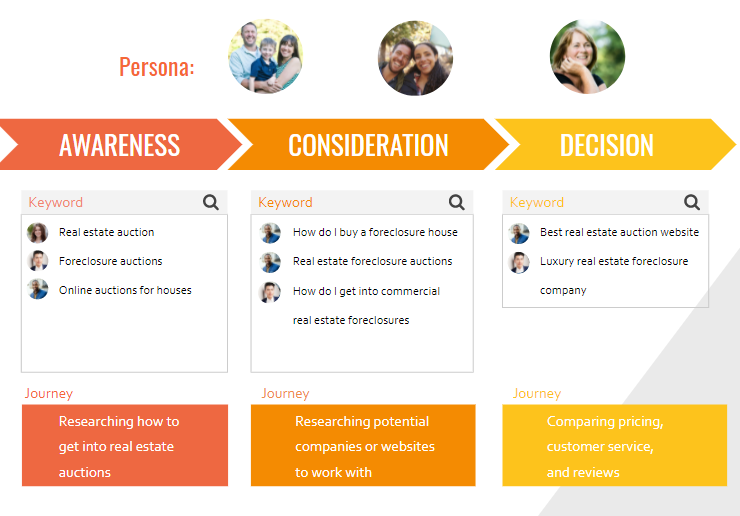
Map keywords to persona to the buyer’s journey
The goal of this phase is to identify all of the possible ways you can be found and to make sure you have content optimized on your website targeting these buying phases and keywords.
You’ll start by identifying primary, root phrases. As you progress, you can go deeper into long-tail terms or semantically related keywords.
This will allow you to identify gaps and opportunities that were missed during your initial baseline and competitive research. Some of these keywords won’t be uncovered unless you truly understand your audience and their needs and pain points.
This stage will complete your research phase and give you all the information to create your content strategy and focus your on-page SEO priorities.
Evaluate your existing content
With your comprehensive keyword research, the next step is to look at the existing content of your site and see if it’s optimized properly.
- Does your website have pages that are not getting any traffic from Google, pages that are near-duplicates or multiple pages targeting the same keyword?
- Do you have content pieces to match the keyword list you created in the previous stage?
Before creating a content calendar or editorial strategy, it’s ideal to audit your existing content. By reviewing your existing pages, you can decide which pages need to be removed, consolidated or optimized.
Some of the elements you can look for include:
- Page traffic
- Primary keyword
- Number of keywords ranking
- Word count
- Internal linking
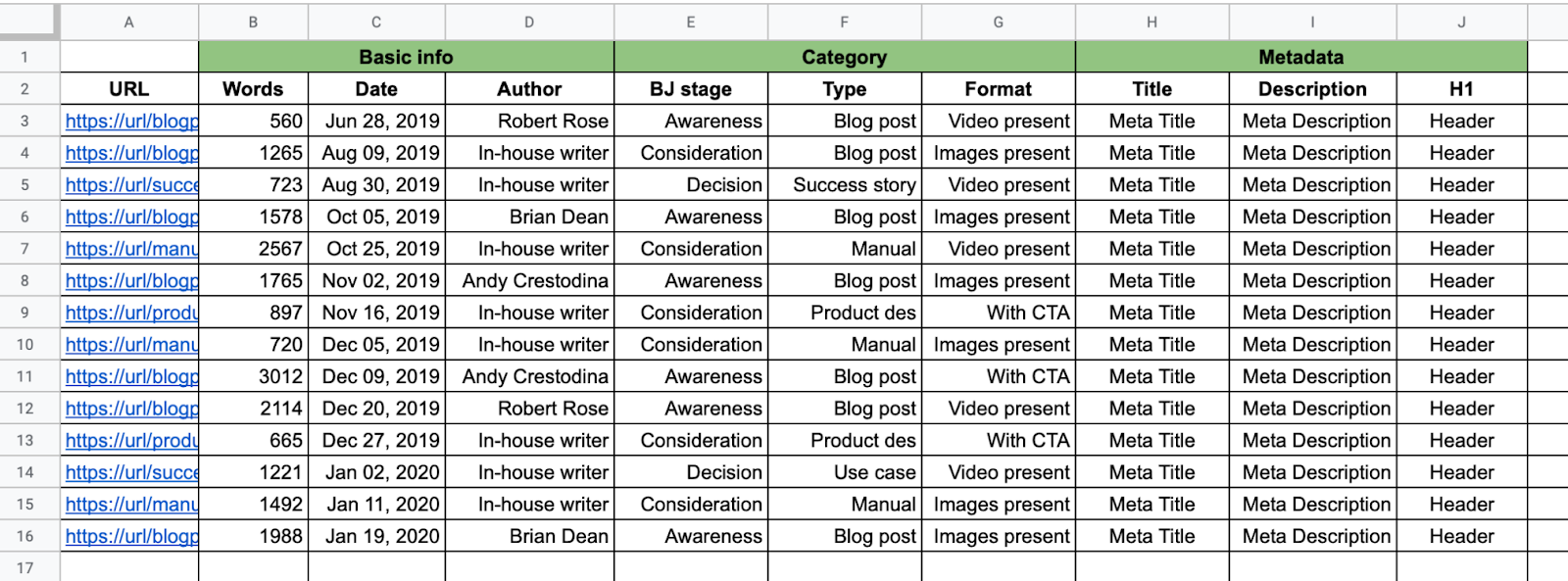
To perform a content audit, you’ll need to export all of your pages from your CMS or use an SEO audit tool, such as Screaming Frog or Semrush Site Audit, to get a list of your site’s existing pages.
Consolidate all of this data into a content audit spreadsheet. Your spreadsheet could look something like this:
Assess your site’s content
Once you have collected all of the data, go through the URLs and label the pages:
- Keep: The page is optimized and performing well and can be left alone.
- Optimize: The page could be ranking better with improved on-page SEO.
- Rewrite/revamp: This is for pages where the content needs to be revamped or rewritten.
- Remove: These pages are not performing well and should be removed. When doing so, it’s important to remove the page from your sitemap, Google Search Console, and any inbound links.
- Consolidate: If there are multiple pages targeting the same keyword, consider moving all of the content into the URL that is performing best and using 301 redirects for the other pages.
How to optimize, revamp or consolidate pages
Once you have all of your pages labeled, it’s time to optimize your content. Some pages may be performing well but could be refreshed to help them perform even better. Others may be performing poorly and need to be optimized to rank.
Typically, this process will involve two steps:
- Editing and re-optimizing the existing content.
- Expanding the article with new content.
Select the primary and secondary keywords for each page
The best way to gather this data is to use Google Search Console for ranking pages or your keyword database for pages that are not.
To gather data from Google Search Console, click on Performance > Search Results report:
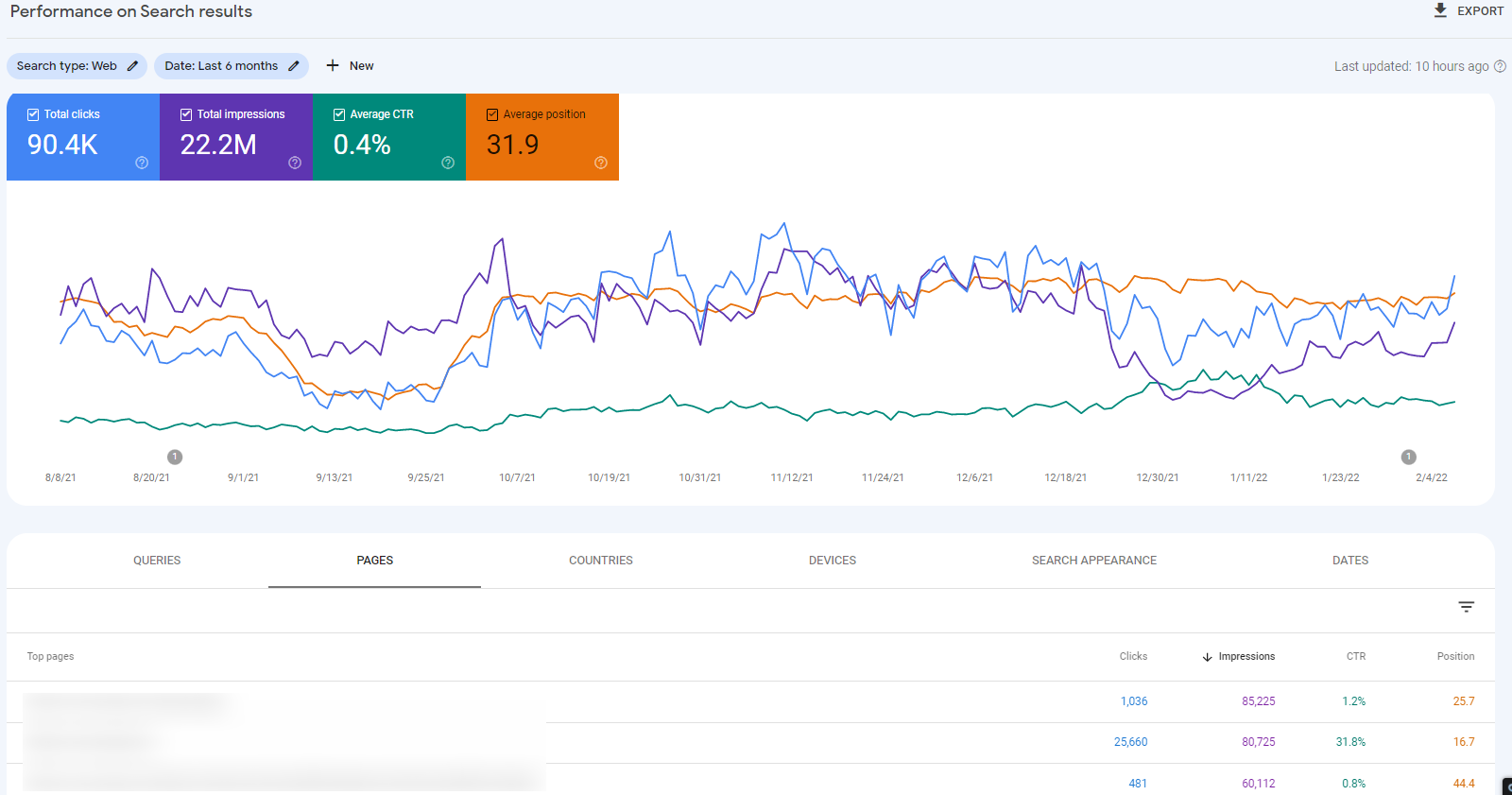
You can click on a page to see the keywords that it’s ranking for and the clicks, impressions and average position for each:
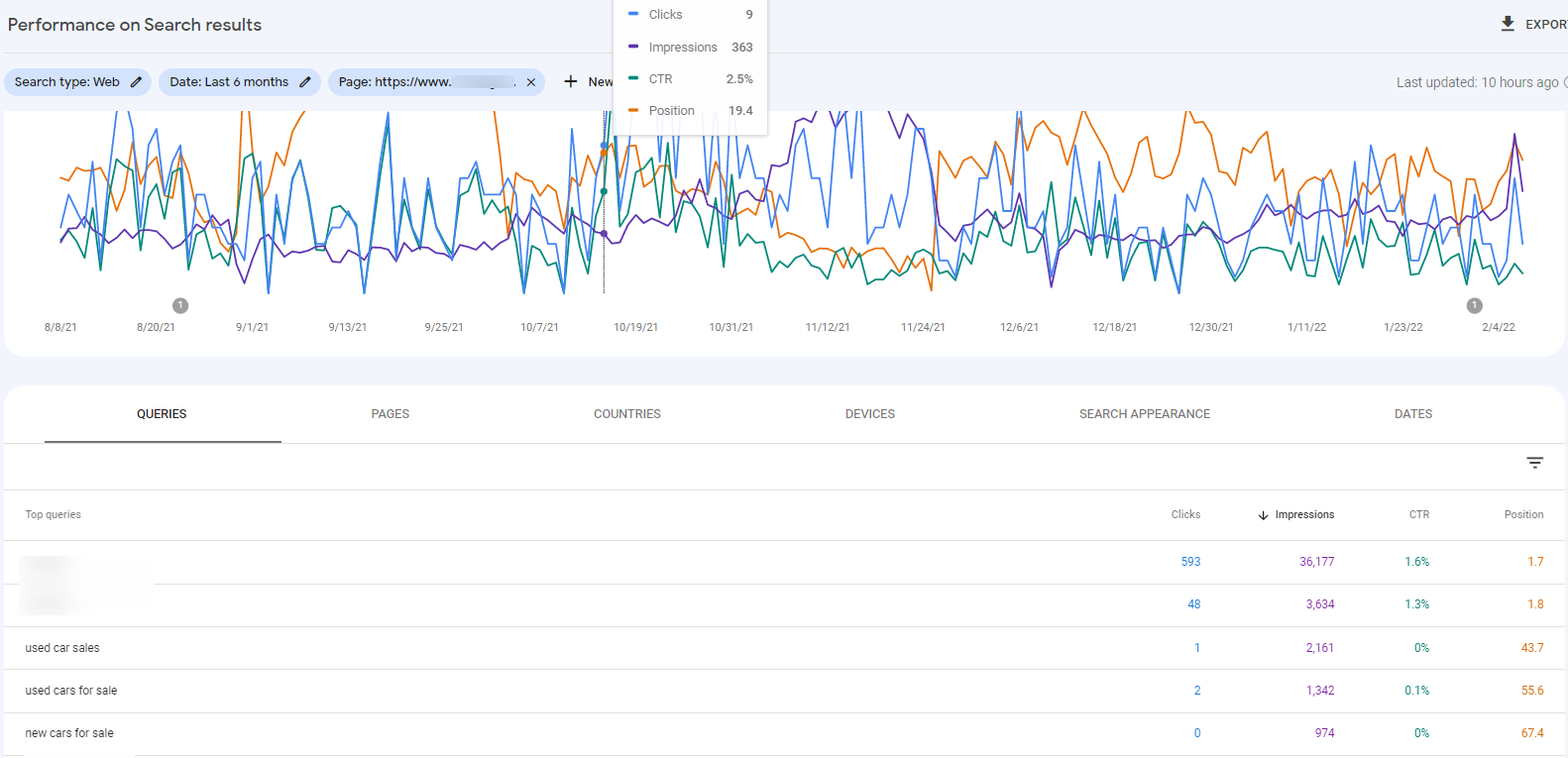
This will help you identify target keywords for each page, which you can add to your spreadsheet.
For each page, add the target primary and secondary keywords you will use when performing the necessary content updates.
Revamp existing content
When optimizing pages, you need to make sure that you are preserving or adding the correct on-page SEO elements. Let’s review these:
Primary keyword optimization
The primary keyword should appear in the:
- Meta (page) title: For existing articles, you can edit an existing article’s meta-title. Use the Google SERP Simulator to see how your title would look. Where possible, start the title tag with your primary keyword and add modifiers to your titles.
- Meta description: Up to 230-character description of the article. Make sure that you use the primary keyword as close to the beginning of the meta description as possible.
- The first heading of your article is the title. This should be an H1 heading. The title/heading should include the primary keyword.
- First paragraph. The primary keyword should appear in the first paragraph, ideally within the first 100 words.
- Anchor text: Include the primary keyword in at least one outbound, internal link.
Adding any secondary keywords
All related secondary keywords should be incorporated naturally into the article. For each related keyword, add them in an H2 heading. Whatever the focus keyword is for each paragraph, it should be both in the H2 heading and in the paragraph following the heading.
Questions and answers
Q&A is an easy way to expand upon your articles by finding related questions. Take the primary keyword, and search for it on Google. Use the questions in the “People also ask” box as section headers:
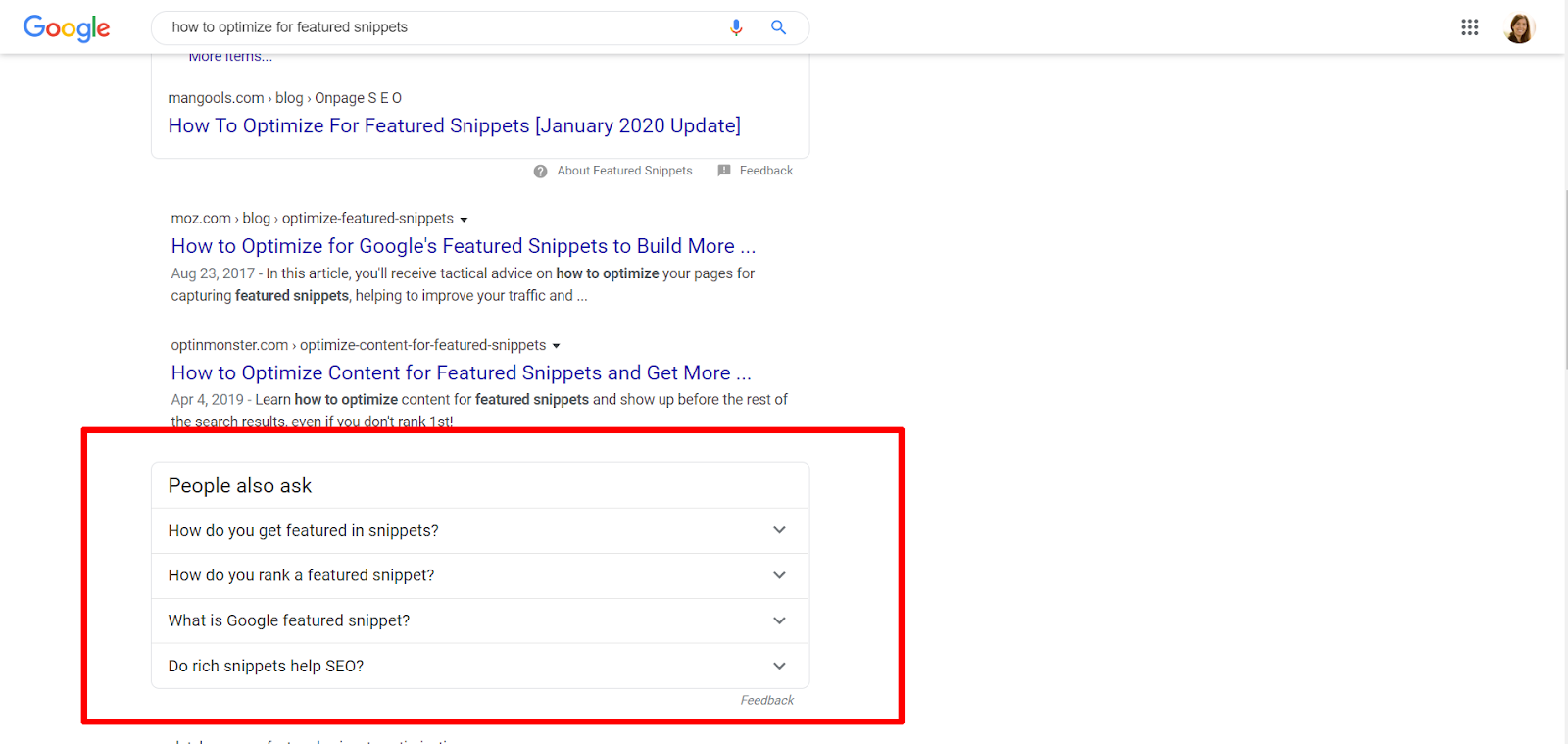
The section header with the question will be an H2. In the next section, you should answer the question as quickly and succinctly as possible. Don’t re-state the question; instead, immediately provide the answer.
If the question was “How do you get featured in snippets,” then the first sentence should answer the question: “To get into featured snippets, you need to ask questions and answer them using paragraphs, lists, and quick answers.”
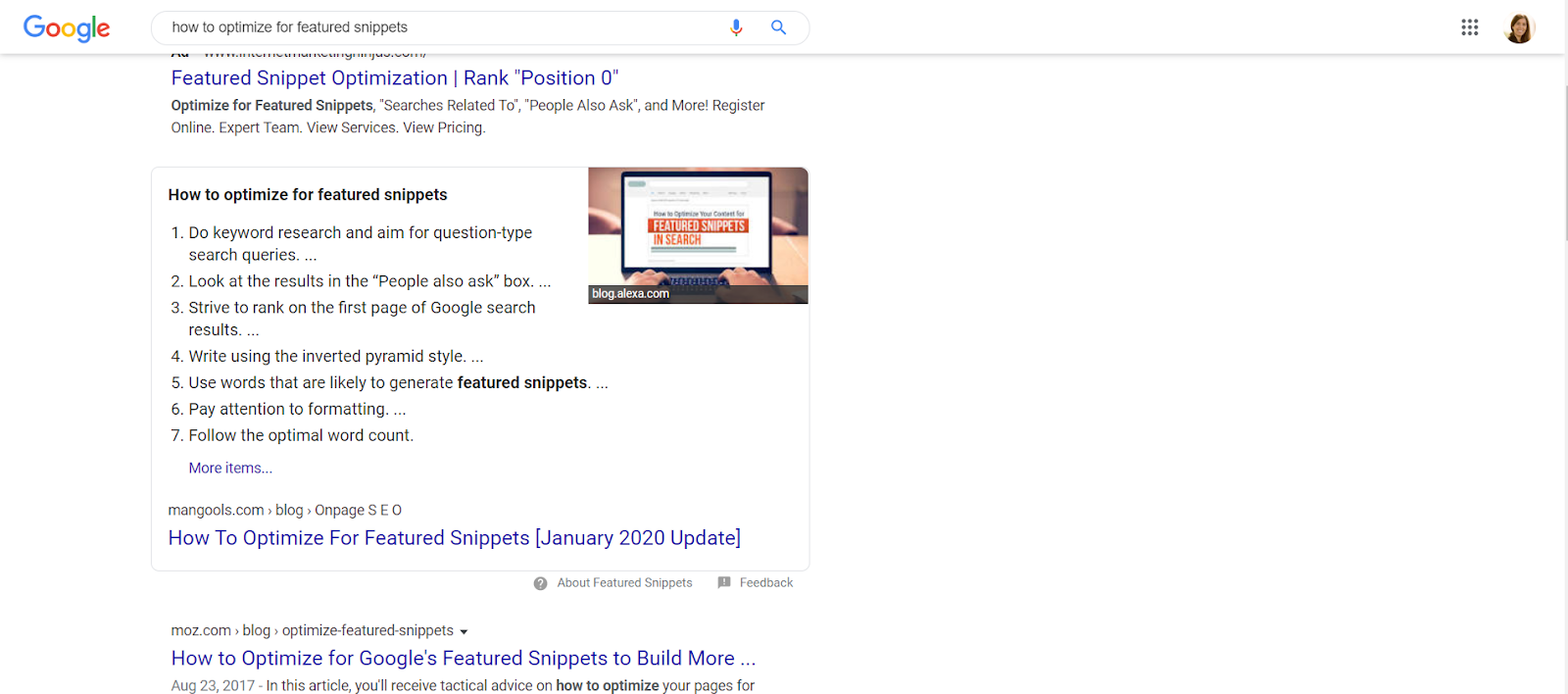
Use bullet points! Google loves listing answers with bullet points, so where possible, answer the question and immediately add a list with bullet points:
Content formatting
Use proper formatting to make the content easy for people to read quickly. Here are a few suggestions for formatting your content:
- Break up giant walls of text. Give information in short paragraphs. Use succinct sentences.
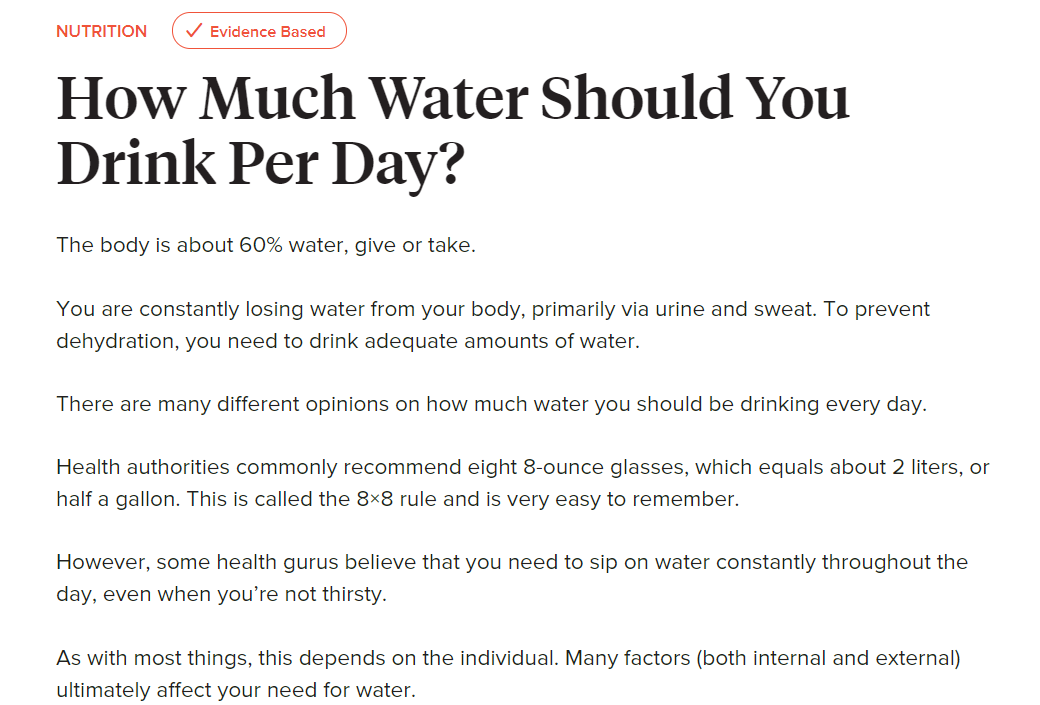
- Add lists. Google loves lists! Are there any paragraphs or sections you can change into bullet points or numbered lists? If so, do it!
Internal links
Add 2-3 internal links to other relevant pages on the site. Keep your anchor text short. Then, find at least 3-5 relevant pages on your site, and link to your target pages. Every page of your site should contain as many links from other site pages as possible.
External links
Add 2-3 external links to relevant pages. Good external links serve a strong purpose. They create a natural link map and connect your sites to authoritative sources. Google will give more weight to a page that has good external links.
Add new content
If the article is thin, you can add new content to expand on key points.
Writing new content
- Add more paragraphs. If you can add a list, more sub-headings, etc., all the better!
- Reading level. Keep the language at a 7th-grade reading level whenever possible. The best content is easy to read and understand, not dense and impregnable.
Images
- Add new, optimized images to your revamped content.
- Along with the link, please write the alt text for the image. This should be a one-sentence image description that includes the primary keyword.
Content consolidation
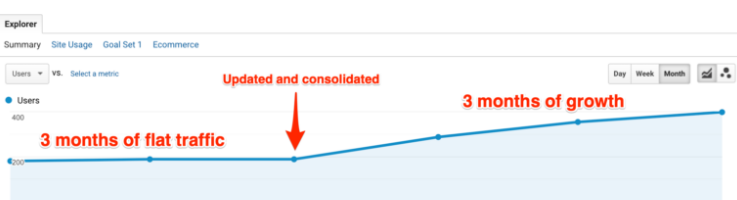
When there are several short pages or articles that are all ranking for the same keyword, it might be ideal to consolidate these articles into one longer, more comprehensive piece.
When consolidating articles, keep in mind:
- Take bits and parts of the different existing articles and merge them into one that makes sense.
- You should write the TARGET URL slug at the top of the document and include the new, optimized meta title and meta description.
- Add links to internal pages and external sites
Prioritize your fixes
Once you have created and labeled your spreadsheet and added target primary and secondary keywords, the final stage is to prioritize and assign your optimizations based on traffic or keyword importance.
If you have pages targeting important keywords that are not ranking well, move those to the top of the priority list.
If there are pages that have a lot of traffic and could be performing better, these should also be prioritized.
At the end of this stage, you should have a comprehensive keyword list that you will have mapped to existing pages or labeled to be created.
Mind the gap
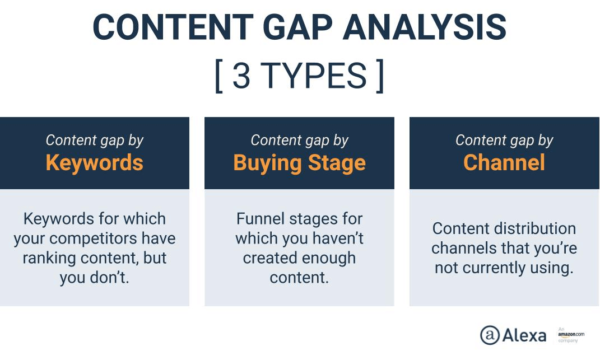
During the early stage, you want to be mindful of identifying persona, content and keyword gaps. If you don’t have content targeting some of your keywords, you’ll be missing opportunities to reach your target audience.
Most sites will have a degree of cannibalization as the SEO and content plans go through different teams and stages.
Before spending significant resources on producing new content, first, identify and maximize the content you already have, and then “mind the gap” by creating a content plan that targets all keywords that haven’t been optimized.
The post An SEO guide to audience research and content analysis appeared first on Search Engine Land.
Courtesy of Search Engine Land: News & Info About SEO, PPC, SEM, Search Engines & Search Marketing
Category seo news | Tags:
Social Networks : Technorati, Stumble it!, Digg, de.licio.us, Yahoo, reddit, Blogmarks, Google, Magnolia.
RSAs. E-A-T. GA4. See the tactic-packed SMX Advanced agenda!
Written on May 10, 2022 at 10:55 am, by admin

Elite, actionable search marketing tactics, expert answers to your burning SEO and PPC questions, and engaging discussions with passionate search marketers are a just click away… secure your spot at SMX Advanced now and join us online, June 14-15, for free!
The agenda is live… see what’s in store!
Programmed by the Search Engine Land editors, this experts-only, tactic-rich training features senior marketers from FoodBoss, William Sonoma, Honey (a PayPal company), and more exploring the latest, most sophisticated search marketing topics and trends, including…
- Leveraging semantic search to improve E-A-T
- Getting the most out of the Google Search Console API
- Maximizing PPC performance with automated bidding
- Seamlessly transitioning to Google Analytics 4
- Future-proofing against the next Google algorithm update
- Driving PPC success in a world with only RSAs
- Understanding the impact AI and entities have on content strategy
- Boosting Core Web Vitals rankings
… and that’s just the start. You’ll also unlock two exclusive keynotes on authoritative content and the link between creativity and automation, live Q&A with speakers (Overtime!), invigorating Coffee Talk meetups, and afternoon breakout discussions with like-minded attendees, and more.
For more than 15 years, over 150,000 search marketers from around the world have attended SMX to learn performance-enhancing tactics, make game-changing connections, and further their careers. Don’t miss your opportunity to join them online for the only professional training experience created by advanced search marketers for advanced search marketers.
Secure your free SMX Advanced pass now!
The post RSAs. E-A-T. GA4. See the tactic-packed SMX Advanced agenda! appeared first on Search Engine Land.
Courtesy of Search Engine Land: News & Info About SEO, PPC, SEM, Search Engines & Search Marketing
Category seo news | Tags:
Social Networks : Technorati, Stumble it!, Digg, de.licio.us, Yahoo, reddit, Blogmarks, Google, Magnolia.
Google adds new valid page metadata help document
Written on May 10, 2022 at 10:55 am, by admin
Google has added a new help document named valid page metadata that talks about how Google can process invalid or inconsistent HTML with the issues around invalid markup. Google also updated its help document on title links with a new section on “no clear main headline” in the troubleshooting section.
Valid page metadata help document
The new “use valid page metadata” help document can be found here, and it reads “using valid page metadata ensures that Google can process the HTML markup of your pages.” “Google tries to understand HTML even when it is invalid or inconsistent with the HTML standard, but errors in the markup can cause problems with your website in Google Search,” the document added. For example, if you use an invalid element in the head, Google ignores any elements that appear after the invalid element.
This is more of an issue for schema or structured data but can potentially also impact other areas in which Google may not understand an element in your HTML.
Google said you should only place valid metadata inside the <head>. Valid metadata includes the following HTML elements:
titlemetalinkscriptstylebasenoscripttemplate
Google added not to use invalid elements in the head:
The following elements are invalid when used in the <head>, and therefore aren’t supported by Google Search when placed in the <head>:
iframeimg- Any other HTML element
Updated title link help document trouble shooting item
Google also updated its title link help document, which was originally published in October 2021. Google first renamed the sub-head from “Avoid common issues with title elements” to “Troubleshooting common issues.”
Google also added a new section named “no clear main headline” that reads:
When there’s more than one large, prominent headline, and it isn’t clear which text is the main headline for the page. For example, a page has two or more headlines that use the same styling or heading elements. If Google Search detects that there are multiple large, prominent headlines, it may use the first headline as the text for the title link. Consider ensuring that your main headline is distinctive from other text on a page and stands out as being the most prominent on the page (for example, using a larger font, putting the headline in the first visible h1 element on the page, etc).
Why we care
SEOs, in general, should be up-to-date on the Google Search developer help documentation. Many of you have already read through these documents once or twice. Learning about new documents being posted and changes to existing documents can save you time on understanding what has changed or how Google sees SEO and Google Search.
These two changes may help you communicate to your stakeholders how to build better pages that work better for Google Search.
The post Google adds new valid page metadata help document appeared first on Search Engine Land.
Courtesy of Search Engine Land: News & Info About SEO, PPC, SEM, Search Engines & Search Marketing
Category seo news | Tags:
Social Networks : Technorati, Stumble it!, Digg, de.licio.us, Yahoo, reddit, Blogmarks, Google, Magnolia.
How a self-audit SEM checklist can protect your work from external audits
Written on May 10, 2022 at 10:55 am, by admin
Search audits have the power to either help or ruin people’s work (and sometimes their career) at the same time.
And honestly? That’s a good thing.
SEM audits are powerful. External and internal audits are needed for the direct and indirect value they bring to your operation.
Audit types
First, let’s talk, non-extensively, about the most common types of audits:
- New biz pitch audit: These are straightforward – the goal is to find (usually surface-level) holes in the current efforts. Expect to do a lot of remote searches and ghosting your IP. You’ll likely use third-party tools like SimilarWeb, Semrush, Adthena and SpyFu to estimate competitor spending and determine their approach. No doubt about it, these aren’t fun. But the payoff could be literal dollars of new business.
- The “under the hood” audit: This is done when you’re pitching new business and the brand is already over their current agency. The business gives you some degree of keys to the castle with access to Google Analytics and their Google and Microsoft ads accounts. These are fun. There will be few, if any, unanswered questions. It’s also easier to win business and a great way to kick an operation in the gut when they are already down.
- “The consultant” audit: Huge pain, where the brand has brought in a “consultant” who is all-knowing, and questions the most minute things, forcing you to question your best practices and decide if truly is best in class.
- Self-audit: This is a noble and shockingly helpful self-check scenario. This is you doing a gut check of your own work on a semi-regular basis (monthly, quarterly, annually, etc.) It also helps you find out when the engines changed something via a glitch or just forgot to tell you, and you can go back to them self-righteously and demand your money back.
- The “invited third-party” audit: Honestly, these are my favorites. Anyone working on an account long enough gets “account fatigue” and cannot see the forest behind the trees. Here you bring in a trust third-party (outside operation or someone in-house who doesn’t work on the business) to eyeball the business. Less pressure, more trust, less “throwing of hands.” This becomes educational for all more than anything else.
No matter the type of audit, the end goal is the same: to find the brand a way to make more profit, directly or indirectly – whether through incremental revenue generation or cost-savings operations.
Doing a great audit
How do you do a great search account audit? “Great” is a relative term in search audits.
It really comes down to what level of access you have. That will decide your next steps for the audit.
But it always starts with a handy QA checklist consisting of settings that need to be reviewed – from simple things like GTM on the site, GA on the site, and whether geotargeting is in place, to more advanced scenarios, such as: Are Bing syndicated search partners on, is their unique ads in rotation for RLSA audience and are ads on/off during low sales periods of the day.
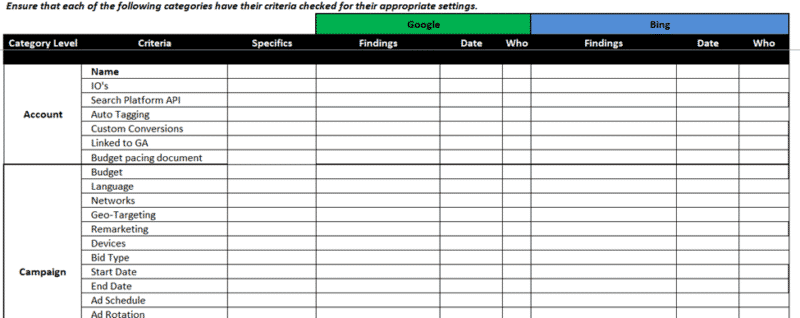
This QA checklist will have hundreds of checkpoints to review. It is designed to help you successfully launch a new campaign. But an audit is basically a QA checklist in reverse.
What makes audits so powerful?
Well, it is easier to explain findings than explain their potential. All of these findings are from real audits:
- Scenario 1: A credit reporting brand refused to allow the team to bid on the term “free credit report.” An audit found multiple keywords mapping to that term within an SQR, all with higher CPCs. They were accounting for 73% of those keywords traffic. Each keyword had a Quality Score of 3. If the brand actively bid on the term “free credit report,” with appropriate ad copy, the QS would come in closer to 5. Estimated cost savings by making this change to the client was $573,000 per fiscal quarter.
- Scenario 2: A car wash brand was trying to figure out how to save funds while driving more visits to their locations. It was documented that the average target consumer would drive a max of five miles for a car wash in their markets and would research the car wash only an hour before going. It was discovered that geo-targeting had a 10-mile radius for advertising, ads ran 24/7 and no local search campaigns were live. Roughly 30% of the ad budget was being spent on consumers too far away and/or unlikely to come given the time of day. Adjustments to both geography and daypart were made to reallocate funds to local campaigns.
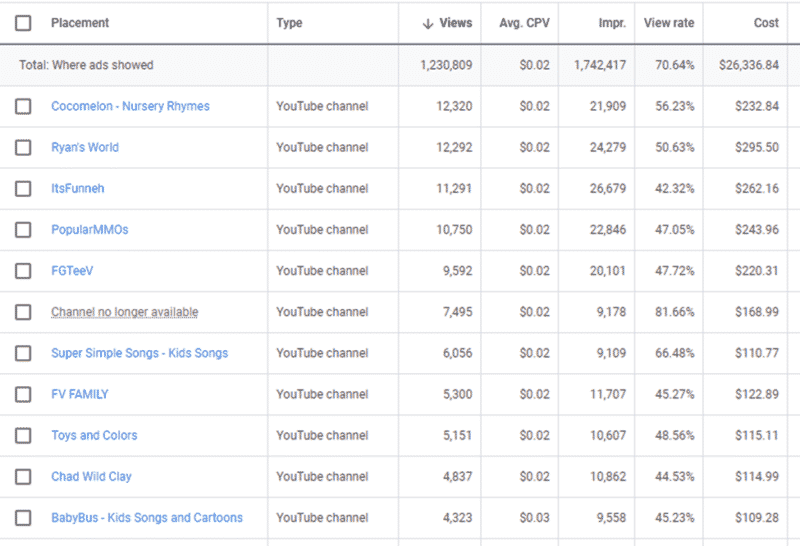
- Scenario 3: Sports nutrition CPG was informed by their agency they were getting stellar performance on YouTube front-end metrics, and they were. However, the data was only surface level. An audit of content triggering ads was done. Keep in mind, sports nutrition means scantily clad individuals, sweating, drinking protein shakes and pre-workout powder. The content audit noted that the agency failed to put negative parameters for brand safety in place. 40% of spend for a year was spent on videos related to Cocomelon, BabyBus and Super Simple Songs. Ultimately, the brand took legal action against the agency running YouTube based on the audit. Seeking damages for the amount spent inappropriately.
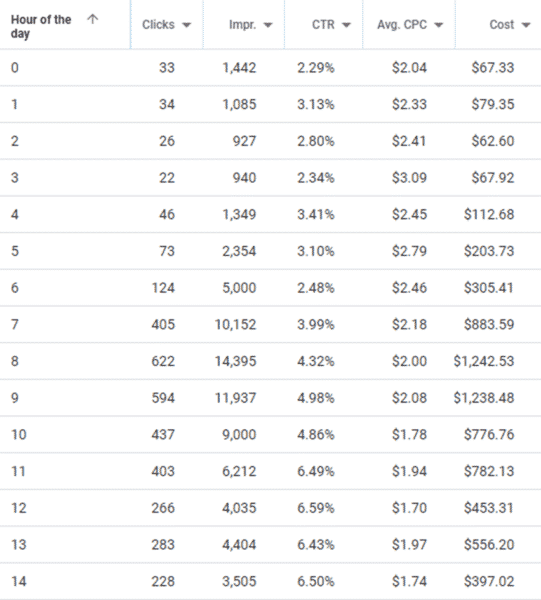
- Scenario 4: A QSR brand was in review for a new agency and gave all operations competing in the RFP a look “under the hood.” To the surprise of all the operations, it was observed that the brand was not using brand keywords while having rather weak SEO. In addition, 10% of budget spend was used during breakfast hours, which accounts for less than 3% of total revenue, while actively losing out on impression share due to budget. This finding (after we won the business) led to bidding on brand terms (and the good old “SEM+SEO: 1+1=3” theory), generating a 10% lift in SEM+SEO revenue. In addition, ceasing SEM during breakfast hours allowed for a reallocation of budget to later in the day during peak periods and reduced impression share loss due to budget.
- Scenario 5: This was a well-timed internal review, and honestly, it still sends a cold shiver down my spine. About 10 years ago, we had to lay off an employee, and he was incredibly displeased. On his way out, he had created automated rules to raise manual bids by 100% 3x a day, every day, and to raise budget caps 1,000% once a week. The cherry on top was that he had created a rule to automatically reactivate campaigns if they were paused every two hours. An audit of scheduled activity and rules revealed all of this and was performed the day after his departure. If you’re wondering, the answer is yes, he lost his severance. We had to provide a legal deposition, and an unnamed search engine was notified by various legal teams to give activity over based on IP address.
- Scenario 6: Honestly, this was the weirdest audit of my career. In 2011, my team was understaffed, and we were running a well-known credit card brand business. This brand promoted a self-created holiday to encourage holiday shopping at local stores rather than online. It was decided to run an online video campaign with the brand. The targeting was pretty wide open. We just had a list of negative keywords. We asked the video platform to run it for us, and they obliged. It was a very short run, a total of five days. We audited the oddly terrible performance after the run to figure out why the performance was so bad. The well-known video platform had used our negative keyword list (a list littered with a wide variety of terms showcasing the worst of human depravity) as the target list. This audit resulted in a reimbursement of $500,000 of media spend and 25% on top of it for pain and suffering.
I share all these scenarios not to frighten, only to inform.
Audits happen. Protect your work.
In the past five years, I’ve gone through four audits on my work. Why? Because a consultancy told the brand it was needed.
It’s nerve-racking and anxiety-provoking, in part because every operation has a different point of view on the proper way to deal with work.
However, my team regularly does internal audits, starting with a simplistic QA document. So we were able to retain our work because “our house was in order.”
A QA document does not take much to create. It just requires you to make an excel spreadsheet, with every setting in a UI, and an hour of your time to review it regularly.
An audit, especially done by an uninvited outsider, is never a welcomed experience. But if you regularly audit yourself and/or your team’s work, it won’t be a problem for you when an outsider does it.
Doing this will give you the most power possible within the search marketing world.
The post How a self-audit SEM checklist can protect your work from external audits appeared first on Search Engine Land.
Courtesy of Search Engine Land: News & Info About SEO, PPC, SEM, Search Engines & Search Marketing
Category seo news | Tags:
Social Networks : Technorati, Stumble it!, Digg, de.licio.us, Yahoo, reddit, Blogmarks, Google, Magnolia.