

3 ways bots and fake users are killing your search efforts
Written on July 26, 2022 at 4:02 am, by admin
Today, we are living in the era of the Fake Web, where a large portion of the internet is made up of malicious scrapers, spam bots, suspicious human users and other bad actors. It seems like every day there is a “breaking news” story about another company falling victim to a data breach, customer information being leaked or servers being hacked.
Historically, these cyber threats were handled exclusively by the chief information security officer or the IT department. However, in recent years search marketers have begun to notice how bots and fake users harm their efforts. When fake traffic makes its way to a company’s website, it can damage a brand’s online reputation and ultimately hinder the effectiveness of paid and non-paid marketing campaigns. Throughout this article, we will cover three specific ways search marketers are impacted.
1. Page rank is penalized.
Malicious scrapers frequently arrive on websites to scan for information and extract data or content to use elsewhere. Because of this, the way they navigate throughout a website appears more erratic than typical human behavior. Bots tend to jump from page to page, rapidly click on various modules, and exit quickly once they have stolen the information they were looking for. Because of the nature of these actions, these harmful automation tools can have much higher bounce rates and shorter time on each page than a standard user. Furthermore, because the end-game of a scraper is often to duplicate content or data somewhere else on the internet, they can also lead search engines to believe that the original content is actually duplicate content. When this type of activity is factored into the overall user behavior on a given website, it can reduce page rank and leave search marketers frustrated and confused.
2. Site speed slows down.
Site speed is also largely impacted by various types of bots and fake users. When malicious bots arrive on a website, they often preoccupy servers with high volumes of requests within short periods. This can overwhelm a website and make the experience slower and more difficult for legitimate human users. Slow website speeds then also harm the website’s ability to rank highly on SERPs, which can be devastating for search marketing key metrics. Additionally, when search rankings drop, the website becomes more difficult for potential customers to find and businesses may begin to lose those customers to competitors and alternative solutions.
3. Keyword strategy is misinformed.
Both SEO and PPC marketers habitually perform keyword research before launching a new initiative or campaign. However, since bots and malicious human users frequently click on both paid and organic links at a large scale, marketers might misunderstand which keywords are actually the best performing. For example, high click-through rates on a given keyword are typically seen as a positive indicator – but if a high percentage of those clicks came from bad actors, the marketer should probably avoid that keyword. The presence of malicious traffic can cause implementation of misguided strategies, which will continue to harm the business’s overall ability to drive quality traffic to the site.
Trying to run an effective marketing operation in the era of the Fake Web can be intimidating at times. Still, the good news is that many organizations are beginning to fight back against malicious traffic. Today, more businesses are starting to implement go-to-market Security technology which can help mitigate these risks and allow marketers to focus on what they do best.
The post 3 ways bots and fake users are killing your search efforts appeared first on Search Engine Land.
Courtesy of Search Engine Land: News & Info About SEO, PPC, SEM, Search Engines & Search Marketing
Category seo news | Tags:
Social Networks : Technorati, Stumble it!, Digg, de.licio.us, Yahoo, reddit, Blogmarks, Google, Magnolia.
Content creation: A psychological approach
Written on July 26, 2022 at 4:02 am, by admin
Are you able to develop a relationship with your current clients and make your future prospects like you?
The best way to do this is to understand the personality of your customers. This can help you predict their motives.
Approach content by developing it for the psychology of the user, rather than the psychology of the writer.
For example, for me (who has the attention span of a gnat), what if a content writer knew that she only had 30 seconds to answer “what are the best running shoes I can wear as a beginner?” Or what if she knew that for my friend (who can overthink how a garage door opener works for hours), she had a good 30 minutes to inundate him with as much information about “what are the best running shoes?”
Dr. Taylor Hartman wrote the book on understanding motives in psychology. I was fortunate to have met him and to learn about how “The People Code” could be transformed into developing deep psychological trait-based content for better performance.
I’ve taken these ideas and tested them. Not only the behaviors of individuals, but all the way up to entire countries and cultures.
I was astonished by what I found, from the improved ROI to the more efficient buyer journeys.
Who are you?
The best way to start writing ads or content based on psychological behaviors is to first understand yourself.
There are many different systems and tools you can use for personality assessments. However, for this article, I’m going to use Hartman’s tests and methodology. It starts with an honest quiz you give yourself of about 50 questions.
For example:
What ONE word of Phrase describes what you are like most of the time?
a/ Opinionated
b/ Nurturing
c/ Inventive
d/ Outgoing.
As a child, I was:
a/ Stubborn, bright, and/or aggressive.
B/ Well-behaved, caring, and/or depressed
C/ Quiet, easygoing, and/or shy
D/ Talkative, happy, and /or playful.
When you are done with the self-assessment questions in the book, you tally up your answers on how many As, Bs, Cs, and Ds to determine where you stand on the psychological trait spectrum, with:
- As being Red (Dominant).
- Bs being Blue (Compliant).
- Cs being Yellow (Influential).
- Ds Being Green (Steady).
What Am I?
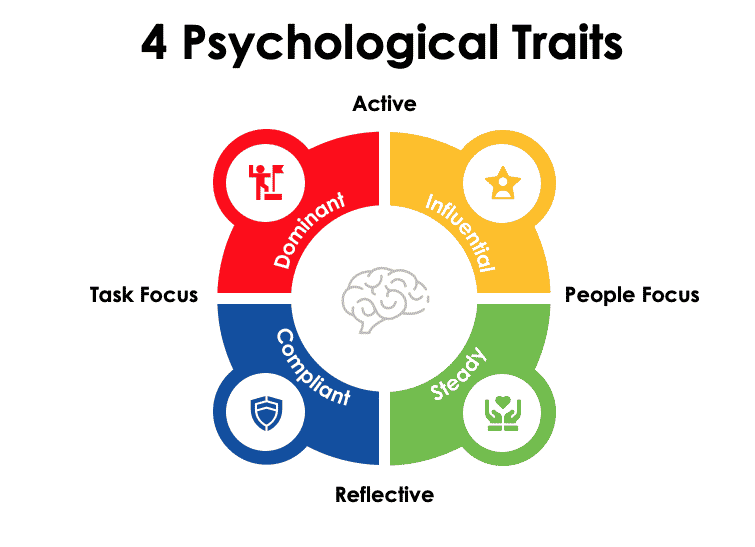
All of our behaviors will fall into a personality classification on this spectrum.
Sometimes they will fall in between two color behaviors as well. For example, you can be evenly split between a Red Dominant and Blue Compliant or a Steady Green and an Influential Yellow.
Dominant Reds
Most of these traits are people who have type-A personalities. Direct, decisive, doers and workaholics.
They may come across as too confident, demanding and domineering. Often they thrive and appreciate admiration, they have a specific need to look good to others and can also be a bit on the selfish side.
The patience of this trait is usually at a minimum, which means content absorption is also at a minimum.
Compliant Blues
Very much the intimate ones. Usually cautious about how they go about things and as a consequence, they tend to have anxiety and be very worry-prone.
There is a need to connect with others and to be understood and appreciated. They are dependable, loyal and expect honesty from others.
They can also come across as moody, self-righteous, condescending and sometimes even a little too empathetic.
Most Compliant Blues love other Compliant Blues. They tend to get each other so very well.
That being said, content absorption is usually done when you can touch their heart and their soul.
Steady Greens
These are the slow, peaceful yet independent people. Typically quiet by nature, they resist and hate confrontation. They are great listeners yet they thrive and need their alone time.
Even-tempered and supportive, but also silently stubborn and over-sensitive. Sometimes it’s harder for this group to embrace or even understand empathy, yet they are diplomatic. T
hey are the polar opposites of dominant reds and tend to do a lot of research and take their time making decisions. The more content, the better.
Influential Yellows
These are the fun-loving, extremely social, playful influencers. The ones that are likely to be interesting, interactive, happy and spontaneous.
They thrive on adventure and need to be adored and praised. Friendships are the highest priority for them yet they can turn off others easily by their impulsive and sometimes irritating loud nature.
Always need to look good socially and it seems like nothing can go wrong, except for their attention span. Your content better not be boring or this group will be off with their mind wandering around the next palm tree vacation.
How to create content around these psychological traits
As you can see from the four different personality types, we are all pretty different and what we absorb in terms of content and creative is also different.
What may resonate well with one group, may fall short with another. Using the “Running Shoes” topic, take a look at how each content reverberates with each group differently.
Dominant Red content

This group is the dominant power type-A personalities. They will make quick decisions if you can feed their ego and not bury them with too much information.
Here are some examples that this group would enjoy:
- What the Elite Runners are Wearing – The runners at the front of the pack talk about what shoes they wear and why.
- Best Sneakers Worn by the Biggest Tech CEOs
Compliance Blue content

This group (of which I consider myself a member) is motivated by the heart and feelings. Considering they are so trusting, they can easily be taken advantage of.
This group does have an analytical side and can be brutally honest if need be. They tend to over-read into everything. But throw in a horse with a hurt leg that’s been patched up and is walking again, you’ll have already won them over.
Here are some examples that this group would enjoy:
- The Best Nike Running Shoes Make You Feel Like an Olympian at Every Turn
- 7 Ethical & Sustainable Running Shoes – Run Like the World Depends on It
Steady Green content

This group is the peace-lovers. The ones who take life in the slow lane.
This group is often what we all need in order to slow down, take a deep breath, pretend we do Tai Chi and then go with them on their journey of never-ending research. Stretching the period of decisiveness from what you thought would be two hours to three weeks.
- Running for Weight Loss, The Ultimate Guide for Runners Who Want to Lose Weight. (Eventually, they will research every cited blog in the article to start to come to terms of which shoes to buy.)
- The Best Running Shoes With Arch Support
Influential Yellow content

This group is made up of little rays of sunshine – the influencers who not only make me smile but make me want to pick up a good self-help book so I can be just like them.
Content-wise, you’ve got to make sure you style your content as much as possible. Just about anything colorful and fun can get them going. Because they lack the patience for deep research, I will need to write content that’s fun, useful and clear.
Frustrating an influencer is like death. They can go from the funniest clown to the meanest Karen in a heartbeat.
More to come
In my next article, I plan to do a deeper dive into other forms of psychological profiling, how to tag classifications to personas, how culture, country and language also have their own psychological traits, and how to survey your customers to get insight into what types are attracted to your brand.
Even if you feel you have perfected your writing, re-developing what works based on behaviors is the next step in really enhancing your reader base and ultimately, developing that bond with your current clients and future customers.
Because, finally, you understand them and they get you.
The post Content creation: A psychological approach appeared first on Search Engine Land.
Courtesy of Search Engine Land: News & Info About SEO, PPC, SEM, Search Engines & Search Marketing
Category seo news | Tags:
Social Networks : Technorati, Stumble it!, Digg, de.licio.us, Yahoo, reddit, Blogmarks, Google, Magnolia.
Web hosting for SEO: Why it’s important
Written on July 26, 2022 at 4:02 am, by admin
Want to know an easy way to speed up and improve the overall performance of your website?
Invest in good hosting.
Ignorance is no longer an excuse for any company to use a cheap web host.
Website performance is a critical element that can help improve your rankings, traffic and conversions.
This guide will cover everything you need to understand about why web hosting is important for SEO.
What is website hosting
A website hosting service provider, or web host, is a service that offers the technology required for a website to be viewed online.
Think of a web host as the home base of your website. Websites or webpages are stored on special computers called servers, and through the server your webpages get connected and delivered to internet browsers.
So, when users want to view your website, all they have to do is type your website address or domain into their browser.
When building a website, companies typically invest a lot of time and resources on design, development, digital marketing and SEO.
But web hosting is one area that tends to be an afterthought.
If you are willing to invest in making sure the website looks good and driving traffic to it, why not also ensure that the actual website is fast, functional and flexible?
Using a high-quality web host can maximize your conversion rates, along with other helpful benefits.
How web hosting benefits businesses
If you want a website for your business, then you will need a web host. Although web hosting is usually left at the back of a business’ mindset, it is crucial for your online presence.
A reliable web host can give your company a variety of benefits, such as:
- Improved site performance.
- Effective data management.
- Enhanced security.
- High uptime.
In short, investing in a reliable web host is wise – and should help grow your business.
Expected features from hosting providers
Web hosts offer more than just web hosting services for businesses. Web host firms offer multiple services that ensure a hassle-free experience for business owners and to make sure their only focus is the time and energy spent on their business.
Here are some features you should expect from a good web hosting provider:
- Email accounts: Hosting providers will require users to create their own domain name. Domain names and email accounts will be one of the features provided.
- FTP access: FTP allows you to upload files from a local computer to the web server. Your website will be accessible through the internet, with files transferred from your computer straight to the server using this feature. FTP access is critical for web developers.
- WordPress support: WordPress, which powers nearly half of the websites on the internet, is a convenient way to create and manage your website content.
- Enhanced security: Many hosting providers, such as WPEngine, now provide complimentary SSL certificates with their hosting services.
Most popular web hosts
Popular web hosting companies include:
- GoDaddy
- Amazon Web Services
- Google Cloud Platform
- 1&1 IONOS
- HostGator
- Bluehost
- Hetzner Online
- DigitalOcean
- Liquid Web
- WP Engine
Why web hosting is important for SEO
When it comes to SEO, Google strives to deliver the best possible results for its users.
This means that a strong and reliable web host will lay the foundation for your SEO efforts.
Google looks at several factors to ensure the user has a positive experience after using their search engine. Websites that work faster with improved UX can get a rankings boost.
SEO is a huge focus for nearly all businesses and brands today. Everyone wants their site listed on the first page of Google for relevant search queries.
Websites that fail to rank on Page 1 of Google likely won’t be found. As the saying goes, “the best place to hide a website is the second page of Google.”
There are three main reasons why web hosting is important for SEO: speed, security and location.
Speed
Looking at it from a practical standpoint, speed is an extremely important factor for SEO.
A slow and cheap web host will result in a slow website. The domino effect is that it would result in poor rankings, low organic traffic, and minimal leads.
What’s the solution?
A good web host will have high speeds, which will decrease the load time of your pages.
When determining how fast a website should load in 2022, it should always be as fast as possible. Google’s benchmark for the ideal time for mobile speed is two seconds or less.
A 2022 study showed average loading time for mobile-sites was around 4.5 seconds. For 20% of the analyzed mobile landing pages, the visual content took longer than 6.6 seconds to load.
Considering that speed equals revenue, this is still far too slow.
Tools for Measuring Page Speed
Need to measure your page speeds? Use these helpful tools:
- Google Page Speed Insights
- GTMetrix
- Pingdom
Target Metrics for Websites
The Core Web Vitals report is what shows how your webpages perform based on real world usage data, which is also referred to as “field data.”
With the Core Web Vitals, the URL performance is shown by status, metric type, and URL group.
Core Web Vitals are based on three metrics:
- LCP (Largest Contentful Paint): This shows the amount of time it takes to render the largest element of visible content in the viewpoint from the moment when the user requests the URL. The largest element of content is typically an image or video, or large block text. This metric is important because it informs the user that the URL is loading.
- FID (First Input Delay): This shows the time from when the user interacts with the website by clicking on the link to the time in which the browser responds to the action. This metric is important since it is when the page becomes interactive.
- CLS (Cumulative Layout Shift): This measures the sum total of all the individual layout shifts for every unexpected layout shift. This takes place during the entire lifespan of the page. The measurement can range from zero, which implies no shifting at all, to any positive number. The rest of the numbers indicate how much the layout shifts. This metric is important because it creates a bad user experience if the user experiences a layout shift while interacting with the website.
Security
Without a strong security system for your website, it can suffer from detrimental issues such as hackers, spam pages, and fake backlinks.
All of these things can harm your Google rankings – and potentially result in a manual action.
There is also the risk of your site getting infected with malware, which could potentially result in your site getting blacklisted by search engines or showing a security warning in the search results.
If you don’t use a web host with a strong security system, it could negatively impact your SEO efforts.
One feature that web host providers may offer is a Secure Sockets Layer (SSL). This is a security certificate that is the standard technology for keeping the internet connection secure.
Another plus side of strong security comes from reliable tech support and customer service. As a company, you want to ensure that the web host you’re using has top quality tech support and customer service.
If something is too slow or the site crashes, you can get it solved quick and efficiently. A strong tech and customer support team will ease any worries or panic if your site ever goes down.
Location
Location is an important factor in the SEO of your website. Search engines will look at location-based signals into consideration when searching for optimal results.
Some questions to consider:
- Where is the user?
- Where is the business?
- Where is the site located?
All of these are practical reasons for where your website will be hosted. It plays a role in determining how far the data must travel, and its speed.
For example, if your business is located within the United States, you want your website to be located in the U.S. data center. If your company is in the United Kingdom, then you would want the site to be in a UK data center.
If your business operates globally, you will want a Content Delivery Network (CDN) that offers hubs around the world, so the hosting is fast regardless of the user’s location.
Using a cheap web host can result in not being placed in a local data center. This can potentially negative impact your website, including how the site performs for your users and your organic search rankings.
Which web hosting service should you use?
All hosting platforms have their benefits – but to be blunt, some really stink.
So how exactly should you choose a reliable service?
You can look for the following factors:
- Length of the web hosts’ experience
- Reputation among other clients/companies
- Seeking a web host that offers security measures such as SSL
Why WP Engine is (almost always) my recommendation
We have worked with (and still work with) clients on a variety of hosting platforms.
But when it comes down to which is the best, I almost always suggest WP Engine.
In my experience with WP Engine:
- Their customer service is incredibly responsive, helpful and always available.
- Their security and speed are second to none.
- They conduct daily backups in the unlikely event the website were to go down.
The cost of WP Engine is extremely reasonable. The beginner package (which is great for most website) at only $23/month.
The speed and performance of this hosting platform is tremendous and really aids your efforts as you optimize the site for mobile-speed and core web vitals.
Furthermore, WP Engine also provides a free SSL certificate to their members, even further beefing up the website’s security and meeting Google’s known-standards.
Working with WP Engine has allowed me to focus on my SEO work and less on server and performance issues that may be associated with a weaker hosting service.
Educating your clients/stakeholders on the value of good hosting
Your clients or stakeholders are already investing so much into creating a successful website (content, SEO, etc.)
Picking the wrong web host could undermine all of those other investments.
Picking the right web host can almost instantly improve your speed, Core Web Vitals and standing.
If your website has poor web hosting, it runs the risk of negatively affecting your SEO.
Your site could suffer from downtime, which is about as bad of a user experience as someone could have.
If the web host is slow, it is more likely that the user will leave your page and switch to another option.
Load time equates to reputation. And any website that takes longer than a few seconds to load will lose users (which means fewer conversions and less revenue).
Think of it like this: if you purchased a new Bentley (new website), you wouldn’t want it to have the engine of a Kia Soul (slow web host/server). (I drive a Kia Soul, so certainly not a dig!)
The post Web hosting for SEO: Why it’s important appeared first on Search Engine Land.
Courtesy of Search Engine Land: News & Info About SEO, PPC, SEM, Search Engines & Search Marketing
Category seo news | Tags:
Social Networks : Technorati, Stumble it!, Digg, de.licio.us, Yahoo, reddit, Blogmarks, Google, Magnolia.
Link-building services: 10 best companies to improve your SEO
Written on July 23, 2022 at 9:52 pm, by admin
Link building isn’t easy, especially if you want it to be done right (i.e., stay compliant with Google’s Webmaster Guidelines). Nevertheless, if your goal is to siphon more organic traffic through high search engine rankings, it is vital to study the intricacies of modern white hat SEO.
However, like with any other industry, you also have experts for hire within link building space. This article will cover some of the best link-building service providers. If you need professional help, especially in competitive niches where organic traffic could be highly lucrative, you might as well give these link-building services a try.
To kick things off, let us introduce you to some of the best link-building services, followed by which we have some of the best link-building strategies if you want to do it yourself as well.
10 best link-building services
1. OutreachZ.com
OutreachZ.com is a self-service platform that acts as a middleman between backlink seekers and webmasters willing to publish your content on their blog. The marketplace is enormous and constantly growing. This is an excellent solution for SEO professionals who prefer to have more autonomy by taking matters into their own hands. It lets you choose the blogs you want to publish your content on (based on industry metrics such as DA and DR).
We picked the platform because it effectively solves your blogger outreach problems through a user-friendly interface. Because every blogger listed on the marketplace has been pre-vetted, you’ll save a ton of time contacting them and negotiating the terms of the deal. As long as you can provide well-written content that’s relevant to their niche, it’s almost impossible not to strike a deal – this is a win-win relationship between you and the blogger who has already expressed their interest!
2. RankZ.co
RankZ.co is a managed guest posting platform and one of the best link-building services to source highly relevant editorial links. Even if you know nothing about SEO, their friendly team of experts will take you by the hand and devise a custom-tailored SEO strategy just for you. Just like OutreachZ.com, RankZ has a broad database of bloggers from every niche who are willing to link back to you in exchange for quality content.
We picked it because it can help any website gain higher search engine rankings at very reasonable prices. Unlike some of its competitors, the managed SEO service provider chooses to take a personalized approach for every one of its customers. Before proceeding with the custom-tailored action plan, one of their experts will thoroughly analyze your website and make recommendations based on their findings. Thanks to their in-depth reporting, you’ll always know where you stand in Google, and every backlink they create will be listed there, right along with the relevant metric (DA, DR and similar).
3. Page One Power
This link-building services provider focuses on giving you a personalized experience, meaning they will sit down with you to discuss your individual needs, analyze your existing SEO work and backlink profile, and give you a personalized SEO package. The great thing about this link-building company is the fact they are willing to do a lot of research and heavy lifting for you, thus giving you the extra breathing room to focus on other aspects of your business. Once you start working with them, they will assign a dedicated project manager to oversee your SEO campaign who also serves as your go-to customer support agent.
4. uSERP
If you’re looking for a tried and true SEO and link-building agency that works with high-profile industry names like Robinhood, Monday, Freshworks, Hotjar and others, you’ve come to the right address. Working with small businesses and large enterprises alike, they will craft and initiate an SEO campaign that’s based on quality rather than quantity, so you can count on a fully white-hat and content-based approach to link building. They promise visible results in as little as three months.
5. Newswire
Adding a little bit of diversity to your link-building campaigns can only do wonders for your SEO. This is exactly what Newswire was built on – distributing well-written press releases to authoritative media outlets. In essence, this lets you snag some high-quality backlinks all while increasing your brand’s reputation by bringing it in front of potential clients. According to their website, they can do either local or international coverage. The transparency of their business model ensures that you will always know what you’re paying for.
6. From The Future
From The Future is one of the link-building providers that emphasize the importance of a personalized approach. In practice, this means a high degree of customizability. Before they start working on your project, an SEO expert will analyze your existing backlink profile and do research on where to look for the most relevant backlinks from the top-quality sources in your industry. And this is not a one-off deal either: they promise to be on the lookout for new backlink opportunities on a monthly basis. And once one has been identified, they will message the website owner on your behalf, so you won’t have to.
7. Siege Media
Siege Media believes in the power of content-based link building, and this is the approach they choose to take when working with your brand. To save you time, they will research the most relevant high-authority websites on your behalf and pitch them your outreach offer. Since they create all their content manually, you can count on a high acceptance rate – the bloggers won’t be able to say no! Although this specific link-building services provider won’t give you an exact number of links they can expect to build, they will give you a ballpark figure instead, which is more than enough.
8. Whitespark
Whitespark is one of the better choices for every small business owner – that’s the client base they specialize to serve. Their methodology of choice is helping you build local citations. Before starting to work on your SEO campaign, they will ask you some detailed questions about your business so they can tweak it and custom-tailor it as per your exact needs. Their pricing is transparent – a single citation will cost you $4-$5, depending on its type. If you’re looking to get a citation from specific places, you can even send them a list of pre-approved websites, and they’ll see if they can accommodate your request.
9. The Upper Ranks
Beginning its operations in 2011, this link-building company has been around for quite a while and is a trusted business partner of some of the largest brands in existence, including some established names from the Fortune 500 list. Due to the high standards of their clients, you will never get a subpar backlink – each one they build is a direct result of hours of hard work, blood, and sweat they pour into it. The philosophy of their approach to SEO is to build the kind of backlinks that are relevant to their clients’ industry, thereby having the best chance of standing the test of time and delivering long-term results.
10. FATJOE
To help you overcome any technical hurdles and get started as quickly as possible, FATJOE features an intuitive dashboard from which you can see your active orders and manage them. Their Blogger Outreach service makes it easy to get in touch with webmasters and bloggers who wish to publish your content on their website in exchange for a link back to you. To keep your backlink portfolio as diverse as possible, this link-building services provider will also toss in some press releases. With fast turnaround times and low prices, FATJOE is hardly a miss.
Bonus Service: While inconsistent and hard to scale, HARO, short for Help a reporter out, can get you some of the best links you can proactively build. However, it can be time-consuming and not consistently successful as it requires you to organically contribute to journalists in their active research.
Now, if you do not want to hire a link-building service provider for any reason, you can always do it yourself. Though time-consuming and mundane, link building can be the most rewarding and game-changing of all marketing activities you might have worked on your business.
The strategies we’ll be covering are not only proven to work today but also lay a solid foundation for what’s to come in the SEO landscape in the years to come.
And the best part? In our ultimate white hat backlinking guide, you’ll learn all you need to know to reach your organic traffic goals now and in the future, as well as get educated about some of the common traps and pitfalls to avoid.
Right now, only thematically relevant backlinks are good enough to move the needle.
Fast page load times and mobile-optimized websites are the essential cornerstones of modern on-site SEO, but for Google to rank you alongside the most trusted authorities in your niche, you will need to back it up with strong off-site SEO. Indeed, this means obtaining backlinks from thematically-relevant sources – Google sees this as a vote of trust. Think of it as “street cred” in your chosen niche.
In the past, the primary focus was convincing high-authority websites to link back to you. But nowadays, the topical relevance of the backlinks you build is arguably even more important than the raw authority of the website. Ideally, you would have a backlink cover both of these categories, but in practice, backlinking opportunities like this are hard to find. Therefore, your primary focus when building links should be on relevance – authority, while still important, comes second.
Best White Hat SEO link-building strategies
1. Resource pages
MAIN IDEA: Writing in-depth resources on trending or niche topics that save time and are helpful will earn you the highest quality links for free.
Link type: Follow
When writing content, you should be willing to go above and beyond to help your audience in any way you can. If you take the concept of writing helpful resource pages and combine it with laser-focusing on trending topics that people are searching for, it won’t take much convincing for other people to link to you.
Moreover, since you’ll be utilizing the power of hashtags that are trending when sharing your content on social media, people will organically flock to your website even before it starts ranking on Google. This can create a snowball effect as people are actively searching for the topics you’ll be covering. It’s like riding a traffic tornado – you’ll be giving them exactly the kind of content they’re starving for.
So, what is a resource page? In essence, it’s a comprehensive guide featuring helpful guidance on pressing matters (examples include COVID-19, the Ukraine crisis and similar). Let’s say you decided to create a resource page on COVID-19 where you list a recap of the most important things the reader should know.
You will be covering topics such as:
- What are the symptoms?
- How to isolate properly?
- What should your first response be?
Other ideas:
- If you’re in the SEO niche: Write a post titled “200+ On-Page SEO Factors that Google Uses to Determine Your Ranking.”
- If you’re in the software/entrepreneurship/misc. niche: Write a post titled “200+ Free Websites to Download Free Legal Software.”
Finally, to make this concept truly work wonders for your SEO, you should start searching for other people’s posts on the topic and find out who’s linking back to them. You can use any suitable SEO tool of your choice for this task (Ahrefs is a great choice). Then, reach out to these webmasters and say something along the lines of:
“Hey, I noticed you linked to this post; we created a well-researched article that is even better, more in-depth, and covers more sub-topics. We spent a ton of time making the definitive and most comprehensive resource out there. Would you be willing to link to us instead?”
Even if you only get one out of 20 to respond, make no mistake – it’s well worth your time and effort. Keep in mind the backlinks you’ll get will be of the highest editorial quality. In fact, this is one of the top white-hat SEO strategies out there, and it’s not going against the will of Google but giving it exactly the kind of thing it wants to see instead.
By following the strategy explained above, everybody wins you, the webmaster, Google, and the readers.
- Link baiting: an alternative take on the above
Link baiting is a strategy you should use sparingly. But when executed correctly, it can bring you outstanding results. The premise is this: write something provocative or touch upon a sensitive topic and publish it on your website.
Be respectful and stay within the boundaries of the law, but other than that, say it as you mean it, and don’t pull your punches! This way, people will be compelled to reference your post to chime in, and the discussion can heat up well beyond the comment section of your blog.
This won’t always work, but when it does, your article or blog post can truly go viral. Plus, you can get a boatload of backlinks and traffic. A softer version of the same strategy is to post a discount on your products or services, which is also likely to attract links.
Get your creative juices flowing and think of other ways you could bait people into linking to your content. Anything related to politics, football, dating, and celebrity gossip is a good start.
In the beginning, however, your primary focus should be on getting traffic in the first place. This is the toughest part. Once your website starts getting the initial bout of traffic, the link baiting strategy can be a good way to expand upon the idea of “resource pages” and take it even further.
2. Guest posting
MAIN IDEA: Gain powerful editorial backlinks in exchange for content.
Link type: Follow
Guest posting simply works. It’s one of the most efficient ways to secure high-quality backlinks from virtually any niche of your choosing. If the webmaster takes you up on your offer, this effectively grants you access to high-quality editorial backlinks, which are some of the most powerful ones you can get. This is due to the following:
Firstly, these are content-based links. Google looks upon them much more favorably compared to, for example, backlinks that are placed in the footer or the sidebar. The reason being is that backlinks in those side areas are often not human-generated, whereas the ones placed in the middle of the content most likely are.
Secondly, content-based links imply a healthy amount of editorial pressure. In other words, it’s up to the webmaster to either approve your guest post or reject it, meaning it has to offer something valuable to the reader – otherwise, there would be nothing in it for the webmaster to publish it. By favoring editorial backlinks, Google promotes the distribution of helpful and well-written content. It’s a win-win arrangement for everyone involved! The webmaster gets amazing content for free for their readers to enjoy, and you get a powerful backlink.
Best of all, any blog in your niche could potentially be willing to link back to you in exchange for quality content. At this point, you’re presented with two options:
– You can start contacting bloggers on your own. However, bear in mind it’s a labor-intensive process, and it’s quite typical for the majority of your emails to go unanswered. Furthermore, although still effective, the strategy has been chewed to the bone as you’re not the first one to think of utilizing it. Bloggers these days can be very picky with regard to what they’re willing to publish, so you’re going to have to come up with the very best content to stand a chance and pass through their filters. And that’s not even mentioning the time it takes to compile a list of bloggers and email them one by one.
– In case writing and emailing people is not your cup of tea, you’re better off outsourcing it to a professional or finding the best link-building service with native writers on board (like the ones we mentioned above). But be very careful who you entrust this task! A no-name blogger outreach services provider could end up promising the sky and under-delivering, or worse yet, providing the wrong type of links that could harm your entire SEO campaign.
Long story short: in the SEO sphere of today, guest posting remains the holy grail of white-hat link building. At the same time, it also helps position you as the authority in your niche and grow your brand. Once your posts get published, don’t forget to count the highly targeted traffic your website will receive directly from the webmaster’s blog when people start clicking through your link. This can drive highly qualified leads immediately, even before SEO benefits start taking place.
3. “Parasite” websites (with high Domain Authority)
MAIN IDEA: Utilize high DA websites that can rank for low-to-medium competition keywords on their own.
Link type: Nofollow
How would you like to ride the waves of another website’s authority and capitalize on its high search engine rankings? With the so-called “parasite” SEO strategy, you can quickly claim the top spots in Google for low-to-medium competition keywords.
There are numerous websites you can use for this purpose, with some of the best being:
– Medium
– LinkedIn Pulse
After registering, simply publish an article there, and the platform will let you insert a backlink. Granted, it will have the “nofollow” attribute, but the strategy is worth pursuing for the direct clicks your website will receive alone.
For example, let’s imagine you’ve written an article about “blue widgets” and published it on your main website. Do some keyword research and identify some related LSI keywords (typically, these will have a low difficulty). All of these long-tail keywords are perfect to write a supporting article for – inside, you will mention your website as a reference where they can learn more about the topic.
You could, of course, use the long-tail keyword strategy on your main website as well, but don’t expect a miracle in terms of search engine rankings if it’s new. Although you will eventually rank for your chosen keywords, either way, know that “parasite” websites already have a high domain authority in Google and are thus much better suited for ranking quickly. Yes, even without building any additional backlinks to them at all!
4. Infographics
MAIN IDEA: Create eye-catching materials that people distribute without you even asking
Link type: Varies
Infographics have long been a closely guarded secret and a potent link-building weapon in the hands of the best link-building services and their clients. Much like press releases, once created, infographics are the kind of content people will happily distribute on their own without you having to lift a finger, provided the content (and its presentation) is truly something remarkable.
Granted, not every topic will perform equally well, so you have to do your due diligence. In general, info-based topics that are packed with stats tend to perform well (hence the name “info”-graphics). When brainstorming ideas, make sure to think about what kind of statistics or facts would invoke the “WOW, I didn’t know that!” response in your readers. Because let’s face it – some statistics are just plain boring. And content that makes people yawn won’t get shared.
Last but not least, consider hiring a graphic designer for the job. Even though you could technically get away with doing it for free using Canva or similar template-based tools, it’s essential to create something eye-catching.
Note: In case you catch someone publishing your infographic without linking back to your site, kindly reach out to them and ask for a backlink. Most will be happy to oblige. But just in case, don’t forget to also include your logo and your main website URL in graphical form.
5. Broken link building
MAIN IDEA: Get a free backlink in exchange for fixing other people’s broken links.
Link type: Follow
This backlinking strategy is severely underutilized, but if executed correctly, it could net you some high-quality editorial backlinks. In essence, it works like this:
First, do some thorough research and web crawling to discover whether any bloggers in your niche have published any articles with broken links in them. These can be broken due to typos, but sometimes, the domain they were linking to could have expired or is simply no longer hosting that content. Then, get in touch with them, notify them about the issue, and offer your website’s URL as a replacement (ideally, you’ve already published an article that covers this topic).
As you might have guessed, the hard part is locating these broken backlink opportunities, and if you were to do it by hand, you’d probably go crazy. The good news is that there’s a myriad of SEO tools you can use for this purpose, so this aspect of the equation is semi-automated and practically done for you.
If you’re planning to use this strategy, there’s something very important to keep in mind: don’t try to hide your intentions. Be transparent. Say that “yes, my goal is to get a backlink from you, but if you help me out, we both gain something from it.” The reason being is that you’re solving a problem they’re having, but for this to work best, the replacement URL you’ll provide truly has to contain the kind of content that will leave them breathless. Ideally, it should be better to cover the topic more in-depth than the original. To check out the old article that is no longer reachable or someone has taken it down, you can use a free tool like Archive.org.
6. Email those who scrape your content and request they link back to you
MAIN IDEA: Instead of going after copyright violation, turn it into your favor and get a backlink.
Link type: Varies
Stealing other people’s content is not only a copyright violation, but it’s also not recommended for SEO (duplicate content issues). Nevertheless, the internet is full of individuals who are utterly unaware of the fact, so expect them to do it regardless.
Even though you’d be 100% in the right to request they take down the content that legally belongs to you, might we suggest a better strategy? Instead of going at them hard, kindly ask them to link back to you as a way to say “thanks.” This way, they can continue using the content, but you’ll get something out of it as they’ll list your website as the source.
Don’t worry about their stolen article potentially harming yours. If you published the article before they did and Google crawled your website before crawling theirs, your version will be recognized as the original.
7. Press releases
MAIN IDEA: Raise brand awareness with PR articles that get picked up automatically.
Link type: Varies (mostly nofollow)
Although Google claims to be ignoring links obtained by distributing press releases (after all, most of them will have the “nofollow” attribute), it’s unlikely these backlinks will hurt you. In fact, they are not only great for diversifying your backlink profile but also for the purpose of growing brand awareness. If you get lucky and your PR articles get picked up by the right news outlets, you can even score some high authority “follow” backlinks along the way.
So how do you write an amazing PR article that has the best chance of getting picked up by the media? In essence, structure your content in such a way that it addresses the following 5 big questions:
– What message are we conveying/what is our announcement?
– Who are we trying to reach?
– What’s in store for our target audience?
– When will it be launched?
– Who will be the one to deliver the message?
Of course, the exact questions can vary from niche to niche, but you get the idea. As long as you cover the “who,” the “what,” the “when,” the “where,” and the “why,” you should be in good shape.
8. Q&A websites
MAIN IDEA: Get direct traffic by sharing your expertise.
Link type: Nofollow
Q&A websites are an under-utilized yet powerful tool to grow your online presence. Not only do they let you leave a link back to you inside your profile and answers, but they also help you establish yourself as an authority in your niche – provided that your answers are genuinely helpful. In other words, you’ll be placing your business directly in front of a highly targeted audience who’s looking for a solution, which is exactly what you need.
The leading Q&A websites in today’s web space are:
– Quora
– LinkedIn Answers
However, you need to approach them with the right strategy in mind – mindlessly throwing your website’s URL around won’t get you anywhere (and it may even get you banned from the platform). In fact, even directly linking to your products or sales pages is NOT recommended most of the time.
What you need to do is research the most common questions people are asking, categorize them, if need be, and write a blog post on your website that addresses them from various different angles. Now, you have a powerful free resource you can share with them if they want to learn more.
So, let’s say you come across a question that asks about X.
In your answer, you would do your best to answer that question to give the reader a good basic idea of what they need to do (but don’t go into the details too much). Then, at the end of your answer, you can say something to the extent of “if you’d like to learn how you can solve X, check out the detailed guide I’ve posted on my blog that answers your question even more specifically.” And inside that blog post (and NOT on the Q&A website directly), you subtly promote whatever products or services you’re offering.
Do you see the difference? By doing it this way, no one will ever flag your answers as spam – in fact, the readers will thank you for it. Moreover, these Q&A websites often rank very highly on Google, meaning you can legitimately piggyback off of their search engine authority and funnel a healthy portion of their traffic your way.
Although things may change over time, these will always be worth it for marketing purposes in one way or another. Even if they suddenly decide to make all of your links “nofollow” (or even prohibit you to insert links in the first place), it’s well worth it to participate as these may net you a handsome chunk of direct traffic.
9. YouTube
MAIN IDEA: Repurpose your content by turning it into videos that generate traffic.
Link type: Nofollow
Video distribution sites like YouTube and Vimeo are fantastic for getting your content out there and generating some thematically relevant backlinks while you’re at it. Did you know YouTube is the world’s second-largest search engine? It functions exactly like Google in many ways, with the main difference being its focus on video rather than written content. By uploading to YouTube, not only can you leave a link under every video you post, but you will also get direct traffic to your website from targeted visitors.
If you’ve ever published an article, you can repurpose it for all sorts of things, including turning it into a video. Feel free to use the content you’ve already written as a manuscript for your video or amend it slightly if you wish. At any rate, most of the hard work will have already been done at this point – now, you only need to figure out what video production/editing approach would work best.
If you’re camera-shy, there’s no need to put your face on the screen if you’re not comfortable with doing so for any reason. You can make a captivating video by using nothing more than a couple of PowerPoint slides or it can simply be you talking over an image background. As long as you’ve got a decent microphone at hand, you should be able to produce something in a matter of minutes. Alternatively, you could also outsource any part of the video creation process to a freelancer.
10. Blog commenting
MAIN IDEA: Get direct traffic by adding value to the discussion.
Link type: Nofollow
Although blog commenting shouldn’t be your primary link-building strategy due to it yielding nothing more than “nofollow” links that don’t count for much, the best link-building services still recommend using it in modesty. The reasons are twofold:
– It makes your backlink profile more diverse
– It helps you establish a brand in your niche
Keep in mind that the vast majority of these links will be “nofollow.” In most cases, your author’s name will appear as a clickable link you can use to link back to your website, but don’t try to shove your links inside the body of the comment (this will most likely cause the webmaster to delete your comment straight away).
To be successful with blog commenting, the trick is to find relevant blogs in your niche and, ideally, be the first to leave a comment. This way, you’re almost guaranteed to be noticed and may receive some direct clicks to your website, provided the comment you leave contributes something valuable to the discussion.
In other words, don’t just leave a comment for the sake of doing it. Comments like “hey there, great blog post” are not enough to get your comment approved – you have to do better! The goal is to invoke curiosity in the reader. If possible, try to use your real name with an avatar for your posts to have an added bit of legitimacy and to stand out more.
- Bonus strategy 1: Unlinked mentions
How many times has it happened to you that someone mentioned your name or brand, but it’s in plain text form rather than it being a clickable link? A pity you can’t do anything about it being hyperlinked… or can you? Listen: if someone decided to mention you in a positive context, chances are they will be more than willing to link back to one of your websites when asked nicely. And if not, try your luck with another person who mentioned you somewhere. With SEO tools (or Google directly), you’ll discover more of these unlinked mentions than you can chew on, especially if your brand is popular.
- Bonus strategy 2: Link reclamation
Not every backlink you’ve created will last for a lifetime. Sometimes, sites get taken down for a myriad of reasons, domains expire without being renewed, etc. But in other cases, they get removed deliberately by the webmasters. Chances are, at least one of the websites that used to be linking to you no longer does, and several SEO tools can help you pinpoint precisely what those are. Then reach out to those people and ask if they could add it back. Be polite. Sometimes it’s a mistake on their end, or perhaps they decided to rewrite the entire article. Either way, it doesn’t hurt to try.
- Bonus strategy 3: Superior content
Have you ever stumbled upon a low-quality piece of content that had a ton of backlinks and couldn’t help but wonder how it got them in the first place? If you’re a part of the SEO industry, you’ll come across one of these sooner or later. Then, write an article on the same topic, but make it bigger and make it better. It has to be superior to the original in every way you can imagine. After it gets published, convince the webmaster to link to your article instead. If you’ve done your homework, this should be an easy win.
- Bonus strategy 4: Directories
Obtaining backlinks from directories is an old-school SEO strategy, and most of them will be “nofollow.” While this is unlikely to give you a substantial boost in your search engine rankings, it does serve an essential purpose – diversifying your backlink profile. Do you think it’s natural to have only the highest quality editorial backlinks pointing to your site and nothing more? Of course not. So go out there and claim these surefire victories, as small as they may be.
- Bonus strategy 5: RSS feed
Is your website powered by WordPress? Then you probably have an RSS feed already. In essence, this is a mechanism that broadcasts your newly published content to the world. Unfortunately, some will blatantly steal your content and republish it on their blog. But often, they’ll employ some sort of automation to do it, meaning they won’t bother stripping out any internal links you’ve left in there. So, make sure to insert them in your articles and mention other related content you’ve published on your website – it’s a good on-site SEO strategy you should consider utilizing either way.
- Bonus strategy 6: Spying on your competitors
A wide range of SEO tools allow you to check the backlink profile of any page you’re interested in, including your competitors’. Why would you want to do that? The reason is simple: to see where they’re getting their backlinks from. If they’re willing to link to your competitors, they’re likely ready to link to you as well, especially if your content is far superior. The next step is to identify backlinking opportunities – which webmasters should you reach out to first? Go through them one by one and you should be able to get a response eventually.
- Bonus strategy 7: Social media
Although any backlinks obtained from social media tend to be “nofollow” (Facebook, in particular, is set to “noindex”) and thus not likely to have a significant impact, it’s still a good idea to have them for multiple reasons. First of all, your backlink profile should be natural, varied, and diverse. By sharing valuable content on social media, not only do you get your brand in front of people’s eyes, but also foster healthy relationships with those who could end up becoming your loyal customers. You need to show them that you’re not just another faceless corporate entity; that there’s a real human face behind all of this, someone whose vision is to help others achieve their dreams and solve their problems. As a result, most will feel indebted to you and be more willing to do business with you – that’s the power of reciprocity.
- Bonus strategy 8: Our retailers’ pages
This method only applies if you’re running some sort of retail or eCommerce store. Simply make a list of the products you carry in your inventory and jot down your manufacturers and suppliers. Then, write them an email and inquire whether they have some sort of “our retailers” page. Ask if they could link to your e-store. Most will be willing to oblige.
- Bonus strategy 9: Tweak your redirects
In case you’ve restructured your website, it’s important to have 301 redirects pointing from the old URL structure to the new one. Without it, you’d be losing out on link juice from anyone who’s linking out to you. Of course, newly launched websites won’t have to worry about this problem, but if yours has been around for a couple of years, it’s good to have this in mind – a little tweak like this could do wonders for preserving your existing rankings.
- Bonus strategy 10: Testimonials
Bought any products recently that you’d have zero second thoughts about endorsing? Send an email to their creators, share your love and enthusiasm for the product, and ask if you could write a testimonial for them. In most cases, you’ll also be able to provide a link to your website. This works two ways: their sales pages get more credibility and you’ve just scored a powerful backlink to your site. Nice!
- Bonus strategy 11: Free web-hosted tools
If you have a decent knowledge of coding, you could come up with a free tool and host it on your website. It could be something as simple as a calculator or as complex as an online scraper or SEO tool. These tend to attract quite a bit of organic backlinks. Alternatively, you could also hire a developer to do this for you, but bear in mind that, depending on the length and complexity of the project, it could end up costing you a pretty penny. Alternatively, it can be something creative: maps, tests, quizzes… you get the idea.
- Bonus strategy 12: Blogger reviews
If you have a product to give away, see if they would like to receive a free copy in exchange for a review. It’s quite easy to score some high-quality editorial links this way. However, be careful how you present the offer – it’s against Google’s Webmaster Guidelines to give out a product in exchange for a backlink directly.
- Bonus strategy 13: Get interviewed
Are you an established name in your niche? Perhaps you’re holding a Ph.D. or you’re a well-known athlete? Capitalize on your accomplishments by letting other people interview you. You can bet they’ll be happy to leave a link as well. And in case you’ve been interviewed before and haven’t had a website at the time, reach out to them and ask them to insert your link next to the podcast or interview.
- Bonus strategy 14: Start a petition
Is your niche about a passionate subject, something to do with human rights, perhaps? If there are people who believe in the same cause as you, they will do anything in their power to support it, including linking to it. You might even get featured in the media.
- Bonus strategy 15: Provide a transcription
There are many podcasts and videos online whose creators simply don’t have the time or resources to generate a transcription or provide subtitles. Offer to do it for them in exchange for a backlink.
11. The dos and don’ts of white hat SEO
Before we conclude our guide, here are some of the key points you should apply to your SEO strategy:
- DO: Go after editorial backlinks
Editorial backlinks are placed somewhere in the body (as opposed to the sidebar or footer). For Google, this indicates that someone has placed the link there intentionally (as opposed to the link being auto-generated by some plugin or a script). Therefore, it acts as a vote of confidence and thus carries more weight.
- DON’T: Overuse “exact match” anchors
In the past, overusing “exact match” anchors worked tremendously well and was used by many SEO experts as a shortcut to attain high search engine rankings in a relatively short period of time. However, ever since Google introduced its infamous Penguin algorithm update in 2012, this is a surefire way to shoot yourself in the foot and get penalized by the search engines. In other words, you’re 10 years late to the party!
- DO: Focus on backlink quality rather than quantity
In SEO, quality goes a long way. Anyone can build thousands of spammy backlinks using automated tools, but nowadays, this will kill your rankings faster than you can say “cheese.” The ones you want to shoot for are usually the kind that is the hardest to get.
- DON’T: Worry about keyword density (too much)
Keyword density is another SEO metric that used to be relevant back in the day, but nowadays, its relevance is minimal at best. Yes, it’s important to mention your main keyword at least a couple of times, but going above 2% in terms of keyword density could get your content flagged for “keyword stuffing.” Just don’t do it – Google is now smart enough to know what your content is about because it can understand its intent (read about the Hummingbird algorithm update if you’d like to know more).
- DO: Build backlinks at a steady pace
As a general rule of thumb, it’s much better to spread out your backlinks over a long period of time than trying to get it all out there in a single day. Also, it’s normal for your search engine rankings to fluctuate as you do this, so there’s no reason to panic. The odds of witnessing this phenomenon are even greater if your website is new.
- DON’T: Engage in link exchanges
You may be compelled to link back to someone in case they linked back to you due to common courtesy. But in reality, this could harm your SEO efforts. Google isn’t the biggest fan of link exchanges; it wants to see people linking to you naturally.
12. Conclusion
Off-site SEO is a marathon, not a sprint. As long as you focus on acquiring backlinks slowly and steadily, your search engine rankings will gradually improve. Consider working with the best link-building services to take some of the burden off your shoulders – building quality backlinks is hard work, after all. In fact, it’s one of the most challenging aspects of SEO, and it’s easy to mess up if you’re not 100% sure what you’re doing. Best of luck on your journey, and may you get the search engine traffic your awesome products and services deserve!
The post Link-building services: 10 best companies to improve your SEO appeared first on Search Engine Land.
Courtesy of Search Engine Land: News & Info About SEO, PPC, SEM, Search Engines & Search Marketing
Category seo news | Tags:
Social Networks : Technorati, Stumble it!, Digg, de.licio.us, Yahoo, reddit, Blogmarks, Google, Magnolia.
New Instagram videos under 15 minutes will automatically become Reels
Written on July 21, 2022 at 3:47 pm, by admin
As Reels gain in popularity, Instagram is taking it upon itself to move any video you post under 15 minutes (if your account is public) into the Reels category.
When you go to post a video to your profile, Instagram will show this alert.
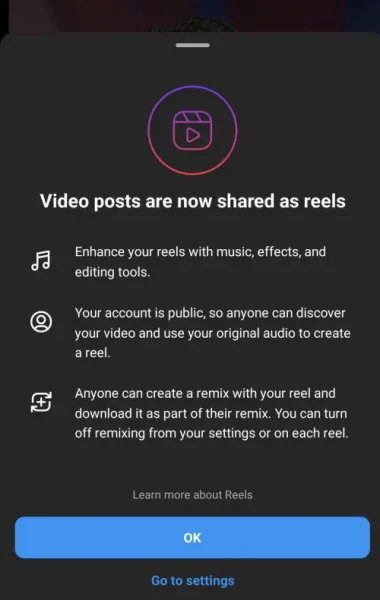
Discovery. When your Reels are posted to a public profile, they may be eligible and recommended for more people to see. This also allows other users to Remix, edit, and add their own spin on the videos using Instagram’s built-in tools like templates and a new Dual feature that records your front and back cameras simultaneously.
A few exceptions. There are a few exceptions to this, like videos posted before things changed today and videos that are longer than 15 minutes. The blog post also indicated that currently, only videos under 90 seconds in length will be eligible for the Discovery and recommendation system.
Remix tools. Instagram is also expanding tools for Remix to help enhance the way stories are told on Instagram when collaborating with creators and friends, including:
- Remix for photos: Photos are core to the Instagram experience. In the coming weeks, you will be able to remix public photos. This gives you a limitless inspiration to create your own unique reel.
- Expanded Remix layouts: Choose between a green screen, horizontal or vertical split-screen, or picture-in-picture reaction view to add your own video commentary to existing reels.
- Add your clip: Have a hot take? Rather than having your remix appear at the same time as the original reel, you can now add your clip after the original so it plays sequentially.
Read the announcement. You can read more about these new features on Instagram’s blog.
Why we care. The new features are being released in the same week as Facebook breaks up its main feed, and TikTok creators expressing their frustrations over low payouts. If you’re a creator who earns revenue from Instagram Reels, you can take advantage of their new tools and potential greater visibility.
The post New Instagram videos under 15 minutes will automatically become Reels appeared first on Search Engine Land.
Courtesy of Search Engine Land: News & Info About SEO, PPC, SEM, Search Engines & Search Marketing
Category seo news | Tags:
Social Networks : Technorati, Stumble it!, Digg, de.licio.us, Yahoo, reddit, Blogmarks, Google, Magnolia.
Does Reddit even have an ads policy?
Written on July 21, 2022 at 3:47 pm, by admin
A study conducted by Marketing Brew and an API called Pushshift resulted in some pretty odd findings regarding which subreddits allowed ads and which ones didn’t.
The findings. The results are based on the API pulling data from the top 2,500 most popular subreddits. They show that despite spending the last decade trying to address brand-safety concerns, their actual approach is more cautious, which makes the platform seem unpredictable and inconsistent.
Where Reddit doesn’t allow advertising. These are popular subreddits where Reddit doesn’t allow ads.
- r/mileycyrus
- r/mensrights
- r/daftpunk
- r/floridaman
- r/mensrights
- r/mdma
- r/islam
- r/israel
- r/redhotchilipeppers
- r/depression
- r/archerfx (a community dedicated to a popular animated television show)
- r/ska
- r/stopsmoking
Where Reddit does allow ads. Some subreddits that were allowed to run ads included political and alcohol topics.
- r/alcohol
- r/crypto
- r/religion
- r/politics
- r/neutralpolitics
- r/ukpolitics
- r/canadianpolitics
Some ads. Weirdly enough, these subreddits were labeled as sometimes allowing ads.
- r/americanpolitics
- r/internationalpolitics
- r/liberal
- r/conservative
What Reddit says. Reddit spokesperson Amanda Geraldo said that every new subreddit is labeled no_ads until it goes through a “manual human review” to gauge if it’s considered safe. She also said subreddits labeled as some_ads require advertisers to “opt-in or opt-out of advertising” and are considered “expanded inventory.”
Why we care. Reddit is expected to surpass $522 million in ad spend by 2023. For perspective, Twitter is expected to bring in $5.58 billion this year. Even though they’re on the smaller end of the spectrum as far as ad platforms go, there’s still a lot of potential upside. If you’re an advertiser looking to run ads on Reddit, be aware of where your ads may or may not be allowed.
The post Does Reddit even have an ads policy? appeared first on Search Engine Land.
Courtesy of Search Engine Land: News & Info About SEO, PPC, SEM, Search Engines & Search Marketing
Category seo news | Tags:
Social Networks : Technorati, Stumble it!, Digg, de.licio.us, Yahoo, reddit, Blogmarks, Google, Magnolia.
TikTok’s history of low Creator Fund payouts has some leaving the platform for good
Written on July 21, 2022 at 3:47 pm, by admin
Creators on TikTok, disappointed about how much they’re being paid from its Creator Fund, are leaving the platform claiming mental health blows and burnout.
A pattern of unhappy creators. There have been several creators that have criticized TikTok for low payouts since the platform pledged to pay out a total of $1 billion over a three-year period. In reality, creators like Hank Green claim they’re paid between $0.02 – $0.03 per one thousand video views. To put that into perspective, YouTube creators claim that they are paid roughly $1 per every one thousand views.
- In 2021 Kevin Yatsushiro created a video on TikTok that went viral with over 3 million views. He was paid only $12.50.
- Alicia Trautwein posted a video in 2021 that gained 1.8 million views. She was paid about $10.
- Nikki Apostolou is a TikToker with 145,000 followers. She posts about 3 videos a day, each getting about 2-3 million views. She makes about $20-$30 per month on average.
- Jimmy Donaldson is one of TikTok’s top creators with over 32 million fans on the platform. In January he earned just $25.10.
What’s the solution? Creators Trautwein and Yatsushiro have both suggested that TikTok needs to create a standardized payout program, much like how YouTube’s model works. This would make the TikTok Creator Fund a more competitive and secure program.
The YouTube model. Last year, YouTube’s CEO Susan Wojcicki wrote in a blog post that the company had shelled out $30 billion to creators between 2018 and 2021. “We can’t compare overall revenues for the two apps — TikTok is owned by a private company — but we do know that YouTube has roughly twice as many users as TikTok, not 30 times as many.”
Taking on brand sponsorship deals. Another option for TikTok creators is to work directly with large brands for sponsorship deals. Creators like Vi Luong who has 1 million followers have earned up to $32,000 per month through sponsorships.
According to Business Insider, Deanna Giulietti is a lifestyle creator with around 1.7 million followers on TikTok. Giuletti now creates content on both TikTok and Instagram Reels, which she uses to make money. The creator told Insider that she signs an average of 10 to 15 sponsored deals a month, depending on the time of the year, and last year she made $535,000 from brand deals alone, including $126,000 in November thanks to the holiday push.
TikTok’s claims. TikTok claims that they pay their creators based on a variety of factors including video views, engagement, the locations seen, and total participants in the Creator Fund. “Authenticity of a view” is also a considered factor, though there is no data on how that is calculated.
Why we care. TikTok’s claims that they want to be a source of consistent and reliable income for creators is laughable at best. We’re not saying that all creators participating in the Creator Fund are being underpaid, but the data isn’t telling us much otherwise. However, this could be good news for brands looking to hop on the influencer bandwagon, as the pool of creators looking for deals may be higher.
The post TikTok’s history of low Creator Fund payouts has some leaving the platform for good appeared first on Search Engine Land.
Courtesy of Search Engine Land: News & Info About SEO, PPC, SEM, Search Engines & Search Marketing
Category seo news | Tags:
Social Networks : Technorati, Stumble it!, Digg, de.licio.us, Yahoo, reddit, Blogmarks, Google, Magnolia.
Facebook Home tab to show more content recommendations
Written on July 21, 2022 at 3:47 pm, by admin
Meta CEO Mark Zuckerberg has announced two significant changes to the Facebook app that will make it feel like a hybrid of TikTok and “Facebook classic.”
What’s new: Users will start seeing these changes starting today:
- The Home tab will include more personalized content recommendations, with a greater emphasis on Reels and Stories.
- A new Feeds tab that will allow users to see posts from friends, groups and Pages in reverse chronological order.
The rollout is expected to take about a week. These changes will come to the desktop later this year.
How Meta CEO Mark Zuckerberg described the change. “One of the most requested features for Facebook is to make sure people don’t miss friends’ posts. So today we’re launching a Feeds tab where you can see posts from your friends, groups, Pages and more separately in chronological order. The app will still open to a personalized feed on the Home tab, where our discovery engine will recommend the content we think you’ll care most about. But the Feeds tab will give you a way to customize and control your experience further.”
What it looks like. Here’s a screenshot Facebook shared:
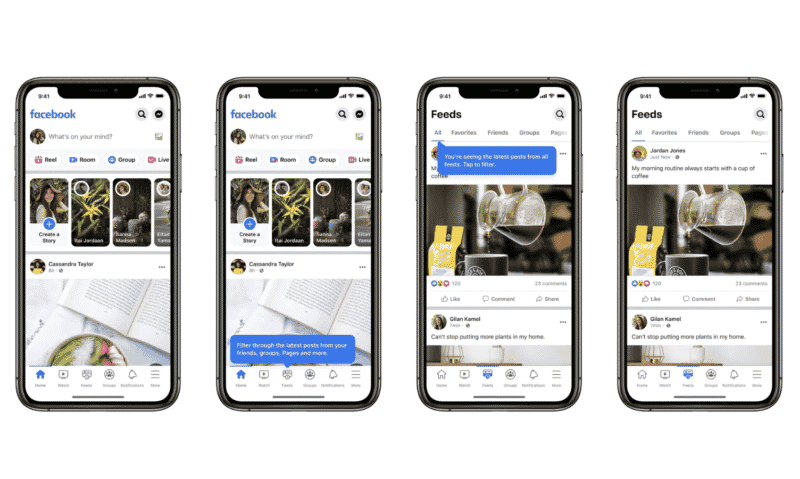
Official announcement. Facebook has published the official news announcement here.
Why we care. This has the potential to be a big “meh” or it could end up being a significant opportunity for marketers. This change shouldn’t impact advertising, as Facebook Ads will continue to appear in the Feed. But there is potential that video content could go viral if it gets enough engagement and sends the right signals (e.g., related engagement, related topics, locations) to Facebook’s machine-learning algorithms.
The future is now. In 2016, Zuckerberg said: “We see a world that is video-first with video at the heart of all of our apps and services.” It took six years, and the explosive growth of TikTok, but we continue to watch this major shift for Facebook from being a social network to becoming more of a TikTok-like content discovery engine.
The post Facebook Home tab to show more content recommendations appeared first on Search Engine Land.
Courtesy of Search Engine Land: News & Info About SEO, PPC, SEM, Search Engines & Search Marketing
Category seo news | Tags:
Social Networks : Technorati, Stumble it!, Digg, de.licio.us, Yahoo, reddit, Blogmarks, Google, Magnolia.
Webinar: Everything you should know about building quality links at scale
Written on July 20, 2022 at 12:46 pm, by admin
Getting backlinks is one of the most challenging and time-consuming tasks in SEO. So how do you get started on creating a successful outreach program that brings in quality links?
Join Purelinq’s Kevin Rowe, who will walk you through creating a scalable outreach program to create a natural link profile, meet minimum quality requirements and drive maximum impact.
Register today for “Everything You Should Know About Building Quality Links at Scale,” presented by Purelinq.
The post Webinar: Everything you should know about building quality links at scale appeared first on Search Engine Land.
Courtesy of Search Engine Land: News & Info About SEO, PPC, SEM, Search Engines & Search Marketing
Category seo news | Tags:
Social Networks : Technorati, Stumble it!, Digg, de.licio.us, Yahoo, reddit, Blogmarks, Google, Magnolia.
Google launched three new ad creation tools
Written on July 20, 2022 at 12:46 pm, by admin
Google has just announced two new tools in an attempt to make the process of creating ads and collaborating with team members much easier.
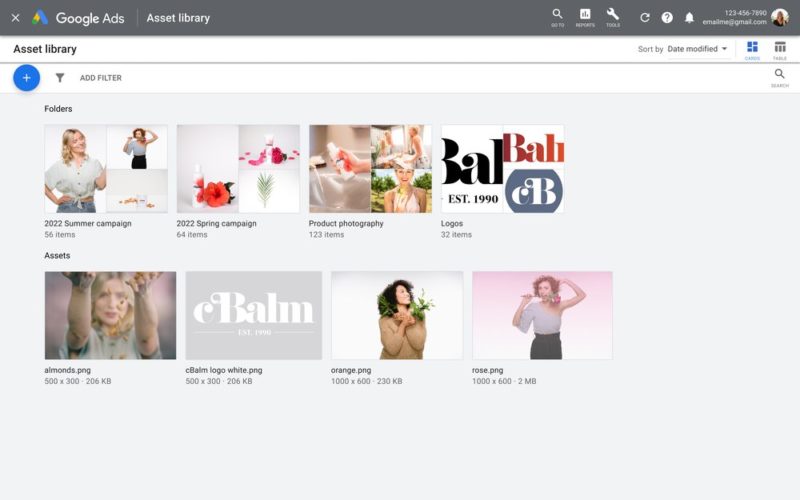
1. Asset storage and organization
Multiple team members trying to access images and videos can be a tedious process. Google’s new Asset Library attempts to solve that issue by creating a visual-first database where colleagues can upload, download, and share assets from current and past campaigns.
The Asset Library is currently available for Performance Max, Discovery, App, Local, and Display campaigns as well as some extensions. When you’re ready to create or edit a new campaign, simply access the library and click on the appropriate assets.
2. Create video ads for YouTube
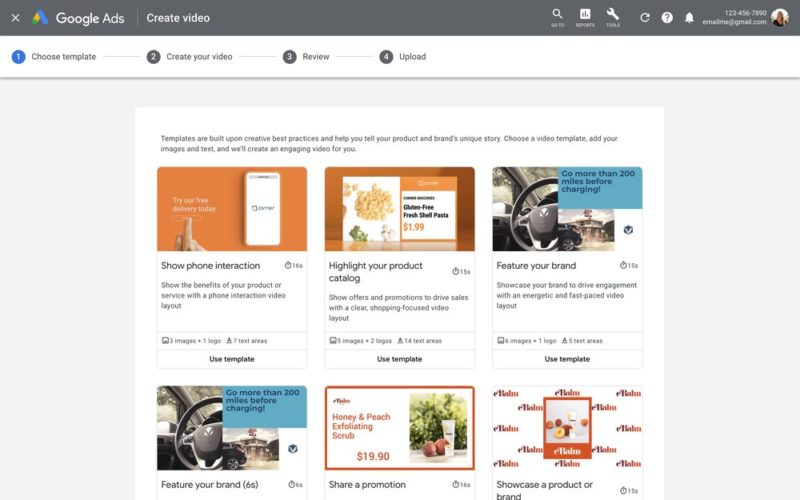
Last week we reported the launch of the Ads Creative Studio, which is intended on giving creators a new platform for customizing video and display ads. Today they announced a new feature allowing advertisers to quickly create video ads for YouTube.
The templates are made specifically for YouTube and designed “to help drive results,” although we suggest testing these templates against your current ads.
3. Voice-over audio
Google reports that videos with voice-over drive better performance. So they have also released a voice-over audio feature integrated into the video creation tool. The feature uses Google’s speech-to-text technology and is accessible through the asset library. There are seven voices available and the languages include English, Filipino, French, Hindi, Indonesian, Korean, Malaysian, Mandarin, Spanish and Swedish.
Read the blog. You can read the blog announcement about these new features here. Google Ads Liason Ginny Marvin also made the announcement on Twitter.
We’ve been working to make high-quality video ad creation easier for businesses of all sizes. Video creation is now fully launched in Google Ads Asset Library. You can also quickly add voice-over to your new & existing video ads. 1/2…
— AdsLiaison (@adsliaison) July 20, 2022
Why we care. These new features seem helpful, but like with any new release, advertisers should test before diving in. If you’re working with a team and creating multiple video ads for YouTube, try the new tools out and let us know on Twitter what you think.
The post Google launched three new ad creation tools appeared first on Search Engine Land.
Courtesy of Search Engine Land: News & Info About SEO, PPC, SEM, Search Engines & Search Marketing
Category seo news | Tags:
Social Networks : Technorati, Stumble it!, Digg, de.licio.us, Yahoo, reddit, Blogmarks, Google, Magnolia.