

5 things your Google Looker Studio PPC Dashboard must have
Written on October 31, 2022 at 5:39 am, by admin
If you’re just getting started with Google Looker Studio, you’ve probably experienced blank-page syndrome.
You get your data source connected, open up a new file, and you have no idea what to do next.
There are no instructions. No guide rails. Just you and an empty page to fill.
And while you can start with a template (Google Looker Studio Report Gallery has several), it’s still tough to know how to customize it to perfectly fit your needs.
Here are some tried-and-true elements to include in PPC dashboards and reports that will banish blank-page syndrome and give your stakeholders the insights they crave.
1. Titles, subheads and context
When you add a chart in Google Looker Studio, you select the data source, dimensions, metrics and date range from the Data Panel to populate your visualization.
But your reader doesn’t see the Data Panel and won’t know what your chart is about unless you take an extra step to include it in your dashboard.
The two graphs below show identical data visualizations. Figure A includes only the chart, while Figure B includes written titles and context.
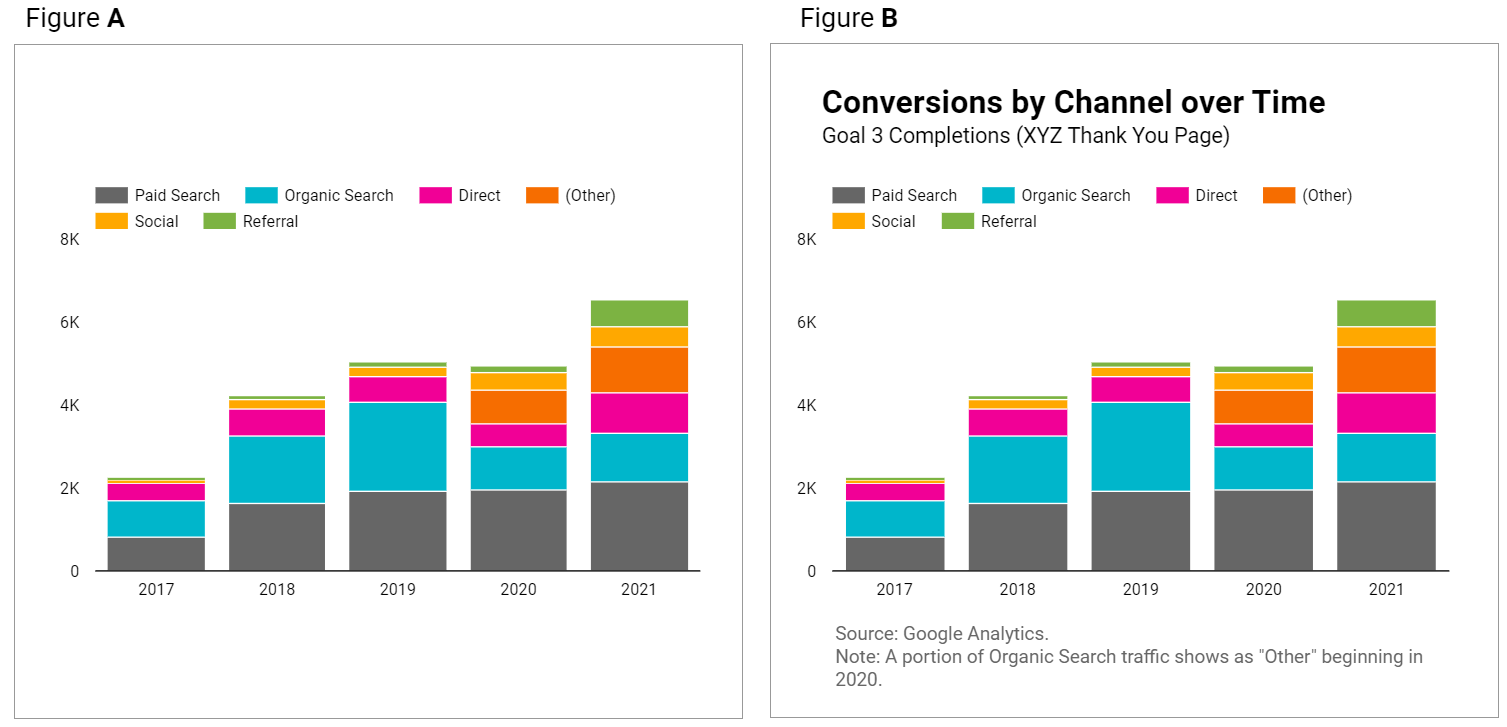
Figure A leaves questions in your reader’s mind that Figure B answers.
You can make your graphs and tables easier to understand at a glance with these tips:
- Give your data visualizations a title.
- Use subheadings and microcopy for additional context.
- Use legends.
- State the date range if it’s not included in the chart. (Note: “auto” date range defaults to last 28 days.)
- If multiple data sources are used throughout your dashboard, clarify which is used in specific charts.
How to do it:
- Add a text box and write out your titles and descriptions.
- This will open up a “Text Properties” panel to edit fonts, text size, and styling elements.
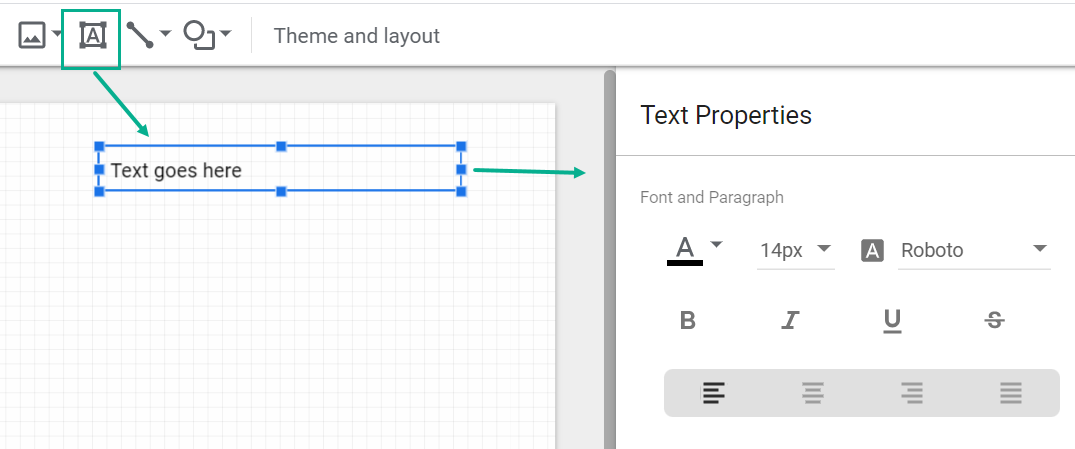
It’s worth the small manual effort it takes to add a text box and include context!
2. KPI scorecards
You don’t need an article to tell you that your dashboard should include your key performance indicators (KPIs).
But while you’re planning out your dashboard, pay special attention to where to include them.
Your KPIs matter most in your report and deserve top billing.
That means showcasing your KPIs with scorecards like so:

Not as afterthoughts at the end of a table:
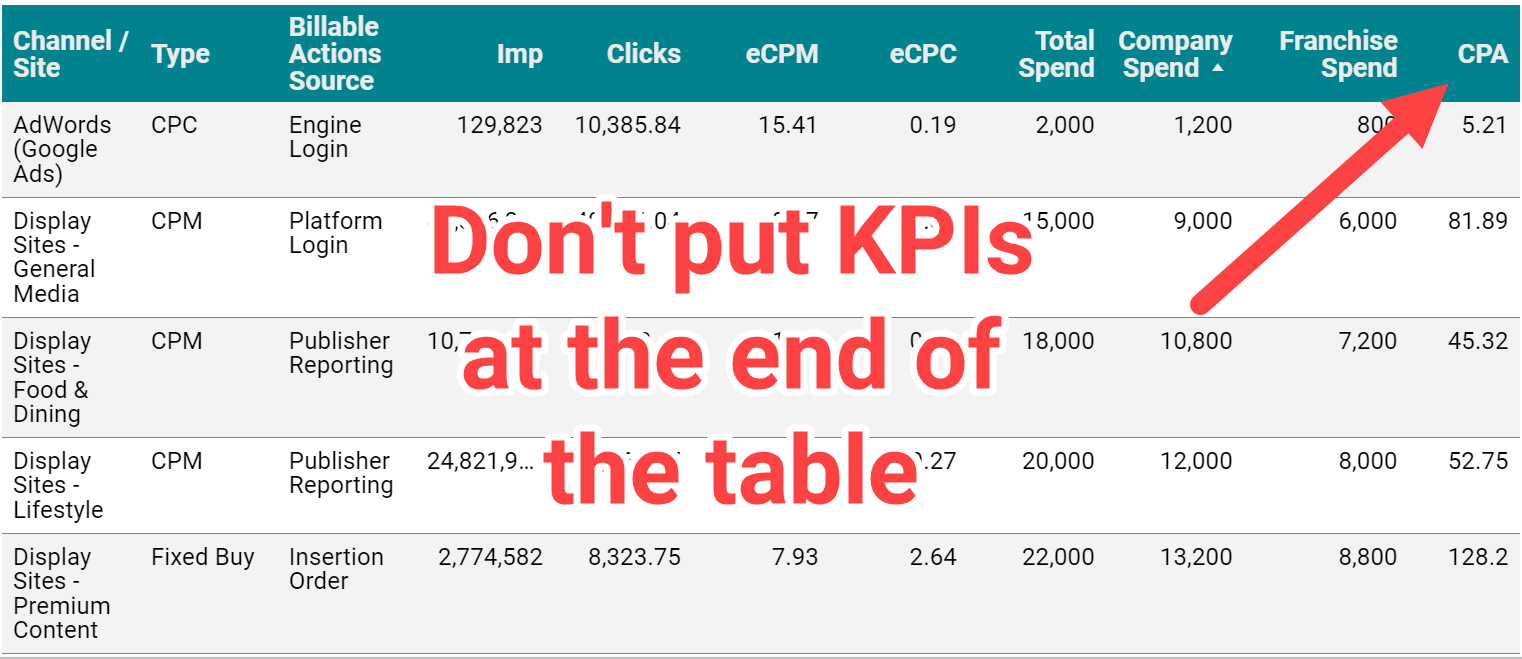
Not only do tables make it hard to identify KPIs, for languages that are read left to right, tucking KPIs on the far right of the table tells your reader these metrics are low priority.
Keep your reader focused on your key growth metrics like lead volume, revenue, or return on ad spend (ROAS), rather than vanity and traffic metrics like impressions and clicks.
How to do it:
- Use Chart > Scorecard.
- In the “metric” section of the Data Panel, add your KPI. Repeat as needed.
- Control format and size in the Style Panel.
Having KPIs appear in tables and other charts isn’t a problem, but give them added attention by using scorecards.
3. Goal pacing
Some advertisers use fixed monthly or annual marketing budgets with no room for adjustments.
Others have sales or efficiency goals they need to hit with flexible budgets.
No matter what the approach, your dashboard should answer the question:
Are we meeting our objectives, and how do we know?

Account objectives aren’t standardized, and neither is the approach for including goal pacing in your dashboard.
Fortunately, Looker Studio gives you many options for adding objectives and pacing, from literally charting against a goal to adding a written description of the target.
Here are some examples of how you might anchor performance to a goal:

How to do it:
- Option: Add a header that states the objective
- Option: Use a pacing chart such as bullet or gauge
- Option: Add a calculated field with progress to goal (metric/target)
Including goal pacing gives your reader confidence in how to interpret performance data.
4. Trends and historical comparisons
Trends and historical comparisons let your reader know if things are improving – or need improvement – over time.
Maybe you fell short of the goal, but you always miss it because it’s unrealistic.
Maybe you hit your goal, but you’re down compared to last year, and you need to take corrective action.
Don’t make your reader wonder whether current performance is average, down or “best month ever.”
Snapshot (single-metric) comparisons
Tables and scorecards give you an easy way to show your reader how performance for this period compares to another, using color-coded arrows to indicate the direction of the change (delta).
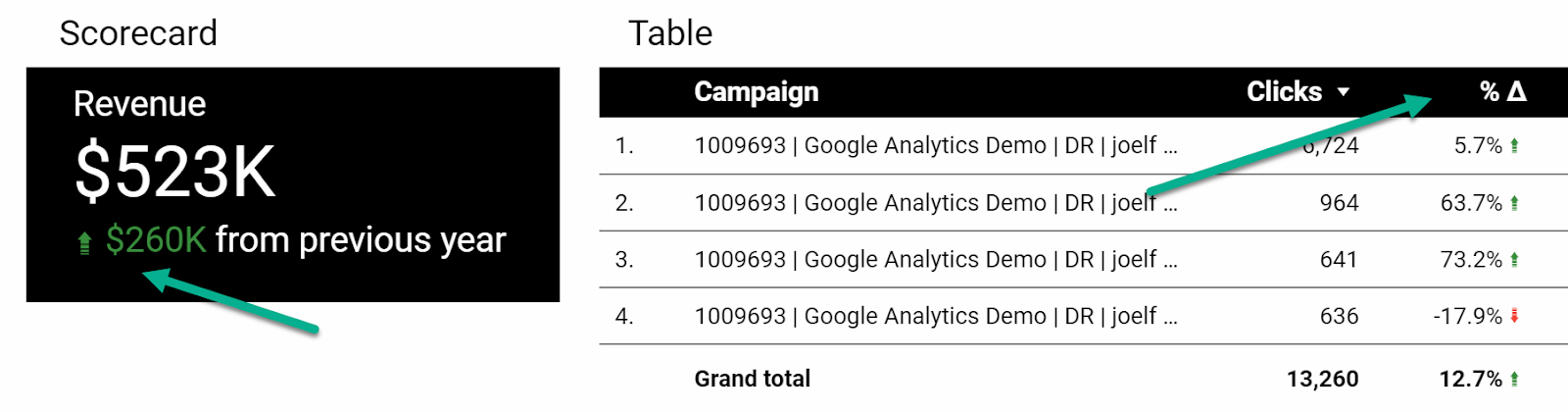
How to do it:
- Under “Date range,” select your comparison date range:
- Fixed
- Previous period
- Previous year
- Advanced
- In the Style Panel:
- Control the color of positive or negative change arrows
- For Scorecards only, you can select whether to show absolute or percentage change and whether to include a description of the previous time period (comparison label).
- You can also format Scorecards to show both YoY and MoM comparisons.
Line charts
You can get a complete picture of performance trends using time series charts.
Rather than just comparing this period to the last period, you’ve got an entire history revealing trends in seasonality, market impact and more.
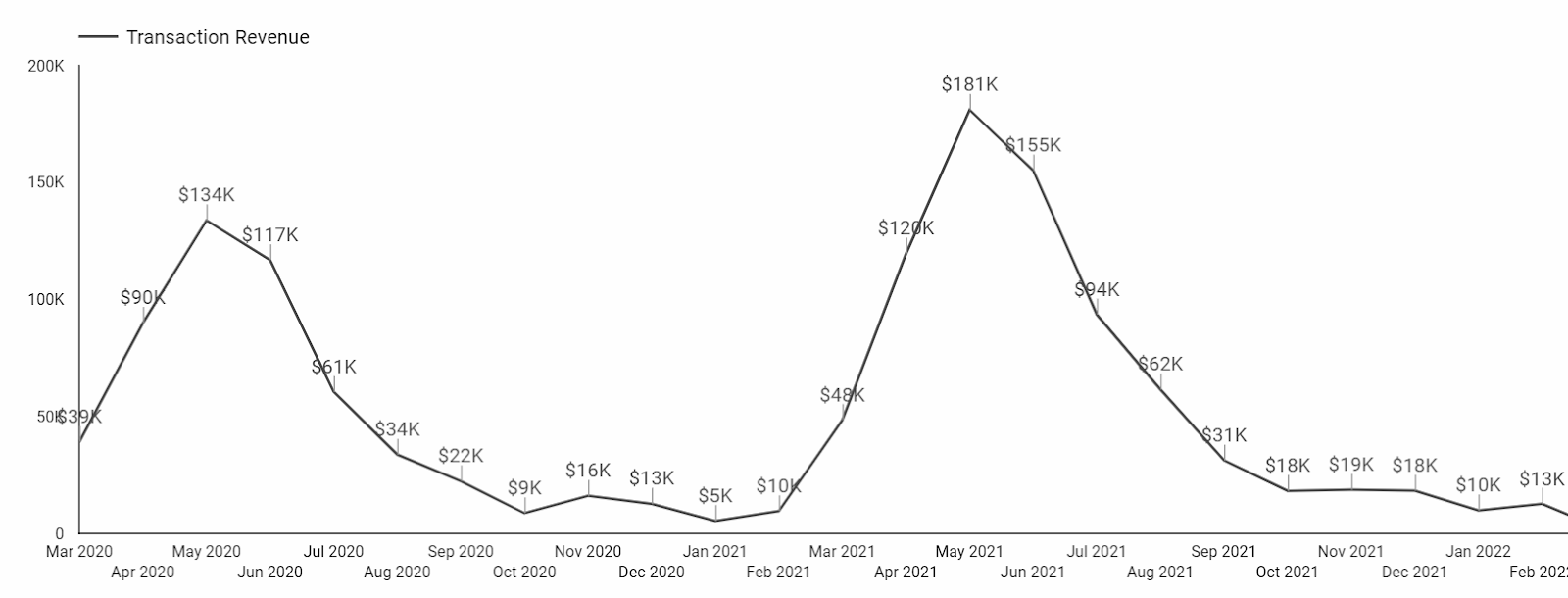
You can use a continuous Time series chart (shown above) or designate a comparison time period.
Here’s how that same data looks as a Year over Year (YoY) Time series chart. Note that the comparison year will show as a lighter shade of this period’s line:
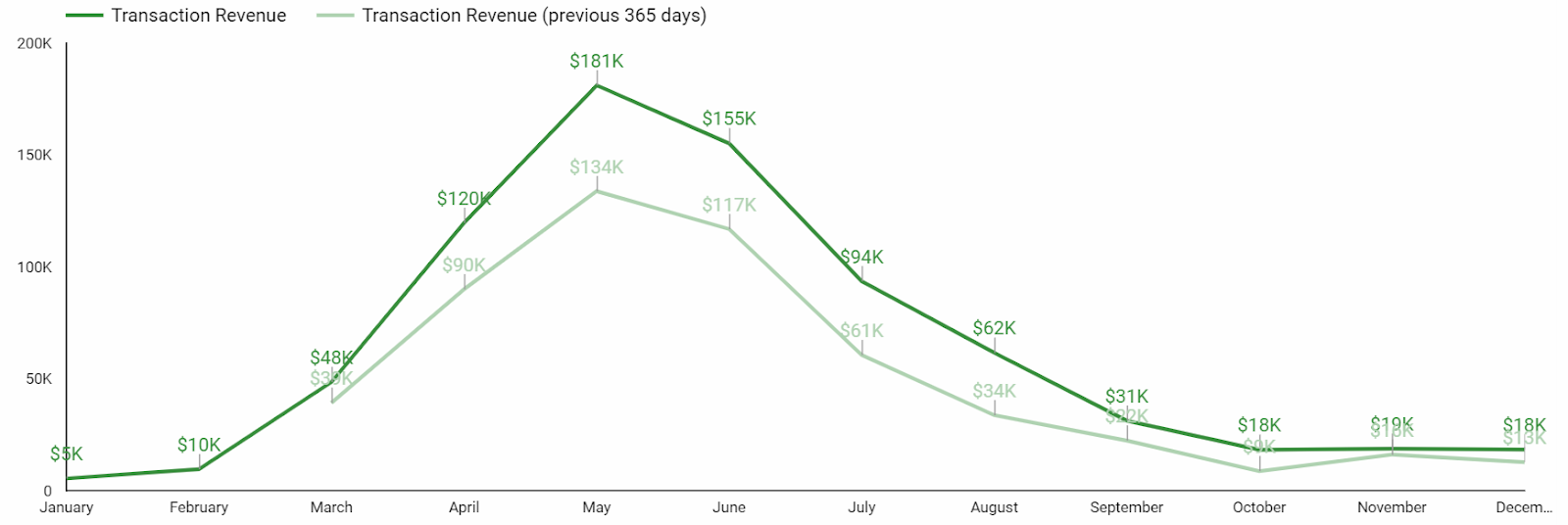
Another way to show historical performance is with a line chart that uses a time period as a breakdown dimension.
This Line chart is from a report comparing CPCs before and during the Covid-19 pandemic:
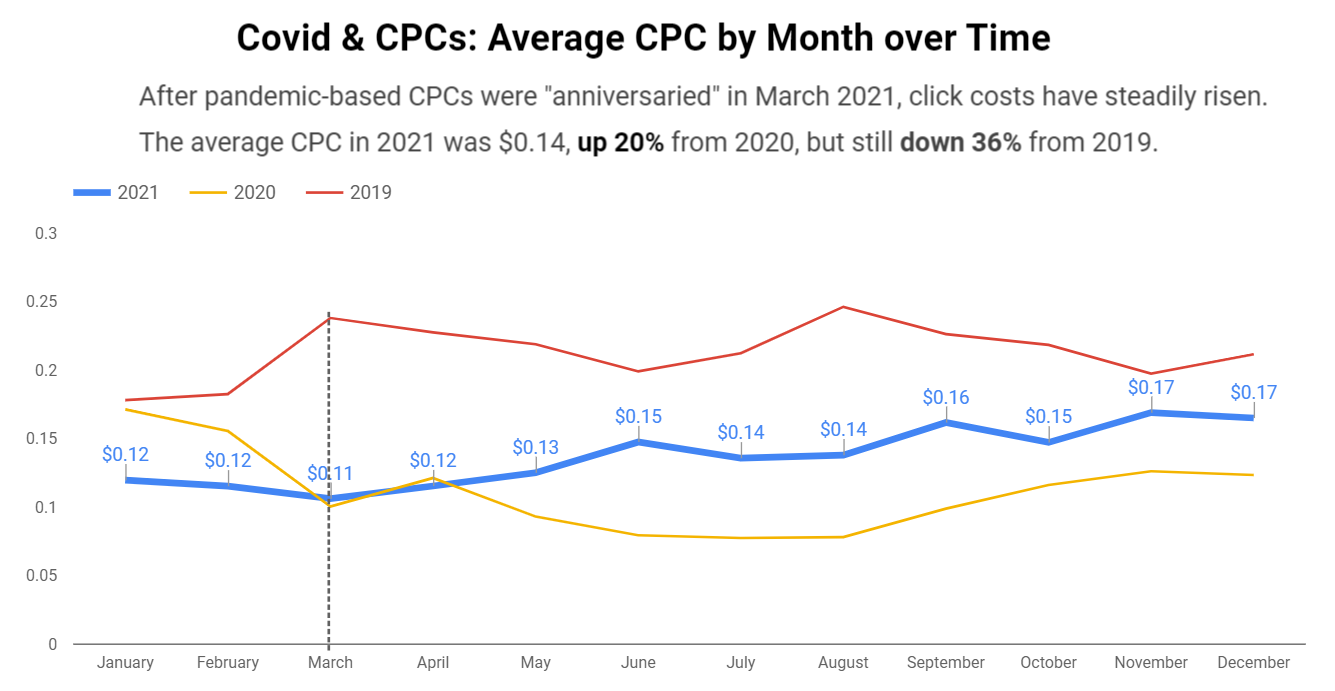
How to do it:
- To compare two time periods: Use a Time series chart and select a comparison date range.
- To compare three or more time periods (shown here for years):
- Select a Line chart
- Set the “Dimension” to Month
- Set the “Breakdown Dimension” to Year
- Set the “Sort” to Month
- Set the “Secondary sort” to Year
A few important notes for trends and historical comparisons –
- Only use these for your KPIs or metrics that directly contribute to your KPIs. Don’t add a CTR trend chart just for the sake of including a trend chart.
- There’s almost never a reason to show daily granularity in these charts. Zoomed in that closely, you’ll miss the signal for the day-to-day noise. Look for trends at a monthly level.
5. Categorical tables
Okay, so tables aren’t that glamorous.
But if your Looker Studio dashboard doesn’t have a table, something’s probably missing.
Why? Because there are times when your audience needs to compare multiple categories across multiple metrics. And nothing does that more efficiently than a table.
Tables are great for comparing default categories like:
- Campaigns
- Ad groups
- Keywords
- Search terms
- Final URLs
And depending on the complexity of your PPC dashboard, you can create tables for:
- Engines and platforms
- Channels and networks
- Funnels / intent / stages of awareness
- Brand vs. nonbrand
- Pivots of time segments, conversion types, and other categories
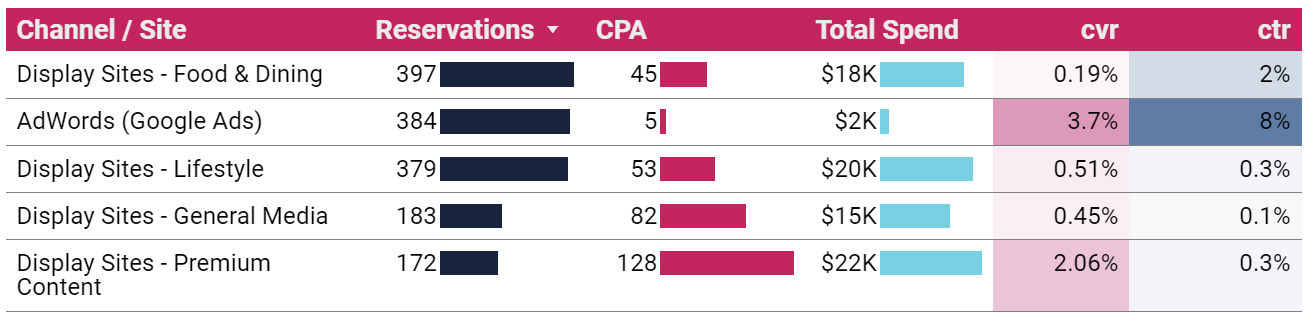
How to do it:
- Chart > Table (or Pivot table)
- Dimension(s): the category or categories you want to compare
- Metrics: your KPIs and supporting metrics
- From the Style Panel, you can format your table to include heatmaps, bars and targets
It’s easy to build tables and add metrics, and it’s easy to get carried away. Exercise some restraint and limit the number of metrics in your table, so it remains useful to your reader.
Bonus: Shiny charts
Our list constrained us to five categories, but here’s one bonus for making it to the end:
Shiny charts.
What are shiny charts?
Shiny charts are visualizations that your audience loves and gets excited about, even if they’re not super actionable.
Your readers may not learn anything new, but they’ll feel like they learned something new.
Maps are a great example.
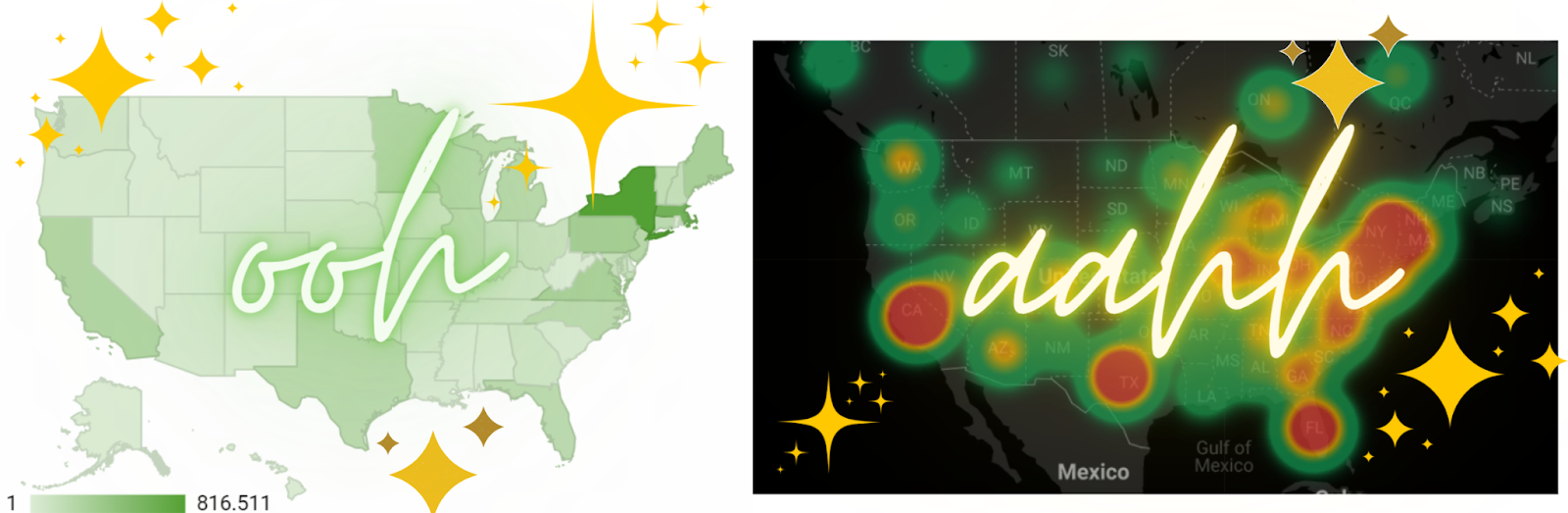
Many dataviz experts say not to use map charts; there are better ways to communicate location data.
But try to find a client or stakeholder who doesn’t love to see performance data on a map. Go ahead. I’ll wait.
Sure it’s a bit counterintuitive when you’re trying to build out an actionable dashboard. Maybe even a bit controversial. And you don’t have to do it. But a chart that makes your audience feel good just for seeing it has its own merit.
Putting it all together
While your Looker Studio dashboard can technically include whatever you want, it should at a minimum include:
- Title and context
- KPI scorecards
- Goal pacing
- Historical comparisons
- Categorical tables
These don’t need to (and can’t) all be discrete sections. One scorecard can include a title, KPI, pacing, and time comparison.
There are many other charts and visualizations that can take your PPC dashboard from good to great. Getting started with this list will set you up for success and give you a dashboard worth the time it took to build.
The post 5 things your Google Looker Studio PPC Dashboard must have appeared first on Search Engine Land.
Courtesy of Search Engine Land: News & Info About SEO, PPC, SEM, Search Engines & Search Marketing
Category seo news | Tags:
Social Networks : Technorati, Stumble it!, Digg, de.licio.us, Yahoo, reddit, Blogmarks, Google, Magnolia.
13 essential SEO skills you need to succeed
Written on October 30, 2022 at 2:39 am, by admin
What is the greatest skill in SEO?
If you believe this tweet, it’s patience.
Although patience is a great answer, I would never say there is a “greatest” SEO skill.
Why?
Because SEO requires various hard skills (things you can learn or be taught) and soft skills (how you work and interact with others) to succeed.
As I’ve always found, asking many SEO professionals one question will get a wide variety of opinions. So I asked several SEO professionals what they would consider the greatest skill in SEO.
Here’s what they told me.
1. Research and troubleshooting
Dave Davies, Lead SEO, Weights & Biases
- “As far as greatest skills go, I have to go with the stock SEO answer: It depends. In this case, though, it really does.
If the practitioner is content-focused, then writing skills combined with strong research abilities (both SEO and subject-based) would definitely top my list. If the practitioner is a technical SEO, then the most important skills skew to technical knowledge – but even that branches out.
If they work as a contractor, then they likely need to have a broad understanding of different tech and a strong ability to research specifics and work with developers. If they’re an in-house SEO or platform-specific contractor, then they would likely need a stronger grasp of a specific stack, and possibly deployment capabilities.
The one skill that every SEO needs is research and troubleshooting capabilities. If they can’t do that, their career will be short. Thankfully, if you’re reading this, you do your research.”
2. Critical thinking
Dan Taylor, Head of Technical SEO, SALT.agency
- “For me, one of the greater skills for SEO professionals to develop is critical thinking. The SEO ecosystem is awash with noise and claims, with varying levels of data and anecdotal evidence to support them. Far too often, much of this content and advice is taken verbatim and applied to own situations without a second thought, with the expectation that the implementation will yield the same results.
A common example in SEO happens when working with a client (and other stakeholders) on a website redesign. More often than not, the designs, and some proposed technical implementations, will be taken from other websites without considering the ‘other’ factors that go into how a website ranks. Just because eBay, the BBC, Amazon, etc. do X, doesn’t mean X will work for Bob’s Hardware or Bob’s Finance Co.
With critical thinking, SEOs should read a study online, see the inputs and outcomes, and then intentionally find other studies that contradict these results – and then form their own opinions and influence their strategies with application to the current client scenario.”
John McAlpin, Director of SEO Strategy, Cardinal Digital Marketing
- “Most experienced SEO professionals will likely say that the most important skill is a soft skill. I’d say that’s pretty spot-on.
In my opinion, the most important SEO skill is critical thinking. Not everything in SEO is black and white. There’s always a middle ground. It takes real detective skills to find the answers.”
3. Problem-solving
Elmer Boutin, VP of Operations, WrightIMC
- “Problem-solving and the ability to see the big picture. We often get so bogged down in the minutia of various SEO tasks that we miss the big picture of what’s going on between the website, the search engines, the potential visitors, and the business the website represents.
Taking a step back and looking at things from end to end can help us solve problems more than fretting over things like meta description length or figuring out the optimum time to release a blog post.”
Corey Morris, Chief Strategy Officer, Voltage
- “The greatest skill in SEO is problem-solving. It rarely goes according to plan.
Adapting, finding new ways, and exploring all resources for technical, on-page, IT, UX and off-page factors are all critical to success. Using a checklist, and checking boxes, won’t get you far.”
4. Experimenting
Himani Kankaria, Founder, Missive Digital
- “The greatest skill in SEO is experimenting. One thing that works for one business or industry is not necessarily what would work for another. You cannot judge that without testing.
Also, most of the projects have different audience buying and browsing perspectives, technologies for the website UX, content, how we build the navigation, etc. So you need to keep checking what works for your website, client, or employer because SEO is ever-evolving, and one cannot learn or unlearn new or outdated things without experimenting. Sometimes, we learn from someone else’s experiments, so experimenting is a super duper skill in SEO.”
5. Business acumen
Trond Lyngbø, Founder, Search Planet
- “As an SEO consultant specializing in enterprise-level SEO consulting for enterprise ecommerce companies and omnichannel retailers, I value SEO strategies that are not SEO strategies for Google, but SEO for business performance results, productivity and economic growth.
A solid understanding of business, business processes, workflow automation and cross-functional alignment is worth gold in this segment.”
Connie Chen, SEO Specialist, Moving Traffic Media
- “Commercial awareness (ROI) and soft skills because you need to be able to translate the work that you’re doing into measurable impact for your stakeholders. You must also know how to distill technical ideas into concepts that make sense to those stakeholders.”
6. Adaptability
Maria White, Head of SEO, Kurt Geiger
- “SEO is a spectrum. As such, it is hard to dominate all skills (Technical, Data, Content, PR, Story Telling, Management and more). These skills change as Google and search evolve. Every Google algorithm shapes the way we do SEO.
Given that the only constant is change, then the best skill to succeed is the ability to adapt. Changes are the norm when working in an agency: new clients, bigger clients, various budgets, fast pace and more. If, along with that, we add constant changes to the algorithm that involves changing the way we work, then here is where only those with the ability to adapt will not only survive but they will thrive.”
Holly Miller Anderson, Lead SEO Product Manager, Under Armour
- “The greatest skill in SEO is adaptability. SEO is a learned skill from technical to content. But adaptability is a choice.”
7. Communication
Casey Markee, Owner, Media Wyse
- “SEO requires an ability to clearly explain concepts and objectives, usually in many different ways, to many different people. Your ability to do so, professionally and emotionlessly, is a big part of your daily success.”
8. Ability to learn
Chris Silver Smith, President, Argent Media
- “The greatest skill in SEO is the ability to learn. One constant in SEO is change – one must learn new things and flex to adapt to new ways constantly.”
9. Persistence
Ludwig Makhyan, Co-founder, MAZELESS
- “Persistence is the greatest skill, where you don’t get disappointed by failures and continue to learn, push to improve, engage with other teams and cooperate for the greater success of the business you represent.”
10. Cross-collaboration
Jon Clark, Managing Partner, Moving Traffic Media
- “Cross-collaboration is an incredibly valuable skill. SEO is one of the few skills/roles that sits at the crossroads of nearly every department in an organization: design, development, content, UX, PR, marketing, engineering, quality assurance, analytics, and more.”
11. Understanding the user
Mike Grehan, SVP of Corporate Communications, NP Digital
- “The greatest skill of an SEO is to fully understand the “information need” of an end user. They don’t start their research as a consumer or a B2C customer or B2B, or anything other than a human being trying to solve a problem. Help Google to help them – and Google will surely help you!”
12. Inquisitiveness
Mark Jackson, President and CEO, Vizion Interactive
- “An inquisitive mind. In SEO, you can be a technically gifted and super bright person or a content marketing expert, but if you lack an inquisitive mind, you may not be looking at a project from all the possible angles.”
13. Ability to know what matters
Olaf Kopp, Co-founder and Head of SEO, Aufgesang
- “The greatest skill in SEO is “ranking experience.” You can do a lot in SEO. But only 20% of that ensures 80% of success. Only with enough experience in knowing which tasks are effective, in which case makes the difference between good and average SEOs.”
Joe Devita, Managing Partner, Moving Traffic Media
- “The ability to stay focused on the optimization signals that matter rather than be distracted by all the noise.”
The post 13 essential SEO skills you need to succeed appeared first on Search Engine Land.
Courtesy of Search Engine Land: News & Info About SEO, PPC, SEM, Search Engines & Search Marketing
Category seo news | Tags:
Social Networks : Technorati, Stumble it!, Digg, de.licio.us, Yahoo, reddit, Blogmarks, Google, Magnolia.
4 digital marketing pain points SMBs face today by Microsoft Advertising
Written on October 30, 2022 at 2:39 am, by admin

To succeed as a small or medium-sized business (SMB), employees must work smarter. Tight budgets and scrappy teams require innovation at every level — from the Founder and CMO, e-commerce Marketing Director to VP of Marketing, Social Media Director to Paid Search Strategist. This opportunity to bring creativity and agility to the table is one of the many reasons why employees find SMBs rewarding workplaces. Employees can help define the company vision. They can imagine ways to actualize this vision. And often, with SMBs, the product offering aligns with employee values and belief systems.
But let’s face it. The job of a digital marketing decision-maker within an SMB can be challenging— from the long hours to shifting budget priorities. Some might say digital marketing for an SMB is just as hard as creating the company product, thanks to ever-changing platforms, resources, content demands, and time constraints. Getting seen by the right audience can be difficult.
A challenging digital marketing world
Tasked with a new campaign, the digital marketing lead faces questions on how to create, target and execute digital advertising: When do you launch a digital campaign? What platform do you advertise on? How do you reach your target audience? What do you even post?
Digital marketers understand online advertising is key to amplifying their brand, but often they’re not clear where to begin; SMB advertising starts to feel like a ball-and-chain. Rapid changes in the advertising industry also contribute to marketer overwhelm. Consumer behaviors and demands for privacy are forcing brands to adapt how they reach and best serve people’s needs. While the digital marketing space can feel overwhelming, now is a crucial time for marketers to forge deeper relationships with people.
“You need to continually create and revamp the things that work, staying timely. It never ends. We have to keep tweaking our graphics to make sure they’re going to catch attention. It’s not like back in the day when you could run an ad in a newspaper and that same ad was going to run for six weeks, and you were done with it. You constantly have to make content to stay top-of-mind.“
To help accelerate SMB growth, Microsoft developed a quantitative and qualitative research program to better understand how SMBs manage their digital marketing today and to identify the pain points digital marketing leads face. Advertising decision makers of companies with less than 200 employees participated in a 15-minute survey to understand their needs and top pain points within the digital advertising landscape. Microsoft later conducted qualitative interviews to dig deeper into SMB needs. Most respondents noted they had few internal resources to support their efforts and often relied on agencies or freelancers for support (typically for content production or digital campaign management and optimization).
Four universal digital marketing pain points
The SMB founders and employees surveyed had different marketing POVs and experienced challenges unique to their roles. Some respondents were big-picture thinkers struggling to keep up with the ever-changing digital landscape, while others valued flexibility, optimization and results but had a tough time justifying marketing dollars spent. Many focused outward, eager to explore new ways to become and stay relevant on emerging social platforms like TikTok, while other leaders spent a large amount of time inside marketing brainstorming sessions, developing strategy with their team.
Although the findings were as diverse (and interesting) as the businesses surveyed, four clear SMB challenges emerged as shared frustrations: content creation, time and resource constraints, platform fragmentation, and evaluating ROI/ROAS. Read on for details about shared SMB marketer pain points.
Content creation
A shared frustration with SMB respondents was the volume and type of content deliverables required per campaign — and the reality that content takes time and effort to create. Many people and review cycles are necessary to strategize, envision, develop, write, design, update and optimize a successful digital marketing campaign. This constant demand for content tests SMBs’ bandwidth to fully execute the planned marketing vision.
“Coming up with the right content and being able to put that content together…that’s driving everything these days. Having the right content and current content. For me, it’s a resource thing, I don’t have the resources to generate content in a timely manner. Keeping it fresh.“
Time and resource constraints
The list of tasks for digital advertising marketers is extensive — from determining the marketing budget to developing and distributing content, managing digital campaigns, to analyzing and optimizing marketing efforts…and everything in between. Marketers have much to do but little time or resources to get the work done. The study shows that, out of necessity, SMB digital marketers are forced to either become marketing “Jacks and Jills of all trades” or are left scrambling to find freelancers or agencies to get tasks accomplished. The result? Mixing varying resources produces varying results.
“You spend a lot of time to do a quality check on content, because once it goes up there, it’s up there…Creating and monitoring content has been the thing that takes the most time because it’s only one piece of what I do here, and I’m the only person that’s doing it right now…it just takes time.“
Platform fragmentation
The stress of platform fragmentation is another shared SMB hurdle, as marketers face large quantities of information to learn, manage, and analyze. This is because digital marketers use many campaign and reporting platforms with unique algorithms and ad formats. Plus, these platforms and tools are continuously evolving. Digital advertising leaders experience overwhelm, not only with the many CMS platforms, reporting tools and analytic insights available but also with feature updates within each tool. Forced to keep up with platforms and upgrades, marketers experience pressure to hire more people to diversify the learning load.
“Algorithms change all the time. You have to be specialized in digital marketing to understand everything. My marketing department also works in shopper marketing and trade marketing. The amount of specialization that we can get to a degree is limited.“
Evaluating ROI/ROAS
Evaluating a campaign’s return on investment (ROI) and return on ad spend (ROAS) has always been challenging — but respondents note that it is even harder to track conversions and gauge true campaign ROI/ROAS with recent privacy changes. Another shared challenge is the perceived lack of standardized metric consistency or transparency across platforms. When developing reports for executives, respondents are tasked with piecing together multiple reports from different platforms to paint a clear picture of a campaign’s tangible return on investment.
“I think conversions are really frustrating. Some of that is the iOS update stuff that happened recently…it’s not accurate because it’s not giving conversions from Facebook. I want to have a completely accurate ROI for digital campaigns, and I don’t feel I’m getting that.“
SMB digital advertising solutions
In today’s digital space, businesses need smarter solutions to grow their business online and find new customers. SMBs are time-constrained and know every click matters. That is why Microsoft Advertising offers its newly redesigned Smart Campaigns experience to make online advertising easier and help small to medium-sized businesses reach more customers across leading advertising and social media platforms.
Smart Campaigns empowers digital marketing leaders to easily reach high-value customers across the web who have higher buying power, spend more online, and are more likely to engage with ads. It’s easy to get started. Marketers set up ads in a matter of minutes while they watch in real-time as the platform intuitively improves the ad, measures its performance, and shows understandable results across platforms.
A new feature within Smart Campaigns is Multi-platform. With Multi-platform, SMBs can expand their reach and maximize their investment by using one ad tool to target many channels like Google Ads, Facebook, Twitter, Instagram, LinkedIn and Microsoft Advertising. Instead of creating ads on fragmented platforms to launch and monitor a campaign, SMBs can save time by running ads on multiple platforms in minutes.
Smart Campaigns with Multi-platform is a new digital marketing ecosystem designed to eliminate SMB digital marketing pain points and connect marketers with people at the right moments across work and life.
“Hearing that everything could be in one place and that you could manage it all on different platforms, that’s exciting and innovative…I would be very interested. Being able to log on and do everything and see everything in one spot would save me time. That would be amazing.”
The post 4 digital marketing pain points SMBs face today appeared first on Search Engine Land.
Courtesy of Search Engine Land: News & Info About SEO, PPC, SEM, Search Engines & Search Marketing
Category seo news | Tags:
Social Networks : Technorati, Stumble it!, Digg, de.licio.us, Yahoo, reddit, Blogmarks, Google, Magnolia.
How to make the most of Performance Max this holiday shopping season
Written on October 30, 2022 at 2:39 am, by admin
Performance Max is one of the biggest shifts to automation that we’ve seen from Google. How do we make it work this holiday shopping season?
Ideally, you should’ve prepared everything in advance.
Black Friday is in ~30 days! If you’re just starting now, you’re already behind.
Below are some ways you can still get ahead.
1. Audience signals
This is the most underrated part of Performance Max, but likely the most important.
Google gives you the ability to input signals on who the system should target. Upload your customer and email lists, compile top keywords, use interests etc.
We’ve found success with the following audience signals:
- Customer match
- High-value customers
- 2021 holiday shoppers
- Email subscribers
- Custom intent
- Competitor names and URLs
- High-intent (bottom-funnel) keywords
Tip: Use the Klaviyo and Google Ads integration.
2. Asset groups
With PMax, it’s important not to shock the system by making drastic changes. It’s better to make smaller and more incremental changes.
You can use these approaches:
- Create a new asset group for promotional items.
- Layer new promo creative and extensions.
If you’re creating a new asset group, do it within the same campaign so that the product-level historical performance will be utilized.
Be patient and give it some time to collect data and ramp up. It can take time!
Keep in mind: Creating new Performance Max campaigns for BFCM is not recommended because the learning period takes too long to ramp up.
You’re best off adding new asset groups to existing Performance Max campaigns or layering on promotional assets with the current asset groups.
Get the daily newsletter search marketers rely on.
<input type=”hidden” name=”utmMedium” value=”” />
<input type=”hidden” name=”utmCampaign” value=”” />
<input type=”hidden” name=”utmSource” value=”” />
<input type=”hidden” name=”utmContent” value=”” />
<input type=”hidden” name=”pageLink” value=”” />
<input type=”hidden” name=”ipAddress” value=”” />
Processing…Please wait.
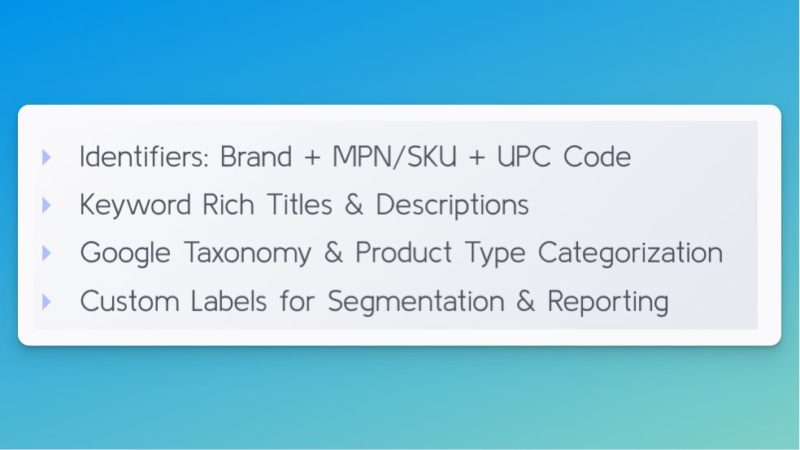
3. Datafeed
The datafeed is important all year round, but especially important now!
Google Shopping and Performance Max do not allow you to target based on keywords.
The system uses your product information to understand what search queries should show your ads.
4. Ad extensions
Ad extensions (assets) are an easy way to launch promos without making campaign changes that can throw off the system.
You can and should add promo extensions in two places:
- Google Merchant Center for Shopping
- Google Ads for Search, YouTube, etc.
In Google Merchant Center (GMC), you’ll want to make sure you have Promotions enabled under Growth > Manage Programs.
Once you have the option to create promos, go to Marketing > Promotions, then click the big blue button to submit your promotion info.
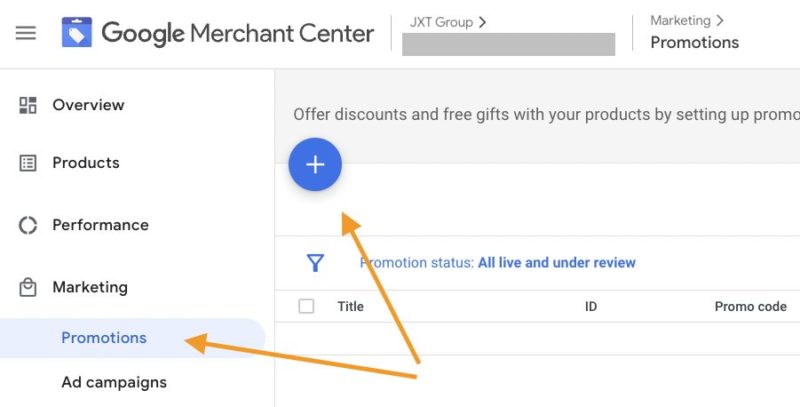
Note: GMC promos are very finicky and subject to manual approval so make sure to set this up correctly. It’s especially important to get the product selection right. (Step 2 below.)
Give yourself time and submit all promos in advance, just in case.
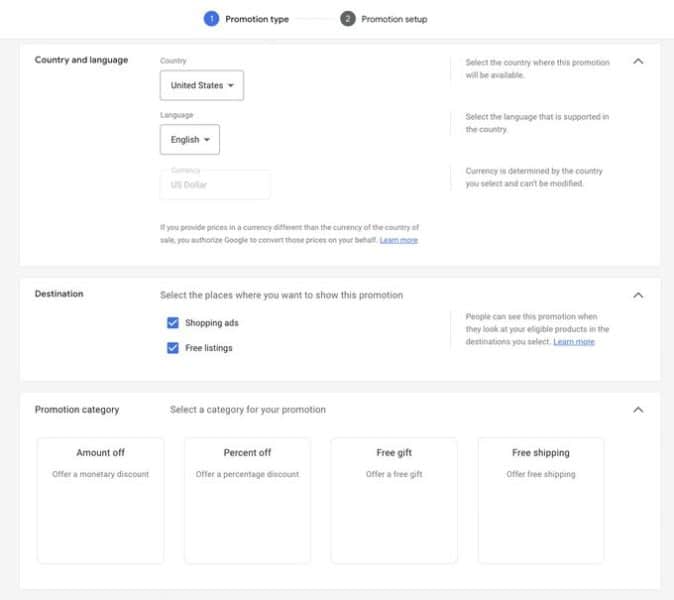 Step 1: Promotion type
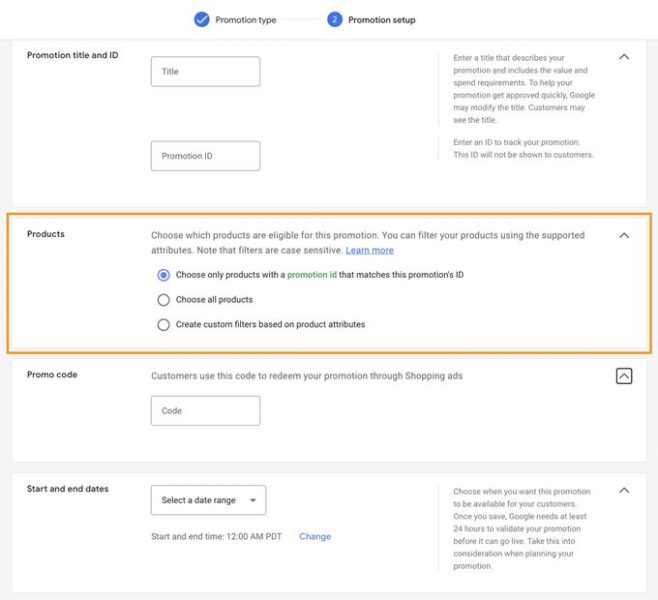 Step 2: Promotion setup
In Google Ads, promotion extensions (assets) can be added on the account level or campaign level. Just click the Assets tab and add new.
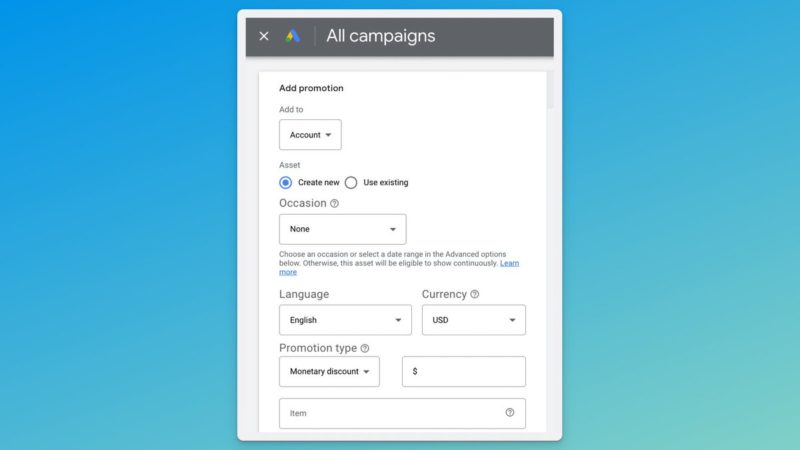
5. Bids and budget
Give the system space to perform but don’t make super-drastic changes.
We recommend increasing budgets and decreasing tROAS targets incrementally. Again, don’t shock the system.
Anytime you increase the budget, you force the system to find new audiences. It can take time for the algorithm to find a new audience that’ll perform well.
Also, keep in mind that as you increase your budget, you’ll likely see your ad costs increase as well.
6. Smart Shopping style
You can run Performance Max without any assets, only using your product datafeed. This forces the system to run in a similar manner to Smart Shopping with more placements available.
This is a great way to capture high-intent traffic at scale.

7. Paid social style
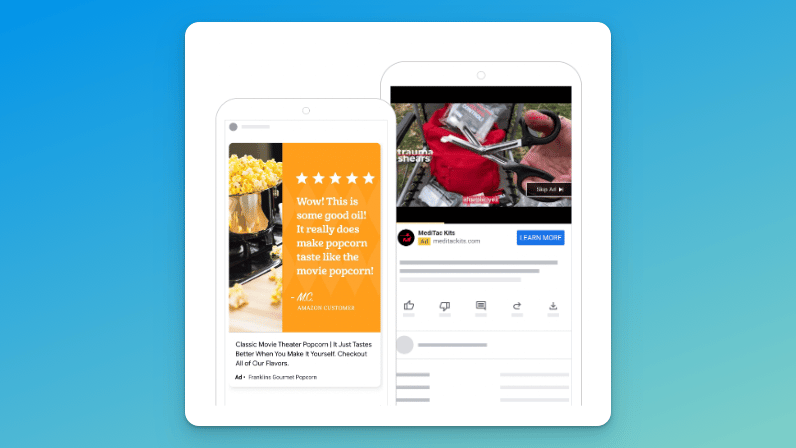
Additionally, you can run Performance Max without a datafeed which will exclude the Shopping placements and run display ads only.
If you see success with Facebook, Instagram, and TikTok, this can work very well for you.
And make sure you’ve got the setup, reporting and optimization basics of PMax covered by reading the following articles:
- How to set up Performance Max campaigns the right way
- How to maximize insights from Performance Max
- Performance Max optimization: How to improve your performance
The post How to make the most of Performance Max this holiday shopping season appeared first on Search Engine Land.
Courtesy of Search Engine Land: News & Info About SEO, PPC, SEM, Search Engines & Search Marketing
Category seo news | Tags:
Social Networks : Technorati, Stumble it!, Digg, de.licio.us, Yahoo, reddit, Blogmarks, Google, Magnolia.
Google Ads podcast placement now available
Written on October 27, 2022 at 8:20 pm, by admin
Google advertisers can now advertise on podcasts.
Yep, announced today, “advertisers can now align their ads with podcast content globally. Simply create an audio or video campaign and select “Podcast” as a placement.”
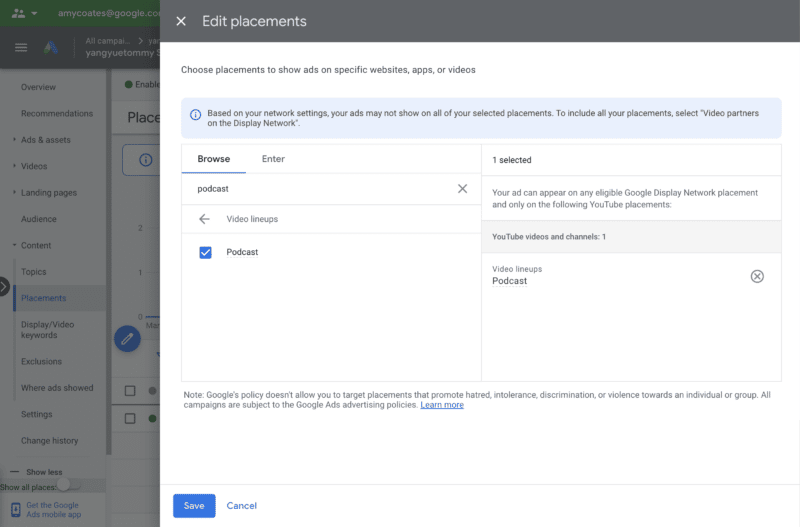
Why we care. Last month we reported on three new audio, shopping, and streaming features available to YouTube advertisers. Today advertisers can officially select “podcast” as their preferred placement.
The post Google Ads podcast placement now available appeared first on Search Engine Land.
Courtesy of Search Engine Land: News & Info About SEO, PPC, SEM, Search Engines & Search Marketing
Category seo news | Tags:
Social Networks : Technorati, Stumble it!, Digg, de.licio.us, Yahoo, reddit, Blogmarks, Google, Magnolia.
Licensed healthcare providers eligible to apply for new YouTube product features
Written on October 27, 2022 at 8:20 pm, by admin
YouTube has just announced that licensed healthcare providers can now apply to make their channels eligible for new health product features – a suite of information resources released last year.
What this means. The health product features previously launched include health source information panels to help viewers identify videos from authoritative sources and health content shelves that highlight videos from these sources when you search for health topics, so people can more easily navigate and evaluate health information online.
Previously, those features have only been available to educational institutions, public health departments, hospitals, and government entities. The new guidelines will make the features available to a wider group of healthcare providers.
How to apply. Eligible healthcare providers can apply starting today using the guidelines below, taken directly from the YouTube blog announcement.
Applicants must have proof of their license, follow best practices for health information sharing as set out by the Council of Medical Specialty Societies, the National Academy of Medicine and the World Health Organization, and have a channel in good standing on YouTube. Full details on eligibility requirements are here.
All channels that apply will be reviewed against these guidelines, and the license of the applying healthcare professional will be verified. In the coming months, eligible channels that have applied through this process will be given a health source information panel that identifies them as a licensed healthcare professional and their videos will appear in relevant search results in health content shelves. Health creators in the US can apply starting October 27th at health.youtube, and we’ll continue to expand availability to other markets and additional medical specialties in the future.
Why we care. YouTube is trying to help people become more informed, engaged and empowered about their health by attempting to create a space where they can find reliable, factual, and informative content from legitimate healthcare providers.
However, not every licensed healthcare provider shares safe, proven, harmless content. Users should still do their due diligence to ensure that the content they are consuming is high quality.
Additionally, advertisers who work with licensed providers should apply for the new features today to ensure their channels have added visibility.
The post Licensed healthcare providers eligible to apply for new YouTube product features appeared first on Search Engine Land.
Courtesy of Search Engine Land: News & Info About SEO, PPC, SEM, Search Engines & Search Marketing
Category seo news | Tags:
Social Networks : Technorati, Stumble it!, Digg, de.licio.us, Yahoo, reddit, Blogmarks, Google, Magnolia.
Reddit is building an Ads API, first 4 partners announced
Written on October 27, 2022 at 8:20 pm, by admin
Reddit is working on a new Ads API and have just announced their first four alpha partners. The partners will be integrated into the API and are helping build solution that will inevitably help advertisers build, scale, and optimize campaigns.
Who are the partners. The four partners involved in Reddit’s new venture are:
- Vidmob
- Sprinklr
- adMixt
- PMG
Who will benefit. Reddit’s API will benefit advertisers spending at scale, as well as self-serve advertisers who are using Reddit ads for the first time.
Release date. The API is still in development and there is no release date published at this time. Reddit says they are looking to “bring more strategic developers on board in the coming months.”
What Reddit says. “We have long had the aspiration to build an ecosystem of partners via our API that enables more effective and efficient campaign management on our platform. The Reddit Ads API will allow a global, diverse set of partners and clients to access all the capabilities we have built and continue to develop to drive performance,” said Reddit COO, Jen Wong. “These foundational alpha partners represent some of the best and brightest across the industry in terms of innovation, creativity and adtech. Having them join our developer ecosystem is tremendously exciting.”
Why we care. The new API will help advertisers discover new audiences, trends, and additional data they need to optimize their campaigns for conversions.
The post Reddit is building an Ads API, first 4 partners announced appeared first on Search Engine Land.
Courtesy of Search Engine Land: News & Info About SEO, PPC, SEM, Search Engines & Search Marketing
Category seo news | Tags:
Social Networks : Technorati, Stumble it!, Digg, de.licio.us, Yahoo, reddit, Blogmarks, Google, Magnolia.
GA4 gets new homepage experience, 5 new features
Written on October 27, 2022 at 8:20 pm, by admin
Google has just unveiled several new Google Analytics 4 (GA4) updates, including a new homepage experience, real-time behavioral modeling reports, and custom channel grouping.
Insights through machine learning
Behavioral modeling. Behavior modeling with real time reporting will give advertisers a complete picture of user behavior as it happens, in a privacy-centric way.
Behavior modeling uses machine learning to fill in the gaps of your understanding of customer behavior when cookies and other identifiers aren’t available.
Real-time updates will be available in the near future to give advertisers a complete view of the customer journey as it’s happening.
The new home page experience. Originally previewed at Google Marketing Live and available to all advertisers as of today, is personalized for customers, highlighting key top-line trends, real-time behavior and their most viewed reports. Additionally, it uses machine learning to look for trends and insights and surfaces them directly to advertisers on the home page.
Integrations and solutions to power better ROI
Data-driven attribution (DDA). DDA was introduced into GA4 earlier this year, after becoming the default for all ads conversions last fall. Soon, Google will launch custom channel grouping, a feature that lets advertisers combine different channels to compare cost-per-acquisition and return-on-ad-spend based on data-driven attribution. For example, businesses will be able to compare the performance of their paid search brand with their non-brand campaigns.
Integration with Campaign Manager 360. With this integration, you’ll be able to see a more complete picture of your campaign performance alongside web and app behavioral metrics.
GA4 Setup Assistant updates
Universal Analytics (UA) is sunsetting in 2023, so to help advertisers complete the transition easily, Google is rolling out an update early next year that will automatically help standard UA users set up their GA4 properties.
Google’s step-by-step guide will help you migrate to GA4 on your own if you choose to opt out of using the Setup Assistant. If you choose to utilize the Setup Assistant, you can access it in the admin section of your UA property.
Beginning early next year, the Setup Assistant will create a new Google Analytics 4 property for each standard UA property that doesn’t already have one. It should also be noted “the new GA4 properties will be connected with the corresponding UA properties to match your privacy and collection settings. They’ll also enable equivalent basic features such as goals and Google Ads links,” Google said.
New migration deadline for 360 customers
Additionally, we acknowledge that this is a complex transition, especially for enterprise customers which is why we’re pushing the migration deadline for 360 customers from October 2023 to July 2024, to ensure a successful setup.
Dig deeper. You can read the full announcement and more details on the features on the Google Marketing Blog.
Why we care. GA4 has been an inconvenient thorn in the garden of marketing. Maybe that’s being dramatic, but most advertisers are putting off implementing the new Analytics property to the very last minute. This is a bad idea.
If you haven’t set up GA4 yet, get started on it asap. Utilize the Setup Assistant to begin collecting data, then go back later and customize your dashboard and create additional views.
These new features are only helpful if you’re actually using the product.
More resources. Check out these additional resources to help you set up and get the most out of GA4:
- 11 steps to setting up a successful GA4 property
- GA4 now has an enhanced measurement option for Form interactions
- Your guide to Google Analytics 4 attribution
- Google Analytics 4: A breakdown of Demographic and Tech details reports
- Google Analytics 4 integration now available for Ads Manager
- How to migrate to Google Analytics 4: A step-by-step guide
The post GA4 gets new homepage experience, 5 new features appeared first on Search Engine Land.
Courtesy of Search Engine Land: News & Info About SEO, PPC, SEM, Search Engines & Search Marketing
Category seo news | Tags:
Social Networks : Technorati, Stumble it!, Digg, de.licio.us, Yahoo, reddit, Blogmarks, Google, Magnolia.
YouTube trim video tool turns videos into 6-second bumper ads
Written on October 26, 2022 at 5:20 pm, by admin
The new trim video tool from YouTube turns your videos into 6-second videos that you can use for bumper ads. How convenient!
Machine learning strikes again. The new tool is now available globally in Google Ads, making it easy for advertisers to create bumper ads. The tool is powered by a machine learning model that identifies important scenes and brand elements from the original video and adapts them for shorter formats, Google says.
Not new(s). The tool was first introduced in 2019 as Bumper Machine and Google says that since then it “has helped hundreds of brands drive more reach, frequency and efficiency by effortlessly generating 6-second bumper ads. It improves on the Bumper Machine beta in many ways, with an enhanced machine learning model that can better select clips to adapt into shorter formats and an interface with more intuitive editing capabilities.”
Dig deeper. Learn more about the new trim tool in the Google Ads Help Center.
Why we care. The new tool can be used by advertisers to quickly create bumper ads if they don’t have the cutting and editing resources available to larger businesses. The new feature also allows you to test multiple ads much faster, as all of the videos created will be available in the asset library.
The post YouTube trim video tool turns videos into 6-second bumper ads appeared first on Search Engine Land.
Courtesy of Search Engine Land: News & Info About SEO, PPC, SEM, Search Engines & Search Marketing
Category seo news | Tags:
Social Networks : Technorati, Stumble it!, Digg, de.licio.us, Yahoo, reddit, Blogmarks, Google, Magnolia.
Meta Q3 earnings: ad revenue declined 4%, but monthly users showing promise
Written on October 26, 2022 at 5:20 pm, by admin
Meta shared its 2022 Q3 earnings today and, as expected, performance left a lot to be desired. Advertising revenue came in at $27.2 billion, down roughly 4% year-over-year.
The positives. Overall ad impressions were up 17%, while the cost per ad decreased 18% YoY.
Monthly active users on the platform increased 2% to 2.96 billion YoY.
Not news. Meta isn’t alone when it comes to underperforming earnings. This week Google and Microsoft also released worse-than-expected results, to the disappointment of investors. SNAP also reported their slowest-ever quarterly growth last week, but added 6% more monthly users.
Frankly, Meta’s poor performance is (probably) no surprise to anyone. Meta shares are down nearly 60% YTD and inflation, a shaky economy, and privacy changes certainly contribute. At closing today, shared decreased another 7.69%.
iOS and ongoing TikTok competition. Meta is still dealing with a host of challenges due to the implementation of iOS14, including growing competition from TikTok, all of which have taken a toll on Meta’s ability to drive interest in both organic and advertising users.
Internal company documents obtained by the Wall Street Journal, indicate that Instagram users cumulatively are spending 17.6 million hours a day watching Reels, less than one-tenth of the 197.8 million hours TikTok users spend each day on that platform.
What meta says. “Our community continues to grow and I’m pleased with the strong engagement we’re seeing driven by progress on our discovery engine and products like Reels,” said Mark Zuckerberg, Meta founder and CEO. “While we face near-term challenges on revenue, the fundamentals are there for a return to stronger revenue growth. We’re approaching 2023 with a focus on prioritization and efficiency that will help us navigate the current environment and emerge an even stronger company.”
Dig deeper. You can review the Meta Investor Relations site with slides and a Webcast replay here.
Why we care. This quarters disappointing financials for both search and social could be a sign of an even bigger economic pitfall. Advertisers should prepare for higher CPCs, staff cuts, and increased costs all around.
The post Meta Q3 earnings: ad revenue declined 4%, but monthly users showing promise appeared first on Search Engine Land.
Courtesy of Search Engine Land: News & Info About SEO, PPC, SEM, Search Engines & Search Marketing
Category seo news | Tags:
Social Networks : Technorati, Stumble it!, Digg, de.licio.us, Yahoo, reddit, Blogmarks, Google, Magnolia.