

How to get the most out of the Google Search Console API using regex
Written on November 2, 2022 at 11:40 am, by admin
Google Search Console is an amazing tool that provides invaluable search data by real users directly from Google. While the charts and tables are friendly to work with, a large part of the data is not accessible from the UI.
The only way to get to this hidden data is to use the API and extract all that valuable search data that is available to you – if you know how. This is possible with regular expressions.
Here’s how you can maximize the Google Search Console API using regular expressions, according to Eric Wu, VP of Product Growth at Honey, a PayPal Company, who spoke at SMX Advanced.
Diagnosing SEO issues with GSC
Working on a website experiencing stagnant or declining growth or a core update drop?
Most SEO professionals turn to Google Search Console (GSC) to diagnose such issues.
(Or if resources permit, you may even use a paid tool like Ryte or build your own platform.)
Fortunately for the SEO community, there’s no shortage of Looker Studio dashboards (formerly Google Data Studio) useful for GSC analysis, including:
- Aleyda Solis’ free dashboard, which uses GSC data to easily identify potential rankings changes in recent days from the Google Core Update.
- Google’s search traffic monitoring dashboard, which now pulls Discover and Google News traffic data.
- Hannah Butler’s Search Console Explorer Studio. (And if you want to manipulate GSC data hands-on and find quick insights, you can use Butler’s Search Console Explorer Sheet.)
Dashboards allow SEOs to look at an overview of different trends as opposed to using GSC and doing multiple clicks to get to the data you need.
But if you’re analyzing enterprise sites, you can run into some roadblocks.
- Looker Studio and Google Sheets both load slowly, especially when you’re dealing with large sites.
- GSC’s interface has a 1,000-row export limit.
- GSC has a huge sampling problem. Enterprise SEO teams miss 90% of their GSC keywords, according to Similar.ai. And if you know how to extract the data, you can actually get 14x the keywords.
Overcoming GSC’s sampling problem
Explorer for Search is another tool that you can use for GSC analysis. From Noah Learner and the team at Two Octobers, it is built with data pipelines using GSC’s API which then outputs data to BigQuery (basically bypassing Google Sheets and downloading CSV files), and then visualizes information with Data Studio.
With this, you can have confidence that you’re getting to almost all the data.
There’s still a caveat due to GSC’s sampling problem, especially for large, ecommerce sites with lots of different categories. GSC won’t necessarily show all the data that’s coming in from those directories.
After conducting various tests to get the most data out of the GSC API, the Similar.ai team discovered a way to close the GSC sampling gap.
They found that by adding more subdirectories as different profiles within your GSC dashboard, you can extract even more data as Google gives you more information at that lower level.
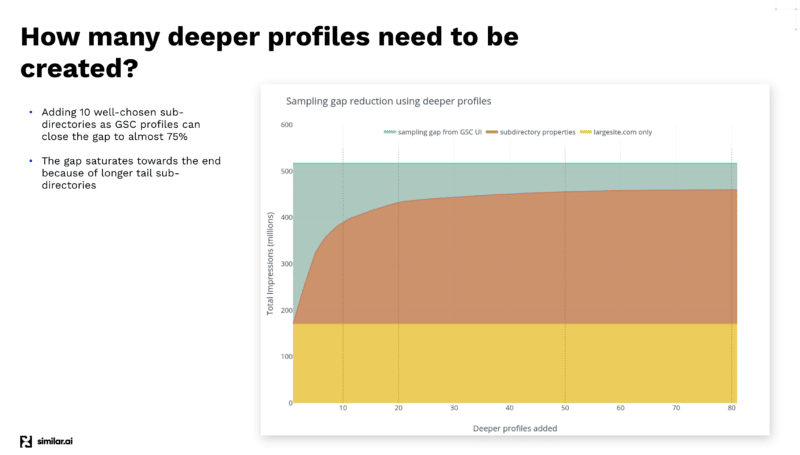
For example, if you’re looking at example.com/televisions and you add “televisions” as a subdirectory in your GSC profile, Google will give you only the keywords and the click information for that subdirectory and down.
And by adding a lot of these different subdirectories, you can extract a lot more information.
That solves the sampling problem, but you can get even more data by using regular expressions.
Getting more GSC data with regular expressions
Regular expression, or regex, is a powerful tool to understand your data.
In April 2021, Google added regex support to GSC – giving SEOs more ways to slice and dice organic search data.
A lot of times, data is not useful unless you can comprehend it. And regex helps to extract actionable insights from GSC’s rich data.
But as powerful as it may be, regex can be difficult to learn.
The best place to understand and dive deep into regular expressions is Google’s official documentation on GitHub. (Google uses RE2 in its products, which is a flavor of regular expression.)
While regex is available in all kinds of different programming languages, you’ll find it almost everywhere even to those who are modifying .htaccess files.
In the next few sections are use cases for leveraging regex for GSC.
Regex informational queries
When looking at actual informational search queries in GSC, you typically want to understand:
- How are people actually coming to your site?
- What questions are they extracting?
Looking at those things from a one-off standpoint, within GSC can be difficult.
You’re always searching for the words “what,” “how,” “why” and then “when.”
There are a couple of ways to make extracting informational queries less tedious with regex.
Daniel K. Cheung shared a regex string that will show you all queries containing “what,” “how,” “why” and “when” that either got a click or an impression:
"what|how|why|when"
And this regex string shared by Steve Toth takes the previous example up a notch:
^(who|what|where|when|why|how)[" "]
You can use this string if you want to capture question-based queries that start with either “who,” “what,” “where,” “when,” “why” and “how” and then followed by a space.
This is a great list to use when you’re looking for any type of word that would start a question:
- are, can, can’t, could, couldn’t, did, didn’t, do, does, doesn’t, how, if, is, isn’t, should, shouldn’t, was, wasn’t, were, weren’t, what, when, where, who, whom, whose, why, will, won’t, would, wouldn’t
Putting all this into regex form would look something like this:
^(are|can|can't|could|couldn't|did|didn't|do|does|doesn't|how|if|is|isn't|should|shouldn't|was|wasn't|were|weren't|what|when|where|who|whom|whose|why|will|won't|would|wouldn't)\s
In this 178-character string:
- You have the caret (
^) which tells you the query needs to begin with this word: - The words are separated with pipes (
|) instead of commas. - All the words are wrapped in parentheses.
- There’s a backslash and the “s” (
\s) which denotes a space after the word.
This is good, but can also get tedious to do.
Below, Wu simplified the previous list of words to be more regex-friendly and shorter which is ideal for copying and pasting. Maintaining it this way also helps with efficiency.
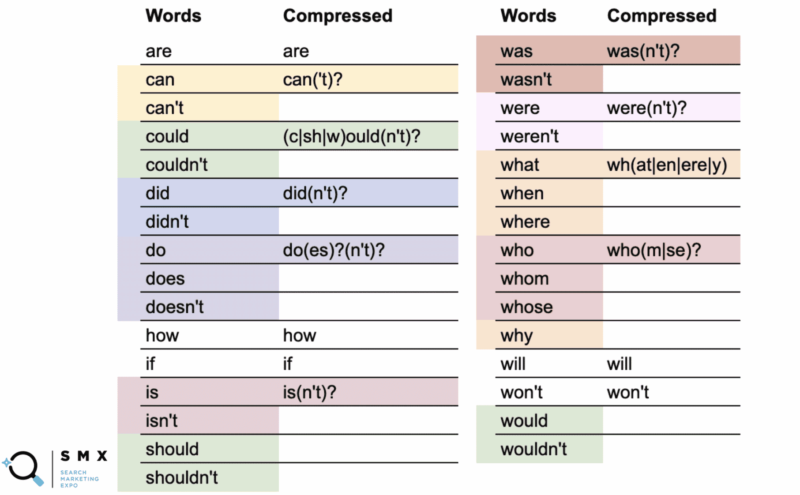
In the first column are the normal words and in the second column, the compressed regex.
For instance, the word “can” uses the compressed version can(‘t)?.
What the question mark indicates is that anything within the parentheses is optional. The compressed syntax allows you to cover both the word “can” and “can’t.”
More interestingly, you can do this with could/couldn’t, should/shouldn’t, and would/wouldn’t where the -ould part of the words is the common base, like (c|sh|w)ould(n’t)?. This short string covers all six of those cases.
While simplifying that long list of words turned the string less readable, what’s great is that it fits more into the regex field and allows you to copy-paste easier.
^(are|can('t)?|(c|sh|w)ould(n't)?|did(n't)?|do(es)?(n't)?|how|if|is(n't)?|was(n't)?|were(n't)?|wh(at|en|ere|y)who(m|se)?|will|won't)\s
If you go a step further, you can compress it even more. In this case, Wu reduced the character count from 135 to 113 characters.
^(are|can('t)?|how|if|wh(at|en|ere|y)|who(m|se)?|will|won't|((c|sh|w)ould|did(n't)?|do(es)?|was|is|were)(n't)?)\s
Regular expressions can get really complicated. If you’re getting a regex string from someone else and would like to disambiguate what is doing what, you can use Regexper to help you visualize it.
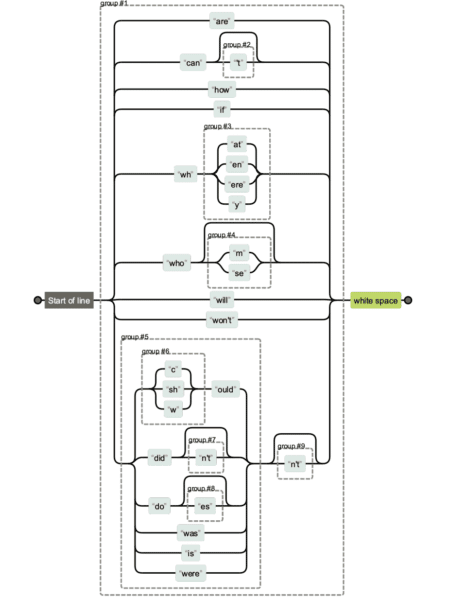
Below you’ll see a comparison of the different regex string versions. It’s easier to maintain the first one, and obviously harder to maintain and read the last one.
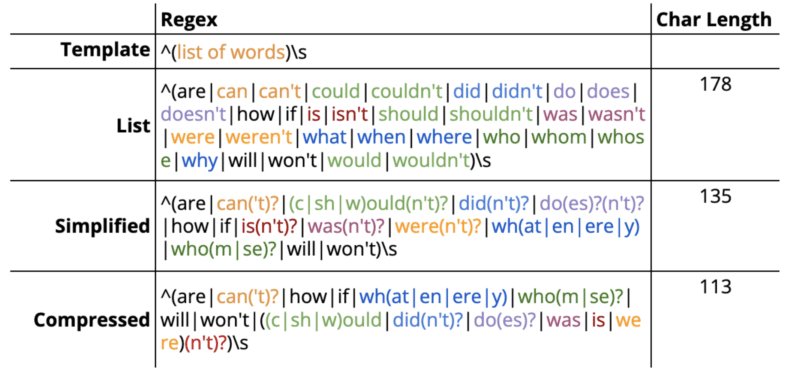
But sometimes character count really will matter especially when you have longer regular expressions.
Regex filter limits for GSC is 4,096 characters, according to Google Search Advocate Daniel Waisberg.
That would seem quite a bit. However, if you have an ecommerce site and have to add domain names, subdomains or longer directories, you’ll most likely hit that limit.
Regex branded queries
Another instance where you may start hitting the regex character limit in GSC is when you use it for branded queries.
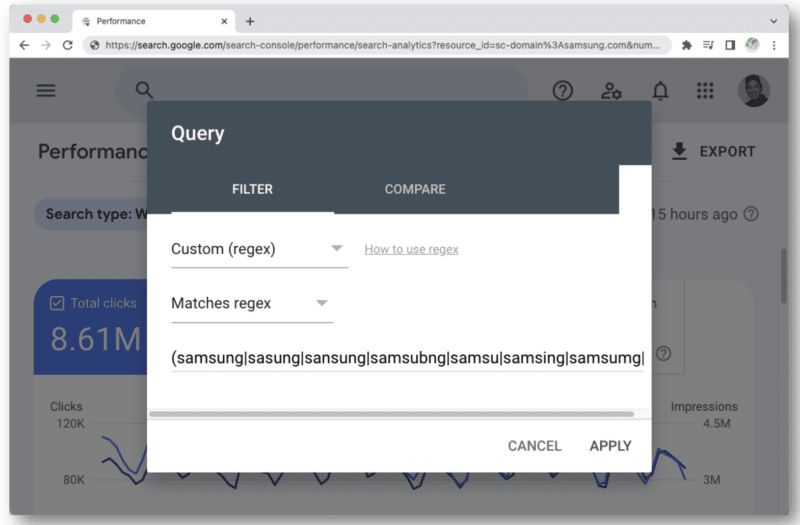
When you think about all the different types of misspellings of a brand name that a person could type, you’ll quickly run into that 4,096 character count. For instance:
- aamaung, damsung, mamsang, sam sung, samaung, samdung, samesung, sameung, samgsung, samgung, samsang, samsaung, samsgu, samshgg, samshng, samsing, samsnug, samssung, samsu, samsuag, samsubg, samsubng, samsug, samsumg, samsumng, samsun g, samsunb, samsund, samsund, samsunh, samsunt …
This is where understanding regex helps. With this string, you can capture the brand name “samsung” along with misspellings:
(s+|a|d|z)[a-z\s]{1,4}m?[a-z\s]{1,6}(m|u|n|g|t|h|b|v)
A lot of times, people will misspell the middle parts of the word. But in general, they get the format and length right and you can approach your syntax this way.
For brand query misspellings, consider the following:
- Main letters that make up the brand query.
- Consonants.
- Letters surrounding hard consonants.
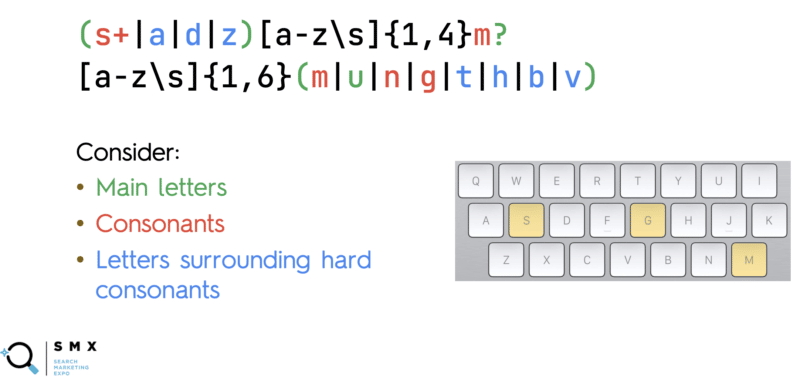
In red are the hard consonants that people typically don’t miss when they’re typing in a brand name. These are the main letters that make up that particular brand. For “samsung”, the “s” in the beginning, the ”m” in the middle, and then “n” and “g” at the end.
The blue letters surrounding those main consonants on the keyboard are the ones people typically mistype. In the example, around “s”, you see the “a”, “d” and “z”. (While the layout is different for international keyboards, the concept is still the same.)
The regex string above captures all the possible variants of “samsung.”
The other major trick here is in [a-z\s]{1,4}.
In regex form, this basically says, “I want to match any letter “a” to “z”, or a space, one to four times.”
This captures all those weird misspellings that can happen in the middle of a brand query – where a person can potentially hit the same key multiple times or accidentally press space.
Additionally, the brand name is a certain length (“samsung” has seven characters). People likely won’t end up typing 20–50 characters.
So in this regular expression, we’re guessing that between “s” and “m” in “samsung,” someone’s going to mistype 1–4 characters. And then from “m” to “g” at the end, they’ll mistype 1–6 characters, with spaces included.
Adding all this allows you to capture the many variations of a branded query comprehensively.
The other thing to note is that the brand name could appear in different parts of the query.
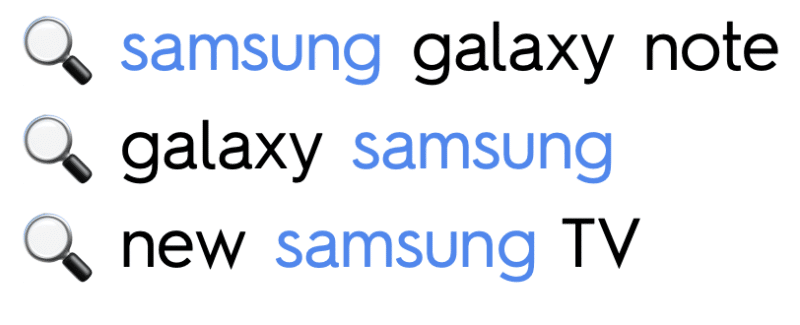
So we need to make sure that the brand name itself, is captured. It should either be:
- At the start of the query.
- In the middle of the query (thus surrounded by spaces).
- Or at the end of the query.
The regular expression for this is as follows:
(^|\s)(s+|a|d|z)[a-z\s]{1,4}m?[a-z\s]{1,6}(m|u|n|g|t|h|b|v)(\s|$)
This captures all queries where the brand name “samsung” is either at the start, middle or end.
- Start of string =
^ - Surrounded by spaces =
\s - End of string =
$
JC Chouinard’s post, Regular Expressions (RegEx) in Google Search Console, dives even deeper into regex examples.
Regex and the GSC API in action
Regular expressions came in useful for Wu and his team when they worked with a client that encountered traffic drops following a core update.
After looking at the ecommerce site’s different issues, they discovered that the problem resided in some product detail pages.
They needed to segment pagetypes for analysis in GSC. But this was a complex task because of the different URL structures for U.S. and international products.
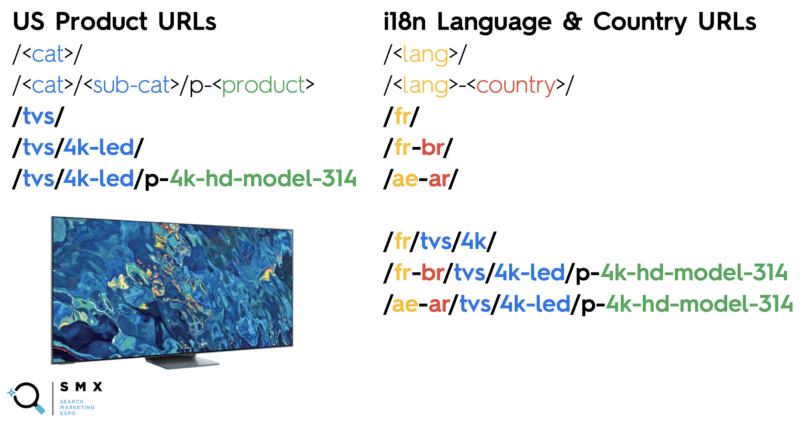
The site’s international product URLs included language and country codes, whereas U.S. product URLs did not.
Even using regex syntax was tricky because letters and dashes exist in the product slug, categories and subcategories. Additionally, they needed to filter out the international product URLs to capture only U.S. pages.
To get all U.S. product landing + detail pages (not i18n pages), they came up with the following regex strings:
Include: /([^/]+/){1,2}p?
Exclude: /[a-zA-Z]{2}|[a-zA-Z]{2}-[a-zA-Z]{2}/
Here’s a breakdown:
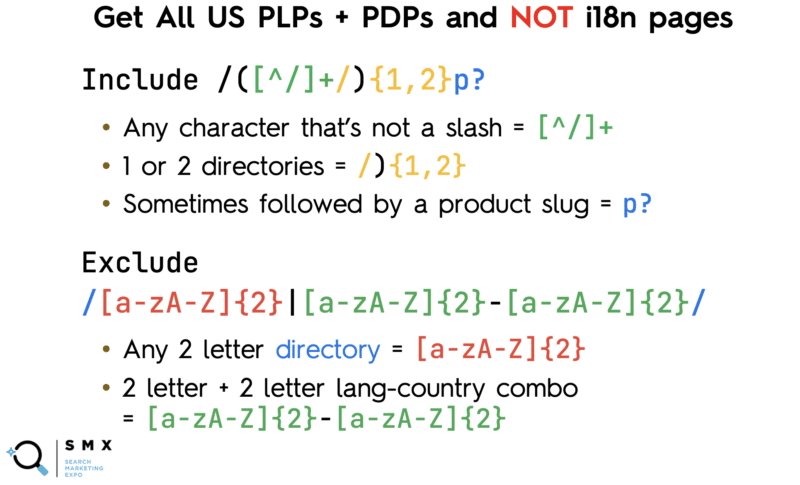
The team wanted to match the category, the subcategory and all the products so they included:
- Any character that’s not a slash =
[^/]+ - 1 or 2 directories =
/){1,2} - Sometimes followed by a product slug =
p?
A caret (^) typically means the start of the string. But when it’s inside brackets (as in [^/]), it indicates a negation (i.e., “not anything within this box”).
So this string /([^/]+/){1,2}p? means “I want any number of characters that is not a slash, leading up to a slash (which denotes the directory), and sometimes followed by the letter ‘p’ (the prefix for product slugs).”
At the same time, the team didn’t want to match the country and language combination which also contained letters and dashes, so they excluded:
- Any 2 letter directory =
[a-zA-Z]{2} - 2 letter + 2 letter lang-country combo =
[a-zA-Z]{2}-[a-zA-Z]{2}
Creating a regular expression to match all the language and country codes on their own would be tedious because of all the possible combinations, so they were unable to approach this the way did for informational queries (where every single type of combination was excluded).
But even after creating these regex strings, they had a problem.
In Google Search Console, there’s only one field to paste a regex string. You’ll have to choose either Matches regex or Doesn’t match regex – you can’t use both at the same time.
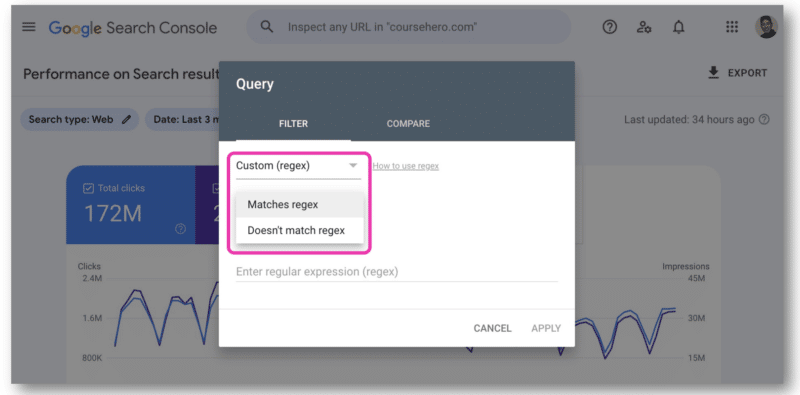
This is where the GSC API came in handy as it allows joining regex strings.
In the Google Search Console API documentation, there’s a Try it now link.
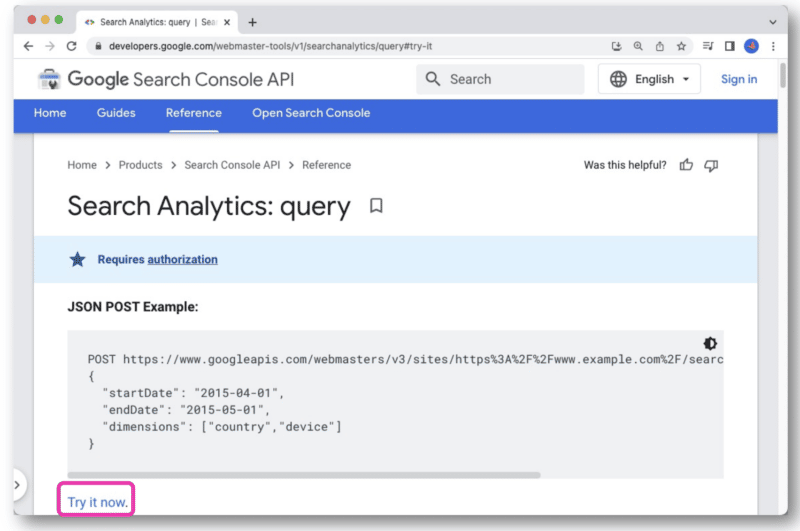
Once clicked, it will open up a console that allows you to select a site and make your API request through the web view.
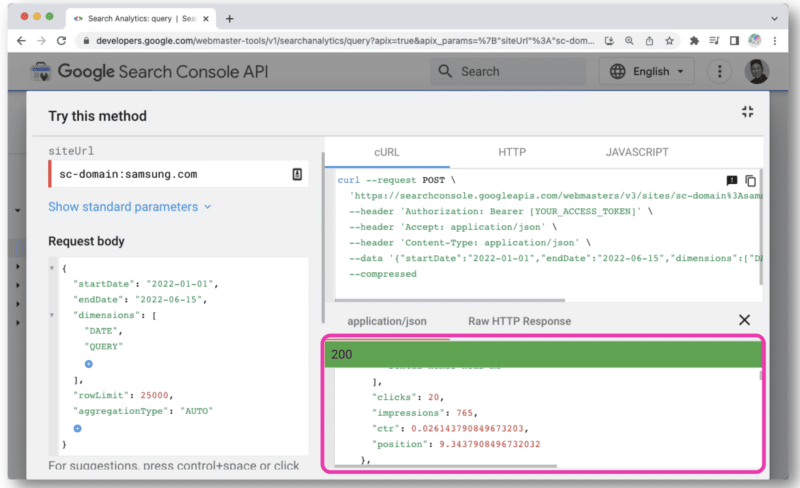
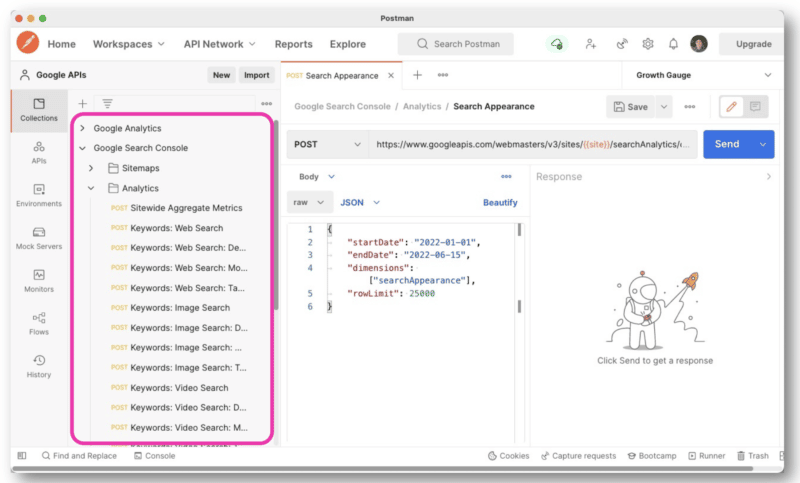
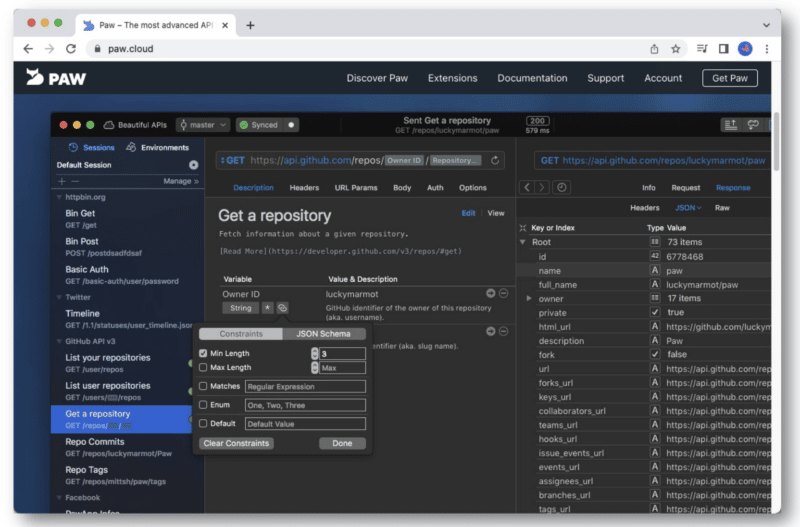
But to better manage API queries, Wu recommends using Postman on the desktop or Paw (which is native to Mac).
Postman allows you to create queries and save them for later. And if you have access to other sites, you don’t have to create a new query each time. You just simply change out the site name with a variable and then make multiple requests.
Paw, on the other hand, is much easier to look through and utilize.
To access the API, you’ll need to get your API keys. (Here’s a helpful tutorial from Chouinard.)
Once you get this info, you’ll have your client ID and client secrets, which you’ll add to your OAuth 2.0 authentication within either Postman or Paw.
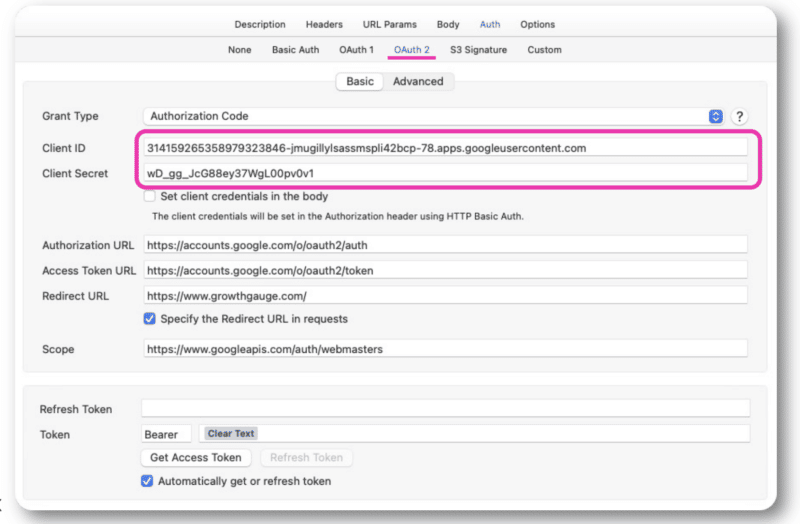
From there, you’ll be able to sign in with your normal account.
Wu mainly made GSC API requests using the regex strings in Paw. The query is entered in the middle of the interface.
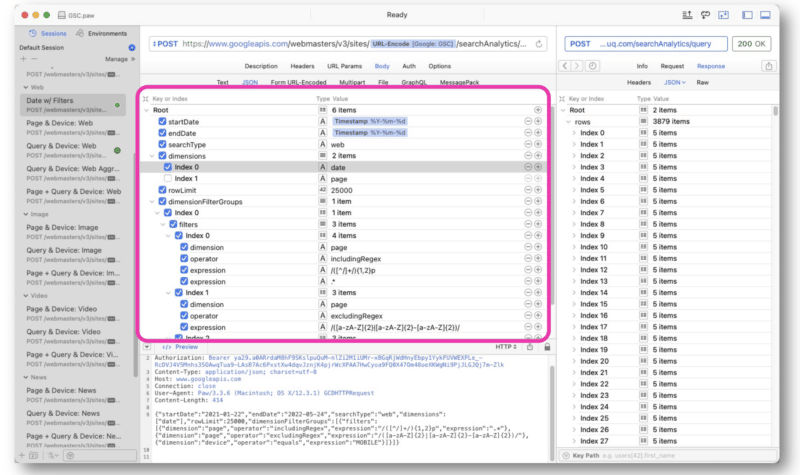
The response from Google is similar to that of the GSC API web view. The data can then be exported for processing.
Since the data is in JSON, the information can be messy and hard to read.
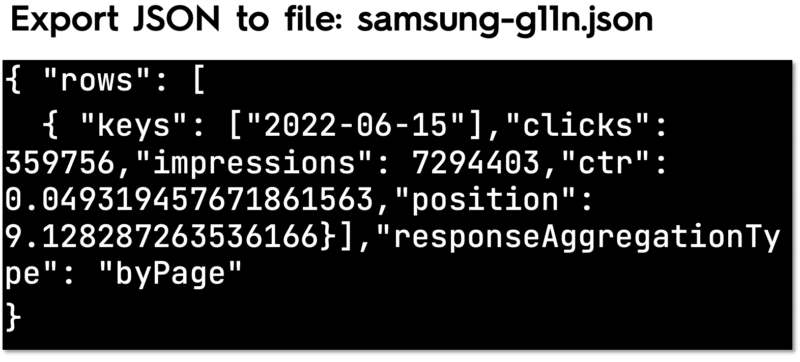
For this, you can use a free and open-source command-line JSON processor called JQ to pretty-print the information.
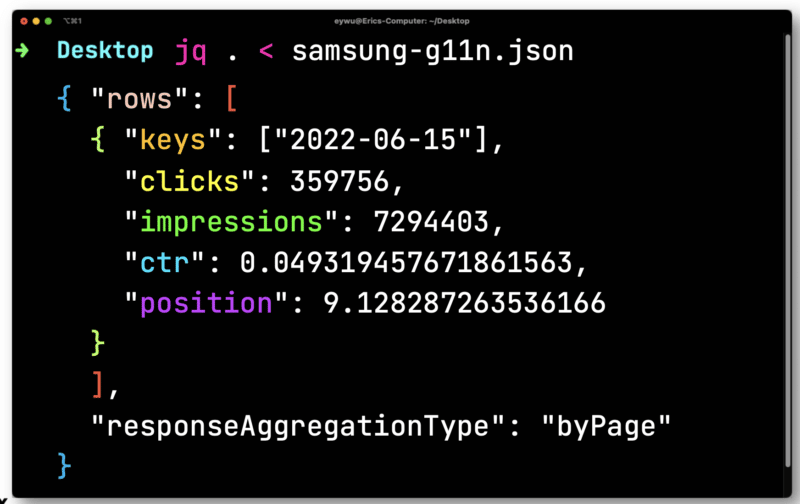
The data is not that useful until you get it into a spreadsheet. Pipe in the file you’ve exported from Paw to JQ. Open it and then iterate over each row – saving each element so you can output them to a CSV.
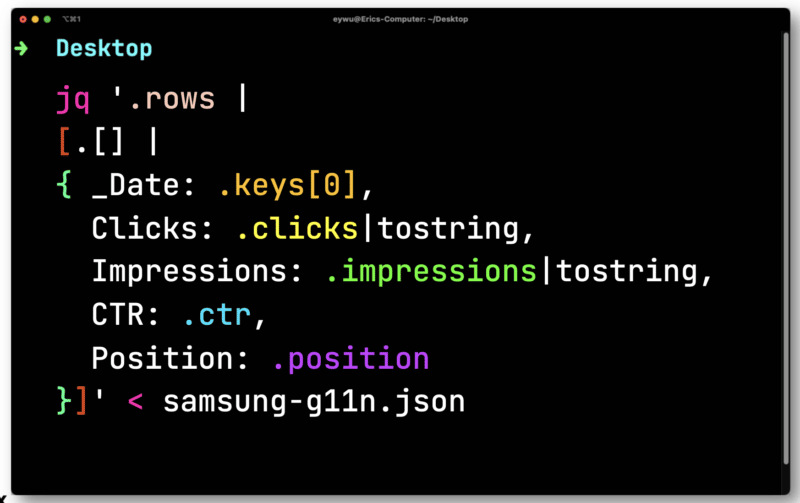
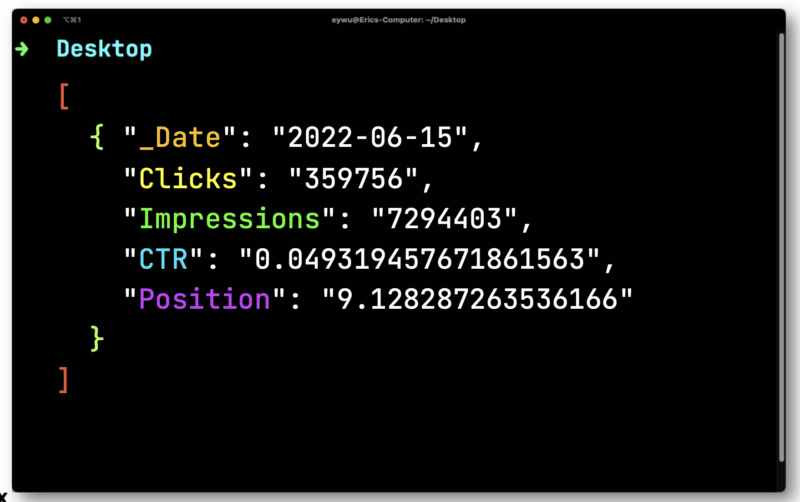
Here, you’ll need to convert clicks and impressions which are floats (a number that has a decimal place). Both need to be converted into strings compatible with a CSV.
JQ will then output the following much-simpler format.
Next, you’ll use Dasel to take this format and then make it into a CSV.
And here’s the end result.
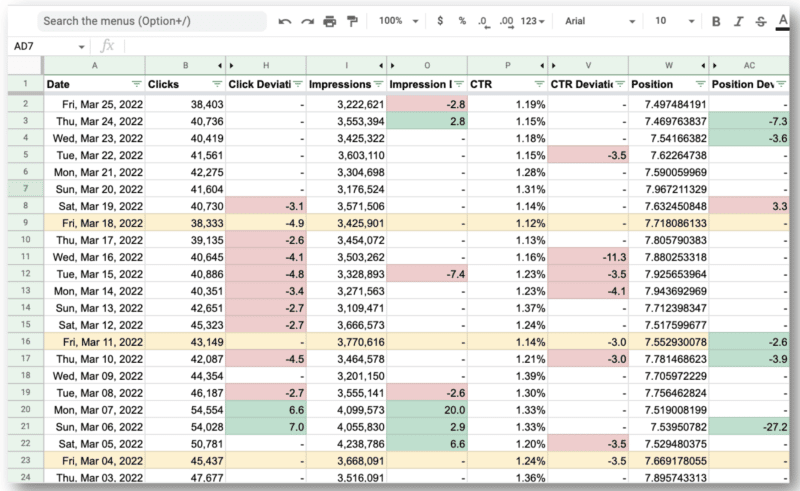
What’s amazing for Wu’s team is that they were able to use the Google Search Console API and regular expressions to:
- Filter out all the international queries and look at just the U.S. where they were having the main issues.
- Identify the days the site was having issues.
Watch: Getting the most out of the Google Search Console API
Below is the complete video of Wu’s SMX Advanced presentation.
The post How to get the most out of the Google Search Console API using regex appeared first on Search Engine Land.
Courtesy of Search Engine Land: News & Info About SEO, PPC, SEM, Search Engines & Search Marketing
Category seo news | Tags:
Social Networks : Technorati, Stumble it!, Digg, de.licio.us, Yahoo, reddit, Blogmarks, Google, Magnolia.
Enterprise SEO agency vs. in-house SEO team: What to consider
Written on November 2, 2022 at 11:40 am, by admin
Every time I start a new job, I get asked, “What does the relationship look like between you, the in-house enterprise SEO Director, and the SEO agency? When can we pull back on our budget for our SEO agency?”
This is a problem in the SEO industry.
The tweet below illustrates the symptomatic problem within the industry.
Choosing between an in-house SEO or SEO agency is like wishing everything you touched turned to gold, but instead, it’s just getting Cheetos powder on it.
— annaleacrowe (@annaleacrowe) October 21, 2022
The central problem is understanding that it’s not enterprise SEO agencies vs. in-house SEO teams. It’s not a competition.
Enterprise SEO involves complex problems dependent on many other resources and departments. It’s time to let go of the surface-level thinking of us vs. them.
This isn’t an article about the pros and cons of using an SEO agency, consultant, or in-house SEO. It’s about my personal experience of creating a blended approach to using both an SEO agency and an in-house SEO professional.
If you’re an enterprise company investing in SEO, choosing between an in-house SEO and an SEO agency depends on how fast you want to run. Let me explain.
Why the ‘enterprise SEO agency vs. in-house SEO teams’ concept is broken
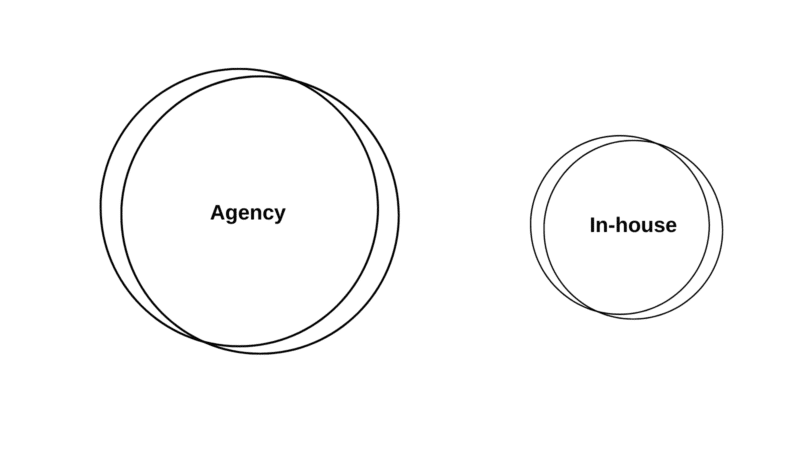
You either worship the altar of promised ROI predictions from SEO agencies or the realistic, logical in-house SEO that tells you SEO can’t promise ROI.
Whatever side you’re giving the Voldemort treatment to doesn’t matter.
It’s an example of how in-house SEO teams and agencies can meet in the middle – and give the C-suite what they want.
When hiring their first in-house SEO lead, executives often make the mistake of searching for a unicorn that’s equally proficient in technical and content.
If you find one, lucky you. But it’s more likely you’ll need a give and take.
SEO agencies should be an extension of your in-house SEO team to fill in the gaps your in-house team is missing.
Ask yourself: Do you need a screwdriver? Or a Swiss Army knife?
So, instead of promising ROI predictions based on keywords, an in-house SEO team can provide the agency with a full accounting of what true SEO looks like behind the scenes with product, engineering, and content.
Together, the agency and the in-house team can provide a blueprint for investment, scale, and return.
Get the daily newsletter search marketers rely on.
<input type=”hidden” name=”utmMedium” value=”” />
<input type=”hidden” name=”utmCampaign” value=”” />
<input type=”hidden” name=”utmSource” value=”” />
<input type=”hidden” name=”utmContent” value=”” />
<input type=”hidden” name=”pageLink” value=”” />
<input type=”hidden” name=”ipAddress” value=”” />
Processing…Please wait.
Investing in enterprise SEO agencies and in-house SEO teams is expensive
Many enterprise companies have marketing budgets but often believe SEO is “free” and don’t prioritize resources.
This is a mistake.
This mentality leaves the in-house SEO team to live up to unrealistic expectations and burnout.
Previously, I worked at a well-known enterprise company with a portfolio of 15 global brands as a Director of SEO to find out I was the only person actually doing SEO. In my first 1on1 with my boss, I was tasked to create a roadmap for when we could let go of our SEO agency to bring SEO in-house.
The caveat – “bring SEO in-house,” meant I was the only person to execute SEO.
At this company, that meant partnering with UX to design the website and working with web dev on our page speed, all while executing on-page and link building, not to mention writing content.
I took on this challenge to make a business use case with a budget for SEO that allocated funds toward scaling my internal SEO team and hiring an SEO agency.
Here’s how.
| Annual estimated cost (USD): Enterprise in-house SEO team vs. SEO agency |
Low | Medium | High |
| In-house | $90,000 | $320,000 | $760,000 |
| Agency | $120,000 | $600,000 | $1.5 million |
Numbers are pulled based on my personal experience in-house and working with agencies.
When looking at the side-by-side comparison, it may seem like building an in-house SEO team is cheaper, but an agency can execute faster.
60% of my time is spent getting leadership and cross-department buy-in to SEO as an in-house SEO professional. With an SEO agency, SEO work is still getting done.
Take a look at this outline of tasks broken up between an enterprise SEO agency and an in-house SEO team:
| In-house | Agency | |
| SEO Strategy | Creates SEO strategy focusing on processes and cross-department collaboration and shares with the SEO agency. | Agency aligns with the in-house SEO team strategy and supports with data and execution of tactics. |
| Forecasting | Provides forecasting and ROI based on in-house resources. | Merges keyword forecasting with in-house forecasting to create a middle agreement. |
| Monthly Report | Shares metrics, definitions, and KPIs that align with overall business goals. | Creates monthly reports utilizing data from in-house tools. |
| Technical Audit | Reviews technical audit and begins prioritization. | Provides technical audit. |
| Technical Roadmap | Prioritize technical audit findings, creates Jira tickets, and partner with the web dev team for execution. | Reviews and aligns on the technical roadmap and troubleshoots questions from the web dev team. |
| Content Audit | Reviews content audit and begins prioritization. | Provides content audit. |
| Content Gap Analysis | Reviews content gap analysis and begins prioritization. | Provides content gap analysis. |
| Keyword Mapping | Reviews keyword mapping and partners with Product Marketing to ensure it aligns with the brand and business goals. | Provides keyword mapping. |
| Content Calendar | Prioritize content audit findings, create content briefs (if the agency does not provide them), and partner with the editorial team for execution. | Reviews and aligns on the content calendar and troubleshoots questions from the Product Marketing and/or Editorial team. |
| Content Briefs | Reviews and approves content briefs, and assigns to the Editorial team, then edits and submits to the web dev team for publishing. | Provides content briefs. |
One of the biggest challenges enterprise companies face is how fast the company grows. If you’re a global brand, SEO is expensive and time-consuming.
As your brand evolves, your marketing and SEO tactics need to accommodate the scale of your company.
This means prioritizing an in-house SEO team and an SEO agency that can work together at scale.
The power of working together with enterprise SEO agencies and in-house SEO teams
There is great power in combining forces. Think of Woody and Buzz, Apollo and Rocky, Clarice and Hannibal.
Enterprise SEO takes a lot of time and money to execute properly. And oftentimes, you’ll have to fight for the resources you know you need to meet the business goals.
The culprit lies in this stigma of choosing between an SEO agency and building an in-house team. There is no choice. The answer is both.
Remember, SEO is not here to tell enterprise companies what to do with their web presence.
Our goal as SEO professionals is to show them the opportunities and together, with a combined effort from the agency and in-house team, you can build a plan for investment and scale.
The post Enterprise SEO agency vs. in-house SEO team: What to consider appeared first on Search Engine Land.
Courtesy of Search Engine Land: News & Info About SEO, PPC, SEM, Search Engines & Search Marketing
Category seo news | Tags:
Social Networks : Technorati, Stumble it!, Digg, de.licio.us, Yahoo, reddit, Blogmarks, Google, Magnolia.
7 tips for a holiday-ready social media strategy
Written on November 2, 2022 at 11:40 am, by admin
The things that are vital for brands throughout the rest of the year are even more critical to social media success during the holidays.
There’s more noise, people are distracted, and they’re busy.
How do you ensure your posts cut through the noise and keep their attention through the holiday season?
Here are seven tips to make your social media strategy holiday-ready.
1. Be helpful
Give your audience the info they’re looking for, earn their trust and, as a result, their attention.
Simplify their experience by providing:
- Click-to-shop options directly from your social profiles.
- Direct links to products or booking information from your posts to assist them in finding what they need quickly.
Work with complementary businesses to provide one-stop shopping and tag those businesses in your posts. Not only is this helpful to your customer base, but it also expands the reach of both brands.
Go above and beyond
Brainstorm ideas to help your audience simplify their lives.
Offer expedited delivery options or added service perks to save time during the busy season.
If you have an HVAC company, offer free furnace filter changes with service calls.
Does your restaurant deliver? Send utensils and disposable containers to help with cleanup.
Small touches can make a big difference.
2. Make an impact
How are you helping others this time of year?
Whether you’re in the service industry, retail, or anything in between, customers want to support businesses that support their communities.
Give back by:
- Providing community outreach.
- Collecting items for food or clothing drives.
- Using your physical location to be a dropoff point for donations to a charitable organization.
Stay away from polarizing issues or causes to avoid alienating members of your audience.
Go above and beyond
Team up with a nonprofit to help your community members make an impact.
- Host a donation drive.
- Provide holiday meals to families.
- Allow members of your team to choose causes that are important to them.
- Support those organizations with time or monetary donations if possible.
Parker Colorado’s West Main Taproom + Grill offers free appetizers to anyone who brings in donations for a local nonprofit’s winter coat drive. They’re helping the community and driving new business – everybody wins.
3. Be relevant
Is your offering timely or relevant to your customers’ lives? How can you make sure it is?
One of the easiest ways to determine if your content is providing value to your audience is to simply ask.
People love sharing their opinions, so use that opportunity to streamline your content.
Go above and beyond
Incorporate being relevant with being helpful, and you’re sure to score major points with your customers.
Provide them with helpful, timely information that makes their lives easier, and they will remember you when it’s time to spend their hard-earned dollars.
Get the daily newsletter search marketers rely on.
<input type=”hidden” name=”utmMedium” value=”” />
<input type=”hidden” name=”utmCampaign” value=”” />
<input type=”hidden” name=”utmSource” value=”” />
<input type=”hidden” name=”utmContent” value=”” />
<input type=”hidden” name=”pageLink” value=”” />
<input type=”hidden” name=”ipAddress” value=”” />
Processing…Please wait.
4. Acknowledge their pain points or stressors
Some of your customers may be experiencing difficulties this time of year. How can you help alleviate that stress?
The holiday season often creates a massive influx of mail (both electronic and physical), advertising, and social media posting. Don’t be that brand.
You do not need to send email blasts multiple times per day unless you’ve got something you know will resonate well with your audience. (Tip: A 10% off coupon is not that something!)
Go above and beyond
Think of things your brand can do to take something off of your customers’ plates, reduce stress, or make their lives easier.
Hire a massage therapist to provide chair massages in your lobby while people wait for appointments.
If you have a large space, provide supplies and schedule a weekend for customers to come to your location and wrap holiday gifts.
A reasonably small investment may be priceless in the eyes of your customer base, even if they don’t take advantage of your offer.
5. Know your audience
If you don’t know your audience, how can you give them what they want?
Spend time before your busy season getting to know your audience members and customers to ensure you’re speaking to them in a way that resonates.
Be inclusive by being considerate of the fact that many people have different holidays and traditions that they celebrate.
Acknowledge that while not everyone is the same, we can celebrate each other regardless of those differences.
Go above and beyond
Know your competition’s audience as well and step up when the competition falls short.
Be available on community groups to swoop in and provide assistance when your competitors don’t hold up their end of the deal with their customers.
6. Don’t waste their time
Don’t add to the already overwhelming holiday noise.
Make sure posts, emails, and other communications have a point and are worth reading, and then follow through with their entire customer experience.
Providing a spectacular experience on social media, but then making people wait 40 minutes for a scheduled appointment unravels all of the hard work you’ve done.
Additionally, be sure your offerings are actually worth clicking on.
Making a big deal about a huge sale or massive discount and then offering a 10% discount or restricting sales to specific items is not only a waste of time. You’re going to frustrate your customers and lose their trust, making them less likely to shop with you or use your services now or in the future.
Go above and beyond
Find a way to save them time. Hassle-free returns, expedited appointment options, and concierge services are all excellent ways to give your customers a little extra time back during the busy holiday season.
7. Have a plan
All of the awareness, consideration, and helpful intention are not going to get you anywhere if you don’t know your goals and find a path to execute them.
Map out your content and have a plan for promotions.
Schedule posts in advance to help streamline your busy schedule, but be sure to pause both organic and paid campaigns if something happens that would cause your content to seem insensitive or inappropriate to your audience.
Set realistic goals and expectations, and have a procedure for how to handle things if expectations are not met or things go awry.
No one is perfect, and customers understand this.
But how you handle those moments of imperfection can ensure you lose a customer or gain a lifelong brand advocate. Be sure to respond accordingly.
Go above and beyond
Create a special product or offering that your customers will get excited about.
Nerdy Nuts knows their fans love their products, and that they get super excited about new flavors and special offerings.
This year, they’re releasing a holiday advent calendar with a variety of both favorite and all-new flavors.
On-brand, relevant, exciting, and – combined with their fantastic social media support – helpful.
Amp up the engagement during the holidays
While you’re at it, have fun! Social media is designed for engagement and interaction.
Share relevant brand messaging in a way that encourages your audience to not only get to know you, but to communicate with you and share your content as well.
Fun, positive, uplifting holiday content not only makes your audience feel good, but it helps them feel good about your brand.
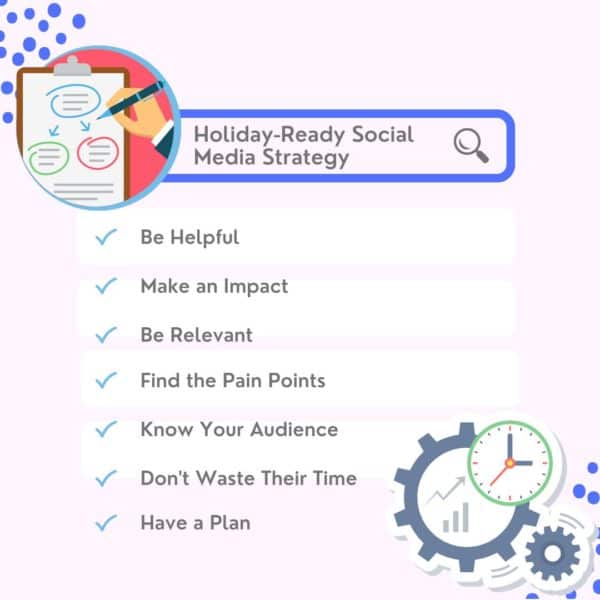
The post 7 tips for a holiday-ready social media strategy appeared first on Search Engine Land.
Courtesy of Search Engine Land: News & Info About SEO, PPC, SEM, Search Engines & Search Marketing
Category seo news | Tags:
Social Networks : Technorati, Stumble it!, Digg, de.licio.us, Yahoo, reddit, Blogmarks, Google, Magnolia.
Google Search adds new coupons, side-by-side deals and price insights
Written on November 1, 2022 at 8:39 am, by admin
Google has added new ways to find deals across the web using Google Search through new coupons and promotions, side-by-side deal views, and a new price insights navigator. Google launched this before the holiday shopping season and said “few new features to help you easily find those discounts and get the perfect gift at the right price.”
Updated coupons and promotions
Google now has new coupons and promotions labels in the shopping search results. Google has a new promotion badge that will show up in Google Search on items running a special promotion. Google is also adding a new coupon clipping feature, which allows you to easily copy promo codes when you’re ready to buy. This is a feature you often see on those coupon sites, where you click to copy the promotion code to your clipboard.
Here is a screenshot of this:

Compare deals side by side
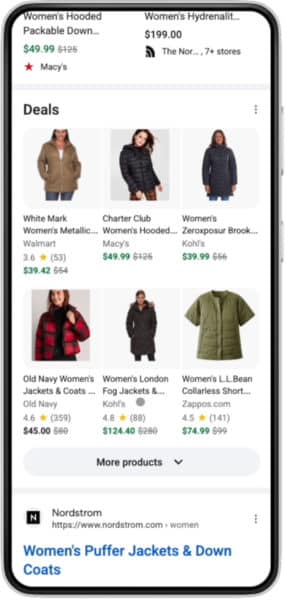
Google also added a way to compare two or more deals, by giving you a side by side comparison view in Google Search. For example, if you search for a women’s puffer coat, Google will show a side-by-side comparison of available puffer coats on sale right in Google Search results
Here is what that looks like:
Price insights
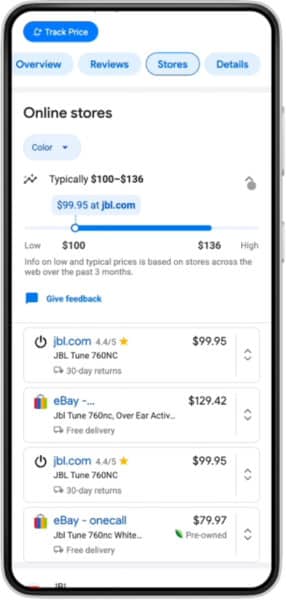
Google also launched a new design and feature called price insights. Price insights helps searchers understand the prices they see and make better buying decisions, Google said. You can see in price insights how one merchant’s price compares to others’ and whether it’s low, typical or high for that product.
Here is what that looks like:
Why we care
With the holiday shopping season here, as expected, Google is adding new search features to help shoppers find the products they are looking for. These features may or may not help your e-commerce site be more visible in Google Search. At least, you search be aware of these changes so that you can understand what you may want to do, such as which structured data you want to add, or what information you want to add to Merchant Center, so that you can leverage these new Google Search features.
The post Google Search adds new coupons, side-by-side deals and price insights appeared first on Search Engine Land.
Courtesy of Search Engine Land: News & Info About SEO, PPC, SEM, Search Engines & Search Marketing
Category seo news | Tags:
Social Networks : Technorati, Stumble it!, Digg, de.licio.us, Yahoo, reddit, Blogmarks, Google, Magnolia.
Google is getting rid of similar audiences segments
Written on November 1, 2022 at 8:39 am, by admin
Starting in May 2023, similar audiences segments will stop being generated, and existing similar audiences segments will no longer be added to campaigns and ad groups on Google Ads and Display & Video 360.
In August 2023, similar audiences segments will be removed from all ad groups and campaigns.
What this means. More automation. Google says that similar audiences segments will transition to “more powerful, tested, privacy-centric automated solutions. These solutions help advertisers connect with relevant audiences, all while meeting people’s expectations for privacy.”
“We are committed to creating durable, resilient solutions for our advertisers to help them reach an engaged and relevant audience, even as fewer third-party cookies are available. Automation is a big part of this commitment.”
Enter Optimized Targeting and Audience Expansion
Replacing similar audiences segments is Optimized Targeting (for video, display discovery and performance campaigns) and Audience Expansion (for brand campaigns).
Optimized Targeting. For Discovery, Display and Video action campaigns on Google Ads and Display & Video 360, optimized targeting will help businesses find new and relevant audiences that are likely to convert without relying on third-party cookies.
Google says. Advertisers who use optimized targeting on Display and Video 360 can see, on average, 55% improvement while using first-party audiences.
Audience Expansion. For Awareness and Reach video or Consideration video campaigns, audience expansion makes it easier for businesses to reach more people likely to convert.
Availability. This solution is already available in Google Ads and will be launched for Display & Video 360 in the first half of 2023.
Things to know. Keep in mind the following features and best practices when creating or updating your Smart Bidding and Optimized Targeting settings.
- Advertisers can still use Customer Match lists for Smart Bidding or Optimized Targeting.
- Use Smart Bidding for store sales and offline conversions.
- You can (and should) adjust Smart Bidding conversion values.
Dig deeper. To understand how these automated solutions work towards advertisers’ marketing objectives, they can use Audience Insights – a new feature on the Insights Page that helps businesses learn more about their customers’ interests and how they engage with their ads.
You can read more info about these changes on the Google Help Center post.
Why we care. Similar Audiences segments will be available for (at least) the next 6 months. If your campaigns are using these segments, you can continue to do so until after the holiday season. However, you should still plan and test your transition to Smart Bidding and Optimized Targeting so the impact will be less harmful.
The post Google is getting rid of similar audiences segments appeared first on Search Engine Land.
Courtesy of Search Engine Land: News & Info About SEO, PPC, SEM, Search Engines & Search Marketing
Category seo news | Tags:
Social Networks : Technorati, Stumble it!, Digg, de.licio.us, Yahoo, reddit, Blogmarks, Google, Magnolia.
How seasonality affects the SERPs and what it means for SEO
Written on November 1, 2022 at 8:39 am, by admin
As we head into another seasonal period, it’s time to prepare our holiday strategies to maximize client visibility for the deal-getters and the peak shoppsouing period.
During the next quarter, many of us acknowledge that we’re likely to see a change in traffic levels as we attribute this to seasonality.
This does not affect all business models. Still, for some (outside of the ecommerce spectrum), interest begins to slow down as consumer focuses are laid elsewhere, and company priorities change.
One thing that may not necessarily factor into your SEO strategies – as a threat and an opportunity – is how Google’s search results pages (SERPs) behave to the changes in both user search frequency and search intent.
Why does seasonality affect search results pages?
Google’s end goal is to provide a high-quality SERP that caters to user needs and supports a query by presenting high-quality results.
Google determines if a query requires a seasonal or temporary change to how specific value propositions and beneficial purposes are presented in the SERPs. They might consider:
- Has there been an increase in searches for this query? (Comparing period Y to X.)
- Has there been a change in user SERP behavior for this query? (Changes in click patterns, scroll, quick-backs.)
- Has there been an increase in users performing further queries to refine it?
- Has there been a change in the additional terms or stop words being introduced to the secondary query?
If Google detects changes in these user patterns, it may choose to begin experimenting with the SERP and rotate results and source-types – or even introduce new source-types and SERP features altogether.
This isn’t something new. In 2018, JR Oakes tweeted his observations on how rankings changed month-over-month, with major changes around December 2017.
Over time, Google will learn these patterns and refine future SERP adjustments over time.
With seasonality, most marketers have an almost predictable data pattern used for planning marketing activities, content, and onsite messaging. Often, this is where the assessment stops.
Many strategies I’m privy to don’t go one step further to assess how the SERPs will change during these seasonal periods. Yet, it is important to understand so we can inform our SEO strategies (including content type and publishing frequency).
Get the daily newsletter search marketers rely on.
<input type=”hidden” name=”utmMedium” value=”” />
<input type=”hidden” name=”utmCampaign” value=”” />
<input type=”hidden” name=”utmSource” value=”” />
<input type=”hidden” name=”utmContent” value=”” />
<input type=”hidden” name=”pageLink” value=”” />
<input type=”hidden” name=”ipAddress” value=”” />
Processing…Please wait.
Identifying seasonally affected SERPs
A lot of ecommerce SERPs we are familiar with will experience some form of seasonality, and we can usually predict and identify these through experience and common sense.
But what if you start seeing a change in traffic and rankings for particular URLs? How can you identify whether or not your SERPs are beginning to fall into a seasonality experiment?
The answer is through data. Understanding what your SERPs look like during “normal times” is important, and comes from:
- Recording and monitoring SERP features.
- Monitoring the source types (and their positions) within the results page.
Several third-party tools record this information and retain it historically.
Let’s take the search term [beard oil]. It is a query with more than one dominant interpretation, as I could be looking to make a purchase, research different brands, or even research different oils.
This query has already changed several times over the course of this year. This October, it is beginning to show signs of changing to a seasonal SERP:
| March 2022 | July 2022 | October 2022 |
| Reviews People also ask Video carousel |
Reviews Sitelinks Images People also ask Video carousel |
Reviews Shopping ads Map pack FAQ Images People also ask Video carousel |
As we get closer to peak ecommerce periods and more users are searching for the term, Google’s SERP features are favoring and introducing commercially focused elements with Shopping Ads and the Map Pack (to cater to those wanting to buy both online and in-person).
We can also see a change in which source types are being ranked highest for the query.
So if we look at the top 5 ranking URLs for July 2022:
| Rank / Website | Source Type |
| #1 Men’s Health | Non-commercial entity, informational |
| #2 CNN | Non-commercial entity, informational |
| #3 GQ Magazine | Non-commercial entity, informational |
| #4 Amazon | Commercial entity, commercial |
| #5 Amazon | Commercial entity, commercial |
And we compare them to October 2022:
| Rank / Website | Source Type |
| #1 Amazon | Commercial entity, commercial |
| #2 Men’s Health | Non-commercial entity, informational |
| #3 Beard Brand | Commercial entity, commercial |
| #4 Dr. Squatch | Commercial entity, commercial |
| #5 Bad Ass Beard Care | Commercial entity, commercial |
Looking at third-party metrics, one would argue that websites like Dr. Squatch don’t have the same backlink profile, brand, or content levels as the likes of GQ. But they’re a different source type, so the threshold required to rank is lower.
As Google is altering the SERP with a heavier commercial focus, the only thing that GQ can do in this scenario is to try dislodging Men’s Health as the second result or wait it out for Google to determine that a different source type is required.
This, of course, is not taking into account that October 2022 also has a Map Pack and Shopping Ads taking up SERP real estate and clicks.
Looking at data from 2021, the SERPs followed a similar pattern before reverting back around March.
If we look at Google Trends data, we can correlate these SERP changes with the peaks and troughs of [beard oil] searches in the United States (outside of an increase around the time of the first pandemic lockdown).
Communicating seasonal SERPs to wider stakeholders
Not all SEO stakeholders who receive reports and updates are au fait with how search engines work. Changes in rankings and traffic can unnecessarily set off alarm bells and lead to poor short- and long-term decision-making.
Identifying if your key traffic-driving search terms are susceptible to seasonality changes, or have been so in the past, is vital. Ensure that tags or classifications are in place and monitor them more closely around seasonal periods.
This is especially useful if the organization you are working with has a turnover of VP and C-level. They might not know the vertical as well as the previously established person in that position.
Creating awareness of how rankings and traffic may change will mitigate the conversations when it does happen. It also helps build a business case for different content types to maintain brand visibility.
This might involve a strategy in which the brand is made visible through a different source type or adjacent search queries that aren’t as affected by the seasonality changes.
Investing in brand or digital assets outside of your website is an important consideration for creating an SEO strategy that can weather Google changes.
The post How seasonality affects the SERPs and what it means for SEO appeared first on Search Engine Land.
Courtesy of Search Engine Land: News & Info About SEO, PPC, SEM, Search Engines & Search Marketing
Category seo news | Tags:
Social Networks : Technorati, Stumble it!, Digg, de.licio.us, Yahoo, reddit, Blogmarks, Google, Magnolia.
The static homepage is dead by Intellimize
Written on November 1, 2022 at 8:39 am, by admin

While most people associate first impressions with meeting someone in person, the same phenomenon occurs when someone lands on your website for the first time. Sometimes you know who they are, but often they are anonymous. In fact, 67% of the buyer’s journey is done before they indicate any buying signal, and about two-thirds of potential buyers walk away after a bad experience.
When you think about it, your website is your storefront, it’s the window into your brand. It says who you are, what you do and tells the visitor what they can expect and how they should feel.
Many companies fall short because they don’t spend enough time thinking about the first time someone will experience their website. They usually have one static homepage and then create zillions of landing pages to personalize for promotions because it’s troublesome to get the website changed. Even if you have first party data, much of what you do will be lost on anonymous visitors because they’ll land on your site and leave before they’ve had a chance to soak in all you have to offer. The static homepage is dead.
Research shows that people make up their minds about something in less than half a second. They form an impression when they first see your site. If that impression is positive, it’s likely they’ll continue to explore your site. If they don’t like what they see, they’ll leave. Studies show that customers who have a positive experience tend to spend 140% more with a given brand.
So, what should you be doing?
- Check your site speed often. Page load times have the biggest impact on your website’s first impression. For example, a recent study showed that a 2-second delay in load time resulted in abandonment rates of up to 87%.
- Focus on the customer experience and put your critical content and messaging above the fold. While customers are used to scrolling through websites, you have less than half a second to get your point across, and once you grab their attention, it takes approximately 2.6 seconds for the consumer’s eyes to focus and influence their first impression.
- Avoid flicker whenever possible. Flicker refers to when a webpage loads in one state and then quickly transitions to show a different website experience—typically a dynamic variation with personalized elements. While this may seem like a somewhat innocuous side effect of website personalization, it can have lasting effects on your conversion rates. In fact, in a recent study by Radware, Walmart found that for every one second of improvement in regards to their page load time they increased their conversions by two percent.
- Personalize for all visitors, even anonymous ones. When you know some attributes about your web visitors, such as the ad they clicked on to get to your site, machine learning powered personalization can help you take it a step further and dynamically customize your message or product or image shown based on firmographic, behavioral and contextual data. According to a study by Segment, 71% of customers feel frustrated when their experience with a brand feels impersonal.
- Beauty is in the eye of the beholder and poor design is often associated with mistrust of a brand. According to a recent study, first impressions are 94% design related. The most important things you can take into account are the imagery, typography and overall aesthetic. Does the image or video convey the feeling you want the buyer to experience? Does it inspire the visitor to take the desired action?
Regardless of whether you’re a B2B brand doing Account Based Marketing (ABM) or a D2C brand with an online store, first impressions matter, don’t waste yours. To learn more about making a great first impression with your website, talk to our experts and request a demo.
The post The static homepage is dead appeared first on Search Engine Land.
Courtesy of Search Engine Land: News & Info About SEO, PPC, SEM, Search Engines & Search Marketing
Category seo news | Tags:
Social Networks : Technorati, Stumble it!, Digg, de.licio.us, Yahoo, reddit, Blogmarks, Google, Magnolia.
10 spooky SEO tactics to axe in 2023
Written on October 31, 2022 at 5:39 am, by admin
It was a cold, dark night. At the end of the long path was an old, rundown mansion covered in cobwebs. Inside was a candle flickering next to the shadow of a person.
You rub the frost off the stained-glass window on the doorstep, and there’s just enough light to see what the man inside is doing. He’s moving his body from side to side, chanting numbers – what could it be? Black magic?
You put your ear to the window to find out what you can hear – and you can make out … something:
“One, two, three, four paid links!”
Alas – he’s not a sorcerer at all – but something even more chilling: A marketer performing the ancient practice of black hat SEO!
Does this tale spook you as much as it does me? It’s almost 2023, and if you’re involved in buying links – or any of the 10 things I’m about to detail in this article – you won’t have a chance to compete in the search results.
So without further ado, here are 10 spooky SEO practices to axe in 2023.
1. Not getting buy-in from the top
Your company may say that you can “do SEO” without actually understanding what SEO means.
Fast-forward to a few months down the road when you need to make big decisions about the site, and management is nowhere to be found.
To be successful in SEO, you need commitment from the top.
In addition, SEO needs to be thought of even when you, the marketer, are not in the room.
Every decision on the website impacts SEO. When you have proper buy-in, you can solve so many other issues featured in this article.
2. Hiring people that know less about SEO than you
You’ve hired a big, brand-name agency because you heard they were the best.
The company assigns an SEO professional with a fancy title to your account – what could go wrong?
Except after only a few weeks, it is apparent that you know more than your SEO team does.
And, with a little digging, you find that the person servicing your account has only a few years of SEO under their belt.
This is a real phenomenon, folks.
Make sure you research the people you hire before you sign that contract. Otherwise, your working relationship will not be fruitful.
3. Being sure you have a plan that will stick
“Man plans, Google laughs.”
OK, that isn’t quite how that old expression goes, but the reality is that the only thing constant in SEO is change.
With Google making thousands of changes to search each year, and your competitors even more, how can you seriously plan for SEO six months from now?
You do not have any knowledge about the changes you will encounter. So come to terms with the fact that a long-term SEO plan is worthless.
What to do instead?
Run in four-week sprints and re-evaluate what the website needs after each sprint.
4. Getting SEO advice and not implementing it
If you’ve invested time and money into hiring an SEO only to ignore their recommendations, then don’t be surprised by the results you don’t get.
I understand. Sometimes it seems like an uphill battle to get things done.
That is why having buy-in and a plan for how you will implement SEO strategies is the first step before engaging in SEO services.
5. Ignoring the hard changes
When faced with business silos, competing priorities and a lack of resources, it may seem impossible to get the “hard” changes done to a website.
Sometimes, they are partially or even poorly implemented to try and move the needle.
The hard changes, though, are those changes that can make a fundamental difference to your SEO program.
If the recommendation is to do them, make a case for getting them done and, if you need to, hire outside expertise to do them the right way.
6. Thinking any content is good content
If you go to the heart of almost any Google algorithm update, you will find it centers on quality content.
To succeed now and in the future, you need helpful content – expert, authoritative and trusted content.
You must somehow stand out from the competition rather than regurgitate what everyone else is saying.
Spinning others’ ideas equates to average content. And Google does not reward the average.
7. Thinking all keywords are equal
Inventing keywords does not mean that anyone would search for them. Thus they may get no traffic.
That is just one point, but you must also consider that there are many keyword strategies, and they vary by industry.
Matching your content to query intent can help you perform better in search – and is the key to being considered an expert and gaining ranking.
And if it is not ranked, then the content is nearly worthless.
8. Not looking at PPC data
Unfortunately, PPC data is often ignored. And SEO and PPC teams often feel at odds with one another.
Knowing what converts in PPC is a solid indication of the ROI for each keyword.
Also, by studying the negative keywords in PPC that identify ambiguous keywords, the SEO sees issues that point to the need for schema.
Bottom line: If certain keywords have a clear meaning and great conversion, then you may want them in your SEO program.
9. Buying links
By now, we shouldn’t still be having the “paid links” conversation.
Yet many websites still engage in this practice – unknowingly or knowingly.
To be fair, link buying is not always a black-and-white issue; there are shades of gray.
For example, if I pay someone to write an article and place it on another site, is that a paid link? Google thinks so.
The remedy to paid links? Create things worth linking to and then let others know about them.
10. Not taking any SEO training
How will you have meaningful discussions with your SEO team if you don’t know what they are talking about?
How will you get Bob in IT to actually make changes to the website if he has no SEO knowledge?
It is so critical that in-house teams have a baseline understanding of SEO, as well as to keep up with emerging strategies.
SEO training is an excellent way to get teams up-to-speed on SEO.
This proactive step helps ensure you are making sound decisions and can keep things moving forward.
Let go of these spooky SEO tactics
These are spooky times and, unfortunately for many websites, scary SEO tactics still exist.
Give the axe to the 10 items in this article and you will have a chance at competing in the search results in 2023.
The post 10 spooky SEO tactics to axe in 2023 appeared first on Search Engine Land.
Courtesy of Search Engine Land: News & Info About SEO, PPC, SEM, Search Engines & Search Marketing
Category seo news | Tags:
Social Networks : Technorati, Stumble it!, Digg, de.licio.us, Yahoo, reddit, Blogmarks, Google, Magnolia.
Make business more human with Qualtrics solutions by Amazon Web Services
Written on October 31, 2022 at 5:39 am, by admin

Delivering an outstanding customer experience (CX) is no longer a function; failing to meet customer expectations can jeopardize business growth. A recent Qualtrics study found that bad experiences put a business at risk of losing an average of 9.5% of its revenue. But linking CX to business value and the bottom line is a challenge when siloed data and a lack of technology can’t deliver the multi-channel experience customers expect.
In this episode of the Solution in Focus series, you’ll listen in as Allison Windon, senior vice president of strategy at Qualtrics, discuss how to elevate CX based on insights you generate from customers’ real-time journeys. You’ll also hear how to fully leverage Qualtrics solutions in your AWS Cloud.
You’ll hear how Qualtrics helps you:
- Reduce the cost to serve by understanding and optimizing inefficient journeys and customer touchpoints.
- Improve customer retention by identifying and prioritizing strategic areas of improvement across the entire customer journey.
Increase customer lifetime value by understanding and improving loyalty behaviors that drive repeat purchases.
The post Make business more human with Qualtrics solutions appeared first on Search Engine Land.
Courtesy of Search Engine Land: News & Info About SEO, PPC, SEM, Search Engines & Search Marketing
Category seo news | Tags:
Social Networks : Technorati, Stumble it!, Digg, de.licio.us, Yahoo, reddit, Blogmarks, Google, Magnolia.
Microsoft Performance Max import updates
Written on October 31, 2022 at 5:39 am, by admin
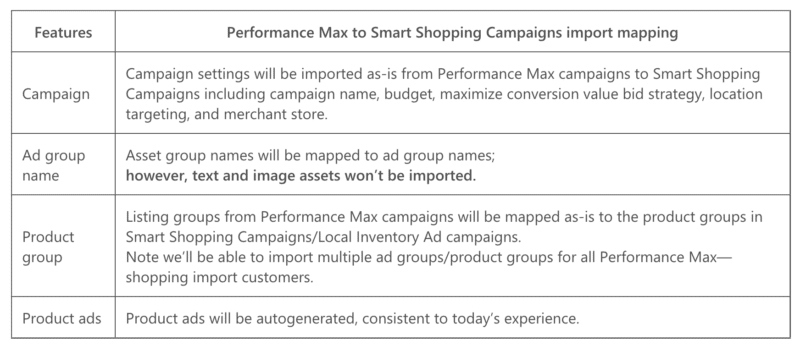
Microsoft Ads has just launched a solution within the Google Import tool to simplify duplicating your Performance Max campaigns across platforms.
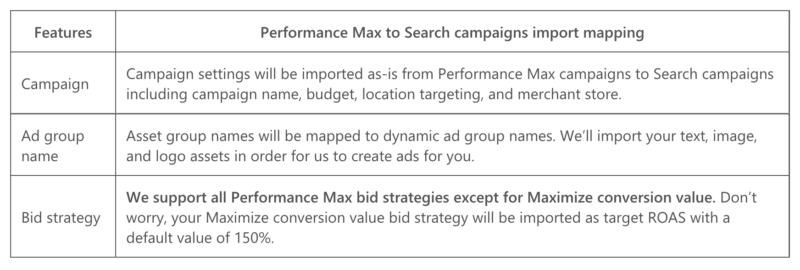
They’ve also started a pilot program for importing Performance max campaigns that aren’t using a Merchant Center. The new experience will import these campaigns as Search campaigns and create Dynamic Search Ads (DSA).
Best practices. Microsoft outlines the following best practices for importing Performance Max campaigns using the Merchant Center.
The following are best practices for importing Performance Max campaigns without Merchant Center.
Use the Google Import Tool. You can access the Google Import Tool here.
Dig deeper. Read the Microsoft blog announcement and access the setup checklist here.
Why we care.
The post Microsoft Performance Max import updates appeared first on Search Engine Land.
Courtesy of Search Engine Land: News & Info About SEO, PPC, SEM, Search Engines & Search Marketing
Category seo news | Tags:
Social Networks : Technorati, Stumble it!, Digg, de.licio.us, Yahoo, reddit, Blogmarks, Google, Magnolia.