

Google Ads Reach Planner now forecasts Video Action campaigns
Written on November 11, 2022 at 4:58 pm, by admin
Advertisers will now have the option to select “Action – Online Conversions” as a goal when setting up your plans in Reach Planner and can also add Video Action Campaigns to existing plans.
What is the Reach Planner. The Google Ads Reach Planner makes it easier for advertisers to plan for Conversions, Views, Reach, and Impressions-based metrics. It provides a forecast for how your media plan might perform, based on your desired audience, budget, and other settings such as geographic location and ad formats.
How it works. Google says that forecasts are modeled on trends in the ad market and the historical performance of similar campaigns run in the past.
Why we care. Advertisers using video will now be able to predict campaign performance using the new tool. This could be helpful for budgeting during the holiday season.
The post Google Ads Reach Planner now forecasts Video Action campaigns appeared first on Search Engine Land.
Courtesy of Search Engine Land: News & Info About SEO, PPC, SEM, Search Engines & Search Marketing
Category seo news | Tags:
Social Networks : Technorati, Stumble it!, Digg, de.licio.us, Yahoo, reddit, Blogmarks, Google, Magnolia.
YouTube has expanded its comment translations and smart replies
Written on November 10, 2022 at 12:58 pm, by admin
YouTube has just announced an expansion of its comment translation tools, as well as broader access to Smart Replies, its streamlined, template response option which allows fast replies on videos.
Comment translations. Last year YouTube announced the availability to comment translations within the app via a Google Translate integration.
YouTube said the feature became so popular that it has now added comment translations to Studio Mobile as well.
Smart Replies. The experiment, which provides comment suggestions and templated responses, is also being expanded.
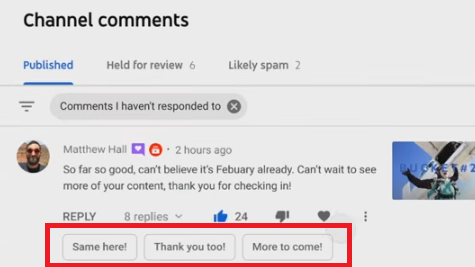
Smart Replies have been available to some users for a while, but now, YouTube is making them available to all creators in the main app, while it’s also launching a new experiment of Smart Replies on Studio Mobile.
Dig deeper. To learn more about the new translate and smart features, you can watch the video from Creators Insider.
Why we care. The translation feature could make video interaction and engagement easier and more robust for viewers in different countries, and those who speak different languages. If you’re a creator, interacting with your viewers and receiving feedback is a great way to help grow your community.
The post YouTube has expanded its comment translations and smart replies appeared first on Search Engine Land.
Courtesy of Search Engine Land: News & Info About SEO, PPC, SEM, Search Engines & Search Marketing
Category seo news | Tags:
Social Networks : Technorati, Stumble it!, Digg, de.licio.us, Yahoo, reddit, Blogmarks, Google, Magnolia.
3 simple steps to automating content creation for businesses by SE Ranking
Written on November 10, 2022 at 12:58 pm, by admin

All parties involved in the content creation process know just how much time, effort and financial resources go into it. Writing a piece of content with a chance of ranking at the top of the search results takes up a good chunk of those resources. As companies grow and develop, the resources available for projects (especially time) can diminish.
In this article, we will discuss how to leverage content research and automation tools to cut corners and preserve valuable resources. Take advantage of these tips and tricks to create quality content that both Google and people will love.
What is content automation, and why do you need it?
Content marketing automation involves identifying repetitive content marketing tasks and then using relevant tools to automate those tasks.
Think about it. If your content automation software is doing all the heavy lifting, SEOs will no longer have to waste hours of their time each week writing out detailed content briefs for content creators. Instead, your copywriters can skip the SEO learning curve and focus on crafting compelling sentences to create even more compelling content.
With automation software, your SEO and content teams can save time, cut costs, make smarter decisions, and focus on crafting marketing strategies that really make a difference.
From doing research to creating content and optimizing it, content automation tools can improve your productivity across the entire content life cycle.
Creating content is a process that includes some indispensable steps, namely:
- Determining the article topic
- Creating a content brief
- Writing an optimized article copy
Performing these tasks manually would take up a lot of the SEO and content teams’ time. Luckily, content research and automation tools help you cover and fast-track your entire content creation journey—all in one place.
There is a range of content tools on the market, but for the purpose of this article, we’ll illustrate how to automate your content creation by using SE Ranking’s content tool, the Content Marketing Platform. It helps you craft content briefs in just a few minutes and write full-fledged articles in as little as a few hours.
To elaborate, SE Ranking’s Content Marketing Platform relies on AI when analyzing your competitors’ content. It pulls data from top-ranking pages to let you know what to aim for in your content in order to outrank them.
This tool also uses NLP to suggest the most suitable keywords to use in your content. It points out the terms that both Google and people expect to find on a page relative to the topic.
Let’s move on to dissecting the content creation process.
Step 1. Determine the article topic
Many SEO and content marketing specialists bank a good chunk of their content creation efforts on keyword research. After all, doing keyword research is the first step towards searching for an article topic. It’s how to find out what people are talking about the most. You’re discovering which topics are currently in higher demand.
By optimizing content pieces for search, SEOs and content marketers generate a steady flow of traffic to their websites. They cover various search intents to help users move down the search funnel.
To make sure you’re automating the entire process, check to see if your keyword research tool can:
- Suggest similar, related and long-tail keywords with various search volumes based on a seed keyword.
- Provide you with complete and accurate data on keyword metrics, including search volume and keyword difficulty.
- Highlight SERP features for every keyword.
- Indicate a keyword’s user intent.
- Show you how volatile a keyword SERP is and how authoritative its players are.
Pay close attention to how large your keyword research tool’s database is and how much you can rely on it in terms of accuracy.
SE Ranking’s Keyword Research tool ticks every box in this respect. Plus, it’s a part of a larger ecosystem of tools, meaning you can seamlessly manage all of your site’s data from one central hub.
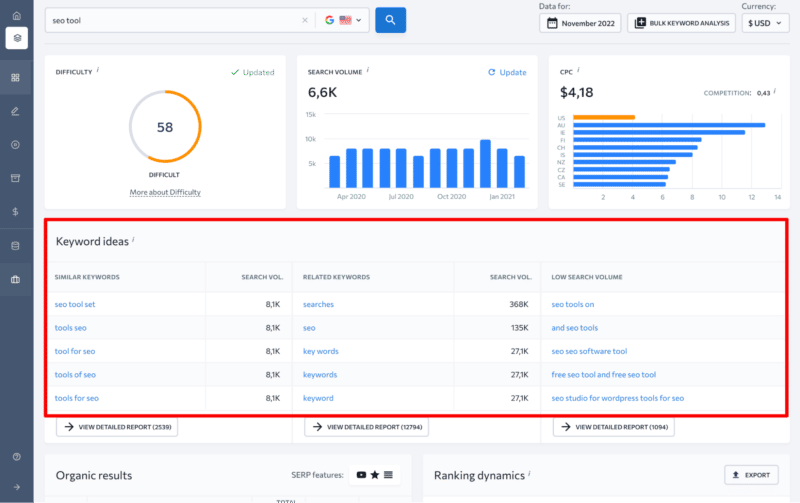
With this tool, you don’t have to export anything to Excel. No more working with data in a dull environment.
Instead, you can directly add the keywords you’re interested in targeting to one of SE Ranking’s tools. These include Keyword Manager, Keyword Rank Tracker and Content Editor (this tool is where all the content creation magic happens).
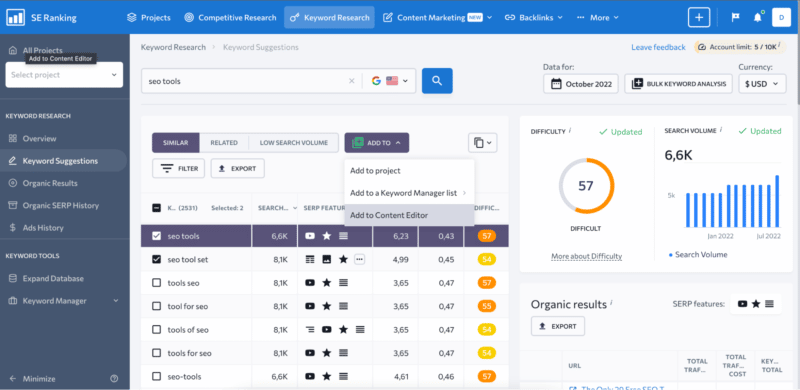
After finishing your research and choosing the main keyword (or several related keywords) that you want to focus your new piece of content on, settle on the article’s main topic. Then, start creating an SEO content brief for your copywriter.
Step 2. Create a content brief
Since your copywriter relies on you to be the SEO expert, specify in the content brief what you want the article to look like.
Start by analyzing the top-ranking SERP players in your selected region to understand what works for them. Use that information to write out a detailed brief. Filter out the competition, so it only includes websites similar to yours in terms of user intent.
To do this, visit each competitor’s website to make sure they are properly communicating the topic at hand to their audience. Their content should be tailored not just to the right audience, but to the stage they’re at on the buying journey.
Once you’ve selected the right digital rivals, go over your upcoming article’s content parameters. Note that the default values in SE Ranking’s Content Marketing Platform are displayed as an average of every selected competitor, but you are free to change them as you see fit. Consider deciding on your own how many words or characters should be included in the text, how many headings and paragraphs the text should be broken down into, as well as how many images will make the text easier to read.
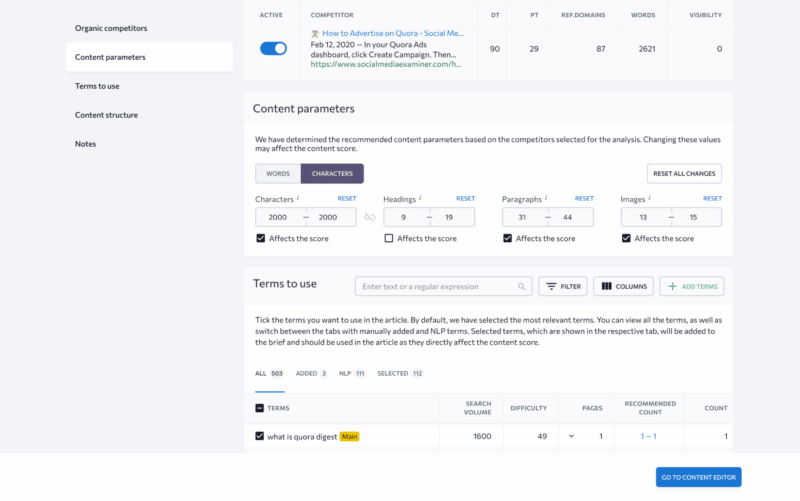
Every SEO pro knows that you should include specific keywords in your text to increase its chances of appearing in Google for a related search. This is where you can get additional help and get a list of NLP keywords that Google considers essential.
Last but not least, analyze competitor page heading structures to create a detailed outline of your upcoming article. You can either copy competitor headings as is or draw inspiration from them and create your own structure with unique headings.
Your copywriters will then have a detailed article outline specifying everything from its length to the number of times a keyword should be used on the page.
Step 3. Write an optimized article copy
As a content creator, use the detailed SEO content brief as a basis for writing the article copy.
You can take the traditional route and write the text right on the spot, or you can turn to an AI rewriter for help if you feel stuck.
Practically every modern content marketing automation tool gives you the opportunity to take a piece of text from a competitor’s website and insert it into your own copy. It then offers plagiarism-free alternatives for you to use in your article.
If you’re in a hurry, you can take this method to its extreme by pulling relevant chunks of texts from competitor articles and letting the AI rewrite plagiarism-free alternatives. But, of course, it’s always better to let the experts do their thing.
Once you, as a copywriter, are happy with the text of your soon-to-be-published article, optimize it to increase its chances of outranking the top competition.
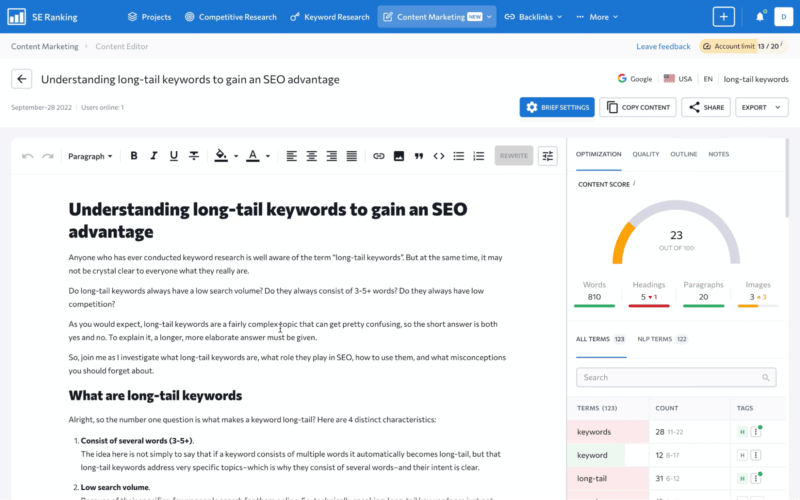
Since all of the requirements are right there next to your text, along with gauges, you can see exactly how well the text is optimized.
Make sure the copy has enough total words and that specific keywords aren’t used too much. Get rid of any punctuation and grammar mistakes, and make sure the readability level is appropriate.
All data is clearly laid out in the Content Marketing Platform so that content creators don’t have to jump through any additional hoops to create SEO-friendly texts.
Until the end of the year, you can get a 30% discount on your first purchase of the Content Marketing Platform by using the promo code Content30 at checkout.
Bonus: Keeping track of your pages’ Google rankings
After publishing your brand new piece of content, keep track of its performance in search. This is to gauge the ROI of all the time and effort you put into creating it.
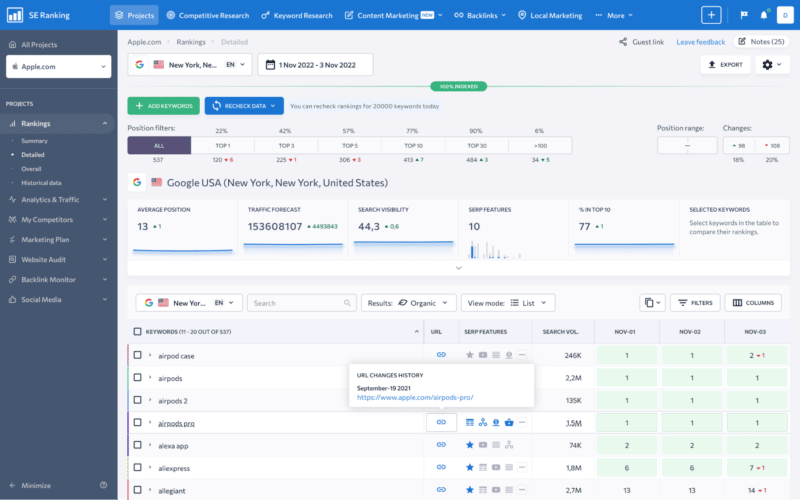
SE Ranking’s Keyword Rank Tracker delivers extensive ranking data with pinpoint accuracy across every major search engine. Add your website, specify the search engines and competitors, and keep daily track of your target keywords’ ranking positions.
This is so you can act quickly if your rankings change or if another competitor pulls out all the stops to outrank your pages.
Recap
The best way to leverage content marketing automation tools is to use them to help humans—not to replace them. Let your content automation tool do most of the heavy lifting so you can automate repetitive manual processes. Free yourself up to do higher-value creative tasks.
When content marketing automation tools are used correctly, they can skyrocket your digital business’s efficiency, save you a small fortune each month, improve your customer service and improve the overall quality of your products and services.
Do less and get more done!
The post 3 simple steps to automating content creation for businesses appeared first on Search Engine Land.
Courtesy of Search Engine Land: News & Info About SEO, PPC, SEM, Search Engines & Search Marketing
Category seo news | Tags:
Social Networks : Technorati, Stumble it!, Digg, de.licio.us, Yahoo, reddit, Blogmarks, Google, Magnolia.
YouTube has launched a global Target frequency feature
Written on November 10, 2022 at 12:58 pm, by admin
YouTube now has a global Target frequency goal option for video campaigns. The new goal allows advertisers to select a frequency goal (up to four per week), which YouTube will optimize towards.
What YouTube says. “Now advertisers can select the frequency target and our systems will optimize towards maximum unique reach at the frequency goal. With our built-in capping, campaigns deliver within a tight distribution range so viewers don’t see the ads too many times. In fact, over 95% of Target frequency campaigns on YouTube successfully achieved their frequency goals when set up following recommended best practices. Not only do the campaigns deliver on their target frequency, but they drive brand impact as well.”
Early testing. YouTube tested this new goal with Triscuit, whose goal was to ensure that its brand stays top of mind with consumers.
According to YouTube, the brand set up a Video experiment to determine the incremental ad recall that a weekly frequency of two could deliver. The Target frequency campaign achieved a 93% higher absolute ad recall lift compared to the non-frequency optimized campaign, at a 40% cheaper cost per lifted user.
Also available in Ads Editor. Google also announced today that the new Target frequency goal was going to be supported in the new Ads Editor v2.2.
Dig deeper. Learn more about the new Frequency goal on the Google Ads & Commerce Blog.
Why we care. Advertisers who use Video ad campaigns should implement the new Target frequency goals to ensure that their videos show an appropriate number of times without exhausting their audiences.
The post YouTube has launched a global Target frequency feature appeared first on Search Engine Land.
Courtesy of Search Engine Land: News & Info About SEO, PPC, SEM, Search Engines & Search Marketing
Category seo news | Tags:
Social Networks : Technorati, Stumble it!, Digg, de.licio.us, Yahoo, reddit, Blogmarks, Google, Magnolia.
Google rolls out Ads Editor v2.2 with optimized targeting, 11 other features
Written on November 10, 2022 at 12:58 pm, by admin
Google just announced the rollout of Ads Editor v2.2. This version adds 12 new features and also eliminates one. Let’s take a look.
Asset library
The new version includes added support for enhanced leveraging of images in asset libraries. It also includes:
- Adding, removing, and renaming images
- Assigning images to folders
- Integrating asset library features into the image picker, for example, filtering by folder and searching by asset name
Notifications
You can now use notifications to help you get the important information you need to manage your accounts in Editor. There are also alerts to let you know when there are active notifications for review. You also get one-click access to notifications directly from the toolbar.
New UI for editing ad schedules
You can now visually edit ad schedules for campaigns and certain ad assets. Previously, ad schedules could only be changed by CSV import or by copying from another campaign or asset.
Support-friendly network logs
Logs containing API errors and details of the operations that triggered them are now provided in an easy-to-understand format.
Out-of-sync indicator
The Editor will now periodically check to determine if account changes have been made since the last sync and notify you to sync them if needed.
Google says that not all changes may be detected and it is still recommended to get recent changes before posting.
Global offers
In the shopping settings for Shopping and Performance Max campaigns, you can now choose to:
- Make the country of sale optional (allow it to be empty or cleared if it’s not already empty)
- Include support for an optional feed label
Recommended Video campaign budgets
The Editor will now show a recommended budget based on your Target CPA bid for Video action campaigns. It will also warn you if your current budget amount is below this recommendation.
Video campaign target frequency
The Editor now includes full support for Target frequency video campaigns.
Video campaigns with shopping
Editor now supports all video campaign sub-types (except Outstream and Audio) via the shopping setting (Product feed) and product groups.
More recommendations support
Editor provides support for additional recommendation types, including the ability to add lead form ads to get more leads.
Basic support for all recommendations
Basic support for additional recommendation types is now shown in Editor. Recommendation types appear under Recommendations > Other recommendations.
Optimized targeting
The ad group “Targeting expansion” setting slider has been replaced with an “Optimized targeting” setting, which can now be enabled or disabled with a checkbox.
Removed
Gmail display campaigns support. Editor version 2.2 no longer supports Gmail display ads and campaigns.
Why we care. Advertisers who use Ads Editor will benefit from these changes and new features. The ability to manage accounts from a separate, offline, platform allows you to save time and make changes in bulk.
You can download the new Ads Editor here.
The post Google rolls out Ads Editor v2.2 with optimized targeting, 11 other features appeared first on Search Engine Land.
Courtesy of Search Engine Land: News & Info About SEO, PPC, SEM, Search Engines & Search Marketing
Category seo news | Tags:
Social Networks : Technorati, Stumble it!, Digg, de.licio.us, Yahoo, reddit, Blogmarks, Google, Magnolia.
What stakeholders should expect from SEO
Written on November 9, 2022 at 8:55 am, by admin
SEO is a long-term play and requires patience.
I’ve told this to clients and stakeholders hundreds of times during my career.
After a couple of decades in the industry, I still believe that SEO demands time to see results.
SEO is a long-term commitment that should be considered an investment versus an expense.
It is not advertising and does not have the same type of quick return on investment measurement.
However, I have also seen clients and contacts who were told to wait and look at SEO as long-term, then end up getting burnt anyway.
There’s a difference between being patient and just waiting.
Beyond time, other factors go into a solid SEO client/agency partnership – or even in-house resources and teams – to ensure that expectations are defined and managed, so the effort is ultimately successful.
How to define and manage SEO expectations?
SEO expectations include:
- The amount of time that SEO takes.
- Hard costs associated with SEO resource investments (internal or external/agency).
- Soft costs associated with SEO resource investments.
- Non-SEO resources needed (copy, UX, dev, IT, approvals, etc.).
- Level of involvement by client/stakeholders.
- Competitive landscape.
- Audience volume.
- Overall ROI opportunity.
That’s a lot of stuff! There’s likely more to add to the list or nuanced ways to break out some of the items into more bullet points.
SEO is big. There are plenty of moving parts. It takes time, money, and a baseline level of understanding to:
- Learn what you are getting.
- Know that ROI is possible.
- Have decision points down the road that are objective and not based on emotion or incomplete data.
How long does SEO take?
SEO takes time. It is a long-term discipline that requires consistent short-term tactics and implementation.
Whether you have an agency, consultant, or in-house person/team managing SEO, you need to mentally prepare for it to take some time to see significant results.
But that doesn’t mean you should detach from the effort, waiting for it all to be fully optimized and performing to your liking.
If you haven’t seen a strategy, tactical plan and goals, you should ask for one.
There’s no reason to be “floating” or waiting for updates or results or to be led to believe that you should trust someone to handle SEO and that, at some point down the road, it will magically be “done.”
Promises about how long it will take to see specific results should not be expected or made. However, experienced SEO professionals should be able to give you some reasonable expectations based on their strategy, plan, and process – tied to your goals – or at what points you should see certain milestones.
You should expect to know:
- What milestones are ahead.
- What metrics and KPIs you’ll be seeing.
- The level of communication and input you need in the process.
Get the daily newsletter search marketers rely on.
<input type=”hidden” name=”utmMedium” value=”” />
<input type=”hidden” name=”utmCampaign” value=”” />
<input type=”hidden” name=”utmSource” value=”” />
<input type=”hidden” name=”utmContent” value=”” />
<input type=”hidden” name=”pageLink” value=”” />
<input type=”hidden” name=”ipAddress” value=”” />
Processing…Please wait.
How well should I expect SEO to perform?
This question probably could – and should – come before asking how long it will take. However, it sometimes isn’t asked at all until months into an SEO investment.
This is a key question on the front end of any SEO engagement or investment. Much like how long SEO takes, SEOs are often non-committal and can’t guarantee performance.
However, they should be able to do some modeling and projections based on your historical, current, and opportunistic website and business data combined with audience and competitor research.
Suppose there’s a big opportunity to gain new exposure with rankings for new topics and terms, matched with the right content and ability to serve that audience, getting them to convert in a customer journey. In that case, that can be used to do some projecting.
If you know the full investment in any SEO resource (people and tech) plus the other areas that will be needed (copy, IT, etc.), then you can get a pretty good picture of the total monetary investment.
Your SEO should be able to help you with some data to:
- Connect the dots with your business information.
- Calculate possible conversions.
- Work through the math to ensure the potential ROI is positive, making for a good business investment overall.
What does SEO success look like?
SEO success can come in many different forms. Return on investment is the one that comes to mind first.
Beyond that:
- How is SEO performance influencing your customer journey?
- Is it generating more or new awareness?
- Is it moving people through to the next step?
It may not always lead directly to a conversion. Thought leadership and other aspects of exposure and engagement from SEO traffic could be part of your goals and essential in the success equation.
Having a solid partnership with your SEO team is vital as well.
You should be able to trust them to lead the strategy, be transparent, and have open lines of communication on the goals and ROI metrics, making sure no one is caught off guard.
What are warning signs?
Bad SEO warning signs include:
- Poor communication.
- Lack of transparency.
- No conversation around strategy and goals.
These key items are central to so much of what goes right and wrong with SEO efforts. Time, money invested, goal performance metrics, and what it takes to achieve them are critical.
If any of those components aren’t clear, are glossed over, or are missing from your internal or external SEO resources and team, then it should be a cause for concern.
Keep these in mind before you start or call a timeout with your current partner to resolve any concerns before spending additional time and dollars.
Always set and manage SEO expectations
Unfortunately, I know many people who are skeptical about SEO or have given up on it. That tends to stem from the belief that SEO doesn’t work or that SEO providers can’t be trusted, so the effort isn’t worth it.
I totally get it. I’m not saying I’m perfect or that my team is and that every client we’ve partnered with has had an ideal path to their goal results.
However, you can see a profitable path for your SEO efforts. How? By:
- Managing expectations.
- Watching for warning signs.
- Understanding what makes SEO successful.
Yes, there are a lot of moving parts and pieces.
Yes, SEO takes time and money.
But it doesn’t have to be something you sit back and wait and see while you write checks.
The post What stakeholders should expect from SEO appeared first on Search Engine Land.
Courtesy of Search Engine Land: News & Info About SEO, PPC, SEM, Search Engines & Search Marketing
Category seo news | Tags:
Social Networks : Technorati, Stumble it!, Digg, de.licio.us, Yahoo, reddit, Blogmarks, Google, Magnolia.
10 things to eliminate from your life to be more productive at work
Written on November 9, 2022 at 8:55 am, by admin
We’ve all seen how work has changed over the past two and a half years.
Remote work, once rare, became the norm, especially in industries like online marketing which can easily be done remotely.
During the peak of the COVID-19 pandemic, as many as 71% of workers were working remotely.
That said, many digital marketers already worked remotely.
I’ve been fully remote since 2012 and before that, worked hybrid (mostly remotely) for five years. I know many who have done the same.
Remote work has its benefits and challenges. One of the biggest challenges is productivity.
Being productive while working remotely has always been tricky. There are distractions at home that don’t exist in an office.
I would argue, though, that an office has distractions that don’t exist at home.
Water cooler conversations, impromptu meetings, people stopping by your desk to chat, and an open-office environment – all are distractions that can make workers less productive.
Add to that the Great Resignation and tech layoffs due to a possible recession, and you might be overwhelmed and find it difficult to be productive no matter where you work.
Not to worry – here are 10 things to eliminate from your life to be more productive at work.
1. Distractions
Whether you’re working from home or in an office, distractions can be a problem. Distractions can come from your surroundings, such as house cleaning, the TV at home or coworkers in the office.
Technology, which is designed to make us more productive, can also be a distraction.
For example, just now as I was writing this, a meeting reminder popped up on my screen.
Meeting reminders are probably a necessary distraction. But do you really need to be notified every time you get an email or a Teams chat?
Probably not.
Turning off unnecessary notifications goes a long way in reducing interruptions and improving productivity.
I disable email notifications entirely. No flying envelope on the screen, no sound, nothing. I check email at regular intervals but don’t react every time one comes through.
Same thing for Teams or other IM chat notifications. I mute notifications from group chats, treating them like email. Otherwise, my Teams notifications would be going off all day.
Enable only the notifications that are absolutely necessary, and mute or disable the rest.
I leave meeting reminders on because without them I’d never remember all my meetings. But I know people who don’t even have meeting reminders going off. Experiment and decide what works best for you.
2. Multitasking
We’ve all been on a Zoom call where we’ve given in to the temptation to check email or chats. Especially now that so many meetings are happening via technology rather than with people sitting around a table, it’s easy to pop over to Outlook and start reading.
Resist the temptation to multitask.
While you may think multitasking makes you more productive, it actually doesn’t.
Frankly, it’s also rude.
Make every effort to give the meeting your full attention. That way you can focus on any takeaways and to-do’s that might be assigned to you.
And if you find yourself in a meeting that you don’t need to be in, ask to drop. Or decline the meeting invite.
It’s OK to protect your valuable time. Decline meetings that you don’t absolutely need to be in.
And if you’re the one scheduling the meetings, consider whether it needs to be a meeting at all.
Meeting culture is broken and people will thank you for helping clear their calendar.
3. Working without breaks
Have you ever been so busy that you feel like you need to stay chained to your desk to get everything done?
I sure have.
It’s hard to step away when you have so much to do, so many meetings, and so many people calling, emailing, and IM’ing you.
Do it anyway.
Taking short breaks improves productivity and helps give you a fresh perspective on the tasks at hand.
I like to walk, and I take short walk breaks a couple of times a day. Outside, if possible.
The fresh air and movement help clear my head.
I’ve often found that the solution to a problem I’d been scratching my head over becomes clear as day when I step away from my desk and get some fresh air.
If you can’t get outside and walk, at least step away from your desk. Walk the hallways of your office or home. Go up and down stairs if you have them. Get your blood pumping.
And don’t forget about lunch breaks.
Many of us work through lunch, concerned that taking 20 minutes to eat will set us behind.
Forget that.
Take a break, even if it’s just for a few minutes to grab a bite and eat it, slowly.
4. Repetitive work
Do you find yourself performing the same task, day after day or week after week?
Pulling reports, checking budget pacing, and reviewing performance are all regular part of any digital marketer’s routine.
But if you find yourself doing repetitive work, see if you can streamline it.
If you have junior staff, delegate!
We have a rule on our team that if a manager finds themselves doing a task more than three times the exact same way, we make a video illustrating how to do the task – and then delegate it to a junior team member.
It’s amazing how much time and effort this has saved our busy managers.
Now, I realize not everyone has someone they can delegate to.
Before we were part of Merkle, I was pretty much running my accounts solo.
If that’s the case for you, don’t fret! See what you can automate.
I think a lot of us forget that we can automate report pulls from Google Ads, Microsoft Ads, Facebook Ads, analytics platforms, bid management platforms and pretty much any tool we’re using to evaluate performance has a way to create automated reports.
Use them. It’s so much easier to react to a report in your inbox than to have to create it from scratch every time.
One more tip – if you’re not familiar with scripts for Google Ads and Microsoft Ads, it’s time to learn and use them.
Scripts can help automate routine tasks and save tons of time.
5. Unnecessary meetings
I’ve mentioned meetings a couple of times already. Meetings are such a big part of many digital marketers’ workdays.
Often, meetings are necessary and unavoidable. We all have to meet with clients, for example.
But many meetings are just unnecessary, especially now that so many people work remotely.
I worked remotely long before the pandemic. But I noticed my calendar filled up dramatically once everyone else was remote.
It seemed like conversations that previously would have been a quick phone call or email had now turned into a meeting on the calendar.
And when a meeting is on the calendar, meeting organizers feel like they have to fill the scheduled time.
Resist this temptation.
If you just have a question for someone, call or email them. Don’t schedule a meeting.
If a meeting is necessary, think carefully about who needs to attend. Invite only those who are critical to the objective.
Speaking of objectives – preparing for meetings goes a long way to keeping them productive.
Every meeting should have an agenda listed in the meeting invite. This helps attendees prepare.
Distribute any materials – reports, screenshots, etc. – ahead of time if possible so people can review them and prepare questions.
Have a plan for the meeting. If you’re leading the call, prepare what you’re going to say, how long you’ll spend on each topic, and what outcomes are needed.
Don’t leave a meeting without outlining next steps. This helps prevent additional meetings.
Get the daily newsletter search marketers rely on.
<input type=”hidden” name=”utmMedium” value=”” />
<input type=”hidden” name=”utmCampaign” value=”” />
<input type=”hidden” name=”utmSource” value=”” />
<input type=”hidden” name=”utmContent” value=”” />
<input type=”hidden” name=”pageLink” value=”” />
<input type=”hidden” name=”ipAddress” value=”” />
Processing…Please wait.
6. A messy calendar
Whether you use Microsoft Outlook, Google Calendar, Calendly or some other calendar program, getting a grip on your calendar is key to being productive.
Don’t limit the use of your calendar to meetings. I schedule blocks of time to get things done. Otherwise, someone will fill my time with more meetings.
If you use Microsoft Outlook, their Viva tool will actually help you schedule “focus time” where you can block open times to focus on task completion.
And protect your time. Have a set start and end time for your workday, and stick to it as much as you can.
Sure, urgent meetings outside of normal hours can and do happen – sometimes they’re unavoidable.
But for regular meetings, work with your team/client to see if you can find a time that fits with your schedule so you’re not regularly attending 7 a.m. or 7 p.m. meetings – unless that’s your preference.
7. A messy workspace
What does your workspace look like? Is it neat as a pin, or covered with clutter?
Most of us are probably somewhere in between. But if you can get closer to “neat as a pin,” you’ll find your productivity increasing.
Research cited in the Harvard Business Review “has shown that our physical environments significantly influence our cognition, emotions, and behavior, affecting our decision-making and relationships with others.”
Many people were forced into working remotely when they didn’t really have the right space for it.
I get that. We dealt with that in my own household at the start of the pandemic.
But at this point, if you’re still remote, it’s likely at least partly by choice. So whatever and wherever your workspace is, see if you can clear the clutter. You might be surprised at how much more productive you become.
8. Social media during the workday
Yes, we all get news from social media. You probably found this article via a social media link.
In the SEO and SEM space, social media has been around since before it was called social media. I fondly remember the old SEO forums of the early 2000s, where members of the community gathered to ask questions, share news, and just chat with each other.
But constantly checking social media is a real productivity killer.
Instead of keeping Twitter open all day, set times that you’ll look at it. Maybe you only check your feed first thing in the morning, at lunch, and before logging off at night.
Just don’t stay on there all day. You’ll find you’re much more productive.
9. Pressure on yourself
We all put a lot of pressure on ourselves. It’s human nature.
How many times per day do you think, “I should be able to do all this! Why am I struggling?”
Try to go easy on yourself.
Be realistic about what you can get done in a day. If you’re feeling overloaded, sit down with your manager and lay out all the tasks on your plate.
Ask your manager to help you prioritize. And be clear with them about how long it will take you to complete everything on the list.
As mentioned earlier, set a time to shut down every day. Do not answer emails all day and night.
If you must have work email on your personal phone (and I know this is the reality for many of us), turn off your notifications and do not open your work email app after hours. The emails will be there in the morning.
Search engine marketing is rarely life or death. Aside from emergencies like a website going down, most problems can wait until the next morning.
10. Self-doubt
Going hand in hand with putting pressure on yourself is dealing with self-doubt.
Just this week, I had a moment where I felt like I just couldn’t do the task that was being asked of me.
And I’ve done paid search for more than 20 years.
We hear a lot about imposter syndrome. According to Healthline:
“Imposter syndrome, also called perceived fraudulence, involves feelings of self-doubt and personal incompetence that persist despite your education, experience, and accomplishments.”
Try to push past imposter syndrome.
You were put in your job because your supervisor had confidence you could do it. So unless you lied about your qualifications, be confident!
You can do this!
Showing confidence goes a long way not only in increasing your productivity, but making clients feel at ease.
It’s OK to confidently say, “Let me look that up and get back to you.” I say this on calls on a regular basis.
No one expects you to have every answer at your fingertips. Don’t hem and haw – just say you’ll follow up.
Being more productive leads to better results
I hope you can apply some of these productivity tips to your work life.
Here’s to eliminating productivity blockers and getting more done with less stress.
The post 10 things to eliminate from your life to be more productive at work appeared first on Search Engine Land.
Courtesy of Search Engine Land: News & Info About SEO, PPC, SEM, Search Engines & Search Marketing
Category seo news | Tags:
Social Networks : Technorati, Stumble it!, Digg, de.licio.us, Yahoo, reddit, Blogmarks, Google, Magnolia.
Instagram’s in-app post scheduling tool now available to professional accounts
Written on November 9, 2022 at 8:55 am, by admin
Instagram has just rolled out its new in-app post-scheduling tool for creators and businesses. The new tool lets you schedule Reels, Photo, and Carousel posts up to 75 days in advance.
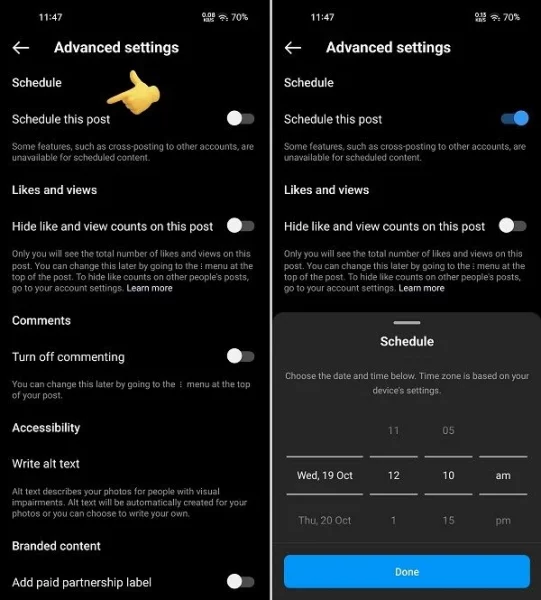
How it works. You’ll be able to schedule Reels by:
- In the creation flow, tap ‘Advanced Settings’ before sharing the post
- Tap ‘Schedule this post’
- Select the time and date you want it to go live
- Tap ‘Schedule’ in the post composer
What Instagram says. Functionally, this doesn’t add anything new as you’ve been able to schedule posts via Creator Studio since 2020. But it could make it easier to manage your content on the go, while the capacity to schedule Reels, in particular, could help you maximize your content performance.
Why we care. Brands and social media advertisers who manage Instagram accounts can now easily schedule posts without having to integrate with third-party tools. This feature is likely to come in handy around the busy holiday season, or as brands and agencies are looking for ways to cut costs.
The post Instagram’s in-app post scheduling tool now available to professional accounts appeared first on Search Engine Land.
Courtesy of Search Engine Land: News & Info About SEO, PPC, SEM, Search Engines & Search Marketing
Category seo news | Tags:
Social Networks : Technorati, Stumble it!, Digg, de.licio.us, Yahoo, reddit, Blogmarks, Google, Magnolia.
How brand marketing helps improve E-A-T signals: An introduction
Written on November 9, 2022 at 8:55 am, by admin
If you came to SEO from a non-marketing or technical background, it can be beneficial to have a broader understanding of brand marketing. This helps you better ally with your marketing communications colleagues to contribute to improving your website E-A-T.
In this article, I will share some of the core principles of brand marketing and how they may be reflected in criteria that can positively demonstrate expertise, authoritativeness and trustworthiness.
Note: This is a deep dive into the first part of my SMX Next presentation, which takes place next week on Nov. 16. Register here for free.
Why SEOs should care about brand marketing
In a previous article, I shared the extensive E-A-T auditing process my agency uses. The process is varied and detailed, covering the evaluation of work that may not be under your control.
For example, one of the checkpoints is to look at the business’s key people to see:
- How they are referenced and promoted on the site.
- How much of their research, work, patents and other evidence of expertise is displayed, marked up, and validated through linked references.
Representing and marketing key people, particularly media-trained spokespeople, is usually the remit of the PR team or agency.
If you work for a small or micro organization or you are an owner-operator, then perhaps all aspects of marketing communications fall to you.
In either case, it is really important to understand some of the basics of brand marketing and how mid to large-sized brands behave. This way, you can ensure that the output of brand marketing is communicated in a way that Google can process and evaluate.
Finally, while some aspects of the work that can help validate your E-A-T may not be under your control, you can use this topic to further internal education efforts as to what SEO is and how it can harness the efforts of all marketing teams.
You can explain to your colleagues how their work has dual purposes and benefits outside of their primary goals.
As an SEO, this is an exciting opportunity for you to:
- Coordinate a broad project.
- Drive awareness of the benefit of SEO in a more accessible, non-technical manner.
- Implement meaningful improvements for the business.
Let’s get into some principles and commonalities of good brand marketing behaviors so you can replicate this approach for yourself and understand more about how other teams’ work can dovetail into your E-A-T SEO goals.
Why does Google care about brands?
Google cares about brands because consumers care about brands.
While E-A-T is a relatively new concept coming to life in August 2018, I would argue that it is an evolution of work that can be traced back to updates as early as Vince in 2009, which was informally known in the industry as “the brand update.”
This update appeared to favor brands, but Google re-framed this as a “trust change.” That the new ranking order appeared to give more weight to brands is more symptom than cause, because [good] brand activity and behavior evince a greater variety of trust signals.
This matters because this is an example of giving the consumer what they want. Quite simply most consumers are reassured by familiarity and trust brands to deliver on expectations.
Researchers found that 7/10 consumers will buy more from brands they trust and that people abandon purchases if trust is broken, according to the 2021 Future of Marketing Research study by Adobe.
Moreover, 63% of respondents who indicated they trust a brand, will recommend that brand to their friends.
Trust is vitally important and can be broken quickly, with the top three reasons respondents gave for leaving a brand relating to misuse of data.
This a cautionary tale for those who invest time and effort in building brand value, only to lose all benefits through aggressive targeting or failure to remove someone from marketing after opting out.
Get the daily newsletter search marketers rely on.
<input type=”hidden” name=”utmMedium” value=”” />
<input type=”hidden” name=”utmCampaign” value=”” />
<input type=”hidden” name=”utmSource” value=”” />
<input type=”hidden” name=”utmContent” value=”” />
<input type=”hidden” name=”pageLink” value=”” />
<input type=”hidden” name=”ipAddress” value=”” />
Processing…Please wait.
What brand accomplishments communicate trust to consumers?
Strong brands have a purpose outside of commercial goals, commonly referred to as a company vision or mission.
Similarly, a set of values or beliefs should be shared by founders, leaders and team members which are aligned with the vision.
Brands have identities that are instantly recognizable, helping to expand reach and familiarity which engenders trust.
Finally, brands should behave to a certain standard aligned with values and do so consistently. This is what generates trust.
When consumers see clear and consistent values and ethos around what a brand stands for, purchases move outside of pure necessity and begin to become a part of our perception of identity. This is social identity theory.
“Social identities are most influential when individuals consider membership in a particular group to be central to their self-concept and they feel strong emotional ties to the group. Affiliation with a group confers self-esteem, which helps to sustain the social identity.”
If we buy into this social identity as personality, it is clear to see why broken trust leads to a sharp rejection as per the Adobe study findings.
What is a brand vision?
A brand vision or mission statement is simply the brand’s purpose and reason for being.
The most successful global brands that are instantly recognizable exist for much more than the purpose of commercial growth.
Good vision statements are:
- Driven by purpose.
- Challenging.
- Contribute to some degree of greater societal good.
- Forward-looking and reaching.
- Recognizable and suitable.
Here are some fun examples that you will likely know. Have a read of these vision statements and see if you can identify the brand they belong to. (I’ll note the answers at the end of this article.)
- “To bring the best user experience to its customers through innovative hardware, software, and services.”
- “To inspire and nurture the human spirit – one person, one cup and one neighborhood at a time.”
- “Our deepest purpose as an organization is helping support the health, well-being, and healing of both people — customers, team members, and business organizations in general — and the planet.”
Note that all of these examples are entirely non-commercial and speak to impacting society and even the planet positively.
Jenna Tiffany, Chartered Marketer and author of Marketing Strategy, states in the book that “transformation of ‘vision’ into ‘sales targets’ can be devastating for a brand and company culture.”
This is because, without a guiding purpose, there is no action framework outside of the pursuit of profit and revenue, leading to actions becoming disparate and inconsistent.
To ensure consistency and purpose in operations, most good brands lean into a set of non-commercial values.
What are brand values?
According to The Branding Journal, brand values are:
“[F]oundational beliefs that can steer action and encourage customer loyalty.”
Take the story of Whitney Wolfe Herd and how she founded Bumble, as an example. She took the company to IPO last year and made history as the youngest woman to ever take a company public.
Wolfe Herd’s ambitions for the company were driven by a broader goal to make online dating a safer space. In a Time interview, author Charlotte Alter references Wolfe Herd’s strong belief in the value of brand.
“Wolfe Herd sees Bumble less as a dating app, a social platform or a tech company than as a brand. It’s the word that she uses the most when talking about Bumble, and it’s the word that crops up most frequently in conversations with employees and executives.”
It is no surprise then, that along with a non-commercial purpose, the brand has a clear set of values stated on the company About page which are:
- Integrity
- Kindness
- Quality
- Confidence
- Respect
It is clear to see how these values are intrinsic to the company’s goal of making online dating a safer space.
What may not be clear yet, is how having vision and values can contribute to how our E-A-T is perceived. To illustrate this in the most tangible way we will discuss a final introductory aspect of brand marketing and that is identity.
Brand identity matters
In Brand Identities: A Framework for Successful Branding, author Phani Tej Adidam defines brand identity as:
“[A]n outward expression of the brand, including its name and visual appearance. The brand’s identity is its fundamental means of consumer recognition and symbolizes the brand’s differentiation from competitors.”
With that understanding, a brand’s total identity can be far broader than a simple logo but extends to:
- Logo
- Colors
- Shapes
- Fonts
- Emblems
- Trademarks
- Words/slogans
It’s not just the image or mark itself that becomes recognizable. Whether trademarked or not, even the text descriptor of a visual device can be understood as part of the whole entity.
As an example, search Google for “three stripes” to see this in action.
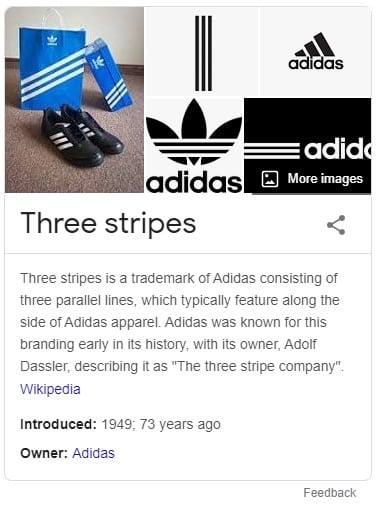
The generic query “three stripes” generates a knowledge panel result explaining:
- The trademark.
- Its origin and appearance.
- Variations in the application of how the three stripes are incorporated into visual marks.
On this extension of assets and peripherals being a part of the whole brand story, Tiffany of Let’s Talk Strategy and author of the previously mentioned Marketing Strategy book added:
“A brand is how a person perceives and identifies an organization or person (if it’s their personal brand). This perception can be influenced with what are known as branding elements, such as logos, a specific slogan/strapline, designs, symbols, and (most importantly) the feelings which the products or services evoke. A brand is more than a product or service; it is the combination of all of these elements.”
How can brand marketing be leveraged to grow E-A-T?
Simply put, brand marketing is about the creation and marketing of tangible assets. Over time, assets are understood to be entities by search engines.
Entities can be marked up with schema, linked to, cited and referenced to contribute to a growing semantic dataset of tangibles.
This is entity SEO, which has been increasingly in focus this year as the rate of progress in joining the strands of entity, quality and complex semantic and contextual understanding is evident with MUM.
When it comes to brand marketing, all of the brand assets (which may be people, marks, values, vision, slogans, catchphrases, and colors) have the potential to become entities.
Let’s look at it as a step-by-step process imagining we’re a start-up.
1. Create or evaluate all marketable assets
These are the summation of identity components, vision and values, and key people and their assets too.
If you are a start-up, this is a very exciting time to define all these things with founding member energy.
If not, it is never too late to work on this aspect of who you are as a business and why you do what you do best.
2. Assets become entities
Any asset that is defined, named, referenced and marketed consistently over time becomes an entity – a “thing” in and of itself.
It’s been a very long time since Google acquired Metaweb in 2010, which facilitated a sea change in Google named entity recognition (NER) capabilities.
When your assets are understood as entities, Google can better understand when a search user may be referring to your asset as opposed to a word or phrase in another context.
Entities can get more real estate on the SERP particularly if it is exclusive, such as a trademark, an individual or an invention.
In many cases, you can own the entire first page for your own entities, even if it may be with a mix of owned and operated versus not owned but operated (such as social media pages.)
3. Entities can be marked up
Structured data is becoming the new rule 34 of the web. If it exists, there is a schema for it.
Adding semantic markup conveys a greater depth of understanding. It can contextualize the object in a way that a query string might not.
While not absolutely critical to be understood as an entity, we often find that markup can accelerate time to trigger entity recognition. It is also simple to implement and can be added via Google Tag Manager if development constraints exist.
How does any of this contribute to E-A-T?
All of the things we have discussed today are signals or indicators of a level of maturity and responsibility that larger organizations should have within our society.
These are brand behaviors that engender trust in us as consumers. Therefore, it makes perfect logical sense that known brands that deserve to match a query should rank well in Google Search.
Better CTR means higher search engagement which leads to greater potential for paid ad clicks which means Google, advertisers and search users all have a better experience.
Authenticity is key
Brand marketing has to be genuine. Vision has to be authentic, or it will be impossible to retain consistency.
Authenticity in vision, values and message is often referred to as brand DNA, which helps us understand that it isn’t something we should or could fake.
To fake it would possibly mean more effort and less reward than having vision and values and being authentic in their communication.
Brand vision statements – answers:
- Apple Inc.
- Starbucks
- Whole Foods
The post How brand marketing helps improve E-A-T signals: An introduction appeared first on Search Engine Land.
Courtesy of Search Engine Land: News & Info About SEO, PPC, SEM, Search Engines & Search Marketing
Category seo news | Tags:
Social Networks : Technorati, Stumble it!, Digg, de.licio.us, Yahoo, reddit, Blogmarks, Google, Magnolia.
10 Google Analytics 4 settings to check before the holiday season
Written on November 8, 2022 at 4:52 am, by admin
Technically, you don’t need Google Analytics 4 (GA4) to measure your holiday sales efforts this season because Universal Analytics (UA) is still active.
However, next year at this time UA will no longer be tracking data and the individual accounts will likely be permanently shut down and closed sometime around January 2024.
From next year on, the only analytics data you’ll have (from a Google-owned analytics platform, anyway) will be from GA4.
GA4 measures website activity very differently from UA, so the only way you’ll get a year-over-year comparison for this holiday season vs. the next holiday season is if you have the latest platform properly configured now. That’s why you should care.
So, here are 10 things you’ll want to make sure are being properly tracked today.
(Author’s Note: The setup paths listed below are accessed within the GA4 platform itself and you must have Admin privileges)
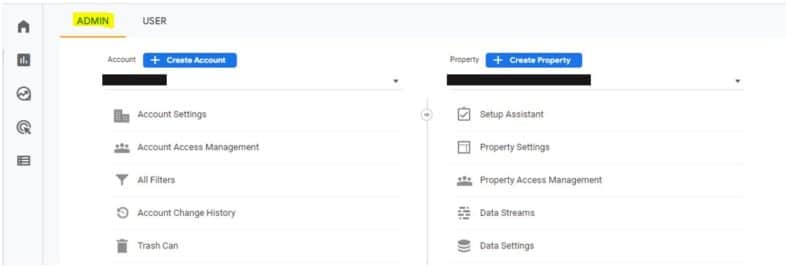 GA4 Admin Screen
1. Does your ecommerce platform have an easy app or plugin to allow GA4 tracking yet?
Six months ago, robust support for GA4 from platforms (e.g., Shopify, BigCommerce) was not yet available.
Now there are apps out there positioning themselves for easier GA4 support.
Many of them are very new so they don’t yet have a large user base. Do your homework before just installing one of those.
In fact, it might be best to consult with a professional. You need to make sure any app or plugin meets your specific measurement needs.
2. Do you have referral exclusions that need to be added?
You may have a number of referral exclusions to consider. For example, PayPal, GooglePay, AmazonPay, ApplePay, etc.
Here is the path to set this up within GA4:
- Admin > Property > Data Stream > Configure Tag Settings > Show More > List Unwanted Referrals
3. Is there any domain tracking needed?
If your ecommerce site is all one domain, then nope. You’re good to go.
However, if you have multiple domains, then you better make sure those are properly set up. An example of this would be a site that has the following:
- https://www.companyname.com
- https://shop.companyname.com
4. Are you driving traffic via Google Ads?
If so, do you have audiences built in Google Analytics for use in Google Ads?
Are you importing conversions from Google Analytics into Google Ads?
It’s a great idea to do so, but if you’re using UA for conversion optimization currently, make sure you list your GA4 audiences as secondary, not primary.
To connect to Google Ads:
- Admin > Property > Product Links > Google Ads Links
To connect to Google Merchant Center:
- Admin > Property > Product Links > Google Merchant Center
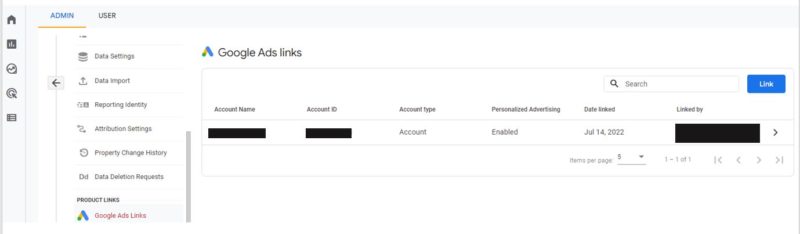 Google Ads links
5. Which analytics account is your Google Search Console connected to?
You can only connect your Search Console to one analytics account at a time so if UA is your source of truth and primary platform of use for this holiday season, keep it connected there.
However, if you’re ready to make the full switch to GA4, it’s pretty simple.
To make that connection:
- Admin > Property > Product Links > Search Console Links
Get the daily newsletter search marketers rely on.
<input type=”hidden” name=”utmMedium” value=”” />
<input type=”hidden” name=”utmCampaign” value=”” />
<input type=”hidden” name=”utmSource” value=”” />
<input type=”hidden” name=”utmContent” value=”” />
<input type=”hidden” name=”pageLink” value=”” />
<input type=”hidden” name=”ipAddress” value=”” />
Processing…Please wait.
6. Have you set up your landing page reports?
Landing pages are often recycled for the next year, so for purposes of YOY comparison data, you’ll want to make sure you’re set up for it.
Here’s how:
- Reports > Life cycle > Engagement > Pages and Screens > Customize Report (pencil icon in the upper right page)
For a full tutorial, be sure to check out How to Make a GA4 Landing Page in 10 Easy Steps from Search Engine Land contributor Krista Seiden.
7. Have you enabled the ‘enhanced measurement’ options for key events?
In GA4, everything worth measuring is an event. Get used to it and make sure you’re all set. Anything related to conversion path is an event.
For ecommerce, that includes critical touchpoints like:
- Site search
- Product listing view page
- Product detail page
- Product video or gallery view
- Add to cart
- Payment page visit
- Confirm order
- Support page/chat
- Etc.
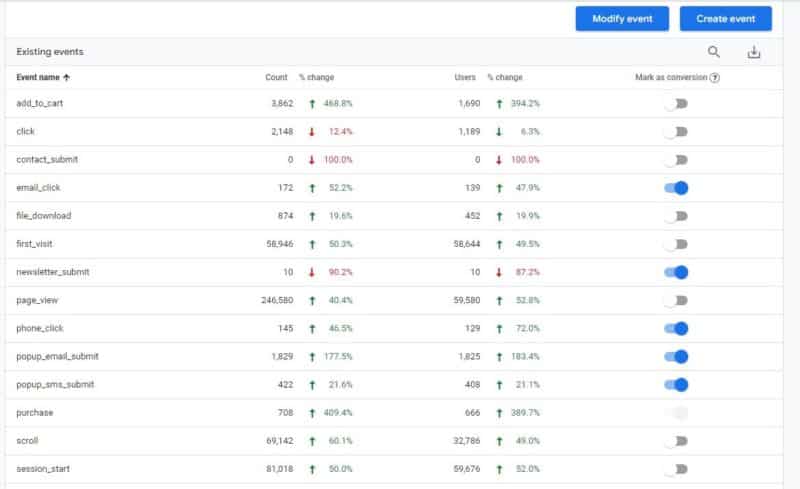 Events Setup/Modify
If your GA4 account does not show any of the above actions as events, then you need to get them set up accordingly.
Many of the actions you’ll want to track (site search, video views, scrolls, etc.) require the “enhanced measurement” feature to be turned on.
Additionally, tracking for form submission signups, button, phone and email clicks needs to be set up as custom events.
To enable enhanced measurement:
- Analytics > Property > Data Streams > Enhanced measurement toggle switch
8. Are your attributions and lookback windows properly set?
While (in the opinion of this author) cookie-cutter attribution models have questionable value in terms of what actually drove the conversion, they are relevant when managing a campaign with multiple touchpoints in a purchase process.
When it comes to lookback windows, the concept is pretty simple: “How far back in time do you look when measuring what assisted in driving the conversion?”
A good rule of thumb is 30 days for acquisition-related events and 90 for others.
Is it perfect? Far from it.
However, defaulting to 30 days should cover you in most cases (but there are exceptions, of course).
To ensure your attribution and lookback windows are properly set:
- Admin > Property > Attribution Settings
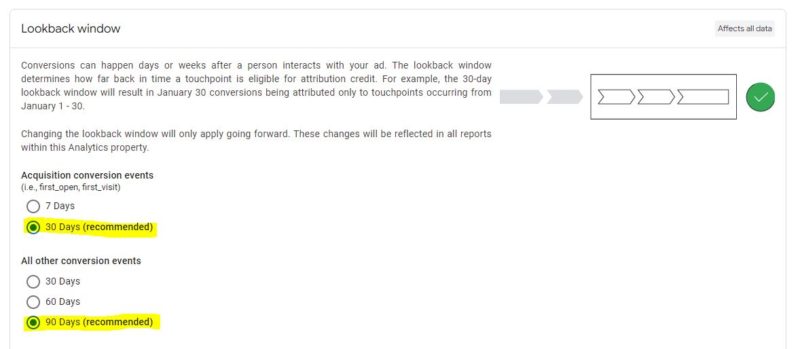 Lookback window
9. Have you looked into GA4’s thresholding issue (smaller accounts)?
What is “thresholding”?
If you have Google signals activated in your GA4 account, you can get session details from sites and apps associated with a Google account.
While this can be beneficial for understanding user behavior, Google also doesn’t want you to be able to personally identify an individual via GA4.
For example, if your ecommerce site has a dozen products and gets 10-20 orders per day, there’s a good chance it would be possible to identify an individual user by taking their order information and matching that up with data you can see via GA4.
If you’ve ever seen thresholding in a GA4 report, it’s terrible.
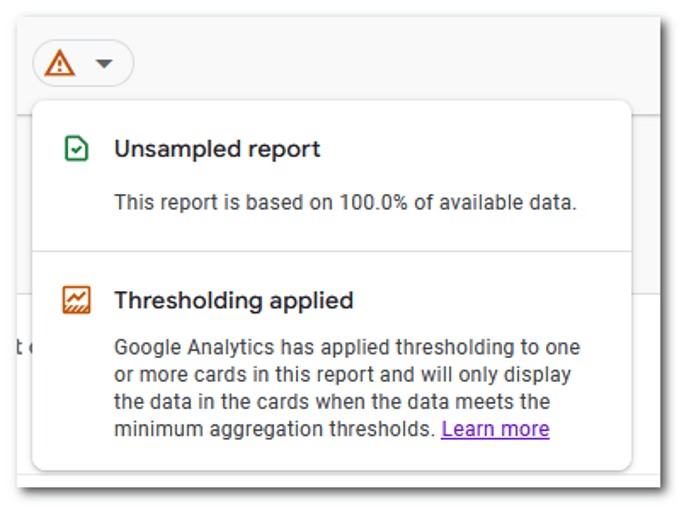 Thresholding
The good news is there is a way around thresholding (for now), but you have to know where to look. Here’s where:
- Admin > Account Settings > Reporting Identity > Show all
Once there, click on “device-based” and that’ll mitigate the thresholding issue:
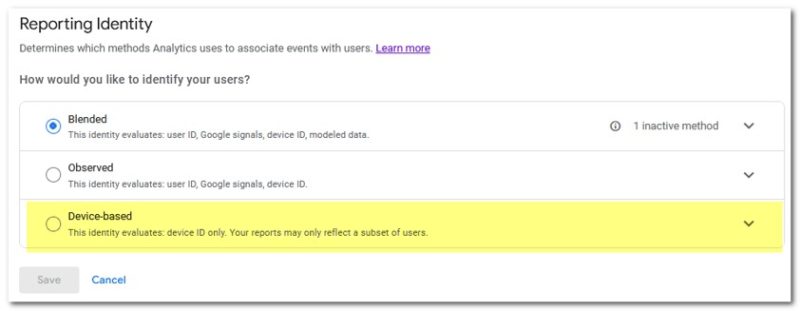 Reporting Identity
10. How will you take annotations?
In UA, the user is able to add an annotation to add critical context to a number.
For example, bad winter weather may have closed the entire state for a whole weekend causing an abnormal spike in website traffic and conversions while people were stuck at home bored.
Knowing why there was an abnormal spike in traffic is critical from a forecasting perspective because the cause should not be considered a reliable, repeatable event.
As of this writing, annotations are not yet available on the native GA4 platform. (Remember the entire point of this article regarding the importance of year-over-year tracking?)
Having annotations to provide proper context to key numbers is critical.
Right now your best options are to either document them separately or install a browser extension that will give you that capability.
Do a simple Google search for “GA4 browser extension” and you’ll see a list of choices.
(This author is neither endorsing nor rejecting the use of a browser extension, but will always advise to only use ones with a solid install base, are well-supported, and come highly recommended by reputable industry experts.)
Annotations will no doubt be added natively to GA4 at some point in the future so documenting them in a spreadsheet somewhere safe is certainly a viable option for now.
Ensure you have solid GA4 data for future use
GA4 has a lot of possibilities, but also a lot of complexities when it comes to setup and use.
This article is by no means a complete checklist, as the platform continues to evolve.
But hopefully, it gives you a solid base to ensure you’ll be able to have solid data from this holiday season to use in future YOY comparisons.
The post 10 Google Analytics 4 settings to check before the holiday season appeared first on Search Engine Land.
Courtesy of Search Engine Land: News & Info About SEO, PPC, SEM, Search Engines & Search Marketing
Category seo news | Tags:
Social Networks : Technorati, Stumble it!, Digg, de.licio.us, Yahoo, reddit, Blogmarks, Google, Magnolia.