

Last call for Google Ads API v11
Written on February 28, 2023 at 11:42 am, by admin
Starting from March 29, 2023, the Google Ads API v11 will no longer be available. Developers still using v11 after this date will notice API requests failing.
Depreciation and sunset timetable. Typically, major versions are supported for approximately 12 months, while minor versions have a support lifespan of 10 months.
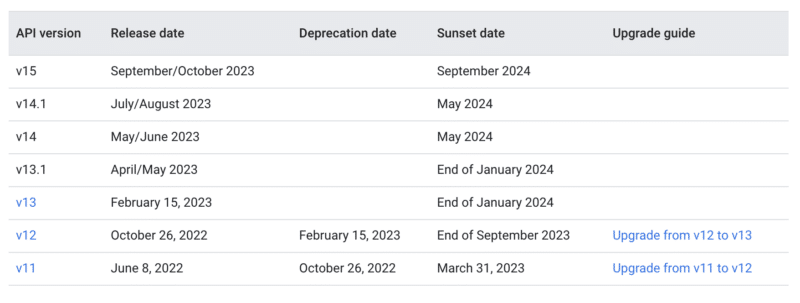
Migrate asap. To migrate to the newest version, visit the Google Ads API documentation here.
Dig deeper. Read the announcement from Google here.
Why we care. New API updates directly affect the functionality and performance of advertising campaigns. Once a version is sunset, all API requests using that version will fail, potentially causing disruptions to campaign management and optimization. By staying up-to-date with the latest version of the API, advertisers and developers can access new features and improvements, ensuring your campaigns are running efficiently and effectively.
The post Last call for Google Ads API v11 appeared first on Search Engine Land.
Courtesy of Search Engine Land: News & Info About SEO, PPC, SEM, Search Engines & Search Marketing
Category seo news | Tags:
Social Networks : Technorati, Stumble it!, Digg, de.licio.us, Yahoo, reddit, Blogmarks, Google, Magnolia.
Bing Webmaster Tools to gain Bing Chat and index coverage reporting
Written on February 28, 2023 at 11:42 am, by admin
Microsoft Bing will upgrade Bing Webmaster Tools to add reporting and tools around the new Bing Chat feature and a new index coverage report. This was announced by Fabrice Canel, Principal Product Manager at Microsoft Bing, this morning in a keynote given at PubCon Austin.
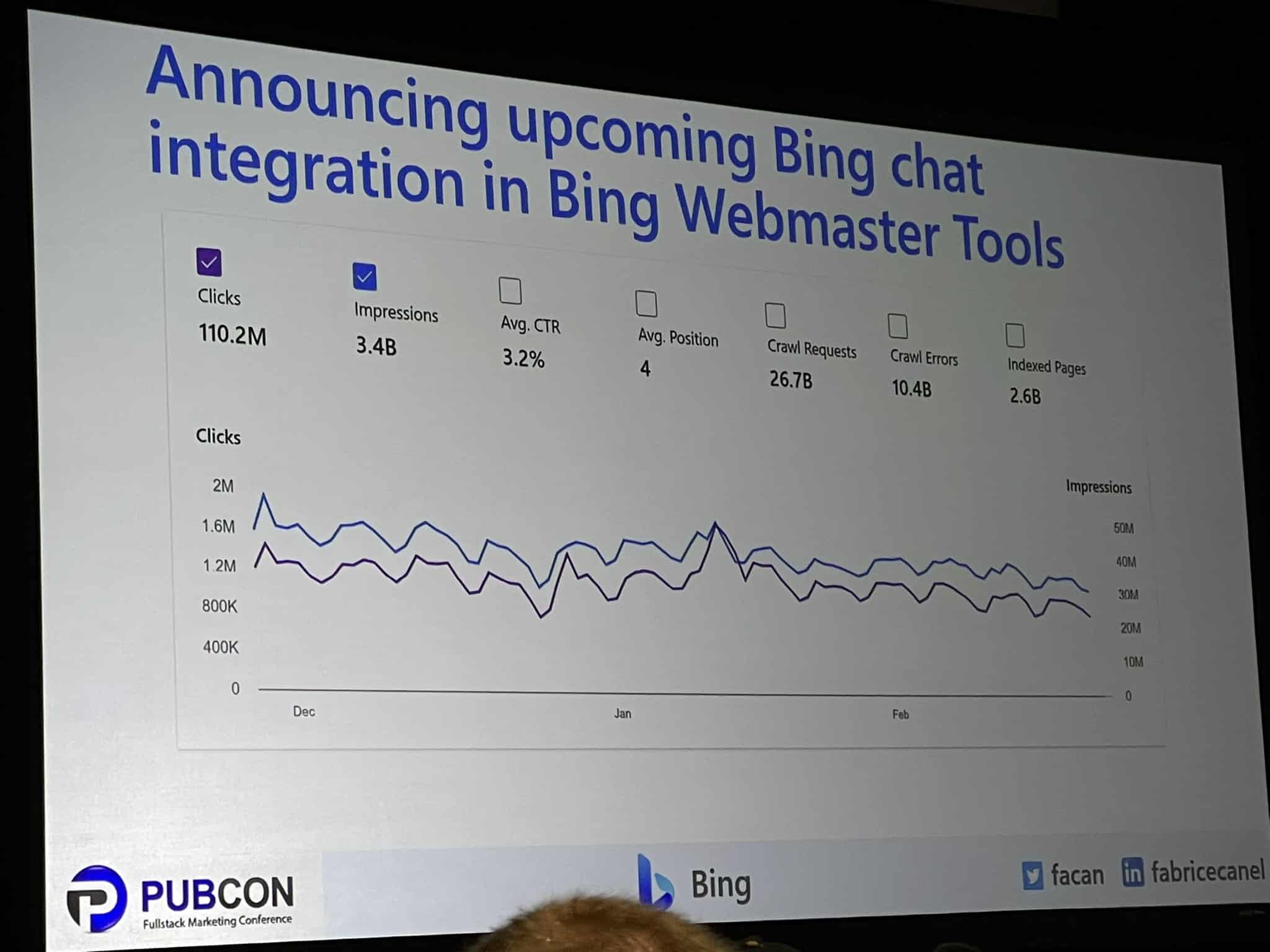
Bing Chat in Webmaster Tools. Bing Webmaster Tools should be adding Bing chat integration to allow publishers, content creators and site owners to see how much traffic the chat feature is sending their sites. It will be part of the Bing performance report and show impressions, clicks, click through rate and more.
Here is a photo of this report from Jennifer Slegg on Twitter:
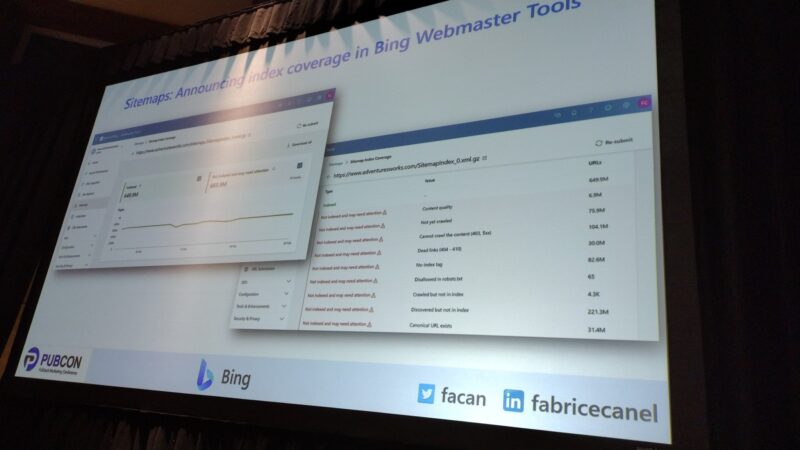
Index coverage report. In addition, Fabrice also announced a new index coverage report coming to Bing Webmaster Tools. This report will show how your pages on your site are being indexed by Bing Search. If pages are being excluded or if pages are having issues being indexed.
Here is a photo of this report from Patrick Stox on Twitter:
Why we care. With all the concern, confusion and stress around these new chat AI features, having a report that shows how many people see our links, click on our links and visit our sites will be helpful to publishers, content creators and site owners. In addition, the new index coverage report can help site owners understand which pages are not being indexed, so they can work on improving indexing through IndexNow, sitemaps or other means.
The post Bing Webmaster Tools to gain Bing Chat and index coverage reporting appeared first on Search Engine Land.
Courtesy of Search Engine Land: News & Info About SEO, PPC, SEM, Search Engines & Search Marketing
Category seo news | Tags:
Social Networks : Technorati, Stumble it!, Digg, de.licio.us, Yahoo, reddit, Blogmarks, Google, Magnolia.
AI can’t write this: 10 ways to AI-proof your content for years to come
Written on February 28, 2023 at 11:42 am, by admin
Don’t get it twisted. The machines are taking over.
It’s only a matter of time until we’re all serving aluminum overlords’ every beck and call.
Fortunately for all of us simple humans, that day is not today.
Despite being a regurgitating raconteur, AI is still a glorified mansplainer – like the Wizard of Oz, minus the fancy haberdashery.
It can’t wrap its dumb little head around anything subjective.
It’s eye-wateringly expensive to run. Orders of magnitude more than Google Search. As if that weren’t bad enough, AI content also makes a mockery of E-E-A-T.
And its source material is probably (definitely) stolen, infringing on others’ copyrights and fair use intellectual property rights.
Promising? Sure. Ready for prime time? Not quite.
So don’t fire your whole writing team just yet (unless they already sucked to begin with).
There are still a few things AI can’t do and won’t be able to do for years to come.
1. Google has already been disrupting top-of-the funnel content for years
Microsoft made waves with a massive $10 billion investment into OpenAI.
That’s a lot of cheddar. But there’s only one problem…
Nobody uses Bing.
Seriously, no matter how you slice or dice the data, they have less than 10% of the market to Google’s ~80-90%+.
So will AI help? Sure. I mean, it can’t hurt! It was already a ghost town to begin with.
I’m not (just) being flippant. I’m making a point.
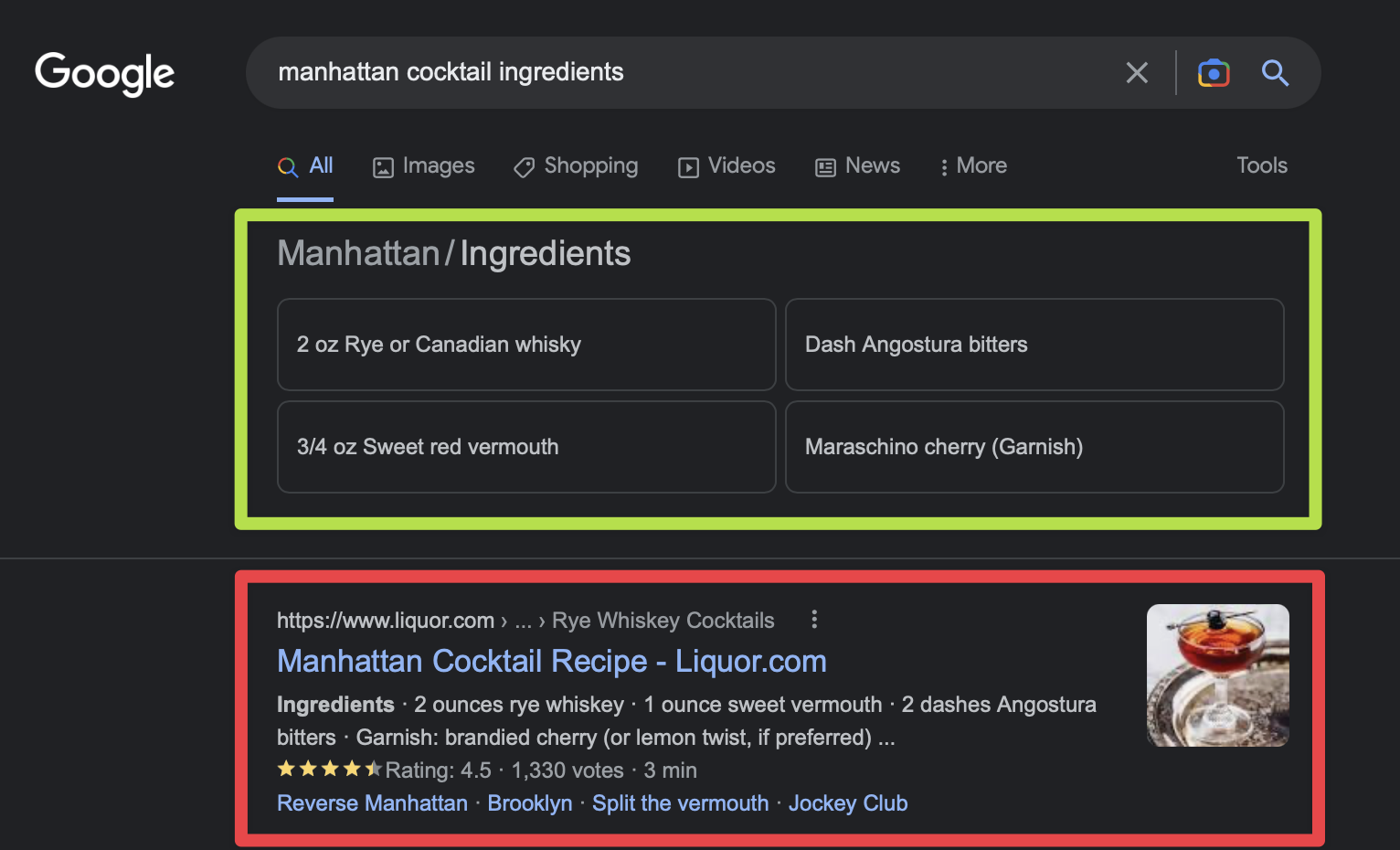
Google has already been disrupting SERPs – for years! – with a proliferation of featured snippet and knowledge graphs, and instant answers that give you exactly what you’re looking for… without requiring a single click.
That means U cAn GeT yUr DrInK oN without ever clicking on poor liquor.com below (and giving them some “ad cents.” (Get it?)
2. Spend more time on MOFU and BOFU content (i.e., the less disruptable stuff)
Despite Google SERPs + AI already cannibalizing your top-of-the-funnel (TOFU) content, it’s less destructive for middle or bottom-of-the-funnel (MOFU/BOFU) stuff.
You know, the kind that actually compels people to do something – click, opt-in, add to cart, start a trial, create an account, or just hit the Buy button.
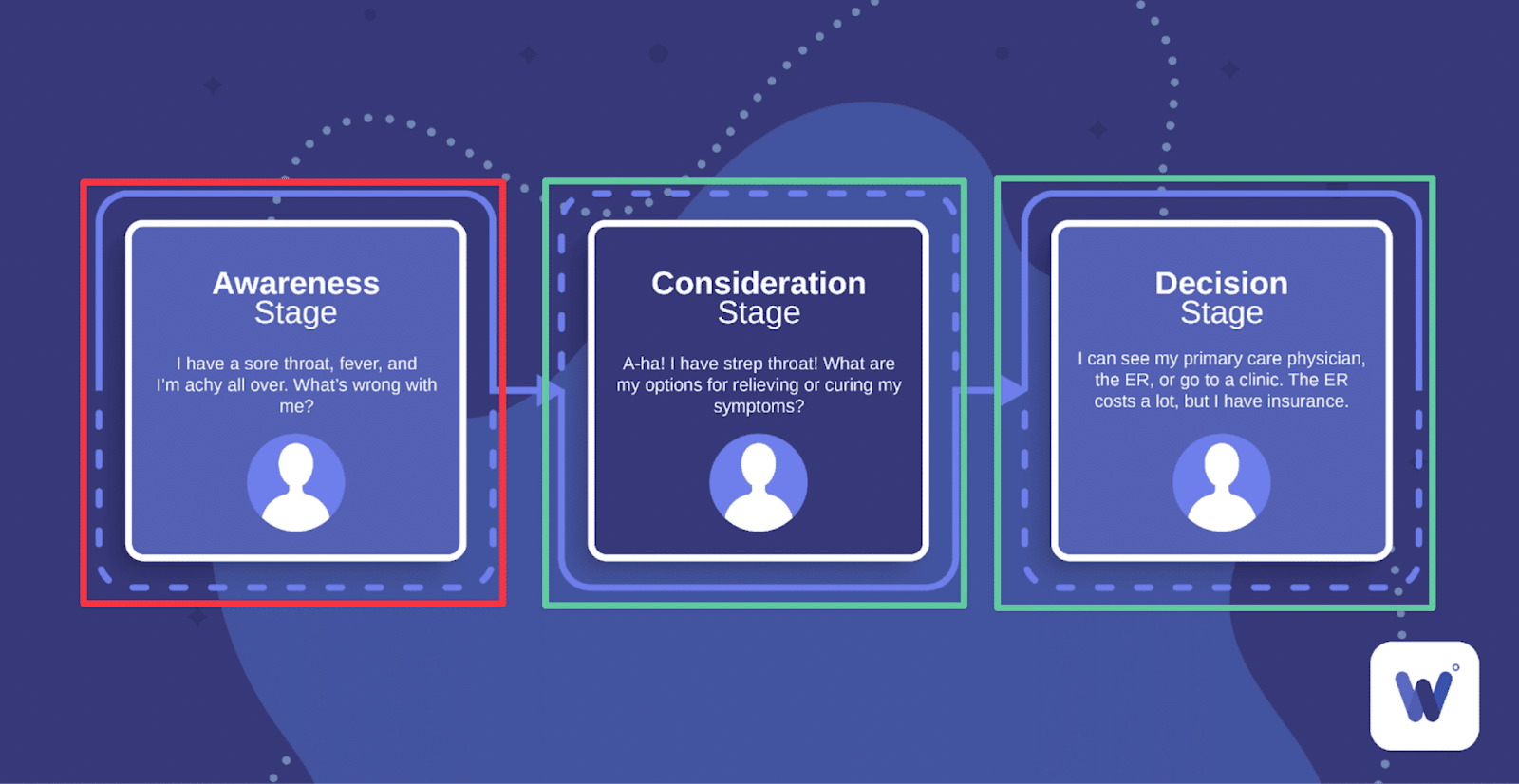
AI content will be similar for the foreseeable time, because the underlying technology relies exclusively on pretrained models.
It’s why machine can often beat Grand Masters at chess. They can scan and store information (read: patterns and moves) and then make decisions based on that data faster.
Like “garbage in, garbage out,” it associates data points that often show up together, then spits it back out again when called upon – without actually understanding what it’s saying.
So while AI content can do a passable job at a simple, black-and-white query like “What is Advil?” and similar, it’s less useful for figuring out if you need Advil or if you should go to the ER.
Which brings us to the next subplot:
AI content is notoriously wrong. Not, like, some of the time – but, like, all of the time.
3. Great content is often written by subject-matter experts, with quotes and nuance to add color to a topic or angle
The world we live in is not black and white. It’s all shades of kinky, messy, sweaty grey.
That’s also why the best content is done by or with subject-matter experts.
‘Cause said experts rely on primary research and verifiable facts or stats vs. baseless claims to properly prepare persuasive points.
That’s not what you get with AI content.
Plus, it’s easy to spot, like the nerdiest game of whack a mole. A new version of ChatGPT is released, a few weeks later, Turnitin can spot it with 97% accuracy.
Take even the title of this article. It was initially going to be a straightforward “how-to,” but I knew turning it into a Top 10 listicle would get more attention.
Knowledge of the audience should even inform the content structure.
But that isn’t all.
The very definition of “content” continues to evolve as more and more stuff shows up in today’s SERPs.
4. Better structure content types around the Query + SERP layout
Google “HubSpot tutorial” and here’s what you won’t see first:
- PPC Ads.
- HubSpot.com.
- People Also Ask questions.
- Traditional organic listings.
- Knowledge Graph.
Give up?
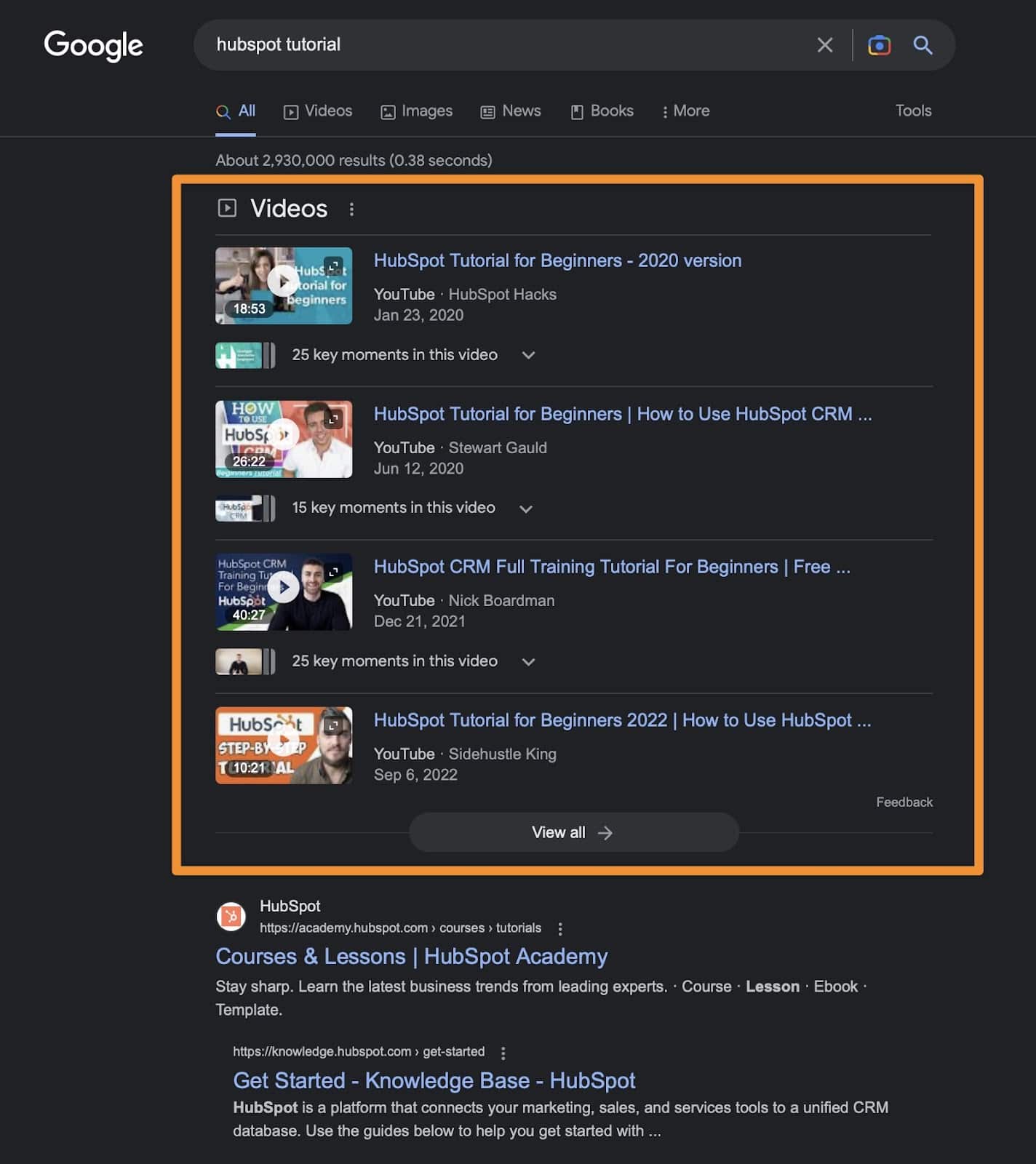
Videos!
C’mon, OpenAI. Where’s your vlogging game at?
This is a perfect segue (if I do say so myself) because the one thing that video often has over plain text is personality.
The delivery of the content in video is arguably just as (if not more) important than the actual content.
But. That shouldn’t necessarily be the case.
It just is. Because most writing on the web suuuuuuuuuuuuuuccccckkkkssss.
Take the obnoxious-as-hell introduction of this article.
I’ve worked with hundreds of brands in the past decade. And I can only count on one hand the number that would let us usually get away with something like that.
Most want to play it safe. Water it down. Make it more generic. Make sure the Oxford comma is just so.
You know, because customers really care how you format em dashes. (Wait. No, they don’t.)
Get 10+ writers to drone on and on and on like the same nameless, faceless, Company, Inc. that’s been the content strategy over the past few years.
Yet, over the next few, it will die an excruciatingly-violent, Squid Games-esque death.
‘Cause AI content is already the faceless master of the universe.
5. Think more recurring columns from individuals with personalities vs. lots of generic writing that all sounds the same
Cue Bourdain.
God, I love him. And miss him. Because he would drop bombs on the regular like so:
“If you are easily offended by direct aspersions on your lineage, the circumstances of your birth, your sexuality, your appearance, the mention of your parents possibly commingling with livestock, then the world of professional cooking is not for you.”
From the thought-provoking:
“Travel changes you. As you move through this life and this world you change things slightly, you leave marks behind, however small. And in return, life—and travel—leaves marks on you.”
To simple quips:
“When dealing with complex transportation issues, the best thing to do is pull up with a cold beer and let somebody else figure it out.”
What do you call that? Journalism? Satire?
No clue. I just call it endlessly readable. Can’t-take-my-eyes-off-it watchable. Literally-LOL listenable.
AI can’t do that. Because AI ain’t got no soul.
It can’t make counterunitive arguments. It can’t weave a narrative that builds on itself.
Not yet, anyway. And not over the next few years at this rate, either.
Those things are self-referential. They build arguments with one brick after another, which requires leaps in logic.
Or they’re completely counter to what “most” acceptable norms might suggest on a particular topic or category.
Remember: garbage in and garbage out. AI can’t process nuance like this yet.
Get the daily newsletter search marketers rely on.
<input type=”hidden” name=”utmMedium” value=”“>
<input type=”hidden” name=”utmCampaign” value=”“>
<input type=”hidden” name=”utmSource” value=”“>
<input type=”hidden” name=”utmContent” value=”“>
<input type=”hidden” name=”pageLink” value=”“>
<input type=”hidden” name=”ipAddress” value=”“>
Processing…Please wait.
6. Mixed media increases persuasion, consumption and even memory recall
When people say “content,” their minds drift to “text.”
But the lines between content types have already evolved. And for a good reason.
Imagery is proven to increase memory recall. Meanwhile, scanning and skimming is the new reading.
That’s why showing people what something looks like will always, unarguably, be better than walls of text.
You might as well be dropping 300 words of Lorem Ipsum when an image comes into view, like so:
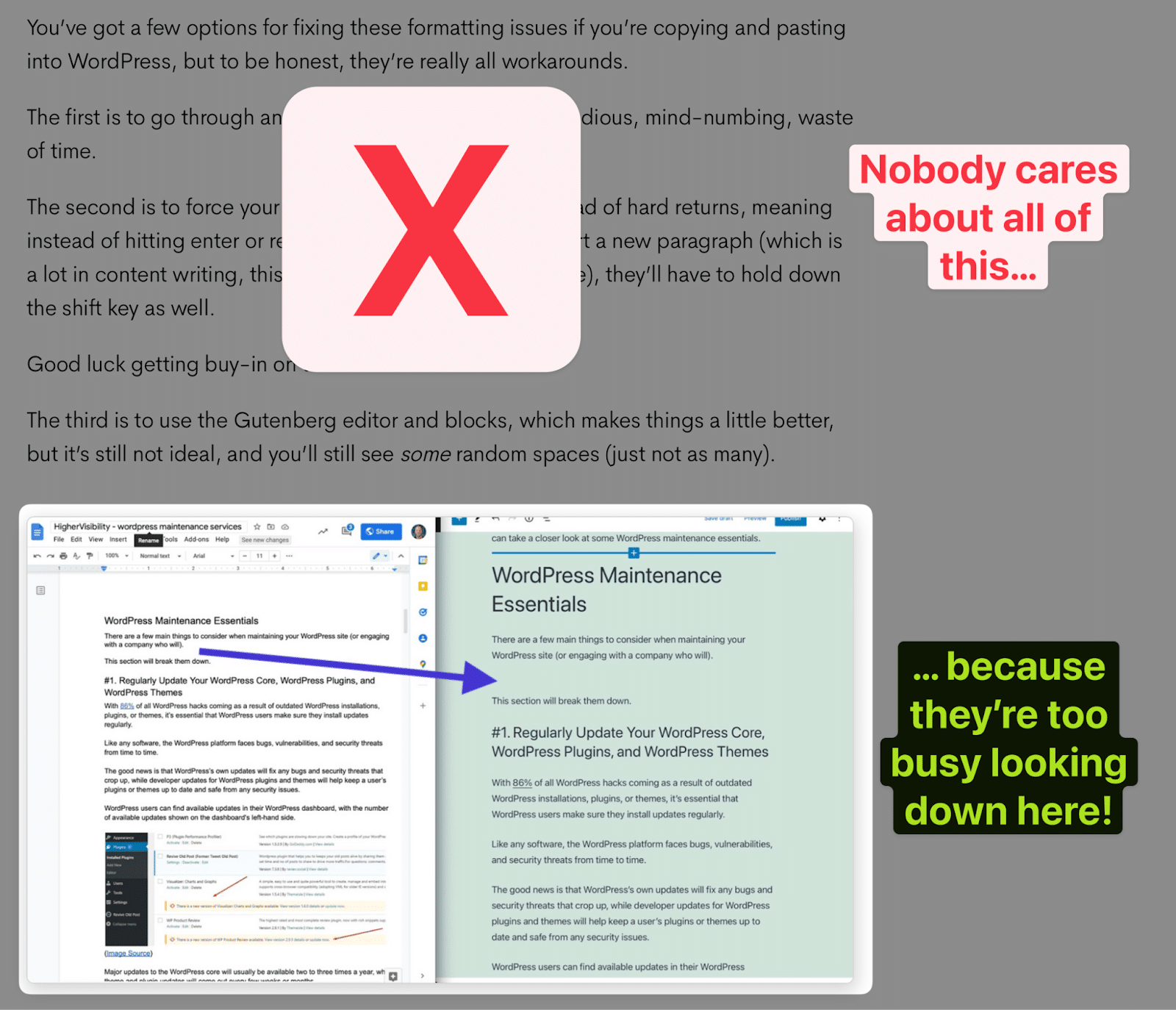
Mixed media helps break up content, actually encouraging more scanning and scrolling, which your crack fiend-like audience is already accustomed to online.
This should include everything from:
- Featured images.
- Charts and graphs.
- Visualizing a process or explanation.
- CTAs.
- Even graphics that could be repurposed for social channels, video thumbnails, and more.
And it means anytime you explain some visual process, show it!
It’s better to show people exactly how to “add a strikethrough in Google Docs,” as an example, than to ramble on and on and on and bury the good stuff in walls of text around it.

7. Create long, in-depth content that can easily be repurposed into more audio and visual mediums
You don’t need another statistic to explain video’s importance to marketing. No one does.
So let’s skip the foreplay and focus on the important point:
The very same long, in-depth, nuanced, interesting content that AI can’t do also lends itself really well to another human-friendly element: audio and video.
A basic element is to take in-depth content and create audio summaries. Or, simply include thematically related discussion-style podcasts into related articles. The Economist does both.
But you can and should do the same with video, especially as YouTube continues to eat away at traditional television + streaming time while also eating away at organic SERP placements, too. (See point #4 above.)
So take your top content, or most competitive “head” terms, and create everything from product-focused walkthroughs to in-depth reviews or even motion graphics.
Just remember that we’re shooting for what AI can’t do = which often means more human inclusion with some talking-head elements, too.

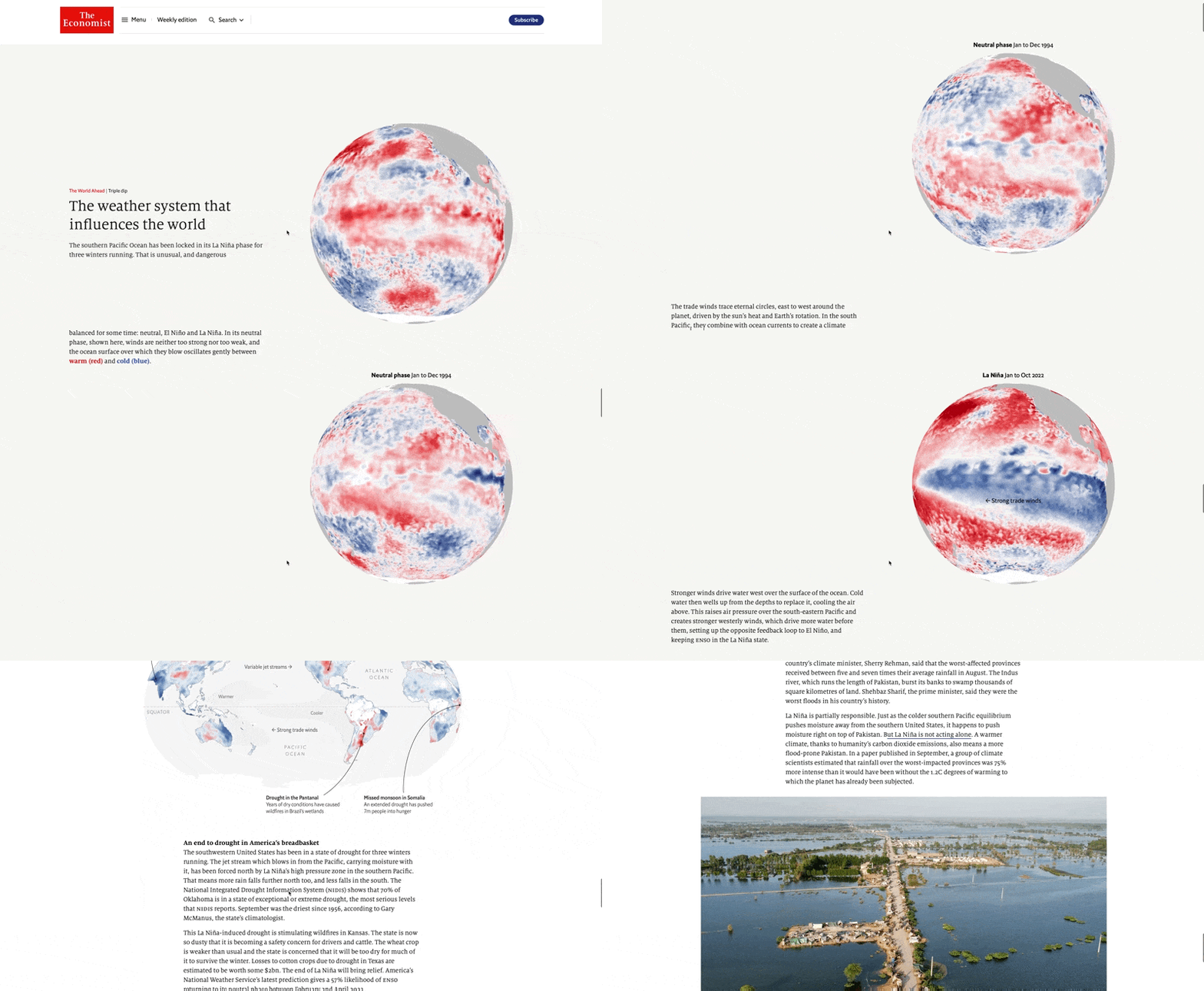
8. Illustrate stories with interactive content and data visualization
The theme over the last few tips here is to focus less on the actual content itself and more on how you deliver it.
Specifically, make it more interactive so it is easier to grasp and more interesting to focus on for a few minutes.
Data visualization is the natural extension, then. Again, take a cue from top publishers like The Economist, which has recently been churning out interactive content pieces like this overview of worldwide weather systems.
9. Lean into nuance and subjectivity by comparing alternative solutions for different audiences
AI doesn’t waffle. It can’t, by definition. It’s programmed to spit out facts like that supremely-annoying know-it-all in your office. (Err, Slack Watercooler.)
The good news is that this dovetails nicely with the fact that online audiences are also becoming savvier. Meaning: if you just spew BS, they’ll see right through it.
Nowhere is this clearer than affiliate-related SERPs. Sure, you can still pull the wool of the eyes of rubes in the “make money online” space.
But generally speaking, people are smart enough to know that there is no #1 right answer 100% of the time.
Instead, you often compare different options for different people based on a wide range of factors.
For instance, what’s the best dive watch you can buy right now?
The answer is entirely dependent on budget!
What’s “nice” at $100 isn’t at $1,000, $10,000, or even $100,000. (Much to my bank account + wife’s chagrin.)
But the point is that you can and should lean more into subject-style content.
At the very least, take a more balanced and nuanced approach to the kind of searches that might realistically work for multiple parties.
Once again, you can up the ante here by using better design, presentation, and even development to highlight these subjective differences clearly.
Think: comparison charts and graphics. Showcase pros vs. cons or which alternative is better depending on their budget, goals, and preferences.
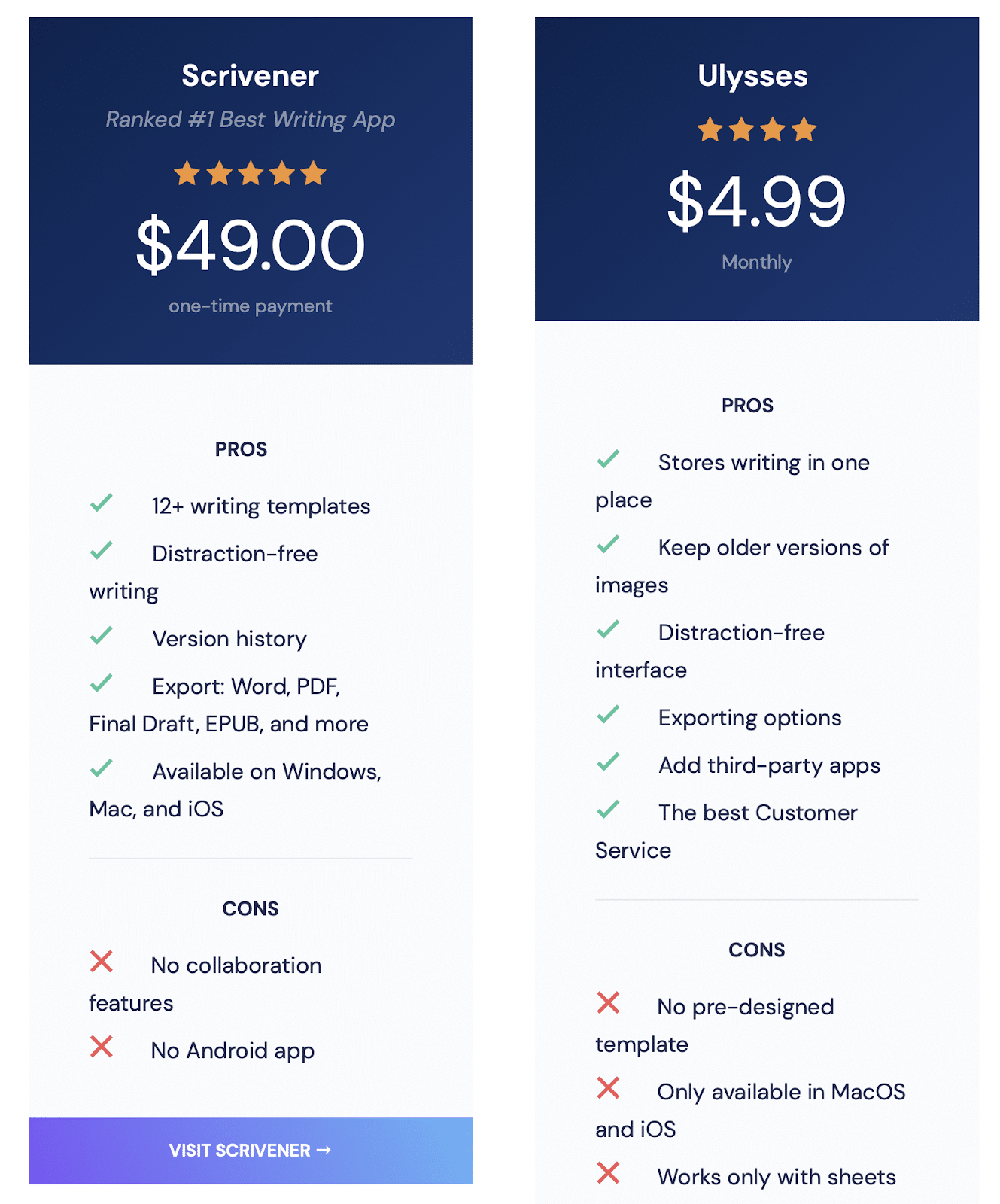
10. Demonstrate how things works, not just what they’re capable of
You should always strive to go the extra mile.
Sounds trite. But it’s true.
If the competing content has zero images, you should have five. If they have 10 stock images, you should have 10 custom ones.
Your content will need a competitive “moat,” made up of all these elements we’re talking about today, to “future-proof” your content as much as possible.
My last favorite example includes calculators, tools, quizzes, and other embeddable elements.
Let’s literally and figuratively go that extra mile now. Say you have two ways of determining your expected finish time in a marathon.
You can:
- Painstakingly look up your mile time on the leftmost column of a huge chart, using both fingers to draw lines between that and your distance time…
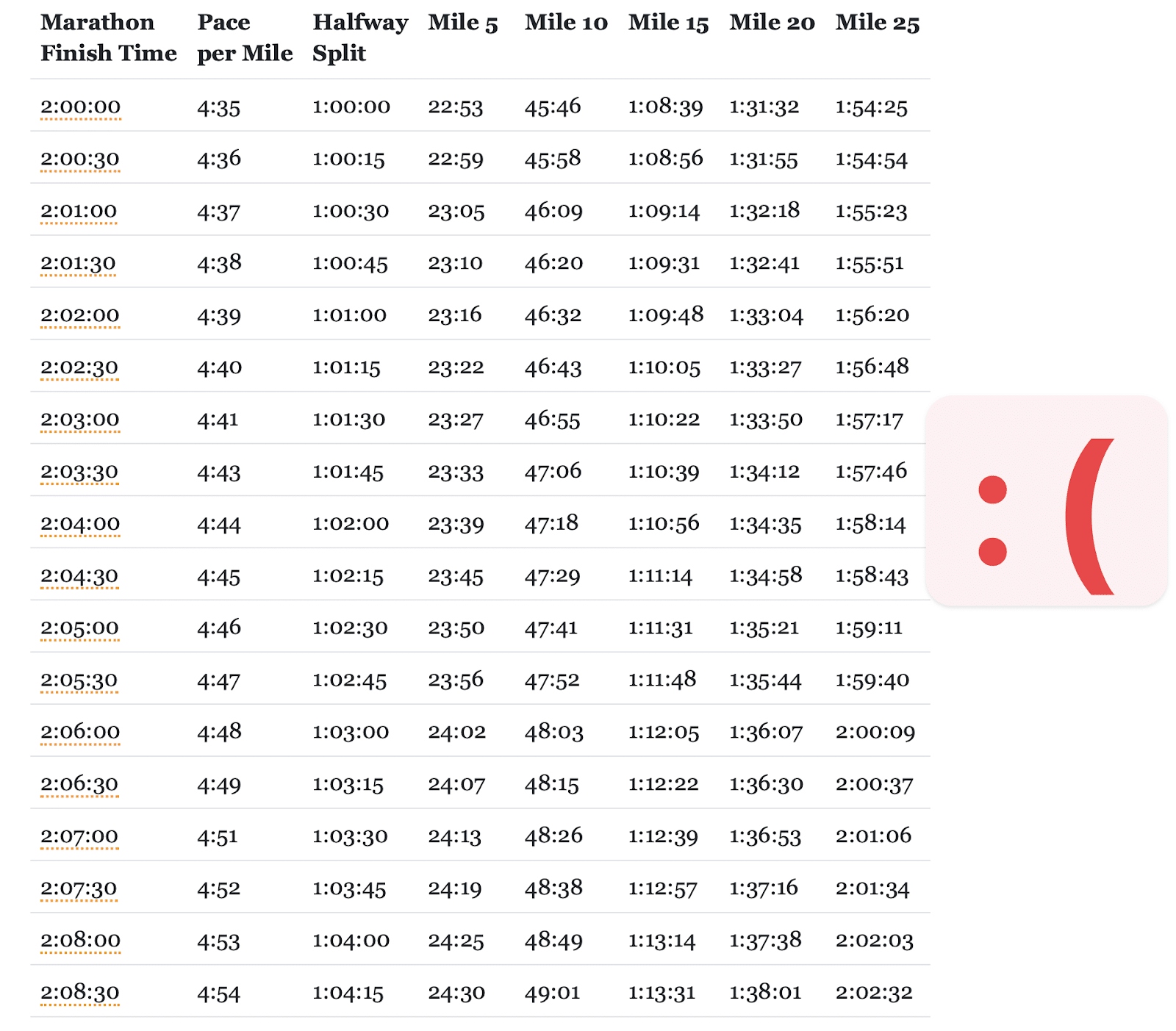
- Or, you could punch in two numbers and get an instant answer:
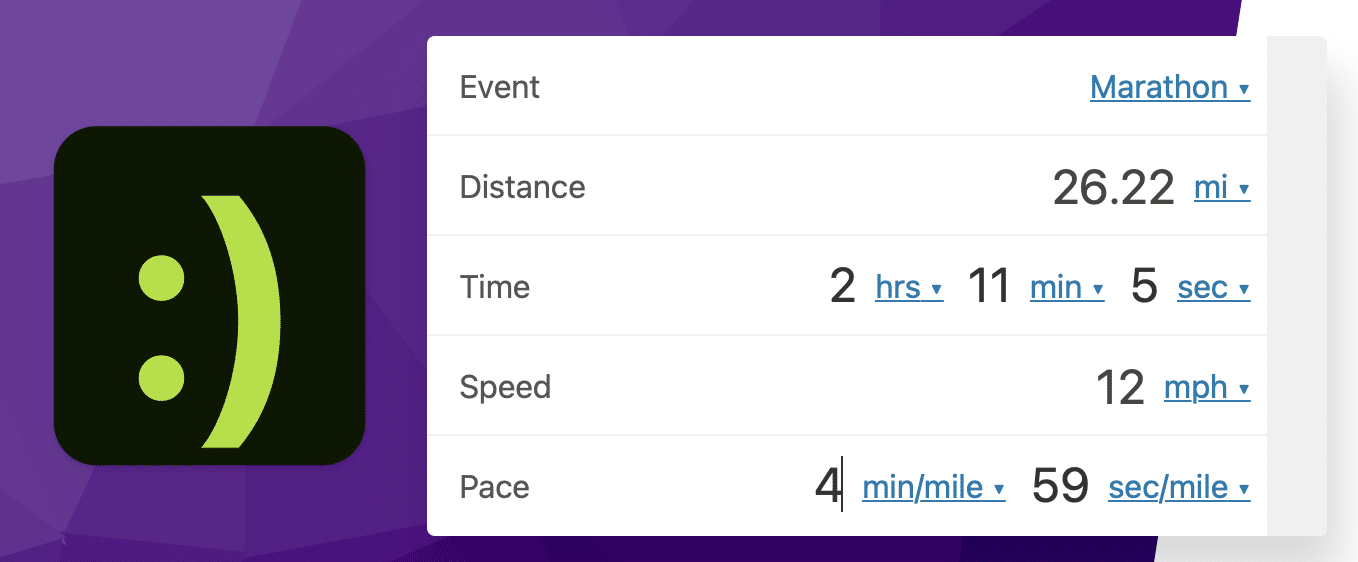
(Hmmm. That latter example even kinda sounds like what AI is doing, anyway?  )
)
Remember that “content” doesn’t always mean “text.”
Yes. You will often need text to start. A script is the nucleus of a video.
But the actual presentation, format, delivery, or interaction will continue to matter more and more over the next decade.
Double down on what AI can’t do
The cat is out of the bag.
AI will only continue getting better and better and better.
Pretty soon, we’ll have no choice but to build digital pyramids in the metaverse in its honor.
Thankfully, that day isn’t today. Or tomorrow. Probably not five years from now, either.
AI can do lots of things better than you and me. However, it’s embarrassingly bad at a slew of things.
Compete on those latter things. On the things that aren’t easily reproducible and aren’t likely to change anytime soon. Especially the human bits that are already hardwired into our internal hard drives.
Machines might be able to beat you at chess. But they won’t ever at intangibles like instincts or intuition.
Or any other “i” word to complete the cheap alliteration joke that confirms there’s a living, breathing human typing this after all.
The post AI can’t write this: 10 ways to AI-proof your content for years to come appeared first on Search Engine Land.
Courtesy of Search Engine Land: News & Info About SEO, PPC, SEM, Search Engines & Search Marketing
Category seo news | Tags:
Social Networks : Technorati, Stumble it!, Digg, de.licio.us, Yahoo, reddit, Blogmarks, Google, Magnolia.
A guide to keyword cannibalization in SEO and how to fix it
Written on February 27, 2023 at 7:37 am, by admin
Keyword cannibalization happens when you have two or more pages ranking for the same keyword. It is generally considered undesirable.
This article will help you decide whether you have a keyword cannibalization problem and, if so, how to solve it.
Is keyword cannibalization always problematic?
Before fixing keyword cannibalization, check whether it is a real problem for your site.
Sometimes, two pieces of content ranking can be favorable, especially with an indented SERPs.
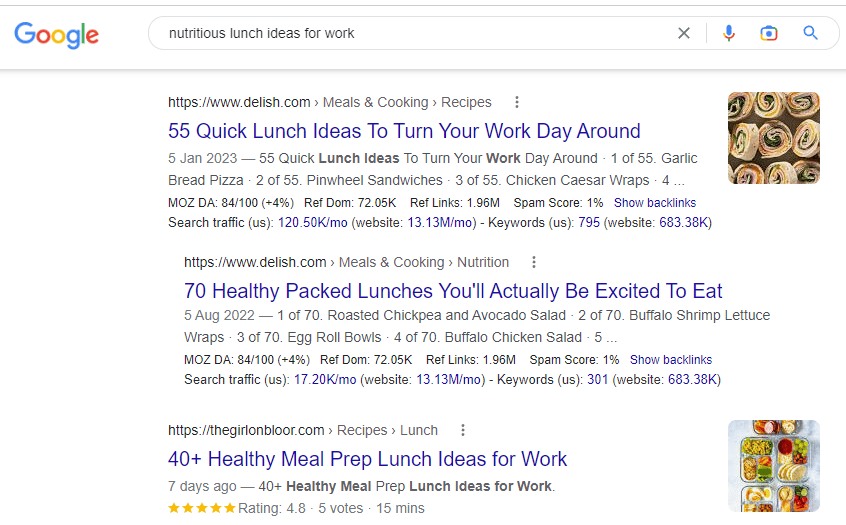
For Delish, these two pages ranking on page 1 are beneficial. In one search, they’ve got two pieces of content ranking. The indented SERP gives Delish more space in the page and increases their chances of a click.
A quick browse of these two pages will show similarities in ranking keywords. For example, according to Semrush, both pages rank for:
- “quick easy healthy lunch”
- “easy healthy lunch ideas”
- “easy healthy lunch”
- “easy and healthy lunch ideas”
You don’t have to take action on two pages ranking when there are indented SERPs. Leave them especially if you’re getting clicks and conversions.
Identifying keyword cannibalization that needs fixing
If you don’t have access to software to help spot cannibalization, you can find potential issues with Google site search.
Use the following when searching:
- site:example.com “keyword”
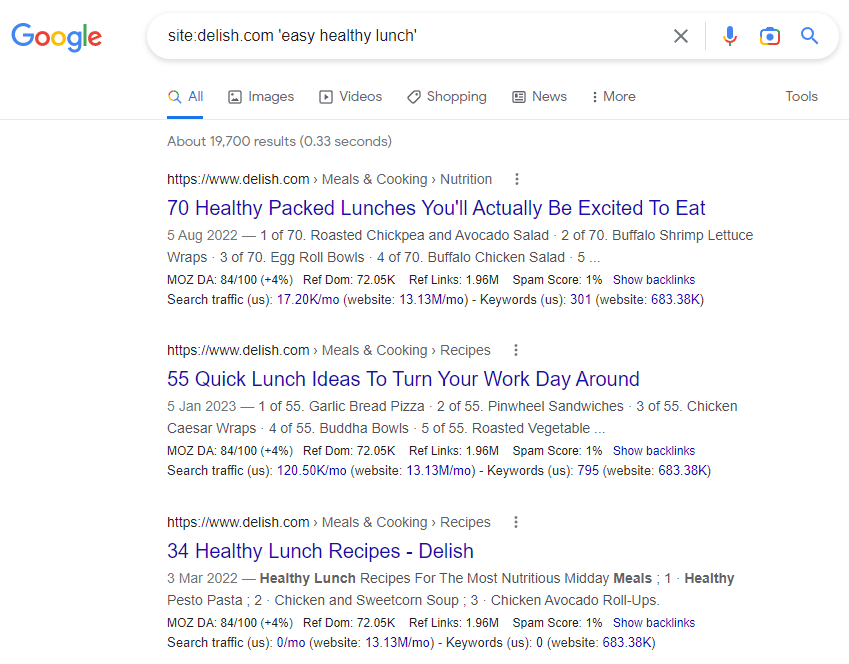
The screenshot above shows how Google has listed content on and around “healthy” and/or “lunch” published on the Delish website.
If you have similar results, look at the pages and investigate if they are problematic.
To identify problematic cannibalization problems, look for the following:
A sudden drop in clicks or impressions
This can happen when you publish a new piece of content and Google prioritizes the new piece over what was already ranking.
This can return to normal after a while, but if it doesn’t, look at the next section on fixing keyword cannibalization.
Struggling to rank despite your best efforts
Two pieces of content targeting the same SERP intent can be “confusing” to Google.
It indicates that your content strategy isn’t as robust as it should be.
Pages ranking for a keyword that isn’t supposed to
If you’ve worked on your content strategy, but the wrong page still ranks, then you’re almost definitely cannibalizing yourself.
In this situation, follow our tips on what to do when the wrong page ranks.
Get the daily newsletter search marketers rely on.
<input type=”hidden” name=”utmMedium” value=”“>
<input type=”hidden” name=”utmCampaign” value=”“>
<input type=”hidden” name=”utmSource” value=”“>
<input type=”hidden” name=”utmContent” value=”“>
<input type=”hidden” name=”pageLink” value=”“>
<input type=”hidden” name=”ipAddress” value=”“>
Processing…Please wait.
Fixing keyword cannibalization
How you fix keyword cannibalization will depend on the problem it’s causing and the solution most useful for your readers.
Here are some keyword cannibalization solutions to consider.
Internal linking
An internal linking strategy is a good first effort to resolve keyword cannibalization.
Here, you won’t be taking pages down or redirecting content – a fairly safe option if you feel nervous about the consequences.
How to fix keyword cannibalization with internal linking
Internal linking is a powerful tool for SEO. It’s useful for readers to find relevant sources and related content. It also gives Google a directive on what a page should rank for.
If you’re doing content the right way, you know what the two pieces of content should rank for.
So you can use an internal link from one piece to the other to reinforce where they sit in website architecture and what people might search to find the piece.
In this instance, opt for an exact match keyword or something close to it.
Review your internal links and identify links pointing to the two ranking pieces. You might be pointing to the pages with the same anchor text.
You can get a good idea of what anchor text you’re using to link to pages with Screaming Frog.
Open Screaming Frog, then click crawl your site. Filter by HTML, click the page you want to view, then hit inlinks.
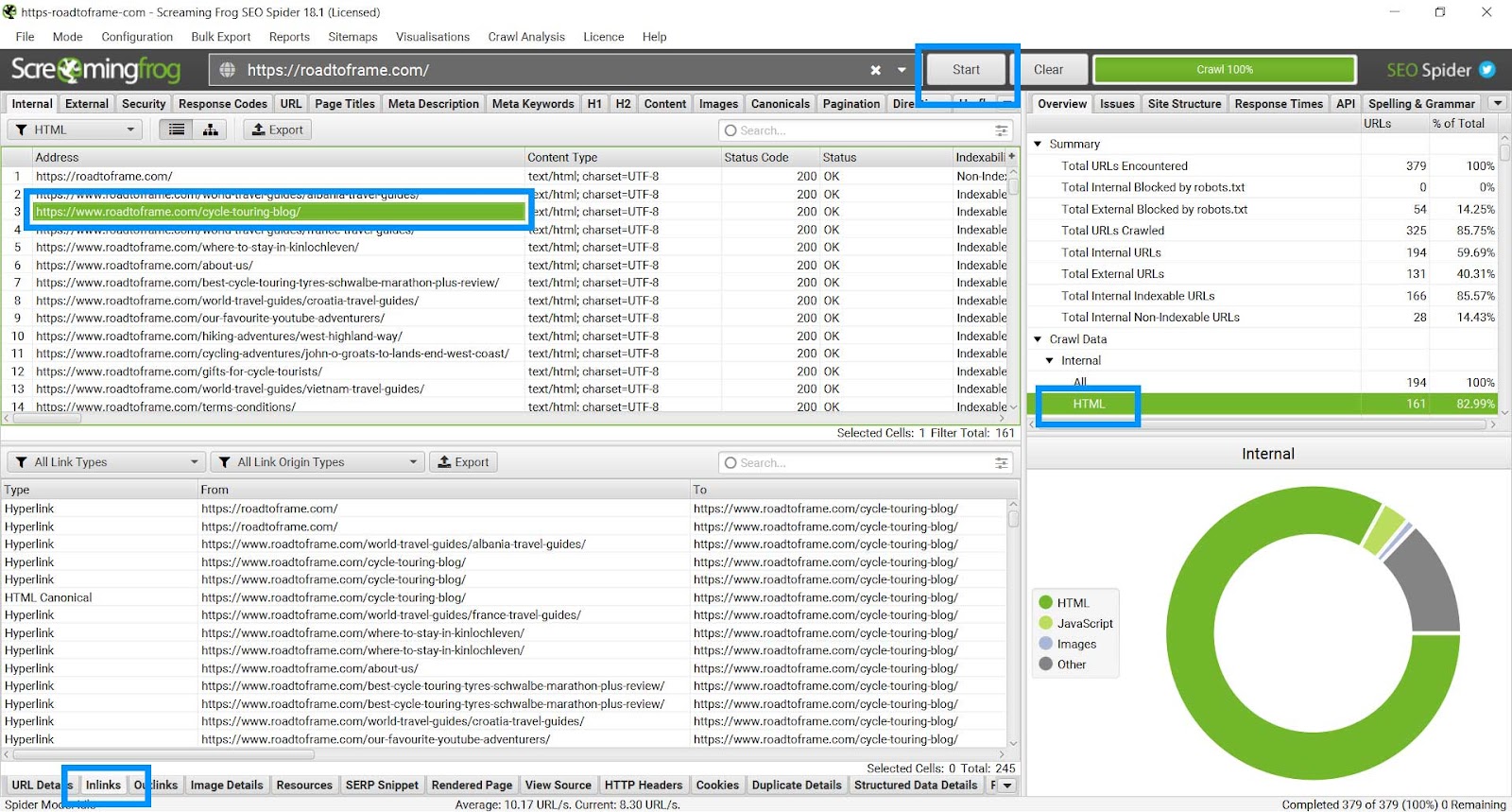
You’ll see which pages link to your page and with what anchor text. With a quick edit you can straighten out your internal linking strategy.
Pro tip: When building a content plan, prepare a content database (like a Google Sheet) where you can pick a keyword from the cluster to use in your anchor links. This process prevents writers from adding random internal links in their articles.
Refining keyword clusters and establishing clear search intent
Perhaps you’ve identified keyword cannibalization but want to keep the two pages. In this case, you might need to give each piece a defined purpose.
To do this, develop a keyword cluster and establish clear search intent. Each piece of content must do something unique.
Using the Delish example from above, we can see that although similar, the two articles have clear search intent.
- One article recommends lunch ideas for work.
- The other recommends packed lunches.
Taking a packed lunch to work is synonymous with a work lunch, but it isn’t just for work purposes.
Content consolidation and 301 redirects
It’s fairly intuitive when you need to do a content consolidation and a 301 redirect. Mostly, you can tell immediately if a page is targeting the exact same keyword.
Going back to the Delish example, although similar, the two pages on healthy lunches have two different intents. As mentioned, one article focuses more on lunches for work, and the other is about packed lunches.
Although nuanced, the two content pieces can co-exist assuming they’re not causing issues behind the scenes.
However, if the two articles were “55 Healthy Lunches” and “The Best Healthy Lunches,” there is an issue.
The target keyword is clearly similar – “healthy lunches” and “best healthy lunches.” Sounds like the same thing, right?
To confirm, a quick search of “healthy lunches” and “best healthy lunches” returns almost the exact same SERPs.
So, these articles would be consolidated, and one would be redirected to the other.
How to fix keyword cannibalization with content consolidation and a 301 redirect
Before consolidating two (or more) articles, do your due diligence. Use data to help you decide which URL you’re keeping and which one you’re redirecting.
- Consolidate the content in the two articles. When you do this, make sure you give it a thorough edit. You’ll do more bad than good if you end up with Frankenstein-esque content. To succeed with this tactic, your content must be high-quality and well-written.
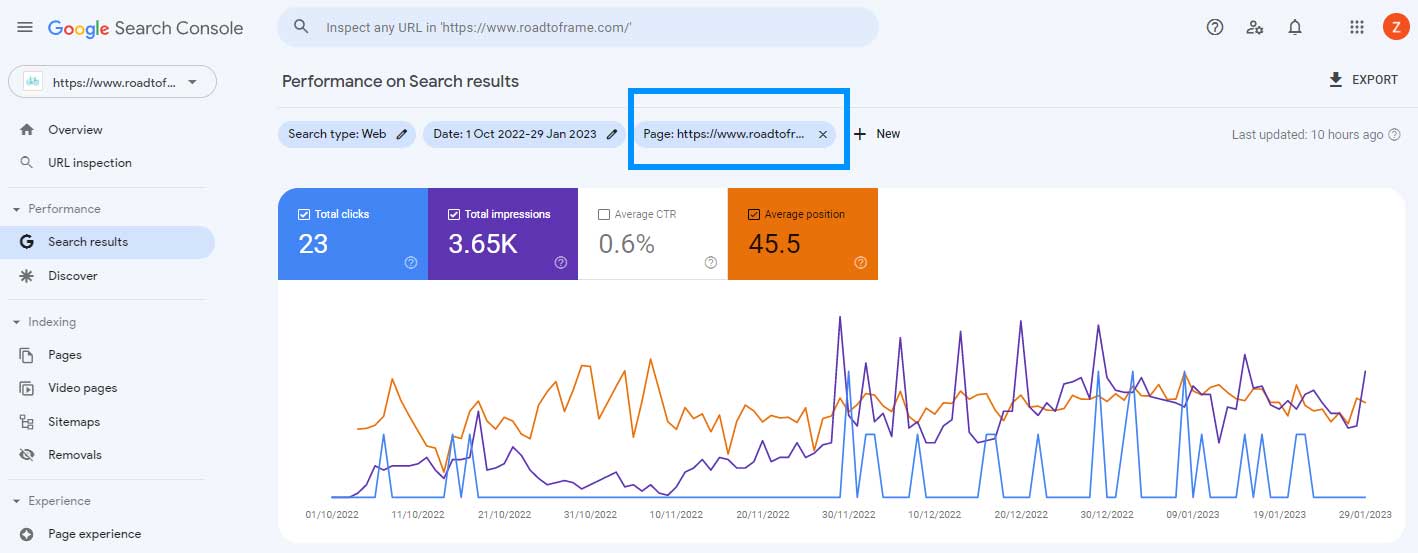
- Find the most successful URL by looking at Google Search Console data. Filter by page to see which URL receives the most clicks, impressions and average position. Generally, one will supersede the other a lot, so the choice will be obvious.
- If the winning URL doesn’t jump out at you by this point, check the backlink profile. Although you will redirect one link to the other and carry over those backlinks, keeping the content on the URL with the strongest backlink profile would be better.
Add a canonical
If the two pages need to exist but you don’t want Google indexing both, you could add a canonical.
This method is useful on ecommerce websites, particularly Shopify sites, where the same product exists on multiple URLs.
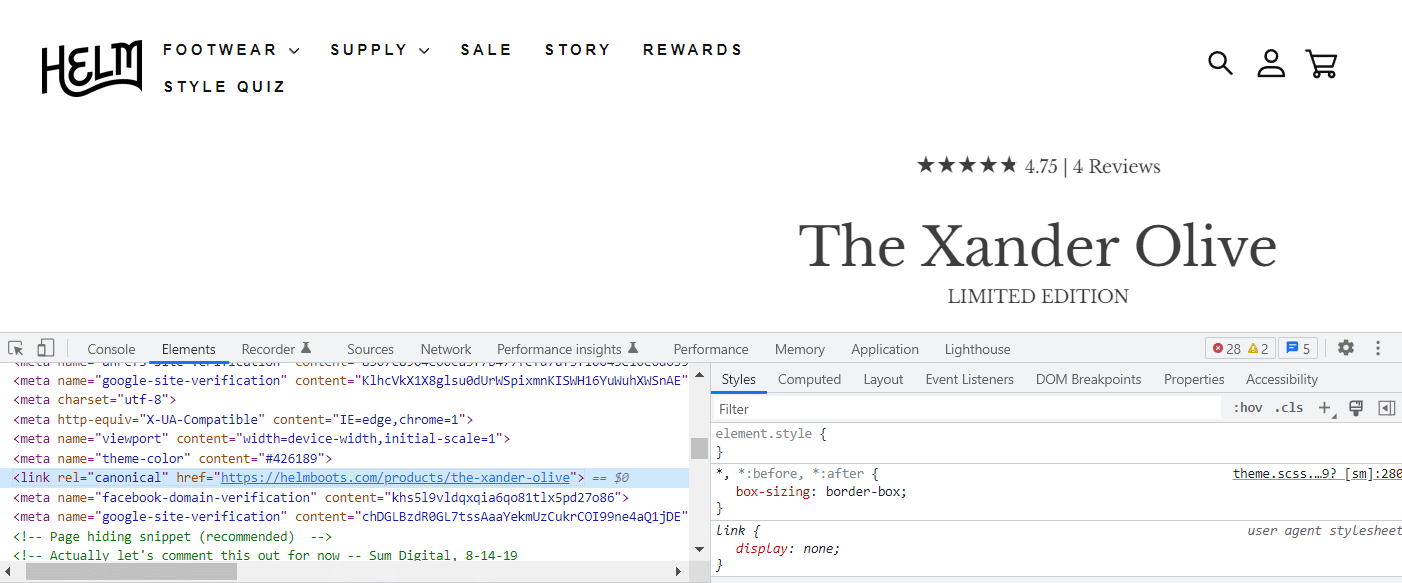
We can see the canonical in action on Helm’s Shopify website.
Their Xander Olive shoe exists on two URLs:
- https://helmboots.com/products/the-xander-olive
- https://helmboots.com/collections/the-xander/products/the-xander-olive
A search within the code of the /collections/ URL shows the canonical pointing to the product.
How to avoid cannibalization in the future
Cannibalization issues occur when there’s no clear plan for content production. Without a plan, well-intentioned writers can deliver similar pieces of content.
To avoid cannibalization, keep a content log and monitor the following:
- Focus keyword: Assign one to each piece of content.
- Keyword cluster: Detail all other keywords the piece should rank for.
- Content pillar/topic: This helps visualize all content under a certain topic.
The closer you are to your content and its purpose, the less likely you are to create cannibalizing content. It helps to have a strategic SEO professional to guide the process so they can correctly assign keywords.
If each piece of content fits within a specific pillar or topic, you can filter content by that topic and double check you’ve not already created content before you write it.
Or, you can use your content research process to identify content that could be edited instead of recreated. Sometimes, a good edit on an existing article can do wonders for your SEO.
The post A guide to keyword cannibalization in SEO and how to fix it appeared first on Search Engine Land.
Courtesy of Search Engine Land: News & Info About SEO, PPC, SEM, Search Engines & Search Marketing
Category seo news | Tags:
Social Networks : Technorati, Stumble it!, Digg, de.licio.us, Yahoo, reddit, Blogmarks, Google, Magnolia.
Why content strategy matters most
Written on February 27, 2023 at 7:37 am, by admin
Does your brand have a strategy behind its content marketing?
It should.
Planning is integral to achieving that ever-elusive return on investment (ROI).
Even if you’re not a natural planner, you’ll probably agree that most tasks are easier to achieve if you plan first.
For instance, planning your meals for the week vs. winging it. Going grocery shopping with a planned list vs. nothing. Planning a trip vs. stepping off the plane with no idea what you’ll do or where you’ll go.
Some people get excitement from living life in the unknown. But, for most of us, whether we want to save money, eat healthier, or get a seat at that hip restaurant on vacation, planning is essential.
The same is true of content marketing.
Without a strategy, your content marketing efforts are far more likely to go nowhere and do nothing.
I’d argue that profitable content marketing is impossible without a solid content strategy.
To answer the inevitable “why?”, let’s discuss why content strategy matters most.
But first, what is a content strategy?
What is a content strategy?
A content strategy is a plan that lays out how you will ideate, create, publish, promote, and manage content.
A content strategy helps define your brand’s goals, workflows, guidelines, budget, team structure, and content rules. It definitively answers these questions:
- Why are we creating content? (What goals are we trying to reach?)
- Who are we creating content for? (Who is our target audience?)
- How will we create content? (Will we use in-house talent? Hire writers/graphic designers/videographers?)
- What content will we create? (What topics and formats will we focus on?)
- Where/when will we publish content? (On our website? On social media?)
- How will our audience find our content? (How does SEO tie in?)
- Who is in charge of managing, publishing, and promoting our content? (What does our content team look like, and who fills what role?)
All of these questions are vital to answer if you create content. And if you formulate a content strategy, all of them will be addressed before you publish a single article. That’s key.
Why a content strategy is your map to profitable content
If you’ve been paying attention, content strategy is a huge deal.
Why?
Because smart content marketing gets incredible results, and those results will cost 62% less to achieve than traditional or paid advertising.
But to get those results, you need a strategy, because a strategy is a map that will lead you to profitable content that earns ROI. Here’s why.
1. Businesses with successful content have a content strategy
97% of businesses reported using content marketing as part of their overarching marketing strategy, according to a Semrush survey. However, only 57% reported having a documented strategy, and a mere 19% said their strategy was advanced.
The clincher? 78% of businesses who said their content marketing was “very successful” also had a documented content strategy.
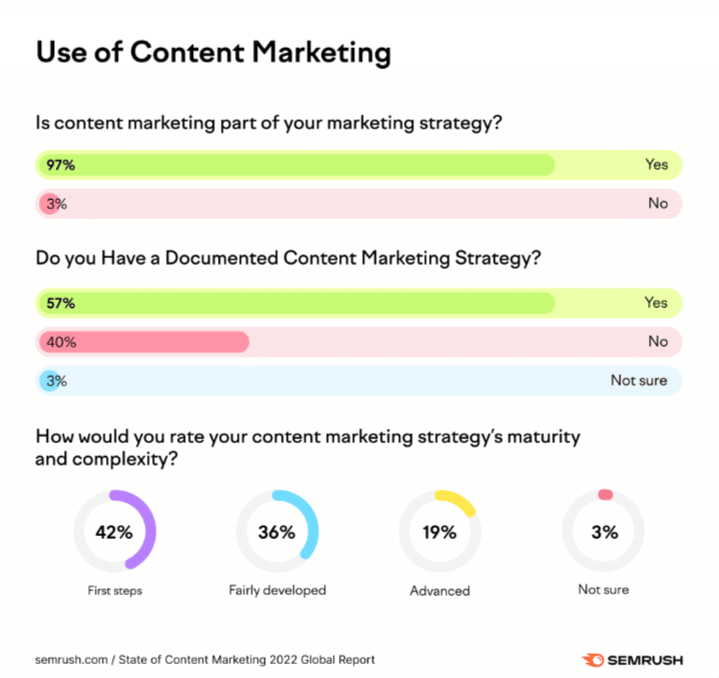
What does it all mean?
Most businesses use content marketing, but many aren’t realizing its full potential.
To do that, you need a content strategy. And, you need it documented.
It matters because, without a documented plan, your content efforts will be scattershot. And scattershot efforts lead to scattershot, unpredictable results.
That is, if you earn results at all.
2. No content strategy? No results
Here’s what doing content marketing without a strategy looks like:
A small brand decides to start a blog. One or two staff members who also happen to be creative are tasked with managing it.
They’re not sure where to find topics, so they look at what their competition is doing and follow suit. They post whenever they have time, so publishing is sporadic and scattered. They post about the topics their main competitor posts about with little differentiation. And when the brand gets busy, the blog falls silent for months.
A year later, the brand checks in with the blog results – and finds none. They conclude blogging is a waste of time.
Yes – in this instance, it is. But that’s because the brand in question started wrong from the get-go. They treated content marketing as an accessory that could be done in spare minutes of the day without much effort.
The truth is, if you want content marketing to work, you have to regard it as another vital business activity – and a content strategy helps you get there.
You need to plan how, when and why to do it, and who you’ll do it for. You need to strategize so your brand can post consistently and regularly (because consistency leads to better results) – and that will require more than somebody’s spare time.
Reality check: It will require dedicated effort from someone whose 9-5 work consists of content creation and nothing else.
How will you direct that person? How will you allocate the resources to employ or pay that person? How do you ensure the created content will earn results? You have to plan. You need a content strategy.
3. A content strategy aligns your people, processes, and technology
If you want results from content, you must ensure your entire brand and team are on the same page, working under the same expectations and toward the same goals.
A documented content strategy aligns all those things like puzzle pieces snapping together to form a complete picture.
Think of building a content strategy as laying out your battle plan for increasing brand awareness, drawing in more website traffic, nurturing your audience, increasing conversions and sales, or whatever goal you decide is most important.
Achieving these goals will require many moving parts, different people, and plenty of tools (like a publishing platform, SEO tools, a content calendar, social media scheduling tools, editing tools and content checkers, collaboration tools, and more).
But the strategy accounts for all these pieces and explains how they fit together.
That’s why you and your team should make decisions about and record the who, what, where, when, and why so your content has its best chance of succeeding.
Get the daily newsletter search marketers rely on.
<input type=”hidden” name=”utmMedium” value=”“>
<input type=”hidden” name=”utmCampaign” value=”“>
<input type=”hidden” name=”utmSource” value=”“>
<input type=”hidden” name=”utmContent” value=”“>
<input type=”hidden” name=”pageLink” value=”“>
<input type=”hidden” name=”ipAddress” value=”“>
Processing…Please wait.
4. A content strategy helps you win buy-in
As we’ve explained, you need investment to ensure content marketing can work. You don’t just need people who will plan, create, manage, promote, and distribute content. You need people who know what they’re doing. And you need tools your people can use to facilitate all of those stages.
But what if the marketing budget isn’t up to you? Then you need buy-in from higher-ups.
How do you get content marketing buy-in? By laying out a strategy with goals, a trajectory, metrics to track, and a budget.
The strategy serves as proof that you know what you’re doing. Even further, it serves as a detailed guide for other people on how you plan to execute content successfully.
That makes it a powerful document to have on your side when you’re working to earn buy-in from bosses, department heads, clients, executives, and anyone else who holds power to invest.
5. A content strategy gives you a competitive edge
Only 40% of marketers say they have a documented content strategy, according to a recent Content Marketing Institute survey.
This statistic hasn’t budged in the last few years.
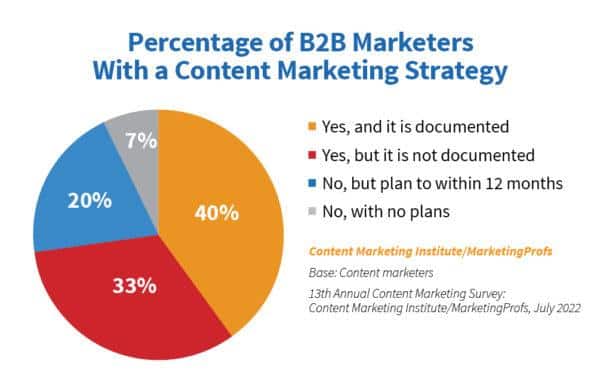
But, year after year, marketers with a documented strategy outperform their peers who don’t have one.
For that reason, they have a competitive edge. You need a documented strategy guiding everything you do in your content marketing to earn that edge over the competition.
The power of a content strategy lies in the finished document and the physical act of creating it.
When brands sit down to figure out this content thing, they crystallize key areas vital to success:
- Clarifying and refining their content goals.
- Getting to the heart of who they need to target with content.
- Envisioning what that content should look like.
- Strategizing how to execute with a clear set of actions like a blueprint.
With all this in mind, we shouldn’t be surprised that marketers who strategize content and write down that strategy are regular top performers.
Bottom line: If you want that competitive edge, you’ll join that club.
Your content marketing is more likely to fail without a content strategy
A content strategy at the heart of your content marketing will determine whether your efforts will fly – or fall flat.
Unfortunately, most brands are approaching content marketing with a laissez-faire approach. They might even be getting “okay” results.
But the thing is, “okay” should not be the standard.
That’s because content can achieve great heights for any brand, regardless of industry or size.
Think of that: Content has immense power to grow your brand.
But to tap into that power, you must have a content strategy.
The post Why content strategy matters most appeared first on Search Engine Land.
Courtesy of Search Engine Land: News & Info About SEO, PPC, SEM, Search Engines & Search Marketing
Category seo news | Tags:
Social Networks : Technorati, Stumble it!, Digg, de.licio.us, Yahoo, reddit, Blogmarks, Google, Magnolia.
Bing AI Chat testing setting the tone of the responses
Written on February 27, 2023 at 7:37 am, by admin
Microsoft is testing a new setting for “tone” in the new Bing AI search and chat experience. You can set the tone to be creative, balanced, or precise to tailor the type of responses you get from the Bing AI chat.
What it looks like. Here is a screenshot posted by Mike Davidson, Corporate Vice President, Design & Research at Microsoft, on Twitter:
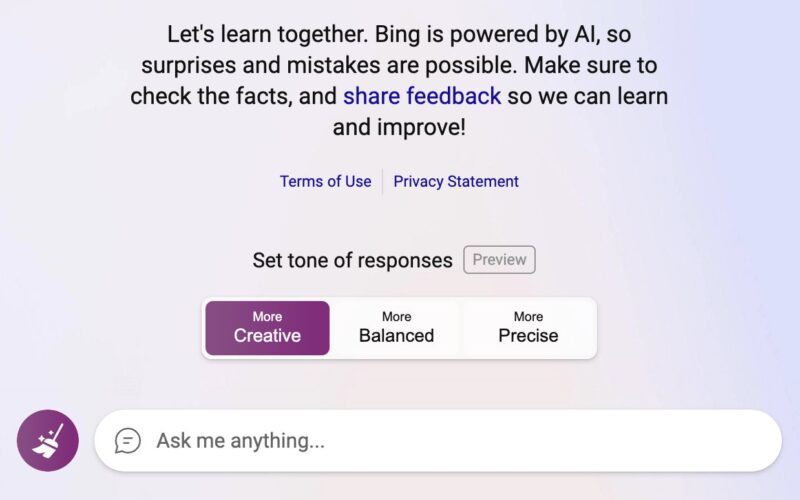
What it does. Mike Davidson said, “some users will see the ability to choose a style that is more Precise, Balanced, or Creative.” I personally do not see this feature yet, so I cannot really test it out, but Microsoft is testing it to a subset of those invited to test the Bing Chat AI feature.
By the description, either Bing will respond with a more precise, maybe factually accurate response or a balanced response that shows multiple sides of the argument, or creative, maybe a response that is a bit more out there.
More changes to Bing AI chat. In addition to the above experiment of setting a tone, I noticed other updates to Bing AI chat this weekend.
- New daily limit of 100 queries per day
- Search queries are not included in the limit
- The Edge sidebar limits are a fixed number
- A new tagging system to help Bing disambiguate parts of the query
- Tone of voice changes
- Relaxing some constraints
- And inviting more users to test the new Bing AI chat
Why we care. It is fascinating to follow all these rapid changes from Microsoft on its new Bing AI Chat. Keeping an eye on what Microsoft is doing to improve the quality of the results, how it responds to criticism, and more is something that is not just fun and exciting to stay on top of, but may teach us about how we can leverage these features to garner more traffic to our sites.
The post Bing AI Chat testing setting the tone of the responses appeared first on Search Engine Land.
Courtesy of Search Engine Land: News & Info About SEO, PPC, SEM, Search Engines & Search Marketing
Category seo news | Tags:
Social Networks : Technorati, Stumble it!, Digg, de.licio.us, Yahoo, reddit, Blogmarks, Google, Magnolia.
This day in search marketing history: February 26
Written on February 26, 2023 at 3:34 am, by admin
Google expands mobile-friendliness as a ranking signal
In 2015, Google announced it would expand its use of mobile-friendliness as a ranking signal, beginning April 21.
This algorithmic change would have a “significant impact” in the mobile search results, impacting all languages worldwide, Google said.
However, when April came, the general consensus was that Mobilegeddon was fairly insignificant, for all the hype and panic their Feb. 26 announcement created.
Google also announced that apps indexed by Google through App Indexing would begin to rank better in mobile search. Google said this only will work for signed-in users who had the app installed on their mobile device.
Read all about it in Mobilegeddon Cometh: New Google “Mobile Friendly Update” To Reward Sites Beginning April 21.
Also on this day
How to identify your products for Google
2021: Google published a list of best practices to help ensure that its search engine understood the products that were being referenced.
Google mobile-first indexing to be applied to all sites within a year
2020: Google was sending notices to sites that had mobile-first indexing issues.
Create display network exclusion lists with this (free) tool
2020: A tool for those tired of manually weeding through placement reports to exclude inappropriate websites and apps from display campaigns.
Google Search Console now lets you export more data
2020: Search Console users could download complete information (instead of just specific table views) from almost all reports.
Google search view in 3D now live for e-commerce sites
2020: A Burberry bag was showing up with a “view in 3D” option in the Google search results.
Google to kill off property sets within Search Console
2019: Google said you could download the data from the interface or the API before they turned it off completely.
Google Ads to sunset average position reporting metric later this year
2019: Average position was one of the few constants for more than 15 years. But with the removal of right rail ads, in particular, its utility sharply declined.
Google call-only ads getting ‘expanded’ with more characters
2019: The other change was that name of the business would move to the description line.
Google releases Mobile Scorecard & Impact Calculator tools to illustrate importance of mobile page speed
2018: One tool showed how a site stacks up against the competition on mobile. The other aimed to drive home the impact mobile speed can have on the bottom line.
Google confirms bug with crawl stats in ‘time spent downloading a page’ Search Console report
2018: Google’s John Mueller confirmed a reporting glitch with the crawl stats “time spent downloading a page” report in the Google Search Console for on Feb. 20 and 21.
In response to EU antitrust ruling, Google Shopping now shows ads from competing shopping engines
2018: In a new structure, the Google Shopping business unit bid against other Comparison Shopping Engines in the ad auction to give the competing engines “equal treatment” as mandated in the ruling.
Google Word Coach, a fun word game in the search results
2018: Google added a new feature to help non-English speakers expand their English-language vocabulary.
Google: AMP Not Yet A Search Ranking Signal
2016: Google’s John Mueller said you could use AMP to become mobile-friendly, but AMP itself was not a ranking signal.
Google Confirms Review Stars’ Mysterious Disappearance In Search Results Was A Bug
2016: Google review snippets returned after a bug caused them to drop out of much of the search results for about a week.
AdWords And Bing Ads Both Having Late-Week Reporting Troubles
2016: Google AdWords reports weren’t downloading or printing. Bing Ads had reporting delays that affected the Web UI, mobile and API.
Google App Updates Will Include New Animations & Ability To Change Google Logo Colors
2016: Users would be able to change the color of the Google logo using a “finger painting-like” feature.
Search In Pics: Coca Cola Google Cardboard, Googley Volvo & Animated Google Sign
2016: The latest images showing what people eat at the search engine companies, how they play, who they meet, where they speak, what toys they have and more.
Google’s Matt Cutts: While Scientific Content Is Great, Clarity & Focusing On The Searcher Is Important
2014: Cutts answers the question: “Should I focus on clarity or jargon when writing content?”
Movie Sites Ranking Better In Google, Now That “Transient Issue” Fixed
2014: Rankings were restored and most traffic was returning to the affected websites.
Hiding From That Google Penalty? It May Find You At Your New Home
2014: Even if you moved your penalized site to a new domain name and didn’t redirect the penalized site, Google might still find it and pass along the bad signals.
AdWords Flexible Conversion Counting Officially Launched, Welcome “Converted Clicks” and “Conversions”
2014: The company officially announced the launch of Flexible Conversion Counting, and advertisers would see new columns in AdWords.
Google Shares Performance Stats On Search Network With Display Select Campaigns
2014: Google released some case study performance results on the new campaign type.
FOX Partners With Google To Allow Voting For American Idol On Google’s Search Results
2014: All you had to do was go to Google, search for [american idol] or [idol] during the voting window, and select from your favorite finalists.
Google Brings Back Right-Click-For-Directions To Google Maps
2014: Users could also use the “What’s Here” option to quickly get lat-long coordinates for any spot on the map.
Baidu Posts 50 Pct. Revenue Growth But Shy Of Investor Hopes
2014: The company announced $1.573 billion in Q4 revenue, a 50.3% increase over 2013.
Welcome Martin Beck, Who Joins Third Door Media From The Los Angeles Times
2014: Beck was Third Door Media’s Social Media Reporter from March 2014 through December 2015.
Google Panda Two Years Later: 5 Questions With HubPages CEO Paul Edmondson
2013: Edmonson confirmed that Panda “caused a massive loss of traffic and revenue.” But HubPages wasn’t planning to change course; the planned was to improve quality.
The Hidden Google Search Box
2013: It seemed as if Google was testing hiding the search box completely from the Google search results page.
Number Crunchers: Who Lost In Google’s Panda Algorithm Change?
2011: The biggest “content farm” type brand that seemed to have suffered was Associated Content.
Yes, More Are Seeing A New Google Look-And-Feel
2010: Testing would continue until May, when it launched the new user interface.
Google Adds “Nearby” Local Search To Options Panel
2010: Google expanded the choices in its Search Options panel with the announcement of a tool to refine searches by location.
Google’s Street View Finds More Trouble In Europe
2010: Members of the European Union’s data protection group urged Google to make changes to its Street View mapping/photo service and warned that Google might be breaking EU laws.
Google News Officially Adds Advertisements
2009: After testing ads for the past few months, Google News officially rolled out ads on Google News search results to all US based searchers.
Google Gets On Twitter
2009: The first tweet was in binary and translated into “Feeling Lucky.”
Google Maps Adds User Photos To Street View
2009: Google added geo-tagged Panoramio photos to StreetView images.
Report: Lack Of Buying Searchers Leading To Depressing Search Ad Market
2009: Rimm-Kaufman shared early first quarter PPC data showing the weak trends in retail for search advertisers.
Yahoo Search Updating: Weather Reports Go Away?
2009: Yahoo eventually did issue a weather report confirming that there are ongoing updates that would be “completed very soon.”
Yahoo Adds Facebook As A SearchMonkey Friend
2009: Yahoo announced that Facebook enhanced results were now turned on by default across search results.
Yahoo CEO Bartz: New Management To Make Yahoo “A Lot Faster On Its Feet”
2009: “For us working at Yahoo!, it means everything gets simpler. We’ll be able to make speedier decisions, the notorious silos are gone, and we have a renewed focus on the customer.”
Google AdWords Launches Limited Beta Test Named “Automatic Matching”
2008: Automatic Matching was a way for Google to help advertisers utilize their full budget towards keywords that they may have not been targeting.
Google Updates AdSense Terms & Conditions
2008: Google updated their AdSense terms and conditions to include better verbiage for new products and features, as well as an update to their privacy requirements.
Despite Takeover Turmoil, Yahoo Not Rolling Over & Playing Dead
2008: Yahoo CEO Jerry Yang said the Microsoft takeover bid had been “a galvanizing event for everyone at Yahoo.”
Minimum Bids In Yahoo About To Change
2008: Minimum bids could be lower or higher than $0.10.
Yahoo To Announce “Search Monkey” Enhanced, Annotated Results At SMX West
2008: Yahoo planned to unveil a project code-named “Search Monkey,” a set of open-source tools that allow users and publishers to annotate and enhance search results associated with specific websites.
Yahoo Buzz Launches: Votes, Searches, & Emails Used To Rank News
2008: Yahoo Buzz was a site where “buzz-worthy” news articles were highlighted based on user votes,
searching activity, and email sharing.
Google Talk / Gmail Adds Live Chat & Invisible Mode Features
2008: The first feature was similar to a live chat box that you could add to any webpage and chat with anyone via your Google Talk or Gmail account.
Google Joins “Unity” Undersea Cable Consortium For More Transpacific Bandwidth
2008: Google joined a consortium of Asian companies to build an undersea transpacific fiber optic cable that would provide much greater bandwidth capacity between the United States and Japan.
Google AdWords To Show Advertisers Exactly Where Their Contextual Ads Are Displayed
2007: Google’s advertiser reports would begin listing the sites where each ad runs.
Google Steps Up Web Page Malware Notifications
2007: Google was giving more detailed reports on the malware issues with a specific site and they were also sending email notifications to webmasters about these malware warnings.
Google Video Plus Box Results
2007: Spotted in the wild.
Google Checkout Australia Coming Soon?
2007: It appeared that Google registered Google Payment Australia PTY. LTD. in Australia.
Google Ordered To Change AdSense Contract By South Korea’s Watchdog
2007: The Fair Trade Commission said the contract enabled Google to “one-sidedly cancel advertisement deals” with publishers.
Microsoft To Buy Health Search Engine Medstory Inc.
2007: Microsoft plans on building out a specialized search engine focused on delivering medical information to consumers.
Video Search Challenge Isn’t Speech Recognition, It’s Content Owner Management
2007: The real challenge was figuring out how to work with content owners, not speech recognition.
Pew Research: Wireless Internet Grows
2007: Pew asserted that roughly 13.5% of U.S. Internet users were accessing the Internet over mobile phones (or their equivalents).
From Search Marketing Expo (SMX)
- Know your site. That’s how you stay ahead of algorithm updates (SMX West 2020)
- Tips For Optimizing Your Local Business Listings, Courtesy of SMX West (SMX West 2009)
- SMX West 2008 Day One Coverage
Past contributions from Search Engine Land’s Subject Matter Experts (SMEs)
These columns are a snapshot in time and have not been updated since publishing, unless noted. Opinions expressed in these articles are those of the author and not necessarily Search Engine Land.
- 2019: Stop the silo madness! Effective site architecture for SEO and findability by Shari Thurow
- 2019: Maximize Facebook performance by leveraging the algorithm by Amanda Farley
- 2019: Google’s next chapter for metrics to focus on clarity once ‘average position’ is removed by Frederick Vallaeys
- 2018: 6 smart e-commerce lessons to boost local business by Wesley Young
- 2016: Connecting Demographics To Search Queries by Andrew Ruegger
- 2016: Prioritizing Local Search Profile Listings: 2 Methods by Lydia Jorden
- 2015: The Importance Of Search Data In Your Marketing by Alistair Dent
- 2015: The Hardest AdWords Quiz You’ll Ever Take by Larry Kim
- 2014: 6 Tasks To Automate In AdWords Without Scripts Or Tools by Sam Owen
- 2013: 3 Major Tablet & Smartphone Search Opportunities For Multinational Websites by Chris Liversidge
- 2013: The Link Shrink Is In: Is Starting Over The Best Option? by Eric Ward
- 2010: It’s A Fatal Mistake To Copy Successful Web Sites by Kim Krause Berg
- 2010: Click to Conversion Time & Your Revenue Attribution Window by Siddharth Shah
- 2009: Should YouTube Sponsored Video Ads Be In Your Marketing Mix? by Eric Papczun
- 2009: SEO 3.0 = Digital Asset Optimization by Jonathan Ashton
- 2008: How Depending on Quality Content Can Actually Cost You Links by Rae Hoffman
- 2007: 3 Jump-Start Methods For Passionate Linking by Debra Mastaler
< February 25 | Search Marketing History | February 27 >
The post This day in search marketing history: February 26 appeared first on Search Engine Land.
Courtesy of Search Engine Land: News & Info About SEO, PPC, SEM, Search Engines & Search Marketing
Category seo news | Tags:
Social Networks : Technorati, Stumble it!, Digg, de.licio.us, Yahoo, reddit, Blogmarks, Google, Magnolia.
This day in search marketing history: February 25
Written on February 24, 2023 at 11:34 pm, by admin
SEOs upset over Google dropping attribution in featured snippets
In 2019, SEOs were not happy about a Google featured snippet format that didn’t immediately show the source of the content.
For the Found on the web card, searchers had to click to expand the featured snippet and then scroll through various sources to see the publisher.
Danny Sullivan, Google’s Search Liaison said Google’s support of the overall ecosystem (searchers, advertisers and publishers) is important. “We don’t thrive & users don’t thrive unless the ecosystem thrives.”
This is an incredible search result from Google:
• Answers a fairly complex question
• Takes the copy of many 3rd party publisher to create its own independent web page
• Zero visible on-page links to the publishers who provided the dataThis is the future of Google Search pic.twitter.com/txNU2Z7HB5
— Cyrus (@CyrusShepard) February 23, 2019
The future of Google search, indeed! Amazingly, you could write a very similar tweet in 2023.
Google’s recent preview of its generative AI search results featured answers to complex questions that were made possible after being trained on content created by third-party publishers, with a grand total of zero links to publishers. Déjà vu!
Read all about it in Controversy over Google Featured Snippets stealing publisher traffic reignites.
Also on this day
IndexNow integrations grow as Bing says ‘millions’ of sites are using it
2022: Duda, All in One WordPress SEO plugin and Rank Math SEO plugin gained IndexNow support.
LinkedIn launches podcast network aimed at professional audiences
2022: The pilot program included shows about topics such as technology, recruiting and mental health, from external experts as well as its own in-house news team.
Google Images to replace dimensions overlay on image thumbnails
2020: Google would instead show product, recipe, video, and soon, licensable labels in place of that dimensions information.
How to use the AMP status report to identify page errors, validate fixes
2020: Google posted an explainer for its AMP (accelerated mobile pages) status report.
‘Made in USA’ ad extensions spotted on Bing
2020: A “Made in USA” label accompanied by a flag icon appeared to be the latest automated ad extension test by Microsoft Advertising.
Google revamps Test My Site mobile site speed tool
2019: Test My Site (which launched in 2016) was rebuilt with more features details on a site’s mobile site speed.
Nearly half of users have a bad reaction to ‘not secure’ browser warning, survey finds
2019: Survey found the flag affected user behavior and brand perceptions.
Google Assistant everywhere: more dedicated buttons, expansion on lower-end phones
2019: The company also was adding local search suggestions in Messages.
Google Explains How Search Console Reports Work
2016: Google Webmaster Trends Analyst John Mueller explained how the Search Console reporting works and why it may seem delayed for some of the reports.
Google Testing A Red “Slow” Label In The Search Results For Slower Sites
2015: The slow label would indicate if a particular webpage was slow and warn the user before clicking over to the site that it may load slowly.
Yes, Google Is Testing Green Star Reviews In The Search Results
2015: Google said expect more experiments with the colors of the stars in the search results over the next few months.
Study: Google Now Displays Rich Answers For 19.45% Of Queries
2015: 19.45% of the 850,000 search queries looked at in the study triggered rich answers.
Yahoo Gains Share And Query Volume In Latest comScore Search Report
2015: Firefox deal powered the second straight month of growth for Yahoo search.
Ray Kurzweil’s Job At Google: Beat IBM’s Watson At Natural Language Search
2014: His sole job at Google was to make the company’s computers as smart as humans – smarter, actually – when it came to natural language understanding.
The Marquee HTML Google Easter Egg
2014: When you searched for [marquee html], the results count would scroll from right to left on the page.
Bing Improves Tax Related Search Results Before April 15th
2014: Bing showed smarter results when you searched for [tax forms], [IRS forms], or even specific forms like [irs form 1040].
Quixey Offering Deeper Search Results Inside Mobile Apps
2014: Quixey, which described itself as a search engine for apps rather than an alternative app store, announced deeper “functional search” within apps.
Google Panda Two Years Later: The Real Impact Beyond Rankings & SEO Visibility
2013: A look at what happened to some Panda’s losers.
Google: PageRank Dilution Through A 301 Redirect Is A Myth
2013: There was no more dilution of PageRank with a 301 redirect when compared to using a normal link.
Europeans Taking Sweet Time In Resolving Antitrust Case With Google
2013: Any possibility of swift action in Europe appeared to be fading.
YP: Our Mobile Ad Network Second Only To Google
2013: YP said it had “over $350 million in advertising revenue [in 2012] attributable to mobile, making it the number two company in the US mobile advertising industry.”
WSJ Pulls Back On What Google Searchers Can Read For Free
2012: The Wall Street Journal has been keeping some stories out of First Click Free for over half-a-year.
Demand: Google Changes Have Produced “No Material Impact” Yet
2011: Demand Media said its properties were not negatively impacted by the newest Google algorithm change (which would eventually become known as the Panda Update).
Google’s Mobile Search Adds “Open Now” Filter
2011: After doing a Google search, the “Show only businesses open now” filter appeared above the search results.
Report: Google Negotiating With DOJ To Prevent Suit To Block ITA Deal
2011: Negotiations intensified in the waning days of the Justice Department’s investigation into the antitrust implications of Google’s potential acquisition of travel software company ITA.
OneRiot Brings Social Targeting to Mobile Devices
2011: Social ad network OneRiot introded the ability to target mobile audiences by interests, demographics and influence on its ad network of Twitter clients.
Google Caffeine May Be Months Away & You Can’t See It
2010: Google said Caffeine wasn’t live on Google.com, was only at one data center and you couldn’t easily see it for yourself.
Google Advertises Chrome … On Bing!
2010: Google confirmed that they placed these ads and that they were always looking for ways to promote their products.
Companies Ask Courts, Regulators To Restrain Google To Compensate For Own Competitive Failures
2010: A Foundem complaint/brief with the FCC argued that Google favored its own products and thus “search neutrality” was required to prevent Google from harming competitors.
Losing Google? Chinese Scientists Say It’s Like Going Blind, Life Without Electricity
2010: 84% of Chinese scientists surveyed said that losing Google would “somewhat or significantly” hamper their research; 78% said that international collaborations would be impacted in the same way.
Opera Says Google Dominating Search On Mobile Web
2010: Google had a lead comparable, almost exactly, to its market share on the PC in the U.S.
Yahoo Answers Gets A New Look
2010: Yahoo announced a fairly substantial overhaul of how Yahoo Answers looked and worked.
Google Toolbar 6 For IE Adds Search To Windows Task Bar
2009: This toolbar, when installed, added the Google Quick Search Box to the task bar of Windows computers.
Google Joins EU Anti-Trust Case Against Microsoft Browser
2009: Google’s move to some degree reflected how important it considered Chrome and its adoption to be in the long term for the company.
Microsoft’s TechFest 2009 Is A Search Playground
2009: Hundreds of Microsoft researchers from around the world gathered at company headquarters to share ideas and show off their latest creations.
Yahoo Mobile Head Boerries To Leave, How Will It Affect Yahoo Mobile?
2009: Yahoo had seen the mobile space as strategic and made a massive global business development effort with carriers and device makers to embed Yahoo services and search on millions of handsets.
Penn State Study: Paid + Organic Listing = 15% Clickthrough Rate
2009: Study also found that 35% of queries did not result in any ad clicks ad all.
SEOs Want The NOINDEX Tag To Not Show A Page In The Index
2008: When asked “How should Google treat the NOINDEX meta tag?” 240 chose “Don’t show a page at all.”
Survey Says: Google Top Brand In UK
2008: Microsoft was second in this survey.
Hackers Launch Goolag: A Google Vulnerability Scanner
2008: A group of hackers launched a search tool powered by Google to help see if your sites were vulnerable to a hacking attempt.
Pakistan YouTube Ban Propagates Worldwide, Causing Major YouTube Outage
2008: The Pakistan ban of YouTube not only caused Pakistan ISPs to block YouTube, but also spread worldwide and stopped users even in the U.S. from accessing YouTube.
Yahoo, You’re Not Off The Hook Over The Chinese Dissidents Case Says New Lawsuit
2008: Yahoo was being sued again for allegedly leaking personal information and aiding the Chinese Communist Party in Internet censorship and the persecution of dissidents.
Ask.com Adds More Sponsored Ads, Pushing Organic Results Below Fold
2008: Ask.com was displaying five sponsored results for many keyword searches.
Andy Beal Launches Trackur For Monitoring Online Reputation
2008: You coud set up monitoring across a variety of sites on a set of keywords at a much lower price than reputation management firms generally charged.
From Search Marketing Expo (SMX)
- SEO dos and don’ts of website migration (SMX Next 2021)
- Smart Shopping campaigns: How to test and extract more value from automated campaigns (SMX West 2020)
Past contributions from Search Engine Land’s Subject Matter Experts (SMEs)
These columns are a snapshot in time and have not been updated since publishing, unless noted. Opinions expressed in these articles are those of the author and not necessarily Search Engine Land.
- 2020: Competition forces retailers to rethink the role of branded, non-branded and trademark traffic by Chris Corrado
- 2019: Content structure and structured data: Will they impact featured snippets? by Brodie Clark
- 2019: Think like a search marketer to drive growth with YouTube by Matt Lawson
- 2016: Setting Local SEO Expectations: 3 Points To Hit Early And Often by Jenny Foster
- 2016: Google Is Fixing The “Permanently Closed” Problem by Joy Hawkins
- 2016: The Death Of Search Marketing Expertise by Andrew Goodman
- 2015: How To Use Fetch As Googlebot Like An SEO Samurai by John Lincoln
- 2015: How Travel Advertisers Should Actually Be Using Search Marketing Benchmarks by Lori Weiman
- 2014: The Secret To Staying Relevant With Authorship by Jim Yu
- 2014: When The Best SEO Move Is To Kill The Site by Eric Ward
- 2013: Is Social Media Worthwhile For Local Businesses? by Chris Silver Smith
- 2013: 3 Neuromarketing Considerations For Landing Page Optimization by Mona Elesseily
- 2013: Why Do Brands Overlook The SEO Opportunity For Non-Branded Keywords? by Eric Enge
- 2011: Interview With Hampus Jakobbson Part II: Plugging Into The Grid by Gord Hotchkiss
- 2011: How To & When To Use Google Ad Extensions: Phone & Local Extensions by Carrie Hill
- 2011: Designed To Fail: Why Many Tests Give You Meaningless Results by Siddharth Shah
- 2010: Extending The Lifecycle Of Super Bowl Ads Through Online Video by Eric Papczun
- 2010: The Advertiser Interview: How To Surface Key Goals by Josh Dreller
- 2010: Local Search Complexity = SMB Frustration by David Mihm
- 2009: B2B & Social Marketing: Discovering Its Hidden Value by Michelle Stern
- 2008: The Secret Of Large Term Lists (It’s All In The Bidding) by Alan Rimm-Kaufman
< February 24 | Search Marketing History | February 26 >
The post This day in search marketing history: February 25 appeared first on Search Engine Land.
Courtesy of Search Engine Land: News & Info About SEO, PPC, SEM, Search Engines & Search Marketing
Category seo news | Tags:
Social Networks : Technorati, Stumble it!, Digg, de.licio.us, Yahoo, reddit, Blogmarks, Google, Magnolia.
This day in search marketing history: February 25
Written on February 24, 2023 at 11:34 pm, by admin
SEOs upset over Google dropping attribution in featured snippets
In 2019, SEOs were not happy about a Google featured snippet format that didn’t immediately show the source of the content.
For the Found on the web card, searchers had to click to expand the featured snippet and then scroll through various sources to see the publisher.
Danny Sullivan, Google’s Search Liaison said Google’s support of the overall ecosystem (searchers, advertisers and publishers) is important. “We don’t thrive & users don’t thrive unless the ecosystem thrives.”
This is an incredible search result from Google:
• Answers a fairly complex question
• Takes the copy of many 3rd party publisher to create its own independent web page
• Zero visible on-page links to the publishers who provided the dataThis is the future of Google Search pic.twitter.com/txNU2Z7HB5
— Cyrus (@CyrusShepard) February 23, 2019
The future of Google search, indeed! Amazingly, you could write a very similar tweet in 2023.
Google’s recent preview of its generative AI search results featured answers to complex questions that were made possible after being trained on content created by third-party publishers, with a grand total of zero links to publishers. Déjà vu!
Read all about it in Controversy over Google Featured Snippets stealing publisher traffic reignites.
Also on this day
IndexNow integrations grow as Bing says ‘millions’ of sites are using it
2022: Duda, All in One WordPress SEO plugin and Rank Math SEO plugin gained IndexNow support.
LinkedIn launches podcast network aimed at professional audiences
2022: The pilot program included shows about topics such as technology, recruiting and mental health, from external experts as well as its own in-house news team.
Google Images to replace dimensions overlay on image thumbnails
2020: Google would instead show product, recipe, video, and soon, licensable labels in place of that dimensions information.
How to use the AMP status report to identify page errors, validate fixes
2020: Google posted an explainer for its AMP (accelerated mobile pages) status report.
‘Made in USA’ ad extensions spotted on Bing
2020: A “Made in USA” label accompanied by a flag icon appeared to be the latest automated ad extension test by Microsoft Advertising.
Google revamps Test My Site mobile site speed tool
2019: Test My Site (which launched in 2016) was rebuilt with more features details on a site’s mobile site speed.
Nearly half of users have a bad reaction to ‘not secure’ browser warning, survey finds
2019: Survey found the flag affected user behavior and brand perceptions.
Google Assistant everywhere: more dedicated buttons, expansion on lower-end phones
2019: The company also was adding local search suggestions in Messages.
Google Explains How Search Console Reports Work
2016: Google Webmaster Trends Analyst John Mueller explained how the Search Console reporting works and why it may seem delayed for some of the reports.
Google Testing A Red “Slow” Label In The Search Results For Slower Sites
2015: The slow label would indicate if a particular webpage was slow and warn the user before clicking over to the site that it may load slowly.
Yes, Google Is Testing Green Star Reviews In The Search Results
2015: Google said expect more experiments with the colors of the stars in the search results over the next few months.
Study: Google Now Displays Rich Answers For 19.45% Of Queries
2015: 19.45% of the 850,000 search queries looked at in the study triggered rich answers.
Yahoo Gains Share And Query Volume In Latest comScore Search Report
2015: Firefox deal powered the second straight month of growth for Yahoo search.
Ray Kurzweil’s Job At Google: Beat IBM’s Watson At Natural Language Search
2014: His sole job at Google was to make the company’s computers as smart as humans – smarter, actually – when it came to natural language understanding.
The Marquee HTML Google Easter Egg
2014: When you searched for [marquee html], the results count would scroll from right to left on the page.
Bing Improves Tax Related Search Results Before April 15th
2014: Bing showed smarter results when you searched for [tax forms], [IRS forms], or even specific forms like [irs form 1040].
Quixey Offering Deeper Search Results Inside Mobile Apps
2014: Quixey, which described itself as a search engine for apps rather than an alternative app store, announced deeper “functional search” within apps.
Google Panda Two Years Later: The Real Impact Beyond Rankings & SEO Visibility
2013: A look at what happened to some Panda’s losers.
Google: PageRank Dilution Through A 301 Redirect Is A Myth
2013: There was no more dilution of PageRank with a 301 redirect when compared to using a normal link.
Europeans Taking Sweet Time In Resolving Antitrust Case With Google
2013: Any possibility of swift action in Europe appeared to be fading.
YP: Our Mobile Ad Network Second Only To Google
2013: YP said it had “over $350 million in advertising revenue [in 2012] attributable to mobile, making it the number two company in the US mobile advertising industry.”
WSJ Pulls Back On What Google Searchers Can Read For Free
2012: The Wall Street Journal has been keeping some stories out of First Click Free for over half-a-year.
Demand: Google Changes Have Produced “No Material Impact” Yet
2011: Demand Media said its properties were not negatively impacted by the newest Google algorithm change (which would eventually become known as the Panda Update).
Google’s Mobile Search Adds “Open Now” Filter
2011: After doing a Google search, the “Show only businesses open now” filter appeared above the search results.
Report: Google Negotiating With DOJ To Prevent Suit To Block ITA Deal
2011: Negotiations intensified in the waning days of the Justice Department’s investigation into the antitrust implications of Google’s potential acquisition of travel software company ITA.
OneRiot Brings Social Targeting to Mobile Devices
2011: Social ad network OneRiot introded the ability to target mobile audiences by interests, demographics and influence on its ad network of Twitter clients.
Google Caffeine May Be Months Away & You Can’t See It
2010: Google said Caffeine wasn’t live on Google.com, was only at one data center and you couldn’t easily see it for yourself.
Google Advertises Chrome … On Bing!
2010: Google confirmed that they placed these ads and that they were always looking for ways to promote their products.
Companies Ask Courts, Regulators To Restrain Google To Compensate For Own Competitive Failures
2010: A Foundem complaint/brief with the FCC argued that Google favored its own products and thus “search neutrality” was required to prevent Google from harming competitors.
Losing Google? Chinese Scientists Say It’s Like Going Blind, Life Without Electricity
2010: 84% of Chinese scientists surveyed said that losing Google would “somewhat or significantly” hamper their research; 78% said that international collaborations would be impacted in the same way.
Opera Says Google Dominating Search On Mobile Web
2010: Google had a lead comparable, almost exactly, to its market share on the PC in the U.S.
Yahoo Answers Gets A New Look
2010: Yahoo announced a fairly substantial overhaul of how Yahoo Answers looked and worked.
Google Toolbar 6 For IE Adds Search To Windows Task Bar
2009: This toolbar, when installed, added the Google Quick Search Box to the task bar of Windows computers.
Google Joins EU Anti-Trust Case Against Microsoft Browser
2009: Google’s move to some degree reflected how important it considered Chrome and its adoption to be in the long term for the company.
Microsoft’s TechFest 2009 Is A Search Playground
2009: Hundreds of Microsoft researchers from around the world gathered at company headquarters to share ideas and show off their latest creations.
Yahoo Mobile Head Boerries To Leave, How Will It Affect Yahoo Mobile?
2009: Yahoo had seen the mobile space as strategic and made a massive global business development effort with carriers and device makers to embed Yahoo services and search on millions of handsets.
Penn State Study: Paid + Organic Listing = 15% Clickthrough Rate
2009: Study also found that 35% of queries did not result in any ad clicks ad all.
SEOs Want The NOINDEX Tag To Not Show A Page In The Index
2008: When asked “How should Google treat the NOINDEX meta tag?” 240 chose “Don’t show a page at all.”
Survey Says: Google Top Brand In UK
2008: Microsoft was second in this survey.
Hackers Launch Goolag: A Google Vulnerability Scanner
2008: A group of hackers launched a search tool powered by Google to help see if your sites were vulnerable to a hacking attempt.
Pakistan YouTube Ban Propagates Worldwide, Causing Major YouTube Outage
2008: The Pakistan ban of YouTube not only caused Pakistan ISPs to block YouTube, but also spread worldwide and stopped users even in the U.S. from accessing YouTube.
Yahoo, You’re Not Off The Hook Over The Chinese Dissidents Case Says New Lawsuit
2008: Yahoo was being sued again for allegedly leaking personal information and aiding the Chinese Communist Party in Internet censorship and the persecution of dissidents.
Ask.com Adds More Sponsored Ads, Pushing Organic Results Below Fold
2008: Ask.com was displaying five sponsored results for many keyword searches.
Andy Beal Launches Trackur For Monitoring Online Reputation
2008: You coud set up monitoring across a variety of sites on a set of keywords at a much lower price than reputation management firms generally charged.
From Search Marketing Expo (SMX)
- SEO dos and don’ts of website migration (SMX Next 2021)
- Smart Shopping campaigns: How to test and extract more value from automated campaigns (SMX West 2020)
Past contributions from Search Engine Land’s Subject Matter Experts (SMEs)
These columns are a snapshot in time and have not been updated since publishing, unless noted. Opinions expressed in these articles are those of the author and not necessarily Search Engine Land.
- 2020: Competition forces retailers to rethink the role of branded, non-branded and trademark traffic by Chris Corrado
- 2019: Content structure and structured data: Will they impact featured snippets? by Brodie Clark
- 2019: Think like a search marketer to drive growth with YouTube by Matt Lawson
- 2016: Setting Local SEO Expectations: 3 Points To Hit Early And Often by Jenny Foster
- 2016: Google Is Fixing The “Permanently Closed” Problem by Joy Hawkins
- 2016: The Death Of Search Marketing Expertise by Andrew Goodman
- 2015: How To Use Fetch As Googlebot Like An SEO Samurai by John Lincoln
- 2015: How Travel Advertisers Should Actually Be Using Search Marketing Benchmarks by Lori Weiman
- 2014: The Secret To Staying Relevant With Authorship by Jim Yu
- 2014: When The Best SEO Move Is To Kill The Site by Eric Ward
- 2013: Is Social Media Worthwhile For Local Businesses? by Chris Silver Smith
- 2013: 3 Neuromarketing Considerations For Landing Page Optimization by Mona Elesseily
- 2013: Why Do Brands Overlook The SEO Opportunity For Non-Branded Keywords? by Eric Enge
- 2011: Interview With Hampus Jakobbson Part II: Plugging Into The Grid by Gord Hotchkiss
- 2011: How To & When To Use Google Ad Extensions: Phone & Local Extensions by Carrie Hill
- 2011: Designed To Fail: Why Many Tests Give You Meaningless Results by Siddharth Shah
- 2010: Extending The Lifecycle Of Super Bowl Ads Through Online Video by Eric Papczun
- 2010: The Advertiser Interview: How To Surface Key Goals by Josh Dreller
- 2010: Local Search Complexity = SMB Frustration by David Mihm
- 2009: B2B & Social Marketing: Discovering Its Hidden Value by Michelle Stern
- 2008: The Secret Of Large Term Lists (It’s All In The Bidding) by Alan Rimm-Kaufman
< February 24 | Search Marketing History | February 26 >
The post This day in search marketing history: February 25 appeared first on Search Engine Land.
Courtesy of Search Engine Land: News & Info About SEO, PPC, SEM, Search Engines & Search Marketing
Category seo news | Tags:
Social Networks : Technorati, Stumble it!, Digg, de.licio.us, Yahoo, reddit, Blogmarks, Google, Magnolia.
The GA4 migration deadline is right around the corner
Written on February 24, 2023 at 11:34 pm, by admin

Google is sunsetting Universal Analytics (UA) on July 1st. Starting in March, Google will automatically create Google Analytics 4 (GA4) properties for any customer who does not set up a GA4 property with basic settings.
If you do not opt-out of auto migration by February 28, 2023, Google will transition your UA account to GA4 without any custom strategy. To ensure accurate tracking and analysis, you should make the switch to GA4 now and customize the setup as needed.
GA4 is much more than just a new “version” of Google Analytics. It’s a completely new platform – built from the ground up to collect, process, and report on data differently than before. Migrating to GA4 is a complex and integral process that requires strategic planning and expert implementation.
Need help? This 5-minute GA4 preparation guide from MoreVisibility will provide the insight and assistance you need to get started. Visit Digital Marketing Depot to download the GA4 Preparation Guide.
The post The GA4 migration deadline is right around the corner appeared first on Search Engine Land.
Courtesy of Search Engine Land: News & Info About SEO, PPC, SEM, Search Engines & Search Marketing
Category seo news | Tags:
Social Networks : Technorati, Stumble it!, Digg, de.licio.us, Yahoo, reddit, Blogmarks, Google, Magnolia.