

4 new Instagram Reels features
Written on April 14, 2023 at 11:22 pm, by admin
Instagram has just introduced 4 new features for Reels, including:
- A dedicated destination to discover inspiration through trending audio and hashtags on Instagram Reels.
- Easier Reels editing
- Two new metrics to Reels insights: total and average watch times.
- Expanded availability of gifts on Reels to additional countries and incorporated a feature that allows creators to acknowledge fans’ gifts.
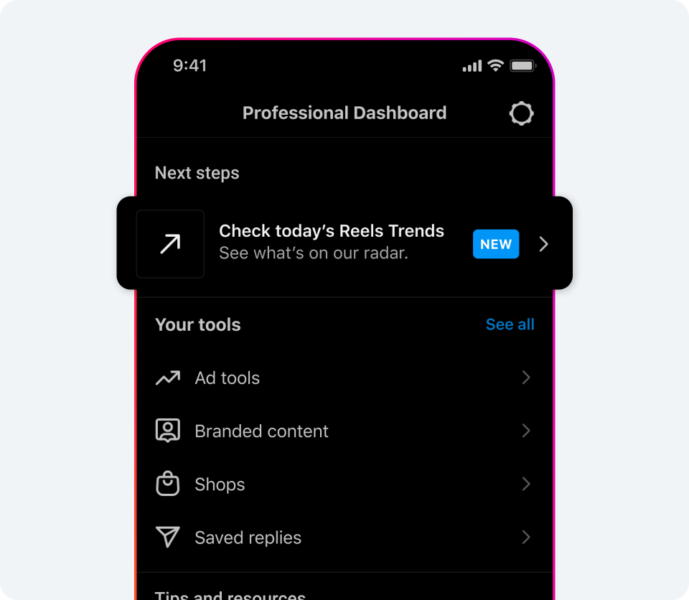
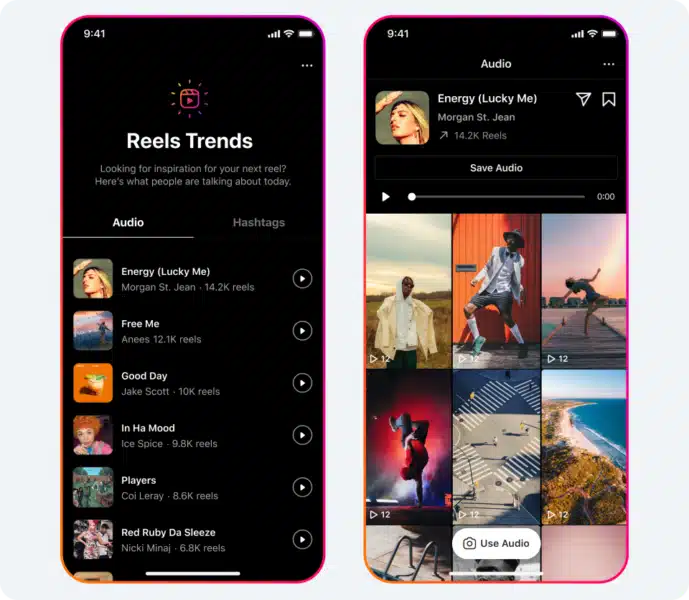
Find out what’s trending. Creators continually seek new content ideas, and to facilitate this, a dedicated space is being introduced to provide inspiration from the latest trends. This will enable users to view the most popular songs on Reels, check the number of times the audio has been used, and either use or save the audio for themselves.
Users will also have the ability to explore the top trending topics and hashtags on Reels, which can inform their content creation. For instance, the festival season might gain traction earlier than anticipated.
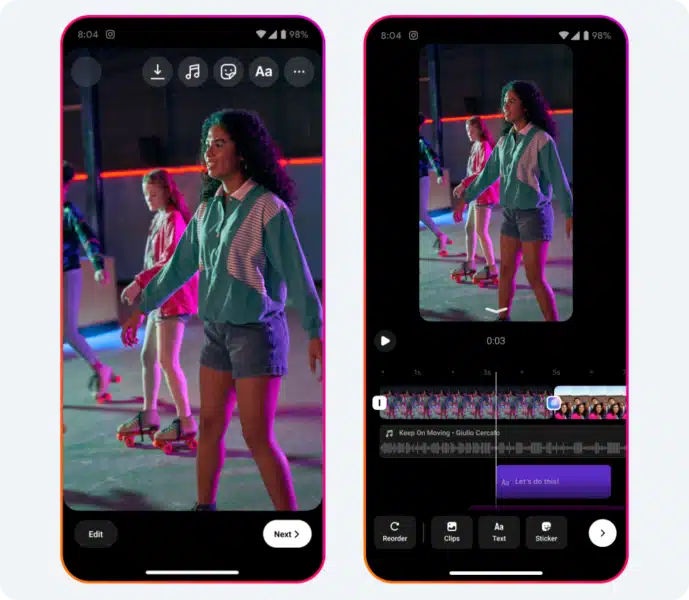
Editing Reels, easier. Instagram is streamlining the process of editing reels on Instagram by consolidating video clips, audio, stickers, and text into a single editing interface. This enhancement allows users to more visually align and time elements of their reels to the appropriate moments. As they continue to invest in developing methods to simplify and ease the editing process, users can look forward to additional exciting tools. This feature is accessible worldwide on both iOS and Android devices.
Updates to insights. Instagram is enhancing Reels insights to provide a better understanding of content performance. Two new metrics are being introduced: total watch time and average watch time – and they are simplifying the process of viewing insights directly on users’ reels.
Total watch time records the cumulative duration of time a reel was played, including any replays. Average watch time calculates the mean time spent playing a reel by dividing the watch time by the total number of plays. For instance, if the average watch time is 17 seconds, it means that on average, viewers watched 17 seconds of the Reel. This information will help users identify where their audience is engaged or where they might need to develop a stronger hook to retain viewers for a longer period. Additionally, they are introducing a new method to track how reels contribute to user growth. Users will now receive notifications regarding new followers gained from their reels.
Improving and expanding gifts. Instagram has made gifts available to more creators by expanding to additional markets in the coming weeks, including Australia, Canada, France, Mexico, New Zealand, and the UK.
Additionally, they’re introducing a feature that displays which fans have sent a gift, enabling creators to acknowledge their supporters. By tapping the heart icon next to their supporters, creators will send a notification to the fans, letting them know that their gift has been seen and appreciated.
Dig deeper. You can read about Instagram’s new features here.
Why we care. Instagram’s continuous improvement and expansion of features create a more interactive environment for creators and users. These enhancements also help advertisers better understand user behavior, identify trending content, and develop targeted campaigns that resonate with their audience.
The post 4 new Instagram Reels features appeared first on Search Engine Land.
Courtesy of Search Engine Land: News & Info About SEO, PPC, SEM, Search Engines & Search Marketing
Category seo news | Tags:
Social Networks : Technorati, Stumble it!, Digg, de.licio.us, Yahoo, reddit, Blogmarks, Google, Magnolia.
Google Marketing Live registration opens
Written on April 13, 2023 at 8:18 pm, by admin
Google has opened registration for Google Marketing Live – the company’s annual event for showing off its newest ad formats, products and updates.
When is Google Marketing Live. Tuesday, May 23, starting at 9 a.m. PT.
The agenda so far. The event will explore how Google’s AI-driven ads solutions can amplify your marketing skills and generate impressive business outcomes in the evolving economic landscape.
The pre-show starts at 8:55 a.m. PT, followed by the opening keynote at 9 a.m. PT. Technology Broadcast Journalist Laurie Segall and Google VP Jason Spero will then lead an in-depth session discussing Google’s latest product unveilings, complete with a Q&A featuring the teams behind their creation.
Google Marketing Live 2022. Here are links to our coverage of Google Marketing Live 2022:
- Google Marketing Live 2022: Everything you need to know
- Google shopping ads get a ‘swipeable’ makeover
- 7 updates coming to Google Performance Max campaigns
Reaction at SMX Advanced. Join us for SMX Advanced 2023 for a roundtable discussion on GML 2023 and hear reactions and insights straight from Google Ad experts. Here’s our panel from SMX Advanced 2022: Google Marketing Live 2022: Reactions from the experts.
How to register. You can register for Google Marketing Live 2023 here.
Why we care. In the fast-paced world of digital marketing, staying up-to-date with the latest tools, technologies, and strategies is crucial for maintaining a competitive edge. Google Marketing Live 2023 is a free event and allows advertisers to stay ahead of the competition and on top of industry trends and changes.
The post Google Marketing Live registration opens appeared first on Search Engine Land.
Courtesy of Search Engine Land: News & Info About SEO, PPC, SEM, Search Engines & Search Marketing
Category seo news | Tags:
Social Networks : Technorati, Stumble it!, Digg, de.licio.us, Yahoo, reddit, Blogmarks, Google, Magnolia.
Harness the power of customer data to stay ahead of the competition by Cynthia Ramsaran
Written on April 13, 2023 at 8:18 pm, by admin

Attracting interest in a tool or product may be the easy and fun part of building a business, but converting inquiries to purchasers is when it gets hard. So many brands today continue to struggle with acquiring, converting, retaining and creating loyal customers for life. Yet leading companies across the globe seem to be accomplishing all of that and then some.
Want to know how? Register and attend “Harnessing the Power of Customer Data to Stay Ahead of the Competition,” presented by Tealium.
Click here to view more Search Engine Land webinars.
The post Harness the power of customer data to stay ahead of the competition appeared first on Search Engine Land.
Courtesy of Search Engine Land: News & Info About SEO, PPC, SEM, Search Engines & Search Marketing
Category seo news | Tags:
Social Networks : Technorati, Stumble it!, Digg, de.licio.us, Yahoo, reddit, Blogmarks, Google, Magnolia.
Google: Video must be main content to appear as thumbnail
Written on April 13, 2023 at 8:18 pm, by admin
Video thumbnails will only be shown in Google’s search results when a video is the main content of a page, Google announced today.
The announcement. “Today, we’re making a change so that video thumbnails only appear next to Google search results when the video is the main content of a page. This will make it easier for users to understand what to expect when they visit a page.”
What’s changing. Google has been showing a video to the right of the search listing when a video was present on a page, but not the main element.
This video thumbnail format will go away because removing it had a “minimal impact” on the overall engagement for publishers, Google said based on tests it conducted.

Google Search Console impact. You may see an impact to your search appearance reported metrics for videos in the performance report. Annotations will appear in the video indexing report and video enhancement report, Google said.
What’s not changing. Google will still show a video thumbnail to the left of a search listing when Google determines a video is the main content of a page.

Why we care. If your pages have been ranking with video thumbnails, you’ll watch to watch the performance of those pages heading forward. This change also has implications for the video metrics you see reported in GSC.
Read Google’s announcement. Simplifying video presentation on Google Search Results.
The post Google: Video must be main content to appear as thumbnail appeared first on Search Engine Land.
Courtesy of Search Engine Land: News & Info About SEO, PPC, SEM, Search Engines & Search Marketing
Category seo news | Tags:
Social Networks : Technorati, Stumble it!, Digg, de.licio.us, Yahoo, reddit, Blogmarks, Google, Magnolia.
Microsoft’s integration with Roku reveals increased engagement across CTV and search
Written on April 13, 2023 at 8:18 pm, by admin
Merging Microsoft and Roku campaigns proves to be more effective in encouraging lower-funnel search activities when executed concurrently. According to a new report from Microsoft:
- Television streaming triggers a surge in search behavior, with Roku TV streaming advertisements resulting in a 9% growth in brand searches per user and an 11% uptick in clicks per user.
- Multi-channel exposure enhances engagement, as evidenced by an almost 18% overall increase in click-through rates on the Microsoft Audience Network when users are exposed to Roku ads.
- When users are exposed to both the Microsoft Audience Network and TV streaming, there is an 11% rise in searches and a 10% increase in clicks.
The whitepaper. The study, published on Thursday, seeks to assist marketers in comprehending how TV streaming, native, and search ads collaborate to boost full-funnel effectiveness. Achieving full-funnel measurement is more challenging in the context of a disjointed media-buying landscape.
While TV streaming ads are commonly believed to generate awareness, they can also lead to purchases. Search ads are known for fostering engagement and promoting lower-funnel activities, but they can also raise awareness.
The alliance between Microsoft and Roku enables both to access a vast audience. Microsoft’s platforms can reach over 1 billion users, while Roku boasts over 200 million active streamers.
How it works. Advertisers execute TV streaming ads on Roku, as well as native ads and search ads on Microsoft. Anonymized and encrypted Roku ad exposure data is transferred from LiveRamp to Microsoft.
Microsoft examined the ad activity correlated with Roku exposures before and after the Roku ads are delivered. Subsequently, advertisers obtain a report containing cross-channel performance metrics and audience insights. This information empowers advertisers to optimize their strategies across multiple channels.
Download the whitepaper. You can download and review the whitepaper from Microsoft here.
Why we care. Cross-channel advertising with Microsoft and Roku allows advertisers to target audiences more accurately, understanding their preferences and behavior across various platforms. This enables advertisers to deliver more relevant and personalized ads, increasing engagement and conversions.
The post Microsoft’s integration with Roku reveals increased engagement across CTV and search appeared first on Search Engine Land.
Courtesy of Search Engine Land: News & Info About SEO, PPC, SEM, Search Engines & Search Marketing
Category seo news | Tags:
Social Networks : Technorati, Stumble it!, Digg, de.licio.us, Yahoo, reddit, Blogmarks, Google, Magnolia.
Google releases April 2023 reviews update
Written on April 12, 2023 at 5:17 pm, by admin
Google has released the April 2023 reviews update. This update goes beyond Google’s prior product reviews updates to evaluate reviews of any topic that is reviewable, including:
- Services and businesses.
- Destinations.
- Media (e.g., games, movies).
The big takeaway. Google has changed the name of its “product reviews system” to “reviews system” and has altered the language in multiple parts of its guidance documentation around product reviews to now apply to all types of reviews.
Announcement. Google announced the April 2023 reviews update on Twitter:
Released the April 2023 reviews update, which now covers reviews about products, services, and things. Learn more about how to write high quality reviews:https://t.co/tdM0JhyyTG
— Google Search Central (@googlesearchc) April 12, 2023
Google also updated its Search Status dashboard at 9:08 PDT with the following: “Released the April 2023 reviews update, which now covers reviews about products, services, and things. Learn more about how to write high quality reviews.”
Google makes “product review” guidance “review” guidance. This is a big change. Google has reworded its article on How to write high-quality reviews in multiple places, providing guidance about “product reviews” to simply apply to all types of “reviews” – just with more generic language.
You can see many of the changes here, as shared by Marie Haynes on Twitter:
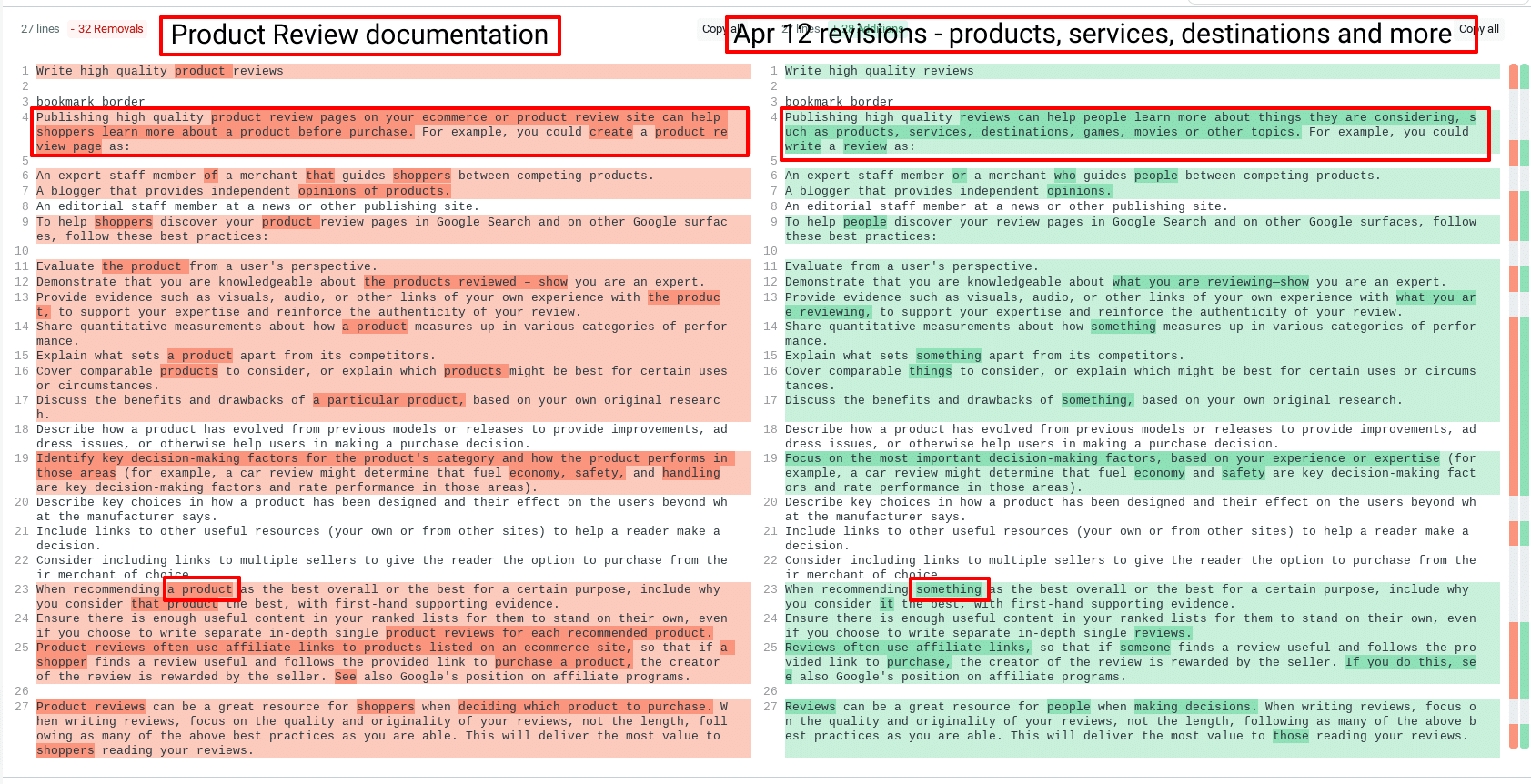
For example, Google has edited “shoppers” to become “people.” And a “product” becomes a “thing” or “something” or is simply deleted.
While the edits are small in terms of grammatical choices, they are big in terms of implications and scope. What was the product reviews update now essentially applies to every possible type of review as part of Google’s review system.
Review system name change. The “Google Search’s reviews system and your website” page, before this update, was called “Google Search’s product reviews system and your website.” That page is now 301 redirecting to the new page.
Google added some new guidance:
The reviews system is designed to evaluate articles, blog posts, pages or similar first-party standalone content written with the purpose of providing a recommendation, giving an opinion, or providing analysis. It does not evaluate third-party reviews, such as those posted by users in the reviews section of a product or services page.
Reviews can be about a single thing, or head-to-head comparisons, or ranked-lists of recommendations. Reviews can be about any topic. There can be reviews of products such as laptops or winter jackets, pieces of media such as movies or video games, or services and businesses such as restaurants or fashion brands.
Most of the other changes were simply deleting the word “product,” except where it added “services or other things” to the first line in the “How the reviews system works”:
“The reviews system works to ensure that people see reviews that share in-depth research, rather than thin content that simply summarizes a bunch of products, services or other things.”
– Google Search’s reviews system and your website
Why we care. If your website publishes any type of review content, this will be an important update to watch. Check your rankings to see whether your organic traffic improves, declines or stays the same.
Google on high-quality reviews. So what does Google consider a high-quality review? Google has shared 14 best practices (note that these are not new):
- Evaluate from a user’s perspective.
- Demonstrate that you are knowledgeable about what you are reviewing—show you are an expert.
- Provide evidence such as visuals, audio, or other links of your own experience with what you are reviewing, to support your expertise and reinforce the authenticity of your review.
- Share quantitative measurements about how something measures up in various categories of performance.
- Explain what sets something apart from its competitors.
- Cover comparable things to consider, or explain which might be best for certain uses or circumstances.
- Discuss the benefits and drawbacks of something, based on your own original research.
- Describe how a product has evolved from previous models or releases to provide improvements, address issues, or otherwise help users in making a purchase decision.
- Focus on the most important decision-making factors, based on your experience or expertise (for example, a car review might determine that fuel economy and safety are key decision-making factors and rate performance in those areas).
- Describe key choices in how a product has been designed and their effect on the users beyond what the manufacturer says.
- Include links to other useful resources (your own or from other sites) to help a reader make a decision.
- Consider including links to multiple sellers to give the reader the option to purchase from their merchant of choice.
- When recommending something as the best overall or the best for a certain purpose, include why you consider it the best, with first-hand supporting evidence.
- Ensure there is enough useful content in your ranked lists for them to stand on their own, even if you choose to write separate in-depth single reviews.
Languages impacted. Google said this system applies to these languages: English, Spanish, German, French, Italian, Vietnamese, Indonesian, Russian, Dutch, Portuguese and Polish.
Previous product review updates. This is an evolution of Google’s series of product review updates – of which there have been six since 2021. Google has now redirected all of its prior pages providing guidance around the “product reviews” update to its revised “reviews” guidance.
Here’s a timeline of all Google’s past product reviews updates:
- Google February 2023 product reviews update
- Google September 2022 product reviews update
- Google July 2022 product reviews update
- Google March 2022 product reviews update
- Google December 2021 product reviews update
- Google April 2021 product reviews algorithm update
The post Google releases April 2023 reviews update appeared first on Search Engine Land.
Courtesy of Search Engine Land: News & Info About SEO, PPC, SEM, Search Engines & Search Marketing
Category seo news | Tags:
Social Networks : Technorati, Stumble it!, Digg, de.licio.us, Yahoo, reddit, Blogmarks, Google, Magnolia.
LinkedIn SEO guide: Optimizing your profile for more connections, better leads
Written on April 12, 2023 at 5:17 pm, by admin
LinkedIn is a powerful search engine capable of generating targeted, substantial traffic to your profile.
Moreover, this traffic can develop into valuable professional connections and new clients.
In this guide, you’ll learn how to optimize your profile to tap into that power and make LinkedIn work for you – driving more connections and better clients.
LinkedIn is not just a resume
LinkedIn is much more than an online resume. It’s also more than just a place to list your credentials, add a little blurb about yourself and hope someone is intrigued enough to network with or hire you.
With LinkedIn optimization, you will build connections with some of the best and brightest in your industry and attract your ideal clients directly to your profile and inbox.
From profile optimization and SEO to content posting and engagement, this guide covers everything you need to turn your LinkedIn profile into a brand-building, lead-generating machine.
More than SEO: Full-throttle LinkedIn optimization
Many LinkedIn optimization guides start and end with SEO, but I say that SEO is just the tip of the iceberg.
As with your business website, the success of your inbound marketing through LinkedIn depends on traffic and conversion optimization.
If you focus all your efforts on SEO without fully optimizing your profile for conversions, you aren’t making the most of the traffic coming in.
That’s why I put all of the LinkedIn SEO best practices to the test and applied my own expertise around conversion copywriting, sales funnels, and conversion optimization.
The result of that testing is this guide – which includes sections about profile aesthetic, creating a LinkedIn lead funnel, writing compelling copy on your profile, and converting connections into new clients.
The LinkedIn optimization guide covers:
- Profile aesthetic
- Profile copy
- LinkedIn SEO
- Lead funnel
- Connections
- Recommendations and skills
- Posting and content
- Engagement
- Analytics
- Creator mode
You’ll also learn how to craft a high-converting “welcome” message for new connections, attract your ideal clients directly to your profile and build authority with LinkedIn articles.
Let’s get into it, shall we?
1. Spruce up your profile aesthetic
One of the best things about your LinkedIn profile is how much real estate you have in terms of optimization.
Sure, the obvious places are your headline, summary and experience sections, but you can also take advantage of your profile photo and cover photo sections.
This is what I call optimizing your “profile aesthetic” – as you aren’t adding SEO keywords but tailoring your profile’s look to your target audience.
Do looks really matter? You tell me.
How important is the design of your business website to how it appeals to potential clients/customers?
Exactly.
Optimize your profile’s curb appeal
I’m a strong proponent of squeezing every bit of juice out of a platform to have it work for my business. When it comes to LinkedIn, that means not only having it talk the talk but look the look.
To optimize your profile’s “curb appeal,” you will focus on two features: the profile photo and the cover photo.
Profile photo
We are all familiar with the dull, grainy headshots on LinkedIn. If you want to take LinkedIn branding seriously, I say dare to stand out!
You’ll want a professional, high-quality image highlighting your personality and business. Something that your potential clients will find approachable.
- High-quality image – clear, not pixelated.
- Close shot of your face.
- Simple background.
- Appropriate attire.
- Smile!
For some industries, your look may include professional attire and a corporate background. For others, it could be more casual. The key is to appeal to what your target audience is most familiar with in working with people like you.
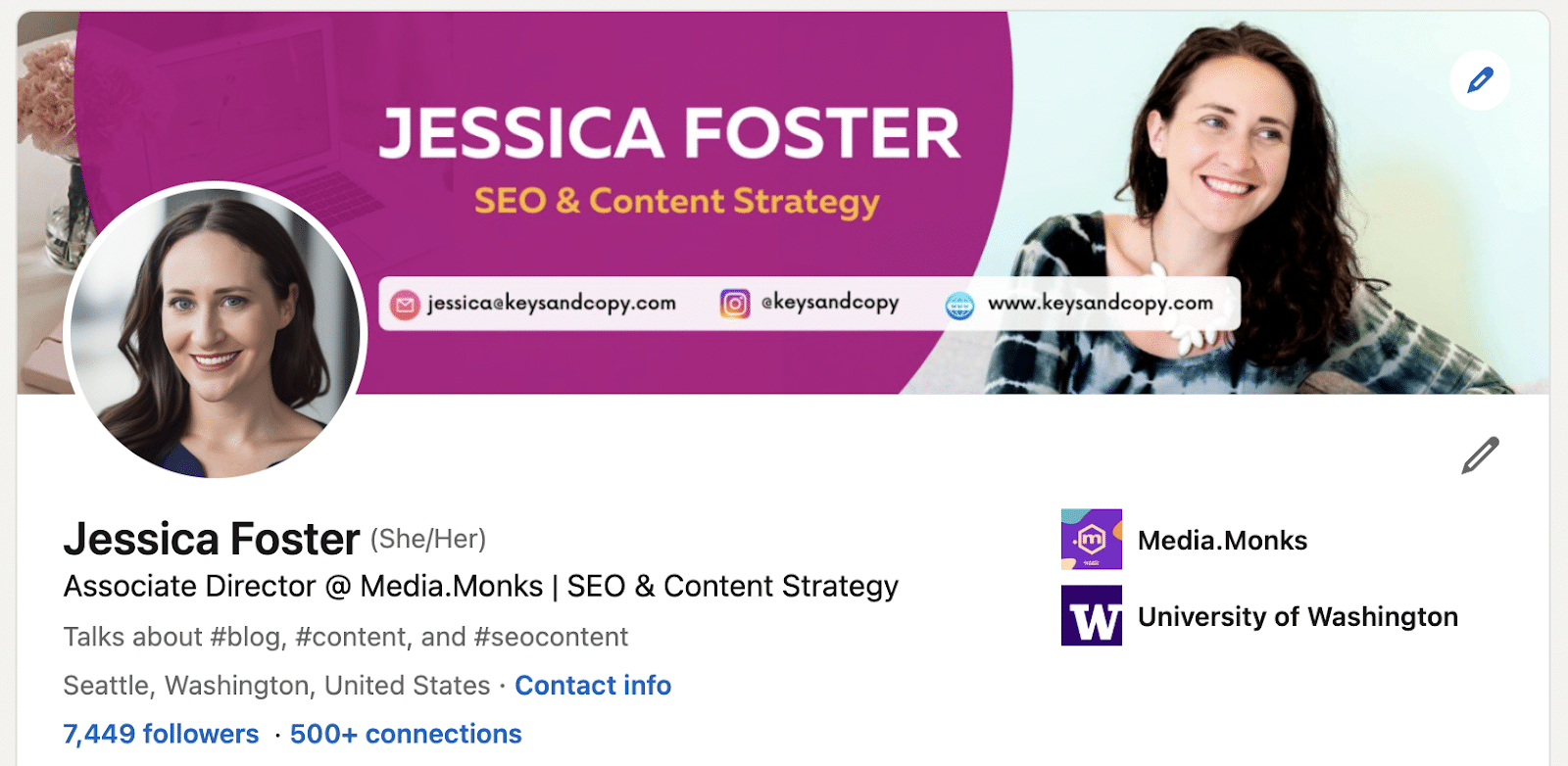
I’m an associate director of SEO at a global media agency, so my clients expect some degree of polish and professionalism.
This is why I include a professional headshot and a well-designed background image with my name, email address, and social media handles.
And please, ditch the selfie. I highly recommend investing in a professional headshot for this. It will make a huge difference – taking you from amateur to expert.
Background photo
The background photo section also gives you ample real estate to tell profile visitors what you (and your business) are all about.
The default LinkedIn profile cover photo is a blue background with geometric shapes and dots.
As far as we business owners are concerned, this is nearly seven inches of desktop real estate that are going to waste.

Let’s make it count.
You can easily create a custom cover image using Adobe Photoshop or Canva with a professional background and copy that appeals to your target audience.
Best practices include:
- Adding a tagline telling profile visitors what you do and who you serve.
- Adding your website URL and social media handles.
- Having an attractive backdrop image that draws in your target audience.
- Including a call to action or letting users know how to contact you.
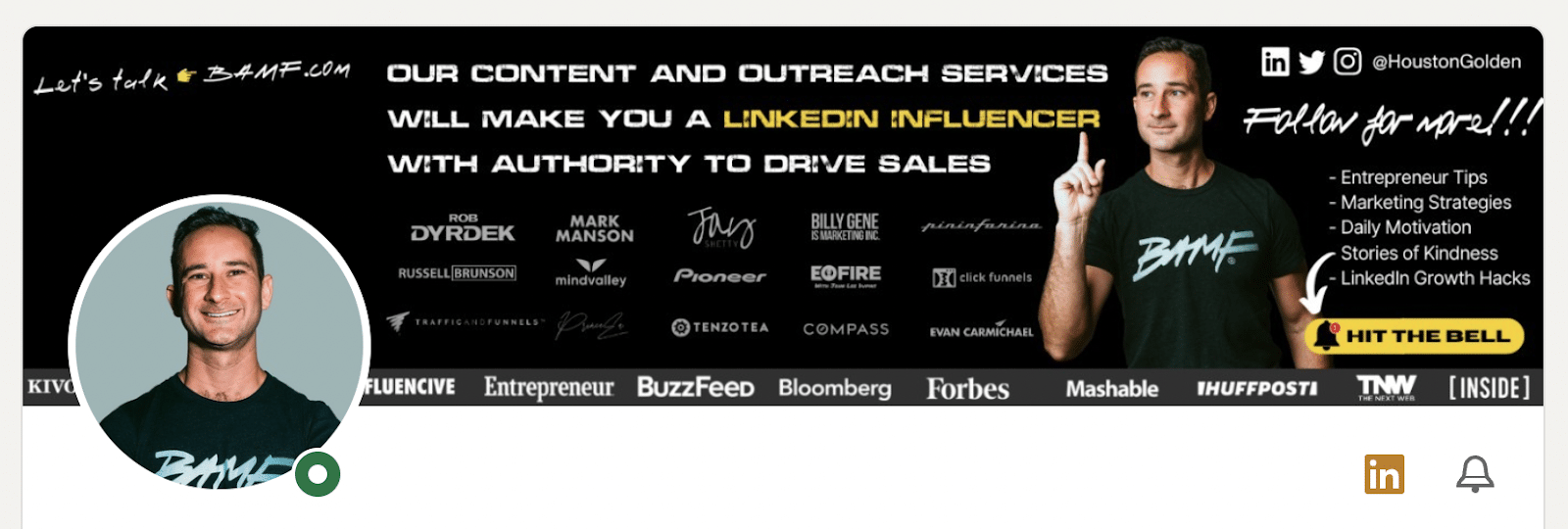
In the example above, we see how this LinkedIn profile makes ample use of the cover photo section by including:
- A description of what services the founder offers (“content and outreach services…”)
- A call to action (“Follow for more!”)
- The founder’s social media handle (“@HoustonGolden”)
With this, users know at a glance what he does, who he helps and how best to reach him – all without having to dig through his entire profile.
Users are prompted to “Hit the bell” (i.e., turn on notifications for his profile) to learn more “entreprenuer tips,” “marketing strategies,” and more.
By optimizing the look of your profile, you give the best possible first impression to your potential connections. You also make it easier for potential clients to understand what you are about and how to get ahold of you.
Once your profile is pretty, it’s time to move on to the rest of the sections.
2. Write compelling profile copy
As an SEO content writer and copywriter, I geeked out when it dawned on me that LinkedIn is a great place to implement conversion copywriting. It really is a no-brainer.
Unfortunately, many of us have treated our LinkedIn profile like a resume – concise and professional, but boring.
LinkedIn was built around the idea of professionals connecting with other professionals.
You won’t effectively do that if your profile reads like the ingredients section on the back of a bran flakes cereal box.
Write with your target audience in mind
Instead, write your LinkedIn profile like you would your online dating profile, only more professional.
Make it interesting, add pizzazz and write it to appeal to the type of people you want to attract.
There are a few primary areas where you can do this: your headline, summary and experience sections.
Headline
Your headline is the line of text directly beneath your name on your profile. LinkedIn gives you about 220 characters of space here to tell visitors who you are and what you offer.
Your headline should combine LinkedIn SEO keywords (which we will discuss in section three of this guide) and compelling copy. That’s because it attracts traffic and keeps users engaged with your profile.
LinkedIn released an update stating that “dwell time” is an important factor in its algorithm.
This means it’s even more important to have a compelling copy to entice users to read through your profile and explore your content.
In your profile copy, you will want to be uber-clear about what you do. This is not a space for witty taglines like “Probably out fishin’” or “I rank it, you bank it!”
Headlines like these do not include keywords and can leave profile visitors feeling confused about what exactly it is that you do.
I suggest:
- Keeping your headline chocked full of keywords, with a bit of finessing copy. (i.e., “I’m a digital marketing strategist helping small businesses reach more customers online.”)
- Crafting a compelling headline with conversion copywriting.
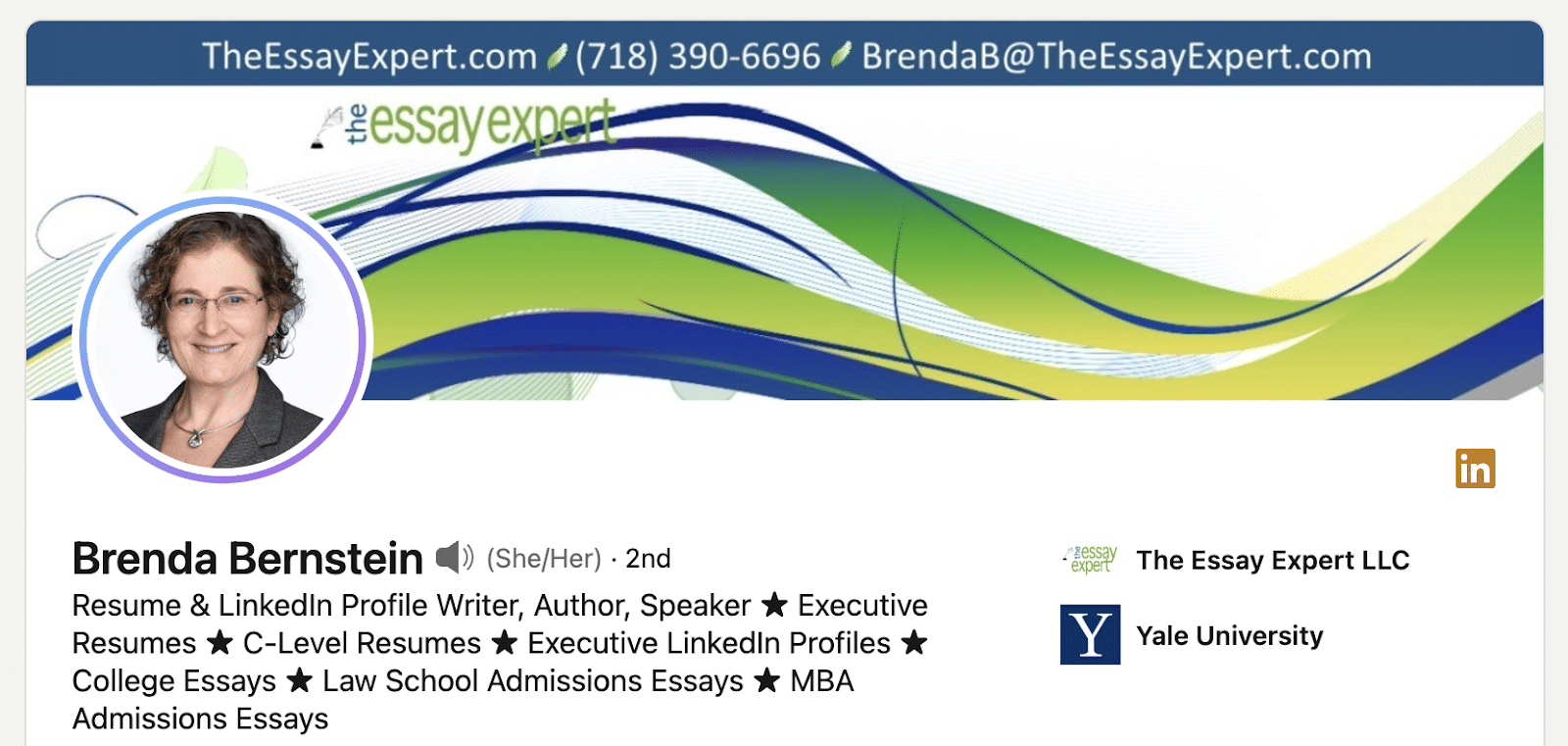
In the example above, this profile gets straight to the point by describing:
- What her title is (“Resume & LinkedIn Profile Writer”)
- What she does (“Author” and “Speaker”)
- What she offers (“Executive Resumes,” “Law School Admissions Essay,” etc.)
This headline includes relevant keywords that could potentially draw in people looking for services like hers.
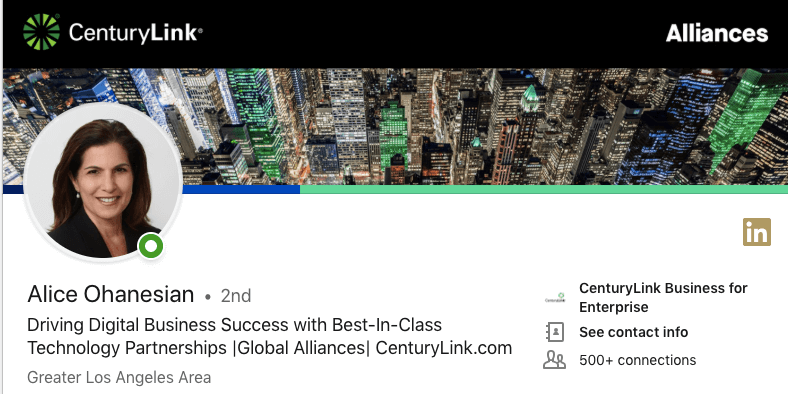
Similarly, this business owner focuses less on keywords and more on appealing to people looking for “business success” through a “best-in-class” partnership.
Both examples fill their headline with copy and keywords, ensuring no space goes to waste.
Not a great writer? You may want to contact a professional copywriter to help you craft a message that appeals to your target audience.
Later, we will discuss finding LinkedIn SEO keywords to include in your profile.
About section
Your About section is the largest space for adding compelling copy and LinkedIn SEO keywords. With 2,600 characters worth of space, you can’t afford not to optimize this section.
This is where visitors go to learn even more about you, your business and the services that you offer.
I like to compare it to the About us page on a business website. And every great copywriter will tell you this page is about your audience, not you.
You need to craft an about section that speaks to what your target audience is looking for. This is not a place to simply rattle off your accomplishments and services.
Ask yourself: What is my potential audience looking for when it comes to working with someone like me?
Market research will be able to answer this for you.
If you conducted market research prior to adding copy to your business website, then you can apply the same concepts here. If you haven’t conducted market research in order to figure out your audience’s struggles, pain points, needs, and wants, you will want to do that first.
Once you have your market research, you will write a summary that appeals to your target audience/ideal clients.
You will simply address their primary struggle and how you will be able to help them overcome that struggle.
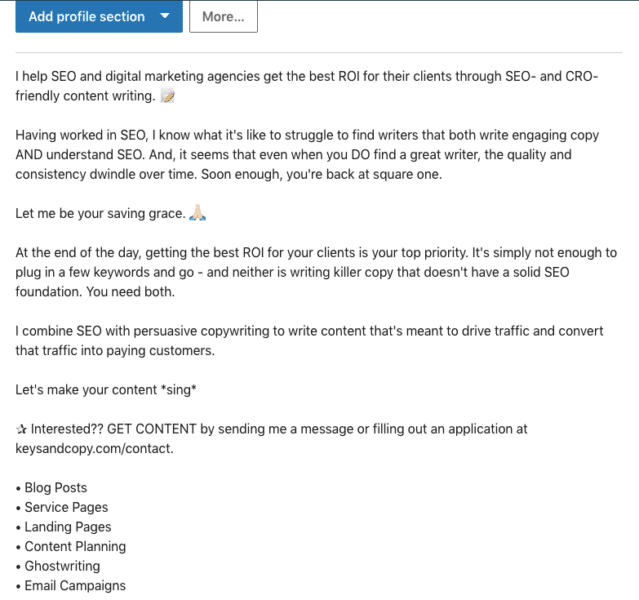
In the example above, you can see how I address the primary struggles that SEO agencies have when outsourcing SEO content: poor quality and writers’ lack of SEO knowledge.
Then, I explain how I do things differently, what to expect when working with me and how best to contact me.
Your summary section shouldn’t ramble on and on; it should be concise, targeted and written with a purpose.
Get your message across as efficiently and effectively as possible so that you can move visitors along your profile funnel without delay.
Profile link
In April 2022, LinkedIn announced that all Creators can add a link to the “Introduction” section on their profiles. This link appears below your name and description on your profile.
You can use this feature to add a link to your website, YouTube channel, online store, ebook, or whatever you want.
Experience section
The experience section is where I see most business owners getting lazy and treating their profiles like a resume. I used to do this myself. Not anymore.
Your experience section is another place to include LinkedIn SEO keywords and compelling copy that convinces users that you are the right fit for them.
You do this by writing each experience in a way that highlights what you took away from working at that company and the results you got for them.
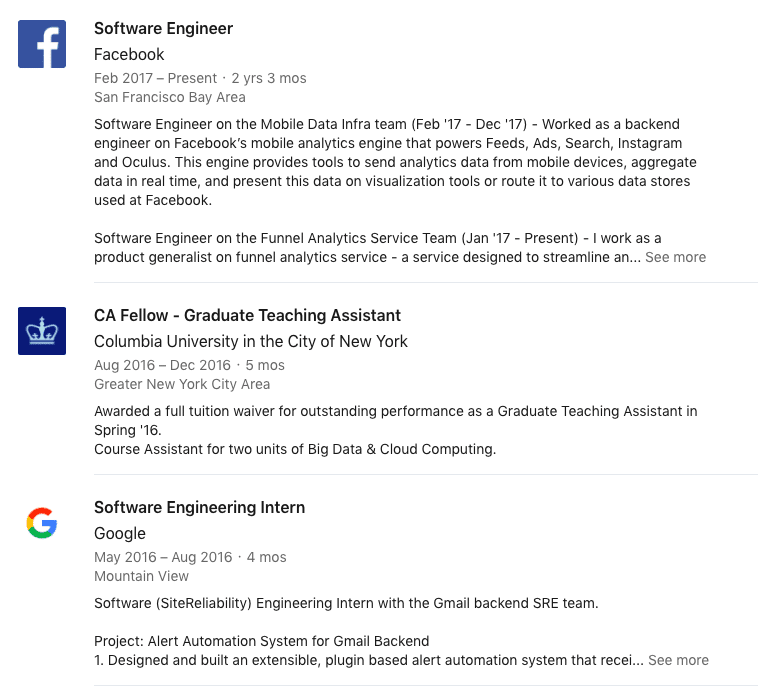
Above is an example of how a LinkedIn user has used the experience section to include detailed summaries of her work at certain companies, the projects she was a part of and the results she generated through these projects.
For your profile, you can mention results like:
- The percentage increase in traffic generated for an SEO client.
- An uptick in conversions for a Facebook ads client.
- How you increased a client’s business revenue year over year.
Highlighting these achievements is a great way to show profile visitors that you have experience and can replicate those results for them.
I suggest writing naturally here rather than including a bulleted list of everything you have done. Hand-pick your best examples and make them super compelling.
Speak to what your potential clients are searching for and tell them how you can generate the desired results.
Top tips
- Add experience items for each of your top clients (and link to their company profile), describing the work you did and the results you generated for them.
- Use layman’s terms whenever possible. Don’t assume that your audience knows what “CTR,” “schema markup,” “KPIs,” “keyword cannibalization” or other industry terms mean.
- Remove any experience examples irrelevant to the audience you aim to serve. If you offer SEO services to law firms, they don’t need to know that you were a Boy Scout in sixth grade or a party chair at your college fraternity.
- Include references to any publications you write for or industry organizations you are a part of.
3. Implement LinkedIn SEO
LinkedIn SEO differs from regular SEO because the keywords users type in to find services and businesses on LinkedIn aren’t always the same as what users type into Google.
That’s because the average user doesn’t consider LinkedIn a search engine. They use it as intended – as a social media platform – and therefore use short-tail terms matching users’ job titles.
While users may use keywords like “copywriting services for small businesses” in Google, they are more likely to use terms like “copywriter” or “writer” on LinkedIn.
However, when users search long or short-tail terms in Google, LinkedIn profiles can rank in the SERPs. That’s why I suggest optimizing your profile with SEO keywords and what I call “LinkedIn SEO keywords.”
Finding SEO keywords
To find SEO keywords for your profile, simply conduct keyword research as you would if you were finding keywords for your business website.
- What do you want your profile to rank for?
- Do these terms get decent search volume, with low competition?
- Do they match the intent of your target audience?
These are all questions you’ll want to consider.
Generate a list of terms worth ranking for and with a reasonable search volume.
With this list, you will start on your LinkedIn SEO keyword research and optimize your profile with a combination of these terms.
Finding LinkedIn SEO keywords
Unfortunately, I have yet to find a tool that provides search volume data for keywords used on LinkedIn.
Therefore, this is not a hard science. But, if you are skilled in SEO, you can make some informed guesses about how keywords are being used on LinkedIn.
Here is my process for finding keywords on LinkedIn:
Step 1: Search for the shortest, broadest term associated with your services.
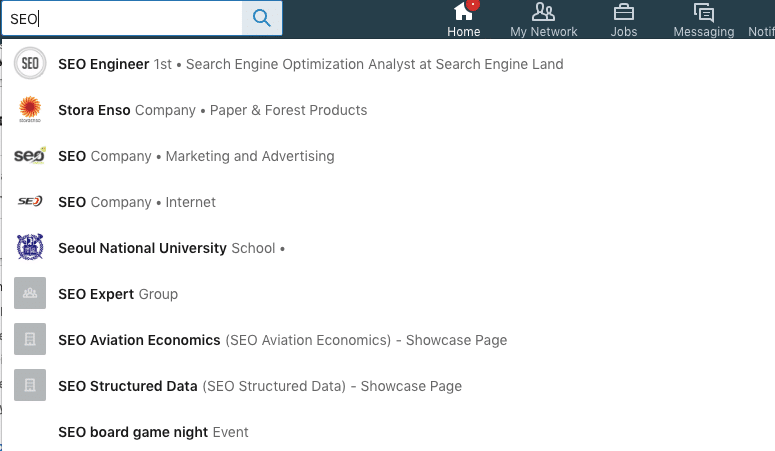
Use LinkedIn’s search box to search for the broadest term that applies to your business.
If you have an SEO agency, this would be “SEO” or even “marketing.” As a Facebook ads expert, this would be “Facebook ads” or “advertising,” perhaps “social media.”
LinkedIn will automatically show you a list of the top results for that term in your network (more on this later).
Step 2: Look at the full results.
Beneath the list of results, you will see an option to “See all results for [keyword].” Click on this to view the full results page.
This will take you to a page that shows you all of the results associated with this keyword, including the number of results, whether the results are connections, companies, groups, the location of the results and much more.
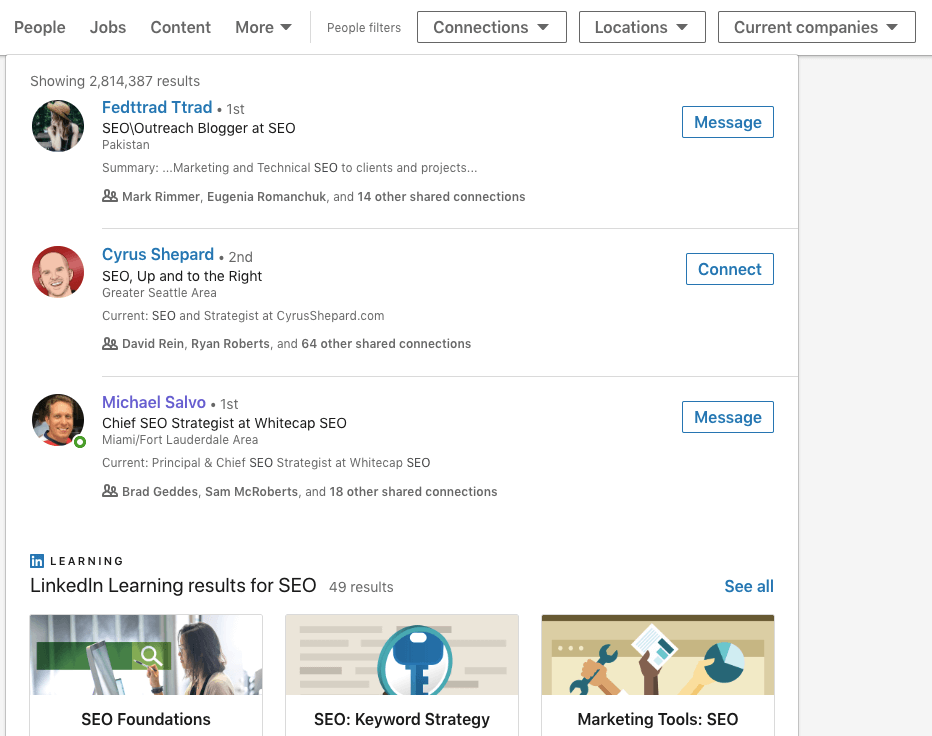
You will notice that the top results are likely connections already in your network – identified by a “1st,” “2nd,” or “3rd” degree connection annotation.
This means that you aren’t seeing the true search results, as LinkedIn prioritizes showing people and companies you have some existing connection with.
Our job is to determine which terms yield the highest volume and best match results across the board.
Step 3: Take note of the search volume.
Before moving on to the next step, note how many results your initial search yields.

You can do this by looking at the original total or by filtering it by people and companies. Do not add any other filters yet.
Basically, you want to know how many results are pulled when users search for that term to find people or companies that offer services like yours.
Step 4: See expanded results for first-, second- and third-degree connections.
Once you have recorded the initial “volume,” filter the results by ticking off the connection options.
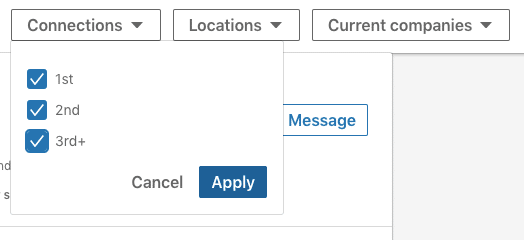
This will pull up the profiles of people you are connected with and those you are not connected with.
There’s no good way to see what others see when searching for your target keyword, but this gets you close.
It will show you what keywords profiles within and outside your network are using and how those profiles rank on LinkedIn for those terms.
This “search volume” will be your guide when it comes to deciding which terms are worth using in your profile.
Step 5: Analyze the keywords used in the results.
Much like conducting competitor analysis of websites in your niche, you will now want to identify what keywords are used in the “top ranking” profiles.
(Remember though, these search results are skewed based on your degree of connection).
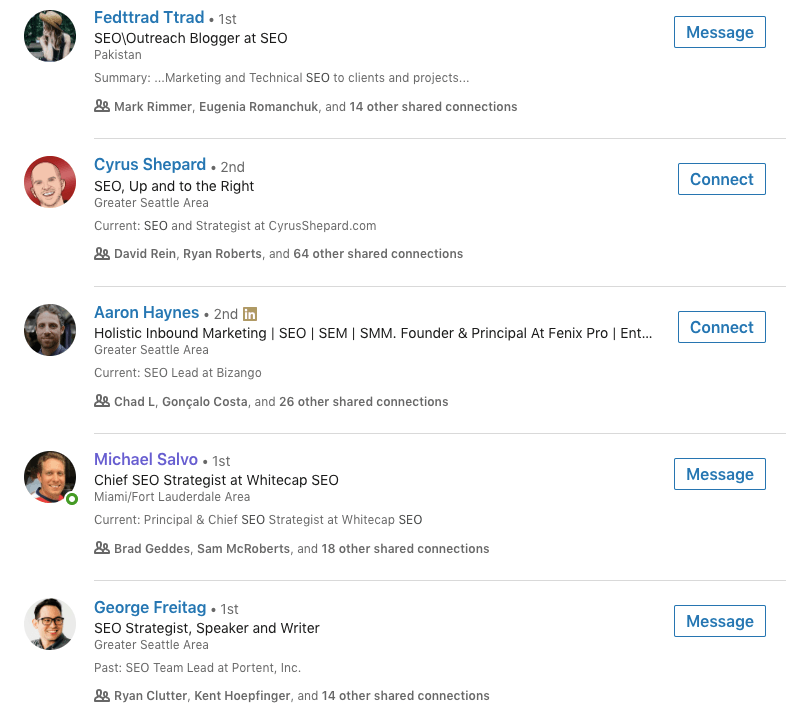
Note how your keyword is being used in the resulting profiles.
Are profiles using “SEO strategist” or “SEO specialist?” Are they simply listing “SEO, SEM, SMM” or are they more specific? See if you can find any trends here.
Finally, determine which terms are the best match for the kind of traffic you are trying to attract to your profile.
In the example above, we can see that most of these profiles use the term “SEO” near the headline’s beginning, so we may also want to implement this. “SEO strategist” has also been used.
Make a list of these terms. Then, enter these terms into the search box again and see what results come up. Repeat this process until you have a list of the top 3-5 most used terms related to your initial “seed” keyword.
Step 6: Reference your SEO keywords list
Finally, you should compare your LinkedIn SEO keywords list to your regular SEO keywords list.
Is there an overlap? If so, keep these terms.
Are some terms being used on LinkedIn but may not be a great fit in the search engines? Decide whether you should replace this with a high-volume, low-competition SEO keyword.
Eventually, you will have a mix of terms that have the potential to draw in traffic both from LinkedIn searches and Google searches.
Adding LinkedIn and SEO keywords to your profile
Once you have a solid list of keywords, you will want to incorporate them into your LinkedIn profile.
Compared to Google, a plus side with LinkedIn is that there is no evidence that keyword stuffing is penalized here.
However, you want to keep your audience in mind and have your keywords fit into your copy compellingly and naturally.
Some areas to add keywords:
- Headline
- Summary
- Experience section
- Recommendations
- Skills section
If there are some regular SEO keywords that you don’t want to leave out, your Experience section is a great place to add these.
If you found trends regarding where these keywords were included in the top-ranking profiles, try to follow this in your own profile.
At the same time, don’t compromise if you think your profile copy is stronger by taking a different approach.
In section six, I address how to generate recommendations, skills and endorsements, plus how to add keywords to these sections.
4. Create a profile ‘funnel’
Wondering why copywriting is so important for your LinkedIn profile?
Well, it’s because your goal is to turn your profile into a funnel for new leads.
While many LinkedIn users rely on visitors to take the initiative and contact them via direct message, you and I will do things differently. We are going to make it stupidly easy for people to convert.
We’ll funnel visitors down the page – from your cover photo and headline to your summary, to your media section and, finally, to your inbox or landing page.
Photos and headline – Awareness
After visitors have read the text on your cover photo and in your headline, they should have a pretty clear idea about who you are and who you help. They will then make the decision of whether to learn more about you.
About – Interest
The About section is your chance to:
- Address any pain points they have.
- Communicate what your unique selling point is.
- Briefly cover the kinds of services that you offer.
This is where it’s super important to get your messaging on point, based on the market research you conducted earlier
Media – Decision
The media section on your LinkedIn profile allows you to add links to your website and blog posts or upload videos. This content can make all the difference in convincing visitors that you are the right fit for them.
While directing visitors to a page or post could be effective, this approach involves directing visitors off your profile.
There’s the chance of creating a bottleneck here, as visitors may drop off due to inconvenience or because it takes longer to read through text versus watching a short video.
That’s why I suggest adding a video to your media section instead. This video, again, should address the primary pain points your audience faces, communicate how you will help them and include a clear call to action.
If you do this effectively, you will build trust with your profile visitors and convince them to reach out to you directly.
Inbox or landing page – Action
The call-to-action in your video should tell visitors how best to contact you. This will likely be through LinkedIn direct message or your website. You may want to include a unique landing page for LinkedIn leads.
Your call to action should sound like this:
- “For x services, send me a message [on my website/through LinkedIn/through this link].”
Be specific about how visitors should reach you and what they should expect after they contact you.
“Send me a LinkedIn message for a custom quote” is much more compelling than “Visit mywebsite.com for more info.”
By creating a profile funnel, you are more likely to take advantage of the traffic coming to your profile.
Without a funnel, the burden is on visitors to figure out what you offer, chase down the details on your website, and figure out how to contact you.
A funnel makes the process straightforward, simple and conversion-friendly.
Get the daily newsletter search marketers rely on.
<input type=”hidden” name=”utmMedium” value=”“>
<input type=”hidden” name=”utmCampaign” value=”“>
<input type=”hidden” name=”utmSource” value=”“>
<input type=”hidden” name=”utmContent” value=”“>
<input type=”hidden” name=”pageLink” value=”“>
<input type=”hidden” name=”ipAddress” value=”“>
Processing…Please wait.
5. Build smart connections
While LinkedIn SEO and creating a profile funnel taps into the power of inbound marketing on LinkedIn, there’s another way to attract your ideal clients to your profile.
That method involves building connections with your target audience and professionals in your industry.
As we learned in the SEO section of this guide, LinkedIn prioritizes showing you your first-, second- and third-degree connections whenever you search for a keyword.
It works the same way for your potential clients. If you are connected with people in their network, your profile will likely pop up when they search for one of your keywords.
Therefore, the more industry connections you have, the better.
Making the right kind of connections
Many LinkedIn users connect with every possible person they can find (aside from the clearly spammy profiles).
While this has yet to be tested, I think this can potentially weaken your profile, as you will become associated with profiles outside of your industry, making it less likely for your profile to be associated with your target keywords.
Is it beneficial to be connected with loads of graphic designers in India if you provide legal SEO services in the United States? Common sense would say no. (Feel free to prove me wrong, though.)
I think it makes sense to build connections within your industry and the industries of your target audience.
As a legal SEO expert, that would mean connecting with other legal SEO agencies, digital marketing experts, law firms, law blog writers and the like. You can still get quite broad.
Be smart about the kinds of connections you want and how they could benefit your business in the short and long term.
Finding your target audience on LinkedIn
While connecting with other people in your industry is simple, you will want to put more time and energy into connecting with people who fit your ideal client persona.
If you have been in business for a while, you will likely already know what these people look like. They could be small business owners, tech entrepreneurs, SaaS businesses, Fortune 500 companies, law firms, etc.
Knowing this, you will simply use these identifiers to find profiles on LinkedIn that match.
If you are just starting out, you need to figure out what terms your target audience uses to describe themselves on LinkedIn.
You can do this by searching some general terms that you know about your audience (like “small business,” “contractor,” or “mommy blogger”) and seeing what comes up in the LinkedIn results.
Dig around until you find people that fit your ideal client persona, and take note of what terms they used in their headline and summary. Then, use these terms to find other people to connect with.
Connecting and saying ‘hi’
One of the reasons why LinkedIn has had a bad reputation for being dull and spammy is that many users use the platform to cold pitch their new connections. We aren’t going to do this.
Every time you extend a connection request to someone, send them a message introducing yourself and why you want to connect with them.
Remember – you are practically strangers. It will take a bit for them to trust you and determine whether the connection is worth it.
Rather than jumping into the pitch, follow scripts similar to the ones below (which have gotten me a near 100% response rate):
Networking script
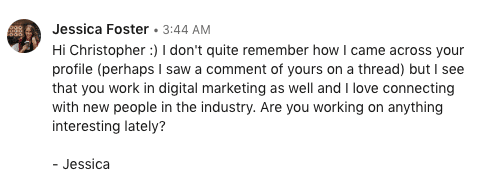
“Hello [ name ],
Thanks for connecting. I see that we are both in the [ niche ] industry. I am an [ industry title ] myself. Are you working on anything interesting lately? Chat soon! – [your name ]“
This script implies that the person has already connected with you or may have extended the connection first. It creates a sense of familiarity versus making it seem like a random stranger is connecting with them.
It also gives a reason for the connection instead of leaving room for the person to suspect ulterior motives. They know what you do, so they can decide whether the connection is worth their time.
Finally, it prompts the person to respond by asking them about themselves. This puts the ball in their court.
And, if they happen to be working on a project that you could potentially help them with, it opens the door to having that conversation without you coming across as salesy.
Potential client script
“Hello [ name ],
Thanks for connecting. I see that you [ run a small business/have a law firm/are a tech entrepreneur/etc ]. I wanted to reach out because I [ help businesses like yours do x ]. Maybe there’s potential to work together. Are you working on anything interesting lately?”
Similar to the previous script, this script lets the person know who you are and why you want to connect with them and leaves it up to them to respond to you.
No pitch implies that you know how you can help them – you don’t yet – or start rambling about your services.
This keeps the conversation open and prevents the risk of you pitching them on one service when they may have asked you about a different service you didn’t think to mention.
Let the conversation flow more naturally, and they will likely ask you about services most relevant to them.
Another benefit of this approach is to avoid drawing in leads that may not be the best fit for you.
A final note about connections
Try to build as many connections as possible (following the process outlined above), or at least reach that “500+” mark.
This helps you build a more expansive network and appear trusted in your industry.
6. Gather recommendations, skills and endorsements
Again, LinkedIn SEO isn’t quite as measurable as website SEO, but that’s part of the fun.
Optimizing certain sections for keywords allows you to test what works and what doesn’t and develop your lead generation strategy.
The recommendations, skills and endorsements sections are all areas where you can add LinkedIn SEO keywords, but they don’t bring any hard evidence that says they move the needle in SEO. They may, however, move the needle when it comes to conversions.
Recommendations
LinkedIn recommendations are the “reviews” of your profile.
This is where references and past clients can talk about their experience working with you and the results you have gotten for them.
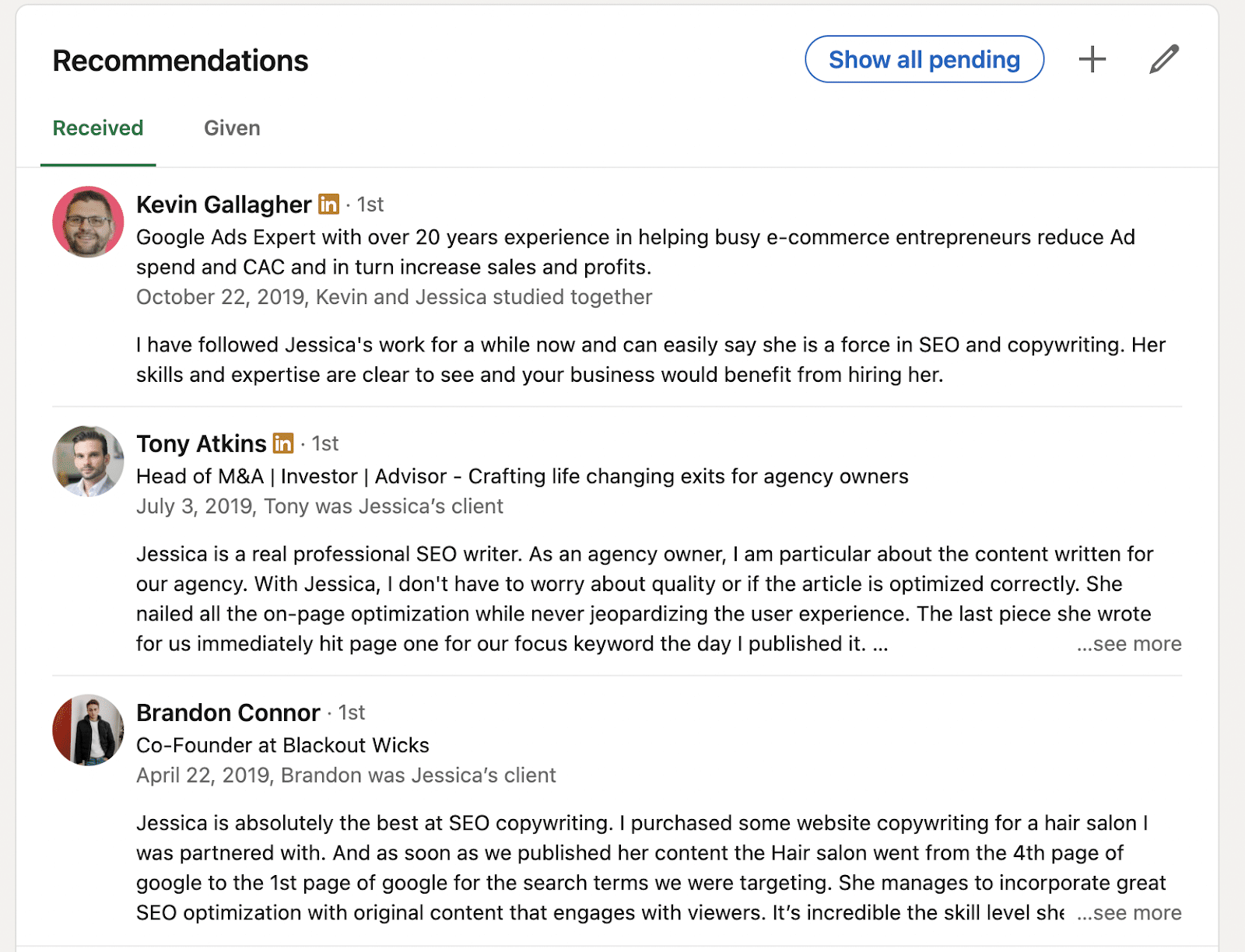
Your clients will likely include keywords naturally here, which may or may not play a role in your profile SEO.
If you prompt your network contact for recommendations, you may want to suggest that they include those target keywords, just in case.
SEO aside, recommendations are great social proof to show you know what you are doing and bring awesome results to your clients.
If visitors see many positive recommendations on your profile, this could be the final push they need to hire you.
Skills
LinkedIn allows you to add a list of skills to your profile that tells visitors what you are best at.
This is another area where it may be smart to include things with your target keywords.
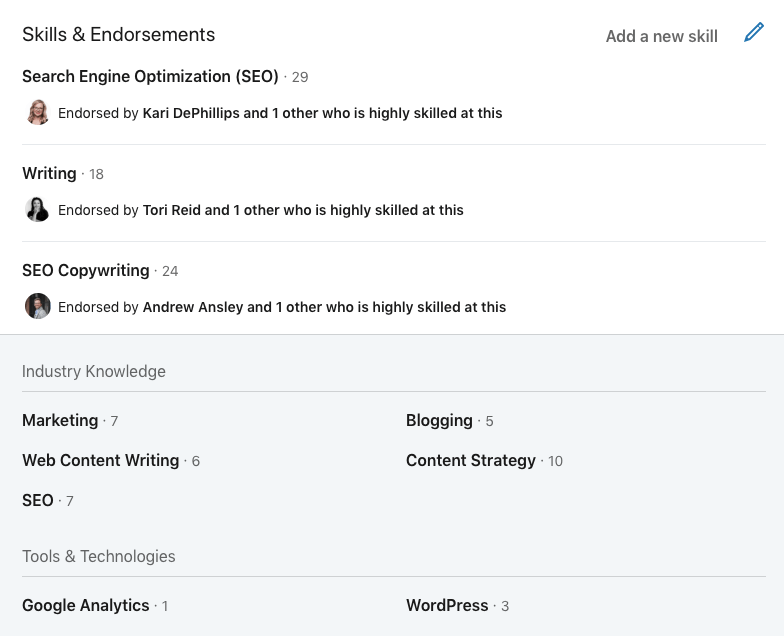
You can have three “top” skills and a longer list of other skills you have.
I recommend listing your primary skills in the top three sections, as these are the most likely to get endorsed (as they are seen first).
Endorsements
Endorsements are when other users endorse you for the skills on your profile. Again, this serves as social proof that you have the skills you say you have.
You can reach out to users on LinkedIn to endorse your skills to boost your numbers. You can also endorse users for their skills, which could prompt them to contact or endorse you.
It’s best to have many endorsements for just a few skills versus only a few endorsements for many different skills.
7. Post the right kind of content, consistently
LinkedIn has quickly evolved to reveal more SEO factors and capabilities than ever before.
And while many guides have been written on how to “hack” the algorithm, your success on the platforms really depends on what works best for you and your specific audience.
Your LinkedIn content strategy should incorporate different types of content – long-form posts, images, videos, shared blog posts, etc. – to see which ones get the best engagement.
The goal is to repeat what works, ditch what doesn’t, and revise your strategy to fit your audience and business.
One thing to note is that it is difficult to test your content’s success without consistency.
You should post different types of content multiple times throughout the day and then assess the results. If you are simply posting one short post per day, it’s unlikely that you will get any tangible data.
You may also want to look at what your competitors are posting and which types of posting are getting the most engagement there.
LinkedIn articles
LinkedIn gives an added algorithmic push to articles that are published on their platform.
In recent developments, LinkedIn allows you to customize how your SEO title and description will appear in search engines, making it even easier to improve your LinkedIn reach.
Think of some article topics relevant to your target audience on LinkedIn. Then, use LinkedIn’s own Articles function to write articles, optimize them for LinkedIn Search, and reach new users.
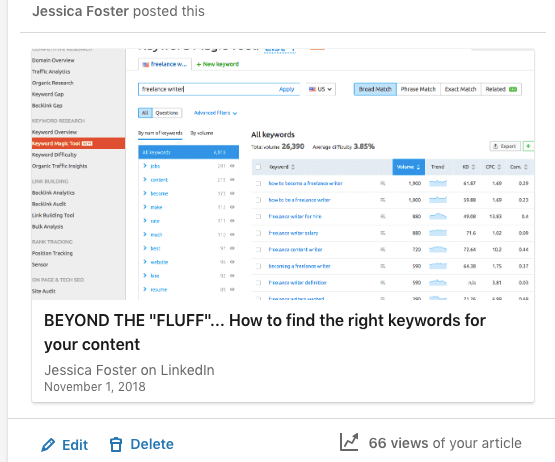
While a shared blog post may attract a small handful of website visits, an article published on LinkedIn can easily trigger 2x, 3x or 5x the views.
For this reason, it may make sense to republish your existing blog content on LinkedIn.
Just be aware of the ramifications of having two identical pieces of content competing for the same keywords.
However, if website SEO isn’t a major concern, it could be worth taking this approach for social traffic alone.
Be sure to include a call to action within your LinkedIn article to take advantage of that traffic.
Also, consider LinkedIn collaborative articles if you are eligible to contribute.
8. Give engagement, get engagement
Engaging with other accounts on LinkedIn is another way to expand your reach.
Whenever you engage in a post, your comment and name pop up on your connections’ LinkedIn feed.
You can also pop up as a second- or third-degree connection to users in their network, expanding your reach.
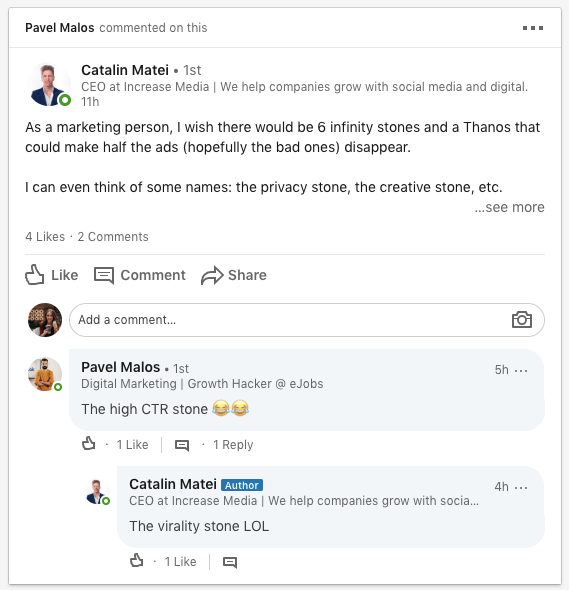
That is, the more of a presence you have on LinkedIn, the more likely you will be seen by people inside and outside your network.
Much of your time on LinkedIn should be spent engaging with other people’s content, not just posting your own content (until you come up with a content strategy that works).
It’s the best way to connect with users one-on-one and reach profiles outside your immediate network.
When users see your comment, they are likely to click on your profile to learn more about you. You can then reach out to these new viewers by requesting to connect.
These views are reflected by your notifications and in your LinkedIn analytics.
9. Understanding your LinkedIn analytics
No optimization guide is worth its weight without showing the results in terms of cold, hard numbers.
That’s why I was sure to test all of the LinkedIn best practices I encountered and any optimization hacks I came up with on my own.
I recommend marketers and business owners do the same, as LinkedIn optimization is still not cut-and-dry.
The success of your LinkedIn strategy depends on what works best for your target audience.
Post impressions, profile views, total followers and search appearances
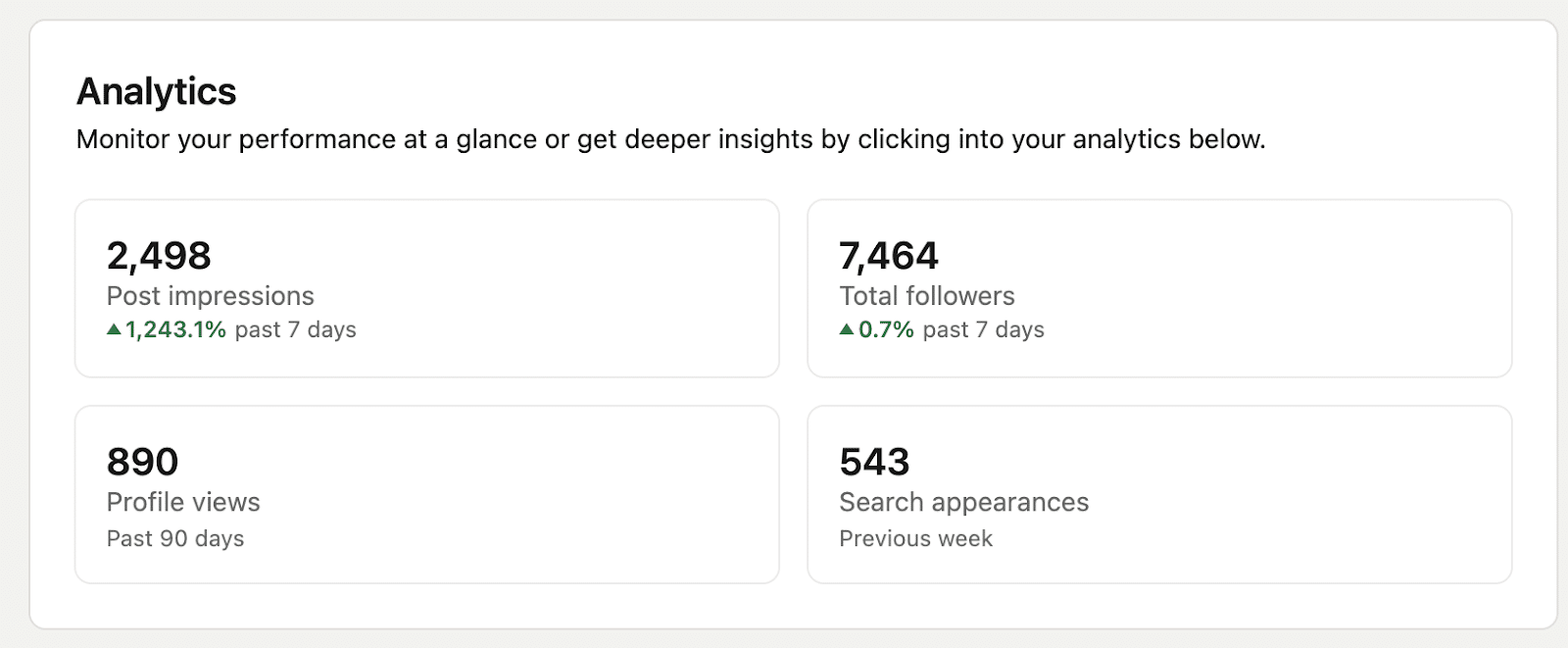
LinkedIn offers you helpful data to see how your profile is performing. You can see:
- How many people have viewed your profile.
- How many have viewed your posts (i.e., impressions).
- How many people new people have followed you.
- How often you have appeared in the search results (i.e., search appearances).
You can also see who has viewed your profile (unless they have a protected account) and examine trends over time.
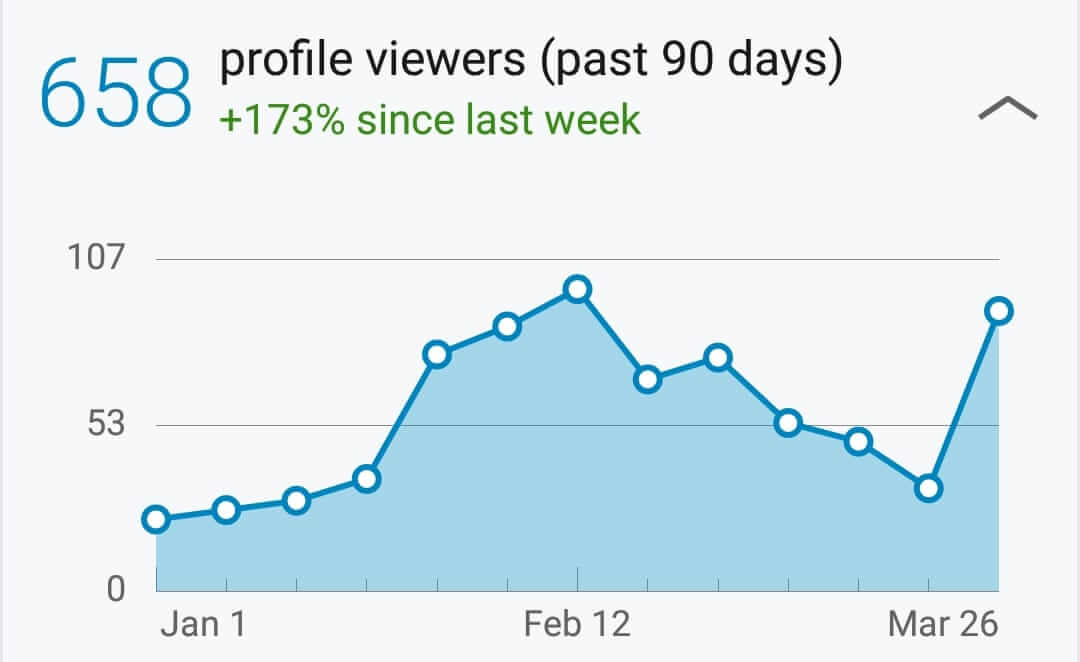
Since implementing my LinkedIn SEO strategy, I saw a 173% increase in profile views over 30 days.
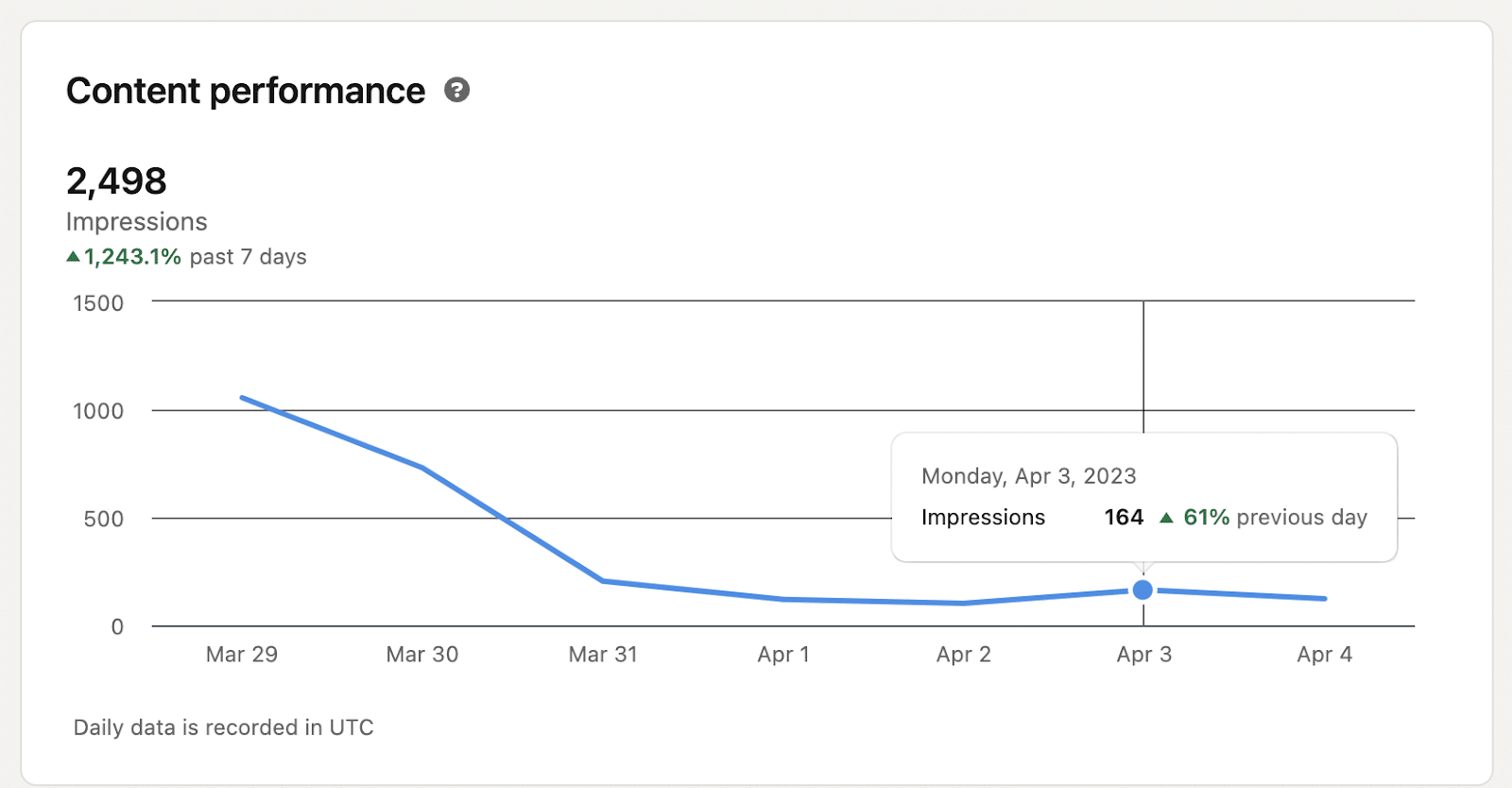
A month later, my average number of profile views has been around 160 per day (following a sharp uptick when I posted more consistently in March). That is with very little posting or engaging on LinkedIn (roughly 1-3 times daily).
I have also grown my connections from 325 to 7,464, generating dozens of qualified leads every month.
These results have come from a process of near-constant testing. I have told others to implement micro-optimizations and analyze their LinkedIn analytics to see what is working and what isn’t.
Track your conversions
The goal of LinkedIn optimization isn’t merely more traffic and connections, though.
If you are starting your LinkedIn optimization journey, I recommend tracking how many leads you generate due to your efforts (LinkedIn does not track this for you). Only then will you truly know whether your strategy is paying off.
You can tap into your Google Analytics to see how many visitors you get from LinkedIn and then set up conversion tracking there.
However, if you direct users to your LinkedIn inbox, you must track this manually or with a bot.
The numbers don’t lie. Follow what works, and you will certainly see an uptick in connections, traffic, and leads over time.
10. Gain followers via Creator Mode
LinkedIn recently announced new tools to help creators like you increase discoverability and attract new followers. Note that you have to have Creator Mode turned on to access these features.
Followers from feed
Remember when I talked about how you gain visibility via connections? In Creator Mode, you don’t have to be first-degree connections to attract new followers.
Now, whenever a user sees your content in their Feed (via the algorithm), LinkedIn prompts them to follow you (via a “Follow” button) without them having to leave their feed.
Hashtags
LinkedIn has been utilizing hashtags to better surface content (and profiles) on the platform. Be sure to include hashtags in your profile and posts to make your content easier for users to find. When a user uses LinkedIn search to find topics, LinkedIn will match their search with people/profiles that regularly talk about those topics.
Connection requests
It used to be that someone sending you a Connection request would only result in a prompt to you, but that user would not automatically become a follower.
Now, whenever someone sends you a new connection request, that person becomes one of your followers – and your content will appear in their feed.
Turn your LinkedIn profile into a lead-generation machine
By following the LinkedIn optimization tips above and testing your own ideas for optimization, you can generate high-volume traffic to your profile and convert that traffic into qualified leads for your business.
The foundation of this strategy consists of:
- Conducting LinkedIn SEO keyword research.
- Optimizing your profile aesthetic.
- Building quality connections.
- Directing visitors through your custom profile funnel.
Afterward, make adjustments based on what works for your target audience and business model.
Are you making the most of your LinkedIn profile? If not, start today.
The post LinkedIn SEO guide: Optimizing your profile for more connections, better leads appeared first on Search Engine Land.
Courtesy of Search Engine Land: News & Info About SEO, PPC, SEM, Search Engines & Search Marketing
Category seo news | Tags:
Social Networks : Technorati, Stumble it!, Digg, de.licio.us, Yahoo, reddit, Blogmarks, Google, Magnolia.
5 Python scripts for automating SEO tasks
Written on April 12, 2023 at 5:17 pm, by admin
Python is a powerful programming language that has gained popularity in the SEO industry over the past few years.
With its relatively simple syntax, efficient performance and abundance of libraries and frameworks, Python has revolutionized how many SEOs approach their work.
Python offers a versatile toolset that can help make the optimization process faster, more accurate and more effective.
This article explores five Python scripts to help boost your SEO efforts.
- Automate a redirect map.
- Write meta descriptions in bulk.
- Analyze keywords with N-grams.
- Group keywords into topic clusters.
- Match keyword list to a list of predefined topics.
The easiest way to get started with Python
If you’re looking to dip your toes in Python programming, Google Colab is worth considering.
It’s a free, web-based platform that provides a convenient playground for writing and running Python code without needing a complex local setup.
Essentially, it allows you to access Jupyter Notebooks within your browser and provides a host of pre-installed libraries for data science and machine learning.
Plus, it’s built on top of Google Drive, so you can easily save and share your work with others.
To get started, follow these steps:
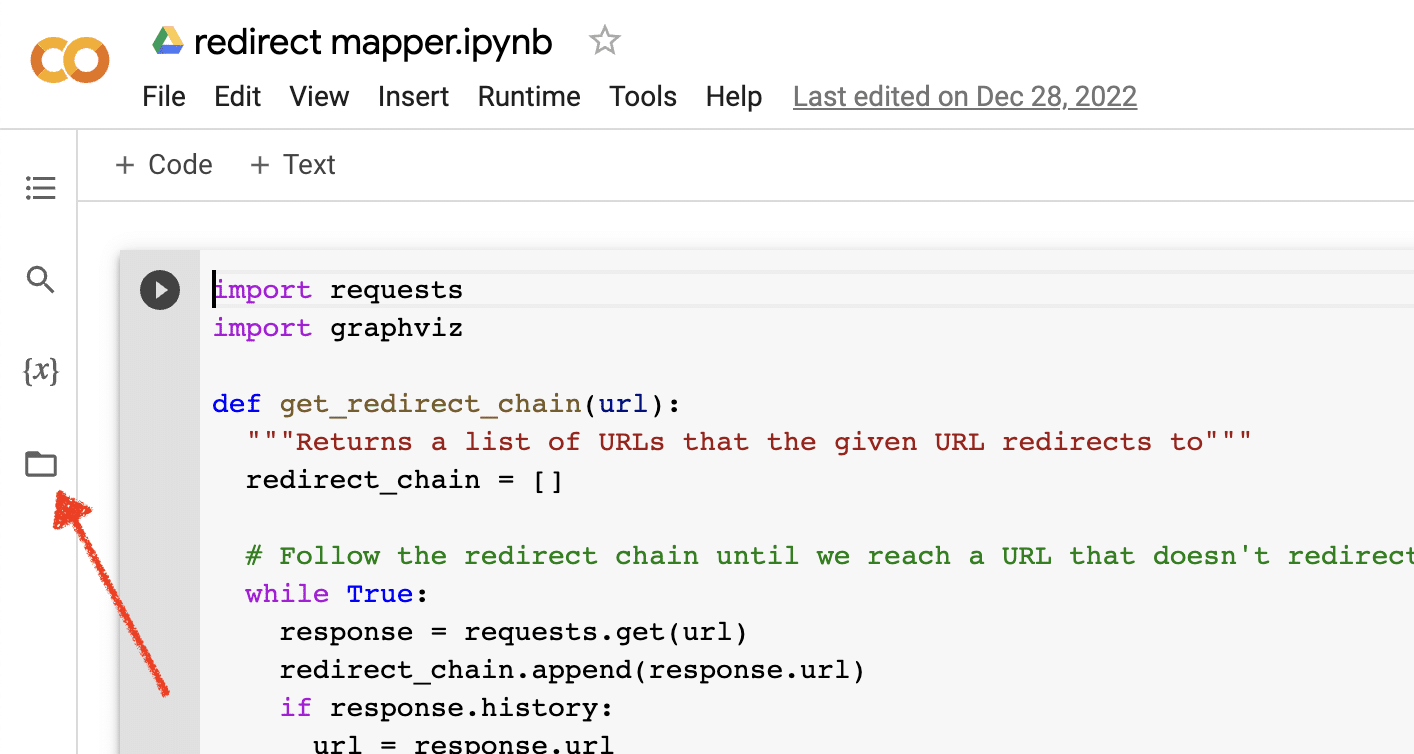
Enable file uploads
Once you open Google Colab, you’ll first need to enable the ability to create a temporary file repository. It’s as simple as clicking the folder icon.
This lets you upload temporary files and then download any results files.
Upload source data
Many of our Python scripts require a source file to work. To upload a file, simply click the upload button.
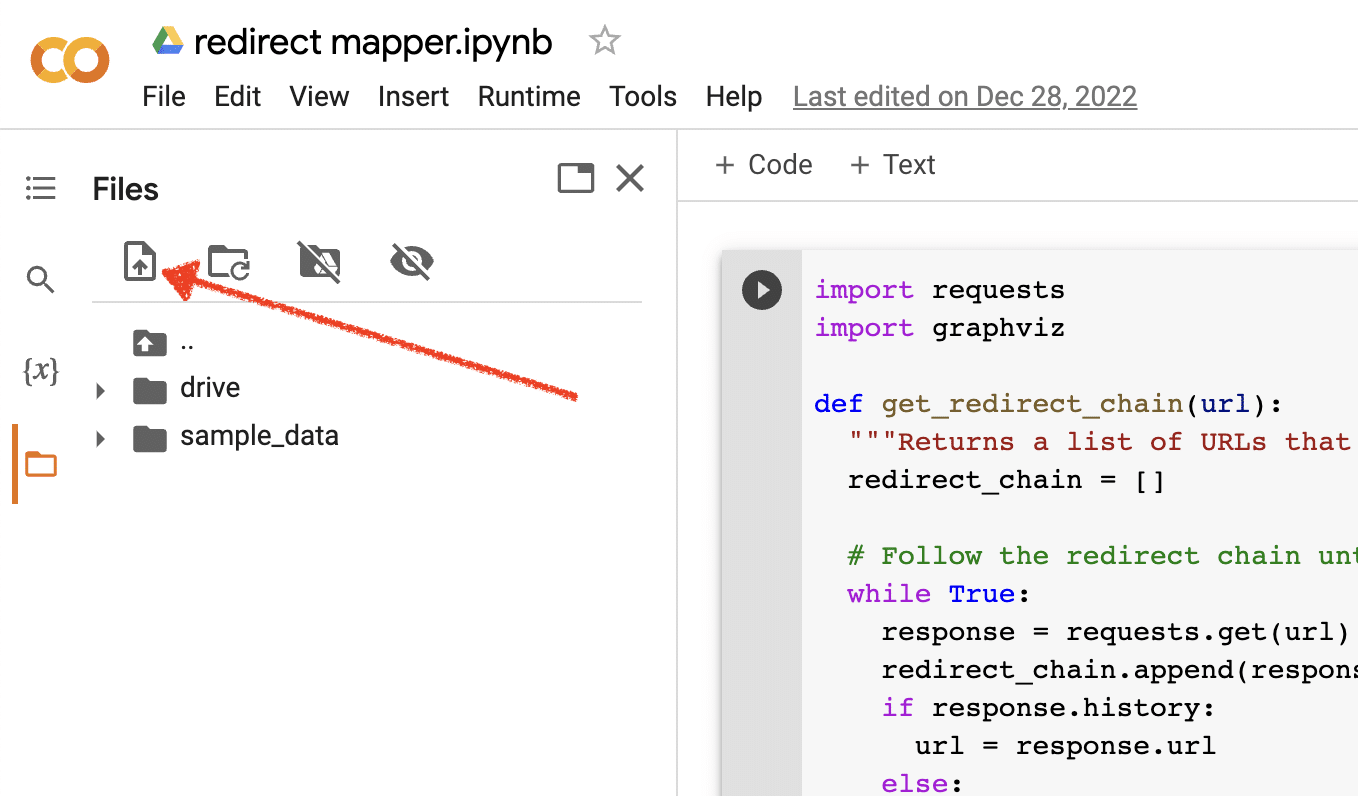
Once you finish the setup, you can start testing the following Python scripts.
Script 1: Automate a redirect map
Creating redirect maps for large sites can be incredibly time-consuming. Finding ways to automate the process can help us save time and focus on other tasks.
How this script works
This script focuses on analyzing the web content to find closely matching articles.
- First, it imports two TXT files of URLs: one is for the redirected website (source_urls.txt), and the other for the site absorbing the redirected website (target_urls.txt).
- Then, we use the Python library Beautiful Soup to create a web scraper to get the main body content on the page. This script ignores header and footer content.
- After it’s crawled the content on all pages, it uses the Python library Polyfuzz to match content between URLs with a similarity percentage.
- Finally, it prints the results in a CSV file, including the similarity percentage.
From here, you can manually review any URLs with a low similarity percentage to find the next closest match.
Get the script
#import libraries
from bs4 import BeautifulSoup, SoupStrainer
from polyfuzz import PolyFuzz
import concurrent.futures
import csv
import pandas as pd
import requests

#import urls
with open("source_urls.txt", "r") as file:
    url_list_a = [line.strip() for line in file]

with open("target_urls.txt", "r") as file:
    url_list_b = [line.strip() for line in file]

#create a content scraper via bs4
def get_content(url_argument):
    page_source = requests.get(url_argument).text
    strainer = SoupStrainer('p')
    soup = BeautifulSoup(page_source, 'lxml', parse_only=strainer)
    paragraph_list = [element.text for element in soup.find_all(strainer)]
    content = " ".join(paragraph_list)
    return content

#scrape the urls for content
with concurrent.futures.ThreadPoolExecutor() as executor:
    content_list_a = list(executor.map(get_content, url_list_a))
    content_list_b = list(executor.map(get_content, url_list_b))

content_dictionary = dict(zip(url_list_b, content_list_b))

#get content similarities via polyfuzz
model = PolyFuzz("TF-IDF")
model.match(content_list_a, content_list_b)
data = model.get_matches()

#map similarity data back to urls
def get_key(argument):
    for key, value in content_dictionary.items():
        if argument == value:
            return key
    return key

with concurrent.futures.ThreadPoolExecutor() as executor:
    result = list(executor.map(get_key, data["To"]))

#create a dataframe for the final results
to_zip = list(zip(url_list_a, result, data["Similarity"]))
df = pd.DataFrame(to_zip)
df.columns = ["From URL", "To URL", "% Identical"]

#export to a spreadsheet
with open("redirect_map.csv", "w", newline="") as file:
    columns = ["From URL", "To URL", "% Identical"]
    writer = csv.writer(file)
    writer.writerow(columns)
    for row in to_zip:
        writer.writerow(row)
Script 2: Write meta descriptions in bulk
While meta descriptions are not a direct ranking factor, they help us improve our organic click-through rates. Leaving meta descriptions blank increases the chances that Google will create its own.
If your SEO audit shows a large number of URLs missing a meta description, it may be difficult to make time to write all of those by hand, especially for ecommerce websites.
This script is aimed to help you save time by automating that process for you.
How the script works
- First, the script imports a list of URLs from a TXT file (urls.txt).
- Then, it parses all of the content on the URLs.
- Once the content is parsed, it creates meta descriptions aiming to be below 155 characters.
- It exports the results into a CSV file.
Get the script
!pip install sumy
from sumy.parsers.html import HtmlParser
from sumy.nlp.tokenizers import Tokenizer
from sumy.nlp.stemmers import Stemmer
from sumy.utils import get_stop_words
from sumy.summarizers.lsa import LsaSummarizer
import csv

#1) imports a list of URLs from a txt file
with open('urls.txt') as f:
    urls = [line.strip() for line in f]

results = []

# 2) analyzes the content on each URL
for url in urls:
    parser = HtmlParser.from_url(url, Tokenizer("english"))
    stemmer = Stemmer("english")
    summarizer = LsaSummarizer(stemmer)
    summarizer.stop_words = get_stop_words("english")
    description = summarizer(parser.document, 3)
    description = " ".join([sentence._text for sentence in description])
    if len(description) > 155:
        description = description[:152] + '...'
    results.append({
        'url': url,
        'description': description
    })

# 4) exports the results to a csv file
with open('results.csv', 'w', newline='') as f:
    writer = csv.DictWriter(f, fieldnames=['url','description'])
    writer.writeheader()
    writer.writerows(results)
Script 3: Analyze keywords with N-grams
N-grams are not a new concept but are still useful for SEO. They can help us understand themes across large sets of keyword data.
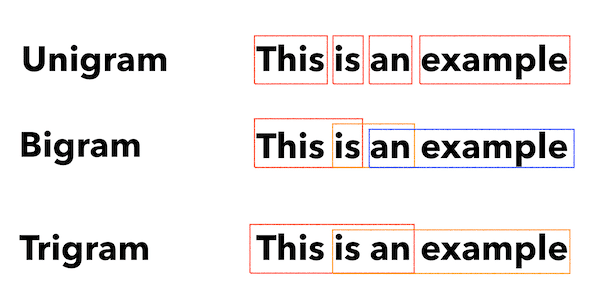
How this script works
This script outputs results in a TXT file that breaks out the keywords into unigrams, bigrams, and trigrams.
- First, it imports a TXT file of all your keywords (keyword.txt).
- Then it uses a Python library called Counter to analyze and extract the N-grams.
- Then it exports the results in a new TXT file.
Get this script
#Import necessary libraries
import re
from collections import Counter

#Open the text file and read its contents into a list of words
with open('keywords.txt', 'r') as f:
    words = f.read().split()

#Use a regular expression to remove any non-alphabetic characters from the words
words = [re.sub(r'[^a-zA-Z]', '', word) for word in words]

#Initialize empty dictionaries for storing the unigrams, bigrams, and trigrams
unigrams = {}
bigrams = {}
trigrams = {}

#Iterate through the list of words and count the number of occurrences of each unigram, bigram, and trigram
for i in range(len(words)):
    # Unigrams
    if words[i] in unigrams:
        unigrams[words[i]] += 1
    else:
        unigrams[words[i]] = 1

    # Bigrams
    if i < len(words)-1:
        bigram = words[i] + ' ' + words[i+1]
        if bigram in bigrams:
            bigrams[bigram] += 1
        else:
            bigrams[bigram] = 1

    # Trigrams
    if i < len(words)-2:
        trigram = words[i] + ' ' + words[i+1] + ' ' + words[i+2]
        if trigram in trigrams:
            trigrams[trigram] += 1
        else:
            trigrams[trigram] = 1

# Sort the dictionaries by the number of occurrences
sorted_unigrams = sorted(unigrams.items(), key=lambda x: x[1], reverse=True)
sorted_bigrams = sorted(bigrams.items(), key=lambda x: x[1], reverse=True)
sorted_trigrams = sorted(trigrams.items(), key=lambda x: x[1], reverse=True)

# Write the results to a text file
with open('results.txt', 'w') as f:
    f.write("Most common unigrams:\n")
    for unigram, count in sorted_unigrams[:10]:
        f.write(unigram + ": " + str(count) + "\n")
    f.write("\nMost common bigrams:\n")
    for bigram, count in sorted_bigrams[:10]:
        f.write(bigram + ": " + str(count) + "\n")
    f.write("\nMost common trigrams:\n")
    for trigram, count in sorted_trigrams[:10]:
        f.write(trigram + ": " + str(count) + "\n")
Script 4: Group keywords into topic clusters
With new SEO projects, keyword research is always in the early stages. Sometimes we deal with thousands of keywords in a dataset, making grouping challenging.
Python allows us to automatically cluster keywords into similar groups to identify trend trends and complete our keyword mapping.
How this script works
- This script first imports a TXT file of keywords (keywords.txt).
- Then the script analyzes the keywords using TfidfVectorizer and AffinityPropagation.
- Then it assigns a numeric value to each topic cluster.
- The results are then exported into a csv file.
Get this script
import csv
import numpy as np
from sklearn.cluster import AffinityPropagation
from sklearn.feature_extraction.text import TfidfVectorizer

# Read keywords from text file
with open("keywords.txt", "r") as f:
    keywords = f.read().splitlines()

# Create a Tf-idf representation of the keywords
vectorizer = TfidfVectorizer()
X = vectorizer.fit_transform(keywords)

# Perform Affinity Propagation clustering
af = AffinityPropagation().fit(X)
cluster_centers_indices = af.cluster_centers_indices_
labels = af.labels_

# Get the number of clusters found
n_clusters = len(cluster_centers_indices)

# Write the clusters to a csv file
with open("clusters.csv", "w", newline="") as f:
    writer = csv.writer(f)
    writer.writerow(["Cluster", "Keyword"])
    for i in range(n_clusters):
        cluster_keywords = [keywords[j] for j in range(len(labels)) if labels[j] == i]
        if cluster_keywords:
            for keyword in cluster_keywords:
                writer.writerow([i, keyword])
        else:
            writer.writerow([i, ""])
Script 5: Match keyword list to a list of predefined topics
This is similar to the previous script, except this allows you to match a list of keywords to a predefined set of topics.
This is great for large sets of keywords because it processes them in batches of 1,000 to prevent system crashes.
How this script works
- This script imports a keyword list (keywords.txt) and a topics list (topics.txt).
- Then it analyzes the topics and keyword lists and matches them to the closest match. If it doesn’t find a match, it categorizes it as other.
- The results are then exported into a CSV file.
Get this script
import pandas as pd
import spacy
from spacy.lang.en.stop_words import STOP_WORDS

# Load the Spacy English language model
nlp = spacy.load("en_core_web_sm")

# Define the batch size for keyword analysis
BATCH_SIZE = 1000

# Load the keywords and topics files as Pandas dataframes
keywords_df = pd.read_csv("keywords.txt", header=None, names=["keyword"])
topics_df = pd.read_csv("topics.txt", header=None, names=["topic"])

# Define a function to categorize a keyword based on the closest related topic
def categorize_keyword(keyword):
    # Tokenize the keyword
    tokens = nlp(keyword.lower())
    # Remove stop words and punctuation
    tokens = [token.text for token in tokens if not token.is_stop and not token.is_punct]
    # Find the topic that has the most token overlaps with the keyword
    max_overlap = 0
    best_topic = "Other"
    for topic in topics_df["topic"]:
        topic_tokens = nlp(topic.lower())
        topic_tokens = [token.text for token in topic_tokens if not token.is_stop and not token.is_punct]
        overlap = len(set(tokens).intersection(set(topic_tokens)))
        if overlap > max_overlap:
            max_overlap = overlap
            best_topic = topic
    return best_topic

# Define a function to process a batch of keywords and return the results as a dataframe
def process_keyword_batch(keyword_batch):
    results = []
    for keyword in keyword_batch:
        category = categorize_keyword(keyword)
        results.append({"keyword": keyword, "category": category})
    return pd.DataFrame(results)

# Initialize an empty dataframe to hold the results
results_df = pd.DataFrame(columns=["keyword", "category"])

# Process the keywords in batches
for i in range(0, len(keywords_df), BATCH_SIZE):
    keyword_batch = keywords_df.iloc[i:i+BATCH_SIZE]["keyword"].tolist()
    batch_results_df = process_keyword_batch(keyword_batch)
    results_df = pd.concat([results_df, batch_results_df])

# Export the results to a CSV file
results_df.to_csv("results.csv", index=False)
Working with Python for SEO
Python is an incredibly powerful and versatile tool for SEO professionals.
Whether you’re a beginner or a seasoned practitioner, the free scripts I’ve shared in this article offer a great starting point for exploring the possibilities of Python in SEO.
With its intuitive syntax and vast array of libraries, Python can help you automate tedious tasks, analyze complex data, and gain new insights into your website’s performance. So why not give it a try?
Good luck, and happy coding!
The post 5 Python scripts for automating SEO tasks appeared first on Search Engine Land.
Courtesy of Search Engine Land: News & Info About SEO, PPC, SEM, Search Engines & Search Marketing
Category seo news | Tags:
Social Networks : Technorati, Stumble it!, Digg, de.licio.us, Yahoo, reddit, Blogmarks, Google, Magnolia.
How to glean insights from impression share to boost PPC performance
Written on April 12, 2023 at 5:17 pm, by admin
Search marketers have a bevy of metrics at their disposal. It can be difficult to know exactly how to react when we’re analyzing all these metrics simultaneously.
I’m a proponent of leveraging impression share metrics to identify meaningful optimizations for my paid search campaigns.
The insights don’t necessarily come from the impression share itself, but the impression share lost due to rank or budget.
This article we’ll cover:
- What each metric represents.
- Tips for calculating these metrics at scale in a spreadsheet.
- How to take action based on the results of your analysis.
Defining impression share and related metrics
Here’s what each metric means:
- Impression share (IS): The percentage of impressions your ads receive compared to the total number of impressions your ads could get.
- Impression share lost due to budget: The percentage of impressions your ad would have received if you had an unlimited budget.
- Impression share lost due to rank: The percentage of impressions your ad would have received if your ad had the highest rank.
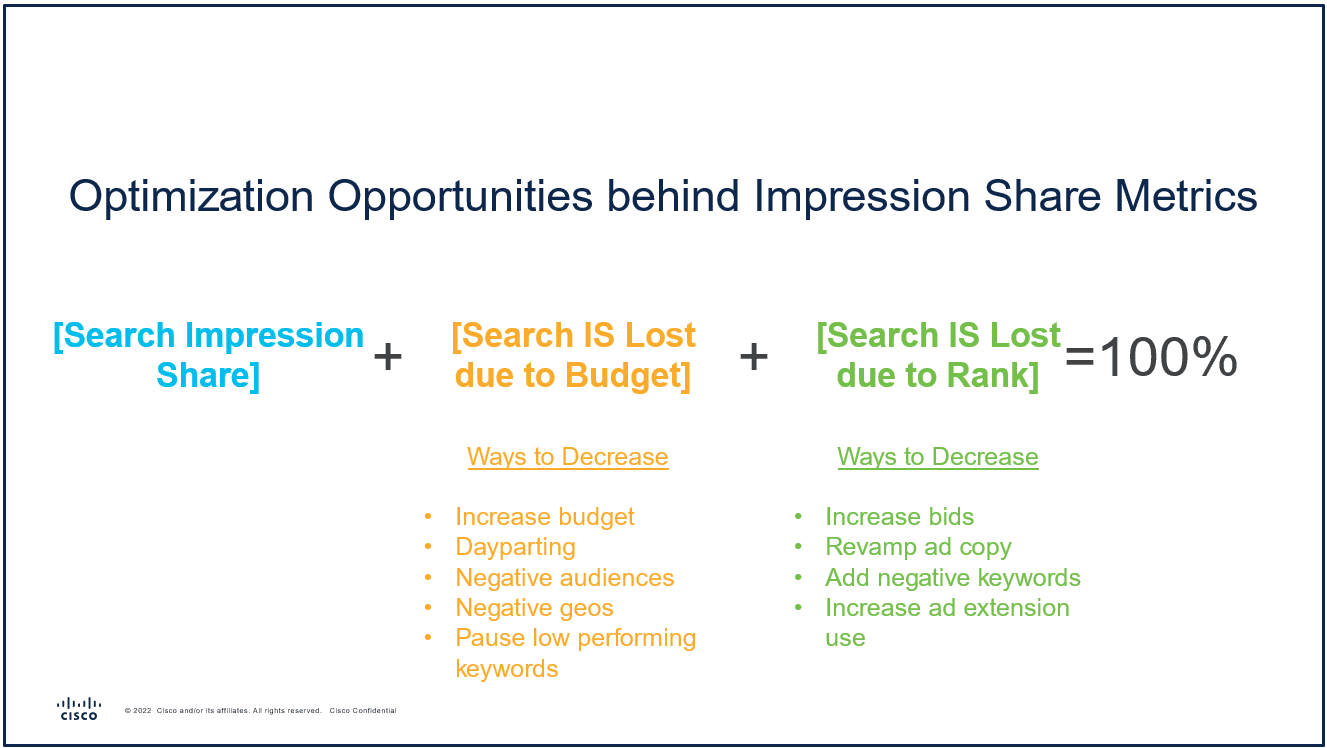
Though it might be obvious, note that the sum of these three metrics is 100%.
This is important because it can help you identify the potential impact of different optimizations. If one is significantly higher than the other, you know where to exert your energy.
Calculating impression share at scale
If you are familiar with my content, you are likely aware that I minimize my time on activation platforms and focus my energy on number crunching. (Surprise, surprise!) It’s no different with impression share metrics.
Understanding that the sum of these three metrics equals 100% also gives you the tools needed to aggregate impression share calculations at scale. It’s simply a math formula that we can replicate in a spreadsheet using basic calculations.
Before jumping into the technique, I will note that using filters in the platform should always be the source of truth, especially if you frequently see the infamous impression share of “<10%” in your account.
The below is meant to provide mathematically-backed estimates and enhance your analytical abilities, especially when dealing with a lot of data. Always go with what you see in the platform if you’re reporting to your stakeholders.
When I do see “<10%” in my analysis, I first attempt to subtract the IS Lost (Rank) and IS Lost (Budget) from 1. If either of those metrics shows as “>90%,” I use an assumption of 5%. If you include the 5% estimate, this will inherently expose you to slight accuracy risks.
The first step is calculating what I refer to as the “Universe of Impressions,” or UoI, which represents the total possible number of impressions. (I’m unsure if this metric has an official name.)
Since we know how many impressions our campaign generated and that impression share represents the proportion of the total possible impressions you showed, we can simply divide the impressions by the impression share to know the total possible impressions or UoI.

Now that we know the total number of impressions, we can calculate the estimated impressions we lost due to budget constraints by multiplying the UoI by the IS Lost (Budget).
We replicate this same calculation using IS Lost (Rank) to calculate the estimated number of impressions we’re losing to poor ranking in the auctions. I’ve combined those steps in the next screenshot.

You can always check your math by summing your impressions, estimated impressions lost (budget), and estimated impressions lost (rank) and comparing them to the UoI.
If your math is right, they should be identical.

The final step is creating a pivot table with calculated fields representing our three impression share metrics using the column titles above.
- Estimated impression share:
- [Impr.] / [Est. UoI]
- Estimated impression share lost due to budget:
- [Est. Impr. Lost (Budget)] / [Est. UoI]
- Estimated impression share lost due to rank:
- [Est. Impr. Lost (Rank)] / [Est. UoI]
With this approach, you can now adjust your pivot table and see a dynamic calculation of impression share based on the filters and inputs you include.
To illustrate this, I’ve included the highlighted campaign totals across the two weeks. Feel free to use the screenshots above to check my math.
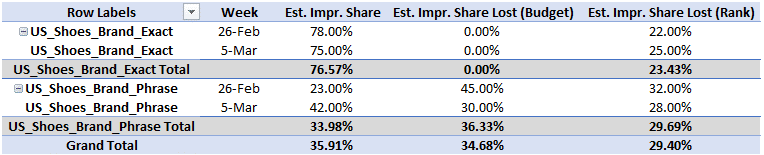
If you find tips like these useful, I encourage you to check out my previous article on Excel pivot table best practices for search marketers.
Get the daily newsletter search marketers rely on.
<input type=”hidden” name=”utmMedium” value=”“>
<input type=”hidden” name=”utmCampaign” value=”“>
<input type=”hidden” name=”utmSource” value=”“>
<input type=”hidden” name=”utmContent” value=”“>
<input type=”hidden” name=”pageLink” value=”“>
<input type=”hidden” name=”ipAddress” value=”“>
Processing…Please wait.
Optimizing based on your impression share insights
Now that you’ve done all your number crunching, it’s time to turn the analysis into action.
You know what is best for your business, and many optimizations are at our disposal.
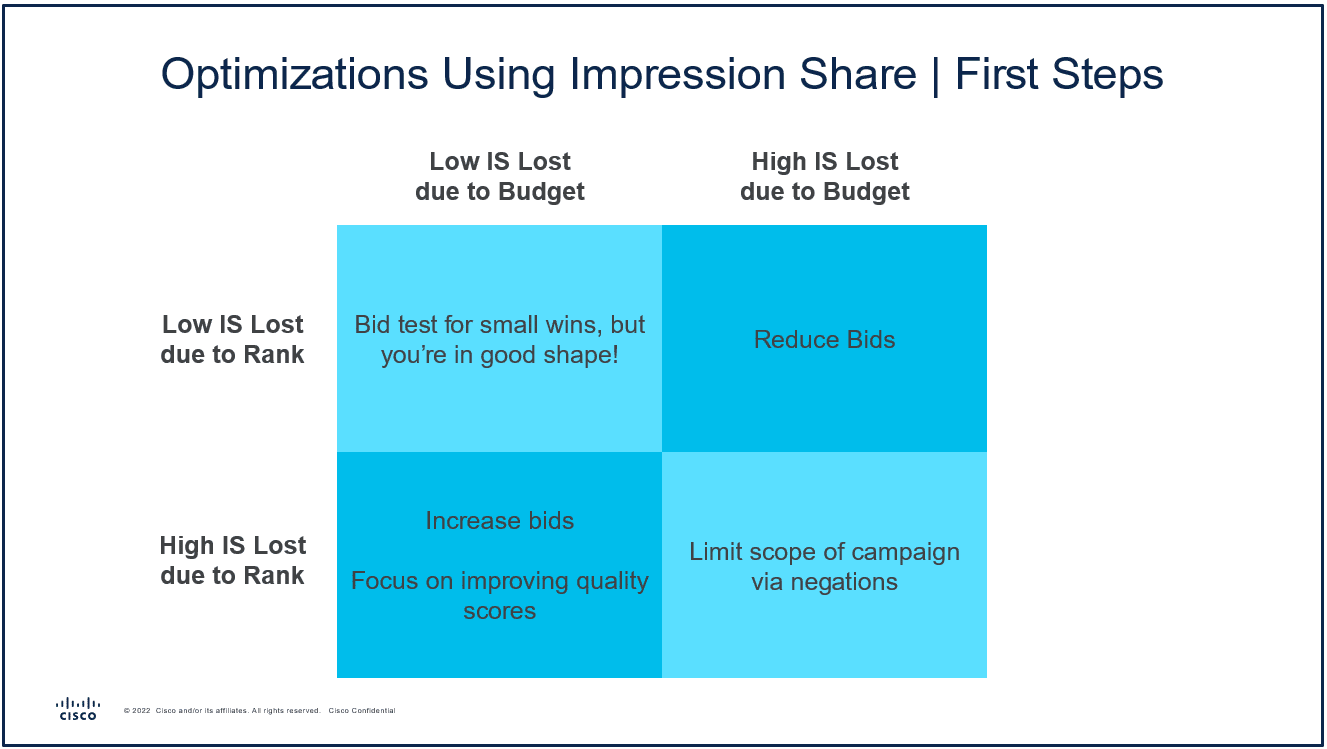
I’ve attempted to summarize how I approach optimizations based on what I see in the impression share metrics. But in reality, the lines blur between these boxes.
For example, you could increase your bids to help improve the bottom right corner scenario (high IS lost due to rank and high IS lost due to budget).
One tip I’d encourage you to implement within your campaigns is to focus on driving down impression share lost due to budget, even if that means shifting the IS lost from budget to rank.
Most advertisers can’t make budget magically appear to solve the “IS lost due to budget” problem.
This mindset will generally lead to more effective performance, as shifting the IS lost from budget to rank likely means you are culling down your campaigns or getting “stingier” about spending the budget.
To finish, here are some of my favorite approaches to limit the scope of campaigns, if that’s the optimization that makes the most sense:
- Dayparting.
- Keyword pauses.
- Segment-based negations. (Audiences, geos, devices… you name it!)
- Negative keywords.
If we’re focused on improving quality scores, here are the ways I typically try to approach this:
- Ad copy refreshes.
- Increasing the number of extensions in use.
- Negative keywords.
- Landing page testing.
It should be noted that there are other impression share metrics, such as top IS and absolute top IS.
The good news is that the calculations highlighted in this article apply to those metrics, too. They can be leveraged with general IS metrics to create more informed insights.
The post How to glean insights from impression share to boost PPC performance appeared first on Search Engine Land.
Courtesy of Search Engine Land: News & Info About SEO, PPC, SEM, Search Engines & Search Marketing
Category seo news | Tags:
Social Networks : Technorati, Stumble it!, Digg, de.licio.us, Yahoo, reddit, Blogmarks, Google, Magnolia.
Google Ads API is removing ad group and keyword forecasts
Written on April 11, 2023 at 2:16 pm, by admin
Google will be deprecating the “Keyword Plan Ad Group Forecast” and “Keyword Plan Keyword Forecast” functionalities. This change is slated to take effect on June 1, 2023.
Changes to the GenerateForecast Metrics Request. Beginning June 1, the “Generate Forecast Metrics Request” will continue to be the method for obtaining forecast data. However, the “Keyword Plan Ad Group Forecast and Keyword Plan Keyword Forecast” components will no longer be populated and will instead return empty results. The “Keyword Plan Campaign Forecast,” on the other hand, will remain functional and be returned as usual.
Updating Your Applications. If your applications rely on the “Keyword Plan Ad Group Forecast” or “Keyword Plan Keyword Forecast” features, it is critical that you update them to accommodate the upcoming changes. Make sure your applications are prepared to handle empty responses from these components.
Recommendation and Resources. Google encourages you to start updating your applications as soon as possible to ensure a seamless transition. For guidance on how to effectively use the “Keyword Plan Campaign Forecast,” you should refer to the Google Ads API documentation.
Why we care. If advertisers or publishers rely on these features in their applications, they need to update their systems to ensure continued functionality. Failing to do so may lead to disruptions or inaccuracies in their forecasting and ad performance management.
The post Google Ads API is removing ad group and keyword forecasts appeared first on Search Engine Land.
Courtesy of Search Engine Land: News & Info About SEO, PPC, SEM, Search Engines & Search Marketing
Category seo news | Tags:
Social Networks : Technorati, Stumble it!, Digg, de.licio.us, Yahoo, reddit, Blogmarks, Google, Magnolia.