

Why people hate the Google Analytics 4 user interface
Written on July 7, 2023 at 7:22 am, by admin
Marketers are not happy with the Google Analytics 4 user interface (UI).
In fact, social media has been inundated with complaints about the Universal Analytics replacement – but it’s concerns over the UI that have been dominating the conversation.
So, is the GA4 UI really as bad as some are claiming? We spoke to three digital marketing experts to find out…
‘Usability is poor – but hang in there!’
Janet Driscoll Miller, president and CEO of Marketing Mojo, isn’t a fan of GA4’s UI but said “it’s not terrible”. She believes the difficulties that arise are due tot he platform being so new and different to Universal Analytics. “I don’t think Google did a very good job with usability in the design of the interface,” she tells Search Engine Land.
- The settings and layout aren’t intuitive – “For example, if you create an Explorations report, you must first essentially import the dimensions and metrics you’d like to pull from in the first settings column, then pull from those into the second column which creates your data visualization. That’s certainly different than UA and not necessarily very clear to new users.”
- Google needs to make some tweaks – “I think I speak for most Google Analytics power users here, they really need to add back the Annotations feature. It was a great UA feature and likely isn’t difficult to program (it’s literally a note and a date) but it was so helpful to many of us, especially when doing forensic or troubleshooting projects and working with large teams.”
- Fix the sharing of Explorations reports – “When you currently create and share an Explorations report with others, you a) cannot limit who it is specifically shared with and b) those that it is shared with cannot change the report date range. Currently for others to change a shared report’s date range, the user must make a copy of the report so that user becomes that new report copy’s owner and then the date can be altered.”
If you’re struggling to navigate the new UI, simply keep practicing, Miller said.
“The more you become accustomed to how GA4 works, the easier it will get over time,” she said. “Change is hard, but this is here to stay. Before too long, we’ll all be much better with it. Hang in there!”
‘GA4 lacks basic capabilities – but we’ll get used to it’
Independent contractor and advisor, John Erikson, has been feeling increasingly frustrated with the GA4 UI. Universal Analytics was more straightforward and easier to navigate, which made simple tasks, like creating reports, much easier to carry out, he said.
Erikson explained:
- No ability to use regex in the search box: “You can only search one phrase at a time which is very limiting. The only way I could find to filter by URL patterns was to set up Audiences. But Audiences have to be set up in advance, cannot be edited/changed, and the regex is limited to 100 characters so I had to split long patterns in to many chunks to build audiences.”
- Problems arise if URL structures are tweaked: “If anything changes in the site in URL structure (which is guaranteed to happen many times in the future), the audience becomes obsolete and no way to look backwards.”
- Time-consuming mistakes: “If you make any mistake in creating an Audience, you have to discard what you did and create a new one.”
- Segments/dimensions issues: “On selecting segments/dimensions in GA4, instead of the ability in Universal to select/deselect one or more segments in a single list and click apply, you have to open customization or add comparison, click add filter, select a dimension from a long dropdown, then select dimension value from another dropdown, then apply (and you can only select one). Granted it is only a few seconds difference, but when you look at many different patterns every day, it becomes frustrating to repeat those excess UI moves over and over when you used to do it faster.”
- Clumsy design: “That same dropdown structure is used in creating/editing GA4 reports. The dropdown lists are long and it is hard to find what you are looking for. You can type in partial names and more quickly find them once you know them, but initially it is very hard to scroll through them all and find what you want. Also, you can only select one so it is hard to look at multiple dimensions/values. I do find it clumsy to use.”
Despite Erkison’s issues with the new platform, he realizes it’s here to stay and is confident he will get used to it and adapt.
“It’s just frustrating when you’ve used a system that works well for many years and see it replaced by a supposed improvement that is just harder to use and lacks such basic capabilities,” he added
Get the daily newsletter search marketers rely on.
<input type=”hidden” name=”utmMedium” value=”“>
<input type=”hidden” name=”utmCampaign” value=”“>
<input type=”hidden” name=”utmSource” value=”“>
<input type=”hidden” name=”utmContent” value=”“>
<input type=”hidden” name=”pageLink” value=”“>
<input type=”hidden” name=”ipAddress” value=”“>
Processing…Please wait.
‘GA4 is missing the simplest functions’
Chris Fox, independent analytics strategist, has also been experiencing problems with GA4’s UI. He notes that simple functions that were present in UA are now either completely missing or are more complicated and time-consuming to perform. He explained:
- “Time Series charts can only show data at the day level and cannot be changed to view data at a Week/Month level.”
- “You have to edit reports to be able to use basic dimensions like Landing Page in a Traffic report.”
- “Segments are gone and instead we have ‘Comparisons’, which don’t have preset options and do not allow you to save the ‘Comparisons’ you create like you could with Segments.”
- “If you want to add a filter to both dimensions in a report with a secondary dimension, you cannot do it in the table — rather, you have to filter one in the table and the other at the report-level at the top of the page (or both at the report-level).”
- “When you edit a report to add metrics, you are limited to 12; so I’m often editing a report just to view a certain metric and then resetting back to the previous configuration.”
- “Before, if I wanted to look at a visualization of monthly traffic for the last year, I just had to change the date granularity in the line chart on the Channels report to ‘Monthly.’ To do that in GA4, I’d have to download the data and create the chart myself in Excel/Tableau/etc.”
Venting his frustrations, Fox told Search Engine Land that these unnecessary, time-wasting changes have made GA4 “feel like a free edition of the full product which was Universal Analytics”.
Unfortunately, he joins a long list of marketers that have been making the same complaints about the GA4 UI.
Why we care: If enough people are experiencing the same problems with GA4 and these issues are then reported to Google, the search engine may review its product to make necessary changes. In the event it doesn’t, marketers will be forced to come up with their own solutions – and it will undoubtedly be easier to come together in order to brainstorm ideas.
Deep dive. For more information on how to migrate to GA4, read Google’s ‘Learn how to make the switch‘ guide.
The post Why people hate the Google Analytics 4 user interface appeared first on Search Engine Land.
Courtesy of Search Engine Land: News & Info About SEO, PPC, SEM, Search Engines & Search Marketing
Category seo news | Tags:
Social Networks : Technorati, Stumble it!, Digg, de.licio.us, Yahoo, reddit, Blogmarks, Google, Magnolia.
Study: TikTok loses popularity as ecommerce search engine
Written on July 6, 2023 at 4:18 am, by admin
Fewer U.S. adults are beginning their product searches on TikTok than a year ago, according to a CivicScience study.
Why we care. This is the latest evidence that Amazon is a platform that retail brands must pay attention to. While TikTok intends to build a $20 billion ecommerce business, the U.S. won’t be a big factor yet – and may never be. Regardless, marketing and advertising budgets will continue to follow users. But ultimately it comes down to whether TikTok is an effective platform for your brand.
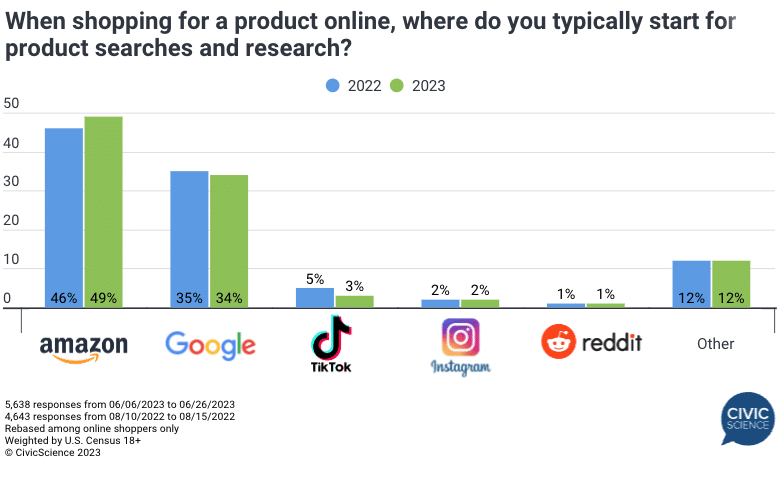
Amazon and Google reign. Overall, the starting point for product searches among online shoppers is Amazon (49%, up from 46% in 2022), followed by Google (34%, down from 35% in 2022).
Amazon also increased its popularity among younger age groups, compared to last year:
- 18- to 24-year-olds: Up 45%
- 25- to 34-year-olds: Up 44%.
Additional context. These results are similar to another U.S. survey we reported on in Amazon beats Google as starting point for product search. That survey found 38% of shoppers began product searches on Amazon, while 35% started searching on Google.
TikTok’s YoY decline. After hitting a new high in 2022, CivicScience noted a “steep decline” for TikTok among younger generations this year:
- “Usage fell from 18% to 11% among Gen Z (18-24) and from 10% to 5% among young Millennials (25-34) from August 2022 to June 2023.”
Most people who start their product searches on TikTok, Instagram or Reddit are between the ages of 18-34, CivicScience noted.
About the study. The CivicScience study asked U.S. online shoppers: “When shopping for a product online, where do you typically start for product searches and research?” It then compared 5,638 responses received between June 6 and 26 to 4,643 responses from August 2022.
The post Study: TikTok loses popularity as ecommerce search engine appeared first on Search Engine Land.
Courtesy of Search Engine Land: News & Info About SEO, PPC, SEM, Search Engines & Search Marketing
Category seo news | Tags:
Social Networks : Technorati, Stumble it!, Digg, de.licio.us, Yahoo, reddit, Blogmarks, Google, Magnolia.
Threads, Meta’s Twitter alternative, to launch July 6
Written on July 6, 2023 at 4:18 am, by admin
Meta is expected to launch Threads, a “text-based conversation app,” under the Instagram brand, tomorrow (July 6).
What is Threads. According to the download page:
“Threads is where communities come together to discuss everything from the topics you care about today to what’ll be trending tomorrow. Whatever it is you’re interested in, you can follow and connect directly with your favorite creators and others who love the same things – or build a loyal following of your own to share your ideas, opinions and creativity with the world.”
Why we care. Since Elon Musk bought the platform, Twitter has found new and exciting ways to upset many of its users and lose advertising revenue. Threads may be a platform for marketers and advertisers to watch – but ultimately wherever users go, the budgets and marketing investments will follow.
Admit one. You can sign up for the app already. To do so, go to Instagram search, type in “Threads” and you’ll see an “Admit One” ticket in the right side of the search box.

Clicking on that will take generate your ticket, which you can then click on to be notified when the app is available to download.

Not available in EU. One region where Threads won’t be launching is the EU. Meta has received multiple fines in the EU for violating the General Data Protection Regulation (GDPR).
According to the Independent:
“Sources close to Meta said that the tech giant has refrained from rolling the service out in the EU because of what the company believes is a lack of clarity contained in the EU’s Digital Markets Act. Under the Act, companies such as Meta become “gatekeepers”, with restrictions on how they mingle users’ personal data.”
No Instagram Threads app in the EU: Irish DPC says Meta’s new Twitter rival won’t be launched here, The Irish Independent
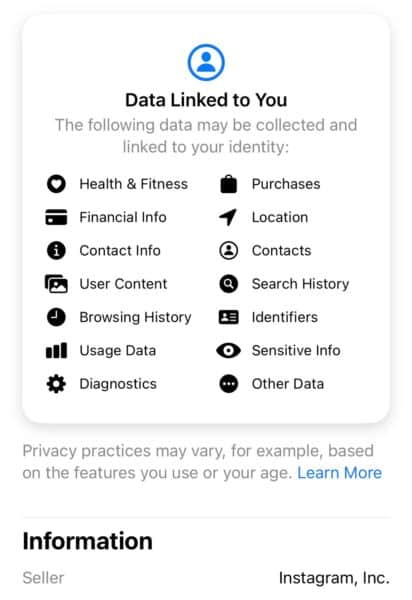
Extensive data collection. Meta will be collecting a lot of user data, including search history, browsing history and much more:
The post Threads, Meta’s Twitter alternative, to launch July 6 appeared first on Search Engine Land.
Courtesy of Search Engine Land: News & Info About SEO, PPC, SEM, Search Engines & Search Marketing
Category seo news | Tags:
Social Networks : Technorati, Stumble it!, Digg, de.licio.us, Yahoo, reddit, Blogmarks, Google, Magnolia.
Build authority and dominate organic search like a boss by Cynthia Ramsaran
Written on July 6, 2023 at 4:18 am, by admin

It’s time to challenge the belief that the market for organic traffic around any given topic is unknowable. It is actually quite objective and, when measured properly, can provide the context that’s glaringly missing from modern SEO strategies and make organic content part of a winning go-to-market strategy.
Join Ryan Brock, Chief Solution Officer at DemandJump, as he reveals how to revolutionize your SEO approach using Pillar-Based Marketing as a unifying methodology that allows you to include SEO in your go-to-market strategy confidently.
Register and attend “Build Authority and Dominate Organic Search Like A Boss,” presented by DemandJump.
Click here to view more Search Engine Land webinars.
The post Build authority and dominate organic search like a boss appeared first on Search Engine Land.
Courtesy of Search Engine Land: News & Info About SEO, PPC, SEM, Search Engines & Search Marketing
Category seo news | Tags:
Social Networks : Technorati, Stumble it!, Digg, de.licio.us, Yahoo, reddit, Blogmarks, Google, Magnolia.
10 things we hate about Google Analytics 4
Written on July 6, 2023 at 4:18 am, by admin
Google Analytics 4 hasn’t exactly got off to the best start with marketers.
In fact, it’s getting pretty awkward – some advertisers are so disappointed with the new program that they’ve even been hosting funerals for its predecessor, Universal Analytics.
But what is it about GA4 that’s got the world of digital marketing so riled up?
We decided to ask our readers in a GA4 readiness poll to find out. Below, we’ve put together a list of the most common complaints. Let us know if you and your team can relate…
1. User interface
GA4’s user interface was hands-down the biggest issue our readers reported.
The UI was described as “slow”, “laughable” and a few other adjectives we’re opting not to publish.
Independent sales and marketing contractor, John Erikson, told us:
- “When on selecting segments/dimensions in GA4, instead of the ability in Universal to select/deselect one or more segments in a single list and click ‘apply’, you have to open customization or add comparison, click add filter, select a dimension from a long dropdown, then select dimension value from another dropdown, then apply (and you can only select one).
- “Granted it is only a few seconds difference, but when you look at many different patterns every day, it becomes frustrating to repeat those excess UI moves over and over when you used to do it faster.”
- “That same dropdown structure is used in creating/editing GA4 reports. The dropdown lists are long and it is hard to find what you are looking for. You can type in partial names and more quickly find them once you know them, but initially it is very hard to scroll through them all and find what you want.
- “Also, you can only select one so it is hard to look at multiple dimensions/values. I don’t know the answer to fixing this, but I do find it clumsy to use.”
2. Data lag
Another major concern for marketers has been the delay of same day data on GA4.
Advertisers have stressed that they need the ability to monitor performance constantly and are confused as to why the new analytics platform doesn’t appear to have this function.
Ron Weber, Sr Director at Actian, explained:
- “The data latency is a joke, taking 12-24 hours to report on what is happening prevents this from being an actionable tool.”
- “I wish I wasn’t backlogged for the past few years and thus could/would have realized this before.”
- “Maybe Google will just move the computing power from UA -> GA4 so that this will change? [praying]!”
3. Data discrepancies
Marketers raised concerns about discrepancies on GA4 too.
Differences in information had resulted in some worrying that the data being served therefore couldn’t possibly be accurate, resulting in people questioning if they can trust GA4.
Sabine Walton, Senior SEO Manager at Handlerbund Marketplace, told us:
- “What I find problematic is the discrepancy between GA4 API and the respective Looker Studio Connector. Dimensions that are present in the API and even per default in the GA4 reporting interface are apparently missing in the Looker Studio connector, e.g. Landing Page dimension.”
- “The Google Team seems to work on that, because at least the landing page dimension is now present. But that also means that I have to minus two days before UA data collection comes to an end – then adjust and check my numerous reports again and again.
- “I am as ready as the tool is, but I certainly do not look forward to working solely with GA4. I am also thinking about looking for alternative tools to GA4.“
4. Hard to use
Marketers across the board have been reporting that GA4 is incredibly difficult to use.
Even seasoned advertisers are finding it challenging trying to navigate their way around the new platform.
SEO and marketing consultant Jason McDonald told Search Engine Land:
- “GA4 is a disaster. It is so much harder to use than UA, and completely non-intuitive.”
- “It is nearly impossible to drill down by clicking as was possible than UA.
- “It is the Windows Vista of Google Analytics, and all the cognoscenti are afraid to say publicly that it is garbage. But everyone knows it is garbage.”
5. Lack of resources
With so many marketers struggling as they try to figure out GA4, many are questioning why Google hasn’t provided more educational resources explaining how the new tool works.
The marketing team at Storis told us:
- “I found most of the answers that I was stuck on from taking private courses through SMX or finally getting to a knowledgeable Google team member.
- “Their documentation really lacked especially where there were major functional changes or gaps. I kept trying to figure out how to replicate things that weren’t brought over.
- “Also, many of the people on Google’s own team aren’t up to speed making support calls confusing.”
6. No basic option
Some advertisers explained that marketing doesn’t wear a one size fits all hat.
While some of the more complex settings may suit some, other professionals, such as bloggers, would just like access to basic tools on GA4 and are wasting time and money trying to understand features they don’t need to use.
Eb Gargano from Productive Blogging told us:
- “One of the things I have observed is that many bloggers and online businesses have been totally losing their minds over GA4 – wasting days (and in some cases weeks) stressing over this, when their time could have been much better spent elsewhere.”
- “The truth is most bloggers and online businesses need only a simple setup and an understanding of the basic reports. But no one is saying that, and online business owners are being scared into believing they need to spend lots of money on expensive courses and a lot of time creating multiple custom reports.”
- “I think it’s a real shame there isn’t a ‘GA4 Lite’ for users who only need basic data.”
7. Lack of features
Another common complaint from marketers responding to our poll was the lack of features GA4 has to offer in comparison to Universal Analytics.
Marketers seemed particularly bothered by the removal of attribution features.
Elizabeth Rule, account manager and local SEO analyst for Sterling Sky, told us:
- “I’ve been using GA4 as much as possible the past month to get used to it, but honestly it just feels like a clunkier version of GA3 with fewer features that I actually want to use.
- “I find myself wanting to go back to GA3 every time I use GA4 – and it’s not because I’m just too used to it. Some of the features I use every day are missing or extremely complicated to find in GA4.”
Get the daily newsletter search marketers rely on.
<input type=”hidden” name=”utmMedium” value=”“>
<input type=”hidden” name=”utmCampaign” value=”“>
<input type=”hidden” name=”utmSource” value=”“>
<input type=”hidden” name=”utmContent” value=”“>
<input type=”hidden” name=”pageLink” value=”“>
<input type=”hidden” name=”ipAddress” value=”“>
Processing…Please wait.
8. Difficulty recreating reports
Clients and marketers alike have desperately been trying to recreate reports in GA4 that they previously relied upon when using Universal Analytics.
Unfortunately, it seems for many that this task has proved far more difficult than it should have been.
Tom Demers, co-founder and managing partner of SEO and PPC agency Measured SEM, told us:
- “Clients are frustrated with recreating their existing reports in GA4, particularly for specific edge cases, recreating dashboards in third-party reporting tools – including Looker Studio.”
- “There is also a lot of work around recreating events / goals within GA4 (and confusion around not seeing those events in certain reports).”
9. Reports
Marketers also complained that they were struggling to simply create reports in GA4 – an issue that didn’t impact them when they were working with UA.
According to many marketers who took part in our poll, Google has made many unnecessary changes when it comes to building reports, making their workload more difficult.
Eric Bushaw, search engine optimization manager at G5, told us:
- “In time, I think GA4 will enable greater insights than UA did.”
- “With that said, some of the seemingly arbitrary changes to how reporting can be done are frustrating.
- “Eliminating views, restrictions around how custom segments can be used, and other seemingly unnecessary changes are going to make life difficult for us once UA is really gone.”
10. Bugs
Several marketers contacted Search Engine Land to report bugs within GA4, claiming many features weren’t working as intended. Issues being flagged included syncing issues with Looker Studio Dashboard and AMP new script not working.
SEO consultant John McAlpin told us:
- “The platform still has a lot of bugs, and we find ourselves spending more time figuring out why attribution is not properly labeled and why the data is inconsistent.”
Let’s not panic
Marketers have found the enforced migration from Universal Analytics to GA4 tough, so it can be reassuring to know this challenge is being felt across the industry.
But regardless of how difficult the adjustment has been, search marketing expert and SMX Advanced speaker Kayle Larkin told Search Engine Land it’s important marketers get on board with Google’s latest analytics program as it will likely be around for a long time. She said:
- “There’s an age-old saying that the grass isn’t always greener on the other side.”
- “People use the internet in completely different ways than in 2012, and I see GA4 as Google’s answer for future-proofing website analytics. The industry needs a free option.”
- “Marketers need to pause for a moment and think about what information is really useful and helpful - what they need to know.”
- “Himanshu Sharma said it well on LinkedIn: ‘It is important to remember that we are not in the business of data retrieval. We are in the business of data analysis to improve ROI.’”
- “Either way, you need to understand your data and how that supports your marketing initiatives.”
Larkin went on to explain that change within any platform and any industry can cause people to panic. But as time passes, confidence and familiarity increases, causing attitudes to change. She concluded:
- “Everyone was mad when Facebook updated their interface and ‘couldn’t find anything’. It was ‘horrible’ and ‘the end of Facebook.’”
- “Because we use Facebook daily, that was quickly forgotten, and no one even remembers what the old interface looked like.”
- “The response to the GA4’s interface – you see the same reaction when any platform changes its interface. People do not like change.”
- “But GA4 is so customizable, and with LookerStudio – there are a lot of options for getting the reports to visualize information and insights in a meaningful way.”
Did deeper
If you’re struggling to navigate GA4, why not sign up for a GA4 training course?
Alternatively, for free information and resources on how to use GA4, read the Google Analytics 4 account training guide and support guide
The post 10 things we hate about Google Analytics 4 appeared first on Search Engine Land.
Courtesy of Search Engine Land: News & Info About SEO, PPC, SEM, Search Engines & Search Marketing
Category seo news | Tags:
Social Networks : Technorati, Stumble it!, Digg, de.licio.us, Yahoo, reddit, Blogmarks, Google, Magnolia.
ChatGPT Browse with Bing temporarily disabled
Written on July 5, 2023 at 1:15 am, by admin
Open AI has disabled the Bing search feature it has added to its ChatGPT AI service. “We’ve disabled the Browse with Bing beta feature out of an abundance of caution while we fix this in order to do right by content owners,” Open AI posted.
Open AI said it is working on bringing the feature back but for now it had to disable the feature because it reportedly allowed access to paywalled content.
Browse with Bing. Open AI added Bing Search to ChatGPT as a premium service in May. Doing so added to ChatGPT more up-to-date information and timely information powered by Bing Search. ChatGPT has a data set from 2021 or earlier, which is why using Bing Chat provided a better experience for more timely questions. With Bing Search in ChatGPT, the service can “provide timelier and more up-to-date answers with access from the web,” the company wrote.
The service was for ChatGPT Plus subscribers.
Disabled on July 3rd. On July 3, 2023, Open AI disabled the Browse with Bing feature on ChatGPT. It was disabled “out of an abundance of caution,” the company wrote. “Ww are working to bring the beta back as quickly as possible,” the AI company added.
Paywalled content loophole. Last week, many noticed that ChatGPT’s Browse with Bing feature was able to access content behind a paywall. Here is a tweet I spotted back then:
ChatGPT Plus users can use Browsing Mode to navigate around paywalled articles:
Tested this on a paywalled article from Fortune Magazine.
After GPT-4 Browsing printed the article, I paid for the Fortune subscription to confirm – it was the same text. ChatGPT did not… pic.twitter.com/YI8ohiY11H
— AI Breakfast (@AiBreakfast) June 26, 2023
Mikhail Parakhin from Microsoft replied to that on Twitter, saying, “In Bing Chat we have a mechanism to prevent paywalled content from leaking into answers (if publisher set up the “paywall” flag).” “I will let OpenAI know they should double-check this,” he said back then. I guess Microsoft Bing is working with Open AI’s ChatGPT team to resolve the issue on Open AI’s side. I do not believe this impacts Bing Chat.
What it looks like. Here is a screenshot showing how it is enabled for Plus subscribers:

Why we care. The Browse with Bing feature in ChatGPT made the service even more useful to searchers and people with questions. It is unclear when the feature will return but I suspect it will return soon.
The post ChatGPT Browse with Bing temporarily disabled appeared first on Search Engine Land.
Courtesy of Search Engine Land: News & Info About SEO, PPC, SEM, Search Engines & Search Marketing
Category seo news | Tags:
Social Networks : Technorati, Stumble it!, Digg, de.licio.us, Yahoo, reddit, Blogmarks, Google, Magnolia.
Authority management: A new discipline in the era of SGE and E-E-A-T
Written on July 5, 2023 at 1:15 am, by admin
With the rise of large language models (LLMs), mass-produced AI content is becoming more prevalent and the risk of incorrect information spreading also grows.
Thus, it is increasingly important for search engines and answer machines to identify trustworthy and authoritative sources and weed out all others.
This recent evolution in SEO requires new tasks, skills and roles.
This article explores a new potential marketing discipline called “digital authority management” and the role of E-E-A-T in a new search environment like Google’s Search Generative Experience (SGE).
Quality verification for Google search: E-E-A-T’s influence and role
The huge influence of E-E-A-T in today’s Google search can no longer be ignored.
An author’s general authority and credibility become more significant at a time when mass-produced, identical AI content and disinformation are rampant.
Below is a summary of possible areas of influence of E-E-A-T in Google search:
Rankings in the classic Google search results
At least since the documentation of the Google Core Updates, the importance of E-E-A-T as a ranking influence has been confirmed since 2018.
Display in Google Discover and Google News
According to Google, E-E-A-T is used for playout on Google News and Discover one of the three most important factors.
Helpful content system
E-E-A-T plays an important role here. According to the Helpful Content System documentation:
“Google’s automated systems are designed to use many different factors to rank great content. After identifying relevant content, our systems aim to prioritize those that seem most helpful. To do this, they identify a mix of factors that can help determine which content demonstrates aspects of experience, expertise, authoritativeness, and trustworthiness, or what we call E-E-A-T.”
Showing indicative snippet elements like star reviews, FAQ snippets, sitelinks
Rich snippet elements are not displayed for every result, even though they have implemented the necessary structured data.
From my observation, there must be a sitewide factor that may or may not show these items depending on the topic. E-E-A-T would be a suitable standard for choosing results that are getting rich snippets.
Indexing
One of the big challenges for Google is the cost-effective crawling and indexing of URLs and content. In times of mass content created with AI, this challenge increases exponentially.
Google’s Gary Illyes recently commented on indexing in the Search Off the Record podcast. He pointed out that proportionately less content will be indexed in the future and that website owners should pay more attention to the quality of their content so that it is indexed.
E-E-A-T would be a way to exclude entire website areas from indexing in a scalable way without having to crawl every single URL.
Get the daily newsletter search marketers rely on.
<input type=”hidden” name=”utmMedium” value=”“>
<input type=”hidden” name=”utmCampaign” value=”“>
<input type=”hidden” name=”utmSource” value=”“>
<input type=”hidden” name=”utmContent” value=”“>
<input type=”hidden” name=”pageLink” value=”“>
<input type=”hidden” name=”ipAddress” value=”“>
Processing…Please wait.
E-E-A-T as a meta factor at author level
When it comes to E-E-A-T, I often read that one should optimize at the document level, but it is quickly forgotten that, in addition to the main content (MC), it is primarily about the evaluation of the author or the content creator. I call them “source entities.”
The search quality rater guidelines clearly state that the main focus should be on the reputation of the website and the content creator in the page quality rating.
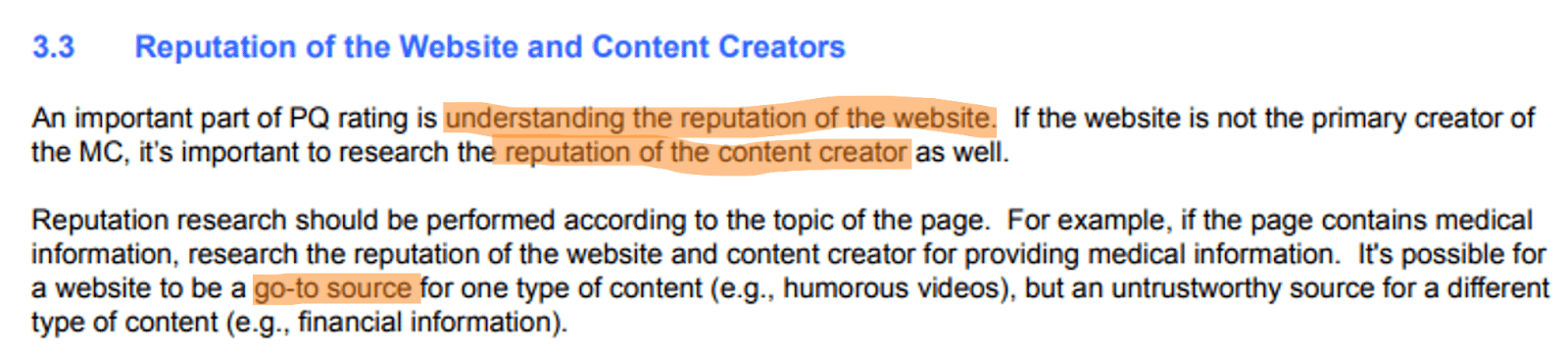 Source: Google search quality rater guidelines
Reputation can be used analogously to trust, which is the focus of E-E-A-T.
Here, we need to distinguish between the source entity (publisher or author) and the website (domain).
Websites are to be understood as digital representations of source entities, so they are closely related to each other.
An E-E-A-T evaluation takes place primarily on a meta level for the website, source entity, or content creator.
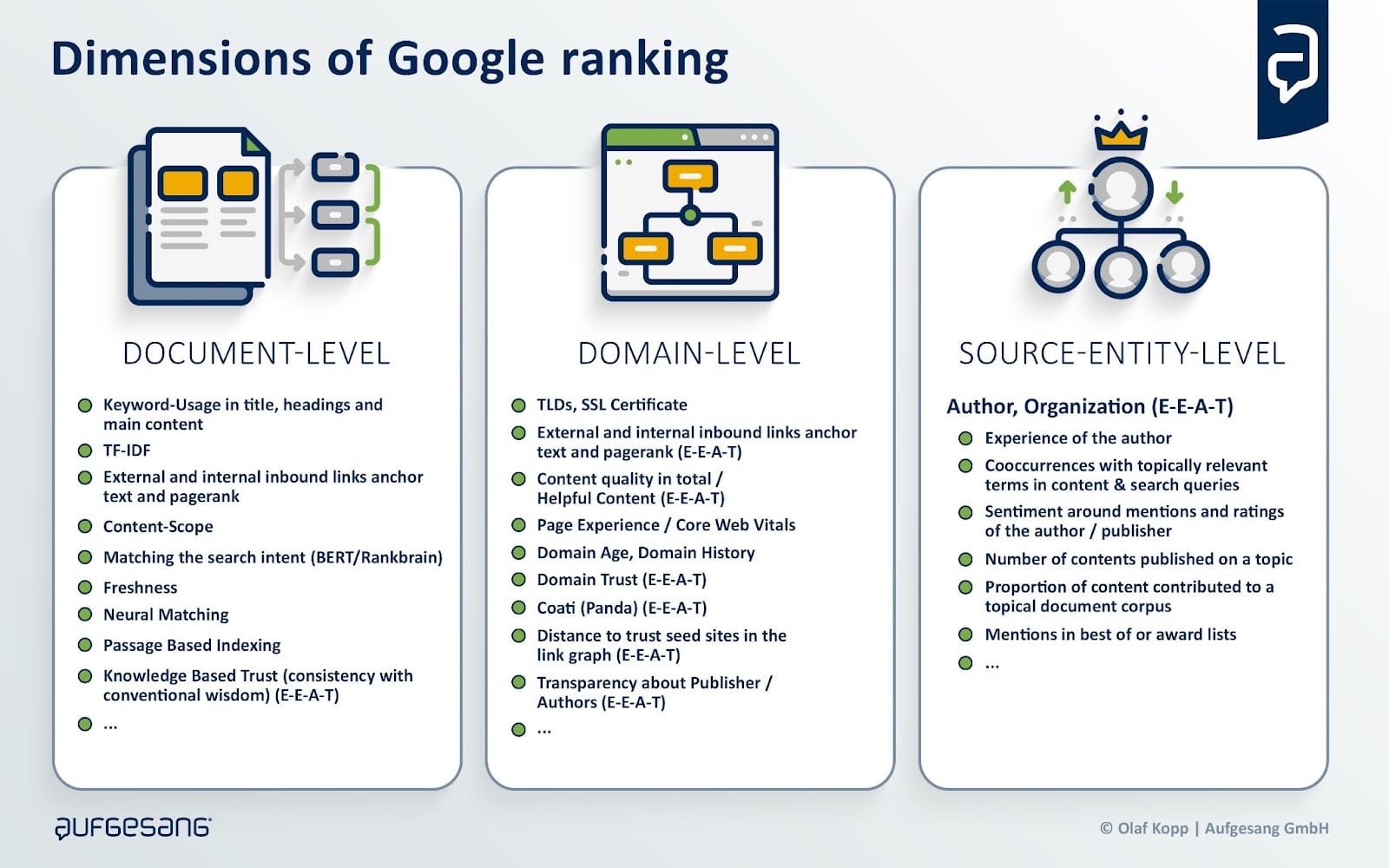
The reputation of a website should be checked based on the information published there and, above all, by researching independent sources such as:
- Reviews.
- References.
- Recommendations by independent experts.
- Forum discussions.
- Wikipedia.

Off-page sources provide information about the source entity on About Us pages and comments on the main content.
It is about evaluating a consistent and qualitative overall picture of the source entity or content creator.
In my article “14 ways Google may evaluate E-A-T,” I have identified over 14 measurable signals that may play a role in E-E-A-T.
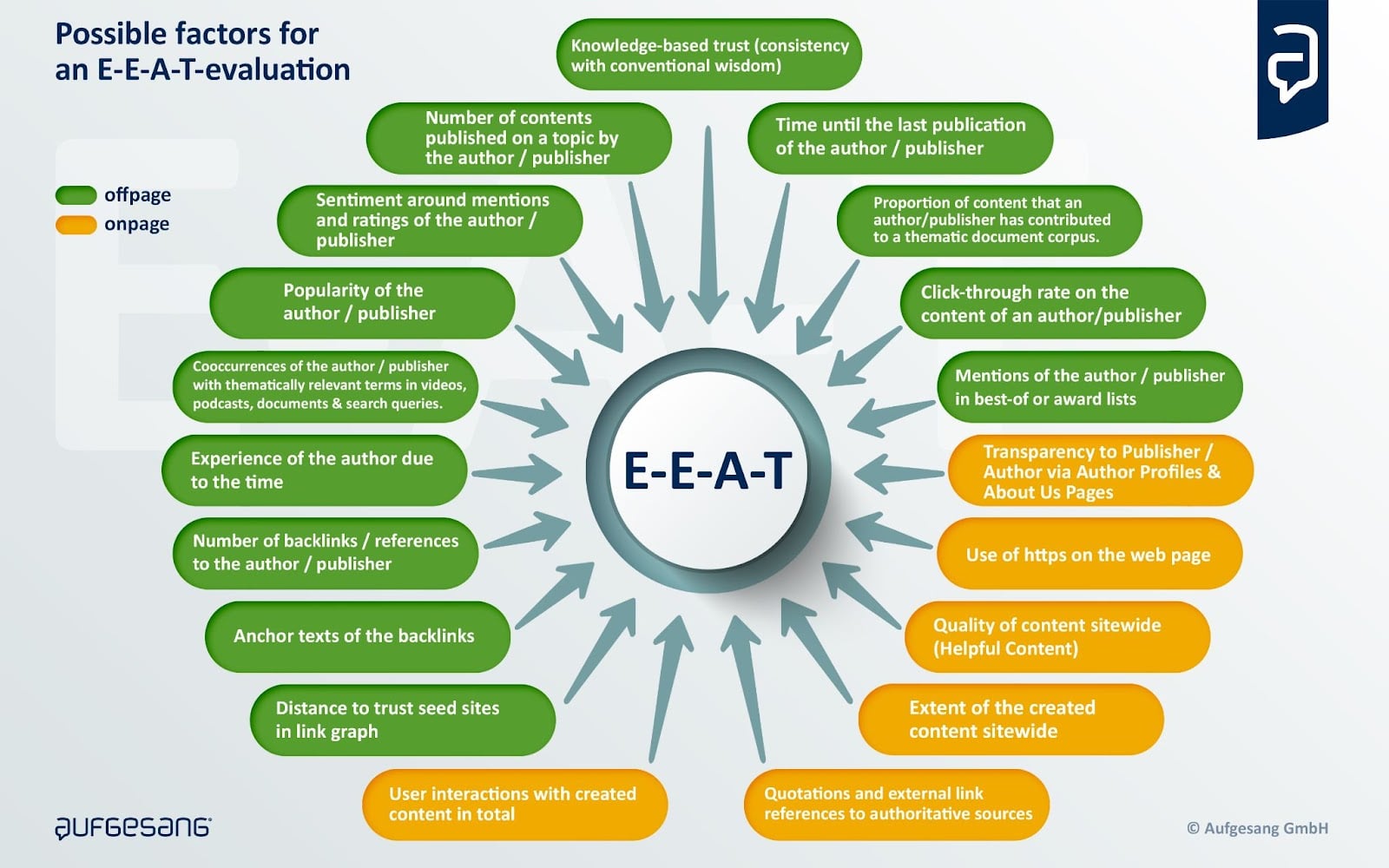
Google has made it clear several times that E-E-A-T is not a direct ranking factor and that there is no uniform E-E-A-T score. Rather, E-E-A-T is a mix of factors that gives an overall picture of experience, expertise, authoritativeness and trustworthiness in content and the source entity.
E-E-A-T can be understood as a quality classifier that provides content with a ranking bonus after document scoring. This ranking bonus is higher for YMYL topics than other topics and searches.

Possible ranking process including E-E-A-T at Google
Websites can be divided into different quality levels, described in the Google patent, “Website Representation Vector to Generate Search Results and Classify Website.”
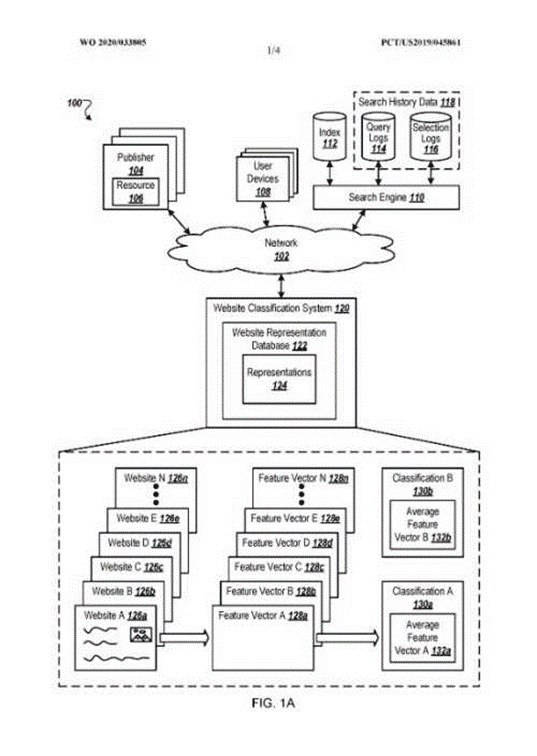
Depending on the level, the ranking bonus can vary.
As we can see, building a reputation, authority and credibility that can be measured by Google plays an increasingly important role in Google rankings.
In How Google may identify and evaluate authors through E-E-A-T, I explain in more detail how Google can evaluate source entities at this meta level.
The possible role of E-E-A-T on generative AI applications like Bard
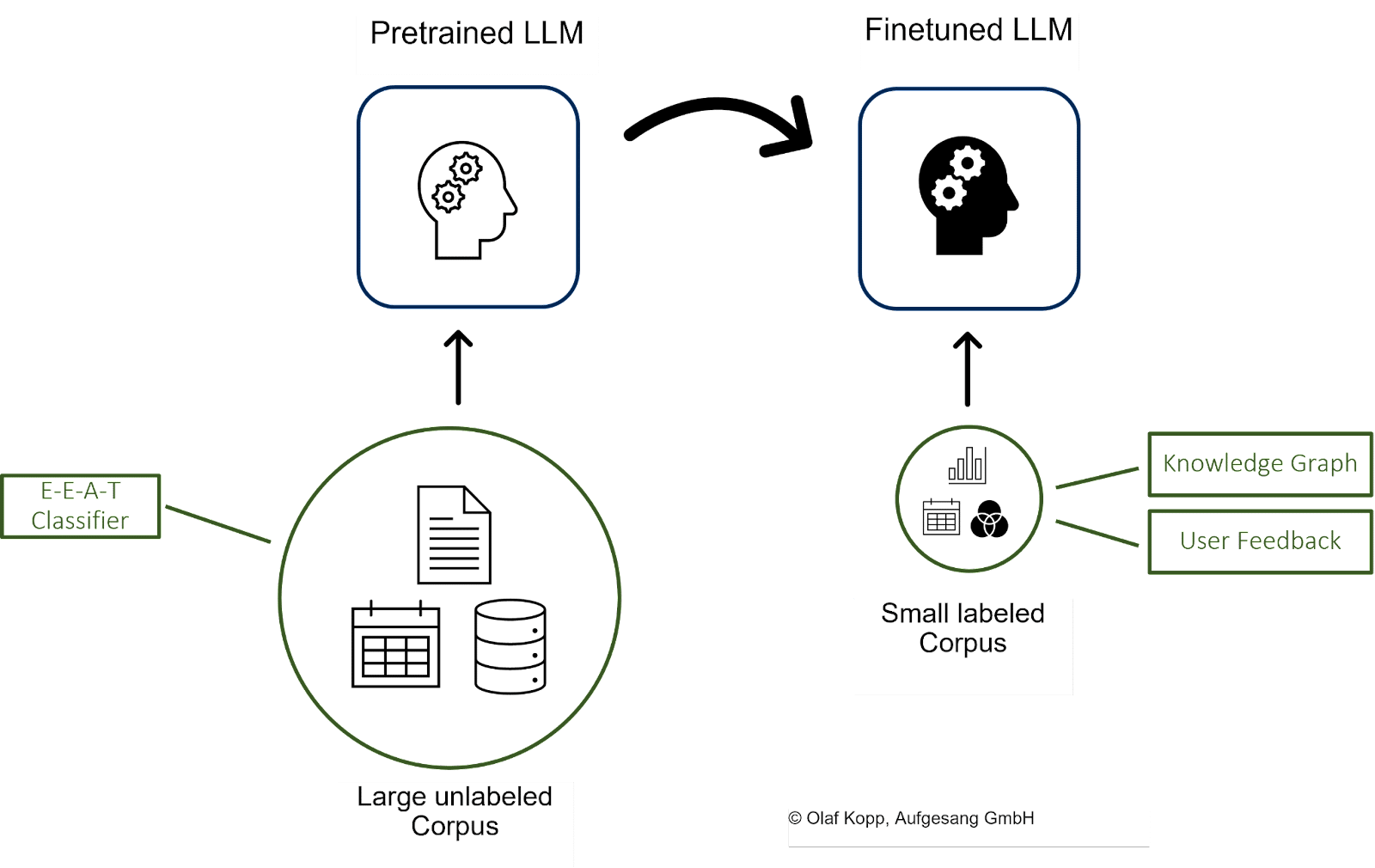
LLMs such as GPT, BARD or PaLM learn using training data from selected sources. This process takes place as part of natural language understanding.
We have seen LLM-based outputs through ChatGPT and will see more in the future through the AI snapshot box and conversational mode on Google SGE.
For the training data to be as valid as possible, providers of generative AI applications must ensure that the underlying data corpus comes from trustworthy sources.
Google could also use the E-E-A-T concept to select these sources and only access those that belong to a certain quality class.
This would enable Google to update the data corpus for training the LLMs on a big scale. The facts from the Knowledge Graph could be used for fact-checking.
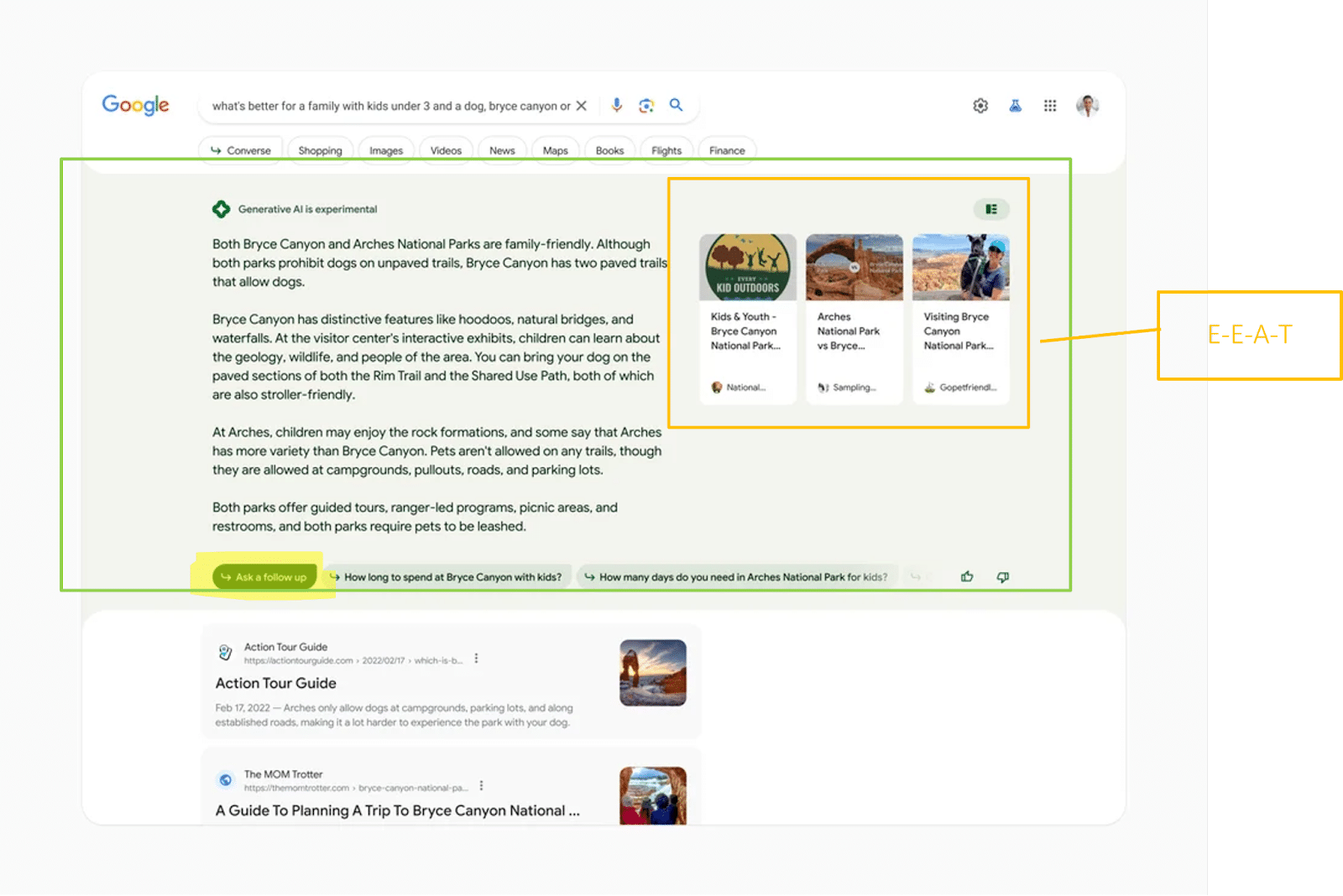
The link boxes in the snapshot box refer to results related to the AI-generated response, according to Google.
Because the links’ positions are highly visible, Google will have to pay attention to particularly trustworthy sources. Here, too, E-E-A-T can play an important role.
The author’s experience and expertise, the delivery in the new perspective feed should play an important role, according to Google, which suggests the reference to the double E in E-E-A-T.

Future product or solution searches could look like this:

Aim for your products and solutions to be included in topically relevant AI-generated responses by leveraging relevant sources selected as training data for LLMs.
This is the only way to create the necessary co-occurrences of product or company plus topic/product group.
This also turns you into an authoritative brand with a solid reputation for the algorithms.
The role of digital authority management
Building a brand and reputation are originally the task of brand management, marketing and PR – basically, beyond classic SEO.
However, those responsible for brands rarely concern themselves with the effects of their efforts on generating algorithmically measurable signals.
In many companies, SEO and brand management are far apart and don’t often talk to each other. So there is a gap that brand managers and SEOs in most companies have yet to close. I believe digital authority management is the answer.
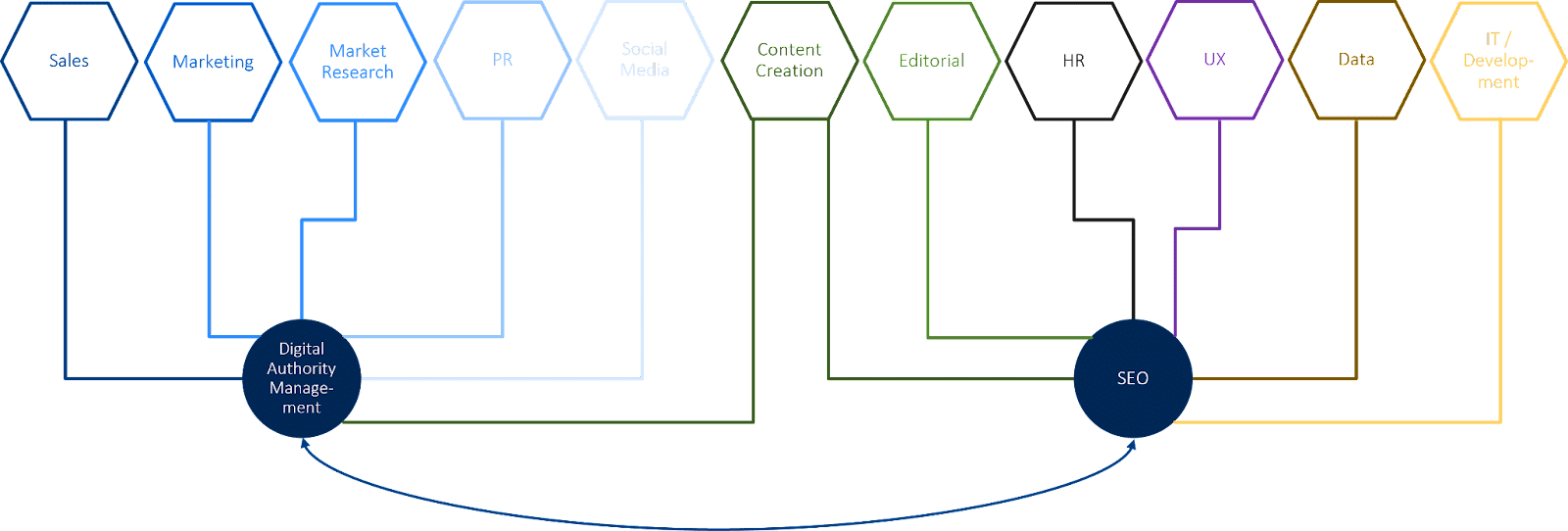
Digital authority management involves SEO and branding and is responsible for building digital brand to improve visibility in search engines and generative AI-controlled output applications.
A digital authority manager plans and promotes efforts to generate algorithmically measurable signals of topic leadership and brand positioning. In addition, this role is responsible for the consistency of the signals and the digital sentiment around the company.
Here are some approaches to the tasks of a digital authority manager:
- Positioning of authors or companies as experts.
- Establishing a digitally recognizable themed tour.
- Ensuring the consistency of author and company descriptions in online media.
- Earning and controlling links from authoritative media.
- Designing marketing and PR campaigns that influence brand searches/
- Identifying resources used (by Google) for training LLMs.
- Controlling sentiment-related signals such as ratings.
- Controlling brand-related online samples.
- Managing influencer relations and influencer marketing.
- Closing exchanges with social media, SEO, link building, content creation, PR, marketing and brand management.
Rethinking your digital branding and organizational structure
The significance of building digital brands is growing in the era of generative AI. Digital brand building involves generating signals that work for people and the algorithms of digital gatekeepers such as search engines.
It is time to rethink your corporate structure, break down silos and work toward a user-centric organization.
User-centric companies do not structure themselves according to channels but to user needs. They are also up to speed with technological developments.
Interface disciplines such as digital authority management become more vital to create bridges between departments and make the silos penetrable.
The post Authority management: A new discipline in the era of SGE and E-E-A-T appeared first on Search Engine Land.
Courtesy of Search Engine Land: News & Info About SEO, PPC, SEM, Search Engines & Search Marketing
Category seo news | Tags:
Social Networks : Technorati, Stumble it!, Digg, de.licio.us, Yahoo, reddit, Blogmarks, Google, Magnolia.
Twitter didn’t just block unregistered users, it blocked Google Search
Written on July 3, 2023 at 10:14 pm, by admin
In the past few days, Google Search has dropped over half of the indexed URLs from Twitter from the Google Search index. This was done after Twitter added a “feature” on Friday afternoon only to display tweets to signed-in and registered users; also, the throttling going on at Twitter right now is probably not helping.
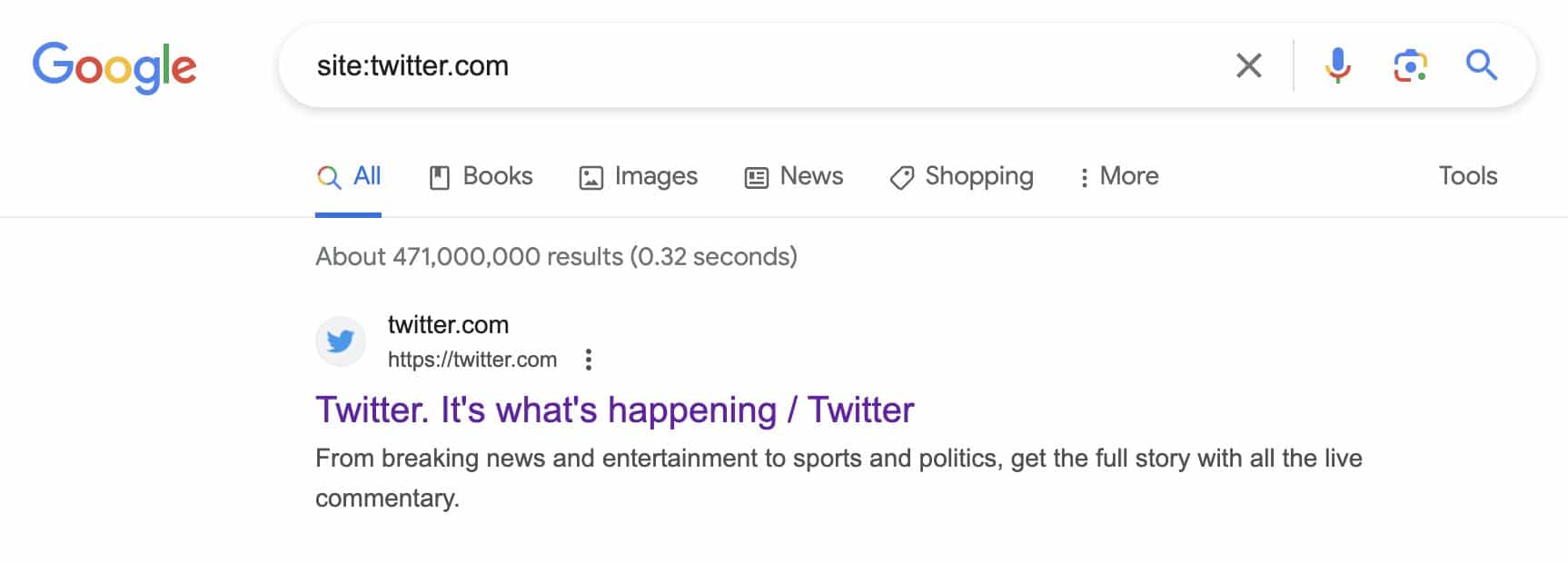
Last I checked, it looks like Twitter went from 471 million tweets indexed by Google to 180 million tweets indexed by Google. That is a 62% drop in index saturation by Google of Twitter.com.
Index count dropping. On Friday, right shortly after Twitter blocked unregistered users from seeing public tweets, I took a screenshot of a site command in Google Search for Twitter. While we all know Google site commands are by far not accurate, the downward trend of indexed URLs is very clear.
Here is that screenshot showing 471 million results in Google’s index from Twitter.com:
I did the same site command right before writing this story and I now see 180 million results in Google’s index from Twitter.com:

Don’t trust the site command? Glenn Gabe shared a screenshot on Twitter of third-party tool, Semrush, showing Twitter’s visibility dropping in Google Search:

Firehose. Let’s not forget that Google Search can still show new tweets from Twitter in Google Search. Google has a long-standing deal with Twitter for its firehose. That is why when you do some Google Searches, you can still see the Twitter carousel for some queries.
Here is what that can look like:

Old tweets. But the old tweets seem to be dropping out and gradually finding its way out of the core Google web search index. So that means less visibility for Twitter in Google Search, it means less access to searchers and journalists finding content on Twitter and I guess overall less ad impressions for Twitter’s platform.
Why we care. If you have a brand that relies a lot on Twitter and the visibility those tweets get in Google Search, that may be impacted, especially if that visibility is from older tweets. Also, some older tweets that may have ranked well in Google Search, may no longer be ranking too well right now.
It is unclear if Twitter will reverse course on this decision or decide to use the supported markup for paywalled content, which should help the content stay indexed by Google Search.
Right now, Twitter seems to be a bit of a mess, for many reasons.
The post Twitter didn’t just block unregistered users, it blocked Google Search appeared first on Search Engine Land.
Courtesy of Search Engine Land: News & Info About SEO, PPC, SEM, Search Engines & Search Marketing
Category seo news | Tags:
Social Networks : Technorati, Stumble it!, Digg, de.licio.us, Yahoo, reddit, Blogmarks, Google, Magnolia.
9 GA4 training courses to help confused marketers
Written on July 1, 2023 at 4:11 pm, by admin
Marketers have been pulling their hair out trying to get to grips with Google Analytics 4 – fortunately, we’ve got some good news.
There are a bunch of incredible courses and resources available that’ll boost your confidence and understanding of how to use the new platform.
Here, we’ve compiled a list of 9 Google Analytics 4 training courses that you may want to consider.
1. Marketing Land
Cost: $249
Level: Advanced
Duration: Two days
Search Engine Land’s former ‘Search Marketer of the Year’, Colleen Harris, is running this SMX Masterclass course online live on August 16 and 17. “The Marketing Land course is designed to give people practical applications of GA4,” Harris said. “It’s also looking at GA4 under the theme of ‘I got through July now what do I do?’ So much of GA4 this last year has just been getting things set up now it’s time to go back and say ‘how can I get more out of this tool?’”
Harris will be covering the following topics:
- How to compare Universal GA and GA4 data after the move to GA4
- Understanding how to build audiences to use within advertising plus a deep dive into the advertising reporting in GA4
- Best practices for custom reporting and libraries
- Differences between custom events, parameters and dimensions
- How to leverage GTM for custom events and parameters
2. Google Analytics 4 (GA4)
Cost: $600
Level: Three learning levels – principles, intermediate and advanced
Duration: One day
This course, put together by The Chartered Institute of Marketing, is available both in-person and online. It sets out to teach marketers how to implement GA4 and show them the advantages this system has over its predecessor, Universal Analytics.
Key features of the course include:
- Insights powered by artificial intelligence (AI)
- Deeper audience integration with Google Ads
- Customer lifecycle-framed reporting
- Customer-centric data measurements
- New navigation and reporting
- Enhanced e-commerce reporting
- Customise reports
- Using explore reports
Get the daily newsletter search marketers rely on.
<input type=”hidden” name=”utmMedium” value=”“>
<input type=”hidden” name=”utmCampaign” value=”“>
<input type=”hidden” name=”utmSource” value=”“>
<input type=”hidden” name=”utmContent” value=”“>
<input type=”hidden” name=”pageLink” value=”“>
<input type=”hidden” name=”ipAddress” value=”“>
Processing…Please wait.
3. Google Analytics 4 Kickstarter
Cost: $2,500 (for any team size)
Level: Beginner to intermediate
Duration: Six hours in total, spread across two three-hour sessions on different days
Delivered to you and your team live online, no experience is necessary for Measure Lab’s GA4 course – although there are more advanced courses available. The course comprises four modules designed to help marketers get up to speed with Google’s new analytics tool.
The course covers the following topics:
- How GA4 works
- Account structure and setup
- Using the interface
- Key metric definitions
- Tracking your campaigns
- Standard acquisition reports
- Attribution modelling
- Advanced marketing reports
- Reporting identities
- Event and page reporting
- Event customisation
- Funnels and user flows
- Building and using Audiences
- Exploration techniques
- Segments
- Activation
4. Google Analytics 4 (GA4) for SEO
Cost: $49.99
Level: Beginner to intermediate
Duration: 10 videos
SEO consultant Joe Hall created this all inclusive GA4 course specifically to help SEOs. In the course, Hall details each step to getting your website set up on GA4, as well as how to build various custom reports for organic traffic.
The course covers the following topics:
- Setting things up
- Events and conversions
- Collections and library
- How to create an organic traffic report
- How to create an organic landing pages report
- How to create an organic conversions report
- How to create a referring search engines report
- How to create an organic sessions GEO map report
- How to create an organic traffic dashboard
- GA4 Organic Traffic Report Creation Cheat-Sheet [PDF]
5. Google Analytics 4 (GA4) Complete Course
Cost: $225
Level: Intermediate to advanced
Duration: 7 HD video lessons to watch at your own pace
Love Data’s practical and comprehensive course was created to help marketers master GA4 and give them a much needed confidence boost. The lessons teach you how to build GA4 reports and use them to improve the performance of your website and/or campaign.
This course covers the following topics:
- How to use the default reports and customize them to meet your needs.
- Correctly track inbound marketing campaigns and report on their performance.
- Create custom audiences for in-depth analysis, reporting, and remarketing.
- The major differences between GA4 and Universal Analytics.
- Using conversion and e-commerce reports to measure and optimize conversions.
- Understanding how your marketing channels work together to drive conversions.
- Configuring GA4 to collect meaningful and accurate data
6. Google Analytics 4: Implementation and Configuration
Cost: $635
Level: Intermediate
Duration: One day
Available in person and online, Jellyfish’s GA4 course was designed for marketers who already have some knowledge of GA4, such how reports are created and data is collected. It teaches all marketers need to know about setting up GA4, configuring and auditing properties and how the new platform differs from UA. Marketers will also have their newfound knowledge put to the test with hands-on, in-platform exercises.
This course covers the following topics:
- Introduction to GA4 & Considerations
- Planning a GA4 Implementation
- Initial GA4 Set-up
- Enhanced Measurement
- Event & Ecommerce Configuration
- Custom Definition Set-up
- GA4 Property Settings
- GA4 Product Integrations
7. Become Great at Google Analytics 4
Cost: $299
Level: Intermediate
Duration: 5 hours 9 minutes
Created by Charles Farina, Head of Innovation at Adswerve, this course aims to teach marketers everything they need to know to get started with GA4. Farina discusses an array of topics from data integrations to funnels to pathing reports. Upon completion, marketers are awarded a certificate.
Key features of the course include:
- Understanding why GA4 is the future of Google Analytics and why getting started now is important
- Learning about the new event-driven data model GA4 uses and how it is similar or different to other analytics solutions
- Developing an implementation plan for dual-tagging or migration of your existing Google Analytics properties
- Ability to leverage enterprise features that were previously only available in Google Analytics 360 including the BigQuery integration, funnels, and unsampled data
8. Bespoke GA4 Training Solutions for every business
Cost: From $1,620
Level: Beginner to intermediate to advanced
Duration: One day
Optix Digital Academy offers bespoke training days, which can be delivered in-person and online, to suit your business’ needs. Marketers are invited to submit a brief detailing specific areas they need assistance with ahead of the course, and an outline of the training day is then agreed between the company and your business.
This course covers the following topics:
- Introduction to GA4
- GA4 & GTM
- Setting up GA4
- GA4 Interface
- E-commerce in GA4
- Events & conversion tracking
- Reports
- Explore
- Advertising
- Developer Support
9. Google Analytics 4 for Beginners - New Google Analytics
Cost: $70
Level: Beginner
Duration: Two-hours on demand video
This Udemy course is available on mobile and TV, and was created for people starting their careers in digital marketing. A certificate is awarded upon completion with students graduating with new skills in being able to analyze website and campaign performance.
This course covers the following topics:
- What is Google Analytics 4 and how it works02:31
- GA4 Data Model
- Creating a GA4 property
- Upgrading from Google Analytics to Google Analytics 4
- Overview of Google Analytics reports
- Understanding Acquisition Reports
- Campaign Tracking
- Campaign Builder
- Engagement Reports
- Active Users and Stickiness
- Retention Reports
- Analysis Hub Overview
- Exploration Analysis
Why we care. One of the most common complaints we saw when reviewing the answers to our GA4 readiness poll was that marketers don’t think Google has provided enough resources with regards to using the new analytics system. If you’re in this boat and are struggling with GA4, it’s essential you brush up on your knowledge so that you can continue to monitor the performance of your campaigns or else you won’t be able to accurately report your successes back to clients.
What’s the problem with GA4? Marketing Land course creator Colleen Harris told Search Engine Land that there are a lot of differences between UA and GA4, and marketers are finding the changes challenging. “There are a lot of new features in GA4 and workflow updates,” she explained. “This is also a time where most digital marketers are already trying to do so much with little time, and this is one more big thing.”
Harris added that the attribution changes within GA4 are currently posing the biggest issue to marketers. “Folks are used to getting a lot of data about the users and the reality of marketing is that we all will be getting less data and have to the same with it,” she continued.
Has Google not provided enough help? Marketers have complained that Google has not given them enough tools and resources to get their heads around GA4. However, Harris tells Search Engine Land that Google has done the best it can given the deadlines it had to meet and the large volume of people they were working with. She said: “All those UA codes come with every level of knowledge and skills, so trying to educate so many people at so many different levels is a feat.”
Why should marketers invest in GA4 training? Marketers need access to data behind their campaigns to monitor performance, create reports and make adjustments for improved ROI. So it’s essential that advertisers gain confidence in using GA4. “Data is going to flow and GA4 isn’t going to go away, so the more you stay away from it the harder it is to become comfortable with it,” said Harris.
In addition to needing to know the essentials, GA4 comes with a lot of benefits that could make a huge difference to your campaign. “The conversions path report is one of the best parts of GA4 that lets you start to understand the early, mid and late touch point before the conversions happen,” added Harris. “It opens up a lot in terms of understanding activity before the conversions.”
Deep dive: For free information and resources on how to us GA4, read the ‘Google Analytics 4 account training guide and support‘ guide.
The post 9 GA4 training courses to help confused marketers appeared first on Search Engine Land.
Courtesy of Search Engine Land: News & Info About SEO, PPC, SEM, Search Engines & Search Marketing
Category seo news | Tags:
Social Networks : Technorati, Stumble it!, Digg, de.licio.us, Yahoo, reddit, Blogmarks, Google, Magnolia.
13 of the funniest reactions to GA4: The roast of Google Analytics 4
Written on July 1, 2023 at 4:11 pm, by admin
Marketers haven’t had the easiest time migrating from Universal Analytics to Google Analytics 4.
Some advertisers are so frustrated with the new tool, that they’ve even been holding funerals for UA in the hope that Google might get the message and make a sudden U-turn.
Search Engine Land recently ran a poll to find out how the industry is coping and to give marketers an opportunity to get their voices heard – and the feedback was interesting to say the least.
The enforced switchover is a historic transitional moment in digital marketing history, and we know it’s a big adjustment. But if you don’t laugh, you’ll cry. So with that in mind, we’ve put together a list of the funniest reactions we received to Google’s enforced GA4 switchover. Enjoy!
Short and sweet. Some marketers were able to summarise their experiences with GA4 in just a few words.
- “Mad! Mad! Mad!
- “Total cr*p!”
- “GA4 = LAME!”
- “One word (in fact two words): BS!”
- “What a Waste of our time.”
- GA4 UI team should be fired
“Google should be ashamed!” Marketers certainly know how to articulate their frustrations. They also know how to dish out some pretty epic one liners. We’re so glad we won’t be answering calls on the GA4 customer service desk on Monday.
- “Did they find the software in a Christmas cracker? The biggest pile of sh*t I have ever seen. Unusable for scenario of casual small business owner with a simple question about their stats. I can only conclude that Google deliberately wanted to obfuscate people’s access to their own website data. If it doesn’t get better, considering removing from many customers’ sites because it is just pointless drag on speed stats.”
- “GA4 is potentially the worst product update ever from a pure usability perspective, and Google should be ashamed of its current state.”
- “Google trying to do tableau for dummies is not working on either level.”
- “Simply Put, GA4 Sucks. It is a pain in the a*s to use (NOT USABLE) requires much more time than previous version lacks the same visual impact as GA3 it is junk.”
Mind games. What if Google secretly designed GA4 with a hidden agenda; to get marketers to stop using its own tools and turn to its competition instead? Makes sense. Kinda. Well, not really.
- “This might be the least user-friendly product Google has ever produced. Almost like they don’t want people to use it.”
I’m outta here! A fantastic solution if you’re not a fan of GA4; turn on your Out Of Office, go on vacation and wait for all of this to blow over. Of course, it probably won’t. But definitely a great short-term option.
- “I have been dreading the arrival of this date so much that I booked a trip out of town. LOL. My hope is that by the time I return from vacation, Google will have changed their mind, and Universal Analytics will continue to exist.”
Get the daily newsletter search marketers rely on.
<input type=”hidden” name=”utmMedium” value=”“>
<input type=”hidden” name=”utmCampaign” value=”“>
<input type=”hidden” name=”utmSource” value=”“>
<input type=”hidden” name=”utmContent” value=”“>
<input type=”hidden” name=”pageLink” value=”“>
<input type=”hidden” name=”ipAddress” value=”“>
Processing…Please wait.
You can’t make me. Alternatively, if you’re not in a position to take a vacation right now, just close your eyes, pretend GA4 isn’t happening and do nothing. What could possibly go wrong?
- “Our marketing department doesn’t have the faintest idea how to follow complex directions. And most of them are out of the office for the next two weeks. So IT kicked the project over to our business insights department, who swiftly said, “We don’t have anything to do with Google Analytics anymore. Talk to Marketing. Now it looks like the project is mine. I’m a one-person department. I’m not gonna do sh*t. That’s my GA4-adjacent sob story.”
Why we care: We’re all in the same boat right now. After 11 years of relying so heavily on Universal Analytics, migrating over to GA4 is a daunting task. But unfortunately, we don’t have a choice (unless you want to consider a GA4 alternative). So we might as well get our heads down and try to figure it all out. But that doesn’t mean we can’t have a laugh along the way.
The post 13 of the funniest reactions to GA4: The roast of Google Analytics 4 appeared first on Search Engine Land.
Courtesy of Search Engine Land: News & Info About SEO, PPC, SEM, Search Engines & Search Marketing
Category seo news | Tags:
Social Networks : Technorati, Stumble it!, Digg, de.licio.us, Yahoo, reddit, Blogmarks, Google, Magnolia.