

4 elements of good content, according to Google research
Written on May 25, 2022 at 2:23 am, by admin
Good content, above all, is all about the story.
That’s according to new research from Google and Talk Shoppe, a research agency. Google wanted to find out how viewers determine the quality of content.
Why we care. While the findings of Google’s research are geared toward visual content (specifically: YouTube), the broad lessons can be applied to any type of content you create.
Good content has four elements:
1. Relevant. People want content relevant to their interests. But they also want content that is created by approachable and relatable creators.
- Key stat: 80% of people are more open to advertising or branded content when the content is relevant to them.
2. Intellectual. People want content that introduces them to new things. This includes brands.
What types of content? It could be an educational series, a how-to or a product review.
- Key stat: 88% of people said YouTube helped expand their perspectives or ways of thinking.
Is this statistic in conflict with the first stat? Yes, at least partially. But the use of the word “intellectual” may be the issue.
Many people seek out content that reinforces things they already believe, regardless of the level of “intellect.” That’s why over the past decade there have been so many concerns around filter bubbles and what engagement-driven algorithms recommend to us.
3. Sensorial. Good storytelling is all about the details. For video specifically, people said “unique storytelling or production” can be more stimulating than “cinematic quality.”
- Key stat: 94% of people said good content tells a good story.
- Another key stat: 92% of them say good content is produced with thought and effort.
What it means: content doesn’t have to be perfect. But your content should always be authentic, be useful/helpful, have a purpose and tell a story.
4. Emotional. Most people want a content experience – something that makes them feel something – or even multiple emotions (though it failed to specify whether positive or negative emotions made a difference).
Bonus: if you can achieve this with your content, this can help create a deeper connection with your audience. In other words, content that wins peoples’ hearts should translate to greater loyalty.
- Key stat: 85% of people said good content makes them feel something emotionally.
The full story. You can view the research, which was created as a visual story, on Think With Google.
So is that all that makes content good? No. In fact, it really depends on who you ask.
For this research, Google asked content consumers.
But ask someone on the SEO/marketing/creator side, typically metrics determine whether something is “good.”
In other words, all that matters is how the content performed. Was your content consumed or ignored?
To figure that out, we look at things like:
- Number of pageviews
- Time on page
- Number of links
- Organic visibility / ranking
- Organic traffic
- Click-through rate
- Engagement (comments, shares)
- Bounce rate
- Lead generation / task completion (e.g., add to cart, subscribe, content download, book an appointment)
But we all know that not every piece of content succeeds. Most content won’t do huge numbers. You probably can think of “good” content you’ve created that failed to do great numbers.
Does that mean the content isn’t good? No. It just means the content failed.
Need help creating good content? Check out these resources:
- Why good content costs serious money
- What is quality content?
- Content & search engine success factors
The post 4 elements of good content, according to Google research appeared first on Search Engine Land.
Courtesy of Search Engine Land: News & Info About SEO, PPC, SEM, Search Engines & Search Marketing
Category seo news | Tags:
Social Networks : Technorati, Stumble it!, Digg, de.licio.us, Yahoo, reddit, Blogmarks, Google, Magnolia.
Google Ads bug inflating some cost-per-click (CPCs) for non-US campaigns
Written on May 25, 2022 at 2:23 am, by admin
Google Ads has a bug of some sorts impacting some a “subset of non-US campaigns” where cost-per-click amounts are incorrectly inflated, the company posted.
The notice. Google posted this notice about 30 minutes ago:
We’re aware of a problem with Google Ads affecting a significant subset of users. We will provide an update by May 25, 2022, 1:00 AM UTC detailing when we expect to resolve the problem. Please note that this resolution time is an estimate and may change. We’re aware that a subset of non-US campaigns are affected by a technical issue causing cost-per-click (CPC) to be incorrectly inflated. We are working to resolve this issue.
Seeing inflated costs. If you are seeing inflated CPCs and costs on your non-US campaigns, do not worry, Google is aware and working on a fix.
It is not clear if this is a reporting issue or an issue impacting your budgets. Either way, you should ask for refunds after we learn more about the underlining issues.
Fix coming. Google has not posted an estimated time for when this will be resolved but Google will provide and update within the next 12 hours or so.
Why we care. If you are running campaigns outside of the US and you notice CPC inflation, you are not alone. Google is aware and will fix the issue – so no need to panic. Stay tuned as we provide more updates as they come in.
The post Google Ads bug inflating some cost-per-click (CPCs) for non-US campaigns appeared first on Search Engine Land.
Courtesy of Search Engine Land: News & Info About SEO, PPC, SEM, Search Engines & Search Marketing
Category seo news | Tags:
Social Networks : Technorati, Stumble it!, Digg, de.licio.us, Yahoo, reddit, Blogmarks, Google, Magnolia.
3 changes coming to Google Ads audience features
Written on May 25, 2022 at 2:23 am, by admin
Google Ads is reminding advertisers about some changes to its audience targeting and reporting features. These changes, which were shared via email with advertisers, are fairly minor and some have already started rolling out to accounts.
Reuse audiences. Advertisers will be able to reuse audiences across campaigns. When you build an audience to use in a campaign, Google Ads will save it so you can use it again in a future campaign.
This feature is now available for use as an audience signal on Performance Max and is coming soon to Discovery, Video Action and App campaigns. The ability to reuse audiences will be expanding to more campaign types in the coming months, according to a tweet from Ginny Marvin, Google’s ad products liaison.
New terms. Google Ads is renaming some key terms in your audience report and throughout Google Ads. You may have seen this already in some accounts. Google revealed this via this help documentation in September 2021.
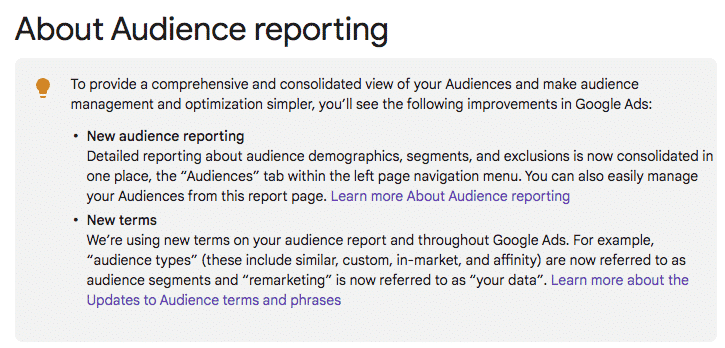
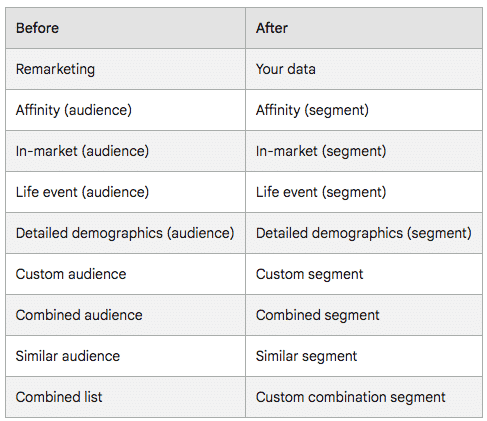
For example, Audience types (e.g., similar, custom, in-market, affinity) are now audience segments and Remarketing is now Your data. Here’s the full list of name changes:
New audience reporting. Google is consolidating audience reporting into a new Audiences tab. Located in the left-side navigation menu, you’ll find reporting about demographics, audience segments and exclusions. Google said this is a “simplified view” of all the same reporting features. This is another change you may have seen already in some accounts.
Why we care. Instead of rebuilding audiences manually in each campaign, new reusable audiences will allow advertisers to save time while keeping targeting consistent across campaigns. The experience should be similar to how custom segments act currently, where once an audience is created, it can be applied to any campaign instead of manually checking off types in each campaign. Changes to the audience segments will then be distributed to all campaigns targeting the audience segment.
Here’s the email from Google, shared on Twitter by @PPCGreg:
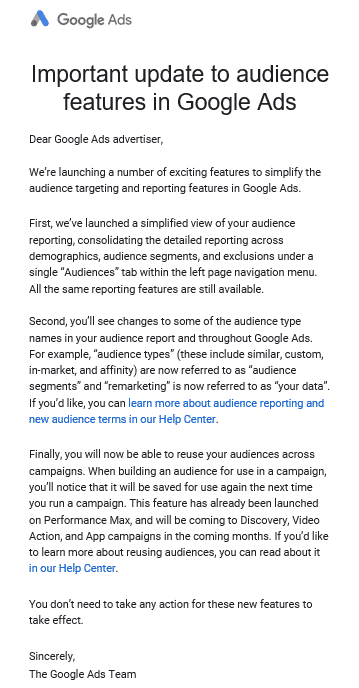 (Click to enlarge)
The post 3 changes coming to Google Ads audience features appeared first on Search Engine Land.
Courtesy of Search Engine Land: News & Info About SEO, PPC, SEM, Search Engines & Search Marketing
Category seo news | Tags:
Social Networks : Technorati, Stumble it!, Digg, de.licio.us, Yahoo, reddit, Blogmarks, Google, Magnolia.
Chrome will show Google Lens results in the same browser tab
Written on May 25, 2022 at 2:23 am, by admin
Google Lens results within Google Chrome on desktop will now be displayed on the right side of the same browser tab you are viewing. This is instead of the results opening up in a new tab or new window within Chrome.
How it works. Here are the steps to take on Chrome to see this yourself:
- Open a page in Chrome.
- Right-click on an image.
- In the menu, choose “Search image with Google Lens.”
- If you right-click anywhere outside an image, from the menu, you can choose “Search images with Google Lens.” After you click this option, you can drag to select an image.
Tip: Search results display on the right side of your screen. To display them in a new tab, click Open 
Here is a GIF of it in action:
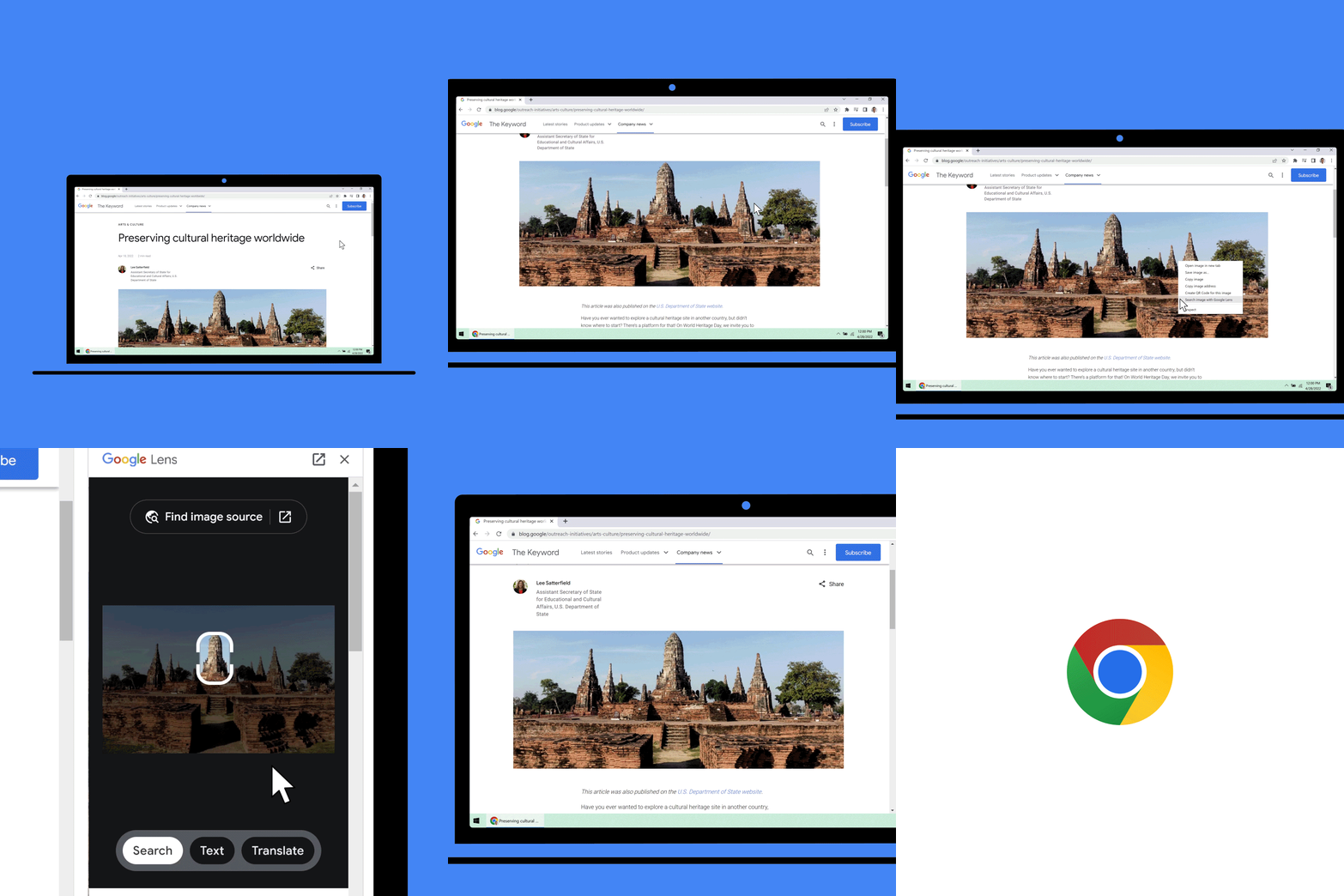
Who can see it. Google said this feature is now rolling out to all Chrome users. Google said this is part of the search company’s “broader effort to help people search and access information in more natural and intuitive ways.”
Why we care. This may encourage searchers and Chrome users to search more visually using Google Lens. If your content is displayed in these results, there is a chance you might see more traffic to your site through this search feature. Either way, you should be aware of this new Chrome feature as a potential source of traffic to your site and also how useful it can be for you to learn about images or things.
The post Chrome will show Google Lens results in the same browser tab appeared first on Search Engine Land.
Courtesy of Search Engine Land: News & Info About SEO, PPC, SEM, Search Engines & Search Marketing
Category seo news | Tags:
Social Networks : Technorati, Stumble it!, Digg, de.licio.us, Yahoo, reddit, Blogmarks, Google, Magnolia.
Automating Ourselves Out of Existence
Written on May 23, 2022 at 11:23 pm, by admin
Time has grown more scarce after having a child, so I rarely blog anymore. Though I thought it probably made sense to make at least a quarterly(ish) post so people know I still exist.
One of the big things I have been noticing over the past year or so is an increasing level of automation in ways that are not particularly brilliant. 
Just from this past week I’ve had 3 treat encounters on this front.
One marketplace closed my account after I made a bunch of big purchases, likely presuming the purchases were fraudulent based on the volume, new account & an IP address in an emerging market economy. I never asked for a refund or anything like that, but when I believe in something I usually push pretty hard, so I bought a lot. What was dumb about that is they took a person who would have been a whale client & a person they were repeatedly targeting with ads & turned them into a person who would not recommend them … after being a paying client who spent a lot and had zero specific customer interactions or requests … an all profit margin client who spent big and then they discarded. Dumb.
Similarly one ad network had my account automatically closed after I had not used it for a while. When I went to reactivate it the person in customer support told me it would be easier to just create a new account as reactivating it would take a half week or more. I said ok, went to set up a new account, and it was auto-banned and they did not disclose why. I asked feedback as to why and they said that they could not offer any but it was permanent and lifetime.
A few months go by and I wondered what was up with that and I logged into my inactive account & set up a subaccount and it worked right away. Weird. But then even there they offer automated suggestions and feedback on improving your account performance and some of them were just not rooted in fact. Worse yet, if they set the default targeting options to overly broad it can cause account issues in a country like Vietnam to where if you click to approve (or even auto approve!) their automated suggestions you then get notifications about how you are violating some sort of ToS or guidelines … if they can run that logic *after* you activate *their* suggestions, why wouldn’t they instead run that logic earlier? How well do they think you will trust & believe in their automated optimization tips if after you follow them you get warning pop overs?
Another big bonus recently was a client was mentioned in a stray spam email. The email wasn’t from the client or me, but the fact that a random page on their site was mentioned in a stray spoofed email that got flagged as spam meant that when the ticket notification from the host sent wounded up in spam they never saw it and then the host simply took their site offline. Based on a single email sent from some other server.
Upon calling the host with a friendly WTF they explained to the customer that they had so many customers they have to automate everything. At the same time when it came time to restoring hosting that the client was paying for they suggested the client boot in secure mode, run Apache commands x and y, etc. … even though they knew the problem was not with the server, but an overmalicious automated response to a stray mention in a singular spam email sent by some third party.
When the host tried to explain that they “have to” automate everything because they have so many customers the customer quickly cut them off with “No, that is a business choice. You could charge different prices or choose to reach out to people who have spent tens of thousands on hosting and have not had any issues in years.” He also mentioned how emails can be sent to spam, or be sent to an inbox on the very web host that went offline & was then inaccessible. Then the lovely customer support person stated “I have heard that complaint before” meaning they are aware of the issue, but do not see it as an issue for them. When the customer said they should follow up any emails with an SMS for servers going offline the person said you could do it on your end & then later sent them a 14-page guide for how to integrate the Twillio API.
Nothing in the world is fair. Nothing in the world is equal. But there are smart ways to run a business & dumb ways to run a business.
If you have enough time to write a 14-page integration guide it probably makes sense to just incorporate the feature into the service so the guide is unneeded!
Businesses should treat their heavy spenders or customers with a long history of a clean account with more care than a newly opened account. I had a big hedge fund as a client who would sometimes want rush work done & would do stuff like “hey good job there, throw in an extra $10,000 for yourself as a bonus” on the calls. Whenever they called or emailed they got a quick response.
I sort of get that one small marketplace presuming my purchases might have been a scam based on how many I did, how new my account was, and how small they were, but the hosting companies & ad networks that are worth 9 to 12 figures should generally do a bit better. Though in many ways the market cap is a sign the entity is insulated from market pressures & can automate away customer service hoping that their existing base is big enough to offset the customer support horror stories that undermine their brand.
It works.
At least for a while.
A parallel to the above is my Facebook ad account, which was closed about a half decade or so ago due to geographic mismatch. That got removed, but then sort of only half way. If I go to run ads it says that I can’t, but then if I go to request an account review to once again explain the geographic difference I can’t even get the form to submit unless I edit the HTML of the page on the fly to seed the correct data into the form field as by default it says I can not request a review since I have no ad account.
The flip side of the above is if that level of automation can torch existing paid accounts you have to expect the big data search & social companies are taking a rather skeptical view of new sites or players wanting to rank freely in their organic search results or social feeds. With that being the case, it helps to seed what you can to provide many signals that may remove some of the risks of getting set in the bad pile.
I have seen loads of people have their YouTube or Facebook or whatever such account get torched & only override the automated technocratic persona non grata policies by having followers in another channel who shared their dire situation so it could get flagged for human review and restoration. If that happens to established & widely followed players who have spent years investing into a platform the odds of it happening to most newer sites & players is quite high.
You can play it safe and never say anything interesting, ensuring you are well within the Overtone Window in all aspects of life. That though also almost certainly guarantees failure as it is hard to catch up or build momentum if your defining attribute is being a conformist.
Courtesy of SEO Book.com
Category seo news | Tags:
Social Networks : Technorati, Stumble it!, Digg, de.licio.us, Yahoo, reddit, Blogmarks, Google, Magnolia.
Webinar: Overcome third-party data challenges for CX success
Written on May 23, 2022 at 11:23 pm, by admin

A sublime customer experience allows customers to move from channel to channel without losing their place or the information they’ve entered. To successfully deliver these experiences, brands must meet current data, security, and personalization challenges with ambitious strategies and first-rate technology.
Join seasoned experts from Redpoint Global in a live webinar and learn how you can creatively collect first-, second- and third-party data to engage and retain consumers.
Register today for “Data-Driven Answers to Achieve Omnichannel Success” presented by Redpoint Global.
The post Webinar: Overcome third-party data challenges for CX success appeared first on Search Engine Land.
Courtesy of Search Engine Land: News & Info About SEO, PPC, SEM, Search Engines & Search Marketing
Category seo news | Tags:
Social Networks : Technorati, Stumble it!, Digg, de.licio.us, Yahoo, reddit, Blogmarks, Google, Magnolia.
Is Google Search showing fewer sitelinks
Written on May 23, 2022 at 11:23 pm, by admin
Google Search seems to be showing fewer sitelinks in the search results. Google would show as many as six sitelinks per search result snippet, now Google seems to be showing a maximum of four sitelinks and often just two sitelinks.
What are sitelinks. Sitelinks are links from the same domain that are clustered together under a web result. Google Search said it “analyzes the link structure of your site to find shortcuts that will save users time and allow them to quickly find the information they’re looking for” in the search results.
What changed. Google seems to have changed to a vertical format for large sitelinks and is only showing up to 4 sitelinks. Even the example from Google’s very own help documentation shows six sitelinks.
Screenshots. Here are screenshots showing how a search for [tesla] is showing four sitelinks:

A year or so ago, the same search displayed six sitelinks:

My site has always showed at least four sitelinks, now I see it showing only two:

If you search for rustybrick with a space, [rusty brick], Google does show four:

Why we care. Fewer sitelinks may lead to less of a chance to get clicked on from the Google Search results. That may lead to less site traffic from Google search and ultimately lead to less revenue.
We have emailed Google to confirm this was changed and to learn more about why it has changed.
Hat tip to this Reddit thread for spotting this.
The post Is Google Search showing fewer sitelinks appeared first on Search Engine Land.
Courtesy of Search Engine Land: News & Info About SEO, PPC, SEM, Search Engines & Search Marketing
Category seo news | Tags:
Social Networks : Technorati, Stumble it!, Digg, de.licio.us, Yahoo, reddit, Blogmarks, Google, Magnolia.
Google News new design being tested
Written on May 23, 2022 at 11:23 pm, by admin
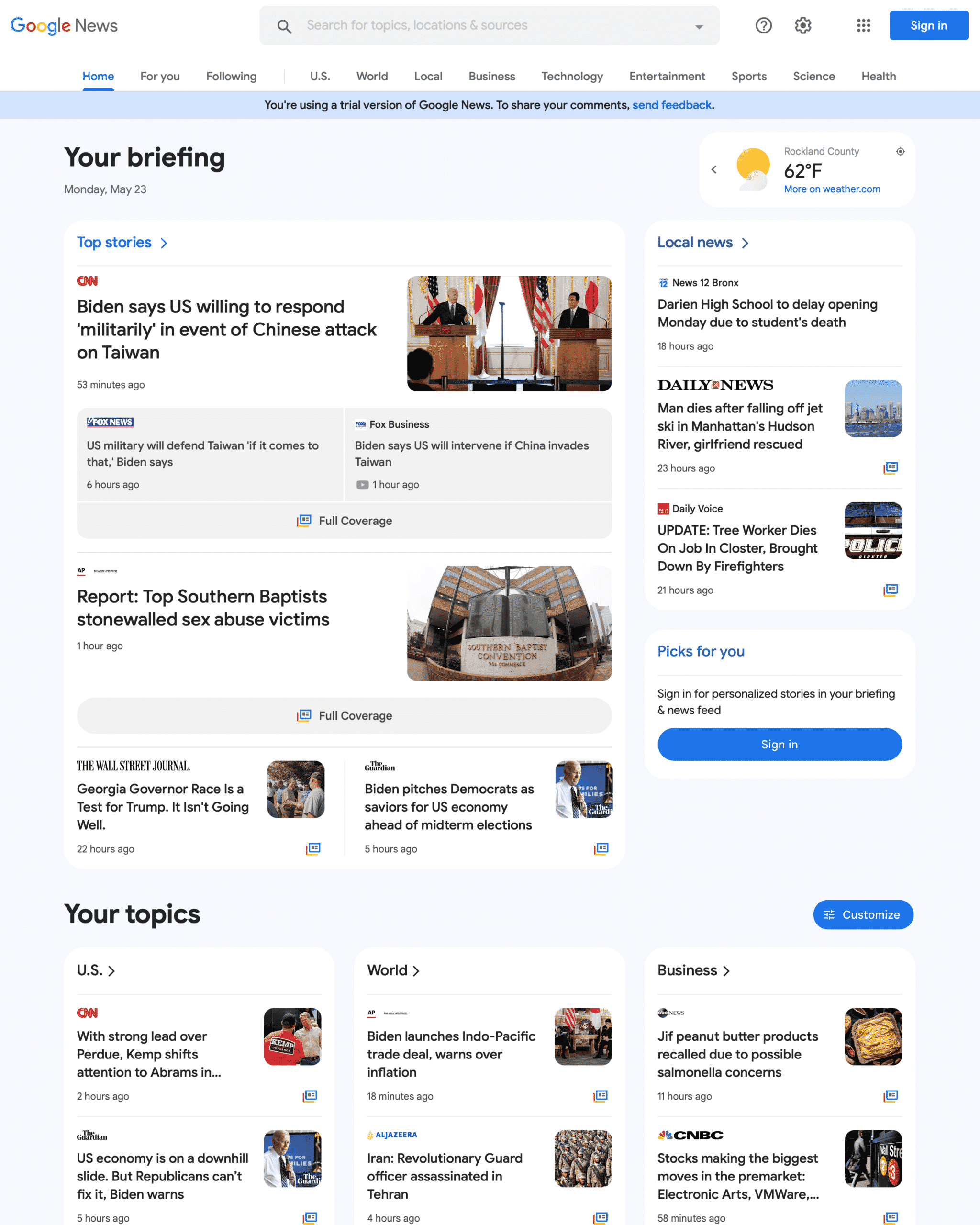
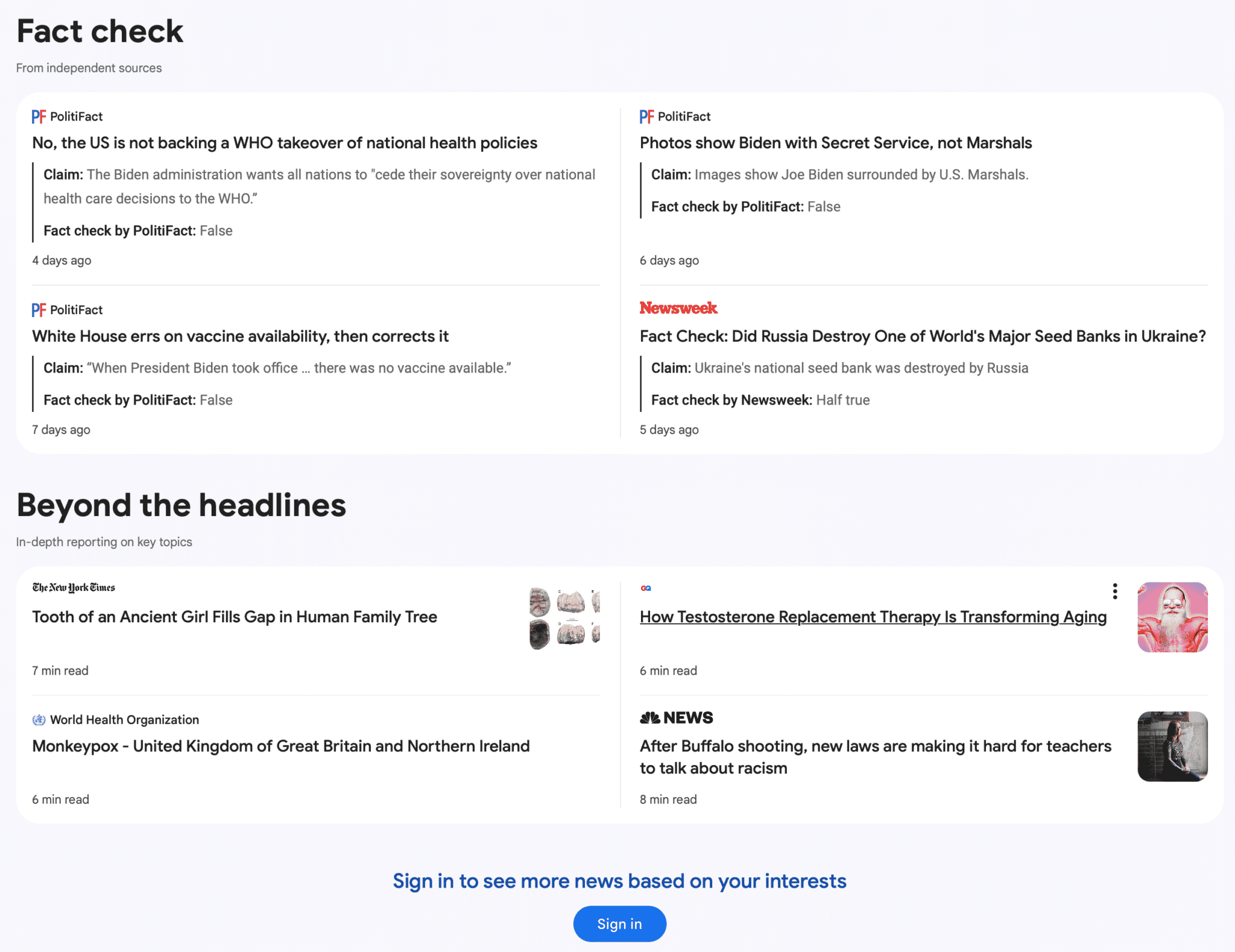
Google is testing a new trail version of the Google News portal at news.google.com. It is a limited trail, I was only able to bring it up once in Safari private mode, but then I lost it. The new home page is more visual, brings the navigation menu from the left side to the top and overall cleans up the look of the home page.
What it looks like. Here is a screenshot of the top of the page that I was able to screen capture when I saw the test – you can click on it to enlarge it:
Here is the bottom portion of the page where you can see the “Fact check” section. Again, you can click on it to enlarge it:
When will you see it. Again, this is just a test, just a trial, Google is running to see if those in this test group like the new Google News design and if the responses they expect from the new design is positive or negative. Google is constantly testing new user interfaces across all their platforms, so this should come as no surprise.
Why we care. Whenever Google releases a new design or user interface in Google Search or Google News, that can impact ones visibility and clicks to their web site. So keep these user interface tests in mind when understanding any risks or rewards you might see in the future with Google News interface changes.
Again, this is just a test – it is hard to know if and when this new design will go live.
The post Google News new design being tested appeared first on Search Engine Land.
Courtesy of Search Engine Land: News & Info About SEO, PPC, SEM, Search Engines & Search Marketing
Category seo news | Tags:
Social Networks : Technorati, Stumble it!, Digg, de.licio.us, Yahoo, reddit, Blogmarks, Google, Magnolia.
How privacy changes affect B2B paid search marketing
Written on May 23, 2022 at 11:23 pm, by admin
Everyone’s talking about privacy. When Google announced the deprecation of third-party cookies in early 2020, privacy became a hot topic.
The loss of third-party cookies impacts all advertisers and is especially challenging for B2B marketers, who struggle to reach the right audience even with third-party cookies in play.
Let’s review how today’s privacy changes came about – and then look ahead to what it all means for marketers.
How did we get here?
In the early days of the internet, it was the Wild West. No one cared about privacy.
As with anything new, consumers were enamored with going to a website, ordering whatever they wanted and having it show up at their door.
Sure, mail-order had been around for a long time. But it wasn’t exciting to fill out a form, write a check and send it in – only to wait 6-8 weeks for the order to arrive.
The internet changed buying habits forever.
It was possible to find and buy nearly anything online easily. Still, the internet also offered a treasure trove of user data that marketers could tap into for insights into buyer behavior.
Somewhere around the mid-2000s, retargeting was introduced.
I remember being at a search conference around 2005, watching a demo of a new technology that would dynamically serve ads based on users’ search activity and the websites they visited.
My mind was blown. Do you mean we can show different ads to different users based on things we know about them? Sign me up!
No one thought about privacy then either. We were so enamored with this new technology that we never gave privacy a thought.
Privacy becomes a thing
Fast forward to today.
Retargeting is everywhere. Everyone knows when they are being retargeted. And advertisers are often doing it poorly.
Every digital marketer can come up with a handful of bad retargeting they’ve experienced personally.
For me, a memorable one was just after I’d made an online reservation at a hotel for a business trip to Seattle. I was immediately bombarded with ads – from the same hotel I’d just booked, saying, “Book your trip to Seattle now!”
Come on.
I believe that lazy marketers are partly responsible for the privacy changes coming later this year. People are sick of poorly targeted ads that follow them incessantly.
How privacy affects B2B search marketing
B2B search marketing is challenging under any circumstances. Searchers don’t self-identify as B2B users when they perform a search.
And often, the keywords they use are the same keywords a consumer might use, even though each is looking for two different things.
Terms like “insurance,” “security” and even “design software” are vague. The searcher could be looking for services for themselves or their business.
That’s where third-party cookies came in.
Advertisers got excited when Google introduced audience targeting options like affinity and in-market audiences. Finally, a way to layer on audience signals based on search and browsing behavior!
However, audience targeting options are hopelessly consumer-focused. Here are Google’s current affinity segments:
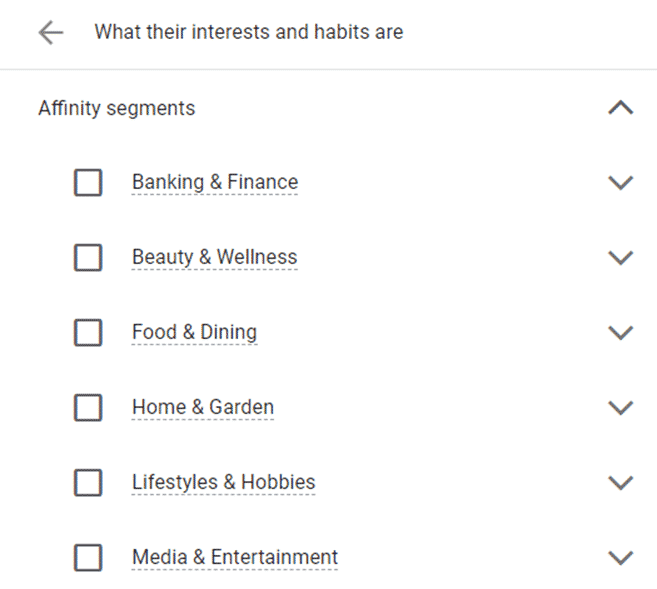
See anything that looks remotely like B2B? Me neither.
In-market segments aren’t much better. Here’s one for Business Services:
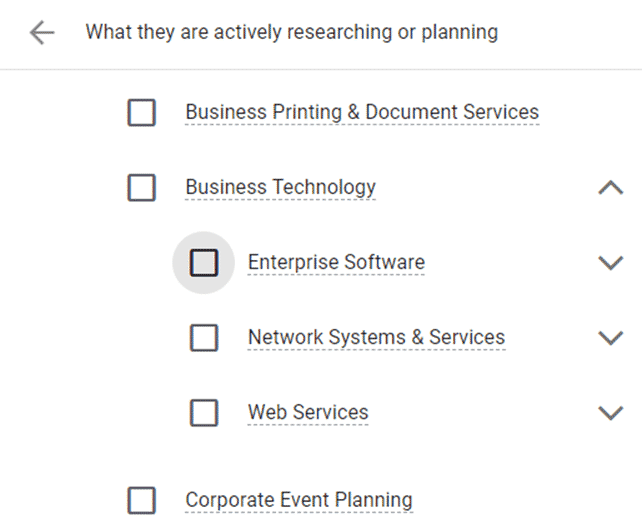
The “Business Technology” category isn’t bad, but the others, such as “Business Printing & Document Services,” seem tailored to small businesses, not enterprises.
The death of third-party cookies
So what does all this have to do with privacy?
Targeting options like affinity audiences and in-market audiences are built from third-party cookies. Search engines use signals (e.g., which websites users visited) to compile the audiences.
Google has announced the deprecation of third-party cookies from Chrome within the next year.
In other words, most of these targeting options are going away soon.
First-party audiences to the rescue
First-party audiences are great for B2B. They remove many obstacles B2B advertisers face: consumer-focused targeting, or targeting that’s too broad for the business need.
But first-party audiences also pose challenges for B2B.
The biggest hurdle is creating the audiences in the first place.
To efficiently use first-party audiences, advertisers need some way to compile audience data, group users into cohorts and securely pass the data to advertising platforms like Google Ads and Bing Ads. Usually, this is done through a data management platform (DMP)
Advertisers who use a DMP have a relatively easy time using first-party audiences in their PPC campaigns. The DMP can be used to upload audiences directly to search engine platforms.
Unfortunately, even among our enterprise clients, surprisingly few have a good DMP setup. This means most advertisers are not able to use first-party audiences effectively.
And even for advertisers who do have a suitable DMP, we often find that the first-party audiences are too small to target.
Unlike e-commerce, B2B is a smaller universe. There aren’t as many people researching enterprise business software as there are people buying shoes on a given day.
There are even fewer people from companies with more than 5,000 employees researching ERP software for the enterprise.
See where I’m going with this?
Audiences that are too small to target aren’t much help.
Or are they?
Search engines use audiences as a signal for targeting ads. Think of an audience as a way to tell Google and Bing who you’re trying to reach.
One way to amplify the signal of a small first-party audience is by using similar audiences (also called lookalike audiences).
Similar audiences are often 2-10 times bigger than first-party audiences. Here’s an example:


The first-party audience only has about 5,000 members – it’s large enough to target but won’t drive much traffic.
But the similar audience has anywhere from 10,000 to 50,000 members for search and up to 1 million for display – a much larger reach.
Similar audiences are especially helpful for B2B, which tends to have a low audience match rate). We’ve seen strong performance from similar audiences for our B2B clients.
Let paid social help
Another way to create B2B audiences is to use paid social to inform paid search.
Paid social is usually used for upper-funnel activity – awareness and consideration. But we’ve used paid social to create audiences for paid search retargeting.
The great thing about paid social is that we know a lot about our target audience. We can target based on employer, job title, company size, education, skills and other factors that indicate the user is a good target for B2B.
Create a dedicated landing page for paid social traffic for your B2B audience targets and tag it for retargeting. Then target people who visited that page with Google Ads.
We’ve done this with YouTube videos too. People who watch a 30-60 minute keynote from a B2B conference make a great audience for follow-up with RLSA or display retargeting.
And don’t forget about LinkedIn targeting in Microsoft Ads. Being able to use LinkedIn profile attributes to target is a big differentiator for Microsoft Ads, and it’s especially useful for B2B advertisers.
Use micro-conversions as signals
Another way to create retargeting audiences is to use micro-conversions as signals for intent.
B2B has a long sales cycle – usually 12-18 months or longer. No one buys a six-figure business software system in a single visit with a credit card.
The process usually involves a lot of research, with multiple touchpoints along the way.
Users might follow these steps on the way to purchase:
- Read an article
- Download a whitepaper
- Read an ebook
- Request a demo
- Sign up for a free trial
- Contact sales
- Purchase
Each of these actions represents a micro-conversion.
You could create audiences for people who downloaded a whitepaper. You could even segment this further by creating audiences based on the type or product of the whitepaper they downloaded if you’re selling multiple products or targeting multiple audiences.
Retarget users who downloaded a whitepaper with an offer for a free demo or trial. Then retarget users who signed up for a demo or trial, asking them to contact sales.
If you sell to multiple business sizes, you can also start to segment by small business vs. large enterprise based on the content they consumed.
Using first-party data is an investment – of time and money
The days of simply picking an audience based on in-market traits or affinity groups are numbered. Lazy marketing is soon to be a thing of the past.
Now is the time to start building your first-party audiences and think about your buyer journey.
Get serious about creating micro-conversions and paid social audiences to reach your target.
The post How privacy changes affect B2B paid search marketing appeared first on Search Engine Land.
Courtesy of Search Engine Land: News & Info About SEO, PPC, SEM, Search Engines & Search Marketing
Category seo news | Tags:
Social Networks : Technorati, Stumble it!, Digg, de.licio.us, Yahoo, reddit, Blogmarks, Google, Magnolia.
Google search results spam for ‘Bill Slawski obituary’ shows the dark side of SEO
Written on May 20, 2022 at 2:19 pm, by admin
We reported yesterday the sad news that Bill Slawski has died.
It’s less than 24 hours later and no actual obituary has been published (either by a news site or funeral home). Yet, Google’s search results are littered with spammy results.
Look at what is ranking on a Google search right now for [bill slawski obituary]:
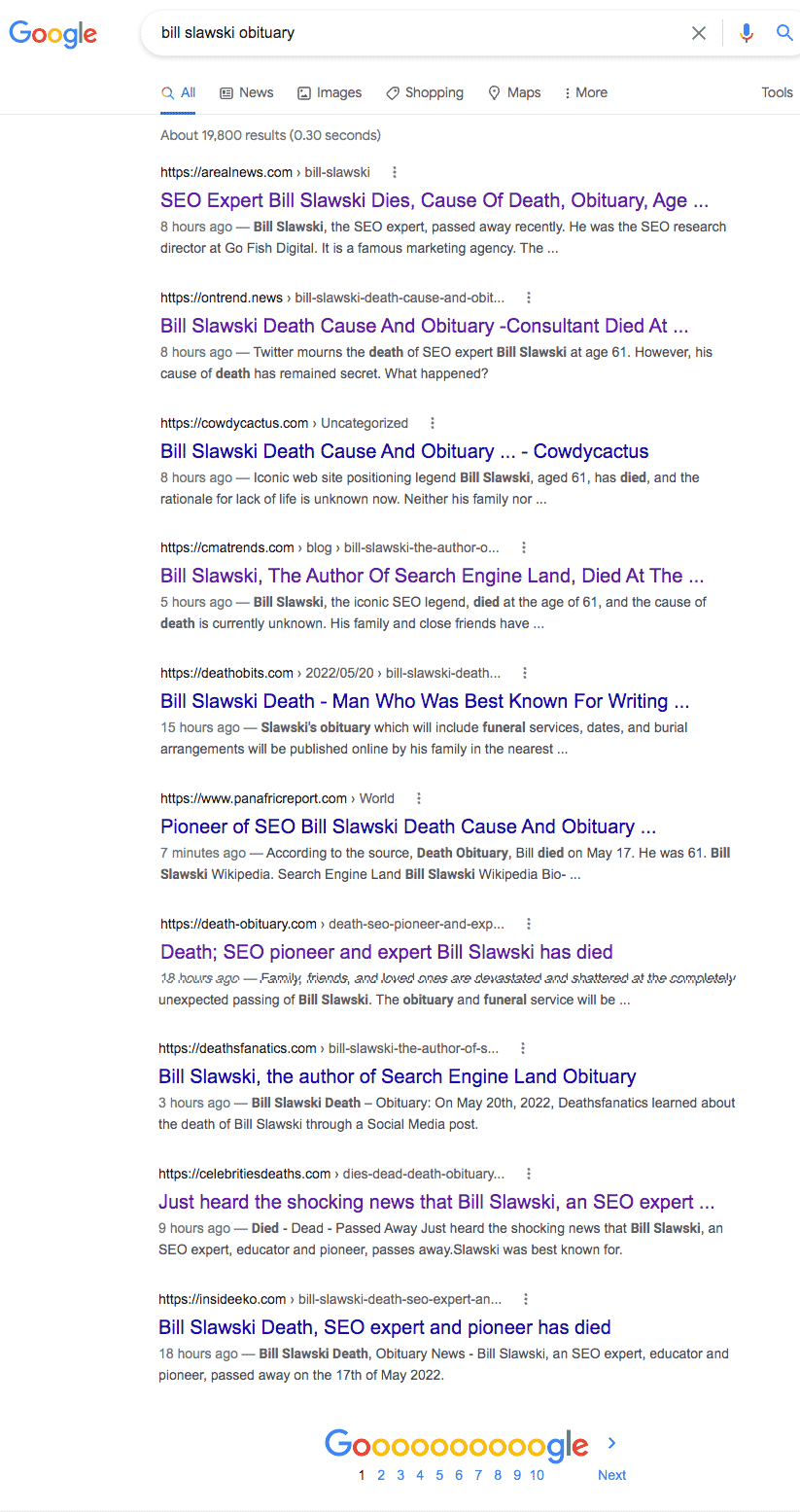
This is a horror, especially for anybody seeking trustworthy information on Slawski’s funeral arrangements.
To me, this SERP looks like Google, before the Panda Update, for certain queries where content farms reigned. That’s the easiest way to describe it.
A ton of low-quality websites have created thin content with the sole purpose of optimizing it to rank whenever someone searches for an obituary for Bill Slawski. And they are monetizing whatever traffic they get through display ads.
What’s worse – there are many of these types of sites. And these sites have one thing in common: the content reads like it was either automatically generated or written (poorly) by people whose first language is not English.
Let’s look at some of the sites so you can understand how gross this all is:
1. AReal News
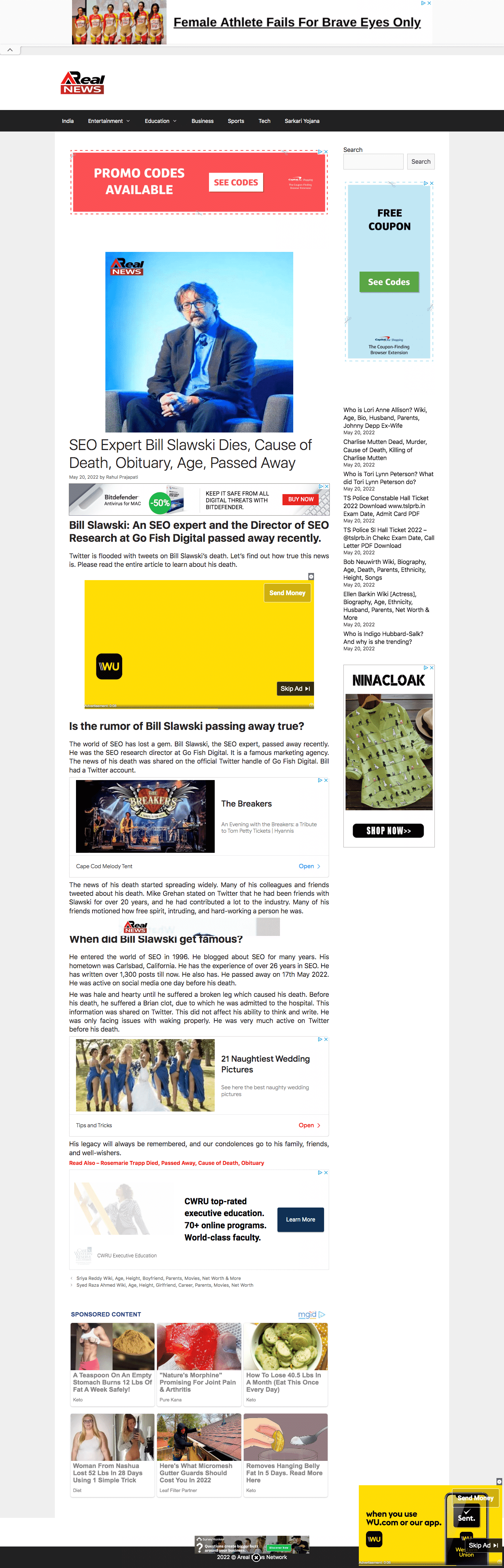
The content is pure garbage. Look at this paragraph:
“He was hale and hearty until he suffered a broken leg which caused his death. Before his death, he suffered a Brian clot, due to which he was admitted to the hospital. This information was shared on Twitter. This did not affect his ability to think and write. He was only facing issues with waking properly. He was very much active on Twitter before his death.”
Aside from the obvious content problem, this site looks like it should be in clear violation of Google’s page layout algorithm (aka Top Heavy). Before you even get to the content, you get nothing but ads, ads, ads.
And searching for [obituary site:arealnews.com] reveals this isn’t a one-off. It’s a strategy:

2. OnTrend

Some of the garbage content:
“No doubt, he was surrounded by his wife and children when he took his last breath peacefully. The further insights of Bill’s partner are inaccessible at this time. We are keeping an eye on this topic.”
3. CowdyCactus
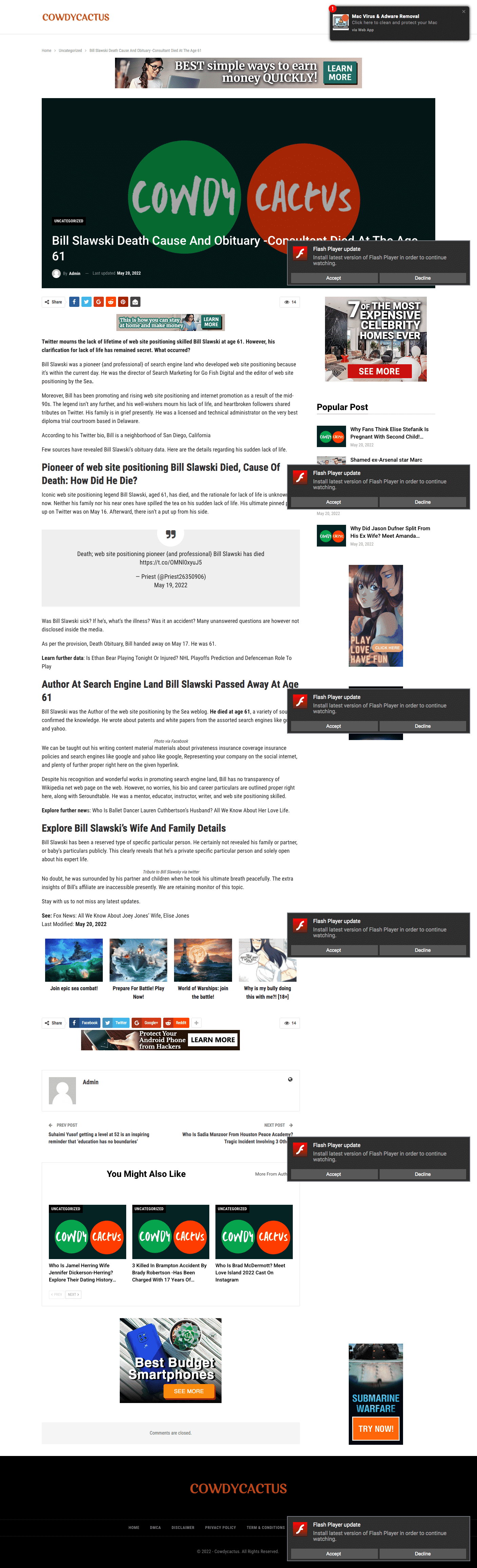
If this isn’t outright search spam, it’s certainly about as low-quality content as you can publish before reaching that threshold:
“Twitter mourns the lack of lifetime of web site positioning skilled Bill Slawski at age 61. However, his clarification for lack of life has remained secret. What occurred?”
In fact, when I turned my adblocker off to take that screen capture, it was infested with so many ads and redirects to spam I could no longer even view the site. Hopefully, my computer didn’t get a virus.
4. CmaTrends

Before we look at this example, make sure you check out this site’s homepage title tag: “CmaTrends « We SELL Entertainment Periodt!”
And the opening of their “article”:
“Bill Slawski, the author of Search Engine Land, died at the age of 61, #Bill #Slawski #author #Search #Engine #Land #died #age Welcome to O L A S M E D I A TV N E W S, This is what we have for you today:”
I could cite more examples, but you get the point.
Google’s new information problem. The quality of this search result is bad. But it goes beyond just Slawski.
This is a known issue. For certain new search queries, often there isn’t enough content on the web for Google to rank. So you get a bunch of content that, otherwise, has no reason to have any visibility.
Sometimes you also see this after a broad core algorithm update. Suddenly, Google starts surfacing iffy content from suspect sources – as if they hit a sort of reset button. Typically, Google eventually figures it out and more appropriate content returns to where it should be (though not always).
The profits of death. Aside from the clearly bogus “news” sites, there are a couple of spammy obituary websites in there – deathobits.com and death-obituary.com. Both are also loaded up with display ads. Including Google ads.
Yet this is not a new problem. And it goes far beyond Slawski. In fact, some brands are even helping fund this low-quality content.
Marketing Brew published a report in November detailing how spammy sites rip off obituaries and actually end up being monetized by ads from major brands (e.g., Nike, Nordstrom, Zola, Burt’s Bees). Google told Marketing Brew it has:
“strict policies that explicitly prohibit Google–served ads from running on sites that use disruptive advertising formats, including pages with more ads than publisher content. We also prohibit ads from running alongside content that’s been copied from other sites. When we find pages or sites that violate these policies we take appropriate enforcement action.”
I’ve reached out to Google to comment on this story. I will update if/when I receive a response.
The post Google search results spam for ‘Bill Slawski obituary’ shows the dark side of SEO appeared first on Search Engine Land.
Courtesy of Search Engine Land: News & Info About SEO, PPC, SEM, Search Engines & Search Marketing
Category seo news | Tags:
Social Networks : Technorati, Stumble it!, Digg, de.licio.us, Yahoo, reddit, Blogmarks, Google, Magnolia.