

Ex-Googler: Ad revenue is hiding Google’s fundamental problems
Written on February 15, 2023 at 2:53 pm, by admin
Google made $224 billion from ad revenue in 2022, which has helped hide four major cultural problems within the company, according to former Google engineer Praveen Seshadri.
Why we care. Although Seshadri was not a member of the search team, he offers some interesting insights from within Google that may help us understand why Google has been lagging behind Microsoft and OpenAI in the ongoing AI wars – and why Google brought back co-founders Larry Page and Sergey Brin during its “code red” period.
Google’s four cultural problems. Seshadri, who worked at Google for three years, wrote that Google has four cultural problems:
- No mission.
- No urgency.
- Delusions of exceptionalism.
- Mismanagement.
Seshadri wrote these are all “natural consequences of having a money-printing machine called ‘Ads’ that has kept growing relentlessly every year, hiding all other sins.” He added:
“While two of Google’s core values are ‘respect the user’ and ‘respect the opportunity’, in practice the systems and processes are intentionally designed to ‘respect risk’. Risk mitigation trumps everything else. This makes sense if everything is going wonderfully and the most important thing is to avoid rocking the boat and keep sailing on the rising tide of ads revenue.”
Not the Google of 10 years ago. I was reminded of the 2013 Founders’ Letter, published by then-CEO Page in May 2013.
“It’s amazing what you can achieve with a small dedicated team when you start from first principles and aren’t encumbered by the established way of doing things. Yet I’ve learned over time that it’s surprisingly difficult to get teams to be super ambitious because most people haven’t been educated in this kind of moonshot thinking. They tend to assume that things are impossible, or get frightened of failure. It’s why we’ve put so much energy into hiring independent thinkers at Google, and setting big goals. Because if you hire the right people and have bold enough dreams, you’ll usually get there. And even if you fail, you’ll probably learn something important.
It’s also true that over time many companies get comfortable doing what they have always done, with a few incremental changes. This kind of incrementalism leads to irrelevance over time, especially in technology, because change tends to be revolutionary, not evolutionary.”
Based on what Seshadri wrote (among others), it sounds like Google has drifted away from that 2013 vision Page laid out. Now Google seems to have become what it used to be against, where at least some of its teams are essentially “swimming in molasses.”
While Google is hardly irrelevant in 2023, Google is facing challenges on several fronts. Google’s rushed Bard announcement truly was the opposite of the risk mitigation Seshadri wrote about – and Google employees bashed CEO Sundar Pichai after the launch, calling it “botched”.
Read Seshadri’s article. The maze is in the mouse
The post Ex-Googler: Ad revenue is hiding Google’s fundamental problems appeared first on Search Engine Land.
Courtesy of Search Engine Land: News & Info About SEO, PPC, SEM, Search Engines & Search Marketing
Category seo news | Tags:
Social Networks : Technorati, Stumble it!, Digg, de.licio.us, Yahoo, reddit, Blogmarks, Google, Magnolia.
3 questions SEOs are fielding in the wake of AI-powered search
Written on February 15, 2023 at 2:53 pm, by admin
February 2023 is just halfway through and it’s already been a red-letter month in SEO following dual announcements from Google and Microsoft regarding their new AI-powered search functionality.
Since then, SEOs have fielded plenty of questions from clients trying to understand what the news means for their brands. While it is a bit early to tell definitively, a few themes have emerged.
How does this impact the SERPs?
For starters, clients continue to rely on their agency partners to absorb and translate news like this.
That’s according to Alec Cole, an SEO strategist at performance marketing agency Amsive Digital, who anticipates Google Bard “force a sea change in these conversations” as client questions become more pointed.
“We’re going from ‘What do you think of this new technology?’ to ‘How are you going to adapt your strategy to deal with the changes this is going to have on SERPs?’” he added.
That said, he noted Google’s recent algorithm updates and “obvious alarm over AI content” spurred initial questions several months ago, so the conversations remain ongoing.
SEO consultant Sara Taher agreed clients are mostly interested in learning more at this point.
“They ask a lot of questions about ChatGPT and how they can incorporate it in their workflows and how we can leverage all these new tools for SEO and marketing,” she added. “Clients are less worried than SEOs and that’s probably because SEOs have deeper knowledge of the situation.”
Is content still king?
While brands aren’t worried about the announcements from Microsoft and Google per se, they are concerned about the implications for content. Specifically, they are worried content quality will diminish – and they will have to compete with even more bad content.
“We have responded to let them know that there are several filters in place at Google to assist with preventing that as much as they can,” said Michael Bonfils, global managing director of digital marketing agency SEM International. “To focus on great, relevant content and be assured that we will be keeping an eye out for any longer-term impacts.”
Get the daily newsletter search marketers rely on.
<input type=”hidden” name=”utmMedium” value=”“>
<input type=”hidden” name=”utmCampaign” value=”“>
<input type=”hidden” name=”utmSource” value=”“>
<input type=”hidden” name=”utmContent” value=”“>
<input type=”hidden” name=”pageLink” value=”“>
<input type=”hidden” name=”ipAddress” value=”“>
Processing…Please wait.
Does this change everything? And, if so, what should I do now?
And, of course, everyone wants to know if AI will be the next big thing that disrupts search.
Barry Rolapp, a senior SEO strategist at Amsive Digital, however, said it’s too early to tell.
“The tools ‘hallucinate’ more often than I am currently comfortable with to use in an extended capacity,” he added. “There’s a lot of potential for search disruption, but we’ve said that in the past and seen little change to our overall SEO strategies (Mobilegeddon anyone?).”
Beyond staying on top of the news, Cole said there’s likely not much more SEOs can do for now as “optimizing for Bard is likely going to be a process similar to ‘optimizing’ for BERT: follow the search guidelines, create excellent websites and cross your fingers.”
In the meantime, Rolapp is encouraging clients who want to be more proactive to dig deeper into schema.org and start marking up entities and topics.
“Considering how integrated Bing and Google are in schema.org and their reliance on it for SERP features, I can only imagine that they will be relying on it more heavily in the near term to help train their respective models as most website publishers have few limitations to incorporating the markup,” he added.
The post 3 questions SEOs are fielding in the wake of AI-powered search appeared first on Search Engine Land.
Courtesy of Search Engine Land: News & Info About SEO, PPC, SEM, Search Engines & Search Marketing
Category seo news | Tags:
Social Networks : Technorati, Stumble it!, Digg, de.licio.us, Yahoo, reddit, Blogmarks, Google, Magnolia.
Meta aims to increase transparency in ad targeting for Facebook and Instagram users
Written on February 14, 2023 at 10:51 am, by admin
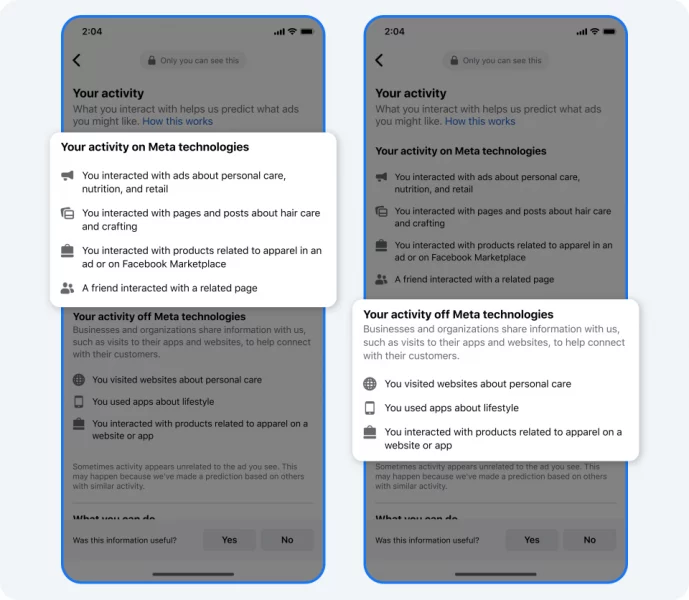
Facebook has just launched an updated version of its “Why am I seeing this ad?” tool which now includes information on how they use machine learning to deliver ads. The tool will provide information on how your activity on and off our platforms informs the machine learning models. It will also include new examples and illustrations to explain how these models connect various topics to show relevant ads.
Additionally, there are now more ways to access ads controls from different pages in the tool.
What’s new. From the Meta support site:
Beginning today, the “Why am I seeing this ad?” tool on Facebook will include:
- Information summarized into topics about how your activity both on and off our technologies — such as liking a post on a friend’s Facebook page or interacting with your favorite sports website — may inform the machine learning models we use to shape and deliver the ads you see.
- New examples and illustrations explaining how our machine learning models connect various topics to show you relevant ads.
- More ways to find our ads controls. You will now be able to access Ads Preferences from additional pages in the “Why am I seeing this ad?” tool.”
Why Meta is making changes. Meta says they collaborated with privacy experts and stakeholders to gather feedback on increasing transparency in their ads system. One of the main suggestions was to be more transparent about how their machine learning models contribute to the ads people see.
Meta says they’re committed to using machine learning responsibly and being transparent about its use is vital to ensure people are aware of the technology involved and the data used.
“By enhancing transparency, we aim to increase accountability and help people feel more secure. The updates to “Why am I seeing this ad?” aim to provide clear information about machine learning models used to deliver ads. These are the latest developments in our continuous efforts to improve our ads transparency and provide better understanding of our data and technology use.”
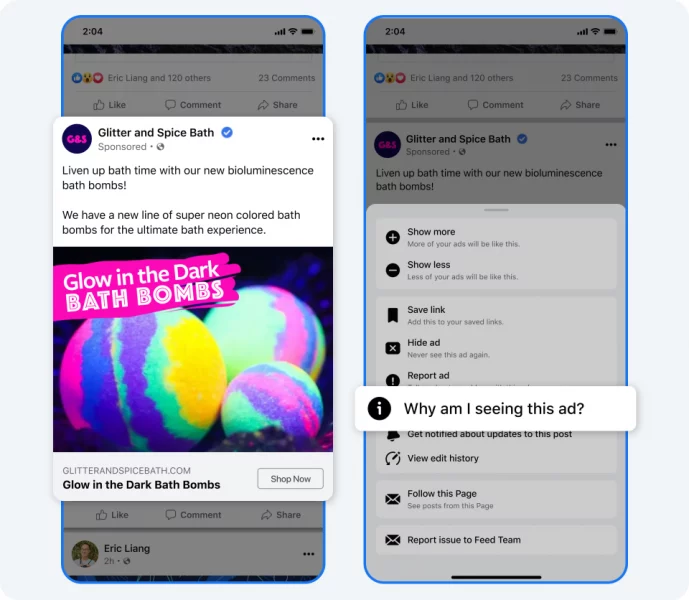
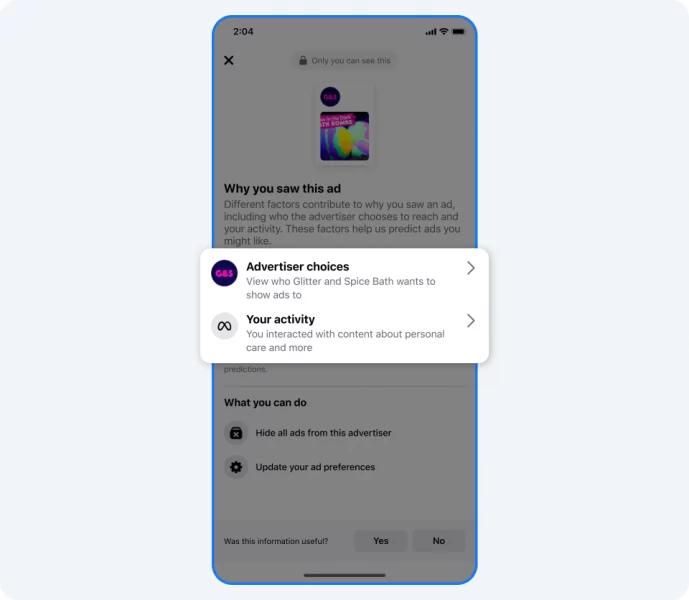
Find the “Why am I seeing this ad?” feature. To access the “Why am I seeing this ad?” tool on Facebook, click on the three-dot menu in the upper-right corner of any ad in your feed. You can still hide ads from specific advertisers and access your ads preferences within the tool. The updated version is currently available on Facebook globally and will be expanded to Instagram in the future.
Dig deeper. You can read the full announcement from Meta here.
Why we care. This tool enhances transparency and provides users with clear information about the ads they see. By being transparent about the use of machine learning and the data used to deliver ads, users may feel more comfortable with the ads they see and may be more likely to engage with them.
Though this could be seen as a bad thing for advertisers, it forced brands to rethink their targeting. By doing so, it can potentially lead to higher engagement rates and better return on investment. Additionally, by understanding how the tool works, advertisers can improve their ad targeting and content to reach their desired audience more effectively.
The post Meta aims to increase transparency in ad targeting for Facebook and Instagram users appeared first on Search Engine Land.
Courtesy of Search Engine Land: News & Info About SEO, PPC, SEM, Search Engines & Search Marketing
Category seo news | Tags:
Social Networks : Technorati, Stumble it!, Digg, de.licio.us, Yahoo, reddit, Blogmarks, Google, Magnolia.
Why Performance Max for lead generation often fails and how to make it work
Written on February 14, 2023 at 10:51 am, by admin
Many ecommerce advertisers are starting to better understand how to set up and optimize Performance Max, but it’s still a very difficult campaign type for lead gen accounts.
The funnel-driven nature of leads and the variance in quality are two of the biggest impediments.
Unlike ecommerce where a purchase signifies the “end” of the transaction, lead creation is the beginning of the sales process – and just because someone fills out a form doesn’t make them a quality lead.
With so much more left to play, it’s dangerous to allow Google to judge its contributions based on data from that limited window.
Few lead generation advertisers use Performance Max so there’s considerably less to say than there is for ecommerce.
These observations and recommendations come from my experience, and I’ve answered some common questions about optimizing Performance Max for lead gen.
So what makes this such a tough thing to get right?
Performance Max for lead gen needs offline conversion data
Getting Performance Max to work for lead generation programs without offline conversion data is very hard. Without it, Google’s systems are prone to bringing in a lot of spam.
So traffic bots fill out the form and Google thinks it got you a quality lead. It pats itself on the back – and even worse, starts to go after more of the same low-quality traffic.
I recall someone on Twitter calling this the feedback loop of doom, and it’s incredibly difficult to get out of it.
Restrict spam and bot form submissions with reCAPTCHA
That data piece of the puzzle is very hard to acquire and implement, but there are ways around it.
One example is installing a reCAPTCHA or honeypot that blocks the form from being submitted by spam bots so that it never gets triggered as a conversion in Google’s eyes.
Even if you do that and preempt the unwanted, you can still wind up with a pipeline full of irrelevant or unqualified leads. Let’s say you’re selling a commercial product – you might start getting residential leads that you can’t sell to.
In this example, Google’s systems won’t know that last bit of information unless you have offline conversion tracking that marks those leads as low-quality.
Get the daily newsletter search marketers rely on.
<input type=”hidden” name=”utmMedium” value=”“>
<input type=”hidden” name=”utmCampaign” value=”“>
<input type=”hidden” name=”utmSource” value=”“>
<input type=”hidden” name=”utmContent” value=”“>
<input type=”hidden” name=”pageLink” value=”“>
<input type=”hidden” name=”ipAddress” value=”“>
Processing…Please wait.
Teach Google what works for your business
Offline conversion imports – and any extra data over and above what Google already has – will help you teach Google what decisions are right for your account and business.
For most of our ecommerce clients, all they need is the revenue data that comes in and a clear understanding of who their most profitable customers are.
For lead gen, data is one place we lean in further and heavier.
For example, Performance Max can only measure how many phone calls or form submissions you get, but it doesn’t know how many led to good, great, or bad conversations.
Along with revenue data, customer email lists, audience signals, and data feeds, this is really what we need to make Performance Max work for ecommerce.
Because lead gen clients are usually split into marketing and sales functions, it’s a bit tougher to make this happen.
How to share data between your CRM and Performance Max
What helps most in our experience is implementing an integration with a customer relationship management (CRM) tool, such as Salesforce or HubSpot.
With this, we can see offline conversion data for leads generated through Google Ads.
Say we’re measuring form submissions, chats, phone calls – any type of contact – and the client gets 10 leads but only two were good. We want the system to know which two out of the 10.
And over time, Google starts to see that the good ones come from certain geos or share certain audience signals.
If you can upload offline conversions in the time it takes to go from lead to actual revenue, you want to feed that data into the system. But if you have a long sales cycle, we recommend scoring the lead (this is data you have right away).
You might set things up so that if a sales rep tags a lead as irrelevant, it sends that back to Google with a lower lead score/value. And if it’s a good lead, they assign it a higher category or value.
How to use HubSpot, Salesforce and Zapier with Google Ads
Salesforce and HubSpot have default integrations with Google Ads, as do certain other popular CRM tools.
If yours doesn’t have a pre-built integration, you can use a tool like Zapier to automate the transfer of data between products.
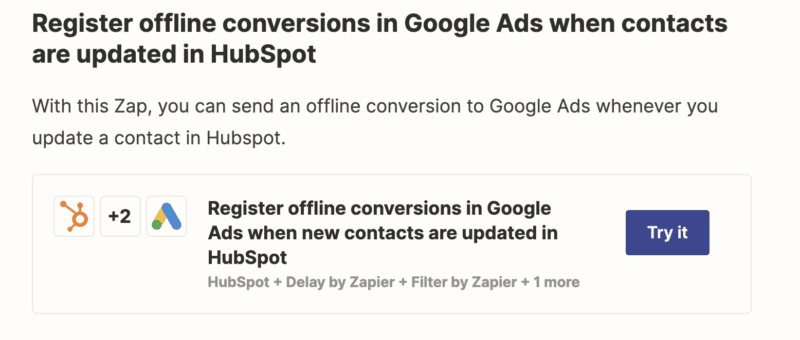
Screenshot from Track offline conversions in Google Ads by Zapier
You might set up an automated workflow that looks like this:
- Google generates a lead via Performance Max.
- A sales rep marks it as a qualified lead (score of 10).
- Information is fed back to Google Ads.
- The qualified lead progresses to the proposal stage (score of 20).
- Information is fed back to Google Ads again.
By ensuring an automated step is triggered each time the lead score is updated, you’ll keep Google aware of which leads are good for business and which aren’t. The system sees the value increasing the further it gets in your sales cycle, and then it can go after more of those.
Google (and Performance Max) is smart enough to figure it out over time, but you have to provide regular and accurate inputs – and you’ve got to be willing to eat some of the upfront costs to help the system learn.
Bottom line: Connect the dots or walk away
PPC marketers can do every part of their job right, and a Performance Max campaign can still fail. Maybe the brand’s website isn’t set up the right way or the sales team isn’t actively feeding data back to Google on lead quality.
Lead gen for Performance Max cannot work without buy-in from other teams.
Yes, Performance Max is capable of acquiring leads at a greater scale than regular search campaigns, but I highly recommend connecting the dots of your system – or abandoning it entirely.
Frequently asked questions (FAQ): Performance Max for lead generation
How do I improve lead quality and relevance?
We like to start with a Search campaign using a manual bidding strategy and Phrase Match keywords.
Once we’ve negated irrelevant search terms, we then migrate to Smart Bidding and Broad Match while staying on Search.
As traffic volume increases, we’ll add remarketing on YouTube and Discovery.
But unless we have conversion values, we won’t migrate to Performance Max for lead gen because it generates too many spam leads.
So good! I created this loop as I was thinking of cycle, but I'm going to steal your "Feedback Loop of Doom" name and cite you as a source
pic.twitter.com/aAbj1aBity
— Scott Redgate (@sredg8) September 4, 2022
However, if you can prevent the conversion tag from being fired on spam form submissions, you can and should test Performance Max.
You can accomplish this by using an invisible reCAPTCHA to block bots from submitting the form.
Many businesses that run lead gen campaigns have some type of buyer journey or funnel. If you have a multi-step form or registration process, assign incrementally greater values at each stage:
- Step 1 = 10
- Step 2 = 20
- Step 3 = 30
- Complete = 100
How do I use audience signals and asset groups?
Performance Max uses audience signals for targeting. These are different from audience lists, which are cohorts of specific users.
Even if you upload a customer list, Performance Max will only consider their audience signals – their shared behaviors or traits – when deciding who to show your assets to.
We've found success with the following Audience Signals:
Customer Match
— High-Value Customers
— 2021 Holiday Shoppers
— Email SubscribersCustom Intent
— Competitor Names & URLs
— High-Intent (Bottom-Funnel) Keywords
Tip: Use the Klaviyo × Google Ads integration: https://t.co/HQ0UXlbzvM
— Menachem Ani (@MenachemAni) October 26, 2022
We structure Performance Max asset groups around product or service categories, not by audience signals. Since there is no true or uniform audience targeting, there will likely be overlap. Ad creative should match the specific service offering.
How do I send traffic to the right landing pages?
You may also want to disable URL Expansion in campaign settings or exclude specific URLs that don’t convert well, such as blog posts or resource pages.
Landing page reports are a great way to see which pages on your website are converting and which are wasting opportunities.
How do I track the right types of leads?
There are three ways to generate leads: chat, form submissions, and phone calls. Make sure you’re monitoring all of them.
Connect your CRM so that the lead-to-close pipeline and revenue data are captured. Use the HubSpot or Salesforce integration, or a tool like Zapier if you use a different CRM.
If form submissions aren’t of great quality, focus on calls that are only counted as a conversion if longer than 60 seconds.
Can I run Performance Max for a local business?
Local campaigns were deprecated and rolled into Performance Max, so if you want to advertise on Google Maps, you’ll need Performance Max.
Make sure to turn off Location Expansion in campaign settings. I typically recommend increasing target areas to within a 30- or 45-minute drive for local businesses.
As promised, I put together a list of what I look at when setting up and/or auditing a Search campaign for a local business.
Also added a tab for quick wins when pitching a potential client.
If you want a version you can edit DM me.#googleads
— Derek Mollins (@ppcClickShark) January 4, 2023

The post Why Performance Max for lead generation often fails and how to make it work appeared first on Search Engine Land.
Courtesy of Search Engine Land: News & Info About SEO, PPC, SEM, Search Engines & Search Marketing
Category seo news | Tags:
Social Networks : Technorati, Stumble it!, Digg, de.licio.us, Yahoo, reddit, Blogmarks, Google, Magnolia.
How to analyze Google’s SERPs
Written on February 14, 2023 at 10:51 am, by admin
SEO has a lot of moving parts.
You have to worry about your content strategy, keyword selection, Google ranking signals, backlinks, and competition.
When clients ask me if they can rank their site for a particular keyword, I conduct a SERP analysis immediately.
I wouldn’t know how difficult it is to rank for a specific keyword without analyzing Google’s SERPs first.
If you’re not conducting base analysis, you might set your site up for failure by funneling all of your resources to a main keyword that is too far out of reach.
Defining SERP analysis
So, what is SERP analysis?
Search engine results page (SERP) analysis is the practice of analyzing the top-ranking pages for your desired keyword, spotting opportunities to rank for this keyword and trying to pinpoint difficulties in reaching the top of the search results.
A SERP analysis demands that you:
- Search for the desired keyword.
- Evaluate the top sites.
- Determine if the keyword is relevant to your site.
- Determine how you “could” rank for this keyword.
However, the final item on this list has a big question mark next to it.
You need to go beyond what you would need to do to rank today because your competitors are working diligently to maintain these rankings in most cases.
How to analyze a Google SERP
Learning how to analyze Google SERPs provides insights into a keyword and your ability to rank for the term. However, you’ll also uncover:
- Additional keywords that you may try to rank for on search engines.
- Opportunities that your competitors are missing.
- Content ideas.
- And more.
You can look through the SERPs manually, but when it comes to competitive keywords, you’ll want a tool to help you with looking at a page’s link profile, number of external backlinks and other factors.
A few tools work very well for this purpose, such as:
- Semrush
- Ahrefs
- Moz
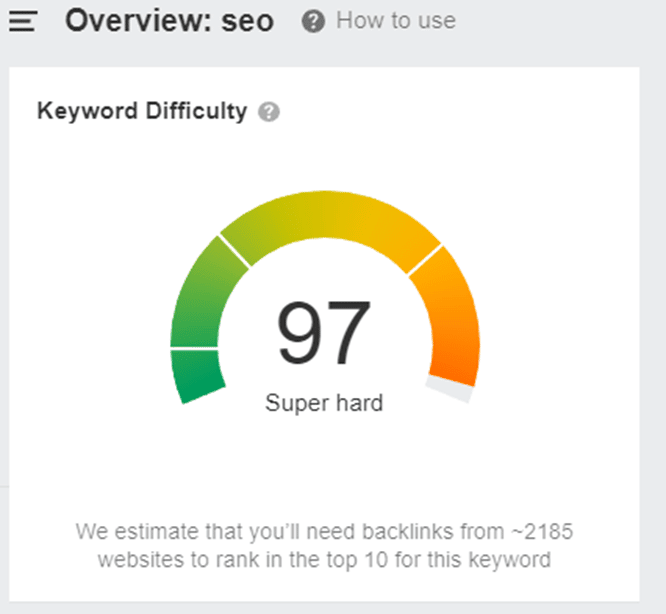
Plug in your keyword to these tools, and you’ll find a wealth of information on the top-ranking pages. For example, on Ahrefs, I just conducted a search for “SEO” and came out with the following:
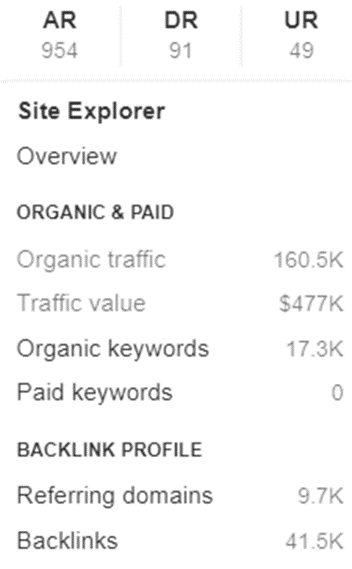
Search Engine Land’s What is SEO is ranked #2 and shows the following statistics:
Ranking for this keyword will be extremely difficult without a massive budget, a highly reputable website and a backlink campaign.
However, it’s important to look at other factors in a SERP analysis, such as:
- Search intent.
- Type of content ranking.
- The competition.
Search intent
When searching for your query, search intent can be determined by the different layouts and types of pages that you land on. You can tell the intent because it will be one of the following:
- Commercial: Users who are researching before making a purchasing decision.
- Informational: Users who are trying to find a solution to their problem and are educating themselves.
- Navigational: Users who are looking for a brand or website that they already know about.
- Transactional: Users who want to buy a product or service.
Considering these four categories of intent, you’ll find that the keyword “SEO” has informational intent, as all the top results aim to educate their readers. Your goal to outrank these competitors would be to educate the user.
Sites may look something like this:
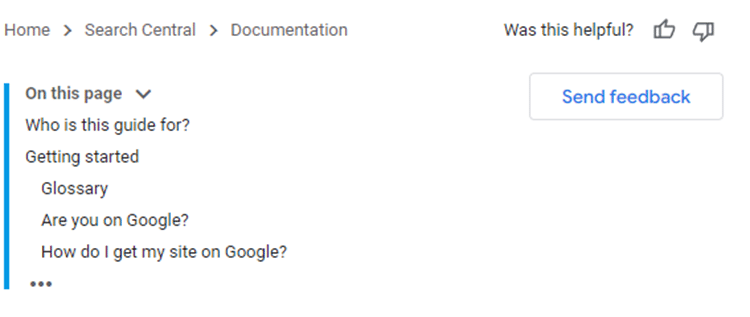 Google’s SEO starter guide
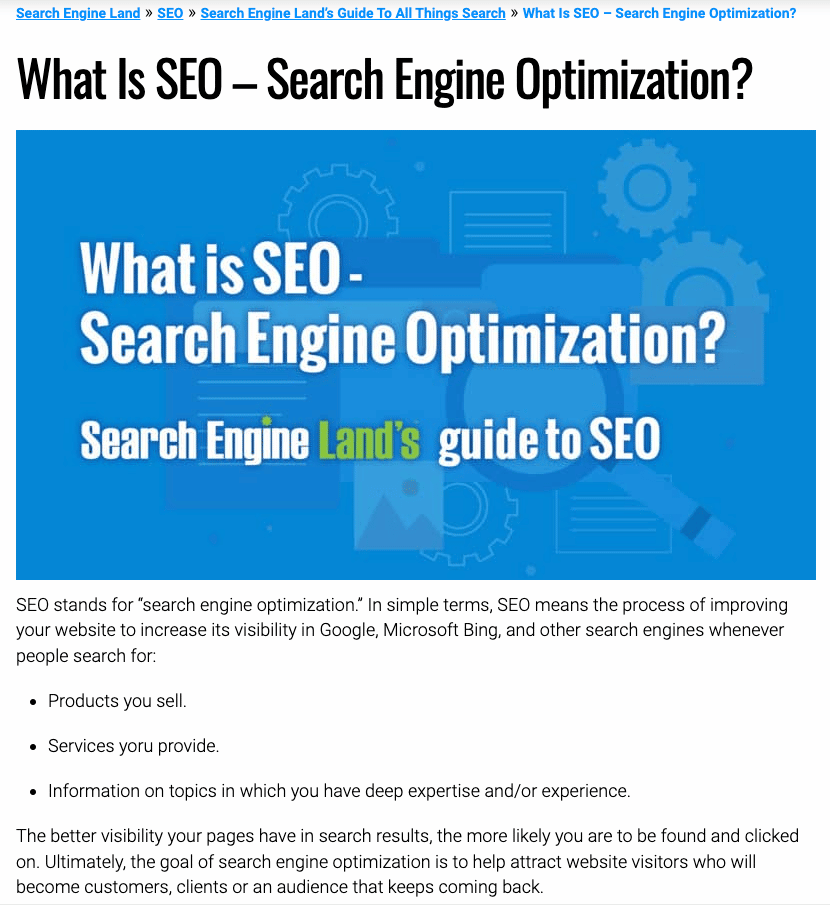 Search Engine Land’s What is SEO guide
If you changed the keyword to “books on SEO,” you would find Amazon as a transactional intent keyword because the site is laid out for products.
However, if you changed the keyword to “SEO books on Amazon,” this would be seen as a navigational keyword because the user is looking for these books specifically on Amazon.
Search intent is important because it will dictate your site’s:
- Layout.
- Navigation.
- Personalization.
- Common devices used to access the site.
Once you go through search intent, you can focus on the technical aspects of the site, UI/UX design and content.
Type of content ranking
Often, you’ll find an array of content ranking for a certain keyword. Going back to the “books on SEO” keyword, there are a lot of content types that are ranking:
- Ecommerce stores.
- Listicles.
- Guides.
- Book reviews.
This keyword is far easier to rank for than just “SEO” and you can create the above types of content to meet the needs of people querying this keyword.
When you perform SERP analysis, you have the opportunity to learn what content currently works for your competitors and don’t need to reinvent the wheel. Perhaps you can create a video guide on the top books to go along with your listicle or review article.
Now, you can learn a lot of information from just a few minutes of SERP analysis:
- Keyword difficulty.
- Backlink profile.
- Search intent.
- Content ideas or types to use.
You might even find videos ranking for a certain keyword, allowing you to target traffic via YouTube. It may be easier to show up at the top of the results in a snippet or video than with informational content.
Make a note of SERP features on the page that you may be able to leverage in your content creation, such as:
- Ratings.
- Shopping results.
- People also ask.
- Featured snippet.
- Images.
You can target the keyword from all angles to try and generate traffic from all sources.
The competition
You’ve already done a basic analysis of the top-ranking sites, but now it’s time to look into these sites further. You can look at things such as:
- Keyword difficulty.
- External backlinks to the entire domain.
- External backlinks to the page.
- Domain authority/page authority (or similar).
- Top domain presence.
- Social signals.
It is worth taking the time to look through the competing page and learn about the type of content created, length, proper on-page optimization, formatting, images and video use.
When you analyze competing sites, you can get an idea of what works and how well the site has targeted the keyword.
You may find opportunities to create better content or use on-page and technical SEO to improve your odds of ranking for the keyword.
Additionally, you can identify content gaps in the competitor’s content strategy that may improve your odds of ranking for the keyword.
However, if the entire top page is filled with truly tough competitors, it may be worth finding a new keyword to target.
For example, if the top results include Google’s own sites, Microsoft, Apple and Wikipedia, it will be very difficult to overcome them.
Get the daily newsletter search marketers rely on.
<input type=”hidden” name=”utmMedium” value=”“>
<input type=”hidden” name=”utmCampaign” value=”“>
<input type=”hidden” name=”utmSource” value=”“>
<input type=”hidden” name=”utmContent” value=”“>
<input type=”hidden” name=”pageLink” value=”“>
<input type=”hidden” name=”ipAddress” value=”“>
Processing…Please wait.
Use your SERP analysis in your SEO and content strategy
Can you rank for the specific keyword within budget and in a relatively timely manner? If so, you can begin to dig deeper by:
- Creating content that is more in-depth and better than your competitors.
- Focusing heavily on the content gaps that the competition is overlooking.
- Improving your on-page and technical SEO.
- Looking through the backlink profile of the top-ranked sites and seeing if there is any opportunity to replicate the backlinks.
If the search results include rich snippets for the query, you absolutely should incorporate structured data into your site, too.
Something as simple as a picture of one of the top-ranking books in SEO can bump up your click-through rate dramatically, even if you’re not ranked as high as some of your competitors.
When older pages or sites are ranking in the top 10 results, they often haven’t implemented structured data, opening up a golden opportunity for you to use it on your page.
You can now begin drafting your content ideas and looking for faults in the competition:
- Perhaps all of the books listed on the competitor’s site are 5+ years old. You can create a new list of books that are relevant to the best practices of today.
- You can create multiple forms of content, such as blog posts, videos and images to improve your chances of ranking higher in the results.
Your content must have its own unique selling proposition. When you create content, it’s important to take a step back and ask:
- Why would people like my content better than what already exists?
- Do I provide any unique insights or data?
- Can I improve readability or add custom images?
If you’re focused on creating generic content without original data or insights, you may not achieve the results that you had hoped for. You’ll find that adding something “special” is a selling point for readers and search engines.
You should spend time making your content or pages the “best.”
However, when the search intent is transactional or navigational, it may be hard to make the content the best. In other cases, you can certainly use a strong content strategy to rank for a keyword.
Once you have everything in place and start posting your content and working on off-page SEO, it’s important to track your keyword rankings.
Many of the tools listed previously offer keyword rank tracking and will allow you to:
- Monitor the keyword over time
- See when you begin improving your ranking for a specific word
- Discover when your rankings drop
Performance monitoring will help you understand what is and isn’t working for your site or a particular keyword.
You may find that you need to conduct another SERP analysis in a few months to see what changes have occurred and how you need to adjust your optimization strategy to see results.
The post How to analyze Google’s SERPs appeared first on Search Engine Land.
Courtesy of Search Engine Land: News & Info About SEO, PPC, SEM, Search Engines & Search Marketing
Category seo news | Tags:
Social Networks : Technorati, Stumble it!, Digg, de.licio.us, Yahoo, reddit, Blogmarks, Google, Magnolia.
This day in search marketing history: February 14
Written on February 14, 2023 at 10:51 am, by admin
Google Webmaster Tools comes out of beta
In 2007, Google Webmaster Tools officially came out of beta.
Launched in June 2005 as Google Sitemaps, its expansion led to a name change on Aug. 4, 2006.
Google also revealed that Webmaster Central had more than a million users.
Read all about it in Google Webmaster Central Leaves Beta; Its Blog Gains Comments.
Eventually, Google Webmaster Tools would be rebranded as Google Search Console, on May 20, 2015.
Also on this day
Google crawl stats report is missing a chunk of data
2022: This seemed to be a widespread reporting issue.
Google AdSense launches related search for content pages
2022: The feature was designed to drive incremental ad revenue while encouraging more engagement from visitors.
Microsoft Advertising nearly doubles available markets with 29 more countries
2022: This expansion would increase the platform’s reach by 41 million customers.
EU copyright directive poised to become law, includes licensing fees for search engines
2019: Controversial ‘link tax’ and content filtering provisions were part of the final language of the Directive.
Google announces AMP for Email – delivering Accelerated Mobile Pages experiences to your inbox
2018: The new spec was available through the Gmail Developer Preview, with support in Gmail slated for later that year.
Google featured snippets now often followed by the ‘people also ask’ box
2017: People also ask got more frequent and prominent placement in Google.
Open Letter: Why Search Engine Land Will & Won’t Cover Someone Being Penalized By Google
2014: Search Engine Land would only write about it if there was some exceptional news value.
Googling The Weather: From 20% Project To Sophisticated Query Analysis
2014: A look at the evolution of weather-related searches and how Google handled them.
Google Publishes Full Text Of EU Antitrust Agreement
2014: The document contained extensive examples of how search results would look in Europe under the new agreement.
New Bing Ads Editor Release Coming Soon, To Include Update To Campaign Conflicts Review
2014: The update gave users the option to override changes without having to review the conflicts first.
For Robocop, Bing Imagines The Future Of Search In 2028
2014: The Bing search folks shared a few screenshots showing a 3D, three-panel search display that they came up with for search circa 2028.
The Donkey Cutts SEO Game: Avoid Panda & Penguins
2014: The game worked like “Donkey Kong,” but replaced the objects based off of Google ranking signals.
Search In Pics: Google Boomerang, Google NYC In Snow & Susan Wojcicki’s Last Day
2014: The latest images showing what people eat at the search engine companies, how they play, who they meet, where they speak, what toys they have, and more.
Google Sends Hundreds Of Thousands Of Webmaster Notifications Each Month & 90% Are Black Hat Related
2013: Google’s Matt Cutts answers “How many types of messages does the webspam team send to Webmaster Tools?”
Google Now Adds Movies, College Sports, Homescreen Widget
2013: Google Now added movie ratings from Rotten Tomatoes and movie passes from Fandango.
The Google Movie — “The Internship” — Debuts Its Trailer
2013: A comedy about what it was like to work at Google as interns (Vince Vaughn and Owen Wilson).
Why The Wikipedia/Google Search Results Study Is Flawed
2012: Study was based on 1,000 unique one-word searches created by using a random noun generator on Google UK and conducted using Google Chrome on Incognito mode.
Google AdWords Sitelinks Now Uses Related Ads
2012: Google said they “incorporate text from ads in your account that are related to your sitelinks,” to make up the Enhanced Sitelinks.
Bing & Google: “Spreading Romney” Ranking Tops For “Romney” Is Normal
2012: Apparently it was business as usual.
Scroogle Says Google Is Blocking Their Privacy Search Engine
2012: Google said it wasn’t manually blocking Scroogle but they had automated systems in place that “deter scraping or excessive queries to Google.”
New: Block Sites From Google Results Using Chrome’s “Personal Blocklist”
2011: While Personal Blocklist was designed to allow individuals to build up their own unique blocklists, Google said it could use the data to influence the search results for others.
Google Image Search Adds SVG Filter & Google Displays Satellite & Terrain Maps
2011: Two updates for Google Search and Image Search.
Study Asks, Can You Trust Google’s Personalized Search Results?
2011: For most people, search quality had been declining, results were less personal, reflecting more of a standardized Google-centric view than ever before.
Google Wants You To “Map Your Valentine”
2011: It used Google Maps and enabled you to send an email card to a spouse/partner/lover/friend.
comScore Looks Back At Smartphone Growth In “Mobile Year In Review”
2011: Facebook, far and away, was the leader in total engagement with more than 3X the mobile time spent on Google.
One Mission Accomplished: Microsoft’s Deal With Nokia Injects Windows Into The Smartphone Conversation
2011: It helped create a perception that there were three mobile platforms that mattered and Windows was one of them.
Twitter As Utility, Like Running Water? That’s Goal, Says CEO
2011: “It needs to be water. It’s instantly useful. It’s simple. I don’t have to re-learn how to use water. It’s always present,” said Twitter CEO Dick Costolo.
deCarta Challenges Google With Free Mapping, Local Search Tools Aimed At Mobile Developers
2011: The set of free developer tools was intended to challenge Google Maps and Places.
ComScore To Report Google Maps Now Number 1
2009: MapQuest’s January monthly unique visitors were 41.5 million and Google’s were 42.2 million.
AdWords + Video: Video Ads Come To Google Search Results
2008: Advertisers paid once on a CPC basis where any click counted. So if a user clicked on the URL link that counted as a click or if a user clicked to play the video that also counted as a click.
Hitwise Illustrates How A Google Slap Can Hurt Hard
2008: One website saw a 87% decrease in traffic for the search term “car insurance”]” due to a Google penalty.
Microsoft Executive Shuffle Goes “Live”
2008: Who was in and out. Related coverage: Official: Microsoft Management Reorg Announced; Dueling Ad Groups?
Yang’s Letter: Dear YHOO Shareholders, Yahoo Will Be A “Must Buy” For Advertisers & Grow 15% Per Year
2008: He said Yahoo had a “unique combination of strengths,” including a strong brand and being a leader in display advertising, search advertising, mobile and online video.
Pew: Americans Increasingly Shop Online But Still Fear Identity Theft
2008: 43% of internet users have been frustrated by the lack of information they encounter while using the internet to find out about or buy goods or services.
Citysearch And AOL Announce Reciprocal Content And Ad Distribution Deal
2008: The two firms would share revenue from clicks or leads generated from AOL distribution.
Vertical Search Provider Healthline Beefs Up Content, Features
2008: More search, tools and content, plus a marketplace.
Google AdWords Adds Quality Score Column & To Improved Quality Algorithm
2007: The most significant change in the algorithm: they would better handle keywords that had little data.
Google Officially Opens Gmail To World
2007: Gmail restrictions were dropped.
Google News: Top Of Mind, Even If Not Top Of Traffic
2007: Google News came under far more criticism and attention than its apparent usage as a news resource.
Google Scores Higher On Forbes Tests
2007: Google Search got an A-.
Google Earth Adds KML Search Feature
2007: Enabled you to search for Keyhole Markup Language.
VSearch: Embedded Voice Mobile Local Search
2007: VSearch would be ad supported.
From Search Marketing Expo (SMX)
Past contributions from Search Engine Land’s Subject Matter Experts (SMEs)
These columns are a snapshot in time and have not been updated since publishing, unless noted. Opinions expressed in these articles are those of the author and not necessarily Search Engine Land.
- 2020: The state of tracking and data privacy in 2020 by Andrew Garberson
- 2019: 6 things you need to know about Google’s change for service area businesses by Joy Hawkins
- 2019: Update your match types and account structure to improve performance, here’s how by Amanda Farley
- 2018: A link-building case study: Using brand mentions and competitive linking tactics by Andrew Dennis
- 2018: How to build a stronger, more effective PPC team by Frederick Vallaeys
- 2017: How to use psychological principles to improve ad copy by Jason Puckett
- 2017: Seasonal and holiday link building by Andrew Dennis
- 2014: Prioritizing SEO Strategies In 2014: Where To Focus by Warren Lee
- 2013: How Leveraging Data Quality In Google Shopping Can Increase Product Sales by Barbara Starr
- 2013: You’d Want To Have A Thorough Doctor, Why Not Your SEO? by Trond Lyngbø
- 2013: 6 Advanced Strategies For Optimizing PLA Campaigns by Matt Lawson
- 2012: Developing A Global SEO Diagnostics Plan by Bill Hunt
- 2012: Social Search Engine Volunia Faces The Critics by Sean Carlos
- 2012: Understanding Ranking Lag Time For New Links by Eric Ward
- 2011: SMX West Preview: Managing PPC For Large Companies by David Roth
- 2011: 3 Ways Google Could Adjust The Revenue Dials by George Michie
- 2011: 3 Tips To Detect & Fix Mobile Search Leaks, Improve Your CTR by Brian Klais
- 2008: Meet The Moguls At Tube Mogul by Bob Heyman
- 2008: The Inconvenient Truth About Social Media Marketing by Aaron Wall
- 2008: 7 Things I Love About Small Business SEO by Matt McGee
< February 13 | Search Marketing History | February 15 >
The post This day in search marketing history: February 14 appeared first on Search Engine Land.
Courtesy of Search Engine Land: News & Info About SEO, PPC, SEM, Search Engines & Search Marketing
Category seo news | Tags:
Social Networks : Technorati, Stumble it!, Digg, de.licio.us, Yahoo, reddit, Blogmarks, Google, Magnolia.
Podcasts: A content guide for beginners
Written on February 13, 2023 at 6:51 am, by admin
If writing isn’t your forte, good news: Content marketing isn’t limited to written formats.
Any type of content that your audience can consume, learn from, and enjoy is fair game. And that includes podcasts.
Podcasting is a popular and fast-growing medium – 79% of Americans aged 12 and up are familiar with podcasting, and 62% have listened to a podcast at least once.
Podcasts exist for every topic under the sun: movies, music, fashion, beauty, news, culture, gaming, true crime, cooking, mental health, books, marketing, the environment, fiction, self-help, education, finance, comedy – and more.
No matter your industry or expertise, you can create a podcast about it.
And there’s a lot of room for newcomers: Only about 4 million podcasts exist. Compare that to the number of blogs – nearly 600 million – and you’ll see that the competition is far less stiff.
In other words, creating a podcast is a smart move for brands looking to differentiate and build trust and authority with their audiences.
Let’s dive deeper into this great content type, including how to start a podcast.
What is a podcast?
Chances are, if you’re reading this, you’ve listened to at least one podcast in the past year but want to know more about them.
To define it as simply as possible, a podcast is an audio program focused on a specific topic and split into multiple episodes. Podcasts are pre-recorded, so listeners can download or stream episodes at any time through their preferred podcast channel, like Apple Podcasts, Stitcher, or Spotify.
Additionally, most podcasts feature people talking – whether they’re people telling stories, experts sharing knowledge, or a host interviewing interesting guests.
Some podcasts are nothing more than two people having a conversation in every episode. Some feature one person talking directly to the listener. There are even scripted podcasts with a continuing story like a TV show – but only dialogue and sound effects convey the fictional plot.
Whatever the format, podcasts are an audio experience that connects creators directly with listeners’ ears.
Why start a podcast?
Anyone can create a podcast – anyone.
Whether your brand is tiny or sprawling, the start-up costs are low and the equipment needed is minimal.
Plus, the continued and growing popularity of podcasts means that you’ll most likely have an audience out there who will be interested in what you produce.
For example, 50% of Americans ages 12-34 listen to podcasts monthly, and 43% of 35-54-year-olds.
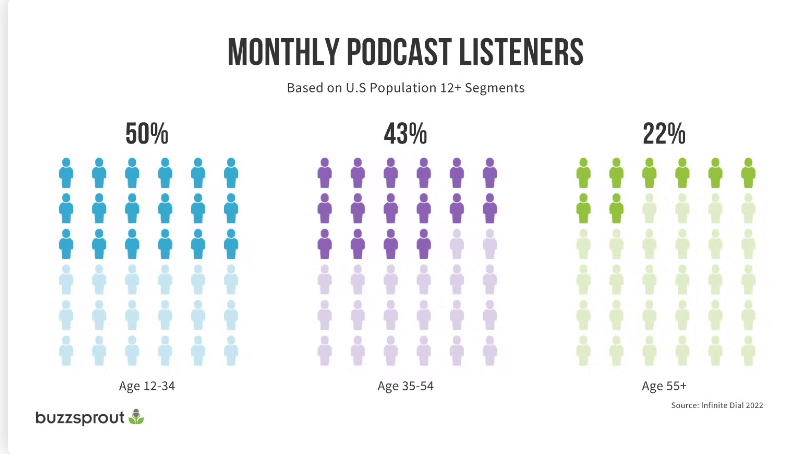 Source: Buzzsprout
All that said, don’t forget the most important reason to start a podcast: a more intimate connection with your audience.
Podcast content allows you to speak directly to them and prove your expertise in a much more direct way.
Generally, podcast listeners give more time and attention to a podcast than a written article. You may have their undivided attention for 30 minutes, a stark contrast to the 90 seconds they might spend scanning a blog post.
This makes podcasts more intimate than written content and may build trust and brand awareness faster. Plus, a podcast is a fantastic demonstration of E-E-A-T, which adds to your credibility in both the eyes of searchers and search engines.
Lastly, if you publish your podcast episodes on your website with helpful show notes or transcriptions, those episodes can rank in search engines for queries your audience is searching for.
Bottom line: Podcasts are great for your brand and great for SEO.
Get the daily newsletter search marketers rely on.
<input type=”hidden” name=”utmMedium” value=”“>
<input type=”hidden” name=”utmCampaign” value=”“>
<input type=”hidden” name=”utmSource” value=”“>
<input type=”hidden” name=”utmContent” value=”“>
<input type=”hidden” name=”pageLink” value=”“>
<input type=”hidden” name=”ipAddress” value=”“>
Processing…Please wait.
7 best practices for starting a podcast
Interested in starting a podcast? Start here.
1. Start small, then invest
The second after you decide to start a podcast, don’t run out and immediately buy expensive equipment.
Instead, start small. Use your smartphone and an inexpensive microphone to record your first episodes. Test how your podcast is received and determine whether you can grow it.
If the answer is yes, you can slowly invest in better recording equipment (like a smart microphone that can hone in on your voice and filter out background noise, a headset, and audio editing software), creative help (like a sound mixer or editor), and fancy graphics for cover art.
2. Choose a topic and format
One of the first tasks for creating a podcast is to choose a topic and format.
- Topic: What will your podcast be about? What will you cover?
- Format: How will your podcast be presented? One host? Two or three? Will you tell stories? Do interviews? Share knowledge?
The best way to uncover your main topic and format? Research.
Audience research
What do they want to hear from you? What are they interested in?
What problems or pain points do they have that you could address in your podcast?
Topic research
Find a broad overarching topic that ties into your expertise and overlaps with your business.
If you publish other content, like blogs, consider choosing the same topic area for your podcast. This gives your podcast cohesion and ties it to your other content.
You can even repurpose blog content for podcast episodes, and vice versa, if they’re thematically and topically linked.
Competitor research
Do your competitors have podcasts? What podcasts exist out there on your topic?
Look at what the competition is doing, how they format episodes, and what information they share. How can you differentiate?
3. Outline or script episodes
Before you jump into recording, you need a rough idea of what you’ll cover in each episode and how you’ll do it.
Start by brainstorming topics for at least your first 10 episodes. This will give you an idea of the mileage you’ll get out of your podcast topic/theme and help you keep each episode cohesive and relevant.
(If you struggle to come up with podcast episode topics after the first 10, that might be a sign that you need to broaden your theme or tweak it.)
Then, after your first few episode topics are set, you can write a brief outline of talking points for episode one. You don’t have to script every word you say (unless that helps you!), but you should give yourself a roadmap so you don’t get lost while recording.
Remember, each episode should have a main topic and a goal attached. You need to give listeners a reason to stay with you. Just talking randomly for 20 minutes won’t provide any value.
4. Push through initial discomfort – just press record
With your first episode outlined or scripted, you can press record.
If you’ve never podcasted before, you may have a few false starts before you get into a groove. It may feel strange or unnatural.
The best thing to do is push through and just get your recording done. Over time, you’ll get more comfortable. Don’t give up just because things didn’t go perfectly the first time you tried. You will get better at this the more you do it!
5. Include an intro and outro
Almost all professional-sounding podcasts include a short introduction, where listeners may hear a snippet of music and the host welcoming them to the podcast and introducing the episode topic.
Then, to give listeners a satisfying sense of completion, include an outro (a.k.a., conclusion) that mirrors the intro but instead signs off and sets up expectations for the next episode.
These two bookends help your podcast sound more polished and organized, which listeners enjoy.
6. Optimize
Optimizing your podcast gives it the best chance of being found by listeners. There are a few key areas to focus on for optimization:
- Podcast title: Keep it short, sweet, and relevant to your brand and chosen theme.
- Podcast category: Choose the category that best fits the content of your podcast.
- Podcast description: This description is what potential listeners will read to discover what your podcast is about and whether they want to listen. Keep this user-focused and make sure to include relevant keywords.
- Podcast cover art: Keep it simple, clear, and eye-catching. Don’t try to cram too much text on your cover art. If you can, invest in a graphic designer to create this for you. If you don’t have the means for that right now, try using templates on Canva.
7. Choose a podcast hosting platform
Finally, when it’s time to submit your podcast to platforms like Spotify or Apple Podcasts, know that you need to have a separate host for your audio files first.
Your podcast hosting service stores your podcast episodes and generates an RSS feed, which is what you’ll submit to podcast platforms.
You’ll only have to do this once, as the RSS feed should update automatically when you upload new episodes to your host service.
Hosting services to check out include Podbean, Buzzsprout, or Transistor.
5 great podcast examples
Now that you understand the basic steps to starting a podcast, it’s time to get some inspiration.
Here are some excellent examples of brands, creatives, journalists, and businesspeople doing this medium justice.
Branded podcast: Inside Trader Joe’s

Trader Joe’s is a grocery chain known for its unique products and seasonal items.
On its podcast, hosts go inside stores and behind the scenes to give you the scoop on cult products and how the company works.
Advice podcast: Not Another Anxiety Show

Host Kelli Walker is a registered nurse, certified health and wellness coach, and former agoraphobe.
This anxiety-focused podcast offers guidance, tips, and resources for working through the disorder from Kelli and a myriad of experts.
Fictional podcast: Limetown

This fictional podcast tells the story of the strange disappearance of over 300 people from a small Tennessee town.
It plays out like you’re listening to a real investigative podcast, which makes it even more immersive. This podcast was so popular it was turned into a TV show.
Finance podcast: Money Girl

The Money Girl podcast is hosted by a personal finance and business expert, Laura D. Adams, who breaks down complex financial and small business topics for listeners, making them fun and easy.
Investigative podcast: In the Dark

This award-winning podcast features in-depth investigative journalism on true crime stories gone awry. Each season focuses on one case and dives into every detail. As it happens, the second season was instrumental in helping free a man from prison.
Note: True crime podcasts have exploded in popularity since “Serial” was released in 2014. The best of them are great examples of storytelling and are worth a glance for inspiration.
Ready to start your podcast?
If by now you’re excited to start your podcast, that’s a great sign.
The best thing you can do is dive in with enthusiasm because that passion will show up in your end product.
Any person, brand, or creator can start a podcast.
Just remember to start small, research and plan your topic based on what your audience would love to hear, roughly outline what you’ll say in each episode, and take the time to optimize.
Happy podcasting!
The post Podcasts: A content guide for beginners appeared first on Search Engine Land.
Courtesy of Search Engine Land: News & Info About SEO, PPC, SEM, Search Engines & Search Marketing
Category seo news | Tags:
Social Networks : Technorati, Stumble it!, Digg, de.licio.us, Yahoo, reddit, Blogmarks, Google, Magnolia.
Overcoming the paradox of personalization to meet consumer expectations by BlueConic
Written on February 13, 2023 at 6:51 am, by admin

With growing privacy concerns, consumers are rethinking what data they’re willing to give to brands, and over 80% of CMOs say privacy has changed their perception of personalization.
Join the webinar featuring BlueConic’s Khurram Moiz, principal customer success manager, and special guest, Forrester Senior Analyst, Jessica Liu, as they discuss the state of consumer personalization and outline the strategy, data and technology needed to successfully design and execute personalized experiences.
Tune in to find out:
• When consumers want personalization throughout their lifecycle.
• Why highly technical teams are not required.
• Real-world examples of how first-party data can unlock innovation.
The post Overcoming the paradox of personalization to meet consumer expectations appeared first on Search Engine Land.
Courtesy of Search Engine Land: News & Info About SEO, PPC, SEM, Search Engines & Search Marketing
Category seo news | Tags:
Social Networks : Technorati, Stumble it!, Digg, de.licio.us, Yahoo, reddit, Blogmarks, Google, Magnolia.
This day in search marketing history: February 13
Written on February 13, 2023 at 6:51 am, by admin
Google AMP stories launch
In 2018, Google launched a new, visually rich mobile content format designed to generate more engagement from users.
Breaking with previous guidance, Google didn’t intend for this type of AMP content to match your non-mobile content. Instead, this mobile-only content was supposed to be unique.
Specifically, Google said AMP Story content should be “fulfilling and standalone.”
In addition to Hearst and The Washington Post, Google worked with CNN, Meredith, Mashable, Mic, Vox and Condé Nast to develop and roll out AMP Stories.
Dig deeper:
- Google gets in on mobile ‘story craze’ with new AMP Stories format
- AMP Stories: The new Accelerated Mobile Pages format from Google
Also on this day
Google: ‘We do updates all the time’ — somewhat confirming February update rumors
2020: Google’s Danny Sullivan referred to the company’s advice given around “several updates” in November 2019.
Big Google Partners program changes are coming: What you’ll need to qualify
2020: There were new requirements for agencies to achieve and maintain Google Partner status starting in June.
Google backtracks on using (relevant) keywords in your Google My Business description
2020: An update to the help page about adding keywords to improve visibility in local search results was disputed by local SEOs and quickly removed.
TechTarget cites technical SEO issues as reason for 25% decline in Google traffic
2020: In TechTarget’s recent earnings report, the company said unpaid traffic represented 94% of overall traffic in the quarter.
Business owners can now reply to reviews on Google Maps desktop
2019: Business owners with verified Google My Business listings could reply to reviews left about their business directly in Google Maps on desktop.
Google tests ads in Assistant results
2019: With the Assistant on a billion devices, the move was inevitable.
Google enables ‘join waitlist’ for restaurants
2019: Clicking on the join waitlist button opened a screen that identifies the current wait time and enabled users to input their party size.
Google launches new look for ‘people also search for’ search refinements
2018: The suggestions either loaded on delay or when a user clicked on a result and then clicked back to the search results.
Spotted: Links to competing shopping engines in UK Google Shopping results
2018: The new “inclusive” look was in response to the European Commission’s antitrust ruling against Google.
Google: No comment on possibility of a Feb. 7 algorithm update
2017: Many webmasters and SEOs were noticing some significant changes in Google’s search rankings algorithm.
Google’s ‘people also ask’ search feature officially gains dynamic loading
2017: Google’s people also ask feature gained a new way for searchers to explore topics in the desktop and mobile search results.
Google Maps new feature lets users create lists of saved places that can be shared & accessed offline
2017: Users could keep track of saved places and share lists with others via text, email and popular messaging apps.
Google Webmaster Tools Data Stopped Updating Almost A Week Ago
2015: The data and tools had stopped updating Feb. 7.
Search In Pics: Google Disco Ball, A Cacoon & YouTube Cafe
2015: The latest images showing what people eat at the search engine companies, how they play, who they meet, where they speak, what toys they have, and more.
Google Offers Advice On Faceted Navigation & Infinite Scroll Web Pages
2014: Techniques to make infinite scroll pages and faceted navigation more search engine friendly.
Will 11th Hour Objections Derail The Google-EU Antitrust Settlement?
2014: EU Commissioners were considering forcing additional discussions or preventing the settlement from becoming final.
Bing Ads Expands Mobile Sitelinks Coverage In US, Will Roll Out To EU Markets
2014: Bing Ads had enabled over 60% of the mobile traffic on the Yahoo Bing Network to run sitelinks in the U.S.
Green Ribbon, Minimum Wage, Climate Changes: Google Searches For The State Of The Union
2013: Some of the interesting trends we saw on Google due to the State of the Union address.
Panic Flu Searches May Have Tricked Google Flu Trends Into Thinking Things Were Worse
2013: Google Flu Trends overshot the percent of the U.S. population with influenza-like illness by nearly double what the CDC reported.
A “Cool” Google Rich Snippet For Snow Conditions
2013: It contained snow depth statistics, new snow stats within 24 and 72 hours, the conditions of the snow, the lifts open on the mountain, the current weather and more.
Google Hits 67 Percent Market Share Again, Bing Hits Another All-Time High [comScore]
2013: Search activity was up 11% in January over December, to almost 19.5 billion “core” searches.
Google Fixes Bug That Required Cookies To Search
2012: Google also initially reconfirmed that requiring cookies “is not something we’re testing or rolling out.”
Where’s It Hurt? After You Search For A Symptom, New Google Health Search Results Suggest Causes
2012: Google introduced improved results that shortened the time from symptom-related search to the discovery of potential medical causes and conditions.
Google Apologizes, Continues To Tweak Buzz
2010: Google announced three tweaks to Buzz (including changing auto-follow to auto-suggest) and offered an apology for what it called a “challenging week.”
Google: ‘Don’t Blame Us For Terrorism’
2009: Google said it shouldn’t be blamed for terrorist use of Google Earth.
Google Analytics On The iPhone: 3 Apps Reviewed
2009: The good, bad, and ugly of Google Analytics apps on the iPhone (Analytics App, myAnalytics and Analytics Pro).
Newspapers, Google And The “Devaluation” Of Content
2009: “Google is great for Google, but it’s terrible for content providers, because it divides that content quantitatively rather than qualitatively.”
Android Paid Apps Launch: “It’s Business Time”
2009: developers can start charging for their apps and consumers will start gaining access to and paying for selected apps on Android phones.
Yahoo Discontinues MyWeb, Pushes Delicious
2009: MyWeb launched in 2005, as part of Yahoo’s vision for a “very individual Web.”
Google AdWords To “Strictly Enforce” Display URL Policy
2008: The policy was remaining the same, but starting April 1, Google would begin “strictly enforcing” it.
Google Study: 1.3% Google Searches Return At Least One Malicious Result
2008: They checked 66.5 million URLs and found that 3.4 million were “suspicious” and 3.4 million were malicious, pointing to 181,699 landing sites.
News Corporation A Potential Partner For Yahoo In Avoiding Microsoft, Google Interest ‘Wanes’
2008: Antitrust realities were likely at the heart of Google’s diminishing interest in a search deal.
Third Annual Yahoo Searchlight Awards Happen Against Surreal Backdrop
2008: As Yahoo was laying off its promised 1,000 workers.
Microsoft adCenter Says No To Spanish Landing Pages For US Traffic
2008: The landing page was targeting U.S.-based Spanish-speaking customers.
WPP To Consolidate Search Agencies Under GroupM And Outrider Brand
2008: This consolidation created a global search agency with offices on multiple continents.
Google On Centerfold Of Marie Claire
2008: The 12-page piece was named Fashion for Work at the Google Headquarters and highlighted model Britni Standwood throughout the Googleplex.
Google Maps Adds “Report Incorrect Data” Link
2007: For any unverified business listing, Google would show a “report incorrect data” link that took you to a page to easily notify Google of the problem.
Google Search Results Now May Display Malware Warnings
2007: Google’s “This site may harm your computer” message linked directly to a Google help document explaining the message in more detail.
Google Ads Getting New Google Checkout Badges
2007: The icon would be updated to a badge format similar to the Google Checkout buttons used by merchants since the program started.
Google Loses In Belgium Newspaper Case
2007: A Belgium court found that Google did violate copyright when including material from several Belgian newspapers in its search index.
InfoSpace Joins Forces With FAST For Mobile Search
2007: It sought to marry InfoSpace’s carrier relationships and content expertise with FAST’s search technology and PPC platform on mobile devices.
Wordtracker Adds UK Keywords Option To Keyword Tools
2007: Those wanting to target the UK region would have an option to specify UK keywords only and be shown related keywords based on that data.
SingingFish.com Now Redirects To AOL Video Search
2007: AOL purchased SingingFish.com in November 2003.
Special Valentine’s Day Cards For SEOs
2007: Messages included “I love you more than links from Google itself,” “Roses are red, violets are blue, link bait is fun and so are you.”
Eurekster Adds More ‘Wiki’ To Swickis
2007: Eurekster added Q&A functionality to Swickis (social site-search widgets) and the ability for site users to add links directly into the site’s index.
From Search Marketing Expo (SMX)
Past contributions from Search Engine Land’s Subject Matter Experts (SMEs)
These columns are a snapshot in time and have not been updated since publishing, unless noted. Opinions expressed in these articles are those of the author and not necessarily Search Engine Land.
- 2020: No, the Google My Business description does not impact ranking by Joy Hawkins
- 2020: Leverage Python and Google Cloud to extract meaningful SEO insights from server log data by Charly Wargnier
- 2020: Microsoft Office hits pause on forcing Bing search in Chrome, Firefox by Detlef Johnson
- 2019: Death of the keyword: What it is (and is not) for retail by Andy Taylor
- 2018: How do you optimize content for a voice-first world? by Sherry Bonelli
- 2017: ‘Things to do near me’ SEO by Andrew Shotland
- 2017: 7 tips for small manufacturers thinking about using AdWords by Dianna Huff
- 2015: Is Your Local Site Mobile Friendly? Should It Be? by Rachel Lindteigen
- 2014: Why “Big Data” Won’t Win You The Battle For Online Revenue by Matt Ackley
- 2013: The Rise Of Programmatic Branding In RTB by Frost Prioleau
- 2013: How To Use Social Networks To Create Laser-Targeted B2B Advertising Campaigns by David Rodnitzky
- 2013: Search Funnel Data Now More Actionable In AdWords by Frederick Vallaeys
- 2012: 5 Rules To Turn Your Local Business Into A ‘Social’ Business by Myles Anderson
- 2012: The Challenge Of Justifying Enterprise SEO by Ian Lurie
- 2012: 7 Key Mistakes That Cost Advertisers ‘Mobile Super Bowl I’ by Brian Klais
- 2009: Tool Review: WordStream Helps SEM Pros Streamline & Segment Keyword Lists by Josh Dreller
- 2008: Designing And Owning Your “Search Shelf Space” by Robert J. Murray
- 2008: B2B Blogging: Using Thought Leadership To Drive Positioning & Sales by Galen DeYoung
- 2007: Sproose – A Social Search Engine by Phil Bradley
- 2007: You Hum It, These Search Engines Claim They’ll Find It by Phil Bradley
- 2007: Social Media Marketing Is Ethical! by Cameron Olthuis
< February 12 | Search Marketing History | February 14 >
The post This day in search marketing history: February 13 appeared first on Search Engine Land.
Courtesy of Search Engine Land: News & Info About SEO, PPC, SEM, Search Engines & Search Marketing
Category seo news | Tags:
Social Networks : Technorati, Stumble it!, Digg, de.licio.us, Yahoo, reddit, Blogmarks, Google, Magnolia.
This day in search marketing history: February 12
Written on February 12, 2023 at 2:45 am, by admin
Google penalizes JCPenney for link scheme
In 2011, JCPenney was caught engaging in link schemes and, as a result, found itself on the receiving end of a Google penalty.
The New York Times was apparently perplexed by how well jcpenney.com ranked in organic search for practically everything the retailer sold. So they asked someone familiar with SEO to look into it.
What they found: JCPenney’s site had thousands of peculiar links pointing to it with very descriptive anchor text. The Times shared its findings with Google – and Google took manual action. The JCPenney website was nowhere to be found on Google for the queries they had previously ranked number one for.
JCPenney said they knew nothing about the links – and subsequently fired their SEO firm.
Read all about it in New York Times Exposes JCPenney Link Scheme That Causes Plummeting Rankings in Google.
Also on this day
New chart annotations make Google Ads’ change history reports much easier to navigate
2020: Annotations were available in campaign-level change reports in the Google Ads UI.
Video: Ann Smarty on the history of guest blogging & the future of link building
2020: Smart ran MyBlogGuest, which got hit hard when Google cracked down on guest blogging.
For retail advertisers, Shopping ads continue to overshadow text ads
2019: Fourth-quarter reports from Marin and Merkle highlighted the importance of Shopping ads for merchants’ search advertising strategies.
Analyst: 8 billion voice assistants by 2023
2019: Analyst firm Juniper Research predicted “nearly 8 billion digital voice assistants to be in use by 2023.”
Google, Getty Images enter a multi-year global licensing partnership
2018: The deal effectively ended Getty’s European antitrust complaint against Google.
Google Won’t Provide SEO Certifications To Webmasters Or SEO Companies
2016: Google discussed internally if they should add an SEO certification program and decided not to do so.
AdWords Automated Bidding Gets An Overhaul: Welcome, Portfolio Bid Strategies
2016: Terminology changes came with some new functionality, including the ability to set different CPA targets at the ad group level within the same bid strategy.
Google Mobile Image Search Adds Drop-Down & Other UI Changes
2016: Google added a drop-down menu on the image search result page for mobile devices and tweaked some more user interface features.
Streetmap Loses Anti-Competitive Lawsuit Against Google In UK
2016: Streetmap had sued on grounds that putting Google Maps at the top of search results was an “abuse of competition.”
Search In Pics: Google Jedi Master, Aerial Silks Class & Sundar Pichai Meets NFL’s Ronnie Lott
2016: The latest images showing what people eat at the search engine companies, how they play, who they meet, where they speak, what toys they have and more.
Google’s Search Impact Report Goes Live For Select Few Webmasters
2015: Google released the alpha version of their new search queries report in Google Webmaster Tools to a small number of Webmasters for feedback and testing.
Now It’s Expedia Vs. Priceline As Orbitz Swallowed For $1.6 Billion
2015: After buying Travelocity the previous month, Expedia grabbed Orbitz in competitive bidding.
Google’s Matt Cutts On Being A Spam Fighter: Looking For Patterns & Always New Spam Efforts
2014: He answers the question “What’s it like to fight webspam at Google?”
5 Times Google Penalized Itself For Breaking Its Own SEO Rules
2014: When Google took action against itself – Google Chrome, Beat That Quote, Google AdWords (2x) and Google Japan.
Microsoft: We Don’t Censor Search Outside China
2014: An article asserted that Bing search results for Chinese language speakers in the U.S. were radically different than those in English for controversial terms such as “Tiananmen Square” or “Dalai Lama.”
Report: Mobile To Drive A Third Of Paid-Search Clicks By Year End
2013: The company said that as of December 2012, mobile devices accounted for 23.4% of all US paid-search clicks.
Bing Ads Updates Pro Accreditation Training; Exam Is Now Free
2013: Among the changes, Bing transitioned the training segments from video based to text based content.
Foursquare Improves Android App, Makes Search More Prominent
2013: An “Explore” search box was added at the top of the screen.
Wait Wait… Don’t Tell Me: “I Search Google. So Does Bing”
2011: NPR’s “Wait Wait… Don’t Tell Me” quiz show did a funny send up over Google’s accusations that Bing was copying Google’s search results.
Google AdWords Now Offering “Bid Ideas”
2010: The feature gave suggestions on if you should increase or decrease your bids on certain keywords.
Google Tweaks Mobile Search, Adds Olympics Onebox, Yahoo Offers Dedicated Mobile Olympics Site
2010: Google made some subtle changes to its mobile homepage and searchbox.
Google May Offer Buzz Independently From Gmail
2010: “It’s clear that interest in Buzz may extend beyond the current Gmail base, and we’re open to serving that community.”
Google Offers Beta Features In New “Maps Labs”
2010: So that people could get a look at new functionality and Google can get early feedback on potential new features to introduce.
Google’s Sergey Brin Talking China At TED
2010: A transcript of an impromptu Q&A with Google cofounder Sergey Brin on Google’s decision to leave China.
Nielsen: Bing Regains December’s Losses In January
2010: Bing’s January share wiped out its drop from December.
Yahoo Founders To Sell Up To 5 Million Shares
2010: Jerry Yang, the former CEO, would be selling 3 million shares and David Filo would sell up to 2 million shares.
Google, Yahoo & Microsoft Unite On “Canonical Tag” To Reduce Duplicate Content Clutter
2009: The birth of the rel="canonical" link element. The search engines would use this as a hint, not as a directive.
Google Turns Off Radio Ads
2009: Google Audio Ads and Google Radio Automation wasn’t as successful as they hoped
Google Buys Paper Mill In Finland For New Data Center
2009: It cost $51.7 million.
Google “My Tracks” Uses Android GPS To Capture Outdoor Performance
2009: It helped runners, skiers, bikers and other outdoor enthusiasts capture their routes and performance using the phone’s GPS chip.
Microsoft Continues Peeling Off Yahoo Search Talent
2009: Yahoo executive Larry Heck would be working on Microsoft search.
Internet Ads Grow; Google Sees Slight Decline
2008: IDC reported that overall Internet advertising had grown 27% year over year to $25.5 billion in 2007.
Google Maps Adds Street View Photography For Several New Cities
2008: 30 cities had the street views feature.
Mobile Musical Chairs: Google Befriends Nokia; Yahoo Snags T-Mobile Europe
2008: Yahoo appeared to have replaced Google as the search provider for T-Mobile in Europe, while Google became a major search partner of Nokia.
Tech Companies Go After Yahoo Employees In Wake Of Microsoft & Layoff News
2008: The companies were seeking developers, project managers, and key executives who may have wanted to jump ship ahead of a possible Yahoo-Microsoft merger and upcoming layoffs. Related: Updated: Yahoo Layoffs Happening Now
MSNbot 1.1: Live Search Implements A More Efficient Crawl
2008: Microsoft announced changes to their Live Search crawler intended to reduce bandwidth resources during the crawl of a site.
Google Accused Of Profiting On Film Piracy: Discussions Continue
2007: Google is said to have supported two websites that allegedly offered pirated movies in part by an ad rep suggesting they bid on terms like “bootleg movie download.”
What Are Google Sitelinks?
2007: Many more people were reporting seeing Google Sitelinks update.
Yahoo Signs Mobile Advertisers; Google Partners With Vodafone On Maps, Live Search Mobile Leaving Beta
2007: A variety of expected mobile announcements ahead of 3GSM World Congress.
Search Love Triangle: Ask.com Wants Those Looking For Yahoo.com On Google.com
2007: We’ve never heard of a search engine advertising for those seeking another search engine on a third search engine. Until now.
Ironically, You Need A Map To Find Google & Microsoft’s Windows Mobile Map Apps
2007: It was an incredible challenge.
Yahoo Go For Mobile Goes “Gamma,” LG Partnership Announced
2007: It featured the ability for consumers to search directly from maps and share oneSearch results, news articles and the service directly with friends.
Microsoft, Google & Others To Build New Wireless Device?
2007: Was this a way for these companies to offer mobile services without having to work with mobile carriers?
Ask.com Chooses Central Washington For New Data Center
2007: In related news, it seemed like Google’s North Carolina deal was going to be reviewed by the Senate Finance Committee.
Past contributions from Search Engine Land’s Subject Matter Experts (SMEs)
These columns are a snapshot in time and have not been updated since publishing, unless noted. Opinions expressed in these articles are those of the author and not necessarily Search Engine Land.
- 2020: Learn how to chart and track Google Trends in Data Studio using Python by Hülya Çoban
- 2018: Monitoring web migrations: A checklist for moving from one site to another by Aleyda Solis
- 2016: A Layman’s Visual Guide To Google’s Knowledge Graph Search API by Barbara Starr
- 2015: AdWords Scripts Bulks Up With Bulk File Uploads by Russell Savage
- 2015: 10 WordPress SEO Questions That Took Me 10 Years To Answer! by Trond Lyngbø
- 2014: How 3 B2B Companies Integrate SEO In Their Online Marketing Strategies by Derek Edmond
- 2013: Your Top 5 Questions About The New gTLD Domain Extensions, Answered by Kathy Nielsen
- 2013: Is Your Local Pricing Strategy Blocking Search Engine Spiders? by Bill Hunt
- 2013: How Search & Social Will Hit The Fast Forward Button In 2013 by Jim Yu
- 2013: How 5 Years Of Doing The Right Things Can Be Undone In 9 Months Of Doing Nothing by Erin Everhart
- 2010: Information Architects Are From Venus, SEOs Are From Mars by Shari Thurow
- 2010: A Guide To Choosing Your Paid Search Management Tool by Josh Dreller
- 2010: User Generated Content Offers Significant SEO Benefits by Brian Klais
- 2009: Are You Sitting On A Good Idea? by Aaron Wall
- 2009: How To Lose Money & Alienate Your Customers by Lance Loveday
- 2008: How To Shout On Social Media Sites Without Screaming by Muhammad Saleem
- 2008: LinkSpotting – Headlines That Lead To Links and Why by Eric Ward
- 2007: I Have A Link Building Secret by Eric Ward
< February 11 | Search Marketing History | February 13 >
The post This day in search marketing history: February 12 appeared first on Search Engine Land.
Courtesy of Search Engine Land: News & Info About SEO, PPC, SEM, Search Engines & Search Marketing
Category seo news | Tags:
Social Networks : Technorati, Stumble it!, Digg, de.licio.us, Yahoo, reddit, Blogmarks, Google, Magnolia.