

Google Analytics 4 introduces benchmarking data
Written on August 31, 2024 at 11:28 am, by admin
Google rolled out a significant update to Google Analytics 4 (GA4), allowing users to compare their performance with other businesses in their industry.
Why we care: This new feature will provide valuable context for advertisers trying to understand their performance relative to their peers, potentially informing strategic decisions and goal-setting.
How it works.
- Users can access benchmarking data if their property has the “Modeling contributions & business insights” setting enabled in Admin > Account Settings.
- Benchmarks are refreshed every 24 hours.
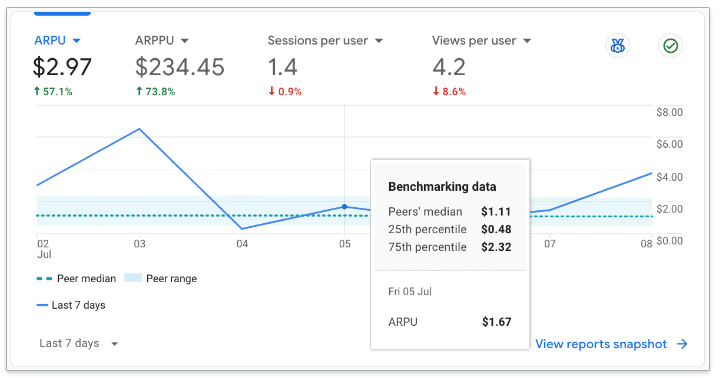
- The summary displays:
- Your trendline.
- Median in your peer group.
- Range in your peer group (25th to 75th percentile).
Key features.
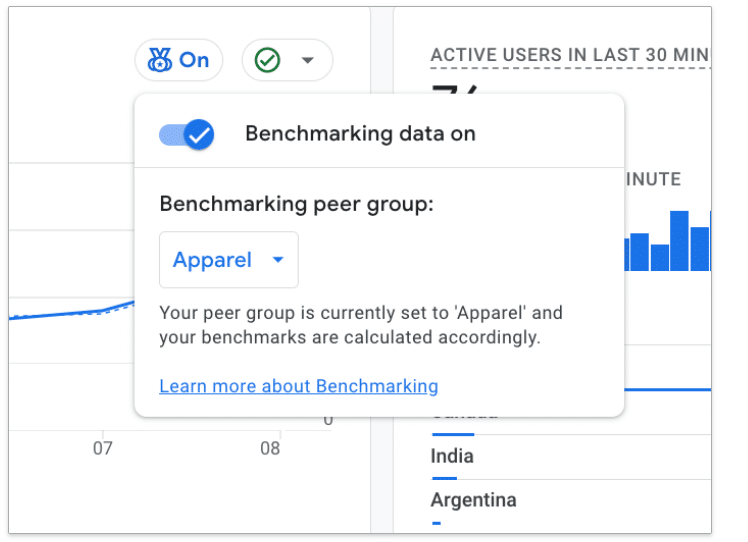
- Customizable peer groups: Users can select from various categories to find the most relevant comparison group.
- Data privacy: Google assures that benchmarking data is encrypted, protected and aggregated to maintain privacy.
- Wide range of metrics: Covers acquisition, engagement, retention and monetization.
The big picture. This update addresses a long-standing need in the analytics community for comparative data, allowing businesses to gauge their performance more accurately within their industry context.
What’s next. Users are encouraged to check their GA4 accounts for this new feature and explore how it can enhance their analytics insights.
Courtesy of Search Engine Land: News & Info About SEO, PPC, SEM, Search Engines & Search Marketing
Category seo news | Tags:
Social Networks : Technorati, Stumble it!, Digg, de.licio.us, Yahoo, reddit, Blogmarks, Google, Magnolia.
Google Analytics 4 introduces benchmarking data
Written on August 31, 2024 at 11:28 am, by admin
Google rolled out a significant update to Google Analytics 4 (GA4), allowing users to compare their performance with other businesses in their industry.
Why we care: This new feature will provide valuable context for advertisers trying to understand their performance relative to their peers, potentially informing strategic decisions and goal-setting.
How it works.
- Users can access benchmarking data if their property has the “Modeling contributions & business insights” setting enabled in Admin > Account Settings.
- Benchmarks are refreshed every 24 hours.
- The summary displays:
- Your trendline.
- Median in your peer group.
- Range in your peer group (25th to 75th percentile).
Key features.
- Customizable peer groups: Users can select from various categories to find the most relevant comparison group.
- Data privacy: Google assures that benchmarking data is encrypted, protected and aggregated to maintain privacy.
- Wide range of metrics: Covers acquisition, engagement, retention and monetization.
The big picture. This update addresses a long-standing need in the analytics community for comparative data, allowing businesses to gauge their performance more accurately within their industry context.
What’s next. Users are encouraged to check their GA4 accounts for this new feature and explore how it can enhance their analytics insights.
Courtesy of Search Engine Land: News & Info About SEO, PPC, SEM, Search Engines & Search Marketing
Category seo news | Tags:
Social Networks : Technorati, Stumble it!, Digg, de.licio.us, Yahoo, reddit, Blogmarks, Google, Magnolia.
Google Search now supports AVIF file formats
Written on August 30, 2024 at 8:27 am, by admin

Google Search finally supports the AVIF file format in Google Search, Google Images and all locations Google Search shows images such as Google Discover, Google News and so forth. “We’re happy to announce that AVIF is now a supported file type in Google Search, for Google Images as well as any place that uses images in Google Search,” John Mueller, Google Search Advocate, wrote.
What is AVIF. AV1 Image File Format is an open, royalty-free image file format specification for storing images or image sequences compressed with AV1 in the HEIF container format. It competes with HEIC, which uses the same container format built upon ISOBMFF, but HEVC for compression.
Google said it is one of the mostly widely used image formats today. “AVIF is an open image file format based on the AV1 video compression standard,” Google added.
What this means for SEO. Technically nothing. Google said, if you are using AVIF formats, you don’t need to do anything, Google will now process them and use them like they would other image formats. “You don’t need to do anything special to have your AVIF files indexed by Google,” John Mueller wrote.
In March 2024, Google hinted this support was coming soon and now it is here.
You can see the full list of supported image file types over here.
More details. Mueller wrote:
“AVIF is an open image file format based on the AV1 video compression standard. It’s supported by all major web browsers, and images in AVIF image file format are supported by a variety of services and platforms on the web, including WordPress, Joomla, and CloudFlare. It’s not recommended to blindly make sweeping changes to images across a website: take the time you need to evaluate which format works best for your specific needs. If you do choose to change image file formats for some of your images, and if this results in changes to filenames or extensions, make sure to set up server-side redirects.”
Why we care. If you are using workarounds for AVIF files on your sites, you no longer need to. Google now natively supports AVIF file types in Google Search.
Also, any workarounds you have, you can now remove.
Make sure to watch your Search Performance reports for any changes you make around AVIF files, to ensure Google is processing those images properly going forward.
Courtesy of Search Engine Land: News & Info About SEO, PPC, SEM, Search Engines & Search Marketing
Category seo news | Tags:
Social Networks : Technorati, Stumble it!, Digg, de.licio.us, Yahoo, reddit, Blogmarks, Google, Magnolia.
Peak PPC season is coming: 5 tests to run now
Written on August 30, 2024 at 8:27 am, by admin

We all love to take a little time away from the grind during the slow season (which for many of us is right now), but smart PPC marketers are also using the time to get in the prime position when the tide is higher.
- In retail, that will fire up in October (probably earlier than ever this year).
- In B2B, that means prepping for the end-of-year push that comes from needing to hit quotas and engaging brands about to be flush with new yearly budgets.
No matter your vertical or the particular timing, there are five tests I like to run during the slower season to help clients get learnings to leverage when the tide is high. Those are:
- Channel diversification.
- Landing page optimization.
- Seasonal creative and offer testing.
- Incrementality testing.
- Default settings testing (TL;DR: find them and turn them off).
1. Channel diversification tests
When choosing a new channel to test, the first things to consider are:
- How effectively it can help you reach valuable users.
- Where the right people spend their time.
Depending on your company’s size and goals, you can weigh the pros and cons of niche platforms with great targeting and intent (for SaaS, maybe that’s relevant subreddits or a platform like Capterra) vs. bigger platforms with more reach and less precise targeting (YouTube or connected TV).
Once you choose your channel(s) to test, you must find some budget. Ideally, your brand or client has a test budget to play with, but if not, consider shifting the budget from the same stage of the purchase journey.
For instance, if you’re looking to build awareness and you’d like to test Reddit, assess how spend on platforms like GDN is performing to see if you can pull from there without impacting your revenue too dramatically.
Timing-wise, I believe there are no bad times to run tests. Still, remember that your goal should be to learn.
If demand is relatively low, you’re not running aggressive promotions and direct response is relatively soft, it’s a particularly good time to test up in the funnel.
When you’re weighing timing, use the tests to get information you can leverage in your peak season.
Dig deeper: Un-silo your PPC campaigns: 4 tactics for more cohesive marketing
2. Landing page and CRO tests
The soft season is also a good time to tweak your existing landing pages or launch new ones to see how they perform.
The ultimate goals are to improve user experience and conversion rates – some of our clients have seen a 15%+ boost from these efforts.
Build your list of landing pages to address based on a combination of impact (engagement volume) and opportunity (low CVR).
You can assess this by looking at your data (spend, traffic and CVR) within your ad platforms or do some cross-channel assessments in GA4.
First, test the higher-impact variables:
- Copy above the fold.
- A layout that delivers impact at a glance.
- Adding different types of social proof.
- Form fields and copy.
- Different CTAs.
To get the clearest insights when tweaking or revamping a page, duplicate it and run A/B tests between the new and old versions. This approach also prevents performance from dropping if you’re testing riskier changes.
Dig deeper: A/B testing mistakes PPC marketers make and how to fix them
3. Seasonal creative and offer tests
There’s only so much advanced testing of seasonal creative you can do (Christmas themes might not work in July, for example), but you can test how different specials, promotions and CTAs resonate with your users.
It’s also a good idea to look for different opportunities to run seasonal PPC promotions:
- For retail, the usual examples would be Mother’s Day, Father’s Day and other relevant secondary holidays.
- For B2B, the end of the quarter and the need to hit quota can leave room for limited-time promotions to test with your users.
Many industries can have their own seasonal spikes, too.
Consider the academic calendar if you’re in the education space or the enrollment period if you’re in health and schedule some tests outside of high tide to get learnings to leverage.
Dig deeper: 3 tips for using promotions and discounts in paid search
4. Incrementality testing
One of my favorite testing initiatives for slower times is incrementality testing.
Basically, test segments of your campaigns to see if they’re actually driving the return you think they are or if users in those segments would be engaging or purchasing without seeing your ads.
These can take the form of holdout tests or geo tests.
- For holdout tests, create groups that do not receive your ads and measure their performance against similarly composed groups that are seeing your ads to gauge the difference.
- For geo tests (a form of holdout tests), identify specific geographic areas to suppress and measure the performance of those geos to those still getting served ads.
Successful learnings from these tests depend on a few key factors:
- The right variable (and only one variable, whether that’s geo or age or another factor).
- Identifying segments to compare that are close enough in composition to produce clean results.
- Enough data density to make a call on the level of incrementality your spend is driving.
If you find that your campaigns aren’t all that incremental, the next step is to determine where to reallocate the spend for greater impact.
Often, moving funds away from direct response and up the funnel to build brand awareness and reputation is a long-term play.
If you’re thinking about when to start incrementality testing, the most common reason is that you’re spending more but not seeing a higher return.
Another reason, though less common, is when your closed-won rate drops in the later deal stages. This suggests there’s a chance to strengthen customer loyalty earlier in the process.
Dig deeper: Incrementality testing in advertising: Who are the winners and losers?
5. Default settings testing
Yes, this is kind of an excuse to remind you to check your default settings (e.g., Google Search Partners, audience expansions in any channel, etc.).
My rule of thumb is to turn off any settings that will give the advertising platform power to expand your campaigns.
For smaller brands or brands without a sophisticated analytics set-up, it’s best to just turn off these settings and monitor impact (I’m guessing the impact will be improved efficiency).
Even for brands with more robust measurement systems that tell them that GSP and audience expansions are bringing in revenue, the slow season is a good time to do some on/off testing to measure the effects in their campaigns.
Dig deeper: Improve your Google Ads performance: 3 simple setting changes
Prepare your PPC campaigns for high-demand periods
Human nature makes it hard to knuckle down when the sun is shining, and you’re months away from seeing the traffic that will make or break your year. But your competitors are feeling the same pull to power down their laptops.
Brands that run these tests now and have a system for analyzing and storing the results to deploy when the tide starts rising will have a big edge in crunch time.
Just remember that when you’re patting yourself on the back in late December, you have your summertime self to thank.
Courtesy of Search Engine Land: News & Info About SEO, PPC, SEM, Search Engines & Search Marketing
Category seo news | Tags:
Social Networks : Technorati, Stumble it!, Digg, de.licio.us, Yahoo, reddit, Blogmarks, Google, Magnolia.
Mastering AI and marketing: A beginner’s guide
Written on August 30, 2024 at 8:27 am, by admin

Welcome to the first installment of our article series on artificial intelligence (AI) for marketing beginners. This aims to demystify AI, providing foundational knowledge and practical insights on how AI can help your marketing efforts.
This introductory article explores AI and why it’s significant and highlights key milestones. I’ll also share actionable steps you can take to start integrating AI into your marketing strategy.
What is AI?
Artificial intelligence or AI, refers to the simulation of human intelligence processes by machines, particularly computer systems.
These processes include:
- Learning (the acquisition of information and rules for using the information).
- Reasoning (using rules to reach approximate or definite conclusions).
- Self-correction.
In the context of marketing, AI involves using data and algorithms to predict, analyze and enhance marketing strategies and decisions.
Why is AI significant in marketing?
AI is incredibly important in marketing. It helps marketers connect better with their audience, run more effective campaigns and improve ROI.
Here are a few key reasons why AI is crucial for modern marketing:
Personalization
AI enables highly personalized marketing experiences by analyzing consumer data and behavior.
This means tailored content, product recommendations and targeted ads that resonate more with individual consumers.
Efficiency
AI automates repetitive tasks such as data analysis, email marketing and social media posting, freeing up valuable time for marketers to focus on strategy and creativity.
Predictive analytics
AI-powered tools can forecast future trends and consumer behavior, allowing marketers to make data-driven decisions and stay ahead of the competition.
Enhanced customer experience
AI-driven chatbots and virtual assistants provide instant, personalized responses to customer inquiries, improving overall customer satisfaction and engagement.
Cost savings
By optimizing ad spend and reducing the need for manual labor, AI helps businesses save money while achieving better results.
The future of AI
Before we delve into the historical milestones of AI, it’s important to understand where the technology is heading.
The ultimate goal of AI research is to develop general artificial intelligence (GAI), also known as strong AI or artificial general intelligence (AGI).
General AI refers to a hypothetical form of AI that could think and learn like a human, unlike today’s AI systems, which are designed for specific tasks (narrow AI).
Although general AI is an exciting idea, we’re not there yet. The AI tools transforming marketing today are still narrow AI. Each advancement in AI brings us closer to the potential of general AI.
Key milestones in the development of AI
Understanding the historical development of AI gives us a deeper appreciation of its capabilities and future potential. Here are some significant milestones in AI’s evolution:
1950s: The birth of AI
- The term “artificial intelligence” was coined by John McCarthy in 1956 during the Dartmouth Conference.
- This period saw the development of the first AI programs, including the Logic Theorist and the General Problem Solver.
1960s: Early research and development
- The 1960s marked significant advancements in AI research, with the creation of the first neural networks and the development of ELIZA, an early natural language processing program.
1980s: The rise of expert systems
- AI research gained momentum with the advent of expert systems, which mimicked human decision-making processes.
- These systems were widely used in fields such as medicine and finance.
1990s: Machine learning emerges
- The focus shifted to machine learning, a subset of AI that involves training algorithms to learn from data.
- Notable achievements include IBM’s Deep Blue defeating world chess champion Garry Kasparov in 1997.
2000s: Big data and AI integration
- The explosion of big data in the 2000s fueled AI’s rapid growth.
- AI systems became more sophisticated, with applications in various industries, including marketing, healthcare and transportation.
2010s: Deep learning and AI everywhere
- The 2010s witnessed the rise of deep learning, a more advanced form of machine learning.
- AI-powered technologies such as voice assistants (e.g., Siri, Alexa) and autonomous vehicles became mainstream.
2020s: AI in everyday life
- Today, AI continues to evolve, with advancements in natural language processing (e.g., GPT-3), computer vision and more.
- AI is now an integral part of everyday life and business operations, revolutionizing how we interact with technology.
5 actionable steps for beginners
Now that you understand the basics of AI and its significance, here are some actionable steps to help you start integrating AI into your marketing efforts:
1. Explore AI tools
Begin by exploring marketer-friendly AI tools such as:
- HubSpot: Offers AI-powered marketing automation features.
- Grammarly: Uses AI to improve your writing.
- Canva: Has AI features for designing marketing materials.
- ChatGPT: Can help generate content ideas and drafts.
- Perplexity: Is an answer engine that aims to provide more contextualized and accurate answers compared to traditional search engines
2. Start with small projects
Implement AI in small, manageable projects. For example, use AI tools to:
- Personalize email marketing campaigns.
- Automate social media posting and analytics.
- Analyze customer data for insights.
3. Use AI for content creation
Leverage AI to enhance your content creation process. Tools like Copy.ai and Jasper can help generate blog post ideas, write drafts and even create social media posts.
A word on AI hallucinations
AI hallucinations refer to instances where generative AI systems generate false or nonsensical information that appears plausible but has no basis in reality.
This phenomenon is crucial to understand when using AI in marketing, as it can result in inaccurate content, misleading analytics or inappropriate customer interactions.
To mitigate this, always verify AI-generated content, use human oversight and choose reputable AI tools with built-in safeguards.
4. Learn and adapt
AI is constantly evolving. Stay updated with the latest trends and advancements by following reputable sources such as:
- AI newsletters: Subscribe to newsletters like “The Algorithm” by MIT Technology Review.
- Online courses: Enroll in AI and marketing courses on platforms like Coursera and Udemy.
5. Join AI communities and educate yourself
Engage with online communities and forums dedicated to AI and marketing.
Platforms like Reddit and LinkedIn have groups where you can ask questions, share experiences and learn from others.
I have found Medium to be a great resource for AI education. But if you ever want to play around with Midjourney, they have a ton of content on perfecting your prompts.
Prompt examples
It’s important to understand the structure and elements that make a prompt clear, specific and actionable for AI.
Here are key components and best practices:
Components of a prompt
- Context: Provide background information or the scenario that sets up the prompt. This helps the AI understand the situation better.
- Task: Clearly define the specific task you want the AI to perform. This can be a question, an instruction or a request for specific information.
- Constraints/Instructions: Include any specific guidelines, limitations or instructions that the AI should follow while generating the response.
- Examples (if necessary): Providing examples can help clarify what you’re looking for and guide the AI towards the desired outcome.
Midjourney prompt: Image creation
- “/imagine prompt: A compelling LinkedIn banner image, featuring a diverse team in a brainstorming session, whiteboard filled with ideas. Bright, inspiring colors, viewed from an overhead angle. Background of a modern office with large windows and natural light. Sharp details, dynamic lighting, collaborative ambiance. Created Using: digital photography, realism, high detail, natural lighting, dynamic composition, innovative atmosphere, hd quality –v 6.0”
ChatGPT prompt: Social media content ideas
- “Our company, [COMPANY NAME], is launching a new product/service in [MONTH/YEAR]. Can you suggest some social media content ideas that will help us build buzz and generate interest among our target audience? Additionally, please create a 30-day content calendar that includes specific posts, themes and strategies to maximize engagement and anticipation leading up to the launch.”
ChatGPT prompt: Email ideation
- “Can you generate three versions of a comprehensive series of educational emails for [MY COMPANY NAME] in the [INDUSTRY] industry on the topic of [TOPIC]? Each email should provide in-depth insights, actionable tips and practical advice that our subscribers will benefit from. Additionally, please include engaging subject lines, personalized greetings and clear calls to action to enhance engagement. Ensure the content is well-structured, informative and tailored to different segments of our audience, reflecting their varied needs and interests. The series should also align with the latest trends and best practices within the [INDUSTRY] industry.”
Dig deeper: Advanced AI prompt engineering strategies for SEO
Understanding the tech reshaping the marketing landscape
By learning the basics of AI and its significance and implementing these actionable steps, you’re already on the path to becoming a more informed and empowered marketer.
Embrace AI’s possibilities and get ready to elevate your marketing game to new heights.
Dig deeper: How AI will affect the future of search
Courtesy of Search Engine Land: News & Info About SEO, PPC, SEM, Search Engines & Search Marketing
Category seo news | Tags:
Social Networks : Technorati, Stumble it!, Digg, de.licio.us, Yahoo, reddit, Blogmarks, Google, Magnolia.
Google Ads adds product Categories tab
Written on August 30, 2024 at 8:27 am, by admin
Google Ads added a new Categories tab under the Products section. It appears to pull from the google_product_category attribute.
Why we care: These ecommerce insights may give you a clearer view of performance metrics, demand trends and actionable recommendations to drive more clicks and sales.
How it works:
- Performance insights: Understand what’s driving success in your campaigns and where improvements can be made.
- Demand trends: Stay ahead by spotting shifts in consumer interest at the category level.
- Actionable recommendations: Get tailored suggestions for boosting your return on ad spend (ROAS), including tips on pausing underperforming categories and optimizing top-performing ones.
What to watch out for. Some advertisers wonder whether Google will correctly categorize products.
First seen. This update was first brought to our attention by Aleksejus Podpruginas on LinkedIn:
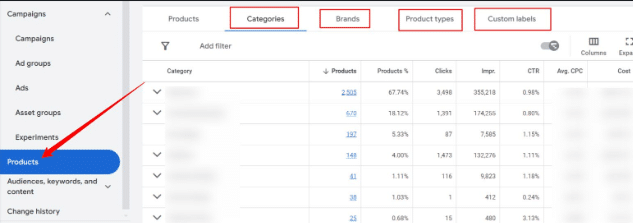
Bottom line: These insights could help you fine-tune your strategies and possibly outpace the competition, all from the convenience of the product page.
Courtesy of Search Engine Land: News & Info About SEO, PPC, SEM, Search Engines & Search Marketing
Category seo news | Tags:
Social Networks : Technorati, Stumble it!, Digg, de.licio.us, Yahoo, reddit, Blogmarks, Google, Magnolia.
6 steps to AI-driven budgeting and forecasting for digital marketing
Written on August 29, 2024 at 5:25 am, by admin

AI is transforming how businesses approach their digital marketing budgeting and forecasting processes.
Companies can develop robust forecasting and budgeting models that focus on data-driven decisions.
This approach enables customized strategies that align with specific business goals and can be adjusted based on organizational needs and channels.
AI is a key driver for transformation.
- Up to 86% of organizations implementing generative AI report seeing revenue growth of 6% or more in their total annual company revenue, per a Google Cloud report.
This article covers how to leverage AI with the right data to come up with forecasting and budgeting prioritization, specifically for digital marketing efforts.
Below are the six steps to craft a model that aligns with your unique business needs.
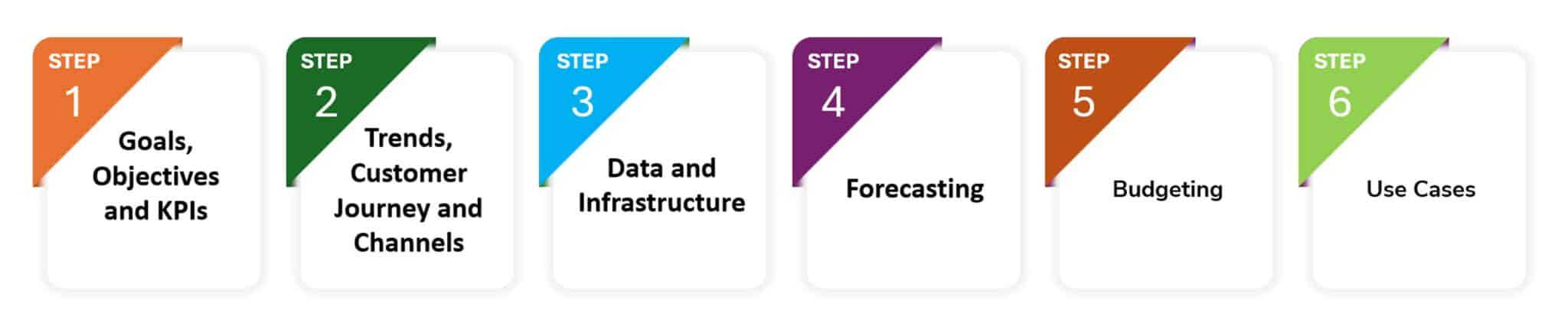
Step 1: Define business goals, objectives and KPIs
This step is divided into two parts: setting goals and identifying key performance indicators (KPIs).
Clearly articulate business objectives
Specify the overall business objectives, such as increasing revenue, enhancing brand awareness, generating leads or boosting engagement rates.
Identify specific KPIs
Determine the relevant KPIs for each targeted channel, such as views, conversion rates or cost per acquisition (CPA).
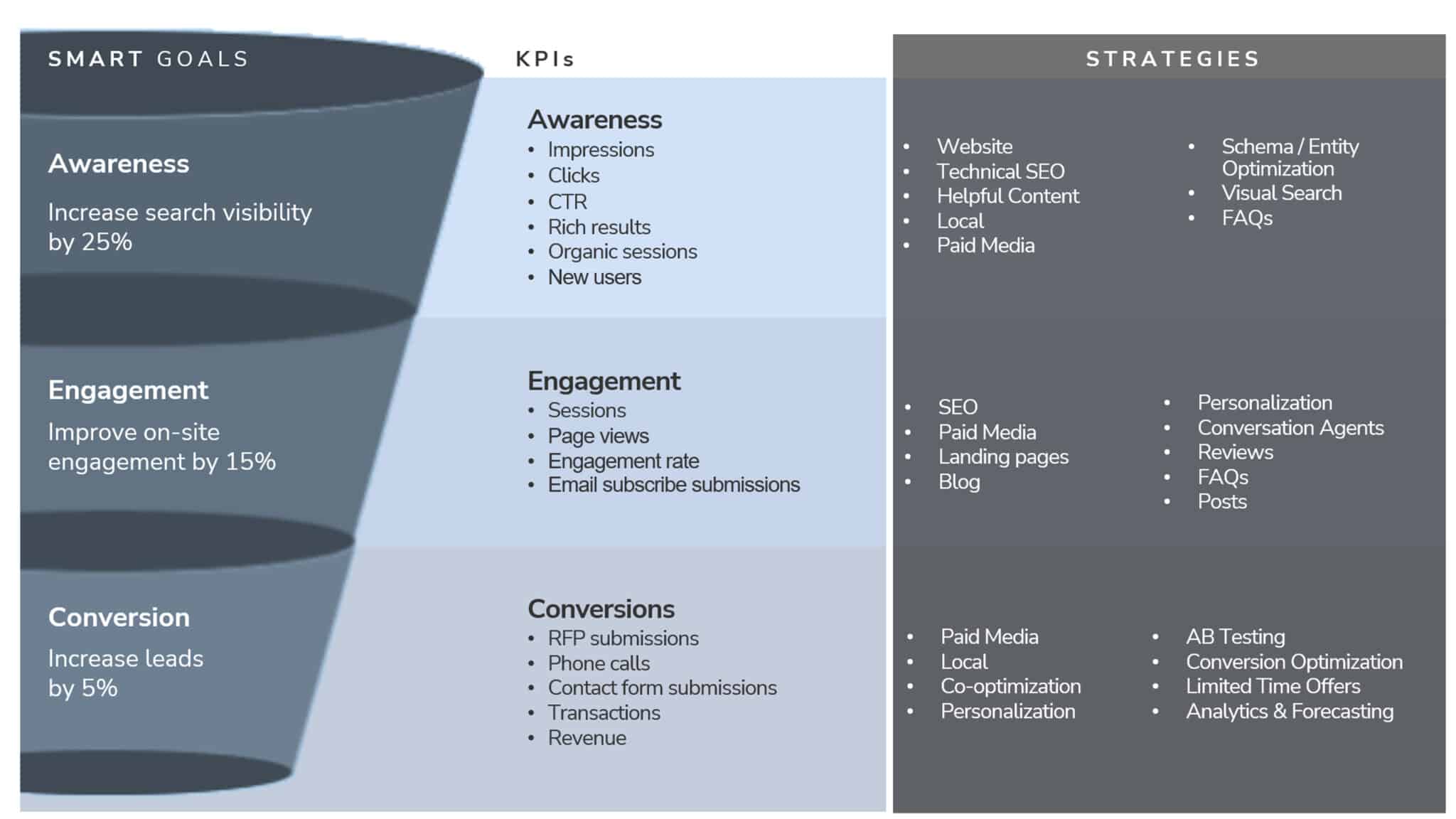 Goals, KPIs, strategies alignment
After aligning on goals and KPIs, analyze historical trends to identify channels and strategies that can contribute toward achieving the goals.
Step 2: Trends, customer journey and channels
Channel distribution analysis
- Gather historical data: Collect data on marketing spend, revenue and key performance indicators for each channel.
- Identify performance levels: Analyze the data to determine which channels are high-performing and which are low-performing.
- Calculate ROI: Know the return on investment (ROI) and other relevant metrics for each channel.
Market and trends analysis
- Identify industry and market trends: Examine industry trends, including market demand and supply patterns for the upcoming year and the previous year.
- Assess consumer behavior and emerging technologies: Identify shifts in consumer behavior and emerging technologies, such as AI, virtual agents and the shift to mobile platforms.
- Analyze competitor activity: Evaluate competitor performance across different channels.
Search trends and customer journey
- Analyze customer discovery channels: Determine how your customers are finding your business. While new marketing strategies may seem promising, ensure these channels align with your customer’s journey.
- Use Google Search Console and Google Analytics: Leverage tools like search console and analytics to understand customer search trends and compare them with industry-wide search changes.
- Evaluate content formats: Assess whether your business is gaining traction through videos, AI-generated overviews or images and compare these results with industry and competitor benchmarks.
Step 3: Data and infrastructure
Evaluate the existing technology stack
- Assess the technology infrastructure for its ability to centralize data, maintain data quality and ensure data security.
Centralize data
- Consolidate all data from various channels and touchpoints into a single location, such as a data lake. Test if data can be used to run analysis and reporting.
Data cleaning and pre-processing
- With all the data collected, the next step is to prepare it for forecasting and budgeting models.
- Begin by cleaning and organizing the data, focusing on the most relevant data points aligned with business goals and KPIs.
- Ensure data accuracy and consistency by removing outliers and addressing any inconsistencies.
- Conduct exploratory data analysis to identify patterns and correlations.
Step 4: Forecasting
Forecasting is key to budgeting because it helps manage risks, seize opportunities, optimize resources and make smart investment decisions.
The following machine learning and language-based models can be used to generate these forecasts:
ARIMA (Auto Regressive Integrated Moving Average)
- Combines autoregression and moving average.
- Flexible for various time series patterns.
- SARIMA, or seasonal ARIMA, accounts for seasonal fluctuations.
Prophet
- Developed by Facebook.
- Decomposes time series data into trend, seasonality and holiday effects.
- Works best with time series with strong seasonal effects and multiple seasons of historical data.
Chronos (language-based model)
- Developed by Amazon.
- A family of pretrained time series forecasting models based on language model architectures.
- A time series is transformed into a sequence of tokens via scaling and quantization and a language model is trained on these tokens using the cross-entropy loss.
- Once trained, probabilistic forecasts are obtained by sampling multiple future trajectories given the historical context.
Consider using Claude 3.5 Sonnet by Anthropic to easily generate Python code for implementing the forecasting models.
Step 5: Budgeting
Determining the optimum channel allocation
- Determine the most suitable budget allocation method based on business objectives, such as percentage of revenue or a fixed amount per channel.
- Consider factors like channel maturity, potential ROI and customer and market trends.
- Use statistical techniques such as Linear Regression to generate a market mix model that optimizes the budget allocation across channels to meet your business goal.
Regular monitoring and optimization
- Continuously track channel performance against budget and KPIs.
- Identify underperforming channels and reallocate budget accordingly.
- Optimize campaigns based on real-time data and insights.
Step 6: Use cases
Finally, create specific use cases for each step of your marketing plan. For example:
- “As the chief marketing officer of an upscale hotel, I want to increase online revenue by 20% year over year. To help achieve this goal, recommend the best budget allocation across digital channels.”
Solution steps
Define business goals and KPIs
- Goal – Increase revenue by 20% overall
- KPIs – Revenue
Channel distribution, ROI, revenue and conversions
- Gather historical revenue and conversion data from Google Analytics across all channels.
- Collect spend data for all channels.
- Calculate ROI for each channel.
Data and infrastructure
- All data should be available in a centralized storage such as a data lake.
- It is easier to access clean and centralized data for training the model.
- Install required python libraries such as pandas, numpy or scipy.
- Perform exploratory data analysis to identify trends and seasonal patterns by running python libraries and statistical analysis
Forecasting and budgeting
- Use forecasting models such as SARIMA to forecast the revenue from each channel based on the spend. The model will account for seasonality trends in the data
- Use statistical optimization techniques to find the best budget allocation across channels.
Working model output
Current average spend across the top channels:

After executing all the steps given above, here’s the recommended allocation by the budgeting model:
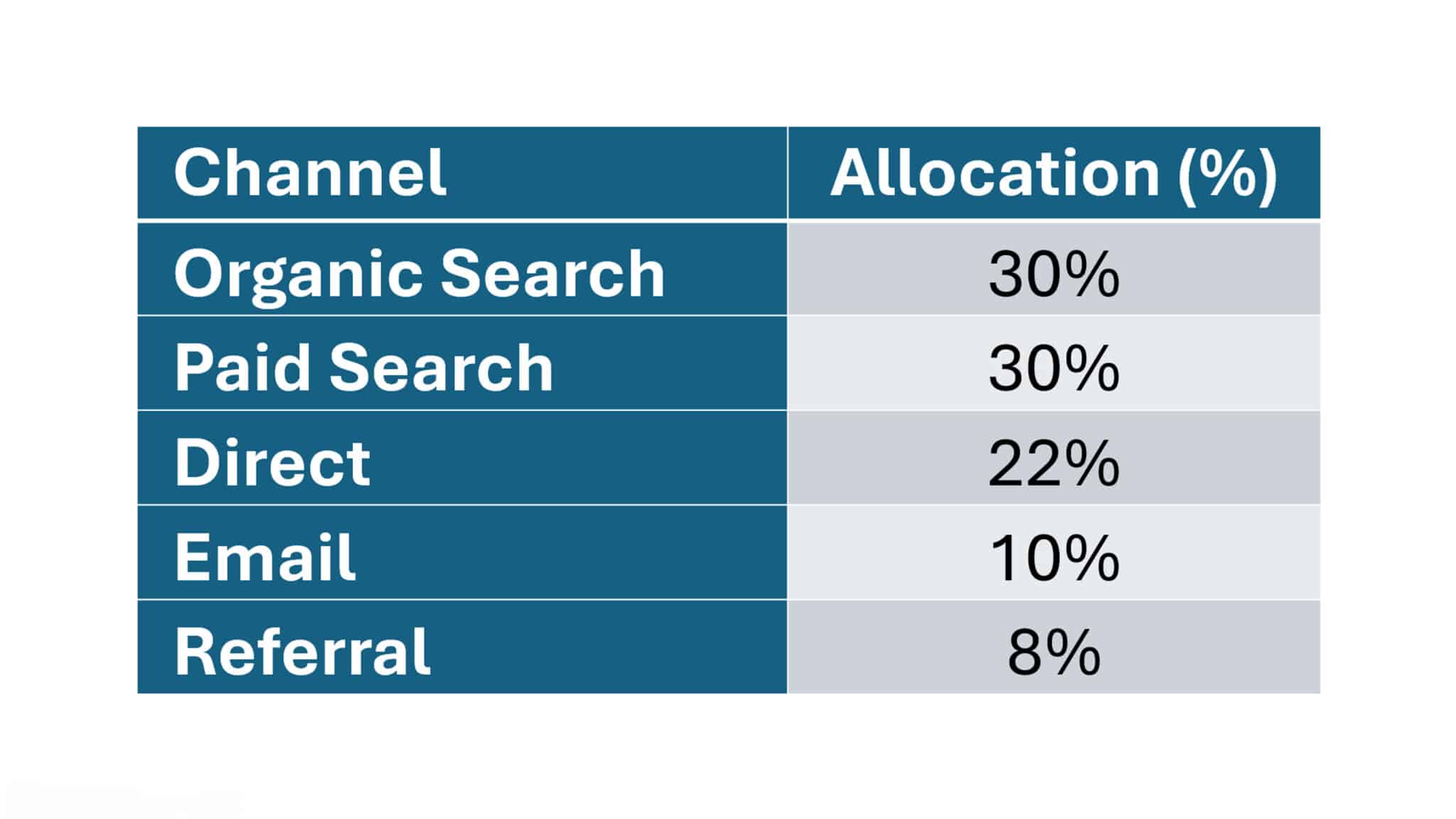
Individual channel allocation
Once you have the budget allocation for each channel, the next step is to break it down further and identify specific sources or platforms within each channel.
For example:
- Within the organic search channel, you might consider sources like Google Business.
- For paid search, platforms like Google Ads and Facebook.
This helps determine the precise budget needed for each source.
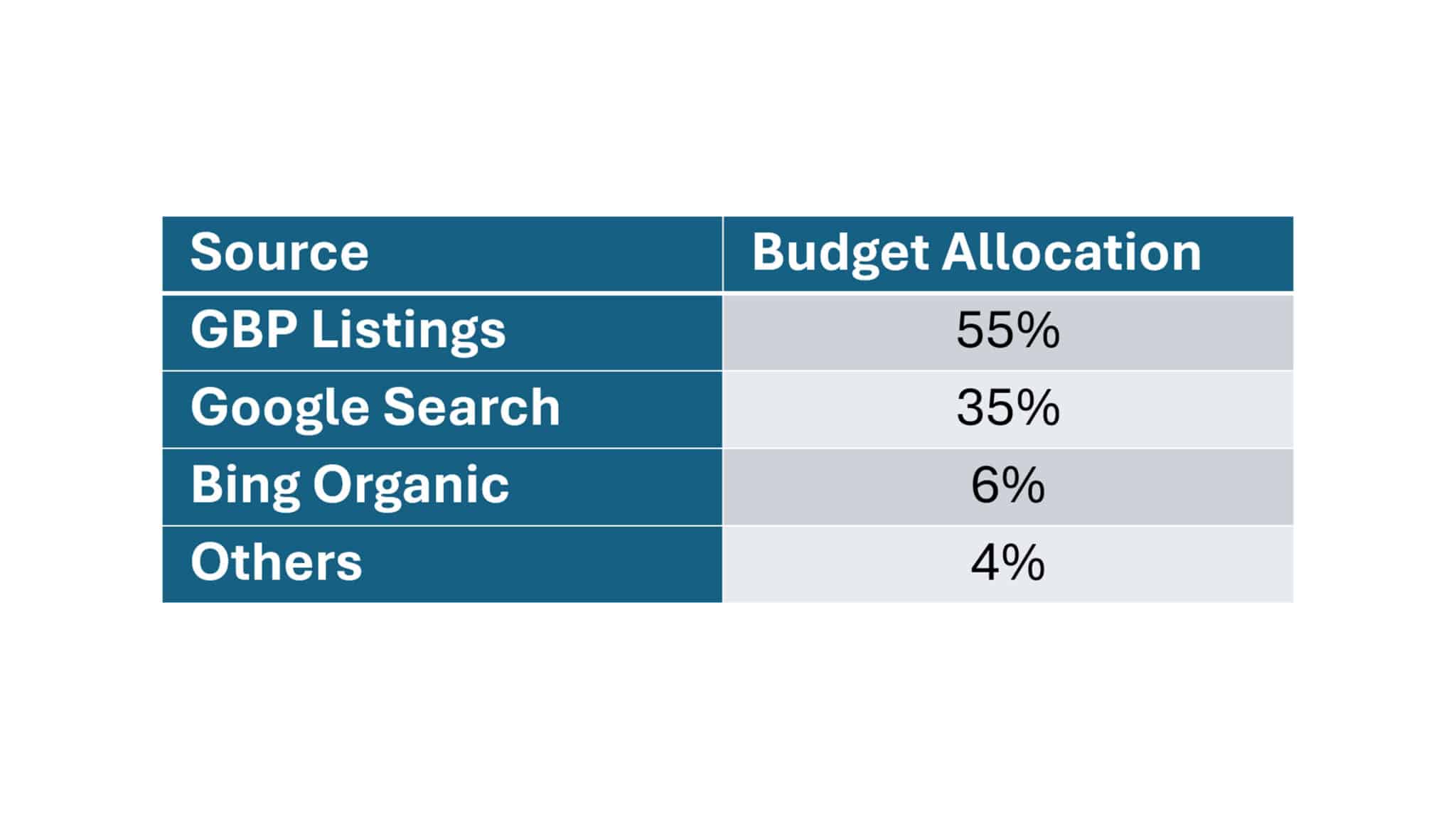
For our use case, focus on the organic search channel. Run the budgeting model for all sources within this channel to determine each source’s allocation.
After executing all the steps, here’s the recommended budget allocation for organic search sources:
Strategies and solutions to maximize the full-funnel digital experience
Now based on the recommended allocation, deploy the strategies to optimize GBP Listings and Google Search.
AI in digital marketing: Smarter budgeting and forecasting
In the AI era, budgeting and forecasting can be done in real time if data from various customer touchpoints and channels is centralized and readily available throughout the customer journey.
By leveraging AI, you can optimize marketing performance by allocating the right budget to each channel based on its contribution to achieving your business goals.
Courtesy of Search Engine Land: News & Info About SEO, PPC, SEM, Search Engines & Search Marketing
Category seo news | Tags:
Social Networks : Technorati, Stumble it!, Digg, de.licio.us, Yahoo, reddit, Blogmarks, Google, Magnolia.
New Google tools to boost first-party data strategies
Written on August 29, 2024 at 5:25 am, by admin
Google is rolling out two new features to help you navigate the evolving digital privacy landscape and strengthen first-party data strategies.
Why we care. Despite Google deciding to roll back on its plans to remove third-party cookies, with privacy regulations still in place, first-party data has become crucial. These tools is intended to help you simplify data collection and management while respecting user privacy.
Driving the news. Google announced Tag Diagnostics and a new consent management setup, both designed to streamline first-party data collection and utilization.
Details. The new offerings include:
Tag Diagnostics:
- Provides at-a-glance view of account health.
- Alerts users to potential measurement issues.
- Offers guidance on fixing problemsAvailable in Google Tag Manager, Google Ads, and Google Analytics.
Integrated Consent Management Platform (CMP) setup:
- Streamlines consent banner creation and consent mode implementation.
- Works within Google Ads, Analytics, and Tag Manager interfaces.
- Integrates with several CMP partners, including consent manager, Cookiebot, iubenda, and Usercentrics.
What’s next: Google plans to continue adding new diagnostics capabilities and investing in first-party data solutions as the industry evolves.
Bottom line. As digital advertising faces a privacy-driven shift, Google is positioning itself as a key enabler of first-party data strategies for advertisers.
Courtesy of Search Engine Land: News & Info About SEO, PPC, SEM, Search Engines & Search Marketing
Category seo news | Tags:
Social Networks : Technorati, Stumble it!, Digg, de.licio.us, Yahoo, reddit, Blogmarks, Google, Magnolia.
Adtech antitrust trial judge blasts Google’s business practices
Written on August 29, 2024 at 5:25 am, by admin

Google’s legal troubles appeared to worsen yesterday as the judge of the adtech antitrust trial delivered sharp criticism of the tech giant, signaling possible consequences for its business practices.
What happened: During the pre-trial motion hearings, Judge Leonie Brinkema sharply criticized Google for its handling of privileged information, labeling the company’s actions as “absolutely inappropriate and not proper.”
The court singled out the so-called ‘Walker Memo,’ containing what she referred to as “incredible smoking guns,” as evidence of potential wrongdoing.
The ‘Walker Memo’ refers to a 2008 memo by Google’s chief legal officer, Kent Walker, who created a “communication with care” policy. This policy advised employees to switch sensitive litigation-related chats to “history off” mode, automatically deleting chats within 24 hours, according to court documents.
The judge also condemned Google’s practice of auto-deleting chats, mockingly referred to by employees as “Vegas mode,” implying that the company may have intentionally destroyed evidence.
Why we care. If Google is found to have engaged in anticompetitive practices, it could lead to significant changes in the digital advertising landscape. That could include changes in pricing and bidding models, and possibly increased competition from other platforms.
The big picture: This trial, one of the most significant antitrust cases in decades, could reshape the landscape for the media and tech industries.
The judge’s remarks suggest that Google’s internal practices could heavily influence the trial’s outcome, with potential inferences drawn against the company as witnesses testify.
What to watch: With less than two weeks until the trial begins, Google faces mounting scrutiny. The judge’s familiarity with related antitrust rulings, including a recent unfavorable decision against Google, sets the stage for what could be a pivotal moment in the company’s legal battle.
Dig deeper.
- Google’s $2.3 million check secures bench trial in adtech antitrust case
- Google will face a new U.S. antitrust jury trial in September
U.S. vs. Google. This is the second major antitrust trial for Google within the year. Earlier this month, in the U.S. vs. Google antitrust trial, a federal judge ruled that Google illegally monopolized search and search advertising markets, especially by paying $20 billion annually for default search status on iPhones.
Courtesy of Search Engine Land: News & Info About SEO, PPC, SEM, Search Engines & Search Marketing
Category seo news | Tags:
Social Networks : Technorati, Stumble it!, Digg, de.licio.us, Yahoo, reddit, Blogmarks, Google, Magnolia.
Seasonal PPC: Your guide to boosting holiday ad performance
Written on August 29, 2024 at 5:25 am, by admin

Black Friday, Christmas, Valentine’s Day – these aren’t just dates on a calendar; they’re golden opportunities for savvy marketers.
A well-planned pay-per-click (PPC) strategy can mean the difference between riding the wave of seasonal demand and getting lost in the holiday noise.
Seasonal PPC isn’t about simply increasing your ad spend when the leaves start to fall. It’s a specified approach that aligns your Google Ads campaigns with the rhythms of consumer behavior throughout the year and your inventory strengths and seasonalities.
This article will show you the key components of an effective seasonal PPC strategy, including:
- Identifying seasonal trends in your industry.
- Adjusting budgets and bids to profit from peak periods.
- Crafting strong ad copy that resonates with seasonal intent.
- Leveraging advanced features in Google Ads for seasonal success.
Understanding seasonality in PPC
Seasonality is not just about Santa hats in December or beach balls in July. In PPC, it’s the rhythm that drives consumer behavior throughout the year.
What is seasonality?
At its core, seasonality refers to predictable changes that happen at specific times of the year.
Think of it as the business world’s version of nature’s seasons. But instead of leaves changing color, we’re looking at spikes in search volume, shifts in buying habits and fluctuations in ad performance.
Take the fashion industry. As surely as birds fly south for winter, shoppers start hunting for cozy sweaters and boots when the temperature drops.
Or consider travel. Come January, you can bet your bottom dollar that searches for “summer vacation ideas” will start ticking up as people dream of escaping the winter blues.
But it’s not just about the weather. Seasonality can be driven by:
- Holidays (Christmas, Halloween, Mother’s Day).
- Annual events (Super Bowl, Black Friday).
- Academic calendars (back-to-school season).
- Financial cycles (tax season).
Each industry has its own unique seasonal patterns. The key is recognizing yours.
How seasonality shakes up consumer behavior
Consumers are a fickle bunch and seasonality plays them like a fiddle.
One month, they’re all about fitness gear and diet plans (hello, New Year’s resolutions); the next, they’re loading up on chocolates and flowers (looking at you, Valentine’s Day).
These shifts in demand aren’t just minor blips. They can cause bigger changes in search volumes, click-through rates and conversion patterns. For example:
- Searches for “air conditioner” skyrocket in the summer months.
- “Tax software” becomes a hot topic when the tax submission deadline comes nearer.
- “Halloween costume ideas” explodes in popularity come October.
Understanding these patterns is like having a crystal ball for your PPC campaigns. It allows you to anticipate changes and adjust your strategy accordingly.
Why you can’t afford to ignore seasonal trends
If you’re not factoring seasonality into your PPC strategy, you’re essentially flying blind. Seasonal trends aren’t just nice-to-know trivia. They’re the bread and butter of effective PPC management.
Recognizing and adapting to these trends lets you:
- Allocate your budget more effectively, ramping up spend when it matters most.
- Craft more relevant ad copy that speaks to seasonal needs and desires.
- Adjust your bidding strategy to stay competitive during peak seasons.
- Avoid wasting money on campaigns that are out of sync with consumer demand.
Think of seasonality as your secret weapon. While your competitors use the same strategy year-round, you’ll pivot and adapt, always one step ahead.
Remember, in PPC, timing is everything. Understanding seasonality is your ticket to being in the right place, at the right time, with the right message.
Preparing for seasonal PPC campaigns
Prepping for seasonal PPC campaigns isn’t about guesswork or shooting in the dark. It’s about arming yourself with data, insights and rock-solid goals. Let’s break it down.
Data analysis: Your crystal ball
First, dive into your past campaign data. Pull up your reports from previous years and look for patterns.
- When did your clicks spike?
- When did conversions soar?
- When did things go quiet?
These aren’t just numbers on a spreadsheet; they’re breadcrumbs leading you to PPC gold.
For example, if you’re an ecommerce store, you might notice that your “women’s boots” campaign goes through the roof every September. That’s not a coincidence, that’s valuable intel.
But don’t just look at the wins.
Those campaigns that tanked? They’re just as important.
Maybe your summer swimwear ads flopped in June but killed it in April when people were planning vacations.
Lesson learned.
The goal here isn’t just to reminisce about past glories or cringe at old mistakes. It’s to build a roadmap for the future.
Your past performance is the best predictor of future success – if you know how to read it right.
Next to the campaign report, a product ID report and category report are also valuable.
Depending on the inventory size, ID reports might get a little out of hand, and you should consider using more enterprise tools instead of a Google spreadsheet, but for most use cases, that should work just fine.
Personally, I’d like to include the last 12 months in a separate column and pull the IDs in rows. That way, you can easily scan through months and find patterns.
In the Google Ads interface, this can be done via the Shopping Products report, where you can add a Month column and clearly split it.
 Google Ads ID report with monthly segmentation
 Google Sheets ID report with color scale
Market research: Spy games
What are your competitors up to?
You can use various PPC tools to see what kind of ads your competitors are running during different seasons.
Are they ramping up spend for certain keywords? Are they using specific ad copy during holidays?
Don’t copy them outright, but do take notes.
But don’t stop at your competitors. Look at the broader market conditions.
- Could economic factors impact your seasonal performance?
- Are new trends emerging in your industry?
For instance, if you’re in the travel industry, monitor fuel prices, as they could impact people’s vacation plans and, by extension, your PPC performance.
Remember, you don’t operate in a vacuum. The more you understand about your market ecosystem, the better positioned you’ll be to carve out your niche.
Dig deeper: Top 5 ways to stay up to date on paid search trends
Goal setting: Your North Star
You’ll need concrete, measurable objectives to guide your seasonal campaigns.
Start with the big picture.
What do you want to achieve this season? More sales? Higher ROI? Increased market share?
Then, break it down into specific, measurable goals:
- “Increase conversion rate for our Christmas campaign by 15% compared to last year.”
- “Achieve a 20% higher click-through rate for our Back-to-School ads in August.”
- “Reduce cost-per-acquisition by 10% during our slow season in February.”
These goals aren’t just numbers to impress your boss (though they might do that, too). They’re your North Star, guiding every decision you make in your seasonal campaigns.
Review your goals regularly as the season progresses. Be ready to pivot if needed. Flexibility is key in PPC.
Remember, preparing for seasonal PPC campaigns isn’t a one-time task. It’s an ongoing process of learning, adapting and refining.
But with solid data analysis, shrewd market research and clear goal-setting, you’ll be well-equipped to tackle whatever the seasons throw at you.
Designing seasonal PPC campaigns
Alright, we’ve done our homework. Now it’s time for the fun part – actually designing those seasonal campaigns that’ll make your competitors wonder what hit them.
Keyword strategy: Surfing the seasonal wave
First up, keywords. You might think you know your keywords inside and out, but seasons have a funny way of shaking things up.
Time to put on your detective hat and do some seasonal keyword research. Tools like Google Trends are your best friend here.
For instance, if you’re selling fitness equipment, you’ll see searches for “home gym” spike every January. But come summer, “beach body workout” might be the phrase on everyone’s lips.
But don’t just stick to the obvious. Look for those hidden gems – the long-tail keywords your competitors might be missing.
Maybe it’s “last-minute Valentine’s gift ideas” or “affordable Christmas decorations.” These could be your ticket to standing out in a crowded market.
And remember, it’s not just about finding new keywords. It’s about adapting your existing strategy.
That evergreen keyword that performs well year-round? It might need a seasonal twist. “Men’s shoes” could become “men’s winter boots” or “men’s summer loafers,” depending on the season.
The key is to think like your customer:
- What are they looking for right now?
- What problem are they trying to solve this season?
Your keyword strategy should reflect that.
Ad copy and creative: Dressing for the season
Now that we’ve sorted our keywords, it’s time to dress them up in snazzy seasonal outfits. I’m talking about your ad copy and creative.
Your ad copy needs to do more than just mention the season. It needs to capture the customer’s mood, urgency and excitement.
- For a summer campaign, don’t just say, “Buy swimwear.” Try “Make a Splash This Summer – New Swimwear Collection.”
- For Christmas, instead of “Holiday Sale,” how about “Unwrap Joy: Christmas Deals That’ll Make Santa Jealous”?
But it’s not just about clever wordplay. Use your ad copy to address seasonal pain points.
- “Stay Warm and Stylish” for winter clothing.
- “Ace Your Finals with Our Study Guides” for the exam season.
Show your customers you understand what they need right now.
And let’s not forget about ad extensions. Use them to highlight seasonal offers, limited-time deals or special holiday services.
- “Free Gift Wrapping for Christmas Orders” as a callout extension? Yes, please!
For visuals, if you’re running display ads, make sure your imagery matches the season. Snowflakes in winter, beach scenes in summer – you get the idea.
But don’t be cliché. A unique, eye-catching image will always outperform a generic stock photo.
Budget allocation
Seasonal PPC isn’t about spending more – it’s about spending smarter.
Identify your peak seasons.
- When do you make the most sales?
- When is customer interest at its highest?
These are the times you want to go big.
Don’t be afraid to significantly increase your budget during these periods. If December accounts for 30% of your annual sales, maybe it should also account for 30% of your annual PPC budget.
But here’s the trick: start ramping up before the peak hits. If your big season is Christmas, don’t wait until Dec. 1 to increase your budget. Start in November to capture those early bird shoppers.
On the flip side, don’t completely neglect your off-seasons. This is a great time to test new strategies, build brand awareness or target niche markets without breaking the bank.
And remember, budget allocation isn’t set in stone. Keep a close eye on your campaigns and be ready to shift funds around. If a certain ad group is killing it, don’t be afraid to funnel more budget its way.
The goal is to be fluid, responsive and ready to seize opportunities. Your budget should be as dynamic as the seasons themselves.
Designing seasonal PPC campaigns is part art, part science and a whole lot of staying on your toes. But get it right, and you’ll ride the seasonal waves to PPC success.
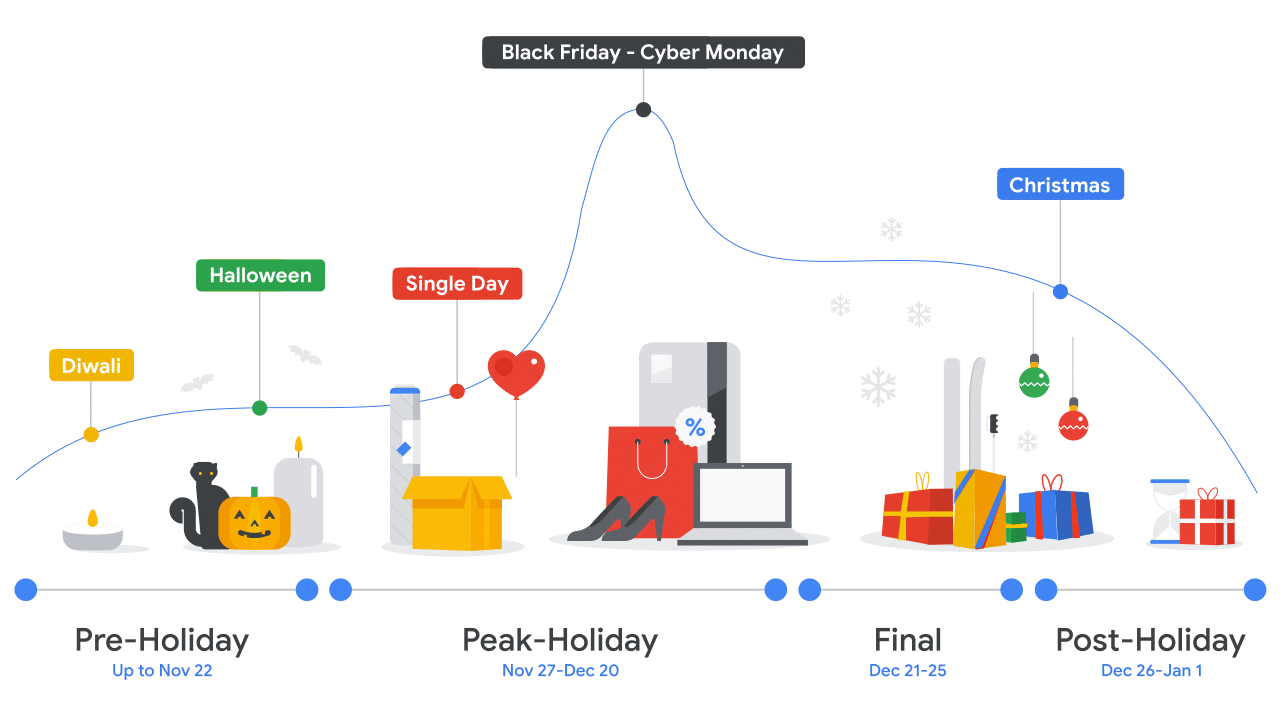
Plan your peak
When planning for seasonal events or promotions in digital marketing, it’s crucial to recognize that seasonality typically unfolds in three distinct phases:
- Pre-phase.
- Peak.
- Cool-off.
Each of these stages requires specific strategies and preparations to maximize effectiveness.
Pre-phase
- Involves building anticipation, adjusting budgets and preparing ad creatives.
- Gradually increase your advertising efforts to capture early interest during this time.
Peak phase
- The height of the seasonal event, where consumer interest and activity are at their highest.
- Demands the most aggressive strategies, with maximized budgets and highly targeted campaigns to capitalize on peak demand.
Cool-off phase
- Sees a gradual decline in interest, requiring a strategic scaling back of efforts while still capturing lingering engagement.
- Plan for a smooth transition between these phases, adjusting bids, budgets and messaging accordingly.
By recognizing and planning for these distinct phases, you can more effectively allocate resources, tailor messaging and optimize campaigns throughout the entire seasonal cycle, ensuring they capture the full potential of seasonal trends and events.
Implementation and management
Now it’s time to put your battle plan into action and keep those campaigns humming like a well-oiled machine.
Let’s dive into the nuts and bolts of making your seasonal PPC campaigns work their magic.
Campaign setup: Building your seasonal powerhouse
Your campaign structure should be as crisp and clear as a winter morning. Group your ads by season, product line or whatever makes sense for your business.
The goal? To make management a breeze and performance tracking crystal clear.
For example, don’t lump your “Summer Swimwear” and “Winter Coats” into one catch-all clothing campaign.
Give them their own space to shine. This way, you can easily dial up or down as the seasons change.
Leverage special offers. These are your secret weapons in the seasonal battle for clicks.
Flash sales, limited-time discounts, buy-one-get-one deals – use them all.
But here’s the kicker: make sure they’re prominently featured in your ad copy and extensions. “48-Hour Summer Blowout!” is a lot more compelling than “Summer Sale.”
And don’t forget about those countdown timers in your ads. Nothing creates urgency like watching the seconds tick away on a great deal.
Dig deeper: How to use incentives in your PPC ads to drive more sales
Make use of adjustment tools
Seasonality adjustments are a powerful feature in advanced bidding strategies. They help fine-tune ad campaigns for short-term events that significantly impact conversion rates.
This tool is particularly useful for managing bids during brief periods of anticipated high activity, such as sales, promotions or seasonal events that typically last between 1 to 7 days.
By implementing seasonality adjustments, you can proactively inform the bidding algorithm about expected changes in conversion behavior, allowing for more accurate bid optimization during these periods.
However, using this feature judiciously is important, as Smart Bidding algorithms already account for most seasonal trends.
Seasonality adjustments are most effective for short-duration events and may not perform optimally if applied for extended periods exceeding 14 days.
When used correctly, this tool maintains optimal performance during brief periods of atypical conversion behavior, ensuring that campaigns remain effective and efficient even during short-term fluctuations in market conditions.
Monitoring and optimization: Keep your finger on the pulse
You’ve launched your campaigns. Time to kick back and watch the conversions roll in, right? Wrong! This is where the real work begins.
Real-time monitoring is your new best friend. Set up alerts for sudden drops in performance or spikes in cost.
The seasonal PPC landscape can change in the blink of an eye, and you need to be ready to pivot.
A/B testing isn’t just for websites. Try different ad copies, landing pages and even bidding strategies.
Maybe your “Spook-tacular Halloween Deals” ad outperforms your “Halloween Savings You’ll Die For.” Only one way to find out!
Speaking of bidding, be ready to adjust on the fly. If a certain keyword is crushing it, don’t be afraid to up the ante.
Conversely, if something’s eating budget without results, cut it loose. Remember, in seasonal PPC, hesitation is the enemy of success.
Dig deeper: 3 ways to stay on top of PPC performance
Utilizing automation tools: Your PPC autopilot
I know what you’re thinking. “This sounds like a lot of work!” Well, here’s where automation comes to the rescue.
PPC automation tools are like having a tireless assistant who works 24/7.
Use them to adjust bids based on weather (perfect for seasonal products), time of day or user location.
Set up rules to pause low-performing ads or increase bids on high-converters automatically.
Automated bidding strategies also apply here. These use machine learning to adjust your bids in real-time, helping you achieve goals like maximum conversions, target ROAS or enhanced CPC.
Automation isn’t “set it and forget it.” Think of it more like a smart co-pilot. You still need to keep an eye on things and make course corrections when needed.
For example, during your peak season, you might want to loosen up your target ROAS a bit to capture more sales volume.
Or, during slower periods, you might switch to a different strategy or increase ROAS to maintain visibility without breaking the bank.
The key is to find the right balance between automation and human insight. Let the machines crunch the numbers, but bring your seasonal know-how to the table.
Remember, implementing and managing seasonal PPC campaigns is a bit like steering a ship through changing waters. You need to be alert, responsive and always ready to adjust your sails.
But with the right structure, a keen eye for optimization and smart use of automation, you’ll navigate those seasonal seas like a pro.
Measuring success
Alright, you’ve weathered the seasonal storm. Your campaigns have run their course. Now comes the million-dollar question: How did we do?
Key performance indicators (KPIs): The vital signs of your campaign
KPIs are the vital signs of your PPC campaign – the metrics that tell you whether you’re crushing it or crashing and burning.
I could rattle off a laundry list of metrics, but let’s focus on the heavy hitters for seasonal campaigns:
- Return on ad spend (ROAS): This is the big one. How much are you making for every dollar spent? During peak seasons, you want this number doing backflips.
- Conversion rate: Are your seasonal shoppers pulling the trigger? A spike here means your ads are hitting the mark.
- Click-through rate (CTR): This tells you if your ad copy is resonating. Is your “Spooky Halloween Deals” ad actually spooking up some clicks?
- Cost per acquisition (CPA): Keep an eye on this one. It’s okay if it creeps up a bit during peak seasons, but it shouldn’t be skyrocketing.
- Impression share: Are you showing up when it counts? During your key seasons, you want to dominate those search results pages.
Remember, these KPIs don’t exist in a vacuum. A dip in CTR might be okay if your conversion rate is through the roof. It’s all about the bigger picture.
Analyzing results: Making sense of the numbers
Now that you have your numbers, it’s time to put on your detective hat and figure out what they’re telling you.
Start by comparing your results against your goals. Remember those targets we set way back when? How’d we do?
If you smashed your goals, great! But don’t stop there. Figure out why. Was it that killer ad copy? The smart bidding strategy? Bottle that success for next time.
If you fell short, don’t beat yourself up. This is where the real learning happens.
Maybe your timing was off or your messaging didn’t quite land. Every “failure” is just a lesson in disguise.
Look for patterns and anomalies. Did certain product categories outperform others? Were there unexpected spikes or dips? Each of these is a clue to help you refine your strategy.
And don’t just look at your own performance. How did you stack up against the competition?
Tools like Auction Insights can give you a peek into your share of the market during the season.
Dig deeper: 3 steps for effective PPC reporting and analysis
Post-season review: Your seasonal PPC postmortem
This is where you extract every ounce of wisdom from your seasonal campaign.
Get your team together (yes, even the intern) and have a no-holds-barred discussion. What worked? What flopped? What surprised us?
Here are some questions to kick things off:
- Did we time our campaign right or were we late to the party?
- How did our ad copy perform? Any unexpected winners or losers?
- Did our budget allocation match the ebbs and flows of the season?
- How did our automated strategies hold up under seasonal pressure?
Document everything. These insights are pure gold for your next seasonal campaign.
Based on what you’ve learned, start sketching out plans for next year. Maybe you need to start your Christmas campaign earlier.
Perhaps your summer sale needs a complete revamp. Whatever it is, get it down on paper while it’s fresh.
Managing seasonal PPC campaigns: Additional tips and tricks
Here are some further ideas to leverage more out of seasonality:
Product labeling for special shopping campaigns
- Create specific labels or custom labels for products that are particularly relevant to the seasonal event.
- For example, label items as “Valentine’s Day Gifts” or “Black Friday Deals.”
- This lets you easily create and manage dedicated Shopping campaigns for these seasonal products.
Optimizing product titles
- Enhance your product titles with seasonal keywords.
- For instance, add phrases like “Men’s Christmas Gift Idea” or “Perfect for Mother’s Day” to relevant products.
- This can improve visibility in seasonal searches and increase click-through rates.
Utilizing audience lists
- Create and use audience lists based on past seasonal shoppers or users interested in similar products.
- This is useful for more targeted remarketing during the current season.
Seasonal-themed bundles or giveaways
- These usually work much better if there is a connection to a current seasonality or event.
Courtesy of Search Engine Land: News & Info About SEO, PPC, SEM, Search Engines & Search Marketing
Category seo news | Tags:
Social Networks : Technorati, Stumble it!, Digg, de.licio.us, Yahoo, reddit, Blogmarks, Google, Magnolia.