

How to analyze Performance Max search terms insights for PPC success
Performance Max campaigns have become incredibly popular among PPC advertisers due to their automation and simplicity. However, one consistent pain point has been the lack of visibility into search queries triggering ads. Without this data, optimizing Performance Max campaigns has been limited.
Relief seemed at hand when, in February 2023, Google introduced the campaign_search_term_insight report, which includes a field with the search term. Script developers, myself included, immediately built scripts and automations using this new search terms data for Performance Max campaigns.
However, despite what many scripts published claimed, none included search term data; instead, they were limited to category labels. This was due to a persistent error with the Google reports that refused to include the search term data.
Thanks to Mike Rhodes for monitoring the Google reports and letting me know the bug was recently resolved. Now that search terms data is finally available in scripts, I’ll explain how to access search query data, analyze it to find optimization opportunities and take action based on the findings.
What data is now available?
In February 2023, Google introduced a new insights report exclusively for surfacing Performance Max search term data. This report provides visibility into:
- The actual search queries your ads appeared for.
- Search categories that queries are grouped into.
- Clicks, impressions and other performance metrics.
It does not provide visibility into cost. However, having the search terms and clicks is a huge step forward.
Accessing the data
There are a few ways to access the new Performance Max search insights report:
- Directly in the Google Ads interface under Insights on the campaign page.
- Via the Google Ads API.
- Using a Google Ads script that leverages the API report.
 Search terms for Performance Max can be found in the Google Ads UI. Screenshot by author, March 2024.
The benefit of using a script is it can automatically pull the data into a spreadsheet for easier manipulation and analysis.
I’ve created a script that puts the search terms into a spreadsheet. Simply go to this gist URL and copy the code.
Then, paste it into the Google Ads Scripts interface. It will then automatically pull search term data for all Performance Max campaigns into a Google Sheet.
When you run the script, it adds the data to a spreadsheet like this:

The data availability is similar to regular search query reports, with a few limitations:
- Data only goes back to March 2023, when it was first released.
- Search term data may be sampled if the volume is high.
However, this still provides significantly more visibility than previously available in Performance Max campaigns.
Analyzing the data
Now that you have Performance Max search query data pulled into a spreadsheet, what insights can you gain? Here is some analysis you can do:
Identify irrelevant search terms that trigger your ads.
- Find high-performing search terms that drive conversions. Look for opportunities to optimize those terms for more volume.
- Review search categories for additional keyword ideas that are already working.
- Sort by impressions to find high impression, low click terms that may indicate poor relevance and could benefit from better ad creative assets like headlines and descriptions.
Essentially, you’re looking for search term patterns in the data that inform you on optimizing the campaign better.
Since you can’t target specific keywords in Performance Max, this is not about identifying strong new keywords to add. Still, you can find signals for new negatives and get ideas on how to improve ad copy or landing pages.
Using GPT-4 to analyze the data
In the year it took Google to fix the bug and get the data working, GPT has come a long way. So I downloaded the report generated by my script, uploaded the CSV to GPT-4 and asked if it could help me find optimization ideas.
I used the prompt:
- “I have a file that contains search terms for my Google ads in Performance Max campaigns. Can you analyze the search terms and share some interesting findings?”
It automatically used the openAI Code Interpreter capability to scan the file, and it suggested four data segments for further investigation:
- High-conversion terms: Search terms leading to the most conversions.
- High-value terms: Search terms with the highest conversion value.
- Efficiency metrics: Search terms with the best clicks-to-impressions ratio (CTR) and conversions-to-clicks ratio (conversion rate).
- Category and subcategory insights: Performance trends across different categories and subcategories.
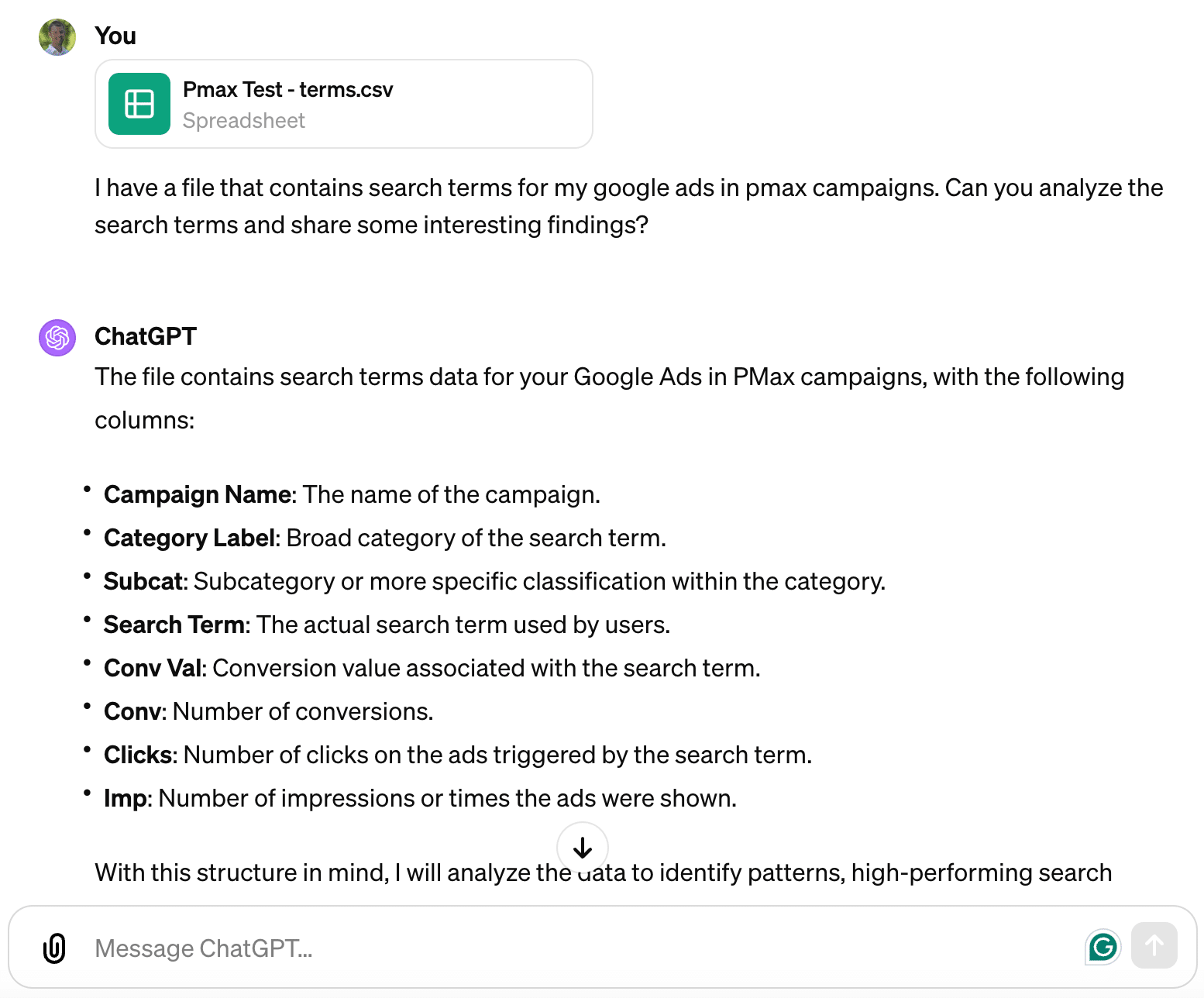
It immediately went on to analyze the full data set I uploaded. Since it used Advanced Data Analysis (formerly Code Interpreter), I could see the Python code it was using.

Based on this, I found that Google was showing my ads a lot for searches related to “free advertising,” since I can’t help with that, it gave me a great idea for a new account-level negative keyword.
Taking action
Now that you’ve analyzed the Performance Max search term data, here are three actions I recommend taking:
- Add irrelevant terms as account-level negative keywords. You cannot add negative keywords at the campaign level in Performance Max. However, adding irrelevant terms as account negatives will prevent ads from showing on those queries across your whole account.
- Optimize ads and landing pages for high-performing queries. Look for themes in the search terms with high clicks and conversion rates. Then, enhance your ad copy, offers and landing pages to better target those users.
- Refine audience targeting with what you learn. The search queries provide insight into your ideal audiences. Look for demographic or interest patterns you can add into your campaigns as audience targets.
The script
Using Performance Max search terms to boost PPC results
The release of Performance Max search term visibility has been a long time coming. This data finally grants PPC advertisers more control and optimization ability for automated campaigns.
As a PPC expert, be sure to tap into this new capability right away. Follow our guidance to access and analyze the data, then take action on the insights learned. Over time, you’ll gain a much clearer picture of who your Performance Max ads are reaching and how to improve your messaging to resonate with your audience.
The result will be more relevant ads, lower costs and, most importantly, more conversions from your Performance Max campaigns.
Courtesy of Search Engine Land: News & Info About SEO, PPC, SEM, Search Engines & Search Marketing
Category seo news | Tags:
Social Networks : Technorati, Stumble it!, Digg, de.licio.us, Yahoo, reddit, Blogmarks, Google, Magnolia.
You can follow any responses to this entry through the RSS 2.0 feed.