

YouTube advertising: The ultimate guide
With billions of users worldwide, one of the lowest advertising costs and the growing preference for video, YouTube has some serious marketing potential.
Aside from the well-known organic side of YouTube, it also offers highly lucrative marketing tools: retargeting video and display ads.
Combined with other marketing channels, you can become a strong contender for driving brand awareness and generating leads and sales.
But first, you have to make sure your target audience doesn’t just skip your ads.
Learn how to create an effective YouTube advertising strategy with this comprehensive guide.
Is YouTube a good way to advertise?
YouTube has 2.1 billion users worldwide, bringing in over $29 billion in ad revenues annually. This success is likely because 59% of viewers find YouTube’s ads more relevant than those on TV or other streaming services. Over time, more relevant ads lead to higher conversion rates and stronger brand loyalty.
You have a unique opportunity to adapt video ads into various ad formats. For example, one emerging trend is the rise in vertical videos. Vertical videos allow users to watch a video in full screen without having to rotate their phone.
Recently, Google found that in some cases, just by adding a vertical video asset to a video action campaign, you can reach 10 to 20% more conversions compared to only offering horizontal videos for YouTube Shorts.
Despite being a highly popular organic search engine with clear benefits, YouTube is underutilized by many companies. When combined with other channels, YouTube ads become a key retargeting touchpoint crucial for driving conversions and achieving business success.
How much does YouTube advertising cost?
Generally speaking, YouTube ad costs start at $10 per day. There’s no minimum spend, so your ad expenses depend on the allocated daily budget. Factors that influence cost include:
- Advertising goals: Are you looking to increase brand awareness, drive website traffic, or generate leads? Your goals influence the type of ads you run and the budget required.
- Target audience: If your audience is active on YouTube and you want to reach a large number of viewers, you might need a higher budget. But you’ll also need to filter the audience targeting settings to show your ad only to relevant users, which then helps optimize costs.
- Ad format: YouTube offers various ad formats and each format has different pricing structures, so your budget should align with the chosen format.
- Competition: If there is a high demand for ads targeting your audience, it might be necessary to allocate a larger budget to stand out. But you can also combat this by developing a stronger niche and filtering audience targeting to reduce costs.
- Ad placement: Where your ads appear on YouTube (e.g., in-stream, in-display, or homepage) affects costs. Keep in mind that premium placements may require a higher budget. So, when deciding where ads go, consider where your target audience is most likely to benefit from seeing them.
- Cost-per-click (CPC) or Cost-per-thousand-impressions (CPM): Decide whether you want to pay for clicks (CPC) or impressions (CPM), as the pricing model you choose will impact your budget strategy. If you want the user to view more of your video ad, you might consider focusing on CPM, but if you want users to come to a landing page, you might consider focusing on CPC.
Types of YouTube ads
YouTube comes with various ad formats, so you can deeply hone in on what your target audience engages with the most. YouTube ad formats include:
Display ads
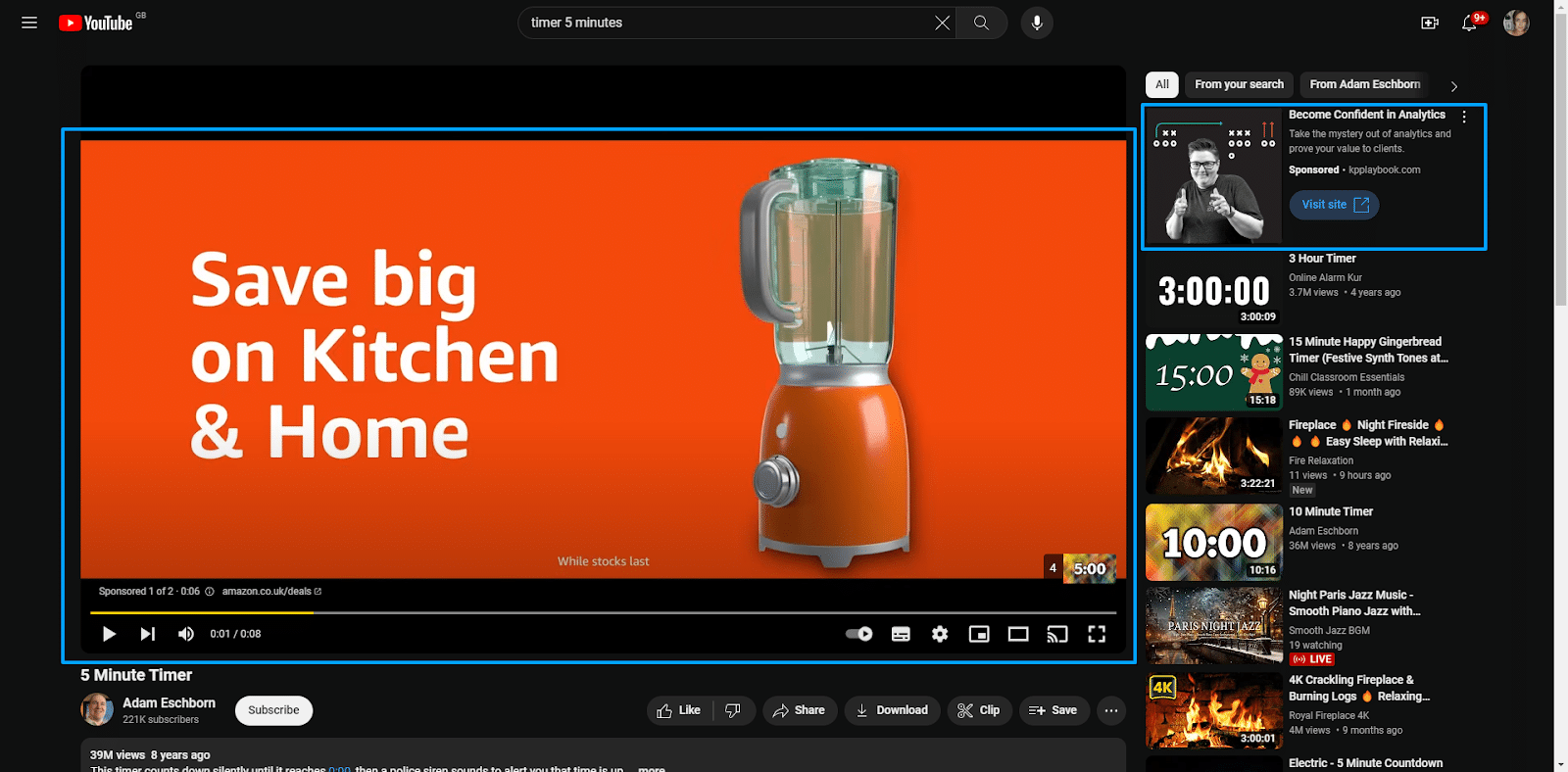
- These ads are positioned above the video suggestions on the sidebar when YouTube isn’t in full-screen view and appear next to the feature video.
TrueView ads
- When a user searches for specific content, then the ads are displayed on the same screen within the search results.
- TrueView Ads come in a few different formats:
- In-stream ads: Video ads that can be skipped after 5 seconds that appear before, during, or after the main video content.
- Non-skippable ads: Limited to 15 seconds, these short ads must be watched in full before users can view the main video content.
- Long, non-skippable ads: Limited to 30 seconds, these longer ads must be watched in full before users can view the main video content.
- To give you an idea of the visual placement, here’s an example of a TrueView skippable ads and Display ads.
Overlay ads
- These are semi-transparent ads that overlay the primary video content, though they can be clicked to close. They usually occupy 20% of the space below your video.
Sponsored cards
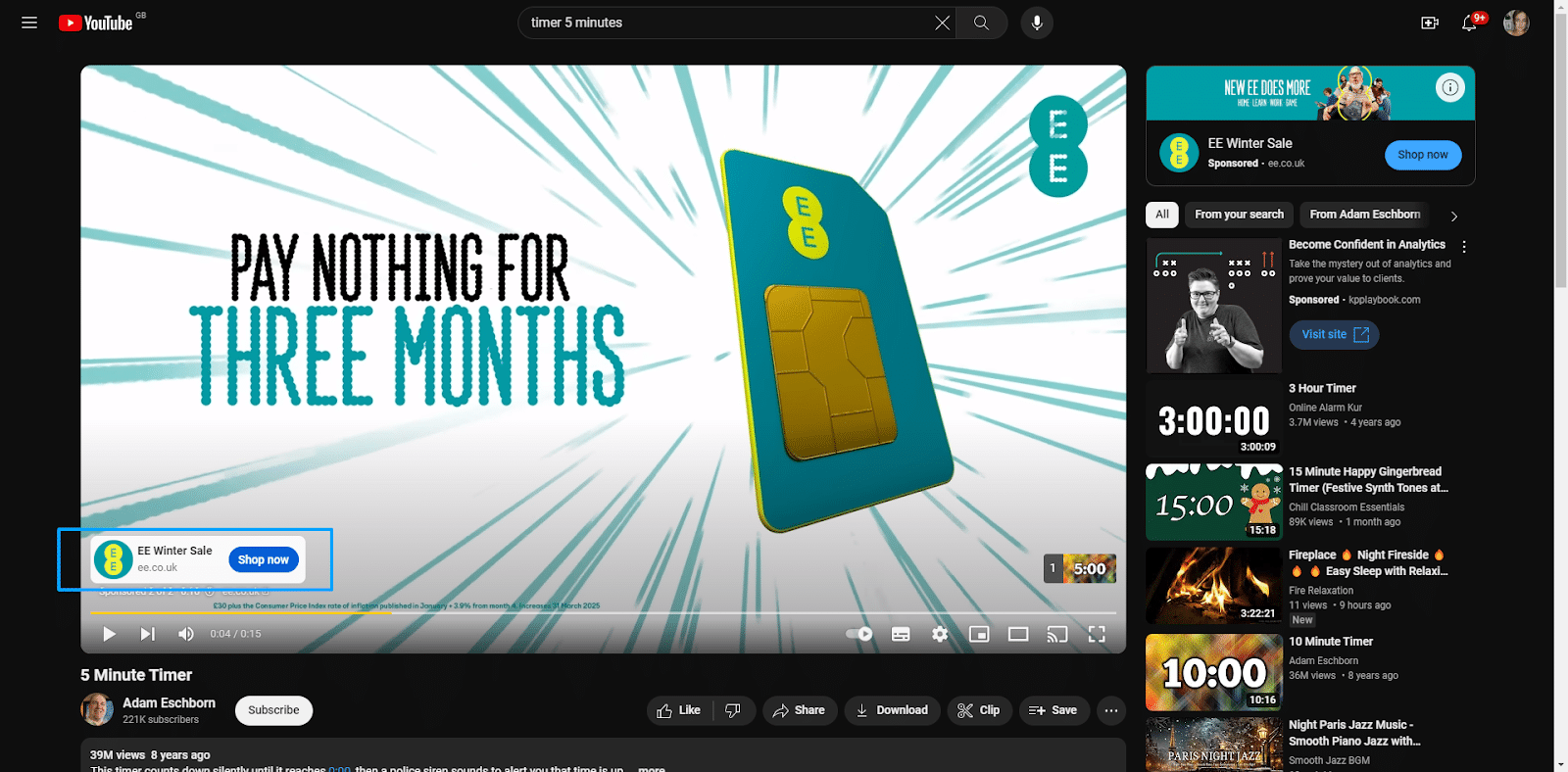
- These ads have cards with relevant content, allowing you to run ads featuring upcoming products within videos without interrupting the content.
- They are typically displayed for a few seconds, then disappear. To give you a visual idea of sponsored cards, take a look at the image below:
Video discovery ads
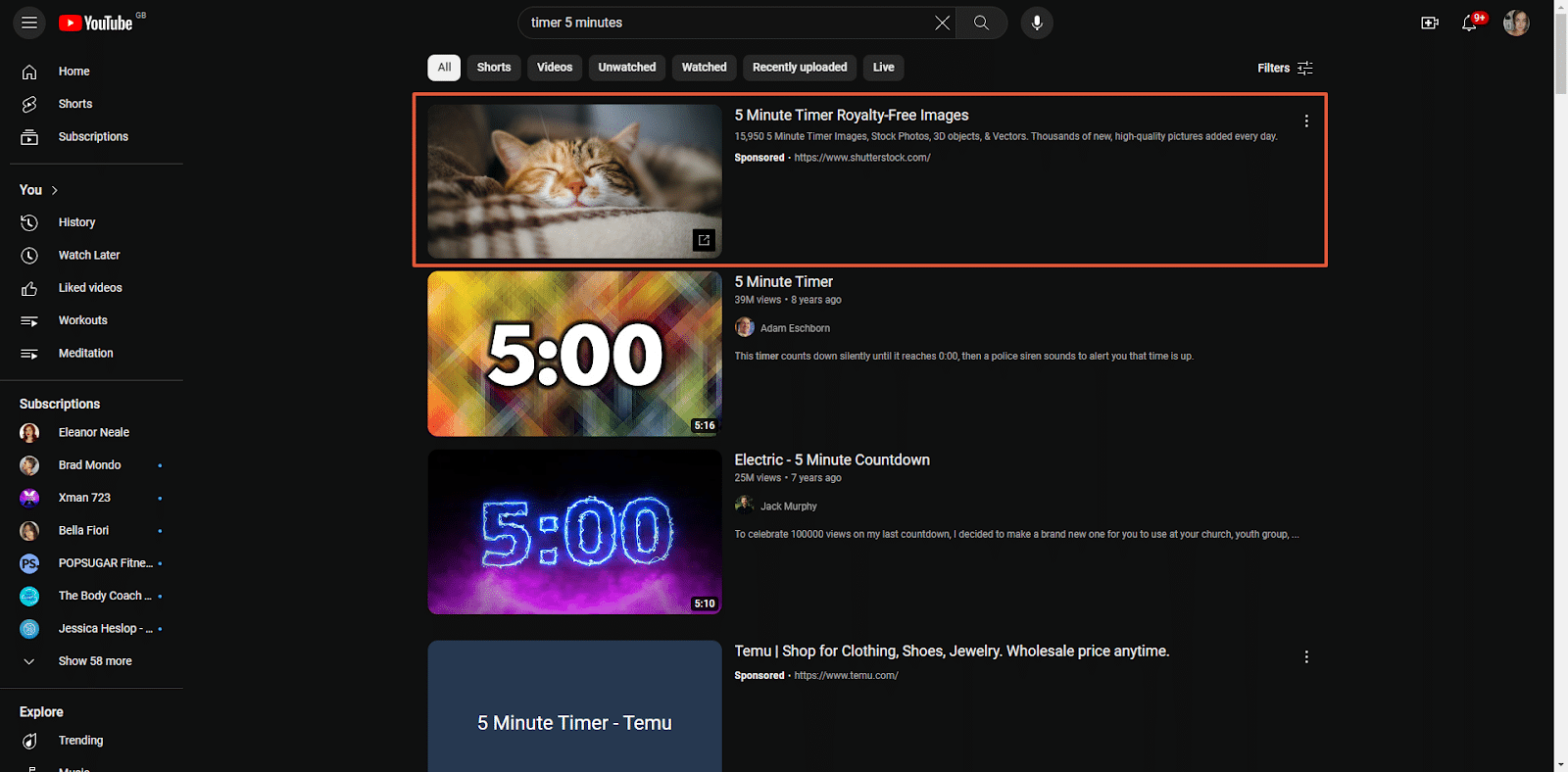
- Similar to Google SERPs, these ads appear in the YouTube search results and alongside related videos on the watch page.
- The search results list the promo videos at the top, then the organic results. Users can also hover over the thumbnails to see a video preview.
- To give you an idea of what this looks like, check out the image below:
Dig deeper: 3 key trends reshaping YouTube marketing today
How to advertise on YouTube in 7 steps
Like any marketing strategy, advertising on YouTube requires plenty of research, crafting a strategic approach, and analyzing your success. To help, I’ve broken the process down into seven actionable steps:
- Identify your target audience
- Choose your ad types
- Create your bid and targeting strategies
- Establish campaign structure based on intent stage (BoFu, MoFu, ToFu)
- Prepare your videos
- Set up and monitor GA4 conversion tracking
Now let’s take a look at these steps in detail.
Step 1: Identify your target audience
Before getting too deep into your YouTube ad content creation, you must understand your target audience and how to engage them. You can then enter this into YouTube to help you get in front of the right people.
Thanks to a recent update to YouTube’s audience insight tools, you can precisely define your target audience within each ad group and choose where your ads should appear.
There are several different targeting options in this update, allowing for customization across several categories:
Demographics
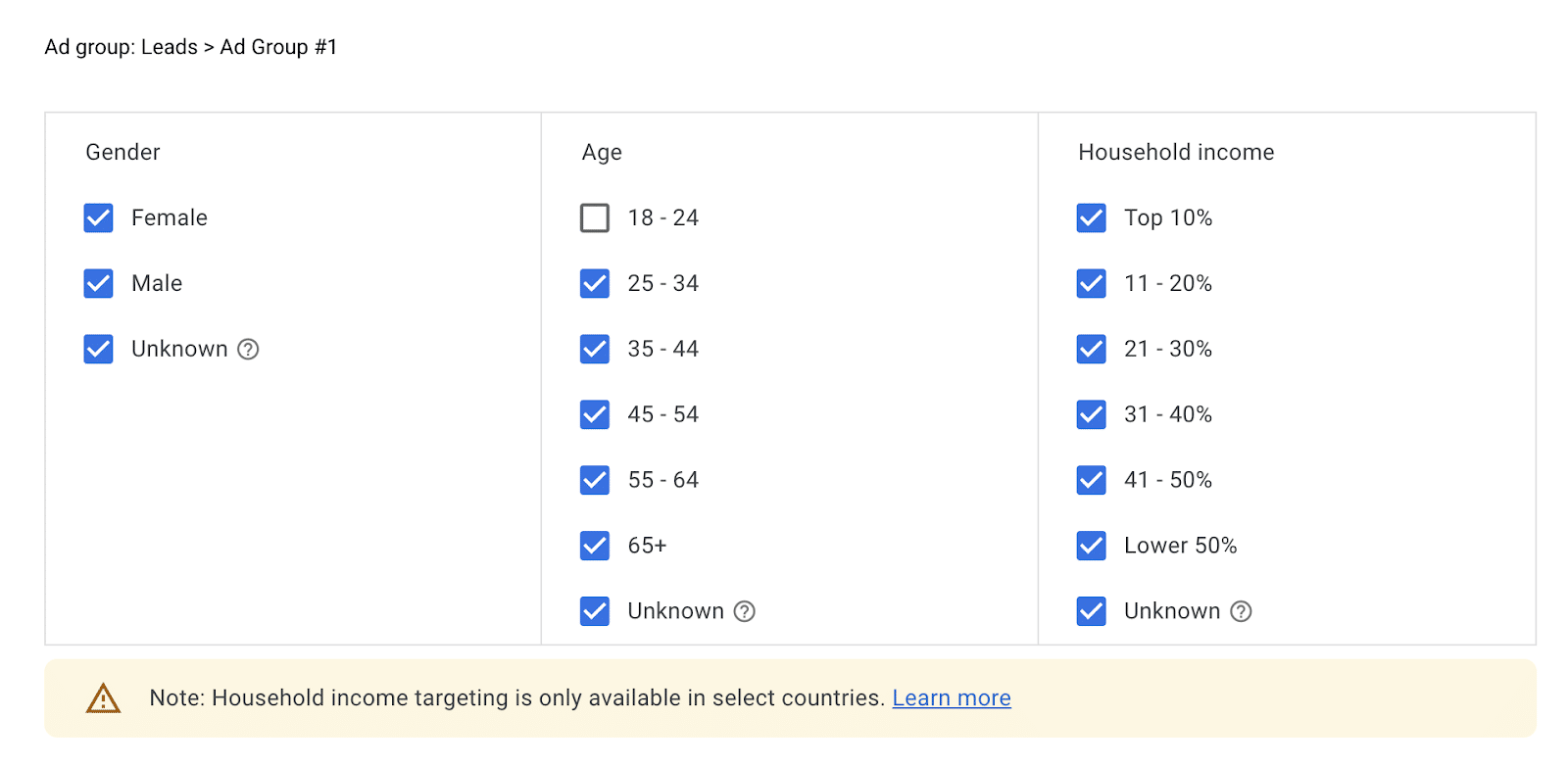
With this broad targeting option, you can clearly define the specifics of your audience. This allows you to reach your audience based on gender, age, and household income.
While it’s a great tool, remember that using demographics alone could result in lower returns and engagement, as a one-size-fits-all message might not resonate with such a diverse audience.
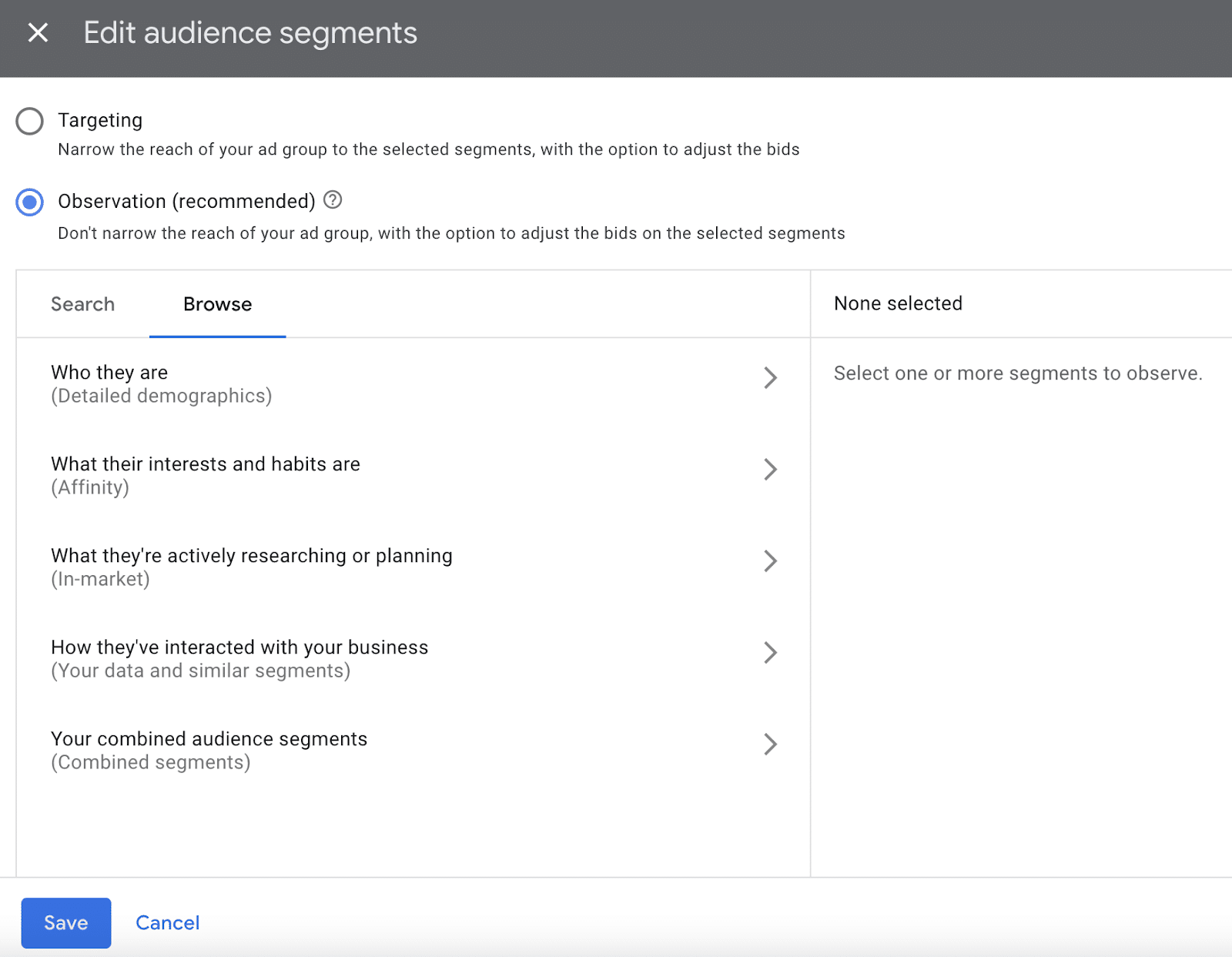
Audience segments
This lets you strategically target people with specific demographics, interests, and behaviors.
Essentially, these create a subgroup within your general target audience to help explore more specific groups based on the identified parameters.
To refine your targeting, segments can include:
- Detailed demographics.
- Affinities.
- In-market.
- Your data and similar or combined segments.
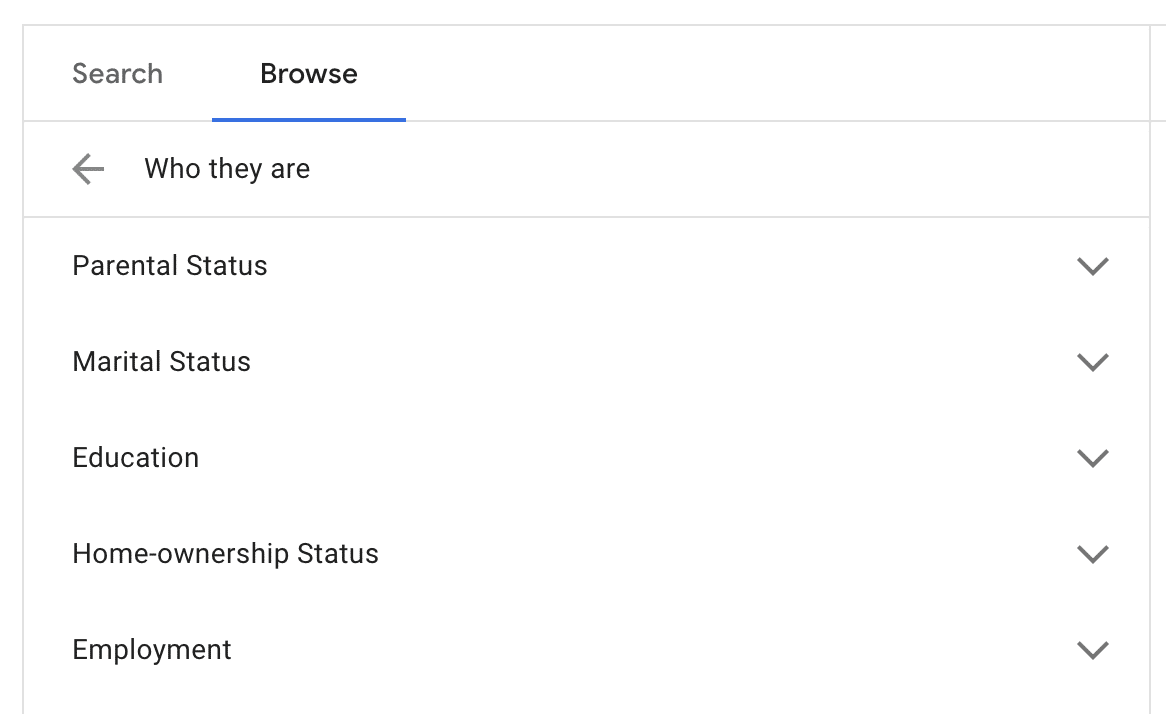
Detailed demographics
This helps refine your audience by targeting more specific information, including:
- Parental status.
- Marital status.
- Education status.
- Home ownership status.
- Employment status.
You can tailor ads to appeal to specific groups, such as those in construction, education, real estate, finance, etc.
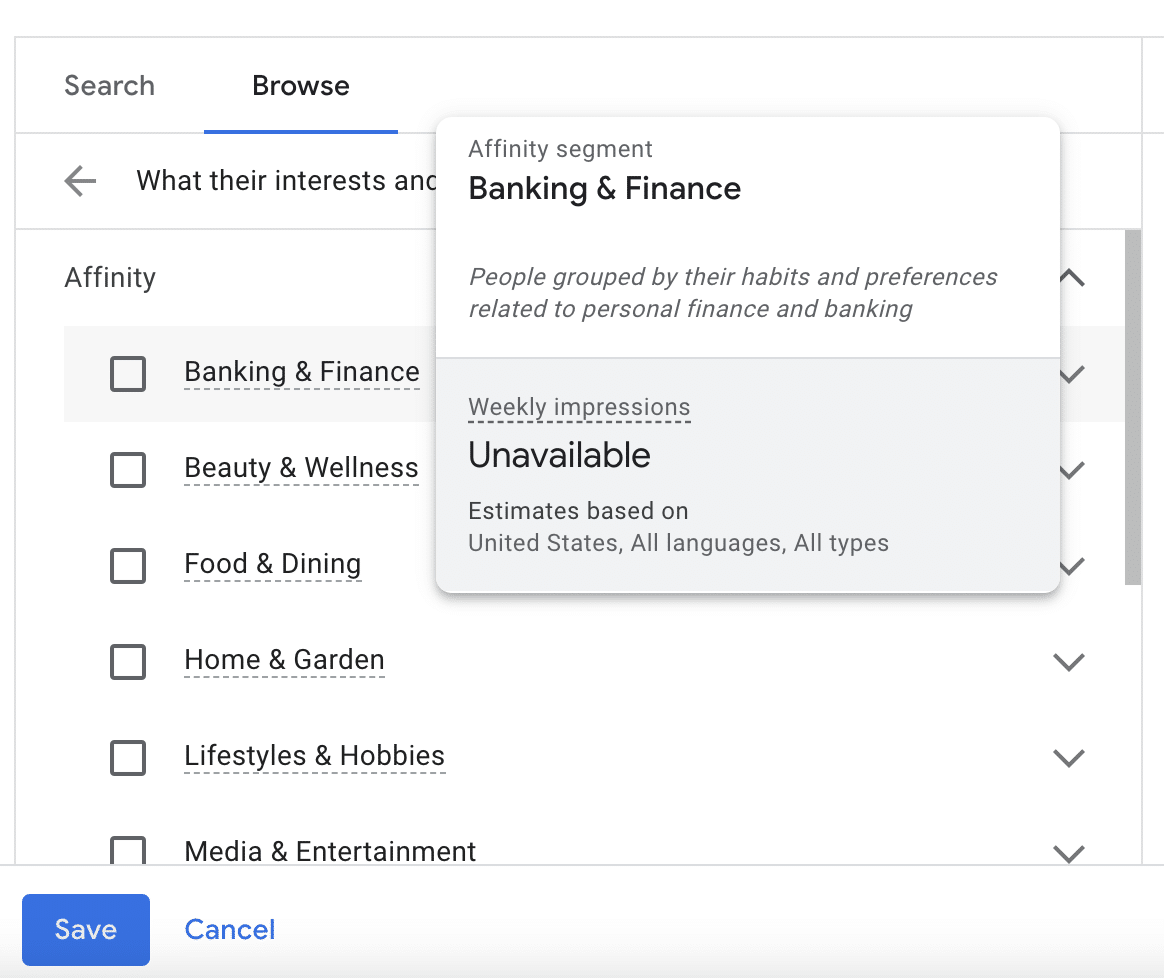
Affinity audiences
This segmentation allows you to reach audiences with specific interests and habits.
For example, you can target people interested in categories like banking and finance, beauty and wellness, food and dining, home and garden, lifestyles and hobbies, etc.
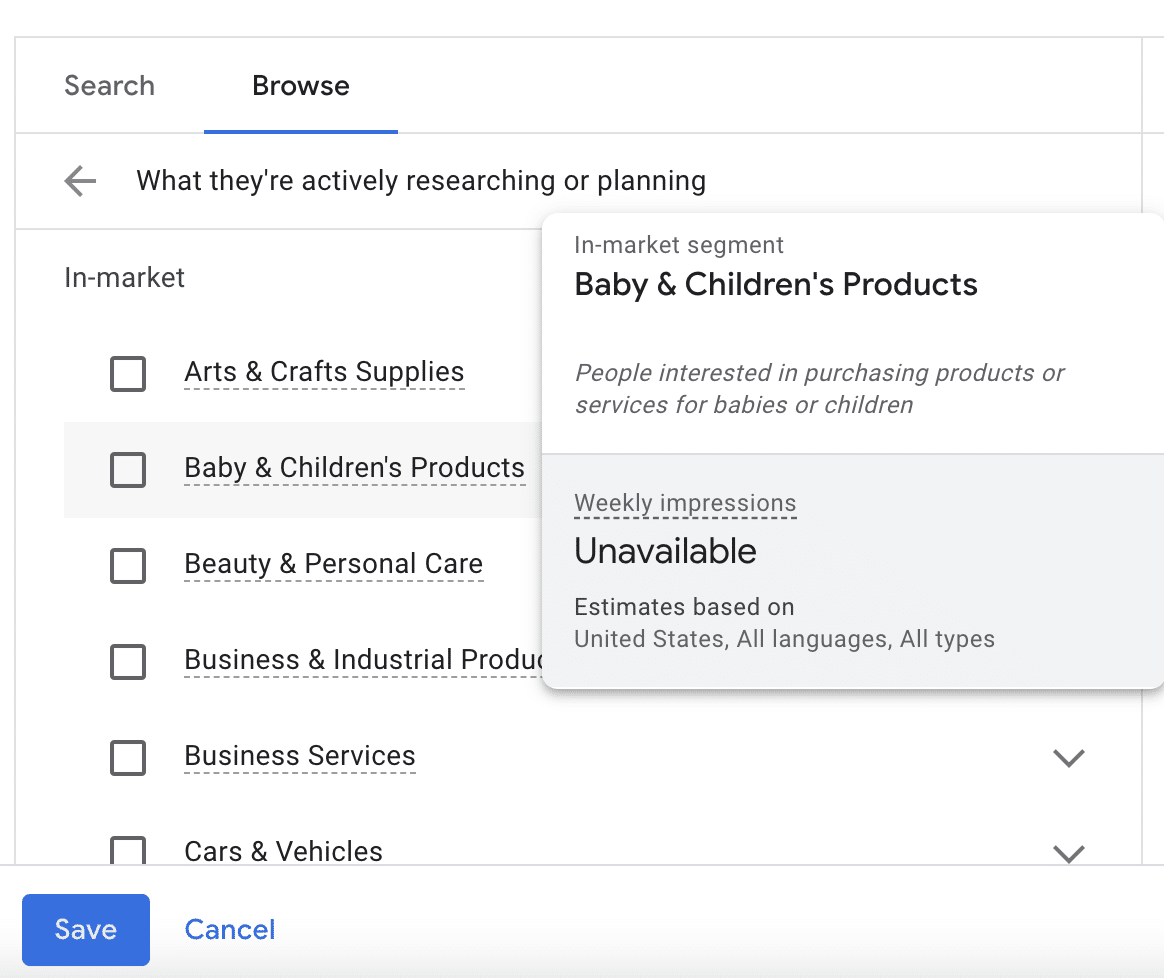
In-market audiences
A lot of people use YouTube as a resource when researching a topic or planning to purchase specific products or services.
Segmenting by in-market audiences allows you to get in front of people actively searching for similar products or services.
This segment is ideal for conversion-focused campaigns, driving engagement, and facilitating purchases.
Your data and similar segments
Using this segment, you can remarket to users who have visited your website but haven’t converted.
Getting in front of them again can increase brand recognition and help influence conversions. You can utilize similar audience segments for effective retargeting.
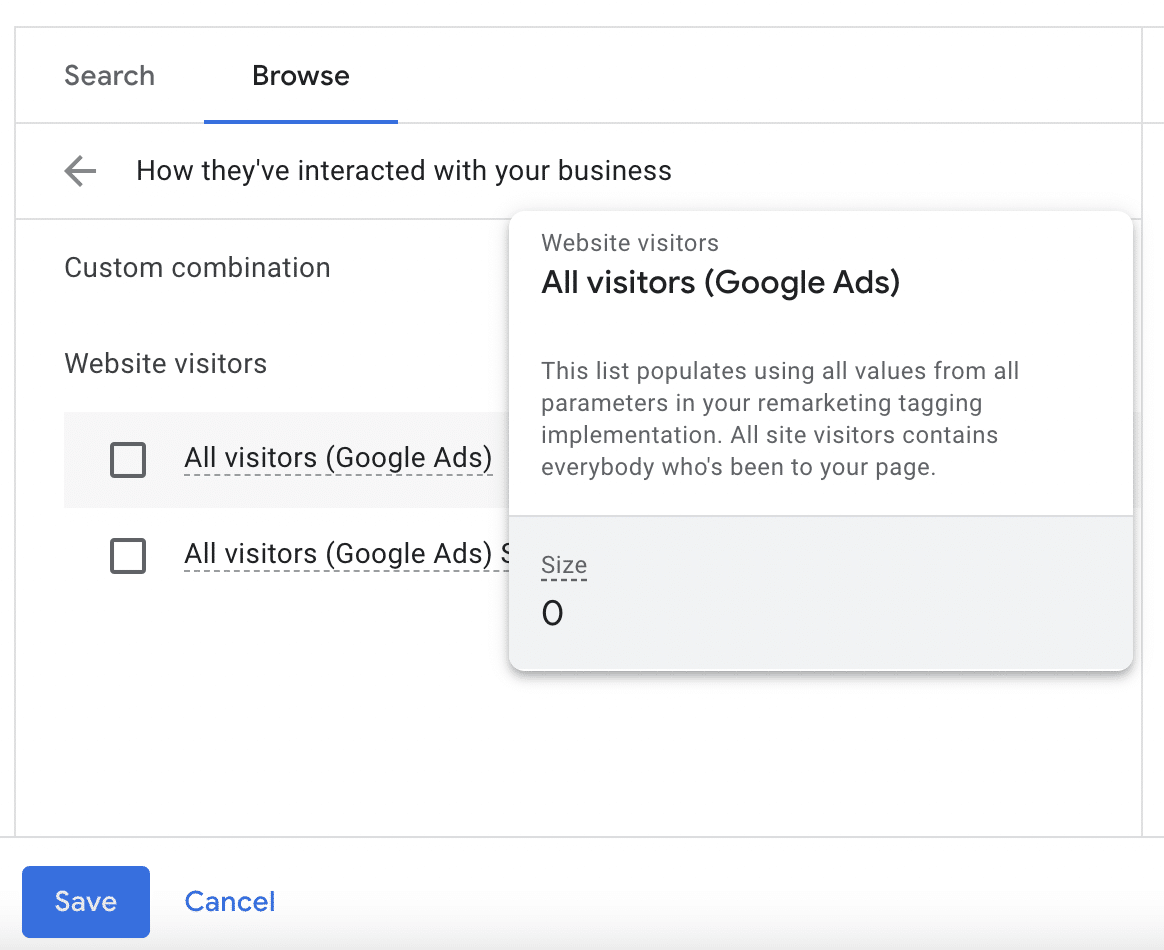
Combined segments
You can combine two or more segments from this list, which helps you define your ideal audience with precision and increase the effectiveness of your YouTube ads.
Keywords
In addition to segmentation, you’ll also want to contextually target your audience using keywords.
For example, if you target “localized marketing,” your ad will appear on videos and channels related to that topic.
This is a good tactic for awareness campaigns, but a keyword-only approach typically isn’t as effective for conversion-focused campaigns.
Topics
Another option is to select specific topics to help ensure that your ad is shown on related videos and channels.
However, there are benefits and drawbacks similar to a keyword-focused approach and are more effective in awareness campaigns.
Step 2: Choose your ad types
Diversifying your YouTube ad formats is essential to cater to various audience preferences and achieve specific campaign goals.
Here’s a detailed exploration of different ad formats on YouTube, each offering unique advantages, and how to align them with your campaign objectives:
TrueView ads
As mentioned, these ads are displayed on the same “screen” as the video content a user searched for. There are two primary types: skippable and non-skippable.
Skippable TrueView ads
- Format: Viewers can skip the ad after 5 seconds.
- Advantages: Ideal for longer content, as you only pay if viewers watch beyond the first 5 seconds, which gives you more space for storytelling and detailed messaging.
- Best for: Brand awareness, engagement, and conveying complex messages.
Non-skippable TrueView ads
- Format: Viewers can’t skip the ad.
- Advantages: Captures immediate attention, ensuring your message is seen in its entirety.
- Best for: Short, impactful messages, and when immediate engagement is crucial.
Bumper ads
These are like miniature ads. They’re short, sweet, and to the point.
- Format: Short, non-skippable ads (typically 6 seconds).
- Advantages: Concise and memorable, great for delivering quick messages.
- Best for: Increasing brand recall, complementing broader campaigns, and conveying a brief but impactful message.
Display ads
Overlay ads
- Format: Semi-transparent overlay on the lower part of the video.
- Advantages: Allows for interactive elements without disrupting the viewing experience.
- Best for: Calls to action, promoting additional content, and maintaining engagement.
Overlay image ads
- Format: Static image overlays on the lower part of the video.
- Advantages: Non-intrusive yet visually impactful.
- Best for: Branding, displaying products, and providing additional information.
Step 3: Create your bid and targeting strategies
To determine your budget, use the following steps:
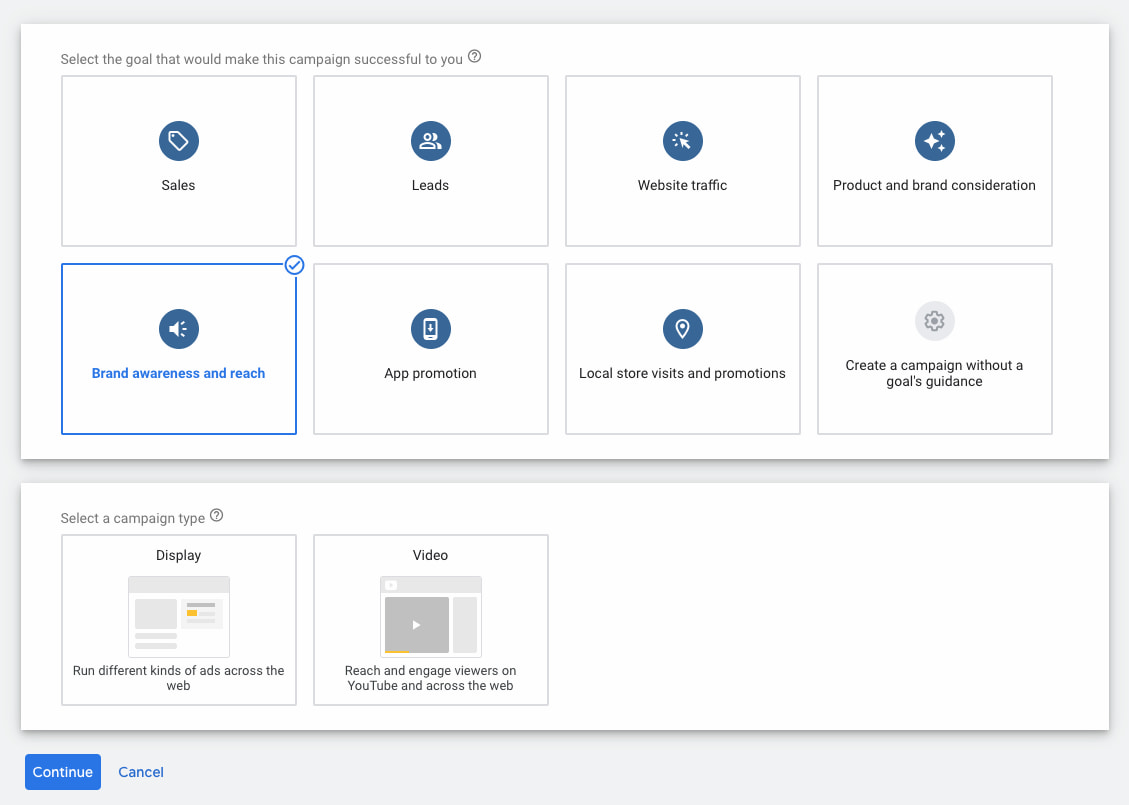
Define your campaign goal
Decide whether you want to focus on brand awareness, lead generation, or sales and align your budget with the specific outcomes you aim to achieve.
Each part of the sales funnel requires different content and ad development types, which can result in varying ROIs.
When you’re setting up an ad, you can set the campaign goal here:
Dig deeper: Setting PPC goals: How to tailor KPIs and metrics for each funnel stage
Establish your campaign duration
How long will your YouTube ads run? What’s the timeframe for your campaign?
Short-term campaigns will likely have different budget considerations than long-term ones, as they may reach a smaller audience.
Researching industry benchmarks can help you understand the average costs and set realistic expectations for your budget.
Choose your bid strategy
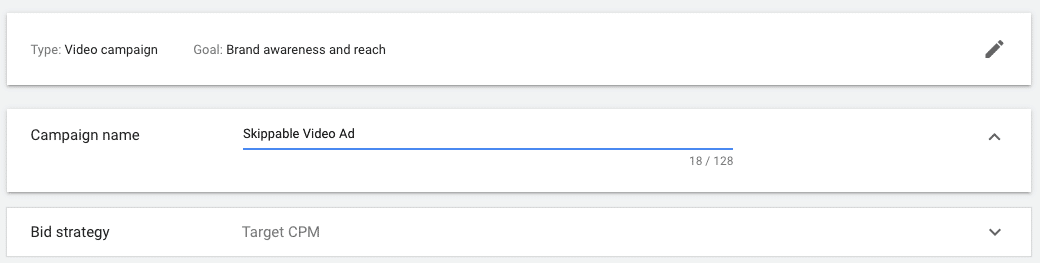
A bidding strategy is where you’ll set an average amount you’re willing to pay for impressions, actions, or clicks.
This is established when you choose your ad format type and then select the bid strategy for that campaign, as shown in the image below:
There are a few different types of bidding strategies you can experiment with, so try a few and see which option works best for your goals:
- A cost-per-view (CPV) strategy charges advertisers whenever a viewer watches at least 30 seconds of the ad or engages with it in some way. This is a great option for campaigns focusing more on brand awareness and video views.
- With cost-per-action (CPA), you set a target cost for specific actions such as clicks or conversions and then pay based on your audience’s engagement. This is suitable for performance-oriented campaigns where specific actions, such as lead generation or sales, are critical.
- Enhanced cost-per-click (eCPC) allows manual bidding while letting Google adjust bids for clicks. This is often regarded as the bidding strategy most likely to lead to conversions, as it offers a balance between manual control and algorithmic optimization.
- Automated bidding is another option you have to allow YouTube’s algorithm (via Google) to automatically adjust your bids to get the most conversions within your specific budget. This is ideal for campaigns where the primary goal is to maximize the number of desired actions. Just make sure you’re willing to spend whatever budget you enter, as Google may adjust your bids to the maximum amount.
Outline production costs vs. ad format
YouTube is filled with experienced content creative and engaging videos.
If you want your ad to spark some interest, you’ll also need to put aside a budget for creative production costs, including ad creatives.
Remember, high-quality content often requires an investment but can significantly impact campaign performance.
Calculate management costs
In addition to video production, you’ll also need to make sure you allocate the resources to regularly manage and assess your campaign performance.
Give yourself some flexibility and be prepared to adjust your budget based on real-time data. This ensures the optimal allocation of resources and maximum effectiveness of your YouTube ad campaigns.
Step 4: Establish campaign structure based on intent stage (BoFu, MoFu, ToFu)
Defining and understanding the marketing funnel stages is crucial for creating a targeted and effective YouTube advertising strategy.
Tailoring your ad content and messaging to align with each stage allows you to address users’ varying needs as they progress through the funnel, from initial awareness to conversion.
Top of funnel (ToFu)
At the ToFu stage, the primary goal is to create brand awareness and capture the attention of a broad audience. This sets the stage for targeted messaging and a pathway to conversions.
During the ToFu stage, you need to create compelling, attention-grabbing content that introduces your brand, product, or service to a wide audience.
Try to focus on storytelling, highlighting your unique value proposition and the broader benefits you offer. Pair this with engaging visuals, captivating narratives, and brand messaging to help create a memorable first impression.
The best ad formats for ToFu campaigns are Skippable TrueView Ads and Bumper Ads, as they allow for concise, yet impactful messaging. Use a CTA that encourages users to explore more about your brand or product without putting too much pressure on them to take immediate action.
Middle of funnel (MoFu)
In the MoFu stage, the goal is to help nurture your audience and guide them toward considering your products or services. This part of the funnel targets users already aware of your brand and may be considering converting.
During the MoFu stage, developing content that provides more in-depth information about your products or services is important. Try to showcase specific features, benefits, and any unique selling points to differentiate your offering from competitors.
You can also include social proof such as testimonials, case studies, or educational content to help build trust and credibility.
The best ad formats for MoFu campaigns are longer-form, skippable TrueView ads, allowing a more detailed presentation of your products or services.
Use a CTA that encourages users to explore specific product features, download resources, or sign up for newsletters to deepen engagement.
Bottom of funnel (BoFu)
In the BoFu stage, the primary focus is converting potential customers into actual ones. This part of the funnel targets users who are already familiar with your brand and ready to decide.
During the BoFu stage, drive action by developing content that emphasizes conversion-driven elements, such as limited-time offers, discounts, or exclusive deals. Always provide clear information on how users can make a purchase or take a desired action and use strong, compelling CTAs that create a sense of urgency.
The best ad formats for BoFu campaigns will combine skippable TrueView ads, display ads, and overlay ads to reinforce your conversion-oriented messaging.
Create a CTA that directly prompts users to make a purchase, sign up for a trial, or take the specific action that aligns with your conversion goals.
Dig deeper: How to use always-on marketing in paid search
Step 5: Prep your videos
Creating impactful video content is fundamental to a successful YouTube advertising campaign. The components of successful videos for YouTube include:
Compelling and engaging video content
- Try to tell a story about your business and/or product or service in a way that connects to users emotionally while simultaneously highlighting your brand’s values.
- Within the narrative, highlight unique selling points (USPs) so it’s easy to see what sets your product or service apart from competitors.
- Be clear and try to emphasize key features and benefits without being overly salesy or pushy. Essentially, you want to create a video that clearly shows viewers why they should choose your offering.
Optimization for mobile viewing
- Videos need to be responsive and optimized for smaller screens.
- You also need a quick hook that captures their attention within the first few seconds, as mobile users can be more prone to quick browsing.
- Try experimenting with vertical or square video formats, reducing users’ need to turn their devices. This mirrors Instagram Reels and TikToks, leading to increased performance on mobile devices without sacrificing screen coverage.
Clear CTAs
- To generate good conversion rates, you need to be strategic about CTA wording and placement.
- This might mean placing CTAs at the beginning of your video to encourage immediate engagement or adding them to the end to prompt a specific action.
- If the goal is to drive traffic to a specific webpage, include clickable links in your video descriptions or use YouTube’s in-video programming features to add external links.
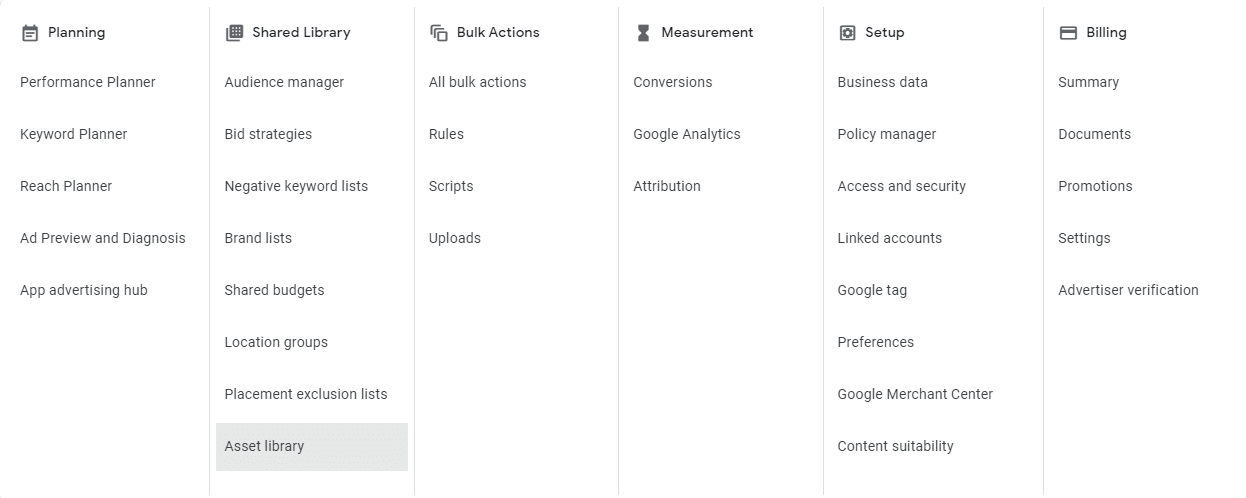
Uploading to YouTube channel or Google Ads asset library
- When your ads are finalized, upload your videos directly to your YouTube channel. This ensures that your content is easily discoverable and shareable, contributing to the growth of your channel over time.
- If you’re managing campaigns within Google Ads, add your videos to the Google Ad Asset Library. This centralized storage allows for the efficient reuse of assets across different campaigns.
Optimize metadata
- Similar to any type of content creation online, you need to optimize the metadata for your YouTube ads.
- Optimize video titles, descriptions, and tags for relevant keywords.
Appealing thumbnails
- Within your YouTube channel, choose thumbnails that make people want to click them.
- Creating visually appealing thumbnails that accurately represent the video content can be crucial in CTR.
- At the same time, try to avoid spammy clickbait thumbnails that will frustrate your audience or inaccurately represent the content.
Align campaigns with relevant landing pages
- If your campaign goal is to generate clicks for a specific landing page, ensure you have a landing page that directly relates to the particular campaign, including audience buyer intent levels and a high-quality UI/UX.
Step 6: Set up and monitor GA4 conversion tracking
To track YouTube Ad performance with GA4, you must clearly outline your conversion goals for each video and the landing pages connected to the videos.
Whether it’s encouraging sign-ups, driving purchases, or achieving specific actions, defining these goals will allow for more precise tracking throughout the campaign.
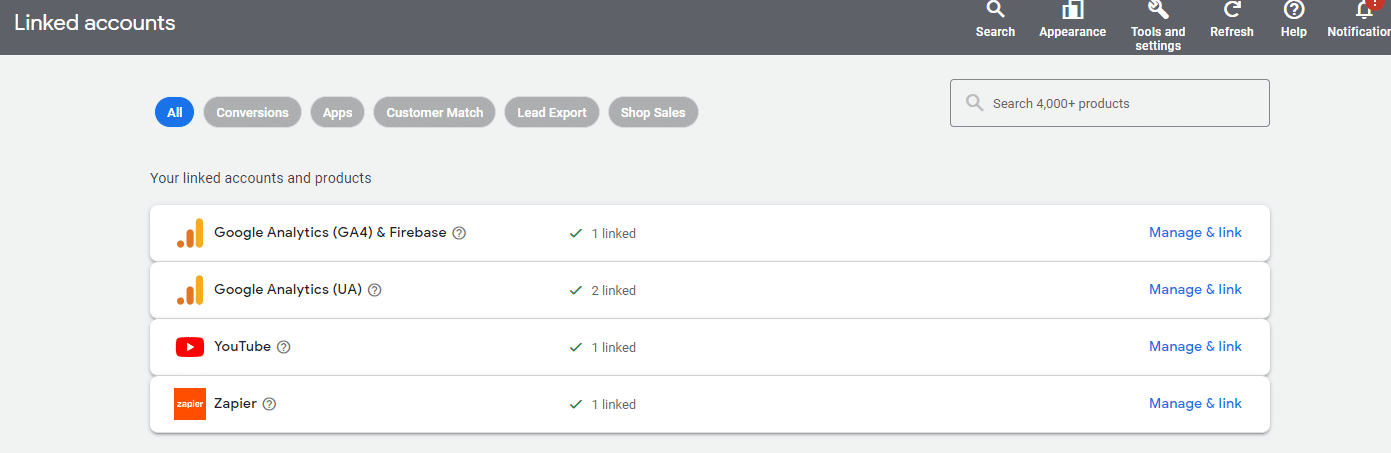
Next, link Google Ads to GA4 and your YouTube channel to create a connection between the two. This will help facilitate the seamless sharing of data between the two platforms, which is essential for accurately tracking YouTube ad campaign success.
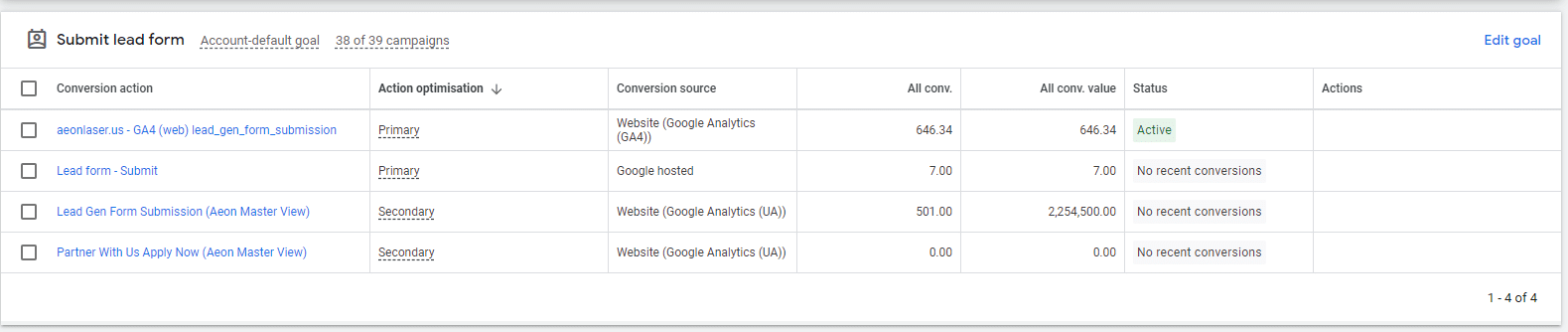
Once the channels are connected, import your conversion goals into Google Ads. This allows Google Ads to attribute conversions directly to your YouTube ad campaigns, which provides you with detailed insights into your ongoing campaign performance.
GA4 also formulates Audience Reports to help you better understand the characteristics and behaviors of users engaging with your site.
Regularly check these reports to gain insight into audience segments that respond well to your YouTube Ads, which allows you to tailor future campaigns accordingly.
Harness the power of YouTube ads with the right strategy
Although YouTube has long been known as a highly effective organic strategy, YouTube ads can be just as effective for growing brand awareness and generating leads and sales.
As users move faster and faster toward video-first campaigns, YouTube is one of the best platforms to grow an audience on, especially as it’s underutilized by most brands.
Because it’s not fully saturated and the user base continues to grow, this channel is one of the best new media opportunities to capitalize on today.
Courtesy of Search Engine Land: News & Info About SEO, PPC, SEM, Search Engines & Search Marketing
Category seo news | Tags:
Social Networks : Technorati, Stumble it!, Digg, de.licio.us, Yahoo, reddit, Blogmarks, Google, Magnolia.
You can follow any responses to this entry through the RSS 2.0 feed.