Archive for the ‘seo news’ Category
Wednesday, February 7th, 2024
Google is investigating a devastating Local Service Ads (LSA) tactic that could “nuke competitors out of existence.”
When more than one LSA is linked to a Google Business Profile (GBP), the ad becomes invisible, killing off all leads. Alarmingly, competitors can use this loophole to intentionally create an LSA linked to your GBP without your knowledge, preventing your ad from reaching consumers.
Why we care. If your GBP has unexpectedly stopped generating leads, it may be due to someone else linking an LSA to your GBP. Identifying this issue requires consultation with your Google support representative.
Drop in leads. The initial complaint surfaced when a business owner shared their experience on the Google Business Profile forum. They reported that their LSA was performing well initially. However, overnight, their leads and even spam abruptly ceased, leaving them puzzled about the root cause of the issue. They elaborated:
- “I finally got a rep to look into it and he told me that our Google my business profile has two LSA’s linked to it, which is causing our ad to be invisible. When I check our GMB there is only one account linked to us, and it’s the one that I set up. I’ve only ever set up one LSA account, and I’m the only one with the access and credentials to do so.”
- “I’m being told that I cannot unlink this other unknown LSA account because I don’t know any of the credentials of that other account. Their solution was for me to unlink our 10 year old account with established reviews and start a new google business profile from scratch. This is a horrible suggestion in my mind. Why would an unknown entity get to force us off of our own Google listing.”
- “There must be a way where we can re-verify our account and eliminate any LSA’s we don’t approve of. We did hire a company to run a website for our owner (the GMB account is the same as the company’s), but they aren’t running LSA’s for us.”
‘Brutal tactic’. Commenting on the flagged issue, Ben Fisher, Co-Founder/Lead Consultant at Steady Demand, urged Google Ads Liaison Ginny Marvin to investigate the loophole on X. He wrote:
- “This is a brutal new tactic that competitors are doing on LSA. A competitor makes a new LSA for a competitor and because the link to GBP is automatic the system will essentially nuke the competitor out of existence.”
- “@adsliaison this is wrong on many levels.”
What Google is saying. Marvin responded shortly after to confirm Google was looking into the issue.
Get the daily newsletter search marketers rely on.
Deep dive. Read the Google Business Profiles forum, where the issue is being discussed, for more information.
Courtesy of Search Engine Land: News & Info About SEO, PPC, SEM, Search Engines & Search Marketing
Wednesday, February 7th, 2024
SMX Advanced, the premier conference for experienced senior-level search marketers, returns online June 11-12.
As you know, 2023 was an unprecedented year for search and the pace of change will continue through 2024. There’s a growing sentiment that Google search is not serving search marketers well. How do we continue to optimize search efforts and focus on what matters most to reach customers?
We’re still waiting and watching for Google Search Generative Experience to launch and we don’t know what it will mean for organic search. On the PPC side, costs continue to go up but tracking is increasingly challenging. SMX Advanced will cover these and other important search topics in both PPC and SEO.
If you know how to solve complex search challenges, we want to hear from you. Even if you haven’t spoken before at SMX, consider submitting a session topic idea. We are always looking for new speakers with diverse points of view.
The deadline for SMX Advanced pitches is April 16.
The earlier you submit proposals, the better. Spots fill up quickly.
Here are a few tips for submitting a compelling session proposal:
- Present an original idea and/or unique session format.
- Include a case study or specific examples.
- Be realistic about what you can present in 30 minutes.
- Provide tangible takeaways and a plan of action.
- Include what an attendee will be able to do better as a result of attending your session.
Read our guide to speaking at SMX for more details on how to submit a session idea, or directly to this page to create your profile and submit a session pitch.
If you have questions, feel free to contact me directly at kbushman@thirddoormedia.com. I’m looking forward to reading your proposals!
Courtesy of Search Engine Land: News & Info About SEO, PPC, SEM, Search Engines & Search Marketing
Wednesday, February 7th, 2024
More advertisers are exploring the potential of value-based bidding (VBB). But what exactly is this method and why does it matter?
This article discusses what you need to know about value-based bidding, how it differs from “Maximize conversions,” and two approaches to implement VBB for your Google Ads account. We’ll also explore perspectives from the PPC community on this evolving strategy.
What is value-based bidding?
Value-based bidding enables you to prioritize conversions differently based on their value to your business. You can assign values to various actions, directing the bidding algorithm to optimize for higher-value outcomes.
This gives you a more nuanced way to bid beyond just chasing conversion volume, aligning your ads with profitability goals.
Questions:
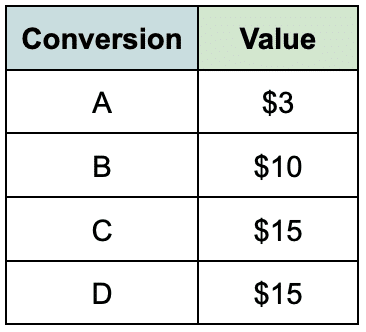
- Which conversion action is preferred: A, B, C, or D?
- If an advertiser has a stronger preference for B over A, then B is assigned a value of $10 and A is assigned a value of $3.
- If the advertiser equally prefers both C and D, but each has more business value than B, then both options can be assigned a value of $15.
These priority values can be attributed to conversions, including actions like:
- Completing a form.
- Watching a video.
- Downloading a white paper.
- Using specific website functionalities such as a chat or quote system.
These lower-value conversions are also called “micro-conversions,” indicating that they are minor actions with business value but are not necessarily the preferred conversion event.
The bidding algorithm, with the provided value data, can now account for the various actions based on the assigned values, with the goal of maximizing the overall generated value from the conversion set.
During auction time, VBB seeks to optimize for the most valuable outcomes as defined by the advertiser and can also function with a tROAS to align with profit goals.
Contrast: The traditional ‘Maximize conversions’ bidding
Traditional maximize conversion bidding, on the other hand, typically revolves around tallying conversions and maximizing volume.
While this approach can be effective, it comes with its drawbacks. Specifically, traditional bidding tends to focus solely on increasing the overall number of conversions without considering the diverse values associated with different conversion actions.
The shortcomings become apparent when considering the intricacies of the buying journey.
Clarifying the value of phone calls and lead forms can be crucial for certain businesses.
Sometimes, phone calls may translate to a higher customer lifetime value or larger orders compared to form submissions.
When a form submission leads to a return call, the call center may encounter difficulties reaching the lead or the lead may simply forget they filled out a form online.
Blocking calls from unknown numbers through spam filtering is another scenario, post form fill.
Maximizing the number of conversions would not consider this additional business knowledge.
The algorithm is known for going after the path of least resistance. If the form is easy and all conversions are treated equally, it is possible to end up with an account optimized primarily for form fills.
This approach might not be ideal for Google’s algorithms either. Merely prioritizing the maximization of conversions may lead to inaccurate data for Google’s machine learning and bidding algorithms.
This is particularly evident in accounts with smaller budgets. Sometimes, advertisers simply cannot afford the preferred conversion. As a result, there is less data available for algorithms to effectively bid.
The traditional way to counter this is to add “easier conversions.” However, these easier conversions are not all equal.
Let’s consider a local venue for parties and weddings as an example. This type of business operates on low margins but has a high price tag associated with a “booked event.” The advertiser might not be able to afford a large budget in Google Ads.
The traditional approach would be to optimize the account for a “booked event.” A single booked event may result in a revenue of $10,000 for a wedding. However, if the monthly advertising budget is only $2,000, optimizing for a “booked wedding event” may not be feasible.
To move forward, you can instead focus on bidding for actions such as “watching a video about the event space” or “downloading a feature sheet” to engage potential customers and continue the sales process.
Based on business knowledge, you know that downloading the feature sheet, which provides the business with an email address, allows you to build a relationship and convert to a “booked wedding event.”
This is where a value-based approach can be applied. By incorporating sales knowledge into the advertising strategy, the business can make informed decisions about which actions will most likely lead to successful conversions and provide the bidding algorithm with enough data based on their budget to bid optimally.
If the scenario above was used indiscriminately, the algorithm would favor the path of least resistance, potentially undermining your true objectives, and the result could be a high number of “video views,” which are not the best path to a “booked event.”
Dig deeper: 5 tips for effective PPC bidding on a budget
Get the daily newsletter search marketers rely on.
The traditional application of value-based bidding
Value-based bidding in Google Ads is standard practice for ecommerce websites. The value of each purchase is passed back into the interface, then the campaigns, ad groups, and keywords can be optimized according to ROI.
The account structure can be configured to allocate a budget based on the products that yield the highest return on investment.
Dig deeper: How non-retail advertisers can embrace value-based bidding in Google Ads
Exception: Value-based bidding for lead generation advertisers
VBB is still not the default implementation in most Google Ads lead gen accounts because it is considered a more advanced approach.
Another factor contributing to the lower adoption rates of VBB is advertisers’ tendency to avoid adding conversions deemed “easier.”
Including browsing-related conversions can artificially inflate conversion numbers and create the illusion of better performance for an account.
Experienced advertising managers prioritize optimizing for the outcome and have operated in this fashion for years.
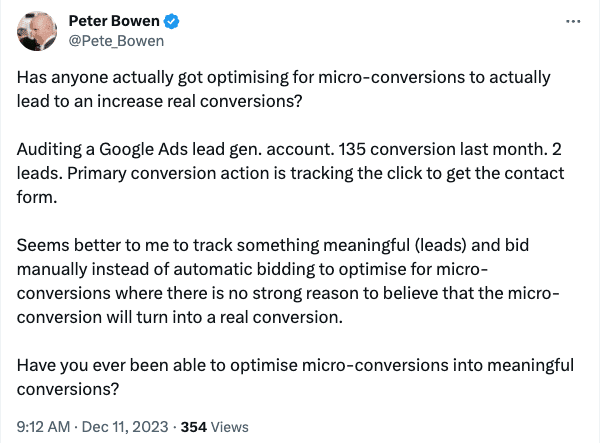
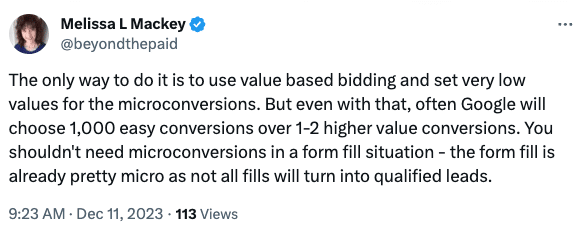
This exchange on X demonstrates that adding conversions with no discernment can disadvantage the advertiser. The response presents VBB as an approach to managing multiple conversions.
As Melissa Mackey (@beyondthepaid) points out in the thread, VBB is a viable solution. The algorithm will generally focus on higher-value conversions to maximize value.
Approaches to value-based bidding
Two key approaches emerge within value-based bidding, each offering its unique advantages.
Method 1: The ranking values method
This approach entails assigning importance rankings to conversions (1, 2, 3, 4, 5, etc.), directing the algorithm to prioritize higher-ranking actions. However, this method lacks the precision required to accurately represent ROI. The assigned value merely signifies importance.
This method is more sophisticated than the maximize conversion approach. However, the return on advertising spend (ROAS) achieved through this method would hold no significance.
Method 2 (Google’s recommendation): Calculate the true business value for each conversion action
This approach involves attributing actual monetary worth to each conversion, considering factors such as customer lifetime value, profit margin, and sales process knowledge.
Integrating true ROI into the advertising platform provides a more precise evaluation of the campaign’s effectiveness.
This is also the approach Google recommends. Google has created a tool to help calculate the values that can be accessed here.
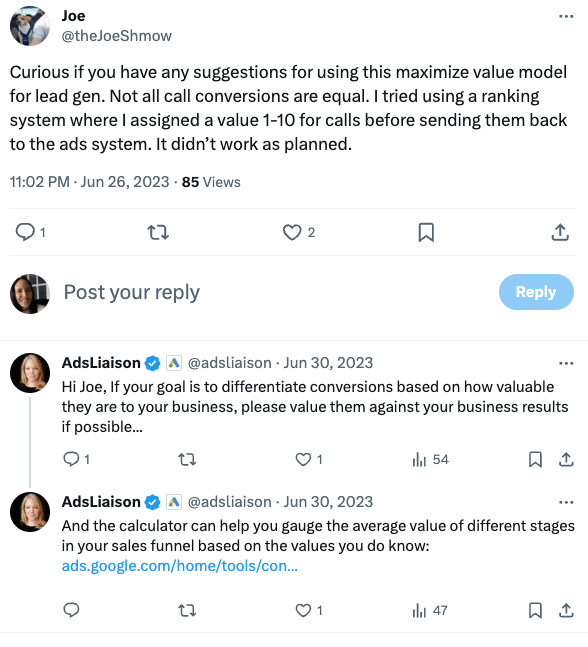
There was also a thread on X where Google Ads Liaison Ginny Marvin addressed this answer.
In the thread, @theJoeShmow asked about the first method outlined above, and the recommendation is to take the time to calculate the true meaning for your business.
What does the paid search community think?
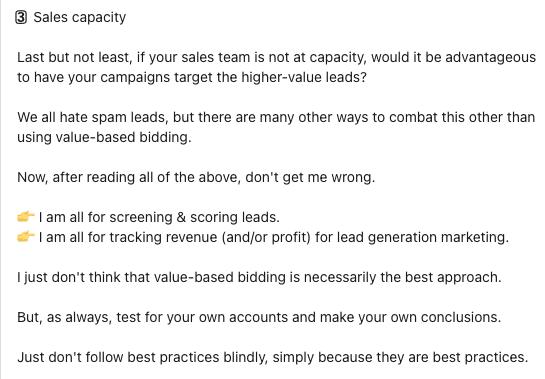
Michael De Boeck posted on LinkedIn that he doesn’t like value-based bidding because it is positioned as the “ultimate upgrade” for lead generation campaigns.
De Boeck highlights that “value-based strategies are biased to adapt toward higher-value conversions.” He also emphasizes the importance of asking key questions about the sales process when adopting this bidding approach.
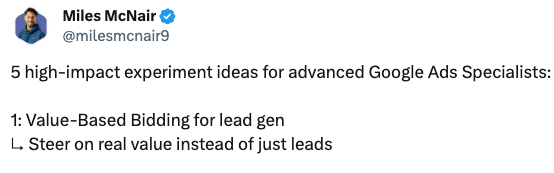
Miles McNair on X recommends testing VBB using the experiments, ranking it as his top recommended test.
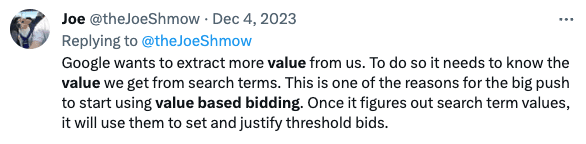
Lastly, @theJoeShmow on X suggests that VBB could be a method for Google to gather more information from advertisers to assess how much bid thresholds can be raised.
The verdict for value-based bidding
Like most answers in advertising, the answer lies firmly in your data.
Optimizing accounts for “easier conversions” makes sense for advertisers with smaller budgets and limited data. This allows advertisers to realize the benefit of paid advertising without optimizing for the most expensive outcome, which can be quite costly.
Prioritizing the value of conversions over volume enables bidding on desired actions while maximizing overall ROI.
Regularly analyzing data and segmenting actions is essential to make decisions around marketing effectiveness.
In essence, value-based bidding allows advertisers to define and prioritize valuable conversions, applying a target ROAS strategy to achieve their advertising goals.
Success in advertising hinges on advertisers who take the time to analyze data and define the value of actions, while those who neglect this step may face failure.
The crucial factor lies in leveraging business information with the right automated bidding strategies aligned with goals.”
Advertisers who analyze their business and plan strategically will outperform those who set it and forget it in the automated world of Google Ads.
Success comes from a strategic mindset, not just automation. In 2024, VBB stands out as a powerful tool for advertisers aiming for a more advanced and strategic approach.
Dig deeper: How to make PPC automation work for lead gen
Courtesy of Search Engine Land: News & Info About SEO, PPC, SEM, Search Engines & Search Marketing
Wednesday, February 7th, 2024
Optimizing product detail pages (PDPs) is crucial for ecommerce websites. Well-optimized product pages can increase organic traffic, boost conversions, and grow revenue.
This comprehensive guide covers key elements of effective product page optimization, including:
1. Product page URLs
Clear, descriptive URLs enhance both user experience and visibility. Ideally, they should describe what content a page holds.
It is important to optimize URLs for clarity and user-friendliness and not to just stuff keywords. Remember, their primary purpose is to guide users.
A good product page URL should look like this:
https://brand.com/category/subcategory/color-product
Improve your site structure by identifying uncategorized product pages
Some products may be directly linked to the domain and listed alongside main categories.
The risk is that those pages can have the same treatment as the main categories and create mess since some products will not be displayed properly.
To find these uncategorized products:
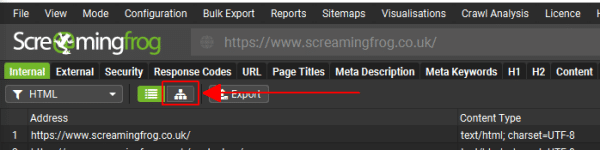
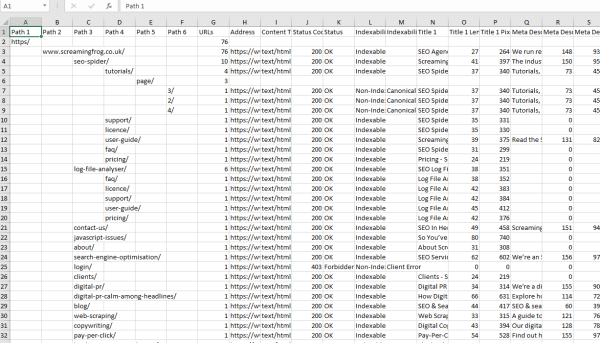
- Crawl your website using Screaming Frog.
- Then can click the directory tree icon on the Internal tab.
- You will then see the internal tab turned into a directory tree.
- Click Export. This will export the site in a directory tree format in a spreadsheet.
In this spreadsheet, you can now see your main categories and subcategories and find products that might have been uploaded without a category, as well as other irregularities on the site structure of your website.
2. Image optimization
If you work for a brand that prioritizes minimal text on their pages (like luxury brands), or if you’re required to have no text on key pages, then images become crucial. They serve as the equivalent of your text, conveying content to search engine crawlers. This makes image optimization a must in your SEO strategy.
Image URLs
High-quality images are essential for showcasing products. The file names of these images should be descriptive and include:
- Domain
- Type of product
- Color or size
- Main features
This is a perfect example from Chanel:
https://www.chanel.com/images//t_one///q_auto:good,f_auto,fl_lossy,dpr_1.1/w_840/small-classic-handbag-black-grained-calfskin-gold-tone-metal-grained-calfskin-gold-tone-metal-packshot-artistique-vue1-a01113y01864c3906-9535401164830.jpg
This URL describes the following product to Google:
Image alt text
Alt text is probably the most important content component for images. This element will help search engines understand what the image is about.
Make sure to optimize image alt texts for web accessibility, aiding visually impaired users. This is not an opportunity for keyword stuffing.
Example: Chanel Medium Double Flap Caviar Leather
- Product page URL
https://www.chanel.com/us/fashion/p/A01113Y01864C3906/small-classic-handbag-grained-calfskin-gold-tone-metal/
- Image alt text
Img alt="Small Classic Handbag - Black - Grained Calfskin & Gold-Tone Metal - CHANEL - artistique view 1 - see full sized version"
Image schema
Implementing schema on your images and across product pages enables you to offer content and context to the search engines to understand our pages.
Dig deeper:
Get the daily newsletter search marketers rely on.
3. Product descriptions
Once your customers are influenced by an ad or a campaign on TikTok, you only have a short time to get them to stay and convert once they land on your product page.
Along with product images, descriptions are crucial to make a customer buy or abandon the idea of buying.
Here are some important consider for your product descriptions:
- Pop-ups: Some categories may need to add pop-ups, for instance, food products that provide a reminder on allergies. However, if you are not in a health-related or high-risk category, then try to delay a pop-up. If you have a high-value item, showing too many pop-ups might not convince people to buy it; instead, it might make them change their minds and leave the website without buying anything.
- Keep your product descriptions clean and easy to read. Too much information, buttons, labels or discount info will overwhelm the customer and will, again, result in abandonment.
- Avoid content duplication for similar products. In case of potential duplication or close similarities, make sure canonicals are in place to differentiate product descriptions and pages.
- Make sure to have hreflangs in place for product descriptions in the same language but for various different languages and international versions of your site.
- Avoid keyword stuffing. It looks spammy and won’t help you. Include the minimum necessary keywords, but don’t go to extremes. Remember, your product descriptions are meant to convince users, not just Google.
The Velvet Powder Puff became a viral sensation at the beginning of 2023. The product description is precise and a great sales pitch that also includes a how to wear guide, pushing an influenced costumer to convert immediately.
Dig deeper: How to make your ecommerce content more helpful
AI and product description generators
Using product description generators can be a double-edged sword. On one hand, they offer efficiency and consistency, especially for businesses with a large inventory of products. However, the downside is that these generators may lack the unique, human touch that can make product descriptions more engaging and persuasive.
If you handle a large website with hundreds of products, chances are you probably can hire a copywriter. If so, do so instead.
If you are a smaller site, it’s best to write them yourself or take some time. Using generative AI can be OK as long as these product descriptions are checked by a copywriter or brand manager and they are signed off before going live.
Otherwise, you will only create content for the sake of having it on a product page, and it can result in abandonment.
Dig deeper: How to use ChatGPT to generate product descriptions at scale
4. User-generated content on PDPs to boost organic and direct traffic
UGC, such as customer reviews and Q&As, can significantly enhance SEO. They provide fresh, relevant content, which search engines favor. Encouraging UGC on product pages can also increase trust and engagement among users.
Create a content hub for your User Generated Content, you can then create other pieces of content, such as research or data and use these resources to pitch journalists or papers to get coverage and links.
Example: Charlotte Tilbury Flawless Filter Foundation
This is a highly converting product page. It is a product page aimed at pushing an already influenced customer to convert rather than satisfy a search engine.
User-generated content, for some niches, is what makes their pages highly converting. In the case of this foundation, seeing the product in many shades and many types of skin in real pictures is the final push to get a customer to convert.
Note: Only use this type of content if it’s relevant to your niche. Otherwise, it will seem out of place and instead of converting, it might lead to abandonment.
Dig deeper: Why ecommerce brands must showcase authentic E-E-A-T
5. Global adaptation
Global adaptation involves more than just translation. It includes:
- Cultural customization: Understanding cultural nuances and preferences in different regions. Do not use machine translators; if you use agencies, ensure they have target country copywriters who can adapt your content to your target country.
- Local SEO: Using region-specific keywords and phrases.
- Pricing strategy: Adapting pricing to reflect local market conditions and purchasing power.
- Payment methods: what payment methods are effective in your target country? Is it paypal? Or Klarna? Do people prefer installments?
Dig deeper: 15 SEO localization dos and don’ts: Navigating cultural sensitivity
Make your product pages useful for customers
Product page optimization is an ongoing process that requires a strategic, multifaceted approach. The tips above provide an excellent starting point for enhancing your PDPs.
Focus on creating pages that engage users while also appealing to search engines. Test different optimization strategies and refine them based on performance data.
Optimized product pages will become powerful drivers of organic growth and revenue with time and consistency.
Courtesy of Search Engine Land: News & Info About SEO, PPC, SEM, Search Engines & Search Marketing
Tuesday, February 6th, 2024
The big cookie crumble of 2024 officially began in January with Google’s initial roll-out of Tracking Protection for Chrome users.
Any PPC marketer caught off-guard by this either haven’t paid attention to the signals for several years or haven’t corralled the necessary parties to create a cohesive strategy in response – or both.
As an agency marketer, I’ve been in the position to help dozens of brands formulate an approach to life after third-party cookies.
Whether you’re scrambling for an overall strategy or need guidance on the high-leverage initiatives to prioritize, I can say with confidence that you’ll be well ahead of the curve if you tackle these three projects right away:
Here’s why each project is vital in a world without third-party cookies.
1. Website design: Audit your use of third-party cookies
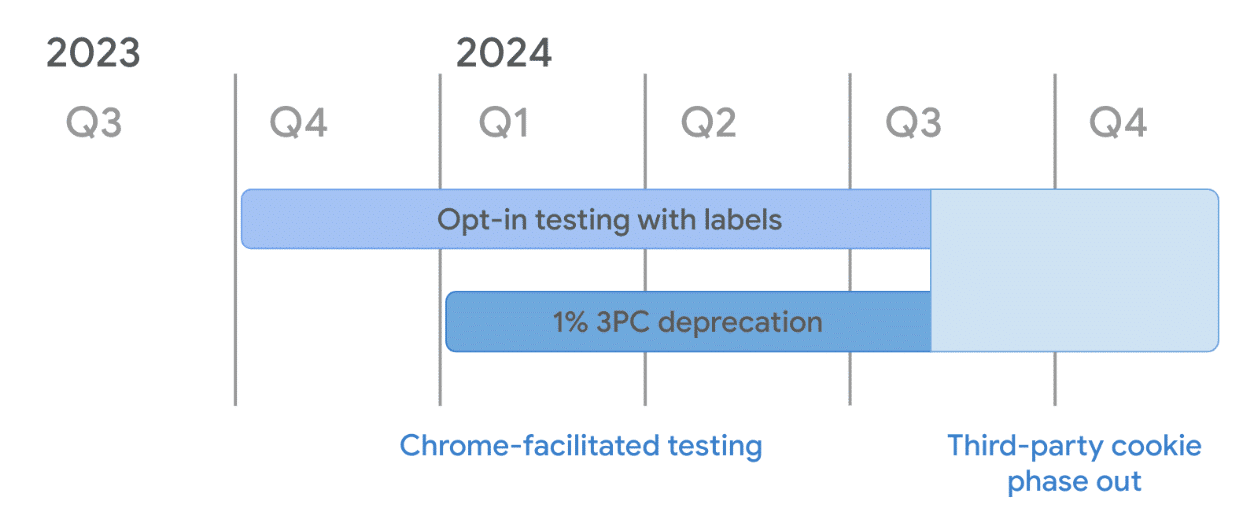
Google has provided a handy reference point (including the images below) for marketers to get their bearings on the cookie phaseout.
For this step, we’ll focus on the second phase of that page: Auditing your use of cookies.
Google’s literature is a helpful reminder of a couple of angles to the third-party cookie phaseout that go beyond tracking:
- Usability issues lurk everywhere if you don’t get a handle on your site’s embedded content and widgets. (Check that “add to calendar” function!)
- Even if you have first-party cookies set up, consistent usage of proper code is important for smoothing out how your site behaves across browsers.
Yes, you need to focus on improving targeting and analytics without cookies, but don’t put the cart before the horse: a working website.
Dig deeper: PPC outlook: How advertisers can stay ahead in 2024
Get the daily newsletter search marketers rely on.
2. In-platform data integration
OK, now about that tracking and reporting. Major ad platforms have given advertisers ways to improve in-platform reporting and help bidding and targeting algorithms find high-quality users.
Google: Integrate offline conversion tracking
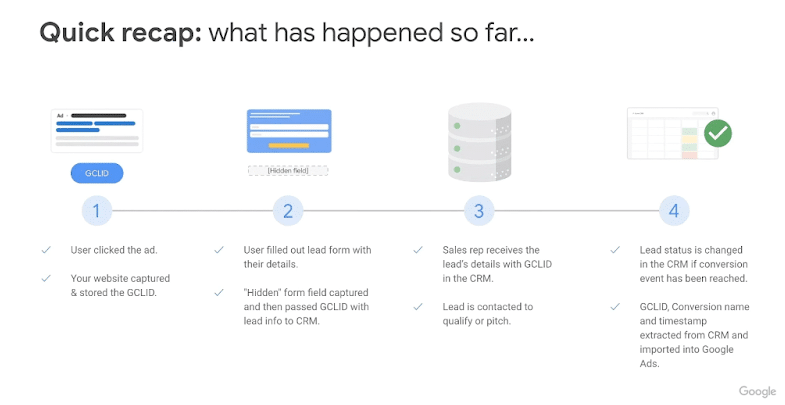
Whether you’re relying on digital ad campaigns to help drive B2C offline conversions (think: car dealerships) or driving leads for B2B, it’s critical to your understanding of campaign performance – and your future performance – to integrate offline conversion tracking (OCT), or offline conversion data, into your Google campaigns.
Reporting-wise, adding OCT brings a critical level of nuance to the value your campaigns are driving.
Instead of citing a mass of new leads and exchanging high-fives with your colleagues, integrate your CRM data to understand how many of those leads made it through the funnel to stages like MQL, SQL, SAL, and opportunity.
The benefits are huge. You will:
- Find areas to cut without compromising your pipeline.
- Identify sources of high-quality leads where you should increase investment.
Campaigns that simply set bidding for leads without using OCT to teach the targeting algorithms how to find quality leads are giving Google a license to go after the easiest possible targets.
This will result in a lot of junk pouring into your CRM. Your CPL may drop, but your CPQL (cost per qualified lead) will likely suffer.
Dig deeper: 5 best practices for tracking offline conversions in Google Ads
Facebook: Incorporate Conversions API
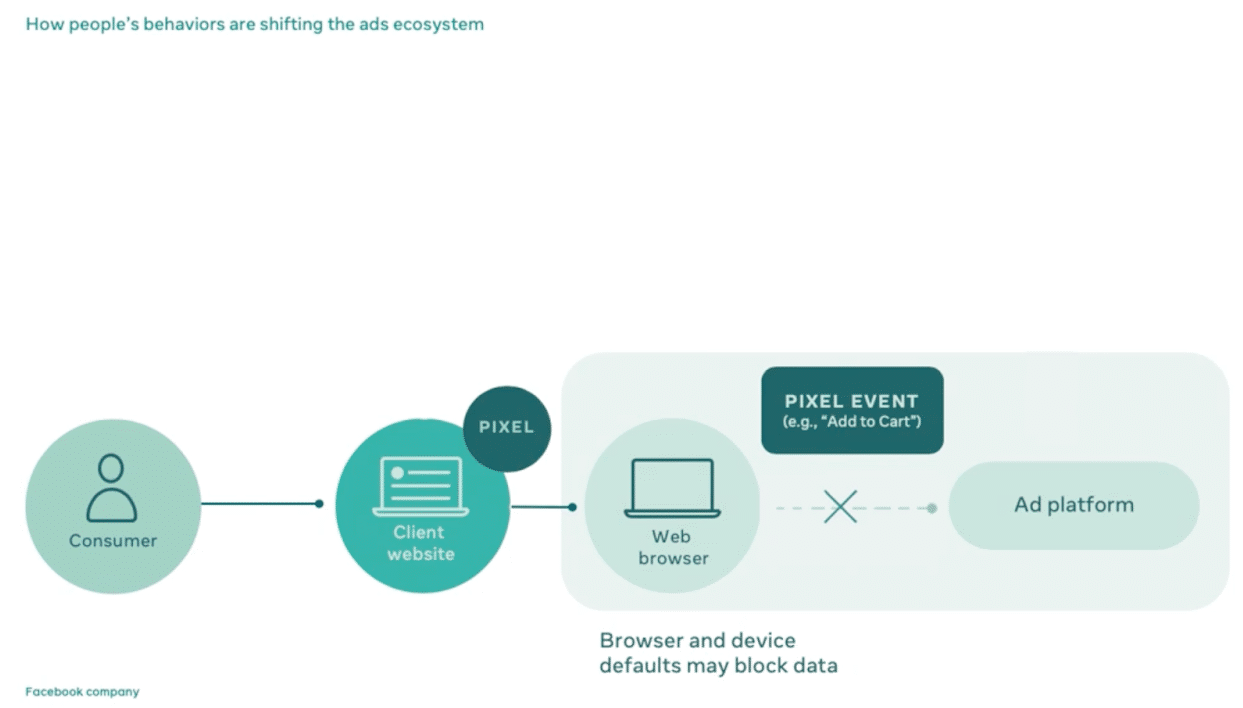
Before Google began its cookie phaseout, Apple’s iOS 14 kicked a leg out from under Facebook’s conversion reporting, led advertisers to leave or minimize the platform in droves, and tanked Facebook stock prices.
In response, Facebook leaned into its conversions API (CAPI) product, which requires dev work but moves conversion tracking to your website’s server.
It doesn’t rely on cookie tracking and effectively gives you more accurate conversion tracking in an iOS 14 and post-cookie world.
This has much the same benefits as Google’s OCT integration. You can:
- Better understand your campaign performance. (This goes for all verticals, including ecommerce).
- Use that data to train the bidding algorithm to find more valuable users.
LinkedIn: Incorporate CAPI
B2B marketers know the challenges of a long sales cycle with multiple conversion events and many stages of a lead.
LinkedIn’s CAPI, which follows the same principles as Facebook’s, is crucial for understanding advertising’s impact on the pipeline.
As far as using offline data to train LinkedIn’s algorithm, LinkedIn’s algorithm isn’t quite as refined as Facebook’s (yet) in finding the right users, but incorporating OCT is a good practice that should bear fruit.
3. Incrementality measurement: Lift tests and media mix modeling
Geo lift testing and media mix modeling (MMM) are two very different methods to tackle the same challenge: measuring incrementality – or the true value of your paid initiatives irrespective of click-based tracking limitations.
These are practices we’ve been preaching long before the cookie phaseout, but introducing more tracking limitations makes them even more important for seeing an accurate picture of your campaign performance.
Lift testing, which divides audiences into test groups and holdout (or control) groups to show causality on ad results, can take the form of geo holdouts, PSA testing, etc.
Media mix modeling is a more technical approach that usually requires third-party software and pulls from a large amount of data (we recommend at least two years’ worth) to determine performance correlations.
The pros and cons of each approach break down as follows:
Whatever their relative pros and cons, the main pro of the two big options for incrementality measurement is the same: you’ll know the value of your ad campaigns, with or without cookies.
Either way, every savvy search marketer should double down on dedicating time and budget to measuring the true value of initiatives like:
- Retargeting (where users might have converted anyway).
- Google brand search (branded keywords, often over-valued).
- Google non-brand search (more generic keywords, often undervalued).
Learnings from such measurement exercises are likely to help refine your media mix and ultimately produce more revenue.
Over the years, we’ve seen many marketers develop a bias for direct-response marketing that stems from cookie-based measurement.
That bias has typically ignored factors like the halo effect and devalues upper-funnel KPIs like impressions and reach.
Ultimately, if cookie extinction forces us to look at the full picture instead of leaning only on down-funnel metrics and last-touch conversions, we’ll be better.
Dig deeper: Efficiency vs. volume in PPC: 4 tips to strike a balance in incremental conversions
Set up your marketing for success even without third-party cookies
If you don’t have a background in analytics and haven’t considered the data picture deeply, these initiatives might spark some angst.
The good news is that they are the way forward, and tackling them now will help you future-proof your marketing as privacy regulations develop.
Couple that with robust partner systems and a growing pool of solution providers, and it won’t be that hard to clear a way forward through the cookie crumbs. But it is time to get moving.
Courtesy of Search Engine Land: News & Info About SEO, PPC, SEM, Search Engines & Search Marketing
Tuesday, February 6th, 2024

Jon and Zach Ball in 2011
What does it take to build a $10 million agency? Let’s break it down. A $10 million agency generates an average of $833,000 monthly revenue.
Page One Power does link building and content. Its average client is $7,500/month. That means we need 111 clients to clear $833,000 monthly. Because this is the SEO industry, we lose about 5% of our business every month from clients changing their goals or just wanting something else, so they move on.
That means we need to sell seven new deals a month to keep the business we have. We close 40% of our qualified leads. So, we need about 20 quality leads a month to close seven deals.
Knowing the numbers helps you develop your plan. We have measurable goals for lead generation to help manage our business.
We’ve been in business for 13 years. We’ve learned a lot since 2010. We have a long client list, so we’re very busy. We’re almost always at maximum capacity.
When you can get the clientele you want through marketing, great service and a great product, you can market, create demand and control the volume with pricing. Getting to this point was our business goal from the start.
It’s important to set a revenue goal and make a plan to get there. We’ve noticed that your business grows in the direction you focus on. If you focus on negative outcomes like fear of loss, crazy customers or employees leaving, you’ll head in that direction. You always grow what you focus on. Focus on growth, and you’ll grow.
It sounds simple, but it’s true.
Positioning
In SEO, the old adage applies: “The riches are in the niches.” In-house marketers, website operators, publishers and business owners encounter problems in their marketing, and they look for solutions for their problems. Often, the more precisely you can position your offering, the higher your percentage of finding and closing your prospective customer.
Doing general SEO, including local SEO, link building, PPC, video, social media and other services, is an option many choose. Narrowing your focus gives you many advantages, including more exact marketing, higher quality products and a staff that becomes experts.
All we do is link building. For 13 years, we’ve focused on that job. Our staff gets better at it every day. They’ve worked very hard to build an impressive system. Our single-minded focus is what has allowed us to become the industry leaders. We’ve never been distracted.
Luckily for us, SEO is a big industry. It’s big enough to take us to a point where we only take the clients we feel we can be successful with. We turn away more prospective clients than we accept. The better you get at what you do, the higher the quality you can produce, the better the clients who will work with you.
Marketing
Marketing is simple: Establish a clear message and send that message out in as many ways as possible. The first step is made much easier by clarifying the product you offer. The more exact your product, the more exact your message. Prospects that are tuned into your frequency will respond.
Imagine a radio signal. The clearer and more precise your message, the more effective you’ll be at finding people who tune into your frequency. Be the clearest message out there for people looking for you.
Your tagline should tell your prospects what you can do for them in the most succinct way possible. The biggest obstacle to sales is often confusion. Confusion about what you offer, confusion in presenting the offer, and confusion about your product. Clarify everything as often as possible.
Our tagline, “The Link Builders You’ve Been Looking For,” tells the prospect that we do link building, and we understand that finding a reliable, quality link-building solution is a journey many SEOs encounter. We’re the solution to that problem.
Go for broke
We outlined the problem of business attrition above. We need 20 qualified leads per month to keep our business. We need more leads if we want to continue to grow. Marketing is how you get those qualified leads. Try everything and market like crazy. There is never an end to marketing. You can slow your marketing when you want to shrink your business.
When we started Page One Power in 2010, we used almost half of our revenue for marketing. It didn’t make much financial sense when we were collecting $100k a month and spending $50k a month on marketing, but we grew rapidly through those years because of the marketing. Now, we market just as much, but we have the luxury of being extremely picky with the leads we pursue.
People
SEO is a service business. Your product is made by the people that you hire. Therefore, finding and training the right people to produce SEO is one of your biggest challenges. So, how do you find them? How do you keep them?
Finding people is a big job. We look everywhere. Locally, we use a talent agency to find qualified SEO people. Nationally, we use Indeed to find prospective employees. Be careful who you hire. If you make a mistake, it’s okay to fire quickly.
Keeping good people is one of the most important jobs you have. We don’t have a formula to keep people. We just have principles that are born of common sense.
People are people. People want fair pay, working hours that make sense, managers who treat them with respect and good benefits. The best people thrive when they can express their creativity. People succeed when they have some control and can create something.
Micromanagement, excessive rules, corporate policies, cutthroat salaries, mistrust, strife, infighting, greed and other perils can spoil your entire company. Replace these with trust, compassion, an attitude of cooperation, and generosity.
You also need to guard against anyone who brings negative energy into your company. Watch over your staff carefully and fire when necessary.
Delegation
Delegating means letting go of control. Some people can’t do this. It’s too difficult. But if you want to grow your agency to $10 million, there are many responsibilities you’ll have to delegate. You’ll have to delegate and trust. Trust that someone can do something for you in their way, even at 70% effectiveness. Tell people what you want them to do. Not how to do it.
Not trusting your staff means you’ll have the worry and struggle of micromanagement. No one wants to work for a micromanager. That’s the fastest way to lose staff. You can’t afford to lose staff. You need quality people.
Working on the business
If you want to strategize, plan and execute a quality SEO campaign for your clients, there’s much work to do. Someone has to be capable enough to revise content, tighten up navigation, optimize the internal linking, suggest new content, and, of course, set up a sustained link-building program. You, as a business owner, will struggle to do all of this work if you are also trying to pay bills, work with prospective clients, hire, do marketing, etc.
In the beginning, Page One Power’s founders separated the work into two categories: working in the business and working on the business. We focus on working on the business. That’s the work you can do best. You know the business better than anyone.
Spend your time refining your website, making training materials, setting up useful health insurance plans, providing support to your staff and setting the direction of every department in your agency. Working on your business is the path to a highly successful agency.
There are, of course, many other principles to follow, but these are the core ideas behind our agency. The SEO industry is a robust, lively industry, and you can make great money if you can organize your business to capture your little slice of the pie.
Courtesy of Search Engine Land: News & Info About SEO, PPC, SEM, Search Engines & Search Marketing
Tuesday, February 6th, 2024
Amazon has secured a landmark deal with Reach, the UK’s largest publisher, to access customer data for targeted advertising.
The agreement, one of the first of its kind in Europe, comes in response to Google’s plans to deprecate third-party cookies later this year.
Why we care. As advertisers explore options beyond third-party cookies for targeted ads, this deal offers inspiration for alternative approaches to reach high-value consumers online.
How it works. The agreement will see Reach share “contextual” first-party data with Amazon, such as information about the articles people are viewing. Amazon will then use this data to enhance targeted advertising on the UK publisher’s sites, providing advertisers with more relevant and effective advertising opportunities. Financial details have not been disclosed.
Brand safety. Reach plans to leverage Mantis, a brand safety and contextual advertising tool for publishers, to ensure that ads are shown next to content users are interested in. This collaboration helps Amazon better target specific audiences with relevant advertising across Reach’s publications, such as the Mirror, Daily Star and OK! magazine.
What are third-party cookies? A third-party cookie is a small piece of data placed on a user’s device (computer, cellphone, or tablet) by a website different from the one the user is currently visiting. It tracks the user’s browsing history, enabling personalized ads based on their activities.
Why now? Google Chrome officially began the phased discontinuation of third-party cookies in January, with plans to completely deprecate them by the second half of 2024.
What Amazon is saying. Frazer Locke, Amazon Ads director of EU adtech sales, told the Financial Times:
- “As the industry shifts towards an environment where cookies are not available, first party contextual signals are critical in helping us develop actionable insights that enable our advertisers to reach relevant audiences without sacrificing reach, relevancy or ad performance.”
Get the daily newsletter search marketers rely on.
Deep dive. Read our article on Google Chrome’s deprecation of third-party cookies for more information.
Courtesy of Search Engine Land: News & Info About SEO, PPC, SEM, Search Engines & Search Marketing
Tuesday, February 6th, 2024
Google will face allegations of using underhanded tactics to secure its position as the world’s leading search engine in a jury trial set for September 9, brought by the U.S. Justice Department and a coalition of states.
The tech giant, which owns a 90% market share in search, is accused of paying massive sums to companies like Apple to make it the default search engine on products like the iPhone. The lawsuit argues that Google should be forced to sell its ad manager suite to make the search engine market fairer.
In response, Google denied the claims and suggested that should the lawsuit succeed, it would “slow innovation, raise advertising fees, and make it harder for thousands of small businesses and publishers to grow.”
Why we care. The outcome of the landmark case could bring significant changes to Google and the future of Search and the Internet. But it’s equally possible the trial will result in no changes and Google will be free to continue operating however it wants.
What Google is saying. Google declined to comment on the jury trial date.
What the States and the Justice Department is saying. The Justice Department, along with Virginia and other states, had sought a July date for the trial in Alexandria, Virginia. However, U.S. District Judge Leonie Brinkema explained in an order that a summer trial would have presented logistical challenges, reports Reuters. Both Google and the Justice Department declined to comment on the jury trial date.
Additional lawsuits. In a separate legal matter, Google is set to go to trial in March 2025 in a U.S. federal court in Texas. This trial involves a similar lawsuit from Texas and other states challenging Google’s ad tech practices.
In a third case, closing arguments are anticipated to be heard in May by a U.S. judge in Washington, D.C. This case involves lawsuits from the U.S. Justice Department, Colorado, and other states, focusing on Google’s dominance in web search.
Get the daily newsletter search marketers rely on.
Deep dive. Read our Google antitrust trial guide for a breakdown of everything you need to know.
Courtesy of Search Engine Land: News & Info About SEO, PPC, SEM, Search Engines & Search Marketing
Friday, February 2nd, 2024
Microsoft’s Deep Search, an optional generative AI feature meant to help searchers with complex questions that don’t have simple answers, seems to have rolled out to more users today. I personally can see the “Deep Search” icon at the top right of the Bing search box after conducting a search in Bing. And I asked others and they can see it too.
What it looks like. Here is a screenshot of the “Deep Search” icon at the top right of the Bing search results page:
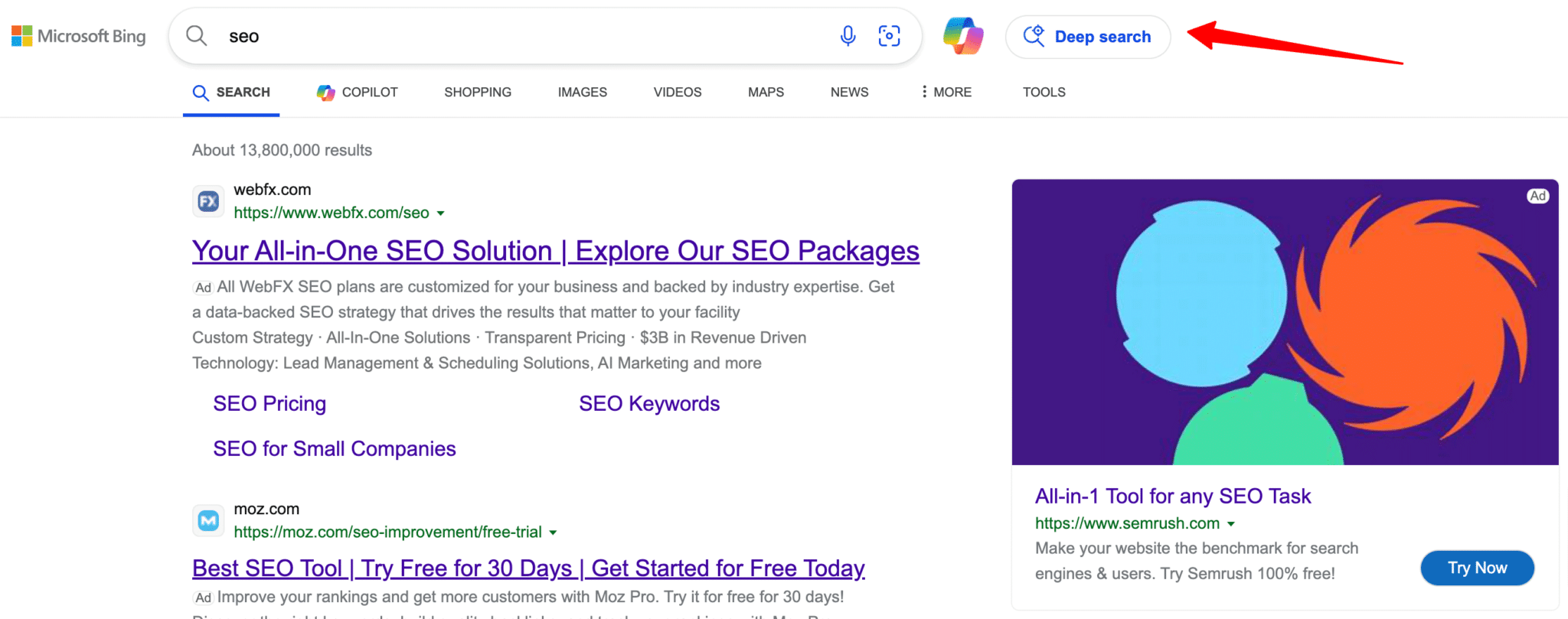
When you click it, it takes you to a screen to refine your search and says “Taking a second look at your search…” and then it does a number of related searches to come up with the search results.
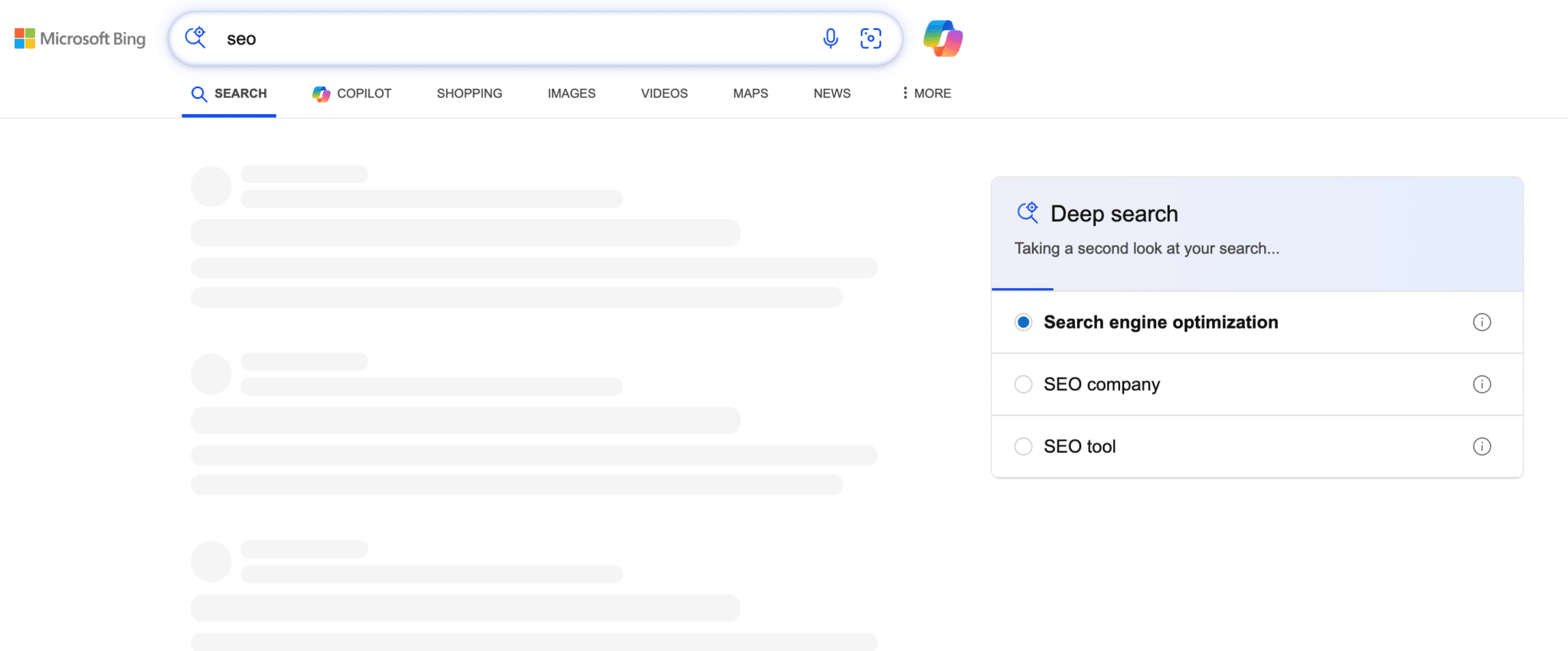
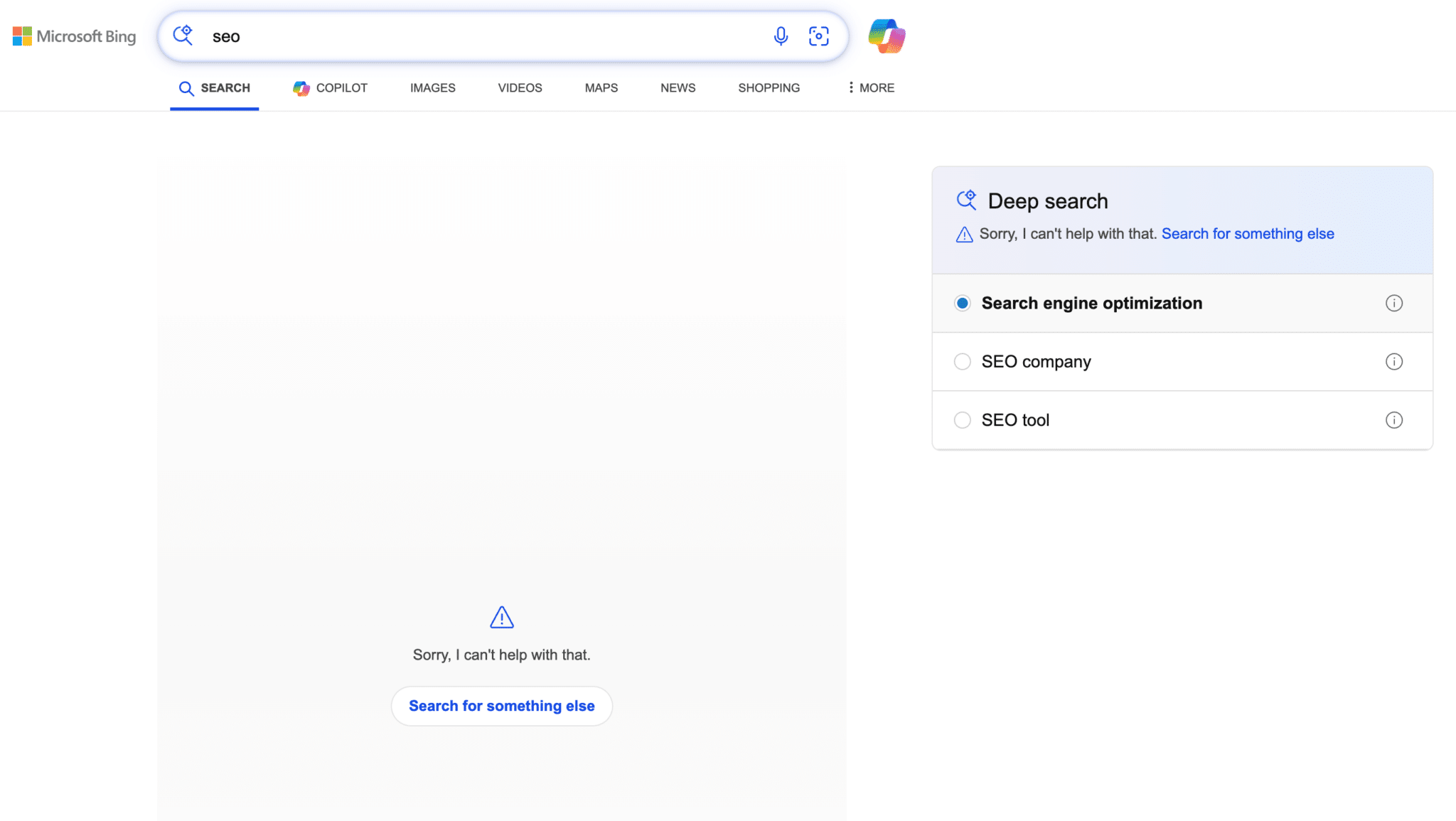
For the [search engine optimization] query, Bing Deep Search is unable to return any results.
But for a search on SEO company, it can:

Here is an example of a search for [Bing] that asks me if I want the [AI chat] version:
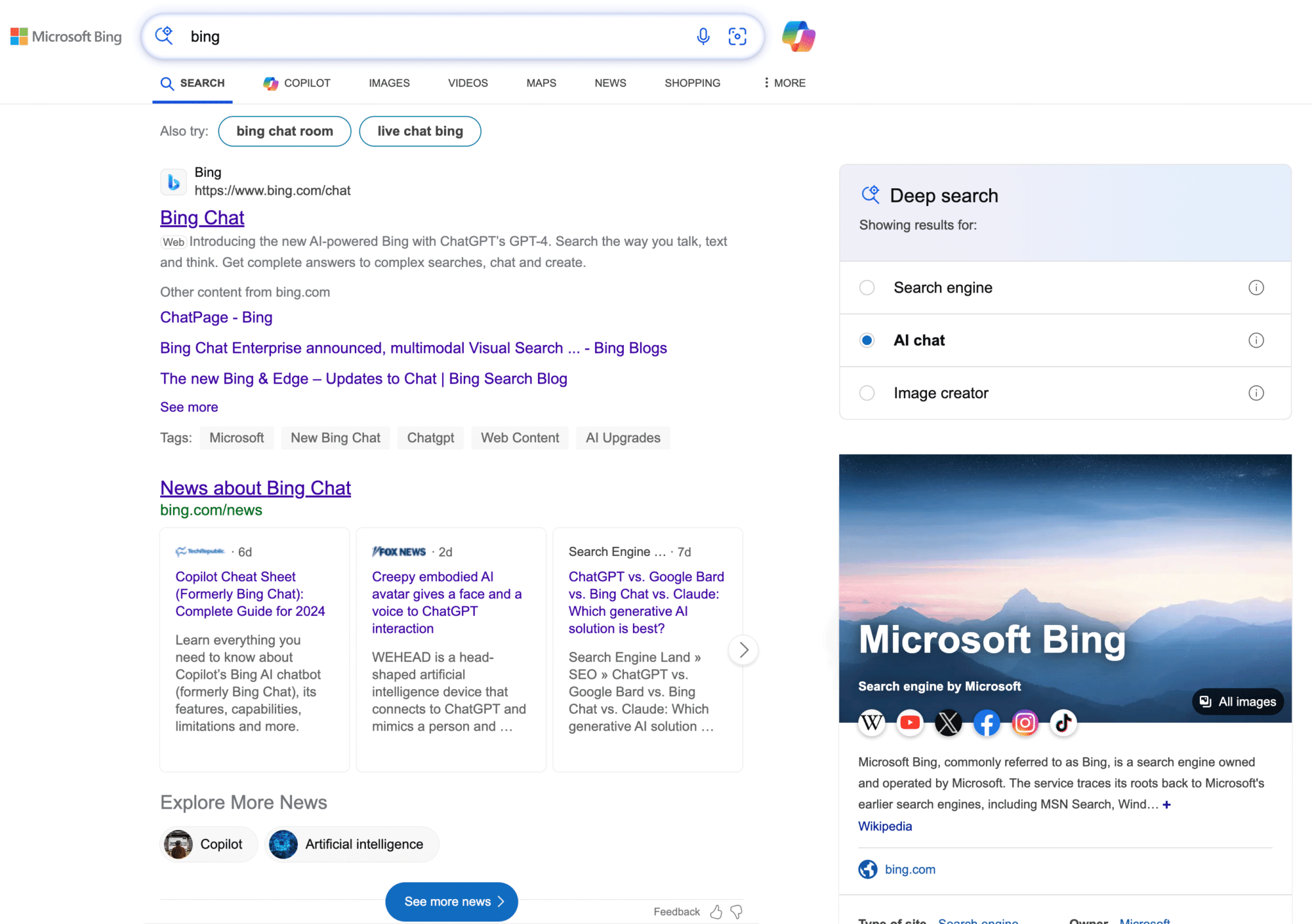
Live for all? Mikhail Parakhin from Microsoft made it sound like it is not fully live yet, but everyone I asked can see it:
We are testing it everywhere, the plan is to release everywhere, too.
— Mikhail Parakhin (@MParakhin) February 2, 2024
How it works. Deep Search is built on top of Bing’s web index and ranking system. It then uses GPT-4 to discern all the possible intents and variations behind the query and compute descriptions for each of them to create an “ideal set of results.”
After using a combination of querying techniques, Deep Search will surface results that typically wouldn’t appear in Search results.
Deep Search results ranking. The biggest factor is how well a page matches Bing’s expanded description. A few other relevance and quality factors mentioned were:
- How well the topic matches.
- Whether it has an “appropriate level of detail.”
- Whether the source is credible and trustworthy.
- Freshness.
- How popular the page is.
It is slow, very slow. Deep Search won’t load as quickly as regular search results. It may take Deep Search up to 30 seconds to complete, Microsoft said. This makes the feature sound dead on arrival – as most searchers likely won’t have that much patience.
In my tests, I did a search, put the window in the background and came back later to see the results. It is way too slow.
Why we care. This is another variation of using AI for search results. These search results seem like they would drive more clicks than Bing Chat or Google Bard and even Google SGE. But time will tell.
But being that it is so slow to generate any search results, it might be a deal breaker for most searchers.
Courtesy of Search Engine Land: News & Info About SEO, PPC, SEM, Search Engines & Search Marketing
Friday, February 2nd, 2024
Google needs to re-evaluate its approach to automation, according to some advertisers.
The search engine announced several AI-driven updates to Responsive Search Ads (RSAs) earlier this week to help streamline ad creation and boost return on investment.
However, some interpreted this update as another move by Google to promote automation – a direction that doesn’t resonate well with all advertisers.
‘We need choice regarding automation’
Greg Finn, Director of Marketing for Cypress North, explained to Search Engine Land that while generative AI can be a helpful tool, advertisers should have the choice to opt out of automation. Without this level of manual control, there is a risk of detrimental effects on campaign performance and data insight capabilities. He said:
- “It’s not that advertisers are concerned about the increase of automation – they’re concerned about automation being the only option.”
- “In my experience, we’ve found that auto-applied recommendations can often do more harm than good. Take smart bidding, for example. Sometimes, it can raise bids too high for people in specific industries. So being able to opt out can generally make performance go up – or at the very least, cut waste.”
- “Advertisers like to know where how their money is being spent. I know I do. But when you use campaigns like Performance Max, it’s quite blackbox, so you can get some insights but not the full picture.”
- “However, the biggest problem advertisers have with automation is bad automation – things you can’t opt out of. This is something that needs to be addressed.”
‘Automation can be risky’
PPC consultant Peter Bowen agreed that while AI can be an effective tool for maximizing campaign performance, advertisers should be able to opt out. Delving into specifics, especially concerning RSA updates – such as the ability to display a single headline based on predicted performance – he expressed general support for the concept. Nonetheless, he stressed that advertisers require more control to achieve optimal results. Speaking to Search Engine Land, he said:
- “A single headline will be shown in RSAs if it’s expected to improve performance, but at the moment, the advertiser doesn’t have the ability to define what performance improvement they’re after.”
- “When automation operates without clear advertiser-defined constraints, it is risky.”
- “Google benefits from improved clickthrough rate but that doesn’t translate directly to improved advertising results, so it’ll be interesting to see who’s interest this automation favours.”
- “Of course, automation saves labor, and that’s a good thing. But, automation is only safe when it operates under a set of rules.”
- “I think Google is trying to make advertising work for their average customers, but there are a lot of people far away from the average advertiser, so their drive to automation isn’t working as well.”
‘I don’t trust the machine’
Anthony Higman, CEO of online advertising agency Adsquire, also expressed concerns regarding RSAs, highlighting their use of AI for determining ad copy variations. Describing RSAs as “awful,” he substantiated his apprehensions by sharing a screenshot that showcased an instance where an AI error negatively affected ad copy:
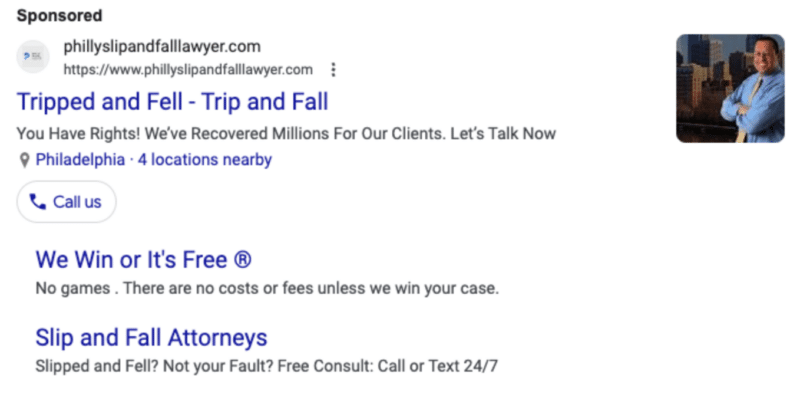
Higman emphasized the lack of control for advertisers in addressing or preventing issues seen in the example above, underscoring his worries about the overall quality of Google Ads’ automated features. He told Search Engine Land:
- “Advertising is not a one size fits all situation. There are more nuances than what AI decides regarding ad platforms and I think that bad data can skew those metrics. So at this point in time, no I don’t entirely trust the machine.”
- “Obviously, we are adapting to the new forced system, but again I think that in a lot of instances, AI can make decisions based on either false data and/or Google’s current goals – and that that is not always ideal for advertisers.”
- “I understand that it is a work in progress and Google is working to improve the system, but again, I think that there are just way too many nuances for RSAs to say this is the best headline so this is what we are going to show.”
- “I don’t think that the current system really works and it needs to be addressed by Google.”
Google’s advice
In response to marketers’ concerns about the inability to opt out of automation, Search Engine Land interviewed Sylvanus Bent, Group Product Manager, Search Ads, Google. He clarified that for optimal campaign results, a synergistic approach involving both human expertise and AI is the best approach. He said:
- “Using AI doesn’t mean advertisers will be completely hands-off – the combination of human expertise and AI-powered insights ensures the inputs provided allow advertisers to guide the AI to drive the best results.”
- “AI is a critical part of the Ads ecosystem and we’re committed to providing advertisers with the tools they need to stay in control from the moment they create a campaign using generated assets all the way to AI-powered reporting, insights, and optimization recommendations.”
- “By harnessing these tools, advertisers can keep pace with evolving customer behaviors and deliver more tailored messages to their audiences.”
Follow best practice
Responding to concerns about the quality of RSAs, Bent advised advertisers to follow the company’s best practice guidelines. He highlighted the importance of using features like Ad Strength to optimize campaigns, noting that advertisers who enhance their Ad Strength rating from “Poor” to “Excellent” experience an average increase of 12% in conversions.
He encouraged advertisers to leverage this AI-powered tool to enhance the quality of their RSAs for maximum results. Sharing more insights into how advertisers can improve the quality of RSAs, he continued:
- “When you provide the most unique headlines possible, you give your RSAs more options to match ads with relevant search queries.”
- “And to boost performance further, RSAs can now dynamically display a single headline when predicted to improve results, and will ultimately reduce redundancy where there are multiple headlines.”
- “This flexibility, along with providing more headlines and descriptions, enables advertisers to tailor ads more closely to match potential customers’ search queries.”
The future of automation
Sundar Pichai, CEO of Alphabet, acknowledged the pivotal role played by AI in Google’s remarkable achievement of $48 billion in search revenue during the last quarter of 2023. Pichai emphasized the positive influence of Google’s AI investments and expressed optimism regarding the future of automation. Despite this positive outlook, however, some advertisers are wary, concerned that Google might be progressing towards full automation, which may significantly impact their marketing strategies moving forward.
Responding to these concerns, Bent assured that the majority of Google advertisers are already embracing AI. With that in mind, Google remains committed to further investment in this area.
While acknowledging the widespread adoption of AI, Bent urged the advertising community to voice genuine concerns and provide feedback. Google hopes this collaborative approach will enable it to refine its offerings based on valuable insights from advertisers. He added:
- “We continue to expand our AI capabilities to improve advertiser results and simplify campaign setup and management.”
- “Today, nearly 80% of advertisers already use at least one AI-powered Search ads product. Google AI works best when advertisers provide their expertise about their businesses and customers.”
- “We’ll keep listening to advertiser feedback and exploring ways to better serve our users and advertisers; their success remains our core focus.”
Courtesy of Search Engine Land: News & Info About SEO, PPC, SEM, Search Engines & Search Marketing