Archive for the ‘seo news’ Category
Friday, February 16th, 2024
Yelp’s ad revenue increased by 13% to a record $1.28 billion in the final quarter of 2023.
Ad clicks for the year experienced a year-over-year growth of 5%, while the average cost per click (CPC) increased by 9%.
Services sector. Yelp reported a record-breaking $793 million in advertising revenue from Services businesses in 2023, marking a 14% increase from the previous year. The Home Services category stood out in particular with a rise of 20% year-on-year in annual revenue growth.
Restaurants, Retail and Other sectors. Yelp reported a 10% increase to a record $483 million, driven by growth in advertiser demand
Self-serve and Multi-location. Together, these channels accounted for approximately 50% of Yelp’s 2023 advertising revenue. Self-serve revenue increased by approximately 20% year over year and multi-location revenue grew by approximately 15% year over year.
What Yelp is saying. Jeremy Stoppelman, Yelp’s co-founder and chief executive officer, said in a statement:
- “Looking ahead, we’re increasing our focus on our Services categories in 2024 as we execute on a robust product roadmap to build Yelp into the best place for consumers to connect with trusted service pros and drive more quality leads to advertisers.”
- “Our team has repeatedly shown that focusing on our product-led strategy can drive durable growth, and we remain confident in the significant opportunities ahead to drive shareholder value over the long term.”
Why we care. Yelp’s increasing ad clicks, indicating a positive return on investment, make it a strong contender for your ad spend this year. This is especially noteworthy for brands in the Services sector, as Yelp is strategically shifting its focus to this area to generate more quality leads for advertisers.
Get the daily newsletter search marketers rely on.
Deep dive. Read Yelp’s full Q4 2023 earnings report in full for more information.
Courtesy of Search Engine Land: News & Info About SEO, PPC, SEM, Search Engines & Search Marketing
Thursday, February 15th, 2024
Meta issued an apology to advertisers following an Ads Delivery outage that resulted in campaigns overspending by “thousands.”
The tech giant confirmed that services are now restored and expressed regret for any inconvenience caused to advertisers.
Refunds, anticipated to take between four and eight weeks, are now awaited by affected parties.
Why we care. If you were affected by the Ads Delivery outage, applying for a refund is necessary, but it’s important to note that payment is not guaranteed. To enhance the likelihood of receiving a full refund, there are specific steps you can take.
Refund application. Barry Hott, Growth and Performance Marketing Consultant, urged advertisers to report the issue to their Meta reps and/or support to “increase the likelihood of a refund for you and for everyone.”
Hott then shared a step-by-step guide to show advertisers how to raise a complaint. He recommended filing a report with Meta support and sending this exact message:
- “My campaigns overspent their budgets and seemed to ignore their cost caps yesterday due to a confirmed widespread Meta ad delivery outage, causing campaigns to spend more than expected and did so extremely inefficiently, causing me to lose money.”

This should then bring you to the menu displayed in the screenshot below. Here, you will need to select “claim refund for ad spend.”

You then need to choose your ad account and select “other ad account issue” as demonstrated in the screenshot below:

You’ll then be able to write another message – for this step, Hott recommended simply pasting the same blurb from earlier along with the below screenshot of the Meta Status Page:

Next, start uploading screenshots showing your performance issues. Include all account IDs if you have multiple accounts. Answer support questions politely, considering their potential unfamiliarity with Meta ads and the outage. Hott concluded:
- “Hopefully you’ll get to a point where they ask for the amount you are requesting for a refund. If you have estimates of what you think was lost, share that amount, but don’t be greedy, use a realistic estimate based on recent past performance.”
- “This is our best chance at getting the refunds we deserve. I hope you found this helpful! Please repost or share this with your peers, and if you don’t already follow me or @MetaBizStatus (the automated account I set up that reports Meta outages), please do!”
Fallout. Several advertisers claimed to have lost thousands as a result of the Meta Ads Delivery outage.
One marketers wrote on X: “Woke up to a ~$80 credit from $6k down the drain. But my ticket is still unresolved and they emailed me at 5 am asking me to be patient as they are working it out.”
Another advertisers commented on X: “It blew thousands in minutes!”
Get the daily newsletter search marketers rely on.
What Meta is saying. Meta did not immediately respond to Search Engine Land’s request for comment.
Courtesy of Search Engine Land: News & Info About SEO, PPC, SEM, Search Engines & Search Marketing
Thursday, February 15th, 2024
Google is disputing claims made about Privacy Sandbox by an IAB Tech Lab report.
The Privacy Sandbox might make it harder for the marketing industry to show effective ads and could put smaller brands and media companies at a big disadvantage, according to the study.
Google responded by stating that the report contains “many inaccuracies” and “ignores” the broader goal of the Privacy Sandbox, which is to improve user privacy while still enabling effective digital advertising.
Why we care. If Privacy Sandbox disadvantages smaller businesses as the report suggests, exploring alternative solutions might be worthwhile ahead of the deprecation of third-party cookies.
What the IAB Tech Lab is saying. The report, titled Fit Gap Analysis for Digital Advertising, stated that:
- “In its current form, the Privacy Sandbox may limit the industry’s ability to deliver relevant, effective advertising, placing smaller media companies and brands at a significant competitive disadvantage.”
- “The stringent requirements could throttle their ability to compete, ultimately impacting the industry’s growth.”
Corrections. Google criticized the report, citing numerous inaccuracies and misunderstandings. The clarifications provided by Google can be categorized into four areas (refer to the bullet points below for the exact wording).:
- Corrections to assumptions or use case gaps that are supported by the Privacy Sandbox APIs.
- Use cases that are currently not supported by third-party cookies and are thus out of scope.
- Feedback and/or proposals that could potentially recreate cross-site tracking and go against privacy-preserving goals.
- Areas where the solution should be determined by the ad tech provider (not the browser or platform) or where the ad tech provider needs to adapt new tactics building on top of Privacy Sandbox.
Despite accusing the report of containing false information, Google said that it would welcome additional feature requests and possible improvement suggestions from the IAB Tech Lab.
What Google is saying. Google said in a statement:
- “The Privacy Sandbox APIs provide building blocks that support business goals while preserving privacy for people. They are not designed to offer 1:1 replacements for third-party cookies or cross-site identifiers.”
- “In order to deliver meaningful improvements to user privacy, it’s not viable to recreate every marketing tactic as it exists today. But it is possible to provide solutions that address business objectives by adapting existing approaches and, in some cases, inventing new ones.”
- “While this change takes investment, effort, and collaboration, we believe it is both necessary and achievable.”
Moving forward. Google confirmed it plans to continue with its plans to phase out third-party cookies later this year, subject to addressing concerns raised by the UK Competition and Markets Authority.
What is the IAB Tech Lab? The IAB Tech Lab is a nonprofit consortium uniting global stakeholders in digital media. It focuses on developing technology and standards to improve growth and trust. Key areas of concern include brand safety, ad fraud, identity, data and consumer privacy, ad experiences, and programmatic effectiveness.
Get the daily newsletter search marketers rely on.
Deep dive. Read Google’s response in full for more information.
Courtesy of Search Engine Land: News & Info About SEO, PPC, SEM, Search Engines & Search Marketing
Thursday, February 15th, 2024
Meta is offering small businesses a new way to boost posts without having to pay a 30% service charge to Apple.
Starting later this month, advertisers will be able to use Facebook and Instagram directly on desktop and mobile to access all the features available in the iOS apps for boosting content without paying Apple.
Why we care. This solution could prove hugely beneficial to small businesses as they can now boost posts without having to pay a charge, saving them money.
What is the Apple service charge? Beginning later this month, when advertisers use the Facebook or Instagram iOS app to boost a post, Apple will handle the billing process, retaining a 30% service charge on the total ad payment (excluding taxes). It’s important to note that this service charge goes to Apple, not Meta.
What are boosted posts? This is a feature that allows business to quickly promote a piece of content without needing to set up a full campaign in Ads Manager.
New payment process. Instead of being charged after boosted posts run, iOS businesses now need to pay in advance by adding prepaid funds to their accounts. If these funds are added within the iOS app, an Apple service charge applies. However, if added from payment settings on desktop or mobile browsers, advertisers can use them without fees, including for boosting content through the iOS apps.
Impacted markets. The new payment process and Apple service charge will initially launch in the US, with additional markets subject to the fee later this year. Advertisers globally can avoid the Apple service charge by boosting content directly from the Facebook.com or Instagram.com websites.
What Meta is saying. Meta said in a statement:
- “We are required to either comply with Apple’s guidelines, or remove boosted posts from our apps.”
- “We do not want to remove the ability to boost posts, as this would hurt small businesses by making the feature less discoverable and potentially deprive them of a valuable way to promote their business.”
- “We are committed to offering businesses flexible and convenient options to help them navigate this change and maximize the results of their ad spend. As part of our efforts to do this, we have invested in alternative ways to boost posts.”
Get the daily newsletter search marketers rely on.
Deep dive. Read Meta’s announcement in full for more information.
Courtesy of Search Engine Land: News & Info About SEO, PPC, SEM, Search Engines & Search Marketing
Thursday, February 15th, 2024
TikTok Creative Assistant is now directly accessible within Adobe Express.
This AI-powered virtual assistant, previously confined to TikTok’s Creative Center, offers users the ability to gain TikTok Insights on trending hashtags, brainstorm creative ideas, and even generate video scripts.
Why we care. The Creative Assistant add-on in Adobe Express minimizes the time and effort required when working across various platforms, making content creation more efficient and user-friendly.
No cost. If you’re not using Adobe Express yet but want to explore their Creative Assistant integration, you can access the new add-on for free through the desktop.
Creative Assistant explained. TikTok’s AI assistant was launched to help advertisers and content creators with:
- Increasing reach: If your brand aims to enhance its presence on TikTok, Creative Assistant can provide guidance on creative best practices, highlight top-performing trends, and offer tips to prepare your brand for success on the platform.
- Creative brainstorming: Creative Assistant allows your team to brainstorm content ideas based on both new and evergreen trends. It can also generate or refine scripts for your TikTok videos.
- Competitor research: Creative Assistant can analyze top-performing TikTok ads and popular hashtags using data from the TikTok Creative Center to provide competitor insights.
- Creative support: In addition to Creative Assistant, Adobe Express offers creative templates, Adobe Stock video and images, as well as editing tools, elements, and overlays tailored for TikTok-first content creation.
- Optimizing workflows: This integration eliminates the need for extra time, effort, and resources required to use different platforms for each stage of the creative journey.
Prompt ideas. If you’re interested in using Creative Assistant but are unsure how this feature can help you, TikTok has provided a few suggested prompts for you to experiment with:
- “Show me what’s trending on TikTok.”
- “Give me tips for making a high-performing ad creative.”
- “Show me some TikTok ad examples.”
- “Write some thought starters for my ad.”
Getting started. Creative Assistant is now accessible as an add-on for Adobe Express users worldwide in English on desktop. To access this feature, log in to Adobe Express, go to the add-on tab, search for “TikTok Creative Assistant,” and click add.
What TikTok is saying? TikTok said in a statement:
- “Over the past few years, TikTok and Adobe have helped brands seize a creative opportunity by building easy-to-use creative solutions.”
- “With the new Creative Assistant add-on, Adobe Express now supports your brand’s entire TikTok creation journey from ideation to launch.”
Get the daily newsletter search marketers rely on.
Deep dive. Read TikTok’s announcement in full for more information.
Courtesy of Search Engine Land: News & Info About SEO, PPC, SEM, Search Engines & Search Marketing
Wednesday, February 14th, 2024
Even experienced PPC advertisers can struggle with bid strategies in Google Ads.
There are over half a dozen options, each serving different objectives and use cases. You can easily lose track of when to use what.
Each bid strategy gives Google’s systems a different mandate around spend, target metrics and profit. Media buyers constantly bounce from one bid strategy to the next, and it’s not uncommon for a campaign to switch between strategies depending on where it’s at in the lifecycle.
Save this guide as your main resource for understanding which bid strategies to use, when and how to use them, and why they’re important.
1. Manual CPC
Manual cost-per-click (CPC) bidding is not really a place that I believe most campaigns want to stay, but it has two clear uses.
First is brand campaigns, where the goal is less about performance and more about making sure that searches for your brand end up on your website, not those of your competitors. With brand campaigns, you want to capture a certain amount of impression share.
- How many searches are there for my brand each month?
- Am I showing up at least 80-90% of the time?
- Am I capturing and profiting from these queries?
In my experience, you’re better off with Phrase and Exact Match when using manual bidding, while limiting Broad Match to just a few very relevant terms.
Broad Match is much more liberal and when you combine that with Smart Bidding, Google knows which of the 100 people searching for the same keyword are most likely to convert. They can tweak those bids in real time.
The other use case for Manual CPC is low-volume keywords, typically in lead generation campaigns. When you’re running a Search campaign and trying to stay profitable, but you don’t have a large budget and or a large enough data signal, manual bidding often works well.
If your budget is $50 a day and you start bidding $7 per click, and you see that you’re spending the full $50 a day, you can bid less per click. If that works, you keep lowering your bid until you see that Google is no longer spending the full budget. That’s when you know to push back in the other direction.
In those cases where you’re using manual bidding, it’s important to look at performance by device or time of day to see if you need to implement specific bid adjustments. I typically do this until I have enough conversion volume, and then I try to switch to Maximize Conversions or Target CPA.
Even with a limited budget, sufficient conversion data is my barometer for deciding to move to Smart Bidding. If I’m on manual bidding several months or years into a campaign’s lifetime, it’s because there truly are no better options.
2. Maximize Clicks
I use Maximize Clicks out of the gate when I want a campaign to simply spend its budget: Shopping, Search, and Dynamic Search. When I want to collect conversion data and speed up the learning process, I set it to Maximize Clicks for a few weeks.
The difference between Manual CPC and Maximize Clicks is the latter doesn’t give Google any limitations on how much to bid. You can set a bid cap, but the idea of this bid strategy is to simply exhaust a daily budget and get as many clicks as possible.
I recommend using it sparingly – only when your goal is to push traffic to collect data.
That being said, you might find it useful for upper-funnel campaigns focused on prospecting, such as Demand Gen or even certain Search campaigns where you want to generate new traffic from specific audiences.
Remember to take those results with a pinch of salt, because this bid strategy has no guardrails on the quality of clicks.
Dig deeper: Bidding and bid adjustments in paid search campaigns
3. Target Impression Share
Target Impression Share has only one use case, in my opinion: Branded search. I’m sure there are other scenarios where it makes sense to different folks.
The goal of branded search is maintaining visibility – you don’t want that traffic to wind up on a competitor’s site. If the traffic converts, it converts; Smart Bidding is not really going to influence the level of intent.
When you show up 90% of the time and capture 90% of clicks, there’s no reason to use a CPA or ROAS target. Both of those will push aggressively and make you pay more for a click that you can buy for much less.
Again, make sure you’re only using Phrase and Exact Match, or the system will go overboard.
Don’t use this strategy if the play is to get more of your competitor’s impression share. Bidding on your own brand means you have high relevance, so you get cheaper CPCs than your competitors.
Now flip that equation: You don’t have high relevance for your competitor’s brand, so you’ll have to bid much more aggressively. In this situation, I’d use a CPA or ROAS target to make sure this tactic remains profitable.
Get the daily newsletter search marketers rely on.
4. Smart Bidding (and why I prioritize it)
My goal with most campaigns is to move toward some form of Smart Bidding eventually. Google has a tremendous amount of user data that influences its ability to push your account in the right direction, but you’ll never see that if you stick to manual bidding.
Many advertisers and media buyers are skeptical of Smart Bidding and have every right to be. But I don’t believe that campaigns that rely overly on manual controls will continue to deliver outsized results in the years to come.
Maximize Conversions (Target CPA) and Maximize Conversion Value (Target ROAS)
The difference between Google’s two primary Smart Bidding strategies is simple:
- Maximize Conversions focuses on the number of transactions or conversion actions
- Maximize Conversion Value focuses on any value that you provide (typically revenue)
What often ends up happening is lead gen service providers lean in on Maximize Conversions while ecommerce brands go for Maximize Conversion Value. But if you do lead generation and can import your offline conversion values – pipeline and sales data – then you can use Maximize Conversion Value to great effect.
The ultimate goal of Google Ads is to bid based on value, so that you can look at your cost versus revenue and optimize for profit margin.
With both bid strategies, you can include a target goal: CPA for Maximize Conversions and ROAS for Maximize Conversion Value.
Without these targets, you’re telling Google to spend your whole budget – whether that’s $100 a day or $100,000. And the system will try its best to do that while getting you as many conversions or conversion value as possible.
Give it a Target CPA or a Target ROAS, and you’re no longer telling the system its first objective is to spend the budget but to meet your goal while spending as much of the budget as possible within those confines.
For most campaigns seeking profitability, Maximize Conversions with Target CPA or Maximize Conversion Value with Target ROAS are typically where you want to get unless you have specific objectives around reach, frequency or metrics.
Finding the sweet spot for a ROAS or CPA target
There’s a science to finding the optimal ROAS or CPA target for Smart Bidding to work with.
I like to start either bid strategy with no target. This pushes it to spend and gather data, allowing me to establish a benchmark for what that target comes in. If the CPA is $100 and I want it to be less, I set the target to $95 and see how much I can still spend.
If I still get full use of my daily budget, I keep pulling it back slowly while seeing if I can still pull in a similar amount of traffic and conversions at a lower cost. Keep tweaking those metrics until it lands at a place that makes sense for you while following these best practices:
- Reduce the target by no more than 10-20% at a time and give the system a few weeks to acclimatize. Accounts with more conversion data can get away with bigger and more frequent changes.
- Watch for the cliff. Maybe you’ll end up doing 90% of original volume while spending only 60-70% of the original spend (and still exhausting nearly the full daily budget). Maybe you’ll see a massive drop and need to roll it back.
- Lower your bids whenever a campaign is reaching its daily budget every single day. You do this on Smart Bidding by lowering your Target CPA or increasing your Target ROAS, which changes the ultimate bid that goes into the auction. If your campaign is set to $100 a day and spends $105 every day, you can likely lower your bids.
Value-based bidding
With Maximize Conversion Value, Google gives you the opportunity to feed it with business data that illustrates which leads are most valuable to you.
While it’s often used by ecommerce businesses that quantify the dollar value of things, it can also be used in lead generation.
The simplest way to do this is for lead gen is to:
- Understand your brand’s full sales funnel – how prospects become leads, how leads become qualified leads, how qualified leads become opportunities, and how opportunities become sales.
- Work with your team or clients to determine what a sale is worth, then work backward through the funnel, noting down the typical conversion rates from one stage to the next. If you do this right, you can determine the value of a conversion in Google Ads based on how much revenue a deal generates.
- Use offline conversions to manually or automatically feed that information and those values back into Google Ads, allowing the system to find more of the kinds of leads that lead to closed deals, signed contracts and money in the bank.
Additionally, Conversion Value Rules lets you add positive and negative weightage to locations, devices and audiences, effectively serving as another layer of bid adjustments for Smart Bidding.
Dig deeper: Value-based bidding: Why it’s key to boosting your Google Ads
Match bid strategy to your campaign’s goals
I’m pro-Smart Bidding and pro-automation in general. However, I understand that thousands of Google Ads marketers still prefer the old-school method of controlling everything themselves.
Ultimately, it’s important that we’re all able to do what’s best for our clients and brands. That’s why I believe the most essential part of picking a bid strategy is lining it up with what you want to achieve.
Performance Max, for example, only allows you to use Smart Bidding and is a poor fit for accounts with limited conversion data. If you aren’t willing to adapt, stick to Manual CPC and its limits.
Criticism of automation and AI is fair when it’s in the right context, but for those using these new technologies with the right support and setup, better performance is a question of “when” rather than “if”.
Courtesy of Search Engine Land: News & Info About SEO, PPC, SEM, Search Engines & Search Marketing
Wednesday, February 14th, 2024
Reddit shows up 97.5% of the time in Google Search product review queries and accounts for nearly two-thirds of the slots reserved for Google’s Discussions and forums SERP feature, a new analysis finds.
Why we care. Reddit can be a valuable resource for searchers but has an obvious spam problem. More than half of Reddit’s top-ranked threads have spam as the top comment, as called out in the analysis by author Glen Allsopp, who wrote that “Google’s promotion of them feels excessive,” adding these “current search results are the worst I can recall seeing.”
By the numbers. An analysis of 10,000 keyphrases found that Discussions and forums appear 77% (7,702) of the time. Overall, 766 individual forums appeared, but just Reddit and Quora had 3X greater visibility than every other forum:
- Reddit appeared in 7,509 results and was featured 14,263 times.
- Quora appeared in 3,513 results and was featured 3,832 times.
- Every other domain (766 of them), combined, appeared 4,989 times, with most sites never getting a second listing like Reddit. Some were inactive but there were no new forums or any forums with a low number of posts.
Over-correction? So why is Google pushing Reddit so hard? It could partially be in response to multiple stories over the last couple of years discussing how users add “Reddit” to the end of their queries. But based on the findings of this analysis, perhaps Google has over-corrected for this issue.
The analysis. You can read the full Detailed analysis here: The Discussion Forums Dominating 10,000 Product Review Search Results.
Courtesy of Search Engine Land: News & Info About SEO, PPC, SEM, Search Engines & Search Marketing
Wednesday, February 14th, 2024
YouTube introduced a range of updates designed to assist brands and creators in enhancing conversions, expanding their reach, and facilitating the sharing of content:
- Product tagging in live streams.
- Post only feeds.
- Video and Short uploads from mobile.
Product tagging. Creators in the YouTube Shopping Affiliate program can now tag products from participating merchants across in live streams, as well as videos and Shorts. Tagging featured products in live streams displays the “Shopping” button, creating a more visible way to shop. Creators can also pin specific products to highlight them during live streams.
By accessing the Shopping tab in YouTube Studio, creators can track product impressions and click data for their channel, as demonstrated in the screenshot below:

Why we care. This new capability could help brands boost conversion as it makes it easier for consumers to view promoted products and make a purchase.
Post only feeds. YouTube has launched a dedicated post-only feed for Android and iOS devices. Users can access this feed by tapping the “view all posts” button, which displays posts from channels they’ve previously engaged with, as well as recommended posts curated by YouTube.
Why we care. The introduction of a dedicated post-only feed could help brands enhance their reach. As users who have previously demonstrated interest in similar content are more likely to engage, the recommendation of brand posts within this feed may lead to increased exposure and higher levels of interaction.
Mobile video and Short uploads. Creators can now select a file from their device’s gallery, choose the desired monetization option, and complete the videos or Shorts upload process entirely within the Studio mobile app. This simplifies the process of uploading content, making it more convenient for creators to share their work across all platforms.
Why we care. Streamlining the content upload process will enable brands and creators to share videos and Shorts more efficiently. By simplifying the upload workflow, this feature allows content creators to save valuable time that can be redirected towards other essential tasks.
Get the daily newsletter search marketers rely on.
Deep dive. Watch YouTube vlog in full for more information.
Courtesy of Search Engine Land: News & Info About SEO, PPC, SEM, Search Engines & Search Marketing
Wednesday, February 14th, 2024
Google Search currently has a bug when the local pack, the local search results box, is not being served in its desktop of mobile search results. This is affecting a lot of searchers right now and seems to have started at about 8:40 am ET on Wednesday, February 14.
Some searchers are able to see the local packs but here in the United States and in many other countries, it seems the local pack is not rendering for any searcher.
Searches like lawyers near me, density near me, florists near me, pizza near me, car repair near me, and so on – none of those are returning the local pack in the Google Search results right now.

It also does not work when searching directly in Google Maps:

What it should look like. Here is a screenshot from one searcher who is able to see the local pack in the UK. That local pack should show up at the top or middle of the normal search results.
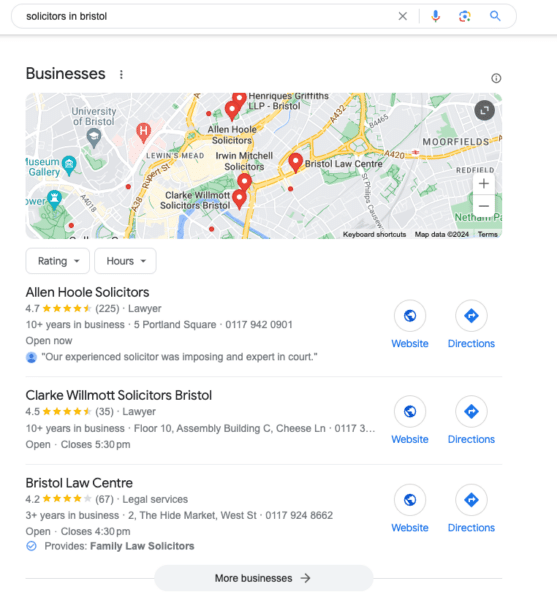
There has been no word from Google on this issue yet but this can have a serious impact for local businesses that get a lot of traffic from these local packs.
Why we care. If you are a local business and depend on driving traffic and sales through Google’s local pack and local search results, know there is a bug. I suspect Google will fix this bug relatively quickly but it has already been over an hour since we noticed the bug and it is still not resolved.
Fixed. It took over two hours but it is now working again, here is a screenshot:

Courtesy of Search Engine Land: News & Info About SEO, PPC, SEM, Search Engines & Search Marketing
Tuesday, February 13th, 2024
Google expanded its generative AI features for automatically created assets (ACA) to all English language advertisers in the U.S. and UK.
Why we care. If you are an English-speaking advertiser in the U.S. or UK, you can now start utilizing generative AI to help create your ad campaigns, giving you access to a broader range of ideas instantly and significant time-saving benefits.
ACAs explained. Automatically created assets (ACAs) are a campaign-level setting that advertisers can opt into. By activating this setting, assets such as headlines and descriptions are automatically generated. These generated assets complement the ones provided by advertisers for their responsive search ads, enhancing the overall ad content.
Generative AI and ACAs. In some cases, generative AI is used to create assets that better match what people are searching for. This helps ensure that the generated content is relevant and aligns with users’ search queries.
How it works. Automatically created assets (ACAs) work in conjunction with responsive search ads by generating new content, like headlines and descriptions, based on the specific details of your ad. This includes factors such as your landing page, existing ads, and keywords.
When your ad is eligible to appear for a query, the responsive search ads consider both the pool of assets you’ve created and the automatically generated assets. The system then serves the combination predicted to perform the best.
What Google is saying. Google Ads liaison officer Ginny Marvin said on X:
- “Generative AI is used to improve the relevancy of assets to the search query and predicted performance of your Search ads in Search and Performance Max campaigns.”
- “ACA is meant to supplement, not replace, your existing headlines and descriptions.”
Get the daily newsletter search marketers rely on.
Deep dive. Read Google’s automatically created assets guide for more information.
Courtesy of Search Engine Land: News & Info About SEO, PPC, SEM, Search Engines & Search Marketing

