Archive for the ‘seo news’ Category
Tuesday, January 24th, 2023
Google has made a couple of tweaks to two of its SEO-related help documents. The changes include specifying that the title and link elements are most important for the RSS feed follow in Google Discover and that Google parses img elements even within other elements, such as the picture element.
Google Discover RSS Feed follow
Google added a new line to the Get On Discover documentation under the feed guidelines for the Follow feature in Google Discover. Google wrote:
“The most important content for the Follow feature is your feed <title> element and your per item <link> elements. Make sure your feed includes these elements.”
Clearly, if you care about performing well in the follow feature on Chrome, you should include the <title> element and <link> elements in your RSS feed.
Google Image SEO best practices update
Google also updated the image SEO best practices document to clarify that Google parses <img> elements even when they’re enclosed in other elements (such as <picture> elements) when indexing images.
The document used to say “Google parses the HTML of your pages to index images, but doesn’t index CSS images.” It now reads:
“Using semantic HTML markup helps crawlers find and process images. Google parses the HTML <img> elements (even when they’re enclosed in other elements such as <picture> elements) in your pages to index images, but doesn’t index CSS images.”
Why we care
If you are looking to leverage more when it comes to either the Follow feature in Google Chrome powered by Google Discover, or you are looking to perform better with your image SEO, make sure to read the updated documentation that Google has provided. More importantly, if you make any changes to your site, make sure to test to see if there is a positive or negative impact to your search performance.
The post Google updates image SEO best practices and Google Discover docs appeared first on Search Engine Land.
Courtesy of Search Engine Land: News & Info About SEO, PPC, SEM, Search Engines & Search Marketing
Tuesday, January 24th, 2023
In today’s world, video ads are the most effective way for businesses to reach their target audience and promote their products or services.
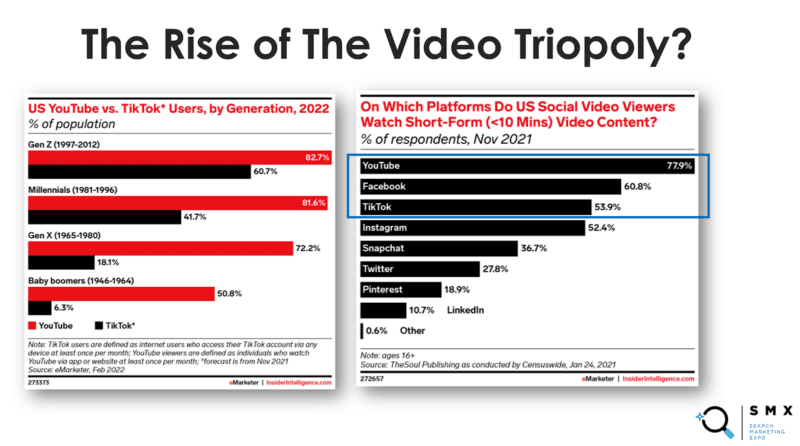
During my SMX Next presentation, we reviewed three innovative trends for video, which helped create a deeper conversation around the role that data and analytics play, along with targeting and optimization.
Let’s revisit some key strategies, questions and thoughts from the presentation.
The rise of vertical video
Each year, I try to think of the most valuable impression in our ad space. For many years, I’ve always sourced the answer to YouTube TrueView Skippable Ads. Rightfully so, since you don’t pay for a user until they watch 30 seconds of an ad (or, if the video is shorter in length, they complete or engage).
However, I’ve changed my opinion recently. I am convinced that vertical video is the most valuable impression on the web today.
Vertical video is a must for any advertiser in 2023 due to the following three ad types:
From a creative standpoint, you can run the same, if not similar, ads across all three platforms. Each carries its own unique set of targeting, which separates them in their ability to drive quality user volume.
- For ecommerce: My recommendation would be Reels first due to the Instagram shops integration. Followed by TikTok due to trends, audience, and engagement opportunities.
- For B2B: I would start on Shorts, a better transition from this ad to the YouTube channel to engage with more content. Also, you can leverage the power of Google Ads and Analytics to serve ads to audiences who have either shown interest in the brand or provided a level of intent within Google Search and/or YouTube.
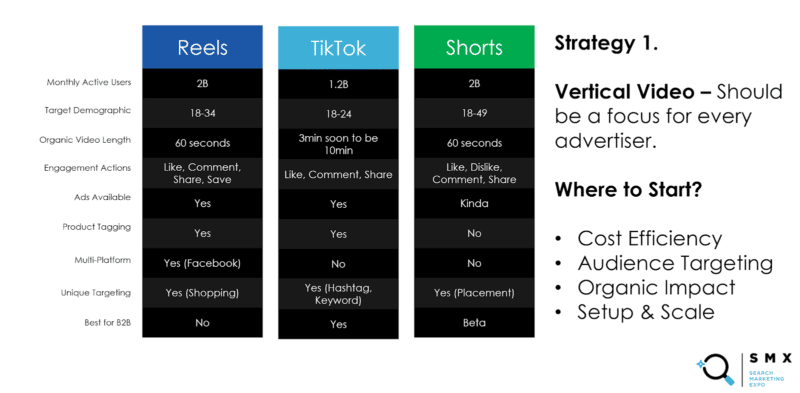
Vertical video: Comparison by platform
TikTok for B2B
Using TikTok for B2B is a common concern for marketers. Can it really be effective, specifically when targeting executives?
The short answer is, “yes.” The long answer, however, includes some nuance.
When targeting executives, we can assume these busy individuals are not necessarily on TikTok, but those who relay key messages to these executives (partners, assistants, managers) would be the ones to relay this type of messaging to the decision-maker.
Thus, I don’t think TikTok needs to hit the target to be effective. Rather, the creative, messaging, and product need to attract the target audience to take action – to learn more and deepen the impact to take the next step of passing it up the ladder to the executive.
While TikTok can be very effective for brands, we find that it is more effective for some vs. others. However, the platform is building tools to help B2B advertisers, including the following:
- Hashtag targeting: For the first time, we can leverage the power of search intent and video by targeting specific keywords users have either searched or tagged.
- Lead gen campaign: Decrease friction by allowing users to convert directly from an ad to your CRM with a max survey of 10 questions.
- Video length: Organic length has increased to 3 minutes from 1 minute earlier this year, and I believe 10 minutes would be the next jump as TikTok looks to capture longer time spent, where YouTube currently holds the crown.
- Influencers: While not a specific product, this is a tactic we have seen to be a clear advantage. Leveraging product integration with an influencer with your target demographic following can work for B2B.
Jumping on a video trend vs. creating a compelling ad
Another key question from the audience during the presentation was, “Is it better to jump on a video trend or create a compelling ad” from a video perspective.
If you have the budget, you should strive to test both so you understand the impact. There is no right or wrong answer here I would just use my best judgment.
Here are a few points to consider:
- If you are a larger brand, I believe you have a better opportunity to win with a video trend due to your current audience being willing to latch on and push the trend even further. If you are a smaller brand, you are looking for a home run which is rare but not impossible.
- The compelling ad is always a go-to for both large and small brands, in my opinion, because it is designed to grab the viewer’s attention and persuade them to take a specific action. Compelling ads can be effective at reaching a wide range of viewers.
The future of advertising
The future of advertising in the near term is vertical video. Thus, taking a deeper look into the platform opportunities for these placements is extremely important.
Since the presentation, the Variable.Media team and I have been able to generate a few more case studies and gather data specific to these vertical placements.
YouTube Shorts
This is a must for anyone currently running YouTube ads. We see strong engagement, average rates (CPM/CPV), but longer watch times.
The longer time spent could be due to the user and state of mind within a story, having watched all the other content from the subscription or search tab, thus in a short from the home tab.
TikTok
Hashtag targeting works, but we’re finding limited scalability, especially with B2B brands.
A great audience target, however, we will need to see growth to perform at scale.
Instagram Reels
A much more engaging placement than stories or the newsfeed at a fraction of the cost.
For most brands, we run reels as we find the audience is likelier to share, comment, or save than click through, a new behavior that has shifted from newsfeed to stories and now reels.
Maximize vertical video in your advertising strategy
Video creates a unique opportunity to reach a wide range of audiences on platforms while increasing engagement and conversion rates.
Vertical video ads offer a powerful way for businesses to promote their products and services.
However, it is important to remember that the most effective approach will depend on a business’s specific goals and target audience, which can play a critical role in maximizing the impact of vertical video.
Watch: 3 innovative video marketing trends for 2023 and beyond
Below is the complete video of my SMX Next presentation.
The post Top video marketing trends for 2023 and beyond appeared first on Search Engine Land.
Courtesy of Search Engine Land: News & Info About SEO, PPC, SEM, Search Engines & Search Marketing
Tuesday, January 24th, 2023
ICYMI, Microsoft has ambitious plans: to double the size of its ad business to $20 billion.
So why is this big news? Google and Meta are showing signs of fading, making more room for emerging platforms like TikTok, Amazon and Instacart.
Wait, what about Microsoft Ads?
Microsoft’s search and news advertising revenues have consistently grown over the last four quarters (Q2: 32%; Q3: 18%; Q4: 15%; Q1: 16%).
One advantage of Microsoft Ads is its cost-effectiveness. It’s typically cheaper than Google Ads and offers more opportunities to target specific audiences with relevant ads at a lower cost per click.
Additionally, Microsoft Ads provides detailed analytics that are easy to interpret, making it easier to track ROI and refine campaigns over time.
On the other hand, Microsoft still falls miles behind Google in terms of users. Google typically sits around 83.84% share of the global search market (fallen from 89.95% in the past three years); during the same timeframe, Bing’s share has risen from 3.99% to 8.88%.
But what do other advertisers think?
I asked Christine Askew of Workshop Digital (and 2022 winner of Best B2B Search Marketing Initiative) and Timothy Jensen of M&T Bank (and SMX Next panelist on 2023 PPC trends to get ahead of), their thoughts on why more brands should be giving Microsoft Ads a fair shot.
Why is having competition for Google search a good thing? Why should search marketers root for competitors like Microsoft Ads?
Having competition for Google search encourages companies to innovate, invest in better search technologies, and create better user experiences.
Competition also keeps prices down and helps to ensure that no one search engine has too much market share or power.
By creating a more competitive market, search marketers can benefit from better search options and more competitive pricing.
Additionally, competition helps to ensure that search results remain unbiased and free from manipulation.
Ultimately, competition is a healthy thing for the search industry and helps to ensure a better experience for users.
How has Microsoft improved their Ads dashboard, features, and product offerings?
Microsoft has introduced a unified interface that allows for better cross-platform optimization and insights. They have also included more detailed reporting, data visualization, and new automated campaign management tools.
Additionally, Microsoft has launched new features such as audience insights and automated bidding strategies to help users better target their campaigns.
Finally, Microsoft has improved its product offerings to include more comprehensive features, such as the ability to manage multiple campaigns from a single dashboard and the ability to optimize campaigns for different devices.
Here are just a few of the latest products and features released by Microsoft:
When will Microsoft Ads get respect?
Microsoft has been playing the long game – for a long, long time now. And Microsoft has an equally long history of mistakes and missed opportunities going back over a decade.
Microsoft Ads has been slow to gain respect from search marketers. But Microsoft has continued to improve its platform (e.g., the introduction of a unified interface, more detailed reporting).
Additionally, search marketers are starting to recognize the value of Microsoft Ads, such as its ability to target campaigns across multiple platforms and its automated bidding strategies.
As more search marketers become aware of Microsoft Ads and its benefits, it is likely that it will gain more respect in the industry.
- “This may just come with time, and by differentiating themselves in any way from Google – their #1 competitor.” Askew said
- “When they improve the reliability of mapping search query intent to keywords. Even exact match keywords are off the rails in matching to a high volume of irrelevant terms. Microsoft should also do more to listen to advertisers’ concerns about the directions Google has taken and be bold enough to take a different direction as opposed to trying to achieve parity with every change Google makes.” Jensen said.
What should Microsoft do to compete more aggressively in the ad space?
One idea, via Jensen, is more comprehensive integration with LinkedIn:
- “The LinkedIn profile targeting capabilities we do have certainly were a good starting point, but we were promised expansion of targeting options that never happened. Group targeting, job seniority targeting, and others could be powerful when combined with the Audience Network. A longer-term pipe dream would be an ability to set up campaigns running on LinkedIn via Microsoft Ads (or vice versa) with a full range of targeting options.” Jensen said.
Why should advertisers and brands try Microsoft ads?
Microsoft offers more detailed reporting and data visualization, as well as automated bidding strategies and audience insights in addition to a wide selection of ad formats, including text, image, and video ads.
Microsoft Ads are also competitively priced, making it an attractive option for budget-conscious advertisers and brands.
And the introduction of Multimedia Ads has given the platform a unique feature that advertisers likely won’t find with other ad solutions.
- “I think Microsoft has the reputation that they ‘”‘just follow whatever Google does months later.’ Our team is always impressed when Microsoft releases a new feature that is different from Google (incentivizing Meta campaign imports, LinkedIn audience integration, action assets, etc). I think that being less of a ‘follower’ and more of a ‘trend-setter’ will help really elevate the adoption of Microsoft Ads,” Askew said.
Why are brands hesitant to try running Microsoft Ads?
There’s a perception that most everyone uses Google as their search engine of choice, Askew said, when in reality 724 million monthly unique desktop searchers globally on the Microsoft Search Network in December 2021 (according to comscore Search):
- “A client asked ‘do people even use Microsoft’s search engine?’ I hit him with that handy dandy stat. Additionally, advertisers who specialize in lead gen may look at lead volume only and say ‘Google is driving more leads for me at a more efficient cost per lead, so why would I continue to fund Microsoft campaigns?’ When in reality, lead volume is only one piece to the puzzle – there’s also lead quality to analyze.
For one of my B2B lead gen clients in particular, we see less lead volume and a less efficient cost per lead on Microsoft compared to Google; however, every month we consistently see a greater percentage of those leads turn into an opportunity in Salesforce – which can then lead to a contract/revenue for the business. This means Microsoft is driving higher quality leads than Google.
If we’d just stopped to look at lead volume alone, we’d be undervaluing Microsoft entirely. Many advertisers who don’t have this kind of closed loop data may be hesitant for this exact reason.”
Besides the obvious point that volume is significantly lower than Google, performance can often be unpredictable as well, Jensen said:
- “While I’ve worked with some brands that see excellent results from Microsoft, more of my recent experience tends to be that leads are lower quality and month-to-month flakiness can occur in both amount of conversions and how qualified they are. Search query mapping to keywords leaves much to be desired. The recent move to “force” Audience Network inclusion in campaigns (unless you opt for an account-wide exclusion) hasn’t helped either.” Jensen said.
The advantage of using Microsoft ads over Google Ads
Microsoft offers some advantages over Google Ads, including a unified interface for cross-platform optimization, more detailed reporting and data visualization.
Additionally, Microsoft offers a variety of pricing options with different ad formats that are likely a cheaper option than Google. Finally, Microsoft provides access to a larger global market, which can be beneficial for advertisers and brands looking to expand their reach. Said Askew:
- “Compared to Google – Certainly the LinkedIn audience integration, Google does not have as many audiences that are relevant for B2B industries in my experience. Cheaper click costs than Google, which means more bang for your buck.
Microsoft has different extensions, now known as assets, than Google including action assets and filter link assets. Microsoft Clarity is also available (a lesser-known & free user recording and heat mapping tool that can be used to understand user behavior on a website).
Compared to Meta – I think the audiences Microsoft has available are more relevant in the B2B space than Meta. Especially since Meta has been steadily removing audience targeting options as time goes on. For businesses that operate B2B, getting the audience targeting right is half the battle.”
Despite its limitations, the LinkedIn integration is a big advantage for Microsoft with a level of B2B data that the other platforms just don’t have, Jensen said:
- “While volume can be a challenge, I’ve seen good conversion data from layering on job functions and industries with the right brands. Another advantage is that with their ‘underdog’ status there has been at least some level of trying to listen to marketers and roll out features that are helpful, although I’ve seen less of this in more recent years.”
So are Microsoft ads better for B2B?
It depends. (I know, I know. Sorry.)
Microsoft has a wide selection of ad formats, including text, image, and video ads, as well as audience insights and automated bidding strategies.
Additionally, Microsoft Ads allow for cross-platform optimization and detailed reporting, making it easier to track and measure campaign performance.
Finally, Microsoft is competitively priced and offers a variety of pricing options, making it an attractive option for budget-conscious B2B campaigns.
But as Askew pointed out, volume would likely be lower than that of its competitor, Google. For that reason alone, brands could be hesitant.
How about the Audience Network?
The Microsoft Ads Audience Network is beneficial for brands as it allows them to reach users on a variety of platforms, such as mobile apps and websites. This can be especially helpful for brands looking to target a wide range of audiences – especially B2B.
Additionally, the Audience Network provides access to more detailed data and insights, allowing brands to better tailor their campaigns to their target audiences.
Finally, the Audience Network is integrated into the Ads platform, allowing brands to manage campaigns across multiple platforms from a single dashboard.
Microsoft Ads has come a long way in recent years
Microsoft continues to improve with the help of AI technology. The company is investing heavily in machine learning and artificial intelligence, which will greatly enhance its advertising capabilities in the future.
The bottom line is that Microsoft shouldn’t be overlooked by search marketers who want better results without breaking the bank. With the right targeting and optimization strategy in place, Microsoft Ads can be just as effective as Google Ads at a fraction of the cost.
The post Microsoft is improving its ad platform. Here’s why brands should give it a shot in 2023 appeared first on Search Engine Land.
Courtesy of Search Engine Land: News & Info About SEO, PPC, SEM, Search Engines & Search Marketing
Tuesday, January 24th, 2023
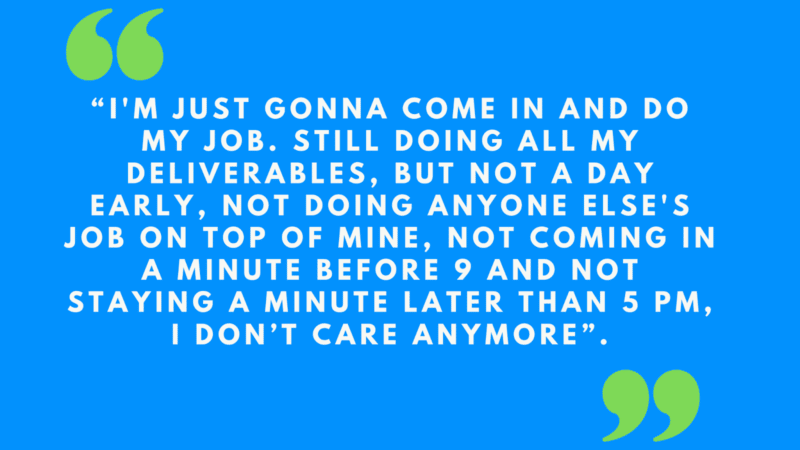
“I’m just gonna come in and do my job. Still doing all my deliverables, but not a day early, not doing anyone else’s job on top of mine, not coming in a minute before 9 a.m. and not staying a minute later than 5 p.m. I don’t care anymore.”
This is quiet quitting.
40% of the global workforce is looking to leave their jobs in the next 3 to 6 months, according to “To quit or not to quit” by Mckinsey and Company. The difference will be in how they will choose to leave, which will also have significant effects on businesses.
While the term “quiet quitting” has been trending recently, there is a misunderstanding that must be addressed regarding the concept.
Setting boundaries, such as declining to work excessive hours, weekends, or being on call for non-urgent requests outside of regular business hours, is not a form of quiet quitting. Rather, it is a matter of self-respect and taking care of one’s own well-being.
True quiet quitting occurs when an employee, unhappy with a situation at work and unable to find a satisfactory resolution, chooses to depart without causing a fuss.
This is not an act of cowardice, but a decision made in the interest of preserving one’s own peace of mind.
It is a common occurrence that when an employee is quietly quitting, they will focus solely on meeting the minimum requirements of their job, and no more. This is often done for fear of being terminated before securing a new position.
However, the employee will likely go to great lengths to conceal their job search and intent to leave, and their behavior and demeanor at work will not change. None will notice a thing.
It is only when they formally tender their resignation or depart that the full extent of their quiet quitting becomes apparent.
The costs of quiet quitting
An employee who has decided to quietly leave will only stay in a job until the role looks decent in their CV (one year tops if they are new) or only a few months more until they secure the next job.
Other costs associated with quiet quitting are:
Lost productivity
When an employee quits, the company may have to scramble to find a replacement, which can lead to lost productivity as the new hire gets up to speed.
Increased workload
In the meantime, remaining employees may have to take on additional responsibilities to cover the workload of the departed employee, leading to increased stress and burnout.
Training costs
The company may have to invest time and resources into training a new employee to replace the one who quit, which can be costly.
Negative impact on morale
Quiet quitting can also have a negative impact on morale among remaining employees, as it may create a sense of uncertainty and insecurity about the stability of the company.
Reputation damage
If quiet quitting becomes a common occurrence at a company, it may damage its reputation and make it difficult to attract top talent in the future.
Especially if the reason a valuable employee quietly leaves is a manager, once that employee leaves, he or she will start talking among those very close to them.
Let’s not forget the financial costs of recruitment and new equipment, too.
The root cause
Poor management is frequently the root cause of quiet quitting. In particular, a lack of effective communication and excessive micromanagement can contribute to this phenomenon.
When an employee’s attempts at communication with their manager are met with confrontation, misunderstanding or friction, they may feel disheartened and choose to silently depart rather than risk further conflict.
Similarly, a manager who constantly checks on the work of their employees, scrutinizes every detail and micromanages every aspect of their work is likely to drive even the most talented and dedicated staff to consider quietly quitting.
Such behavior fosters a toxic and oppressive work environment that ultimately proves unsustainable for those who value their own well-being and professional satisfaction.
At some point in our lives, we all have quietly quit a job, other reasons include:
Fear of retribution
Some employees may be afraid to speak up or voice their concerns to their manager for fear of retribution or negative consequences.
Lack of trust
Some might feel that their concerns will not be taken seriously, leading them to quit quietly rather than trying to address the issue through communication.
Feeling overwhelmed
Some employees may feel overwhelmed or stressed and may not know how to effectively communicate their concerns to their manager. They may therefore choose to quit quietly rather than to navigate a potentially difficult conversation.
Lack of confidence
Some employees may lack the confidence to speak up or communicate their concerns to their manager, leading them to quit instead quietly.
There’s also fear of damaging relationships in the workplace.
Get the daily newsletter search marketers rely on.
<input type=”hidden” name=”utmMedium” value=”” />
<input type=”hidden” name=”utmCampaign” value=”” />
<input type=”hidden” name=”utmSource” value=”” />
<input type=”hidden” name=”utmContent” value=”” />
<input type=”hidden” name=”pageLink” value=”” />
<input type=”hidden” name=”ipAddress” value=”” />
Quiet quitting in SEO: 4 common reasons
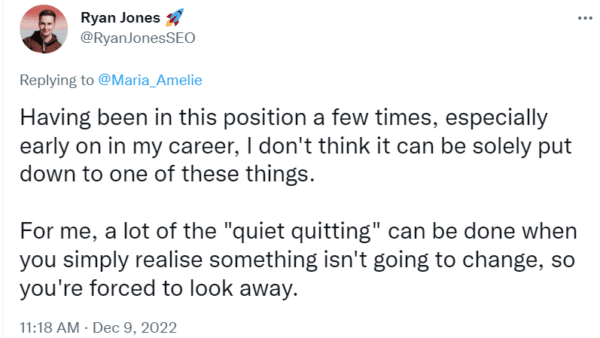
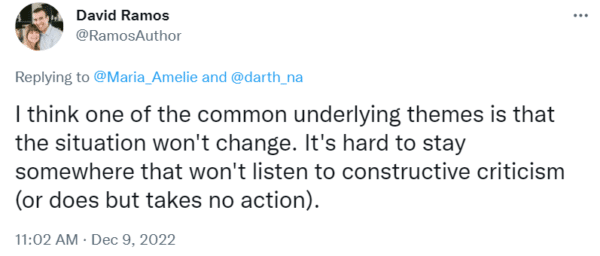
In a recent Twitter poll, I asked SEOs what they think is the most important reason to push people to “quiet quit” and these were the results:
Burnout
In the fast-paced and high-stress world of agency work, burnout is all too common.
The constant pressure to be alert and responsive, the feeling of being chased by an ever-present deadline, and the constant demand to deliver can take a toll on one’s mental health.
It is a sad reality that burnout is often glamorized in some SEO agencies, particularly those that prioritize acquiring new clients and taking on unrealistic deliverables instead of investing in their teams and considering their capacity.
The result is an environment where new challenges are thrown at already overburdened teams, expected to be delivered, as vulgarly said, “by yesterday.”
The SEO sweatshop: The quiet quitting central
Characterized by large open offices where employees are expected to be onsite from 8 a.m. to 7 p.m., five days a week, with no hybrid or remote work options, these places churn out jargon-laden SEO reports with no value at all, unhelpful content, “land” useless links on the media but all done at a rapid pace, sticking up to the philosophy of done “by yesterday.”
In the SEO sweatshop, the “perks” offered to employees are often little more than sweets, trinkets, and fast food, and the culture is one of unhealthy imbalanced lifestyles.
In such agencies, burnout, quiet quitting, and high staff turnover are all too common, as employees are subjected to long hours, low salaries, and immature, uneducated managers who prioritize profits over the well-being of their teams.
Signs of burnout include:
- Feelings of physical, emotional, and mental exhaustion: The employee may feel drained and unable to keep up with their usual workload.
- Decreased productivity and quality of work: Burnout can also lead to a decrease in productivity, as the person may struggle to focus, make decisions, or complete tasks.
- Negative attitudes: Burnout can lead to negative attitudes, such as cynicism, detachment, or frustration. The person may be more critical of their work or colleagues or be the passive-aggressive SEO starting dramas on Twitter.
- Increased absenteeism: Burnout can also lead to increased absenteeism, as the individual may take more time off or call in sick more often.
At the same time, managers should keep a close eye on the following employee traits that lead to burnout:
- Eating lunch at their desk.
- Staying late.
- Timesheets showing over nine hours done a day.
- Sending and responding to emails over the weekend (which also creates a toxic work environment.)
The most significant issue with the SEO sweatshop model is that it is a problem that is evident to everyone in the company, with the exception of the manager.
In these places, there is a culture of disregard for the well-being and professional satisfaction of employees, leading to a cycle of burnout and turnover that ultimately harms the company as a whole.
Culture in the workplace
When the culture within a company is toxic or negative, employees may feel that they have no other option but to leave.
This can be particularly true in cases where the culture is characterized by excessive micromanagement, harassment, discrimination, and poor career progression.
When employees do not feel safe or supported in their work environment, they may opt to resign quietly rather than confront the issue or raise a complaint.
Additionally, if the culture of the company does not align with an employee’s values or goals, they may choose to depart in favor of a more harmonious and fulfilling work environment that aligns with their personal beliefs and aspirations.
Challenging manager
A challenging manager is someone who does not provide clear direction or support to their team, making it difficult for employees to do their job effectively. This can lead to feelings of frustration and insecurity and may cause employees to question their ability to succeed in their roles.
When an employee feels like their manager is not supportive of their career development or growth, they may choose to leave the company in search of a more supportive and nurturing work environment. This can be especially true if the employee has a long-term career goal in mind and feels like their current manager is not helping them to achieve it.
Salary
In a company where workload and responsibilities increase over time but salaries do not, it is not uncommon for employees to turn to quiet quitting as a means of seeking better opportunities elsewhere.
When career progression is hindered by a lack of pay increases and employees feel undervalued and unappreciated.
The post-COVID-19 landscape has further exacerbated this trend, as employees increasingly prioritize their well-being and seek work environments that align with their values and goals.
To prevent costly and damaging instances of quiet quitting, it is essential for managers to clearly communicate policies on pay and career progression from the outset.
By doing so, they can avoid losing valuable employees and ensure that the talent they have invested in is able to thrive and grow within the company.
Prioritizing well-being in SEO
When speaking up, it is important for a manager and an employee to be factual and avoid reacting at all costs.
To prioritize well-being in your SEO team, consider the following.
- Set clear expectations: Have structure as well as processes in place. There is nothing more unsettling than a manager that expects a new employee to immediately know how to do the job without the appropriate onboarding.
- Encourage work-life balance: Encourage employees to take breaks, use their vacation time, and disconnect from work outside office hours.
- Promote a positive work culture: Create an environment that is supportive, collaborative, and respectful. Encourage open communication and feedback. Positive culture is not equal to forced fun.
- Monitor workload carefully and do not micromanage: Make sure that employees are not taking on too much work and that they have the support they need to manage their workload effectively.
- Provide opportunities for growth and development: Offer training, mentorship, and other opportunities for employees to learn new skills and advance their careers.
Remember, it is all about taking notes, listening and following up by email with a plan.
Additionally, offering support resources such as counseling and health and wellness programs can help employees to manage stress and prevent burnout.
By prioritizing the needs and well-being of your team, you can create a work environment that is conducive to success and retention.
 Anime art created by my 12-year-old son in his project Dekiru Art.
The post Understanding quiet quitting in SEO – the silent exodus appeared first on Search Engine Land.
Courtesy of Search Engine Land: News & Info About SEO, PPC, SEM, Search Engines & Search Marketing
Monday, January 23rd, 2023

Make 2023 the year you become a master of search marketing: Attend your choice of SMX Master Class online March 1-2, to learn actionable tactics that will help you drive more awareness, conversions, and sales.
Early Bird rates expire this Saturday, January 28… book now to save 20% off your Master Class!
Choose from six essential search marketing topics:

SMX Master Classes pack a ton of value:
- Six hours of training and live Q&A will equip you with tactical insights, reliable next steps, and fresh inspiration without a major time investment.
- Digital access means you can tune in from anywhere – no plane ticket, hotel reservation, or travel required.
- On-demand playback is included for free, so you can watch and rewatch for deeper learning.
There’s only one catch: This $249 Early Bird rate expires on Saturday, January 28… and once it’s gone, it’s gone. Why pay more next week? Select your Master Class and secure your spot today!
Psst… Teams that train together, thrive together. Attend with your crew to score an additional 20% off with group discounts, depending on your party size. Email reg@thirddoormedia.atlassian.net for more details!
The post SMX Master Class Early Bird rates expire this Saturday! appeared first on Search Engine Land.
Courtesy of Search Engine Land: News & Info About SEO, PPC, SEM, Search Engines & Search Marketing
Monday, January 23rd, 2023
Expedia buys Travelocity
In 2015, Expedia bought rival Travelocity for $280 million amid sluggish travel industry growth and pressure from insurgent travel providers.
Expedia had actually been powering Travelocity.com since 2013. So the acquisition seemed quite logical from both perspectives.
At the time, Expedia also owned several online travel brands: Hotels.com, Hotwire, eLong and Trivago.
Read all about it in Travel Search Consolidation: Expedia Buys Rival Travelocity For $280M
Also on this day
2022: The free basic subscription was an alternative to its full-featured subscription, which cost $4.95 per month.
2020: There would be no more referral fees from partners in flight search, as Google sought to emphasize price and convenience in rankings.
2020: Google added new features to Google Dataset Search with this rollout.
2020: In this installment of Barry Schwartz’s vlog series, he chatted with Grehan about the early days of search, how technology like AI and machine learning are impacting search and who originally came up with term “search engine optimization.”
2019: The “new-to-brand” set of metrics were also available for Amazon sellers’ display and video ad campaigns.
2018: A federal judge invalidated five patents SEO platform provider BrightEdge claimed in lawsuit against competitor Searchmetrics.
2018: After running its Hotel Ads offering in beta in 2017, Bing Ads rolled them out widely.
2017: You could now read book previews directly on your smartphone from Google search.
2017: The Google Doodle paid tribute to Ed Roberts, co-founder of the World Institute on Disability.
2015: Advertisers using a different currency in AdWords and Analytics would now be able to easily compare cost data in Analytics.
2015: Click share also rose on Bing’s product ads, doubling from Q3.
2015: Pinterest adjusted its Guided Search system to serve results that differed depending on whether the user was female or male.
2015: Local news became available for 12 US cities, including San Francisco, New York City, Los Angeles, Chicago, Washington, D.C., Atlanta, Seattle and Boston.
2015: The latest images showing what people eat at the search engine companies, how they play, who they meet, where they speak, what toys they have, and more.
2014: There was no way to search for an HTTPS version of a “what is my referrer” site. So Barry Schwartz made one.
2014: The new smartphone user-agent crawler would follow robots.txt, robots meta tag, and HTTP header directives for Googlebot instead of Googlebot-Mobile
2014: MapQuest notified business users that its local business center and basic local listings product would be formally shutting down.
2014: A judge determined patent-holding company Vringo was entitled to additional royalties from Google in a patent infringement case involving Google AdWords.
2013: With the new system made it easier to quickly skim through multiple images, rather than the old system that requires a lot of clicking, then closing windows to go back and select a new image.
2013: Examples of searches that were a mix of comedy and creepiness.
2012: The companies behind the tool felt Google hadn’t focused on what was best for its users with Search Plus Your World.
2012: In the past, Google ignored most punctuation marks and didn’t show any useful results for them.
2012: The Google 2012 mobile revenue “run rate” range was projected to be between $4 billion and $6 billion (globally). In the US the figure would probably be just over half the number.
2012: Some suggestions for how a social-nuclear war between Google, Twitter and Facebook could be averted.
2011: The Wayback Machine was redesigned and relaunched with a nicer user interface and migrated to a new platform as a foundation for further improvements.
2009: “Wouldn’t it be nice if Google understood the meaning of your phrase rather than just the words that are in that phrase? We have a lot of discoveries in that area that are going to roll out in the next little while,” said Google CEO Eric Schmidt
2009: Google’s sites reached 77% of the online population, age 15 and up, in December 2008.
2008: Google appeared to be serious about showing as many as 10 local listings beside the map and phasing this into results around the world.
2008: Google’s Matt Cutts shrugged off discussion about a pattern of websites ranking in Position 1 or 2 falling to Position 6 in Google.
2008: For the second year in a row.
2008: Google had the greatest decline, down 19.5%. Yahoo was just behind at 18.5%, with Microsoft at about 12.5%. The NASDAQ overall was at 15.5%.
2008: The login page for Google Health was live, although the service itself was not.
2008: As part of this launch, Baidu revamped the Japanese home page and added blog search.
2008: Google had labeled some of the regions in South Korea as being part of North Korea.
2008: Multiple groups asked the US Federal Trade Commission to rule on whether Ask was using unfair and deceptive trade practices in marketing its tool.
2008: The head of an EU group looking into search privacy issues said that Internet Protocol addresses assigned to computers should be treated as personal information.
2008: Remix clustering let you click a link to quickly answer the question, “What other, subtler topics are there?”
2007: Google added plus signs next to each RSS title that, if clicked, would open to show a snippet of the summary from the post.
2007: Google removed the cap on the number of sites you could exclude in the Site Exclusion Tool.
2007: Google: “procedures have been put in place to strip login information from future submissions.”
2007: The ads were to be tested for four weeks.
2007: Microsoft said it would donate $1 per search to Team Seattle’s Seattle’s Children’s Hospital fund.
2007: Google was reportedly giving an undisclosed amount to Seedfund, to indirectly invest in technology in India.
2007: The reviews and opinions presented were generally positive but some smaller businesses had problems and frustrations.
2007: It was free, direct-to-consumer, voice-enabled directory assistance.
2007: The fundamentals course went live and provide 15+ tracks.
Past contributions from Search Engine Land’s Subject Matter Experts (SMEs)
These columns are a snapshot in time and have not been updated since publishing, unless noted. Opinions expressed in these articles are those of the author and not necessarily Search Engine Land.
< January 22 | Search Marketing History | January 24 >
The post This day in search marketing history: January 23 appeared first on Search Engine Land.
Courtesy of Search Engine Land: News & Info About SEO, PPC, SEM, Search Engines & Search Marketing
Monday, January 23rd, 2023
Expedia buys Travelocity
In 2015, Expedia bought rival Travelocity for $280 million amid sluggish travel industry growth and pressure from insurgent travel providers.
Expedia had actually been powering Travelocity.com since 2013. So the acquisition seemed quite logical from both perspectives.
At the time, Expedia also owned several online travel brands: Hotels.com, Hotwire, eLong and Trivago.
Read all about it in Travel Search Consolidation: Expedia Buys Rival Travelocity For $280M
Also on this day
2022: The free basic subscription was an alternative to its full-featured subscription, which cost $4.95 per month.
2020: There would be no more referral fees from partners in flight search, as Google sought to emphasize price and convenience in rankings.
2020: Google added new features to Google Dataset Search with this rollout.
2020: In this installment of Barry Schwartz’s vlog series, he chatted with Grehan about the early days of search, how technology like AI and machine learning are impacting search and who originally came up with term “search engine optimization.”
2019: The “new-to-brand” set of metrics were also available for Amazon sellers’ display and video ad campaigns.
2018: A federal judge invalidated five patents SEO platform provider BrightEdge claimed in lawsuit against competitor Searchmetrics.
2018: After running its Hotel Ads offering in beta in 2017, Bing Ads rolled them out widely.
2017: You could now read book previews directly on your smartphone from Google search.
2017: The Google Doodle paid tribute to Ed Roberts, co-founder of the World Institute on Disability.
2015: Advertisers using a different currency in AdWords and Analytics would now be able to easily compare cost data in Analytics.
2015: Click share also rose on Bing’s product ads, doubling from Q3.
2015: Pinterest adjusted its Guided Search system to serve results that differed depending on whether the user was female or male.
2015: Local news became available for 12 US cities, including San Francisco, New York City, Los Angeles, Chicago, Washington, D.C., Atlanta, Seattle and Boston.
2015: The latest images showing what people eat at the search engine companies, how they play, who they meet, where they speak, what toys they have, and more.
2014: There was no way to search for an HTTPS version of a “what is my referrer” site. So Barry Schwartz made one.
2014: The new smartphone user-agent crawler would follow robots.txt, robots meta tag, and HTTP header directives for Googlebot instead of Googlebot-Mobile
2014: MapQuest notified business users that its local business center and basic local listings product would be formally shutting down.
2014: A judge determined patent-holding company Vringo was entitled to additional royalties from Google in a patent infringement case involving Google AdWords.
2013: With the new system made it easier to quickly skim through multiple images, rather than the old system that requires a lot of clicking, then closing windows to go back and select a new image.
2013: Examples of searches that were a mix of comedy and creepiness.
2012: The companies behind the tool felt Google hadn’t focused on what was best for its users with Search Plus Your World.
2012: In the past, Google ignored most punctuation marks and didn’t show any useful results for them.
2012: The Google 2012 mobile revenue “run rate” range was projected to be between $4 billion and $6 billion (globally). In the US the figure would probably be just over half the number.
2012: Some suggestions for how a social-nuclear war between Google, Twitter and Facebook could be averted.
2011: The Wayback Machine was redesigned and relaunched with a nicer user interface and migrated to a new platform as a foundation for further improvements.
2009: “Wouldn’t it be nice if Google understood the meaning of your phrase rather than just the words that are in that phrase? We have a lot of discoveries in that area that are going to roll out in the next little while,” said Google CEO Eric Schmidt
2009: Google’s sites reached 77% of the online population, age 15 and up, in December 2008.
2008: Google appeared to be serious about showing as many as 10 local listings beside the map and phasing this into results around the world.
2008: Google’s Matt Cutts shrugged off discussion about a pattern of websites ranking in Position 1 or 2 falling to Position 6 in Google.
2008: For the second year in a row.
2008: Google had the greatest decline, down 19.5%. Yahoo was just behind at 18.5%, with Microsoft at about 12.5%. The NASDAQ overall was at 15.5%.
2008: The login page for Google Health was live, although the service itself was not.
2008: As part of this launch, Baidu revamped the Japanese home page and added blog search.
2008: Google had labeled some of the regions in South Korea as being part of North Korea.
2008: Multiple groups asked the US Federal Trade Commission to rule on whether Ask was using unfair and deceptive trade practices in marketing its tool.
2008: The head of an EU group looking into search privacy issues said that Internet Protocol addresses assigned to computers should be treated as personal information.
2008: Remix clustering let you click a link to quickly answer the question, “What other, subtler topics are there?”
2007: Google added plus signs next to each RSS title that, if clicked, would open to show a snippet of the summary from the post.
2007: Google removed the cap on the number of sites you could exclude in the Site Exclusion Tool.
2007: Google: “procedures have been put in place to strip login information from future submissions.”
2007: The ads were to be tested for four weeks.
2007: Microsoft said it would donate $1 per search to Team Seattle’s Seattle’s Children’s Hospital fund.
2007: Google was reportedly giving an undisclosed amount to Seedfund, to indirectly invest in technology in India.
2007: The reviews and opinions presented were generally positive but some smaller businesses had problems and frustrations.
2007: It was free, direct-to-consumer, voice-enabled directory assistance.
2007: The fundamentals course went live and provide 15+ tracks.
Past contributions from Search Engine Land’s Subject Matter Experts (SMEs)
These columns are a snapshot in time and have not been updated since publishing, unless noted. Opinions expressed in these articles are those of the author and not necessarily Search Engine Land.
< January 22 | Search Marketing History | January 24 >
The post This day in search marketing history: January 23 appeared first on Search Engine Land.
Courtesy of Search Engine Land: News & Info About SEO, PPC, SEM, Search Engines & Search Marketing
Sunday, January 22nd, 2023
Google explains the “core” algorithm
In 2016, Google’s Andrey Lipattsev explained the “core” algorithm.
This happened following the news about Panda becoming part of Google’s core algorithm. SEOs wanted to better understand what being part of Google’s core algorithm meant.
Put simply, it meant that an algorithm is consistent enough that Google doesn’t have to worry about it because it’s been tested, works the way it should, and won’t require many changes in the future. As Lipattsev explained:
It is less about the functionality, which means it probably doesn’t change that much over time, and it is more about how we perceive it, in the context of the algorithm. Do we still think this is an experimental thing, it is running for a while and we aren’t sure how long it will last? Or is it like PageRank, it is part of it, it will always be there, at least in the foreseeable future and then probably call it in certain context part of the core algorithm.
So now when you hear about the latest Google core updates, hopefully you better understand what Google’s core algorithm means.
Read all about it in: Google Explains What It Means To Be Part Of The “Core” Algorithm
Also on this day
2022: The tag let you define if you wanted your content indexed when it was embedded through iframes or other means.
2022: Google added a note to the product structured data help documentation to explain how to specify car markup and still have Product review snippet feature eligibility.
2022: It was a temporary technical issue that affected serving on YouTube inventory.
2020: Site owners needed to convert to the schema.org markup if they wanted their pages to be eligible for Google rich results.
2020: CallRail developed the solution partly as a response to the rise of “zero-click search” and the “cannibalization” of website traffic by GMB.
2016: One of Google’s efforts was to prevent accidental mobile clicks when app developers purposely placed ads too close to application buttons.
2016: Bing deploys multiple updates per day in an effort to constantly improve the search results and features.
2016: Weather-related search results would now include hourly sky conditions, air quality and severe weather alerts.
2015: It was unclear what changes RetailMeNot made to recover from the Google Panda algorithm, but their rankings did bounce back.
2015: Additional copy below each Sitelink extension became available in most markets and languages supported by Bing Ads.
2015: “It’s our strong view that there needs to be some way of limiting the concept, because it is a European concept,” said David Drummond, Google’s Chief Legal Officer.
2014: A round-up of industry reactions, summarizing comments from a selection of popular bloggers.
2014: Expedia appeared to have been hit by a Google penalty related to unnatural links.
2014: Marin expected retailers to allocate roughly a third of their PPC budgets to PLAs.
2014: Pinterest also added an “Indulge Me” button to perform searches for “not so healthy” dessert recipes.
2013: “People no longer have patience for traditional search results … They mostly just want quick (and reliable) answers, which is exactly what Google is increasingly giving them.”
2013: The Doodle was in shades of blue, green and yellow. With Dr. King’s face as one of the “O”s in the Google logo.
2011: How well would the leadership shuffling tackle Google’s many challenges?
2011: The desire to get some of its old startup fire back was one of the driving forces behind Page’s ascension.
2011: Matt Cutts promises a renewed effort to take action against content farms (which he defined as “sites with shallow or low-quality content”).
2011: A redesigned document-level classifier made it harder for on-page spam to impact Google’s search index.
2011: It was arguably the first update in almost 9 months – though Toolbar PageRank was very out of date and didn’t have a direct impact on ranking.
2011: The tool let advertisers see how their ads looked on different devices (iPhone, Android, etc.) on multiple carriers.
2011: The first was making the Google search left-side bar more compact and the second was changing the menu choices in the top menu while in Gmail.
2011: The latest images culled from the web, showing what people eat at the search engine companies, how they play, who they meet, where they speak, what toys they have, and more.
2010: Google reported revenues of $6.67 billion in the fourth quarter of 2009, representing a 17% increase over fourth quarter 2008 revenues of $5.70 billion.
2010: This was the second time in about two years that someone with no general stature, reputation or well-known and documented history had tried to claim a trademark on SEO.
2010: Some additional information asserted default search status on the iPhone was a real possibility for Bing.
2010: Google really wasn’t the content vampire that some news publishers accused it of being.
2010: Facebook and Microsoft scaled back their display ad relationship.
2010: The tool helped you search for music and create YouTube playlists based on that query.
2010: Bing pulled the recipes from popular websites and let you filter by holiday, meals, ratings and convenience.
2010: Brin said the people of Haiti were “the real heroes.”
2009: Updates many SEOs and SEMs noticed at Google, Yahoo and Ask.com in the past week.
2009: This was expected to impact around 6,000 to 8,000 employees of its 95,000 workforce.
2009: It was a three-day incentive to encourage participants to do more searches on Live Search.
2009: Google shared some interesting facts and figures about inauguration-related search activity.
2009: NYC Mayor Michael Bloomberg announced a partnership with Google to use Google Maps on a new tourism website and information center.
2008: An informal, online reader survey, of two different audiences, on a range of high-level topics pertaining to mobile search yields different results.
2008: Google created the guide to help webmasters learn the features and reasons to use the tool.
2008: The data Google would be hosting would be available for scientists and also for free for anyone.
2008: Perhaps as many as 2,500.
2008: For some users, a search would show whether a page listed in Yahoo results was also on Delicious and how it had been tagged.
2008: The Europeans appeared poised to be more aggressive than their American counterparts in holding Google’s feet to the fire.
2008: Google had an artistic logo, with children drawing the face of Martin Luther King Jr. on a sidewalk.
From Search Marketing Expo (SMX)
Past contributions from Search Engine Land’s Subject Matter Experts (SMEs)
These columns are a snapshot in time and have not been updated since publishing, unless noted. Opinions expressed in these articles are those of the author and not necessarily Search Engine Land.
< January 20 | Search Marketing History | January 22 >
The post This day in search marketing history: January 21 appeared first on Search Engine Land.
Courtesy of Search Engine Land: News & Info About SEO, PPC, SEM, Search Engines & Search Marketing
Sunday, January 22nd, 2023
Google deduplicates featured snippets
In 2020, Google rolled out a global change to featured snippets that resulted in any URL only appearing once on the first page of search results, instead of twice.
Google said there would be no change to its overall set of web search results. There would still be 10 unique listings, as before. It’s just that Google would be deduplicating and no longer show any of those listings twice.
Google Search Liaison Danny Sullivan announced the news via Twitter:
If a web page listing is elevated into the featured snippet position, we no longer repeat the listing in the search results. This declutters the results & helps users locate relevant information more easily. Featured snippets count as one of the ten web page listings we show.
@dannysullivan
In November, Google was testing removing a site’s normal snippet when a featured snippet was displayed. Google even tested this back in 2017.
Read about it in Listings that earn featured snippets will not repeat on the first page of Google search.
Also on this day
2021: The updated interface aimed to make the search interface easier to read for searchers while providing a cleaner and more modern experience.
2021: The new form asked the business owner, “Why are you reporting this review?” Then it offered multiple options.
2021: “The latest version of the Code requires Google to pay to link to news sites, breaking a fundamental principle of how the web works,” said Mel Silva, Google Australia’s managing director.
2021: The potential for more links to appear in this high-visibility search result feature had SEOs concerned about click-through rates, brand safety and how to optimize for it.
2020: New guidelines were added in several areas, including crawling, structured data, visual content, and best practices.
2020: In this installment of Barry Schwartz’s vlog series, he chats with Sperzel about how he got into technical SEO, site architecture and spider crawling issues, and more.
2019: Improved process would make it easier to set up service areas on GMB.
2019: Defendant firm had falsely represented that it was acting on behalf of Google.
2018: Most users were able to see their properties in the new Search Console beta.
2018: The animated image highlighted the director’s technique for creating montage film effects.
2016: According to court documents and testimony in Oracle’s copyright suit against Google, “Apple received $1 billion from its rival in 2014.”
2016: Including “powered by” search, Google controlled 64.8% of US search query volume, while Bing powered 32.2% of organic search.
2016: The latest images culled from the web, showing what people eat at the search engine companies, how they play, who they meet, where they speak, what toys they have and more.
2016: The interactive doodle included an animated Scoville, pepper facts and a game pitting an ice-cream cone against different pepper types.
2015: Yahoo won the deal to be the default search engine in Firefox in November; now after losing some search share, Google was fighting back.
2015: Advertisers could see how ads would display with bid increases before committing to new keyword bids.
2015: Days after Yahoo was caught testing a Google search design interface, Bing is also caught testing it.
2015: It combined the company’s high-intent local query data with cross-screen behavior and ad exchange mobile display inventory.
2014: The crawl errors report showed errors on the final URL of the redirect, as opposed to the origin URL of the redirect.
2014: A video answered the question: “Are Facebook and Twitter signals part of the ranking algorithm?” Short answer: no.
2014: The data provided background on the website listed in the search result, and it appeared in a small popup window that’s accessible from a clickable link on the second line of the result.
2014: That meant more protection for searchers but what did the loss of referrer data mean for search marketers?
2014: The options you saw at the top might differ or be in a different order based on the query you entered into Google’s search box.
2014: Display advertising did generate more search volume, clicks and conversions.
2013: A new Panda refresh.
2013: Desktop searches remained level from Q3 2012 to Q4 2012, while mobile experienced an increase in search share.
2013: The cost-per-click across Google’s advertising business increased approximately 2% in the fourth quarter, as compared to the third quarter, after several consecutive quarters of decline.
2013: Since June 2011, Google’s top bar had a black background color with white/gray text overlaid.
2013: You (or others) could tag pages to appear associated with you in Bing’s search results. This would be visible to those who had a Facebook account connected to Bing.
2013: The traditional role played by libraries, including access to print works and professional librarians, was still important to most.
2012: Transit time search was only available in cities where Google had partnered with local transit agencies to integrate their data into Google Maps.
2011: Matt Cutts confirmed that Google had discussed giving searchers the ability to remove domains from its search results.
2010: Cutts answered a question about where he thought Google and search would be in 2010. In another video, he re-created his presentation on the “state of the index.”
2010: Globally, searches grew overall by 46%.
2010: Google added an events hCalendar microformat and started highlighting answers in the snippets.
2010: This was part of a plan to diversify their portfolios over time.
2010: Google also ranked fourth on the list in 2009, after being first in 2007 and 2008.
2010: Ballmer called it an “irrational business decision” on Google’s part.
2010: How to see before and after images, taken by satellite, as well as 360-degree ground-level videos.
2010: Microsoft wanted people to download (or update Sliverlight) so they could use the new and improved Bing Maps.
2010: The latest images culled from the web, showing what people eat at the search engine companies, how they play, who they meet, where they speak, what toys they have, and more.
2009: Google reported revenues of $5.70 billion for the quarter ended Dec. 31, 2008, an increase of 18% compared to the fourth quarter of 2007.
2009: For all the effort to put value into real-time search, particularly where Twitter was concerned – Twitter itself may have put an end to those efforts by announcing new limits on its API.
2009: The layoff rumors were true, though the numbers were less than anticipated.
2009: The Google AdWords team has launched a new mini-site to help advertisers reach their goals in light of the current economy.
2009: Job search was the fastest-growing search category in the U.S. in 2008.
2009: President Obama inherited all the links containing anchor text with the words “miserable failure” in them, aimed at former president Bush.
2008:Yahoo had been rolling out updates to their “crawling, indexing and ranking algorithms” over the past couple days.
2008: “Google would exchange its technological know-how for Publicis’s analytical and media planning expertise.”
2008: The fast response was meant for “corporate policy issues.”
2008: A design in Satya Paul’s collection was named “Oogle sari” that looked like a sari
made up of the Google web search results.
2008: The video reportedly drew over 15,000 hits in just two days and apparently embarrassed the couple tremendously.
2007: Yahoo officially confirmed recent speculations of an index update taking place.
2007: Google has quietly removed the information, which included usernames and passwords of individuals, including credentials for accounts at banks and other financial institutions.
2007: This was due to a discussion of a new SEO contest, where editors were warned of an onslaught of spam.
2007: Google would make some of BBC’s content available through Google Video and possibly YouTube.
2007: That time when Google Germany disappeared due to google.de domain registrations shenanigans.
2007: Google was “always considering new ways to extend Google’s advertising program to benefit our users, advertisers and publishers” – including in-game advertising.
2007: They hoped to “allow readers to download entire books to their computers in a format that they could read on screen or on mobile devices such as a Blackberry.”
2007: Google added your sponsored link click activity to Google Search History.
2007: It sought to solve the problem of figuring out where to go and what to do with a group of colleagues or friends.
From Search Marketing Expo (SMX)
Past contributions from Search Engine Land’s Subject Matter Experts (SMEs)
These columns are a snapshot in time and have not been updated since publishing, unless noted. Opinions expressed in these articles are those of the author and not necessarily Search Engine Land.
< January 21 | Search Marketing History | January 23 >
The post This day in search marketing history: January 22 appeared first on Search Engine Land.
Courtesy of Search Engine Land: News & Info About SEO, PPC, SEM, Search Engines & Search Marketing
Friday, January 20th, 2023
On Thursday, a diverse group of individuals and organizations defended the liability shield of Big Tech in a crucial Supreme Court case regarding YouTube’s algorithms. This group included businesses, internet users, academics, and human rights experts, with some arguing that removing federal legal protections for AI-driven recommendation engines would have a major impact on the open internet.
Among those weighing in at the Court were major tech companies such as Meta, Twitter, and Microsoft, as well as some of Big Tech’s most vocal critics, including Yelp and the Electronic Frontier Foundation. Additionally, Reddit and a group of volunteer Reddit moderators also participated in the case.
What happened. The controversy started with the Supreme Court case Gonzalez v. Google and centers around the question of whether Google can be held liable for recommending pro-ISIS content to users through its YouTube algorithm.
Google has claimed that Section 230 of the Communications Decency Act protects them from such litigation. However, the plaintiffs in the case, the family members of a victim killed in a 2015 ISIS attack in Paris, argue that YouTube’s recommendation algorithm can be held liable under a US anti-terrorism law.
The filing read:
“The entire Reddit platform is built around users ‘recommending’ content for the benefit of others by taking actions like upvoting and pinning content. There should be no mistaking the consequences of the petitioners’ claim in this case: their theory would dramatically expand Internet users’ potential to be sued for their online interactions.”
Yelp steps in. Yelp, a company with a history of conflict with Google, has argued that its business model relies on providing accurate and non-fraudulent reviews to their users. They have also stated that a ruling that holds recommendation algorithms liable could severely impact Yelp’s operations by forcing them to stop sorting through reviews, including those that are fake or manipulative.
Yelp wrote;
“If Yelp could not analyze and recommend reviews without facing liability, those costs of submitting fraudulent reviews would disappear. If Yelp had to display every submitted review … business owners could submit hundreds of positive reviews for their own business with little effort or risk of a penalty.”
Meta’s involvement. Facebook parent Meta has stated in their legal submission that if the Supreme Court were to change the interpretation of Section 230 to protect platforms’ ability to remove content but not to recommend content, it would raise significant questions about the meaning of recommending something online.
Meta representatives stated:
“If merely displaying third-party content in a user’s feed qualifies as ‘recommending’ it, then many services will face potential liability for virtually all the third-party content they host, because nearly all decisions about how to sort, pick, organize, and display third-party content could be construed as ‘recommending’ that content.”
Human rights advocates intervene. New York University’s Stern Center for Business and Human Rights has stated that it would be extremely difficult to create a rule that specifically targets algorithmic recommendations for liability, and that it might lead to the suppression or loss of a significant amount of valuable speech, particularly speech from marginalized or minority groups.
Why we care. The outcome of this case could have significant implications for the way that tech companies operate. If the court were to rule that companies can be held liable for the content that their algorithms recommend, it could change the way that companies design and operate their recommendation systems.
This could lead to more careful content curation and a reduction in the amount of content that is recommended to users. Additionally, it could also lead to increased legal costs and uncertainty for these companies.
The post Businesses, users, experts defend big tech against algorithm lawsuits appeared first on Search Engine Land.
Courtesy of Search Engine Land: News & Info About SEO, PPC, SEM, Search Engines & Search Marketing