Archive for the ‘seo news’ Category
Monday, July 17th, 2023

Successful search marketing requires thoughtful coordination between diverse teams responsible for SEO, PPC, analytics, and beyond. One key to nurturing that coordination is a shared training experience that gets teams on the same page, speaking the same language, and working towards a shared vision of success.
Sign your team up for their choice of SMX Master Class – happening live online August 16-17 – to sharpen skills, broaden horizons, and learn actionable tactics that drive measurable results… and save up to 20% off* while you’re at it!
Need to convince your boss to let you attend? We’re here to help!
With seven unique, expert-led courses to choose from, the learning combinations are endless. Attend the same class to unify and bond – or attend different classes to dive deep into respective disciplines and report back with armloads of insights and next steps.
The more you send, the more you save!
- 3-5 people save 10% off total registration
- 6-11 people save 15% off total registration
- 12 or more save 20% off total registration
No matter your setup or schedule, attending as a team is a win-win:
- Working from home? Training together (albeit virtually) with your colleagues will foster a feeling of camaraderie that’s essential to high-performing teams, especially remote ones.
- Tuning in from the office? Embark on an invaluable shared learning experience that will fuel creative brainstorms and collaborative projects for months to come.
- Can’t attend live? All Master Classes will be recorded and available for on-demand replay until October 16 (60 days) – giving you plenty of time to watch and rewatch for deeper learning.
Since 2006, thousands of search marketers have attended SMX with their colleagues, and they’re more successful because of it. Now, it’s your turn. Don’t miss this unique opportunity to transform your team into a veritable search marketing Swiss Army knife.
Email reg[@]thirddoormedia.atlassian.net to receive your exclusive group discount code and get your team signed up today.
Psst… Think you have what it takes to be an “award-winning” search marketer? Enter the 2023 Search Engine Land Awards for your chance to boost team morale, attract new business, and stand apart from the competition!
*Discounts cannot be combined.
The post Teams that train together, win together. Send your team to SMX! appeared first on Search Engine Land.
Courtesy of Search Engine Land: News & Info About SEO, PPC, SEM, Search Engines & Search Marketing
Monday, July 17th, 2023
Successful search marketing requires thoughtful coordination between diverse teams responsible for SEO, PPC, analytics, and beyond. One key to nurturing that coordination is a shared training experience that gets teams on the same page, speaking the same language, and working towards a shared vision of success.
Sign your team up for their choice of SMX Master Class – happening live online August 16-17 – to sharpen skills, broaden horizons, and learn actionable tactics that drive measurable results… and save up to 20% off* while you’re at it!
Need to convince your boss to let you attend? We’re here to help!
With seven unique, expert-led courses to choose from, the learning combinations are endless. Attend the same class to unify and bond – or attend different classes to dive deep into respective disciplines and report back with armloads of insights and next steps.
The more you send, the more you save!
- 3-5 people save 10% off total registration
- 6-11 people save 15% off total registration
- 12 or more save 20% off total registration
No matter your setup or schedule, attending as a team is a win-win:
- Working from home? Training together (albeit virtually) with your colleagues will foster a feeling of camaraderie that’s essential to high-performing teams, especially remote ones.
- Tuning in from the office? Embark on an invaluable shared learning experience that will fuel creative brainstorms and collaborative projects for months to come.
- Can’t attend live? All Master Classes will be recorded and available for on-demand replay until October 16 (60 days) – giving you plenty of time to watch and rewatch for deeper learning.
Since 2006, thousands of search marketers have attended SMX with their colleagues, and they’re more successful because of it. Now, it’s your turn. Don’t miss this unique opportunity to transform your team into a veritable search marketing Swiss Army knife.
Email reg[@]thirddoormedia.atlassian.net to receive your exclusive group discount code and get your team signed up today.
Psst… Think you have what it takes to be an “award-winning” search marketer? Enter the 2023 Search Engine Land Awards for your chance to boost team morale, attract new business, and stand apart from the competition!
*Discounts cannot be combined.
The post Teams that train together, win together. Send your team to SMX! appeared first on Search Engine Land.
Courtesy of Search Engine Land: News & Info About SEO, PPC, SEM, Search Engines & Search Marketing
Monday, July 17th, 2023
When your industry is over-saturated, chances for ranking higher on search engines become harder.
SEO tools give you keywords variations of your main keyword. But in order to attract new users, you need new keywords that people search while, at the same time, none of your competitors is targeting.
The challenge is this: how do you find these new keywords no tool can provide and no competitor is ranking for?
That’s when tangential SEO can come to help.
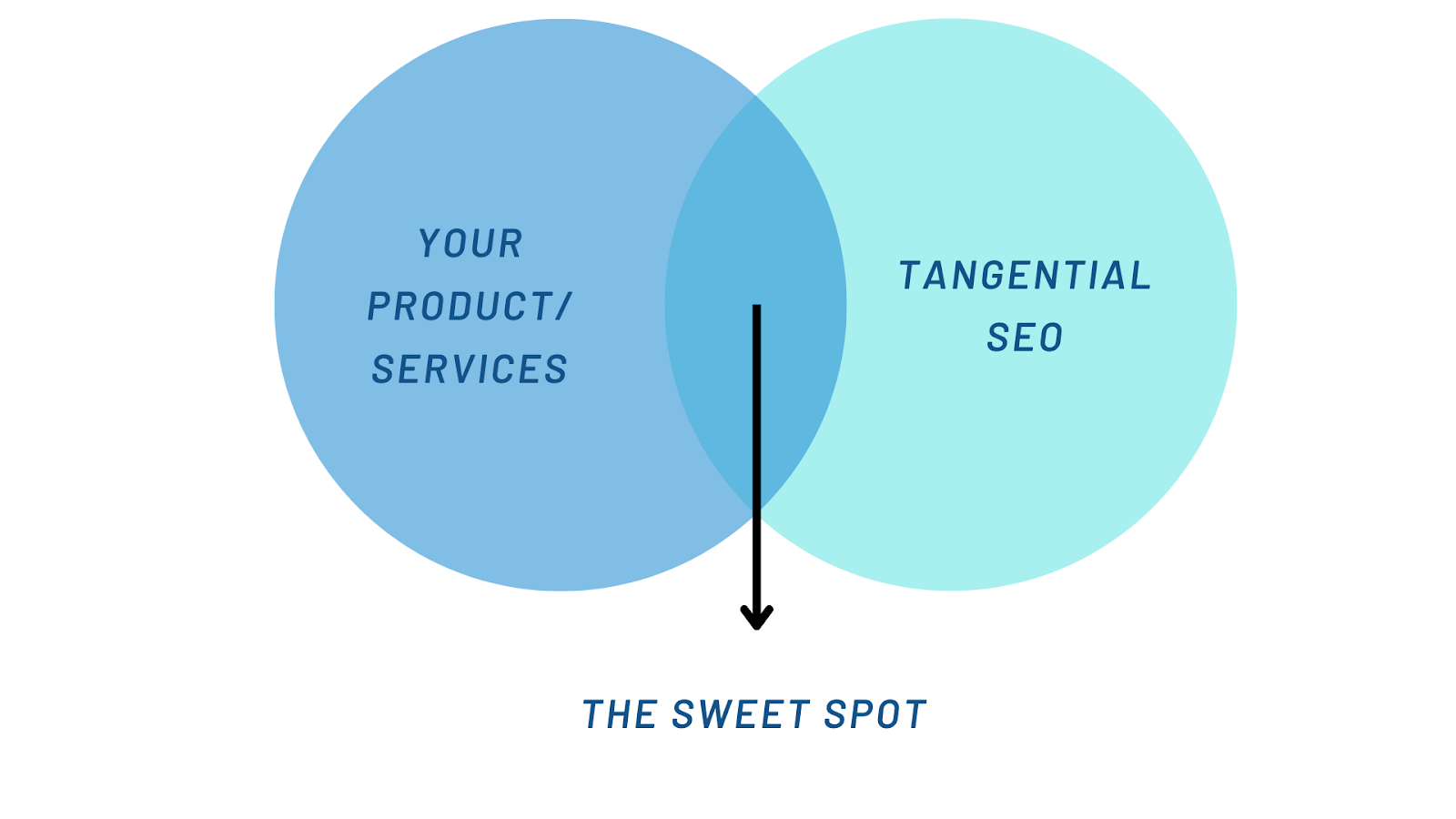
This is a strategy designed to increase your visibility on search engines for keywords that are not your core business but are still relevant to your audience.
What are the benefits of tangential SEO?
One of the main benefits of tangential SEO is attracting a wider audience compared to targeting traditional business keywords.
Another benefit of tangential SEO is exponentially increasing the number of topics you can write about. Potentially, with this strategy, your content can scale because you don’t run out of content ideas.
When it comes to SEO performance, when you cover a range of topics, you can rank for more keywords, which means you’ll attract more traffic to your website.
Last but not least, tangential content ideas could increase your backlinks efforts.
When you publish about trending topics around your industry, chances are your posts can passively attract new backlinks.
Let’s see a couple of examples of tangential topics.
- Main topic: Holiday home.
- People looking to buy homes for holidays only. Companies operating in this niche could create topics around real estate investments and sub-letting opportunities because holiday homeowners could use these houses to earn money on the side.
- Main topic: Online courses.
- Brands operating in this industry could talk about jobs you can do without a degree because students looking to buy courses online will likely avoid university. Here is an example of this content about jobs without a degree. The brand can also focus on career change topics and content, start to showcase job opportunities and create a job board.
The good news is that every niche can use tangential content. Here are more examples from various niches:
| Niche |
Tangential Topic |
| Travel |
Cinema |
| B2B Marketing |
Travel |
| Banking |
Technology |
| Fitness |
Covid-19 |
| Education |
Employment |
| CRM |
Remote work |
| Healthcare |
Data analysis |
| Tech |
Productivity |
Tangential SEO starts from one niche and can be extended to various niches, which also means that your research will uncover new angles and perspectives you might not have noticed before.
You’ll become familiar with your customer’s expectations, pain points and motivations.
When you research the topics they like to read about, you also learn more about your industry, making you a real expert in audience research.
Get the daily newsletter search marketers rely on.
<input type=”hidden” name=”utmMedium” value=”“>
<input type=”hidden” name=”utmCampaign” value=”“>
<input type=”hidden” name=”utmSource” value=”“>
<input type=”hidden” name=”utmContent” value=”“>
<input type=”hidden” name=”pageLink” value=”“>
<input type=”hidden” name=”ipAddress” value=”“>
Why do you need to use AI for tangential SEO?
If it sounds like a lot of work, it’s because it is.
Tangential SEO requires a huge amount of users and industry research simply because no SEO tool can provide you with this data collection process.
The traditional method of building tangential SEO could be time-consuming. This involves some of the following steps:
A lot of preparation is involved before you can write a line of copy.
But there is a quicker way, thanks to AI. In this case, I used Google Bard to develop new, tangential content ideas based on my audience research.
This method could work because it essentially automates the above steps. The secret is to write the right prompt for training AI to your bespoke results.
Essentially, we can reduce the number of steps from six to simply two:
- Write and refine your prompts for Bard.
- Feed the machine with your keywords.
Now, it’s time to see this process in detail.
Ready? Let’s go.
Step 1: Write the prompts
Prompts are essentially instructions you give to AI in the form of text, question, information or code that communicates to AI the reply you want to get.
Writing great prompts allows you to work better with AI tools and generate relevant results instead of mediocre ones.
Good prompts can increase efficiency because you spend less time refining your instructions, and they also strengthen AI responses, providing you with accurate, in-depth and relevant answers.
Because the prompt will be long and detailed, we can split it into three parts to make it more digestible and easier to understand.
Impersonation and context setting
This aims to provide AI with the most accurate information possible.
Feel free to steal my prompts and generate new tangential ideas in less than two minutes.
- “Act both as a psychologist and a search engine consultant trained in helping people find the right product or service for their needs. You are familiar with the concept of tangential SEO when evaluating common reasons for making a choice.”
Now let’s break this first part of the prompt into further analysis to understand what I asked AI to do.
This first sentence helps Bard behave as a psychologist and sets up the context in which we will operate from now on.
You can instruct Bard (or any AI tool in general) to act as different entities or engage in various situations or tasks.
You can prompt AI to impersonate characters, professionals, or even fictional creatures by providing specific instructions.
- “…trained in helping people find the right product or service for their needs”.
This part of the sentence opens up the AI attitude in preparation for what comes next.
We are telling AI to become a people’s companion when choosing products or services, a sort of shopping consultant, if you will.
“You are familiar with the concept of tangential content”.
This part ensures that we are referring to tangential SEO, which will ensure AI responses align with what we are trying to achieve.
It also removes any misunderstanding because we don’t want to refine the prompt too often. We are trying to get this right the first time.
Set up your prompt goal
After setting the context and the impersonation, it’s time to provide Bard with instructions on the type of results we expect.
We don’t want results to vary. We want results to be very specific for us to continue our process of creating tangential content ideas.
- “Create a tangential content category”
This sentence gives Bard a clear outcome. We want to create a tangential content category.
You can also decide to create two or more categories, but the more you ask from AI, the less accurate results will be.
Remember, AI has some limitations when it comes to spitting our results, sometimes they stop generating, especially in cases where the response takes too long.
That’s why I’d recommend focusing on one tangential category and then repeating the same process for another content category.
- “Be very accurate with your choice.”
We give Bard the permission to pick a category for us. All we ask is to be very specific about it.
- “Give common reasons why people make this particular choice”.
Remember the psychologist’s impersonation earlier on? That’s why we added it to the prompt. Now it’s time to get a reply from AI like a trained psychologist would do.
Research shows that psychology has influenced research in both consumer and marketing, so what’s the best way of understanding consumers’ behavior?
Support prompts
In this last step of writing the prompt, we will focus on the psychological part of our research.
We need a way to tell AI that its responses must have a psychological basis in order to be viable and accurate. Otherwise, it’s like shooting in the dark.
- “Give a list of explanations on the reasons why you chose this category and how it matches with the main content I’ll provide you with.”
This sentence is important because we need Bard to explain to us the reason for their category choice.
Essentially, we are asking Bard to provide us with review tools, we need to be able to make a judgment call and assess whether this proposed category makes sense.
- Does the tangential category match our typical customer?
- Is the customer looking for this type of topic Bard is producing?
If the answer is yes, then we can be certain that the tangential topics proposed by AI are accurate.
Lastly, we also need to take care of AI making assumptions, so we simply ask the following:
- “Don’t remind me of previous instructions, don’t make any assumptions.”
Step 2: Add your keywords
In the second step, we need to give direction to AI about our core business and keywords.
This part is vital because it will further resolve the problem of accuracy that we are likely to encounter with any AI tool.
In other words, in this step, we will connect the previous instructions with your product and services.
As an example of a prompt, we will use the topic of “online courses” for an organization that provides fitness courses and trains people to become personal trainers.
Here is an example of a prompt including both the keyword and the business description:
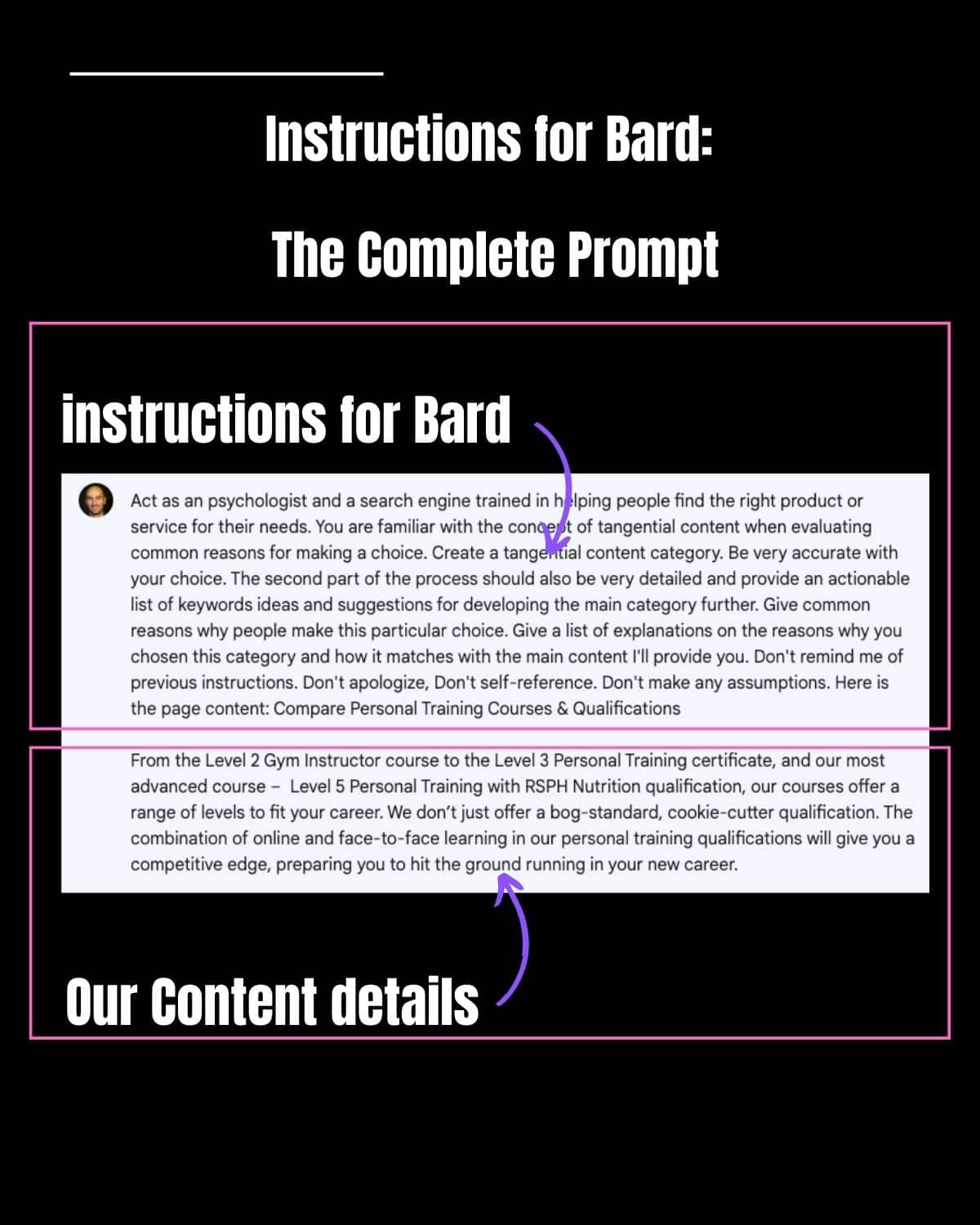
- “The keyword is Personal training courses and qualifications. From Level 2 Gym Instructor course to Level 3 Personal Trainer certificate, our courses offer a wide range of level to fit your career. We don’t just offer cookie-cutter qualifications. The combination of online and face-to-face training will give you a competitive edge, preparing you to hit the ground running in your new career.”
In this prompt, we must be specific about how the business differentiates itself from competitors. I’d recommend using either your mission statement or the unique selling proposition.
Put everything together
This is the complete prompt you can copy-paste into Bard, obviously changing the keywords and your business description.
- “Act both as a psychologist and a search engine consultant trained in helping people find the right product or service for their needs. You are familiar with the concept of tangential SEO when evaluating common reasons for making a choice. Create a tangential content category. Be very accurate with your choice. Give common reasons why people make this particular choice. Give a list of explanations on the reasons on the reasons why you choose this particular category and how it matches with the content I provide you. Don’t remind me of previous instructions, don’t apologise, don’t self-reference. Don’t make assumptions. Here is the keyword and business description: [insert your keyword + business content].”
The results
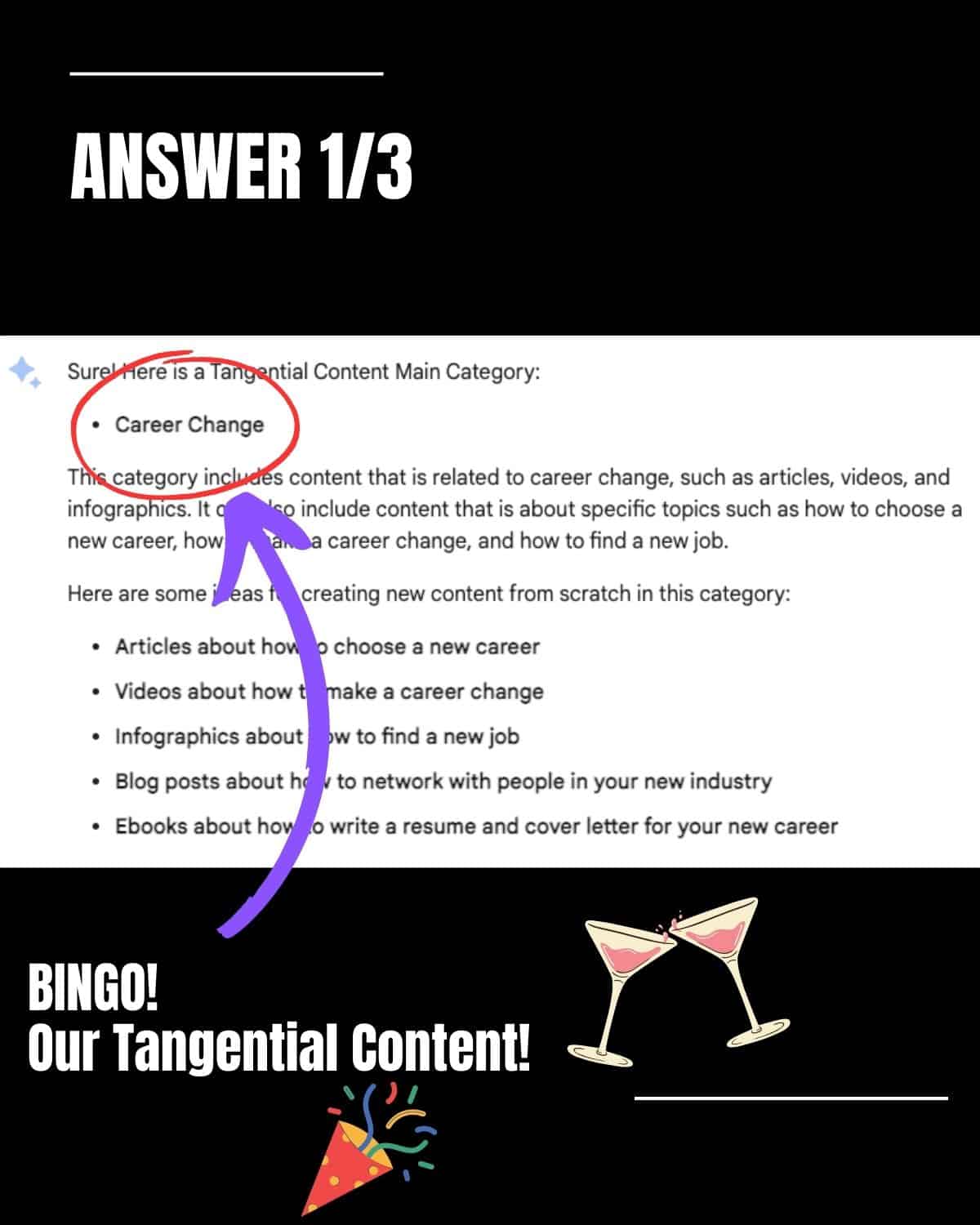
If you did everything right, you should be able to get impressive results from Bard that look like this:
The chat found that one of the tangential categories can be “career change.”
This is a brilliant idea because our ideal customer is usually in the middle of changing careers from desk to fitness. They want to enjoy life at the gym and help their clients reach their fitness goals.
Bard also provides us with ideas around the following:
- Articles about how to choose a new career.
- Videos about how to make a career change.
- Blog posts on how to network with people in your new industry.
- Ebooks and posts on how to prepare your cover letter and CVs for your new career
This is exactly what Tangential SEO is about. It’s content that touches your core business but doesn’t directly mention it.
Bard goes a few steps further to provide us also with a wide variety of SEO tangential categories we might want to consider:
Finding keywords no other tool can find
Using AI, especially Bard, can save you so much audience research time because AI is trained with billions of data points. Humans can only scratch the surface of the variety of tangential content.
This doesn’t mean we should rely 100% on AI. Business owners and marketers know their customers better than anyone, which puts us in the position to evaluate AI responses.
In this practical example, I used the business description and mission statement to feed AI with it.
Remember that all businesses can use this same methodology as long as you have a compelling case for being special and can articulate it clearly enough for AI.
The post Tangential SEO: How to use Google Bard to find content ideas fast appeared first on Search Engine Land.
Courtesy of Search Engine Land: News & Info About SEO, PPC, SEM, Search Engines & Search Marketing
Monday, July 17th, 2023
When your industry is over-saturated, chances for ranking higher on search engines become harder.
SEO tools give you keywords variations of your main keyword. But in order to attract new users, you need new keywords that people search while, at the same time, none of your competitors is targeting.
The challenge is this: how do you find these new keywords no tool can provide and no competitor is ranking for?
That’s when tangential SEO can come to help.
This is a strategy designed to increase your visibility on search engines for keywords that are not your core business but are still relevant to your audience.
What are the benefits of tangential SEO?
One of the main benefits of tangential SEO is attracting a wider audience compared to targeting traditional business keywords.
Another benefit of tangential SEO is exponentially increasing the number of topics you can write about. Potentially, with this strategy, your content can scale because you don’t run out of content ideas.
When it comes to SEO performance, when you cover a range of topics, you can rank for more keywords, which means you’ll attract more traffic to your website.
Last but not least, tangential content ideas could increase your backlinks efforts.
When you publish about trending topics around your industry, chances are your posts can passively attract new backlinks.
Let’s see a couple of examples of tangential topics.
- Main topic: Holiday home.
- People looking to buy homes for holidays only. Companies operating in this niche could create topics around real estate investments and sub-letting opportunities because holiday homeowners could use these houses to earn money on the side.
- Main topic: Online courses.
- Brands operating in this industry could talk about jobs you can do without a degree because students looking to buy courses online will likely avoid university. Here is an example of this content about jobs without a degree. The brand can also focus on career change topics and content, start to showcase job opportunities and create a job board.
The good news is that every niche can use tangential content. Here are more examples from various niches:
| Niche |
Tangential Topic |
| Travel |
Cinema |
| B2B Marketing |
Travel |
| Banking |
Technology |
| Fitness |
Covid-19 |
| Education |
Employment |
| CRM |
Remote work |
| Healthcare |
Data analysis |
| Tech |
Productivity |
Tangential SEO starts from one niche and can be extended to various niches, which also means that your research will uncover new angles and perspectives you might not have noticed before.
You’ll become familiar with your customer’s expectations, pain points and motivations.
When you research the topics they like to read about, you also learn more about your industry, making you a real expert in audience research.
Get the daily newsletter search marketers rely on.
<input type=”hidden” name=”utmMedium” value=”“>
<input type=”hidden” name=”utmCampaign” value=”“>
<input type=”hidden” name=”utmSource” value=”“>
<input type=”hidden” name=”utmContent” value=”“>
<input type=”hidden” name=”pageLink” value=”“>
<input type=”hidden” name=”ipAddress” value=”“>
Why do you need to use AI for tangential SEO?
If it sounds like a lot of work, it’s because it is.
Tangential SEO requires a huge amount of users and industry research simply because no SEO tool can provide you with this data collection process.
The traditional method of building tangential SEO could be time-consuming. This involves some of the following steps:
A lot of preparation is involved before you can write a line of copy.
But there is a quicker way, thanks to AI. In this case, I used Google Bard to develop new, tangential content ideas based on my audience research.
This method could work because it essentially automates the above steps. The secret is to write the right prompt for training AI to your bespoke results.
Essentially, we can reduce the number of steps from six to simply two:
- Write and refine your prompts for Bard.
- Feed the machine with your keywords.
Now, it’s time to see this process in detail.
Ready? Let’s go.
Step 1: Write the prompts
Prompts are essentially instructions you give to AI in the form of text, question, information or code that communicates to AI the reply you want to get.
Writing great prompts allows you to work better with AI tools and generate relevant results instead of mediocre ones.
Good prompts can increase efficiency because you spend less time refining your instructions, and they also strengthen AI responses, providing you with accurate, in-depth and relevant answers.
Because the prompt will be long and detailed, we can split it into three parts to make it more digestible and easier to understand.
Impersonation and context setting
This aims to provide AI with the most accurate information possible.
Feel free to steal my prompts and generate new tangential ideas in less than two minutes.
- “Act both as a psychologist and a search engine consultant trained in helping people find the right product or service for their needs. You are familiar with the concept of tangential SEO when evaluating common reasons for making a choice.”
Now let’s break this first part of the prompt into further analysis to understand what I asked AI to do.
This first sentence helps Bard behave as a psychologist and sets up the context in which we will operate from now on.
You can instruct Bard (or any AI tool in general) to act as different entities or engage in various situations or tasks.
You can prompt AI to impersonate characters, professionals, or even fictional creatures by providing specific instructions.
- “…trained in helping people find the right product or service for their needs”.
This part of the sentence opens up the AI attitude in preparation for what comes next.
We are telling AI to become a people’s companion when choosing products or services, a sort of shopping consultant, if you will.
“You are familiar with the concept of tangential content”.
This part ensures that we are referring to tangential SEO, which will ensure AI responses align with what we are trying to achieve.
It also removes any misunderstanding because we don’t want to refine the prompt too often. We are trying to get this right the first time.
Set up your prompt goal
After setting the context and the impersonation, it’s time to provide Bard with instructions on the type of results we expect.
We don’t want results to vary. We want results to be very specific for us to continue our process of creating tangential content ideas.
- “Create a tangential content category”
This sentence gives Bard a clear outcome. We want to create a tangential content category.
You can also decide to create two or more categories, but the more you ask from AI, the less accurate results will be.
Remember, AI has some limitations when it comes to spitting our results, sometimes they stop generating, especially in cases where the response takes too long.
That’s why I’d recommend focusing on one tangential category and then repeating the same process for another content category.
- “Be very accurate with your choice.”
We give Bard the permission to pick a category for us. All we ask is to be very specific about it.
- “Give common reasons why people make this particular choice”.
Remember the psychologist’s impersonation earlier on? That’s why we added it to the prompt. Now it’s time to get a reply from AI like a trained psychologist would do.
Research shows that psychology has influenced research in both consumer and marketing, so what’s the best way of understanding consumers’ behavior?
Support prompts
In this last step of writing the prompt, we will focus on the psychological part of our research.
We need a way to tell AI that its responses must have a psychological basis in order to be viable and accurate. Otherwise, it’s like shooting in the dark.
- “Give a list of explanations on the reasons why you chose this category and how it matches with the main content I’ll provide you with.”
This sentence is important because we need Bard to explain to us the reason for their category choice.
Essentially, we are asking Bard to provide us with review tools, we need to be able to make a judgment call and assess whether this proposed category makes sense.
- Does the tangential category match our typical customer?
- Is the customer looking for this type of topic Bard is producing?
If the answer is yes, then we can be certain that the tangential topics proposed by AI are accurate.
Lastly, we also need to take care of AI making assumptions, so we simply ask the following:
- “Don’t remind me of previous instructions, don’t make any assumptions.”
Step 2: Add your keywords
In the second step, we need to give direction to AI about our core business and keywords.
This part is vital because it will further resolve the problem of accuracy that we are likely to encounter with any AI tool.
In other words, in this step, we will connect the previous instructions with your product and services.
As an example of a prompt, we will use the topic of “online courses” for an organization that provides fitness courses and trains people to become personal trainers.
Here is an example of a prompt including both the keyword and the business description:
- “The keyword is Personal training courses and qualifications. From Level 2 Gym Instructor course to Level 3 Personal Trainer certificate, our courses offer a wide range of level to fit your career. We don’t just offer cookie-cutter qualifications. The combination of online and face-to-face training will give you a competitive edge, preparing you to hit the ground running in your new career.”
In this prompt, we must be specific about how the business differentiates itself from competitors. I’d recommend using either your mission statement or the unique selling proposition.
Put everything together
This is the complete prompt you can copy-paste into Bard, obviously changing the keywords and your business description.
- “Act both as a psychologist and a search engine consultant trained in helping people find the right product or service for their needs. You are familiar with the concept of tangential SEO when evaluating common reasons for making a choice. Create a tangential content category. Be very accurate with your choice. Give common reasons why people make this particular choice. Give a list of explanations on the reasons on the reasons why you choose this particular category and how it matches with the content I provide you. Don’t remind me of previous instructions, don’t apologise, don’t self-reference. Don’t make assumptions. Here is the keyword and business description: [insert your keyword + business content].”
The results
If you did everything right, you should be able to get impressive results from Bard that look like this:
The chat found that one of the tangential categories can be “career change.”
This is a brilliant idea because our ideal customer is usually in the middle of changing careers from desk to fitness. They want to enjoy life at the gym and help their clients reach their fitness goals.
Bard also provides us with ideas around the following:
- Articles about how to choose a new career.
- Videos about how to make a career change.
- Blog posts on how to network with people in your new industry.
- Ebooks and posts on how to prepare your cover letter and CVs for your new career
This is exactly what Tangential SEO is about. It’s content that touches your core business but doesn’t directly mention it.
Bard goes a few steps further to provide us also with a wide variety of SEO tangential categories we might want to consider:
Finding keywords no other tool can find
Using AI, especially Bard, can save you so much audience research time because AI is trained with billions of data points. Humans can only scratch the surface of the variety of tangential content.
This doesn’t mean we should rely 100% on AI. Business owners and marketers know their customers better than anyone, which puts us in the position to evaluate AI responses.
In this practical example, I used the business description and mission statement to feed AI with it.
Remember that all businesses can use this same methodology as long as you have a compelling case for being special and can articulate it clearly enough for AI.
The post Tangential SEO: How to use Google Bard to find content ideas fast appeared first on Search Engine Land.
Courtesy of Search Engine Land: News & Info About SEO, PPC, SEM, Search Engines & Search Marketing
Monday, July 17th, 2023
How does SEO content help increase sales?
Many brands make the mistake of relegating search engine optimization (SEO) to ranking websites and driving targeted traffic.
They never align it with their sales efforts, leaving a huge gap in their business growth strategy.
However, if executed well, SEO can help you significantly boost your sales.
And that’s exactly what I want to help you see in this post.
We’ll examine the challenges of attributing sales to SEO, how SEO content helps you increase sales and much more.
Challenges in connecting SEO efforts to revenue
Aligning SEO with revenue generation can be complex, presenting various challenges for brands. And this is why many brands fail to see how SEO can help them increase sales.
Some of these challenges include:
Lack of tools and proper configurations
Attributing revenue to SEO requires sophisticated tools and accurate configurations to extract the necessary data. Many businesses may lack the tools or skilled personnel to handle this in-house.
Outsourcing to a SaaS SEO agency can be a beneficial solution, particularly since regular upgrades are necessary for both tools and personnel.
Complexity of attribution
Attributing revenue to SEO is daunting due to its involvement throughout the customer journey.
Users interact with multiple touchpoints before converting. This makes it difficult to pinpoint the exact impact of SEO efforts.
While not flawless, you can use different attribution methods to help gauge the impact of SEO on your bottom line.
Use tools like Google Analytics to help you with this.
Lack of historical data for analysis
Many businesses face the challenge of limited historical data for analyzing SEO return on investment (ROI). SEO takes time to produce an ROI, which compounds the difficulty of assessing its impact without sufficient historical data.
Despite these challenges, you should still develop a system to help you track and attribute the impact of SEO to sales.
Understanding the role of SEO in revenue generation is crucial for effective marketing and resource allocation.
It helps you make informed decisions and optimize your marketing strategies for better business outcomes.
Get the daily newsletter search marketers rely on.
<input type=”hidden” name=”utmMedium” value=”“>
<input type=”hidden” name=”utmCampaign” value=”“>
<input type=”hidden” name=”utmSource” value=”“>
<input type=”hidden” name=”utmContent” value=”“>
<input type=”hidden” name=”pageLink” value=”“>
<input type=”hidden” name=”ipAddress” value=”“>
How SEO content helps increase sales
Viewing SEO as a mere traffic-generating channel overlooks its true potential as a key revenue driver.
SEO should be seen as an integral part of growth marketing, capable of leveraging substantial bottom-line growth.
Here are several ways in which SEO can contribute to revenue generation:
1. Powerful customer acquisition channel
You can acquire new customers effectively by shifting from using SEO solely as a traffic source to a customer acquisition channel.
Fine-tune your SEO and content strategies to target individuals more likely to convert.
One way to do that is to prioritize bottom-of-the-funnel (BoFu) content that incorporates high purchase intent keywords. This approach positions SEO as a marketing channel and a powerful catalyst for sales.
2. Improved customer retention rates
SEO done right can positively impact your customer retention rates. You can use it to build authority, credibility and trust. These factors encourage increased sales, a crucial factor in business growth.
Additionally, SEO provides valuable insights into customer buying behavior. This enables the development of marketing and sales strategies tailored to help retain customers and enhance the overall efficiency and contribution of your SEO to revenue growth.
3. Reduced customer acquisition costs (CAC)
SEO helps minimize customer acquisition costs (CAC) by providing a more cost-effective alternative to paid channels.
As SEO compounds over time, it generates results without proportional cost increases. As a result, your CAC drastically reduces, leading to your bottom line experiencing a boost.
4. Reputation management and brand building
A positive brand reputation cultivated through SEO efforts yields numerous benefits.
These include customer loyalty, increased customer confidence, and transforming customers into brand ambassadors. These factors lead to heightened sales and revenue growth.
5. Support for other sales and marketing channels
SEO’s broad scope extends its influence across various sales and marketing disciplines.
Whether it’s pay-per-click advertising (PPC), affiliate marketing, social media marketing, or public relations (PR), SEO provides support and visibility to other channels.
This visibility enables more sales, especially for established brands with enterprise-level SEO strategies.
Recognizing and capitalizing on SEO’s revenue-driving capabilities can help you unlock significant growth opportunities for your business.
That’s why you must implement a comprehensive SEO strategy that aligns with your sales goals. You’ll then see its power as a catalyst for revenue generation.
The post How SEO content helps increase sales appeared first on Search Engine Land.
Courtesy of Search Engine Land: News & Info About SEO, PPC, SEM, Search Engines & Search Marketing
Saturday, July 15th, 2023
Google has confirmed it fixed the ongoing issue with Google News indexing. This resulted in many publishers seeing massive traffic declines from Google News for a three-week period, starting around June 21st.
The update. Google posted an update at 5:06 pm ET today, saying, “We fixed the issue with News indexing. There will be no more updates.”
Google initially discovered the issue on July 10th, and Google identified the specific issue the day after, then implemented a fix on July 12th. After the fix was implemented, publishers began to see improvements.
Now Google is confirming the fix worked, and news publishers should see their traffic at mid-July levels.
Why we care. If your site is in Google News and you noticed a traffic drop from Google News over the past few weeks, it might have been related to this Google News indexing bug. Google fixed the issue today and you should have started to notice normal traffic levels from Google News today.
The post Google fixes Google News indexing bug appeared first on Search Engine Land.
Courtesy of Search Engine Land: News & Info About SEO, PPC, SEM, Search Engines & Search Marketing
Friday, July 14th, 2023
Amazon Prime Day 2023 broke records to become the retailer’s most successful to date.
The two-day event, which took place on July 11 and 12, saw year-on-year spending shoot up by 6.1% to $12.7 billion in the U.S., according to Adobe Analytics data.
Prime members splashed out on more than 375 million products worldwide and saved over $2.5 billion on Amazon’s discounted deals.
Why we care. Amazon Prime Day is soaring in popularity and with such a high footfall of traffic, it’s an excellent time for marketers to advertise and optimize on the platform for maximum reach. For those advertising on Amazon already, it may be worth considering increasing ad spend. The bi-annual event provides brands with the opportunity to not only strengthen their relationship with existing customers but also reach and attract new ones, which could potentially help drive brand awareness and result in a higher ROI.
What categories reported the biggest increase in sales? Surges in spend were reported across several categories by Adobe. In comparison to average daily sales in June:
- Appliance sales increased by 52%
- Toy sales increased by 27%
- Apparel sales increased by 24%
- Electronics sales increased by 12%
- Stationary and office supplies sales increased by 76%
“Prime Day has become one of the biggest e-commerce moments of the year, as consumers latch onto major discounts from a number of different retailers. The record spending shows us that consumers are tapping into their inner bargain hunters, stocking up on specific categories such as electronics and apparel while the discounts remain steep,” said Vivek Pandya, lead analyst at Adobe Digital Insights.
Get the daily newsletter search marketers rely on.
<input type=”hidden” name=”utmMedium” value=”“>
<input type=”hidden” name=”utmCampaign” value=”“>
<input type=”hidden” name=”utmSource” value=”“>
<input type=”hidden” name=”utmContent” value=”“>
<input type=”hidden” name=”pageLink” value=”“>
<input type=”hidden” name=”ipAddress” value=”“>
What discounts were offered? Amazon offered discounts across all categories of its product portfolio – although not all products were included:
- Electronics were discounted by up to 16%
- Apparel was discounted at 13%
- Toy were discounted by up to 15%
- Sporting goods were discounted at 9%
- Furniture was discounted at 7%
Additional findings. In addition to identifying how much customers spent, the Adobe Analytics report also identified how customers are changing their buying process:
- Buy Now Pay Later (BNPL) orders were up 19.5% year-on-year and accounted for 6.4% of all online orders.
- BNPL generated $461 million in revenue.
- BNPL was primarily used for products purchased in apparel, furniture/home and electronics categories
- Smartphone sales were up 42.7% year on year and drove 43.7% of sales
When is the next Amazon Prime Day? Amazon is yet to confirm if there will definitely be a second Prime Day this year. However, last year, in addition to hosting the two-day sale in July, Amazon also hosted one Oct. 11 and 12.
Retail Media Networks. A new force this year, retail media networks (RMNs) also contributed to Prime Day returns. Traffic referred to retail websites from RMNs increased by more than 70% over last year, according to Salesforce.
- “Ads on retail media networks caught consumers’ eyes throughout Prime Day. We saw a huge surge in traffic from this emerging media – making it a critical component of the marketing mix,” said Rob Garf, Salesforce’s VP and GM of retail.
Additional reporting on this story from Chris Wood.
The post Amazon Prime Day 2023 sets U.S. sales record: $12.7 billion appeared first on Search Engine Land.
Courtesy of Search Engine Land: News & Info About SEO, PPC, SEM, Search Engines & Search Marketing
Friday, July 14th, 2023

Communicating with your customers across channels is crucial to providing positive experiences. However, often this means regularly replicating and syncing customer data across different systems in order to deliver differentiated and personalized campaigns. But with all of this data movement, you end up stuck with a version of (not so real) “real-time” marketing data.
The solution is simple: live where your data lives.
Join Snowflake, MessageGears, and their joint customer Frontdoor for a dynamic discussion on how your entire customer engagement strategy can and should be centered around your data – so that you can do what you do best without having to worry about the technology.
Register and attend “Ignite Your Marketing Engine with the Power of the Data Cloud,” presented by Snowflake.
Click here to view more Search Engine Land webinars.
The post Leverage real-time data for stronger campaigns and higher ROI appeared first on Search Engine Land.
Courtesy of Search Engine Land: News & Info About SEO, PPC, SEM, Search Engines & Search Marketing
Friday, July 14th, 2023
Threads is implementing branded content tools to give marketers access to paid promotion opportunities.
Meta’s new social platform doesn’t serve ads yet. However, this feature will enable brands to explore the possibility of running influencer campaigns.
Why we care. Meta is waiting until Threads reaches a critical mass before selling ad space, which is proving a little frustrating for brands wanting to be one of the first to advertise on the fastest-growing social app in the world. With that in mind, paid promotion opportunities could be an effective way for brands to connect with the Threads audience in the meantime, in a way beyond creating organic posts.
Following Instagram’s lead. Threads has adopted the terms of services implemented by its Meta sister platform, Instagram. The terms include guidance regarding sponsored content. Under these guidelines, Threads has to ensure that:
- Brands use Instagram’s branded content tools when they work with influencers on sponsored content.
- Only eligible brands have access to paid partnership labels to posts.
- Brands clearly disclose paid partnership collaborations.
Why now? Marketers are eager to ensure that their brands are one of the first to establish their voice and identity on Threads, while it’s still one of the world’s most talked about social apps.
More than 100 million people signed up to Threads in its first week, and marketers are desperate to start reaching the platform’s users in the most effective way possible while it’s still trending.
Deep dive. Read our Threads FAQ guide for a more in-depth overview of the new platform.
The post Threads is adding branded content tools to create paid promotion opportunities appeared first on Search Engine Land.
Courtesy of Search Engine Land: News & Info About SEO, PPC, SEM, Search Engines & Search Marketing
Friday, July 14th, 2023
Repetitive advertising on streaming platforms can damage a brand’s reputation, according to a new study.
Overexposure to the same ad campaigns was described as “annoying” and “disruptive” by participants in a new joint study, conducted by IPG’s Magna unit and ad tech firm Nexxen, called It’s All in the Delivery: How Repeating Ads Affect CTV Viewers, Brands and Platforms.
Notably, researchers identified a 16% drop in purchase intent amongst those who had seen the same ad six times or more.
Why we care. Marketers must ensure they are purchasing ad space on platforms with effective technology to manage frequency. By not doing so, they run the risk of overexposing the services and products they want to promote which has been identified as having a negative impact on potential customers. Not only does improper frequency management result in a decline in purchase intent but it can also damage the reputation of a brand.
By the numbers. Although participants who saw the same ad six times reported a 92% recall afterward, demonstrating an incredibly strong brand awareness, there were negative findings linked to the increased frequency:
- 48% of participants found the ad “annoying.”
- 33% of participants reported the ad “disrupted” their viewing experience.
- 83% of participants were convinced the repetition was intentional.
- 68% of participants blamed the brand for the repetition.
- 44% of participants blamed the streaming service for the repetition.
Get the daily newsletter search marketers rely on.
<input type=”hidden” name=”utmMedium” value=”“>
<input type=”hidden” name=”utmCampaign” value=”“>
<input type=”hidden” name=”utmSource” value=”“>
<input type=”hidden” name=”utmContent” value=”“>
<input type=”hidden” name=”pageLink” value=”“>
<input type=”hidden” name=”ipAddress” value=”“>
What have the researchers said? Kara Manatt, executive vice president of intelligence solutions at Magna, stressed that repetitive ads caused damage to both brands and the streaming platforms, and so called for change. She said:
- “The platforms are suffering too, because people also attribute the fact that this is happening to the platform. It really can be so annoying to people and viewers, that they’re willing to find content elsewhere.”
- “This really validates the need to be working with trusted partners who have the right technology to help manage frequency. It’s not just the overall frequency. It’s making sure that those six exposures don’t take place in a single show [but rather] takes place in an appropriate cadence over time.”
IPG client, New Balance, took part in the study and said the results highlighted the need for frequency caps. The company said in a statement:
- “While these fundamentals are currently part of our buying process, we are eager to hear more in terms of larger advancements in the industry from a broadcaster/publisher perspective that will ultimately create a more optimal user experience.”
About the study. The It’s All in the Delivery report research analyzed the feedback of 1,246 participants, who were exposed to a variety of frequencies of the same ad during a one-hour viewing period. Some were exposed to the same ad six times, while others just once.
The post Repetitive ads ‘damage brand reputation and purchase intent’ appeared first on Search Engine Land.
Courtesy of Search Engine Land: News & Info About SEO, PPC, SEM, Search Engines & Search Marketing