Archive for the ‘seo news’ Category
Thursday, July 20th, 2023
The Washington Post has published a document outlining its internal SEO and web performance best practices that anybody in news SEO will want to read.
The document, Web Performance and SEO Best Practices and Guidelines, outlines what the Post calls “proven strategies and guidelines for optimizing web performance and search engine optimization (SEO).”
SEO and web performance best practices. The Post’s document breaks down all of its guidelines into what is essentially a checklist, consisting of four buckets: on-page SEO, content optimization, technical SEO and off-page SEO.
The web performance guidelines focus on loading, rendering and responsiveness. It also shares many of the tools it uses to monitor performance – including Lighthouse, WebPageTest, Google Search Console and Google Analytics.
The purpose of the guidelines. The Post wants to make sure it:
- Provides a positive user experience.
- Increases website visibility.
- Drives organic traffic.
- Improves the site’s overall success.
What they’re saying. The document was officially announced today, although it appears the document was published May 31. The Post said it is publicly sharing its guidelines and tools to help others ensure their “own site practices are optimal”:
- “We identified a need for a Web Performance and SEO engineering team to build technical solutions that support the discovery of our journalism, as the majority of news consumers today read the news digitally. Without proper SEO and web performance, our stories aren’t as accessible to our readers,” according to Arturo Silva, engineering lead.
Read the document. Web Performance and SEO Best Practices and Guidelines
The post Washington Post shares SEO and web performance guidelines appeared first on Search Engine Land.
Courtesy of Search Engine Land: News & Info About SEO, PPC, SEM, Search Engines & Search Marketing
Thursday, July 20th, 2023

Many campaigns on TikTok, YouTube, Facebook and others fail simply because marketing teams need the right tools to maximize conversions. When increasing sales on Amazon and other marketplaces, you may be missing the mark on targeting, tracking and attribution.
In this webinar, learn how to increase revenue with practical tips your marketing team can put into practice for immediate, measurable impact. You’ll learn how to unleash the full power of social media advertising and organic engagement to amplify your brand visibility and capture the attention of your ideal customers.
Register and attend “A Revenue-Boosting Blueprint to Ignite Marketplace Sales and Dominate Paid & Organic Campaigns,” presented by URLgenius.
Click here to view more Search Engine Land webinars.
The post A blueprint for boosting sales and dominating paid and organic campaigns appeared first on Search Engine Land.
Courtesy of Search Engine Land: News & Info About SEO, PPC, SEM, Search Engines & Search Marketing
Wednesday, July 19th, 2023
Google is removing support for the related search operator, a special search command where Google can tell you what other websites are related to another site.
Danny Sullivan, Google’s Search Liaison, confirmed via Twitter the related search operator is going away, saying:
- “It hasn’t really worked that well for some time, as in some cases, the information was dated.”
What is the related search operator. The related search operator allowed you to type in the Google search box, for example, [related:https://www.google.com/] and Google would return related websites to that URL. Google’s old help documentation said:
“Google determines the relatedness of URLs by comparing multiple factors, such as the entities mentioned on the page and the general category of the page.”
It’s going away. I noticed this morning that Google removed the operator from its help documentation and then asked Google if the related search operator was going away. Google confirmed it is indeed going away, although, it currently seems to return results.
Sullivan added that it was rarely used anyway.
Alternatives may come back. Sullivan added:
- “Potentially we might revisit another way to show this type of info in the future.”
What and when that might be is unknown.
It begs the question, Google’s SGE can and does provide an AI snapshot answer to answer that question. So is the related search command needed?

Here is what the related search operator looks like for this site:

Why we care. If you use the related search operator for SEO and search marketing research, you may need to find an alternative solution going forward. Maybe AI search engines like Google SGE, Bard, Bing Chat, ChatGPT or others might be able to help.
The post Google confirms related search operator is going away appeared first on Search Engine Land.
Courtesy of Search Engine Land: News & Info About SEO, PPC, SEM, Search Engines & Search Marketing
Wednesday, July 19th, 2023
Instagram is rolling out new features on Reels that will make it easier for brands to jump on trends, increase reach and edit videos.
For the first time, you can search the Template Browser via category, making the Meta-owned platform far simpler to navigate.
You will also now have access to more editing capabilities than ever before as the platform has made it less time-consuming to customise templates.
Why we care. Finding out what videos are trending and adding to that conversation is a great way to maximize reach by capturing the attention of people who might not have otherwise been aware of your brand. These new features not only make it easier to see what videos are popular, but the new editing capabilities make content creation simpler and faster. In addition, if you want to cash in on a trend but are struggling to come up with an original concept, Reels’ new simpler browsing system means they can now explore how other people have recreated templates for much-needed inspiration.
Template Browser revamp. You can browse through different Instagram templates via category in the updated Template Browser. These categories will be organized into Recommended and Trending – as well as whatever templates or audio that you have saved to your account.
How it works. Users be able to access the Template Browser whenever they go to create a reel. Simply:
- Tap on the create button from the home page.
- Tap on REEL.
- Tap the image in the lower left corner of the screen to open your camera gallery.
- Tap on Templates.
You can also access the Template Browser via the Reels Tab. Tap on the camera icon and then select Templates.
Save your favorite template. If you see a template you would love to use, you can save that video and return to it later. Simply tap the Use Template button located on the Reel. That footage will then be accessible in the Template Browser.
Get inspired. Whenever you stumble across a template that you would love to use but and need some inspiration, you now have the option to check out the competition. By tapping on the Template by icon in their chosen reel, brands will be shown examples of how others have used the template and gotten creative to make that video their own.
New editing capabilities. When you create templates, the audio, number of clips, duration of the clips, and AR effects will automatically be added to your reel. This means they no longer have to manually add or recreate these features themselves, saving a lot of time.
Instagram has also announced that it will start adding text and transitions that were used in the original reel to templates, which will again help save you time. However, the templates will still be fully customizable so that you can add or remove clips, adjust timings and edit preloaded elements. This new feature is expected to be rolled out in the coming weeks.
Get the daily newsletter search marketers rely on.
<input type=”hidden” name=”utmMedium” value=”“>
<input type=”hidden” name=”utmCampaign” value=”“>
<input type=”hidden” name=”utmSource” value=”“>
<input type=”hidden” name=”utmContent” value=”“>
<input type=”hidden” name=”pageLink” value=”“>
<input type=”hidden” name=”ipAddress” value=”“>
Added bonus. Meta also confirmed this week that Instagram Reels will now also be served on Facebook. People will also have the opportunity to write comments on these clips without switching between the apps. This means that brands now have the potential to reach more people than ever before across the Meta network.
What has Instagram said? The platform said via its announcement:
- “Reels templates allow you to easily create a reel by reusing elements from another reel you love. Just drop in your own videos and photos to save time and put your own creative spin on a reel.
- “We’re excited to share some upgrades to Reels templates that will help you more easily find inspiration and create engaging reels.
- “Whether you’re joining in on a trend or want to create a fun reel to express your creativity, Reels templates can get you started in just a few taps.
- “We’re always working on ways to improve your Reels experience. We’ll continue to build on the Reels templates feature to make it easier and more fun to create and share on Instagram.”
The post Instagram updates Reels to simplify content creation appeared first on Search Engine Land.
Courtesy of Search Engine Land: News & Info About SEO, PPC, SEM, Search Engines & Search Marketing
Wednesday, July 19th, 2023
Microsoft’s Performance Max is now in open beta. Select marketers can now access its full inventory and serve ads across its network.
Why we care. Microsoft’s Performance Max offers new features which aim to simplify marketers’ workloads and give them back time to focus on the creative and help them to reach untapped audiences. Being able to work directly with Microsoft on Performance Max campaigns will also give advertisers more transparency and detail into that asset level of reporting.
How to get started. Creating a campaign with Microsoft Performance Max consists of five steps:
- Set up Microsoft conversion tracking: While Google import is a great way to get started if you’re already using Performance Max there, you must ensure that conversion tracking is set up with Microsoft too as it’s a requirement. This can be done via UET or with offline conversion goals. This should always be the first set up and Microsoft advises making sure that you’ve set up the appropriate goals.
- Set budget and bid strategy: With maximize conversions within optional target return on ad spend goal, you can set and maximize conversion values with optional target CPA goals.
- Final URL expansion: Microsoft recommends turning this setting on because it helps drive consumers to the most relevant landing page. It also lets Microsoft create additional assets based on what’s working well on landing pages.
- Add assets: Next up, you should add text, images and ensure that their brand’s store is set up with Microsoft when using the Merchant Center.
- Audience signals: This helps Microsoft with regard to predictive targeting, which in turn can help you reach your target audience.
What has Microsoft said? Lauren Tallody, Sr. Product Marketing Manager and Automation Lead for Microsoft, told Search Engine Land:
- “Since Google launched their Performance Max product in 2021, we took our time to understand if there was a need across advertisers for this kind of product on our side.
- “We wanted to understand your needs, where we could differentiate and where we could focus. And this will continue to be a long journey.”
Timeline. Microsoft has been working on the creation of its Performance Max program since the fall of last year and has already seen positive results:
- September 2022: Import Google PMAX campaigns using Merchant Center – As more advertisers started embracing the PMAX product in Google, Microsoft wanted to capture that demand and have a parity experience and so started importing Google Max campaigns as either smart shopping or local inventory ads.
- October 2022: Import Google PMAX campaigns not using Merchant Center – Microsoft changes its approach slightly by importing Google Max campaigns as DSA campaigns.
- May 2023: Closed beta launch of Microsoft’s Performance Max – The close beta launch went “very well” for Microsoft and the results encouraged it to continue building the product and import those campaigns in.
- July 2023: Open beta launch – Microsoft’s Performance Max officially went into open beta a couple of weeks ago.
Get the daily newsletter search marketers rely on.
<input type=”hidden” name=”utmMedium” value=”“>
<input type=”hidden” name=”utmCampaign” value=”“>
<input type=”hidden” name=”utmSource” value=”“>
<input type=”hidden” name=”utmContent” value=”“>
<input type=”hidden” name=”pageLink” value=”“>
<input type=”hidden” name=”ipAddress” value=”“>
Next steps. Microsoft is now looking to bring its Performance Max product to general availability and continue to build on more features. This includes:
- API support.
- Microsoft Advertising Editor support.
- Expanded reporting like search term and domain reports.
- Smart shopping campaign upgrade tool.
The post Microsoft’s Performance Max is now in open beta appeared first on Search Engine Land.
Courtesy of Search Engine Land: News & Info About SEO, PPC, SEM, Search Engines & Search Marketing
Wednesday, July 19th, 2023
Are you looking for new ways to save time doing research and competitive analysis?
Then these five handy SEO tools and plugins – which are completely free to use – should help:
- Competitor research: Wayback Machine
- Data analysis: Copy Selected Links
- Design and layout: GoFullPage
- Research and data formatting: Docs Online Viewer
- Reformat content from an image: OneNote
1. Competitor research: Wayback Machine
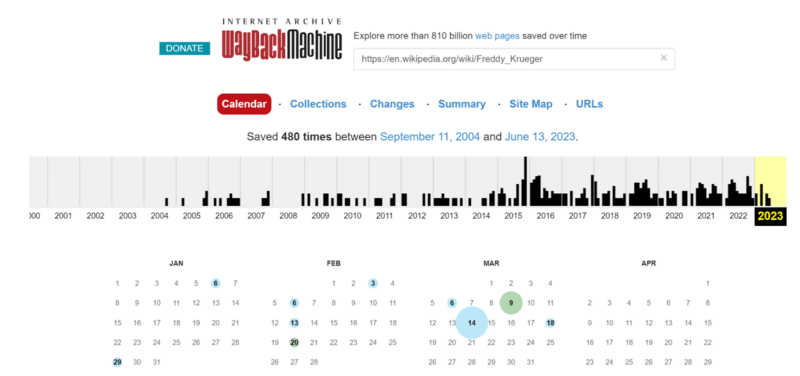
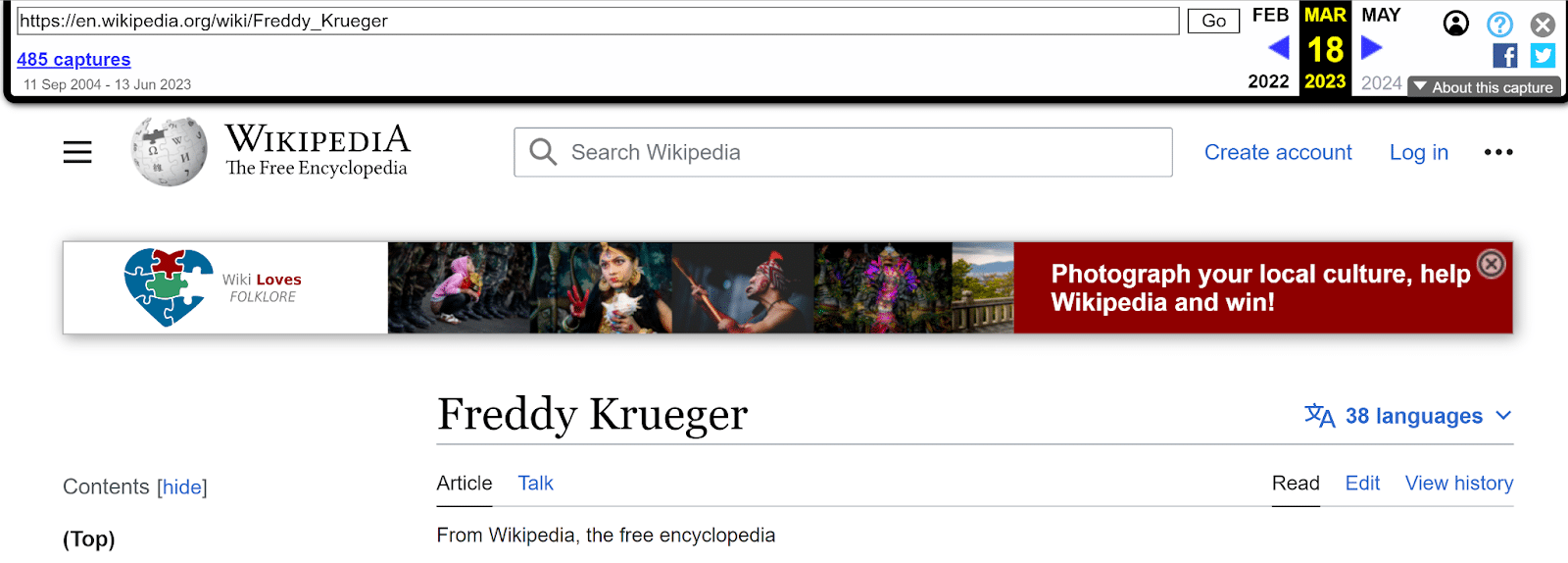
The Internet Archive Wayback Machine is one of the most underrated free tools for SEO. Not only can you use it to view past versions of your own website, but you can also use it to view competitor changes.
There are probably hundreds of tools and approaches for competitive SEO analysis, like Fluxguard and Visualping. But the Wayback Machine is free and can be used on any site. And it can’t easily be blocked by a competitor’s firewall (yes, your competitor can block IPs coming through your company’s VPN).
You can view past versions of competitor pages to see what they’ve updated, tested and reverted, like:
- Design and layout elements
- Calls to action (CTAs)
- Content and headline changes
- Keyword focus
Web Archives also has extensions for all the major browsers that let you instantly view versions of any page you’re on.
When to use it
- Spot and track trends over time, or come up with ideas to test on your own site.
- Use the Changes tab to see how much a page has changed over time. It can give you clues if competitors seem to update certain pages on a regular timeline.
- For sites that use a category or folder structure, the Sitemap tab lets you see a visual map of the structure of the site. This is especially useful for sites without an obvious or public sitemap.
- Share before and after screenshots if you can’t access previous versions of your page.
When you can’t use it
The Wayback Machine has one major downside: You can’t view a page that hasn’t been archived before.
The Wayback Machine doesn’t have a record of every webpage, though it does come pretty darn close.
The Archive claims it has 813 billion web pages in its collection. With an estimated 4.5 billion indexed webpages in existence, that’s about 18% of the whole internet.
Fortunately, you can add any page to the archive that you can view later. If you search for a URL and it’s not in the archive, click the option to save it to add it to the collection. But there won’t be historical data before that point.
Dig deeper. 5 ways to use the Wayback Machine for SEO
2. Data analysis: Copy Selected Links
Let’s say you have a list of linked article titles in a spreadsheet. But you need to add the actual URLs in a column too.
Instead of right-clicking and copying each URL into a new cell, you can use the Copy Selected Links extension for Chrome and Firefox.
Copy the linked text, then right-click and paste. Now you have a list of the URLs for the content you copied.
When to use it
If you’re making edits across many pages on your site, typically, you’d have to log into your CMS, open each page and then click Edit. Or you might search for each page in the CMS dashboard and click Edit on each one.
If you use a CMS like WordPress, you can often copy the list of pages straight from your CMS dashboard, along with the Edit links, into the same spreadsheet.
- Create a spreadsheet.
- In your CMS, select all the pages to edit and copy with Ctrl/Cmd + C.
- In your spreadsheet, paste the list of linked pages.
- Right-click the page titles and paste the live URLs in one column.
- Right-click the Edit links and paste in another column.
Get the daily newsletter search marketers rely on.
<input type=”hidden” name=”utmMedium” value=”“>
<input type=”hidden” name=”utmCampaign” value=”“>
<input type=”hidden” name=”utmSource” value=”“>
<input type=”hidden” name=”utmContent” value=”“>
<input type=”hidden” name=”pageLink” value=”“>
<input type=”hidden” name=”ipAddress” value=”“>
3. Design and layout: GoFullPage
Now you have a spreadsheet with a list of the page links and edit links. You can right-click and open all the Edit links in new tabs instead of opening each page individually.
GoFullPage is a Chrome browser extension that lets you take a screenshot of an entire page at once.
You can take a picture of an entire page on desktop and mobile without needing to scroll and take multiple screenshots.
Save your screenshot as a PDF or PNG, or mark up your image with notes before you save it or share it.
When to use it
- Save search results for specific keywords to see how the SERP changes over time.
- Compare SERP results side-by-side for users in different locations or using different devices.
- Share before and after screenshots of page changes.
- User test different versions of the same page without the need for a designer.
4. Research and data formatting: Docs Online Viewer
Doing an advanced web search for filetype:pdf is enormously helpful for finding specific data types, like sample files and reports.
But some sites require you to download the PDF instead of letting you view it directly in your browser. You can always open a PDF in Chrome from your Privacy and Security settings. But this isn’t foolproof.
Docs Online Viewer, a Chrome or Firefox browser extension, puts a linked cloud icon next to any PDF. Click it to view the PDF in your browser.

When to use it
- The obvious use case is so you never have to download a PDF first before you find out if the PDF is useful.
- Sometimes this plugin lets you view a PDF that’s behind an email signup button – without giving away your email address.
- Viewing the PDF in your browser also means you can combine this with other extensions, too. Use this plugin with Copy Selected Links to copy all the URLs in a database of links, for example.
5. Reformat content from an image: OneNote
OneNote is a go-to program for organizing notes and your work life. It also has a lesser-known feature: copying text from images.
- Copy any image into a OneNote page.
- Right-click on the image.
- Select Copy Text from Picture.
- Paste it into your Note with Ctrl/Cmd + V or right-click + paste.
It’s not perfect at copying text by any means. But for images that are structured around copy, it can be up to 80% accurate.
You’ll often need to check certain letters and numbers manually. OneNote might mix up a 1 and an L, for example.
When to use it
This is helpful for pulling out content from an image so you can analyze the data or turn it into on-page content.
Google can’t read content from images like it reads on-page copy, even if it does have proper alt text. Neither can screen readers.
Whenever you have an image on a page, it’s useful to include the same info from the image in another, more readable format. Use this tool to take a diagram and turn it into copy, or include both an image of a table and an HTML table on your page.
The image-to-text feature is available with free or premium versions of OneNote. OneNote is available for both PC and Mac.
Get the most out of your SEO tools
To get the most out of your SEO tools, share the best tools and tips you’ve found with your team, clients and peers.
SEOs love to try new things, so try new tools and feature whenever you can, then spread your wealth of knowledge to others.
The post 5 free SEO tools and plugins to try appeared first on Search Engine Land.
Courtesy of Search Engine Land: News & Info About SEO, PPC, SEM, Search Engines & Search Marketing
Tuesday, July 18th, 2023
You’re an SEO with the best intentions of driving traffic and awareness for your brand (or client). After work, you take a spin to the grocery store and pay a few bucks more than you expected.
On the way home, you stop to fill your gas tank and notice that the price per gallon is higher than the last time you filled it.
You shrug and start mentally planning the next day – digging into your favorite keyword research tool, checking out site speed metrics after some asset optimizations, and prioritizing some pages to review after doing month-over-month traffic analysis.
I’m here to tell you you’re missing something.
If the last 12 months or so have taught me anything, it’s that macroeconomic trends significantly impact how users engage with online content.
Maybe SEO is not the first initiative anyone thinks of when strategizing how to incorporate macroeconomic angles inxto their marketing campaigns, but you’re missing the boat if you don’t.
This article examines:
- The macroeconomic signals to watch and why.
- Sources to reference to gauge user reaction.
- How to assess users’ developing needs and emotions.
- How to address those needs and emotions in your SEO campaigns.
The macroeconomic signals to watch and why
I’m not saying you should use daily gas prices as a barometer. I am saying they could be a good reminder to keep your finger on the pulse of the bigger picture.
Signals to watch include:
- Consumer confidence ratings.
- Venture capital and private equity funding trends.
- The stock market.
- Inflation.
- The monthly jobs report.
If you’re in B2C, consumer confidence, inflation and jobs are key.
If you’re in B2B (especially working with high-growth companies, as I do), it’s essential to gauge how easy (and/or expensive) it is to raise funds.
And for marketing agencies, know that the macroeconomy heavily influences the economics of how businesses spend on marketing and spend to acquire users.
If you’re working in an industry closely related to finance, like lending or real estate or insurance, you likely have a second layer of important metrics to watch (e.g., mortgage rates).
Either way, knowing the economic picture can alert you to prime times to dig in for more information to help you effectively engage users.
Sources to reference to gauge user reaction
The SEO space isn’t about staying in a bubble of reporting; it’s about keying into audience behavior, which means you must know your audiences. That goes way beyond monthly search volume and search volume over time.
Many of the major keyword tools aggregate monthly over time and won’t give you the agility you need to gauge real-time impact.
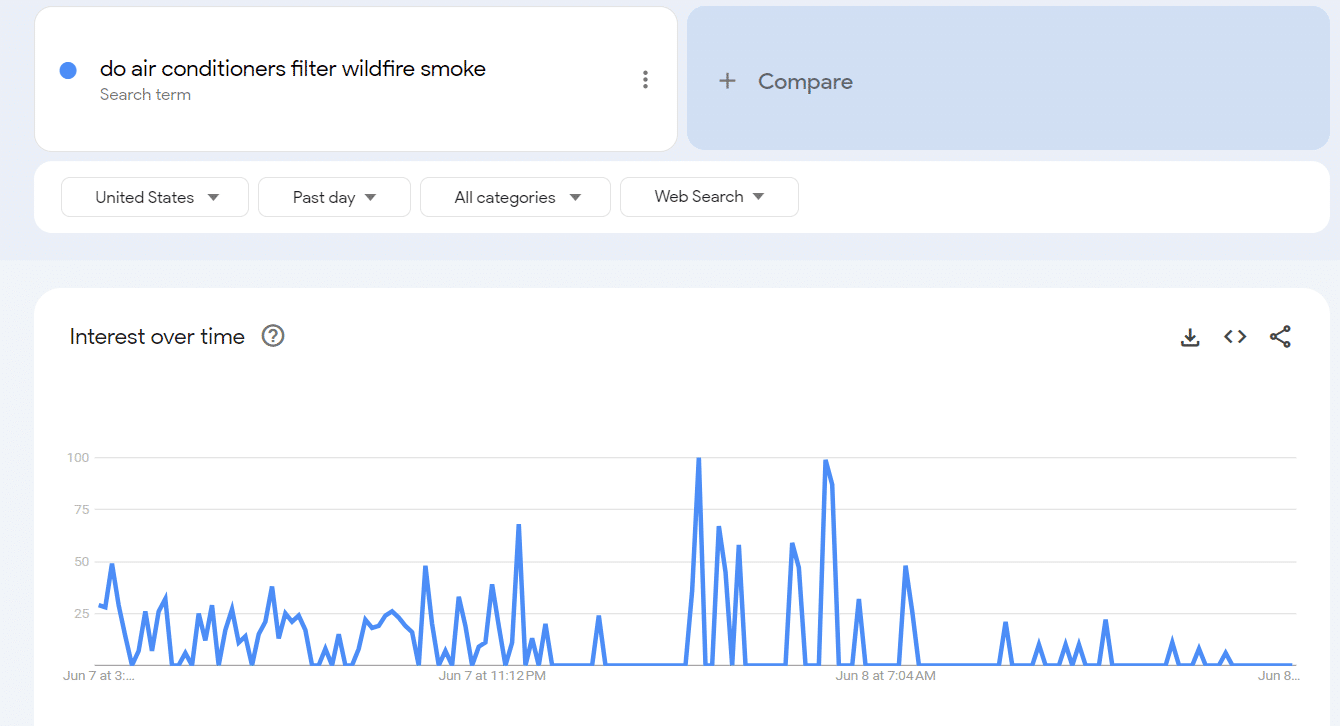
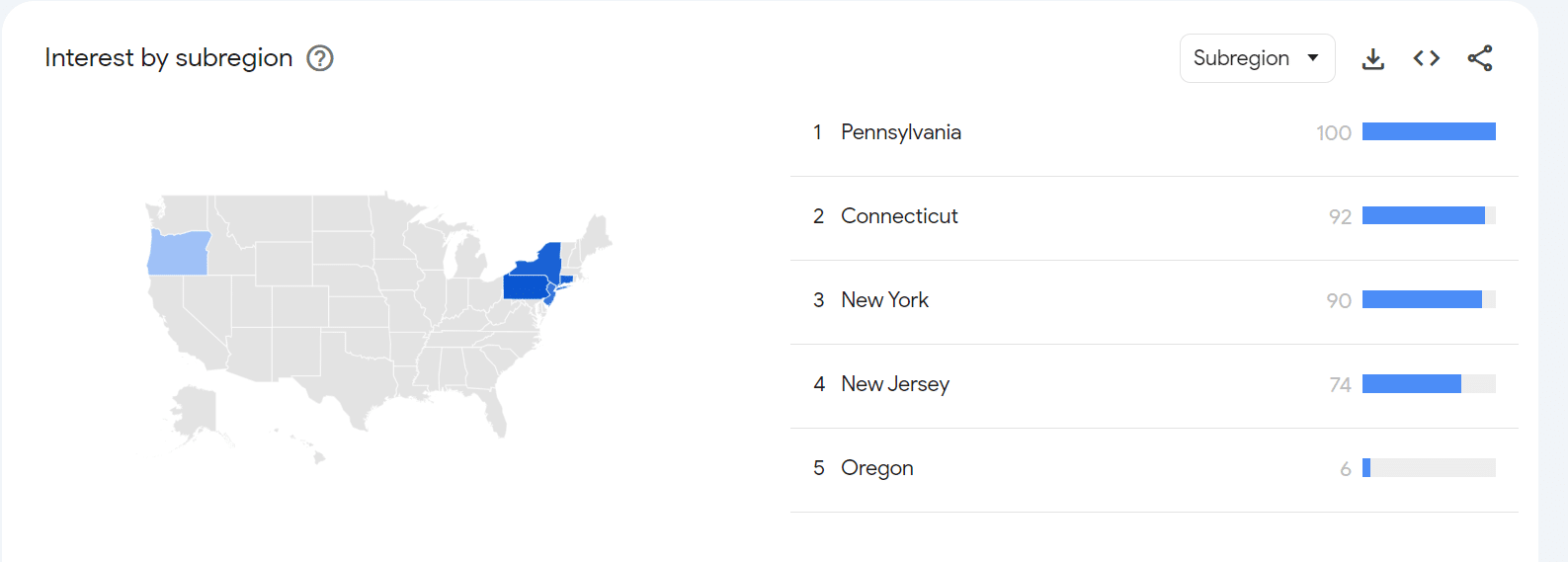
Google Trends, on the other hand, has become an incredible real-time source for changing behavior.
Check out the geo (and hourly) breakdown of the query “do air conditioners filter wildfire smoke” during the eerie period in June when Canadian wildfires were turning the metro New York skies orange:
Twitter and Reddit are other good sources for up-to-the-minute info.
Depending on who you follow, Twitter can give you the view of people like journalists and politicians, who help shape the broad discourse.
Reddit can take you into the weeds to show you what people closer to the ground are saying.
If you’re looking to gauge impact in your specific industry and see the approaches and angles that are most popular:
- Pick two or three trusted industry sites.
- Gauge the (non-sponsored) articles in the prime positions. Those have almost always earned that real estate with lots of engagement.
Qualitative data from your customers, clients, and leads is always good to gather. Your own reports – from Google Search Console and Google Analytics – will show you in real time if you already have any assets that are drawing renewed interest.
Get the daily newsletter search marketers rely on.
<input type=”hidden” name=”utmMedium” value=”“>
<input type=”hidden” name=”utmCampaign” value=”“>
<input type=”hidden” name=”utmSource” value=”“>
<input type=”hidden” name=”utmContent” value=”“>
<input type=”hidden” name=”pageLink” value=”“>
<input type=”hidden” name=”ipAddress” value=”“>
How to assess users’ developing needs and emotions
If the sources I just referenced hit on common themes, opportunities, or challenges more than once, you’ve got another layer of analysis to do.
What fears, ambitions, or questions do those point to that you can address with UX and content? And what modifiers might you add to more broad queries that might make them timely and relevant?
For instance, a few years ago, when mortgage interest rates were in the 2-3% range, a simple “mortgage brokers” would have sufficed.
With interest rates soaring today, something like “mortgage broker comparison tool” or “mortgage broker price match” would likely draw tons of high-intent engagement.
On the B2B side, less available funding means lots of budget reduction, which in turn means a reduction in transactional intent – and a shift up the funnel into research and education, which you can address with content that speaks to industry challenges and your unique solutions.
How to address those needs and emotions in your SEO campaigns
I’ve already mentioned a couple of ways to address these – changing the nature of your content and keywords to align with shifting intent.
Other ways to use your analysis include new site hubs to address discrete challenges, updated UX to emphasize relevant themes and messaging, and even new content initiatives.
(As an example, I once had a client in the manufacturing space; we built a content strategy around the Bureau of Labor Statistics’ monthly Jobs Report in which we got real-time analysis from the client’s CEO each time the report came out, and we’d publish the analysis immediately – and get lots of incremental traffic.)
The other step is to feed intel to your paid media teammates. Suppose we’ve created a piece of content for a relevant term that gets lots of traffic and conversions (which is directional data but still indicates that the page is valuable). In that case, your paid media team will want to know that bidding on that term, even if it’s expensive, is highly likely to succeed.
And from a keyword perspective, remember that keyword planners aren’t exactly up to date with traffic data, so if you see real-time spikes, you can help your paid colleagues take advantage before the keyword’s costs catch up to increased volume.
Looking at the bigger picture
You’ll notice that none of the above contained any (extremely amateur) predictions about the economy itself.
Whether the economy stays in flux, turns for the better, or nosedives, the same principles hold: macro trends should be reflected in SEO strategy.
And it’s not just the economy. As COVID taught us, anything with a transformative effect on society at large introduces new needs that SEOs can help address.
So consider this a reminder to broaden your perspective beyond your usual inputs. Even in SEO, a little real-time curiosity and analysis can bear fruit you won’t see growing in the keyword planner.
The post How to incorporate macroeconomic signals into your SEO strategy appeared first on Search Engine Land.
Courtesy of Search Engine Land: News & Info About SEO, PPC, SEM, Search Engines & Search Marketing
Tuesday, July 18th, 2023
While Google is opening up the discussion on giving credit and adhering to copyright when training large language models (LLMs) for generative AI products, their focus is on the robots.txt file.
However, in my opinion, this is the wrong tool to look at.
My former colleague Pierre Far wrote an excellent article on Crawlers, search engines and the sleaze of generative AI companies where he highlighted some of the immense challenges currently facing the online publishing industry. Similar to his article, I will keep this proposal high-level as developments in this field are extremely fast-paced.
Why not use robots.txt
There are a few reasons why using robots.txt is the wrong starting point for the discussion on how to respect the copyright of publishers.
Not all LLMs use crawlers and identify themselves
The burden is on the website operator to identify and block individual crawlers, which may use and/or sell their data for generative AI products. This creates a lot of extra (and unnecessary) work, especially for smaller publishers.
This also assumes that the publisher has editing access to their robots.txt file, which is not always the case with hosted solutions.
This is not a sustainable solution as the number of crawlers continues to grow
The usable file size of a robots.txt file is limited to 500 kb, according to the newly proposed robots.txt standard.
This means that a large publisher may run into problems with their robots.txt file if they need to block a lot of LLM crawlers and/or refined URL patterns in addition to other bots.
An ‘all or nothing’ approach is unacceptable
For the larger crawlers like Googlebot and Bingbot, no distinction can be made between the data being used for search engine results pages (traditionally where there is an “agreement“ between the publisher and search engine in the shape of a “citation“ to the original source) and generative AI products.
Blocking Googlebot or Bingbot for their generative AI products also blocks any potential visibility in their respective search results. This is an unacceptable situation where the publisher is forced to make a choice between “all or nothing”.
Robots.txt is all about managing crawling while the copyright discussion is all about how the data is used
The latter is about the indexation/processing phase. As such, robots.txt isn’t really relevant to this discussion but rather a last resort if nothing else works and should really not be the starting point of this particular discussion.
Robots.txt files work fine for crawlers and do not need changing for the purpose of LLMs. Yes, LLM crawlers need to identify themselves, but what we really need to talk about is indexation/processing of the crawled data.
Reinventing the wheel
Luckily, the web already has some well-established solutions which can be used for managing the usage of data with regard to copyrights. It is called Creative Commons.
Most of the Creative Commons licenses would do fine for the purpose of LLMs. To illustrate:
- CC0 allows LLMs to distribute, remix, adapt, and build upon the material in any medium or format with no conditions.
- CC BY allows LLMs to distribute, remix, adapt, and build upon the material in any medium or format, so long as attribution is given to the creator. The license allows for commercial use, but credit must be given to the creator.
- CC BY-SA allows LLMs to distribute, remix, adapt, and build upon the material in any medium or format, so long as attribution is given to the creator. The license allows for commercial use. If LLMs remix, adapt, or build upon the material, it must license the modified material under identical terms.
- CC BY-NC allows LLMs to distribute, remix, adapt, and build upon the material in any medium or format for noncommercial purposes only so long as attribution is given to the creator.
- CC BY-NC-SA allows LLMs to distribute, remix, adapt, and build upon the material in any medium or format for noncommercial purposes only so long as attribution is given to the creator. If LLMs remix, adapt, or build upon the material, they must license the modified material under identical terms.
- CC BY-ND allows LLMs to copy and distribute the material in any medium or format in unadapted form only so long as attribution is given to the creator. The license allows for commercial use and credit must be given to the creator, but no derivatives or adaptations of the work are permitted.
- CC BY-NC-ND allows LLMs to copy and distribute the material in any medium or format in unadapted form only, for noncommercial purposes only, and so long as attribution is given to the creator and no derivatives or adaptations of the work are permitted.
The last two licenses are unlikely to be usable for LLMs.
However, the first five licenses mean that LLMs need to consider how they use the crawled/obtained data and ensure they adhere to the requirements placed upon using the data from the publishers, such as attribution and when sharing the product built upon the data.
This would put the burden on the “few“ LLMs in the world instead of the “many“ publishers.
The first three licenses also support “traditional“ usage of the data, for example, in search engine results where the attribution/credit is given through the link to the original website. While the fourth and the fifth license also support research and development for open-source LLMs.
Side note: Keep in mind that all these software companies building LLMs often use open-source software where they have the same copyright license challenges with regard to the software libraries and operating systems they use to avoid copyright violations on a code level. So why reinvent the wheel when we can use a similar system for the data this code processes?
The meta tag is the way
Once a publisher has identified an appropriate license, this license still needs to be communicated. Again, this is where robots.txt seems to be the wrong approach.
Just because a page should be blocked from crawling for search engines does not mean it can’t be used or isn’t useful for LLMs. These are two different use cases.
As such, to separate these use cases and allow for a more refined yet also easier approach for publishers, I recommend we use a meta tag instead.
Meta tags are pieces of code that can be inserted on a page level, within a theme or the content (I know, this is not technically correct, but HTML is forgiving enough and can be used as a last resort when a publisher has limited access to the code base). They do not require the publisher to have additional access rights other than being able to edit the HTML of the content published.
Using meta tags does not stop crawling, like the meta noindex. However, it allows you to communicate the usage rights of the data published.
And although there are existing copyright tags that can be used – notably from Dublin Core, rights-standard (abandoned proposal), copyright-meta (focuses on the name of the owner rather than the license) and other attempts – the current existing implementation of these on some websites may conflict with what we try to accomplish here.
So a new meta tag may be necessary, although I am happy to reuse an existing or old one, such as “rights-standard“, as well. For this discussion, I am proposing the following new meta tag:
<meta name="usage-rights" content="CC-BY-SA" />
In addition, I recommend that this meta tag is also supported when used in HTTP Headers, like the noindex is supported in X-Robots-Tag, to aid LLMs crawlers better managing their crawl resources (they only need to check the HTTP Headers to validate the usage rights).
X-Robots-Tag: usage-rights: CC-BY-SA
This can be used in combination with other meta tags. In the example below, the page should not be used for search results but can be used for commercial LLMs as long credit is given to the source:
X-Robots-Tag: usage-rights: CC-BY, noindex
Note: The name “usage-rights“ for the meta tag is a proposal and can be changed.
Foolproof solution
Granted, there are bad crawlers and bad actors building their LLMs and generative AI products.
The proposed meta tag solution won’t prevent the content from being used that way, but neither will the robots.txt file.
It is important to acknowledge that both methods depend on the recognition and compliance by the companies using the data for their AI products.
Conclusion
Hopefully, this article illustrates how using robots.txt for managing data usage in LLMs is, in my opinion, the wrong approach/starting point for dealing with usage and copyrights in this new age of LLMs and generative AI products.
This meta tag implementation would enable publishers to specify copyright information at the page level using Creative Commons, without preventing the page from being crawled or indexed for other purposes (like search engine results). It also allows for copyright declarations to be made for various uses, including LLMs, generative AI products, and potential future AI products.
The post Robots.txt is not the answer: Proposing a new meta tag for LLM/AI appeared first on Search Engine Land.
Courtesy of Search Engine Land: News & Info About SEO, PPC, SEM, Search Engines & Search Marketing
Tuesday, July 18th, 2023
Bing Chat now supports visual search, which means you can now upload a photo or take a picture and have Bing Chat respond with answers around those visuals. “Visual Search in Bing Chat is rolling out now on desktop and mobile,” Microsoft Bing posted on its blog.
What it looks like. Here is a video of it in action on the mobile interface of Bing Chat:
Here is how it works on the desktop interface of Bing Chat:
Why we care. Visual search is a big part of search in general, Bing Search added this feature back in 2018, while Google has Google Lens. Google also just rolled out Google Lens in Bard last week. Bing Chat was testing this feature for over a month.
If you want to ask Bing Chat more details about what you are seeing or on a screenshot you have access to, you can now do so.
Bridging visual and search with AI can be a lot of fun but don’t trust everything you see on these AI search features, they still can hallucinate.
The post Visual Search now live in Bing Chat appeared first on Search Engine Land.
Courtesy of Search Engine Land: News & Info About SEO, PPC, SEM, Search Engines & Search Marketing
Tuesday, July 18th, 2023
Kroger is breaking away from Microsoft to take its advertising platform – Kroger Precision Marketing – in-house.
The new system, which the grocer has spent the last year working on, is currently in beta but all marketers are set to transition in the fall.
Why we care. With 2,700 stores across 35 states, Kroger is the largest supermarket chain in the US and has historically worked with more than 2,000 brands. Marketers that launched campaigns using the old ads platform noted it was “clunky” and unnecessarily time-consuming as they were forced to navigate multiple systems to get a campaign live. The new platform, however, acts as a one-stop shop where marketers can both get their ads live and access data, meaning they can make informed decisions faster to potentially get a better ROI.
“It wasn’t a decision we took lightly because Microsoft has been a great partner,” Dan Mayer, VP, Media Platform, Kroger Precision Marketing at 84.51˚, told Search Engine Land. “But this new platform gives [marketers] more control and the ability to act on data and insights much more quickly – we’re excited for that.”
Highlights. The new platform will provide marketers with the power to:
- Reach relevant audiences using search-based insights and custom ad groups.
- Design, iterate, and activate creative messages within the platform.
- Customize and save multiple creative templates by brand and product.
- Optimize all campaign elements including budgets, messaging, and flighting.
- Build reports and boost performance against deterministic retail data – including sales lift, household penetration and unit lift.
Although Kroger is excited to roll out its new ad platform, Mayer emphasized that the system will always be a “work in progress” and that the team is looking forward to hearing feedback from clients.
- “The media space is incredibly dynamic so there is lots more to come. We want to continue to enhance its features and functionalities,” Mayer said.
Read on for highlights from my recent Q&A with Mayer for more details around Kroger’s new self-service ad platform.
Kroger’s ‘biggest pain point’
Marketers had been submitting feedback to Kroger about the interface of its old platform, explaining it was unnecessarily time-consuming to get a campaign live.
- “One of the biggest pain points was the creative of it.
- “Targeted onsite ads in particular was a bit of a disjointed experience because the campaign process started in one spot but you’d have to jump out to build that creative in another spot – and then you’d have to come back in again!
- “The current state is a little clunky if I’m being honest. There are multiple systems [marketers] have to navigate to get a campaign live. We needed to somehow bring that one experience into one platform.”
Taking back control
For Kroger, addressing marketers’ biggest pain point resulted in it taking the tough decision to move away from Microsoft and creating an in-house self-service ad platform, so that its team of scientists could provide real-time data for more control.
- “We like to think we have a healthy obsession with our customer experience and optimizing that experience.
- “[Going in-house] gives us more direct control over that experience as it allows us to offer our data insights and science much more seamlessly and quickly.
- “We now own the roadmap, we own the decision on priority and what we can get into production and when, whereas in the past we depended on partners to bring that stuff to market.
- “With our new platform, [marketers] can now come directly to us through a single entry point and stay contained within that platform. You’re not bouncing out onto other platforms to execute campaigns.”
Verdict from marketers so far…
Although the new platform is still in beta and it’s very early days, Kroger has already started collecting feedback.
- “The feedback from marketers so far has been relief because of how we’ve simplified the process for them.
- “Marketers seem to appreciate the ease of use now – especially when it comes to setting up and activating campaigns.
- “They’re also excited by the science we’re bringing to them – and how much more quickly. We’ve successfully deployed science previously but now that is a much quicker process and advertisers can see the benefit of that in the form of increased performance of their campaigns.
- “But when we were making this platform, there were certainly points at which we thought we had everything covered then we’d go and test it and we realized oh we’ve missed that so we’ve got to add a component of a feature. So I’m excited to get more feedback from our advertisers because this is a work in progress.”
Next steps
Kroger’s new ad platform won’t be rolled out to all marketers until the fall, however, the company is already looking to next year and beyond.
- “We’ll have all advertisers coming over by the end of the year and we’ll be open to the feedback they have to give as we continue to enhance the features and functionalities.
- “Marketers will be able to give feedback on the ad platform.
- “We will also continue to build the platform out across our other advertising experiences across our off site portfolio later this year and into next year.
- “We’re not reporting revenue or our financial goals at the time, but we expect to continue to rapidly grow. Watch this space!”
The post Kroger’s new self-service ad platform: What you need to know appeared first on Search Engine Land.
Courtesy of Search Engine Land: News & Info About SEO, PPC, SEM, Search Engines & Search Marketing