Archive for the ‘seo news’ Category
Wednesday, August 16th, 2023
X (Twitter) has paywalled XPro (TweetDeck) for both brand and personal accounts.
Users now need to be Blue subscribers to access the tool, which has been rebranded as XPro under Elon Musk’s reign.
Why we care. Some people will feel disgruntled about paying for a tool that has historically been free, so may leave the platform and look for alternatives. This is likely to negatively impact the discoverability of content.
Disappointing. Julie F Bacchini, PPC expert and managing director of PPC Chat, told Search Engine Land that the move would have a significant impact on the marketing community:
- “For Twitter based communities, like PPC Chat, it is a serious blow to community interactivity. PPC Chat has historically been a Twitter based community with lots of activity centered on our community hashtag.”
- “Unfortunately, due to changes in the past six months and culminating with making XPro a paid only feature, we have had to move our weekly chats off of Twitter and onto our other channels.”
- “It also potentially really hampers discoverability of content and like minded follows as it is a lot more difficult to follow lists without a tool like XPro. I get that X is trying to increase its revenue, but putting a historically free tool that really enhanced the Twitter user experience behind a paid subscription is disappointing.”

Final nail in the coffin. Anu Adegbola, PPC expert and founder of PPC Live UK, told Search Engine Land that this change was a disappointing move for the marketing community. She said:
- “TweetDeck was a platform X offered for free – and it didn’t make many updates to it whilst it was free. Yet now they are going to make it a paid service? That is not on!”
- “It was a nice way to organise follows and see multiple groups of follows at once without actually having to follow people – for example, you could just view by lists. This change is going to mean a lot less time on X and people seeing important tweets a lot less.”
- “X has really become a mess lately and this is the final nail in the coffin for me. TweetDeck was essential for me to drown out troll noise and only pay attention to people who I thought were worth paying attention to. This now goes away.”
Why now? X announced that it was going to paywall XPro after rolling out several improvements to its functionality last month. Following the modifications, the platform now supports:
- Full composer functionality
- Spaces
- Video docking
- Polls
- And more
Get the daily newsletter search marketers rely on.
<input type=”hidden” name=”utmMedium” value=”“>
<input type=”hidden” name=”utmCampaign” value=”“>
<input type=”hidden” name=”utmSource” value=”“>
<input type=”hidden” name=”utmContent” value=”“>
<input type=”hidden” name=”pageLink” value=”“>
<input type=”hidden” name=”ipAddress” value=”“>
How to switch over. X explained that all your saved searches, lists, and columns will carry over to the new XPro. You’ll be prompted to import your columns when you load the application for the first time. However, in order to access the new platform, you will need an X Premium subscription, which starts at $8 a month.
Teams functionality in XPro is still temporarily unavailable, however, X has confirmed that the service will be restored in the coming weeks.
What has X said? X is yet to comment on putting TXPro behind a paywall since initially announcing its plans to do so back in July.
Deep dive. Visit the X Help Center for more information.
The post X (Twitter) paywalls XPro (TweetDeck) appeared first on Search Engine Land.
Courtesy of Search Engine Land: News & Info About SEO, PPC, SEM, Search Engines & Search Marketing
Wednesday, August 16th, 2023
Google may soon allow businesses and organizations to manage their social media links that show up on their local listing within Google Search and Google Maps. Google added a new help document on how to manage your social links in Google Business Profiles.
Manage social links in Google Business Profiles. This feature is not fully rolled out to all businesses, yet, but some businesses may be able to login to their Google Business Profile and edit their profile and add or edit their social links within the “edit profile” section of their profile. The Google Business Profile API supposedly supports managing this now, as well.
Here is how add social links:
You can add one link per social media site. For example, you can add one Facebook and one YouTube link to your Business Profile. To add a social media link:
- Go to your Business Profile. Learn how to find your profile.
- Click Edit profile
 Business information Contact.
- To edit, click Social profiles Down arrow
 .
.
- In the drop down that opens, select the social media link you would like to add.
- In the web address field, add the link.
- Click Save.
Here is how edit social links:
- Go to your Business Profile. Learn how to find your profile.
- Click Edit profile Business information Contact.
- To edit, click Social profiles.
- Update the web address field for the social media link you’d like to update.
- Tip: To find the correct format for social media links, refer to the table above.
- Click Save.
Here is remove add social links:
- Go to your Business Profile. Learn how to find your profile.
- Click Edit profile Business information Contact.
- In “Social profiles” next to the profile you want to remove, click Trash
 .
.
- Click Save.
Supported social networks. Here is a list of social networks that is supported:
- Facebook
- Instagram
- LinkedIn
- Pinterest
- TikTok
- X (formerly known as Twitter)
- YouTube
Where social links display. Currently, Google can show social links for a business or organization in the business profile in Google Search and Google Maps. Here is a screenshot of my company’s social links in Google Search, which I have no direct way of managing outside of asking someone at Google to update it manually.

Why we care. Until now, it was very hard to manage these social media links that displayed in your Google business profile listing. But soon, if not now, you should be able to manage those links directly in Google Business Profiles.
Hat tip to Elisabeth Rule for spotting this.
The post Google Business Profiles to let you manage your social links appeared first on Search Engine Land.
Courtesy of Search Engine Land: News & Info About SEO, PPC, SEM, Search Engines & Search Marketing
Wednesday, August 16th, 2023
No, you don’t have to worry about scores from SEO tools. Google doesn’t even use scores from some of its own tools (e.g., Lighthouse) for ranking.
That’s according to Google Search Advocate John Mueller, in the latest #AskGooglebot video.
Why we care. Even though Google has said numerous times that Google does not use SEO tool scores (e.g., Domain Authority), it has become a zombie myth (i.e., a myth that just won’t die). Tool scores are not mission-critical SEO metrics. You’re optimizing for Google and search engines – not third-party tool metrics.
Not at all. Google Chrome’s Lighthouse tool is just one example of a tool that will show you performance scores. However, like third-party tools, Google Search doesn’t use Lighthouse scores for ranking.
- “No, Google does not use scores from third-party SEO tools or services. It doesn’t matter whether it’s about a website’s authority or a rating about spamminess, Google doesn’t use these scores at all,” Mueller said
But. Even though Google doesn’t use SEO scores for ranking, Mueller said some of these scores could be useful for finding actual issues.
- “They could help with the next steps, or perhaps even qualify the work that was done. Knowing how to score comes to be is critical in determining whether it makes sense for you.”
The video. Watch Does Google Search use SEO scores? #AskGooglebot
The post Google: Don’t worry about SEO tool scores appeared first on Search Engine Land.
Courtesy of Search Engine Land: News & Info About SEO, PPC, SEM, Search Engines & Search Marketing
Tuesday, August 15th, 2023

Your subject line communicates your email’s value to the recipient and encourages them to read further and, potentially, to engage with your brand on a deeper level by responding to your call to action (CTA). A poor subject line is more than just bad: It can contribute to your email being marked as spam, dinging your reputation with your customer and search engines.
That’s why it’s important to focus on your subject lines as an important part of your email marketing campaigns, instead of leaving them as a last-minute item to be completed right before you hit send.
This eBook from Marigold outlines email subject line best practices, and shows some examples of subject lines that really work.
Don’t miss this opportunity to optimize your email marketing strategy! Visit Digital Marketing Depot to download Email Subject Line Tips and Best Practices.
The post Email subject line tips and best practices (with examples!) appeared first on Search Engine Land.
Courtesy of Search Engine Land: News & Info About SEO, PPC, SEM, Search Engines & Search Marketing
Tuesday, August 15th, 2023
The end is near for Google Discovery ads.
You can now sign up for access to Google Ads’ Demand Gen, the new campaign type announced at Google Marketing Live in May.
Once you’re in the beta, your Discovery campaigns will be automatically upgraded to Demand Gen.
All Discovery campaigns should be “upgraded” to Demand Gen by early 2024.
What is Demand Gen beta? “Demand Gen campaigns combine image + video ads in one place and can be used to drive conversions, site visits and actions like sign-up and add-to-cart across YouTube, Discover and Gmail,” Google Ads Liaison Ginny Marvin explained in a thread on X, formerly known as Twitter.
In addition to YouTube Home, Search and Watch Next, Discover, and Gmail, Demand Gen campaigns work across:
- YouTube Shorts.
- YouTube in-stream.
RIP, Discovery ads. Google introduced Discovery ads in 2019.
Why we care. Being able to see how your creative will look across Demand Gen placements is great for advertisers, especially brands with strict compliance and/or brand teams, as PPC expert and SMX speaker Sam Tomlinson points out in an X thread full of reactions and takeaways.

Who is eligible for an upgrade? Right now, all you need is an active Discovery campaign. Google Ads will open Demand Gen campaigns to everyone in October 2023.
How to upgrade. Sign up for the Demand Gen beta via this short form.
New features. Once you sign up for the Demand Gen beta, you can explore these new features:
- Different ad formats in one campaign: You will be able to experiment with a variety of different ad formats, including short-form videos, carousels, portraits, and square images to try to engage your audience more effectively.
- Lookalike segments: This feature will help you find customers similar to those who have already engaged with your brand through a custom-built Seed list. The ability to test from Narrow to Broad also provides the ability to restrain or expand reach.
- Unique goals: Similar to Discovery ads, you can optimize Demand Gen for conversions or use value-based bidding strategies.
- Maximize Clicks bidding: You can use this tool to optimize for site visits and actions, helping to drive high-value customers to your website.
- Ad previews: This feature lets you see how your creatives will look across different surfaces.
- A/B experimentation: Use this feature to optimize placements and find the perfect mix for your campaigns.
What Google is saying. Demand Gen was “built to help advertisers who buy on social platforms find and convert consumers with immersive, relevant, and visual creatives that grab attention and spur action in the right moment,” a Google spokesperson said:
- “Demand Gen drives conversions, site visits, and actions (like sign-ups and adds-to-carts) on our entertainment-focused touchpoints — YouTube, including Shorts, Discover and Gmail.”
- “In the coming months, we’ll share more resources and best practices to help ensure your upgrade process is as smooth as possible.”
Get the daily newsletter search marketers rely on.
<input type=”hidden” name=”utmMedium” value=”“>
<input type=”hidden” name=”utmCampaign” value=”“>
<input type=”hidden” name=”utmSource” value=”“>
<input type=”hidden” name=”utmContent” value=”“>
<input type=”hidden” name=”pageLink” value=”“>
<input type=”hidden” name=”ipAddress” value=”“>
Timeline. Here’s what’s coming next:
- October: All Discovery campaigns will become eligible to move to Demand Gen. Some Discovery campaigns will automatically migrate to Demand Gen.
- January - March 2024: Google will launch automatic upgrades for all remaining Discovery campaigns.
Google’s announcement. Get ready to upgrade your Discovery ads to Demand Gen
The post You can now sign up for Google Demand Gen campaigns, which will replace Discovery ads appeared first on Search Engine Land.
Courtesy of Search Engine Land: News & Info About SEO, PPC, SEM, Search Engines & Search Marketing
Tuesday, August 15th, 2023

Don’t miss your chance to participate in tactic-rich, expert-led training on your search marketing specialty – and get specific answers to your burning questions: Register now for your choice of live, two-day SMX Master Class – happening online tomorrow and Thursday, August 16-17!
 (Need to convince your boss to let you attend? We’ve got you.)
Each Master Class is loaded with actionable tactics you can implement immediately:
Attending the Master Classes is a win-win-win:
- Can’t attend live? Instant on-demand access is included with your pass.
- Can’t choose one class? Purchase multiple to save 15% off total registration.
- Attending as a group? Unlock a unique team-building experience and save up to 20% off*
Don’t be left behind. Explore the hottest topics in search alongside industry legends who are ready to answer your specific questions – all from the comfort of your own computer. No travel, no hotel room, no time out of the office.
Secure your spot at one of these exclusive SMX Master Classes for just $299!
Psst… Think you have what it takes to be an “award-winning” search marketer? Enter the 2023 Search Engine Land Awards for your chance to boost team morale, attract new business, and stand apart from the competition!
*Groups of 3-5 save 10%, 6-11 save 15%, and 12 or more save 20%. Email reg@thirddoormedia.atlassian.net. Discounts for different offers cannot be combined.
The post [This week] Actionable search marketing training & live Q&A at SMX appeared first on Search Engine Land.
Courtesy of Search Engine Land: News & Info About SEO, PPC, SEM, Search Engines & Search Marketing
Tuesday, August 15th, 2023
Microsoft is giving advertisers more time to complete verification through its Advertiser Identity Verification (AIV) program.
The company will only pause ads in three scenarios.
Why we care. You will still need to complete the Microsoft Ads verification requirements if you want your ads to continue showing globally.
How it works. All advertisers will still be asked to complete AIV when setting up a new account. If verification has not been completed, Microsoft will pause ads in the following scenarios:
- Advertisers whose ads will serve in the European Economic Area (EEA) will have 30 days to complete verification for ads to continue serving in the EEA.
- If AIV is not complete within 30 days, eligibility to serve ads in the EEA will be suspended until successful completion of AIV.
- Advertisers whose account has been flagged by systematic checks related to risk for advertisers or those who use our products.
- Ads will not serve globally until successful completion of AIV.
- Advertisers whose account has been suspended for policy violations, who have not already completed AIV.
- Successful completion of AIV will be the first step for the advertiser to be able to appeal the suspension.
Why now? Microsoft reviewed its initial decision following feedback and decided this change was needed to minimize the impact on customers.
Get the daily newsletter search marketers rely on.
<input type=”hidden” name=”utmMedium” value=”“>
<input type=”hidden” name=”utmCampaign” value=”“>
<input type=”hidden” name=”utmSource” value=”“>
<input type=”hidden” name=”utmContent” value=”“>
<input type=”hidden” name=”pageLink” value=”“>
<input type=”hidden” name=”ipAddress” value=”“>
What is Microsoft is saying. “As this continues to roll out across advertisers, the scope of ads that may be paused may expand over time as we continue to learn and evaluate the process, as well as any risks for our users.,“ the company wrote in a blog post:
Identity verification help. You can read the official help documentation here.
The post Microsoft gives unverified advertisers more time appeared first on Search Engine Land.
Courtesy of Search Engine Land: News & Info About SEO, PPC, SEM, Search Engines & Search Marketing
Monday, August 14th, 2023
Google has reportedly issued refunds to marketers amid claims it has been selling low-quality ads.
A representative from the search engine confirmed the payments but insisted it was common practice.
The payouts come after Google was accused of violating its own advertising standards approximately 80% of the time, according to an Adalytics study.
Why we care. Advertisers paying premium prices for a service Google has allegedly been failing to deliver will want their ad dollars back. This cash can then be reinvested to improve campaign performance elsewhere.
What has Google said? A spokesperson for Google told Ad Age:
- “As part of ongoing relationship building, we sometimes issue credits to advertisers, this is not uncommon.”
- “As we’ve stated repeatedly, Adalytics used a flawed methodology to make wildly inaccurate claims about Google Video Partners.”
What did the Adalytics study find? The report accused Google of misleading advertisers by:
- Playing premium ads without the promised audio.
- Placing ads in small videos in low-value places such as the side of a page’s main content.
- Placing ads in automatically-played videos.
- Placing ads on websites that don’t meet Google’s standards for monetization.
Companies and organisations impacted include small businesses, Fortune 500 companies and even the U.S. Federal Government. Dozens of marketers have since expressed their regret over purchasing Google’s True View ad product, its primary video ad product, as a result.
Get the daily newsletter search marketers rely on.
<input type=”hidden” name=”utmMedium” value=”“>
<input type=”hidden” name=”utmCampaign” value=”“>
<input type=”hidden” name=”utmSource” value=”“>
<input type=”hidden” name=”utmContent” value=”“>
<input type=”hidden” name=”pageLink” value=”“>
<input type=”hidden” name=”ipAddress” value=”“>
Who is Adalytics? Adalytics is a crowd-sourced advertising performance optimization platform that was set up to review and improve the digital advertising landscape. The company conducted this research by investigating campaigns for more than 1,100 brands that achieved billions of ad impressions between 2020 and 2023.
Deep dive. You can learn more about Adalytics’ investigation by reading its report, Did Google mislead advertisers about TrueView skippable in-stream ads for the past three years? You can also read Google’s ‘Transparency and brand safety on Google Video Partners‘ statement which was made in response to the report.
The post Google issues refunds amid accusations it missold ads on third-party websites appeared first on Search Engine Land.
Courtesy of Search Engine Land: News & Info About SEO, PPC, SEM, Search Engines & Search Marketing
Monday, August 14th, 2023
Amazon is testing highlighting product features and customer sentiment as part of a generative AI “customer review highlights” feature.
This seems to be an expansion of the test we reported on in June.
Why we care. If you sell products on Amazon, this feature could lead to more sales. Reviews remain critical as consumers decide whether to buy a product (Amazon highlighted that “customers contributed nearly 1.5 billion reviews and ratings to Amazon stores” in 2022). The big question is whether this new feature impacts sales positively or negatively.
What it looks like. Amazon’s feature appears at the top of the Customer reviews section on product pages. The AI-generated paragraph, which mentions product features and customer sentiment, appears under a bold Customers say heading. Beneath the paragraph is this line: “AI-generated from the text of customer reviews”:

Several tappable attributes (e.g., Performance, Ease of use, Stability) appear under the customer review highlights. This feature lets you filter to only show reviews mentioning that specific attribute. Here’s a screenshot example Amazon provided for Ease of use:

Who can see the test. A “subset of mobile shoppers in the U.S. across a broad selection of products” have been opted into the test, Amazon said in a blog post.
What Amazon said. The test is likely to expand in the coming months:
- “We are always testing, learning, and fine-tuning our AI models to improve the customer experience and, based on customer feedback, may expand our review highlights feature to additional categories and customers in the coming months.”
Newegg has a similar feature. Online retailer Newegg added AI-generated summaries of customer reviews on its product pages, as well as highlighting pros and cons or products.
More generative AI to come? In May, we reported that Amazon had plans to add generative AI to its search experience and was building tools for advertisers that generate videos and images. The company has not provided any updates on if/when we will see these.
The post Amazon tests AI-generated review highlights with U.S. mobile shoppers appeared first on Search Engine Land.
Courtesy of Search Engine Land: News & Info About SEO, PPC, SEM, Search Engines & Search Marketing
Monday, August 14th, 2023
The Google Ads help guide has a new AI assistant.
Currently in open beta, the new tool has been designed to help users find answers and solve account issues relating to Google Ads.
Select users are currently being invited to test the AI and provide their feedback.
Here’s a screenshot of the new tool in action, as shared by PPC expert Julie F Bacchini:
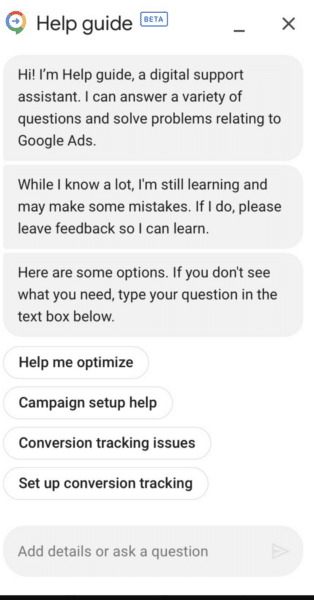
Interestingly, the new AI assistant notably comes with a disclaimer, warning:
- “While I know a lot, I’m still learning and may make some mistakes. If I do, please leave feedback so I can learn.”
Why we care. Marketers have been widely encouraged to test new AI tools and integrate them into their daily work strategies. However, this tool comes with a clear warning that isn’t yet a finished product and that it may provide incorrect answers, which would suggest it’s unreliable and could waste time.
What has Google said? Google sent emails to select users, inviting them to trial the new tool and provide their feedback:
- “If you choose to try this new feature, you’ll see the option to provide feedback on any AI-generated content.”
- “Your feedback helps us improve the quality and accuracy of AI answers. Keep in mind that this is an early technology preview, so it may display inaccurate or inappropriate content.”
- “If you don’t want to try this feature, you can still get many answers from help guide without it.”
Get the daily newsletter search marketers rely on.
<input type=”hidden” name=”utmMedium” value=”“>
<input type=”hidden” name=”utmCampaign” value=”“>
<input type=”hidden” name=”utmSource” value=”“>
<input type=”hidden” name=”utmContent” value=”“>
<input type=”hidden” name=”pageLink” value=”“>
<input type=”hidden” name=”ipAddress” value=”“>
Deep dive. Read Google Ads’ Best Practice guide for more information on how to get the most out of Google Ads.
The post Google Ads launches new AI assistant but warns its content may be inaccurate appeared first on Search Engine Land.
Courtesy of Search Engine Land: News & Info About SEO, PPC, SEM, Search Engines & Search Marketing

