Archive for the ‘seo news’ Category
Monday, August 21st, 2023
GA4 proves to be an incredibly valuable tool, offering extensive insights into your website’s performance.
While certain metrics and dimensions come pre-configured by the tool, others require partial or custom setup by users.
This is the case with event parameters, which enable us to obtain relevant information about actions taking place on our website.
Although a few of these parameters come pre-defined by GA4, most require proper configuration to ensure accurate data collection.
What are event parameters in GA4?
In GA4:
- Events allow you to measure specific user interactions on a website, such as loading a page, clicking on a link or submitting a form.
- Parameters provide additional information about those events.
For instance, a user views a product or adds an item to the cart.
With event parameters, you can create settings that describe the product they are viewing or the product they are adding to the cart, such as the name, the page, the link, the method or the price.
You can use parameters to create custom dimensions and metrics that will improve how you analyze your website performance.
You can add up to 25 parameters for each event. Event parameter names can have up to 40 characters, and the value assigned to each must be 100 characters or fewer.
Event parameter types in GA4
There are two types of event parameters in GA4, depending on how they are captured by the tool:
- Automatically collected parameters: GA4 automatically captures a set of parameters. Both automatically collected events and enhanced measurement events come with default parameters. However, the latter often requires custom configuration in many cases.
- Custom parameters: These parameters allow you to collect information that is not captured by default. This is applied to recommended events and custom events, where custom configuration is required.
Automatically collected parameters
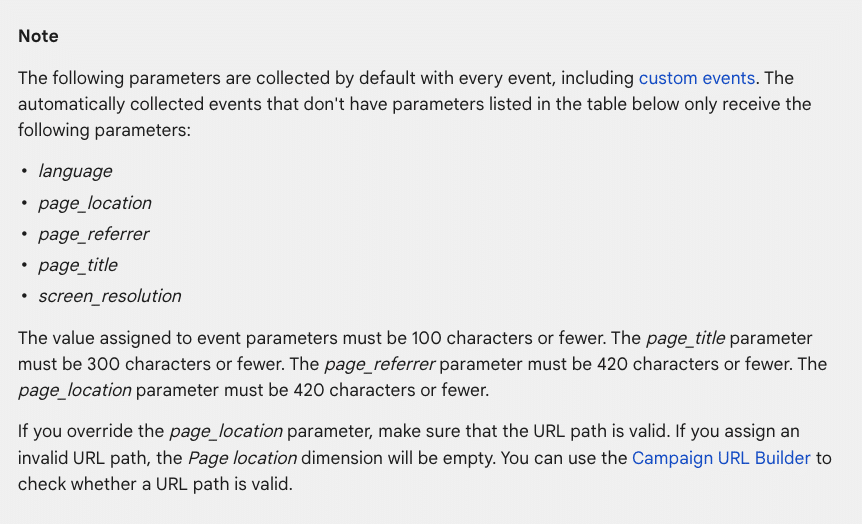
When you create a GA4 property, the following parameters, which provide supplementary information about the events, are automatically collected by GA4:
- language
- page_location
- page_referrer
- page_title
- screen_resolution
Check the list of automatic parameters provided by GA4 for automatically collected events.
How to view the parameters automatically collected in GA4 reports
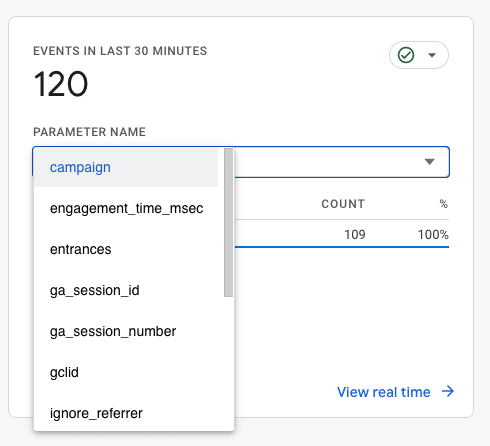
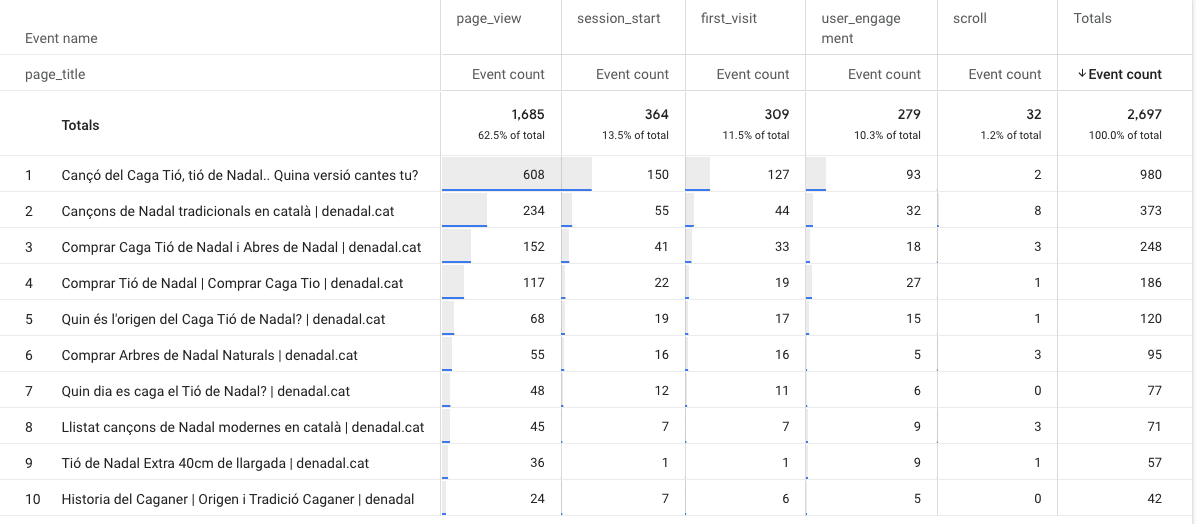
To view the automatically collected parameters, you need to go to Reports > Engagement > Events, then click on one of them (e.g., page_view)
Those displayed here are correctly set up and triggered. Otherwise, you will have to do a custom setup.
Custom parameters
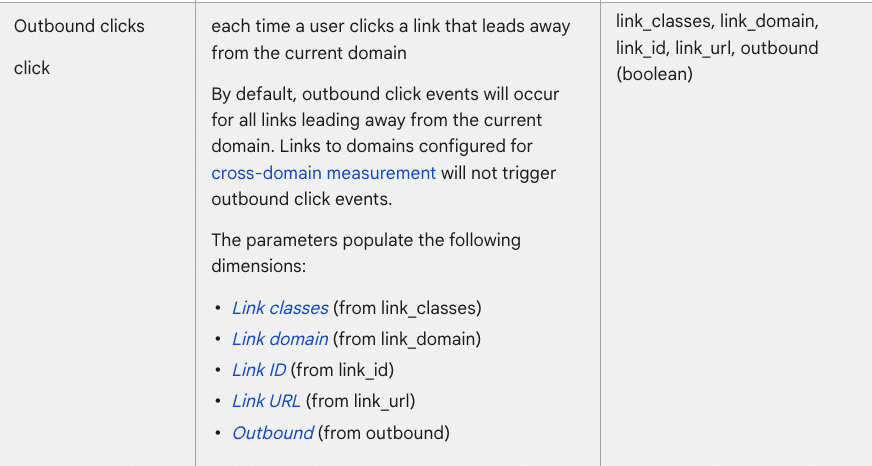
Custom parameters allow capturing information that is not collected by default. Depending on the type of event, Google recommends a set of parameters:
As you can see, most of the parameters require personalized configuration.
Customized event parameters can be configured via:
How to configure event parameters via Google Tag Manager
The most recommended option for creating event parameters – whether enhanced, recommended, or customized – is through Google Tag Manager.
To do this, you must follow the next steps to create custom parameters via Google Tag Manager:
First, ensure the GA4 and Google Tag Manager accounts are properly configured and linked.
When creating or configuring event parameters, check the recommended parameters provided by Google for this event:
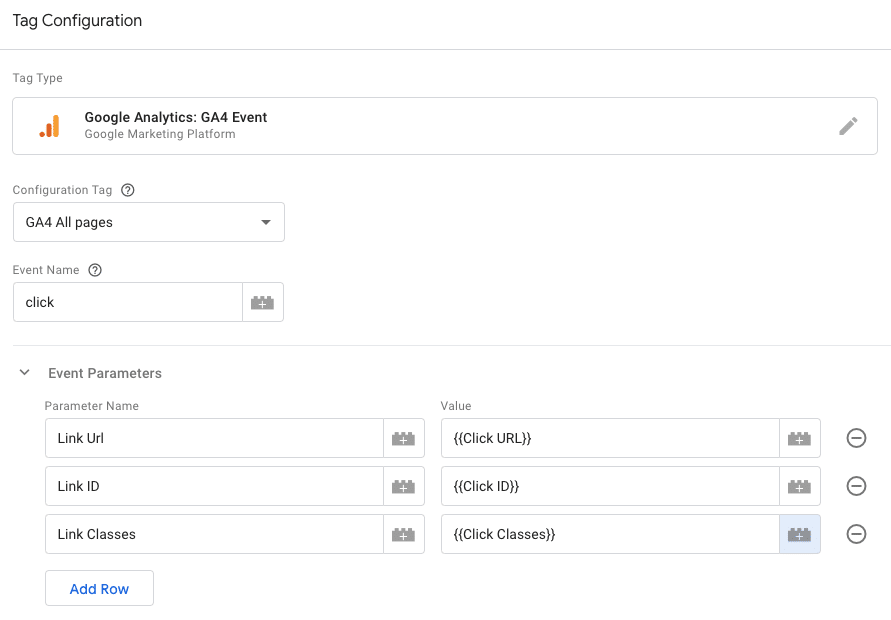
Take into account the parameters you need when configuring the event in Google Tag Manager. For example:
Check out more information about the different dimensions and metrics of GA4 and the different parameters recommended depending on the event.
After creating the tag, verify that it is activated successfully through Admin > Debugview:
And also through Google Tag Manager:
If everything is in order, you need to send these parameters as custom dimensions to link them with each event in GA4, enabling you to analyze the events with the new parameter information.
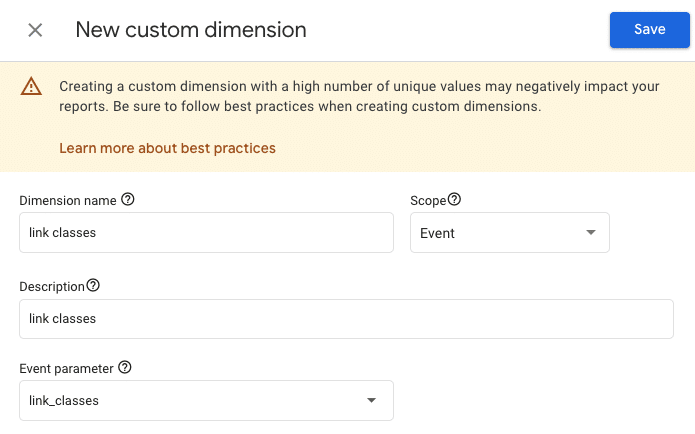
To achieve this, navigate to Admin > Custom Dimensions > Create custom dimension and create one for each new parameter.
If you skip this step after creating them for the first time, they will not appear in the tool with each event.
Now you can view the new information for each of your events (Engagement > Events):
In most cases, it may take hours or even days for data to be gathered and displayed.
Get the daily newsletter search marketers rely on.
<input type=”hidden” name=”utmMedium” value=”“>
<input type=”hidden” name=”utmCampaign” value=”“>
<input type=”hidden” name=”utmSource” value=”“>
<input type=”hidden” name=”utmContent” value=”“>
<input type=”hidden” name=”pageLink” value=”“>
<input type=”hidden” name=”ipAddress” value=”“>
Where to extract the parameter information for each event
Aside from the recommended parameters for each event, you can discover all the parameters included in each website event through Google Tag Manager.
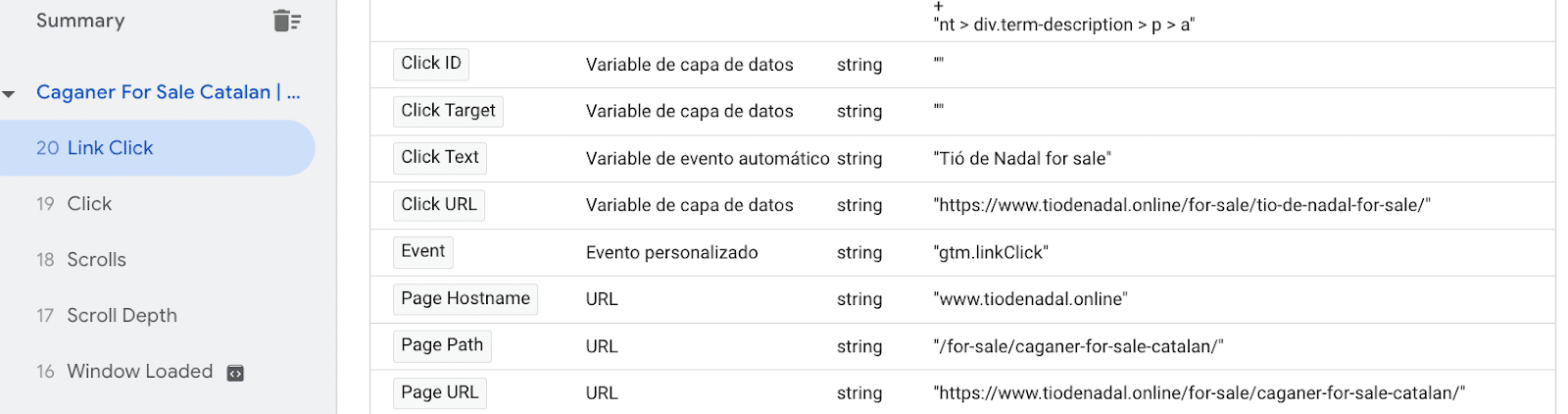
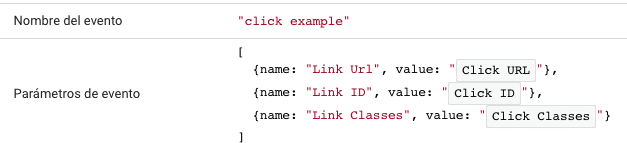
To know all the parameters an event can have, go to Google Tag Manager > Preview. Then, click on the event you want to measure. For example, on a link within your own website.
The variables of the data layer will provide you with all those that are triggered. This will help you identify the different parameters that includes that action within the website.
For example, you can see the following triggered variables for this Link Click. All of them could be set up as parameters:
How to configure event parameters via GA4
Although creating new parameters via Google Tag Manager is strongly recommended, GA4 also allows creating or editing existing event parameters directly within the tool itself.
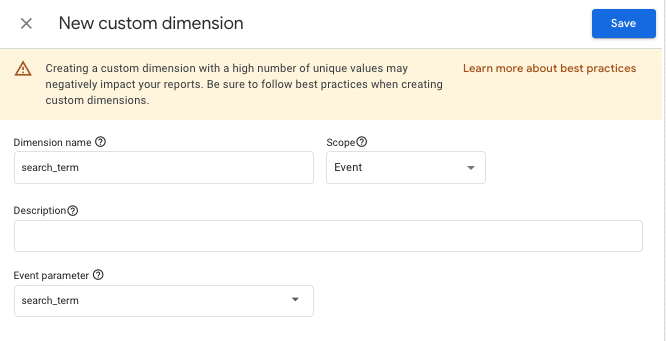
In cases where the event is automatic or enhanced measurement, you can often do it directly from Custom Dimensions via GA4:
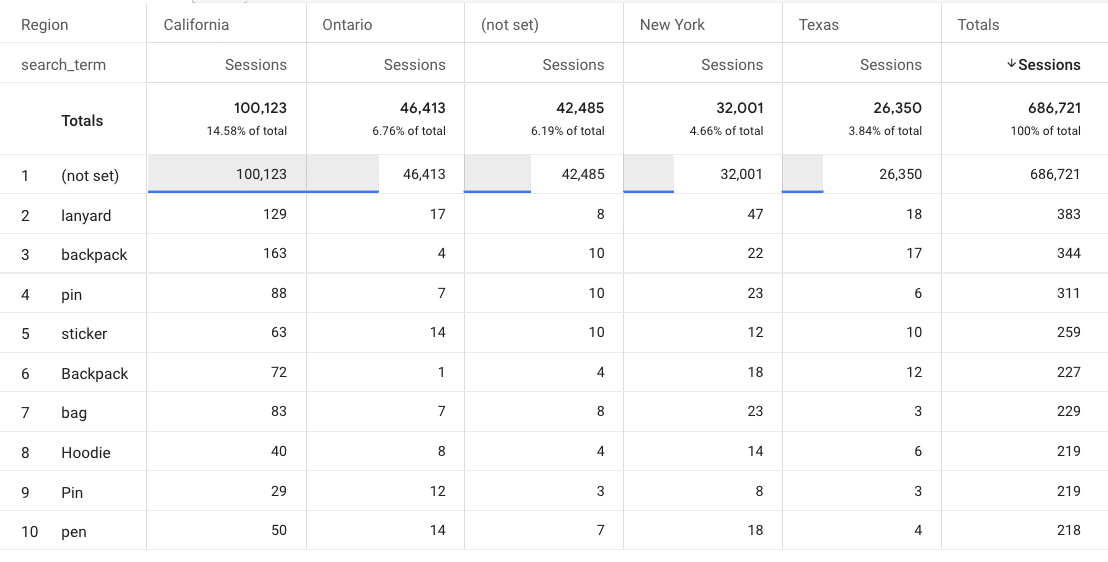
The search_term parameter, for example, will let you find out what users search for in the search box of your own website.
In this case, you can also include the dimension Region to see each region’s most popular searched terms.
GA4 also provides a series of predefined parameters, which can be modified if the user is interested. This is done in the same area where GA4 allows modifying events.
To do so, go to Admin > Events > Modify Event.
How to create reports to visualize event parameters
If you want to analyze this new information, navigate to Explore > Reports, with the parameters as the dimensions:
Furthermore, you can incorporate these parameters in Looker Studio reports, enabling you to analyze and examine the information according to specific business objectives and requirements.
For example, the following image shows you through the page_url parameter, in which page the file_download event is happening:
Another example would be the following slide, which shows you specifically, by the form_id event parameter, which form has been submitted specifically on a webpage:
To add the parameters to Looker Studio, it is necessary to include them as dimensions and the events or conversions as metrics.
Setting up event parameters is crucial for a holistic analysis of your website. Parameters let you view website events completely, allowing for a more detailed interpretation.
The post Setting up event parameters in GA4: Everything you need to know appeared first on Search Engine Land.
Courtesy of Search Engine Land: News & Info About SEO, PPC, SEM, Search Engines & Search Marketing
Monday, August 21st, 2023
Connected TV advertising broke records after ad spend reached $1 billion in June, according to a report by ad-research company Vivvix (formerly known as Kantar).
The research investigated how ad dollars are spent across a growing list of streaming platforms, such as Discovery+, Max (formerly HBOMax), Roku, and YouTube.
Growth categories included household supplies and beverages – which rocketed by more than 300% year-over-year. However, verticals like pets, as well as cosmetics and beauty didn’t trend as highly.
The industry milestone, which supports Vivvix’s predictions for the first half of 2023, comes at a time when digital formats account for 70% of total ad spend, in which video is the fastest growing format.
Why we care. This report highlights that the advertising industry recognizes the importance of running campaigns on CTV platforms, and which sectors in particular are increasing their ad spend. It’s important to monitor competitors’ strategies so that you can make informed decisions, respond to trends, capitalize on market opportunities, and maintain a competitive edge in your industry.
Promising forecast for YouTube. YouTube also experienced significant growth in the digital ecosystem, according to the Vivvix report. In June, the Google-owned platform generated $1.4 billion in ad spend across it properties. Based on this performance, Vivvax predicts that ad spend will continue to grow, particularly as non-linear properties continue to capture more viewership.
Looking ahead. CTV advertising is expected to grow by 13.2% globally in 2023 to $25.9 billion, according to GroupM’s mid-year forecast. In the US specifically, CTV advertising is expected to grow by 21.2% year-on-year this year as the majority of Americans continue spending so much time streaming TV every day, reports Insider Intelligence.
Get the daily newsletter search marketers rely on.
<input type=”hidden” name=”utmMedium” value=”“>
<input type=”hidden” name=”utmCampaign” value=”“>
<input type=”hidden” name=”utmSource” value=”“>
<input type=”hidden” name=”utmContent” value=”“>
<input type=”hidden” name=”pageLink” value=”“>
<input type=”hidden” name=”ipAddress” value=”“>
What has Vivvix said? Andrew Feigenson, CEO of Vivvix, said:
- “This milestone validates the projections on CTV’s ascendency from experimental to a ‘table stakes’ medium. It’s where viewers are increasingly spending their time, and in order to be competitive, brands must play ball on those fields, and understand what competitors are doing on these platforms.”
- “The data really informs brands where the white space is within the video journey as well. We noticed, for example, a dearth of pet brands advertising on Disney+ in June. That signals a real opportunity.”
- “Being able to take a broader view of the video landscape helps advertisers see the strategy their competitors are using across various channels. The shift of ad dollars between new and emerging platforms can make it difficult for advertisers to connect the dots, so it’s important for brands to have access to a wider lens. We are confident that more brands will continue to allocate more of their advertising budgets to CTV and other digital media, which will affect traditional TV advertising.”
- “To give brands the deepest, richest and fullest picture of advertising spend, Vivvix is purpose-built to look across the full spectrum of ad platforms, from linear to digital. We are continually investing in expanding our coverage across all digital media, including CTV, and social video like YouTube. Vivvix gives advertisers a view into more than $162 billion worth of digital ad spend which translates to a deep level of competitor ad campaign visibility.”
Deep dive. Read the Vivvix report in full for more information.
The post CTV ad spend hits record-breaking $1 billion in June appeared first on Search Engine Land.
Courtesy of Search Engine Land: News & Info About SEO, PPC, SEM, Search Engines & Search Marketing
Monday, August 21st, 2023
Do you know that a whopping 85.1% of marketers now use AI in their content production workflow?
With the proliferation of AI-generated content, are you obliged to disclose to search engines and readers that a bot created your content?
This is a question many have been asking as the latest AI platforms help people create near-perfect content.
So, is it necessary to label content that’s been produced using AI?
Is this beneficial to publishers and readers?
Those are the questions we’ll be tackling in this article.
What is AI labeling?
AI labeling simply means letting people know if a piece of content was generated using artificial intelligence.
It’s all about marking your content as “AI-generated” so your users know that artificial intelligence played a role in producing it.
The label can be anything like a byline, tag, watermark, etc. that indicates AI produced the content.
Why is this important?
More and more content online is AI-generated. And even if AI didn’t generate it, it may have played a role in research and development.
This is where we cross the muddy waters of whether AI-generated content should be labeled as such so readers know exactly what they’re reading.
From an SEO point of view, what does Google say about AI labeling?
Is AI labeling necessary? Here’s what Google says
Many policymakers, like the European Union, are advocating for AI labeling.
However, Google takes a different stance when it comes to labeling content as AI-generated.
Coming from the biggest search engine, that’s pretty surprising.
More so considering that the search engine giant takes its E-E-A-T standards seriously.
So, how does this fit in with AI-generated content?
- Quality trumps origin: Google values quality content more than it does the originator of the content.
- User experience matters, a lot: Google evangelizes user experience. Labels detract from this.
- Authority plays a huge role: The authority of the website a piece of content is published on and that of its author pull a lot of weight.
What does all this mean for AI-generated content?
From Google’s standpoint, AI labeling isn’t a necessity.
It does not contribute to any of the ranking factors used to determine content quality.
The important thing is to create content that’s useful and optimize it for ranking.
How does Google treat AI-generated content?
One of the questions most asked about AI-generated content is whether Google can detect it.
The simple answer is – yes.
But does it matter?
As we’ve already seen, Google doesn’t mind if content is AI-generated or human-written. All that matters is that your content is written for people first and meets E-E-A-T standards and is in line with the search quality rater guidelines.
This means if your AI-generated content is helpful, then it can rank. The other side of the coin is that human-written content written solely to reach the top of the SERPs won’t rank.
In a nutshell, Google doesn’t really look at the source of the content but rather the quality of the content and the intent behind its creation.
Get the daily newsletter search marketers rely on.
<input type=”hidden” name=”utmMedium” value=”“>
<input type=”hidden” name=”utmCampaign” value=”“>
<input type=”hidden” name=”utmSource” value=”“>
<input type=”hidden” name=”utmContent” value=”“>
<input type=”hidden” name=”pageLink” value=”“>
<input type=”hidden” name=”ipAddress” value=”“>
AI labeling isn’t necessary, but the human touch is
Since AI labeling isn’t necessary, does that mean you should copy AI-generated text and paste it into your CMS?
Absolutely not!
While AI content writing tools are improving, you still need to add a human touch to every piece of content before publishing.
One reason is that human editors are needed to verify facts, ensuring every piece of content is high-quality and trustworthy. Especially if you’re in a fast-paced industry, these can change pretty quickly, necessitating human fact-checkers.
Another reason you need to add a human touch is that Google’s algorithms and ranking signals are primarily based on human-generated content.
They prioritize natural language in search rankings, and achieving this in AI-generated content takes a human touch.
As AI becomes mainstream, policies may evolve
AI is no longer the future.
It’s here to stay.
And with AI adoption becoming widespread in various industries, including digital marketing, policies and frameworks guiding its use are bound to be revised, especially around ethics, accountability, and transparency in AI applications.
However, transparency will be focused on social media platforms and other platforms that publish a lot of images.
This is to combat misinformation spread through deepfake images and videos. These can be deceptive and harder than written content to verify.
Does this mean you should consider AI labeling?
We’ve looked at AI labeling and what major brands and policymakers think of it.
And we’ve come full circle to the question that brought us down this path – is AI labeling necessary?
This is how I see it:
If you’re publishing AI content with quality in mind and include your human touch in the production process – AI labeling isn’t necessary.
However, there may be some instances in which you may want to consider it depending on the context, topic, and content you’re sharing. It all comes down to good judgment.
The post AI-generated content: To label or not to label? appeared first on Search Engine Land.
Courtesy of Search Engine Land: News & Info About SEO, PPC, SEM, Search Engines & Search Marketing
Saturday, August 19th, 2023
Amazon Sponsored Product ads will now appear on third-party premium apps and websites.
Pinterest, BuzzFeed, Hearst Newspapers, Raptive and Ziff Davis brands like Lifehacker and Mashable are among the brands that are partnering up with the retail giant to increase reach for its Sponsored Product ad product.
The news comes after Amazon announced a multi-year collaboration with Pinterest to become its first ever third-party advertising partner back in April.
Why we care. Expanding the reach of Amazon Sponsored Product ads means marketers can potentially achieve higher conversion rates and increased return on ad spend, positioning their brands for success in a dynamic digital landscape. The new feature could also help address the attribution issue on Pinterest, which has proved to be a budget-limiting factor for advertisers, as huge discrepancies have previously been reported between the Pinterest dashboard and Google Analytics.

How it works. Amazon will identify users on the third-party platforms that are likely to be interested in your product by analyzing relevant page context, the campaign and cost-per-click parameters that you have already established. It will then display your campaign to this audience.
All ads on the third-party platforms will link back to your Amazon product page, enabling potential customers to easily make a purchase in just a couple of clicks.
Eligibility. Sponsored Products will only appear on third party premium apps and websites if they meet the following criteria:
- The product must be in stock.
- The product includes trusted Amazon shopping attributes such as Prime delivery promise, ratings and accurate pricing information.
Next steps. You don’t need to take any action for your Sponsored Products to appear on third-party premium apps or websites – Amazon will enable this feature automatically for you.
Campaign reporting will be available n the Sponsored Products placement report, which can be downloaded in the report centre.
What has Amazon said? Colleen Aubrey, senior vice president, Amazon Ads Products and Technology, said:
- “Sponsored Products has always been about helping customers discover products they may love.”
- “We’ve been building and evolving Sponsored Products in our store for more than 10 years, leveraging advanced machine learning algorithms to show advertising that’s highly relevant for customers, and therefore highly effective for the advertisers that choose to use it.”
- “We are excited to now apply what we’ve learned about connecting customers and products in meaningful ways to a range of great websites and apps.”
Get the daily newsletter search marketers rely on.
<input type=”hidden” name=”utmMedium” value=”“>
<input type=”hidden” name=”utmCampaign” value=”“>
<input type=”hidden” name=”utmSource” value=”“>
<input type=”hidden” name=”utmContent” value=”“>
<input type=”hidden” name=”pageLink” value=”“>
<input type=”hidden” name=”ipAddress” value=”“>
What has Pintrest said? Martha Welsh, Chief Strategy Officer at Pinterest, told Search Engine Land:
- “We’re excited to enter this next phase of our third-party partnership with Amazon Ads to bring more shoppable content onto the platform along with a great consumer buying experience. Shopping on Pinterest has never been easier.”
- “Now through our partnership, advertisers on Amazon are able to have their products appear in our search results, making ads on Pinterest even more relevant and actionable.”
- “Shopping is one of the top requests we receive from our users – more than 50% of users say they come to Pinterest to shop – and we’re continuing to deliver more ways to go from inspiration to action. We’re in the early stages of testing right now and seeing encouraging results.”
Deep dive. Read Amazon’s Sponsored Products announcement in full for more information.
The post Amazon Sponsored Product ads will now appear on Pinterest, Buzzfeed, and more appeared first on Search Engine Land.
Courtesy of Search Engine Land: News & Info About SEO, PPC, SEM, Search Engines & Search Marketing
Saturday, August 19th, 2023
IPG Mediabrands advised its clients to temporarily pause campaigns using Google’s Performance Max.
The company issued a “privacy alert” email in response to allegations in a new report that YouTube ads may have led to improperly tracking children.
Brands using PMax may inadvertently violate the Children’s Online Privacy Protection Act (COPPA) as a result, according to the study conducted by Adalytics.
Why we care. If brands are found to be in violation of COPPA, they may have to pay a significant financial penalty just as YouTube did in 2019 when it spent a record $170 million to settle similar charges.
Have any laws been broken? Under COPPA, online services must get parental consent before collecting data for targeted advertising purposes from children under the age of 13.
Adalytics researchers found the platform serving personalized ads from more than 300 brands on “made for kids” videos. When viewers clicked on these campaigns, they were redirected to the brand’s website, which sometimes resulted in dropping cookies on the user’s browser.
IPG Mediabrands investigates. In response to the findings, IPG Mediabrands conducted its own investigation. They reportedly found that at least one of its clients, which was running an adult-targeted campaign, had its ad feature on a “made for kids” channel.
If a child had clicked on the ad, tracking pixels from the brand’s website would have gathered data from the child as well as their associated ID. This data would then have been shared with Google’s PMax.
IPG Mediabrands, which manages $40 billion in marketing investment worldwide, reportedly concluded that a full investigation was needed to identify the full extent of the impact on its clients.
What has IPG Mediabrands said? A spokesperson for IPG Mediabrands told Search Engine Land that the email was an “early, unapproved draft of an internal-only note that was not reflective of our broader organizational POV. This was retracted. This was not sent to clients.”
The email in question – which was obtained by Business Insider – read:
- “Because placement reporting is not available for PMAX, we recommend that clients temporarily pause PMAX until the efficacy of the above controls are validated on non-PMAX campaigns where placement reporting is available.”
- “Clients should consult with their legal, privacy/infosec, website, and data teams to consider potential exposure, and determine the appropriate process for identifying and removing data potentially collected from children.
For example, advertisers may assess data in their CDPs that originated from YouTube as a traffic source.”
- “These recommendations are being made on the basis of the probability of FTC scrutiny, as well as in light of the evidence of waste in advertising investment against unintended audiences.”
What has Google said? Dan Taylor, Google’s Vice President of Global Ads, said the Adalytics study was “flawed”. Addressing the report in a post on X (formerly known as Twitter), he stated:
- “[This is the] 2nd time [Adalytics has] produced faulty research about Google advertising this summer. Here are 6 facts about how we protect kids on YouTube that Adalytics gets completely wrong or ignores.”
- “#1 We don’t personalize ads to kids, ever. And we treat everyone who watches Made for Kids content as a child, regardless of their age.”
- “#2 We built YouTube Kids as a dedicated app designed from the ground up to be a safer experience for kids to explore, with tools for parents and caregivers to guide their journey. The YouTube Kids app has never had personalized ads either.”
- “#3 Made for Kids content has ads but we restrict the types of products that can be advertised: e.g. no ads for video games or media unsuitable for children, no ads about dating and relationship, no ads for food and beverage.”
- “#4 Google does not share with advertisers what content/video a person was watching when they click on an ad. That means advertisers never know if a click came from someone watching Made for Kids content, regardless of their age.”
- “#5 Advertisers, with a single click, can choose to opt out of Made for Kids content. The opt-out, called Content Suitable for Families, prevents advertisers from having their ads run alongside Made for Kids content. Adalytics doesn’t appear to know this.”
- “#6 Cookies ≠ ad personalization. Cookies are permitted under COPPA for statistical reporting, for spam and fraud detection and for frequency capping. They are critical to YouTube creators’ monetization which encourages a rich diversity of content on YouTube.”
- “#7 Though we only just received the report, what we have reviewed shows no violations of our commitments nor privacy policies. Given Adalytics’ last report was debunked by 2 independent organizations, we do not put much stock in the accuracy of their research.”
- “#8 The NYTimes, who was given early access to the report, couldn’t even verify the bulk of Adalytics’ claims. It does not corroborate Adalytics’ accusations and in fact found the opposite: no violation of COPPA, no personalization of ads to kids, and no improper use of cookies.”
- “#9 Adalytics’ report has no substance and tries to make a gotcha when there is none. We offered to meet with them weeks ago and heard crickets. Do they have the credentials and expertise to publish these reports?”
Deep dive. Read Adalytics’ YouTube study in full for more information on its research. Read Google’s official documentation on how ads work on YouTube for supervised accounts for more information.
The post IPG Mediabrands tells clients to temporarily pause Google Performance Max campaigns appeared first on Search Engine Land.
Courtesy of Search Engine Land: News & Info About SEO, PPC, SEM, Search Engines & Search Marketing
Thursday, August 17th, 2023
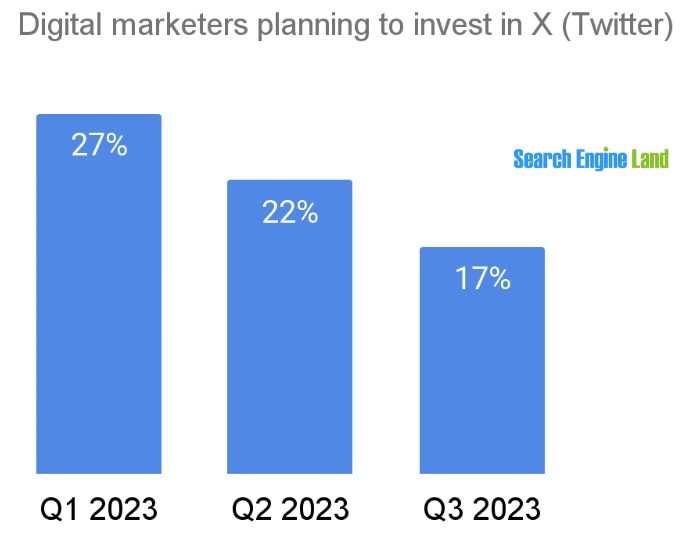
Less than a quarter of digital marketers plan to invest in X, formerly known as Twitter, during the next 12 months, according to a Search Engine Land survey.
And, the percentage of digital marketers investing in X continues to fall rapidly, down from 27% of marketers in Q1 to 17% in Q3 to date.
Where marketers plan to invest. Google (including YouTube) and Meta properties Facebook and Instagram are the platforms most digital marketers will invest in during the next 12 months, 81% and 57%, respectively.
- Forty percent of marketers said they will invest in Microsoft’s LinkedIn business-to-business social media network. Other Microsoft properties, including Bing, will be getting investments from 31% of digital marketers.
- Among the retail media networks tracked, 27% said they planned to invest in Amazon and 11% in Walmart.

About the data. The survey was conducted from January to August 2023. Nearly 1,000 people responded after signing up for the Search Engine Land newsletter.
The post Only 23% of digital marketers will invest in X in the next 12 months appeared first on Search Engine Land.
Courtesy of Search Engine Land: News & Info About SEO, PPC, SEM, Search Engines & Search Marketing
Thursday, August 17th, 2023
Instagram is piloting a new ad layout that crams four sponsored posts into one screen.
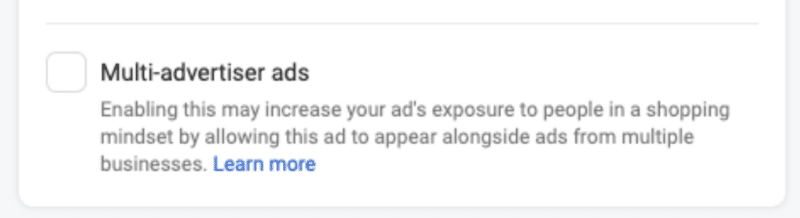
It’s the platform’s latest take on Multi-Advertiser ads, which groups together related sponsored posts from different businesses and serves them to people who have recently shown an interest in related products or services.
The new layout is being displayed between Reels. Advertisers can disable this feature by opting out in Settings.
Why we care. Bombarding Instagram users with so many ads at once may keep CPMs low. However, it could also potentially annoy users, making it harder for brands to capture consumers’ attention, which will negatively impact CTR and ROI.

Not all impressions are equal. While brands may initially see some success with this new ad format, the novelty will wear off and users will eventually opt to skip the content, said Barry Hott, Growth Marketing Consultant and Advisor:
- “Meta’s getting greedy here and trying to squeeze more ad impressions out of their users, particularly on Reels. Great reminder of how all impressions are not equal. I would consider this impression much lower value than a full Reels or Feed ad placement, but it can be used to serve cheap CPMs, more like a right column placement.
- “Lower CPMs on an optimized platform with multiple varied placements are not better for you. When you see lower CPMs, don’t celebrate it, question it.
- “If your attribution setting includes 1-day view, this placement can be used by the system to get more cheap (non-incremental) 1-day view conversions.
- “My bet is this placement will work well for a couple of months before the novelty wears off and users catch on that this interface is solely for them to be served ads and they’ll learn to subconsciously block and skip them.”
The risk of annoying users. Katharine Mckee, digital commerce consultant, raised her concerns over the ad product interrupting the user experience:
- “I would assume that some of this is driven by customer interest. The example may be throwing it off, but all of those [ads in the example] are cheesy/spammy and highly likely to be skipped.
- “It may make sense from a UX perspective to put the seemingly identical things together in one skippable bomb rather than irritating users.
- “Put all the skippable rubbish into one easy-to-ignore slot. I cannot wait to see the ugly reel!”
Get the daily newsletter search marketers rely on.
<input type=”hidden” name=”utmMedium” value=”“>
<input type=”hidden” name=”utmCampaign” value=”“>
<input type=”hidden” name=”utmSource” value=”“>
<input type=”hidden” name=”utmContent” value=”“>
<input type=”hidden” name=”pageLink” value=”“>
<input type=”hidden” name=”ipAddress” value=”“>
What Instagram is saying. Instagram announced its multi-advertiser format via an announcement in its Help Center:
- “Multi-advertiser ads help people discover and compare products from multiple businesses. This ad unit, available for selected placements on Facebook and Instagram, gives advertisers the opportunity to be discovered by people who have recently shown an interest in related products or businesses.”
- “In the multi-advertiser ad unit, personalized ads from different businesses are shown in a carousel format beneath an ad that a shopper has recently engaged with. An ad for a wedding dress might appear beside another brand’s ad for a wedding cake, for example.”
- “The advertiser decides where the action button within their multi-advertiser ad takes people. At the end of the carousel, an action button links to a feed of ads, where shoppers can explore more related products or services (currently only available on Instagram).”
- “This feature is being gradually introduced and may not be available to you yet.”
The post Instagram tests Multi-Advertiser ads, cramming four ads into one screen appeared first on Search Engine Land.
Courtesy of Search Engine Land: News & Info About SEO, PPC, SEM, Search Engines & Search Marketing
Thursday, August 17th, 2023
It’s been just over six months since the new AI-powered Bing with Bing Chat launched – but its overall search engine market share remains virtually unchanged globally and in the U.S.
Why we care. When the new Bing launched, it felt like the dawn of an exciting new era in search. Microsoft seemed to have a legitimate chance to erode some of Google’s dominance and become a truly worthy competitor to Google, thanks to its new conversational and generative AI take on search. Unfortunately, that hasn’t happened.
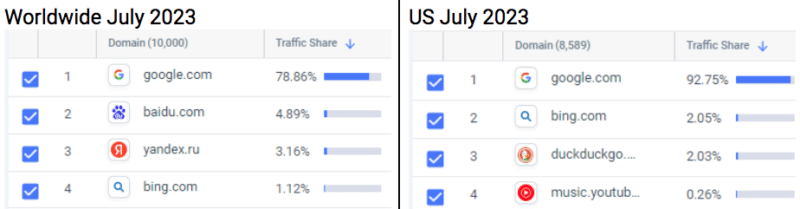
By the numbers. Bing’s U.S. search market share was 6.47% in July, per web analytics service StatCounter.

- In February, when new Bing launched, it’s market share was 6.35%. Bing’s market share peaked at 6.61% in March.
- But Bing’s U.S. market share was typically over 7% in 2022, with a high of 7.82% in November.
Bing’s global search market share was 2.99% in July, per StatCounter.

- The highest Bing’s global search market share has been this year was in January, at 3.03%, a month before new Bing was announced. In 2022, Bing was consistently over 3%.
Microsoft disputes these numbers. A WSJ article today (paywalled, so I’m not linking to it) noted that:
- “[Microsoft] disputed outside data, saying third-party data companies aren’t measuring all the people who are going directly to Bing’s chat page.”
StatCounter said its data takes traffic to and from Bing’s chat into account. Here’s what digital intelligence platform SimilarWeb told me:
- “It’s possible that we’re missing some of the Bing Chat interactions that use an Edge sidebar / extension, but I don’t know how significant that is in the grand scheme of things.”
Yusuf Mehdi, Microsoft’s corporate VP and consumer CMO, told WSJ the company’s internal data shows Bing taking market share from Google, but failed to provide any figures.
- “We’ve made more progress in the last six months than we have in the previous decade or two combined. We’re delighted with our start,” Mehdi said.
This claim seems a bit odd, considering around this time 10 years ago, Bing’s search market share was 17.9%, per comScore.
How Microsoft celebrates six months. Microsoft’s Aug. 7 blog post highlighting the number of chats (1 billion) and images created (750 million), as well as nine quarters of growth for Edge. And it earned them a surprising amount of PR thanks to many publications covering the launchiversary (Search Engine Land was not among those, because there was nothing new to report to you).
More data. I also checked with SimilarWeb and comScore for their latest data on Bing’s lack of growth. Here’s what a SimilarWeb spokesperson told me:
- “We can see a little bit of growth for Bing, but it’s incremental. According to our official rankings for the search engine category, they were the #2 search engine with a little over 2% traffic share in the U.S. as of July, but still at about 1% worldwide.”
Meanwhile, Bing saw a 6% decline in unique visitors and total visits from February to July, according to data from analytics firm comScore. Bing’s unique visitors and total visits also declined 2% year on year in July.
Dig deeper. Here’s some of our previous coverage of the AI search engine arms race that never actually became a race:
The post The new Bing has failed to take any market share from Google after six months appeared first on Search Engine Land.
Courtesy of Search Engine Land: News & Info About SEO, PPC, SEM, Search Engines & Search Marketing
Thursday, August 17th, 2023
Ads from at least 19 brands appeared alongside a pro-Hitler account on X, formerly known as Twitter. Two of those brands have now suspended advertising on the platform. X has now deleted the account.
Why we care. X’s new CEO Linda Yaccarino told CNBC just last week that brands are “protected from the risk of being next to” potentially toxic content and “your ads will only air next to content that is appropriate for you.” Clearly, that’s not the case. X may say its platform is committed to brand safety, but it still has work to do.
What happened. Media Matters for America published this report detailing how X has been placing ads for brands on a verified pro-Adolf Hitler account with thousands of followers. The nonprofit watchdog group also included multiple screenshots showing the promoted posts.
- “The company continues to monetize the openly antisemitic account despite reportedly acknowledging it had violated the platform’s ‘rules against violent speech,’” Media Matters reported.
Unsafe brands. Ads from the following brands were shown alongside the pro-fascist content:
- Action Network
- Adobe
- Amazon
- Atlanta Falcons
- BritBox
- Corn Nuts / Hormel Foods
- FIFA Women’s World Cup
- Fortune
- Gallup
- Gilead Sciences
- MLB
- NCTA-The Internet and Television Association
- Office Depot
- Regal
- Samsung
- Sports Illustrated
- The Athletic / The New York Times Co.
- The Herd with Colin Cowherd / Fox Sports
- USA Today
X loses more brands. Two of these brands – NCTA and Gilead – “immediately paused their ad spending on X,” CNN reported. A spokesperson for NCTA said the company “had opted into X’s brand safety measures including keyword restrictions and limiting its ad placement to the ‘home feed of target audiences.’”
- “We take the responsible placement of NCTA ads very seriously and are concerned that our post about the future of broadband technology appeared next to this highly disturbing content.
- “Brand safety will remain an utmost priority for NCTA, which means suspending advertising on Twitter/X for the foreseeable future and heavily limiting NCTA’s organic presence on the platform.”
The post Brands pause X ad spending after ads serve with pro-Nazi content appeared first on Search Engine Land.
Courtesy of Search Engine Land: News & Info About SEO, PPC, SEM, Search Engines & Search Marketing
Wednesday, August 16th, 2023
Google Ads will offer enhanced customer service for small businesses as part of a new paid pilot.
A select number of agencies and advertisers have been invited to test the new program, which offers one-on-one support tailored to specific customer needs.
Why we care. Small business owners using the program can get specialized advice faster by using this premium service, which has historically only been accessible to Google Ads’ biggest clients.
What’s next? Google will collect feedback from participants. In time, Google hopes to roll the service out to more small- and medium-sized businesses. A Google spokesperson said:
- “These changes are part of a long-term strategy that we’ll be building on over time, testing, and learning as we go.”
Why now? Google launched the pilot in response to a “common complaint” from small businesses that they more specialized advice from the search engine’s experts, along with ideas for how they can improve their ads campaigns and optimize their budgets – a level of service not provided by Google’s automated self-service system.
Get the daily newsletter search marketers rely on.
<input type=”hidden” name=”utmMedium” value=”“>
<input type=”hidden” name=”utmCampaign” value=”“>
<input type=”hidden” name=”utmSource” value=”“>
<input type=”hidden” name=”utmContent” value=”“>
<input type=”hidden” name=”pageLink” value=”“>
<input type=”hidden” name=”ipAddress” value=”“>
What has Google said? A spokesperson from Google told Search Engine Land:
- “The paid pilot is intentionally small in scope so we can take feedback and iterate based on what works best for our customers.”
- “As part of this evolution, we’ve made significant upgrades to the Help Center to help customers resolve issues on their own, more easily. This includes multimedia additions, such as videos and GIFs, across articles related to how to edit your campaign settings, edit your bids, and resolve data inconsistencies in Google Ads accounts. We will continue to invest in this area.”
- “Agencies working with customers included in this pilot will also be able to schedule specialized paid support consultations tailored to their clients’ specific needs.”
The post Google Ads trials enhanced customer service for small businesses appeared first on Search Engine Land.
Courtesy of Search Engine Land: News & Info About SEO, PPC, SEM, Search Engines & Search Marketing