Archive for the ‘seo news’ Category
Wednesday, August 30th, 2023
Google is testing a new search snippet feature titled “mentioned in.” This feature adds a new section to a search result snippet that lets the searcher expand and see the websites on which this site is also mentioned.
What it looks like. Here is a GIF of it in action provided by Brodie Clark:
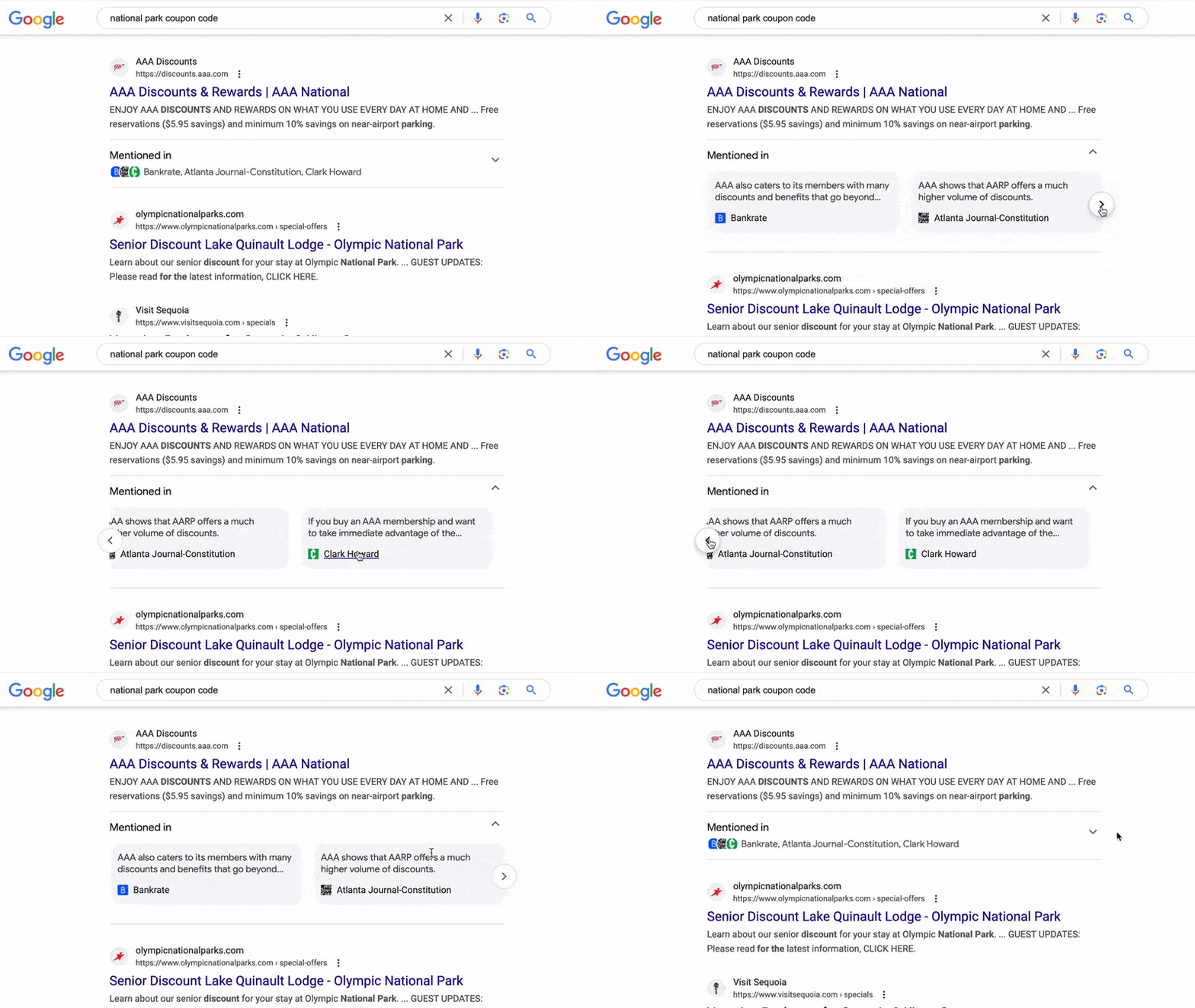
You need to click the arrow-down to expand the feature to see the carousel of sites that the search result is mentioned in. Then you can slide through a carousel of sites that this website is mentioned in.
Note that Google is also testing this without the arrow-down drop down, where it is open by default. Here is a screenshot from Crystal Carter without the dropdown:

Why we care. This feature seems to help searchers trust and validate the search result snippet by giving the searcher more information about if other reputable websites mention the site.
This seems to be a limited test and it reminds me of the goal Google has with the about this result feature. I do wonder how many searchers will actually spend the time clicking the arrow to see more details but that is why Google tests these features.
The post Google Search “Mentioned in” search snippet shows other web pages a site is mentioned appeared first on Search Engine Land.
Courtesy of Search Engine Land: News & Info About SEO, PPC, SEM, Search Engines & Search Marketing
Wednesday, August 30th, 2023
Google Ads has been around for 23 years and is arguably the most complex PPC ad platform within digital marketing.
Over the past few years, there has been a conscious effort to consolidate campaign settings and simplify the available levers within an account.
On the one hand, I think it reduces friction on campaign setup for the less marketing savvy.
However, as someone who has dedicated their professional career to digital marketing, it can cause frustration. In some cases, the tools and features I had before are slowly disappearing.
After using Google Ads for over a decade, there are a few areas that I think most advertisers or agencies don’t utilize enough.
This guide aims to bring light to some of the lesser-known tools and areas of the platform that can pack a big punch when implemented right.
1. Dynamic product remarketing
The first and the most underutilized Google Ads feature is checking a little-known area called “dynamic parameters.”
The premise is that dynamic product marketing is only made possible by making sure you are passing through the right parameters via the Google Tag.
For some reason, there is an expectation that dynamic product remarketing with Performance Max is automatic. But this is only true if your pixel is set up properly.
For ecommerce, we believe it’s a huge miss if you are not dynamically remarketing to your potential customers, specifically when a customer visits a potential product(s) and does not purchase.
The ideal strategy is to allow Google to have visibility into which products each customer looks at.
In a way, it generally does, but to get the best results, you want to ensure that you are passing through the “id” value in your pixel.
This is a critical variable that the Google Ads tag needs visibility into so it can properly remarket.
I dug up the Google help article on Tagging your website for dynamic remarketing. You need to work with your developers to ensure the structured data passes through.
I suggest using the Datalayer checker plugin for Chrome. This will help you and your developers identify the correct variables you want to pass through.
Where to access this in Google Ads
- Click on Tools and settings > Audience manager > Your data sources > Details.
- Review the ‘id’ parameter.
- If you don’t have one, then you’ll need to work with a developer to make sure you’re passing it through.
- If you see IDs passing through, make sure that they match Google Merchant Center. If they don’t, then dynamic remarketing will not work.
2. Seasonality adjustments
In the age of smart bidding, most marketers rely entirely on the algorithm to do the job.
However, a computer cannot anticipate or understand outside factors in many instances.
If you’re using smart bidding, you will want to know the next hidden setting, seasonality adjustment.
This lesser-known tool within Google Ads allows you to give the smart bidding algorithm a heads up on what’s to come.
This is the most useful if you know definitively that conversion rates will increase or decrease significantly.
By inputting these dates and the expected conversion rate variance, smart bidding will use that in the process.
Where to access this in Google Ads
- Click on Tools and settings > Bid strategies > Advanced controls.
- Navigate to Seasonality adjustments, then click on New seasonality adjustment.
Get the daily newsletter search marketers rely on.
<input type=”hidden” name=”utmMedium” value=”“>
<input type=”hidden” name=”utmCampaign” value=”“>
<input type=”hidden” name=”utmSource” value=”“>
<input type=”hidden” name=”utmContent” value=”“>
<input type=”hidden” name=”pageLink” value=”“>
<input type=”hidden” name=”ipAddress” value=”“>
3. Data exclusion
In the same area, you’ll see my next hidden feature, data exclusion.
This tool lets you exclude specific dates across an account, campaign, or campaign type. As Google states:
“Data exclusions are meant to account for outages or major issues related to conversion tracking. Using them often or for long periods could negatively impact Smart Bidding performance.”
This is extremely useful if you experience a conversion drop or the pixel is over-reporting.
If you can identify the issue, you can remove that data from the algorithm. This can save you a lot of potentially wasteful spend if you encounter a tracking issue.
Where to access this in Google Ads
- Click on Tools and settings > Bid strategies > Advanced controls.
- Navigate to Data exclusions, then click on New data exclusion.
4. Account-level automated extensions
A few years ago, I started to get an influx of screenshots from clients saying, “What is this?” and then I’d scratch my head in confusion.
They would share an image with an asset (formerly extensions) I didn’t recognize or set up.
I soon realized that Google was rolling out account-level automated extensions.
These extensions will automatically be generated based on your website, ranging from site links and callouts to longer headlines.
I generally will turn these off for many clients because we want to control the messaging (sorry, Google).
Although Google will tell you that these improve performance, I haven’t necessarily observed that myself, except for a few.
If you are fortunate enough to have a lot of Seller reviews, that has made an impact on click-through rates.
Using dynamic images, we have also observed a lift in click-through rates for larger retailers. Dynamic images will crawl your site and apply relevant imagery to your ad.
Where to access this in Google Ads
- Click Ads & assets > Assets > More options > Account-level automated assets > More > Advanced settings.
5. Your data insights
The last one is more insightful but can be actionable depending on how you want to use it. I think many of my clients are always super interested in this one.
The hidden feature is called Your data insights, which takes your pixel data and lets you get a read on your customer base.
There are two primary areas that we like to look at:
- In-market audiences we’re indexing highly for.
- Affinity segments we index high for.
This information can help shape customer profiles and personas and be used for targeting. All of the segments can be used in some campaigns to bid again.
You can also use this information to help adjust for ad copy or creative. Seeing some of the interests or affinities you wouldn’t expect is fun. You’ll see what I mean when you look at it.
Where to access this in Google Ads
- Click on Tools and settings > Audience Manager > Your data insights.
Maximizing your Google Ads results with overlooked features
Many useful areas are tucked away in Google Ads – options that many advertisers may be entirely unaware of.
Each one of the features I mentioned should provide a bit more insight and control over your campaigns. I hope this article will help you find different ways to influence your Google Ads performance.
The post 5 hidden areas of Google Ads you probably didn’t know about appeared first on Search Engine Land.
Courtesy of Search Engine Land: News & Info About SEO, PPC, SEM, Search Engines & Search Marketing
Wednesday, August 30th, 2023
LinkedIn is a powerful way to connect with a targeted B2B audience through its advertising capabilities.
However, LinkedIn ad campaigns can sometimes stumble even with the best intentions. If you’re puzzled by your LinkedIn Ads setup going awry, you’re not alone.
This article will dissect the critical factors that can undermine your once-promising ad setup, leading it down an unfortunate path.
By identifying these pitfalls, you’ll uncover the challenges and actionable solutions to steer your campaign back on track.
1. Insufficient audience targeting
If you’re new to B2B marketing or used to seeing Meta’s audience sizes of millions of people, you may be surprised to learn that audience size is way too broad for anything on LinkedIn – even if you’re aiming for pure awareness.
The beauty of LinkedIn is that you can get very specific while casting a wider net that extends beyond your buying committee.
Ultimately, your target should encompass anyone capable of interacting with your business, whether directly or indirectly.
As a general rule, anything greater than 300,000 is too broad.
LinkedIn won’t show you all the job titles, job functions, or seniorities that genuinely engage with your content unless you have API access, making it even more crucial to apply filters for effective targeting.
2. Restrictive audience targeting
Following the last point, the opposite is also true: avoid creating hyper-restrictive campaigns. If you have an audience of only 15,000, you might only receive 10 clicks daily.
LinkedIn’s algorithm and ad placement optimization rely on volume to work effectively.
A small audience might not provide enough data for the algorithm to gauge user preferences and behaviors, resulting in underwhelming performance – even if your content is highly relevant.
Striking the right balance between specificity and audience size is key. This can help you achieve the twin goals of reaching the right people while driving the desired level of interaction with your business.
Don’t rely solely on job titles as the primary targeting criterion. This approach is expensive and unreliable, as LinkedIn often faces challenges in accurately categorizing numerous common job titles.
Instead, consider utilizing job seniorities and job functions and employ job titles to exclude irrelevant categories.
You could also explore leveraging seniority levels and member skills to achieve a higher level of specificity.
3. Neglected mobile optimization
With the growth of mobile device usage, a seamless and user-friendly mobile experience is paramount.
If your ads and landing pages are not optimized for mobile devices, you risk alienating a substantial portion of your target audience.
A clunky or unresponsive mobile interface discourages users from engagement, leading to a higher bounce rate and lower conversion rates.
An engaging mobile experience ensures your ads reach your target audience and deliver a positive interaction that fosters meaningful engagement and drives conversions.
A common pitfall many marketers encounter today is the use of lead generation forms pointing to PDFs.
Traditionally formatted PDFs are challenging to read on mobile devices, often necessitating constant zooming in and out.
Create content within HTML pages that offer a comfortable reading experience while on the go.
Get the daily newsletter search marketers rely on.
<input type=”hidden” name=”utmMedium” value=”“>
<input type=”hidden” name=”utmCampaign” value=”“>
<input type=”hidden” name=”utmSource” value=”“>
<input type=”hidden” name=”utmContent” value=”“>
<input type=”hidden” name=”pageLink” value=”“>
<input type=”hidden” name=”ipAddress” value=”“>
4. The audience is not in-market
Up to 95% of your B2B audience is consistently out of the market, per a LinkedIn B2B Marketing Institute report.
So, why do we continually focus on features or merely ’solving’ someone’s workplace problems?
Instead of dismissing those not yet in the right funnel stage, focus on cultivating potential relationships and staying top of mind.
This will organically put your products in a prospect’s consideration set when they are ready to buy.
The essence lies in crafting connections that transcend the transactional and embrace the emotional, using memory metrics to leave an indelible imprint on the B2B users you’re targeting.
5. Poor ad creative
When designing creative for your campaigns, follow the well-studied best practices.
Visual appeal is paramount, so ensure your images are high-quality, relevant, and aligned with your brand’s identity.
Images that include real people or showcase your product/service in action tend to have a stronger impact.
Pair your visuals with concise, compelling messaging. Your ad copy should be succinct yet persuasive, addressing your audience’s pain points and presenting a clear value proposition.
Remember: LinkedIn users swiftly scroll through their feeds, so your ad must grab their attention swiftly and effectively.
Per the previous pitfall, stop focusing on features or ease of use. Instead, create a valuable relationship and show that you know and understand them. This will help your brand stand out.
6. Inadequate budgeting and bidding strategy
The most common issue I see in companies determining a LinkedIn Ads budget is simply allocating “leftovers” after budgeting all other channels.
This undercuts LinkedIn’s potential, as it often represents the most cost-effective way to reach a B2B audience effectively.
While LinkedIn Ads’ CPCs can be expensive (as high as $11.03, per a 2021 Metadata study), they carry substantial value.
The cost per opportunity and pipeline tends to be lower than any other advertising channel.
LinkedIn continues to be a dependable source for industry-related information, according to an eMarketer report.
In North America, 91% of marketers stated that the platform is the most effective channel for their brand this month. Let’s allocate an adequate and appropriate budget for it.
7. Lack of continuous monitoring and optimization
Creating and launching a compelling ad campaign is just the beginning – long-term success comes from its subsequent monitoring, analysis, and optimization.
Setting a static budget without periodic review hampers your campaign’s effectiveness.
The B2B world is ever-evolving, with audience behaviors, trends, and competition shifting rapidly. Neglecting to adapt your strategy can lead to underperformance.
Regularly reassess your budget allocation, refine targeting parameters, and fine-tune your ad content.
The power of LinkedIn’s platform lies in its audience reach and robust tools for analysis and refinement.
Leveraging these tools and committing to an ongoing optimization process ensures that you’re capitalizing on the full potential of your investment.
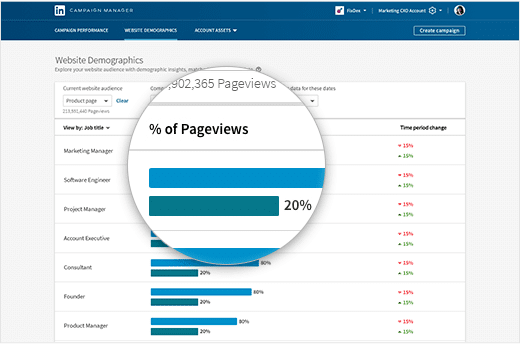
My favorite LinkedIn report is the Website Demographic report, which offers an insightful analysis of the audience engaging with your ads. It’s essentially the Google Ads search term report equivalent for LinkedIn.
Have you ever wondered whether the job functions or skills mentioned at the top of the article effectively target the right personas? This report will provide you with an answer.
Avoiding the common pitfalls of LinkedIn ad campaigns
Recognizing and addressing the potential pitfalls that can undermine your campaigns is essential for connecting with your B2B audience.
Each aspect shapes an effective LinkedIn Ads strategy, from audience targeting and mobile optimization to thoughtful budgeting and monitoring.
Applying these tips to your LinkedIn Ads strategies will help you avoid common pitfalls and leverage this powerful platform’s full potential to foster meaningful connections, drive conversions and ultimately achieve your B2B marketing goals.
The post 7 LinkedIn advertising pitfalls: Where your B2B ads setup might stumble appeared first on Search Engine Land.
Courtesy of Search Engine Land: News & Info About SEO, PPC, SEM, Search Engines & Search Marketing
Tuesday, August 29th, 2023
A fundamental catalyst for innovation, data fuels growth and success. Now with AI, businesses can have an actual dialogue with customers. Instead of having one-way conversations where customers provide elements marketers seek, we can help customers navigate the breadth of information we make available. In turn, we receive the information necessary to segment them.
Sponsored by:
In this episode of the MarTech Podcast: Data Makes the Difference, Karlos Palmer, Dun & Bradstreet’s senior vice president of sales and marketing solutions product, and Kim Davis, editorial director at MarTech, explore the essential role of customer feedback, market trends, and insights and data in creating products that meet customer needs and become valuable assets for organizations.
Tune into the podcast and learn:
- How to use data to help your customers achieve better business outcomes and grow faster than their competition.
- AI’s role in fostering innovation.
- How sales and marketing teams use data to drive future product development.
Tune in to other episodes in the series here.
Guest
Karlos Palmer, SVP of Sales and Marketing Solutions Product, Dun & Bradstreet
Karlos Palmer is an accomplished senior executive with a proven track record in product management, strategy development, and business growth. As the Senior Vice President of Sales and Marketing Solutions Product, Karlos currently oversees the strategic planning, competitive intelligence, product lifecycle management, and budgeting functions for Dun & Bradstreet’s flagship Sales Acceleration product, D&B Hoovers and is responsible for driving innovation and growth across the product portfolio. Karlos has a strong background in global alliances, product development, and project management and has consistently achieved outstanding results throughout his career. He holds an MBA in Management from the Texas McCombs School of Business and a BBA in Economics/International Business from Baylor University.
Moderator
Kim Davis, Editorial Director, MarTech
Born in London but a New Yorker for over two decades, Kim Davis started covering enterprise software ten years ago. His experience encompasses SaaS for the enterprise, digital- ad data-driven urban planning, and applications of SaaS, digital technology, and data in the marketing space.
Prior to working in tech journalism, Davis was Associate Editor at a New York Times hyper-local news site, The Local: East Village, and has previously worked as an editor of an academic publication and as a music journalist.
Sponsor

Dun & Bradstreet, a leading global provider of business decisioning data and analytics, enables companies around the world to improve their business performance. Dun & Bradstreet’s Data Cloud fuels solutions and delivers insights that empower customers to accelerate revenue, lower cost, mitigate risk, and transform their businesses. Since 1841, companies of every size have relied on Dun & Bradstreet to help them manage risk and reveal opportunity. For more information on Dun & Bradstreet, please visit www.dnb.com.
The post Data and AI ignite real-time customer conversations and tangible business results appeared first on Search Engine Land.
Courtesy of Search Engine Land: News & Info About SEO, PPC, SEM, Search Engines & Search Marketing
Tuesday, August 29th, 2023
In 2015, I joined what was a very small SEO team. Since then, we have more than tripled our size.
As we grew, we faced the challenge of scaling our team and continuing to deliver strong work, all while maintaining the culture that enabled our growth in the first place.
This article underscores the significance of creating a strong culture and shares our tactical steps as we grew our team.
Our goal for this journey wasn’t just team expansion but to nurture a culture of excellence and innovation.
Every new member needed to amplify our collective strength rather than dilute it.
Here, I’ll take you behind the scenes of our growth story to:
- Share the importance of cultivating a robust team culture.
- Highlight the steps we took to scale successfully while preserving the essence of who we are.
Challenges with scaling
Ultimately, the challenges of scaling an SEO team boil down to changes in the quality of your “three Ps”: people, process and product.
- People: Rapid growth can lead to a hiring frenzy, and new hires meant to ease the load end up adding to it. Managers find themselves juggling more responsibilities, including training those newcomers.
- Process: Without well-defined standards of practice (SOPs) and training programs, service delivery can become a game of chance, negatively impacting consistency as the team expands.
- Product: Growth often means less flexibility in your product offering. Clear swim lanes for your team need to be established and product offerings standardized, rather than offering too many solutions where you customize every task.
To overcome these challenges, you must:
- Intentionally maintain your team’s culture.
- Foster communication across locations.
- Develop a consistent SEO approach.
- Create a positive work environment that attracts and retains top talent.
With the right approach, you can successfully scale while maintaining your team culture and delivering great client results.
Why culture matters in an SEO team
SEOs are effectively consultants, often working with other marketers. In any consulting business, the biggest asset is the people.
Engaged employees are happier and lead to a 202% revenue increase compared to organizations with a less engaged workforce per one study.
A strong culture in the SEO space is essential for a consulting team as it fosters collaboration, attracts and retains top talent, and helps build a strong brand – all of which help your team stand out in the market. Up to 35% of workers would pass on a job if they felt the culture was not a good fit.
12 ways to maintain your culture as you scale
1. Define your SEO team’s core values
The best corporate cultures are usually rooted in a shared set of beliefs, values, working methods and (perhaps most importantly) purpose.
To define your core values, start by defining a mission statement. Is there anything people consistently say about you that makes you great?
Discussing shared values and goals with your team in a brainstorming session can be a good place to start, but you may want a smaller group to define the final set of core values.
Stephanie Gioia offers a useful framework to determine which values may be truly useful versus which do not serve the overall strategy.
Dig deeper: How to build a values-based agency that drives results
2. Create a strong leadership team and structure
Leaders typically define the culture of a team. This is why it’s especially important to think about the cultural contributions that are most important when identifying team leaders, as well as how to structure your team beneath those leaders.
Limit direct reports to maximize time spent with managers
Nothing says that it’s time to look for a new job like a manager who isn’t providing proper leadership.
Building a culture means retaining the key players through supporting their needs. To do so, you need to ensure that your team has what they need, and one of the most important things needed is proper guidance, especially at the junior levels.
We also recognized early on that for managers to be effective, they need time to provide deep learning, tactical support, and strategic guidance.
We made the business case to hire ahead of the present need state and bring in additional managers to stabilize the management structure. We divided the team into two distinct teams, each with an associate director.
We found that three to four direct reports per manager were the maximum we could allocate without losing our culture and bandwidth to manage and lead.
Frequent manager check-ins
Regular check-ins with team members so that they feel valued and heard is critical to creating an empowered team and retaining personnel.
For our team, this means that each manager meets with their direct reports at least once weekly to dive into the work.
Some managers meet with their direct reports twice or thrice weekly to review deliverables or prepare for client presentations.
Creating a feedback loop
It isn’t enough to just encourage feedback. High-performance teams tend to create a feedback loop wherein feedback is not just heard but clearly actioned upon, thus encouraging more feedback.
The faster and more publicly you act on feedback, the more feedback people will provide. The more feedback that people provide, the better the team gets.
We frequently ask the team for feedback on onboarding, client kickoffs, projects we executed, and team events. We also encourage our team to provide feedback to their managers on how they can better work together.
3. Delegate ownership of team culture
Another critical aspect of scale is delegating key tasks and objectives across the team, including culture.
While it often comes from the top, sometimes team members are stronger connectors and culture builders – and that is OK!
Acquiescing control is tough for most leaders, but the sooner you elect an “owner of team culture,” the sooner you’ll see that garden grow and flourish.
From a tactical perspective, we picked an employee who came to our team with a strong desire to lead culture and had fantastic ideas about implementing it well.
This person also has a great attitude, is highly thoughtful and pleasant, and even wins awards for their cheerful demeanor.
Let team members own areas of the business if they are better suited.
4. Hire for culture contribution vs. culture ‘fit’
One of the biggest paradigm shifts I had as a manager and leader was realizing that I didn’t need or want a “culture fit.” Instead, I needed to recruit based on what cultural contributions candidates could make.
SHRM.org has collected great resources on the idea of “culture ad,” which I recommend reading to learn more about the topic.
There’s also the danger of hiring people whose own core values are not aligned with your team. Rand Fishkin discusses hiring for competence versus culture fit and makes the astute point that it is unlikely that you will be able to change someone’s views totally.
Fishkin recommends building questions in your interview process that can help you identify alignment or gaps.
Identify potential new hires by how well they match your existing culture and what they can add to it.
To put this process into action, map out what you feel your team needs from both a competency and a cultural perspective. Ensure you consider that in your recruiting and career path development approach.
5. Acknowledge greatness as much as you can
In hearing the stories of CEOs and founders, a common thread that I have noted among the best is that their organizations had a strong culture of acknowledging greatness.
Good deeds, both big and small, that are boldly acknowledged can have a powerful effect on an organization.
Jim Perdue of Perdue Farms shared in NPR’s, “Wisdom From The Top with Guy Raz” that highlighting his employees’ good work with a “good egg” award was a key part of a critical change that they needed for Perdue to become a $7 billion business.
You can highlight your team’s work in digital communication channels such as Slack, Teams, or email, or even in person with a paper cut-out award like Jim Perdue.
Whichever method you take, call out your team’s great work frequently, publicly, and individually during one-on-ones.
Get the daily newsletter search marketers rely on.
<input type=”hidden” name=”utmMedium” value=”“>
<input type=”hidden” name=”utmCampaign” value=”“>
<input type=”hidden” name=”utmSource” value=”“>
<input type=”hidden” name=”utmContent” value=”“>
<input type=”hidden” name=”pageLink” value=”“>
<input type=”hidden” name=”ipAddress” value=”“>
6. Have SOPs that are carefully documented
One thing distinguishing an SEO practice is the SOPs that the team follows and their ability to cater deliverables to client businesses and situations.
Having an SOP library has helped our team maintain our culture of detail-oriented work and the quality of that work.
Our team has around 40 different SOP deliverables. These deliverables range from on-site, technical/structural, and off-site.
We generally have a template to follow for each category, an SOP document, and even videos.
This documentation helps our team feel like they know what to do while encouraging them to iterate and improve the SOP.
Having a living, breathing SOP that grows and develops as the industry changes is critical. Accordingly, ensure the team knows that “breaking the mold” is welcomed and encouraged.
Tools like tango.us or fireflies.ai can help you quickly document processes and meetings. A company intranet where all the SOPs live is also a great resource.
You can also simply use Google Drive or a project management tool like Asana to house all SOP documentation.
Dig deeper: 4 tips to build a data-centric culture in your agency
7. Create frequent learning and development opportunities
High-performance race cars require fine-tuning – so does your team. Having a culture built with learning and development cultivates top talent while adding value to employees.
Learning and development create a space people want to be in and an empowered, engaged community.
Here are the regular learning and development practices we have:
- Every Monday, a team member leads a 30- to 60-minute presentation covering something in the world of SEO or content.
- A Microsoft Teams channel dedicated to tools, tips, and things happening in the industry.
- One of our team members creates a weekly round-up that is shared with the team, covering the top digital marketing news.
- We sponsor conference attendance for employees, paying for airfare, hotels, and tickets to send our team to conferences like Mozcon, Pubcon, Search Love, C3, and State of Search, to name a few. We then compare notes from the conferences everyone attends to share learnings across the team.
8. Consider a democratic approach
Our most critical decisions are decided based on a vote from the full team or among the managers.
Running a democratic team requires patience and diplomacy but, in the long term, creates a true sense of community.
Sometimes, leaders may need to make decisions that not everyone is on board with.
That said, the more leaders can gain alignment and treat the team as the sum of its parts, the more stock people put into things, and the better everything works.
Making decisions democratically is like rocket fuel for a team dynamic.
9. Offer up well-planned communication channels
In a remote work environment, we have to navigate having open lines of communication – while still allowing people to focus on their work.
We analyzed how best to simulate our in-office synergy and landed on using channels in Teams.
We have channels dedicated to tools and tech, getting help from others, off-topic non-work things, and client-specific channels in Teams that help our team stay connected.
10. Celebrate together, often
Our focus on celebrating together as a remote team is about celebrating client successes, personal development milestones, years with the company, personal achievements and more.
One of my favorite things we do is celebrate workiversaries (work anniversaries).
Whenever a team member hits their company anniversary, we collect quotes from the other team members and send them along as words of praise, encouragement and general cheer.
With so much of our lives spent at work, we want to make it clear that we appreciate the time people spend with us.
11. Share in what makes people unique
Our Team Hub document is a place for us to collect information about our team members’ interests, hobbies, and favorite foods so that we can celebrate their individuality.
We use this information during holidays, celebrations, and generally, to create a supportive, festive environment that celebrates our individuality.
We also do something we call “Question of the Day,” where we ask a fun question each week and everyone provides their answer.
This could be something like “If you were a Disney character, which one would you be?” or, “if you had a YouTube channel, what would it be about?”
It is a fun way for us to connect and discuss our favorite things in a fairly structured way, enabling everyone to have the mic for a moment.
12. A strong recruiting approach leads to a strong team
How you approach recruiting can greatly impact the talent pool and how your team culture develops.
Some of the most important tools that helped maintain our culture were a part of our hiring process.
- The job description: Having a clear job description that describes the actual day-to-day work pools candidates excited to do that work; this is an obvious grand slam.
- The interview process: Our interview process has multiple steps, including meeting the associate directors, HR, team members of other titles, and, lastly, our VP or CDO in some cases. This process enables a broader set of team members to reach a consensus-based decision on the hire.
- Questionnaire: We give all potential new hires the same questionnaire with technical SEO and other SEO questions. We ask some of these questions in person later in the process – giving interviewees time to think. We want to create a level playing field for candidates who may be better at problem-solving through writing vs. firing off answers in an interview. We also welcome research, as research is critical to what we do and who we are as SEOs.
- Work samples: We ask everyone for work samples to see the attention to detail, quality, care, and insights they offer.
Running all candidates through the same process helps us to accomplish several things.
First, make the right hires, adding value to our culture.
Next, the process helps us provide what we feel is a fair and equitable approach to evaluating talent and fostering an inclusive environment, which is the type of culture we want to build.
Ready to scale your team?
Shift your hiring mindset from culture “fits” to culture “contributors,” delegating the ownership of culture curation, acknowledging greatness and adopting methods to retain and enhance team culture.
Additionally, we recommend fostering a learning environment, limiting the number of direct reports to managers, and creating a democratic decision-making process.
Hopefully, some of our learnings will prove helpful to you in your journey. This road was not easy, but with the principles discussed here, we adapted, innovated and grew the way we wanted.
The post 12 strategies to scale your SEO team without losing your culture appeared first on Search Engine Land.
Courtesy of Search Engine Land: News & Info About SEO, PPC, SEM, Search Engines & Search Marketing
Tuesday, August 29th, 2023
Integrating generative AI into search presents a compelling value proposition.
If SEOs figure out how to adopt this technology effectively, it could revolutionize the industry and fundamentally change how people interact with search.
While there are still some concerns around the accuracy of AI-generated content, as well as omissions leading to some information being taken out of context, SEO expert Eric Enge explained that the technology is still a fantastic tool for creative inspiration and saving time.
Below is a summary how generative AI can be used to drive your technical SEO strategy, as presented by Enge at SMX Advanced.
1. Coding
One of the impressive aspects of ChatGPT is its proficiency in coding, according to Enge. He explained:
- “Chat GPT gives you a very good starting place for your code. Sometimes, it can be a little buggy and needs to be debugged, but it’s a really good place to start – and that’s how I advise you to use it.”
- “If you use it to generate schema markup, remember, it is just a starting place. So make sure you have someone who knows how to read schema markup to validate that it’s right. Using generative AI just speeds up the process.”
2. Generating Hreflang tags
Enge shared an example of a scenario where he used generative AI to create Hreflang tags for different webpages:
- “I had four different languages. It gave a bunch of tags and they all look pretty good. This is an example of how [generative AI] can help speed things up for you.”
3. Translation
Generative AI produces accurate results when used for translation purposes. Enge said:
- “I used it to translate keywords from English to French and it produced a really strong set of results.”
- “This sort of thing could really help from the point of view of operations or speeding up the operations of your business because these are fairly common applications.”
4. Implementing .htaccess rules
Enge added that generative AI can also be used to help speed up the process of implementing .htaccess rules:
- “If you have somebody who’s saying that they’re GoogleBot, but they’re not from one of Google’s IP addresses, that’s generally speaking not a good thing. I don’t know explicitly what harm could come from it, but there isn’t any good that will come from it. So you can it to block those.”
- “You can just routinely do a run through to find the the people who are doing that to you and then just block them. This is a pretty good thing to be able to do.”

5. Creating title tags
Enge recommended using generative AI to get creative inspiration for title tags – but stressed that SEOs should also take into account other factors before publishing anything:
- “It came up with a bunch of great titles as prospects to use. It’s great for brainstorming ideas but I would recommend applying search volume analysis too because we don’t really have that data from ChatGPT yet.”
- “But what this technology does let us do is just get some ideas of what we want from the title from the user perspective – and that’s an important perspective to bring.”
6. Producing meta descriptions
When generative AI is used to create meta descriptions, additional prompts can fine-tune the result until you’re happy with it. Enge added:
- “I just kept throwing these little wrinkles at it and it gave decent suggestions for six different meta descriptions.”
- “The best way to create a meta description is to create something that compels a user to want to click through – because we know it has no influence on ranking. So we want to make it enticing to the user so that they have an understanding of what they’ll get if they click on your result. Generative AI can be used to create examples that might be closer to what we might want to use.”
7. Summarizing content
Enge said generative AI is accurate when summarizing content as it carries out this task solely using content you have entered, leaving no room for confusion, date omissions or false information:
- “It’s a great tool for summarizing content because there are no issues with hallucinations.”
Get the daily newsletter search marketers rely on.
<input type=”hidden” name=”utmMedium” value=”“>
<input type=”hidden” name=”utmCampaign” value=”“>
<input type=”hidden” name=”utmSource” value=”“>
<input type=”hidden” name=”utmContent” value=”“>
<input type=”hidden” name=”pageLink” value=”“>
<input type=”hidden” name=”ipAddress” value=”“>
8. Keyword grouping
Enge also shared examples of him using ChatGPT prompts to classify and cluster keywords into groups. He added:
- “It actually did quite well – although it wasn’t perfect – with classifying keyword list and groups based on their search intent for the commercial transaction.”
- “However, for clustering the keywords into groups based on relevance, ChatGPT did a really good job. In fact, I would say it was 100% accurate with the answers it gave me.”
9. Content assistance
Generative AI is also a useful tool for generating content ideas. You can ask ChatGPT to create a list of popular questions related to a topic to get a list of potential article ideas:
- “You can use this technique when you’re just beginning to build out a new topic area on your site. You still need to have a subject matter expert go through the details and definitely don’t assume the list it gives you is comprehensive.”
- “However, it can speed up your brainstorming process and I think this is a pretty interesting aspect of this tool.”
Watch: Using ChatGPT to drive technical SEO
Below is the complete video of Enge’s SMX Advanced presentation.
The post Using ChatGPT to drive technical SEO appeared first on Search Engine Land.
Courtesy of Search Engine Land: News & Info About SEO, PPC, SEM, Search Engines & Search Marketing
Tuesday, August 29th, 2023
Grocery delivery service and advertising platform Instacart filed for its IPO on Friday.
Why we care. Instacart Ads is an emerging platform where CPG (consumer packaged goods) brands can advertise products (via sponsored product ads, display ads, coupons) to 7.7 million “monthly active orderers” as they shop.
1. Instacart’s 2023 ad revenue. Instacart reported $406 million in ad revenue for the six months of 2023, a year-on-year increase of 24%.
- This increase was driven by an increase in advertising volume and increased adoption of new advertising features and products – despite decreases in ad spend by brand partners due to “macroeconomic uncertainty” and changes in “brand partners’ businesses and performance.”
- Ad revenue was $327 million for the same period in 2022.
2. Instacart’s 2022 ad revenue. Instacart’s full-year advertising revenue hit $740 million in 2022, a 29% YoY increase. Advertising was 29% of Instacart’s total revenue.
- Ad revenue was $572 million in 2021, which was 31% of total revenue, and $295 million in 2020.
3. How many brands use Instacart Ads. Intacart had more than 5,500 “active brand partners” using Instacart Ads as of June 30. This number has grown of “over five times” since December 2019.
4. New Instacart Ads offerings coming. Instacart has plans to add new display advertising offerings, specifically mentioning “shoppable products brand pages to serve as destinations for on- and offsite media,” according to the S-1.
5. Instacart plans to expand its ad tech to more retailers. The company plans to invest in and grow the Instacart Enterprise Platform, according to the S-1 filing:
- “In 2021, we launched Carrot Ads, which helps our retail partners capture new monetization opportunities while broadening advertiser reach to millions of new customers via additional relevant placements on retailers’ owned and operated online storefronts.”
6. Instacart is impacted by seasonality. Instacart expects seasonality to cause fluctuations in its quarterly financial results.
- “Our advertising and other revenue has historically been seasonally high in the fourth quarter and seasonally low in the first quarter in a given year as a result of how advertisers deploy their budgets,” according to the filing.
7. Instacart Ads growth strategy. Here’s how Instacart said it plans to increase its advertising revenue:
- “Capture More Ad Spend and Add New Brands on Instacart Ads. We intend to earn a greater portion of brands’ spend across digital marketing as well as other data and customer insights. Growing the number of active brand partners and their spend will depend on our ability to grow the size and engagement of our customer base to create more clicks and impressions and to innovate on our ads offerings to deliver attractive ROI to our brand partners.”
- “Grow Sales for Emerging Brands and Non-Food Categories. We intend to grow sales for emerging brands and non-food categories that have higher advertising budgets, such as household products, pet items, and personal care. As we grow sales for emerging brands and these categories, we expect to experience a mix shift towards GTV with higher advertising and other investment rate.”
What Instacart said. The company’s filing also touted its high ROI and ability to drive purchases:
- “Our grocery expertise has enabled us to build differentiated advertising solutions and tools that allow CPG brands to reach and engage with high-intent customers at the point of purchase and within minutes of delivery and consumption. With our unique customer data and insights, we provide differentiated analytics for brands, allowing them to better optimize their advertising spend and grow their wallet share.”
The filing. Instacart’s Form S-1.
The post Instacart IPO: 7 key takeaways for advertisers appeared first on Search Engine Land.
Courtesy of Search Engine Land: News & Info About SEO, PPC, SEM, Search Engines & Search Marketing
Thursday, August 24th, 2023
Google Business Profile and other types of Google-related phone scams are on the rise in 2023, according to data shared with Search Engine Land by voice security service Hiya.
Why we care. If anyone calls you about your listing – telling you it “needs to be verified,” “has been flagged for review,” or “may be suspended” and promises to help you for a fee, it’s a scam. Google Business Profiles are free, but that hasn’t stopped scammers from trying to profit from them for years.
17,000. More than 2,000 Google Business Profile scams were reported every month this year through July, for a total of more than 17,000, according to Hiya.

Robocall examples. Here are two examples out of more than 100 variations of messages people have received from these fake “Google partners”:
- “Business owners, your Google Business Profile has not been registered with Google. Please press 1 to be transferred to a business listing specialist to assist you in registering your Google Business Profile, or press 2 to be placed on the do not call list.”
- “Hello. We’re calling from Online Listing Group because your Google Business listing needs attention. If your listing is not showing up properly, customers will not be able to contact you or find your location. If you are the business owner, press 1 now to verify or update your business. Press 9 to opt out.”
Sorry, Kentucky. The four U.S. states that get the most Google scam calls, per person:
- Kentucky
- Rhode Island
- Hawaii
- Wyoming
Past action. Google filed a lawsuit against the company G Verifier in November for allegedly charging business owners money for free Google Business Profiles, selling fake reviews and promising first-page rankings.
Google is aware of these robocalls and has a help document, Help protect against fraudulent calls, which reads:
“Unfortunately, there are many unscrupulous individuals and companies who make fraudulent and misleading calls. Sometimes, callers or pre-recorded robocalls falsely claim to be working “with Google” or “for Google” in an attempt to sell different schemes and online marketing services to unsuspecting individuals and companies.
Many of these types of calls are not allowed under U.S. law (unless you have given permission to receive them), and Google is never behind them.”
Dig deeper. The anatomy of an SEO robocall scheme
The post Google Business Profile robocall scams are increasing appeared first on Search Engine Land.
Courtesy of Search Engine Land: News & Info About SEO, PPC, SEM, Search Engines & Search Marketing
Thursday, August 24th, 2023
Meta has launched a new search tool that tracks branded content campaigns.
The feature, titled “Search Branded Content”, is located in the Ads Library and gives users the option to filter the database by platform, date range (currently, only the previous seven days is available) and username.
From here, you’ll get deeper insights into competitor strategies, including details on their approach, creator-business relationships and campaign frequency.
Why we care. Gaining insights into the influencers your competitors collaborate with and staying informed about rival campaigns can serve as valuable inspiration. This information can influence your brand’s decisions regarding partnership choices.
How it works. Social media expert, Lindsey Gamble, shared a screenshot of what the new search tool looks like on X (formerly known as Twitter):
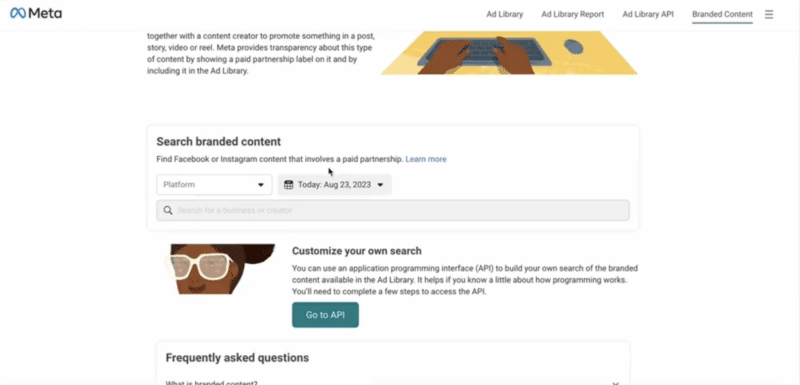
Within the post, Gamble shared a video demonstration illustrating the new feature’s navigation. The video showcases how users can use the tool to gain insights into campaigns involving specific influencers and brands.
When applying the influencer filter, the tool presents an overview of their ongoing campaigns and brand collaborations. Conversely, users can also opt to filter results by brand, revealing the influencers associated with their current campaigns.
Why now? Meta’s decision to improve transparency around branded content campaigns comes as the European Union brings the Digital Services Act into force on Friday – a regulation that puts more onus on large platforms with more than 45 million regional users to create safer digital spaces.
Get the daily newsletter search marketers rely on.
<input type=”hidden” name=”utmMedium” value=”“>
<input type=”hidden” name=”utmCampaign” value=”“>
<input type=”hidden” name=”utmSource” value=”“>
<input type=”hidden” name=”utmContent” value=”“>
<input type=”hidden” name=”pageLink” value=”“>
<input type=”hidden” name=”ipAddress” value=”“>
What has Meta said? Commenting on the new Branded Content search feature, Meta said:
- “Ads are just one way for businesses to promote a product or service on Facebook and Instagram. They can also work together with a content creator to promote something in a post, story, video or reel. Meta provides transparency about this type of content by showing a paid partnership label on it and by including it in the Ad Library.”
- “Use the branded content search to find posts, stories, videos and reels on Facebook and Insatgramt that involved a Paid Partnership. You can filter by app and date.”
- “[This tool] is for anyone who wants to see content from a creator who has worked together with a business.”
Deep dive: Check out Meta’s new Branded Content search tool in the Ads Library to see how it works.
The post Meta rolls out new search tool to track branded content campaigns appeared first on Search Engine Land.
Courtesy of Search Engine Land: News & Info About SEO, PPC, SEM, Search Engines & Search Marketing
Thursday, August 24th, 2023
Meta is widely rolling out its web version of Threads.
This move is aligned with the company’s goal of introducing fresh features to tackle its retention challenges.
Why we care. The expansion to the web could potentially enhance Threads’ active user count and provide a solution to its retention issue. While Threads currently doesn’t display ads, brands utilizing its paid promotion options might experience substantial growth in reach and potentially higher conversions.
How it works. The web version of Threads, threads.net, works in a similar way to the app. Upon visiting the website, users are asked to provide:
- A username, phone number or email address
- A password
The log-in details are the same that you use to log into Instagram.
Upon accessing the web app, the homepage layout closely mirrors that of the mobile version, showcasing an app bar with identical tabs. Notably, the Threads web homepage includes a dropdown menu allowing users to toggle between light and dark themes, report issues, access the about page, or log out.
Usability. Web users are currently able to post a thread, scroll through their feed and interact with others in the same way that they are on mobile. However, there are certain mobile-specific functionalities that are yet to be introduced to the web version. For instance, profile editing is currently unavailable.
Meta is currently addressing these issues and expects a fix to be implemented in the coming weeks.
Get the daily newsletter search marketers rely on.
<input type=”hidden” name=”utmMedium” value=”“>
<input type=”hidden” name=”utmCampaign” value=”“>
<input type=”hidden” name=”utmSource” value=”“>
<input type=”hidden” name=”utmContent” value=”“>
<input type=”hidden” name=”pageLink” value=”“>
<input type=”hidden” name=”ipAddress” value=”“>
What has Threads said? Mark Zuckerberg announced on Thread that the web version would be rolling out “over the next few days”.

Deep dive. Read our Threads FAQ for more information on the platform.
The post Threads is widely rolling out on the web appeared first on Search Engine Land.
Courtesy of Search Engine Land: News & Info About SEO, PPC, SEM, Search Engines & Search Marketing


 Source: