Archive for the ‘seo news’ Category
Wednesday, September 6th, 2023
Google has launched the URL Contains targeting functionality on Performance Max.
The feature, which is also available on Dynamic Search ads (DSA), enables you to manually specify which URL to show your PMax ads to.
Here’s a preview of how to access the new tool on the platform, as shared by Google Ads expert Thomas Eccel on LinkedIn:

Explaining why this new feature could be super useful for advertisers, Eccel told Search Engine Land:
- “Since a Pmax campaign with the Final Url expansion turned on can basically re-direct users on every URL possible (for example, to your blogs, about us page etc), non-monetizable pages should be excluded.”
- “Now, with this new URL rule, I can tell PMax to only redirect users to pages that include them. For example ‘/shop’. Or if I run the PMax campaign for just one product category, let’s say Nike shoes, I can just include ‘/shoes’, for instance .”
Why we care. This feature provides marketers with more control over how their ads are served as you manually get to choose which tokens to target in order to reach a more specific and relevant audience for your brand.
How it works. You can use this functionality to target pages with URLs that contain a certain piece of text – also known as a “token”. Within URLs, a token is a piece of text surrounded by a limiter like “/” or ‘-” – among others.
This feature cannot be used in conjunction with URLs like “electronicsexample.com/servicesmenu/” because the word “menu” appears after the targeted keyword “services”. However, this feature can work for URLs like “electronicsexample.com/services-menu/” because the keyword “services” is separated from the word “menu” with the “-“. Other URL separators include:
What has Google said? A Google told Search Engine Land:
- “This is a new feature rolling out for Performance Max.”
- “We are bringing the same URL Contains targeting functionality from Dynamic Search ads (DSA) into Performance Max to better support DSA use cases in PMax as part of the voluntary upgrade we announced in July.”
- “This feature works exactly as it does in DSA today.”
Deep dive. Visit the Google Ads Help Center for more information on the URL Contains in DSA.
The post Google adds URL Contains targeting functionality to Performance Max appeared first on Search Engine Land.
Courtesy of Search Engine Land: News & Info About SEO, PPC, SEM, Search Engines & Search Marketing
Wednesday, September 6th, 2023
SEO for adult sites is a fiercely competitive space – yet pervasive and unwanted adult-intent traffic remains a big challenge for enterprises, ecommerce sites and marketplaces.
Here is why this is a problem and what can be done about it.
When non-adult sites rank for adult searches
It’s important to understand that “adult-intent traffic” and “adult content” differ.
Any amount of mature content can cause Google to label a website as “adult” and limit its exposure for most queries.
It’s a good practice to label any adult content as such using <meta name="rating" content="adult"> tag that will signal to Google that this content should be filtered from SafeSearch.
Whenever practical, mature content should be separated from the main site by moving it to a subdomain.
Adult-intent traffic, on the other hand, describes the intent behind the search query, regardless of the content of the page it lands on.
How SafeSearch influences Google’s results
If SafeSearch is on, most explicit and adult content will be filtered out from the results, which effectively means a ban on sexually exploitative or sexually suggestive content and nudity.
Websites that Google explicitly labels as being pornographic only show up for certain queries. Google prevents adult-themed content from triggering rich snippets or appearing in Discover.
Ironically, this means that safe websites and platforms that monitor and remove explicit content (for example, mainstream news sites or educational platforms) are more likely to appear for adult-oriented search queries in Google when SafeSearch is on.
General information
For many queries with adult intent, Google might return results that offer more general information about the topic or non-explicit references.
For instance, a search for an adult film star might return a Wikipedia page or a news article about them rather than their explicit content.
Vague queries
Many search queries can be interpreted in multiple ways, both innocent and adult. With SafeSearch on, Google is likely to favor a non-explicit interpretation.
For example, searching for “breast” might prioritize results about breast cancer, chicken breast recipes, or anatomy over more adult-themed results.
While we don’t know what percentage of all Google searches is adult in intent, we know that many authoritative, established sites and global marketplaces capture much of this traffic, even if no matching adult content is found on the site.
It is not uncommon for adult-intent searches to make up to 20-40% of all SEO visits. This number can be even higher for some geos.
Isn’t all traffic good traffic? Unpacking the adult-intent dilemma
For publisher sites that can monetize pageviews through programmatic advertising, a click is a click, and the intent of the traffic might not be the key determining factor for CPM.
For ad arbitrage sites, capturing adult intent visits may even be desirable.
However, this can be problematic for online businesses, platforms, or marketplaces that are conversion-oriented and non-adult.
Analytical noise
When organic search visits are going up, it’s tempting to deem SEO strategy a success. But what if a big portion of these visits are non-converting adult clicks?
An uptick in visits could be because a key competitor or another large website has scaled their adult-traffic blocking efforts.
Not having the right level of insight or ability to isolate valuable visitor segments from noise can lead to:
- Analytical mistakes.
- Misplaced investment of time and resources.
- Failure to tie SEO performance to business outcomes.
It’s expensive
What is the ROI of adult-intent traffic for a non-adult site?
If non-converting adult queries make up a lion’s share of all visits, it may be time to examine the costs associated with serving this traffic and start scaling back.
Quantifying adult-intent queries: Navigating your traffic data
Adult-intent traffic is easy to spot but difficult to quantify.
Sadly, no magic tool will provide all the SEO keyword data and determine what portion is adult in intent.
The bigger the site, the higher the risk.
Established sites that do not restrict indexing of search results pages or marketplaces that leverage user-generated content (UGC) run the risk of amassing an enormous amount of long-tail traffic through low-quality URLs that rank for the most obscure adult terms.
Google Search Console
GSC is a great place to start looking. While it does not provide complete keyword data, it offers enough insights to gauge the magnitude of the problem by examining a relatively small sample of top keywords.
Google Analytics
GA (and most other web analytics tools) can help get more granular by analyzing URLs of top organic landing pages for adult terms or phrases that could be interpreted as adult in meaning.
This is especially relevant for marketplaces, sites that index internal search results, or leverage UGC for SEO.
As a bonus, GA makes it easier to understand the business impact of adult traffic by cross-referencing it with available engagement and conversion data.
Ahrefs
Ahrefs is a fantastic tool that can analyze massive lists of keywords and their ranking fluctuations.
With a bit of regex magic or AI help, it’s possible to determine which keywords have adult intent and estimate the overall share of traffic they represent.
The best part? Competitive intelligence.
Ahrefs makes it easy to analyze competitor standing with respect to adult traffic and glimpse additional insights behind their SEO reach and performance.
It’s well worth segmenting traffic data for further detail. Do some geographies, days of week, times of day, or device types stand out more than others?
Understanding behavioral and usage patterns can make isolating and addressing unwanted traffic easier.
Get the daily newsletter search marketers rely on.
<input type=”hidden” name=”utmMedium” value=”“>
<input type=”hidden” name=”utmCampaign” value=”“>
<input type=”hidden” name=”utmSource” value=”“>
<input type=”hidden” name=”utmContent” value=”“>
<input type=”hidden” name=”pageLink” value=”“>
<input type=”hidden” name=”ipAddress” value=”“>
How to minimize and manage unwanted adult-intent traffic
While no solution will be perfect, here are several ways to reduce adult-intent traffic.
Examine URL slugs and on-page keywords
Frequently, a partial keyword or phrase match in URLs or on-page keywords might be enough to rank a perfectly innocent page to one or more related adult queries.
Sometimes, updating URLs and on-page elements may be enough to drop unwanted rankings.
Remember that changing a URL will likely temporarily impact overall rankings and URL authority for the affected page.
Make use of blacklists
Paid search teams often use blacklists for adult, hateful or harmful keywords. These lists can also be useful for SEO.
Use them to restrict the crawling or indexing of URLs based on related keywords.
One of the most popular methods for this is robots.txt. It offers a simple, effective way to disallow problematic URLs at scale using regex rules.
One of the downsides to this approach is how public it is – it’s quite literally out there for the entire world to see. Another downside is that robots.txt does not allow for nuance.
Not every adult-intent search is equally problematic. In many cases, it may be enough to noindex a page to allow for crawl and discovery of other linked content.
On the other hand, it might be desirable to apply 404 or even 410 response codes to URLs that consistently rank for extreme or very illicit phrases. Websites with dynamic URL generation are especially susceptive to this.
Frequently, URLs that drive adult-intent traffic will only rank for one or a few closely related adult-intent terms, which makes disallowing, noindexing, or doing a 404 redirect viable options.
In other cases, a blanket rule is not the best solution. Consider doing an experiment with conditional rules that:
- Target users, instead of bots.
- Restrict access only to certain audiences, geographies, or device types that drive the unwanted traffic.
Consider engagement-based indexing
An adult-intent user is unlikely to convert on a non-adult site.
These low-quality visits will likely have exceptionally high bounce rates, low pageviews, and no conversions.
A scalable approach for an enterprise site might include custom indexing logic that issues noindex directives based on user engagement and conversion signals.
Manage adult-intent traffic to protect your SEO efforts
While adult-intent SEO traffic might increase the volume of visitors, the quality and relevance of this audience for non-adult sites are questionable.
Businesses must recognize the nuance between traffic numbers and genuine user engagement.
By effectively recognizing, segmenting, and acting against unwanted adult-intent traffic, enterprises can fine-tune their SEO strategies and ensure their content reaches the right audiences.
After all, in the age of data-driven decision-making, it’s not just about attracting eyes – it’s about attracting the right ones.
The post How SEOs can deal with unwanted adult-intent traffic appeared first on Search Engine Land.
Courtesy of Search Engine Land: News & Info About SEO, PPC, SEM, Search Engines & Search Marketing
Wednesday, September 6th, 2023
Microsoft Advertising Editor has rolled out in-market audiences across all of its markets in EMEA, APAC and LATM.
The platform has also launched new audience types.
Alongside this expansion, the platform now supports bulk associations for In-market audiences, as well as:
- Remarketing.
- Dynamic remarketing lists.
- Similar audiences.
- Customer match.
- Custom audiences.
- Custom combination lists.
Why we care. Advertisers have historically only been able to use Microsoft Advertising online to manage audiences. However, they can now do this using the Microsoft Advertising Editor tool, which means they now have the flexibility to monitor and tweak their audience campaigns offline.
How it works. Marketers have been advised that audience creation and management should still be done via Microsoft Advertising online. However, Microsoft Advertising Editor can now be used to update associations in bulk. To update associations in bulk, navigate to the ‘Audience’ tab on Microsoft Advertising Editor and select an option.
Alternatively, to update audience targeting associations, you can import a file or import from Google Ads.
Get the daily newsletter search marketers rely on.
<input type=”hidden” name=”utmMedium” value=”“>
<input type=”hidden” name=”utmCampaign” value=”“>
<input type=”hidden” name=”utmSource” value=”“>
<input type=”hidden” name=”utmContent” value=”“>
<input type=”hidden” name=”pageLink” value=”“>
<input type=”hidden” name=”ipAddress” value=”“>
Read more. Read Microsoft’s Audience options guide for more information on audiences, or Microsoft’s In-Market guide for a full list of markets and available audiences.
The post Microsoft Advertising Editor expands audiences to all markets appeared first on Search Engine Land.
Courtesy of Search Engine Land: News & Info About SEO, PPC, SEM, Search Engines & Search Marketing
Tuesday, September 5th, 2023
Q4 is looming, and many brands are strategizing how to optimize their budgets to get more traffic to their products when buyer intent soars.
One humble suggestion from this longtime affiliate marketer: TM+ partners (also known as Trademark+ partners or affiliate search partners), who work with brands to bid on brand keywords to drive traffic to coupon or offer sites.
Despite what you may have heard, TM+ models are a no-risk model – the affiliate site pays for the click and gets paid by the brand when the ads lead to conversions.
To keep the guidelines clearly delineated, brands should give their affiliate partners a list of keywords approved by the search teams, with any other keywords off-limits to the TM+ partner to ensure both parties aren’t bidding against each other.
I work with a ton of affiliate search partners, but if you’re just getting your feet wet in this initiative, you should start with a short list of targets who can help you get traction.
This article covers four major partners – why I recommend them, their unique strengths, and when they might not make sense for your brand.
1. PromoCodesForYou
Brands that give PromoCodesForYou (PCFY) bidding rights to a keyword set have more of a chance to get picked up for organic inclusion in the portfolio of sites in Dotdash Meredith, PCFY’s parent company.
The portfolio is broad and includes publications like:
- People
- Travel + Leisure
- Allrecipes
- Food & Wine
- EatingWell
- InStyle
- Shape
- Better Homes & Gardens
Brands looking for added exposure to complement direct-response coupon campaigns have a potential gold mine with a PCFY partnership.
The flip side is that PCFY won’t work with just any brand (specifically, small, lesser-known ones aren’t going to be a fit here).
Their sweet spot is well-known brands, and their vetting process includes search volume (pulled from Google Ads) with aggressive volume minimums.
That said, if search volume is low but the brand offers a relatively high average order value, PCFY may be willing to run a test to see if the partnership has some sparks.
2. Offers.com
A relatively close second, Offers.com is a Ziff Davis company with the potential of added organic exposure on its portfolio of sites, which include:
- Mashable
- AskMen
- PCMag
- Everyday Health
- BlackFriday.com
- BestBlackFriday.com
- TheBlackFriday.com
(The latter three are obviously great and relevant platforms for the holidays, getting over 60 million global sessions during the holiday season).
Offers.com isn’t as particular as PCFY about partnerships, so it could be an ideal starting point for small brands looking to build on their momentum.
Get the daily newsletter search marketers rely on.
<input type=”hidden” name=”utmMedium” value=”“>
<input type=”hidden” name=”utmCampaign” value=”“>
<input type=”hidden” name=”utmSource” value=”“>
<input type=”hidden” name=”utmContent” value=”“>
<input type=”hidden” name=”pageLink” value=”“>
<input type=”hidden” name=”ipAddress” value=”“>
3. Slickdeals
This is the deal site that’s most frequently leveraged for clients who have a need for inventory liquidation.
With 69 million unique monthly visitors and a big consumer footprint during the holidays, Slickdeals is great for pushing heavily discounted products.
Working with the site as a TM+ partner means you’ll likely get comped on individual deal submissions, which you usually have to pay for.
Slickdeals is an ideal partner for brands with seasonal catalogs, which usually means there are inventory remnants to clear out for the next season’s line.
It’s not solely for low-priced or mid-priced products. I’ve seen a discounted watch that retailed for $6,000 sell out in a matter of minutes, and some of our high-end clients have seasonal products that have found a great audience on Slickdeals.
But if you’re a brand that’s careful about buying in reasonable quantities and have a limited and/or stable collection of products, you can skip this one and research other partners.
4. CouponCause
CouponCause is different. Its main selling point is a give-back component that encourages consumers to donate their savings to any of a group of partner nonprofits.
It’s a great partner for calendar events like Giving Tuesday, and it’s a natural fit for socially conscious brands who have built a name around doing good.
CouponCause is much more flexible with brand partners, so SMBs and startup brands looking to get awareness or increase sales velocity often start here.
Getting started
If you don’t have relationships with any of these partners, you can go through an affiliate agency (using a recommended vetting process) or dig up a list of contacts at the partner and do the outreach yourself.
Remember that these are partnerships, so you’ll need to create a compelling case for why the platform will benefit from bidding on your brand and product terms.
It bears repeating that when you do get traction, it’s a good idea to make sure your search team is in the loop since they may have reservations or caveats for the partner to address (as well as keywords they want to protect).
Managed well, TM+ partnerships are an added source of low-risk revenue and exposure that can help you maximize purchase intent in the coming months.
Even if you’re not sure you can act in time to catch the Q4 wave, start doing the legwork now – good deals are always in season.
The post 4 top affiliate search partners to consider: A breakdown appeared first on Search Engine Land.
Courtesy of Search Engine Land: News & Info About SEO, PPC, SEM, Search Engines & Search Marketing
Friday, September 1st, 2023
A steady decline in organic click-through rate has posed a real challenge for SEOs over the last few years.
With organic ranking becoming increasingly competitive, the best way SEOs can continue to excel is to shift their focus to SERP features and rich results, according to Tanner Zoromski, SEO manager at Merkle, a customer experience management company.
Technical SEO is an effective way to increase this type of visibility, using structured data and schema markup. He explained:
- “Essentially we want to make search engines’ lives easier by using these techniques because as a result, they will reward us with our content ranking higher in the SERP and we’ll have more interaction from searchers.”
Below is a summary of how structured data and schema testing can increase SERP visibility, as presented by Zoromski at SMX Advanced.
Search is changing
Search is always evolving. As new features are deployed, structured data can provide sites with the edge needed to effectively and efficiently communicate with search engines, Zoromski explained:
- “I want to highlight here that Google is continuing to test and implement search changes, relying more on information scraped from sites. And we are seeing more results resembling product listing pages – which lends clues to the direction Google is looking to take its product.”
- “This means we need to question how to stay at the forefront of this. How do we communicate most effectively with search engines? And how do we make sure that despite these different changes, we’re still present and showing up first?”
Understanding the breadth of schema
The SEO expert went on to explain the importance of knowing what schemes are available and how to correctly deploy them for maximum impact:
- “There are more than 32 different types of schema that can be implemented to interact with over 16 different SERP features.”
- “Whether we’re publishing articles or blogs or we’re reviewing movies, it’s important to understand what schema we can leverage to help search engines to index our sites.”
Winning with product schema
SEOs can implement product schema, images and descriptions across all pages to win feature snippets – otherwise known as position zero, as Zoromski explained:
- “Implement this type of schema to prevent traffic from going to competitors.”
- “Make sure your brand is putting its best foot forward and answering the questions that consumers want to know about their products.”
- “Additionally, make sure that the narrative stays on-site and on-topic for what your brand needs, so you are winning at position zero. Schema is the way to do that on this one.”
Results to shout about
Zoromski shared a case study that he had personally worked on, in which his team was able to double organic sessions for a recipe website by correcting microdata and replacing it with structured data:
- “My team were presented with a challenge – to review and address some improperly nested microdata that was causing error recipe videos and article markup on a blog.”
- “When we looked at the SERP for this keyword, the top organic listings all had structured data – there wasn’t an organic listing in the top search results, which hammers home the need to implement structured data and be visible.”
- “Our approach was to recommend the client remove the microdata and replace it with the JSON LD markup instead. As a result, we provided JSON-LD templates for the structured data types Article, Video, Recipe as well as Recipe with Nested Video.”
- “As a result, the recipe and article structured data returned 101% increase in organic sessions.”
- “This is a pretty clear demonstration that having schema on those pages really elevated their visibility and their engagement with searchers.”
Get the daily newsletter search marketers rely on.
<input type=”hidden” name=”utmMedium” value=”“>
<input type=”hidden” name=”utmCampaign” value=”“>
<input type=”hidden” name=”utmSource” value=”“>
<input type=”hidden” name=”utmContent” value=”“>
<input type=”hidden” name=”pageLink” value=”“>
<input type=”hidden” name=”ipAddress” value=”“>
Tracking performance
From a testing standpoint, Zoromski advised building and monitoring your own SEO testing to track performance and taking multiple factors into consideration, such as:
- Establishing the metrics and dimensions being impacted.
- Building customized reports to monitor KPI performance.
- Defining testing timelines to ensure results within a specific period.
- Controling for internal and external variables such as dev releases and site promotions.
- Allowing room for assumptions that could impact results.
- Relaying findings across teams.
AI and the future of schema
Following recent advancements in AI, Zoromski added that schema will most certainly play a role in this area moving forward – and it’s a situation SEOs need to monitor closely. He concluded:
- “With all the buzz around ChatGPT, Bing and Bard, we are seeing ramifications and effects across digital – and SEO is absolutely going to be affected.”
- “Search behavior is going to change as AI provides more natural language answers as opposed to a list of links.”
- “As SEOs, we need to make sure that in the future, our sites are equipped and able to effectively interact with these different changes. So keep on the lookout and make sure that you’re at the forefront of this.”
The post Increasing SERP visibility with structured data and schema testing appeared first on Search Engine Land.
Courtesy of Search Engine Land: News & Info About SEO, PPC, SEM, Search Engines & Search Marketing
Thursday, August 31st, 2023
If you’re a PPC manager, you likely spend a significant part of your week working on the Google Ads interface.
Several built-in features can help you work more efficiently, reducing time to access data and speeding up bulk edits so that you can focus on bigger-picture tasks.
This article will walk you through some examples and how to access them in the web UI.
1. Saved views
Previously launched as Workspaces, Views allow you to save a set of filters that will carry over as you navigate between campaigns, ad groups, keywords, and other sections of the UI.
These differ from just saving filters within the data table, which will reset once you go to a different section. They can be helpful when you have multiple campaigns divided up between lines of business, service lines, or geographies to allow quicker access without having to manually apply filters.
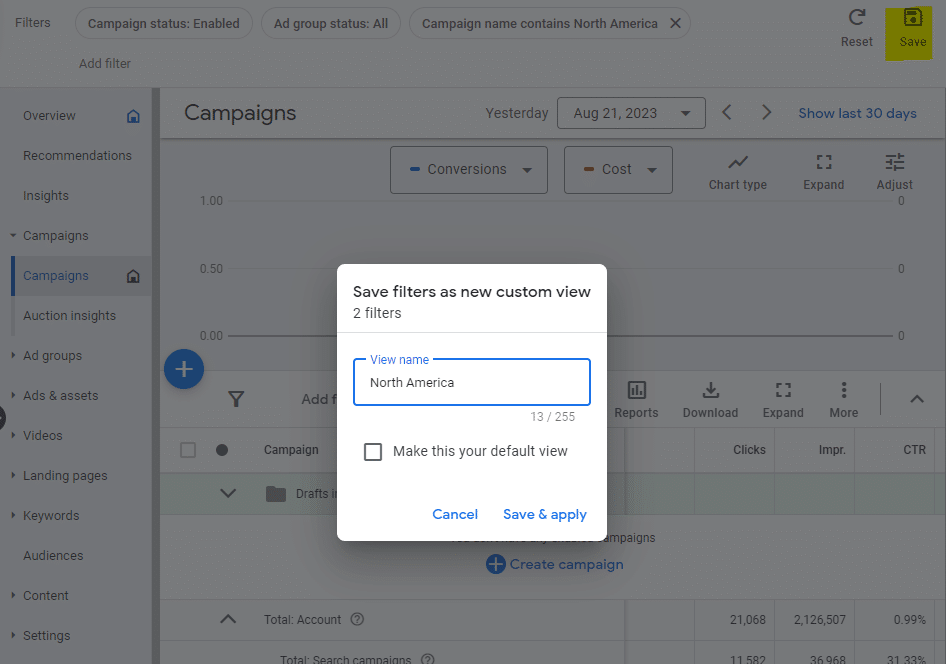
To create a view, apply the filters you’d like from the top bar in the UI and select Save in the upper right. Next, you’ll see a prompt to name and save your view.
In this example, we’re creating a filter to see all campaigns targeted toward North America.
In more advanced use cases, you could apply several filters together to narrow down what you’d like to see in a view.
In the future, you can apply saved views by going to the dropdown at the top of the left sidebar, selecting Views from the dropdown, and choosing your desired view to display.
2. Custom columns
With custom columns, you can create unique metrics to view in the UI, allowing for segmenting data beyond what’s available by default or using formulas to define more advanced metrics.
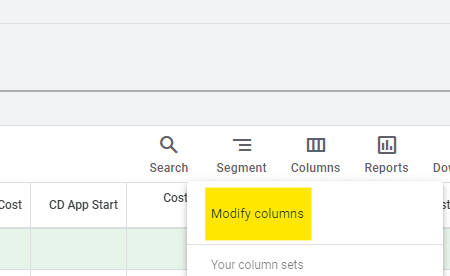
To create a custom column, select the Columns button above the data table in the UI and then choose Modify columns.
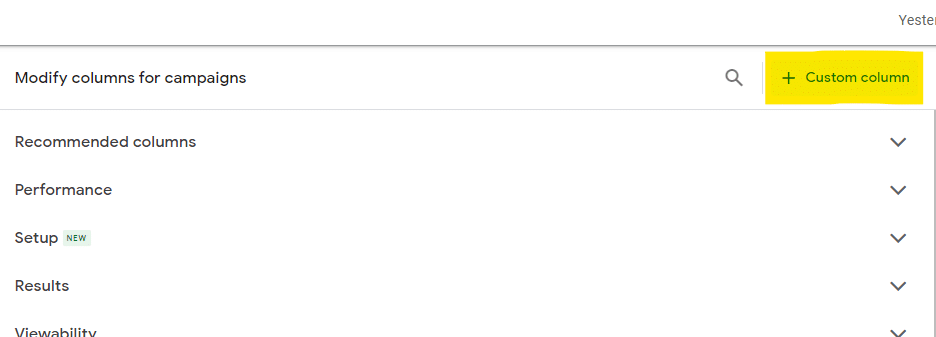
Next, select the + Custom column button in the upper right section of the window that appears.
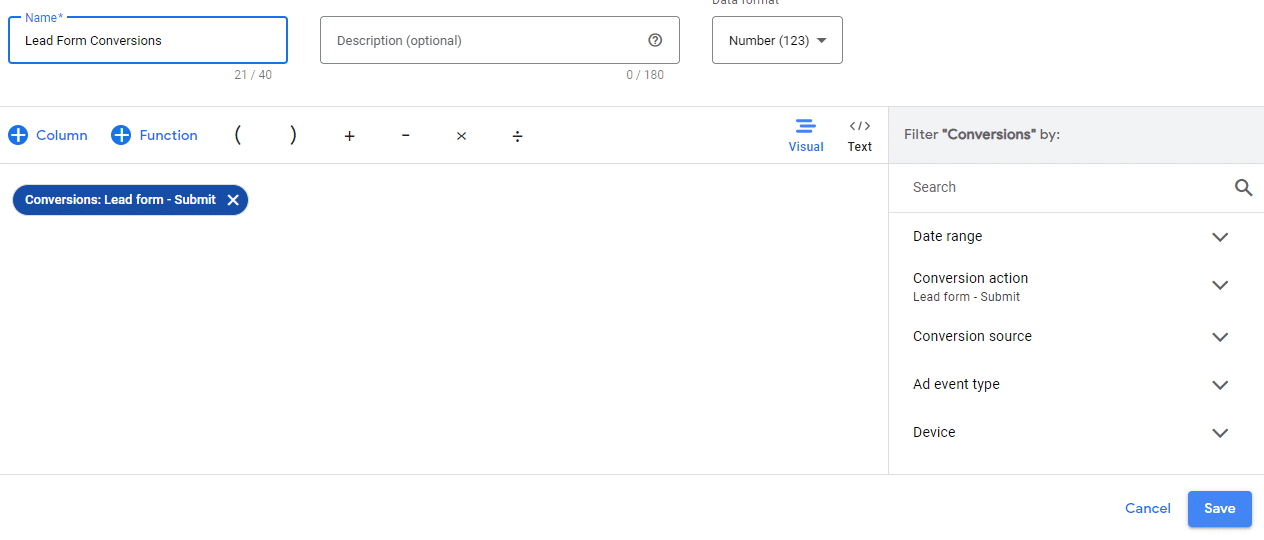
One popular use for custom columns can be to segment to individual conversion actions.
For instance, if you offer both free trial signups and demo registrations, you can create separate columns for each.
To do this, add the Conversions column and then use the right sidebar to filter by Conversion Action to the specific action you’re looking for.
You can even select multiple conversion actions to group together.
You can also select Conversion Rate or Cost Per Conversion metrics and filter those to specific actions to see additional metrics narrowed down.
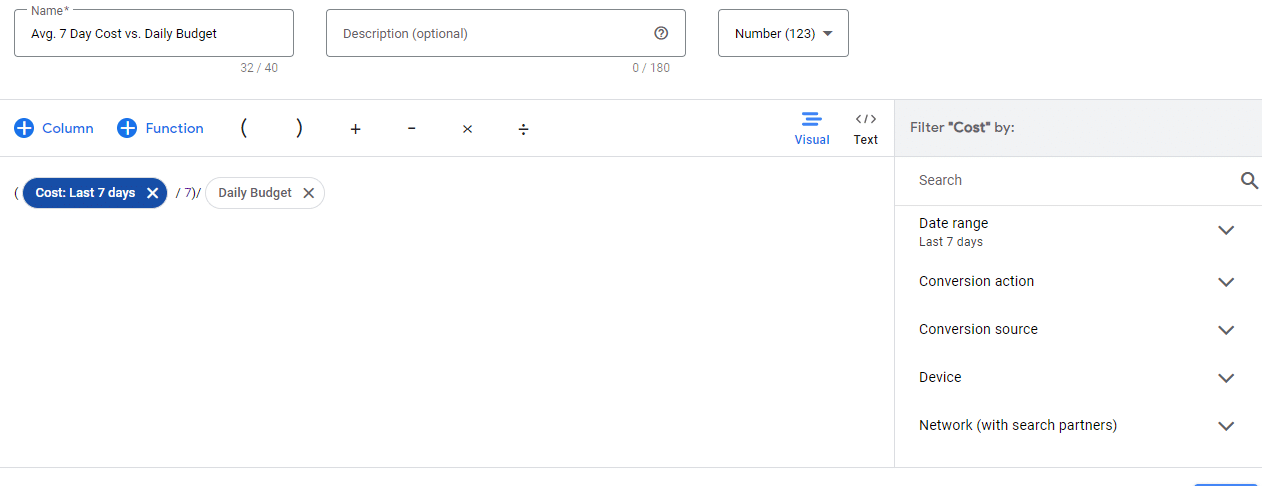
Next, formulas can help to provide more advanced data in the UI. While you can get as complex as you want by incorporating custom logic, there are several more basic formulas to provide useful data.
For instance, the example below allows you to see the average cost over the past 7-day period vs. the daily budget, allowing you to know how much you’re overspending or underspending.
3. Saved column sets
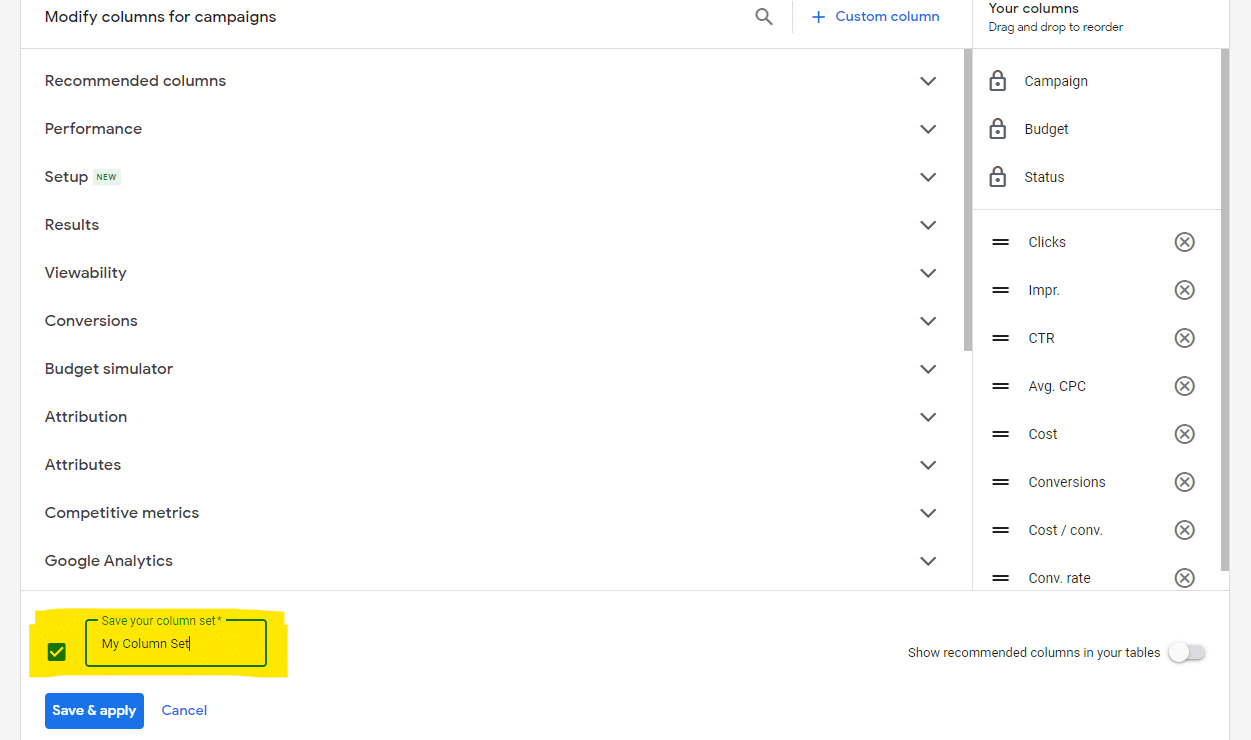
Often going hand-in-hand with custom columns, you can save a set of columns to quickly view data that’s most relevant to the campaigns you’re reviewing.
For instance, if you are tracking multiple conversion actions, you can set up a custom column set that breaks out those conversions separately.
Saved column sets can also reduce frustration from the sometimes arbitrary default columns that Google Ads chooses to display.
Once created, you can quickly select a column set from the Columns dropdown instead of manually adding the columns you want each time.
Get the daily newsletter search marketers rely on.
<input type=”hidden” name=”utmMedium” value=”“>
<input type=”hidden” name=”utmCampaign” value=”“>
<input type=”hidden” name=”utmSource” value=”“>
<input type=”hidden” name=”utmContent” value=”“>
<input type=”hidden” name=”pageLink” value=”“>
<input type=”hidden” name=”ipAddress” value=”“>
4. Policy Manager
If you’ve been managing Google Ads campaigns for some time, you’ve likely run into ad approval issues and had to appeal.
Unfortunately, you don’t receive any notification by default once an appeal is successful, and it’s a pain to have to sift through disapproved and “approved limited” ads in the interface if you are dealing with multiple policy issues simultaneously.
You also want to be careful about appealing the same issue too often, mainly if you’re waiting for a response from the first round of appeals. Thankfully, the Policy Manager offers a centralized place to monitor appeals.
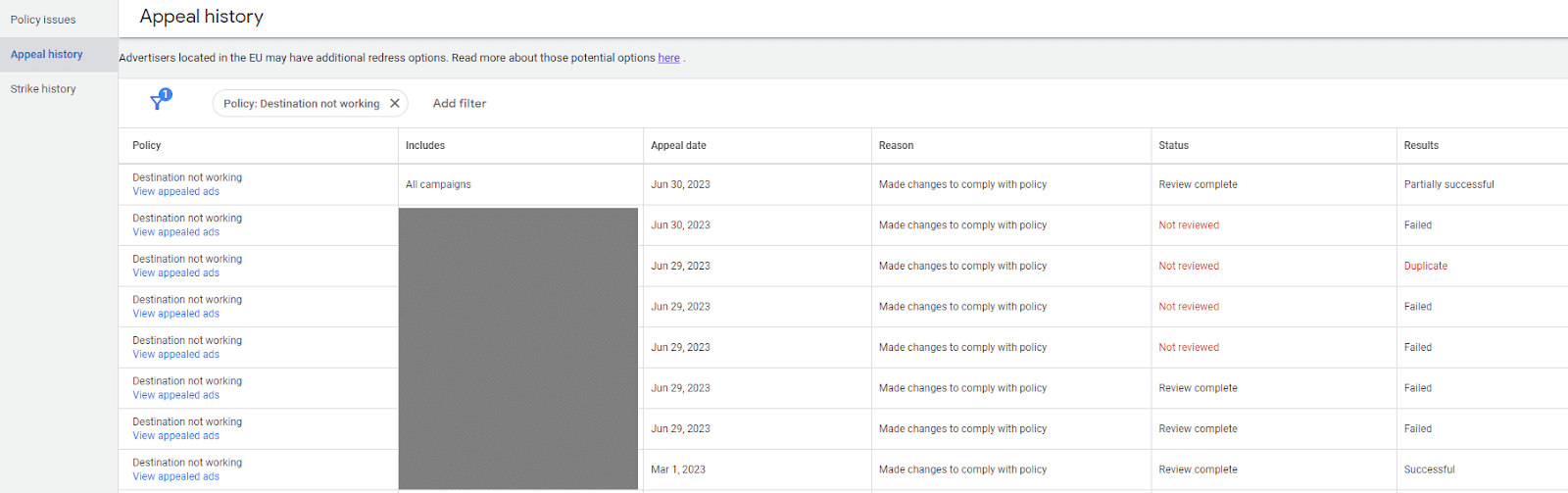
Access this section by navigating to Tools and Settings from the top bar and selecting Policy Manager.
On the Policy Issues page, you’ll see a view of current violations, which you can appeal.
On the Appeal History page, you’ll see the status of appeals you have submitted, including the date and whether it was successful, failed, or is still pending.
5. Negative keyword and placement exclusion lists
Negative keywords are crucial to control spend and help ensure the relevance of traffic in search campaigns.
Using negative keyword lists can help you to be able to quickly and efficiently mark unwanted queries across your account instead of having to add them to individual campaigns.
You can create up to 20 negative keyword lists per account. Consider ways to categorize them based on your campaign structure.
For instance, you may have a catch-all negative list for obviously junky queries that you want to exclude across the board and a brand negative list that you only apply to non-brand campaigns.
Placement exclusion lists operate similarly but for display and video campaigns. You can select placements, including websites, mobile apps, YouTube channels, and YouTube videos.
Both can be accessed from Tools and Settings via the top navigation bar.
6. Automated rules and scripts
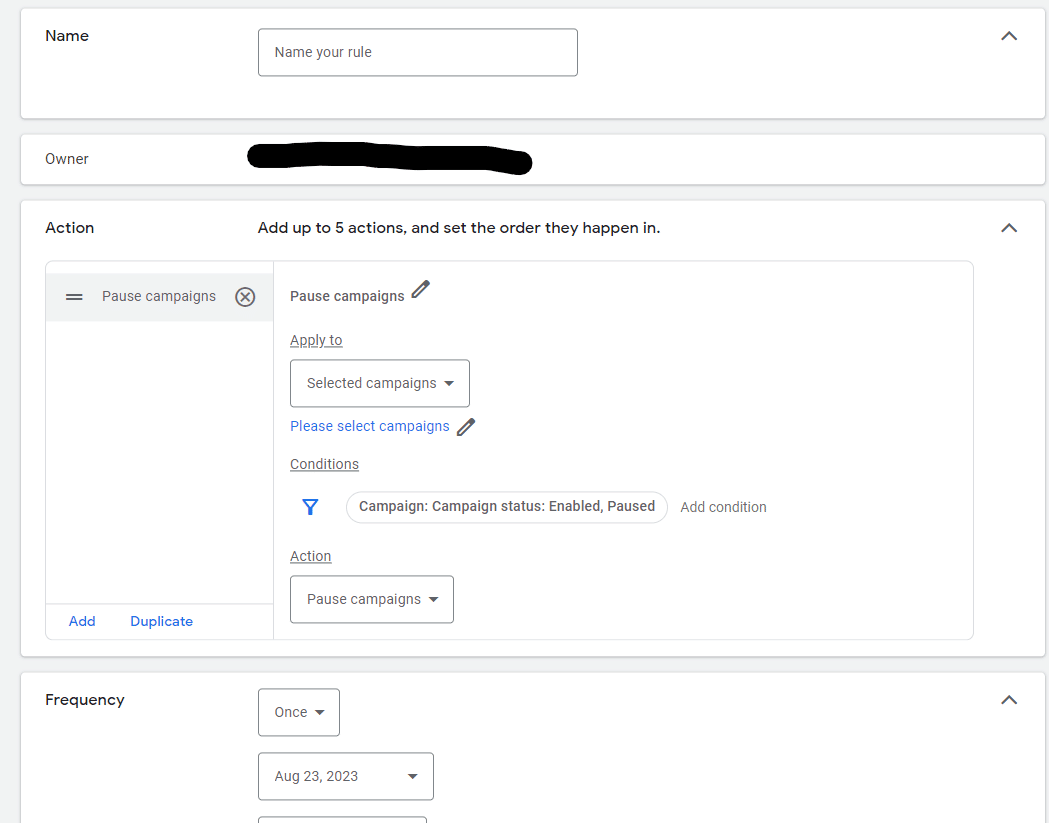
Automated rules are invaluable to set up simple bulk actions and notifications.
For instance, you may want to automatically pause campaigns over a holiday weekend and re-enable them afterward.
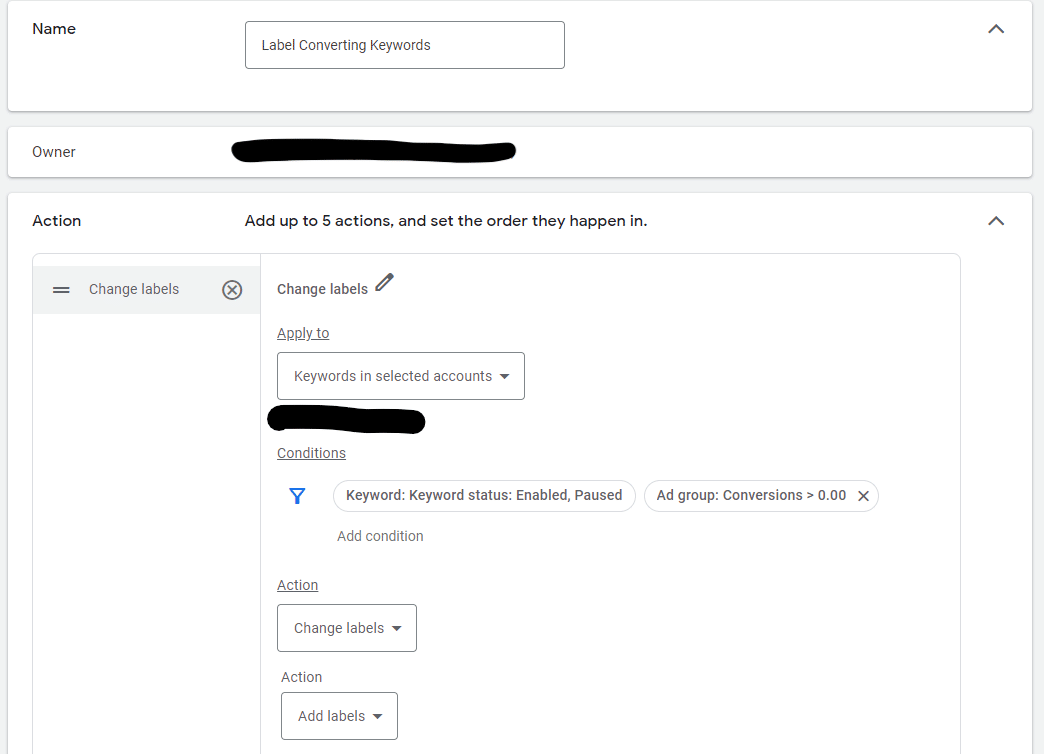
Another use for a rule could be to label keywords once they have received a conversion so you can see which ones have historically converted.
You can also use rules to send you notifications, such as when a campaign has spent over $10,000 in a 30-day timeframe.
Google Ads Scripts provides more advanced options for more complex bulk actions and campaign monitoring solutions.
You don’t necessarily need to know any JavaScript, as many helpful individuals have created ready-to-use scripts that you can copy and paste into the interface.
7. Asset library
The asset library in Google Ads allows you to see image, video, and text assets you’ve used in ads in one place. Access this section from the Tools and Settings dropdown on the top navigation bar.
If you’d like to upload images for future use in a responsive display ad, Discovery ad, or image extension, you can add them ahead of time here.
You can also create folders to organize assets by category and search for individual items.
Additionally, for assets with enough data, you can see top-level audience insights to view those most likely responding.
Start streamlining your Google Ads workflow
We’ve covered several sections of Google Ads that allow you to more easily review custom data, save time accessing reporting, and conduct edits in bulk.
If you come across features you haven’t tested, take some time to dig into the interface and think about how you could use them for your account.
- What custom columns are applicable to your business KPIs?
- Are you using negative keyword lists and placement exclusion lists to keep ads from showing up where you don’t want them?
- Are there rules that could help you manage campaigns more efficiently or send notifications for anomalies?
Stay tuned to Google’s support section and announcements, as these features often change in name and location within the UI.
Dig deeper: 5 hidden areas of Google Ads you probably didn’t know about
The post 7 Google Ads features to streamline your workflow appeared first on Search Engine Land.
Courtesy of Search Engine Land: News & Info About SEO, PPC, SEM, Search Engines & Search Marketing
Thursday, August 31st, 2023
Google Ads is introducing a new policy to combat scams and help prevent misleading ads.
The platform will now have a “get-to-know-you” period for advertisers it doesn’t know well. During this time, Google Ads may limit how many impressions unfamiliar advertisers receive.
The Limited Ads Serving policy will apply when an advertiser targets specific brands in their campaign but the relationship between the ad and brand is unclear, Google said.
This gradual rollout aims to curb bad actors while giving legitimate advertisers time to clarify their branding strategies on the platform before they’re rewarded with full reach.
Why we care. Implementing stricter ad policies could build user trust, giving people more confidence to click on buy from brands advertising on Google. The actual impact will likely be small for advertisers, but this could help some brands by reducing the reach of low-quality advertisers targeting them.
What’s next? Google Ads will notify advertisers impacted by the new policy. Those advertisers will get guidance on meeting the requirements to reach what Google calls “qualified status.”
Google Ads plans to slowly phase in enforcement before gradually expanding the policy’s reach.
Measuring trust. Google Ads shared how it will gauge an advertiser’s trustworthiness based on its track record:
- User feedback: Google Ads will closely monitor user feedback and consider negative and positive reviews.
- Advertising history: Google Ads will analyze whether advertisers have a good track record of adhering to its advertising policies.
- Advertiser Identity Verification: The platform confirmed that completing this step is an “important” factor in establishing trust between users and advertisers.
Help for advertisers. Google Ads stated that it will provide advertisers with advice on how to create clear ads – for example, pinning their domain to the title of the ad, especially if they are not a widely known brand.
Get the daily newsletter search marketers rely on.
<input type=”hidden” name=”utmMedium” value=”“>
<input type=”hidden” name=”utmCampaign” value=”“>
<input type=”hidden” name=”utmSource” value=”“>
<input type=”hidden” name=”utmContent” value=”“>
<input type=”hidden” name=”pageLink” value=”“>
<input type=”hidden” name=”ipAddress” value=”“>
What Google is saying? Advertisers without a record of good behavior could have their impressions limited under this policy until they build their track record, a Google Ads spokesperson told Search Engine Land:
- “While we want to allow users the opportunity to interact with relevant and helpful ads, this policy will reduce the chance that they’ll see a misleading or confusing ad from an advertiser with an unproven track record.”
- “It’s important to us that we keep our platform open to new advertisers and give them the opportunity to deliver a helpful experience. This policy won’t block or remove any ad from our platform, and any limitations on an ad will only apply in certain scenarios like when a user could be confused by an advertiser’s brand identity. We’ll be rolling out this policy gradually and making adjustments to ensure it’s working effectively.”
The post Google introduces new Limited Ads Serving policy appeared first on Search Engine Land.
Courtesy of Search Engine Land: News & Info About SEO, PPC, SEM, Search Engines & Search Marketing
Thursday, August 31st, 2023
“Search is coming to Threads,” according to Meta CEO Mark Zuckerberg.
Zuckerberg shared the news via Threads about an hour ago, but it’s unclear when it’s coming. But if he’s hyping it up, Threads search must be near.
Why we care. The Threads app launched without several basic and expected features – such as the ability to search for posts using words. We have been frustratingly limited to only searching for accounts, but it seems that will finally change soon, which means more opportunities for your posts to be discovered.
Search being tested now. Threads Search is now being tested in New Zealand and Australia, TechCrunch reported. Search will rollout to more English-speaking countries but we don’t yet know when.
What it looks like. Here’s a screenshot for a Threads search for [tennis], via TechCrunch:

What Meta is saying. “We are actively listening to the community’s feedback and working on more features to improve the search experience,” the company said in a statement.
Better late than never? Threads took just five days to get 100 million users. However, in the weeks since, engagement has declined and it has an estimated 8 million daily active users now. We’ll soon find out whether launching the web version of Threads and having actual useful search can help reverse Threads’ downward trend.
Dig deeper. Threads FAQ: Everything marketers need to know
“For you on Threads”. Meanwhile, in another attempt to lure in users, Instagram has started testing a For you on Threads carousel with a link to open the app, TechCrunch reported.
The post Threads search is coming, but when? appeared first on Search Engine Land.
Courtesy of Search Engine Land: News & Info About SEO, PPC, SEM, Search Engines & Search Marketing
Thursday, August 31st, 2023
We have used machine learning and AI in our day-to-day optimization work to save time and improve performance. (Think automated bidding and recommendations, plus data-driven attribution.)
But how can PPC practitioners use generative AI tools like ChatGPT to boost their campaign management and optimization efforts?
ChatGPT can quickly analyze and deliver huge data ranges in many formats. Here are a few ways I use it daily.
1. Product research
One particular challenge for PPC practitioners is the struggle of not being a subject matter expert on every product, service, industry, or brand they work on.
Even in-house managers may have to rely on product managers and others to inform them of certain product specifications, applications, and technical terminology.
One solution is to spend hours researching and reading about each specific area you are marketing. Another is to use generative AI as a starting point for your research to save valuable time.
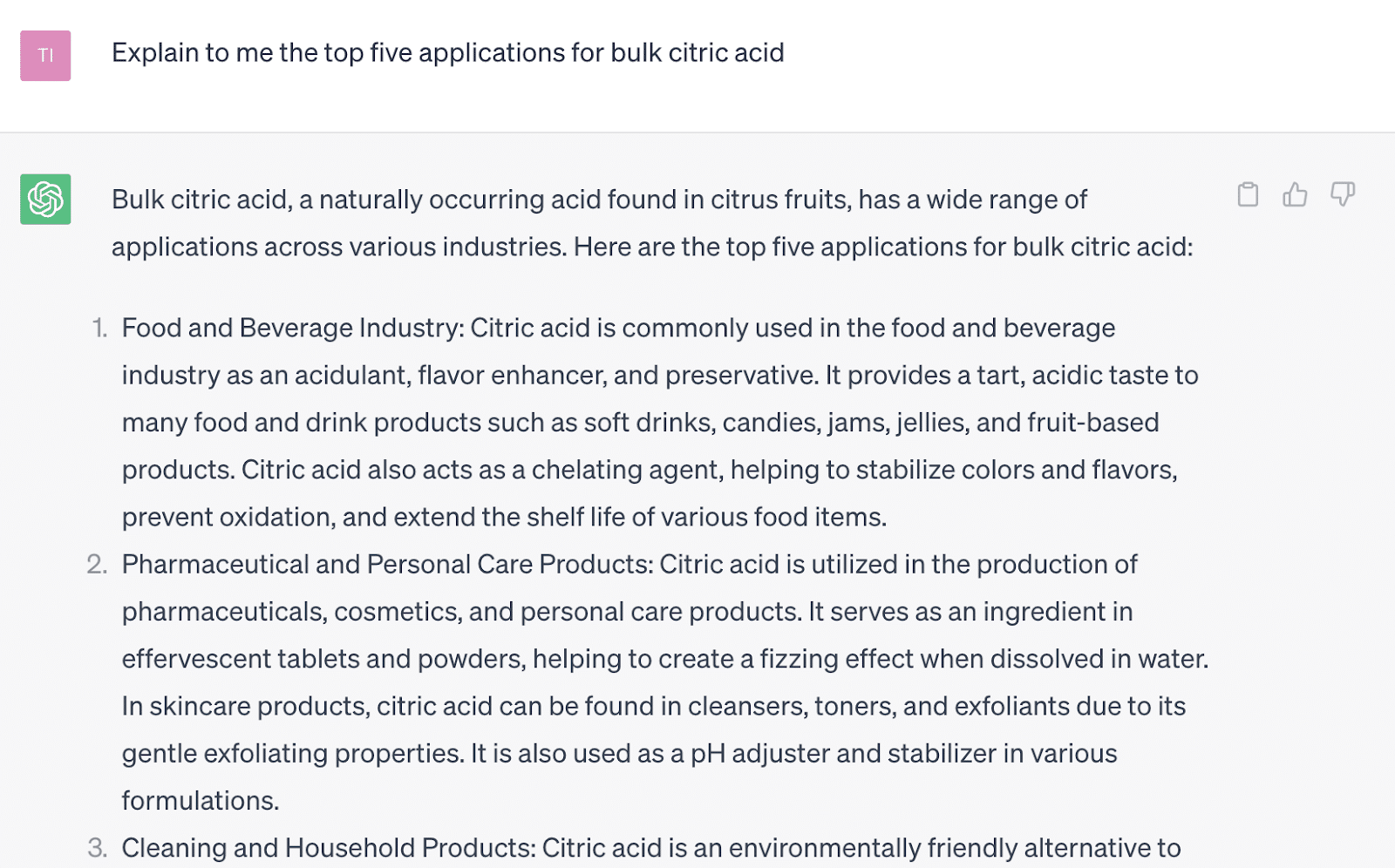
Here is a good example of expediting your initial research as you attempt to learn more about a product you are marketing (in this case, bulk industrial citric acid).
This research method requires critical thinking.
It’s a good starting point to understand topics in which you do not have a strong background but need working knowledge to develop a PPC strategy.
Dig deeper: ChatGPT for PPC marketers: 15 strategic prompts to use today
2. Ad copywriting
With 15 headlines and four descriptions in every responsive search ad, we can simultaneously develop and test many ad copy variations.
Manually drafting ad copy can be time-consuming, though. Additionally, it can be challenging if you are still learning about that particular product.
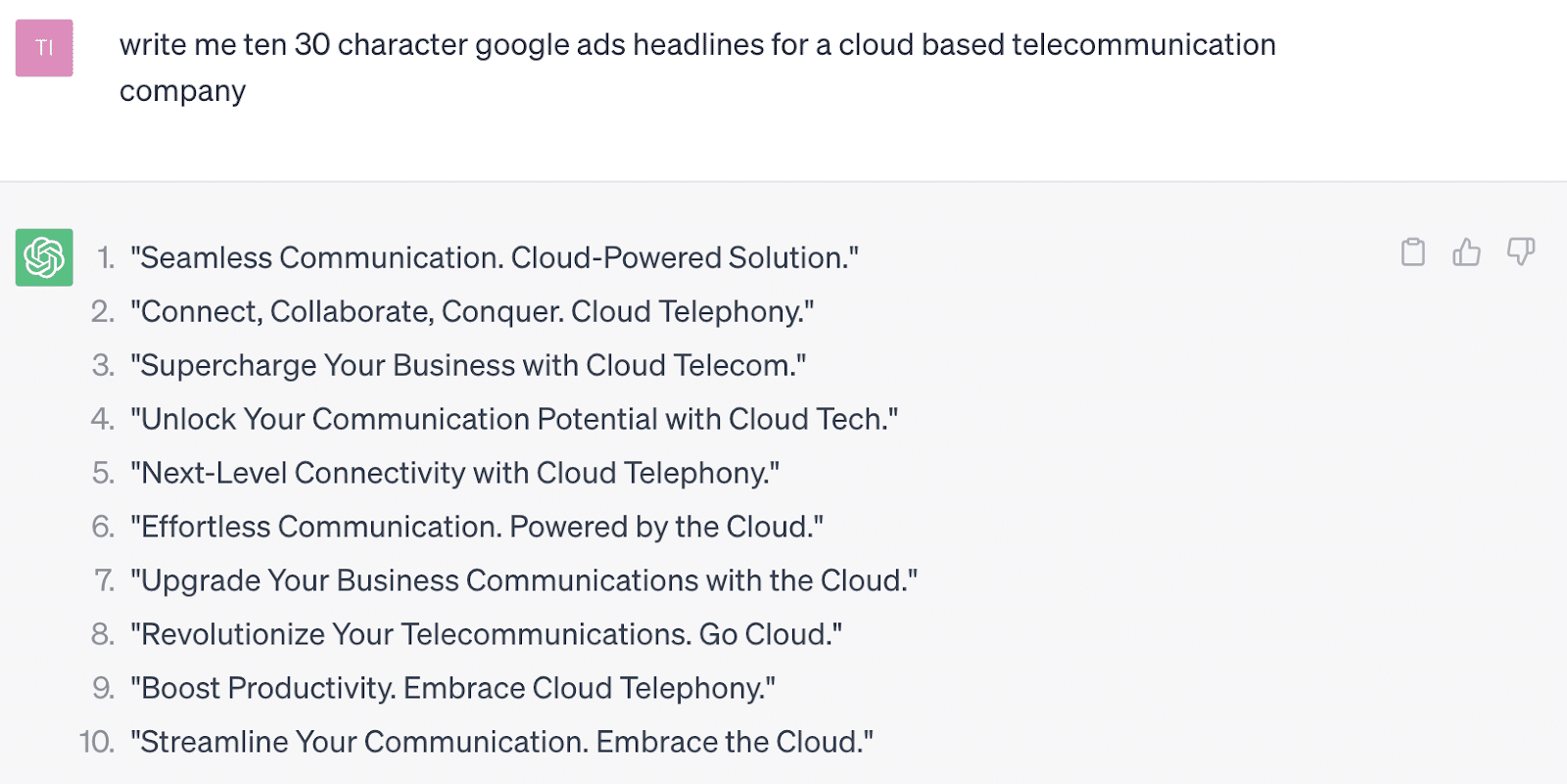
In this example, if you give the tool some specific guidelines around character count, it will generate options for you to carefully review and adjust as needed while saving you time upfront.
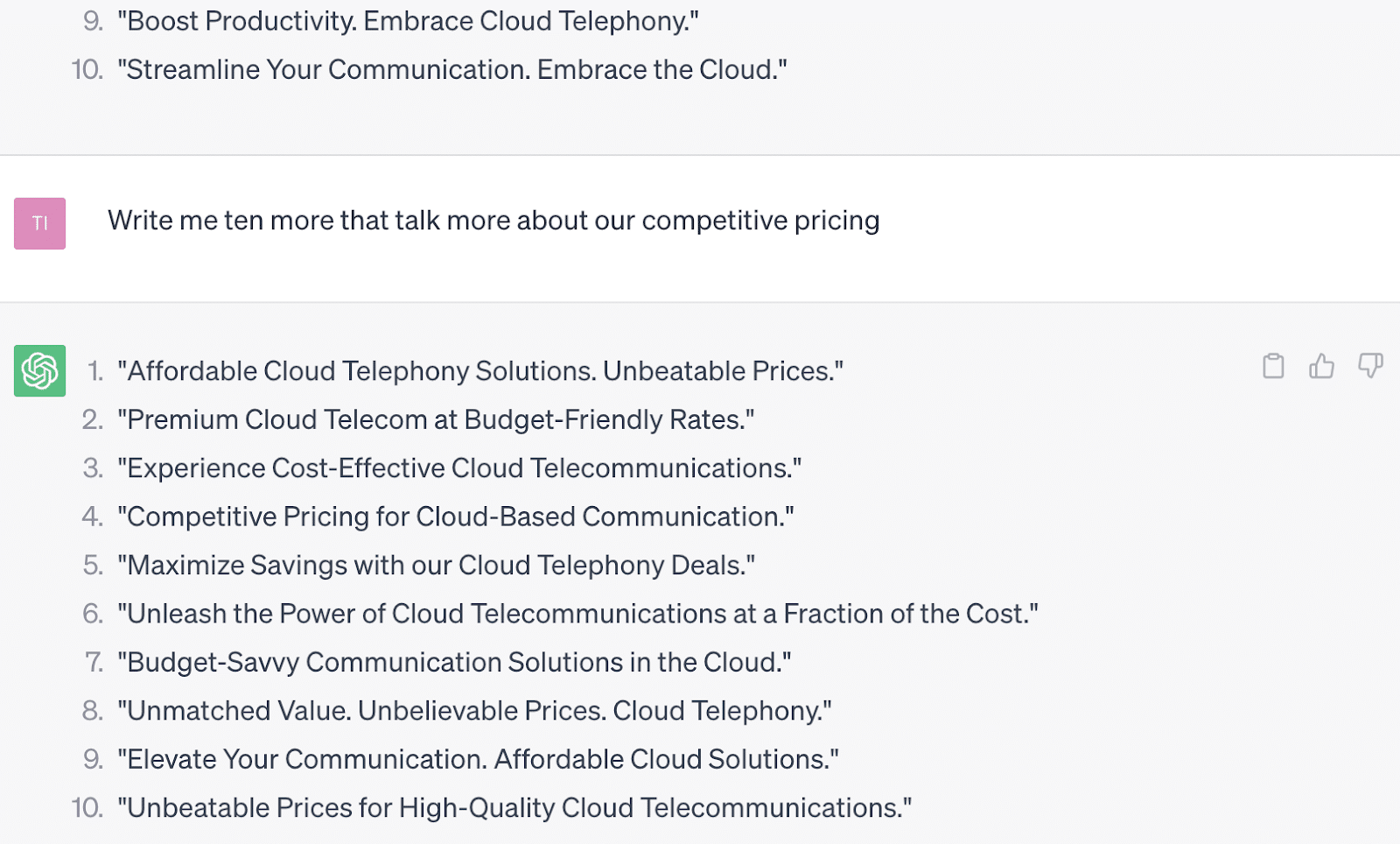
Additionally, you can get even more specific and ask it to incorporate some of the competitive advantages you want to highlight.
ChatGPT will rarely deliver perfect ad copy.
But again, this is a significant time saver and will likely generate many more variations and incorporate more keywords than you might have done manually.
Dig deeper: Elevate your PPC with ChatGPT: The art of asking disconfirming questions
Get the daily newsletter search marketers rely on.
<input type=”hidden” name=”utmMedium” value=”“>
<input type=”hidden” name=”utmCampaign” value=”“>
<input type=”hidden” name=”utmSource” value=”“>
<input type=”hidden” name=”utmContent” value=”“>
<input type=”hidden” name=”pageLink” value=”“>
<input type=”hidden” name=”ipAddress” value=”“>
3. Keyword research
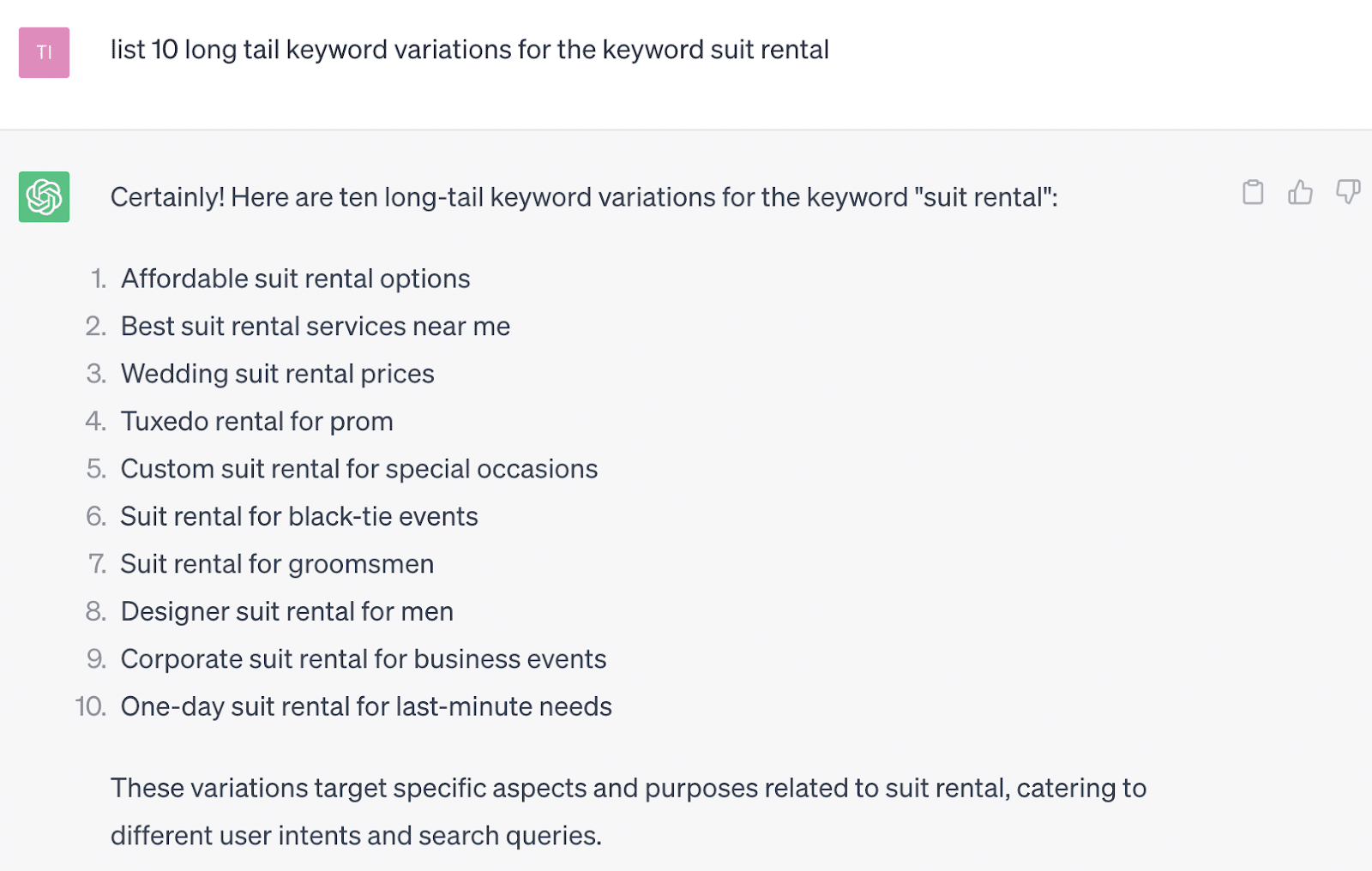
Researching new keyword variations is another way to utilize AI to help you think outside the box and save time.
There are many keyword research tools out there, both paid and free, but ChatGPT can bring a new angle to keyword research.
It can be as simple as asking for initial ideas as you build a new ad group.
Try different prompts and get specific about what you are looking to get out of your research.
The goal is to use the tool to help you think of new angles.
In the example above, maybe I hadn’t gone through some of the qualifying keywords it suggests, like “one-day” or “black-tie”.
Broad match keywords might help you capture a wider range of these fringe keywords, but this research might be helpful in other areas like ad copywriting or landing page copy.
4. Audience and persona research
Audiences have become more important than ever as we attempt to send the right signals to campaigns, especially Performance Max campaigns.
Beyond applying audiences directly to campaigns, understanding the target audience as you create landing page experiences and draft coordinated ad copy is not to be overlooked.
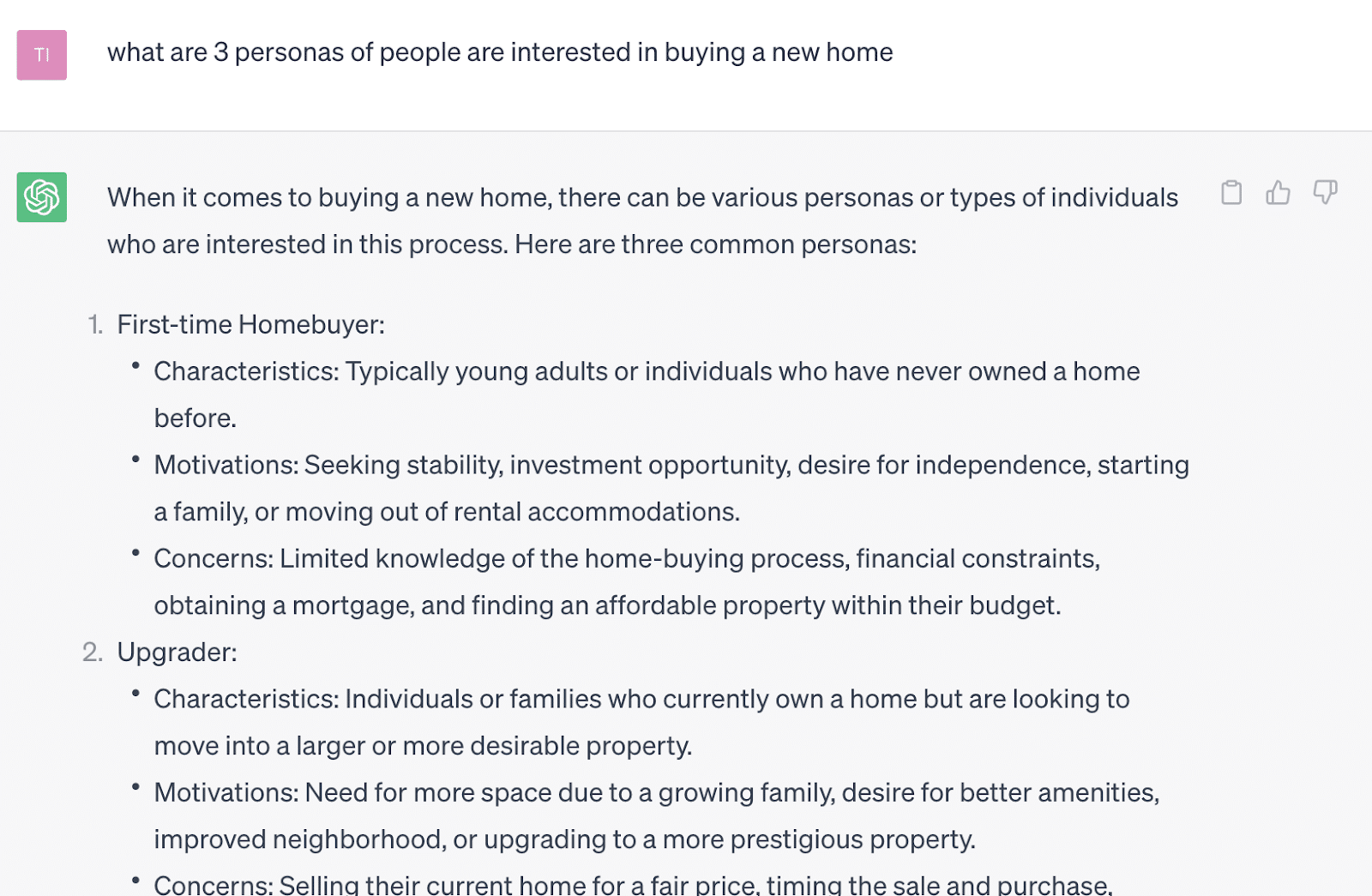
Using AI, you can conduct quick and dirty persona research and better understand some primary audiences you should consider.
This prompt might help you in many different ways, such as:
- Identifying specific demographics you want to target or bid differently.
- Considering a new angle to take when creating different landing page copy for A/B testing.
- Finding new keywords and ad copy that might help you create new ad groups altogether.
Dig deeper: ChatGPT for Google Ads: How to enhance campaign creation
Adding ChatGPT to your PPC toolkit
Generative AI tools like ChatGPT can save us from the mundane and inefficient tasks that take up significant resources to get right.
In the same way automated bidding improves bidding effectiveness and saves time, tools like ChatGPT and other AI functionality will still improve how we market and create paid strategy.
As PPC practitioners, the key is to learn how to use it to deliver the most effective advertising strategy we can.
Effective marketing strategy, in general, still requires human thinking and problem-solving.
Computers will make mistakes. But if we use their power and speed, we can dedicate more time to the important stuff and less to the rest.
The post How to use ChatGPT to boost your PPC efforts appeared first on Search Engine Land.
Courtesy of Search Engine Land: News & Info About SEO, PPC, SEM, Search Engines & Search Marketing
Wednesday, August 30th, 2023
You see Google News surfaces every day. Top stories carousels, the Google news tab, site or app. But how do you get your content to consistently show on these surfaces?
There is no one silver bullet for Google News optimization.
But your content will only reach its full potential across Google News surfaces if a well-optimized Google Publisher Center account backs it.
In this advanced SEO guide, it’s presumed you have an existing Publisher Center account. If not, don’t worry. You can learn how to set up your account right the first time.
Let’s dive into the intricate details of configuring Google Publisher Center to amplify your articles and videos on Google News surfaces.
Google Publisher Center settings
It’s clear Google didn’t put their best UI designer on the Publisher Center project.
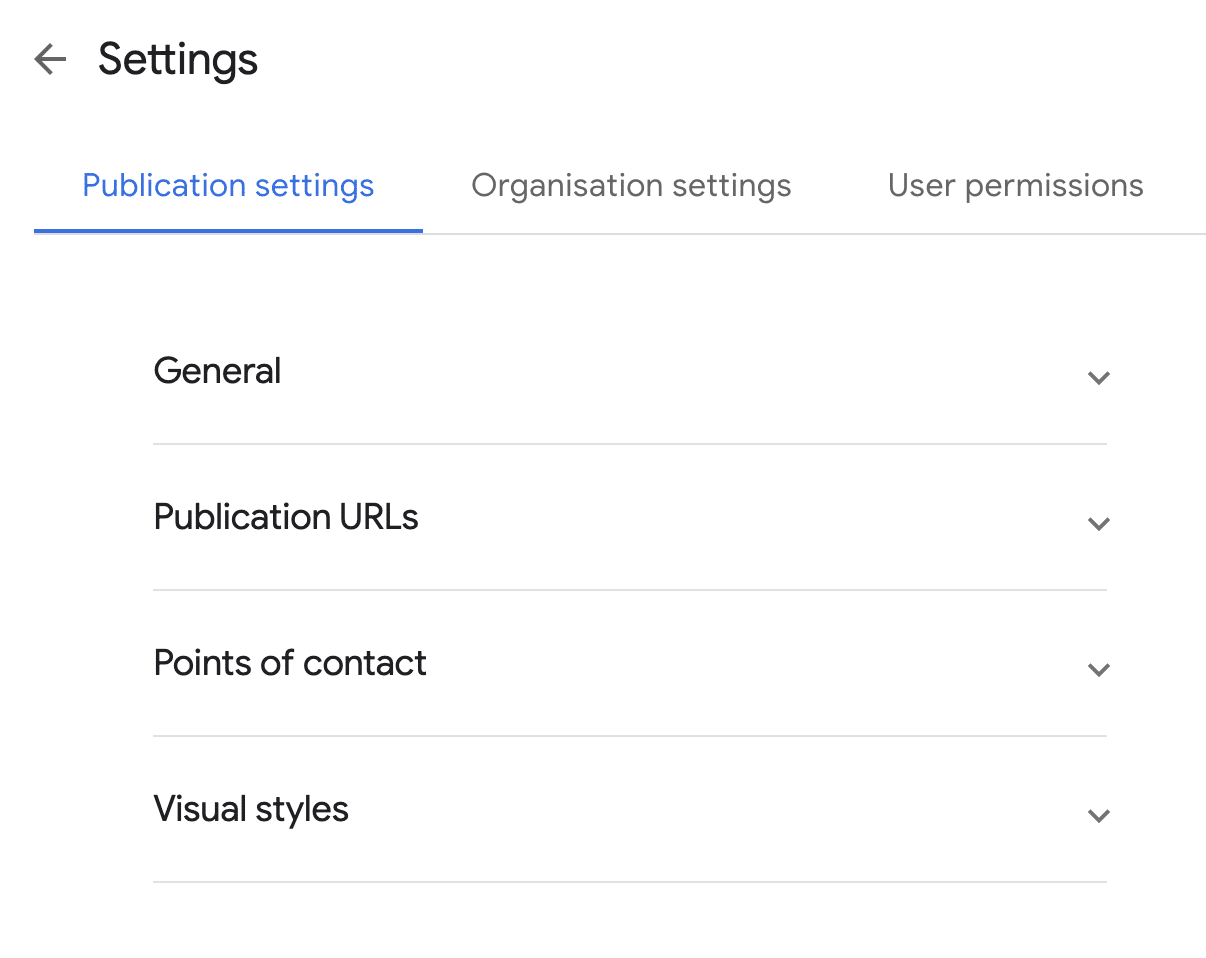
To get to the basic setting, scroll down to the base of your Publisher Center homepage to the More Options section.
Click the Manage your publication and your organization down arrow and Modify publication settings.
Publication settings
Ensure the publication name is the official brand name. Not “BrandName Blog” or “BrandName Magazine.”
When you create a publication, you have an opportunity to corroborate key facts about your brand.
This can help strengthen your brand entity in the Knowledge Graph, Google’s database of understood things.
But if you don’t use the official brand name, Google may have difficulty connecting the two.
The facts you can confirm include:
- Geographic target with country.
- Language of your audience with primary language.
- The parent organization. If this is relevant, ensure your parent company name also uses its official brand name.
- The canonical domain has a verified primary URL and syndication partner relationships with additional URLs.
- Visual brand identity with logos. Communicate the official logo (upload light and dark variants and use a transparent background) and the square variant, ensuring it matches what is used on social media profiles and app icons. Google “recommendations” on size and format should be interpreted as instructions.
Fonts are purely a branding decision, and they will not impact your Knowledge Graph brand entity or the visibility of content across Google News surfaces.
Content labels
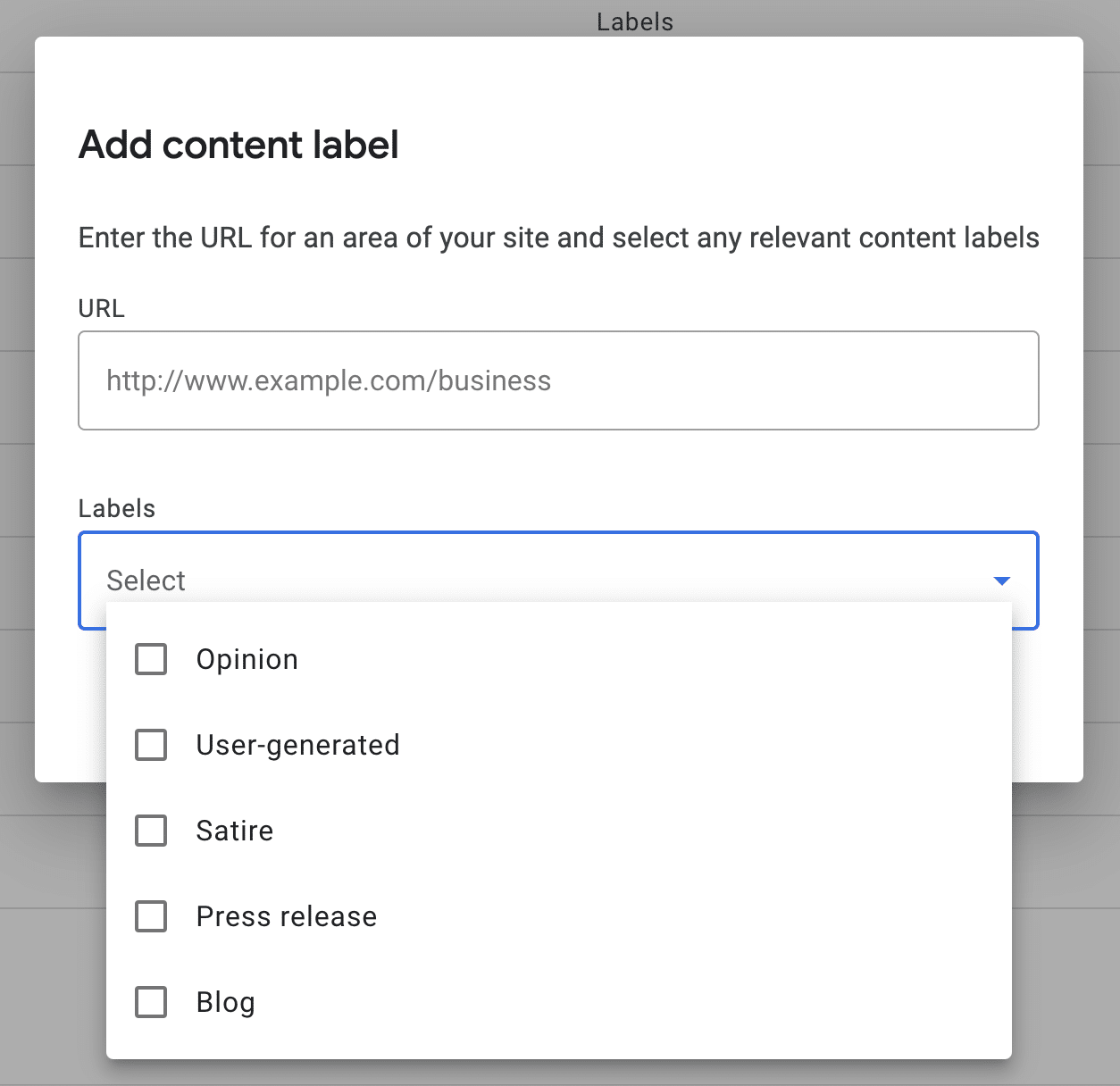
Going back to the More Options section, you will see Add content labels.
Google offers five labels that can be assigned either sitewide or a specific site section.
Use these for opinion or satirical content. This can help Google correctly classify and apply E-E-A-T signals of content pieces, which, if authentically assigned, has the potential to give a visibility boost.
In the case of press releases, blogs and user-generated, this increased understanding may do the opposite on Google News surfaces. Test it if you are methodically minded. Otherwise, I’d steer clear of these three labels.
On top of these foundational settings, Publisher Center offers up to three products:
- Google News publications.
- Reader revenue manager.
- News showcase.
Get the daily newsletter search marketers rely on.
<input type=”hidden” name=”utmMedium” value=”“>
<input type=”hidden” name=”utmCampaign” value=”“>
<input type=”hidden” name=”utmSource” value=”“>
<input type=”hidden” name=”utmContent” value=”“>
<input type=”hidden” name=”pageLink” value=”“>
<input type=”hidden” name=”ipAddress” value=”“>
Google News publication optimization
A Google News publication formally submits your content to Google News surfaces. The choices you make during setup can significantly impact performance.
General
Publication category provides another opportunity to inform the Google Knowledge Graph.
You can also limit distribution to a specific country or Google property, although this is not advisable if your goal is visibility.
Sections
Sections will appear as tabs in your Google News app publication.
At the bare minimum, you should have two sections:
If you are not publishing in video format, you are missing out on a significant opportunity to reach your audience.
To achieve the highest visibility, show the full extent of your content coverage by:
- Setting up a section to match each of your website parent categories. This highlights to your readers and Google what topics you cover.
- Having at least one of these sections tailored for local news to enter local exclusive placements.
- Adding sections for trending topics that are expected to have some longevity.
- Including a Personalized feed section.
Once you have all these sections set up, drag and drop them into an optimal order.
For article sections, a key question is whether to use Web location or Feed.
If you have development resources available, the answer is feed. Why?
- A feed gives you the ability to select what articles are included. You may want to leave out sponsored content or specific syndication partners. It also allows manually deleting an article in the Google Publisher Center section management interface or triggering a manual refresh.
- As for web locations, the order of articles is determined by Google ranking. With a feed, you control the order. You can show at the top the most recent, most popular or those which drive the highest engagement.
- Web locations can show content only after Google has indexed it. Googlebot fetches feed content approximately every 30 minutes – or instantly if you use Websub. This makes Google News feeds a powerful tool for crawl optimization.
Send your developer the Google technical documentation. Be sure to validate the feed before submitting it to Google News.
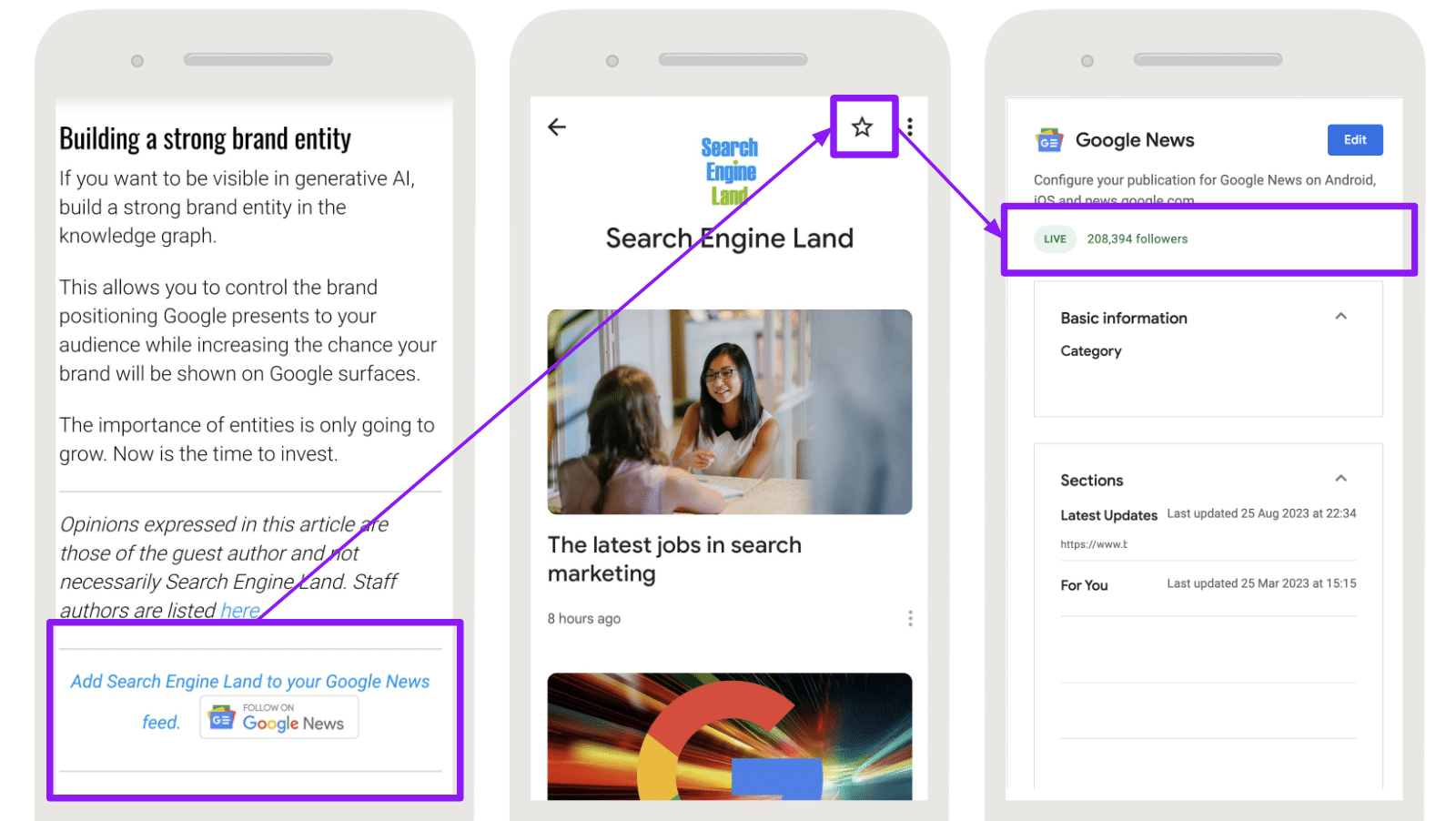
Google News followers
An often under-utilized feature of Google News is the ability for your audience to follow your publication.
Google doesn’t currently offer an API to allow readers to follow your publication directly on-site. But a simple Google News follow button graphic linked to your publication URL will increase followers.
It can also be promoted through other marketing channels, such as social media posts, email newsletter banners, push notifications or even CPC if you want to double down on Google News as a channel.
This “news publication starring” greatly increases the chance your content will be shown in personalized placements on Google News.
This can lead to higher click-through rates, impacting the algorithm to show the content to new readers who might not have discovered it otherwise.
And supports reader retention as the increased access to your audience on Google surfaces will build a more loyal readership.
Boost your Google News visibility with an optimized Publisher Center account
Nailing your Google Publisher Center setup is essential to visibility in Google News.
Ensuring the right settings and building a strong following will give your articles and videos the best chance in the cutthroat world of content.
As an added bonus, it helps establish your brand entity in the Google Knowledge Graph.
The post An SEO guide to optimizing your Google Publisher Center account appeared first on Search Engine Land.
Courtesy of Search Engine Land: News & Info About SEO, PPC, SEM, Search Engines & Search Marketing