Archive for the ‘seo news’ Category
Monday, September 11th, 2023
Media companies and publishers play a pivotal role in affiliate marketing. They are in the position to wield significant influence, enhance search engine rankings and drive substantial revenue for businesses.
However, recent shifts in the industry have seen traditional publications lose their traffic, with smaller, newer players dominating Google’s top positions.
I’ve worked with several media organizations that have sought guidance to boost their traffic and revenue through affiliate marketing.
This article distills valuable insights and recommendations, offering a roadmap for success in a field where reputation and backlinks no longer guarantee instant returns.
Organic traffic performance of established publications vs. newer, smaller publishers
While tracking the performance of media companies doing affiliate marketing, I started seeing traffic declines for established brands.
Below are some snapshots of the websites’ performance. They reflect the entire website’s organic traffic performance, not just the specific sections related to affiliate marketing.
Specifically, keep an eye on the years 2017 and 2021, as these were pivotal periods when significant changes occurred. The screenshots were taken from Semrush, but other tools show the same or similar traffic patterns.
Several publications that encountered traffic declines require a media fee, so you mostly only see big brands and the same products featured in their content.
On the other hand, newer publications are moving in to take their place. Some are making the same mistakes, while others are doing things differently.
Here are a few new players that moved in and are making bank. These are only the website’s affiliate sections so that you can see the gains.
What can be the reason behind these movements?
Let’s look at the sites’ affiliate programs and the types of vendors being promoted
The absence of variety and alternatives
Part of Google’s reviews update is to show variety for shopping. Still, some media outlets tend to focus on big brands and overlook diversification in their affiliate marketing lists.
Some of the publications in the screenshots will tell you that they must work only with certain vendors to add affiliate links, which is a huge mistake (at least in my opinion).
The lack of diversity and options provides a worse experience for consumers, and the sites that did this all have the same traffic-dropping patterns. And although it is not necessarily against Google’s reviews update, it does not meet the guidelines.
Other times, publications won’t add new or up-and-coming brands because their affiliate team requires sponsorships and advertorial purchases. Only the big brands can afford this, especially because placements aren’t always guaranteed.
Often, these smaller or up-and-coming brands will feature the logos and sometimes backlinks to the publication. Although the publications have tons of links, these are harder to get and could help especially if the link is to the listicle they’re featured in.
Smaller stores and brands may share the listicle on social media, and that can bring search engine spiders back to the content for crawling. This sharing also brings potential shoppers to the media listicles and drives more sales for the publication.
There’s a lot of SEO and monetization benefits from going with smaller brands. Still, if the decision-makers at media companies demand big brands and ad fees, they’re sacrificing their online success and ongoing commissions for a one-time fee. It’s a long-term loss for a short-term gain and the potential loss of traffic as a whole.
The struggle of balancing helpful content and monetization
Outside of the advertiser and brand diversity, some publications syndicate their lists with the same vendors to their other brands.
That makes the quality drop on each brand, even if they spin the content. The pros and cons stay roughly the same, so do the products and services featured, and they use the same talking points.
Adding a couple of unique variations won’t make the content helpful or value-adding. That’s why it is important to let editors remain 100% independent on each publication and from the affiliate and ads teams.
They will do the research and choose the best items they can talk about from their expertise. But that doesn’t mean ads and affiliate teams cannot contribute. They can say, “please feature these brands” within. The editors will be free to talk about their experience, whether it is positive, neutral or negative.
But that goes to another issue. Even with editorial freedom, the ads teams may interfere with content by adding cards, carousels, and predominant spaces that feature affiliate and paid links. This offsets the list of services ranked based on merit and quality.
The pay-to-play content is part of the page which means it can potentially impact SEO. The good news is that these features are clearly ads and not part of the content. But these ad spaces can impact the usefulness of the content if they bury it. There’s a balancing act between providing the content the person wants and displaying ads or affiliate lists.
On some lists, the content could be value-adding, fact-checked, and written by industry experts. That’s why the page currently ranks. Then ads carousels or widgets are placed above or between them for monetization. This could cause a drop as the content is no longer as helpful, but it is a needed feature for the publication to make money. There’s a balancing act that occurs.
These paid placements – whether an affiliate, a CPC, a flat fee, a CPM, an advertorial, or a mix of payment models – offset the original text. The paid portions may exist above the expertise content, and that changes the user experience.
The changed UX could make it so the helpful content update devalues their pages and the site. This is where smaller publishers, new media companies, and niche sites can move in and dominate.
Let’s use a pair of running shoes as an example.
Suppose all the lists have Brooks Running for three of the five results and Under Armour for the other two.
Each list has the same shoes and similar talking points. There’s not much difference and variety. This is where the Google reviews update with multiple stores comes in.
Featuring the big brands is OK. Still, try to find independent stores or emerging stores and test the products.
By including a couple of independent retailers or unknown brands, you can add unique copy and shopping options that others cannot. And consumers may enjoy supporting small businesses, not to mention discovering new favorites.
Suppose you discover an equally good shoe for road running that is eco-friendly. Replace something from the list and write original content about the new option.
Then, link directly to their store and elsewhere to shop if they aren’t a DTC-only brand.
Your content has a unique experience combined with the standard best-in-class products. And finding these hidden gems is easy.
Start by looking at retail shows for the footwear and sportswear industries and see who is presenting, advertising, and attending. You’ll discover the brands trying to get their “foot” in the door.
You can also look for new brands on affiliate networks and ask for products to test. On top of having a unique store or brand to help your list stand out, you’ll have original photos and be able to show you physically tried the product, which works to your advantage with E-E-A-T.
As an added bonus, the smaller brands will have more flexibility with commissions, in many cases, and be more attentive as they appreciate the chance you’re taking on them.
Key recommendations
- Ensure that 20-30% of the brands, stores, or products featured on your list are lesser-known and unique, not commonly found on generic “best” or “top” lists. Get the product in hand and give a unique perspective on it – both good and bad.
- Unique and original experiences tend to get rewarded by search engines, along with the standards on the other lists. By having at least 20% of your list different from the others, you’re providing something the others don’t. These new features are why your content is more unique and original – a value-add to the consumer.
Get the daily newsletter search marketers rely on.
<input type=”hidden” name=”utmMedium” value=”“>
<input type=”hidden” name=”utmCampaign” value=”“>
<input type=”hidden” name=”utmSource” value=”“>
<input type=”hidden” name=”utmContent” value=”“>
<input type=”hidden” name=”pageLink” value=”“>
<input type=”hidden” name=”ipAddress” value=”“>
Author bios that don’t demonstrate E-E-A-T
Demonstrating the author’s credentials is a key element for E-E-A-T.
In many cases, author bios are “thin” and don’t share how or why the person is qualified to create the content.
Some will say they love spending the weekend with their dogs or family, which is fine. But they must also list their professional experience, accolades, and qualifications.
- Where are they published, or what industry awards do they have?
- How have they had real-life experience in the niche for an extended time?
- What certifications or degrees do they have that are accredited and recognized by industry professionals?
If they’re reviewing or writing content about the best hosting service, being a tech writer doesn’t help.
Anyone can write an article about technology by researching or reading the service provider’s websites. The writer and fact-checker must both be qualified.
Having a degree or advanced degree in IT and having worked for a hosting company on the product, engineering, or development team for more than 10 years does.
Getting multiple certifications related to the field and sharing the most recent ones also helps make the case why you are an expert in the field.
Ensure the editor and/or fact-checker does not just write listicles and reviews. They should also write guides on how to configure servers, troubleshoot common issues, etc.
Having this mixed within the shopping content builds their trust with the community, and that trust can be passed to their choices on the shopping lists or shopping content. And with that trust, you may see higher conversion rates.
If the person is not writing the guides and “how to” posts on the publication, don’t worry. Link to their bios for where they write high-value content.
For example, I write both here and at other large SEO and marketing publications.
If I am writing a list of marketing tools or services to shop for, ecommerce tools, or guides on affiliate marketing where I’ve won awards, featuring that I’m a columnist or contributor and linking to my author pages allows both people and search engines to associate my knowledge and credibility with the shopping content.
This is something some of the media companies that lost traffic did not do a good job of.
Non-unique selling points or lack of hands-on experience
Many media companies require editorial integrity. A few, in particular, make it clear that editorial and ad sales/affiliate relationship managers are separate. That is a very good thing!
The two teams cannot impact each other for a strong site SEO-wise. These media houses are flourishing and will likely continue because all integrity is intact.
But that doesn’t mean the affiliate teams should not have editors. Allowing the affiliate teams to have writers makes the company better overall.
Successful media companies often separate the teams and allow the affiliate relationship managers to recommend vendors if there is space and a reason.
In other cases, the affiliate team has editors, and the content goes through an SEO and ads review to ensure quality and UX.
By having editors with the affiliate team, they can ensure diversity and introduce new brands and products. Not all sites require an ad fee, which is why these sites have more product and brand diversity. These ones are flourishing.
In these cases, the editors have full control and say over who and what gets featured as their preferences while being able to include good alternatives from the affiliate and ads teams.
It keeps the quality of the content way up. One issue does not apply to the majority above but exists with a few I’m not featuring.
In very few cases, editors are not allowed to receive products, which is odd. If they’re required to write about it, they should be able to test it and have full authority to evaluate it.
They need to be experts to win the readers’ trust and appease algorithms, and they need to share their real experiences for an authentic voice.
The way to do this is to have the product in hand or use the service. If the brand cannot send samples because the media house does not allow that, then the media company needs to buy or hire the service provider for the real-life experience.
There’s no other way around that if the publication wants to succeed. But this has become rare. Most allow product samples now.
Having real photos vs. ones from the brand, showing it in real life, and sharing unique ways to use it all build trust and work for E-E-A-T.
The FTC already requires disclosures at the top of the content or in a clear and easy-to-see space when using affiliate links or selling advertorials. Having a disclosure that you got the products featured in the post isn’t a big deal.
Consumers probably prefer to know that you tried it before recommending it. And if you feature the bad and the good, you’ll keep the consumer’s trust because you’re giving them the full story.
The content isn’t relevant to their audience
I see the publication going for high payments vs. product or service quality.
This tactic gets higher affiliate commissions but also reduces the value of the recommendations because it isn’t based 100% on actual quality.
Higher payouts can lead to irrelevant user experiences. When a publisher sees success because the trust of the domain lifts a topically irrelevant listicle, it may expand further into niches that aren’t topically relevant to its audience. This is bad for many reasons.
If you’re a cooking website and people love the recipes, chef interviews, and ingredient highlights, having a list of the best pet insurance is irrelevant to your audience, even if most readers have pets.
Neither are website builders, even if your audience has their own recipe blogs.
And just because they have blogs, it does not mean they’re on your site looking for small business loans or vacuum cleaners, even though they could use them. Your audience may need them at some point, but that isn’t why they come to you.
When you start pumping out content because it can make you money with affiliate marketing, you take away from the good user experience. If people want dinner recipes, and every third article is a shopping post, the site is no longer helpful and doesn’t meet their needs.
They’ll shift to a new site that stays true to the niche, and you’re likely confusing search engines with what the topic of your site is.
The helpful content update looks at your site as a whole instead of page by page. Google wants to ensure the person gets an easy answer to what they are searching for in the fastest way possible.
That can include multiple forms of media like a blog post, a video, or a sound clip. Because the helpful content update assesses your entire website, it’s reasonable to expect that the articles surrounding the one the user is reading should also be related and relevant.
If the person is on your article learning how to clean wine off a silk shirt, and you give them an answer, they may click on the homepage to see what else you have.
The content and categories should be broken into cleaning and upkeep topics if the site is a cleaning and housekeeping site.
If the person finds life insurance lists, web hosting, or extended car warranties but not the themes they expected, it is a bad experience.
The end user might click on one of them because it is interesting, but you lost your chance to be their go-to resource for cleaning and upkeep.
Instead of irrelevant but high-paying lists, create content with the best cleaning products, landscapers, types of flowers by region and season, etc.
These are part of cleaning and owning a home and tie into the theme. Your entire website will have a better human experience because it is relevant for the humans on your site.
And there are good paying affiliate programs with each niche if you put the work in to find them.
The relevant topics of the shopping lists show the reader you have a lot of resources that complement why they came to you, and by having these, you give them a reason to subscribe to your publication and follow it on social media.
You can link to the lists from the how-to guides, creating an even better UX. When the person clicks from the how-to guide, you’ve increased pageviews for CPM money and can earn a commission. It is a big win for you as a publisher.
When you win their trust, they may opt-in to your email or SMS list. Having them on your email and SMS list means you can make money for many years.
Regaining traffic and profitability with better affiliate marketing strategies
The media companies in the first set of screenshots can turn things around if they change their focus. They can get their traffic back and expand revenue if they:
- Diversify their product and shopping options.
- Work on E-E-A-T and topical authority.
- Maintain a balance between content and monetization.
Note: The screenshots showing traffic declines are for sites I do not work on directly for SEO but watch and use as examples with clients. In some cases, I do work with them through affiliate programs.
The information was publicly available and accessed using third-party tools. Site names have been withheld. The specific websites are not disclosed to avoid any potential scrutiny or repercussions and also out of respect for their privacy and business operations.
The post How publishers can regain traffic and revenue with affiliate marketing appeared first on Search Engine Land.
Courtesy of Search Engine Land: News & Info About SEO, PPC, SEM, Search Engines & Search Marketing
Monday, September 11th, 2023
The Justice Department’s antitrust case against Google and its search engine dominance is set to begin Tuesday.
The case, U.S. et al v. Google, focuses on the company’s popular search engine, alleging Google used its 90% market share to illegally throttle competition in both search and search advertising.
This is one of several antitrust cases against the company. In January, the DOJ filed an antitrust case against it concerning Google’s role as an advertising broker, publisher and auctioneer.
The charges. The federal government alleges Google is harming consumers by stifling innovation in online search tools and limiting choice.
The DOJ also says Google has been able to maintain its monopoly over online search through exclusive agreements that preinstall its search application on devices. This, the government alleges, allowed Google to become the dominant search engine over its rivals and stifle competition.
Federal prosecutors are likely to argue that Google is not allowing a free market of rivals who could offer search choices with better technical perks — such as the speed at which search results are presented — and on policy choices, such as more stringent data privacy practices.
The defense. Google has pushed back strongly on the allegations of anticompetitive behavior. Its products and services are more popular because they are simply better, not because Google has tilted the playing field away from potential rivals, the company will argue.
Google is also expected to argue that their contracts to be default search engines on browsers are not exclusive and do not limit competition. The company argues that users can easily set a new default search engine and that their contracts do not limit access to other search options.
Dig deeper. Report: Google sharing Chrome iOS search revenue with Apple
Why we care. A big change at Google could cause big changes throughout the digital marketing ecosystem. If the DOJ proves its case and somehow alters Google’s search stranglehold it might mean lower costs for advertisers. If Google wins more tech regulation may be harder to achieve. Time, as always, will tell.
Dig deeper. US Justice Department sues Google again, aims to dismantle its ad division
What’s at stake. The U.S. and state allies are not seeking a monetary penalty, but rather an injunction barring Google from continuing the alleged anticompetitive practices. Such an order could have significant business implications for Google. For example:
- The government said in its lawsuit that the court could break up the company as a fix.
- More broadly, the Justice Department may argue it wants to stop Google from leveraging its alleged search monopoly to make exclusive deals in newly emerging markets, including artificial intelligence.
The case is widely seen as one of the biggest challenges to tech industry power since the DOJ sued Microsoft in 1998 over its market dominance for personal computers. The trial court in that case found Microsoft unlawfully tried to block rival browser Netscape Navigator. Microsoft later reached a settlement that left the company intact.
Dig deeper. Judge: No evidence Google harmed competitors by limiting search visibility
The post Google search antitrust trial ready to begin: What’s at stake appeared first on Search Engine Land.
Courtesy of Search Engine Land: News & Info About SEO, PPC, SEM, Search Engines & Search Marketing
Monday, September 11th, 2023
Target return on ad spend (ROAS) is heralded as the holy grail of PPC advertising.
In contrast to click-based and conversion-based bidding, this strategy is designed to optimize financial business outcomes.
While undoubtedly high on the Google Ads evolutionary scale, Target ROAS requires a rigorous setup before realizing its full potential.
Advertisers who switched from Target CPA to Target ROAS saw a 14% increase in conversion value at a similar return on ad spend, per Google’s internal data from March 2021.
Google claims that advertisers who upgraded from Smart Shopping to Maximize Conversion Value and Target ROAS achieved as much as a 30% uplift in conversion value.
Results can vary from one business to another and across different sectors of the economy.
Your success with value-based bidding depends on how well it aligns with your business model and implementation quality.
This article outlines the key considerations in adopting Target ROAS to help you evaluate whether value-based bidding is a good fit for your business.
Target ROAS: An overview
Target ROAS, or tROAS, is a Google Ads value-based bidding strategy designed to maximize conversion value within your targeted return on ad spend.
As a Smart Bidding strategy, Target ROAS leverages a multitude of contextual and audience signals in combination with historical first-party data.
Google uses its advanced predictive modeling to estimate the prospective conversion value of users and automatically adjusts your bids in line with your ROAS target.
The higher you set your target, the lower the AI will bid and vice versa.
In practice, some conversions will yield a higher ROAS than others. Google then factors that into its calculations and recalibrates bidding to maintain your desired ROAS.
Bidding based on potential customer value
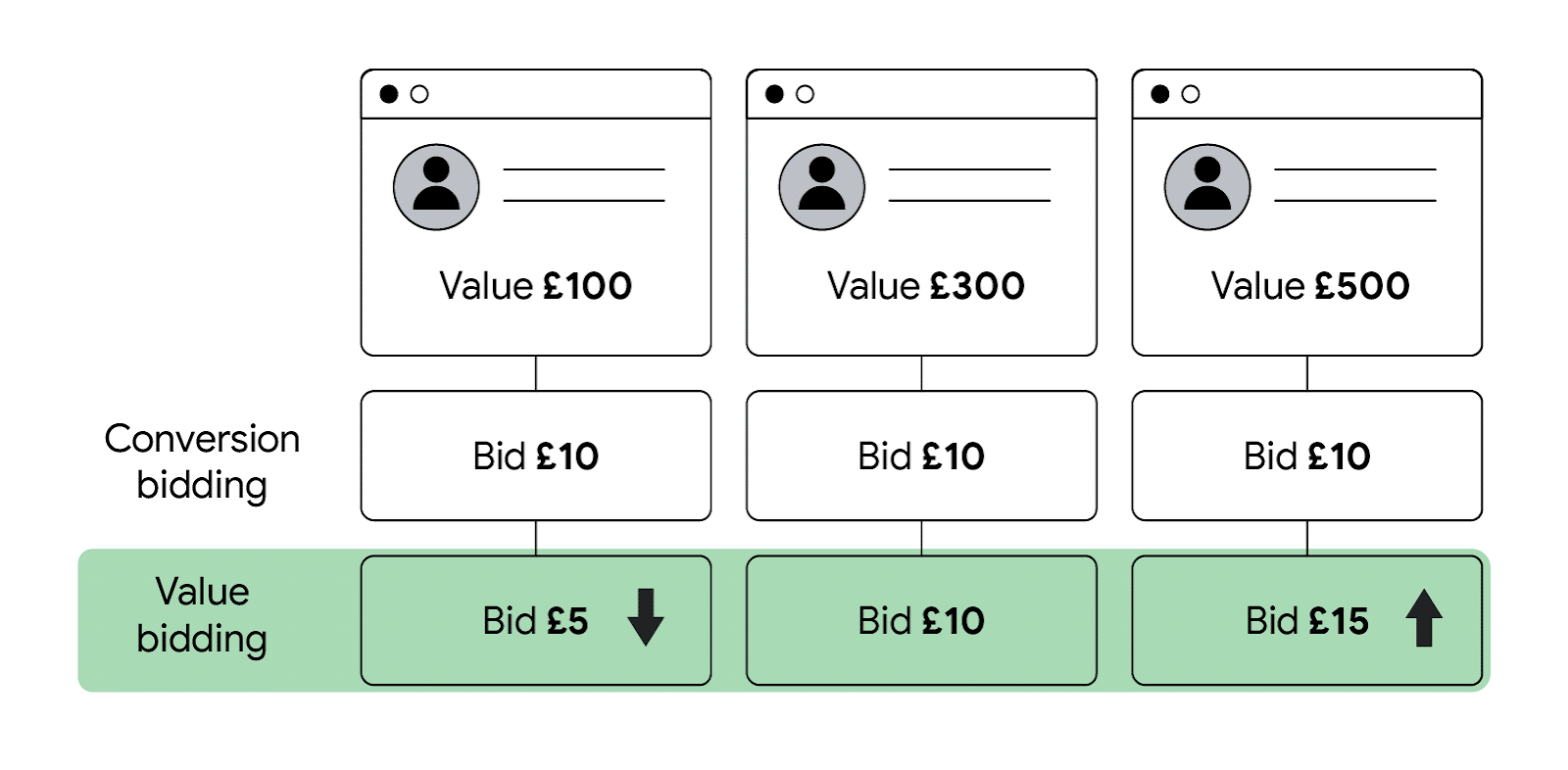 Source: Think with Google
Upgrading from a conversion-based to a value-based strategy represents a shift from optimizing for the highest number of conversions to prioritizing the most valuable customers, according to Ginny Marvin, Ads Product Liaison at Google.
As a consequence of this shift, advertisers should anticipate a trade-off between volume and value.
Therefore, Target ROAS is generally more likely to return a higher total conversion value but lower conversion volume than Target CPA.
Here are five key considerations to help assess your business readiness for tROAS in Google Ads.
1. Variability in sales value
Before delving into the more technical requirements of value-based bidding, it might be useful to weigh up the size of the opportunity.
Considering the variability in sales value will give you some indication of the potential upside that Target ROAS could bring to your business.
At its core, value-based bidding aims to optimize toward high-value conversion outcomes and away from low-value conversion outcomes.
If your business has high variability in sales value within the same product or service category, you’re better placed to reap the rewards of Target ROAS.
Consider an ecommerce store selling products worth $20, $50 and $100.
All things being equal, this store is more likely to benefit from value-based bidding than a store that only sells products worth $50. That’s because the algorithm can drive more $100 sales and fewer $20 sales.
The disparity in value creates the opportunity to optimize for more valuable conversion outcomes.
Conversely, the store in the second example lacks the same capacity for optimization as all products are worth the same.
Value-based bidding is further amplified by greater variance or spread in conversion value.
In our initial example, there’s a moderate level of variance. For instance, the variance would be considerably higher if the products were worth $5, $50 and $500.
A broader distribution in conversion values gives the AI more room to find efficiencies and maximize overall conversion value.
The principle of variability applies to any assigned conversion value, be it revenue, gross profit, or another value estimate unique to your business.
Using value-based bidding in low variability scenarios
What if your products or services are priced similarly? Could you still benefit from value-based bidding?
Even if your prices are uniform, the profit margins may differ. Different customers may buy varying quantities at different frequencies and repeat rates.
In other words, if conversion value variability is low from a revenue perspective, it may not be through the lens of gross profit or customer lifetime value (CLV). We’ll explore the implications of each of these options shortly.
Suppose every sale in your business generates the same conversion value, irrespective of the financial measure you associate with it.
In this scenario, you would assign an identical value to each conversion.
This is similar to Target CPA, but instead of telling Google what you’re willing to pay for a conversion, you’re defining how much a conversion is worth and using the ROAS target as your lever.
The main difference is that with value-based bidding, your bids are pegged to your returns.
The AI will automatically adjust bids with the conversion value against your ROAS target.
Therefore, Target ROAS provides an automation benefit, even when conversions don’t fluctuate in value.
2. Sales volume
Another key consideration is the number of sales your business generates each month.
This will tell you whether you can accumulate sufficient conversion data on an ongoing basis to meet the minimum conversion thresholds.
Target ROAS requires minimum conversion thresholds to provide Google with adequate data to make statistically reliable bidding decisions.
This data allows the AI to spot patterns, establish correlations, and draw meaningful insights that fuel machine learning.
Without sufficient conversion data, the AI would base its analyses on smaller and potentially unrepresentative samples, which could compromise its predictive capabilities.
Larger data sets provide Google more opportunities to learn and bid more effectively.
Most campaign types require at least 15 conversions per campaign in the previous 30 days to run Target ROAS.
However, minimum thresholds can vary by campaign type, as shown in the table below. Note that your conversions must include valid values to qualify toward the threshold.
Minimum Target ROAS conversion thresholds by campaign type
| Campaign type |
Minimum conversions |
Qualification period |
| Search campaigns |
At least 15 conversions |
Last 30 days |
| Shopping campaigns |
At least 15 conversions |
Last 30 days |
| Display campaigns |
At least 15 conversions |
Last 30 days |
| Video action campaigns |
At least 30 conversions |
Last 30 days |
| Discovery campaigns |
At least 75 conversions |
Last 30 days |
| App campaigns |
At least 300 conversions |
Last 30 days |
Please refer to the latest guidelines for the most up-to-date information.
For new or small campaigns with insufficient conversion data, you can start with Maximize Conversion Value, which has no minimum requirements.
Then upgrade to Target ROAS once you reach the required threshold for your respective campaign type.
An important decision is what conversion event to use as your primary conversion action.
When deciding, you must consider your sales volume in conjunction with the length of your sales cycle.
Get the daily newsletter search marketers rely on.
<input type=”hidden” name=”utmMedium” value=”“>
<input type=”hidden” name=”utmCampaign” value=”“>
<input type=”hidden” name=”utmSource” value=”“>
<input type=”hidden” name=”utmContent” value=”“>
<input type=”hidden” name=”pageLink” value=”“>
<input type=”hidden” name=”ipAddress” value=”“>
3. Sales cycle length
The duration of your business cycle will dictate the speed at which you can assign values to different conversions and feed those back into Google.
The faster you can import conversion values, the sooner the AI can factor that data into its computations.
Sales cycles can vary significantly depending on the industry you’re in.
In lead gen, the B2B sales cycle is typically between 60 to 90 days due to the cost, complexity and multiple decision-makers involved.
B2C tends to have a much shorter cycle, ranging from a few minutes to a few weeks.
In contrast, B2B ecommerce generally has a shorter cycle than traditional B2B sales.
Finally, B2C ecommerce would see the shortest sales cycle due to its direct-to-consumer transactions and relatively lower cost.
Consider the average time your prospect clicked your ad and the conversion event. Note that the conversion needs to occur within 90 days of the click. Otherwise, it would fall outside the lookback window, and Google won’t be able to attribute that value back to the original click.
You must choose the primary conversion action most likely to drive optimal performance.
As a rule of thumb, Google recommends optimizing for the conversion event that occurs furthest down your marketing funnel and meets the minimum eligibility criteria.
Here are some general guidelines to inform your decision
Scenario 1: High sales volume, short sales cycle
If your sales cycle is around two weeks or less and you generate at least 100 sales a month, then you’re in a position to optimize for sales or closed deals.
If you’re running lead gen campaigns, consider secondary observational conversion actions, such as:
- Sales Qualified Leads (SQLs).
- Marketing Qualified Leads (MQLs).
- Form submissions.
- Calls.
Alternatively, if you’re running ecommerce campaigns, consider including begin checkout, add to cart, or newsletter subscriptions as secondary conversions.
Scenario 2: Low sales volume, long sales cycle
If your lead gen sales cycle is up to three months and you generate at least 30 sales a month, consider using either SQLs or MQLs as your primary conversion action.
It may also be worthwhile to include sales, form submissions, and calls as secondary conversions for enhanced visibility of your funnel.
In ecommerce, consider using either begin checkout or add to cart as your primary conversion action, while adding sales and subscriptions as secondary conversions.
Scenario 3: Low sales volume, long sales cycle, and long lead qualification time
If your lead qualification time takes more than 30 days:
- Use form submissions and calls as primary conversions.
- Consider importing sales, SQLs, MQLs, and page interactions as secondary conversions.
Recommended conversion actions in lead generation
| Scenario |
Sales Cycle |
Sales vol. |
Primary |
Secondary |
| High sales volume, short sales cycle |
~2 weeks |
100/month |
Closed deals |
SQLs/MQLs, form subs. and calls |
| Low sales volume, long sales cycle |
3 months |
30/month |
SQLs/MQLs |
Closed deals, form subs. and calls |
| Low sales volume, long sales cycle + long lead qual. time (~30 days) |
3 months |
30/month |
Form subs. and calls |
SQLs/MQLs, closed deals, page engagement |
Recommended conversion actions in ecommerce
| Scenario |
Sales Cycle |
Sales vol. |
Primary |
Secondary |
| High sales volume, short sales cycle |
~2 weeks |
100/month |
Sales |
Add to cart, begin checkout |
| Low sales volume, long sales cycle |
3 months |
30/month |
Begin checkout, add to cart |
Sales, newsletter subscriptions |
Google recommends importing your entire conversion funnel for improved visibility while focusing on a single primary conversion action for bid optimization.
An exception to this could be using both form submissions and calls as primary conversion actions, provided there is no duplication
Mapping your marketing funnel can be a good starting point to visualize your prospects’ key actions along their conversion path.
Google’s conversion value calculator provides a quick way to calculate the average values of the conversion actions at every stage of your customer journey.
4. Data accuracy
So far, we’ve emphasized the importance of variability, volume, and frequency. However, the quality of your data will determine the degree of your success.
In the context of Target ROAS, data quality is the extent to which your conversion values accurately reflect their economic worth to your business.
Target ROAS relies on accurate input to deliver your target return on ad spend.
If your conversion values don’t correspond to their true monetary value, neither will the AI’s bidding nor your campaign results.
The “garbage in, garbage out” principle firmly applies here. No matter how advanced the algorithm, a low-quality input is unlikely to produce a high-quality output.
This leads us to the next important decision: What conversion values do you feed the AI?
As a general rule, your acquisition strategy should align with your business goals. Here are several approaches you could take:
Optimizing for proxy values
If you can’t measure or assign transaction-specific values, you can still run Target ROAS using static proxy values.
This is straightforward as it doesn’t necessitate a complex conversion tracking configuration.
Instead, you assign a fixed value to your primary conversion actions, meaning every conversion will account for the same value.
However, you can dynamically adjust your values using rules based on criteria such as location, device, or audience.
If your sales values typically fluctuate, proxy values won’t accurately reflect the true economic value of your conversions.
As such, using proxies is the simplest but most limiting way to go about value-based bidding.
Optimizing for revenue
If your business goal is to maximize the gross value of sales, consider using revenue conversion values. This will require importing dynamic conversion values and an accurate estimate of the revenue driven by each conversion.
By aligning your value-based bidding with revenue, the AI will aim to maximize the total revenue generated within your ROAS target.
Besides driving top-line growth, this may also be suitable for market share expansion or promoting a new product.
A drawback of revenue optimization is its neglect of profitability. They will likely have different profit margins if you offer a wide range of products or services.
However, this difference will not be considered by the AI, which could lead to an overemphasis on high-revenue but low-margin products or services.
Optimizing for profit
If your business prioritizes the bottom line, consider assigning values that closely mirror your gross profit. To calculate gross profit, deduct the cost of goods sold from your sales revenue.
Since ad spend is also a cost of sale, you can use custom columns in your Google Ads account to subtract ad spend from your conversion value (i.e., All conversion value – Cost).
Note that Target ROAS will still optimize for the value in the All conversion value column.
By optimizing for profit, the AI will deploy your budget towards the most financially favorable outcomes.
In the short term, this should yield the highest total gross dollar amount, assuming accurate values, sufficient volume, and timely data imports.
Remember that optimizing for profit could come at the expense of lower conversion volumes.
Moreover, focusing on profit may overlook potential opportunities to grow your customer base or expand your reach.
Lastly, measuring and tracking the true profitability of each conversion can be especially challenging due to the various cost factors at play.
Optimizing for customer lifetime value (CLV)
If you’re aiming to maximize long-term profitability, consider using predicted customer lifetime value (CLV).
This requires assigning a forecasted value to each conversion based on the total expected value over the entire course of the customer relationship.
CLV generally incorporates average order value, purchase frequency, retention rate, and customer acquisition and retention costs. The relative weighting and exact calculation methods can vary across industries.
Like optimizing for short-term profit, this will also likely limit your reach to a smaller conversion pool. Furthermore, accurately estimating long-term profit can be exponentially more complex.
Over the long run, CLV optimization has the potential to deliver the highest return on investment.
But tread carefully. This strategy banks on spending money today and recovering it years into the future.
The delay in feedback on financial performance could prove costly should your initial projections turn out to be incorrect.
While CLV offers significant potential upside, it also comes with considerable uncertainty and upfront costs, making it something of a leveraged bet.
Given these risks, it may be prudent to test CLV-based bidding only after successfully validating a proof of concept using Target ROAS aligned with revenue or profit.
5. Data infrastructure
Hopefully, by now, you have an idea of how to tackle value-based bidding for your specific use case. Assuming your business ticks all the boxes, the next key consideration is data logistics.
More specifically, what systems will you need in place to streamline your marketing data and does your business have the capacity to accommodate your requirements?
Implementing Target ROAS will require a reliable way to collect, store and import data back into Google regularly. You can do this manually, automatically, or combine the two depending on your strategy.
Here are the three main tracking options available:
Manual conversion tracking
Manual conversion tracking allows you to assign a static conversion value for each conversion action inside Google Ads.
This can easily be set and modified on the platform without the need for technical expertise or third-party software.
As noted earlier, this is an imprecise way to track value since static conversion values don’t account for variations in purchase value.
Assuming that your conversion values fluctuate, this is why it’s a suboptimal conversion tracking method.
Tag-based conversion tracking
Tag-based conversion tracking relies on a Google-generated JavaScript code snippet (the “tag”) embedded on your website.
When a user completes a conversion action, the tag captures the associated conversion value and sends it back to Google.
Ecommerce businesses most commonly use this tracking method as it provides a way to dynamically adjust the conversion value to match the actual order value.
This usually means that the conversion values correspond to revenue rather than profit, as the tag pulls the monetary amount the customer spent on a transaction.
It’s also possible to track profit using the tag-based method as long as the profit value is known and accessible when the tag fires.
This may require deep integration with your inventory systems and third-party software to accurately calculate the profit for every sale in real time.
So, while it’s possible to track profit, it may not be practical or feasible for most businesses due to the added complexity involved.
Setting up tag-based conversion tracking requires technical proficiency and can be challenging for businesses with various products or services.
Another limitation of tag-based tracking is its dependence on cookies to attribute conversions back to the ad click.
When a user rejects, blocks, or deletes cookies, this can result in data gaps, negatively impacting your optimization.
Find out more about tag-based conversion tracking in this Google Ads help documentation.
Offline conversion tracking
Offline conversion tracking uses a Google Click Identifier (GCLID) to track offline conversion outcomes following a user’s interaction with your ad.
The GCLID is a unique string of characters that Google automatically appends to your destination URLs.
This tracking method requires that you capture the GCLID parameter alongside the lead or customer’s details and store them in your CRM database.
You can import that data back to the platform once a conversion value is assigned. Google will then use the GCLID to associate the conversion value back to the correct click.
You can import offline conversions manually inside the Google UI or schedule a recurring upload via Google Sheets, HTTPS or SFTP.
Alternatively, you can automate this process using Google Ads API, which would require developer input.
It’s worth checking whether your existing CRM can be directly integrated with Google Ads, as this could save you significant time and effort.
Offline conversion tracking can be a reliable and comprehensive way to track conversion outcomes.
It also offers flexibility when assigning values that best align with your business objectives.
Moreover, it allows you to retract and restate values you’ve already uploaded to reflect returned orders, canceled bookings, or failed deals.
Depending on the degree of complexity, you may require technical resources to get this up and running.
A downside of this approach is its reliance on a clear connection between the ad click and the offline conversion.
In practice, this will not always be possible due to the length of the customer journey or the nature of the conversion itself.
Regardless of the tracking method you choose, it’s important to ensure that your processing of user and customer data complies with local and international data protection and privacy laws in your jurisdictions.
The primary purpose of importing first-party conversion data into the platform is to guide the AI’s bidding decisions.
However, linking the conversion value to the exact click that drove it also unlocks Google Ads’ full reporting capabilities.
This allows you to track profitability down to granular details such as search terms, ads, or placements, to name a few.
Assessing your business’s readiness for Target ROAS
A successful value-based bidding strategy comes down to your data’s variability, volume, speed, and accuracy and the infrastructure needed to support your marketing operation.
- Variability is the degree to which your conversions fluctuate in value.
- Volume refers to the amount of conversion data that you generate.
- Speed measures how promptly you can feed the data back to the AI.
- While accuracy is the extent to which your data reflects the true economic value to your business.
- Your infrastructure represents the technical foundation to collect, store, and import conversion data to the Google Ads platform.
We’ve established that AI thrives on data, but to fully harness Target ROAS, it’s vital to strike the right balance between quality and quantity.
While Google recommends optimizing for the conversion furthest down your funnel that meets the eligibility criteria, that may not always be the best approach.
Depending on the quality of your data, you may see better results by optimizing for a conversion higher up the funnel that provides the AI with more data points.
Sometimes, feeding the AI with a lot of ‘good’ data can outweigh feeding it the bare minimum of “great” data.
Equally, a smaller pool of accurately calculated conversion values may outperform a larger pool of less accurately calculated ones. It’s up to you to adapt your strategy to your unique business circumstances and test your way to success.
So, to ROAS or not to ROAS? That is the question only you can answer.
Theoretical evaluation is a good place to start. But to know how effective value-based bidding can be, you’d have to press that live button and find out.
The post Target ROAS in Google Ads: 5 key considerations appeared first on Search Engine Land.
Courtesy of Search Engine Land: News & Info About SEO, PPC, SEM, Search Engines & Search Marketing
Monday, September 11th, 2023
While SEO can be highly effective, it’s not a one-size-fits-all solution for all businesses.
SEO might not be the immediate answer to your digital marketing needs.
Here’s why SEO may not be the best fit for a business, with alternatives and insights into when it may be a more valuable investment.
1. You require fast results
Do you need fast results for your business and a way to attract tons of visitors to your website in no time? Then SEO may not be your best course of action.
SEO takes time to work.
New websites can take at least three to six months to rank on Google. Even then, 95% of pages don’t enter the top 10 positions within a year, per an Ahrefs study.
Results will vary depending on your strategy, but data suggests that you must wait to see an impact. That’s why this path is not for everyone.
For example, if you are hosting a one-time event or concert, or it’s the first time you are organizing it, you are limited in time.
You can’t just wait for search engines to index your website or for people to start searching for your event. You need to make them aware of it and get them excited.
That’s when paid search or social media ads are more effective in promoting your event and getting people to buy tickets or register.
Or let’s say you have a new solution, such as a CRM or a mobile app, that you want to introduce to the market. You want to show people how awesome your solution is and how it can solve their problems.
Here, you can’t rely solely on SEO. You’ll need to use other marketing methods to grab your audience’s attention and convince them to try your solution.
PPC advertising is key in this case. After you build up some traction and reputation, you can start investing in SEO, as people will search for your solution independently.
So, SEO is not always the best option if you need to quickly generate interest around a new topic or when launching a new product to the market.
You’ll need marketing methods that will help you reach your target audience instantly, such as social media ads or other types of paid advertising, and drive them to your website or landing page.
2. You operate on a tight budget or limited resources
SEO isn’t prohibitively expensive. You can manage much of it yourself with basic knowledge and free tools. Advanced tools like Ahrefs are available for under $100 per month to level up your game.
The problem is that good SEO takes a lot of time and effort.
You have to research keywords, analyze competitors, create content, build links, monitor rankings, and so on. And that’s not even counting the technical aspects of SEO, like site speed optimization, mobile-friendliness and security.
These tasks can consume your precious time and energy, which you could use for other important aspects of your business like customer service and sales.
So what do you do? You could hire an SEO agency or professionals to handle everything for you. They have the skills and tools to get the job done right.
They don’t come cheap, however. Depending on the scope and quality of their services and the things you need help with, you could end up paying anywhere from $500 to $10,000 per month for SEO.
While this can be acceptable for larger companies, it may be a significant sum for many startups and small businesses.
Now, don’t get me wrong. I’m not saying that SEO is not worth the expenses. It can be one of the best investments you make for your business in the long run.
You can drive organic traffic, generate leads, increase conversions, and grow your brand awareness while outranking your competitors and dominating your niche.
The thing is, SEO can wait if you’re on a tight budget or have limited human resources or time.
First, you should focus on developing your business and perfecting the product or service to form a more comprehensive SEO strategy.
You can also defer your SEO efforts if you already have an in-house marketing team that knows what they’re doing and you’re making money from other promotion channels that are working well for you.
Get the daily newsletter search marketers rely on.
<input type=”hidden” name=”utmMedium” value=”“>
<input type=”hidden” name=”utmCampaign” value=”“>
<input type=”hidden” name=”utmSource” value=”“>
<input type=”hidden” name=”utmContent” value=”“>
<input type=”hidden” name=”pageLink” value=”“>
<input type=”hidden” name=”ipAddress” value=”“>
3. You face low demand for your product or service
SEO is about getting people to find you online when searching for something related to your niche.
There must be interest in your topic and demand for information to justify implementing SEO initiatives like content marketing.
For example, if you run a local pet store, you can use the high demand for pet products, information and services online.
It makes sense to try to rank high for keywords such as “how to groom your dog” or “healthy treats for cats,” as they can translate to more sales.
Similarly, your store has to deal with increased competition from other pet businesses for limited ad placements, which can quickly become expensive and unsustainable.
SEO may save you money over time. Once your page ranks among the top results, you only need to keep it updated to retain rankings, proving to be a strategic advantage.
But what if your product or service is not very popular, or you cater to a specific audience? Then, you might not need SEO as much.
For instance, if you’re in security contracting, arms, nuclear, or other industries with low demand or high barriers to entry, you don’t have to worry about optimizing your website for search engines.
Not many people are looking for these things online, and you probably have other ways of reaching your customers.
4. You are not concerned about outranking your competitors
Another case where you don’t need SEO is when your brand is so well-known that everyone recognizes it.
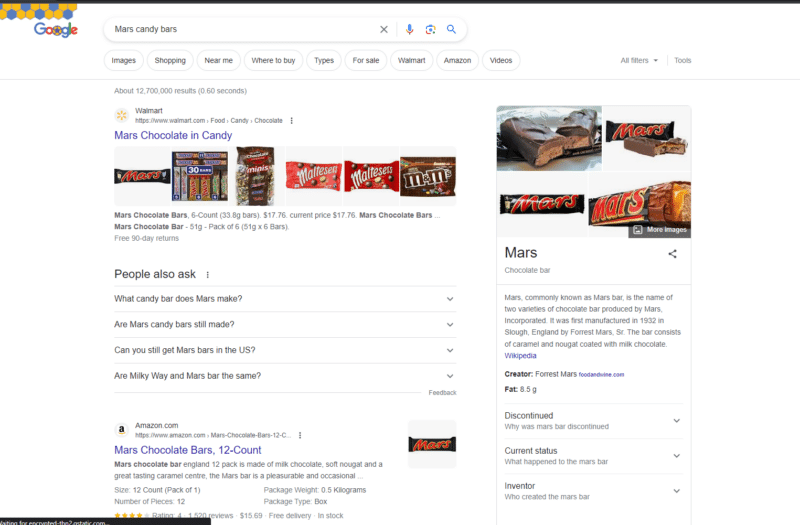
Think of Mars candy bars, for example.
They have a great website but don’t focus on creating elaborate blogs or landing pages targeting specific keywords.
They don’t have to because they’re already famous and are not concerned with beating their competitors in the search results.
What’s more, they don’t sell their products directly to customers. Instead, they rely on a well-developed indirect sales distribution system.
So, they are not interested in ranking for the keyword “Mars candy bar.” Ranking for this keyword may even jeopardize stores that want to get found in their market.
Even if you search for their main keyword, depending on your region, the official website may not reach the top of the search engine results page.
You can see the same trend with other established brands like Coca-Cola that operate under a franchise distribution model.
However, you don’t need to be a global business chain not to concern yourself with competitors.
Another scenario where SEO might be optional is if you have a very niche business that serves a very specific market.
Maybe you sell custom-made jewelry for weddings and only work with a few clients per year.
In that case, you don’t need to compete with thousands of other websites for generic terms like “wedding jewelry.”
You need to reach your potential customers by other means, such as referrals, social media, or email marketing.
5. Your target market does not use search engines
Sometimes, your target audience doesn’t use search engines to find you. They already know you and trust you, and they visit your store in person or type your website address directly into their browser.
For example, if you run a local bakery with a loyal customer base, you don’t need to worry about ranking high on Google for keywords like “best bakery near me.”
Your customers know where to find you and love your products. They might even recommend you to their friends and family through word-of-mouth.
However, just because I said you don’t have to worry about SEO doesn’t mean you can ignore your online presence.
You still need a great website that shows off your brand and what you do. You must also be active on social media to connect with your audience and share valuable content.
Additionally, you can benefit from local SEO, and you still have to optimize and maintain your online pages, whether it’s social media or Google My Business listings.
These things matter greatly if you want to grow your business and reach more people.
Assessing the pros and cons of SEO
If you’re still on the fence about whether SEO is right for your business, consider the following opportunities it can provide to your business:
Pro: Increased visibility and traffic
- SEO can help you attract more organic visitors interested in your products or services.
- You can also target specific audiences based on location, demographics, or preferences.
Enhanced credibility and trust
- You can establish your brand as an authority in your industry through content marketing.
- Appearing at the top of search results will make you seem more authoritative, showing your expertise and value to your customers.
Improved user experience and conversion
- SEO will ensure that you create a user-friendly and engaging website that provides relevant and useful information to your visitors.
- You’ll get to optimize your website for mobile devices and ensure high load speed and accessibility.
- This will improve your customer satisfaction and loyalty and increase your chances of converting visitors into buyers.
Evaluate how important these factors are to your company. Try to consider the long-term perspective of your business.
If you think these opportunities are important, you can start taking small steps toward developing an optimization strategy.
SEO takes time to show results, so it may be worth it to start working on your optimization as soon as you notice chances for growth.
While the benefits are great, and many SEO experts tout the selling points, I believe you should also be aware of the possible disadvantages of this promotion strategy. Here are the things to keep in mind:
Con: High competition and intensity
- SEO is a dynamic and ever-changing field that requires constant research, analysis, and adaptation.
- You must keep up with the latest trends, algorithms, and best practices to stay ahead of your competitors.
- Hiring professional SEO experts or agencies to help you with your strategy may be necessary.
Uncertain and delayed results
- SEO is not a quick fix or a guaranteed solution. Building your ranking and visibility on search engines takes time and effort.
- You may not see immediate or consistent results from your SEO efforts.
- Technical issues, algorithm changes, or manual actions from search engines may impact your progress.
Ethical risks
- SEO can be risky if you don’t follow the ethical and legal guidelines of search engines.
- You may be tempted to use risky techniques to manipulate your ranking or deceive your customers. However, this can backfire and damage your reputation and credibility.
Consider SEO’s value for your business at the moment
SEO is valuable but not obligatory. Assess its pros and cons for your situation.
If you choose SEO, invest fully in experts and resources, be patient for results, and offer unique contributions.
If it’s not right for your business now, don’t stress. You can revisit it when the time is right.
The post When your business doesn’t need SEO appeared first on Search Engine Land.
Courtesy of Search Engine Land: News & Info About SEO, PPC, SEM, Search Engines & Search Marketing
Friday, September 8th, 2023
Threads users can now search through posts on the platform.
Meta CEO Mark Zuckerberg announced the new functionality has now been rolled out to most English and Spanish-speaking countries, including the US and UK.
The new search feature is available on both the Threads mobile app and web app.
Why we care. Potential customers now have a new way to search for and discover brands on Threads, which could result in increased visibility.
Get the daily newsletter search marketers rely on.
<input type=”hidden” name=”utmMedium” value=”“>
<input type=”hidden” name=”utmCampaign” value=”“>
<input type=”hidden” name=”utmSource” value=”“>
<input type=”hidden” name=”utmContent” value=”“>
<input type=”hidden” name=”pageLink” value=”“>
<input type=”hidden” name=”ipAddress” value=”“>
What’s new? Threads did have a search feature when it first launched back in July, however, this only provided the ability to search through users – not posts.
Following testing in Australia and New Zealand last month, Threads’ new search functionality allows users to browse posts using keywords. Below is a screenshot of the new feature in action:

Deep dive. Read our Threads FAQ guide for more information.
The post Threads users can now search for posts appeared first on Search Engine Land.
Courtesy of Search Engine Land: News & Info About SEO, PPC, SEM, Search Engines & Search Marketing
Thursday, September 7th, 2023
In this article I’ve curated some of the most commonly misunderstood elements of entity and semantic SEO, aiming to clear the fog around them.
Here’s our roadmap:
- What are the differences between entities, topics and keywords?
- How do entities affect keyword research?
- What is a topical map?
- How do you do on-page optimizations in the entity paradigm?
- What role does schema markup play in entity SEO?
- What are semantic networks and how do you build them?
What are the differences between entities, topics and keywords?
One of the most common areas of confusion I’ve seen when discussing entities is what differentiates keywords, topics and entities from each other.
Because entities, keywords and topics are intertwined elements in the vast landscape of SEO, it can often be difficult to truly tease apart each definition.
Entities
These are the foundational concepts or things in content. At a basic level, entities can be singular nouns, like “chocolate cake” or “iPhone.”
But they can also represent more complex named concepts, such as events like “The Olympic Games” or places like “Mount Everest.”
In SEO’s semantic framework, entities are unique, identifiable concepts consistent across various texts or contexts. They aren’t tied to specific phrases but represent broader ideas.
Within a keyword phrase like “delicious chocolate cake recipe,” “chocolate cake” is the entity.
On a larger scale, for a website about tech reviews, entities such as “smartphones”, “laptops”, and “gadgets” guide its overarching themes, signaling to search engines the primary subject matter.
Keywords
These are the specific phrases or terms users type into a search engine. They’re the bridge between the user’s intent and the content they’re trying to find.
Keywords can encapsulate one or more entities, reflecting what users are actively seeking.
For instance, while “iPhone” is an entity, a keyword that encompasses it might be “iPhone 12 Pro Max review.”
Topics
Topics are thematic areas or categories that encapsulate one or more entities. Think of a topic as an umbrella under which multiple entities can reside.
For example, under the topic “Smart Home Technology,” entities could include “Google Nest Hub,” “smart thermostats,” and “IoT security.”
Here’s a summary of their key distinctions:
Scope
- Topics are broad and can encompass multiple entities and even various keywords.
- Entities are more specific and focused.
- Keywords are the specific searchable terms related to both.
Hierarchical relationship
- Entities usually fall under topics.
- Keywords can align with either entities or topics or sometimes both.
SEO
- Topics guide your broader content strategy.
- Entities help focus and refine that strategy.
- Keywords serve as the target for actual search queries.
Intersection
- Topics can be used to form content clusters.
- Entities and keywords serve to refine and specify the content within those clusters.
User intent
- Topics guide the user through their informational journey.
- Entities provide specific answers.
- Keywords can be crafted to meet specific user queries.
Semantic networks (in the context of SEO)
- Topics often serve as nodes in semantic networks that connect related entities.
- Keywords serve as the pathways that lead users to those nodes.
The relationship between topics and keywords manifests in how keywords help flesh out the various aspects of a given topic.
In a well-structured content strategy, the keywords you target should naturally fall under the umbrella of your chosen topics.
This ensures that your content is relevant and comprehensive and satisfies a range of user intents related to your topic.
In essence, topics serve as the overarching themes that guide the scope and direction of your content, providing a high-level focus.
Entities further sharpen this focus, giving search engines like Google a nuanced lens to understand the core essence of your content, both on micro and macro levels.
Keywords, meanwhile, refine and drill down into specific facets of your overarching topics, making your content discoverable to users with particular queries related to those topics.
How do entities affect keyword research?
Traditionally, SEO strategies were rooted in keyword research, focusing primarily on keyword difficulty and search volume.
Specialists would aim for low-hanging fruit – terms a site could realistically rank for – before moving on to more competitive keywords.
While effective in the past, this approach has become less optimal due to evolving search algorithms.
Today, a keyword-centric methodology risks creating disjointed topics across a website, undermining the development of topical authority.
Imagine if topics occupied a physical space where some topics are proximal while others are distant.
In this space, “bowling shoes” would be closer to “bowling” than “fun nights out with the family” – however, “fun nights out with the family” might not be far off.
This is how advanced language models perceive language. They generate graphical representations to discern topical relevance.
If your site has a scattered topic structure, jumping from one loosely related topic to another (as with ad hoc keyword targeting), Google might find it challenging to decipher your website’s core intent.
This could lead to a decline in ranking or just an inability to be competitive for the keywords that really matter to your business.
While targeting low-hanging fruit in terms of keywords is still viable, it doesn’t necessarily establish a website as an authority in a specific niche.
To optimize content in this era, we need to consider two key aspects:
Density of the subject matter
Your goal should be to cover content that is graphically close together and to do it better than any competitor. Assess the competition.
Determine which sub-niche within your realm you can outshine others in. Can you truly be the go-to expert on the subjects you target?
Logical subject expectations
Creating content that naturally aligns with your site’s objectives is crucial for SEO success.
I often see SEO professionals broadening their content scope excessively or employing AI to cover every conceivable angle of their subject matter, which misses the mark entirely.
For instance, imagine a site focused on “Kettlebell Workouts for Beginners.”
Adding an article about the history of kettlebell design, while interesting, may not directly benefit the site’s primary audience, who are looking for actionable workout tips.
Entity SEO is not a free pass to cover every topic under the sun. It’s imperative to prioritize the content that resonates with your site’s main objectives and aligns with Google’s understanding of your expertise.
In other words, before you delve into the nuances of kettlebell design, ensure you’ve already covered the basics your audience is actively searching for.
Only expand to broader topics when you’ve observed the search engine sees you as an expert in your sub-niche (this is usually observable by top rankings and quick rankings of new articles).
Remember: Establishing oneself as a topical authority is an ever-evolving challenge. Success hinges on thorough research, pinpointing subtopics ripe for deeper exploration – areas others might have overlooked.
Equally critical is identifying content clusters within competitor domains, not just to replicate but to outdo.
However, stay attuned to their backlink profiles. Gauging your ability to match or even outpace these external factors is crucial for a realistic strategy.
Get the daily newsletter search marketers rely on.
<input type=”hidden” name=”utmMedium” value=”“>
<input type=”hidden” name=”utmCampaign” value=”“>
<input type=”hidden” name=”utmSource” value=”“>
<input type=”hidden” name=”utmContent” value=”“>
<input type=”hidden” name=”pageLink” value=”“>
<input type=”hidden” name=”ipAddress” value=”“>
What is a topical map?
As we discussed above, SEO was often synonymous with keyword research and this was stage one of an SEO effort.
Marketers would scour the web, hunting for keywords promising high search volumes and low competition.
The strategy was simple: find a high-potential keyword, create content around it, rinse and repeat.
This tactic was more about sniping possibilities than building a holistic digital presence.
The aim was to grab those low-hanging fruits – isolated keywords that could easily be targeted to drive traffic.
The idea was you’d build a base of ranking content and then slowly advance to more difficult terms over time. This approach was ultimately keyword-centric.
The cluster-centric approach
In my opinion, an evolved SEO strategy should focus on strategic decisions around clusters of content and not exclusively aimed at individual keywords.
Enter topical maps – a vital tool in modern SEO that helps you better visualize and plan your content strategy.
A topical map is essentially a visual representation of your primary subject and how it connects to various sub-topics and themes.
Think of it as a spider diagram or a mind map. At the center of this map, you have your main subject – the overarching topic your site focuses on.
Branching out from this central node are related sub-topics, which serve as the pillars supporting your main subject.
Each sub-topic can further divide into specific themes or even narrower facets, providing a layered, organized structure to your content.
Imagine your central topic is “Basketball.”
From there, branches like “Basketball Techniques,” “Basketball Equipment,” and “NBA Teams” emerge.
Dive deeper and from “Basketball Techniques,” you have “Free Throws,” “Dribbling” and more.
Interspersed are your keywords, suggesting content angles and user intent.
Instead of focusing on individual keywords, you’re now looking at clusters – groups of related content pieces.
These clusters allow you to paint a comprehensive picture of a subject, making your site a one-stop hub for audiences.
When assessing competition and volume, the focus shifts from individual keywords to these clusters, looking at the aggregate potential rather than singular opportunities.
Here, your focus becomes analyzing the landscape for what clusters of content your competition has and looking for pockets of where you can outperform their clusters instead of their keywords.
The benefits of thinking in clusters
This shift from keywords to clusters offers multiple advantages:
Depth and breadth
- By covering related topics under one umbrella, you provide both in-depth insights and a broad overview, catering to various user intents.
Authority
- A cluster approach signals to search engines that you’re not just skimming the surface. You’re diving deep, establishing your authority in a niche. This triggers search engines to rank you higher, oftentimes for terms that you have weaker external factors than the competition on.
Flexibility
- Clusters allow for easier content expansion. If a new trend emerges within a cluster, you can seamlessly integrate it without disrupting your site’s structure.
Keyword clustering tools can be game-changers when building topical maps. They help you identify when a keyword deserves its standalone topic page or if it fits better within a broader topic.
In essence, the older approach was cherry-picking good keywords and using their success to propel your SEO forward.
The new approach is to select clusters of dense content that establish authority. When done correctly, you can trigger a topical authority boost and circumvent the need for superior external SEO factors.
How do you do on-page optimizations in the entity paradigm?
Now that we’ve seen how entities can be factored into your high-level strategy and content roadmap via topical maps, let’s go through questions people ask about the actual implementation of entities on your site.
On-page SEO and entities: What’s changed?
If you’ve engaged in SEO for any time, a notable change in your Search Console query report is that your pages often rank for keywords not directly mentioned within their content.
Entities and the knowledge graph have transformed Google’s grasp on language. Previously, search results predominantly showcased pages that explicitly mentioned a keyword.
But now, with the deeper understanding provided by entities, Google draws from a wider pool, considering pages that address topics in a related sphere. This leads Google to favor more comprehensive content pieces.
This shift introduced what I term “authority pages.” These are content-rich pages saturated with entity relationships, designed to answer many potential user queries. Such pages aggregate the essence of what previously required several pages.
As you develop these authority pages, AI tools can be instrumental.
The fundamental procedure involves a few key steps:
- First, utilize tools or methods like TF-IDF (Term Frequency-Inverse Document Frequency), RAKE (Rapid Automatic Keyword Extraction), or keyword extraction techniques to pull out crucial keyword phrases or entities from articles that already rank highly in your target area. This step is crucial because it helps you establish the minimum subject matter and terms that Google seems to view as essential for ranking in that particular topic space.
- Once you have identified this baseline, the next objective is to go beyond it. Your aim should be to not just match the top-ranking articles in terms of entities and keywords but to exceed them by introducing new entity relationships or facets of the topic that haven’t been extensively covered. The idea is to offer a more comprehensive, insightful piece that adds value beyond what’s currently available, thereby enhancing your chances of being viewed as an authority on the subject by search engines.
I explore these concepts and tools in greater depth in How ChatGPT can help you optimize your content for entities, where I break down the nitty-gritty of how to maximize your topical authority in the SEO landscape.
What role does schema markup play in entity SEO?
The concept of entities is crucial in the world of SEO, serving as the focal points around which content is structured.
Leveraging schema to highlight these entities can provide search engines with an even clearer understanding of your page’s subject matter and context.
Schema is a tool often underutilized in the SEO community.
While many stick to generic schema setups, custom options like “Mentions schema” can vastly improve how Google understands your content.
Mentions schema allows you to specify what or who your page mentions, and can even link to authoritative sources like Wikipedia for greater clarity.
Here’s how to implement it.
Step 1: Identify your core entity
Before you begin implementing schema, identify the core entity or entities around which your content revolves.
For example, if you’re writing a comprehensive guide about “Mediterranean Diet,” your core entity is the Mediterranean Diet.
Step 2: Use mentions schema
Utilize mentions schema to specify additional entities related to your core entity.
If you’re discussing the Mediterranean Diet, you might mention entities like “Olive Oil,” “Fish,” and “Exercise.”
{
  "@context": "http://schema.org/",
  "@type": "Article",
  "mentions": [{
    "@type": "Thing",
    "name": "Olive Oil"
  },
  {
    "@type": "Thing",
    "name": "Fish"
  },
  {
    "@type": "Thing",
    "name": "Exercise"
  }]
}
Step 3: Use ‘SameAs’ for authoritative sources
When you mention other entities, use the “SameAs” attribute to link to their authoritative sources, such as Wikipedia pages or scientific studies.
{
  "mentions": {
    "@type": "Thing",
    "name": "Olive Oil",
    "sameAs": "https://en.wikipedia.org/wiki/Olive_oil"
  }
}
Step 4: Visualize using tools
Tools like Schema Zone can help you visualize your schema structure.
Plug in your URL to see if your schema correctly highlights your core and related entities.
Step 5: Test and monitor
Use Google’s Schema Testing Tool to make sure your schema is correctly implemented.
After that, monitor your site’s performance to see how the enhanced schema affects your search rankings.
By consciously implementing schema to outline the entities within your content, you’re making your content more understandable to search engines and paving the way for better SEO performance.
It’s an essential step to make your content not just readable but also “understandable” by search engines.
What are semantic networks and how do you build them?
The importance of a well-structured SEO strategy cannot be overstated, especially as search engine algorithms continue to evolve.
While topical maps provide an initial framework defining which clusters of content you should focus on, they only scratch the surface.
Enter semantic content networks – a refined, holistic approach that ties together the multiple facets of your content into a unified whole.
What is a semantic content network?
A semantic content network is a sophisticated way to structure and interconnect your website’s content beyond isolated pages and lone keywords.
At its core, it’s an organizational model that serves as a roadmap for interconnecting your content.
Rather than marking standalone pages or individual keywords, you’ll be plotting out clusters of interrelated content, usually in the form of internal links and hierarchical relationships.
How does it build on traditional models?
If you’re familiar with the “hub and spoke” model, you’ll find similarities here.
In this enhanced model, central themes or “hubs” serve as the anchor points, with related sub-topics or “spokes” branching out.
What sets it apart is its keen focus on logic and accessibility, ensuring that both users and search engines can easily understand the architecture and flow of your content.
Why do semantic content networks matter?
In today’s SEO landscape, search engines like Google are shifting from a narrow focus on keyword counts to a broader understanding of content, context, and semantic relationships.
A semantic content network helps you adapt to this advanced landscape, ensuring your content is not just easily discoverable, but also resonates with this new level of search engine understanding.
By adopting this approach, you’re creating more than just a search-optimized website.
You’re constructing a logically interconnected web of content that enhances the user experience and aligns perfectly with modern search engines’ intelligent, semantic capabilities.
This is the future of SEO, and it’s a future where clarity, coherence, and connectivity reign supreme.
Prioritizing entities and semantic relationships in SEO
In SEO, we’ve transitioned from a narrow keyword-focused approach to an interconnected, holistic view encompassing entities, topics, and the broader semantic relationship between them.
Entities, being the foundational concepts within content, help search engines understand the context and essence of a page beyond mere keyword repetitions.
As we pivot to this enriched understanding, the importance of topical maps and semantic content networks becomes clear.
They’re not mere tools; they’re strategies to better align with the evolving nature of search engines and, in turn, enhance user experience.
A coherent, logical content web is not just the future of SEO – it’s the present.
Recognizing and harnessing this shift can pave the way for more meaningful, impactful online experiences.
The post Entities, topics, keywords: Clarifying core semantic SEO concepts appeared first on Search Engine Land.
Courtesy of Search Engine Land: News & Info About SEO, PPC, SEM, Search Engines & Search Marketing
Thursday, September 7th, 2023
As the PPC landscape continues to evolve, having the ability to predict future campaign performance is invaluable.
This article will cover some of my favorite PPC forecasting techniques using Google Sheets and Vertex AI that paint a clearer picture of the future and empower clients with actionable insights.
While no tool or technique can provide a 100% accurate picture of the future, the methods outlined here can show us a glimpse into the potential trajectories of PPC campaigns.
Google Sheets FORECAST function: The basics
Google Sheets offers an easy-to-use and reliable forecasting function using the formula:
=FORECAST(z, known_y values, known_x values)
Where:
z is the data point for which you want to predict a corresponding y-value.known_y's is the range of dependent data points (usually your past results or outcomes).known_x's is the range of independent data points (usually the variable you think might influence your outcomes).
This function is a great tool if you only have two dimensions.
However, it uses linear regression, which is fine for a quick forecasting sneak peek but nothing too advanced to account for external circumstances or other data sources.
Let’s say you have historical data from the last year and want to forecast future budget predictions to have some numbers to plan with.
In this example, we have the current year’s sales data up to August and want to forecast future sales from September to December.
If we visualize those forecasts, you’ll quickly see the drawbacks of using this method.
The blue line represents the known sales data up to August, and the red line represents the predicted sales data.
The prediction is not more than a trendline, which might help to get a high-level look at something but is nothing compared to the blue line, which is basically how real business data will look like.
Supercharging the Google Sheets FORECAST function
To fix the issue of linear regression, there are multiple ways to approach the forecast formula with advanced methods.
Instead of just using the linear =FORECAST() function, you can add a little twist by adding trend data or other market predictions into the forecast formula, as in:
=FORECAST()*3rdParty_Trend_Data
You can grab trend data from public sources like Google Trends, Google Keyword Planner, Dataset Search by Google or industry reports (from PwC, EY, McKinsey, etc.) and export it into a CSV or any other format you’re used to working with.
Clean up those datasets to match your original sheet’s structure, like data on a day-to-day, week-to-week or month-to-month basis,
Next, supplement the FORECAST function to get a more realistic prediction rather than just a straight line going up or downwards.
In this example, we have used additional trend data, which shows an increased trend toward Q4 of the year. The numbers are, therefore, different from the predicted sales without trend data.
If we visualize those new data, we can see that the trend data gives us better insights and more detail compared to a flat trend line.
As a rule of thumb, it is almost always a good idea to support those forecasts with as much data as possible and supply data on more detailed timeframes like day-to-day or week-to-week.
Get the daily newsletter search marketers rely on.
<input type=”hidden” name=”utmMedium” value=”“>
<input type=”hidden” name=”utmCampaign” value=”“>
<input type=”hidden” name=”utmSource” value=”“>
<input type=”hidden” name=”utmContent” value=”“>
<input type=”hidden” name=”pageLink” value=”“>
<input type=”hidden” name=”ipAddress” value=”“>
Advanced forecasting with Vertex AI
If your PPC campaigns involve large datasets with multiple variables, turning to Google’s Vertex AI could be a game-changer for your forecasting needs.
Unlike simpler tools, Vertex AI allows for more complex models that can take numerous factors into account, such as seasonality, different ad platforms, or even global market trends.
To get started, you’ll first need to upload your historical PPC data to Google Cloud Storage.
From there, you can access Vertex AI’s AutoML Tables to build a machine learning model tailored to your dataset automatically.
After training the model, you can evaluate its performance using built-in metrics to ensure it meets your forecasting requirements. Once you’re satisfied, deploying the model is easy.
Now, you can use this model to predict future outcomes, such as clicks, impressions, or conversions, based on varying levels of ad spend, ad placements, or any other variable you deem important.
And the best part? You don’t need to be a machine learning expert to do this. With a bit of setup and some fine-tuning, you’ll be on your way to more accurate and insightful PPC forecasts.
The capabilities of Vertex AI are sheer endless, but let’s look at a simple framework to start with.
Once your Google Cloud account is set up and you’ve created a project within Vertex AI, you should start by creating a data set.
A data set is basically the collection of data points you want to use for your forecasting.
The data set contains a time dimension and some budget and revenue dimensions. Depending on your goal, the data sets might contain different data points.
Name your data set, select Tabular as your data type and Regression or Forecasting as your objective.
While regression is often used to understand relationships and can be applied to various data types, forecasting focuses more on predicting future points in a time series.
Both are essential tools in data science and are used for different types of decision-making and analysis. You will be fine with forecasting in most of your cases.
Now it’s time to train a new model. For beginners, the AutoML training method is always a good choice. Next, you must set some settings on the forecast period, the target, and data granularity.
Once done, set the training duration and budget, and you’re ready. The model will now learn, and you’ll receive a notification once it’s finished.
The last step is to get predictions from the ML model. This option is only available once the training is done.
To create a forecast, you need to submit data that the forecast will be based on. It’s ideal to use more recent data.
The model will predict future target values learned on the training data set and based on your forecast data set.
Depending on the data volume, the job will take a while. But you shouldn’t wait more than 5-10 minutes for PPC tasks.
Once finished, Vertex AI will supply an output file that contains new columns with predicted values that you can use for further decision-making.
Vertex AI might seem a little much for some forecasting tasks, but remember that you can submit years of historical data, inventory insights and more to train the model.
With Vertex AI, you can build a machine learning forecasting model tailored to your business, which is much stronger than any static forecasting formula.
PPC forecasting for better campaign performance
Ultimately, the choice between these tools depends on your goals and the complexity of your PPC campaigns.
Google Sheets offers a straightforward and accessible way to dip your toes into PPC forecasting. While it may have limitations, it’s a valuable starting point for many advertisers.
On the other hand, Vertex AI takes your PPC forecasting capabilities to the next level with its ability to handle large datasets and complex models. You can now factor in seasonality, global trends, and various variables to make accurate predictions tailored to your business.
Whether you opt for the simplicity of Google Sheets or the sophistication of Vertex AI, forecasting in PPC advertising is no longer a guessing game.
You can now equip yourself with actionable insights and make data-backed decisions on your PPC campaigns.
Dig deeper: A guide to effective PPC projections
The post PPC forecasting with Google Sheets and Vertex AI appeared first on Search Engine Land.
Courtesy of Search Engine Land: News & Info About SEO, PPC, SEM, Search Engines & Search Marketing
Thursday, September 7th, 2023

Increasing first-page rankings and organic traffic has always involved guesswork. Experienced marketers know that deciding what content to produce and how to publish it can lead to wasted time, energy, and money. That can stop anyone dead in their tracks. But what would it look like if guesswork was no longer a factor in SEO and everything that goes into it?
Join Ryan Brock, chief solution officer at DemandJump, for a follow-up to last year’s Pillar-Based Marketing case study and how DemandJump eliminated the guesswork to win 497 first-page rankings in mere weeks on a highly competitive topic.
Register and attend “497 Page One Rankings in 7 Weeks: How Pillar-Based Marketing is Changing SEO,” presented by DemandJump.
Click here to view more Search Engine Land webinars.
The post This SEO strategy led to 497 page-one rankings in 7 weeks appeared first on Search Engine Land.
Courtesy of Search Engine Land: News & Info About SEO, PPC, SEM, Search Engines & Search Marketing
Thursday, September 7th, 2023
Did you know? In 2022, Black Friday online sales totaled over $9.12 billion, and Cyber Monday sales totaled over $11.3 billion.
Black Friday and Cyber Monday are two of the biggest shopping days of the year in the United States. These events are a great opportunity for retailers to boost sales and generate excitement for the holiday season and for people to shop all at discounted rates.
However, for online businesses, it is very important to prepare for these days by using digital marketing services. So, before we dive into the topic, let’s first understand the significance of these days.
How to prepare for Black Friday and Cyber Monday
Black Friday and Cyber Monday are two of the biggest shopping days of the year, and businesses can use digital marketing services to prepare for them. Here are some specific digital marketing services that businesses can use to prepare for Black Friday and Cyber Monday:
1. Start planning your email marketing campaigns
Black Friday and Cyber Monday are two of the biggest shopping days of the year, and email marketing is a great way to reach your existing customers and promote your deals. Here are some tips for starting your email marketing campaigns early:
- Start planning early. The best time to start planning your Black Friday and Cyber Monday email marketing campaigns is in September. This will give you enough time to create engaging and effective emails and to test and optimize your campaigns.
- Personalize your emails. People are more likely to open and click on emails that are personalized to them. Use your email marketing software to segment your list by customer interests and demographics and send targeted emails that are relevant to each group.
- Offer exclusive deals. One of the best ways to get people to open your emails is to offer exclusive deals they can’t find anywhere else. This could be a discount on a specific product, free shipping, or a gift with purchase.
- Track your results. It’s important to track the results of your email marketing campaigns to see what’s working and what’s not. This will help you improve your campaigns over time and get better results.
2. Optimize your website for search engines with SEO
By optimizing your website for Black Friday and Cyber Monday keywords, you can increase your chances of being found by people who are looking for deals.
- Optimize your product pages for Black Friday and Cyber Monday keywords. When people are looking for deals, they are likely to search for keywords related to Black Friday and Cyber Monday. Make sure your product pages are optimized for these keywords so that they rank higher in search results.
- Create holiday-specific content. In addition to optimizing your product pages, you can also create holiday-specific content, such as blog posts, infographics, and social media posts. This content should be informative and engaging and help people learn more about your products and discounts.
- Build backlinks. Backlinks are links from other websites to your website. They are a signal to Google that your website is authoritative and trustworthy. In the weeks leading up to Black Friday and Cyber Monday, focus on building backlinks from relevant websites.
- Track your SEO performance. It’s important to track your SEO performance to see what’s working and what’s not. This will help you make necessary adjustments to your strategy.
3. Use search engine marketing to reach new customers
By running SEM campaigns during Black Friday and Cyber Monday, you can reach a large audience looking for deals.
Here are some tips for running SEM campaigns for Black Friday and Cyber Monday:
- Set a budget. Before you start running any SEM campaigns, setting a budget is important. This will help you avoid overspending and ensure that you’re getting a good return on your investment.
- Choose the right keywords. When choosing keywords for your SEM campaigns, it’s important to select those relevant to your products and that people are likely to search for. You can use a keyword research tool to help you find the right keywords.
- Create effective ad copy. Your ad copy should be clear, concise, and persuasive. It should also be relevant to the keywords you’re targeting.
- Track your results. It’s important to track the results of your SEM campaigns to see what’s working and what’s not. This will help you improve your campaigns over time and get better results.
4. Run paid social ads
Paid social ads are a great way to reach a large audience looking for deals during Black Friday and Cyber Monday. You can boost your sales and reach your marketing goals by running paid social ads on the right platforms and targeting your ads to the right people.
Here are some tips for running paid social ads for Black Friday and Cyber Monday:
- Choose the right platform. Not all social media platforms are created equal. When choosing a platform for your paid social ads, choose one your target audience is using. For example, if you’re targeting millennials, you might want to focus on Instagram and TikTok.
- Target your ads. When you’re targeting your paid social ads, it’s important to be as specific as possible. You can target your ads by demographics, interests, and even past purchase behavior. This will help you ensure that your ads are seen by the people who are most likely to be interested in your offer.
- Create engaging content. Your paid social ads should be engaging and relevant to your target audience. They should also be visually appealing and easy to understand. Use high-quality images and videos and write clear and concise ad copy.
- Offer exclusive deals. One of the best ways to get people to click on your paid social ads is to offer exclusive deals. This could be a discount on a specific product, free shipping, or a gift with purchase.
- Track your results. It’s important to track the results of your paid social ads so that you can see what’s working and what’s not. This will help you improve your campaigns over time and get better results.
By following these tips, you can run effective paid social ads to help you reach your Black Friday and Cyber Monday goals.
It’s time to act now
As the holiday season approaches, the competition will only intensify. By implementing the strategies outlined here, you’re setting yourself up for a successful Black Friday and Cyber Monday. Remember, the time to act is now. Start refining your email marketing campaigns, optimizing your SEO, fine-tuning your SEM strategies and crafting eye-catching paid social ads. With these pillars in place, you’ll be well on your way to surviving and thriving during the holiday sales period. Your success story begins with the steps you take today.
For some great additional ad examples check out this blog: https://digitaldrewsem.com/black-friday-facebook-ads-examples/
The post 4 tips to prepare for Black Friday and Cyber Monday appeared first on Search Engine Land.
Courtesy of Search Engine Land: News & Info About SEO, PPC, SEM, Search Engines & Search Marketing
Wednesday, September 6th, 2023
Meta is reportedly considering paid versions of Facebook and Instagram that would ban ads in Europe.
The cost of the subscription and potential rollout date has not yet been confirmed by the company.
However, Meta will continue to offer free versions of its apps which will still serve ads regardless, according to the New York Times.
Why we care. Depending on user adoption, this could significantly affect brand reach and campaign performance. While an ad-free subscription service is currently under consideration for Europe, it may extend to the US in the future. Advertisers should closely watch this development as they may need to consider reallocating their ad spend to other platforms accordingly.
Why now? A Meta subscription service has been suggested in response to the European Union’s Digital Services Act, which comes into effect on 1 January 2024.
Under the new regulations, more onus is being put on large platforms that have more than 45 million regional users, such as Google and Meta, to:
- Create a safer digital space.
- Establish a level playing field for businesses.
Get the daily newsletter search marketers rely on.
<input type=”hidden” name=”utmMedium” value=”“>
<input type=”hidden” name=”utmCampaign” value=”“>
<input type=”hidden” name=”utmSource” value=”“>
<input type=”hidden” name=”utmContent” value=”“>
<input type=”hidden” name=”pageLink” value=”“>
<input type=”hidden” name=”ipAddress” value=”“>
What has Meta said? The company has not commented on launching paid-for versions of Facebook and Instagram. However, Meta CEO Mark Zuckerberg hinted in 2018 when he appeared before the US Senate that such a product could be on the horizon. When asked if he would consider charging users for access to his apps to avoid ads, he said:
- “There will always be a version of Facebook that is free.“
Then Meta COO, Sheryl Sandberg, added:
- “We have different forms of opt-out. We don’t have an opt-out at the highest level. That would be a paid product.”
Deep dive. Read Meta’s statement on the DSA, issued by Nick Clegg, President, Global Affairs, for more information.
The post Meta may remove ads on Facebook and Instagram for subscribers in Europe appeared first on Search Engine Land.
Courtesy of Search Engine Land: News & Info About SEO, PPC, SEM, Search Engines & Search Marketing