Archive for the ‘seo news’ Category
Friday, September 15th, 2023
TikTok now serves Wikipedia snippets in some of its search results.
This is the first time that the platform has offered its users results from the wider web as historically, it exclusively featured its own content in SERPs.
The Wikipedia snippets were first noticed in TikTok SERPs by The Verge, as shown here:

A spokesperson for the social media app confirmed that the new feature has been live for several months, however, a formal announcement was never made.
Why we care. While Google has previously stated that it sees TikTok as a search competitor, the social media app is clearly intensifying its efforts in the search arena.
A recent survey revealed the majority of Gen Z women are favoring TikTok over Google for their search needs. This shift in user preference raises questions about whether Google might find itself facing a more concerning competitor in the search space than previously anticipated.
How it works. Wikipedia snippets are served on some accounts for select SERPs for”
The snippets been spotted wedged between relevant videos as users have been scrolling down through in-app search results pages.
By clicking on the links that appear at the bottom of the snippet, users are taken to different sections of the Wikipedia entry.
Deep dive. Read TikTok’s Search and Discover guidelines for more information.
The post TikTok quietly adds Wikipedia snippets to its search results appeared first on Search Engine Land.
Courtesy of Search Engine Land: News & Info About SEO, PPC, SEM, Search Engines & Search Marketing
Friday, September 15th, 2023
Amazon is rolling out new features to improve its search capabilities on mobile.
In a bid to rival search engines like Google and Pinterest, the retail giant is launching new search and discovery tools, including:
- Multimodal search (the ability to search using both text and images)
- Expanded AR features
- Find-on-Amazon (a new tool that identifies similar products to those in a photo you share directly with the Amazon app)
Why we care. Although each update may seem inconsequential on its own, together, these new tools can influence how consumers search for products and redirect more searches to Amazon. Consequently, these changes could affect Google’s advertising revenue, as Amazon has been closing in on the dominant position held by Google and Meta in digital ad spending.
Multimodal search. This new tool, which is an improvement on Amazon’s existing visuals search engine, allows consumers to add text as well as images to search for matching products. For example, if you need a replacement part for an appliance, you can snap a photo of the part and include the appliance’s name, such as “Frigidaire.”
Expanded AR efforts. Amazon’s augmented reality tool, initially used for visualizing furniture and decor in your space, now extends to smaller items such as lamps and appliances such as toasters and coffee machines. With this AR feature, you can also rearrange items from one surface to another.
Find-on-Amazon. With this tool, you can search for products using a photo from anywhere. If you see something you like on social media, while browsing the web, reading emails, or chatting online, you can tap the “Share” button and send the image to the Amazon Shopping app. This allows the app to find visually similar products even if you don’t know their name or how to describe them.
More updates. Amazon announced that in addition to the changes mentioned above, it is also rolling out other smaller improvements, including:
- The introduction of sales trend data next to listings (for example, how many items were bought in the past month).
- An improved way to easily search for previously purchased items.
Get the daily newsletter search marketers rely on.
<input type=”hidden” name=”utmMedium” value=”“>
<input type=”hidden” name=”utmCampaign” value=”“>
<input type=”hidden” name=”utmSource” value=”“>
<input type=”hidden” name=”utmContent” value=”“>
<input type=”hidden” name=”pageLink” value=”“>
<input type=”hidden” name=”ipAddress” value=”“>
What has Amazon said? An Amazon spokesperson said in a statement:
- “We are always testing new features and honing existing ones to see what works best to help customers in every phase of their shopping journey.”
- “We know that customer trust is hard to win and easy to lose, so we pay close attention to customer feedback about the shopping experience on Amazon.”
- “We’re always experimenting with ways to make it even easier to shop our store. This means that sometimes things may look different as we test new features, but our mission remains the same: to help you find what you’re looking for.”
Deep dive. Read Amazon’s Search and Shop announcement in full for more information.
The post Amazon launches new search functions on mobile to rival Google appeared first on Search Engine Land.
Courtesy of Search Engine Land: News & Info About SEO, PPC, SEM, Search Engines & Search Marketing
Thursday, September 14th, 2023
Search is hard, as Seth Godin wrote in 2005.
I mean, if we think SEO is hard (and it is) imagine if you were trying to build a search engine in a world where:
- The users vary dramatically and change their preferences over time.
- The technology they access search advances every day.
- Competitors nipping at your heels constantly.
On top of that, you’re also dealing with pesky SEOs trying to game your algorithm gain insights into how best to optimize for your visitors.
That’s going to make it a lot harder.
Now imagine if the main technologies you need to lean on to advance came with their own limitations – and, perhaps worse, massive costs.
Well, if you’re one of the writers of the recently published paper, “End-to-End Query Term Weighting” you see this as an opportunity to shine.
What is end-to-end query term weighting?
End-to-end query term weighting refers to a method where the weight of each term in a query is determined as part of the overall model, without relying on manually programmed or traditional term weighting schemes or other independent models.
What does that look like?

Here we see an illustration of one of the key differentiators of the model outlined in the paper (Figure 1, specifically).
On the right side of the standard model (2) we see the same as we do with the proposed model (4), which is the corpus (full set of documents in the index), leading to the documents, leading to the terms.
This illustrates the actual hierarchy into the system, but you can casually think of it in reverse, from the top down. We have terms. We look for documents with those terms. Those documents are in the corpus of all the documents we know about.
To the lower left (1) in the standard Information Retrieval (IR) architecture, you’ll notice that there is no BERT layer. The query used in their illustration (nike running shoes) enters the system, and the weights are computed independently of the model and passed to it.
In the illustration here, the weights are passing equally among the three words in the query. However, it does not have to be that way. It’s simply a default and good illustration.
What is important to understand is that the weights are assigned from outside the model and entered it with the query. We’ll cover why this is important momentarily.
If we look at the term-weight version on the right side, you’ll see that the query “nike running shoes” enters BERT (Term Weighting BERT, or TW-BERT, to be specific) which is used to assign the weights that would be best applied to that query.
From there things follow a similar path for both, a scoring function is applied and documents are ranked. But there’s a key final step with the new model, that is really the point of it all, the ranking loss calculation.
This calculation, which I was referring to above, makes the weights being determined within the model so important. To understand this best, let’s take a quick aside to discuss loss functions, which is important to really understand what’s going on here.
What is a loss function?
In machine learning, a loss function is basically a calculation of how wrong a system is with said system trying to learn to get as close to a zero loss as possible.
Let’s take for example a model designed to determine house prices. If you entered in all the stats of your house and it came up with a value of $250,000, but your house sold for $260,000 the difference would be considered the loss (which is an absolute value).
Across a large number of examples, the model is taught to minimize the loss by assigning different weights to the parameters it is given until it gets the best result. A parameter, in this case, may include things like square feet, bedrooms, yard size, proximity to a school, etc.
Now, back to query term weighting
Looking back at the two examples above, what we need to focus on is the presence of a BERT model to provide the weighting to the terms down-funnel of the ranking loss calculation.
To put it differently, in the traditional models, the weighting of the terms was done independent of the model itself and thus, could not respond to how the overall model performed. It could not learn how to improve in the weightings.
In the proposed system, this changes. The weighting is done from within the model itself and thus, as the model seeks to improve it’s performance and reduce the loss function, it has these extra dials to turn bringing term weighting into the equation. Literally.
ngrams
TW-BERT isn’t designed to operate in terms of words, but rather ngrams.
The authors of the paper illustrate well why they use ngrams instead of words when they point out that in the query “nike running shoes” if you simply weight the words then a page with mentions of the words nike, running and shoes could rank well even if it’s discussing “nike running socks” and “skate shoes”.
Traditional IR methods use query statistics and document statistics, and may surface pages with this or similar issues. Past attempts to address this focused on co-occurrence and ordering.
In this model, the ngrams are weighted as words were in our previous example, so we end up with something like:
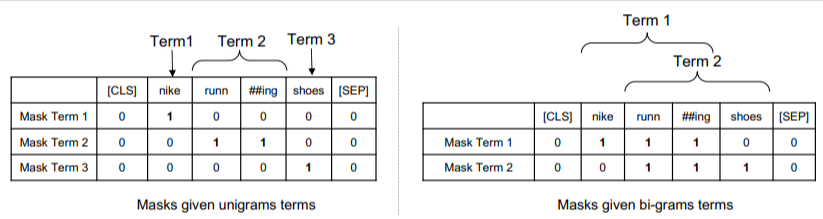
On the left we see how the query would be weighted as uni-grams (1-word ngrams) and on the right, bi-grams (2-word ngrams).
The system, because the weighting is built into it, can train on all the permutations to determine the best ngrams and also the appropriate weight for each, as opposed to relying only on statistics like frequency.
Zero shot
An important feature of this model is its performance in zero-short tasks. The authors tested in on:
- MS MARCO dataset – Microsoft dataset for document and passage ranking
- TREC-COVID dataset – COVID articles and studies
- Robust04 – News articles
- Common Core – Educational articles and blog posts
They only had a small number of evaluation queries and used none for fine-tuning, making this a zero-shot test in that the model was not trained to rank documents on these domains specifically. The results were:

It outperformed in most tasks and performed best on shorter queries (1 to 10 words).
And it’s plug-and-play!
OK, that might be over-simplifying, but the authors write:
“Aligning TW-BERT with search engine scorers minimizes the changes needed to integrate it into existing production applications, whereas existing deep learning based search methods would require further infrastructure optimization and hardware requirements. The learned weights can be easily utilized by standard lexical retrievers and by other retrieval techniques such as query expansion.”
Because TW-BERT is designed to integrate into the current system, integration is far simpler and cheaper than other options.
What this all means for you
With machine learning models, it’s difficult to predict example what you as an SEO can do about it (apart from visible deployments like Bard or ChatGPT).
A permutation of this model will undoubtedly be deployed due to its improvements and ease of deployment (assuming the statements are accurate).
That said, this is a quality-of-life improvement at Google, that will improve rankings and zero-shot results with a low cost.
All we can really rely on is that if implemented, better results will more reliably surface. And that’s good news for SEO professionals.
The post TW-BERT: End-to-end query term weighting and the future of Google Search appeared first on Search Engine Land.
Courtesy of Search Engine Land: News & Info About SEO, PPC, SEM, Search Engines & Search Marketing
Thursday, September 14th, 2023

On average, Americans now check their phones 262 times a day and daily screen time averages over five hours per day. People are using their phones more frequently, for longer periods of time, and are shopping from their phones more than ever before.
With 54% of web traffic coming from mobile, adding text messaging (also known as SMS) to your ecommerce stack can help your team reach more customers faster—while maintaining a seamless customer experience.
This practical SMS marketing guide from Cordial provides best practices and essential tips to help you build an effective SMS marketing strategy that drives new revenue streams and loyalty.
Visit Digital Marketing Depot to download Strengthen Customer Loyalty with SMS Marketing.
The post Why now is the right time to implement SMS marketing appeared first on Search Engine Land.
Courtesy of Search Engine Land: News & Info About SEO, PPC, SEM, Search Engines & Search Marketing
Thursday, September 14th, 2023

Finish 2023 strong and step into 2024 ready to stay ahead of Google algorithm updates, supercharge your funnel with qualified leads, and leverage generative AI to your advantage: Attend SMX Next, online November 14-15, to learn actionable, brand-safe search marketing tactics for free without leaving your desk.
Programmed by the Search Engine Land editors, this expert-led training program explores the latest, most critical search marketing topics, including…
- Integrating generative AI into your content creation process
- How to recover from Google algorithm ranking updates
- SEO and PPC trends to embrace in 2024
- How searchers are using Google’s SGE and what SEOs need to know
… plus so much more. And you’re the first to hear about our just-announced PPC keynote featuring the one and only Fred Vallaeys!

Stay tuned for more keynote details! Your free pass packs the entire SMX experience:
- Get your specific questions answered by search marketing legends during Overtime, live Q&A following most sessions.
- Participate in engaging discussions with like-minded marketers during Coffee Talk meetups.
- Train at your own pace with instant on-demand access available for 180 days.
- Showcase your commitment to continued learning with a personalized certificate of attendance.
No plane ticket, hotel booking, or expense reports required.
For nearly 20 years, more than 150,000 search marketers from around the world have attended SMX to learn game-changing tactics, connect with like-minded professionals, and further their careers.
Don’t miss your final chance to join us in 2023. Secure your free pass now!
The post Actionable. Digital. Free. Get your SMX Next sneak peek here. appeared first on Search Engine Land.
Courtesy of Search Engine Land: News & Info About SEO, PPC, SEM, Search Engines & Search Marketing
Thursday, September 14th, 2023

Google Search Generative Experience (SGE) is looming over the search industry, but little is understood about its mechanisms and expected impact on our organic traffic.
Join this webinar to understand how to overcome the Google SGE challenge. The first step is assessing how Google SGE goes live and how it will impact your organic traffic. Next, identify how to recover from expected traffic drops. Register now to learn about solutions that will help your organization mitigate the risk of SGE.
Register and attend “Overcoming the Google SGE Challenge: Assessment and Recovery Strategies” presented by AgileSEO.
Click here to view more Search Engine Land webinars.
The post Overcoming the Google SGE challenge: Assessment and recovery strategies appeared first on Search Engine Land.
Courtesy of Search Engine Land: News & Info About SEO, PPC, SEM, Search Engines & Search Marketing
Tuesday, September 12th, 2023
Even the most traditional PPC manager can’t deny it anymore: Performance Max can do amazing things. Of course, that requires you to approach it with a different mindset than Search and Shopping.
Let me give you an example.
Years ago, when working with retailers selling products from many different brands, you typically make a separate Shopping campaign for each brand. Try that with Performance Max, and you’ll force it into doing something it’s not built for. And performance certainly won’t be at max.
Consolidation is the name of the game with Performance Max. Performance will take off if you lean in on its machine learning and smart algorithms. But carry forward your habits from the more granular campaign types, and Performance Max’s algorithmic nature will punish you.
Here’s everything you need to know about Google’s Performance Max campaign so that you can keep those needles moving in the right direction.
What is Performance Max?
Performance Max in Google Ads is the culmination of everything that makes the world’s largest search engine special. Years of collecting data on people’s browsing and purchasing behavior has allowed Google to create a campaign that’s tailored to individual searches.
Rather than placing ads in specific inventory types – like search results or product listings – Performance Max allows advertisers to upload all types of assets and access all of Google’s ad placements from one campaign. That includes:
- Text.
- Videos.
- Feeds.
- Images.
After being released to limited accounts during its alpha (2020) and beta (2021) stages, Performance Max rolled out to the wider Google Ads community in 2022 ahead of the peak shopping season.
Since then, Google has continued to support Performance Max by releasing new features, including brand exclusions and asset group-level reporting.
What makes Performance Max powerful?
Google intended Performance Max to be an all-in-one campaign type capable of serving the needs of most advertisers. Here are some of the defining features that make that possible.
Targeting capabilities
Keywords, audiences, and product feeds remain the backbone of campaign targeting. This is no different when it comes to Performance Max, but it’s how those three elements behave and work together that sets this campaign apart.
While it will quickly bypass any initial settings you give it in pursuit of the best conversions, Performance Max starts on better footing when you apply these from day one.
Audience signals
Use these to tell Performance Max what kind of users you want to show your ads to – but remember, it won’t be those exact people.
For example, uploading your customer list as an audience signal doesn’t mean your ad will show to them (or even to others like them) but as a jumping-off point for its own targeting.
Keywords
Performance Max will quickly begin targeting broad queries not directly related to your initial targeting intent (based on custom intent audiences, product data feed, and website URL).
While the absence of negative keywords can be frustrating, it’s likely you’ll still capture opportunities you didn’t consider. Performance Max can also analyze custom intent audiences you build from keywords.
Product feed
As always, a strong data feed is critical to success with Shopping campaigns.
Without an optimized product feed, Google won’t know which queries to show your products for.
Throw in a robust feed, and you will capture opportunities you didn’t even consider because of how Performance Max branches off from your initial path.
Bid management
Performance Max uses Smart Bidding to set cost-per-click (CPC) bids, which effectively means that advertisers have two options when it comes to bid strategies:
- Maximize Conversions with an optional CPA target.
- Maximize Conversion Value with an optional ROAS target.
For this to work optimally, your account needs a sizable amount of historical data that Google can use to determine what’s worked best in the past.
I typically recommend that newer accounts begin with Search or Standard Shopping to gather data, only switching over to Performance Max after maxing out impression share and building a steady stream of conversions.
Complex auctions and intent matching
Google has a massive store of data on how people behave online.
Smart Bidding analyzes over 70 million signals in near real-time (actually a tenth of a second), but we never get to see what those data points are. A certain amount of trust in the system is required for this to work, but do that, and you’ll get the results you want.
Consider 100 people searching for the same exact query. Not only will each person be in a different part of the buying journey, but their unique histories will influence factors like how quickly they might convert. The system will try to find those people most likely to convert during that search.
For ecommerce, fill those data feeds out with the right information – keywords in titles and descriptions, product categorization, and so on. This will allow you to appear in as many searches as possible, irrespective of whether somebody is “window shopping” or ready to buy.
New customer acquisition and brand exclusions
Performance Max has long since allowed advertisers to target net new revenue by bidding higher for new acquisitions, and it recently began rolling out brand exclusions to better control when your ads show for branded queries.
These features may not be as important for smaller advertisers, but larger brands looking to scale can now tell the system to focus on more valuable opportunities. When used together, these features can significantly alter the speed and profitability of a scaling process.
Thanks to asset group-level reporting rolling out to many accounts, we can use these for segmentation more effectively. When we see that certain product segments – brand, category, individual products – are not getting traction or not performing as well, we exclude them and:
- Put them in a new Performance Max campaign to force it to spend.
- Or go back to Standard Shopping.
Think of it as pruning your campaigns for what’s not getting traffic or converting well.
Dig deeper: How to think about brand exclusions for Performance Max
Dynamic Search
Google recently announced the ability to upgrade Dynamic Search campaigns into Performance Max. Remember, the capability has always existed, but you now have a one-click option.
But with Dynamic Search likely to be next on the chopping block and deprecated in the near future – remember, Local and Smart Shopping campaigns already rolled into Performance Max – now is the right time to start testing it through Performance Max.
Get the daily newsletter search marketers rely on.
<input type=”hidden” name=”utmMedium” value=”“>
<input type=”hidden” name=”utmCampaign” value=”“>
<input type=”hidden” name=”utmSource” value=”“>
<input type=”hidden” name=”utmContent” value=”“>
<input type=”hidden” name=”pageLink” value=”“>
<input type=”hidden” name=”ipAddress” value=”“>
What sets Performance Max apart from other Google Ads campaigns?
Let’s look at a few characteristics that set Performance Max apart from its more placement-specific counterparts.
Inventory and ad spend
Bidding and budgeting can only be done at a campaign level, which is familiar enough.
Where it gets tricky is that Performance Max doesn’t show you exactly where it spent your money and this ties in closely with reporting capabilities.
But while you’re buying traffic on inventories that may not typically have the quality of Search and Shopping, Performance Max is still only targeting people likely to convert. Additionally, some industries have a very high cost per click, and Performance Max can really decrease overall costs by looking outside that bubble.
Another thing to remember is that Performance Max is front-loaded in terms of expenses. Be sure to factor in the cost of data gathering during the learning period of a new campaign.
If you have a new account, this will take longer than the usual three to six weeks.
But as you build historical data and get better results, subsequent campaigns should exit the learning period faster and bring costs down, allowing you to free up your budget to bid more aggressively or capture more conversions.
Reporting
Reports in Performance Max can be seen at the campaign and asset group levels, and you can find those right in the Reporting tab inside Google Ads.
But I’ve spoken to several people who don’t ever navigate to where you can build custom reports based on landing page, placements, location, time of day, or products in your data feed. You can also analyze what proportion of your ad spend is data-feed-driven and what is creative-driven.
We’re also big fans of the Insights tab, which Google has revamped (update still rolling out). You used to only be able to look back to 7 and 28 days, but now you can choose any time frame – and download keywords. There’s a lot of good data in there, so don’t neglect it!
Transparency
You can use third-party scripts to determine where your ads are going. Personally, I tend to shy away from that.
The way I see it, either the campaign is performing or not. When it isn’t, there are levers you can pull to try something different.
With Performance Max, you can’t decide when or where your ad shows up – only nudge and guide the algorithm. You also lose the ability to see more granular keywords, instead getting access to keyword themes.
I think accepting this is fundamental to success with Performance Max.
But while you can’t see your ad placements, there is an account-level placement report with impression data. Unfortunately, this doesn’t give you a breakdown of cost and revenue.
Keep in mind that the goal of all of this is to move to a format similar to Advantage Plus in Facebook, which only surfaces data that you can act on.
Control
Many people think Performance Max is a “set it and forget it” campaign. Not really.
You have control, but it’s very different from what we’ve become accustomed to with other campaigns.
You program the system to do what you used to do yourself so you can focus on the decisions machines can’t make. What that comes down to in Performance Max is:
- Ad copy
- Creatives
- Audience signals
- Data feeds
- Bid strategies
- Budgets
- Campaign structure
Don’t think of it as taking one step back, but stepping back to see the big picture.
Involvement
How active do you need to be with Performance Max? Remember: Your goal is to guide the machine, nudge it in the right direction, and ensure it doesn’t veer off course.
Part of that is learning how to tame those compulsive feelings that making changes is the only way to feel involved. Maybe it’s because your clients keep asking why you only made two changes last month.
But with Performance Max, sometimes that’s all you have to do.
Instead, your involvement skews in favor of monitoring and big-picture changes. You set things up, step back and allow the campaign to run. Keep an eye on things while working behind the scenes.
Focus on making sure any first-party data is clean and accurate, that you’re integrated with a CRM (for lead generation), and improving landing page content – things that impact profitability and efficiency.
Performance Max in action: Sample campaign structures
Setting up a Performance Max campaign can be tricky if you don’t know what you’re doing. Here are some examples of how I’ve built campaigns for different types of accounts.
Ecommerce
In ecommerce, there are generally two types of advertisers:
Sells own brand
These accounts typically lead with paid social, spending as much as 70-80% of their total advertising budget on platforms like Facebook and TikTok. Google might even be an afterthought.
These are the brands where Performance Max with creative assets tends to work particularly well for the same reasons the brand works on paid social.
Sells multiple brands
For retailers selling hundreds of different brands or thousands of products – we have clients whose catalogs have hundreds of thousands of SKUs – it’s really about showing up at the very bottom of the funnel, so these accounts lead with Google Ads.
We typically shy away from creative assets and focus more on the “Smart Shopping” approach, which makes audience signals and ad copy less significant. Instead, we focus almost entirely on getting the data feed in near-perfect shape.
Lead generation
For lead generation accounts, we typically begin with Search to build up conversion data and volume – two critical components of making Performance Max work.
Once that’s achieved, we move to Performance Max, splitting asset groups by offering and location. This allows the system to target the right people in the right places so that a New Jersey plumber doesn’t get leads from Glasgow.
If your service is offered virtually or globally, you could omit the location split and just go by offering alone.
What’s absolutely vital is that you include some type of spam filter (like a reCAPTCHA) or low-quality leads will plague you.
Ideally, you should also be feeding offline conversions and conversion values back into Google so that it can identify future leads based on data from your complete sales cycle.
Verdict: The pros and cons of Performance Max
I’m bullish on Performance Max, but it’s not a perfect campaign.
Here’s what I admire about it and a few things I wish Google would improve.
Pro: It lets you scale beyond intent
Let’s say you’re targeting a market with limited search volume, but you really want to test opportunities beyond that limit.
Performance Max can use its data signals to find people who might not be searching for your bottom-funnel keywords but will become a potential customer based on interest.
Performance Max is a full-funnel campaign, so it will find people it thinks are likely to convert based on all those millions of data signals – and it will then pull them down the customer journey.
This is probably Performance Max’s biggest advantage.
Not having the ability to set bids at the asset group level is a major drawback, and I understand why many PPC folks are frustrated with the obfuscation of search term data.
That said – and this could be a mentality issue – does all the other stuff matter? Shouldn’t we be figuring out how to get the most out of this toolbox instead of how to hack it?
The whole idea of bidding with a ROAS target is that you don’t need to look at negative keywords. If it’s not hitting your target, it shouldn’t get that traffic.
I get that people want to be able to check the system quickly, especially when smaller budgets are at play, but patience goes a long way in seeing Performance Max’s true capabilities.
Con: It can be expensive at the start
Like a rocket ship, Performance Max can take you to places you never imagined – at the cost of a slow and expensive takeoff.
Getting somewhere meaningful can take three to six weeks, and that period can be pricey on the front end.
Google monitors behavior rather than optimizing for conversions, so you’re spending considerably more for far fewer conversions than usual.
It takes clear communication and honest expectation-setting to convince clients and bosses that this is necessary to adapt to the modern avatar of Google Ads.
Pro: It’s a great way to try new campaign types.
For brands that are not ready to go all in on something untested like YouTube, Performance Max is a good way to test how that new media works.
Google claims that performance is better when routed through Performance Max, which it typically is. Their official figure is an average gain of 18%, but your mileage may vary.
Con: It’s not as easy as Google says it is
Performance Max is really not as simple as it seems. And while there will always be a place for PPC managers, it also means that we have to put in the effort to stay on top of things.
To get Performance Max right requires nuance, patience, and persistence. Many marketers will test it and give up after a few weeks because it’s not moving in the right direction.
This is shortsighted but understandable.
 : How do you make peace with PPC automation?
 : When I focus on my clients, I get results.
I've put a lot of time and energy into making PMax work. Same is true for Dynamic Search, RSAs, broad match, and Smart Bidding.
I like sharing what we learn because I feel helpful. pic.twitter.com/1SxeVJnWGQ
— Menachem Ani (@MenachemAni) June 7, 2023
Pro: It refreshes your marketing priorities
Performance Max forces PPC managers to think more like marketers than strictly media buyers.
I love the ability to go beyond Search for people who are not equipped to manage Discovery, YouTube, Display, and those more niche networks.
This makes it a great way to scale beyond your capabilities without needing a high level of expertise.
What happens is you’ll reach the audience that you have but who might not necessarily be on the network you’ve been advertising on. Google has made this process uncomplicated.
Con: Its recommendations are far from ideal
I’m always cautious of Google’s recommendations.
Too many people don’t realize what they’re signing up for. On the surface, they appear to be things that you wouldn’t think of. But they can have deeper effects, so use them with caution.
Insights is a good place to get ideas, especially as you don’t have to act on them right away and can instead weigh up the risk-to-reward ratio.
Like everything else in Performance Max, it is very much “eyes on, hands off”:
- Don’t make changes just to make changes.
- Have a goal in mind for each specific change.
- Know what you hope to accomplish so there’s something to measure.
Pro: It’s a reminder that we’re still needed
People are worried that Google wants to cut out agencies and experts, but Performance Max only reinforces the fact that PPC managers aren’t going anywhere.
Our role has changed, and it will change further, but the average business owner cannot optimally run Performance Max from day one. And if there’s anything more difficult than running a Performance Max campaign, it’s fixing one riddled with mistakes.
So whether you’re building from the ground up or fixing what’s broken, you’ll always be around and needed.
Should you run a Performance Max campaign?
Performance Max is a great option to have. But it’s just that: an option.
You don’t have to use it. In some cases, you probably shouldn’t.
Which accounts benefit from Performance Max
- It’s typically harder for ecommerce to ignore Performance Max than it is for lead generation to make it work. That’s how good the lift in performance can be for retail conversions.
- Highly competitive mass retail products – think digital cameras and televisions – can work well on the feed side. Maybe skip the creative assets and use Performance Max a little differently than it was intended.
- If your account is rich with historical data – and in the case of lead-generation, strong first-party data inputs and outputs – you’ll have a much easier time with Performance Max.
- Bigger budgets and high monthly conversions are valuable enough that they give you a bit of a pass when it comes to the more common mistakes. High spenders with demand typically get the most out of Performance Max.
Which accounts are better off with other campaign types
- Brand new accounts – in both new and existing businesses – will struggle with Performance Max right off the bat. You certainly can use it, but know it’s always more effective once you have historical data.
- Ecommerce accounts that neglect their product feed will find themselves spending more than they need to. Way more.
- Lead generation accounts that don’t have high-quality data inputs and outputs – lead qualification, CRM or IVR integrations, spam guards, offline conversions – should stick to Search campaigns.
- Smaller budgets and limited monthly conversions (typically under 30) will probably never gather enough data to make Performance Max worthwhile.
- Legal restrictions can throttle success. These teams don’t like not knowing which headline will show up with which description or point to which landing page. If you press ahead, theme your asset groups as tightly as possible, and you should be fine.
Special case: Regulated industries
Disclaimer: This is informed speculation.
Accounts advertising things like pharmaceuticals and medical services (think detoxification and rehabilitation) aren’t allowed to retarget users. Performance Max offers a way around that because you aren’t targeting specific people, but the system probably will anyway.
As long as the proper teams can approve your ad copy and creatives, it really shouldn’t pose any problems.
Best practices: How to set up, optimize, monitor, and report on Performance Max
Ready to create and run your first Performance Max campaign? Have an active one, but not sure how to study or optimize performance? These resources might help.
Pre-launch checklist
My team has had access to Performance Max campaigns since Google Ads released it in beta, so we’ve had years to refine our go-live process.
Follow along with this detailed walkthrough to maximize your performance with Performance Max with everything you need to know to set up for success.
Read more: How to set up Performance Max campaigns the right way
Optimization stage
While there aren’t many levers to directly optimize Performance Max campaigns, that doesn’t mean you can’t shape them.
Instead, your job is to guide the system governing your campaigns. Here’s a detailed walkthrough of what you can (and should) do to drive better performance.
Read more: How to improve your performance in Performance Max
Monitoring stage
Extracting data and insights from Performance Max can be frustrating, but it’s getting better thanks to features like asset group reporting. Use these tips and tricks to guide your reporting and monitoring process.
Read more: How to maximize insights from Performance Max
Underrated tips and tricks
Ecommerce and lead-generation accounts must approach Performance Max very differently – but what does that mean exactly?
These guides will show you how to avoid repeating some serious mistakes that advertisers have made with their Performance Max campaigns.
Read more:
The post Google Performance Max: Everything you need to know appeared first on Search Engine Land.
Courtesy of Search Engine Land: News & Info About SEO, PPC, SEM, Search Engines & Search Marketing
Tuesday, September 12th, 2023
The multibillion-dollar question right now is whether the Search Generative Experience (SGE) will blow up Google’s Search business model. Based on early testing, Google CEO Sundar Pichai is “confident” that won’t happen.
“It’s important to us to connect users with what’s out on the web, and we are working deeply to make sure that continues to work well,” Pichai told Steven Levy in a Q&A published on Wired.
Why we care. Google may be confident that the SGE experiment will continue to send people to websites, but we’re still finding it hard to trust Google at this point. They won’t reveal any real data to us about whether AI answers are driving clicks to websites, click-through rate data, or advertising performance data on what we are calling CHERPs, or Chat Engine Results Pages. And we have no way to track this in Google Search Console, Google Ads or Google Analytics.
Ads vs. organic. Levy pointed out to Pichai that the AI-generated answers are different from a list of links, which could further add confusion about whether an SGE answer is sponsored or organic.
- “Even in a generative experience we would give you a set of sites that support what we are saying. We want to make sure users are consuming those sites. So I don’t think the core part of the experience will change. We will have a space for ads in a way that makes sense for users and particularly on commercial queries,” Pichai said.
Helping people find information. Pichai pointed out that even though the way Google presents information has evolved greatly in 25 years – but ultimately people are searching for information.
- “We are still trying to help people find the best information that exists online. Inherently, people are also looking for commercial information, and ads are very valuable commercial information, because they connect merchants and businesses, small and big, to users. None of that changes just because we are applying AI deeply. When we evolve search with generative AI, we’ll apply the same principles,” Pichai said.
Like desktop to mobile? Pichai pointed out that people asked similar questions as Google shifted its focus from desktop to making everything mobile-first.
- “Our early testing shows that we’ll be able to get it right. It’s core to the company to evolve search while applying the underlying principles. I am confident we’ll be able to get that right through this transition,” Pichai said.
The search community was also extremely worried about Google’s featured snippets stealing traffic. When Bard launched in February, there were no links. And SGE only finally added links to websites Aug. 30 after months of pressure by search marketers and publishers.
Bing burn. Did the new Bing, powered by ChatGPT, make Google “dance.” Pichai essentially dissed their efforts, comparing it to Alexa and Siri. Pichai also claimed:
- “Around the end of last year, my thoughts were, how can we bring generative AI to search in a way that makes sense for our users? That’s what I’m thinking about, and that’s what will matter in the long run.”
Could that time in late 2022 coincide with OpenAI launching ChatGPT in late November? Generative AI exploded on the scene and supposedly triggered a code red within Google, leading to the return of Google founders Larry Page and Sergey Brin.
Pichai was also asked about the antitrust trial, but had little to say beyond throwing around the word “innovation.”
You can read the full interview here: Sundar Pichai on Google’s AI, Microsoft’s AI, OpenAI, and … Did We Mention AI?
The post Google CEO on SGE and Search evolution: ‘We’ll get it right’ appeared first on Search Engine Land.
Courtesy of Search Engine Land: News & Info About SEO, PPC, SEM, Search Engines & Search Marketing
Tuesday, September 12th, 2023
AI is helping PPC managers focus more on strategic initiatives, such as campaign inputs and back-end management, rather than manual operations.
Increased efficiency and effectiveness? This evolution is exciting!
AI will play an increasingly important role in daily operations as PPC evolves.
Here’s a closer look at how AI will impact the daily activities of PPC account managers.
Less manual operation and managing algorithms
Automation has been transforming the world of PPC for a while.
This trend will only continue. We expect significant changes in how PPC managers work over the next few years.
As automation and AI become more prevalent, PPC managers will spend less time on tasks like monitoring search queries and implementing negative keywords.
Worried? Don’t be. This positive development will free up time for managers to focus on other important tasks.
Despite what some people may say, automation will not eliminate jobs in PPC. Instead, it will lead to a shift in roles and responsibilities.
PPC managers will be responsible for managing algorithms rather than individual keywords. There will be plenty to do!
In fact, with less manual work to do, PPC managers may find themselves busier than ever before – and more valuable to their companies as a result.
Data team collaboration
As PPC campaigns become more first-party data-driven, the partnership between PPC managers and data teams is becoming increasingly important. This collaboration often involves joint efforts toward:
- Implementing tagging infrastructure.
- Website analytics.
- CRM access.
- Utilizing scaled automation and data reporting.
The connection between the data/analytics and PPC teams may have been limited in the past. This was particularly true when PPC relied heavily on only a handful of tracking pixels. Once those were in place, there may have been a less pressing need for more extensive collaboration.
However, it’s essential to establish a robust and ongoing relationship with your data/analytics team to ensure PPC success. While some PPC managers may not have had this kind of partnership in the past, it’s crucial to work toward building one for optimal results.
Want to stay ahead of the game? Leverage first-party data to optimize your campaigns.
This means building strong relationships with your organization’s team in charge of these data projects. Doing so ensures you have the resources and support to stay competitive and drive results.
Don’t wait until it’s too late – start building those bridges today!
Attribution measurement and incrementality testing
Proving the value of paid search to an overall marketing program is familiar to PPC managers. Most PPC programs are measured on sales, revenue, ROAS, LTV and other value-based metrics.
Incrementality analysis may already be part of your PPC program. Great! However, I know of PPC programs building these processes, and now is the time!
Media Mix Modeling (MMM) and incrementality testing are essential to gain valuable insights into marketing campaigns’ effectiveness and efficiency:
- MMM provides a holistic view of how different channels interact and influence customer behavior, enabling managers to allocate budgets optimally. PPC managers need to be part of this conversation!
- Incrementality testing is gaining importance due to the rise of data-driven decision-making. It helps PPC managers measure the true causal impact of a specific marketing tactic or channel and quantify the incremental value generated by your PPC campaigns. It also provides insights into optimal bidding strategies, helps validate the results of A/B tests, and enhances accountability by offering a straightforward way to measure and communicate the impact of marketing efforts to stakeholders.
In today’s complex and data-rich marketing landscape, PPC managers need to make informed decisions considering their campaigns’ broader impact.
Hopefully, you are already involved in these projects within your company. If not, get started!
Audience building and management
Audience targeting has been a tried and true method for PPC managers for quite some time now.
While the advancements in AI and automation won’t necessarily change this approach, the rise of privacy regulations will require new tactics and strategies for audience creation, development, sculpting and management.
To effectively manage your PPC campaigns, you must make the most of your CRM data. If your PPC program has already integrated this, you’re ahead of the game! However, many PPC programs still need to build out their first-party audience processes.
Audience lists may not be as precise for automated campaigns like Performance Max and Demand Gen. Still, they help to shape impression delivery through look-a-like audiences and algorithmic signals.
PPC managers will need to play an active role in crafting audiences that will deliver results in their paid media campaigns.
While some PPC managers may not be affected by this shift in operations due to their robust audience strategy, many others will need to consider new directions and factors.
Ad creative development and testing
Over time, creative assets in PPC have come a long way. The text ad has been the go-to unit for PPC, and for good reason. However, things are changing and will continue to evolve.
PPC is no longer just about search, as image ads have been in the game for a while with Google Display Ads and Microsoft Ad Network. PPC managers have also worked with video ad delivery through YouTube for years. With Performance Max, these ad units are only going to diversify further.
While PPC managers may have saved time in the past by managing search queries and manual bid changes, they will need to focus more on creative assets.
As many other optimization levers are automated, creative messaging will become even more critical. PPC managers must work closely with their creative teams to develop custom ad variations for images, videos, texts, and more.
Also, while we’re talking about creative, PPC managers will hopefully have more time for strategic planning on their landing page/website experience. CRO has been a cornerstone of digital marketing for almost as long as this industry has existed. However, with more automated optimization and AI-driven tactics, advertisers need to find whys to make their company and products stand out. Ad creative and website experience is mission-critical.
Building stronger relationships with creative teams will be crucial for PPC managers in the future.
SEO collaboration
As more time is saved with automation, PPC managers will dive deeper into their collaboration with their SEO team.
Teams should not operate in silos. There should be a shared vision for a holistic SERP optimization strategy.
With the changing SERPs and the emergence of SGE and AI-driven content, paid and organic teams need to work together to optimize the SERP effectively.
Moreover, it is essential to clearly understand the different roles and responsibilities of the PPC and SEO teams. PPC managers should be aware of the latest trends and techniques in paid advertising, while SEO experts should focus on technical optimization and content creation.
By working together, the teams can complement each other’s strengths and weaknesses, resulting in a more comprehensive and effective optimization strategy. Regular communication and collaboration are essential to ensure everyone is on the same page and working towards the same goals.
Dig deeper. SEO vs. PPC: Differences, pros, cons & an integrated approach
Conclusion
Experienced PPC managers are likely familiar with all these tactics.
However, prioritizing algorithm management and user experience optimization will be essential as the landscape shifts and your day-to-day responsibilities evolve.
This pivot may be challenging – but it’s critical for staying ahead in the game.
The post How AI is changing the game for PPC account managers appeared first on Search Engine Land.
Courtesy of Search Engine Land: News & Info About SEO, PPC, SEM, Search Engines & Search Marketing
Tuesday, September 12th, 2023
Q4 is almost here, along with the holiday shopping season.
Rather than focus on ecommerce holiday SEO strategies and campaigns – which you should (hopefully) already have nailed down – now is a good time to start thinking ahead to next year.
1. Learn from last year
Start by reviewing last year’s campaign wrap-ups to identify any missing data or insights.
One big change from last year is that you’re likely now fully using Google Analytics 4. This requires rethinking or reevaluating your reporting.
Revisit your past reports. Can you report on all the data you have before?
Use this opportunity to inform stakeholders about any significant differences due to the new tracking setup.
Unsure where to begin with tracking? Consider a future state workshop.
Gather your team, project to the time when you need to report on holiday campaigns, and collaboratively create the report framework. This workshop format encourages idea exchange and innovative performance review methods.
These sessions also often make us think about ways to test and learn.
2. Test and learn from with a larger dataset than usual
During the holiday season, I’ve seen ecommerce site traffic surge by as much as 70%. This increased activity makes it a great time to spot data trends – and quickly test new ideas.
These tests could be general improvements or holiday-specific optimizations.
I recently worked on a test during peak season for a client, and it doubled revenue per session in a quick experiment, which might have taken weeks to achieve at another time of the year.
Key principles still count:
- Test one idea at a time.
- Keep it simple.
- Ensuring the test is scientifically robust.
I’m a fan of behavioral science, and when I need testing ideas, I turn to nudges – or small adjustments to influence decisions.
Inspired by the research of Daniel Kahneman and Amos Tversky, nudges can be a valuable source of testing inspiration, especially when aligned with audience insights to match potential customer behavior.
Successful testing yields valuable insights to guide your 2024 strategy, whether it’s for regular campaigns or holiday and sales-focused ones.
3. Gamification
Gamification is an underutilized marketing tool that goes through ups and downs in popularity.
The holiday season is an ideal time to experiment with gamification to learn about your audience for your future marketing.
Gamification varies, from generic fun games to customized ones that can captivate your audience for extended periods. For instance, we once created a football-related game for a client that achieved an astonishing average time on site of over 30 minutes.
The secret? A highly relevant, engaging, and addictive quiz.
To use gamification for audience insights, focus on custom games, like a personalized psychographic quiz tailored to your brand.
For example, a clothing brand could create a quiz like “What Does Your Wardrobe Say About You?” It guides users through statements to reveal a persona linked to popular characters, providing valuable insights into your audience.
Done well, this benefits the brand and user. But it must be executed well to avoid harming the brand-user relationship.
Now that you’ve categorized your audience using the quiz profiles, you can create targeted segments. This enables personalized email communications for each profile based on what you’ve learned about them.
4. Data capture
Zero-party data is highly valuable. Finding mutually beneficial ways to collect it from customers can greatly benefit your future strategy.
The holiday season offers more chances to connect with your audience through promotions and exclusive deals. Make the most of this by asking customers what matters most to them in advance. This enables better content personalization, which can increase conversion rates.
To gain an advantage over competitors, consider using games, quizzes, or planning tools to capture information ahead of time for holiday shopping. This allows you to benefit now and in the coming year.
Strike the right balance between questions and rewards to make it worthwhile for customers to provide this information.
Consider offering exclusive access to Black Friday sales in exchange for customer preferences. These insights benefit both your event and customer interests.
Additionally, categorize purchases to distinguish between personal and gift items. This prevents marketing misalignment, allowing you to collect more information, such as birthdays, in exchange for discounts on gifts.
To collect zero-party data effectively:
- Ensure mutual benefit.
- Store data for usability.
- Actively use and track its impact.
5. Digital PR
Digital PR can boost authority for ecommerce holiday season campaigns and the upcoming year, if executed correctly. Preparation and relevance are key.
Publications will share gift guides, Black Friday/Cyber Monday deals, and more. Ensure your brand aligns with these opportunities by analyzing last year’s coverage and your competitors’ visibility.
During planning, wear both your SEO and digital PR hats.
- Be mindful of URLs, so you don’t invest heavily in temporary ones. Create a clear strategy for seasonal landing pages to keep them active, even building anticipation for future campaigns.
Aim for immediate impact and the upcoming year.
Strategically target publications for potential backlinks, especially those you don’t already have. Examine their past holiday content for opportunities your brand can fill.
Be proactive and plan for January content, as the new year arrives swiftly with its own opportunities.
Don’t hesitate to request links when it comes to link building. We had a client with a popular beauty advent calendar capitalize on this by identifying mentions and asking for links.
Ecommerce marketing success is all about planning
Start with your future vision for holiday campaign results and work backward to achieve it.
Learn from the past and adapt to changes (e.g., GA4, economic shifts) to effectively shape your plans.
If you can’t do everything this year, start a holiday 2024 planning document and start preserving your valuable ideas. Testing and learning doesn’t happen all at once. Now is the best time to start testing and learning.
The post Ecommerce marketing next year: 5 ways to set up for success appeared first on Search Engine Land.
Courtesy of Search Engine Land: News & Info About SEO, PPC, SEM, Search Engines & Search Marketing



