Archive for the ‘seo news’ Category
Thursday, October 12th, 2023
In the old world of TV advertising, accurate attribution was all but mythological, so much so that many marketers seem to be under the impression that the same is true for newer solutions like connected TV. A survey from eMarketer found that of all the ways marketers want to see CTV improve, attribution is at the top of the list.
And we get it — attribution is important. Without dependable attribution, brands can’t accurately measure the success of their campaigns. But what these marketers may not realize is that we’re already long past the days of guesstimating success. Reliable attribution on CTV does exist — after all, connected TV is, first and foremost, a performance marketing channel.
The key is finding the right CTV attribution model for your goals. Of course, not every attribution model is created equal. Some models give CTV credit for performance driven by other marketing channels; others don’t give CTV enough credit. Some attribution models estimate the credit CTV may have earned.
Nailing cross-device attribution is table stakes for CTV
In today’s interconnected world, where consumers can be found across a multitude of devices, marketers need an attribution model that follows viewers across each touchpoint through conversion. Of course, that level of cross-device attribution should be the bare minimum expected of a robust CTV attribution model.
To really ensure you’re measuring CTV-driven outcomes, successful CTV attribution will deduplicate other traffic sources. MNTN’s Verified Visits uses source validation to check the traffic for other media sources, ensuring the CTV campaign only takes credit when it’s due. To get a better sense of what an attribution model that gets it right might look like, let’s run through how Verified Visits works:
- Ad is served to the viewer: First, a user views your CTV ad, served on premium streaming networks.
- Cross-device tracking: The platform tracks user visits to a brand’s site on any household device within a customizable window after viewing the ad, whether the visit occurs organically or directly from the ad.
- Source validation: A diagnostic check is run to confirm that the visit wasn’t driven by another marketing channel, such as paid search, social media, or emails.
By following this process, Verified Visits ensures that the CTV campaign only takes credit for the visits it actually drove, giving brands complete insight into a consumer’s path to conversion and deduplication with other channels in real-time. While this level of transparency is not a common practice in the industry just yet, marketers should be looking for a partner that aims to achieve it with their own attribution models.
Accurate attribution means better performance
The benefits of accurate attribution doesn’t stop at measuring the success of CTV campaigns. It’s a compass that can help guide marketers when optimizing their culture campaigns. Clean performance data helps marketers refine their overall strategies based on the outcomes of their CTV ads. In other words, accurate attribution on CTV translates to better performance across the board, allowing brands to reach their audiences at scale and generate measurable results. After all, attribution isn’t just important for peace of mind — research shows that it can improve efficiency by 15-30%. Ultimately, using an attribution model like Verified Visits and ensuring credit is given where it’s due paves the way to more effective, data-driven, and impactful advertising campaigns.
The post Cracking the code on accurate attribution for connected TV appeared first on Search Engine Land.
Courtesy of Search Engine Land: News & Info About SEO, PPC, SEM, Search Engines & Search Marketing
Wednesday, October 11th, 2023
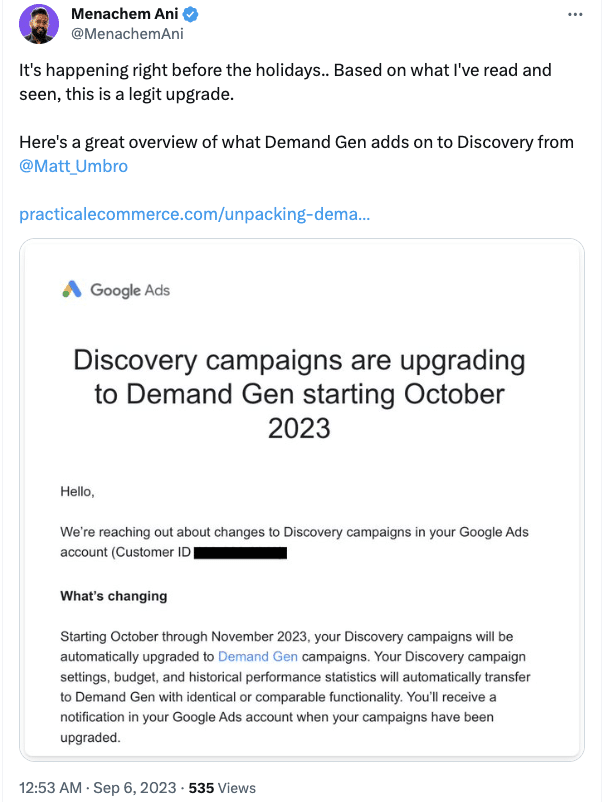
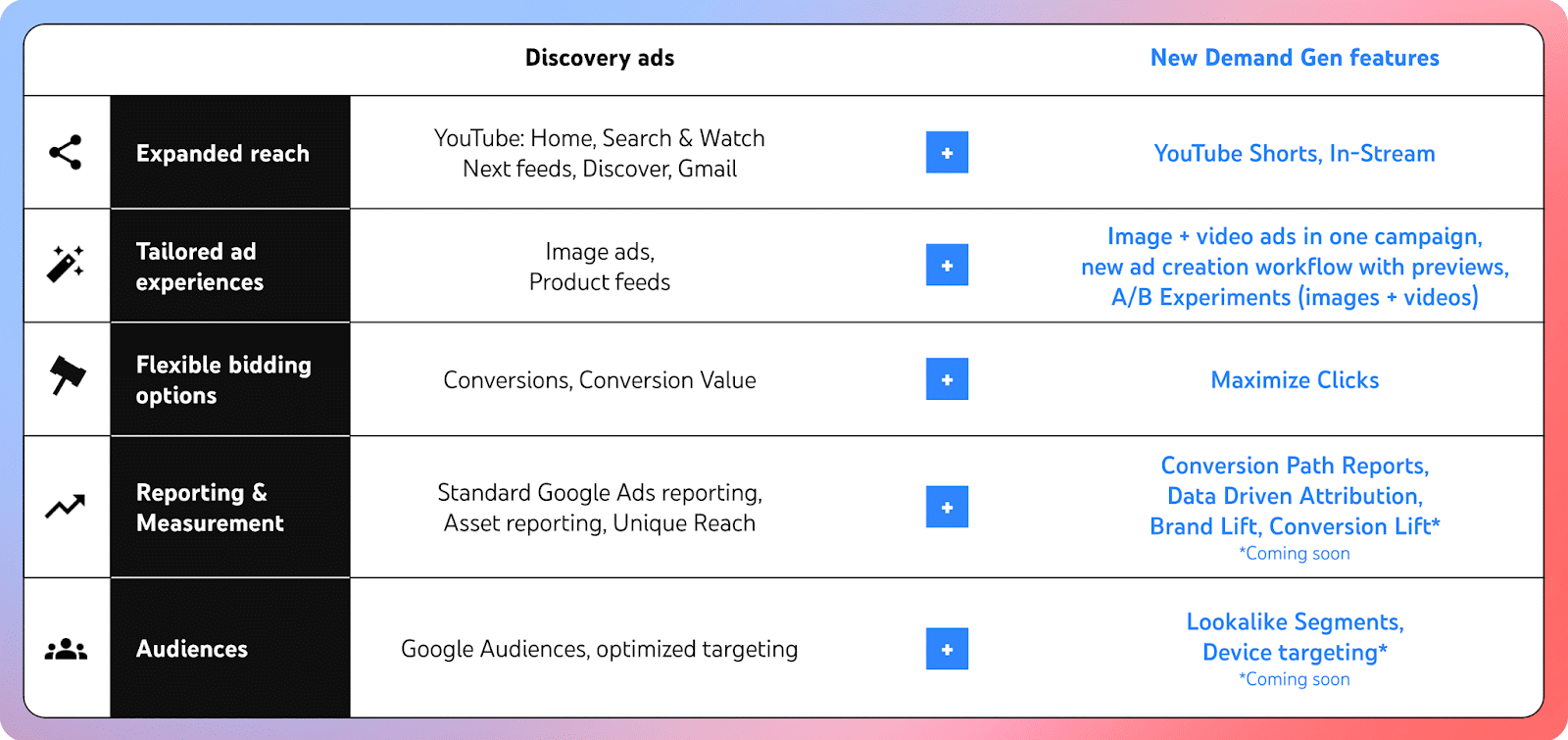
Google Ads has started rolling out Demand Gen globally so that all customers now have access.
Described as the “next generation of Discovery campaigns,” it comes with new features, inventory, and insights, as well as an enhanced ad creation flow.
In addition, Discovery ads upgrades are beginning this week and will continue to be implemented through early next year.
Why we care. Demand Gen is an effective tool when it comes to reaching new audiences and offers more creativity than its predecessor. Discovery campaigns only allowed images, carousels, or product data feed for creatives, however, Demand Gen lets you use videos, including both regular YouTube videos and Shorts, giving advertisers more choice when it comes to creating content that will appeal most to their audience.
What is Demand Gen? Demand Gen is an AI-powered tool that was built to specifically help social platform advertisers by streamlining the process of discovering and converting consumers through visually engaging content. The Google Ads feature was designed to help generate conversions, site visits and actions across entertainment-focused touchpoints such as YouTube (including Shorts), Discover, and Gmail.
Engaging new audiences. Demand Gen can help you to discover new potential customers who may not be acquainted with your brand through the new Lookalike segments features. Advertisers can then maximize performance further by choosing the bidding strategy that fits best with your goals, such as clicks, conversions or website actions.
Creating ads tailored for your audience. Demand Gen can achieve 3X higher click-through rates, at a 61% lower cost per action (CPA) when compared to paid social campaigns, according to Google. It’s able to achieve this by offering a range of different formats so that brands can tailor their content better to their audience, from short-form videos to carousels.
Product feeds for retailers. Demand Gen can combine videos with images and text from your catalogs to show products to potential customers that are most suited to their interests and match their search intent.
Demand Gen best practices. Search Engine Land contributor Menachem Ani, Founder of JXT Group, took part in the Demand Gen beta test before its general rollout and has shared some best practice guidance, including:
- Campaign management suggestions.
- Working with client and leadership tips.
- Setting realistic expectations.
Read Ani’s new article – Google Demand Gen campaigns: Migration and best practices – offers more insights, including what to expect from Demand Gen and advice on budget management.
What has Google said? Vidhya Srinivasan, VP & GM in Google Ads (Search Ads & Ads on Google Experiences), said in a statement:
- “The way consumers discover products is shifting — decisions are made throughout the funnel. To keep up with this evolving media landscape, social advertisers need to adapt their strategies to deliver results.”
- “Demand Gen campaigns can help you capture the interest of billions of users as they spend time on YouTube and Google’s visually immersive touchpoints. The engaging creatives can spur action while our audience and bidding solutions help you nurture interest with more potential customers.”
The post Google Ads rolls out Demand Gen to all customers globally appeared first on Search Engine Land.
Courtesy of Search Engine Land: News & Info About SEO, PPC, SEM, Search Engines & Search Marketing
Wednesday, October 11th, 2023
Demand Gen campaigns – the shiny new tool in the Google Ads toolbox – will become available to the PPC public starting this month.
Those lucky enough to be part of the beta test have seen and experienced firsthand what Demand Gen offers, though deeper insight is still some time away.
While we’re still testing Demand Gen and will be for the foreseeable future, I have had enough time with it to better explain:
- How Demand Gen works and its differences from Discovery, which it replaces.
- What to expect with the rollout and how to approach it.
- Advice on Demand Gen campaign and budget management.
I hope my experiences with Demand Gen can provide some context as you navigate this new territory.
Demand Gen explained
When Demand Gen becomes available in your accounts, you’ll give up your ability to create Discovery campaigns. This is because it directly replaces Discovery campaigns, which are much less algorithmic and have fewer inventory types.
Demand Gen leans into automation and machine learning to do most heavy lifting like Performance Max. Both campaigns use algorithmic targeting, whereas their previous iterations allowed you to select your targeting settings more freely.
But where Performance Max is a full-funnel campaign, Demand Gen (as the name implies) focuses largely on driving awareness and filling the top end of your funnel.
Using Performance Max without a data feed, and only creative assets with audience signals, is somewhat similar to what Demand Gen tries to do.
That setup pushes out Image, Display, and Video ads across all the different networks (except for Shopping). It’s still more focused on bottom-of-funnel conversions than Demand Gen, whose primary goal is to create new demand.
With Demand Gen, you can still add your audiences and create lookalikes, something new to Google that anyone familiar with Meta Ads will recognize. This works by seeding the system with a list – customers, email subscribers, people who take pixel-based actions on your website – and targeting people who closely match it.
It’s a good way of finding new audiences, exactly what Google has said Demand Gen seeks to do. If we compare Demand Gen with its predecessor, the biggest differentiator is creative. Discovery only allowed creatives built using images, carousels of images, or your product data feed. Demand Gen lets you add video; not only standard YouTube videos but also Shorts.
It doesn’t take a linguist to figure out that Demand Gen is Google’s attempt to help advertisers generate demand, since Google Ads has typically been seen as a channel to capture demand as people are looking for something.
It seems that’s a reputation they want to shake because even the interface is built like a paid social campaign, bearing several similarities to how Meta Ads structures their product.
But because this is new to Google, remember that Demand Gen will not do the best job of pushing someone from initial awareness straight to purchase.
You will see a lower reported ROAS than you would with a similar campaign on Meta; this is the nature of generating demand via different Google products (like YouTube or Gmail) instead of a social media platform.
Does that mean Demand Gen is actually driving less revenue? To be determined – you’ll have to look at third-party revenue and attribution tools to figure that out.
Get the daily newsletter search marketers rely on.
<input type=”hidden” name=”utmMedium” value=”“>
<input type=”hidden” name=”utmCampaign” value=”“>
<input type=”hidden” name=”utmSource” value=”“>
<input type=”hidden” name=”utmContent” value=”“>
<input type=”hidden” name=”pageLink” value=”“>
<input type=”hidden” name=”ipAddress” value=”“>
Demand Gen migration guide
By looking back at how Performance Max rolled out, we can learn what we might expect from Demand Gen.
Google is in forward-thinking mode as they retire many of the manual controls we’ve become familiar with. The PPC paradigm continues to shift in favor of automation and machine learning, and advertisers who embrace this change will be at the forefront of progress.
We’ve seen that Google is willing to be very aggressive to push us in that direction, even with a new product like Performance Max (which I believe is still relatively raw). But they continue to implement improvements on a constant basis, with plenty of new updates on the roadmap.
The good news is that Google has been taking inputs and feedback from advanced practitioners quite seriously. We’ve seen proof of this in the form of changes to the Performance Max product over the last year or so that originated from conversations with the PPC community.
While I’m personally happy to see that engagement grow, trust in Google is in short supply these days for valid reasons. This isn’t helped by the fact that they’re moving us to a world where we tell them our objective and provide the right data inputs, and they make the magic happen.
But whatever your feelings, the facts are this shift is going to continue because that’s what Google wants. If we want to stay on board, we need to get on board.
What we can learn from the Performance Max rollout
Performance Max ended up cannibalizing Local and Smart Shopping campaigns, and it will now absorb a third campaign type: Read Google’s announcement on upgrading Dynamic Search to Performance Max, which I believe will eventually be retired.
Performance Max also allows you to create audience signals – including ones built off the people you target with Demand Gen campaigns – but will ultimately target whoever it feels is a good fit, whenever it feels is the right time.
And just as we’ve seen Gmail Sponsored Promotions absorbed by Discovery campaigns, we should expect a similar pattern of cannibalization, independence, and deprecation for Discovery with Demand Gen.
Dig deeper: How to harness DSA wins in Performance Max
Demand Gen best practices
Campaign management suggestions
Google has made recommendations for Demand Gen bidding and budget goals, which we’re still testing:
- Target CPA should be 2x your standard campaign performance.
- Daily budget should be:
These are the suggested benchmarks to give the campaign space to operate and find interested new audiences. But they mean that Demand Gen is effectively off-limits (or a money suck) for accounts and brands with smaller budgets.
Google’s other advice is to give Demand Gen between four and six weeks to factor in conversion delays and allow for a data-gathering learning period. Combined with their budget suggestions, the math won’t often check out on smaller budgets.
Historically, Google has recommended setting your budget at 5x your Target CPA; that’s something we’ve found to work with Demand Gen. Since they want larger budgets to give it more space, similar to YouTube Ads, it may not work well for most smaller campaigns.
We’re seeing Demand Gen fit (so far) in an account that wants to layer something on top of its maxed-out Search, Shopping, and Performance Max. We’re still testing, but at this time, for smaller advertisers with smaller budgets, it may not drive enough conversions to merit a long-term spot in the media mix.
Working with clients and leadership
As with any new campaign from Google, getting clients and bosses on board with Demand Gen will be a challenge for many marketers.
Some clients like to be part of beta programs and try exciting new things. They know that if you find a win before the rest of the market even comes looking, your first movers’ advantage will set you up well.
We’ve seen that with Performance Max and many other Google beta programs, so we know which of our clients are like that and pitch them accordingly.
For other clients – especially with larger accounts – you always want to be testing new things anyway; at that level, you need to unlock new opportunities constantly.
We try to use about 10% of the overall budget (no more) to try different things continuously. It could be a new campaign of an existing campaign type, testing new keywords in a Search campaign, testing a new Performance Max setup, or any place we see or think there might be new opportunities.
It’s important to keep your testing budget to a reasonable figure, like 10% of overall spend, because experiments that go poorly can throw off your entire account’s performance.
Setting realistic expectations
Demand Gen is new, and its primary goal is to get in front of new audiences. So it’s fair to expect fewer conversions with a higher CPA or lower ROAS, and not necessarily measure this campaign the same way you would measure Search or Performance Max.
In larger accounts, it always helps to allocate a portion of the budget to address upper-funnel audiences – especially if you’ve got a good nurture program in place.
With a six-figure monthly budget covering Search, Shopping and Meta, you want to ensure you’re also driving net new awareness – video views, website visits, branded search.
That fresh demand is critical, but it has to come from somewhere and is never free.
Examples from managing Demand Gen during the beta
I’ve been fortunate enough to get my hands on Demand Gen earlier than most advertisers, and I’ve taken advantage of that early access to try it in a few accounts. Here are three examples of those early experiments and what we learned.
(It’s worth noting that just like with Performance Max, you’ve got to have pieces in place to block spam from coming through with lead generation – connecting your CRM, adding a reCAPTCHA to your form, etc.)
Example 1: Lead gen/ecommerce hybrid
For this account, we migrated a long-running Discovery campaign targeting warm audiences – like website visitors and subscribers – as well as more broad audiences – like custom intent, affinity, and interests.
Once we started to ramp up that campaign, it improved enough that we could actually measure conversions at a decent ROAS and leads at a healthy CPA. My guess is that’s because it had so much historical data when we made the switch.
This is one use case we’re really happy with and will continue ramping up.
Example 2: Lead gen with low spend
In a second lead gen account, we’re testing a brand-new Demand Gen campaign at $50-100 per day that has just started driving conversions, but at a very low conversion rate. From what I’m seeing, small budgets may struggle even with strong signals.
Google’s suggestion is to set your budget at 15x your expected CPA, so it could be that we have to test that.
Example 3: Lead gen with moderate spend
Our third test account – also lead gen – spends a modest $1,500 a day and definitely struggles more. It drives traffic and conversions, but the Target CPA is a bit higher than we expected.
It’s too soon to say definitively, but it seems that you need a slightly larger budget for Demand Gen. We’re still determining the reality of the situation. If you manage low-spending accounts, you should too once you get access.
Get your plans in order – you’ve got 6 months
It’s October, which means Google will have begun giving advertisers and accounts access to Demand Gen. That process will run for the next six months, giving you enough time to start making preparations for the switch.
 Timeline from Google Ads Help
For now, your focus should be on setting up creative testing frameworks.
There are no experts on Demand Gen campaigns other than the folks who built it. To the rest of us marketers and media buyers, it’s a new puzzle that we’re figuring out together.
And despite my findings, you should not assume that you’ll have to drop five figures a day to make Demand Gen work without testing it to see if that’s really the case.
If one thing remains true about Google Ads, it’s that they’re always capable of surprises.
The post Google Demand Gen campaigns: Migration and best practices appeared first on Search Engine Land.
Courtesy of Search Engine Land: News & Info About SEO, PPC, SEM, Search Engines & Search Marketing
Wednesday, October 11th, 2023

This is it… your chance to attend the largest search marketing conference on the planet is just a click away: Secure your free spot at SMX Next now and join us online, November 14-15 to unlock actionable SEO and PPC tactics, helpful answers to your specific questions, and engaging discussions with passionate search marketers – all without leaving your desk.
The agenda is live and ready for you to explore!
This experts-led training experience features three exclusive keynotes from ESPN, Optmyzr, and Search Engine Land – plus 40+ tactic-rich sessions on next-level search marketing topics and trends, including…
- Google’s Search Generative Experience: Prepare for impact with Bart Goralewicz, Founder & Head of SEO, Onely LLC
- Driving lead generation with paid media: What’s new and what’s next with Nicole Waddington, Digital Marketing Manager, Cypress North
- Optimizing landing pages with AI: From design to conversion with Amy Hebdon, Founder & Managing Director, Paid Search Magic
- Balancing Performance Max and traditional campaigns for big ROI with Navah Hopkins, Brand Evangelist, Optmyzr
- Building a winning Facebook and Instagram strategy for 2024 with Menachem Ani, Founder, JXT Group
… and that’s just the start. You’ll also unlock Overtime live Q&A with speakers, engaging Coffee Talk networking discussions, AMA-style sessions with winners of the 2023 Search Engine Land Awards, instant on-demand access, a personalized certificate of attendance, and more.
For nearly 20 years, search marketers from around the world have attended SMX to learn game-changing tactics and make career-defining connections. Don’t miss your final opportunity in 2023 to join them online for the only training event programmed by Search Engine Land, the industry publication you trust to stay competitive. Secure your free pass now!
The post Generative AI, GA4, and more 2024 trends to watch… see the SMX agenda! appeared first on Search Engine Land.
Courtesy of Search Engine Land: News & Info About SEO, PPC, SEM, Search Engines & Search Marketing
Wednesday, October 11th, 2023
The concept of findability has evolved into a critical factor for businesses striving to connect with consumers.
It’s no longer just about being present, but being discoverable, chosen and seamlessly integrated into the intricate web of customer journeys.
This article explores findability and how a robust omnichannel findability strategy can help brands create meaningful and lasting customer relationships.
What is findability?
The discipline of findability is centered around connecting the appropriate consumer with the suitable product or service, at the right moment and in the correct location – whether physical or digital.
At my company, Vodafone Spain, our findability approach signifies a shift from solely addressing specific digital requirements and platforms (a static concept) to engaging with a comprehensive journey to discover, locate and fulfill those requirements (a dynamic concept).
Simply put, it emphasizes customer-centricity (the complete journey) and omnichannel focus (consumer behavior regardless of channels).
With the evolution of the web, consumers have transitioned from restricted searches within a solely digital platform to exploring various channels, contingent on their journey phase.
There are now multiple search properties and formats (text, image, video, virtual reality, augmented reality, etc.) that have gradually contributed to addressing diverse needs:
- Search engines: “I want to know” searches.
- Digital video platforms (e.g., YouTube, Vimeo): “I want to know” and “I want to do” searches.
- Geolocation platforms (e.g., Google Maps, store locators): “I want to go” and “I want to buy ” searches.
- Ecommerce platforms (e.g., Amazon, AliExpress, eBay): “I want to buy” searches.
- Social platforms (e.g., Facebook, LinkedIn, TikTok, X, Pinterest): “I want to know” searches (through acquaintances and friends).
As these different aspects of search strategies developed, the focus changed from optimizing for specific elements (like the environment, product or service, and keywords) to a more comprehensive approach that aligns with the various stages of the consumer’s journey.
The findability model: A 4-phase framework
Our findability approach is based on a 360-degree model, spanning analysis to operations.
It prioritizes continuous tactic review for potential corrections and strategy evaluation to adapt to market or competitive changes.
Moreover, findability has visibility in our digital direction, which serves a dual purpose:
- Enhancing our brand and product visibility.
- Functioning as a source of business intelligence.
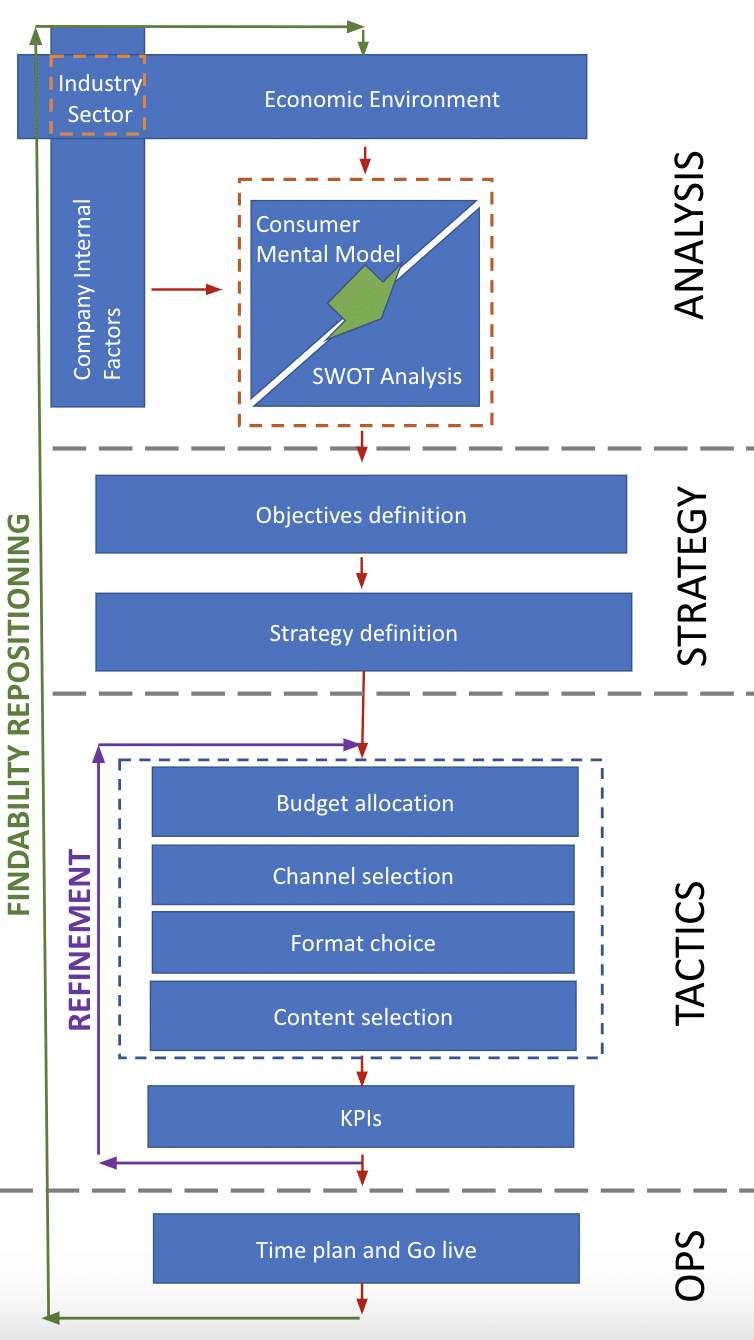 Vodafone Spain’s findability model
Phase 1: Analysis
Economic environment
Understanding the economic environment is crucial for crafting an impactful findability strategy. It helps make informed decisions about resource allocation and ROI-focused marketing tactics.
Within this segment, our focus centers on these key areas:
- Demographic trends.
- Consumption trends.
- Allocation of consumer expenditures across product and service categories.
- Political landscape.
- GDP trajectory.
Company internal factors
While analyzing the economic landscape is crucial, don’t overlook internal factors like organization, innovation, logistics and other intrinsic dimensions in shaping a successful findability strategy.
We are particularly attentive to these pivotal elements:
- Products and services differentiation.
- Market share – splitting by digital and non-digital.
- Internal digital skills vs. outsourcing.
- Attribution model maturity implementation.
- Omnichannel maturity.
Industry sector
The industry sector includes all factors that simultaneously characterize the economic environment and the company internal factors.
Exploring the industrial sector is essential, as economic trends can significantly impact performance. A thorough evaluation helps:
- Identify opportunities and threats.
- Refine the findability strategy to adapt to changing market dynamics.
This allows businesses to innovate and stay competitive.
Within this segment, our focus is directed toward these key aspects:
- Competitors.
- Elasticity of demand.
- Demand growth rate.
- Regulatory environment.
- Annual growth trends.
- Volume of revenue.
You can also use public information repositories to access some of this information.
For instance, Google Trends can be a valuable resource.
Let’s imagine exploring the demand growth rate in relation to the most popular mobile handsets brands from 2004 to the present day:
Consumer mental model
Products and services aren’t merely the results of supply and demand but are intricately tied to the consumer’s engagement within their environment.
How consumers connect with their environment, mental constructs and worldviews shapes their perception and use of products and services.
Exploring their mental models helps us understand how people reference and value concepts.
Analyzing consumers’ search queries and using matrices to identify critical product attributes (i.e., usage frequency and volume) can provide valuable insights.
Consider the scenario of Sarah, a tech-savvy individual considering upgrading her home internet connection.
Here’s how you can approach this:
- Conduct a comprehensive analysis of searches across various platforms to build a detailed consumer profile.
- Adopt models like the Kano model to pinpoint which product attributes resonate with the consumer’s mental framework.
- Delve into the process of how consumers search for and categorize each type of attribute within the Kano model, examining these actions in every micro-moment:
 Attributes categorization for micro-moments
SWOT analysis
Companies can capitalize on economic opportunities by having the right tools and processes that align with consumer thinking to create an effective findability strategy.
At my company, we assign a Visibility Index we developed internally to each attribute in correspondence with a specific micro-moment:
 Representation of Visibility Index
 Example of attributes categorization for micro-moments by Visibility Index
Dig deeper: SEO SWOT analysis: How to optimize where it counts
Phase 2: Strategy
Objectives definition
For our products or services to be discoverable by potential customers, we define specific objectives to implement the model seamlessly.
Objectives can be categorized into:
- Revenues
- Savings
- Orders
- Leads
- Etc.
The objectives must align with both the company and the digital unit’s goals to synchronize efforts on findability with the company’s overall objectives, actions and budget allocation.
Strategy definition starting from customer journey conceptualization and design
This marks the next phase in findability strategy planning, involving the analysis and synthesis of preceding aspects. Here, we aim to streamline potential strategic options and select the implementation strategy.
Customer journey empowers us to define a strategy to position ourselves where the customer is, in a manner and format that resonates with their expectations, precisely when they anticipate encountering them:
Prioritize enhancing user experiences for both digital and physical assets.
Dig deeper: How to create and execute a buyer journey-based content strategy
Get the daily newsletter search marketers rely on.
<input type=”hidden” name=”utmMedium” value=”“>
<input type=”hidden” name=”utmCampaign” value=”“>
<input type=”hidden” name=”utmSource” value=”“>
<input type=”hidden” name=”utmContent” value=”“>
<input type=”hidden” name=”pageLink” value=”“>
<input type=”hidden” name=”ipAddress” value=”“>
Phase 3: Tactics
Budget allocation
Effectively allocating the budget to various marketing channels is crucial for brand visibility and consumer discovery.
Consider investing in:
- Pay per click (PPC).
- Pay per acquisition (PPA), including affiliate marketing.
- Pay per impressions.
- Optimizing store locations.
- Enhancing signage.
- And more.
By assessing these channels and their strengths, you can customize our budget strategy to match your brand’s goals and audience.
There’s no one-size-fits-all approach; each business has its unique combination. Regularly monitoring and adjusting budget allocation is vital for a successful findability strategy.
Channel selection, format choice and content selection
Every strategic decision and budget allocation must translate into tactics supported by:
- Channel selection: Utilizing search environments/search engines such as Google, YouTube, Amazon, Facebook, X (formerly Twitetr), physical stores, corners, malls, etc.
- Format choice: Considering options like video, voice, text, PDFs, images, photos, catalogs. It’s essential to assess the feasibility of generating new content or repurposing existing material.
- Content selection: Focusing on aspects like inspiration, education, entertainment, persuasion, etc.
All of this aims to achieve specific business goals defined at each stage of the purchase funnel.
 Example of Findability strategy and specific tactics by purchase funnel stage
Key performance indicators
Defining your key performance indicators (KPIs) will enable you to clarify objectives and track progress, ultimately leading to the initiative’s launch.
Below are some of the main KPIs we track:
- Zero results searches
- This KPI measures the number of searches that don’t yield any results or satisfactory responses for the user, which is crucial for improving search result accuracy and relevance.
- This can be improved by offering search suggestions, autocomplete and related links, or even making a suggestion to add a new product or service to the portfolio to cover the unmatched demand.
- Most common queries
- This KPI tracks popular keywords or search terms used by searchers to find information or products on a website.
- Monitoring this KPI helps identify relevant and popular search terms, aiding in SEO.
- Trending search terms
- Refers to search terms gaining or declining popularity among users.
- Analyzing these trends is vital to adjust the findability strategy to changing user needs.
- Context
- Refers to where users search from (i.e., webpages, Google, site search, social media).
- This KPI examines different platforms or sources from which users initiate searches, helping tailor the findability strategy to those platforms.
- Date
- Refers to when users searched.
- Relates to search trends based on the date or time when searches occur. Important for planning findability strategies in sync with seasonal trends.
- Geographic area
- Analyzes the geographic location from which users perform searches, useful for adapting search strategies to different regions.
- Devices
- Examines the devices used for searches, helping optimize the search experience for each type of device.
- Bounce rate
- Measures how often users leave a website after searching without clicking on any results, indicating relevance issues.
- Popular content/products
- Measures the popularity of products or content that users search for.
- Search refinements
- Additional search terms users add after an initial query to refine their search, indicating the need for more precise results.
- Digital searches to store visits
- Measures the effectiveness of Findability efforts in driving physical foot traffic to a retail store.
- Online-to-offline conversion rate
- The percentage of online visitors who make a purchase in a physical store.
- Offline-to-online conversion rate
- The percentage of in-store visitors who make a purchase online.
- In-store traffic influenced by online
- The number of store visits that can be attributed to online marketing efforts.
- Local SEO rankings
- The positions of the physical stores in local search results in a context of unbranded product or service searches.
- Customer lifetime value (CLV) by channel
- The value a customer brings over their entire relationship with your brand, broken down by channel.
- Omnichannel customer effort score (CES)
- Measures how easy it is for customers to interact with your brand across all channels.
- Mobile search traffic to physical store visits
- Measuring how many users who found you through mobile search actually visited your physical store.
By consistently measuring and reviewing KPIs, we can enhance the performance of our tactics across all the channels at every stage of the purchase funnel.
This iterative process aims to amplify each tactic’s impact on our business, ultimately driving greater overall success.
Dig deeper: 13 key SEO metrics to track
Phase 4: Operations
4.1: Time plan and go live
In this phase, we plan meticulously and set implementation dates for specified tactics.
We prioritize swift and adaptable execution using agile methodologies, like Kanban for content changes and Scrum for programming code interventions.
Modernizing enterprise search for improved ROI
Mastering findability is vital for enterprise companies.
By seamlessly optimizing for search, integrating online and offline channels and leveraging data-driven insights, enterprise brands can meet their customers where they are and provide a seamless, personalized experience.
Remember, findability isn’t just about being discovered; it’s about being chosen.
As you embark on this journey, continuously monitor KPIs, adapt strategies and stay attuned to the evolving needs of your audience.
With a robust omnichannel findability strategy, you’re not just connecting with customers but creating lasting, meaningful relationships.
The post The enterprise guide to elevating findability and ROI appeared first on Search Engine Land.
Courtesy of Search Engine Land: News & Info About SEO, PPC, SEM, Search Engines & Search Marketing
Monday, October 9th, 2023
Google-Extended, the new standalone product token, to tell Google through your robots.txt to not use your site content for Bard and Vertex AI and other AI projects does not work for the AI-answers and snapshots provided in the Search Generative Experience.
Google told us that Google-Extended does not work for SGE. “SGE is a Search experiment so website administrators should continue to use the Googlebot user agent through robots.txt and the NOINDEX meta tag to manage their content in search results, including experiments like Search Generative Experience,” a Google spokesperson told us.
Why not for SGE. Google explained that SGE is part of the Google Search experience; it is a search feature and thus it should work as how normal search directives work. “The context is that AI is built into Search, not bolted on, and integral to how Search functions, which is why robots.txt is the control to give web publishers the option to manage access to how their sites are crawled,” Google told us.
SGE AI-answers. There are examples of SGE showing AI-generated answers, with website cards, from sites that have specifically directed Google not to use their content for AI purposes.
Glenn Gabe posted a screenshot of VentureBeat.com that specifically has Google-Extended disallowed in its robot.txt file, being used in the AI-generated answer in SGE:
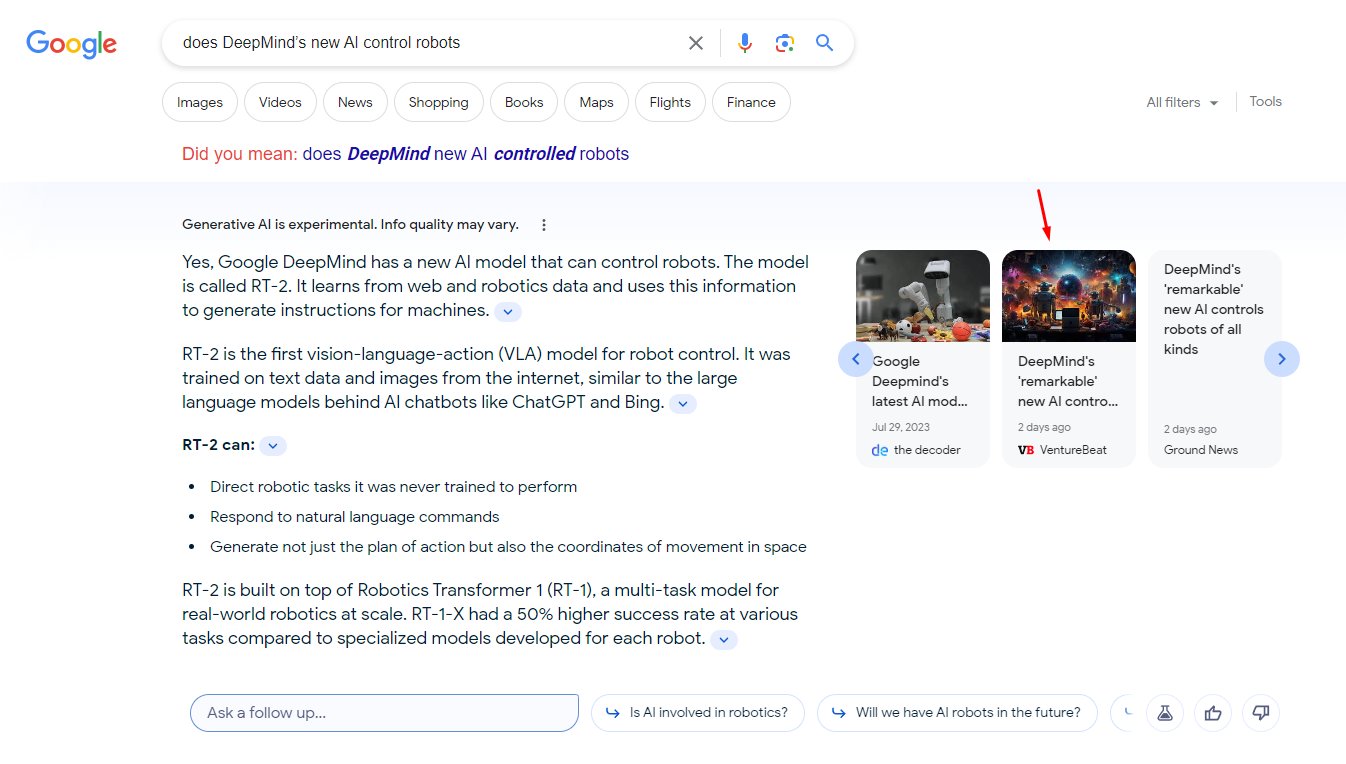
Why we care. If you thought using Google-Extended would prevent Google from using your content for SGE AI-powered answers, then you were wrong. Google-Extended it for Bard and Vertex AI and other non-search-specific products.
If you don’t want your answers in SGE, then you would need to block Googlebot completely, which most of you do not want to do.
The post Google-Extended does not stop Google Search Generative Experience from using your site’s content appeared first on Search Engine Land.
Courtesy of Search Engine Land: News & Info About SEO, PPC, SEM, Search Engines & Search Marketing
Monday, October 9th, 2023
Overstock relaunched as Bed Bath & Beyond on Aug. 1. Many SEO professionals have been critical of the move as the community has begun analyzing early data.
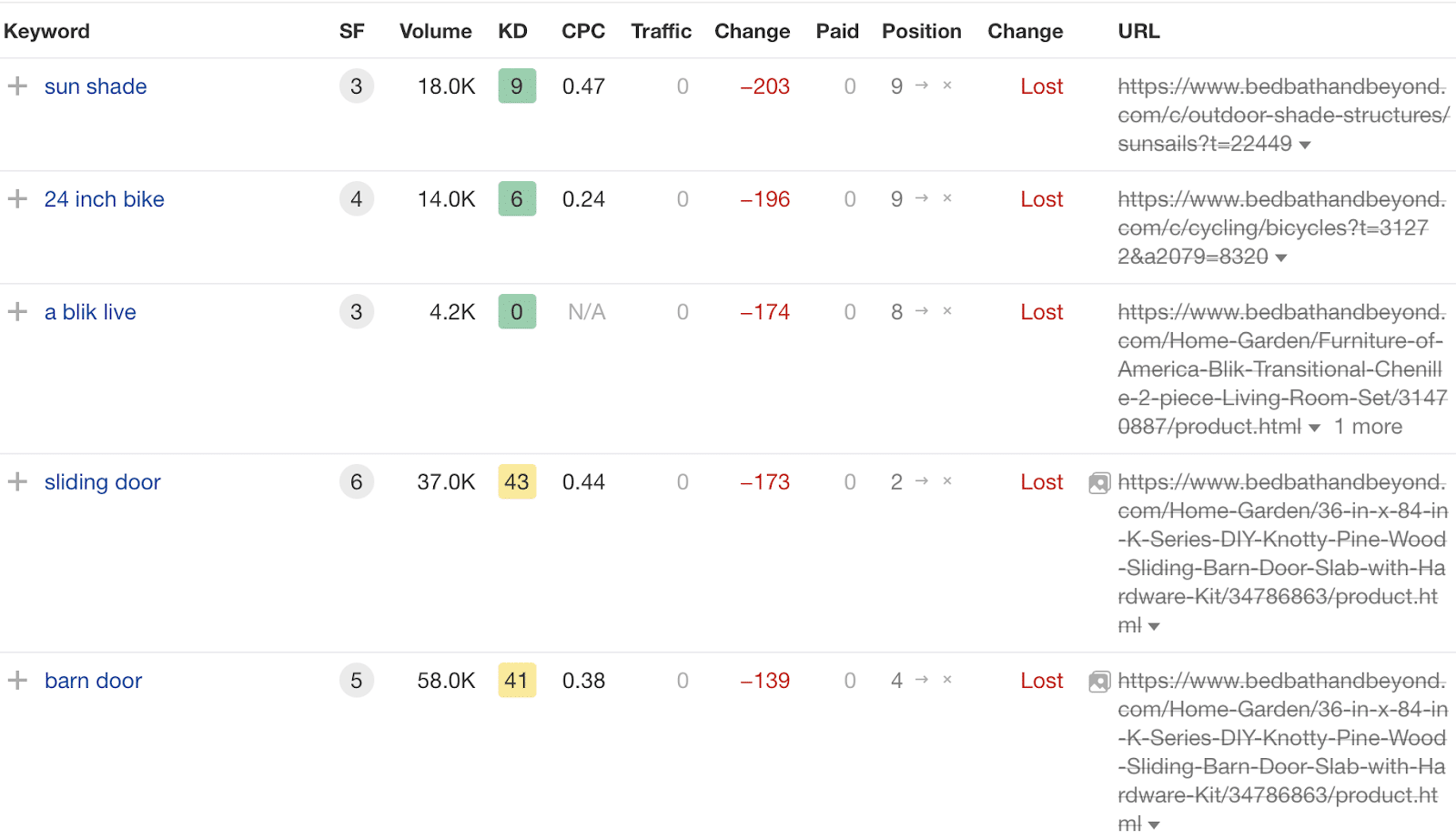
The primary complaint is that overstock.com did not cleanly 301 redirect all URLs to an equal counterpart on bedbathandbeyond.com. Thousands of URLs have not been redirected, and many more were blanketly redirected to the bedbathandbeyond.com homepage.
There are multiple reasons this might have happened.
- The Overstock team determined that certain URLs didn’t contain enough value to burden with a redirect.
- There may have been business reasons for not making the connection, such as reducing the number of products sold on the site.
- The initial merger was the MVP (minimal viable product) and the migration will be released in phases.
Why the merger was big SEO news
Overstock was founded in 1999 as a digital-only shopping destination that offered consumers deals on liquidated inventory. Over the last 20 years, they have evolved into a shopping destination spanning multiple categories.
Everyone knows Bed Bath & Beyond (BB&B) as the store that mails out a blue and white postcard with a discount. The store was founded in 1971 as a fixture in strip malls and suburban areas. As the name implies, the store specializes in home goods, primarily in the bed, bath and kitchen categories.
These two stores were powerhouses online for much of the last 20 years. Their traffic levels were significant among online retailers, making the merger such a big deal for search marketers.
Overstock’s organic traffic peaked during the pandemic when everyone was forced to shop online. Still, they couldn’t sustain their growth, losing market share to Amazon and other online retailers.
Bed Bath & Beyond’s organic traffic peaked prior to the pandemic but never recovered post-pandemic.

Traffic is growing, but still below pre-bankruptcy levels
Over three weeks after the migration, the initial results have been OK. That said, organic traffic has yet to rebound to pre-Overstock levels, according to Ahrefs.

It is not expected that BB&B’s website will reach pre-bankruptcy traffic and absorb Overstock’s organic traffic.
Much of bedbathandbeyond.com’s organic traffic prior to the bankruptcy was customers looking for coveted blue coupons, shopping online for store pickup, or looking at products and then shopping in-store.
It’s safe to assume that BB&B can rise above their pre-bankruptcy organic traffic levels with the combined sites’ organic traffic but below the aggregate traffic totals of overstock.com and bedbathandbeyond.com.
Why won’t BB&B reach the aggregate traffic totals of the two sites?
Partially for the reasons above (mainly shopping online and in-store pickup and people looking to shop in-store) and also due to product and other page overlap.
Many of the categories are the same and will be consolidated on BB&B. There are likely thousands of products that are the same, in which case those pages will be consolidated.
Due to these variables, traffic will be less than the previous sum of both sites. However, over time, BB&B can earn incremental traffic across pages that cater to customers in each stage of their shopping journey.
Get the daily newsletter search marketers rely on.
<input type=”hidden” name=”utmMedium” value=”“>
<input type=”hidden” name=”utmCampaign” value=”“>
<input type=”hidden” name=”utmSource” value=”“>
<input type=”hidden” name=”utmContent” value=”“>
<input type=”hidden” name=”pageLink” value=”“>
<input type=”hidden” name=”ipAddress” value=”“>
Where does Bed Bath & Beyond go from here?
Here are some additional steps that bedbathandbeyond.com can take to boost its organic traffic.
- Focus on category page performance, which has declined since bedbathandbeyond.com declared bankruptcy.
- To counter this decline, the company should focus on improving the content related to its products on these category pages.
- By updating and enhancing the information on these pages, the company can work to regain its lost search engine rankings.
vs.

- Assuming the migration is completed in steps, URLs redirected to the homepage should be redirected to the closest counterpart on bedbathandbeyond.com.
- To capitalize on the recent improvement in search engine rankings, the company could create individual pages on the new BB&B website that correspond directly to the content from the old website. This means there should be a dedicated new page on bedbathandbeyond.com for each piece of content that was moved.
- Stop the bleeding on deeper pages that contain keywords which are no longer ranking since the migration.
- Determine if the influx of new pages has compromised the internal linking structure. Create an internal linking map to ensure that priority pages remain the priority and that link equity is being spread throughout the site.
- Review crawl logs to determine if any site sections are having issues being crawled and accessed.
Dig deeper: How to complete a website shutdown with a split migration
How we would have migrated Overstock to BB&B
Migrations are difficult and complex, especially when merging and/or moving onto a new platform. A lot must happen in the right sequence to ensure the site functions as expected during launch.
When thinking of a migration from an SEO perspective, the main objective is matching pages (old to new) so that they pass their value onto the new pages. While this sounds simple, there are a number of steps that must be planned and executed.
Here are the steps we would take at our agency to ensure that all angles are being considered and that the old site is prepared to pass value onto the new pages:
- Review content on templated pages (e.g., product, category pages) and other content contained in buyer’s guides, blogs, how-to articles, etc.
- Review traffic data to determine which content should be kept on the new version of the site and which content can be retired.
- Once URL structure is understood on the new site, create a URL map that details redirects needed (e.g., single page level or directory level redirects).
- Create rules for programmatic update of internal links.
- Create canonical tag logic for the new pages on the new site.
- Update href-lang links to pages on the new site.
- Create XML sitemap strategy and QA once implemented.
- Review the site from a technical point of view in a sandbox environment to ensure that the site has no major issues and structured data is included on key pages.
- Ensure site speed is addressed for both mobile and desktop.
- Update robots.txt file. List any new XML sitemaps and remove all old references to the old site.
- Validate all changes prior to going live in the sandbox environment.
- Conduct post-migration steps, hotfix important issues, and add less-important issues to the dev backlog.
With most migrations, there will be some hiccups even if all the steps are followed.
It could be an issue with data migration, incorrect canonical logic, or a directive in the robots.txt file that blocks the site from being crawled.
As an SEO, you need to find and fix issues quickly. Product and development teams must be aligned to handle these hotfixes quickly.
Exploring the SEO impact of Overstock and Bed Bath & Beyond’s website merger
So, has it been a perfect migration? Not quite. But it’s also not as bad as some SEOs were initially reporting.
Organic traffic is growing, the number of keywords ranking is increasing, and the BB&B team is learning more about the site daily.
There are clear growth opportunities that the SEO and content teams can undertake. Adding content over time to priority category and subcategory pages would be among the most impactful tasks the BB&B team can tackle.
Also, a focus on internal linking and ensuring the entire site is crawlable and indexable.
The core focus must be getting people comfortable shopping on the new BB&B site. In time, traffic will grow organically if the brand reestablishes itself as a leader in shopping for home goods. W
hile these two combined powerhouses have the potential to eat market share, there are still many risks in the space – giants like Amazon and smaller companies – as DTC businesses continue to grow in popularity due to their ability to adapt to market needs.
The post Overstock’s Bed Bath & Beyond rebrand: The SEO impact appeared first on Search Engine Land.
Courtesy of Search Engine Land: News & Info About SEO, PPC, SEM, Search Engines & Search Marketing
Monday, October 9th, 2023
X (formerly known as Twitter) has started rolling out a new ad product that cannot be blocked or reported.
The new format doesn’t include an ad label so users are not informed that what they’re seeing is an advert. There also isn’t an account associated with the promoted posts, so users also can’t tell who the advertiser is either.
Users reported the new ad format to Mashable, claiming these posts cannot be liked or shared.
Why we care. A surge in spam ads on X could impact user perception and engagement with ads across the platform, potentially resulting in a decline in conversion rates. This new ad type could also be an indication that X is experiencing a shortage of advertisers investing in targeted advertising. It’s essential for advertisers to monitor these developments closely and adapt their strategies accordingly to maintain effective and meaningful user interactions.

What it looks like. The new ad format looks like a regular post, consisting of text and a photo. However, in what appears to be a deliberate attempt to make these ads appear like organic posts, they also feature a fake avatar resembling a profile picture.
So far, these new ads have only been seen on the X mobile app. It’s not yet clear if they are being served on desktop as well.
Who’s using them. The type of ads using this new format are reportedly consistent with those found in spammy, low-quality or click-bait ad campaigns. No major brands appear to have opted for this campaign type.
Third-party links. People who have clicked on the new ad format have reported being taken to third-party websites in a new window. Clicking anywhere on these ads, including the avatar profile, will take you to a third-party website.
Get the daily newsletter search marketers rely on.
<input type=”hidden” name=”utmMedium” value=”“>
<input type=”hidden” name=”utmCampaign” value=”“>
<input type=”hidden” name=”utmSource” value=”“>
<input type=”hidden” name=”utmContent” value=”“>
<input type=”hidden” name=”pageLink” value=”“>
<input type=”hidden” name=”ipAddress” value=”“>
Why now? X has been partnering with third-party companies to address its declining ad revenue issue. In fact, the platform recently announced it had partnered with Google after deciding to outsource the sale of some of its ad space. This new ad type cannot be found in the X ad campaign manager platform, according to Mashable, suggesting these posts are being served via a third party provider.
Deep dive. Visit the X Ads Help Center for more information.
The post X (Twitter) users report new ad format that can’t be blocked or reported appeared first on Search Engine Land.
Courtesy of Search Engine Land: News & Info About SEO, PPC, SEM, Search Engines & Search Marketing
Monday, October 9th, 2023
Google is testing a toned-down, more subtle version of the Search Generative Experience. Some are calling this version the lite SGE, where Google is showing a couple of lines of text from the AI-generated snapshot with the ability to expand that answer to see more.
What it looks like. Here are screenshots that Glenn Gabe provided on social media:

Here are more screenshots:
SGE continues to evolve. I'm now seeing what I'm calling "SGE lite" in the SERPs. SGE doesn't trigger a large block by default anymore… it's now much smaller with a large "Show more" button. Again, IMO SGE will not roll out unless it's revenue-neutral or positive… Stay tuned: pic.twitter.com/JSlUJ7V7ef
— Glenn Gabe (@glenngabe) October 7, 2023
Normal SGE. Compare this to what we normally see for SGE results, with a big answer, that takes up the whole screen real estate and sometimes more:
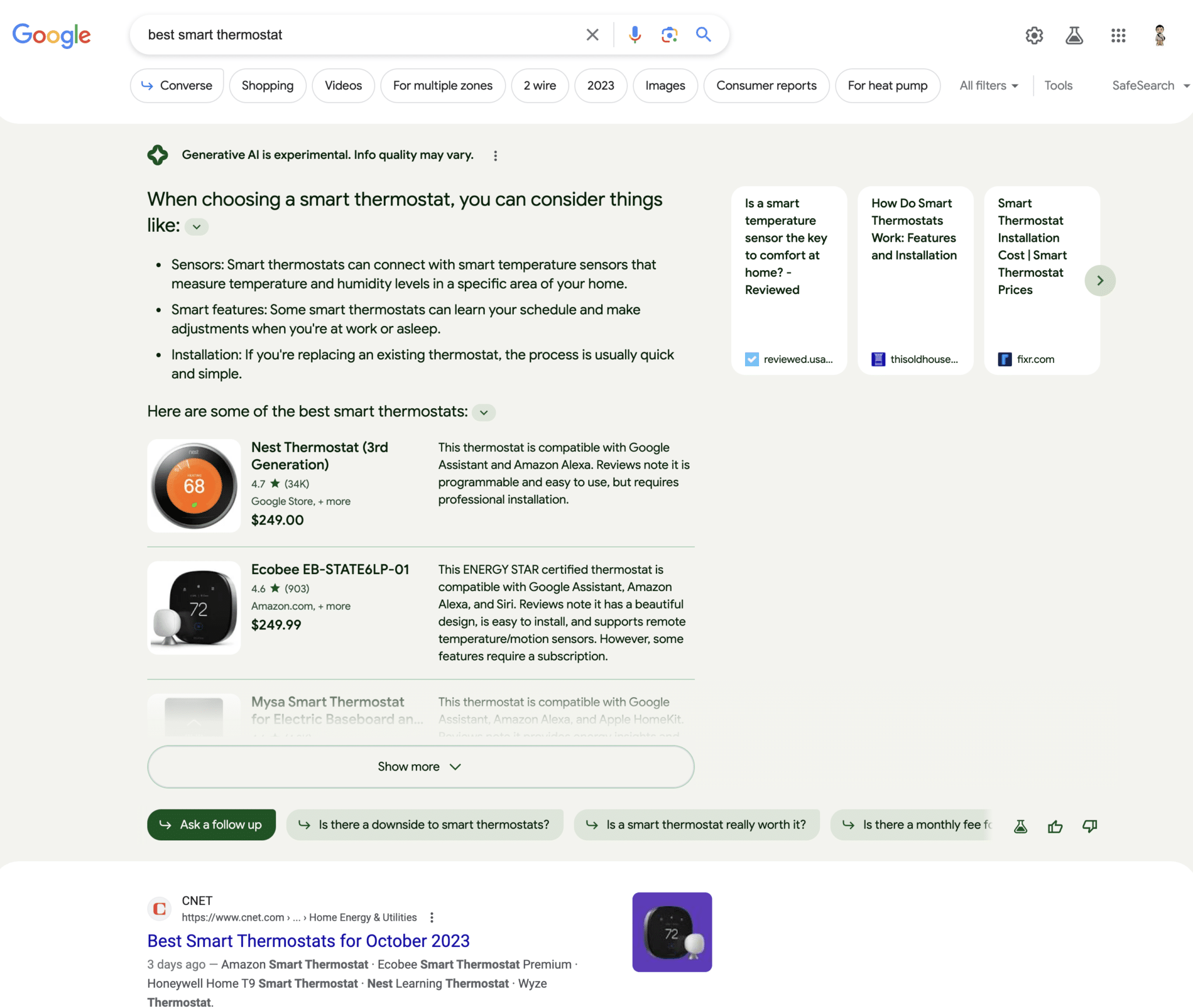
Why we care. Some might prefer this “lite” version of the SGE results. Instead of it overtaking all the search results, the ten blue links and other elements, it is a smaller, more subtle answer at the top of the page that can be expanded upon user choice. Searchers can easily scroll past it to the the traditional search results, unlike the original SGE interface.
The post Google testing more subtle Search Generative Experience design appeared first on Search Engine Land.
Courtesy of Search Engine Land: News & Info About SEO, PPC, SEM, Search Engines & Search Marketing
Thursday, October 5th, 2023

Successful marketing agencies know that the key to building trust with clients is to own what customers say about a business online.
Whether your clients are struggling with negative or non-existent reviews, or already have a solid online reputation, this guide from GatherUp will help you approach, generate, manage, and make the most of your clients’ online customer reviews over the long term.
Download it and learn how to:
- Implement an effective review management strategy
- Track and analyze customer feedback
- Use reviews to improve SEO and boost client credibility
Visit Digital Marketing Depot to download the Marketing Agency’s Guide to Customer Reviews.
The post The marketing’s agency’s guide to customer reviews appeared first on Search Engine Land.
Courtesy of Search Engine Land: News & Info About SEO, PPC, SEM, Search Engines & Search Marketing



 “
“