Archive for the ‘seo news’ Category
Tuesday, October 17th, 2023
Google has added a new business attributed within Google Business Profiles for “disabled-owned” businesses. This new disabled-owned attribute can show up on businesses that are owned by disabled business owners.
Google said, “When businesses choose to identify as disabled-owned in their Business Profile, the attribute will appear on their listings in Maps and Search. This update builds on our existing business attributes, including Asian-owned, Black-owned, Latino-owned, LGBTQ+ owned, veteran-owned, and women-owned.”
What it looks like. Here is a screenshot of this new “disabled-owned” badge or label on business listings in Google Search and Google Maps:

You should be able to add this attribute by editing your Google Business Profile within Google Search.
Other features. Google also added a number of other features to Google Maps and Google Search:
- Use screen reader capabilities with Lens in Maps
- Get around more easily with accessible walking routes in Google Maps
- See wheelchair-accessible information in more places
- Customize your Assistant Routines with more options
- Search faster in the Chrome address bar
- A more accessible camera for your Pixel
Why we care. Adding these labels and attributes to your business listing may drive more attention and more foot traffic into your store.
The post Google Business Profiles adds disabled-owned attribute to listings appeared first on Search Engine Land.
Courtesy of Search Engine Land: News & Info About SEO, PPC, SEM, Search Engines & Search Marketing
Monday, October 16th, 2023
The rise of generative AI is unprecedented. Google’s SGE is redefining everything we know about organic and paid search results. Algorithm updates and ranking factor rollouts are endless.
Turn these daunting challenges into opportunities to stay one step ahead of your competitors and drive measurable results: Attend SMX Next for free, online November 14-15!
Check out the brand-new agenda, featuring exclusive generative AI keynotes from search marketing experts…

…plus 65+ tactic-rich sessions, Overtime live Q&As, Coffee Talk meetups, engaging demos, and more!
Keep reading for 10 undeniable reasons why you should join us online next month:
- You’ll unlock unbiased, trustworthy content from the experts at Search Engine Land, the industry publication of record.
- 100% digital means you can attend from anywhere: office, home, cafe, couch, etc. No travel headaches, no time out of the office, no carbon emissions.
- No budget for training? No problem. SMX is 100% free to attend.
- You’ll only learn safe, reputable, reliable training — no get-rich-quick schemes or dodgy tactics.
- Hours or live Q&A (Overtime!) means you’ll get expert answers to your toughest questions.
- Can’t attend live? Instant on-demand access is included with your free pass, so you can train at your own pace.
- Hear what the best in the biz are up to… and validate your own initiatives and instincts.
- Forge game-changing connections during Coffee Talk meetups with like-minded search marketers.
- Unite your departments with a shared training experience – invaluable to on-site and remote teams alike.
- Earn a personalized certificate of attendance to demonstrate your commitment to continued training and furthering your career.
Need more convincing? Read more about attendees’ favorite reasons to attend SMX.
Ready to register? It’s fast, easy, and free. Don’t miss your final chance in 2023 to learn from and connect with the best and brightest in the search marketing community.
Secure your free pass now!
The post 10 reasons to join us at SMX online this November appeared first on Search Engine Land.
Courtesy of Search Engine Land: News & Info About SEO, PPC, SEM, Search Engines & Search Marketing
Monday, October 16th, 2023
Unassigned traffic in Google Analytics 4 (GA4) is a common headache for digital marketers.
It’s like trying to solve a puzzle with missing pieces: your data is incomplete, making it hard to measure the success of your marketing efforts.
This article covers the common causes of unassigned traffic in GA4 and tips to ensure your campaigns are accurately tracked and optimized.
What is unassigned traffic?
Unassigned traffic refers to web traffic that isn’t categorized under any of the traffic sources or mediums provided by Google Analytics 4 (GA4).
Often, this arises when we use UTMs that reference traffic sources or mediums that GA4 doesn’t recognize. In such cases, Google labels this as Unassigned.
While this is a frequent reason, there can be other factors causing this classification.
How does GA4 classify user acquisition and traffic?
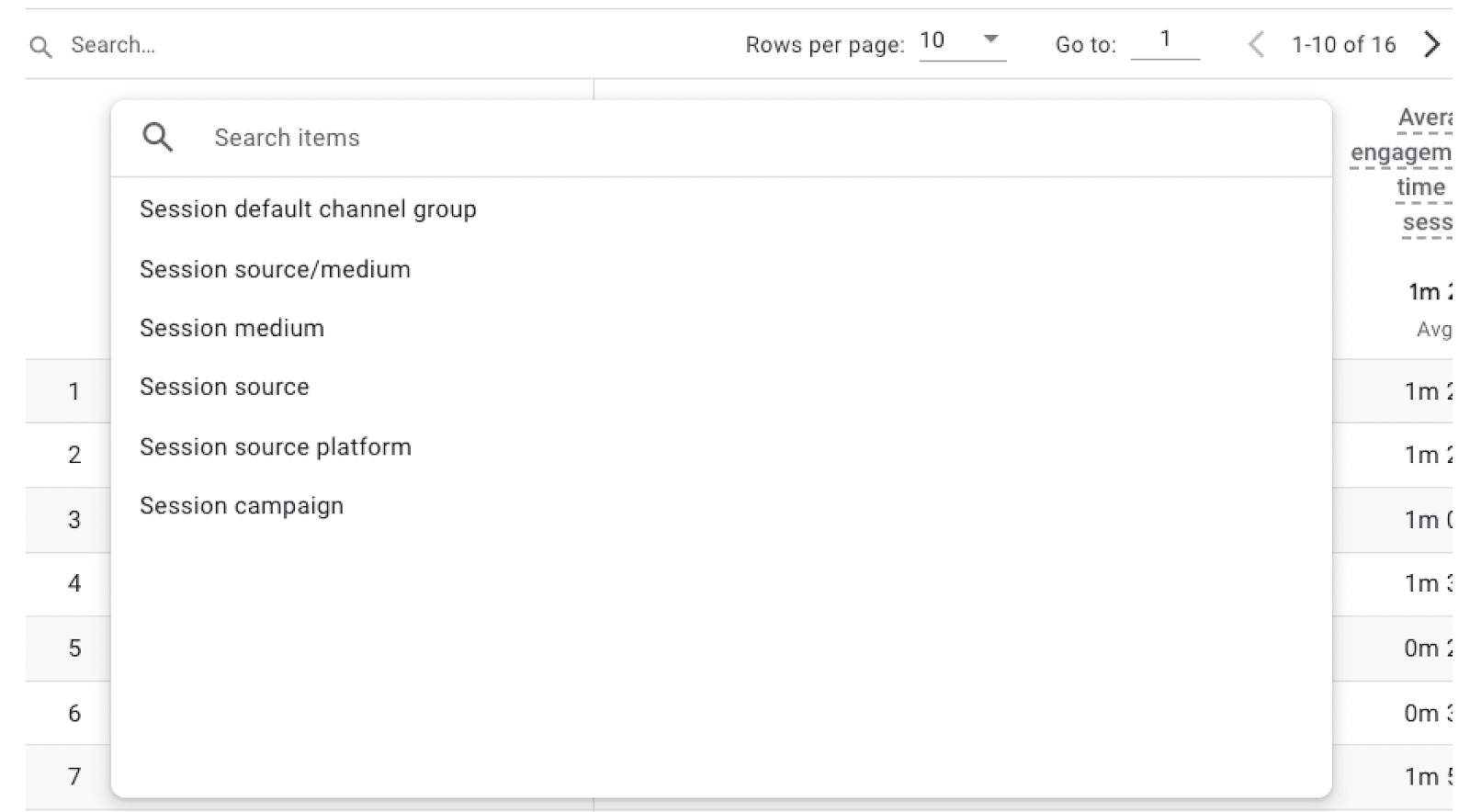
The traffic source dimensions provide information about where the website or app traffic comes from. GA4 provides different dimensions to analyze it. Among the most used include:
Default channel groups
Source
- Identifies the origin of your traffic, like from a search engine such as Google, or another website.
Medium
- Indicates through which method you acquired the website traffic, i.e., via organic, CPC, etc.
First user source / medium
- Given at the user level, this indicates the source or medium responsible for the user’s initial session.
Session source / medium
- Assigned at the session level, this represents what originated the session.
Get the daily newsletter search marketers rely on.
<input type=”hidden” name=”utmMedium” value=”“>
<input type=”hidden” name=”utmCampaign” value=”“>
<input type=”hidden” name=”utmSource” value=”“>
<input type=”hidden” name=”utmContent” value=”“>
<input type=”hidden” name=”pageLink” value=”“>
<input type=”hidden” name=”ipAddress” value=”“>
What are the causes and how to prevent unassigned traffic in GA4?
Manual tagging based on source and medium
One of the main causes of unassigned traffic is the manual tagging of UTMs that do not follow Google’s recommendations.
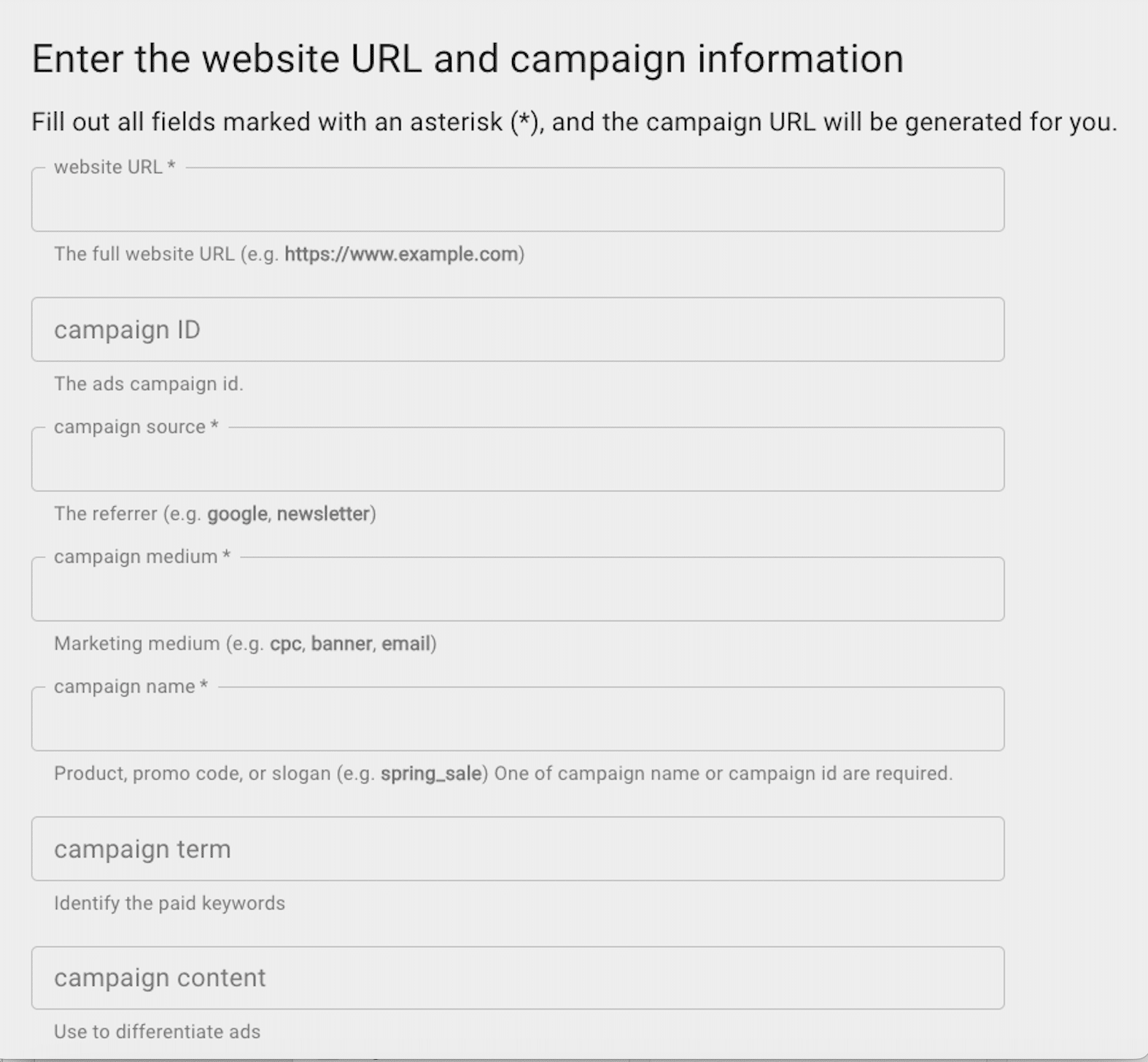
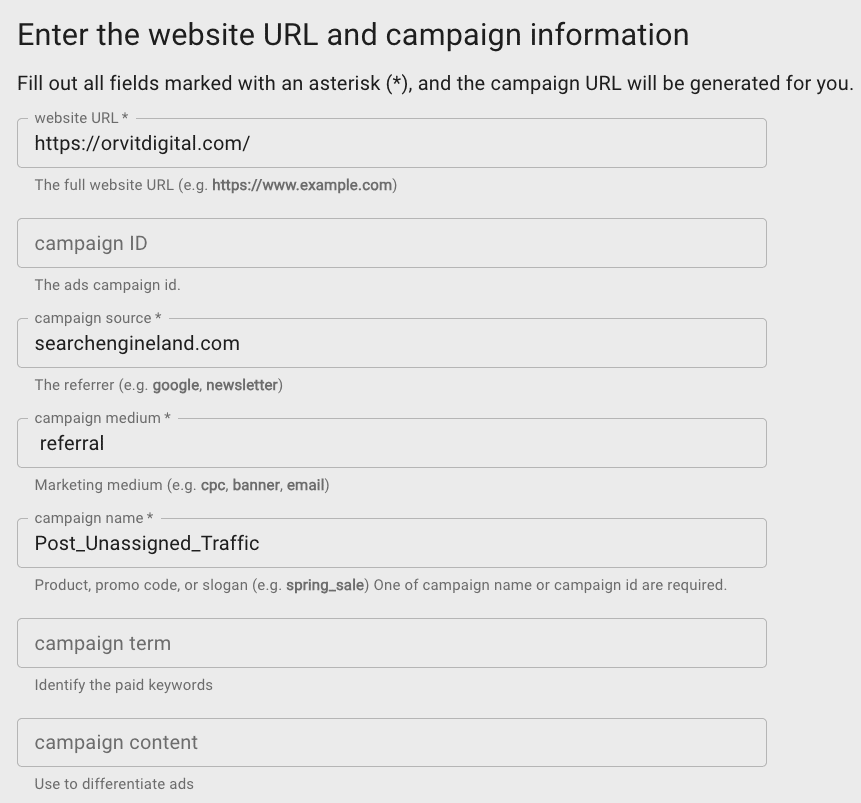
UTM parameters enable you to manually tag URLs for emails, ads, and more. They can be easily added using Google’s Campaign URL Builder, providing insights into the origin of visits.
The essential and most recommended tagging fields are:
- Source and medium, which will allow you to identify where the campaigns come from.
- Campaign name, which allows you to assign a name to the campaign so you can analyze its results through the campaign dimension.
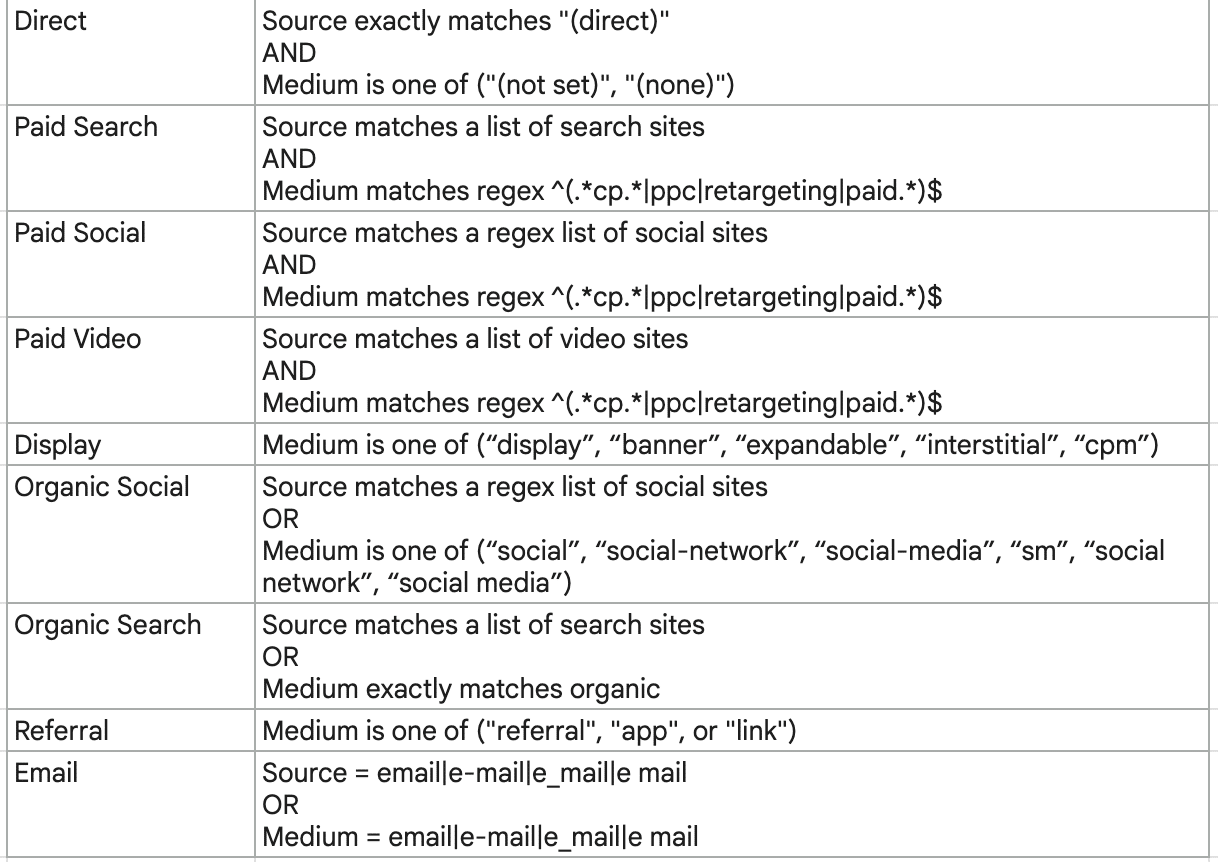
Below are common channels for manual traffic:
If you don’t tag these fields per Google’s recommendations, GA4 will not be able to group them into its predefined categories, so the traffic will be labeled as Unassigned.
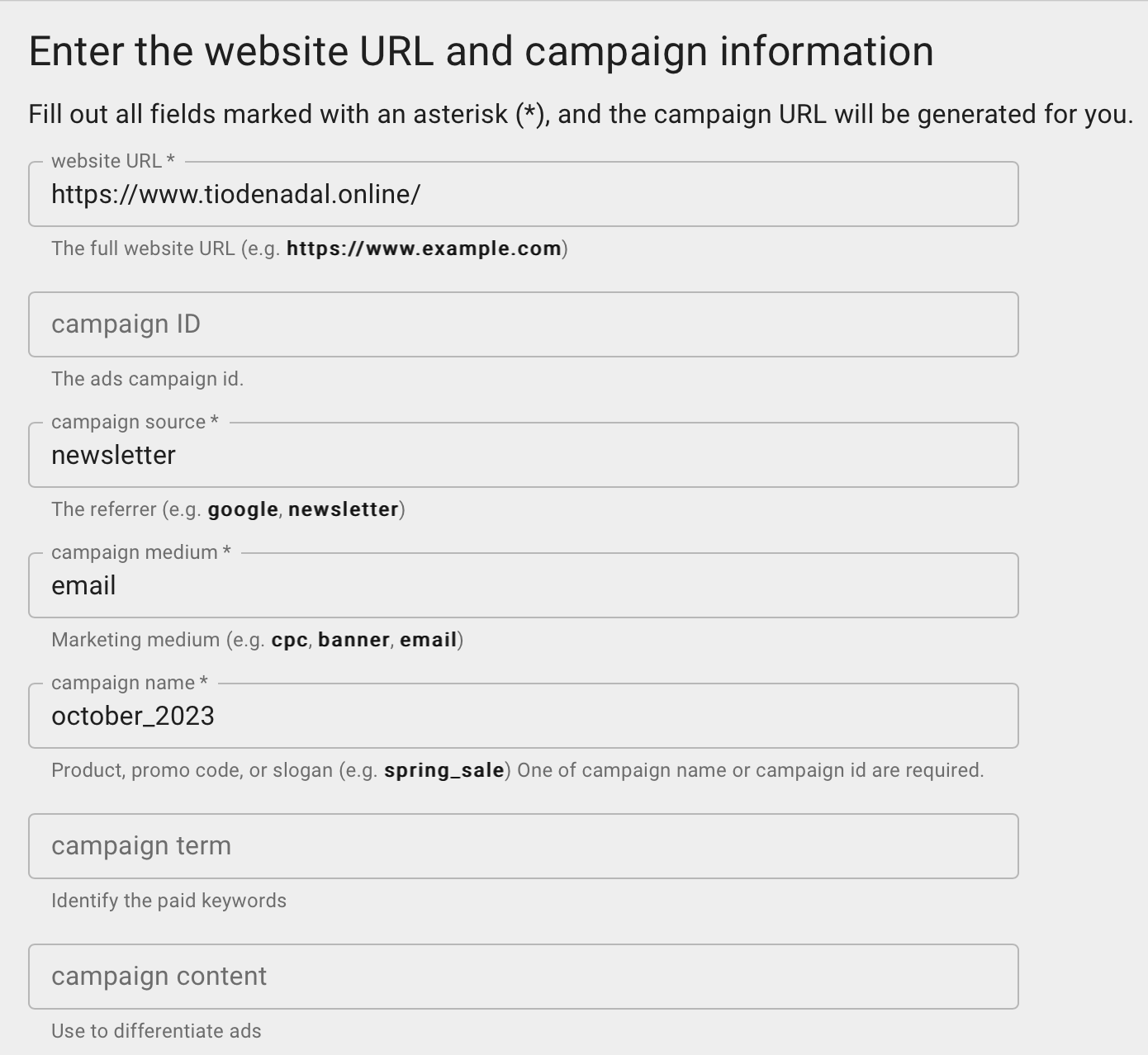
For instance, if we want to manually tag a newsletter URL, we will have to fill in the UTMs parameter fields using Google’s predefined ones:
https://www.tiodenadal.online/?utm_source=newsletter&utm_medium=email&utm_campaign=october_2023
*Newsletter is optional. If you choose to put this source, it is always recommended to stick with it. If not, we can set the name of the ESP used or look for how the source is tagged.
When tracking links from another website, verify your source and medium tracking, then create a UTM with a campaign ID:
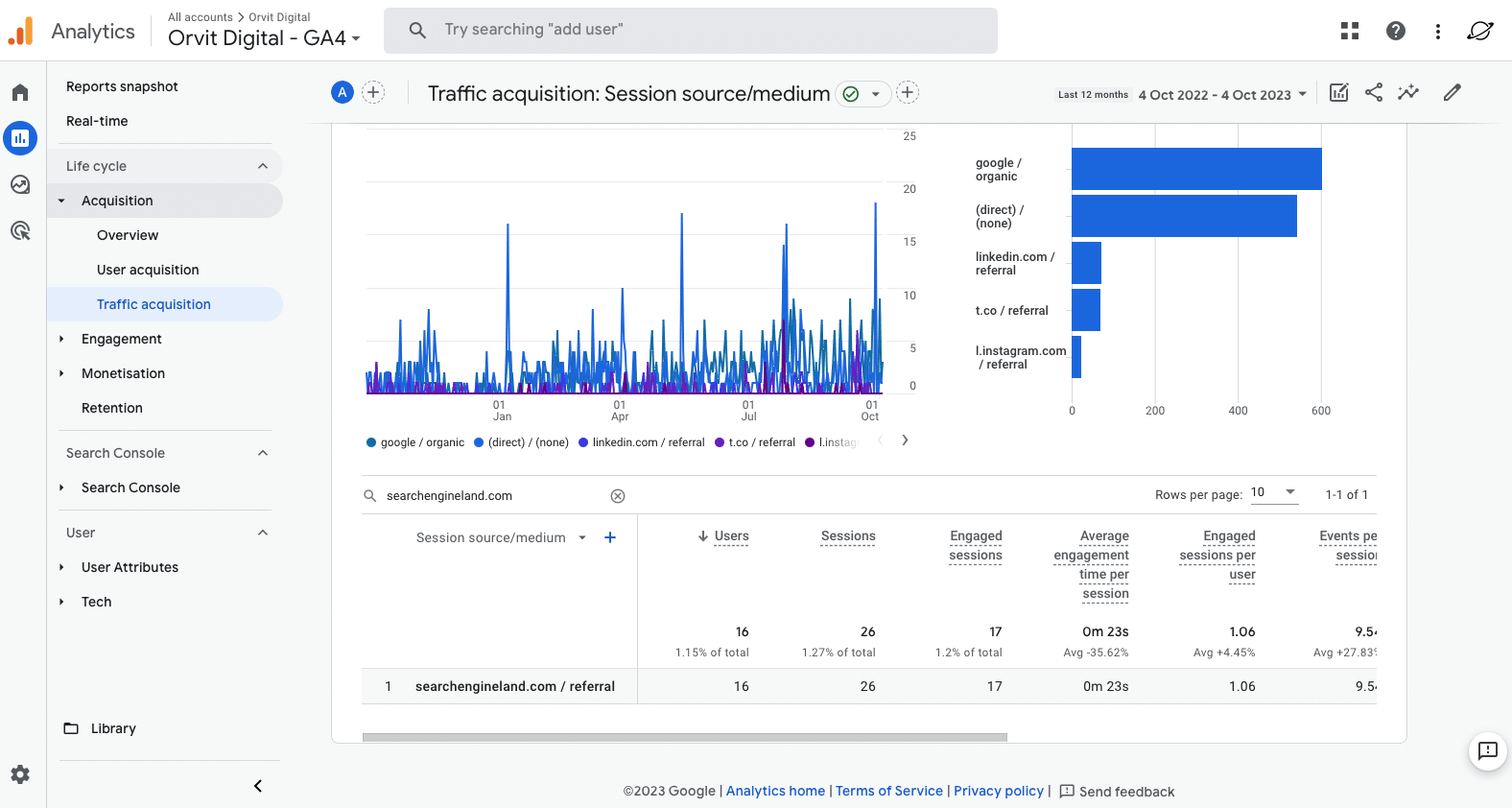
https://orvitdigital.com/?utm_source=searchengineland.com&utm_medium=referral&utm_campaign=Post_Unassigned_Traffic
https://orvitdigital.com/?utm_source=searchengineland.com&utm_medium=referral&utm_campaign=Post_Unassigned_Traffic
For platforms like social networks or marketplaces, Google has a list of sources and categories to ensure accurate tagging and prevent unassigned traffic.
Other ways to prevent unassigned traffic
Since Universal Analytics ceased processing data beginning July 2023, GA4 has become the primary analytics tool from Google.
This means the tool may still have bugs, discoveries and improvements. As of today, some other actions we can do to prevent unassigned traffic include:
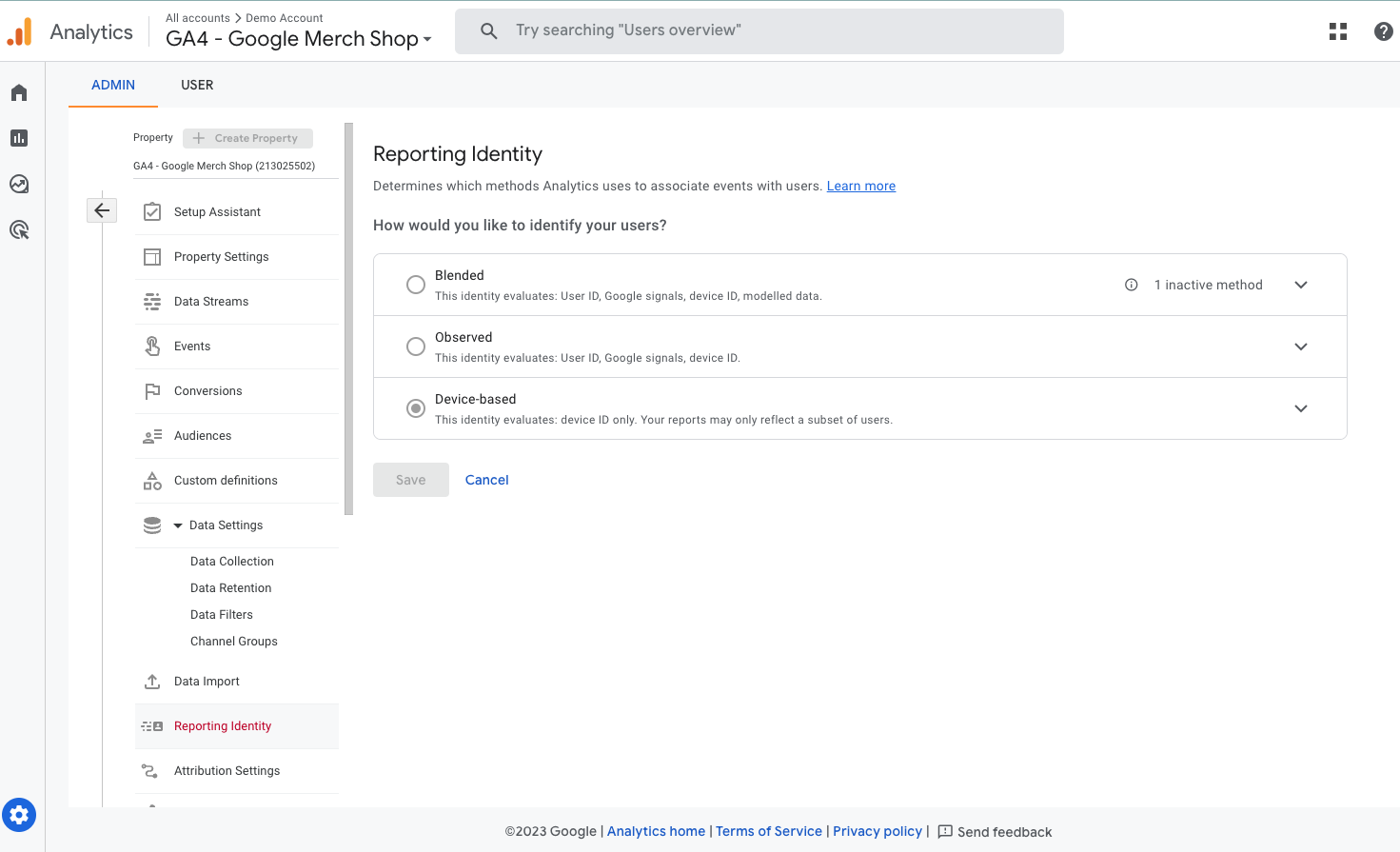
Reporting identity
Google Analytics 4 uses methods like User ID, Google signals, Device ID, and Modeling for tracking user data across platforms. Selecting the right method can help prevent unassigned traffic. Device-based is the recommended one nowadays.
Event configuration
Unassigned traffic can also stem from incorrectly configured events. Ensure your Google Tag Manager settings are spot-on. Events and parameters must also be tagged following Google’s guidelines.
Other causes of unassigned traffic include:
- Events sent through regular tracking without session_start (h/t Antoine Eripre).
- Incorrect session tracking due to short user visits, ad blockers, or connection and data collection errors.
Ad blockers and other devices
Devices or ad blockers that hinder Google’s data capturing can also cause misclassifications of traffic, Himani Kankaria has found.
Simon Vreeman noted mobile apps as a potential source of channel assignment issues.
Use of audience triggers
As Himanshu Sharma highlighted the use of audience triggers in GA4 can greatly increase the volume of unassigned traffic.
If the event generated by the audience trigger isn’t tied to an existing session, perhaps because the session has ended or the criteria are met outside of the user’s current session, the source/medium might default to (not set) / (not set), which then appears as Unassigned in some GA4 reports.
Managing unassigned traffic in GA4
Addressing unassigned traffic in GA4 requires a combination of best practices, accurate tracking, and awareness of potential causes.
Implement these tips to ensure your campaigns are accurately tracked and optimized, providing a more comprehensive view of your marketing performance.
The post How to fix unassigned traffic in GA4 appeared first on Search Engine Land.
Courtesy of Search Engine Land: News & Info About SEO, PPC, SEM, Search Engines & Search Marketing
Monday, October 16th, 2023
Google has added new markup and structured data support for new vehicle listings, designed to help car dealerships get more exposure for their listings. “Vehicle listings on Google allows car dealerships to show their for-sale inventory on Google Search and other Google surfaces,” Google announced.
This comes with new reports and debugging tools within Google Search Console.
Vehicle listing structured data. Google’s structured data help documentation added a new section for vehicle listing (car) structured data. Google provides two ways for dealerships to add their inventory. One is through structured data markup on their websites, which is the main focus of this document, and the other is through feed files uploaded to the vehicle listings partner portal.
Google said the vehicle listing rich result is currently only available in English in the US and US territories for both mobile and desktop interfaces.
You can follow the technical guidelines over here to learn more.
New Search Console report. Google also launched a new rich result report in Search Console to monitor markup issues. This report will show valid and invalid items for pages with structured data for your vehicle listing markup.

Rich results test updated. Google also updated its Rich Results Test to support vehicle listing structured data. You can post your URL of a page or a code snippet to the tool. Using the tool, you can confirm whether or not your markup is valid instantly without waiting for Rich result reports to be updated, Google added.

Why we care. If you have a dealership or you have clients that are dealerships and want more ways to get visibility in Google Search, you now have new markup and structured data you can use to get more eye-balls on your cars.
The post Google adds new vehicle listings structured data appeared first on Search Engine Land.
Courtesy of Search Engine Land: News & Info About SEO, PPC, SEM, Search Engines & Search Marketing
Monday, October 16th, 2023
YouTube today introduced Spotlight Moments – a new advertising package that will serve your brand’s videos next to “the most relevant and engaging content associated with the moment.”
How it works. Using, AI, YouTube can identify popular videos around cultural moments. For example, with Halloween coming up, Spotlight Moments:
- Lets advertiser serve ads across Halloween-related content on YouTube.
- Curates YouTube videos into dynamically updated playlists on a sponsored hub.
YouTube Culture Hub. All the videos will live on the sponsored YouTube Culture Hub. This hub will include the advertiser’s logo. Here’s what that looks like:

Why we care. YouTube’s new advertising offering has the potential to give your brand visibility during key cultural moments and help you reach your target audience. The big question to be determined is what kind of ROI your brand with this ad format.
The full announcement. New ways to show up where the world watches, powered by AI
The post YouTube Spotlight Moments lets brands align ads with cultural moments appeared first on Search Engine Land.
Courtesy of Search Engine Land: News & Info About SEO, PPC, SEM, Search Engines & Search Marketing
Saturday, October 14th, 2023
Google has fixed the Google Ads issue with serving and spending that started on Wednesday morning and lasted almost three days.
Google posted an update at 5:28 pm ET today saying, “The problem with Google Ads has been resolved. We apologize for the inconvenience and thank you for your patience and continued support.”
The issue started on October 11th at 12:59 am ET.
What has Google said? A Google spokesperson said in a statement:
- “We are aware of an issue affecting serving/spending for campaigns running on Google Ads.”
- “This is an acknowledgement note to assure you that the issue is being actively investigated.”
Why we care. You may want to check your Google Ads account to see if there are any anomalies with your account and speak to Google with any necessary refunds or adjustments.
The post Google Ads serving/spending issue resolved after almost 3 days appeared first on Search Engine Land.
Courtesy of Search Engine Land: News & Info About SEO, PPC, SEM, Search Engines & Search Marketing
Friday, October 13th, 2023
As marketing professionals, we frequently feel like we are at war with the financial decision-makers of our organizations.
The CEO, CFO, and CRO seem like the villains keeping us away from the funds needed to do our best work.
We ask for buy-in on exciting initiatives that, we think, will exponentially improve our work’s impact, only to hear a dismissive “no.” We describe the results of our campaigns, just to be questioned about the “actual ROI”.
Worse yet, we might feel like Natalie Marcotullio, head of growth and operations at Navattic.
- “Marketing is just often seen as a cost center since we’re not directly bringing in revenue like sales or customer success,” Marcotullio said.
To find out why this happens, and whether that gut feeling is actually true, I spoke to fellow marketing practitioners as well as people who have crossed over to the other side – marketers who turned into CROs and CEOs themselves.
Here are four things I learned from those conversations:
- Marketers feel trapped and suffocated by the controlling and overbearing behavior from executives and finance teams.
- Executives do indeed doubt whether marketing departments are actually doing useful work.
- Both sides have fallen into dysfunctional and toxic communication patterns, giving up on the hope of ever finding common ground.
- Despite this lack of understanding, both marketers and executives are actually pursuing the same goals.
Let’s examine how poor communication affects buy-in for our work as SEOs, content professionals, or other marketing specialists. And, who knows, maybe we’ll discover a way to finally break out of that self-perpetuating cycle.
Why we’re afraid of executives and decision-makers
Have you failed to get budget approval for an SEO campaign recently?
If you’re anything like most marketers I talk to, that question might have caused you to shiver with dread. If you’ve been asked to prove the impact of your SEO work, whether you work in-house or as an external consultant, you have probably struggled to do so.
You put together a slide deck with all the new keywords your website recently ranked for, added graphs showing an upward trend of impressions and clicks, and maybe even threw in some competitor analysis for that extra oomph. Then, as you talked through those undeniable results of your hard work – a terrible feeling began to creep into the back of your mind.
Your boss or client stared at you with a skeptical glint in their eyes. They impatiently asked for you to “get to the point.” They didn’t laugh at the clever joke that you placed on Slide 7.
And then, once you finished walking them through the entire slide deck, your boss crossed their arms, sighed, and asked the most terrifying question of all:
- “So, how does any of this impact our revenue?”
*Cue the sound of shattering glass and whimpers of broken self-esteem*
Proving impact of marketing work is freaking difficult
Unlike sales or product, marketing can feel like a much more nebulous function. Getting a better SERP ranking, or even improving a website’s CTR, only indirectly connects to revenue.
SEO can be a more difficult channel for demonstrating a clear ROI: user journeys tend to involve search either at the initial exploratory phase or at the final comparison step.
In most cases, the first time someone clicks on our link from a search is very distant from the moment they decide to make a purchase.
- “We know today that marketing takes a lot of touchpoints (LinkedIn, email, communities, WOM) to influence prospects. It can be hard to figure out the influenced ROI of channels that had an impact, especially if they were not the first or last place where a prospect found you,” Marcotullio said.
We often can’t point to our activities and correlate them to how much money came into our organization in a particular quarter. And because we aren’t able to clearly connect those dots for decision-makers, they might end up dismissing our work as not relevant to core business functions.
- “Marketing can often be an afterthought. In many instances, it’s still seen as a creative support function to sales, not as a function that has bottom-line impacts.” said Brooke Duffy, a fractional CRO for B2B SaaS.
Dig deeper: How to convince leadership why they can’t ignore SEO
We’re incentivized to avoid risks
Without a clear ROI, we suffer the consequences of not being trusted.
Not all executives will even give marketers the benefit of the doubt, as Duffy learned the hard way in a previous role.
- “The CEO couldn’t get past his old-school mentality of a sales-led organization, which resulted in marketing getting cut. It’s one thing to work for someone who doesn’t understand marketing, but it’s another to work for someone who doesn’t believe in it. I’ll never do that again!” Duffy said.
Key decision-makers don’t see the value in marketing, so the lack of trust spills over into individual functions.
I’ve seen content and SEO programs gutted by an insistence on avoiding any risk, repeating past tactics, and minimizing any chance of creative input.
Ever wonder why so many results on any given SERP sound the same?
 An uninspired yet all-too-common search results page.
Many organizations have turned their content operations into an assembly line, pumping out predictable, stable and utterly uninspired algorithm-pleasing content.
And we do that because we have to, for fear of getting punished.
Dig deeper: SEO is marketing
We don’t get opportunities to be creative
The content we create is so bland because often we are actively discouraged and prevented from expressing any creativity. We can’t take creative risks when those creative risks might come with an order to pack our bags.
Just look at how Kiran Shahid, a freelance B2B content writer, gets assigned work:
- “Established brands often give writers minimal room for creativity. Very rarely do I get the chance to create outlines – most of the time I get the keyword and outline and it’s a ‘fill-in-the-blanks’ approach.”
The fill-in-the-blanks strategy is frequently excused away with SEO, as we fixate on what has already ranked for a given keyword.
We turn to AI-powered content planning tools, turning a writer’s unique perspective into “another re-hashed post made to tick off keyword lists and word count goals,” as Paul Woodland once wrote on my agency’s blog.
“This is above and beyond SEO indicators” shouldn’t be the sole standard by which we measure creativity, original thought, or value delivered to our prospective customers. Yet, that’s how we justify our short-sightedness:
 Shahid shared this screenshot of a real email that she received from one of her clients.
How well do you think this cookie-cutter approach will actually serve you now that the helpful content update has fully rolled out?
Google is going to incentivize unique, high-quality, and expert pieces. Not garbage that was Frankenstein-ed from competitor articles already ranking on SERPs.
If we want our SEO work to deliver real business impact, we must take risks.
- “There is so much noise in every channel, creativity makes sure your brand and product actually get noticed,” Marcotullio said.
Remember: making your site rank well on search is a means to an end, not an end in and of itself.
We increase visibility with SEO to help our businesses with overall financial objectives. And acting like everyone else won’t help us stand out from the crowd.
Dig deeper: How to use SEO education for stakeholder management
Why executives don’t trust us
But why are executives making our lives so difficult?
Marketing is an essential business function, so don’t the people leading our organizations want us to do our best work? The actions of CEOs and CFOs who question our judgment and cut our budgets can seem counter-productive, if not downright absurd!
To try and truly understand what drives the other side to act this way, I turned to one of the world’s best experts on the topic.
Mark Stouse, chairman and CEO at ProofAnalytics.ai, has interviewed more than 300 CEOs and CFOs of Fortune 1000 companies about marketing impact. And he graciously agreed to share what they said:
- “They’ve been frustrated for decades on this issue of ‘I’m spending, and whatever I’m spending on marketing – how do I know that I’m getting anything of value? How long does it take for things to pay off?’”
And that executive frustration, after brewing for years and decades, has turned into a much more destructive emotion.
- “Disgust. That’s probably the truly accurate phrase or word to use, with the way that a lot of marketing teams actually keep their books. That they are perennially over budget, that they don’t really know how much they’re over budget until it’s too late,” Stouse said.
It’s a hard reality to face. Your CEO or CFO might feel literally disgusted with the way that you and your team have been spending your money and time. That isn’t an emotion that can be countered with even 1,000 SERP snippets.
How did executives get so upset with us?
Well, some tension boils down to how most CFOs think, according to Stouse. When faced with someone who doesn’t know how to manage spend, a CFO might take it personally:
- “If you’re the kind of person who goes into finance, you’ll find those attributes of anyone to be kind of almost like a personal affront. It’s almost like a character flaw.”
You can be the best SEO in the world. But if your CFO figures out that you can’t put together a P&L, they might not care to give you a chance to say anything else.
So, if you want to be taken seriously, you might need to get involved more directly in the financial processes of your organization.
- “Marketing should be in forecasting, budgeting, reporting, and strategy meetings. If that occurs, then marketing needs to build trust by communicating value clearly, for the right audience, through use of data & analytics,” Duffy said.
You might already be resisting the idea. I suspect that some of you are currently thinking: “why should I bother to connect with those decision-makers if they feel disgusted by me?”
And that’s a fair question. Thankfully, one answer to it can be found in a 20-year-old business book.
How ‘crucial conversations’ can help us find a way out
Marketers and executives want the same thing. We are all working toward making our organizations more successful.
And when we can finally show how our marketing efforts contribute to business success, nobody is going to minimize that.
Once a financial model for establishing impact is put in place, everyone is happy:
- “When the analytics come back, everyone is sort of nonplussed in different ways. The finance teams are like, ‘dang, that’s better than we thought it was gonna be’. And the marketers are lightning cigars and saying, ‘yeah, we know, we just couldn’t prove it,’” Stouse said.
So how can we get to the point of setting up analytics and explaining impact, so executives are truly satisfied?
By paying attention to “crucial conversations”.
As explained in the book “Crucial Conversations: Tools for Talking When Stakes are High,” by Crucial Learning:
“A crucial conversation” is “a discussion between two or more people where (1) stakes are high, (2) opinions vary, and (3) emotions run strong.”
Unfortunately, when emotions are high, we are often on our worst behavior. We’re scared, so we try to protect ourselves from harm. But in becoming defensive, we put up walls and forget to listen to other perspectives.
The personal vs. shared pool of meaning in dialogue
Each person participating in a conversation has a “personal pool of meaning” made up of “opinions, feelings, theories, and experiences about the topic at hand.” The information available to any one person informs and influences what actions they’ll take.
Every conversation also has what the book calls a “shared pool of meaning,” or information that is openly and explicitly shared with every participant in that conversation.
And when the reasons behind our desired behavior are allowed to develop from the shared pool of meaning, it’s a lot easier to get buy-in. As explained in the book:
“They understand why the shared solution is the best solution, and they’re committed to act.”
How dialogue breaks down
But why do conversations so frequently become unproductive?
When we argue with executives over the importance of our SEO work, and they respond with disgust, that doesn’t feel like a great way to add to our shared pool of meaning.
Conversations break down into a dysfunctional mess with little notice. Most frequently, this happens because at least some participants no longer feel safe. And when we don’t feel safe, we would rather not be vulnerable or honest.
“Crucial Conversations” states that when people don’t feel safe, they turn to one of two behaviors:
- Silence: When participants are withholding meaning from the shared pool.
- Violence: When participants decide to compel others, forcing their meaning into the shared pool.
Neither of those options is particularly conducive to healthy dialogue or rebuilding trust.
You can’t discuss your budget or explain why a particular strategy was effective if the other person is already shutting down and feeling attacked!
Dig deeper: 7 proven methods to explain the value of SEO
How to establish safety before jumping into explanations of your work
Alright, so if you notice others turning to either silence or violence during an important conversation, what can you do?
Your priority should be to help re-establish safety with other conversation participants. Make them feel a little less overwhelmed, and start reflecting on what you truly want. And yes, this applies even to decision-makers and executives. No matter how much power they might hold, they are still humans.
To begin establishing trust, you should try what the book calls “starting with the heart”. Essentially, take a moment and reflect on your actions and what you truly want. Here are four questions that they suggest:
Question 1: What do I want to achieve for myself?
Is your goal to prove that your particular backlink strategy was superior, or to actually get the CEO to resonate with the principles that convinced you of that approach?
Or is your goal to prove yourself right and take out your frustration on that CEO for the times they didn’t make your life easy?
When we get emotional, it’s easy to lose sight of what we are actually trying to accomplish and begin defending ourselves at all costs.
Question 2: What do I want others to achieve?
Are you trying to prove the CFO wrong, or are you actually aligned with their goal of spending the marketing budget in the most effective way?
Sometimes, you might think that you disagree with someone when, in reality, you share a common purpose.
Question 3: What kinds of relationships do I want with others?
Might it be worth giving up a portion of your content optimization spend to preserve trust and goodwill?
Long-term, showing that you’re capable of changing your mind and listening to the executives’ concerns might actually help you get buy-in faster.
Question 4: How would I act if I really wanted those results?
Now that you know what you want for yourself, for the executive on the other side, and for your relationship with them – what do you really want out of this particular situation?
It’s easy to bottle your concerns, fuming with coworkers, or even blame the other side directly. But will that help you achieve any of the goals that you set for yourself?
Try to push past your anger and truly reflect on what actions you can take to achieve your desired outcomes. Perhaps you might realize that it’s worth trying to truly listen to your CEO or CFO and empathize with their frustration. As Stouse suggested:
- “Have you done anything to connect with your internal customers using their language? To help them understand your value? Or are you going to sit there with your arms crossed?”
Yes, tensions run high. Perhaps you have been treated unfairly. But if you want that decision-maker to change their mind – perhaps try to speak their language first?
By showing that you’re willing to listen to them, you’ll make them more likely to listen to you. And speaking their language would likely include learning to read a P&L statement, as boring as they sound.
Dig deeper: How to win SEO allies and influence the brand guardians
Remember: Executives aren’t one-dimensional villains (usually)
It’s tempting to imagine the people who question our skills, interrogate us about ROI, and withhold budgets as villains.
We might picture our CEO sitting in their office, maniacally chuckling while their shadow expands behind them, just like Scar’s does in the original Lion King. But that’s not true, is it?
Deep down, you know that the executives in your organization aren’t simply one-dimensional. They aren’t out to get you because they have a personal vendetta against SEO.
But when you come in and mention domain authority, featured snippets, or the latest core update – those executives might get lost in the sea of specialized concepts. As Duffy described it:
- “Throwing a bunch of acronyms and data points at everyone without good reason can actually seem like a smoke screen, decreasing trust.”
Remember, when people seem to get angry and act unreasonably, it’s because your communication has broken down. Stop, pause on talking about your marketing work, and focus on establishing safety.
When both you and your executives feel safe and confident that all perspectives will get heard, getting buy-in can become all that much easier.
The post How communication issues prevent you from getting buy-in for SEO appeared first on Search Engine Land.
Courtesy of Search Engine Land: News & Info About SEO, PPC, SEM, Search Engines & Search Marketing
Friday, October 13th, 2023
The concept of randomized generalized second-price (RGSP) auctions sent shockwaves through the PPC community after the subject took center stage at the Google antitrust trial.
While some digital marketers agreed with Google that the practice provides a better user experience, others sided with the Department of Justice (DOJ), arguing that it makes ad auctions unfair and purely helps line Google’s extremely deep pockets.
But what is RGSP, why does the DOJ think it’s problematic for ad auctions and how exactly does it impact Google’s ad revenue? Here’s everything you need to know.
How does Google pick an ad auction winner?
Dr. Adam Juda, Google’s Vice President of Product Management in Search Ads Quality Systems, explained at the federal antitrust trial:
- The highest bidder doesn’t automatically win the ad auction.
- A campaign’s long-term value (LTV) is instead given more weight.
- This means Google sometimes loses out financially in the short term.
When advertisers bid on keywords, instead of determining an ad auction winner purely by bid amount, Google uses a metric called Ad Rank to decide how and if your campaign should rank. This collective score is calculated by examining:
- Bid amount
- Auction-time ad quality (including expected click-through rate, ad relevance and landing page experience)
- Ad Rank threshold
- Competitiveness of an auction
- Context of a search query
- Expected impact of assets and other ad formats
Your Ad Rank is recalculated every time time your campaign becomes eligible to compete in an auction, meaning your ad’s ranking may vary each time depending on competition, quality and search context.
Campaigns that don’t meet Google’s minimum Ad Rank threshold are automatically eliminated from the auction.
How does Ad Rank work?
Imagine five advertisers competing against each other in an ad auction with the respective Ad Rank scores of 80, 50, 30, 10 and 5. For this particular auction, Google requires a minimum Ad Rank threshold of 40 to rank above organic search results. This means that only the first two campaigns (with scores of 80 and 50) are eligible to show above organic search results.
In this instance, for an ad to be shown below organic search results, Google requires a minimum Ad Rank of 8. This mean that the campaigns with Ad Rank scores of 30 and 10 would qualify.
However, the campaign with the Ad Rank score of 5 does not meet the minimum criteria to appear above or beneath the search results and so will be eliminated from the auction, as shown in the table below:

Why doesn’t the highest bidder win?
If the highest bidder automatically won every Google ad auction, there is a risk the search engine could be left serving poor-quality ads. Poor-quality ads may not be relevant to a searcher’s query, which would likely result in a poor:
- Click-through rate.
- Conversion rate.
- User experience.
This would decrease the overall value of Google’s product.
A Google spokesperson explained in a statement:
- “Overall, higher quality ads typically lead to lower costs and more advertising success.”
- “The Google Ads system works best for everybody when the ads we show are relevant and closely match what customers are searching for.”
It is also in Google’s best interest to serve high-quality ads that satisfy user intent because advertisers only pay Google when someone clicks on your ad, visits your site or calls your business.
Issues with Ad Rank
Without RGSP, ad auctions can get “messy,” as Frederick Vallaeys, CEO of Optmyzr, explained in How out-of-order ad promotion works on Google Search here on Search Engine Land.
An ad that meets all minimum criteria required by a Google auction can sometimes still rank below an ad that fails some criteria, he wrote. Vallaeys went further by using an example of an ad auction that had a 4% threshold for predicted CTR. The details of the competing bids are listed in the table below:

In the example listed above, Ad 2 meets the threshold because its predicted CTR is 5% – 1% higher than the 4% required by Google. However, because Ad 1 has a higher Ad Rank score (30), Ad 2 would rank further down the page to maintain auction fidelity, and only be displayed when Ad 1 is allowed.
- “This is not a great scenario for advertisers or Google, so they address this by allowing ads to be shown in a different order than what ad rank would normally dictate,” Vallaeys wrote.
This “different order” refers to the concept of RGSP.
What is RGSP and how does it affect auctions?
RGSP is a practice leveraged by Google that picks the winner of an ad auction at random from the top bidders as long as their long-term values (LTVs – a Google calculation that is essentially the same as Ad rank) are close enough.
The top bidder then “pays the price of the bid equal to the next-highest bid plus one cent,” according to Big Tech on Trial.
The Department of Justice argued at the federal antitrust trial that this practice creates an unfair competition for bidding advertisers as the winner of an auction should always be the highest bidder.
Why is RGSP unfair?
Advertisers have two options if they want to avoid their potential winning bid from being demoted at random to runner-up:
- Improve their campaign’s LTV.
- Increase their bid amount.
The issue here is that Google hasn’t specified exactly how advertisers can increase their campaign’s LTV, which leaves them with one option if they wish to avoid RGSP – increase their bid amount.
To avoid RGSP, the bid amount would have to be significantly higher than the runner-up (as mentioned before, winners and runners-up can only be swapped via the RGSP process if the LTV and bid amounts are close enough). This has resulted in advertisers having to raise their bid 3.7 times higher, reports This Week In Google Antitrust.
What are the issues with RGSP?
Jay Friedman, CEO of advertising agency Goodway Group, highlighted the reasons RGSP could prove problematic for advertisers:
- “Imagine you want to buy a ticket to a concert. Not everyone who wants a ticket can get a ticket, so there is an auction. You submit your bid and it’s not a first-price auction (highest bidder wins, pays what they bid,) and not even a second-price auction (highest bidder wins, pays a nominal amount [i.e. $1] over the second-highest biddger.) Instead, the concert venue holds an RGSP – a ‘randomized general second-price auction.’”
- “Let’s say the the top two bidders submit bids of $100 and $95. In RGSP, the concert venue takes the top two bidders and, ‘as long as the long-term value of each of the bidders to the concert venue is pretty close,’ there is a chance the concert venue randomly swaps the top two bidders and awards the seat to the second highest bidder instead. Sounds like a deal if you randomly get the ticket for $95, and I guess frustrating for the highest bidder.”
- “EXCEPT – the concert venue tells you there are two ways to make sure you don’t get randomly swapped out as the highest bidder. One, increase your long-term value to the venue. They don’t tell you how to do this and note it may include your behavior, referrals, your bid amounts, bid frequency, ‘and other bidder quality elements.’ You decide that’s pretty vague. The second is to increase your bid! And, as it turns out, you’d have to increase your $100 bid to $370 to get sufficient confidence you wouldn’t be outbid.”
What has the DOJ said about RGSP?
The DOJ has argued at the federal antitrust trial that rather than resulting in higher-quality ads, RGSP is being used by Google to boost ad revenue. In putting forward its case, the department shared an email Juda sent to his team at Google acknowledging the difficulty the search engine would have in selling this practice to advertisers. It read:
- “[I]f I have to say, ‘[W]e randomly disable you if you don’t bid high enough,’ then I’m going to have another bad year at [Google Marketing Next] ;).”
There was debate at the trial as to what was implied by the use of a winking emoji in Juda’s message.
Does RGSP increase Google’s revenue?
Google vice president and general manager of ads Jerry Dischler testified at the federal antitrust trual that while he was unsure if RGSP resulted in advertisers increasing their ad auction bids, he could confirm that the practice increases Google’s ad revenue.
Dischler went on to tell the court that the search engine “frequently” changes the auctions it uses to sell search ads, increasing the cost of ads and reserve pricing by as much as 5% for the average advertiser. For some queries, the tech giant may have even raised prices by as much as 10%. However, Google tends “not to tell advertisers about pricing changes.”
The Department of Justice shared an email sent by Dischler back in 2018 to highlight the pressure his team were under to meet revenue targets given to Wall Street by Ruth Porat, Google’s Chief Financial Officer. In the documents, he claimed his team were “shaking the cushions” to increase revenue. He wrote:
- “If we don’t meet quota for the second quarter in a row and we miss the street’s expectations again, which is not what Ruth signalled to the street, so we will get punished pretty bad in the market.”
- “I care more about revenue than the average person but think we can all agree that for our teams trying to live in high cost areas another $100,000 in stock price loss will not be great for morale, not to mention the huge impact on our sales team.”
Is RGSP new?
Practices like RGSP are not new. In fact, Yahoo! gave an interview to The Register back in 2010 explaining it had been using “squashing” and second price auctions since 2007 to increase revenue. Yahoo!’s then chief economist, Preston McAfee (who now works for Google as a Distinguished Scientist) told the publication at the time:
- “When someone has a really high ad click probability, they’re very hard to beat, so it’s not a really competitive auction. So that they don’t just win [every auction], we do squashing. This makes the auction more competitive.”
- “The bidders respond by bidding higher. The one who was destined to lose is now back in the race, so they bid higher trying to displace the number one, and the number one is trying to fend them off so they bid higher too.”
- “We can make the competition a bit more fierce using squashing, even on keywords where there’s not much bidding.”
McAfee did not confirm how much squashing Yahoo! does but did say it was constantly changing and “resetting the parameters”.
What has Google said about RGSP?
Google uses RGSP to prevent a bias where one winner takes all, Juda said at the federal antitrust trial. Commenting on the practice, he told the court “we flip [the winners of auctions with runners-up], otherwise Amazon always shows up on top,” Bloomberg reported.
Another reason for selecting winners at random is so that advertisers don’t need to worry that they may be bidding too much in ad auctions, which could result in them constantly feeling the need to adjust their bid amounts, according to Google.
With RGSP, the price advertisers pay is determined by the bid amount put forward by the next highest-ranked bid. Juda described this method as “advertiser-friendly.”
How has the PPC community reacted?
The concept of RGSP appears to have divided the paid search community, with many criticizing the lack of transparency around it.
PPC specialist Vincent Norris wrote on LinkedIn:
- “So much for giving advertisers transparency, right? What does this mean for advertisers? Does ad rank even matter? I personally hope that Google will get more than a fine and a ‘slap on the wrist’ for this.”
Mike Ryan, Head of Ecommerce Insights at Smarter Ecommerce, commented
- “Is this behavior ethical? No. Whatever the initial motivation, this is auction manipulation that appears to harm Google’s competitor set and yield undue revenues by increasing costs for everyone else.”
Tyler Jordan, digital marketing expert, added:
- “All digital marketers need to be aware that Google’s bid auction is no longer an auction. A real auction’s outcomes are dictated by supply and demand, but we just learned from the horse’s mouth there are other factors in play.
- “I’m sure Google is working on making its advertising product more effective – at least for retail advertisers, since that was certainly the focus of Dischler’s quotes. What I’m sure of is that continuing to game its own system at the expense of its customers is not a long-term strategy for success. I’ve got plenty of ideas for ways Google can get better for #b2b advertisers if they’re open to a more honest way forward.”
Google Ads expert Kirk Williams posted:
- “Google, we genuinely love the product you first introduced. We are the ones who had told clients for years why Search is one of the best marketing channels of all time (what incredible marketing intent there is in a search term!!). Stop the money grab and start rebuilding trust. For the sake of the industry. Please!
 #ppc #googleads #adwords #ecommerce #RGSP.”
However, others have argued that “out-of-order” ranking changes can help improve the user experience, as pointed out by Vallaeys:
- “While out-of-order promotion changes the typical auction dynamics, Google believes it ultimately improves the search experience, and I tend to agree with that. For advertisers, it highlights the need to focus both on bidding strategically and optimizing for relevance and Quality Score.”
Content marketer Goutham Veerabathini shared this notion, commenting on LinkedIn:
- “The introduction of randomness might help create a more dynamic and unpredictable auction environment to prevent strategic strict deterministic ranking of bids that gives top position always to only one player who bids the highest after mastering all the other factors.”
Why we care. Fair ad bidding is essential for advertisers to achieve their marketing objectives efficiently, maintain trust in the advertising ecosystem, and foster long-term relationships with advertising platforms and publishers. It contributes to a healthy and competitive marketplace where advertisers can optimize their strategies for better outcomes.
Deep dive. Read our Google antitrust trial updates for all the latest developments.
The post What is RGSP? Google’s Randomized Generalized Second-Price ad auctions explained appeared first on Search Engine Land.
Courtesy of Search Engine Land: News & Info About SEO, PPC, SEM, Search Engines & Search Marketing
Friday, October 13th, 2023

It’s no secret that B2B marketers have a challenging task in front of them: a niche audience, an often technical offering and tighter budgets than their B2C counterparts. However, a recent survey has found that over 50% of B2B marketers have plans to increase their marketing budget over the next year – and they are looking to AI to help them succeed.
Join MNTN as they walk through how B2B marketers can utilize the rapidly evolving AI technology.
Learn more by registering and attending “AI-Powered Marketing in 2024: A Playbook for Success,” presented by MNTN.
Click here to view more Search Engine Land webinars.
The post AI-powered marketing in 2024: A playbook for success appeared first on Search Engine Land.
Courtesy of Search Engine Land: News & Info About SEO, PPC, SEM, Search Engines & Search Marketing
Friday, October 13th, 2023
Nine out of 10 ecommerce businesses I’ve come across have run Google Ads at some point, but few have considered Amazon Ads despite the significant opportunities it offers.
I believe that Amazon Ads has the potential to be far more effective than Google Ads for ecommerce PPC as it offers higher quality traffic, higher conversion rates, easier tracking, more long-term value and more lenient policies.
In this article, I unpack these advantages and explain why your ecommerce business should be running Amazon Ads over Google Ads.
Why is Amazon Ads undervalued?
There are several reasons that Amazon Ads has not been as popular as Google Ads, even for ecommerce businesses. Let’s get these out of the way.
While Google commands the majority of global search engine usage, boasting over 90% market share, a 2021 survey by Jumpshot revealed that Amazon’s search volume comprises 54% of all product-related searches in the United States.
Google may have a broader reach, but Amazon provides a more relevant targeting opportunity, a nuance often missed by ecommerce advertisers.
Another blocking factor is that Amazon is a stand-alone ecommerce platform. To list a product on Amazon, advertisers are required to invest in the Amazon ecosystem and build a product listing.
The startup cost and learning curve with Google Ads are lower as traffic can be run directly to your ecommerce website. It’s not widely known that Amazon has a program called Fulfilled by Merchant (FBM), where sellers can fulfill products themselves and not use Amazon’s fulfillment centers.
While there might be hesitation to join the Amazon marketplace, the advantage in building another sales channel and gaining access to Amazon’s network of customers and their ad platform is huge.
Lastly, the costs associated with Amazon Ads on face value appear higher than Google Ads. Amazon Ads, like Google Ads, is a CPC platform, which means advertisers are charged for each click on their ads.
However, Amazon also charges a percentage sale commission for any product sold on their platform. This commission varies depending on the product parameters.
Despite this added commission, Amazon Ads is still likely to be more cost-effective than Google Ads, considering that the CPCs are far lower and the conversion rates far higher on Amazon.
1. Amazon has higher conversion rates
Most U.S. product searches happen on Amazon, resulting in significantly higher conversion rates than Google Ads.
While Google Ads offers effective targeting capabilities, Amazon’s advantage lies in its product-focused intent.
Additionally, Amazon provides advertisers with other tools, like advertising products on competitor product listings.
It’s not uncommon for Amazon listings to have conversion rates of 10 to 15% and beyond. Prime members have even higher conversion rates. Compare this to Google Ads, which usually have conversion rates under 5%.
Even considering the 15% commissions on products, the ROAS from Amazon Ads are usually more cost-effective than Google Ads.
2. Amazon makes attribution and tracking easier
Google Ads tracking has come a long way with Google Analytics 4 and Google Tag Manager. But even with these advancements, it’s still difficult to master attribution and understand the true value of Google Ads all the way down to a keyword or product listing.
This is not the case with Amazon Ads. Amazon’s approach is different because all of the product information is housed within the Amazon platform.
Product information, buyer reviews, influencer videos, long-form content and similar products can all be found on the platform connected to the listing.
Add to that the buyer trust that Amazon provides with its reputation of fast fulfillment and free returns. Most of the research and sale is completed on the platform, and all of this information is retained.
As an advertiser, it becomes very easy to understand the customer journey from keyword to sale and the revenue value behind each ad campaign and down to keyword and product target.
Amazon’s Brand Analytics and Ad platform provide ecommerce businesses with a flywheel to constantly improve products and make great marketing decisions. It also means Amazon Ads become highly effective over time, while you may still be guessing at the true performance of Google Ads.
Dig deeper: Amazon advertising attribution: Here’s how it works
Get the daily newsletter search marketers rely on.
<input type=”hidden” name=”utmMedium” value=”“>
<input type=”hidden” name=”utmCampaign” value=”“>
<input type=”hidden” name=”utmSource” value=”“>
<input type=”hidden” name=”utmContent” value=”“>
<input type=”hidden” name=”pageLink” value=”“>
<input type=”hidden” name=”ipAddress” value=”“>
3. Amazon Ads drive rankings
When it comes to how ads affect organic rankings, Google and Amazon have distinct policies. The difference creates an interesting opportunity for Amazon advertisers.
Google says that:
“Investment in paid search has no impact on your organic search ranking. Google maintains a strict separation between our search business and our advertising business.”
Amazon has the exact opposite policy. While they don’t officially state this, it is common knowledge in the industry that Amazon Sponsored Ads drive organic rankings.
In practice, Amazon Sponsored Ads drive more buyers to listings and increase sales. Subsequently, sell-through-rates increase and Amazon uses this trust factor to rank products organically for those keywords.
I’m not judging which policy is better; both make sense in their own way. However, the outcome is that Amazon’s policy enables newer entrants to rank products quickly and get a foothold in the Amazon Marketplace. With Google, investing in SEO can be a slow process.
Dig deeper: Maximizing brand impact with Amazon’s video advertising: A comprehensive guide
4. Amazon Ads builds reviews and long-term value
Similar to the above point, SEO on Google is time-consuming and resource-intensive. Building links and content and optimizing websites to rank on Google takes time and money.
It’s also unclear exactly what works and what doesn’t. It can sometimes feel like trying to catch a falling knife, with the parameters around SEO constantly in flux.
On the other hand, we know that investment in Amazon Ads has a value-added effect on Amazon SEO. As discussed above, more ads mean more sales, which means higher sell-through rates and better rankings.
But also, more ads = more sales = more reviews. Reviews on Amazon are likened to Links to your website on Google. They are the lifeblood of rankings.
Investing in Ads influences your rankings and is a direct investment in your Amazon presence. These reviews are tangible and real. You don’t get the same effect when you invest in Google Ads, which Google specifically states is a siloed platform.
5. The Amazon marketplace is easier to dominate
Not only do Amazon ads make it easier to compete, but it is also far easier to dominate the entire marketplace with Amazon than it is with Google Ads.
Consider Google’s policy of “Unfair Advantage.” You cannot advertise two listings for the same keyword. There are only four ad spots, and Google does not want any advertiser to control all the real estate.
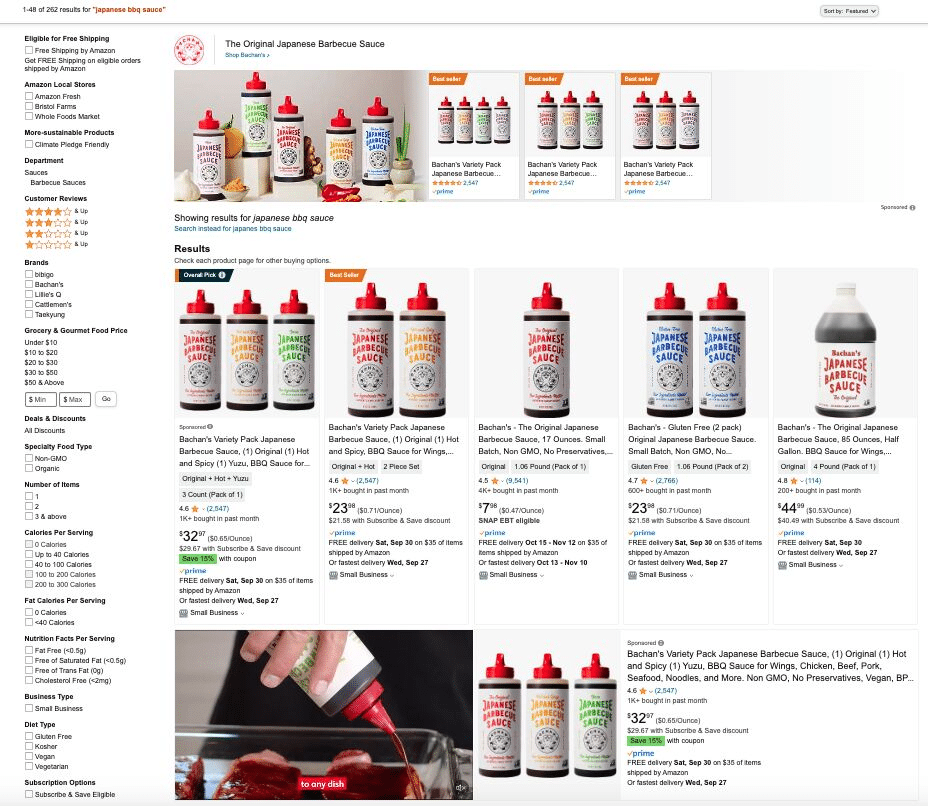
With Amazon, one advertiser can easily dominate a vast amount of real estate on the search results page.
Check out this search for “Japanese BBQ sauce” on Amazon.com. One advertiser controls the whole page:
This kind of dominance of the SERP could never be achieved with Google Ads today.
While there are ways to game this with Google, such as opening multiple accounts, this violates Google’s policy, and if caught, an advertiser risks having all their accounts closed down.
Whereas with Amazon, this allowed and even encouraged. Your ecommerce brand can own the entire SERP if it wants to.
Amazon presents a better opportunity for ecommerce advertisers
While Google has more search volume and can be an effective platform, for a savvy ecommerce business Amazon Ads presents more opportunities. The key reasons in favor of Amazon Ads are:
- More product searches than Google Ads.
- Better ROAS.
- Better conversion rates.
- Easier and better tracking.
- Easier to compete for new businesses.
- Easier to rank long-term.
- Ability to dominate the entire SERP.
Dig deeper: Amazon advertising optimizations to crush Q4
The post 5 reasons Amazon Ads is better than Google Ads for ecommerce appeared first on Search Engine Land.
Courtesy of Search Engine Land: News & Info About SEO, PPC, SEM, Search Engines & Search Marketing