Archive for the ‘seo news’ Category
Wednesday, November 8th, 2023
Navigating the unexpected deadends and misleading turns of a poorly organized website is never fun. Your website must provide visitors with what they expect to find, whether that’s content, products, or whatever means to whatever end.
And yet, I continue to see websites that seem to be designed to keep users ensnared in an annoying virtual corn maze, complete with dead ends and false trails. One way to make sure your users don’t want to come back to your website is to frustrate them. (Unless that’s the point of your site.)
The fixes are usually fairly simple to employ once you can identify the sticking points. To do so, you must know how to interpret Google Analytics 4 (GA4) data for informed insights.
This article explores how you can use GA4’s path exploration report to help remove website roadblocks for your users.
1. How are new visitors from a specific channel navigating my website paths in a specific browser?
If you’re directing too many people down the same, wrong paths, you will have some unhappy and claustrophobic visitors.
Let’s walk through the steps in GA4 to see how visitors navigate your site and how you can see the ways different segments of people navigate (or fail to navigate) your twists and turns.
- Sign in to Google Analytics.
- On the left, click Explore.
- At the top of the screen, select the Path exploration template.
- To try to help you see what’s possible, Analytics will automatically fill the template with a sample implementation. Click Start Over in the upper right to clear the sample.
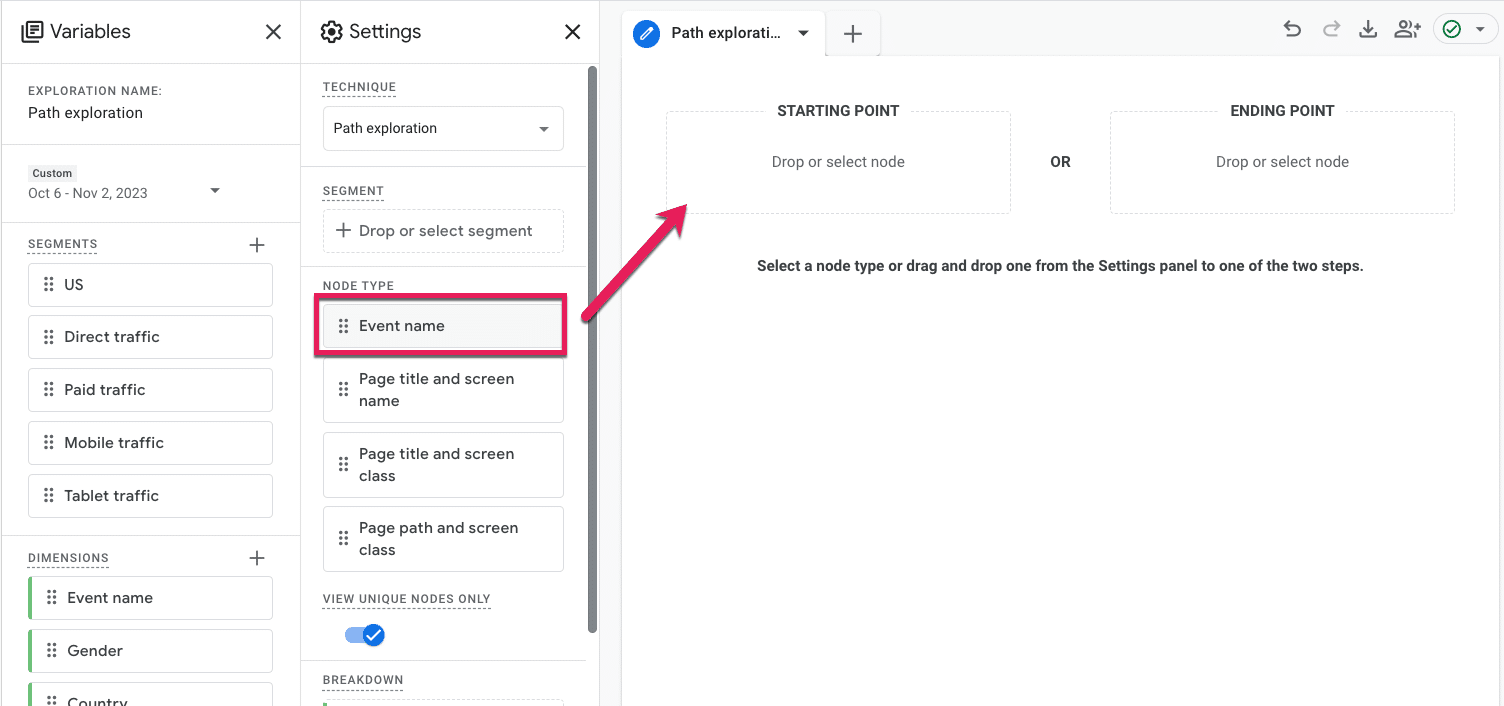
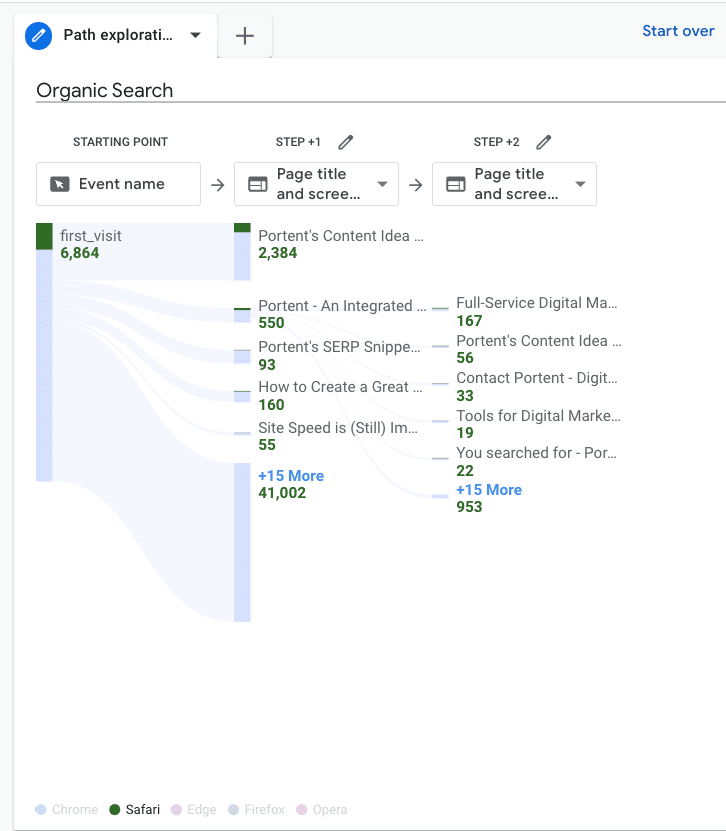
- Drag and drop the Event button from Node Type to the Starting Point.
- At this point, a menu will pop up for you to select what Event you want to dive into. Since we’re focused on first-timers, we will select the default Event, first_visit.
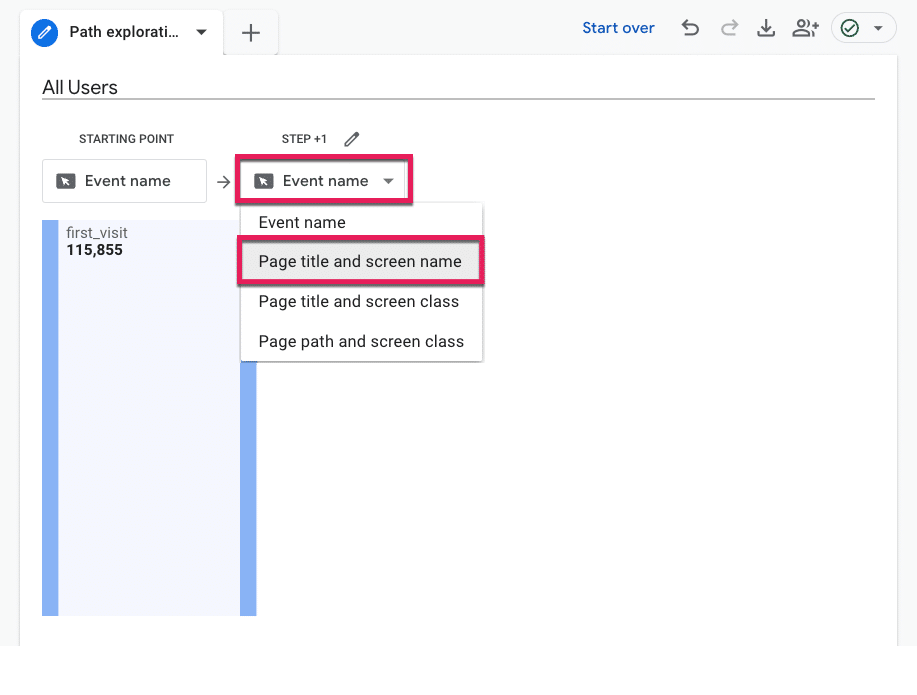
- The report will automatically populate step 1 with the same node type; in this case, the Event. But we’re interested in seeing where first-timers go on our site, so click the drop-down under Step +1 that says Event Name, and select Page title and screen name.
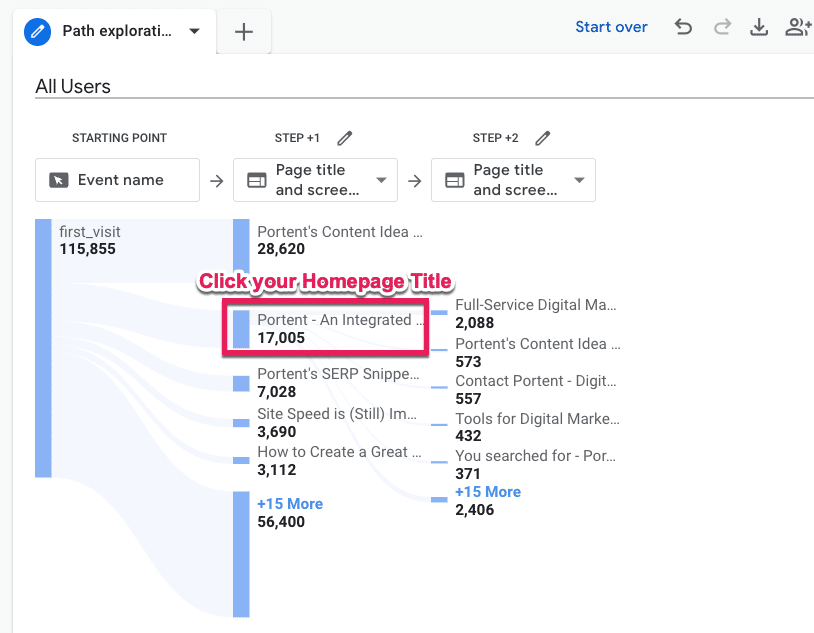
- Now, we can see what pages on our site first-time visitors land on. I’m willing to bet your homepage is pretty high up there, so click that page title to open up Step +2 (a.k.a., what page first-time users to your homepage navigate to).
- Measure your feelings. No, really. Are you surprised by what you see? Did you expect first-time visitors to your homepage to make it to a specific product or pricing page that isn’t even in the top five listed in “Step +2?”
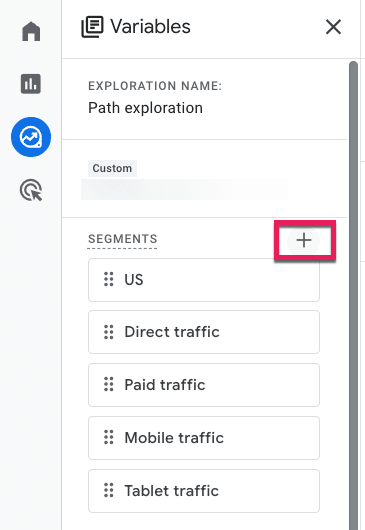
- To see specifically Organic Search users subset, we will apply a Segment. Go to the Segments menu under Variables and click the plus (+) icon.
GA4 has a ton of pre-built segments for you to peruse at your leisure, but we will select Templates and then Acquisition.
- From there, those without RegEx experience can collectively release the breath you’ve been holding because now we can select the First user default channel and add a filter that contains a drop-down of default channels. Then click the big blue Save and Apply button in the top right corner.
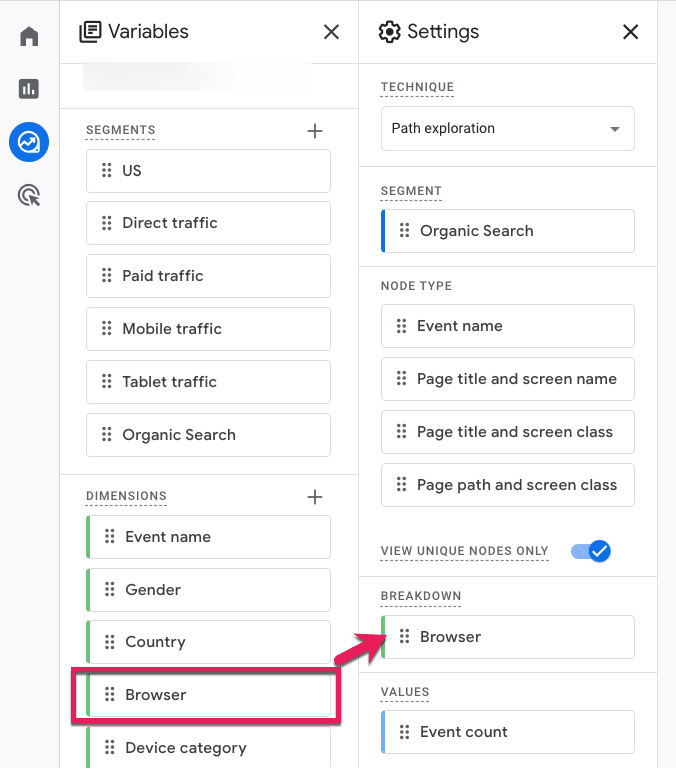
To see our segment broken down by Browser (or analyzed by any other attribute), follow the last three steps, only this time select the Dimensions variable.
- Check the Browser option from the pre-defined Platform / Device Dimensions GA4 provides, click Import, and then drag and drop that Dimension into Breakdown.
- From there, we can hover over the metrics at the bottom to see how this user path compares by different browsers.
Get the daily newsletter search marketers rely on.
<input type=”hidden” name=”utmMedium” value=”“>
<input type=”hidden” name=”utmCampaign” value=”“>
<input type=”hidden” name=”utmSource” value=”“>
<input type=”hidden” name=”utmContent” value=”“>
<input type=”hidden” name=”pageLink” value=”“>
<input type=”hidden” name=”ipAddress” value=”“>
2. What are my non-converting visitors expecting other than what they’re getting?
Is there anything your visitors want that they’re not getting?
Let’s walk through the steps in GA4 to see what users are searching for and how you can prioritize new additions or make existing things easier to find.
- Sign in to Google Analytics.
- On the left, click Explore.
- Choose a blank exploration.
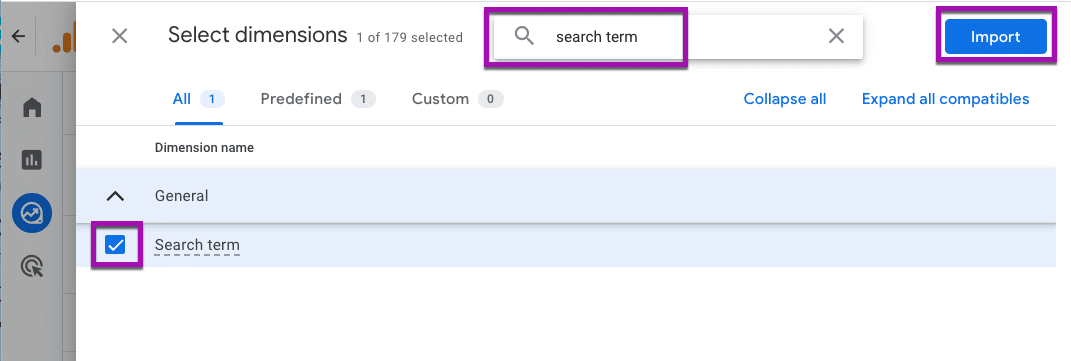
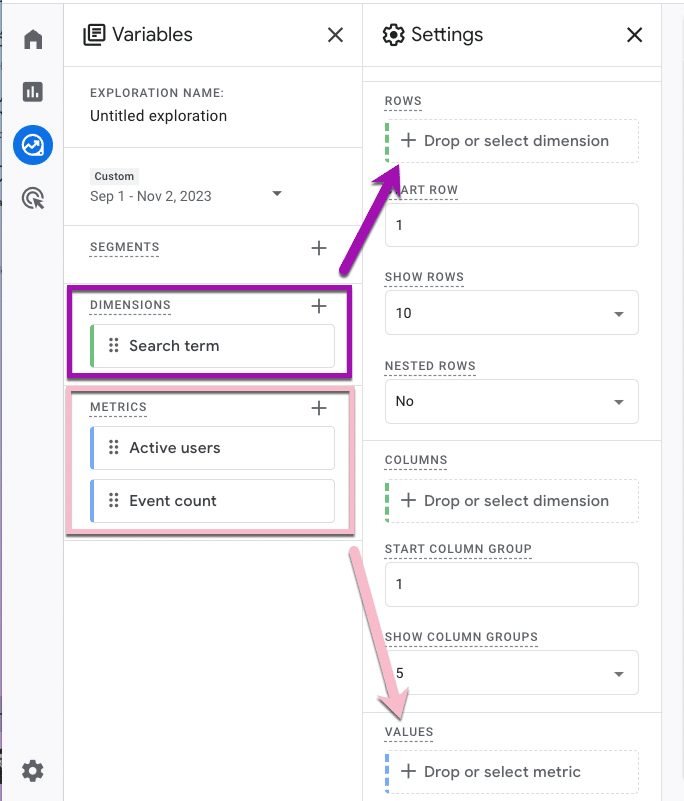
- We’ll need to add “Search term” data to our exploration, so click the + next to Dimensions
- You can explore the Dimensions here, or you can simply type search term into the search bar at the top, click the check box, and add that data by clicking the big blue Import button in the top right corner.
- Now that we know what we want to analyze, we need to specify the specific numbers we’re interested in. Click the plus (+) icon next to Metrics. To see how many users searched for a given term, choose “Active users.” To see how many times those users searched for it, select “Event count.” Then, click Import.
- To populate your report, drag the Dimension Search Term into the row and the Metrics into the values.
- Your free-form exploration now has data in it. Specifically, Search term data from your on-site search, including how many users searched for it and how many times they searched for it. It’s time to search your feelings again. Is the data what you would expect to see?
- To break out our data by non-converters, add a Segment by clicking the plus (+) icon.
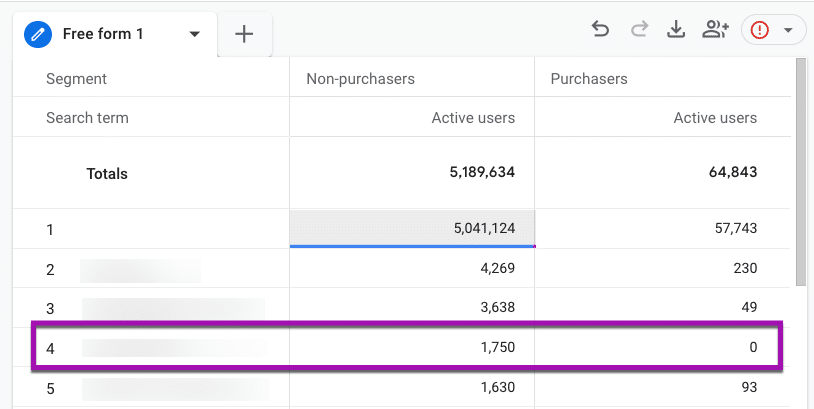
- No need to create a custom segment for this. Google already has prebuilt audience suggestions for us. Go ahead and select the Non-Purchasers audience under the General menu.
- You can see on the next page how that audience was defined, but there’s no need for you to change anything unless you want to. Click the Save and Apply button in the top right, then do the same step for the Purchasers audience.
- Sit with your data for a moment.
- Row 2 is the most searched term for your site. Is it an easy page to navigate to? Based on the data, I would guess “no.”
- Or are you seeing an urgent opportunity to optimize website experiences, like in row 4, where the Purchasers column is 0?
This data tells you that no one searching for the row 4 term is purchasing from your site.
Is that what you expected? Or do you have some content you need to spin up or a Purchasing department to notify?
3. What is the top exited page, and where are those users coming from?
Ideally, everyone who enters should also exit your website, but are they leaving in the right direction?
Let’s walk through the steps in GA4 to see the last pages people visit and what channel those users came from.
- Sign in to Google Analytics.
- On the left, click Explore.
- Choose a Blank exploration.
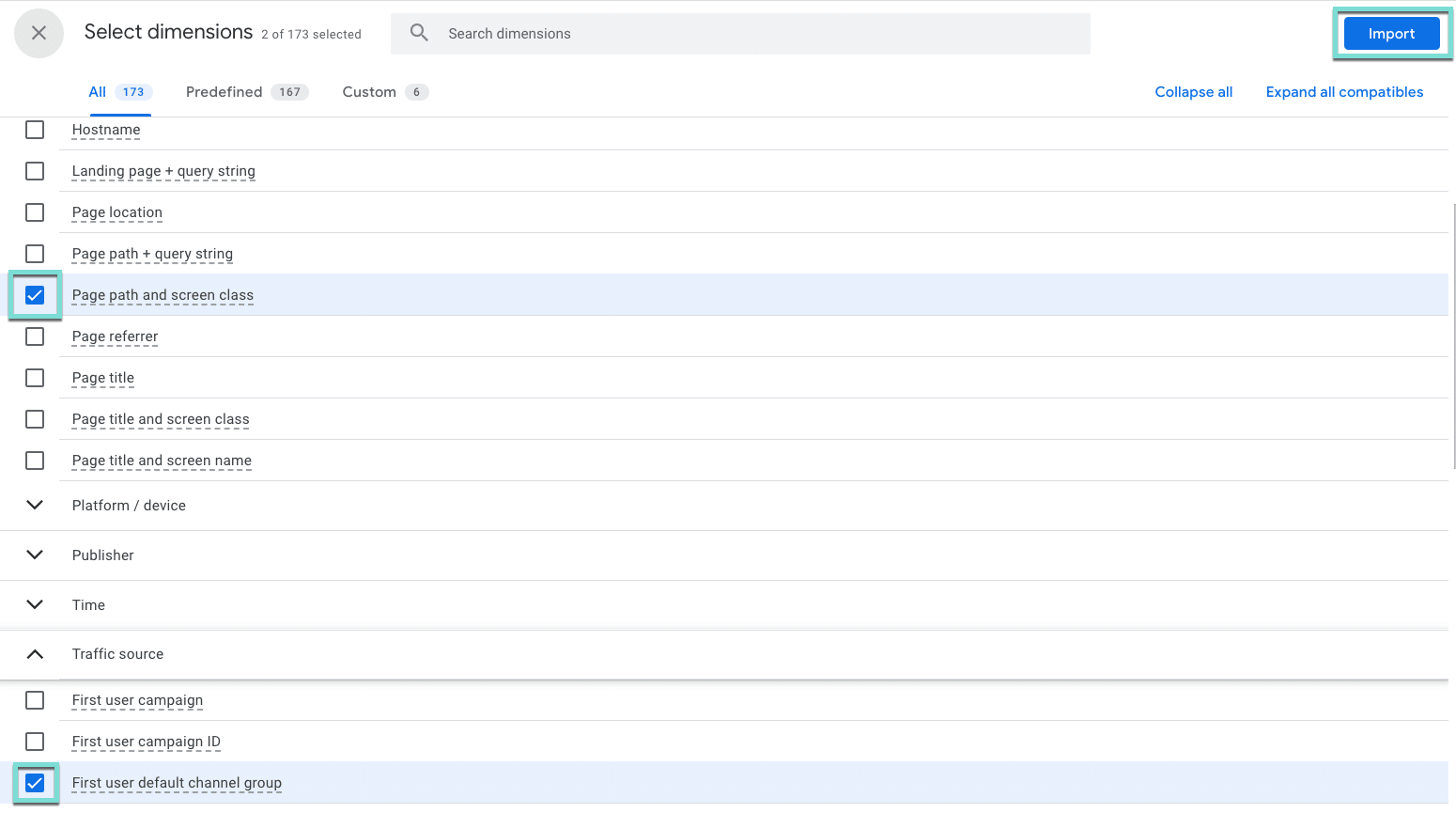
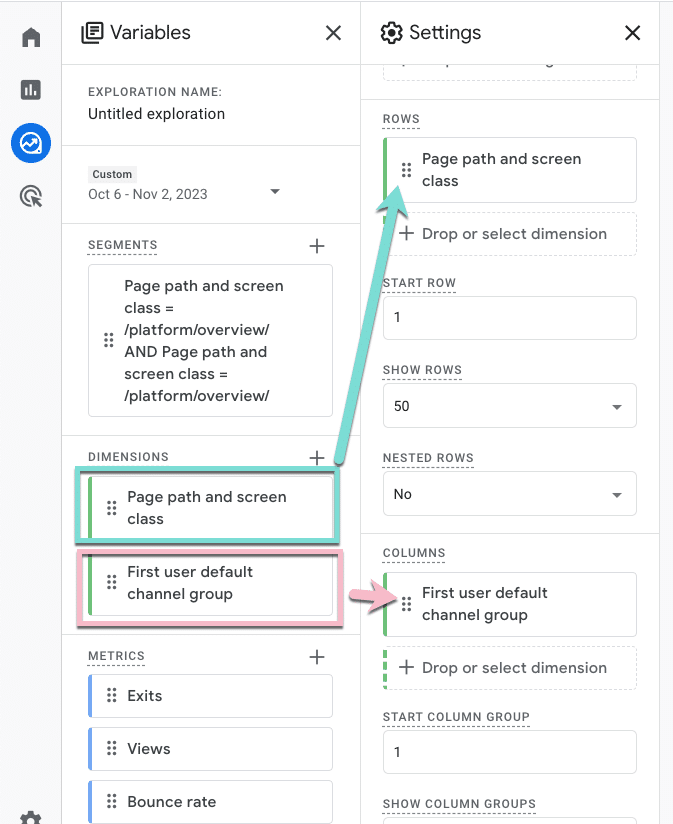
- We need to select the thing we want to analyze. In this case, we want to know the Page title, and we also want to know the Channel these users used to get there. Click the + next to Dimension,
- Select Page path and screen class (under Page/screen), and First user default channel group (under Traffic source), and click the big blue Import button in the top right corner.
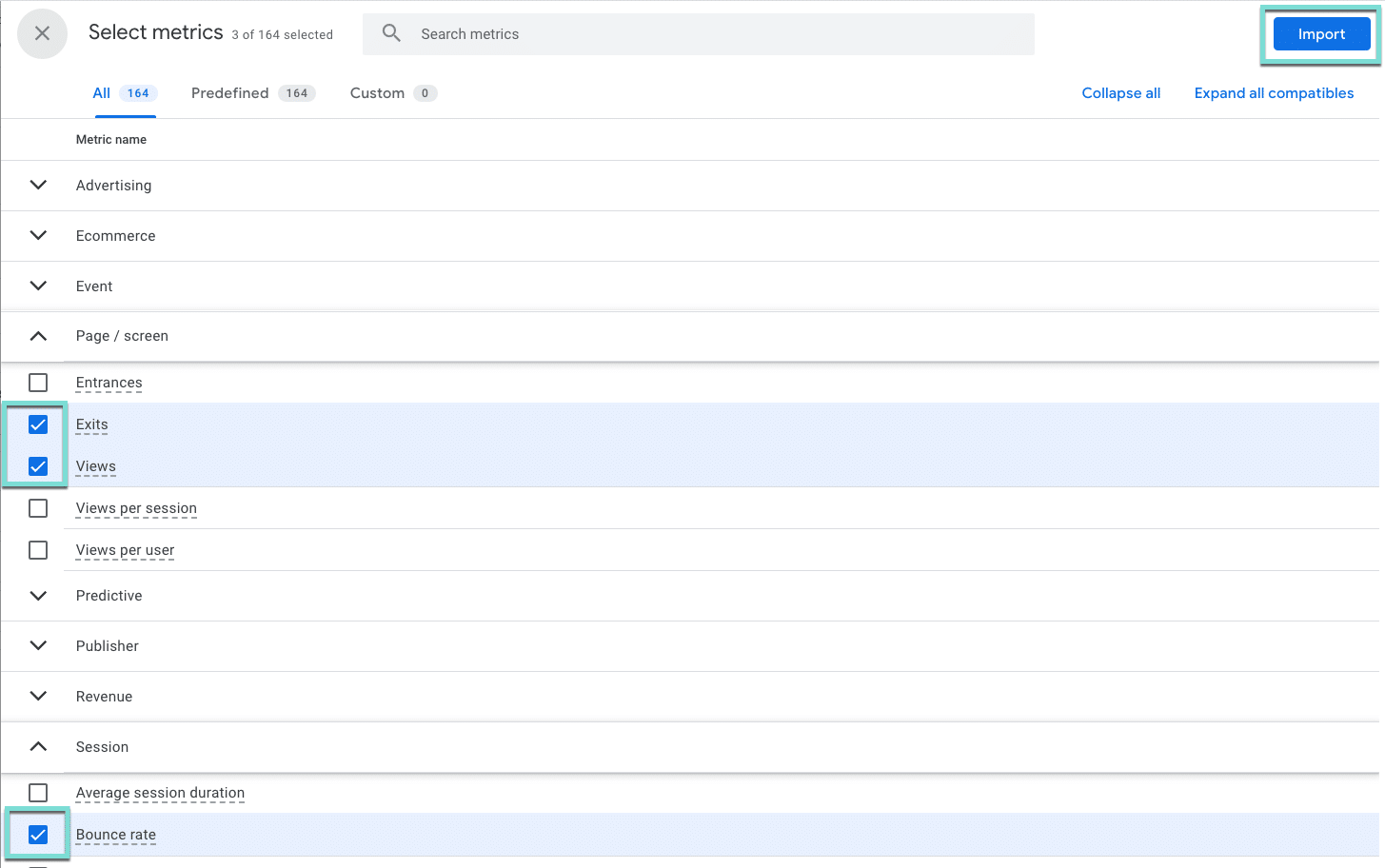
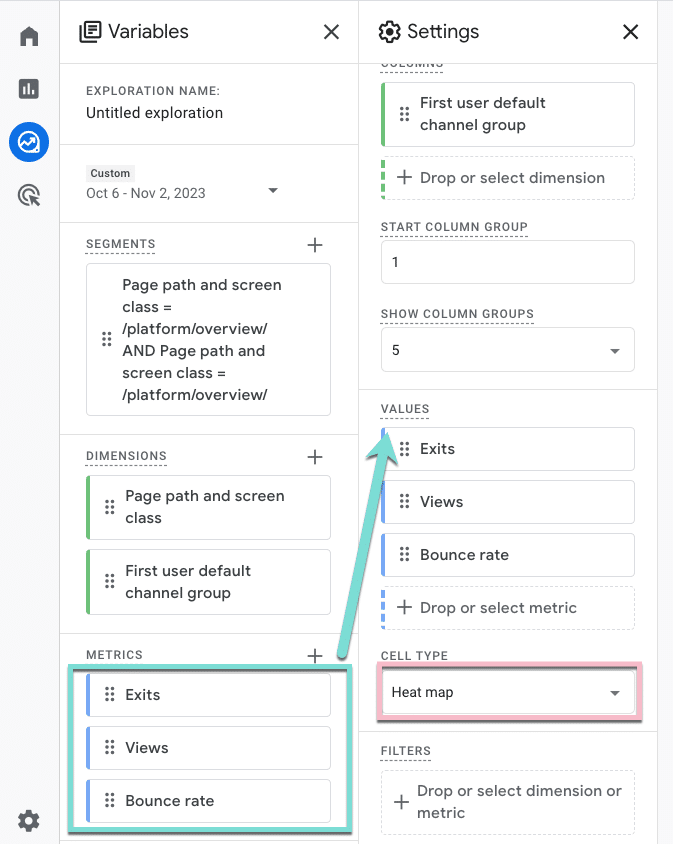
- Now, we need to define the numbers we want to look at. Click the + next to Metrics.
- Using the search bar or by expanding the menus, select Exits, Views, and Bounce Rate, and click the Import button.
- Drag Page path and screen class into the rows area, and First user default channel group to the columns.
- Then, drag your metrics into the values area. To help us focus on the right things, we will also change the cell type to Heat Map.
- Now, go ahead and close out Variables and Settings to minimize those menus and see the full report.
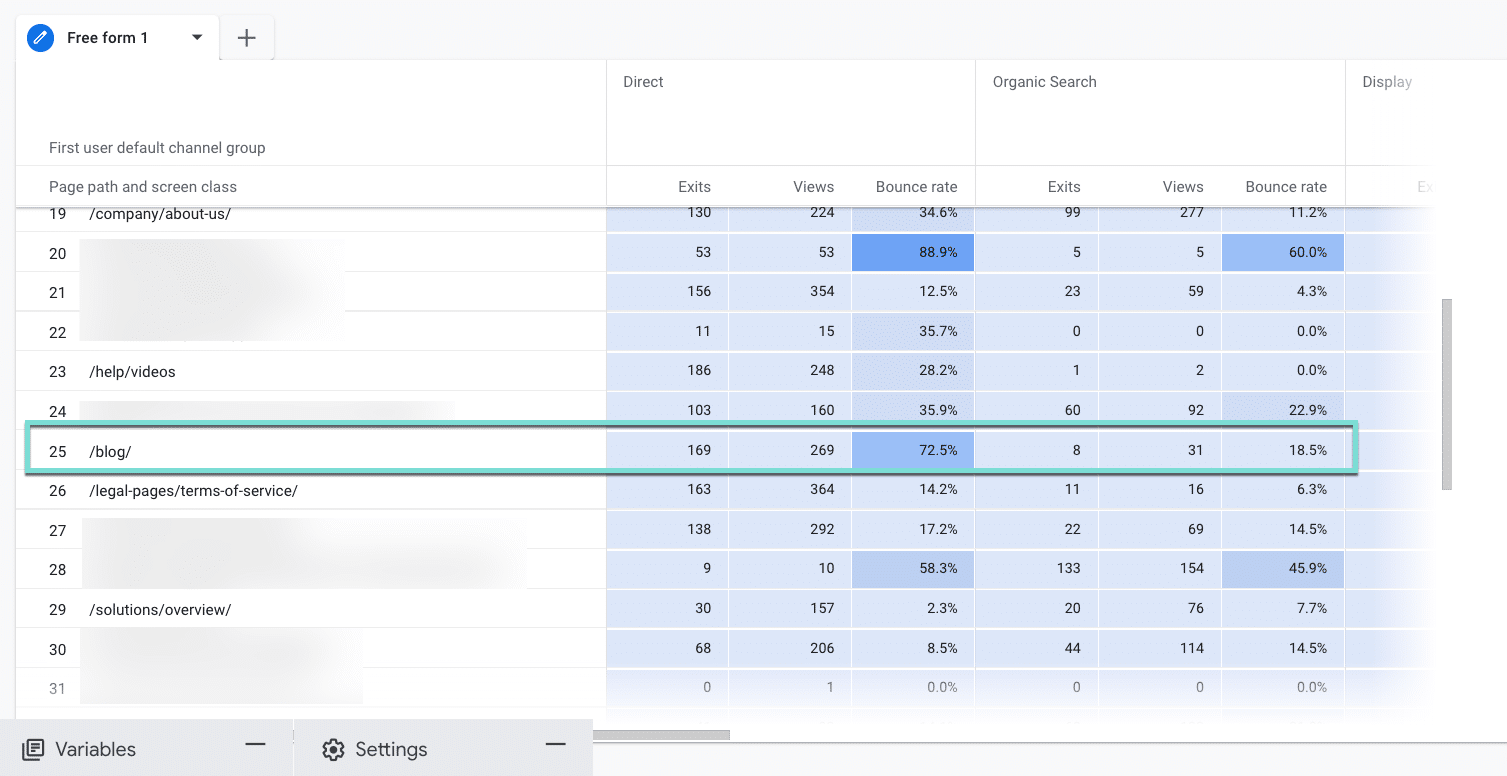
- Examine the heat map and scroll over and down to find the darkest cells that indicate the highest numbers.
- Are you seeing differences by traffic source, like row 25?
- What channels need more attention to improve or optimize event metrics like bounce rate? And why those channels?
- Is the meta description on the Organic Search result setting a different expectation than the one Direct users have when they visit that page?
Enhancing website engagement with GA4
The path exploration report in GA4 can be a game-changer for uncovering and addressing website roadblocks. Leveraging this tool lets you gain insights and take action to enhance the user experience.
Incorporating these insights into your digital marketing strategy can lead to a more user-friendly website, improved engagement, and enhanced overall performance.
Dig deeper: How to use GA4 to optimize your digital marketing strategy
The post GA4 path exploration report: 3 ways to uncover website roadblocks appeared first on Search Engine Land.
Courtesy of Search Engine Land: News & Info About SEO, PPC, SEM, Search Engines & Search Marketing
Wednesday, November 8th, 2023
Amazon Ads should not be trusted – that’s according to digital marketing expert, Bryan Porter.
The Co-Founder and Chief eCommerce Officer at Simple Modern claims his company has spent $14 million on Amazon ads over the years and describes the investment as a “waste”.
Explaining his comments, he says:
- “Amazon ads take credit for sales that would’ve happened organically. Like 40%. Dramatically inflating performance.”
- “Ads convert on relevant keywords. Good products organically rank on relevant keywords. Almost all ads are capturing some organic sales.”
- “More Amazon ads shenanigans? They show your ads on your other product listings. You pay for customers to click between your listings while Amazon ads takes credit for the sale.”
Why we care. When Amazon ads cannibalize organic sales, it means less revenue for the same advertising cost. Efficient ad spend is essential for maximizing profitability and ensuring that the marketing budget is used effectively.
Testing. Sharing his experience on LinkedIn, Porter claims that his company decided to conduct some Amazon ad experiments last year by shutting off campaigns for three months. As expected, revenue did drop – but interestingly this figure was “not even close” to the loss in ad sales reported by Amazon.
New direction. Porter says that his ad testing has transformed his company’s ad strategy and so has decided to share some of his top tips:
- Grouping ad keywords. Porter explains that you can’t gauge a campaign’s true performance when all keywords are mixed together. Some keywords make a big impact (over 90%), while others have a smaller effect (less than 20%). To get a clearer picture, he recommends organizing keywords into three categories:
- Competitors.
- Generic.
- Branded.
- Targeting a 3 ROAS. Porter suggests “running branded campaigns at a 20 ROAS because 80% of sales are capturing organic demand.”
- View Ads as Investments.If investing in inventory or product development brings better returns, allocate your ad budget accordingly.
- Embrace competition. Relying too much on Amazon ads is a weakness, according to Porter. If you find yourself overspending, focus on improving your product or listing for better organic rankings. Building a strong brand is the ultimate advantage.
Get the daily newsletter search marketers rely on.
<input type=”hidden” name=”utmMedium” value=”“>
<input type=”hidden” name=”utmCampaign” value=”“>
<input type=”hidden” name=”utmSource” value=”“>
<input type=”hidden” name=”utmContent” value=”“>
<input type=”hidden” name=”pageLink” value=”“>
<input type=”hidden” name=”ipAddress” value=”“>
What Amazon is saying. Search Engine Land has reached out to Amazon for comment.
Deep dive. Read our Search Engine Land report on Amazon’s latest earnings to find out how much revenue ads generated for the company in the third quarter of 2023.
The post Why this advertiser doesn’t trust Amazon Ads appeared first on Search Engine Land.
Courtesy of Search Engine Land: News & Info About SEO, PPC, SEM, Search Engines & Search Marketing
Wednesday, November 8th, 2023
Amazon is looking to become a player in the generative AI game and also sell more products from ads.
The online retailer’s new Amazon AI image generator lets you upload product photos and add AI-generated backgrounds to produce lifestyle imagery and give your ads a boost.
Lifestyle imagery, no technical expertise needed
Though it didn’t really start dominating headlines until this year, AI has been around for a long time, albeit in subtler ways – and Amazon has been a key player. Its Sponsored Products ads, Alexa devices, and Prime Video features rely on AI and machine learning.
The Amazon AI Image Generator was created in direct response to feedback from advertisers, who cited a lack of experience designing creative and engaging ads as a roadblock to success.
Many lack access to the resources and expertise necessary to create copy, imagery and videos that would attract consumers.
Now, advertisers can simply log into Amazon’s Ad Console, select a product image, and click Generate.
Within seconds, the tool uses generative AI to produce a series of lifestyle and brand-themed images based on product details.
Images can be refined by entering text prompts, and multiple versions can be produced and tested to optimize performance. With just a few clicks, you can create compelling ads at no extra cost.
Lifestyle imagery is successful because it shows your product in use where it is intended. If you’re in the market for a tennis racket, you’ll be drawn to the ad that shows a couple swatting balls back and forth on a court, smiling and having fun, rather than a close-up shot of a racket against a plain white backdrop, right?
The Amazon AI image generator lets you do this with any product you sell.
Let’s say you private label a brand of air fryers. Instead of relying on a standalone photo of your product against a bland background, you can now create a lifestyle-based image of your air fryer sitting on a kitchen counter next to a cookbook and a few recipe ingredients.
This fosters an emotional response in customers, who can now picture your air fryer at home on their own kitchen counter. They may not have the culinary skills of a Gordon Ramsey, but seeing is believing – and believing is buying.
Lifestyle ads can generate click-through rates (CTRs) up to 40% higher than ads using standard product images, according to Amazon.
That should make all of us Amazon marketers believers.
Get the daily newsletter search marketers rely on.
<input type=”hidden” name=”utmMedium” value=”“>
<input type=”hidden” name=”utmCampaign” value=”“>
<input type=”hidden” name=”utmSource” value=”“>
<input type=”hidden” name=”utmContent” value=”“>
<input type=”hidden” name=”pageLink” value=”“>
<input type=”hidden” name=”ipAddress” value=”“>
The benefits of Amazon’s AI image generator
Amazon’s AI image generator boasts innovative technology that is a true game-changer for advertisers.
Using it simplifies the ad creation process, minimizes the time and resources needed to create captivating imagery, and has the potential to significantly improve ad performance.
Notable features and benefits include:
- Accessibility and user-friendliness. The tool is designed to be simple and intuitive, making advanced ad creation capabilities accessible to advertisers regardless of their size or in-house creative resources.
- Increased efficiency and productivity. Automatically generating ad imagery allows advertisers to quickly produce various images for A/B testing, saving time and effort.
- Enhanced ad performance. AI-generated images provide a lifestyle context that can tell a more compelling story than a standard product image, potentially increasing CTRs and overall campaign effectiveness.
- Creative democratization. The technology levels the playing field between small businesses and large corporations, allowing all advertisers to compete with high-quality, context-rich imagery.
- Continuous improvement and innovation. Amazon’s commitment to refining the tool based on user feedback and integrating it with other AI initiatives reflects a broader trend of continuous improvement and innovation within the digital advertising space.
- Cost reduction. Reducing the need for expensive photo shoots and design resources helps brands allocate their advertising budgets more effectively.
- Trendsetting in digital advertising. Amazon’s move signals a shift toward AI-augmented creative processes in the advertising industry, setting a new standard for competitors and the market as a whole.
AI-powered advertising is a game-changer
For advertisers, the end game is about getting the most for your money.
Amazon’s new AI image generation tool can help you boost CTRs in several ways. Using the image generator allows you to:
- Create more eye-catching and engaging images. AI-generated images are more visually appealing and engaging than traditional product photos. AI can generate images that are more realistic, creative, and relevant to your target audience.
- Showcase your products in a more lifestyle-oriented context. AI-generated images can showcase your products in a more lifestyle-oriented context. This helps potential customers better understand how your products can be used and how they can fit into their lives.
- Test different creative variations quickly and easily. The AI image generation tool allows you to quickly and easily test different creative variations of your ads. This can help you identify the images most likely to resonate with your target audience and drive clicks.
For all of AI’s benefits, a little manual intervention will help you unlock the full potential of the image-generating tool.
Use high-quality product photos as the starting point for your AI-generated images. Though it may seem like it at times, AI isn’t magic. It can’t conjure your own product images out of thin air. The Amazon AI image generator uses your product photos to generate new images, so it’s important to start with high-quality photos.
When creating your images, be sure to provide clear and concise instructions. This will help ensure the images generated will be more relevant to your target audience and your ad campaign’s goals.
Take advantage of the tool’s ability to provide multiple versions of your ad by testing them to see which ones drive the most clicks and conversions. AI-powered advertising is most effective when you use the data provided to optimize your campaigns for a better ROI.
AI may still be in its infancy, but it has quickly established itself as a powerful tool that can help drive sales while leveling the playing field.
By leveraging AI, Amazon is democratizing the ability for businesses of all sizes to create high-quality, engaging ads that resonate with consumers and stand out in a crowded digital landscape.
The post Amazon’s AI image generator: What advertisers need to know appeared first on Search Engine Land.
Courtesy of Search Engine Land: News & Info About SEO, PPC, SEM, Search Engines & Search Marketing
Tuesday, November 7th, 2023
The US Federal Trade Commission has published previously redacted information detailing why it’s suing Amazon.
New documents detail a secret algorithm codenamed “Project Nessie”, which allegedly leveraged deceptive practices to boost consumer prices by more than $1 billion – including deliberately making Amazon search worse. Chairman Jeff Bezos reportedly approved this strategy.
Why we care. If Amazon is found guilty of charging brands high fees for showing irrelevant ads that hurt the user experience, advertisers may want to consider moving their ad spend to other platforms for a healthier return on investment and more effective ad placement.
Degrading search results. The Commission claims that Amazon’s service quality declined as it shifted from prioritizing relevant, organic search results on its online storefront (as originally directed by its founder and then-CEO Jeff Bezos), to now featuring pay-to-play advertisements. The organization says Amazon bosses knew this created “harm to users” by making it “almost impossible for high quality,
helpful organic content to win over barely relevant sponsored content.”
Junk Ads. The commission alleges that sellers are now required to pay for advertising to reach Amazon’s large online shopper base, resulting in less relevant search results and higher-priced products for shoppers. These Junk Ads are allegedly referred to as “defects” by Bezos and his staff – despite sellers paying substantial fees for them.
The impact of Junk Ads. An Amazon executive shared examples highlighting how displaying junk ads instead of organic search results negatively impacted the shopping experience during internal discussions, according to the Commission. Some results were clearly unrelated to what the customer was looking for, like an LA Lakers t-shirt ad appearing in a search for “Seahawks t-shirt.” Others were just strange, such as “Buck urine” showing up as the first Sponsored Products slot for “water bottles.”
Rejecting guard rails to protect customers. Amazon allegedly consistently rejected the idea of implementing “guardrails” on ads to protect the customer experience. Senior executives at Amazon emphasized that advertising should not be limited by additional rules, even if there were flaws in this approach.
Bezos ‘prioritizing cash over service’. Bezos reportedly directed his executives to accept more “defect” ads as he wanted to prioritize advertising revenue over improved customer services, according to the Commission. Prioritizing maximum advertising profit had effectively become the guiding principle, despite its shortcomings, according to one senior executive.
Raising prices for consumers. The Commission claims that Amazon’s pay-to-play ecosystem increases the cost for sellers – an expense which is then infiltrated down to consumers. An Amazon executive reportedly said:
- “[T]his extra cost is likely to be passed down to the customer and result in higher prices for customers.”
‘Penalties’ for competitive Sellers. Additionally, Amazon’s alleged anti-discounting behavior penalizes sellers who offer lower prices on other online platforms with lower fees. As a result, many sellers establish their prices on Amazon, even with higher fees, as the minimum price across the internet.
Consumers pay the price. By inundating its search results with paid ads, Amazon guides shoppers towards pricier products. A 2018 study acknowledged that increased advertising makes it harder for customers to find lower-cost products, and as advertising grows, it significantly affects the overall site’s average sales price (ASP).
Alleged anti-competitive conduct. Amazon reportedly employs an algorithm created by former executive Jeff Wilke to prevent other online stores from lowering prices, aiming to deter price competition and maintain higher prices in the market. This approach involves mimicking competitors’ pricing changes to avoid losing market share. It results in less price competition and potentially higher prices for consumers. According to the commission:
- “This conduct is meant to deter rivals from attempting to compete on price altogether – competition that could bring lower prices to tens of millions of American households.”
Stopping competition. Amazon introduced Seller Fulfilled Prime (SFP) in 2015 to expand Prime-eligible products for shoppers, boost sales, and support its growth. SFP allowed sellers to offer Prime-eligible products without using Amazon’s Fulfillment by Amazon services. While sellers liked SFP, Amazon closed its enrolment in 2019 because they reportedly saw it was fostering competition and undermining their market dominance.
Ad revenue. Andy Jassy, Amazon CEO, announced last week that the company’s ad revenue had “grown robustly” – up 26% to surpass $12 billion.
What Amazon is saying. Search Engine Land has contacted Amazon for comment. Tim Doyle, Amazon spokesman, told us:
- “The FTC claims that an old Amazon pricing algorithm called Nessie is an unfair method of competition that led to raised prices for consumers. This grossly mischaracterizes this tool.”
- “Nessie was used to try to stop our price matching from resulting in unusual outcomes where prices became so low that they were unsustainable. The project ran for a few years on a subset of products, but didn’t work as intended, so we scrapped it several years ago.”
Get the daily newsletter search marketers rely on.
<input type=”hidden” name=”utmMedium” value=”“>
<input type=”hidden” name=”utmCampaign” value=”“>
<input type=”hidden” name=”utmSource” value=”“>
<input type=”hidden” name=”utmContent” value=”“>
<input type=”hidden” name=”pageLink” value=”“>
<input type=”hidden” name=”ipAddress” value=”“>
What the Federal Trade Commission is saying: A spokesperson for the department said in its complaint:
- “In a competitive world, Amazon’s decision to raise prices and degrade services would create an opening for rivals and potential rivals to attract business, gain momentum, and grow. But Amazon has engaged in an unlawful monopolistic strategy to close off that possibility.”
- “This case is about the illegal course of exclusionary conduct Amazon deploys to block competition, stunt rivals’ growth, and cement its dominance. The elements of this strategy are mutually reinforcing.”
- “Amazon’s course of conduct has unlawfully entrenched its monopoly position in both relevant markets. According to an industry source, Amazon now captures more sales than the next fifteen largest U.S. online retail firms combined. Yet Amazon has violated the law not by being big, but by how it uses its scale and scope to stifle competition.”
Deep dive. Read the Federal Trade Commission’s revised redacted complaint in full for more information.
The post Amazon’s ‘secret ad pricing scheme’ revealed in previously redacted documents appeared first on Search Engine Land.
Courtesy of Search Engine Land: News & Info About SEO, PPC, SEM, Search Engines & Search Marketing
Tuesday, November 7th, 2023
Ever wonder how Danny Sullivan, Google’s Search Liaison, compiles feedback on issues related to Search and then shares those details with the wider Google Search team?
Sullivan regularly does this work but has only shared examples with the public a few times. He shared some of the latest feedback he’s received Nov. 3.
What Sullivan shared. In a recent post on various social platforms, Sullivan wrote:
- “Someone asked me this week for examples of how I bring the feedback people have outside Google back into Google. Good question. I’ve done this in the past. Here’s a fresh one. After the discussions I’ve had over the past two weeks at an in-person event and online, I compiled a write-up that runs about nine printed pages long, covering themes, thoughts, concerns and suggestions that were shared with the search team. A sampling from that.”
Someone asked me this week for examples of how I bring the feedback people have outside Google back into Google. Good question. I've done this in the past. Here's a fresh one. After the discussions I've had over the past two weeks at an in-person event and online, I compiled a… pic.twitter.com/aqIL6TQHGf
— Google SearchLiaison (@searchliaison) November 3, 2023
The notes. Here are interesting excerpts from the notes, although he posted screenshots of them as shown above:
Everyone is doing things for us. all If you tell someone to make people-first content, it’s not uncommon they fall back into thinking how they show us – Google – that it’s people first. “So you’re saying I should have an author bio to rank better?” No! They should have bios because their own readers would expect that!
Our guidance even encourages people to compare themselves to other pages in our results – something we probably need to amend to say something like I covered in this post. Do a search, look at the sites that come up. Those are what our systems find helpful. That said, the systems aren’t perfect. So if you see a site that seems to be doing things against our guidelines, it might not be successful in the future.
Over and over, people noted large publishers that seem like they can write about anything and get rewarded.
Related is the idea that “parasite SEO” site win, sites that lease themselves out to third-parties and then content ranks on these sites that would never succeed on a different. This is different from big sites winning for original (but not necessarily people-first) content, but the two get conflated.
there’s a desire (such as here and here) for some type of tool or examples to help people better understand what we mean by helpful content or something that identifies if a page or site has been impacted by the helpful content update. I also floated the idea of taking our self-assessment questions and turning them into an interactive tool (this is a very rough idea of how that might work) Possibly, we could begin sharing some actual examples (such as here) or generic/stylized examples like this:
Past examples. It’s been more than four years since Sullivan publicly shared examples of him sharing feedback from SEOs, creators and users with the Google Search team. Here are two of those posts:
Last week, we asked webmasters what they’d like in how Google displays listings. We received over 250 thoughtful replies. It's greatly appreciated by our team that handles this area, shown here as we reviewed them. We're also circulating the comments broadly within search. pic.twitter.com/YDmjkC15fK
— Google SearchLiaison (@searchliaison) November 8, 2018
The search team at Google holds regular "Ranking Fairs," which are like science fair for sharing your projects with others in search. I'm doing my first one today sharing some of the webmaster ecosystem concerns I hear. I share these in other ways, too. But this is more creative! pic.twitter.com/E52hVpB8OG
— Danny Sullivan (@dannysullivan) May 14, 2019
Why we care. On some level it is nice to know that we do have people inside Google that do take our feedback seriously and share them with the wider Google Search team. I know it is not just Sullivan who does this but also other teams at Google, such as John Mueller’s Search Relations team.
We also know that it takes Google time to compile, review and process the feedback and then sometimes even more time to decide if they should take action on that feedback. Finally, programming that feedback into the various search algorithms and search interfaces can take even longer.
So don’t expect any of this feedback to result in changes in Google Search in the next week or two. These changes take time.
The post How Danny Sullivan shares SEO issues with Google’s Search team appeared first on Search Engine Land.
Courtesy of Search Engine Land: News & Info About SEO, PPC, SEM, Search Engines & Search Marketing
Tuesday, November 7th, 2023

As we speed toward the end of the year, search marketers are taking stock of their strategies and plans for 2024. How will generative AI fit into your workflow? Are you prepared for the impact of Google’s Search Generative Experience? What outdated SEO practices will you say goodbye to… and which new lead gen tactics will you adopt
Make sense of it all – and gear up for a successful New Year – at SMX, online November 14-15, for free!
Your free All Access pass unlocks three exclusive generative AI keynotes, plus nearly 70 actionable sessions, live Q&As (Overtime!), engaging demos, interactive Coffee Talk meetups, and AMA-style sessions with select winners of the 2023 Search Engine Land Awards. See the complete agenda!

After two days of training, you’ll be ready to…
- Understand what SGE is and how it will change Google’s landscape
- Future-proof your brand’s website against Google algorithm changes
- Harness the power of Performance Max campaigns for lead generation
- Efficiently publish content that ranks fast with the help of SEO pillar topics
- Craft compelling offers using AI to enhance relevance and appeal
- Unlock the potential of AI-driven creative to supercharge your digital ad campaigns
… and much more. Don’t miss your final chance in 2023 to attend the world’s leading search marketing conference. You and your career deserve this. Grab your free pass now!
The post SMX is online next week… don’t miss out! appeared first on Search Engine Land.
Courtesy of Search Engine Land: News & Info About SEO, PPC, SEM, Search Engines & Search Marketing
Tuesday, November 7th, 2023
Successful SEO professionals know a lot about dealing with uncertainty – such is life when algorithms that make or break performance are kept under lock and key.
But Search Generative Experience (SGE) triggers change-related anxiety from even the most seasoned SEOs.
Simply put, it’s both a paradigm shift and a quickly moving target; Google’s incorporation of SGE has been evolving almost daily.
So what do we know, and what should we expect – and how should we prepare? In this article, I’ll take a look at:
Where do we stand on SGE?
From a UX perspective, Google scaled back on the initial look, which was taking over most of the SERP. Now it’s less in your face, which I suspect they had planned the whole time – test maximalist to force people to notice and collect data on how they behave in the new environment.
Sticking with the user perspective, not everyone is served SGE with every query. I just tried 10 queries (a mix of “what is,” “should I buy,” “top 10 options for,” and information on state governors), and none of them returned results featuring SGE.
This will certainly change as the product comes out of beta, but it reaffirms that SGE is still in the roll-out phase, and users, SEO, and Google are all learning on the fly.
For SEOs, SGE is kind of the black box within the black box of Google’s algorithm. We can make some very educated recommendations for navigating the world of SGE, but nothing is clear at this point.
How could user behavior (and SEO) shift?
I’ve spoken with many people who have recoiled at the idea of SGE taking over their SERPs. This isn’t surprising; it combines the specter of AI taking over the world with a general distrust of change.
Add that to Google’s reputation on the advertising side, taking a few PR hits lately, and you have a bit of a perfect storm.
That said, I expect Google will just shove SGE down people’s throats as they did with featured snippets, the knowledge graph, etc.
After the 100th search, it’ll just be the expected experience. And I do expect the results to get better and more useful over time.
I’m already finding it useful as a user. For example, when looking for synonyms for a given word, I used to go to Thesaurus.com.
Now, I can just type it in and ask Google to show me synonyms, and AI will spit out a list, which saves me time. Something like that is fairly linear.
But for more complex issues, you’re still better off with content written by humans.
Get the daily newsletter search marketers rely on.
<input type=”hidden” name=”utmMedium” value=”“>
<input type=”hidden” name=”utmCampaign” value=”“>
<input type=”hidden” name=”utmSource” value=”“>
<input type=”hidden” name=”utmContent” value=”“>
<input type=”hidden” name=”pageLink” value=”“>
<input type=”hidden” name=”ipAddress” value=”“>
What kind of skills do SEOs need to capitalize on SGE?
This is where we get into speculation a bit more. I believe SGE won’t reward SEOs who practice completely different strategies than they do for keyword and query-related search. The skills will have a ton of overlap.
Having said that, I think for some SEOs, the question of how to harness SGE for your brand’s benefit might become, essentially, “How do you produce really good content that Google will use as a source for its AI,” not “How do you produce valuable content for the end user?”
Writing for AI and writing for users, after all, could have subtle but meaningful differences.
I’m looking at this question like I do with featured snippets. The goal should be to communicate trust and usefulness to Google.
The SEO content I’ve seen featured in SGE for my clients has either featured structured data (easy for Google to digest) or has been housed in pillar pages that cover the topic in-depth and act as a resource.
In short, it looks like content that ChatGPT would reference if asked a specific question, but it doesn’t sound like ChatGPT (which would add nothing to the conversation).
When I think of writing for SGE – which could have real benefits, like lifting your content from the bottom of the SERPs to the top-of-the-page SGE ranks – I think of giving the AI incentive to point the user to your site.
This might sound counterintuitive because Google’s been telling SEOs not to make content just to rank – but ultimately, my goal is to be useful to the end user, which hasn’t changed from pre-SGE days.
If there’s a net-new skill we need to add, it’s developing an understanding of how large language models (LLMs) spit out answers and what the model isn’t delivering that humans need to add.
That could be personal opinions, experience, anecdotes, etc.
AI could certainly remix those and spit them out in aggregate, but there’d be a lot lost in translation.
In short, think about the gaps in AI-produced answers, and make sure you’re addressing those gaps to add value.
Use user-generated content as an insurance policy
On the opposite end of the content spectrum, we have user-generated content (UGC).
Big September and October updates from Google kicked off a lot of chatter on X and SEO forums about the possibility of a bigger emphasis on UGC in the SERP results.
While I haven’t seen a big spike in its SERP visibility, I do think content pulled from sites like Quora and Reddit (speaking as someone with a focus on B2B/SaaS) is useful.
And it represents an extremely personal counterpoint to SGE:
If you’re looking to lean into a facet of SEO to hedge against possible erosion from SGE, UGC could be a smart – and relatively underutilized – bet.
SEO and SGE: Preparing for the future
In a meta sense, the SEO tenets of methodical testing and finding your way in a murky landscape will be more important than ever in planning a world heavy in SGE.
- Follow your favorite industry sources closely.
- Annotate changes in both the Google landscape and your own strategy to recognize trends.
- Understand the role of human insight in bringing value to the user.
It might not guarantee success, but you’ll have a solid foundation that will make strategic pivots easier to pull off.
The post SEO through the Google SGE lens: What’s changing? appeared first on Search Engine Land.
Courtesy of Search Engine Land: News & Info About SEO, PPC, SEM, Search Engines & Search Marketing
Friday, November 3rd, 2023
Google has rolled out its Ads Editor version 2.4, with 16 new features and updates for advertisers to utlize to improve the efficiency of their capaigns.
Below is a breakdown of what’s new.
New Features:
- App Install Ads deep links. You can add app deep links to App Install Ads using the App URL field, just like with App Engagement Ads.
- Automatically created Ad Strength assets. Ad Strength of responsive search ads will take automatically created assets into account to ensure that Ad Strength results are accurate.
- Asset source in asset report. The “Asset source” column is now available for channel level, asset group level, and ad level asset reports. This column enables you to differentiate between automatically created assets and advertiser provided assets.
- Additional fields in Discovery product ads. Discovery product ads now support the following additional fields:
- Videos
- Long headline
- Path 1
- Path 2
- In-feed video ads. Editor now works with in-feed video ads for Discovery campaigns, combining features of Discovery and responsive display ads.
- Text mode for selecting videos. You can now switch between video picker and text mode in the video asset library. Previously, Editor v2.4 used a video picker to select videos for ads. With text mode, you can directly enter video IDs to choose videos.
- Campaign level broad match. Editor now supports the broad match keywords campaign setting. When activated for a campaign, only broad match keywords can be used, and any existing non-broad match keywords will be converted to broad match.
- Video view campaigns. Editor now supports Video view campaigns, which are Video campaigns with Target CPV bid strategy and multi-format video ads.
- Search themes in Performance Max campaigns. Editor now works with search themes in Performance Max campaigns. These themes help you share important insights with Google AI about your customers’ searches and the topics that drive conversions for your business.
- Replace Text tool for product groups. You can now use the Replace Text tool to change text across all parts of a product group. For instance, you can quickly correct a consistently misspelled brand name throughout your product groups.
- Device targeting in Discovery campaigns. You can now enable mobile carrier targeting, and campaign level device bid adjustments for desktop, mobile, tablet, and TV in Discovery campaigns. For bid adjustments, the only adjustments allowed are 0% and -100%.
- Brand settings for Search and PMax campaigns. Editor now supports brand settings for Search and Performance Max campaigns, specifically:
- Brand restrictions for Search
- Brand exclusions for Performance Max
- Dynamic Search Ads features in PMax. Editor now supports features related to Dynamic Search Ads in Performance Max campaigns, including:
- Adding Dynamic Search Ads in Performance Max campaigns.
- Specifying page feeds to use in your Performance Max campaigns.
- Supporting webpage targeting for asset groups.
- Ad format controls for Video reach campaigns. You can now choose the ad formats that show for Video reach campaigns, including:
- In-stream ads
- In-feed ads
- Shorts ads
- Demand Gen ad group level location and language. You can now set language and location targeting for Demand Gen campaigns at the ad group level. Remember that you can only choose the targeting level when creating the campaign, and you can’t modify it later.
- PMax dynamic Search Ads upgrade tool. You can track each campaign’s migration status in the tool, but keep in mind that Google Ads Editor won’t be accessible until the migration finishes. Once the migration is done, the tool downloads draft campaigns and identifies any failed upgrades. It also highlights errors, like missing assets. After fixing these errors, the recommendations are applied immediately.
Get the daily newsletter search marketers rely on.
<input type=”hidden” name=”utmMedium” value=”“>
<input type=”hidden” name=”utmCampaign” value=”“>
<input type=”hidden” name=”utmSource” value=”“>
<input type=”hidden” name=”utmContent” value=”“>
<input type=”hidden” name=”pageLink” value=”“>
<input type=”hidden” name=”ipAddress” value=”“>
Why we care. The new features have been designed to give advertisers greater control, simplify the editing process, and enhance the efficiency and overall performance of your Google Ads campaigns.
Deep dive. Read Google’s full list of changes for more information.
The post Google Ads Editor version 2.5 rolls out with 16 new features appeared first on Search Engine Land.
Courtesy of Search Engine Land: News & Info About SEO, PPC, SEM, Search Engines & Search Marketing
Friday, November 3rd, 2023
Google has rolled out a new Ad Review Centre for AdSense, Ad Manager and AdMob.
Five major changes have been added to the platform – all aimed at improving the user experience for advertisers.
Below is a breakdown of what’s new.
New Features:
- Larger area to view ads. The new Ad Review Centre features an improved layout to maximise the area that you have for viewing ads.
- New, easy-to-use filters. Google has added new filters to make it quicker and simpler to select statuses like ‘Allowed’ and ‘Blocked’.
- Bulk actions are easier: The search engine has also introduced a prominent ‘Select all’ button so it’s now easier to take actions on pages of ads.
- Simplified image search. The new Ad Review Centre has rolled out a more prominent ‘Search by Image’ button and improved the search results. It also now shows image search requirements in the image selection dialogue.
- Improved detail view: Lastly, the platform has also updated the detail view by adding an expandable ‘Ad info’ area with more metadata and a new ‘Related ads’ tab to make it quicker to find related ads.

Why we care. These new features have been introduced to enhance the efficiency of ad management, simplifying the advertiser’s tasks and potentially saving them valuable time in the process.
What Google is saying. A Google Ads spokesperson said in a statement:
- “We’re super excited to introduce the new Ad Review Centre for AdSense, Ad Manager and AdMob.”
- “We’ve spent a lot of time listening to feedback from publishers and partners alike, and we’ve made several investments to improve the experience for everyone.”
Deep dive. Visit the Ad Review Centre overview for more information.
The post Google launches new Ad Review Centre for AdSense Ad Manager and AdMob appeared first on Search Engine Land.
Courtesy of Search Engine Land: News & Info About SEO, PPC, SEM, Search Engines & Search Marketing
Friday, November 3rd, 2023
The U.S. Department of Justice has released several new trial exhibits – including internal Google presentations, documents and emails related to ranking.
Here are seven that specifically discuss elements of Google Search ranking:
1. Life of a Click (user-interaction)
This is a heavily redacted PowerPoint presentation put together by Google’s Eric Lehman – and like most of the other documents, it lacks the full context accompanying it.
However, what’s here is interesting for all SEOs.
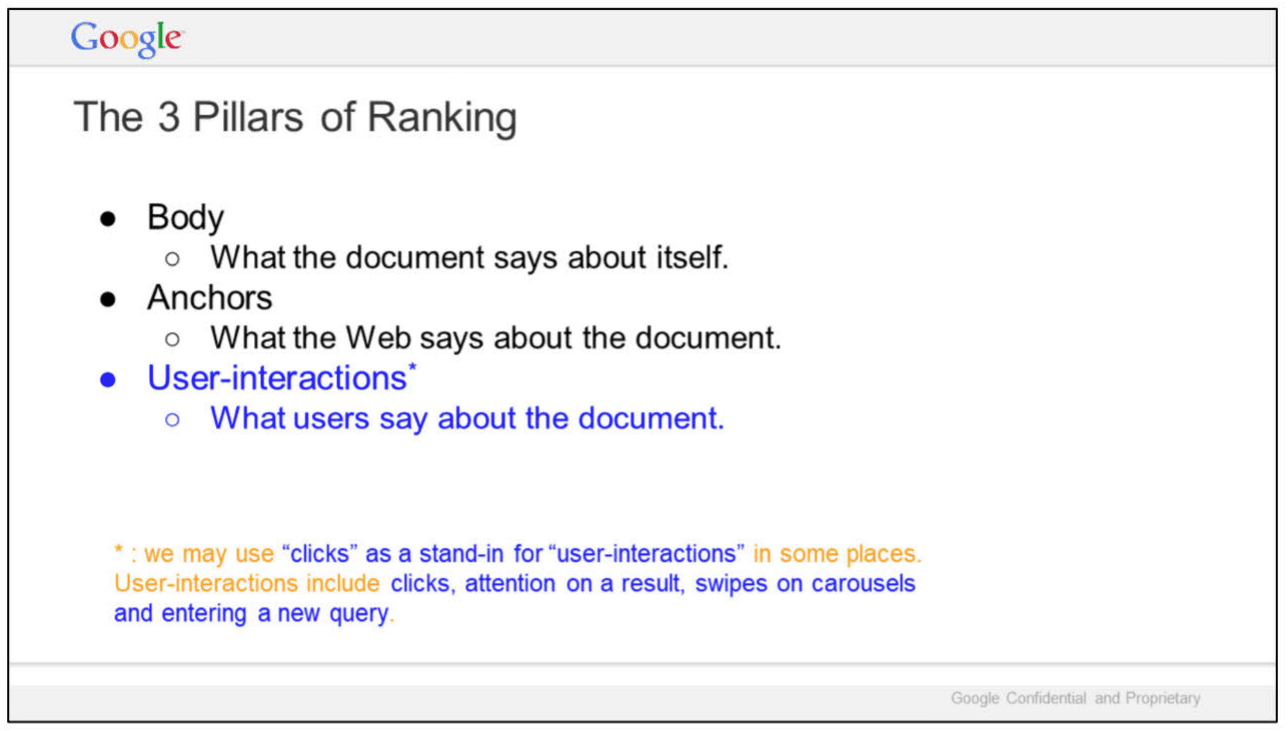
In “The 3 Pillars of Ranking,” slide, Google highlights three areas:
- Body: What the document says about itself.
- Anchors: What the Web says about the document.
- User-interactions: What users say about the document.
Google added a note about user interactions:
- “we may use ‘clicks’ as a stand-in for ‘user-interactions’ in some places. User-interactions include clicks, attention on a result, swipes on carousels and entering a new query.
If this sounds familiar to you, it should. Mike Grehan has written and spoken extensively about this for 20 years – including his Search Engine Land article The origins of E-A-T: Page content, hyperlink analysis and usage data.
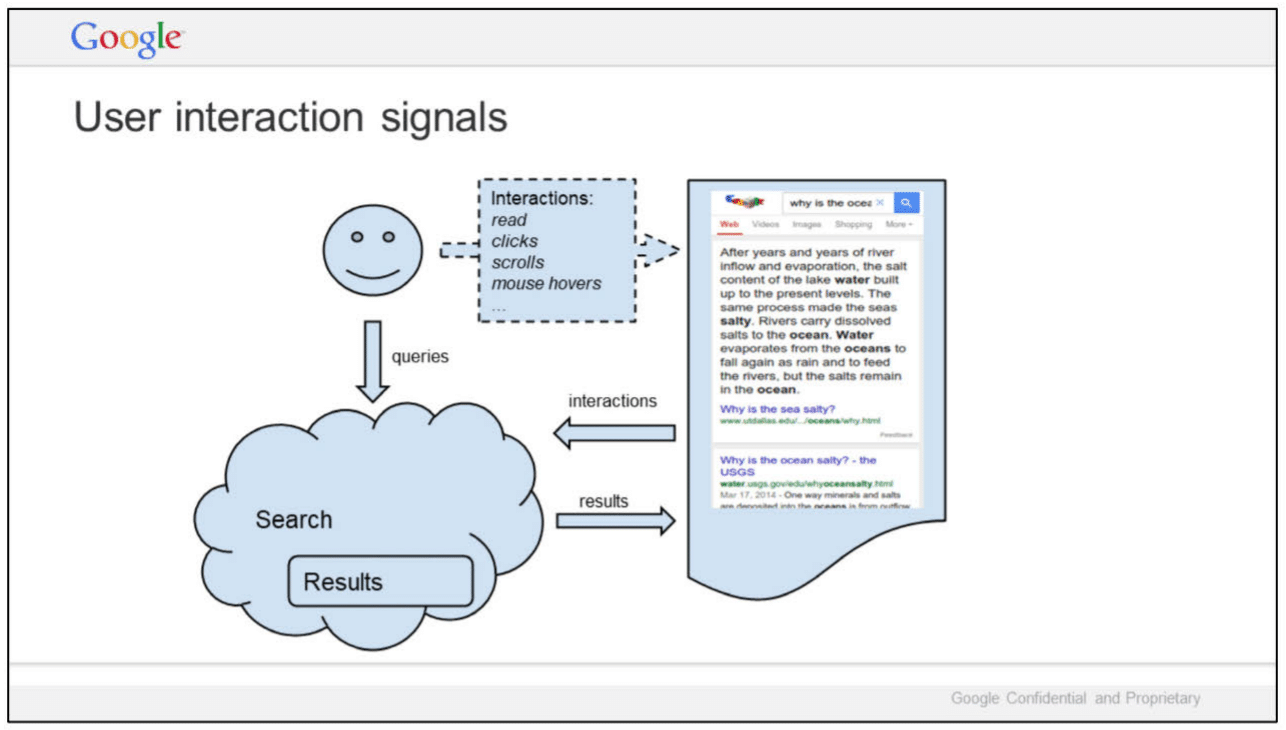
In this slide, titled “User interaction signals,” Google illustrates the relationships of queries, interactions and Search results, alongside results for the query [why is the ocean salty]. Specific interactions mentioned by Google:
- Read
- Clicks
- Scrolls
- Mouse hovers
In September, Lehman testified during the antitrust trial that Google uses clicks in rankings. However, once again, it’s important to make clear that individual clicks alone are a noisy signal for ranking (more on that in Ranking for Research). Google has publicly said it uses click data for training, evaluation, controlled experiments and personalization.
What is redacted:
- A slide titled “Metrics” – all that is visible is one line: “Web Ranking Components.”
- Seven additional slides, including two titled “Outline” and “Summary.”
Link: Google presentation: Life of a Click (user-interaction) (May 15, 2017) (PDF)
2. Ranking
These seven slides were part of a larger Q4 2016 Search All Hands presentation, prepared by Lehman.

In this slide, Google says “We do not understand documents. We fake it.”
- “Today, our ability to understand documents directly is minimal.
- So we watch how people react to documents and memorize their responses.”
And the source of Google’s “magic” is revealed:
“Let’s start with some background..
A billion times a day, people ask us to find documents relevant to a query.
What’s crazy is that we don’t actually understand documents. Beyond some basic stuff, we hardly look at documents. We look at people.
If a document gets a positive reaction, we figure it is good. If the reaction is negative, it is probably bad.
Grossly simplified, this is the source of Google’s magic.”
So how does this work?
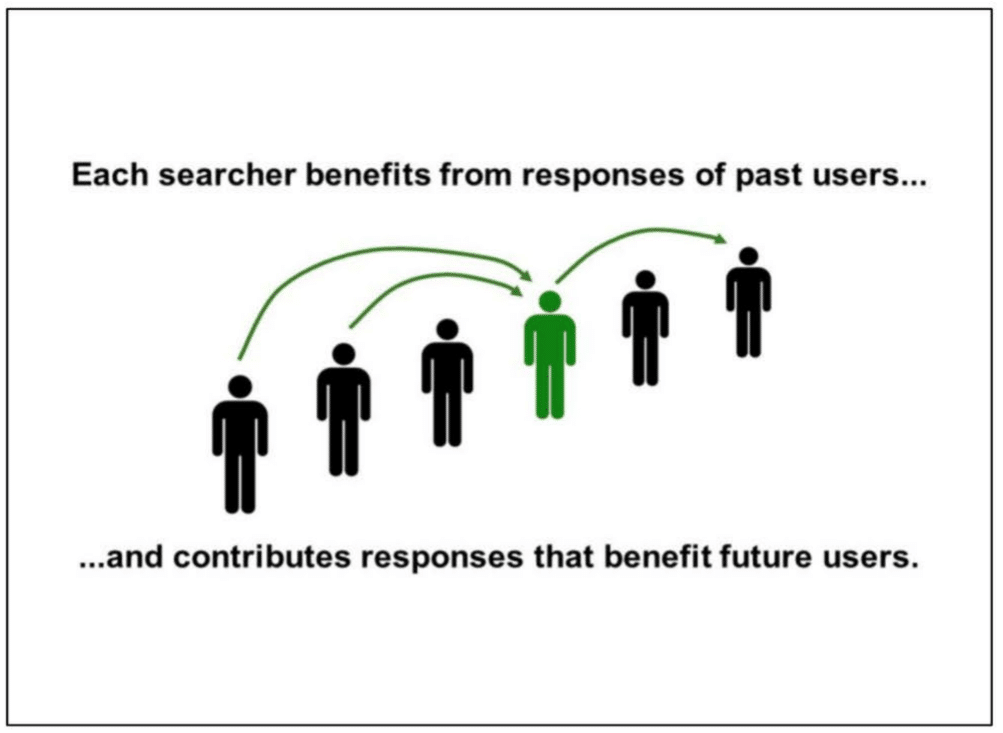
In this slide, Google explains how “each searcher benefits from the responses of past users … and contributes responses that benefit future users”:
“Search keeps working by induction.
This has an important implication.
In designing user experiences, SERVING the user is NOT ENOUGH.
We have to design interactions that also allow us to LEARN from users.
Because that is how we serve the next person, keep the induction rolling, and sustain the illusion that we understand.
Looking to the future, I believe learning from users is also the key to TRULY understanding language.”
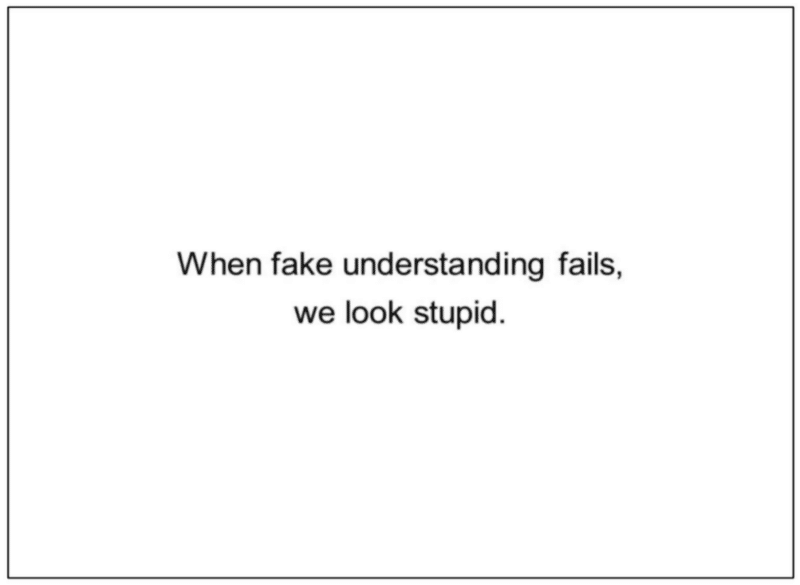
And in the final slide, Google sums up with this statement:
- “When fake understanding fails, we look stupid.”
The other four slides are entirely skippable, unless you’re interested in knowing that “Search is a great place to start understanding language. Success has implications far beyond Search.”
Link: Google presentation: Q4 Search All Hands (Dec. 8, 2016) (PDF)
So when you see Google claiming links aren’t a top 3 ranking factor, now you can hopefully start to better understand why. That isn’t to say links are unimportant or that user data is the entire reason – machine learning and natural language processing are other huge pieces, more on that in Bullet points for presentation to Sundar.
Google is looking at end users – how people interact with Search results. Not as individuals – but as a collective.
3. Ranking for Research
It’s unclear who created this presentation, but there are some very interesting findings in here.
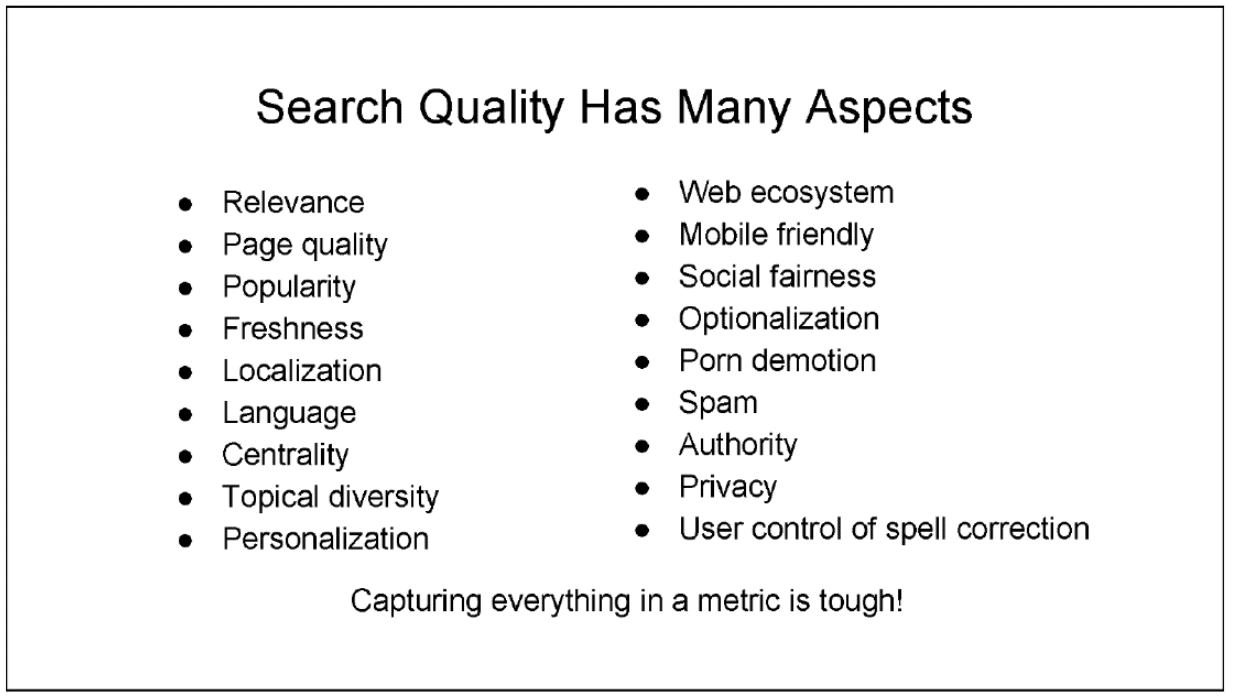
In this slide, Google talks about 18 aspects of search quality:
- Relevance
- Page quality
- Popularity
- Freshness
- Localization
- Language
- Centrality
- Topical diversity
- Personalization
- Web ecosystem
- Mobile friendly
- Social fairness
- Optionalization
- Porn demotion
- Spam
- Authority
- Privacy
- User control of spell correction
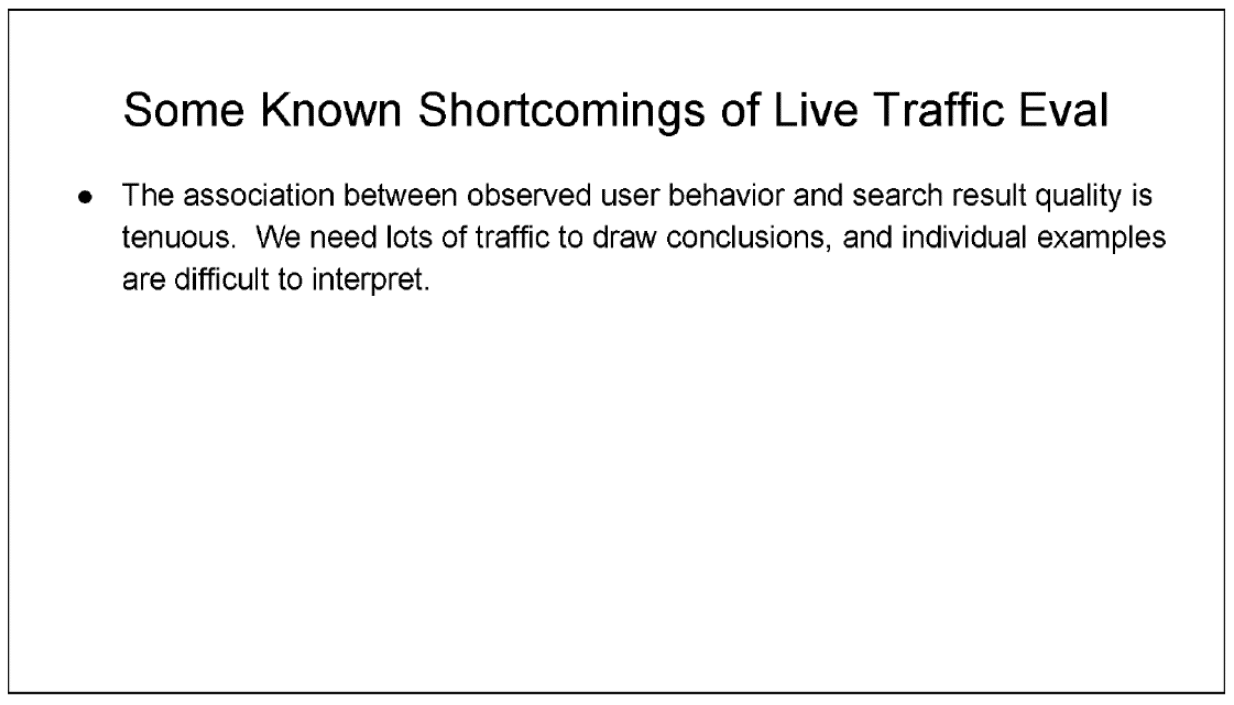
This slide discusses the shortcomings of live traffic evaluations. Yes, essentially Google is talking about clicks not being a good signal because they are hard to interpret.
- “The association between observed user behavior and search result quality is tenuous. We need lots of traffic to draw conclusions, and individual examples are difficult to interpret.”

Finally, this slide provides a different illustration of how Google Search result ranking works:
There are some other interesting tidbits in this presentation, though not necessarily tied to ranking. Of note:
- “Attempts to manipulate search results are continuous, sophisticated, and well-funded. Information about how search works should remain need-to-know.” (Slide 5)
- “Keep talk about how search works on a need-to-know basis. Everything we leak will be used against us by SEOs, patent trolls, competitors, etc.” (Slide 10)
- “Do not discuss the use of clicks in search, except on a need-to-know basis with people who understand not to talk about this topic externally. Google has a public position. It is debatable. But please don’t craft your own.” (Slide 11)
Link: Google presentation: Ranking for Research (November 16, 2018) (PDF)
4. Google is magical.
In this presentation, we learn how search really works.

This slide explains how search does not work. From the notes:
“We get a query. Various scoring systems emit data, we slap on a UX, and ship it to the user.
This is not false, just incomplete. So incomplete that a search engine built this way won’t work very well. No magic.”
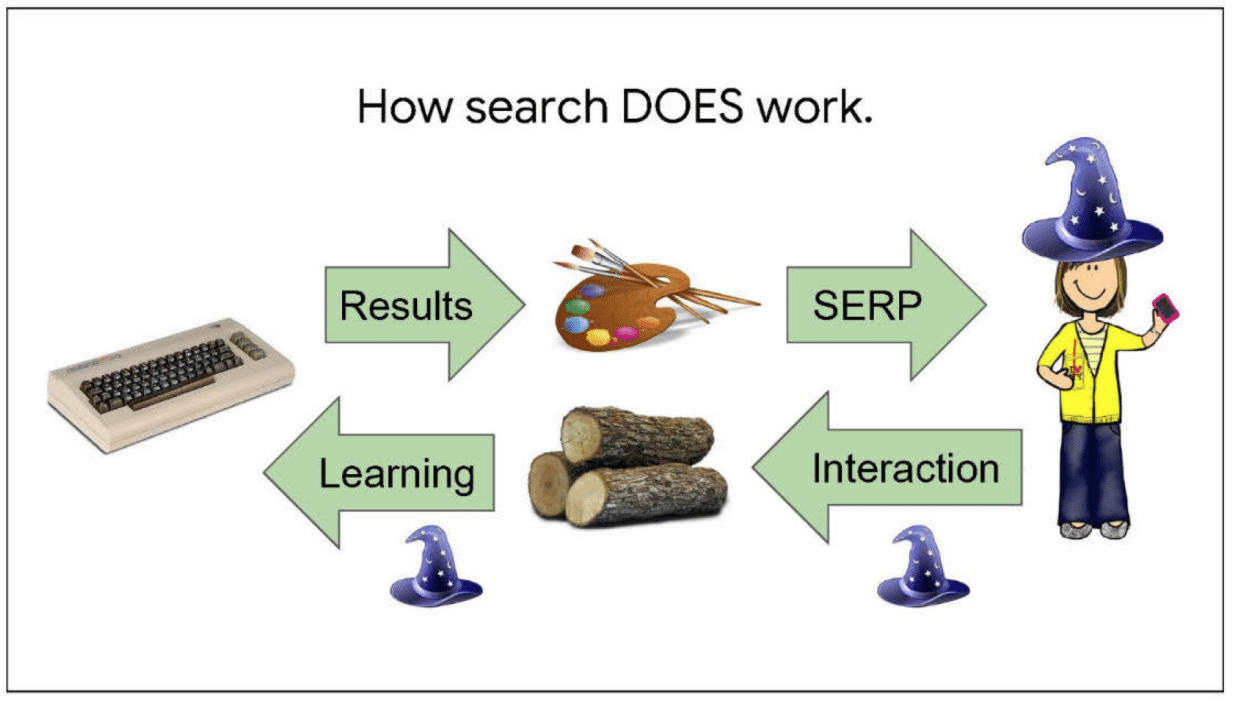
In this slide, we learn how search does work:
“The key is a second flow of information in the reverse direction.
As people interact with search, their actions teach us about the world.
For example, a click might tell us that an image was better than a web result. Or a long look like might mean a KP was interesting.
We log these actions, and then scoring teams extract both narrow and general patterns.”
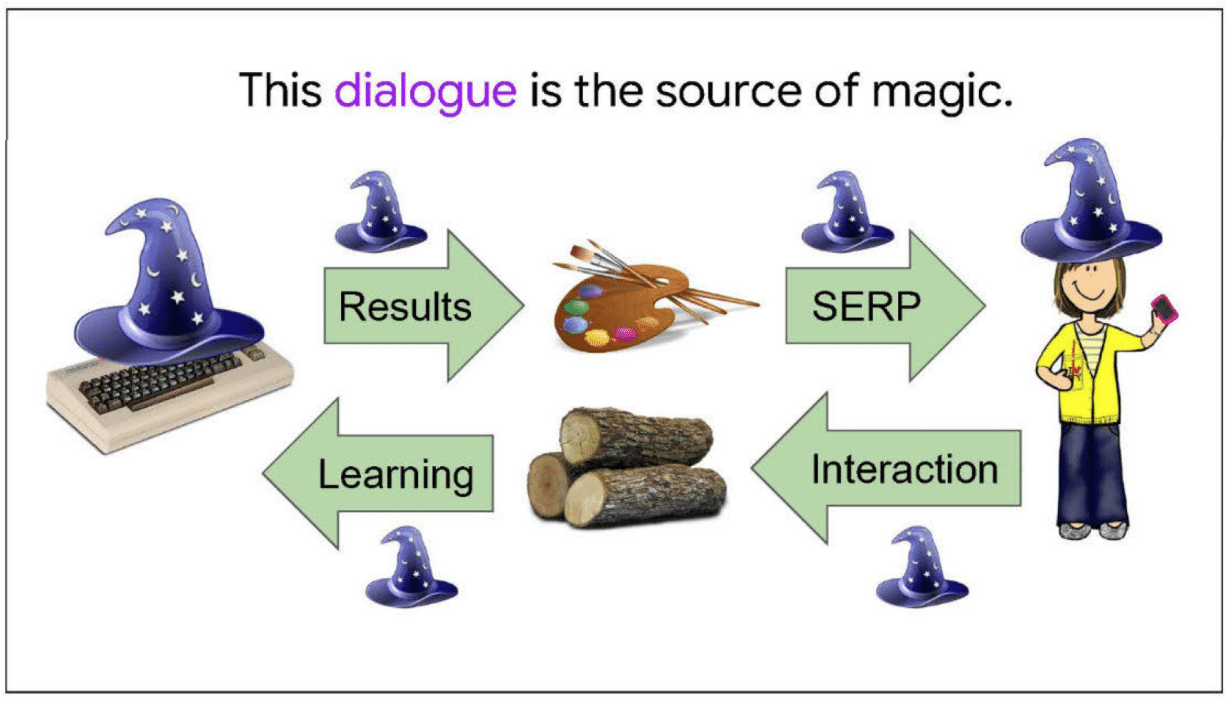
Next, we learn the source of Google’s “magic.” From the notes:
“The source of Google’s magic is this two-way dialogue with users.
With every query, we give a some knowledge, and get a little back. Then we give some more, and get a little more back.
These bits add up. After a few hundred billion rounds, we start lookin’ pretty smart!
This isn’t the only way we learn, but the most effective.”
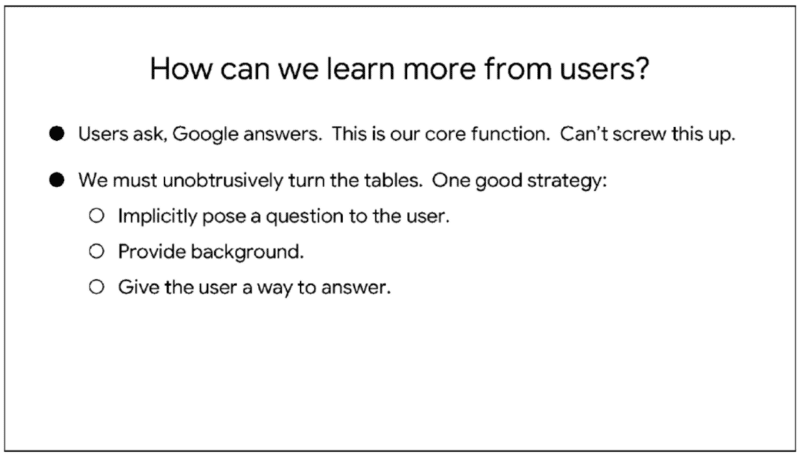
So how does Google learn more from users? From the notes:
“On the surface, users ask questions and Google answers. That’s our basic business. We can’t screw that up. But we have to quietly turn the tables. One way is to:
- ask the user a question implicitly
- provide necessary background information
- give the user some way to tell us the answer”
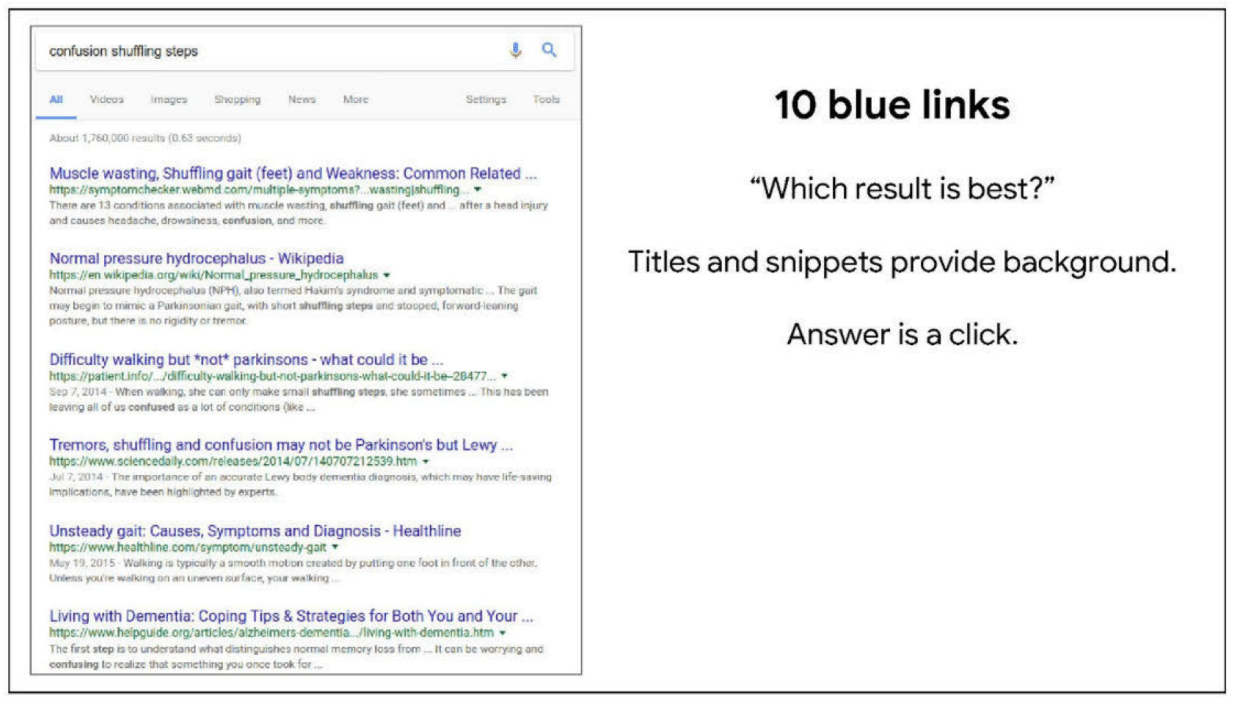
This slide looks at the 10 blue links.
“For example, the ten blue links implicitly pose the question, ‘Which result is best?’
Result previews give background. And the answer is a click.
This is a great UX for learning. For years, Google was mocked for great search results in a bland UI.
But this bland UI made the search results great.”

This slide is on Image Search:
“Image search poses a similar question– which do you like best? Thumbnails provide background information, and the user’s answer is logged as a hover, click, or further interaction.”
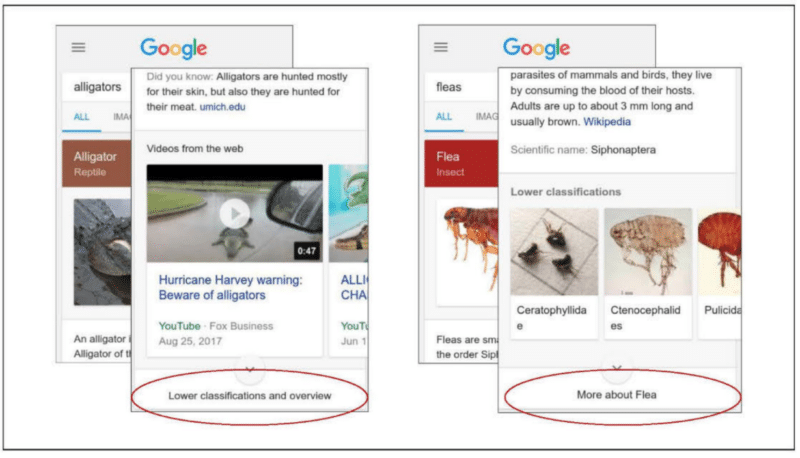
Finally, knowledge cards:
“For example, some knowledge cards need an extra tap to fully open.
On the left, an extra tap means the user wants lower classifications and an overview.
On the right, the user has too little background information.
More what? How is tapping here different from scrolling down? Users can’t make a good decision, so Taps and clicks are such distinctive events in logs; we should endow every one with meaning.”
Link: Google presentation: Google is magical. (October 30, 2017) (PDF)
5. Logging & Ranking
This presentation discusses the “critical role that logging plays” in ranking and search.
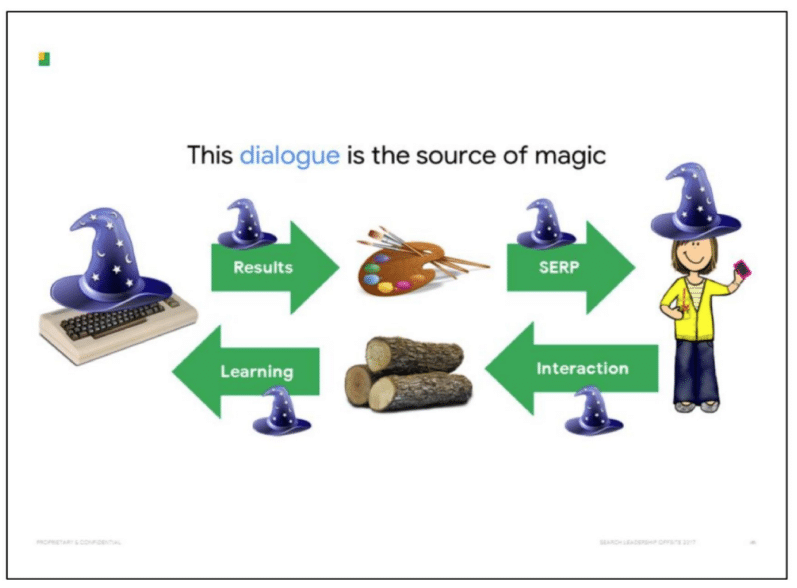
This familiar-looking slide revisits the two-way dialogue being the source of Google’s magic. As explained in the notes:
“Search is a bit like a potluck, where every person brings one dish of food to share. This a great, big spread of food that everyone can enjoy. But it only works because everyone contributes a little bit.
In a similar way, search is powered by a huge mass of knowledge. But it isn’t something we create.
Rather, everyone who comes to search contributes a little bit of knowledge to the system from which everyone can benefit.”

In this slide, Google discusses translating user behaviors. From the slide notes:
“The logs do not contain explicit value judgments– this was a good search results, this was a bad one.
So we have to some how translate the user behaviors that are logged into value judgments.
And the translation is really tricky, a problem that people have worked on pretty steadily for more than 15 years.
People work on it because value judgements are the foundation of Google search.
If we can squeeze a fraction of a bit more meaning out of a session, then we get like a billion times that the very next day.
The basic game is that you start with a small amount of ‘ground truth’ data that says this thing on the search page is good, this is bad, this is better than that.
Then you look at all the associated user behaviors, and say, “Ah, this is what a user does with a good thing! This is what a user does with a bad thing! This is how a user shows preference!’
Of course, people are different and erratic. So all we get is statistical correlations, nothing really reliable.
For example:
[REDACTED]
– If someone clicks on three search results, which one is bad? Well, likely ALL of them, because it is probably a hard query if they clicked 3 results. Challenge is to figure out which one is most promising.”
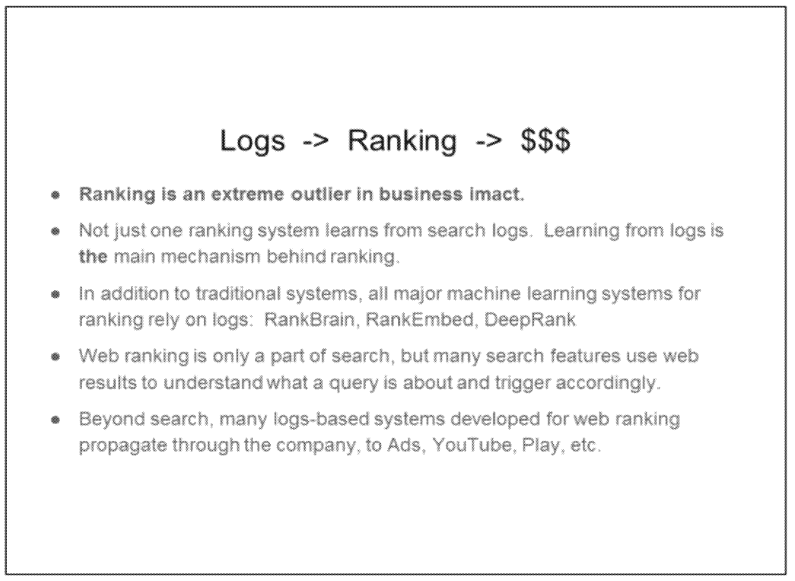
Finally, this slide discusses how logging supports ranking and Search. From the notes:
“… and here comes the part I warned you about. I’m selling something. I’m selling the idea of the logs term keeping the needs of the ranking team in mind. Pretty please with sugar on top.
But the basic reason is that the ranking team is really weird in one more way, and that is business impact.
As I mentioned, not one system, but a great many within ranking are built on logs.
This isn’t just traditional systems, like the one I showed you earlier, but also the most cutting-edge machine learning systems, many of which we’ve announced externally– RankBrain, RankEmbed, and DeepRank.
Web ranking is only a part of search, but many search features use web results to interpret the query and trigger accordingly.
So supporting ranking supports search as a whole.
But even beyond this, technologies developed in search spread out across the company to Ads, YouTube, Play, and elsewhere.
So– I’m not in finance– but grossly speaking, I think a huge amount of Google business is tied to the use of logs in ranking.”
Link: Google presentation: Logging & Ranking (May 8, 2020) (PDF)
6. Mobile vs. desktop ranking
This newsletter dove into the differences between desktop and mobile search ranking, user intents and user satisfaction – at a time when mobile traffic was starting to surpass desktop traffic on some days.
Google did a comparison of metrics, including:
- CTR
- Manual refinement
- Queries per task
- Query length (in char)
- Query lengths (in word)
- Abandonment
- Average Click Position
- Duplicates
Based on the findings, one of the recommendations was:
- “Separate mobile ranking signals or evaluation reflecting different intents. Mobile queries often have different intents, and we may need to incorporate additional or supplementary signals reflecting these intents into our ranking framework. As discussed earlier, it is desirable that these signals handle local-level breakdowns properly.
Link: Email from Google’s Web Ranking Team to Pandu Nayak – Subject: [Web Ranking Team] Aug 11 –Aug 15, 2014 was updated — Ranking Newsletter (August 16, 2014) (PDF)
7. Bullet points for presentation to Sundar
Nothing surprising in this document (it’s unclear who wrote it), but one interesting bullet on BERT and Search ranking:
- “Early experiments with BERT applied to several other areas in Search, including Web Ranking, suggest very significant improvements in understanding queries, documents and intents.”
- “While BERT is revolutionary, it is merely the beginning of a leap in Natural Language Understanding technologies.”
Link: Google document: Bullet points for presentation to Sundar (Sept. 17, 2019) (PDF)
The post 7 must-see Google Search ranking documents in antitrust trial exhibits appeared first on Search Engine Land.
Courtesy of Search Engine Land: News & Info About SEO, PPC, SEM, Search Engines & Search Marketing








 Source: