Archive for the ‘seo news’ Category
Tuesday, November 14th, 2023
Explaining keyword research to those unfamiliar with SEO to gain support can be challenging.
Stakeholders often find it difficult to grasp the value of SEO, and at the same time, SEOs struggle to communicate the benefits and contributions effectively.
Fortunately, there are strategies available for SEOs to bridge this gap by employing their keyword research more strategically and effectively.
This article explores a visual approach for effectively communicating keyword research insights with stakeholders outside the search industry.
Leveraging unique visuals
Non-SEO-savvy stakeholders may not know much about search keywords but likely understand general marketing concepts like the marketing funnel and audience segments.
You can use this understanding to explore keywords more deeply and create strategies that align with these broader marketing terms.
One critical yet frequently overlooked element here is search intent.
You can group keywords based on intent and create a bubble chart to visually represent the position of each keyword cluster within the marketing funnel, like the chart below.
The chart clearly shows the content needed to help searchers at each level of the marketing funnel. Overall, it reveals the necessary content for different stages of the funnel.
But it’s not just limited to that; you can also narrow it down to specific topics or subsets of keywords. This allows for a detailed analysis and a better understanding of the specific types of content needed for each topic.
Taking the above keyword intent visualization and drilling into the “all-weather tires” cluster shows that “Awareness” content should be produced to target these keyword clusters. Unlocking this insight means SEOs can match the searchers’ expectations.
This visualization shows how certain keywords help users move through the marketing funnel, and there are more actions you can take to optimize it further.
Companies often use audience personas or segments in broader marketing efforts. Integrating this knowledge is vital for effective communication, especially with stakeholders focused on paid search, as they commonly associate keywords with audience segments.
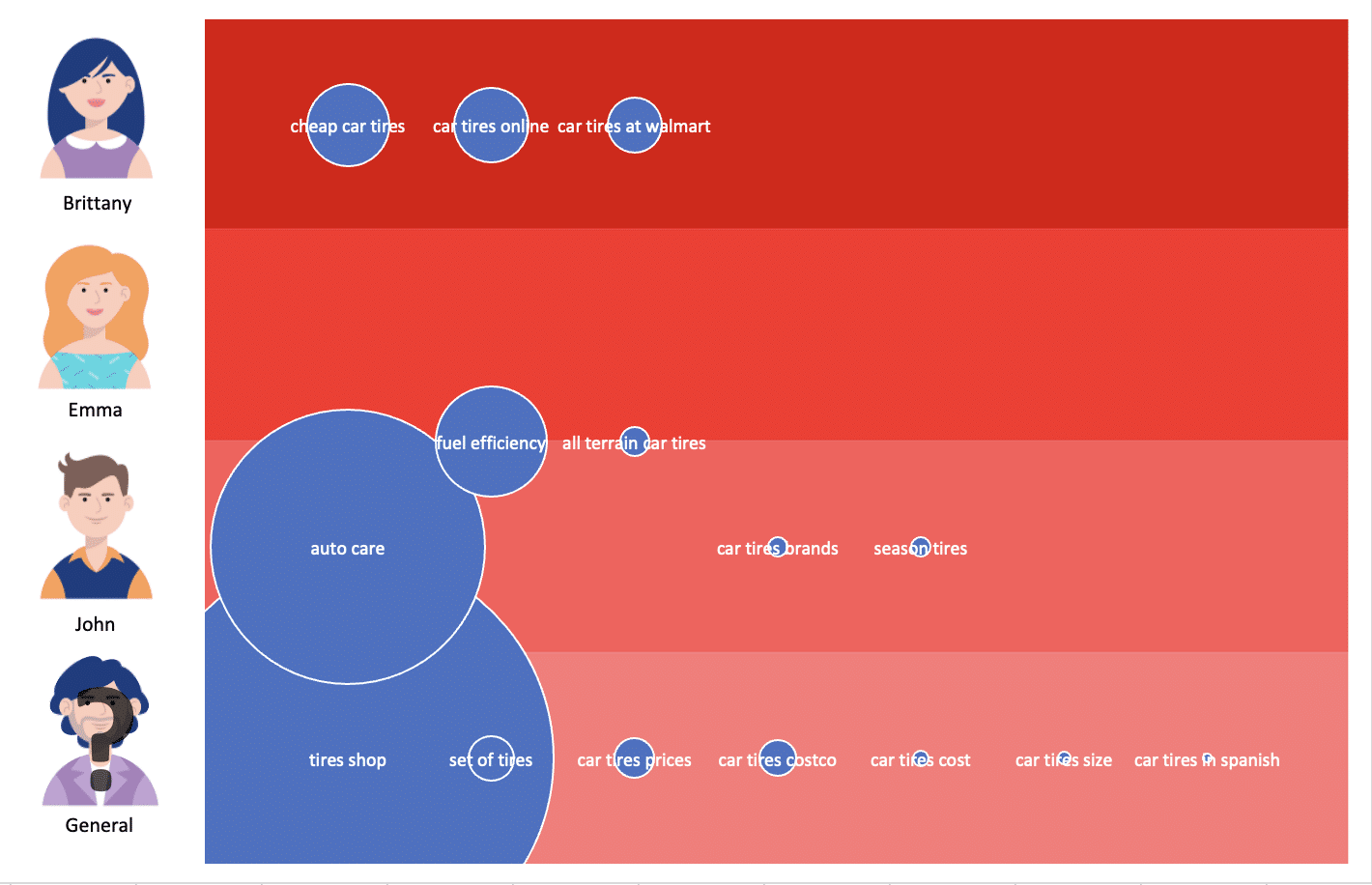
Likewise, by utilizing ChatGPT, SEOs can categorize keyword topics based on audience personas, resulting in a visual representation like the one below:
This chart displays the size of various topics and indicates which audience segments are most likely to engage with content related to those topics.
With these visuals, you are in a stronger position to develop more effective content strategies and enhance your communication with stakeholders outside the search domain.
Get the daily newsletter search marketers rely on.
<input type=”hidden” name=”utmMedium” value=”“>
<input type=”hidden” name=”utmCampaign” value=”“>
<input type=”hidden” name=”utmSource” value=”“>
<input type=”hidden” name=”utmContent” value=”“>
<input type=”hidden” name=”pageLink” value=”“>
<input type=”hidden” name=”ipAddress” value=”“>
How to build the visuals
The effectiveness of these two visuals is undeniable, though they require additional effort to develop.
Keyword intent cluster
SEOs can use various approaches to build keyword intent clusters, but I’ll outline the most straightforward and effective method.
To begin, we need more than just keyword data and search volume to craft this visual. Specifically, it will require top 10 organic listings and a keyword intent score.
A keyword intent score can be calculated through various means. I suggest you use a tool you can access that supplies keyword intent.
When creating my own visuals, I used the DataForSEO API and assigned a score for each SERP feature that appeared on a SERP, then calculated the average score for each keyword.
This can also be accomplished in a tool like Semrush by transforming the categorical keyword intents into a numerical scale.
When assigning a value for each intent, select a minimum value representing transactional intent and a maximum value representing informational intent. A blended intent can also be calculated by assigning a value between two intents.
We can create the intent clusters now that a numerical value has been established for keyword intent.
By gathering page 1 organic listings data, we leverage Google’s intelligence to create more accurate and relevant keyword clusters.
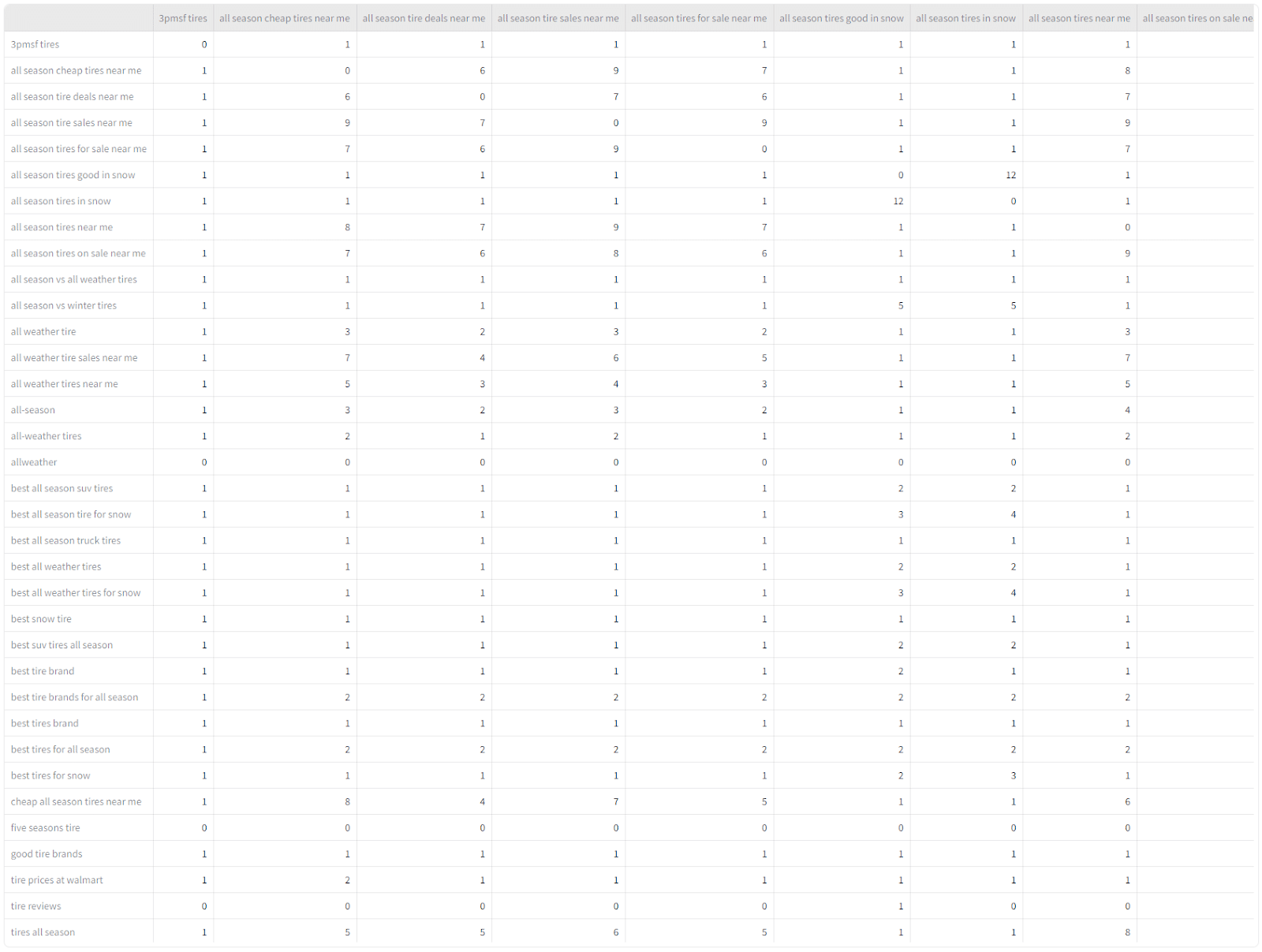
To create the clusters, compile the organic listings for a keyword into a list and compare it to another keyword list, keeping track of the number of similar pages appearing in each list.
Upon completing this analysis, we will be in a position to construct a similarity matrix for all the keywords, identical to the example provided below:
Next, create the clusters and aggregate all of their associated metrics. Through my experimentation, I discovered that establishing a threshold at 4 or 5 similar URLs resulted in the most cohesive clustering.
Once all keyword clusters have been aggregated along with their metrics, it’s time to assemble a bubble chart. The data at this point should closely align with the below:
Each cluster in the bubble chart should ideally start with a value of 0 on the x-axis unless you are in the process of fine-tuning the visual to reduce bubble overlap.
I advise initializing all clusters at 0 and making necessary adjustments to the data once the bubble chart has been generated.
This fine-tuning step is crucial. Without it, the visual can become unclear and difficult to comprehend. To see the impact of this step, compare the examples below.
After fine-tuning, the visual is complete and ready to help communicate the value of specific keywords to stakeholders outside the search domain.
Associate topic clusters with audience personas
If you can access your company’s audience personas or segments, use this information to better align with stakeholders.
Integrating topic clusters with audience personas offers insight into the content that targets each audience within a business. These insights enable SEOs to identify content gaps and potential areas for improvement, equipping them with the necessary data to communicate more strategically.
A quick analysis of the chart below clearly reveals that the business is not effectively engaging with “Emma.” Consequently, when determining the direction for future content creation, they might utilize this insight as a valid reason to devise content that resonates more with “Emma.”
Similar to the keyword intent cluster visualization, there are various ways to create this chart. I’ll share the simplest method I’ve found.
Start by giving ChatGPT your audience personas and asking it to summarize each. This helps make sure that ChatGPT really understands them.
Here is an example prompt:
“I have a list of topics that I would like you to categorize based on the audience personas that I will provide and your knowledge of each topic. Before starting, write a paragraph about each persona to ensure you understand them well. Then I will give you the list of topics to categorize. After categorizing the keywords, please return them to me in a table that I can copy and paste into Excel.
Persona 1:
NAME: INSERT PERSONA NAME
DESCRIPTION: INSERT PERSONA DESCRIPTION - RECOMMENDED >100 WORDS
DEMOGRAPHICS:
AGE: …
GENDER: …
LOCATION: …
EDUCATION: …
INCOME: …
FAMILY LIFE: …
STRUGGLES: INSERT LIST OF STRUGGLES/PAIN POINTS
HOBBIES: INSERT LIST OF HOBBIES
VALUES: LIST PERSONAL VALUES OF THIS PERSONA
Persona 2:
[INSERT PERSONA KNOWLEDGE]
Persona 3:
[INSERT PERSONA KNOWLEDGE].”
When creating this prompt, provide ChatGPT with comprehensive details about each persona. This helps it establish the best understanding of the audience personas possible, which can be verified through the summaries.
After confirming that it has an accurate grasp of the personas, proceed by uploading the list of keyword topics that require categorization.
If all goes well, ChatGPT should generate a table for you that is separated by commas and resembles the following structure:
Next, simply transfer the output to Excel and utilize the “Text to Columns” feature to split the data effectively.
Once the data has been collected, convert the audiences’ names into values for the bubble chart. So, this is to say that Brittany will now be represented by the number four on the y-axis.
For topics assigned to two or more audiences, take the average of the audience number.
An example is the topic “fuel efficiency,” which was categorized for John and Emma, so it was assigned 2.5 as an audience value.
After gathering all necessary data, transform the audience names into numerical values for the bubble chart.
To illustrate, Brittany will be represented as the number four on the y-axis. For topics assigned to two or more audiences, calculate the mean of the audience numbers.
Take, for instance, the topic “fuel efficiency,” attributed to both John and Emma, resulting in an assigned audience value of 2.5.
Subsequently, count the number of subjects assigned to each audience and allocate a numerical value to each topic, indicating its position on the x-axis. The data should closely resemble the example below:
After gathering all necessary data, SEOs can create a bubble graph using Excel.
They can enhance the graph by incorporating additional visual elements, such as background images or gradients, to delineate segments for each target audience clearly.
Visualizing complex SEO concepts for effective stakeholder communication
Bridging the gap between SEO concepts and stakeholder understanding is challenging but crucial.
With keyword intent clusters and audience persona charts, SEOs have a streamlined and visual way to convey complex concepts.
Using the visual aids discussed in this article, you can approach stakeholders with more strategic content insights that align with familiar concepts.
The post Conveying keyword insights to non-SEOs: A visual approach appeared first on Search Engine Land.
Courtesy of Search Engine Land: News & Info About SEO, PPC, SEM, Search Engines & Search Marketing
Tuesday, November 14th, 2023
SEO and PPC professionals are all in the business of driving more traffic to websites.
But are you getting the most out of the visitors you already have?
This is a critical question. And, often, the answer is “no.”
A solid search marketing strategy requires a customer experience plan as its core. Even if customer experience isn’t your direct responsibility, it should be on your radar.
Traffic alone is a vanity metric. What truly matters is how that traffic navigates the marketing funnel and converts into valuable customers.
So, where do you begin with enhancing customer experience?
The starting point is ensuring that your users land on the right page for their intent. Correctly mapping user intent to the most fitting page is critical.
This article introduces a variety of behavioral nudges and ideas to help you extract more value from the traffic your website is already attracting.
Understanding conversion rate optimization
Before delving into these behavioral nudges, let’s quickly set the stage for those less familiar with conversion rate optimization (CRO).
In essence, CRO is a process where hypotheses are crafted to make website changes to boost conversions. These actions are vital to your business, such as sales or engagement with content.
Once a hypothesis is formed, you can use tools like VWO or Zoho’s PageSense to create and test new versions of landing pages. No coding skills are needed.
The tool then serves the current and test versions of the page to a set percentage of the traffic and monitors the results. The test duration depends on your site traffic and how fast the tool can get reliable results.
When the test ends, if your idea works, implement it live. If not, tweak and retest.
Testing this way eliminates gut feelings and biases, letting you confidently report what works for your audience.
The challenge? Figuring out what to test.
5 behavioral nudges to elevate your traffic conversions
Below are five behavioral nudges for testing and driving more conversions from your traffic.
1. Social proof and herding
Social proof is the concept that the actions and beliefs of others influence people. Herding is the tendency of humans to follow what others are doing.
Think about your website and the customer journey toward a conversion – how could you ensure these nudges are included to entice your user to complete the action?
When it comes to social proof, users are looking for signals of trust from others.
Brand logos and testimonials are nice, but how can you ensure this feels as robust as possible?
Well-known third-party integration review tools are great because they are independent and recognized, helping users feel they can trust the review’s authenticity.
Herding might come to life on your website in the form of live messaging such as:
- “20 other people bought this item today” (for ecommerce).
- “Join the thousands of leaders, who were just like you, that have increased their business profit from our training” (for B2B).
You may already have some of these features on your website, but do they stand out enough? Are they in the right position to influence the user in deciding whether to convert?
Some of these changes are as simple as wording changes. A CRO test is often simple and limited to one change. If you change too much, it is impossible to know what worked.
Dig deeper: Unleashing the potential of Google reviews for local SEO
2. Cognitive load
Cognitive load relates to our working memory and the amount of information we can hold at one moment.
Which areas in the conversion path require the most cognitive load for your user?
- On an ecommerce website, this is often the checkout.
- For other business types, this could be a lengthy form or application that needs to be completed.
Is there an opportunity to chunk the process steps up instead of having one long form, making it multiple simpler steps?
Can the user save and come back? Saving your progress is especially important in processes where the user needs to find information they might not know off the top of their head.
On the flip side, does your website process have too many steps?
We recently tested simplifying a three-step personalization process on a client’s website to a two-step process, and the results were phenomenal, with 100% certainty and a material spike in revenue.
You may have heard of “cognitive strain,” which differs from cognitive load.
Cognitive strain relates to the person having to decode what they are looking at, like trying to decipher a picture or content, or doing mental arithmetic to assess something.
Used at the right point in a journey, this type of cognitive action can be extremely powerful.
When we make people think or, ideally, make them feel something, they are more likely to remember it.
This is true of positive and negative feelings, so for any poor user experience, cognitive strain can create a memory you wish the user to forget.
Dig deeper: How to avoid decision fatigue in SEO
3. Scarcity and FOMO
Scarcity is when something is rare and exclusive, such as only a certain amount of tickets, spaces or products available.
Fear of missing out (FOMO) is the urgency factor, which is time-sensitive or about to expire.
These nudges can be used on their own or together.
Most of us have probably been there, in a queue online, trying to buy tickets for a concert or an event that you know only has limited numbers.
You’ve probably also experienced FOMO in a moment like this when a friend messages telling you they’ve been successful and you know it is only a matter of time before the event is sold out.
Now, this is not something we can all replicate in the same way a famous artist or show can. But we can take learnings and think about how we frame our products and or services.
I recently spotted a well-respected business trainer offering a one-time-only masterclass course with only 10 spaces available – an exclusive opportunity. The scarcity was real, and she sold out within hours.
The FOMO of a time-limited sale is true, although this is easily eroded when some websites are always on sale!
Testing where your messaging sits to highlight the urgency, showing a live countdown or percentage complete bar.
There are many ways to grab attention; don’t assume you’ve already nailed it. Test it to see what has the best effect.
Get the daily newsletter search marketers rely on.
<input type=”hidden” name=”utmMedium” value=”“>
<input type=”hidden” name=”utmCampaign” value=”“>
<input type=”hidden” name=”utmSource” value=”“>
<input type=”hidden” name=”utmContent” value=”“>
<input type=”hidden” name=”pageLink” value=”“>
<input type=”hidden” name=”ipAddress” value=”“>
4. Loss aversion
Psychologically, the pain of losing something can be twice as impactful as the pleasure of gaining something.
If your website offers a free trial, a sample product or some way of getting your product or service into the customer’s hands, they will be less likely to want to let go.
As humans, our natural instinct is to avoid losing things. This instinct comes from our evolutionary history, where early humans focused on minimizing the risk of extinction.
This mindset is deeply ingrained in us. So, when we’re concerned that something might go wrong or we might lose money, we tend to avoid or delay dealing with it.
Most businesses have options to avoid losses and the resultant unhappy customers, such as free returns or money-back guarantees.
Messaging like this can be extremely important to help a user feel confident to decide, so it needs to be prominent.
Testing different phrasing and positioning on the page to display this information and even additional links to more detailed explanations can be really helpful in building trust.
5. Anchoring
Anchoring involves presenting a reference point before sharing your brand’s price, timescale or unique information.
Examples include:
- Quoting a competitor’s price and then showing their cheaper price.
- Saying “most businesses take 12 weeks to deliver, we deliver in four weeks.”
- Highlighting that “other manufacturers use X, we use Y because…”
When you present an anchor, you control the reference point. Otherwise, customers rely on their own knowledge for comparisons. Their reference point may be assumed or well-researched, making feedback uncertain.
Playing with anchoring is a great tool to drive conversions and can work for B2C and B2B. As a concept, this needs to be true to the brand.
Uncovering your anchors may take time if you are not using them already. But once you have them, this is a copy and design play from a testing perspective.
Some anchors have transcended brands, such as your mattress should be changed every eight years or engagement rings should cost three months of your salary.
Could your brand or product have an anchor like this that may help increase pricing?
Other brands offer 100-day trials or even 365-day returns. Making these numbers stand out will help the customer see the value your brand brings.
For a charity, the anchor could work in two ways.
- Firstly, the Starbucks effect of having three suggested donation amounts, the most expensive being the anchor, will likely result in the selected middle amount.
- But also testing text to explain what that donation can do for the charity, “$10 will buy…”
This framing may not always resonate with your audience, so test it.
Turning clicks into conversions with behavioral strategies
We’ve discussed five strategies you can use on your website to see if they boost conversions.
Making the most of your current website traffic is a great way to get support for your search strategy.
If you can show that your efforts are working and there’s potential for even better results with SEO or paid search, it’s tough for a budget decision-maker in a growing business to reject the idea.
Begin testing today, and remember, even small changes can have a big impact.
The post Boosting search conversions: 5 behavioral strategies to test appeared first on Search Engine Land.
Courtesy of Search Engine Land: News & Info About SEO, PPC, SEM, Search Engines & Search Marketing
Tuesday, November 14th, 2023
As we encounter advanced technologies like ChatGPT and BERT daily, it’s intriguing to delve into the core technology driving them – transformers.
This article aims to simplify transformers, explaining what they are, how they function, why they matter, and how you can incorporate this machine learning approach into your marketing efforts.
While other guides on transformers exist, this article focuses on providing a straightforward summary of the technology and highlighting its revolutionary impact.
Understanding transformers and natural language processing (NLP)
Attention has been one of the most important elements of natural language processing systems. This sentence alone is quite a mouthful, so let’s unpack it.
Early neural networks for natural language problems used an encoder RNN (recurrent neural network).
The results are sent to a decoder RNN – the so-called “sequence to sequence” model, which would encode each part of an input (turning that input into numbers) and then decode and turn that into an output.
The last part of the encoding (i.e., the last “hidden state”) was the context passed along to the decoder.
In simple terms, the encoder would put together and create a “context” state from all of the encoded parts of the input and transfer that to the decoder, which would pull apart the parts of the context and decode them.
Throughout processing, the RNNs would have to update the hidden states based on the inputs and previous inputs. This was quite computationally complex and could be rather inefficient.
Models couldn’t handle long contexts – and while this is an issue to this day, previously, the text length was even more obvious. The introduction of “attention” allowed the model to pay attention to only the parts of the input it deemed relevant.
Attention unlocks efficiency
The pivotal paper “Attention is All You Need,” introduced the transformer architecture.
This model abandons the recurrence mechanism used in RNNs and instead processes input data in parallel, significantly improving efficiency.
Like previous NLP models, it consists of an encoder and a decoder, each comprising multiple layers.
However, with transformers, each layer has multi-head self-attention mechanisms and fully connected feed-forward networks.
The encoder’s self-attention mechanism helps the model weigh the importance of each word in a sentence when understanding its meaning.
Pretend the transformer model is a monster:
The “multi-head self-attention mechanism” is like having multiple sets of eyes that simultaneously focus on different words and their connections to understand the sentence’s full context better.
The “fully connected feed-forward networks” are a series of filters that help refine and clarify each word’s meaning after considering the insights from the attention mechanism.
In the decoder, the attention mechanism assists in focusing on relevant parts of the input sequence and the previously generated output, which is crucial for producing coherent and contextually relevant translations or text generations.
The transformer’s encoder doesn’t just send a final step of encoding to the decoder; it transmits all hidden states and encodings.
This rich information allows the decoder to apply attention more effectively. It evaluates associations between these states, assigning and amplifying scores crucial in each decoding step.
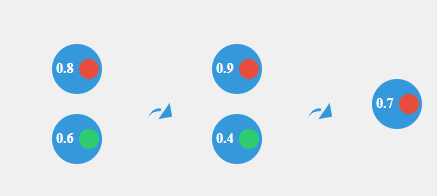
Attention scores in transformers are calculated using a set of queries, keys and values. Each word in the input sequence is converted into these three vectors.
The attention score is computed using a query vector and calculating its dot product with all key vectors.
These scores determine how much focus, or “attention,” each word should have on other words. The scores are then scaled down and passed through a softmax function to get a distribution that sums to one.
To balance these attention scores, transformers employ the softmax function, which normalizes these scores to “between zero and one in the positive.” This ensures equitable distribution of attention across words in a sentence.
Instead of examining words individually, the transformer model processes multiple words simultaneously, making it faster and more intelligent.
If you think about how much of a breakthrough BERT was for search, you can see that the enthusiasm came from BERT being bidirectional and better at context.
In language tasks, understanding the order of words is crucial.
The transformer model accounts for this by adding special information called positional encoding to each word’s representation. It’s like placing markers on words to inform the model about their positions in the sentence.
During training, the model compares its translations with correct translations. If they don’t align, it refines its settings to approach the correct results. These are called “loss functions.”
When working with text, the model can select words step by step. It can either opt for the best word each time (greedy decoding) or consider multiple options (beam search) to find the best overall translation.
In transformers, each layer is capable of learning different aspects of the data.
Typically, the lower layers of the model capture more syntactic aspects of language, such as grammar and word order, because they are closer to the original input text.
As you move up to higher layers, the model captures more abstract and semantic information, such as the meaning of phrases or sentences and their relationships within the text.
This hierarchical learning allows transformers to understand both the structure and meaning of the language, contributing to their effectiveness in various NLP tasks.
What is training vs. fine-tuning?
Training the transformer involves exposing it to numerous translated sentences and adjusting its internal settings (weights) to produce better translations. This process is akin to teaching the model to be a proficient translator by showing many examples of accurate translations.
During training, the program compares its translations with correct translations, allowing it to correct its mistakes and improve its performance. This step can be considered a teacher correcting a student’s errors to facilitate improvement.
The difference between a model’s training set and post-deployment learning is significant. Initially, models learn patterns, language, and tasks from a fixed training set, which is a pre-compiled and vetted dataset.
After deployment, some models can continue to learn from new data they’re exposed to, but this isn’t an automatic improvement – it requires careful management to ensure the new data is helpful and not harmful or biased.
Transformers vs. RNNs
Transformers differ from recurrent neural networks (RNNs) in that they handle sequences in parallel and use attention mechanisms to weigh the importance of different parts of the input data, making them more efficient and effective for certain tasks.
Transformers are currently considered the best in NLP due to their effectiveness at capturing language context over long sequences, enabling more accurate language understanding and generation.
They are often seen as better than a long short-term memory (LSTM) network (a type of RNN) because they are faster to train and can handle longer sequences more effectively due to their parallel processing and attention mechanisms.
Transformers are used instead of RNNs for tasks where context and the relationship between elements in sequences are paramount.
The parallel processing nature of transformers enables simultaneous computation of attention for all sequence elements. This reduces training time and allows models to scale effectively with larger datasets and model sizes, accommodating the increasing availability of data and computational resources.
Transformers have a versatile architecture that can be adapted beyond NLP. Transformers have expanded into computer vision through vision transformers (ViTs), which treat patches of images as sequences, similar to words in a sentence.
This allows ViT to apply self-attention mechanisms to capture complex relationships between different parts of an image, leading to state-of-the-art performance in image classification tasks.
Get the daily newsletter search marketers rely on.
<input type=”hidden” name=”utmMedium” value=”“>
<input type=”hidden” name=”utmCampaign” value=”“>
<input type=”hidden” name=”utmSource” value=”“>
<input type=”hidden” name=”utmContent” value=”“>
<input type=”hidden” name=”pageLink” value=”“>
<input type=”hidden” name=”ipAddress” value=”“>
About the models
BERT
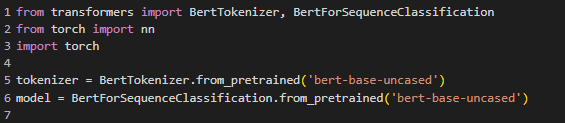
BERT (bidirectional encoder representations from transformers) employs the transformer’s encoder mechanism to understand the context around each word in a sentence.
Unlike GPT, BERT looks at the context from both directions (bidirectionally), which helps it understand a word’s intended meaning based on the words that come before and after it.
This is particularly useful for tasks where understanding the context is crucial, such as sentiment analysis or question answering.
BART
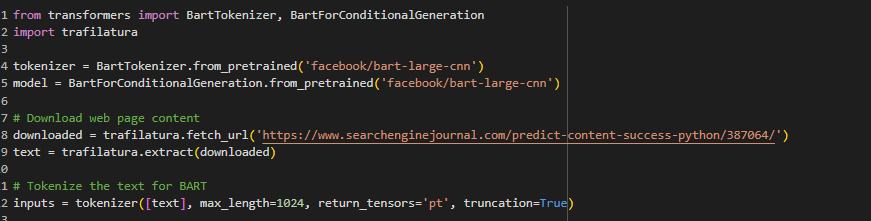
Bidirectional and auto-regressive transformer (BART) combines BERT’s bidirectional encoding capability and the sequential decoding ability of GPT. It is particularly useful for tasks involving understanding and generating text, such as summarization.
BART first corrupts text with an arbitrary noising function and then learns to reconstruct the original text, which helps it to capture the essence of what the text is about and generate concise summaries.
GPT
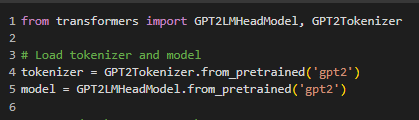
The generative pre-trained transformers (GPT) model uses the transformer’s decoder mechanism to predict the next word in a sequence, making it useful for generating relevant text.
GPT’s architecture allows it to generate not just plausible next words but entire passages and documents that can be contextually coherent over long stretches of text.
This has been the game-changer in machine learning circles, as more recent massive GPT models can mimic people pretty well.
ChatGPT
ChatGPT, like GPT, is a transformer model specifically designed to handle conversational contexts. It generates responses in a dialogue format, simulating a human-like conversation based on the input it receives.
Breaking down transformers: The key to efficient language processing
When explaining the capabilities of transformer technology to clients, it’s crucial to set realistic expectations.
While transformers have revolutionized NLP with their ability to understand and generate human-like text, they are not a magic data tree that can replace entire departments or execute tasks flawlessly, as depicted in idealized scenarios.
Dig deeper: How relying on LLMs can lead to SEO disaster
Transformers like BERT and GPT are powerful for specific applications. However, their performance relies heavily on the data quality they were trained on and ongoing fine-tuning.
RAG (retrieval-augmented generation) can be a more dynamic approach where the model retrieves information from a database to generate responses instead of static fine-tuning on a fixed dataset.
But this isn’t the fix for all issues with transformers.
Frequently asked questions
Do models like GPT generate topics? Where does the corpus come from?
Models like GPT don’t self-generate topics; they generate text based on prompts given to them. They can continue a given topic or switch topics based on the input they receive.
In reinforcement learning from human feedback (RLHF), who provides the feedback, and what form does it take?
In RLHF, the feedback is provided by human trainers who rate or correct the model’s outputs. This feedback shapes the model’s future responses to align more closely with human expectations.
Can transformers handle long-range dependencies in text, and if so, how?
Transformers can handle long-range dependencies in text through their self-attention mechanism, which allows each position in a sequence to attend to all other positions within the same sequence, both past and future tokens.
Unlike RNNs or LSTMs, which process data sequentially and may lose information over long distances, transformers compute attention scores in parallel across all tokens, making them adept at capturing relationships between distant parts of the text.
How do transformers manage context from past and future input in tasks like translation?
In tasks like translation, transformers manage context from past and future input using an encoder-decoder structure.
- The encoder processes the entire input sequence, creating a set of representations that include contextual information from the entire sequence.
- The decoder then generates the output sequence one token at a time, using both the encoder’s representations and the previously generated tokens to inform the context, allowing it to consider information from both directions.
How does BERT learn to understand the context of words within sentences?
BERT learns to understand the context of words within sentences through its pre-training on two tasks: masked language model (MLM) and next sentence prediction (NSP).
- In MLM, some percentage of the input tokens are randomly masked, and the model’s objective is to predict the original value of the masked words based on the context provided by the other non-masked words in the sequence. This task forces BERT to develop a deep understanding of sentence structure and word relationships.
- In NSP, the model is given pairs of sentences and must predict if the second sentence is the subsequent sentence in the original document. This task teaches BERT to understand the relationship between consecutive sentences, enhancing contextual awareness. Through these pre-training tasks, BERT captures the nuances of language, enabling it to understand context at both the word and sentence levels.
What are marketing applications for machine learning and transformers?
- Content generation: They can create content, aiding in content marketing strategies.
- Keyword analysis: Transformers can be employed to understand the context around keywords, helping to optimize web content for search engines.
- Sentiment analysis: Analyzing customer feedback and online mentions to inform brand strategy and content tone.
- Market research: Processing large sets of text data to identify trends and insights.
- Personalized recommendations: Creating personalized content recommendations for users on websites.
Dig deeper: What is generative AI and how does it work?
Key takeaways
- Transformers allow for parallelization of sequence processing, which significantly speeds up training compared to RNNs and LSTMs.
- The self-attention mechanism lets the model weigh the importance of each part of the input data differently, enabling it to capture context more effectively.
- They can manage relationships between words or subwords in a sequence, even if they are far apart, improving performance on many NLP tasks.
Interested in checking out transformers? Here’s a Google Colab notebook to get you started.
The post Transformer architecture: An SEO’s guide appeared first on Search Engine Land.
Courtesy of Search Engine Land: News & Info About SEO, PPC, SEM, Search Engines & Search Marketing
Tuesday, November 14th, 2023
Google’s Search Liaison, Danny Sullivan, has reportedly said that major changes are coming to Google’s search rankings in the future. This comes from a talk Sullivan gave at an event last Friday, where he was quoted as saying that these “major changes” are coming and that some may need to “buckle up.”
Danny Sullivan after this story was published replied on X saying, “I was talking about various things people have raised where they want to see our results improve, or where they think “sure, you fixed this but what about….” And that these things all correspond to improvements we have in the works. That there’s so much coming that I don’t want to say buckle up, because those who are making good, people-first content should be fine. But that said, there’s a lot of improvements on the way.”
Quotes. Here are the two sources I found quoting Sullivan as saying, “buckle-up there are major changes coming to search ranking signals…”
.@searchliaison says so much is coming to change ranking but doesn't want to say "buckle up" because if you are doing the right thing to help users then you should be ok. #brightonSEO
— Danielle Rohe (@d4ni_s) November 10, 2023
Here is some more clarification:
His exact words were…"There's so much coming on and i don't want to say buckle up because that makes you freak out because if you're doing good stuff, it's not going to be an issue to you."
— Andy Simpson  (@ndyjsimpson) November 13, 2023
“Major changes to search ranking” … coming to Google? I don’t know the exact words Danny did/didn’t say, but I’m confident he did say “if you’re doing the right things, you’ll be fine”. Or something like that. And if you ARE affected, you have work to do. https://t.co/KcFkvw8Vp3
— duane forrester (@DuaneForrester) November 13, 2023
But by saying he didn't want to say it he was saying it lol
— Danielle Rohe (@d4ni_s) November 13, 2023
I was talking about various things people have raised where they want to see our results improve, or where they think "sure, you fixed this but what about…." And that these things all correspond to improvements we have in the works. That there's so much coming that I don't want…
— Google SearchLiaison (@searchliaison) November 13, 2023
Busy year of algorithm updates. It has been a wild and very volatile year for SEOs with a ton of Google search ranking algorithm updates. Just this past few weeks we had the November 2023 reviews update, November 2023 core update, October 2023 spam update, and the October 2023 Core Update.
Why we care. Are there more big changes coming to Google’s core ranking algorithms in the near term? What will be so “major” that some of us need to “buckle up” and get ready for? How much will these future algorithm updates be even more impactful than the ones we are currently experiencing?
Or maybe these quotes were taken out of context and we don’t need to stress too much about these changes.
The post Google says major changes coming to search rankings appeared first on Search Engine Land.
Courtesy of Search Engine Land: News & Info About SEO, PPC, SEM, Search Engines & Search Marketing
Friday, November 10th, 2023
If you work in marketing or SEO, looking at data is essential to your day-to-day.
You’re probably analyzing performance to see the results of your efforts, assessing the impact of Google’s latest update, or working on a case study to share with the SEO community.
But when dealing with SEO data, things are not always what they seem. How you perceive data on a high level may not necessarily be valid once you dig deeper.
You need to be thorough, or your assumptions or insights that looked solid initially may be inaccurate.
Throughout my career, I’ve seen many pitfalls that marketing and SEO professionals can encounter when dealing with data. Below are five examples.
1. Misunderstanding the relationship between impressions and rankings
Understanding the relationship between impressions and website’s average ranking metric can save you plenty of time when you’re reporting on SEO performance.
Did your website impressions increase and the average ranking metric decrease? Some clients are fixated on this metric and will be very concerned that the average ranking metric is performing “poorly.” But is it?
Let’s take a simplistic example to explain the relation between impressions and average ranking.
Your website gets:
- One impression from keyword X ranking 2
- One impression from keyword Y ranking 1
- One impression from keyword Z ranking 3
In this case, the average ranking is (6/3 = 2).
Now your website starts to rank for a new keyword, and now you’re also getting:
- One impression for keyword A ranking 10th
That looks like an accomplishment, but at first glance, for the average ranking metric, not so much because your average ranking is now lower (16/4 = 4).
So, while the average ranking metric appears to have worsened, it doesn’t necessarily signify a negative outcome because your website is starting to rank for more keywords. Over time, the rankings for those keywords can further improve. Let alone that ranking 10th for a new keyword is a good place to be.
So, it is quite normal that your average ranking increases when impressions increase, too. It’s not a bad sign and does not mean you’re performing any less!
Tip: Think about the relationship between impressions and CTR. When impressions increase (a good thing), CTR may decrease.
Dig deeper: How to make better SEO reports for the C-suite
2. Comparing apples to oranges
It’s common to show SEO improvement by comparing performance month-over-month. While this is a reasonable approach, there are situations where such comparisons are insufficient and need to be accompanied by comparing the performance of the same month of the previous year. Here’s why.
If you compare January 2023 to December 2022, the results can be an improvement in traffic and performance. For many businesses, especially B2B, December (and sometimes November) are low seasonality months, and they face a natural dip in performance during those months.
Therefore, comparing January 2023 to December 2022 can commonly show performance improvement when actually there may not be any, it’s just a “return to normal.”
So saying something like “we’ve compared the Jan. 1 to April 30 period vs. the previous period, we’ve seen an increase in performance by 60%” may be inaccurate.
In this situation, you may want to:
- Compare Jan. 1 to April 30 of this year vs. last year.
- Use an automated tool/script that helps you consider the seasonality fluctuations.
Get the daily newsletter search marketers rely on.
<input type=”hidden” name=”utmMedium” value=”“>
<input type=”hidden” name=”utmCampaign” value=”“>
<input type=”hidden” name=”utmSource” value=”“>
<input type=”hidden” name=”utmContent” value=”“>
<input type=”hidden” name=”pageLink” value=”“>
<input type=”hidden” name=”ipAddress” value=”“>
3. Using vanity metrics
I get it. There’s plenty of pressure on SEOs to show results and improvement. However, this does not mean reporting on vanity metrics that don’t really matter.
For instance, presenting the quantity of internal or external links created as an “improvement” metric is an invalid approach to reporting SEO activities.
“X% improvement in external links” is not a sound statement.
Also, an increase in something does not necessarily mean “improvement.” More is not always more. Is an increase in keyword density of an article an “improvement,” or does it make it spammy?
Dig deeper: SEO KPIs to track and measure SEO success
4. Reporting migrations as an SEO win
Website migrations are a traditional SEO task, and having a successful migration project is an expectation, not a bonus. It’s common for SEOs to migrate domains/websites and report on the performance afterward.
Once a website is migrated/redirected to the main domain, many SEOs tend to make the mistake of considering the subsequent increase in traffic to the primary domain as a definitive SEO success.
It’s crucial to recognize that this increase is largely anticipated, given that numerous URLs and their associated traffic have been redirected to the main domain. Is this really a win?
Instead, report the percentage of traffic successfully transferred to the main domain. It may take time to settle, but showing how much of the original traffic was preserved is the real SEO win.
5. Failing to report SEO’s value and attribution
SEO is a complicated channel. Unlike PPC where you can have a clear action to ROI path and conversions are well attributed, in SEO, we sometimes need to dig deeper to show the real value the channel is bringing.
For example, in a previous role, the company ran very few PPC ads, and the website’s main/biggest traffic source was SEO.
At first glance, everything seems to be clear and straightforward. But when I started looking at data, I noticed a big percentage of traffic (and therefore conversions) was attributed to “direct traffic.” I got curious, so I drew a graph comparing direct and SEO traffic, it came out looking like this:
You can see how the SEO traffic directly impacts the direct traffic. They go hand in hand in that when SEO increases, direct traffic increases – and vice versa.
If this is the case for your business, it is worth mentioning in your monthly SEO reporting.
Another thing to check is the Attribution reports in GA4 under the Advertising section. You can then click on either Model comparison or Conversion paths. Both will give you insights into how the SEO channel contributes to or supports other channels’ performance. This is another thing worth reporting on.
Strive for accurate SEO data analysis and reporting
We must be thorough when looking at SEO data for auditing or reporting purposes.
Making conclusions based on the data you see first is inaccurate, might put you in a tight spot with your clients, and you can potentially miss out on SEO wins that go unnoticed.
Still, we want to balance being thorough and getting stuck in analysis paralysis. More data is not always a good thing. The best approach is to:
- Define the question you want to answer with data.
- Ensure it’s valid and valuable.
- Start your data journey from there.
Lastly, always double-check your numbers, assumptions and conclusions. Remember, there’s more to data than meets the eye!
The post Top 5 SEO data pitfalls to avoid for accurate analysis and reporting appeared first on Search Engine Land.
Courtesy of Search Engine Land: News & Info About SEO, PPC, SEM, Search Engines & Search Marketing
Friday, November 10th, 2023
Meta has rolled out a new feature that simplifies the conversion process for Amazon sellers.
Shoppers in the U.S. can now link their Facebook and Instagram accounts to Amazon, enabling them to buy products advertised in their feeds without having to leave the mobile apps.
Why we care. Maurice Rahmey, co-founder and co-CEO of Disruptive Digital, described the new feature as “the most significant ad product of the year.” Explaining why the rollout is such a big deal, he said on LinkedIn:
- “Better targeting and optimization: Meta will now be using information sent from Amazon and stores offering Buy with Prime to show consumer’s ads.”
- “Better conversion rates: Consumers will be able to check out more quickly on ads when they connect their account.”
- “Better ads creative personalization: Meta will tailor an ad’s messaging and product page based on whether a user is a Prime member or not and alter additional information such as real-time pricing and shipping estimates.”
How it works. Meta users can now click on ads in Facebook or Instagram, taking them to a shop-like experience within the apps for easy purchases. Using their linked Prime accounts, consumers can buy products without entering card details.
Benefits for advertisers. Rahmey explained that this new collaboartion could prove to be a significant revenue opportunity for Meta, Amazon and advertisers:
- Better ad signals. “Meta gets more ads signal from the top ecommerce store on the web and more attributable conversions to increase client investment.”
- Increased transaction fees. “Amazon gets more transaction fees driven directly from the greatest discovery ads engine on mobile meaning more sales on their platform vs other retailers.”
- More conversions. “Merchants get to expand their conversion volume with an additional sales channel and 1:1 measurement between their likely top ad platform and retail partner.”
Why now. Following Apple’s privacy changes in 2021, which made it tougher for social media companies to target users, Meta faced a major hit to its ad revenue. This, combined with a tough digital ad market, caused Meta’s stock to drop by 64% last year.
After three quarter of revenue declines, Meta bounced back in terms of ad revenue earlier this year, which the company attributes to its continued investments in AI. With that in mind, it’s little wonder the tech giant is exploring additional ways to improve ad revenue by collaborating with retail giant Amazon.
Get the daily newsletter search marketers rely on.
<input type=”hidden” name=”utmMedium” value=”“>
<input type=”hidden” name=”utmCampaign” value=”“>
<input type=”hidden” name=”utmSource” value=”“>
<input type=”hidden” name=”utmContent” value=”“>
<input type=”hidden” name=”pageLink” value=”“>
<input type=”hidden” name=”ipAddress” value=”“>
What Amazon is saying. A spokesperson for Amazon said in a statement:
- “For the first time, customers will be able to shop Amazon’s Facebook and Instagram ads and check out with Amazon without leaving the social media apps.”
- “Customers in the U.S. will see real-time pricing, Prime eligibility, delivery estimates, and product details on select Amazon product ads in Facebook and Instagram as part of the new experience.”
Deep dive. For more information on Meta’s ad revenue performance, read our report on the company’s third-quarter success after it surpassed expectations to increase profit by 23%.
The post Meta’s new partnership with Amazon streamlines conversion process for advertisers appeared first on Search Engine Land.
Courtesy of Search Engine Land: News & Info About SEO, PPC, SEM, Search Engines & Search Marketing
Thursday, November 9th, 2023
Reporting on Google’s market share these days is like reporting on the sky (did you know it’s blue?).
Yet today, Seeking Alpha published an article with a clickable headline of ChatGPT eats away at Google search’s dominance.
This article (which is paywalled, so I’m not linking to it) is based on a Bank of America report (why is Bank of America talking about search market share?), which is based on data from StatCounter and Similar Web, which I learned of via an X post by Greg Sterling.
A report from BofA argues that Google's search market share is down ever so slightly and attributes that to ChatGPT. (I question that.) I think a more interesting metric to look at would be search frequency; are people conducting as many searches on Google as they used to? pic.twitter.com/S9iBXR4biP
— Greg Sterling  (@gsterling) November 9, 2023
By the numbers. Google’s worldwide search market share, according to StatCounter:
- October 2023: 91.53%
- October 2022: 92.34%
This is Google’s lowest global search market share in the past 12 months. But is this ChatGPT eating into Google’s search market share? Extremely unlikely.
The problem? Statcounter doesn’t track ChatGPT because – hello? – it isn’t a search engine. It’s an LLM-based generative AI chatbot.
Relatively stable. Google Search has been “relatively stable” over the past 12 months, according to the report. Well, yes. But we can actually go further back than that on StatCounter.
Google has been “relatively stable” since August 2015. That’s the month Google surpassed 91% search market share worldwide for the first time.
In the past seven years, Googe’s search market share has bounced around from 91.1% (December 2015) to 93.37% (February 2023). For most of these eight years, ChatGPT didn’t exist, including from April to August 2018 when Google’s search market share dipped below 91%.
What about Bing? Microsoft Bing is still down year-on-year, 3.13% (October 2023) vs. 3.59% (October 2022), according to Statcounter. Meanwhile, Microsoft CEO Satya Nadella has warned us that AI will make Google more dominant.
Dig deeper. The new Bing has failed to take any market share from Google after six months.
Other numbers. Some month-over-month comparisons from Similar Web:
- Google traffic declined to 2.8 billion (down 0.4%).
- Bard traffic increased to 8.7 million (up 2%).
- Bing traffic increased to 42.7 million (up 8%)
- ChatGPT traffic increased to 55 million (up 4%). An important reminder here – ChatGPT’s traffic is only 2% of Google’s web traffic.
Why we care. Generative AI is – and will continue to – reshape search as we know it. But false narratives aren’t helpful for anybody. Google is still as dominant as it has been since 2015. The impact of Google, ChatGPT and generative AI on search is a story for search marketers to watch. But for now, there’s nothing to see here.
The post No, ChatGPT isn’t stealing Google’s search market share appeared first on Search Engine Land.
Courtesy of Search Engine Land: News & Info About SEO, PPC, SEM, Search Engines & Search Marketing
Thursday, November 9th, 2023
Meta is adding new tools on Facebook and Instagram to help businesses get better leads.
The tech giant is rolling out five lead generation ad tools, AI features, and CRM partnerships, designed to improve campaign performance and save marketers time and money.
Why we care. Quality leads can save businesses time and resources as they have a greater chance of turning interest into actual sales. Given the higher likelihood of conversion, leveraging tools to optimize lead generation is crucial for marketers as this approach not only ensures more efficient campaigns but also maximizes the return on investment.
Click to WhatsApp Lead Gen: The lead objective is being extended to Facebook and Instagram ads that click to start a WhatsApp chat to help marketers nurture more quality leads with messaging. Select advertisers will have the option to add a Q&A flow in Ads Manager moving forward

Instant form ad format. This feature lets users explore and connect with multiple businesses at once. For example, after signing up for a bridal hair trial, users can easily share their contact information with other relevant businesses, like a nail salon. It offers added convenience for users and more opportunities for small businesses to be discovered by interested customers.

Calling leads on Facebook. Meta is testing this new feature that allows businesses to call people through Facebook to provide assurance and display their business information, including logo and name.
Advantage+ for Lead Gen: Meta is testing full campaign automation for lead generation campaigns, using Meta Advantage. Advertisers can apply AI to multiple campaign aspects simultaneously to “unlock greater performance while saving time and money.”
Hubspot. To support businesses in generating high-quality leads efficiently, Meta is introducing HubSpot as a new CRM integration partner, offering a straightforward click-through setup. Additionally, Meta is streamlining CRM integration with Zapier.
What Meta is saying. A spokesperson for Meta said in a statement:
- “Integrating a CRM with the Conversions API, and using the conversion leads performance goalto optimize for lead quality, can boost campaign performance and help a business reach leads more likely to convert.”
- “In a recent study, ads that used this campaign setup saw an average 16% reduction in cost per quality lead and 21% increase in rate of converting a lead to a quality lead, compared to ads using the leads performance goal.”
Deep dive. Read our 9-step guide on how to use Meta Ads for lead genertion for more information.
The post Meta unveils five new lead generation ad tools for Facebook and Instagram appeared first on Search Engine Land.
Courtesy of Search Engine Land: News & Info About SEO, PPC, SEM, Search Engines & Search Marketing
Thursday, November 9th, 2023
Google Merchant Center is splitting its Shopping Ads and Free Listings Malicious or Unwanted Software Policy into three separate policies:
- Malicious software.
- Compromised sites.
- Unwanted software.
The updated policies will be enforced from October, with full enforcement set to be ramped up over four weeks.
Until then, Google has confirmed that it will continue to enforce its existing malware policy.
Malicious software: The new policy specifically forbids intentionally spreading harmful or unauthorized access-causing software (‘malware’). This rule applies to your ads, listings, and any software your site or app hosts or links to, even if not promoted through the Google Network. Violating this policy is now considered a serious offence.
Compromised sites: A compromised site refers to a site or destination whose code has been hacked to benefit a third party without the owner’s knowledge, often harming users. Ads and listings cannot use compromised destinations. If you violate this, there will be a warning issued at least seven days before any account suspension.
Unwanted software: Ads, listings, and destinations that break Google’s unwanted software policy are not permitted. You will receive a warning at least seven days before any account suspension for violating this policy.
Action required. Take a look at the updated policy to check if any of your ads or listings fall under it. If they do, Google recommends removing them from your feed.
Get the daily newsletter search marketers rely on.
<input type=”hidden” name=”utmMedium” value=”“>
<input type=”hidden” name=”utmCampaign” value=”“>
<input type=”hidden” name=”utmSource” value=”“>
<input type=”hidden” name=”utmContent” value=”“>
<input type=”hidden” name=”pageLink” value=”“>
<input type=”hidden” name=”ipAddress” value=”“>
What Google is saying. A Google spokesperson said in a statement:
- “All of our policies are made to protect a high quality user experience.”
- “We have enforcement systems and processes to prevent content that falls below these standards from being shown to users.”
- “We take any attempts to trick or circumvent our review processes very seriously, so play fair.”
Deep dive. Read Google’s policy update in full for more information.
The post Google updates policy to tackle abuse of its ad network appeared first on Search Engine Land.
Courtesy of Search Engine Land: News & Info About SEO, PPC, SEM, Search Engines & Search Marketing
Wednesday, November 8th, 2023
To scale your PPC efforts and reach a broader audience effectively, you need a strategy encompassing every stage of the customer journey, from brand discovery to taking action.
This is where the concept of a full-funnel PPC approach comes into play.
This article will explain the importance of full-funnel PPC marketing and provide a solution for effective reporting with Looker Studio.
Discover how this strategy can impact your business and streamline your marketing efforts for long-term growth.
What is a full-funnel PPC strategy?
A full-funnel PPC strategy involves looking at all stages in your sales cycle and targeting users via PPC before they know your brand name or may know what solution or product they are looking for.
It helps you target prospects at multiple touchpoints from the Awareness stage all the way to the bottom of the funnel or Action stage.
Potential new customers at the Awareness stage will learn about your brand while seeking answers to their questions.
In many cases, paid search advertisers tend to get too focused on bottom-funnel lead acquisition, whether for lead generation or ecommerce.
However, understanding the importance of a full-funnel strategy can significantly benefit your business.
Dig deeper: How to use always-on marketing in paid search
The importance of a full-funnel strategy in PPC
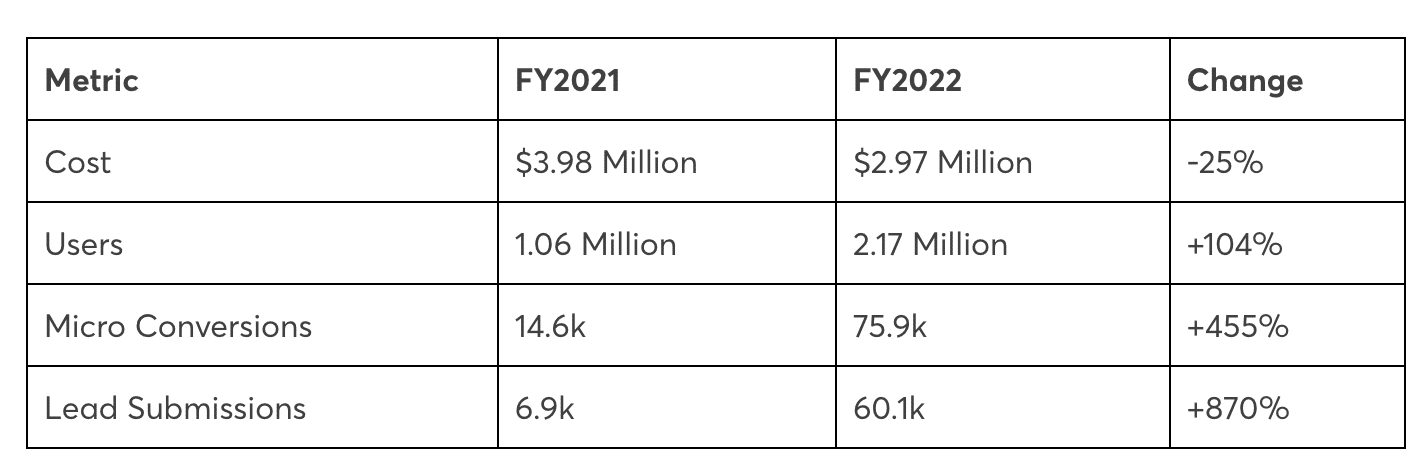
Investing in a full-funnel strategy is well worth the effort. Let’s consider Portent’s own data from a full-funnel approach implemented for a B2B solution targeting mid-sized companies.
These campaigns, which embraced a full-funnel strategy, outperformed the previous campaigns that solely targeted bottom-funnel calls to action in acquiring new users and generating leads.
This data underscores the advantages of a full-funnel approach in reaching a broader audience and driving results.
Get the daily newsletter search marketers rely on.
<input type=”hidden” name=”utmMedium” value=”“>
<input type=”hidden” name=”utmCampaign” value=”“>
<input type=”hidden” name=”utmSource” value=”“>
<input type=”hidden” name=”utmContent” value=”“>
<input type=”hidden” name=”pageLink” value=”“>
<input type=”hidden” name=”ipAddress” value=”“>
PPC campaigns by funnel stages
Now that we see the impact, what campaigns fall under each stage?
Generally, for top-of-funnel awareness campaigns, the best campaign types are:
For middle-of-funnel campaigns, we often classify:
- Non-branded Search campaigns.
- Display and Video and Demand Gen campaigns.
- Remarketing.
For bottom-of-funnel or action campaigns, we would consider:
- High-intent keyword Search campaigns.
- Brand Search campaigns.
- Performance Max.
- Remarketing campaigns.
Difficulties reporting with Google Ads data
One of the biggest challenges when convincing your boss or client to invest in a full-funnel strategy is providing the data to track performance once the campaigns are live.
For Awareness or top-of-funnel campaigns, you want to evaluate their performance on:
- Impressions.
- View-through rate.
For the Interest or Desire stage, you want to look at engaged sessions or other engagement metrics such as:
- Engagement rate.
- Time spent on page.
- Clicks on certain page elements.
Finally, for the Action section of the account, you will want to track your primary conversions, such as:
The question is, how does all of this get reported and visualized?
The top and middle funnel KPIs are only available in Analytics, whereas the KPIs of the funnel’s Action section are metrics you would track in Google Ads.
The answer is to use Looker Studio to create full-funnel reports.
Full-funnel PPC reporting with Looker Studio
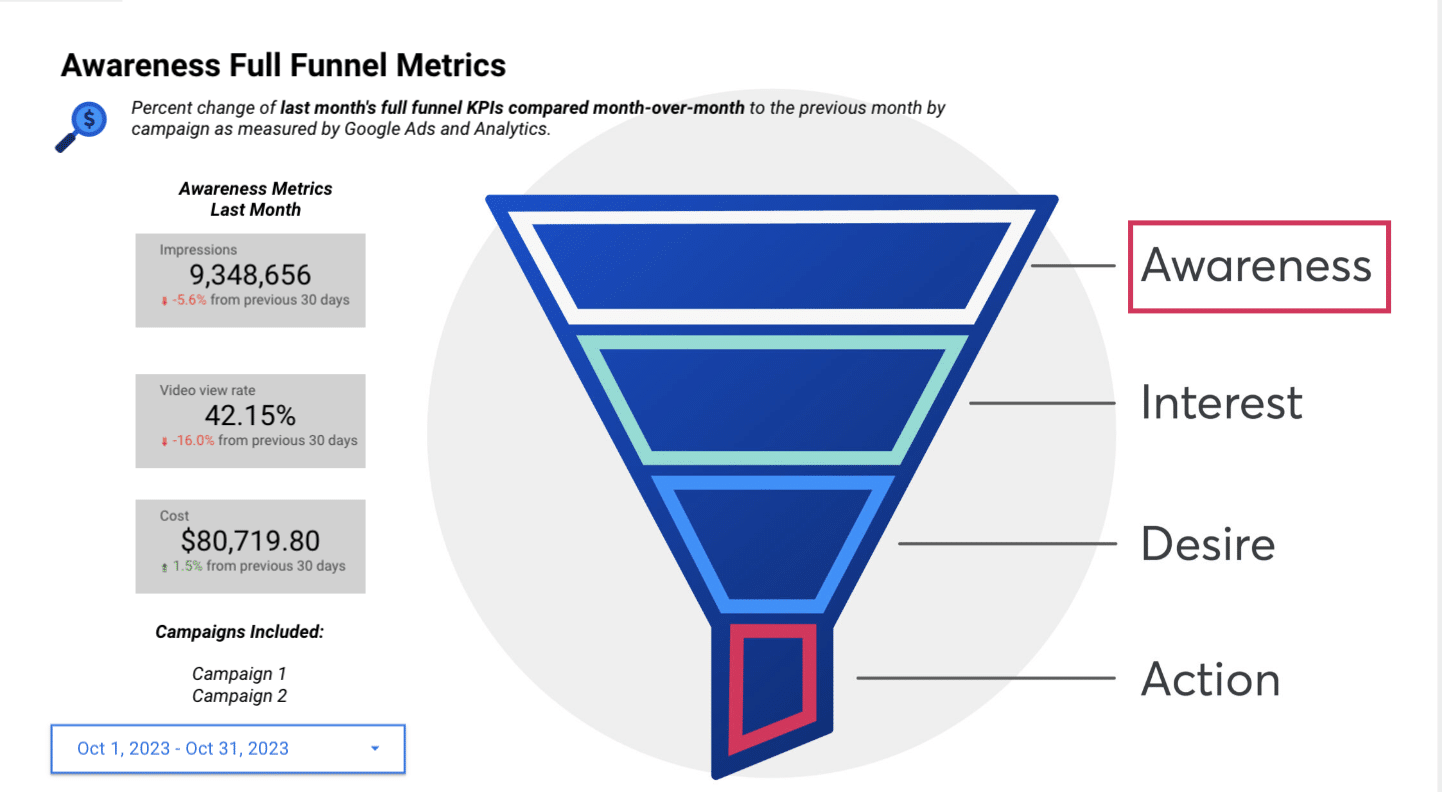
When using Looker Studio, you must guide the visitor through your full-funnel strategy with visuals illustrating what your funnel looks like.
By breaking down the stages in each slide, you can direct the reader to focus on the appropriate metrics for that stage rather than solely concentrating on the bottom-of-funnel action conversions, such as purchases or form fills.
For example, in your report, you can start at the top of the funnel, including metrics relevant to that stage.
It’s advisable to include cost data for various campaign types (e.g., Display, Video, Demand Gen) month over month (MOM). This approach allows for a more focused and clear presentation of data.
Another idea to improve this slide for a client is to include a table with the breakdown of top-of-funnel campaigns. We also recommend providing images or videos on the slide so the user understands which ads are Awareness.
The benefit of this strategy is breaking out the stages in each slide allows you to direct the reader to focus on the appropriate metrics for that stage and not focus solely on the bottom-of-funnel action conversions such as purchases or form fills.
I recommend having a separate slide for each funnel stage rather than combining all full-funnel metrics into a single slide.
The combination of data can be overwhelming and may confuse the visitor about which metrics are the most important.
By presenting each stage individually, you can provide a clear and concise view of the performance at each funnel level.
Dig deeper: 5 things your Google Looker Studio PPC Dashboard must have
Full-funnel reporting simplified
Once you have created your full-funnel report using Looker Studio, you can analyze the impact of your investment in top-of-funnel campaigns on your overall primary conversion actions. This analysis can be done quarterly or over longer time frames.
While it’s important to note that the benefits of top-of-funnel campaigns may take longer to materialize compared to bottom-of-funnel strategies, educating your boss or client on the importance of a full-funnel approach can lead to larger year-over-year growth.
A full-funnel strategy is a valuable approach for targeting prospects at various stages of the customer journey. To effectively report on the performance of such campaigns, Looker Studio can be a powerful tool, providing the necessary data visualization and reporting capabilities.
By breaking down the metrics and guiding the reader through each stage of the funnel, you can ensure that your reporting is clear, focused, and insightful.
Over time, the data collected from top-of-funnel campaigns can provide valuable insights into their impact on your overall business goals.
The post Why your PPC strategy needs a full-funnel approach appeared first on Search Engine Land.
Courtesy of Search Engine Land: News & Info About SEO, PPC, SEM, Search Engines & Search Marketing









 (@schachin)