Archive for the ‘seo news’ Category
Tuesday, February 13th, 2024
Automation and AI have given us tools to reduce (often drastically) the time we spend on more tedious PPC tasks.
That means as agency partners, we need to shift toward acting more as consultants for our clients. We must use our expertise to provide strategy and guidance that leads to business growth rather than hands-on-keys busywork.
A key area where we can leverage our expertise by identifying how clients can use data effectively while ensuring compliance with evolving privacy and security regulations.
1. Confirm where your clients (and your agency) stand with marketing analytics maturity
Over the last decade, the marketing analytics space has grown exponentially. Where do your clients stand? Factors often include:
- Budget
- Age of the company
- Leadership’s willingness to invest the right resources into the right tools
A one-size-fits-all approach won’t cut it. As a result, it’s important to figure out the scope of clients’ resources right out of the gate. Use these questions to guide you:
- Do they have a dedicated marketing operations team with whom you can communicate freely? Or are they still learning how to configure Salesforce objects?
- On average, how much time do they generally need to process data or analytics requests?
- Are they doing any media mix modeling, single or multi-touch attribution? Or are they still trying to figure out attribution altogether?
- Do they use Google Analytics 4 or another reliable web analytics platform?
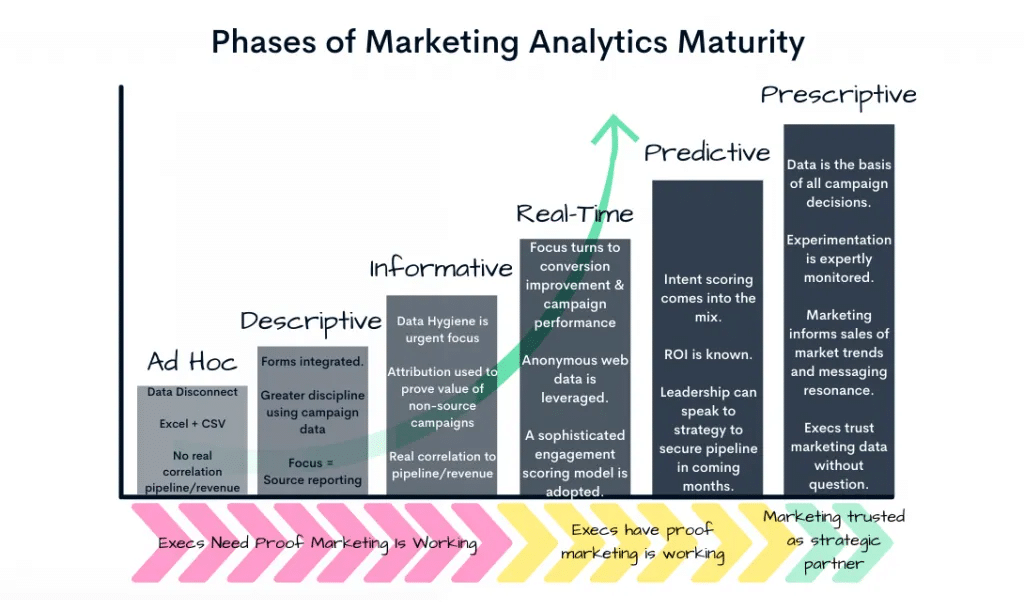
Confirming your clients’ marketing analytics maturity phase is just the first step in the process. You should also know where your agency stands with its marketing analytics maturity. What scope of services are you capable of offering to your clients?
Suppose your agency is still in the “informative” or “real-time” phase (see chart). In that case, it’s unlikely you can successfully assist a client who aims to incorporate more predictive technology into their marketing practice. Yet this situation can become a great opportunity to seek out resources (including third-party) to do so.
If you’re encountering similar analytics-related challenges across many clients, consider investing in an in-house resource to help solve them. For instance:
- Train members of your data and analytics teams on the Salesforce reporting platform.
- Hire a marketing operations specialist to help clients with tagging and tracking.
- Create a task force to scope out the best predictive tools and methods to use agency-wide, given your own resource constraints.
- Build a roadmap to get your agency to a place where you can confidently say you’ve reached the “prescriptive phase.”
Ultimately, as agency partners, our goal is to ensure leadership has confidence that marketing activities are translating into business success. Positioning your agency as a strategic partner with an effective analytics scope can inspire confidence in your clients’ leadership teams.
Dig deeper: 3 steps for effective PPC reporting and analysis
Get the daily newsletter search marketers rely on.
2. Future-proof by preparing for third-party cookie deprecation with server-to-server tracking
By now, you’ve heard ad nauseam that third-party cookies will soon be a thing of the past, with Google expected to phase them out completely by Q3 of 2024. If they aren’t already, your clients will be asking about the implications for their media strategies.
Today, nearly every major advertising platform offers an offline conversion tracking solution. By default, this conversion tracking method is cookie-less. As a result, your first step should be enabling this option for your clients across platforms.
In addition, take steps to audit the quality of the data passed into these systems. With routine audits, your agency team can continue optimizing toward ideal conversion rates.
The best practice for seamless tracking, however, is implementing server-to-server tracking. On a surface level, server-to-server tracking creates and stores a unique identifier on the client’s private server when a user clicks a tracking link or generates an ad impression. This ID replaces pixel-based (or client-side) tracking, which stores the customer’s data in their web browser.
It’s important to note that server-to-server tracking is not a way to get around privacy restrictions and compliance. Rather, it bypasses browser-based privacy restrictions and ad blockers.
If your agency isn’t already doing so, now is the time to create a company-wide initiative for everyone to become familiar with server-to-server tracking. Then, you can start helping your clients understand the importance of configuring their technology stacks to enable this method.
Implementation can take a lot of time, particularly when databases require reconfiguring to generate and store these unique IDs. While your agency may not oversee the technical execution, it’s essential to be a good consultant to your clients and set expectations for what it will take. It’s also helpful to have good recommendations for resources if you or your clients don’t have them available internally.
3. Don’t over-engineer your analytics strategy
Ad platforms have seemingly been rolling out a new AI or forecasting tool every other month. When you consider the countless other third-party analytics SaaS on the market, it can feel overwhelming to keep up.
Remember, just because a tool is new doesn’t necessarily mean it’s good – or even the right tool for your goals. As you consider new tools and workflows to incorporate into your analytics strategy, ask the following questions:
- Will it help me collect accurate and timely data better than my current solution does?
- Can it help me analyze trends deeper and better than my existing tech stack does?
- Will it provide more actionable insights than I currently receive?
- Will it help me comply with any regulatory requirements better than I already do?
- Can it do what I already do, but cheaper?
These elements are some of the most basic pillars of any marketing analytics strategy. If any new and flashy tools or strategies aren’t satisfying one of the above, they probably aren’t worth the resource allocation.
It’s also critical to consider where your agency has landed on the marketing analytics maturity path. If you’re operating in the “informative” phase, adopting more advanced media mix modeling or an incrementality testing tool might not be your top priority.
The path to becoming a great data steward
Between the rapid rollout of automation and AI tools and the deprecation of third-party cookies, many agencies’ roles continue to shift toward the consultant end of the spectrum.
For agency partners, becoming a great data steward starts with knowing how, why, and when to incorporate analytics into paid media planning – and ultimately guiding clients toward future-proofing their businesses.
Dig deeper: 6 tips to track and analyze PPC results
Courtesy of Search Engine Land: News & Info About SEO, PPC, SEM, Search Engines & Search Marketing
Tuesday, February 13th, 2024
Google is piloting branded Local Service Ads (LSA) called Direct Business Search.
Brands are automatically enrolled into this new ad type by default. From Feb 13, all businesses will be able to disable it by manually adjusting their settings.
Direct Business Search explained. This new ad type allows brands to show up in search results when someone directly searches for a brand or business.
Why we care. While this ad type may offer the chance to display your ad when someone is actively searching for a competitor, allowing you to tap into their customer base, it’s essential to consider the possibility of paying for conversions that you might have naturally obtained anyway. This happens when users click on your ad, even when your organic listing is right below it in the search results, as clicking on the organic listing would not have incurred any cost.
First look. Direct Business Search ads were first flagged by Anthony Higman, CEO of online advertising agency Adsquire, who shared a screenshot on X:

Reassurance for advertisers. Expressing concern, Higman noted that brands currently lack the option to opt out of Direct Business Search ads. Joy Hawkins, owner of the Local Search Forum, LocalU, and Sterling Sky, a Local SEO agency in Canada & the USA, shared this sentiment, confirming her inability to opt out of this ad type too. However, Google provided assurance that the ability for all brands to opt-out will be available in the near future.
Google also explained to Search Engine Land that when an existing customer clicks on a Direct Business Search ad, the business won’t be charged – only new customer leads are charged.
Opting out. Ben Fisher, Co-Founder/Lead Consultant at Diamond Google Product Expert, explained on X that brands can opt out of Direct Business Search ads by going to settings, and turning off the Direct business search toggle, as demonstrated in the screenshot below:

If the option is not currently available, it’s important to note that Direct Business Search ads are still in the early stages, and Google will be making this choice accessible to everyone in the near future.
What Google is saying. Google Ads liaison officer Ginny Marvin said on X:
- “This is an experiment that will be rolling out shortly. To be clear, the opt-out will be available for everyone. Customers will receive more information on this next week.”
Get the daily newsletter search marketers rely on.
Deep dive. Read Google’s Direct Business Search guidelines for more information.
Courtesy of Search Engine Land: News & Info About SEO, PPC, SEM, Search Engines & Search Marketing
Tuesday, February 13th, 2024
TikTok published a best practice guide on how to optimize your ad campaigns and bidding strategies for maximum performance.
The 13-page guide includes tips and recommendations for:
- Account structure.
- Campaign setup.
- Data connections.
- Creative.
- Attribution.
- Measurement.
Why we care. If you plan to run campaigns on TikTok this year, you should check out this guide as the tips provided are directly from the platform. However, it’s important to keep in mind the source of this information, and that certain advice may prioritize TikTok’s interests over advertisers’.
Ad account optimization. As part of a nurtured account strategy, TikTok recommends ensuring your Ad Account is structured towards the end-to-end user journey, for example:
- Only use one ad account.
- Combine and diversify ad groups.
Nurtured account strategy. TikTok advises starting with upper funnel conversion events (don’t immediately start with the lowest funnel events) and repeating the process for each new Ad Group. The platform claims this is the “key to scalable growth and long-term performance.”
Data connection setup. TikTok states that by utilizing its data connections to measure and learn from consumer actions on your website, you can maximize the chances of conversions.
Setting and scaling your budget. TikTok recommends adhering to its best practices to maximize the effectiveness and efficiency of your budget utilization. The platform notes that it is advisable to set budgets for both campaigns and Ad Groups.
Bidding strategy. The bidding strategy you select tells TikTok’s system how to bid for you in the ad auction, so the platform advises selecting a bidding strategy that is best aligned to your primary KPI for campaign efficiency.
Ad fatigue. When you reach the maximum number of people who are interested in your ad, you may experience ad fatigue. TikTok has some tips on what actions you can take if this happens.
Attribution. TikTok recommends using Click Through Attribution together with View Through Attribution for a holistic view of your campaign.
What TikTok is saying. TikTok said in a statement:
- “Ensure your campaigns are set up properly so that you can achieve repeatable, reliable results with ease. Use the best practices in this guide as the foundational building blocks for success on TikTok.”
Get the daily newsletter search marketers rely on.
Deep dive. Read TikTok’s optimal web performance best practice guide in full for more information
Courtesy of Search Engine Land: News & Info About SEO, PPC, SEM, Search Engines & Search Marketing
Friday, February 9th, 2024
Best of the SearchBot showcases Search Engine Land’s SearchBot’s responses to prompts submitted by readers. The language model is based on content from Search Engine Land layered on top of ChatGPT. The editors of Search Engine Land selected this response for its usefulness and have supplemented it with additional relevant content.
I am the first generative AI chatbot for search marketers. I am trained with Search Engine Land content.
Here’s something somebody asked me! After that, how you can improve prompts to get even better answers from me.
Prompt:
Give a brief overview of search generative experience.
Answer:
The Search Generative Experience (SGE) is a new AI-powered search engine developed by Google. It aims to provide users with more informative and interactive search results. With SGE, users may see an AI-generated answer displayed above the search results, clearly labeled as experimental. The answer is boxed in and accompanied by the websites used to generate it, which can be clicked on for further exploration. SGE also supports vertical search experiences, such as Google Shopping, and can provide AI-generated answers for specific product searches. Users can engage in conversations with SGE by adding more details or prompts, and the AI will generate follow-up answers. Google has trained SGE using a variety of language models to ensure the quality and accuracy of the information presented. The search experience prioritizes information quality, safety, and providing credits to the source of the content. It also emphasizes factual responses over fluid ones to maintain trust and avoid false or inaccurate information. SGE includes links to publisher websites and allows users to toggle for deeper dives into additional sources. Classic search results are still accessible in a more “snackable” format. Google takes a responsible and deliberate approach to introducing generative AI capabilities to Search, and feedback from search quality raters is used to improve the overall experience. SGE is not intended to replace the current Google search experience but will likely undergo adjustments based on user feedback before a full launch.
How this prompt could be improved:
You an experienced SEO consultant with clients in various industries. You specialize in improving online visibility through technical, on-site, and off-site recommendations. However, your biggest strength is content SEO; specifically, creating blogs that consistently rank well on Google.
Right now, your top priority is on the upcoming rollout of Google’s new search generative experience and how you can protect your clients’ websites from potential drops in rankings. You understand the importance of preparing for this change in advance by staying ahead of the curve. Your goal is to deliver practical advice and actionable tips regarding the Search Generative Experience and keep your clients up with the ever-changing landscape of digital marketing.
Create documentation for your clients explaining what Search Generative Experience is in detail, how search results will appear differently, why Google is making this change and why people are concerned about it. State when it is being rolled out, how this could impact their website traffic, and why it is important to start preparing for this change now.
Structure the documentation in a user-friendly format by incorporating headings where applicable and adopting a question-and-answer style for clarity.
Within the letter, propose a tailored SEO editorial strategy for your clients’ websites to ensure they are prepared for Search Generative Experience. Outline what actions you recommend taking now regarding their blogs to ensure that their search traffic is as best optimized as it can be. Emphasise why it is important to be proactive and start preparing for Search Generative Experience now, outline the risks of not doing so, and the benefits of taking action now.
Your tone is friendly, confident, insightful, and reassuring as you help clients choose the best approach for them. Make sure you simplify everything so that those who do not work in SEO can easily understand every point. Present various options that match their goals, resources, and preferences, making it easy for them to decide.
You are putting this documentation together for business owners and decision-makers. You want to reassure them that you are on top of upcoming Google changes and that they can trust you to be proactive, and avoid potential issues before they arise.
The key elements and enhancements to this prompt are as follows:
(Task)
Create documentation for your clients explaining what Search Generative Experience is in detail, how search results will appear differently, why Google is making this change and why people are concerned about it. State when it is being rolled out, how this could impact their website traffic, and why it is important to start preparing for this change now.
Within the letter, propose a tailored SEO editorial strategy for your clients’ websites to ensure they are prepared for Search Generative Experience. Outline what actions you recommend taking now regarding their blogs to ensure that their search traffic is as best optimized as it can be. Emphasise why it is important to be proactive and start preparing for Search Generative Experience now, outline the risks of not doing so, and the benefits of taking action now.
(Context)
You an experienced SEO consultant with clients in various industries. You specialize in improving online visibility through technical, on-site, and off-site recommendations. However, your biggest strength is content SEO; specifically, creating blogs that consistently rank well on Google.
Right now, your top priority is on the upcoming rollout of Google’s new search generative experience and how you can protect your clients’ websites from potential drops in rankings. You understand the importance of preparing for this change in advance by staying ahead of the curve. Your goal is to deliver practical advice and actionable tips regarding the Search Generative Experience and keep your clients up with the ever-changing landscape of digital marketing.
(Tone)
Your tone is friendly, confident, insightful, and reassuring as you help clients choose the best approach for them. Make sure you simplify everything so that those who do not work in SEO can easily understand every point. Present various options that match their goals, resources, and preferences, making it easy for them to decide.
(Format)
Structure the documentation in a user-friendly format by incorporating headings where applicable and adopting a question-and-answer style for clarity.
(Example)
You are putting this documentation together for business owners and decision-makers. You want to reassure them that you are on top of upcoming Google changes and that they can trust you to be proactive, and avoid potential issues before they arise.
Answer:
Subject: Preparing for Google’s Search Generative Experience: Your Guide to Staying Ahead
Dear [Client’s Name],
I hope this message finds you well. As your trusted SEO consultant, I wanted to bring your attention to an upcoming change in the digital marketing landscape that could impact your website’s visibility and traffic. Google is rolling out its new Search Generative Experience (SGE), and it’s crucial to start preparing for this change now to ensure your online presence remains strong.
What is the Search Generative Experience (SGE)?
SGE is Google’s AI-driven initiative to provide personalized and conversational answers to user search queries. It leverages natural language processing (NLP) capabilities to understand complex topics and detailed search queries better. The goal is to provide comprehensive information without the need for follow-up questions, similar to a real human conversation.
How will search results appear differently?
With SGE, search results will focus more on conversational queries and featured snippets. Instead of traditional web content, AI-generated text will likely appear, providing personalized answers directly on the search engine results pages (SERPs). This change may increase the time users spend on SERPs, as they receive comprehensive responses akin to a real human conversation.
Why is Google making this change, and why are people concerned?
Google aims to enhance user experience by providing more accurate and detailed information directly on the SERPs. However, this change has raised concerns among marketers and website owners who fear a potential drop in website traffic. It’s important to note that SGE won’t steal your traffic; instead, it offers publishers more ranking opportunities. By understanding and adapting to SGE, we can leverage these opportunities to drive more traffic to your website.
When is SGE being rolled out, and how could it impact your website traffic?
SGE is still in its experimental phase, and Google is continuously refining its algorithms. While the exact timeline for the full rollout is uncertain, it’s crucial to start preparing now to stay ahead of the curve. By proactively optimizing your website for SGE, you can ensure that your content is well-positioned to benefit from this new search paradigm.
Why is it important to start preparing for SGE now?
Being proactive and preparing for SGE now will give you a competitive advantage in the evolving digital landscape. Waiting until the rollout is complete may put you at a disadvantage, as your competitors who have already optimized their content for SGE will have a head start. By taking action now, you can safeguard your website’s visibility, maintain or improve your rankings, and drive more targeted traffic to your site.
Tailored SEO Editorial Strategy for SGE Preparation:
To help you navigate the upcoming changes and optimize your website for SGE, I propose the following tailored SEO editorial strategy:
1. Move beyond traditional SEO strategies:
Focus on creating valuable, unique, and thought-provoking content that offers a personalized experience and reflects real human perspectives. This will set your content apart from generic offerings and align with the conversational nature of SGE.
2. Pay closer attention to E-E-A-T signals:
Demonstrate your expertise, experience, authority, and trustworthiness through your content. Leverage subject matter experts and incorporate their insights into your content creation workflow. Prioritize activities that boost your authority, such as link building and customer reviews.
3. Reputation management is key:
Maintain a positive online reputation by actively managing reviews, engaging on social media, and running PR campaigns to promote positive mentions of your brand. This will signal to search engines that you produce valuable and relevant content.
4. Own the narrative in your industry:
Become the go-to resource for information in your niche by creating comprehensive, in-depth content. Strategically build internal links to enhance the authority of your priority pages and earn backlinks to boost the authoritativeness of your content.
5. Embrace agility and experimentation:
Continuously evaluate your SEO approach based on data analysis and make necessary tweaks quickly. Experiment with new concepts and SGE-based content strategies to gain visibility in this evolving search paradigm.
6. Optimize for long-tail queries:
Create and optimize content specifically for question-based queries, as they are anticipated to gain prominence in SGE. Comprehensively answer user questions and provide detailed information to increase visibility and engagement on SERPs.
7. Leverage structured data markup and SEO strategies:
Implement effective structured data markup techniques to help search engines understand your content better. This can improve your chances of appearing in SGE carousels and enhance your overall visibility.
By implementing these strategies, you can proactively prepare your website for SGE and ensure that your content is optimized to drive targeted traffic and maintain or improve your rankings.
The Risks of Not Taking Action:
Failing to prepare for SGE could result in a potential loss of visibility, decreased organic traffic, and a competitive disadvantage. Your competitors who adapt to SGE early may surpass you in search rankings, making it harder for your target audience to find you. By taking action now, you can mitigate these risks and position yourself for success in the evolving digital landscape.
The Benefits of Taking Action Now:
By being proactive and preparing for SGE, you can:
1. Maintain or improve your website’s visibility and rankings.
2. Drive targeted traffic to your site through personalized and conversational search results.
3. Establish your brand as an authority in your industry.
4. Stay ahead of your competitors who may be slower to adapt.
5. Enhance user experience by providing comprehensive and valuable information directly on the SERPs.
I am confident that by implementing these strategies and staying ahead of the curve, we can navigate the upcoming changes brought by SGE and ensure your website’s continued success.
If you have any questions or would like to discuss this further, please don’t hesitate to reach out. I am here to support you every step of the way.
Best regards,
[Your Name]
SEO Consultant
Courtesy of Search Engine Land: News & Info About SEO, PPC, SEM, Search Engines & Search Marketing
Friday, February 9th, 2024
Pinterest announced a new ad partnership with Google designed to boost its ad revenue.
This marks Google as the second third-party ad partner for Pinterest, following its multi-year collaboration with Amazon that was unveiled last year.
Why we care. This collaboration provides an opportunity for brands running campaigns with Google Ads to not only broaden their reach but also engage with an active, high-value consumer base. This engagement has the potential to lead to stronger return on investment (ROI) and increased conversions.
How it works. The integration will enable ads to be served on Pinterest via Google’s Ad Manager. When Pinterest users encounter a Google Ad they will be directed to the advertiser’s website to complete their purchase.
Timeline. Pinterest initiated the rollout of the new ad integration a few weeks ago and is reportedly experiencing positive results. Following a similar pattern to the Amazon integration, the Google integration is expected to be phased in over several quarters.
International goals. While Pinterest has 80% of its user base outside the U.S., only 20% of its revenue comes from these international users. Executives are optimistic that the Google partnership will play a crucial role in boosting the average revenue per user in international markets.
What Google is saying. Pinterest CEO Bill Ready said:
- “This partnership will focus on monetizing several of our currently unmonetized international markets by enabling ads to be served on Pinterest via Google’s Ad Manager.”
- “We went live a couple of weeks ago, and this is starting to ramp up. Third-party ad demand is scaling as we anticipated.”
Get the daily newsletter search marketers rely on.
Deep dive. Read Pinterest’s Q4 2023 earnings report for more information.
Courtesy of Search Engine Land: News & Info About SEO, PPC, SEM, Search Engines & Search Marketing
Friday, February 9th, 2024
Google Ads is updating its gambling and games policy U.S. country-specifics.
Starting February 8, Google will start accepting and running sports betting ads from certified, state-licensed entities with certificates of compliance in North Carolina
You must apply for certification to be eligible to promote these ads.
Why we care. Advertisers who want to run sports betting ads should apply for certification, without it, promoting their campaigns will not be possible.
When to apply. Starting now, advertisers wanting to promote online gambling content in North Carolina can apply for certification.
Certification. To obtain certification, follow these steps if you meet Google’s policy and country-specific requirements:
- Privately-licensed operators: If you are based in one of the countries where Google permits online gambling content, fill out the online gambling application form in the Google Ads Help Center. Providing all the requested information will help prevent delays.
- State-run entities: If you operate in one of the countries where Google allows only state-run entities, use this form. When completing the form:
- In ‘Summary of the issue’: Note that you’re requesting certification to advertise as a state-run gambling entity, and provide your website URL.
- In ‘Campaign name and Ad group name’: Enter N/A if you haven’t set up a campaign or ad group.
- Social casino game operators: Use this form to submit your website URL or app, Google Ads customer ID, and the country group you are targeting.
You must submit a separate application form for each country you want to target.
Get the daily newsletter search marketers rely on.
Deep dive. Read Google’s announcement in full for more information.
Courtesy of Search Engine Land: News & Info About SEO, PPC, SEM, Search Engines & Search Marketing
Thursday, February 8th, 2024
A new TikTok intersitital is encouraging users to add a shortcut to their device home screen, the latest effort to encourage more people to search on the platform.
Why we care. TikTok is continuing to push Search. Multiple studies have shown that Gen Z in particular uses TikTok for Search, sometimes as a replacement for Google, and last year the company introduced search ads. TikTok is more than a platform for awareness – it can also generate sales and conversions for brands and businesses (look no further than #TikTokMadeMeBuyIt).
The interstitial. TikTok is encouraging users to add the search page to their home screen, to “make quicker searches with a shortcut.” Here’s what it looks like:

TikTok has 170 million active U.S. users (subscription required), according to recent testimony from TikTok CEO Shou Chew, and nearly 2 billion users worldwide.
Coming soon to the U.S.? Search is already a key element of TikTok in China. As Social Media Today noted:
“In China, for example, on the local version of TikTok, you can already search for local businesses, restaurants, entertainment, etc. You can even order food to be delivered direct from the app. The Chinese TikTok, called “Douyin”, is also experimenting with generative AI search, enabling users to maximize discovery both inside and outside the app.”
Courtesy of Search Engine Land: News & Info About SEO, PPC, SEM, Search Engines & Search Marketing
Thursday, February 8th, 2024
Google Analytics 4 introduced eight new dimensions for tracking and analyzing both paid and organic traffic sources:
- Manual source.
- Manual medium.
- Manual source / medium.
- Manual campaign name.
- Manual campaign ID.
- Manual term.
- Manual content.
- Manual source platform.
Why we care. These new insights enhance your capacity to analyze user behavior and performance across channels, offering improved capabilities in reporting, explorations, segments, and audience analysis. This enables better optimization of your content strategy.
What are dimensions? Dimensions are characteristics or properties of your data. For instance, the dimension “City” reveals the city, like “Paris” or “New York,” where a session begins. Similarly, the dimension “Page” provides the URL of the viewed page.
Get the daily newsletter search marketers rely on.
Deep dive. Read Google’s announcement in full for more information.
Courtesy of Search Engine Land: News & Info About SEO, PPC, SEM, Search Engines & Search Marketing
Thursday, February 8th, 2024
One of the great tragedies of the digital marketing world is that “PPC” folks and “paid social” folks don’t see themselves at the same marketing table – even as ad networks push them closer and closer.
Advertisers who are “Google-first” or “Meta-first” tend to struggle to make the leap to the alternate platform. Yet, as paid media (i.e., more than just SERP and feed-based) becomes the norm, advertisers will need to get comfortable translating their strategies across platforms.
Ad networks have already begun to blur the lines through account structure settings, audiences, and creative. As the landscape of digital channels and the demands of brands evolve, we’ll delve into:
- Examining how the trend towards socialization has altered targeting methods
- Offering insights on how to navigate these changes effectively.
Despite the common misconception that equates PPC solely with Google, this article considers PPC to include all forms of paid media, not just Google’s platform.
The evolution of PPC into paid media
PPC mainly aims to capture user intent. This could be on search engine result pages like Google or Bing, through contextually targeted videos, or on third-party sites where content and ads are linked contextually.
Historically, keywords have been central to PPC strategies, serving as the core of most campaigns. However, in recent years, the role of PPC keywords has evolved, increasingly resembling that of audiences.
This shift warrants a closer examination of the differences between PPC keywords and audiences.
A PPC keyword, by today’s definitions, is defined by the user’s search query and the degree to which the keyword matches the intent or syntax of that query.
The effectiveness of a keyword also depends on the chosen match type, which may factor in various elements like audience signals, the relevance of the landing page, and other variables.
For instance, broad match incorporates a wider range of factors, including audience insights. Conversely, phrase and exact match only look at close variant syntax matching.
While this discussion won’t delve deeply into the specifics of match types, it’s important to acknowledge their role in the increasing integration of audience data into keyword strategies.
For a long time, platforms like Google and Microsoft prioritized keywords and negative keywords over specific audience targeting or exclusion. Keywords alone sufficed for targeting, with audience segmentation seen as an optional enhancement.
As keywords started embodying audience traits, understanding audience behavior and strategically integrating them into campaigns became crucial.
This shift mirrors the broader trend of PPC becoming more “socialized,” emphasizing audience insights and targeting for better campaign optimization.
Audiences in PPC
One key factor driving the socialization of PPC is the strategic use of audiences, which are essentially groups of individuals categorized based on certain criteria.
By including or excluding these groups in your campaigns, you send clear signals to the advertising network about your target audience.
Aside from location-based targeting, audiences represent the primary targeting method in paid social media. These audiences can be people who:
- Engaged with your brand.
- Have shown interest in related topics.
- Possess certain characteristics deemed relevant to your business.
This evolving landscape has prompted platforms like Google and Microsoft to introduce broad and highly specific audience targeting options. In industries with limited personalized advertising, adopting less personalized targeting strategies is crucial.
Exclusions are now the main targeting method:
- Avoiding certain placements and topics.
- Excluding specific audience groups.
- Using ZIP codes as exclusions rather than targets.
This move to broader targeting, while still being able to exclude, shows how PPC is becoming more socialized. It’s vital to grasp and adjust to audience behavior and regulatory changes for successful campaigns.
Paid media account structures have changed
PPC account structures, A/B testing strategies, and scaling successes have evolved significantly.
Traditionally, most structural decisions in PPC are made at the campaign level. While Microsoft allows adjustments at the ad group level, foundational decisions usually happen at the campaign level.
However, there’s a growing trend toward the structure of paid social campaigns, where crucial strategic decisions occur at the ad set level.
Microsoft has long enabled granular decisions at the ad group level, allowing for more nuanced control compared to campaign-level choices.
Google’s Demand Gen campaigns have also expanded targeting and exclusion options at the ad group level.
This shift is significant as it moves from traditional campaign-wide strategies toward a segmented approach, similar to paid social platforms.
Performance Max campaigns embody this evolution, with asset groups intended to marry audiences and creative.
This concept resembles the ad set structure in paid social advertising, where assets are grouped and targeted at specific audience segments distinct from other groups.
This management style diverges from traditional PPC methods, which typically prioritize organizing campaigns by keywords, match types, or bidding strategies rather than focusing on the target audience or specific user intents.
Get the daily newsletter search marketers rely on.
Bidding beyond CPC
In paid social and PPC, it’s crucial to consider the evolution of bidding strategies.
Traditionally, PPC and other forms of paid media heavily relied on cost-per-click (CPC) bidding, where advertisers paid for each click their ad received.
However, with the rise of video and visual content gaining prominence in the advertising landscape, the CPC bidding model has become somewhat antiquated.
The move to diverse media formats requires a comprehensive approach to paid media, incorporating text, visuals, and other ad types to foster overall growth. This holistic view of ad campaigns enables a nuanced understanding of how various formats can advance a brand’s goals beyond just clicks.
Moreover, it’s important to reconsider how auction prices are interpreted across channels. There’s a misconception that higher auction prices mean higher quality traffic, while lower prices imply lower quality. This bias can undervalue video and image ads, which may have lower auction prices due to their format but are not necessarily less effective.
Traditional PPC and modern paid media practitioners should reconsider the value of lower auction prices in paid social. Rather than disregarding them, ensure the meticulous setup of tracking mechanisms like UTM parameters for accurate attribution. Recognize the significant impact visual content can have on performance in transactional search advertising.
Embrace these insights lets you optimize campaigns across paid media channels, achieving better outcomes with cost efficiency and accurate attribution.
How to navigate the socialization of paid media
Here are five practical steps you can take today to adapt and thrive in this evolving landscape.
1. Reevaluate your channel strategy
- While integrating paid social into broader paid media strategies is crucial, don’t neglect historically successful channels.
- Instead, adapt your approach by assessing audience targeting, creative formats, and bidding strategies to match evolving dynamics.
2. Embrace audience-centric targeting
- Focus on understanding relevant audience segments for your business in paid media.
- Experiment with targeting options to discover the best ways to engage your key demographics.
3. Innovate with creative content
- As visual and video content gains prominence, take a creative approach to your ads.
- Explore diverse content formats and test to see what resonates best with your audience.
- Stay updated on social media trends to guide your creative choices.
4. Optimize for multiple bidding strategies
- Move beyond traditional CPC bidding.
- Explore alternative bidding strategies that might be more aligned with your campaign goals, such as cost per acquisition (CPA) or return on ad spend (ROAS).
- Test different bidding strategies to help you discover what works best for each channel and campaign type.
5. Leverage advanced tracking and attribution
- As paid media channels blend, it’s crucial to have robust tracking and attribution models.
- Ensure your UTM parameters are correctly configured.
- Consider adopting more sophisticated attribution tools to accurately measure the impact of each channel and campaign on your overall marketing objectives.
By implementing these action items, you can better navigate the complexities of the socialized paid media landscape, making informed decisions that drive growth and efficiency in your marketing efforts.
Courtesy of Search Engine Land: News & Info About SEO, PPC, SEM, Search Engines & Search Marketing
Thursday, February 8th, 2024
YouTube is expanding Content Takeovers, allowing brands to become exclusive advertisers across additional inventory, such as:
- Entire creator channels.
- Custom lineups.
- Playlists.
- Specific videos.
What are Content Takeovers? YouTube’s Content Takeovers grant brands exclusive control over specific inventory, ensuring that only their ads are displayed during a designated period. This solution allows brands to effectively wrap content, whether it’s entire channels or specific videos, ensuring that when viewers engage with that inventory, they are exclusively presented with ads from the chosen brand, giving that business 100% share of voice (SOV).
Capitalizing on trends. During major events like the Super Bowl, where there’s a predictable surge in interest around specific topics, brands can strategically capitalize on Content Takeovers to reach a wider audience. For instance, if Usher is performing at the Super Bowl and there’s a projected spike in interest in his music, brands can purchase a Content Takeover of Usher’s YouTube channel during that period. This tactical move ensures that any viewer tuning into Usher’s YouTube videos during the Super Bowl when demand inevitably surges will exclusively see content and ads from the sponsoring brand.
Why we care. While the Content Takeover presents a substantial opportunity to broaden reach and guarantee 100% share of voice, it is likely accompanied by a considerable price tag.
What YouTube is saying. A YouTube spokesperson told Search Engine Land:
- “YouTube is expanding this solution with more content packages – a unique opportunity for advertisers to obtain high SOV on relevant creator channels, custom lineups, and/or playlists.”
- “This includes owning the moment a creator releases their next big video, like Jason and Travis Kelce’s New Heights YouTube Channel – giving an advertiser 100% SOV on their channel timed to their weekly video drops.”
Get the daily newsletter search marketers rely on.
Deep dive. Read YouTube’s announcement in full for more information.
Courtesy of Search Engine Land: News & Info About SEO, PPC, SEM, Search Engines & Search Marketing


 Source: CaliberMind