Archive for the ‘seo news’ Category
Thursday, February 29th, 2024
Google confirmed that it deliberately withholds channel-specific KPIs for Performance Max campaigns because it could be “misleading.”
Some advertisers suspect Google is not being fully transparent about PMax campaign performance data because doing so would impact its ability to push automation.
What Google is saying. When an advertisers asked why Google doesn’t offer channel-level reporting for PMax campaigns in the Google Ads Help Center, a spokesperson replied:
- “It intentionally doesn’t show channel-specific KPIs because looking at aggregate ROAS or CPA for a single channel within Performance Max can actually be misleading and doesn’t accurately represent the value of a given channel.”
- “One channel may seem better than another with stronger ROI on average. However, this doesn’t account for the marginal cost of the next conversion on that channel. The ‘best’ channel in one auction isn’t the best option in another auction.”
- “Performance Max makes a real-time decision about where to place your ad based on which inventory it predicts will deliver the most cost-efficient, high-ROI conversion at that moment.”
Reaction. Julie F Bacchini, President of Neptune Moon LLC, shared a screenshot of the exchange on X and commented:
- “New PMax questions answered from Think with Google… From the first answer… Paraphrased – we won’t show you the stats for channels within PMax because you might get the wrong idea about their performance if you actually see it.”
- “Trust us to always do what’s best.”
Why we care. Advertisers want more transparency in how their campaigns are performing because even though AI can be highly effective, it’s not perfect. And since Google’s products are designed to benefit Google rather than advertisers, many would feel more comfortable having insights to ensure that decisions about their campaign performance prioritize their brands rather than Google.
Get the daily newsletter search marketers rely on.
Deep dive. Read the full Google Ads Help Center Q&A for more information.
Courtesy of Search Engine Land: News & Info About SEO, PPC, SEM, Search Engines & Search Marketing
Thursday, February 29th, 2024
Google has added new search developer documentation for structured data carousels (beta). The new documentation can be found here and is under the “early adopters program.” This structured data is for a new carousel rich result that’s in beta, “which is a list-like rich result that people can scroll horizontally to see more entities from a given site (also known as a host carousel),” Google wrote.
Where it works. This new carousel beta is generally for hotels, restaurants, vacation rents, products, and events. Each tile in the carousel may have information from your site about the price, rating, and images for entities on the page.
What it looks like. Here is an illustration of what this looks like within Google Search:

Guidelines. The generic Google guidelines apply here but in addition, with this specific carousel, Google added these additional guidelines:
- Use of generic types is allowed. However, to use recommended properties, you must use the respective types. For example, to use
amenityFeature, use the LodgingBusiness type.
- Use of additional or extra fields is allowed, but may not appear in the rich result.
You can learn more about the technical implementations and guidelines, including code examples and troubleshooting help over here.
Why we care. If you have a local business or product or event website that can make use of this beta carousel, you might want to give it a try. Rich results often can help get your website more visibility in search and a higher click through rate to your website.
But you need to implement the structured data and track the results to see if it is worthwhile.
Courtesy of Search Engine Land: News & Info About SEO, PPC, SEM, Search Engines & Search Marketing
Thursday, February 29th, 2024
Google Chrome is rolling out updates to make changes and improvements to the search suggestions it shows in the search box within its browser. Google will show what others are search for with the “people also search for” section. Google will also show image thumbnails for some search suggestions in Chrome.
I believe many of these features have been live in the main Google.com search interface for many years.
Chrome search suggestions
The search box will show you what others are searching for when you are signed into your Google account. Google said, “you’ll see suggestions in the Google Search box related to your previous searches based on similar things others are looking for.”
Here is a screenshot Google provided but we’ve seen Google doing this in the main search results page for some time now.

More images for search suggestions
Google will also show more image thumbnails near the search suggestions. Google said, “Android and iOS, Chrome will now show helpful images for broader shopping categories and products based on a simpler search, like “bohemian table.”
We’ve also seen this from Google back in 2019.

Why we care
Your website may get more exposure in the Google Search results if searchers see suggestions that your website would rank for. These search features within Chrome may impact your traffic from Google Search in a positive or negative way.
So keep an eye out for these changes and see if it has any impact on your site’s search traffic.
Courtesy of Search Engine Land: News & Info About SEO, PPC, SEM, Search Engines & Search Marketing
Thursday, February 29th, 2024
Google confirmed it is testing a new PPC ad format. However, key details such as the official name, functionality, influence on auction dynamics, and effect on metrics are yet to be released.
The lack of information surrounding the new ad format has drawn criticism from advertisers.
First spotted: The new ad format was first flagged by Anthony Higman, CEO of online advertising agency Adsquire, who shared a preview on X:

He posted: “These aren’t LSAs, they’re PPC ads. What are we calling this new ad format? And why was no one informed about It?”
Lack of transparency. Commenting on the new ad format and lack of information provided from Google, Higman told Search Engine Land:
- “What bothers me about most things that Google has rolled out recently is the lack of transparency.”
- “I get that it’s 2024 and things are moving faster than ever, but when they roll out a new ad format, of which we have seen about ten in past few weeks, it would be really helpful if they explained how these new ads work and what changes they imply via auction dynamics.”
- “But it seems to me like they just roll these new ads out, then try and figure out how to explain what these changes mean for advertisers.”
- “As a PPC veteran, what rubs me the wrong way is that this feels more and more like we are being forced into adopting everything that Google wants via AI, machine learning and just “trusting” the machine – which again still lacks a lot of transparency in my opinion.”
‘Beyond crazy’. Melissa Mackey, paid search director at Compound Growth Marketing, also criticized the lack of information around the new ad format. She wrote on X:
- “It’s beyond crazy what’s happening in the LSA world right now. Thankfully, we don’t have any clients who use them, but for those who do, this is a new nightmare on the daily.”
- “We haven’t seen these for any of our clients but agree it’s a cr*p ad format plus there’s no info on how this affects metrics etc.”
Why we care. The new ad format lacks clear information on costs and metrics, making it difficult to monitor and optimize campaign performance.
What Google is saying. A Google spokesperson confirmed to Search Engine Land that the new ad format is still in the experimental stage, and there is no certainty about its full launch yet.
Get the daily newsletter search marketers rely on.
Deep dive. Read our PPC marketing guide for more information on how PPC ads work.
Courtesy of Search Engine Land: News & Info About SEO, PPC, SEM, Search Engines & Search Marketing
Wednesday, February 28th, 2024
Google Analytics 4 introduced a default Google Ads report, now available within your account’s performance reporting section.
To access this report, you need to link your GA4 profile with your Google Ads account
Why we care. The inclusion of this Google Ads report, formerly found in GA4’s predecessor Universal Analytics, simplifies data access within GA4. It helps you figure out what’s working well and what needs improvement, making it easier to optimize your campaign more effectively.
First spotted: The report was first spotted by Senior Performance Marketing Manager and Google Ads expert, Thomas Eccel, who shared a preview on X:

To locate this report, go to the Advertising section, navigate to “Performance”, and click on “Google Ads”.
What Google is saying. Google confirmed the new report to Search Engine Land, explaining it’s part of its Advertising workspace update. A spokesperson recently confirmed:
- “If you currently run ads campaigns or monetize your properties with ads, make sure your ads accounts are linked to continue getting these actionable insights. If no account is linked, you will see a page that prompts you to link to an ads or publisher account.”
Get the daily newsletter search marketers rely on.
Deep dive. Read our GA4 Advertising workspace update report for more information.
Courtesy of Search Engine Land: News & Info About SEO, PPC, SEM, Search Engines & Search Marketing
Wednesday, February 28th, 2024
Google is facing a $2.27 billion lawsuit by 32 media groups claiming that the company’s digital advertising practices have led to financial losses.
The publishers, including Axel Springer and Schibsted, are based in various countries across Europe, such as Austria, Belgium, Bulgaria, the Czech Republic, Denmark, Finland, Hungary, Luxembourg, the Netherlands, Norway, Poland, Spain, and Sweden.
What the lawsuit is saying. A statement issued by the media groups’ lawyers Geradin Partners and Stek said per Reuters:
- “The media companies involved have incurred losses due to a less competitive market, which is a direct result of Google’s misconduct.”
- “Without Google’s abuse of its dominant position, the media companies would have received significantly higher revenues from advertising and paid lower fees for ad tech services. Crucially, these funds could have been reinvested into strengthening the European media landscape.”
What Google is saying. Google denies the allegations and has described them as “speculative and opportunistic.” Oliver Bethell, Legal Director, Google, told Search Engine Land in a statement:
- “Google works constructively with publishers across Europe – our advertising tools, and those of our many adtech competitors, help millions of websites and apps fund their content, and enable businesses of all sizes to effectively reach new customers.”
- “These services adapt and evolve in partnership with those same publishers. This lawsuit is speculative and opportunistic. We’ll oppose it vigorously and on the facts.”
Timing. This lawsuit follows the French competition authority imposing a $238 million fine on Google for its ad tech business in 2021, as well as the charges brought by the European Commission last year, both of which are referenced in the media groups’ claim.
Dutch court. The group chose to file the lawsuit in a Dutch court because the country is well-known for handling antitrust damages claims in Europe. This decision helps avoid dealing with multiple claims across different European countries.
Get the daily newsletter search marketers rely on.
Deep dive. Read our antitrust trial updates article for information on Google’s legal battles in the U.S., where the tech giant is being sued by the U.S. Justice Department.
Courtesy of Search Engine Land: News & Info About SEO, PPC, SEM, Search Engines & Search Marketing
Wednesday, February 28th, 2024
Google’s popular gtag.js library makes collecting data for Google Analytics 4 and Google Ads straightforward.
However, it also ties you into Google’s ecosystem. You lose control and flexibility when tracking data.
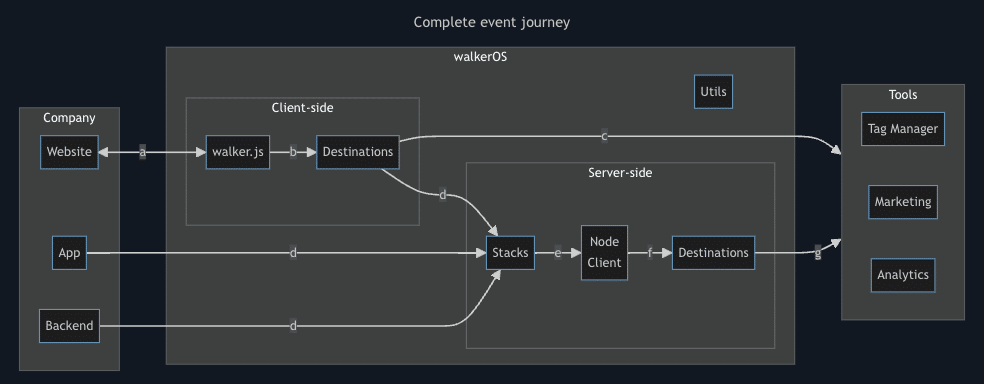
Enter walkerOS. This new open-source tracking library from ElbWalker aims to give you customizable control back. It lets you send data wherever you want, not just to Google. It also claims better performance through a lightweight codebase.
This article explores if walkerOS lives up to its promises. We’ll also:
- Compare its features, flexibility and ease of use vs. the Google tag.
- Learn the cases where switching makes sense, along with the potential downsides.
What is gtag.js?
The Google tag, or gtag.js, is a JavaScript library by Google that tracks and collects data, serving as an all-encompassing link between your site and various Google services, including Google Ads and Google Analytics 4.
As opposed to ga.js and analytics.js, which were only limited to analytics, gtag.js provides a single solution.
It achieves efficiency by using other libraries instead of handling analytics and conversion data capture directly, essentially acting as a framework for those libraries.
This makes it easier during the setup and integration processes while reducing the need for extensive code changes.
Gtag.js combines multiple tracking tags into one, unlike Google Tag Manager. This simplifies user experience, allowing for easier event detection and cross-domain tracking.
Overall, it provides detailed insights into visitor behavior and traffic sources more easily, improving its usefulness.
Dig deeper: Google releases simple, centralized tag solution
Why should you look for a gtag.js alternative?
While gtag.js is the industry standard for Google Analytics and Ads tracking, there are situations where alternatives are preferred. Reasons include privacy, lightweight libraries, server-side data collection and data ownership to avoid vendor lock-in.
Alternatives may provide better control over user data, aiding compliance with regulations such as GDPR and CCPA. They may offer features like data anonymization and selective data collection. This ensures data is managed in line with organizational privacy policies, reducing the risk of data sharing with third parties.
Page speed is vital, so optimizing for JavaScript library performance matters. While gtag.js is lightweight, using multiple libraries can slow down a site.
Smaller libraries improve load times, enhancing user experience, especially on mobile. Consider multi-destination libraries for better performance.
From a data security perspective:
- Sensitive information can be kept more secure and the risk of being intercepted or manipulated on the client side is reduced.
- Server-side data collection can bypass issues related to ad blockers or browsers that restrict tracking scripts, potentially offering more accurate analytics data.
Exploring alternatives offers flexibility in data management, avoiding vendor lock-in and pricing constraints.
Owning your data enables seamless integration with various systems and custom analytics solutions. For instance, if consent for Google Analytics 4 is denied, your tagging server might not receive all data.
What is walkerOS?
Here’s where the walkerOS library comes into play.
WalkerOS (a.k.a. walker.js) offers a flexible data management system, allowing users to tailor data collection and processing to their needs.
It’s designed to be versatile, from simple utilities to complex configurations. Its main objective is to ensure data is sent reliably to any chosen tool.
Simply put, you can implement walker.js and send data to all places for analytics and advertising purposes you need. No need to have a massive amount of different tags.
The walkerOS event model offers a unified framework to meet the demands of analytics, marketing, privacy and data science through an entity-action methodology.
This approach, foundational to walkerOS, systematically categorizes interactions by identifying the “entity” involved and the “action” performed. This structured yet adaptable model ensures a thorough understanding of user behavior.
WalkerOS stands out for its adaptability in event tracking, allowing customization based on specific business needs rather than conforming to preset analytical frameworks.
The philosophy behind walkerOS is to make tracking intuitive and understandable for all stakeholders, enhancing data quality and utility within an organization.
Get the daily newsletter search marketers rely on.
Working with walker.js and what to look out for
Getting started requires some tech knowledge and understanding, but it isn’t as hard as it seems. The walker.js web client can be implemented directly via code via the Google Tag Manager (recommended) and via npm.
All events are now sent to the dataLayer from which we can start the tagging via Google Tag Manager.
The tagging process means we want to define the events we want to capture and send, like filter usage, ecommerce purchases, add to carts, item views and more.
Walker.js supplies a good round of triggers that we can use starting from click, load, submit, hover or custom actions. You can also add destination tags and define where to send the captured data.
Walker.js works on prebuild destinations like Google Analytics 4, Google Ads, Google Tag Manager, Meta Pixel, Piwik PRO and Plausible Analytics. It also offers an API to send custom events to any destination that can receive them.
I recommend using their demo page to play around with it.
Switching away from gtag.js: What to consider
Switching from gtag.js to an alternative like walker.js for tracking and data collection comes with considerations and potential drawbacks, depending on your specific needs and setup. Here are some of the main points to consider:
Integrating with Google products
In terms of integration, gtag.js is designed to work seamlessly with Google’s suite of products, including Google Analytics, Google Ads and more.
An alternative like walker.js does not offer the same level of native integration, potentially complicating the setup with these services. You need technical understanding to implement and maintain.
Feature support and customization
Gtag.js supports a wide range of out-of-the-box features tailored to Google’s platforms. Walker.js may not support all these features directly or might require additional customization to achieve similar functionality.
Ease of implementation for Google users
Gtag.js provides a straightforward implementation process for those already using Google products. Users might find that walker.js requires more technical knowledge to customize and integrate effectively.
Google’s extensive documentation and community support make troubleshooting and learning easier. Walker.js, being less widespread, may have more limited resources for support and guidance.
Exploring GA4 data collection and tracking options
The decision between using gtag.js or switching to an alternative like walker.js depends on your specific use case and needs. If you heavily rely on the Google ecosystem and want seamless integration, then gtag.js is likely the best choice.
However, for those needing greater control and flexibility with their data collection and usage across systems, walkerOS offers a lightweight, customizable tracking solution.
While the setup requires more technical knowledge, the ability to own your data and reduce vendor lock-in provides strategic long-term benefits for many businesses.
Dig deeper: How to set up Google Analytics 4 using Google Tag Manager
Courtesy of Search Engine Land: News & Info About SEO, PPC, SEM, Search Engines & Search Marketing
Wednesday, February 28th, 2024
Brands and businesses must balance optimizing their online presence through SEO with providing an excellent customer experience.
This raises the question – can SEO redefine client experience, or does it risk overshadowing other important elements of the customer journey?
While SEO is key for visibility and accessibility, companies must be careful not to prioritize it over user experience or broader marketing strategy.
Learn how to balance SEO with other efforts to build brand loyalty and meaningful customer relationships.
Balancing SEO with other crucial elements
While SEO is crucial in redefining your client experience, finding a balance and avoiding overshadowing other crucial elements in the customer journey is important.
Be careful not to prioritize SEO metrics over user experience or other aspects of your marketing strategy.
For example, as you optimize for search engine rankings, you shouldn’t sacrifice the authenticity and relevance of your content.
Make sure that your SEO efforts align with broader marketing initiatives to cultivate brand loyalty and nurture meaningful customer relationships.
Dig deeper: SEO and UX: Finding the strategic balance for optimal outcomes
SEO best practices that improve the user experience
1. Treat your visitors to a great user interface
User interface (UI) plays a pivotal role in website performance and user engagement. Websites with shoddy user interfaces might fail to retain visitors’ attention.
Difficult navigation, cluttered layouts and lack of informative content contribute to higher bounce rates and shorter session durations, adversely affecting SEO metrics.
To address this:
- Prioritize creating intuitive, user-friendly interfaces that captivate and retain visitors.
- Ensure easy navigation through clear menu structures, informative service pages and engaging multimedia elements such as images and videos.
- Align UI design principles with SEO best practices to create immersive digital environments that foster meaningful interactions and drive conversion.
Get the daily newsletter search marketers rely on.
2. Establish good linking habits
Linking strategies play a crucial role in SEO and user experience.
Backlinking, the process of acquiring inbound links from external websites, can improve site accessibility and SEO rankings and enhance the credibility and authority of the website.
Internal and external links serve as pathways for users to navigate through relevant content and access valuable information.
Strategic external linking to authoritative sites reinforces trust and legitimacy, enriching the user experience.
Directing users to reputable sources and complementary content establishes your brand as a reliable source of information within your respective industries.
Additionally, internal linking structures guide users through the website’s hierarchy, facilitating seamless navigation and encouraging deeper engagement with the content.
3. Enhance accessibility for all users
To improve user experience and SEO performance, prioritize accessibility.
Ensure that all users, regardless of their abilities or disabilities, can navigate and engage with the website effectively.
Accessibility encompasses various considerations, from accommodating users with visual or auditory impairments to those with motor or cognitive limitations.
From an SEO perspective, accessible websites perform better in search engine rankings as they provide a more inclusive and user-friendly experience.
Here’s how to enhance accessibility to improve both SEO and user experience:
- Semantic HTML and alt text: Use semantic HTML tags to structure content logically, making it easier for screen readers to interpret and navigate. Provide descriptive alt text for images to assist users who rely on text-to-speech technology or have images disabled.
- Readable typography and contrast: Choose legible fonts and appropriate font sizes and ensure sufficient color contrast between text and background to enhance readability for all users, including those with visual impairments.
- Testing with assistive technologies: Regularly test the website with assistive technologies like screen readers and voice recognition software to identify and address accessibility barriers. Conduct usability testing sessions with users of diverse abilities to gather feedback and improve accessibility features.
Dig deeper: 10 internal linking best practices for accessibility
4. Optimize page load times
Page load times are critical factors that significantly impact user experience and SEO performance. Users expect instantaneous access to information, and slow load times can lead to frustration and abandonment. From a UX perspective, slow-loading websites diminish engagement and deter users from exploring further.
Optimizing site performance through technical audits, code enhancements and content optimization strategies improves website stability and enhances SEO rankings.
By reducing page load times and streamlining the browsing experience, you can create frictionless interactions that captivate users and drive organic traffic.
Dig deeper: Page speed and experience in SEO: 9 ways to eliminate issues
Crafting an engaging experience for customers with SEO
SEO strategies and user experience efforts should work in tandem to create an optimal customer journey. Prioritize user-centric design and accessibility while implementing SEO best practices.
Ensure that your focus on search engine optimization does not overshadow building meaningful relationships and enhancing overall brand value.
With the right balance of SEO and UX considerations, you can gain visibility in search results while providing an engaging, seamless experience for customers. The key is integrating SEO seamlessly into your overall digital marketing and content strategy.
Courtesy of Search Engine Land: News & Info About SEO, PPC, SEM, Search Engines & Search Marketing
Tuesday, February 27th, 2024
Google has removed the option to click “more” or “view all” under the local pack within the Google Search results. The local results that show up in the main Google search results for locally intended queries, such as pizza near me, dentists near me and so on, now only shows three listings without the option to see more.
What it looks like. Here is a screenshot showing the local pack missing that button to see more results:

Here is an older screenshot showing that under those three local listings, there was a “view all” and often “show more” button:

Is it a bug or a feature. We have reached out to Google to see if this is an intended feature or if this is unintended. Did Google really remove the option to quickly see more local listings in your area? It just seems to be like this is a bug but again, we have reached out to Google to find out.
Why we care. It is unknown what percentage of searches click to see more local results. I know that I personally often click to see more local places when using this local pack but does the average searcher do that?
Joy Hawkins, a local SEO, wrote that she hopes this is a bug. Most local SEOs and small businesses would not appreciate only the three listings showing without an easy and obvious way to get to see more results.
Courtesy of Search Engine Land: News & Info About SEO, PPC, SEM, Search Engines & Search Marketing
Tuesday, February 27th, 2024
Selecting the right digital marketing agency partner is key for businesses aiming to drive results and scale efficiently. With countless agencies vying for attention, marketers must ask the right questions to ensure they make the best choice for their company’s needs.
Although I’ve owned an agency for seven years, most of my career was spent working on the client side. I’ve compiled questions I would have asked when I was on the other side of the desk and also from questions prospective clients ask us.
These questions can guide your agency selection process, aiding in informed decisions. While not all are necessary for an RFP, they’re valuable for discussions with agencies.
Primarily for paid search, they can be adapted for SEO, paid social, retail media or other needs.
Understanding the importance of this part of the business
1. How many total paid search clients does the agency have and what is the average annual spend of their clients?
- Understanding the agency’s client base and their typical investment levels helps gauge their experience and the scale of their operations.
2. What percentage of the company’s revenue does paid media management represent?
- This insight provides valuable context regarding the agency’s emphasis on paid media and its significance within its overall business strategy. It goes hand in hand with the question above.
- Is the agency just starting out in paid search or is it a core capability?
Understanding your position
3. Will your business be considered a big, medium or little fish in their PPC department?
- Knowing where your business stands in relation to the agency’s other clients gives perspective on the level of attention and resources you can expect to receive.
- In an ideal world, you’ll fit somewhere in the middle – important enough to get proper attention but with an agency that has experience with running larger accounts so that they can help you scale.
4. Will you own your accounts or would they?
- It’s important that you always retain ownership of your account. That way if you’re ever dissatisfied, you can easily take your business elsewhere.
- You’re hiring an agency to manage on your behalf, but that doesn’t mean that you shouldn’t own the work.
5. What does a typical contract term look like?
- Do they lock you into long contracts without an out clause? You’ll never know how the relationship looks until you’ve started collaborating.
- Make sure you have some flexibility in case the partnership or results aren’t working out. If you’re OK signing on for a longer term without an out clause, you may be able to get a discount.
Account audit and optimization
6. Has the agency performed an account audit and what specific observations and areas for improvement were identified?
- This question delves into the agency’s analytical capabilities and its proactive approach to optimizing client accounts. It also helps ensure they have a deep technical and strategic knowledge of finding opportunities.
- Make sure you’re getting specific recommendations instead of generalities. Many agencies won’t perform a free audit unless it’s for a larger account.
- Still, you may consider paying for an audit as part of your evaluation process to get a feel for what they’ve found and how they present information.
7. Based on their audit findings, how much restructuring do they believe is necessary and what is their preferred account setup approach?
- Understanding their proposed strategies for restructuring provides insight into their expertise and methodologies.
- This will also give you a sense of whether they are likely just to take your existing account and make standard optimizations or if they are bringing new thinking to the table.
Assessing performance metrics
8. What do typical reports look like?
- It’s helpful to see a sample of a weekly or monthly report. This will give you a sense of what type of information will be shared with you continuously.
- Do they talk about results or more vanity-type metrics? Is it the level of reporting you’d expect? Does it feel very templated or more customized and full of rich information?
9. Will you have access to a live dashboard?
- You’ll want to know if you have access to performance data (aside from logging straight into Google Analytics or Google ads) directly or if you’ll have to request reports.
- If you can access a dashboard, ask to see a sanitized report version. Make sure that spend and CPA or CPL (or another performance metric) are shown.
- We’ve seen dashboards that report on impressions and clients but hide spend so the client doesn’t know what is profitable and what may be inefficient.
10. What do they typically use to evaluate performance? GA4, platform data or another source?
- Each source of information has pros and cons. Platform data can be very helpful because it provides the richest information, but GA4 will provide a deduplicated view of the order/revenue. You may also want to understand if they use other technology like Triple Whale.
11. What attribution methodology do they typically use?
- This goes hand in hand with the question above. It’s helpful to get aligned so that you’re speaking the same language. Make sure you also discuss the attribution window.
Expected results, timeline and onboarding process
12. Based on their findings, how long do they anticipate it will take to see improved results and what are their expectations regarding performance gains?
- Setting realistic expectations for results and timelines is essential for aligning goals and forming a healthy partnership. However, be a little weary of overly aggressive forecasts unless you know that your program is in disarray.
13. What is their process and timeline for taking over an account?
- Understanding their onboarding process helps manage expectations and ensures a smooth transition.
- For larger programs, you’ll probably expect a request for an overlap period with the existing agency.
14. How do they ensure a smooth transition to avoid any drop in performance during restructures?
- Probing into their strategies for minimizing disruptions during transitions highlights their commitment to maintaining performance consistency.
- Many agencies will suggest a period where more minimal changes are made while they learn the ins and outs of the account. While this may seem lax, it may be for your protection.
Get the daily newsletter search marketers rely on.
Industry focus
15. Do they lean into one particular industry or spread their focus and why?
- You’ll need to decide if you prefer to align with a digital marketing agency specialized in your industry for targeted expertise or opt for one with a broader focus for diverse perspectives and potential cross-industry insights.
16. If they have multiple accounts in your industry, how do they ensure account/client separation?
- Understanding their approach to maintaining client confidentiality and avoiding conflicts of interest is crucial for establishing trust and transparency.
17. Which bidding strategies do they prefer to use and why?
- Each type of account will require different bidding strategies and the strategy will change depending on how much data is available to drive decisions.
For retail or ecommerce clients:
18. What do they see as the role of text ads, shopping and Performance Max (PMax? What about video or other campaign types?
- It’s helpful to understand the agency’s philosophy on each campaign type to ensure a well-rounded strategy. This question addresses the agency’s understanding of retail-specific advertising dynamics and its ability to maximize returns for ecommerce businesses.
19. How do they navigate optimization challenges if they employ a ‘go all in on PMax’ approach?
- PMax is easier to run (and likely more profitable for the agency to manage!), but that doesn’t necessarily mean it’s best for your business.
- Do you really want to hand off full control to Google? Would you prefer for there to be more levers to pull to drive scale or control costs when needed?
20. If you have a physical presence, do they have experience with local campaigns?
- What’s their typical approach and how do they think about attributing sales from stores or driving foot traffic?
For B2B or service focus:
21. Do they have experience with RevOps and understanding the nuances between optimizing for a lead vs a qualified lead and customer?
- Not all leads are created equally and it’s important in B2B to find actual converting customers.
22. Have they handled integrations with call tracking or other offline data sources?
- B2B and service businesses also tend to include more offline sales – captured through phone or other means – so you’ll want a partner that understands how to capture and leverage the right data
Team structure and expertise
23. What is the general structure of their PPC department?
- Exploring the agency’s organizational structure provides insights into its resource allocation and specialization.
- Is there one director over a lot of managers? Or is it a team with a clear hierarchy that’s designed to ensure each account has sufficient senior-level attention?
24. How big is the overall PPC team and how many members are fully dedicated to paid search or social management?
- Understanding the team’s composition and expertise distribution informs expectations regarding the depth of talent available to support your campaigns. You may also want to ask if they use a pod structure or have a different approach.
- The reason that team size matters is because one of the reasons that clients often like agencies is because there is a pool of individuals who are experts and can bring more ideas to the table.
25. What is the average years of paid search experience of the individuals on the PPC team? And what’s the minimum?
- You’ll want to understand if the agency is using experienced professionals or if there are a lot of junior members of the team. Ideally, you don’t have a team that is “learning on your dime.”
Account management
26. How many accounts is the lead responsible for and what role do they play?
- This question sheds light on the level of individual attention and involvement you can expect from the agency’s leadership.
27. Who will be assigned to your account and what is each team member’s level of experience?
- Understanding the qualifications of the team members assigned to your account is crucial for assessing their ability to deliver results. An agency is only as good as the people on your account!
28. How often will you be meeting with the team and who will be on calls?
- Make sure you are clear about who will attend and at what cadence. You may have some calls with more members of the team and others that include just a limited set – but it’s better to know upfront.
Day-to-day operations
29. Who handles most of the day-to-day work in the accounts and how many accounts are they responsible for?
- This question provides insights into the workload distribution and the level of attention your account will receive.
- We’ve connected with individuals in the past who are responsible for more than a dozen accounts. There’s no way that person will have time to learn about your business.
30. Who will be your primary point of contact for day-to-day communications?
- Clarifying the communication channels and primary contact streamlines collaboration and ensures efficient problem resolution.
- Will you be working with an account manager or do you have direct access to the people managing your campaigns?
- You’ll want direct access to ensure that you aren’t playing the game of telephone on strategy and other important topics.
31. What’s the most frequently used method for communication?
- You’ll want to find out if you have access to the team through email only or if you can also communicate through Slack or another means.
Third-party involvement
32. Are any tasks outsourced offshore or to third parties?
- Understanding the extent of third-party involvement helps evaluate potential dependencies and risks associated with outsourcing.
- Ultimately, you’re hiring the agency to know who is actually doing the work from end to end.
Collaboration
33. What is their relationship like with the Google team?
- Access to Google highlights their ability to gather data quickly and can bring potential advantages, such as beta features and industry insights.
34. How do they view the value of paid search and SEO (or Social) partnering and how do they ensure effective communication between teams?
- Exploring their perspective on cross-channel collaboration demonstrates their holistic approach to digital marketing and their commitment to maximizing results across channels.
- How do they collaborate within their agency (if they are managing multiple marketing channels for you) or with other agencies (if the work is divided among agencies)?
Case studies and references
35. Can they provide relevant case studies showcasing successful paid search campaigns?
- Reviewing case studies allows you to gauge the agency’s track record and success stories in delivering results for clients.
- Look for something that’s representative of your business, whether it’s big or small. That doesn’t mean that it needs to be for your industry – but there should be some parallels.
36. Are there reference clients you can speak to about their experiences with the agency?
- Speaking directly with past or current clients provides valuable firsthand insights into the agency’s performance, communication and overall client satisfaction. It’s rare that prospects ask for this and generally reserved for large accounts.
Client retention insights
37. When the agency loses clients, what are the typical reasons cited?
- Understanding the factors contributing to client churn provides insights into potential risks and areas for improvement in the agency’s service delivery.
Marketers can make informed decisions when selecting a digital marketing partner by asking some of these questions and diving into various aspects of a prospective agency’s operations and expertise.
You don’t necessarily need to discuss every one of these, but choosing a good cross-section of questions can help ensure you find a good partner for your business.
Courtesy of Search Engine Land: News & Info About SEO, PPC, SEM, Search Engines & Search Marketing