Archive for the ‘seo news’ Category
Wednesday, March 6th, 2024
Google has turned off some event rich results and changed the way some event rich results appear in the Google search results. As a result, you may see a drop in impressions and clicks reported in Google Search Console with that specific search appearance filter set to on.
What Google said. Google posted this news in the data anomalies section of the Search Console help area. Google wrote that starting on March 4, 2024, “Google Search has changed the way event rich results appear in Search results.”
Google added:
As a result, you may see a drop in clicks and impressions for your event search appearance reported metrics in your performance report. This doesn’t indicate a real drop in traffic, only in the way we categorize it in Search Console.
Ryan Levering from Google explained, “There are still a number of event rich features that use events data. Only rich snippets was turned off in that particular cut AFAIR.”
Why we care. If you run a website that runs events and you get traffic through event rich results, you may see a dip in that traffic going forward. It is unclear to me exactly which event rich result dropped out on March 4th, because we noticed some event rich results drop out around October 2023.
In any event, this is something to consider when you look at your reporting and there is not much you can do, since Google just turned off that feature.
Courtesy of Search Engine Land: News & Info About SEO, PPC, SEM, Search Engines & Search Marketing
Wednesday, March 6th, 2024
Marketing channels and the teams managing them should be constantly collaborating and avoiding operating within silos. But it’s easier said than done sometimes.
One partnership that commonly gets overlooked is between SEO and social media teams – both organic and paid – and how they can collaborate to maximize output, performance, ROI and, most importantly, customer connections.
There’s so much each channel can offer the other. All this typically becomes apparent via performance once that connection is made and a partnership starts.
Here are 13 ways SEO and social media teams can work together to produce enhanced results:
1. Synergy
Team synergy goes a long way in everything you do, especially when trying to speak to a brand’s intended audience.
Consistent messaging, language and perspective in all marketing initiatives help achieve goals the larger team is working towards accomplishing (assuming those teams are on the same page).
Voice and tone, keyword usage and general branding should be consistent, and collaboration as SEOs and social media managers is an easy (and relatively low-cost) way to do it.
Make it a critical objective to meet with your social media or SEO team counterparts to ensure you maximize everything from your image to messaging. This overarching theme is critical to remember with each of the remaining tips for how teams can work together.
2. Keyword targeting
Brands have keywords that represent who they are, what they do, the problems they fix and the products and services they offer. Consistency goes a long way for keywords – and the topics and ideas tied to them – and how they are used. Your audience isn’t naive to those connections. Your audience relies on them.
Intents and other connections tied to keywords and SEO can help social media better understand that.
Use keyword research from SEO best practices to reinforce your social media messaging.
Use your social media audiences and engagements to better understand your customers and the needs that matter to them most.
3. Profile optimization
Keywords go a long way in search and that’s not just for search engines.
People use keywords to search on social media just like they do on search engines. And, while social media algorithms may not be as sophisticated as that of Google, they still offer useful search features that people rely on every day.
That’s why optimizing every one of your business’s social media profiles efficiently is so important.
Social networks have their content indexed in search engines, too.
Yet, properly optimizing a profile goes beyond just keywords.
Ensuring accuracy and consistency of NAP (name of the organization, address and phone number) among the other available entry fields on social platforms helps connect these profiles to the brand and its line of business.
4. Enhanced visibility
Publishing social media content prominently served in search results will increase traffic, engagement and backlinks.
And, with more than 60% of Instagram users claiming they research products and services on the platform before buying, showing up at the right time for those products and services when people may not yet know a brand is critical.
Social media calendars planned out and crafted with SEO infused into them help achieve goals typically tied to branding and engagement. Still, they also can propel quality content to more visibility in organic search.
Strong social signals reinforced by recency and relevancy will also help drive popular and timely social media posts (and the content linked) to the top of relevant search pages when that content satisfies a query.
5. Better planning and content distribution
SEO is typically more likely to work closely with the content team to develop the right topics and keywords to leverage, but what about the social media team?
There is no better team to help distribute quality content to the right people.
There is likely a growing pipeline and cadence for content being planned, created and published; collaborating with social media specialists to get eyes on the content at the right time could make all the difference.
6. Cross-channel promotion
Different people hang out in different places. And your customers are everywhere.
Social media gives us the chance to engage in conversations across a variety of platforms with varying audiences.
SEO helps us know what to talk about, how to say it and what data points are most important. Social media does this in real time. Together, there is massive potential.
Share the quality topics and opinions your brand publishes across social media channels and leverage recency and user behavior signals to compound SEO efforts and reach audience targets at multiple stages.
Get the daily newsletter search marketers rely on.
7. User feedback and social listening
A great way to learn what your audience cares about is by listening.
Brands try customer surveys, mailers and even cold calling to best understand what their current and potential customers think, want and care about.
This data is then built into the marketing strategy and used to guide much of it. But, without social media feedback and insights, a significant part of the strategy will be absent.
People on social media are voicing their mediocre opinions around every corner; businesses should be gobbling that feedback up if it affects their business or their customers in any way.
Listen to your fans and followers. What language is your audience using? Is it in line with internal brand thinking? Are there new keywords trending in the space? Chances are, the social media team can help the SEO team answer many of those questions.
SEO insights (search volume, geographic and demographic details, intent, etc.) on those new keywords would also be useful for the social team to know. Collaborate and capitalize.
Dig deeper: Feedback optimization: A user-first approach to SEO
8. FAQs
FAQ pages can be a gold mine for organic traffic – and for helping users get the answers they need.
And there are not many better ways to ensure you are answering questions that matter than by listening to what people are asking on social media.
They may not always be polite (or even spelled accurately), but there is a lot to be learned from listening to your social media audience.
Are you constantly seeing the same questions being asked over and over? These are indicators that these are the things most important to your audience and you need to do a better job at explaining the answers earlier and more often.
Using organic traffic data in tandem with social media insights, nearly any brand would be able to identify the 10 most important questions customers have regularly.
9. Maximize performance
It’s obvious the ultimate goal of marketing is to improve performance and drive conversions.
SEO and social media collaborating effectively is always going to help achieve this.
Social media profiles and the content they publish benefit from this collaboration for various reasons, but improved traffic and engagement metrics should be expected.
You can also expect an increase in overall traffic flow across various channels and page growth metrics on social media.
The dozen other ways listed in this article for ways to collaborate and leverage social media and SEO together should all aid in achieving maximized performance.
10. Relevancy signals
What you talk about on social media matters in multiple ways.
Repeating themes become connected to your brand through relevancy signals. It’s obviously important to talk about things that matter to your brand (and its customers) while also maintaining a safe distance from sensitive or controversial subjects.
These critical connections across the web are built through branding heavily impacted by SEO initiatives and the business’s day-to-day operations.
If you sell outdoor furniture and talk about outdoor living, furniture materials, seating styles and backyard aesthetics, chances are your audience will not be caught off guard by this and will actually rely on it to inform them in the future.
And when you talk about what you know, your authority shines. SEO’s main goal is to build true authority.
Use social media to compound those authority-building initiatives further. You’ll likely pick up a decent following and probably even have some fun along the way.
11. Partnerships and backlinks
Brands can build relationships with customers and brand allies as individuals, and social media also presents the opportunity to build relationships with other like-minded brands.
This means potentially even collaborating with other brands on products and services and, in turn, acquiring backlinks that will further reinforce those high-quality, industry-relevant connections.
SEO will help identify the most valuable partners. Social media will help make building those connections tremendously easier.
We also know that nofollow links carry their own value within a healthy backlink profile and social media sites build more of these than any other websites by massive quantities.
12. PR and brand reputation
The most commonly overlooked opportunity on social media is the ability to be real and let your brand shine instead of being too buttoned up to do any good.
Too many brands miss the mark in an attempt to be something they aren’t for fear of backlash or rejection.
This should not be seen as a scary situation but rather an opportunity to show who the brand truly is.
SEO is where reputation begins and how it is built. Social media is the vehicle for demonstrating that reputation regularly.
Communicating among these teams regularly keeps the brand aligned and alerted anytime a PR issue or opportunity arises.
Social media offers brands a unique opportunity to engage with customers and mitigate potential damage by remaining socially aware and actively involved in key communities.
Dig deeper: How SEO and digital PR can drive maximum brand visibility
13. Content ideas
This one is the backbone of the best SEO and social media collaborations – and both sides benefit tremendously.
SEO data has long been thorough and useful when identifying what works well and what doesn’t on a website. Social media has been delivering useful data to enhance this for the last several years, and it’s improving every day.
Use as much data as possible to drive decisions that lead to creating good content. Then, use social media to leverage that content.
A lot of SEO data relies on third-party tools and tracking platforms, but social media platforms rely on people and their conversations. If you’re not hearing (or reading) what’s being said, you’re likely missing out on what matters most.
Courtesy of Search Engine Land: News & Info About SEO, PPC, SEM, Search Engines & Search Marketing
Tuesday, March 5th, 2024
In the old days, humans had to identify sources, summarize the work and search for common meaning. Today, robots do the heavy lifting and you, the human, are left to do the creative work of prompting and interpreting the output for the rest of us.
My tagline for the foreseeable future is:
“I’m human. I’m helpful. Some of this is AI, and that’s OK.”
This article explores how you can leverage AI tools to streamline the process of creating blog roundups and skyscraper posts – two effective content formats that, done well, can earn prominent positions in search results pages and drive traffic.
We’ll also dive into:
- The concept of the “AI sandwich” which combines human expertise with the power of AI to produce trustworthy, helpful content.
- A range of AI tools specifically designed for content creation, image generation and video production to incorporate into your workflow.
What are blog roundups and skyscraper posts?
Simply put, a roundup article is a blog post or article that includes multiple other sources to form the article’s content. The contributing content is typically on a fixed theme or topic.
Traditionally, the roundup post may be built on direct contributions from industry experts or may be made up of content repurposed from existing articles.
LinkedIn has gone so far as to institutionalize this through Collaborative articles.
LinkedIn selectively invites experts to contribute to their articles based on their professional background, skill proficiency and engagement on the platform.
From a user perspective, a roundup blog post brings together multiple expert views of a topic.
From an SEO or marketing perspective, roundup posts align the publisher with both the topic of the article and the contributors.
Meanwhile, the “skyscraper technique” was popularized by Brian Dean at Backlinko. The steps involved are:
- Step 1: Find link-worthy content.
- Step 2: Make something even better.
- Step 3: Reach out to the right people.
Dean approaches the skyscraper as a link building technique.
In my initial approach, I received feedback that what I was doing was more of a “roundup.” And that’s OK, too. Whether it’s a roundup, a skyscraper, or a review, the real value is that you are learning from the pages, winning your SERP and repurposing content to improve upon them.
As search engines move from lexical to semantic search, the skyscraper technique becomes as much about including known entities as its linkworthiness.
If well executed, the skyscraper includes several chunks, also known as passages and, if you’re Cindy Krum, “fraggles.” Passages are particularly important in Google’s SGE and rich snippets as they’re often the part of the page included in the rich results.
This podcast episode with Michael King of iPullRank and Martha van Berkel of Schema App offers a great explanation of semantic search, the knowledge graph and their potential implications for SGE.
Repurposing content with AI can make the workflow for blog roundups and skyscraper posts much more efficient.
Dig deeper: Using generative AI to improve existing content: Top tips + sample prompts
AI sandwich: The process of building helpful content with AI and human input
There are concerns that using AI tools will lead to content being deemed “unhelpful.” To support the quality guidelines and their human raters, the best use of AI tools may be an “AI sandwich” where:
- Humans write prompts.
- AI does its thing.
- Then humans edit and fact-check.
If we want to produce helpful, trustworthy content, the output of the AI content generation tools will need to be like a kit of parts on the shelf that together make the whole.
Below is a process for repurposing content with AI:
- Step 1: Identify the content you want to reference.
- Who ranks? This is where a tool like Surfer SEO comes in handy.
- Step 2: Have the tools summarize the reference articles.
- Do it one by one in ChatGPT, Gemini, etc., or do it in bulk in ZimmWriter.
- Step 3: Assemble the summaries into one primary document.
- If you’re a little techy, you can do this with an automation tool like Zapier or Make.com.
- Step 4: Analyze the primary document for learnings, such as:
- Common strategies and techniques.
- Most cited X or Y.
- Unusual or surprising topics.
- Step 5: Assemble the collected works.
- For a Skyscraper post, you may not wish to give a verbose attribution. Instead, your analysis should give a clear understanding of what the winning formula is. Once you know what you need to come “over the top” of the competition, your summaries and analysis will help you create a unique article to win the SERP.
- The roundup is different in one very important way: you are giving credit to the source articles. This is arguably cleaner from an ethical perspective and you still get what you need, which is a significant piece of content worthy of winning in search.
By sampling, summarizing and, in some cases, repurposing already ranking content, you are likely to cover both lexical and semantic search considerations for a given topic.
In other words, if your reference articles are in the top 20 search positions and, through your research and processing, you include a sufficiency of keywords and entities, you are more likely to rank well in search.
Blog posts, videos or social media posts?
Short answer: yes. All of the above.
Once you’ve created your written content and it feels like a fit for your target audience, you can start to think about content distribution.
When you repurpose existing content, you may give an old blog post new life. And that life can get extended.
Each source can provide multiple pieces. You can create blog content, visual content with image generation programs and podcast episodes – as either video or audio.
The same topic doesn’t have to be used in the same format. If you have high-quality content, a new post can reach new audiences, spreading the reach of your marketing efforts.
Social media platforms are a great place to broadcast your repurposed content. Each content piece can be multiple posts.
Your original post can become, with AI helping out, a guest post, an Instagram post or a LinkedIn post. Any of your social media channels are a great opportunity to reuse the same content to reach a new audience.
With the expense of content production, it makes sense to make use of multiple channels and new formats to target audiences, whether new or existing.
Is this black hat (or gray)?
In the words of Don Draper, “I’m not here to tell you about Jesus. You already know about Jesus. Either he lives in your heart or he doesn’t.”
In other words, spam is in the eye of the beholder.
Seriously, though, I prefer the roundup format because it naturally supports attribution. I openly link the original sources. When I use these techniques for content recycling, I give attribution.
Get the daily newsletter search marketers rely on.
Repurposing content: Real-world examples and ideas
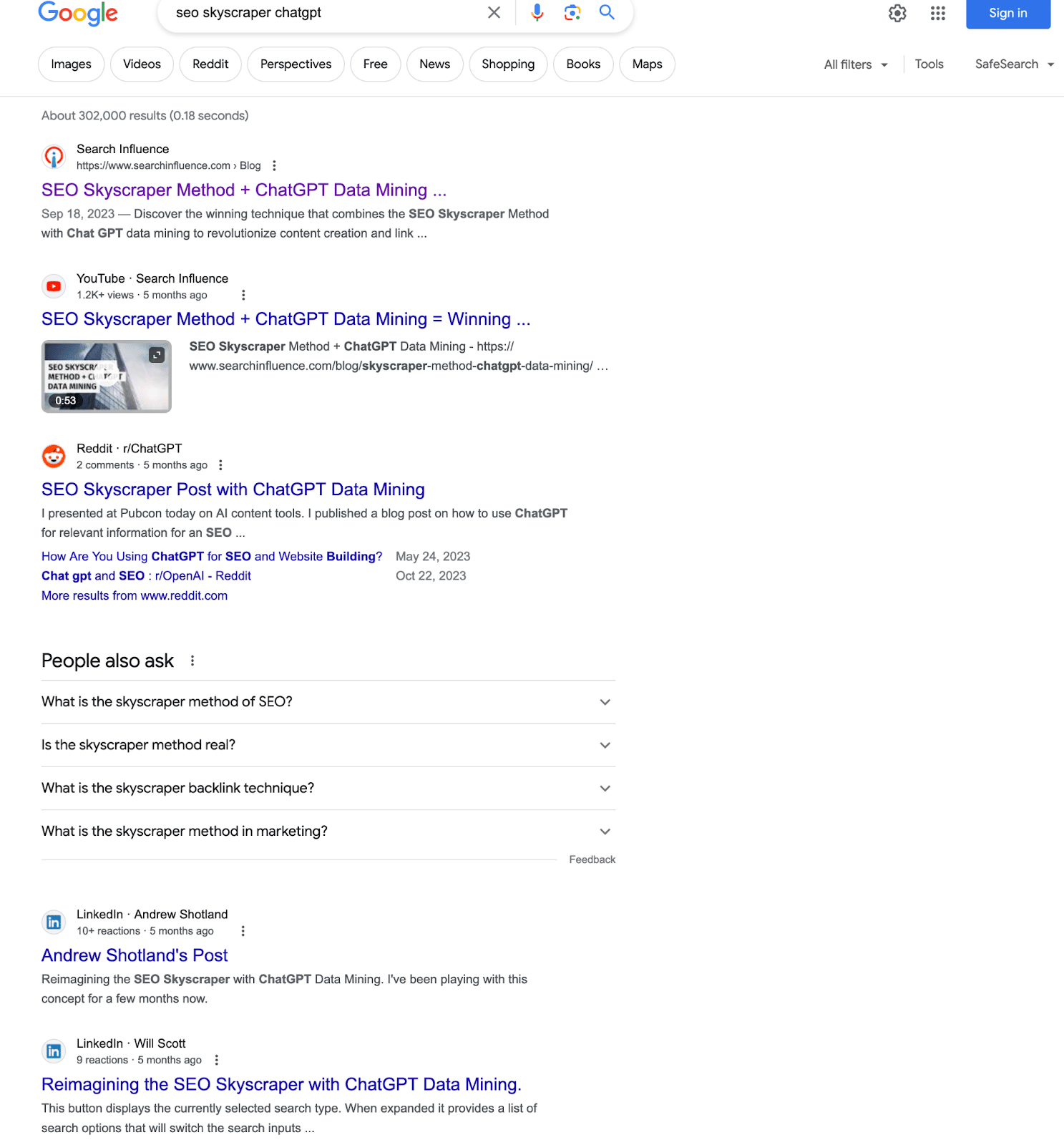
My blog post titled “SEO Skyscraper Method + ChatGPT Data Mining = Winning the SERP” ranks on Page 1 – infinite scroll notwithstanding – for:
- “seo skyscraper chatgpt” easy
- “seo skyscraper method” harder
- “seo skyscraper technique” hardest
(In essence, I’m using this technique to rank for this technique in a blog post where I describe the technique.)
The fact that we can rank among some very authoritative sites really proves the validity of the technique.
If you keep going down the page, you’ll find at least four more references to the article.
Other content types to repurpose include:
- Old blog posts.
- Evergreen content.
- Long-form content.
- Different platforms for high-performing content.
- To-do lists.
- Multiple content pieces from one source.
AI tools you can use in the process
It’s important to look beyond just text in your content creation process. Your audience is not all the same. Using multiple content formats helps you to meet your users where they’re most comfortable.
Taking those long-form blog posts and rendering them as videos or adding a video explainer to guest posts can make them much more accessible and potentially increase engagement.
Below are some AI-powered tools to check out.
Pure AI text tools, GPT interfaces
ChatGPT
For ideation, outlining and small-batch content creation, ChatGPT still reigns supreme for me.
Also, OpenAI was one of the first to make an easily available API for both text and image generation. As such, it’s integrated into other tools I use regularly.
And as the mainstream leader in this area, ChatGPT was the first to grow a plugin ecosystem that is widely adopted, including the super-tool AIPRM.
Also, ChatGPT is integrated with Bing. The Bing integration is very useful. You can go directly from creating a DALL-E 3 (another OpenAI project) image into Microsoft Designer, where you can manipulate it further.
Claude.ai
A product of Anthropic, Claude is a chat interface similar to ChatGPT. I originally started using it because it had a larger context (the number of characters one can process) than ChatGPT.
It’s also good for uploading files and processing them. For instance, I have uploaded the output of Screaming Frog to have Claude recommend how to organize a website’s worth of content based on URL and page title.
Gemini (formerly Bard)
Gemini is Google’s GPT, and it is unique in its ability to interface with other Google products. You can query your email, Docs and other Google properties like Google Flights.
Dig deeper: ChatGPT vs. Google Bard vs. Bing Chat vs. Claude: Which generative AI solution is best?
AI SEO tools
Surfer SEO
Surfer SEO is an SEO tool that analyzes top-ranking content and provides data-driven suggestions to help you write and optimize your own content for higher search engine ranking. It covers keyword research, on-page optimization and content creation.
More recently, Surfer has added a complete AI writer, which incorporates the analysis of its main SEO tool to guide an AI writer. The output of this tool is pretty comprehensive and, in my experience, can rank well right out of the box.
ZimmWriter
Want a one-click blog post from just a keyword? ZimmWriter.
Want 1,000 derivative articles based on existing content? ZimmWriter – yes, really, 1,000!
Want a product review roundup based on existing product listings? ZimmWriter.
Want a topical authority map that you can then automatically write all the content for and then upload to WordPress scheduled out into the future, with images from Pexels, DALL-E or Stable Diffusion? ZimmWriter.
If you need to really create content at scale, ZimmWriter is peerless.
Honorable mention: Content at Scale
I don’t use Content at Scale regularly, but it’s good.
If you want a complete article based on a single keyword or more complex inputs, Content at Scale does a good job. Unlike many tools that use a single model (e.g., OpenAI), Content at Scale uses multiple models and creates human-like content.
In addition to the content quality, it includes several content features that save time in the deployment process, like a table of contents, quote callouts and others.
AI image creation tools
DALL-E
DALL-E 3 is now integrated into ChatGPT 4 and is pretty brilliant. From a natural language prompt, you can get high-quality images. And, in its last release, DALL-E now renders text acceptably.
It sometimes takes a few tries, and in the worst case, you have to take the image into an editor to clean up stray characters, but the direct output is amazing.
Again, as mentioned above, another cool use case for DALL-E is in the Bing/ChatGPT/Microsoft Designer workflow.
Midjourney
Midjourney has many of the attributes of DALL-E but has one big drawback. You have to use it within a Discord chat. It’s my understanding that they’re working on this.
Midjourney is a little more flexible in that you can give it additional directives that aren’t as clear in DALL-E. For instance, you can specify aspect ratios, “lens” type and exposure.
If you like the chat interface, though, DALL-E is more intuitive.
Stable Diffusion
An early entrant to the image generation AI (2022), Stable Diffusion is a very rich tool.
In addition to the attributes of DALL-E and Midjourney, Stable Diffusion can manipulate existing images and create video and 3D assets.
AI video creation tools
Steve.AI
Steve.ai was the original video tool we used. It includes stock live-action and animated videos assembled based on a script – in addition to the video element. AI can generate that script from an existing piece of content.
Steve.AI can also create talking-head and generative videos – where your prompts render the frames. When we first used it a year or so ago, it wasn’t as far along as it is now and it’s worth another look.
Wave.video
Wave.video is my current go-to. It builds a script from content if needed and uses still and video stock art.
What makes Wave.video a better choice for me today is the price point. You can create as many videos as you like for a relatively low price.
For slideshow videos that you’re going to deploy to YouTube and your website, I find Wave.video intuitive. You can also render your own images in one of the image tools above to include in the video slideshow.
Both Steve.AI and Wave.video allow you to select voice-over voices that will read your script. I believe Steve has more and as with any AI voiceover, one has to be conscious of how mechanical they sound.
D-iD
This tool’s differentiator is that you can sample a person’s image and voice, allowing you to use them as an avatar.
You can then use that avatar as an overlay on other videos, but live-action and AI-generated. This is great for explainer videos, presentations and training.
In my experience, the avatars are a bit wooden, but I’m sure that will change with time. A similar product I learned about at Pubcon Austin is elai.io.
Next-level content repurposing with AI
If you believe the sites at the top of Google are a clue to what the algorithms find relevant, then starting with those as your input is a good idea.
Taking that a step further, you can make even better semantic connections for the algorithm when you bring in some AI-enabled SEO tools.
Courtesy of Search Engine Land: News & Info About SEO, PPC, SEM, Search Engines & Search Marketing
Tuesday, March 5th, 2024
It took an extra five days but now websites built and hosted on Google Business Profiles are now being redirected to the Business Profile listing on Google Maps. Google announced in January that it will be shutting down Business Profile websites on March 1, 2024.
Google updated its help page this morning to say, “As of March 5, 2024, websites made with Google Business Profiles are no longer available and customers that visit your site will be redirected to your Business Profile instead.”
What it looks like. I made a GIF of how this looks, when you try to click over to a Google Business Profile website, you are redirected to a Google Maps listing. You can see in the GIF below a screenshot of the Business Profile website. Above that screenshot, I click on the link to that Business Profile website, which then takes me to Google Maps and not that website.
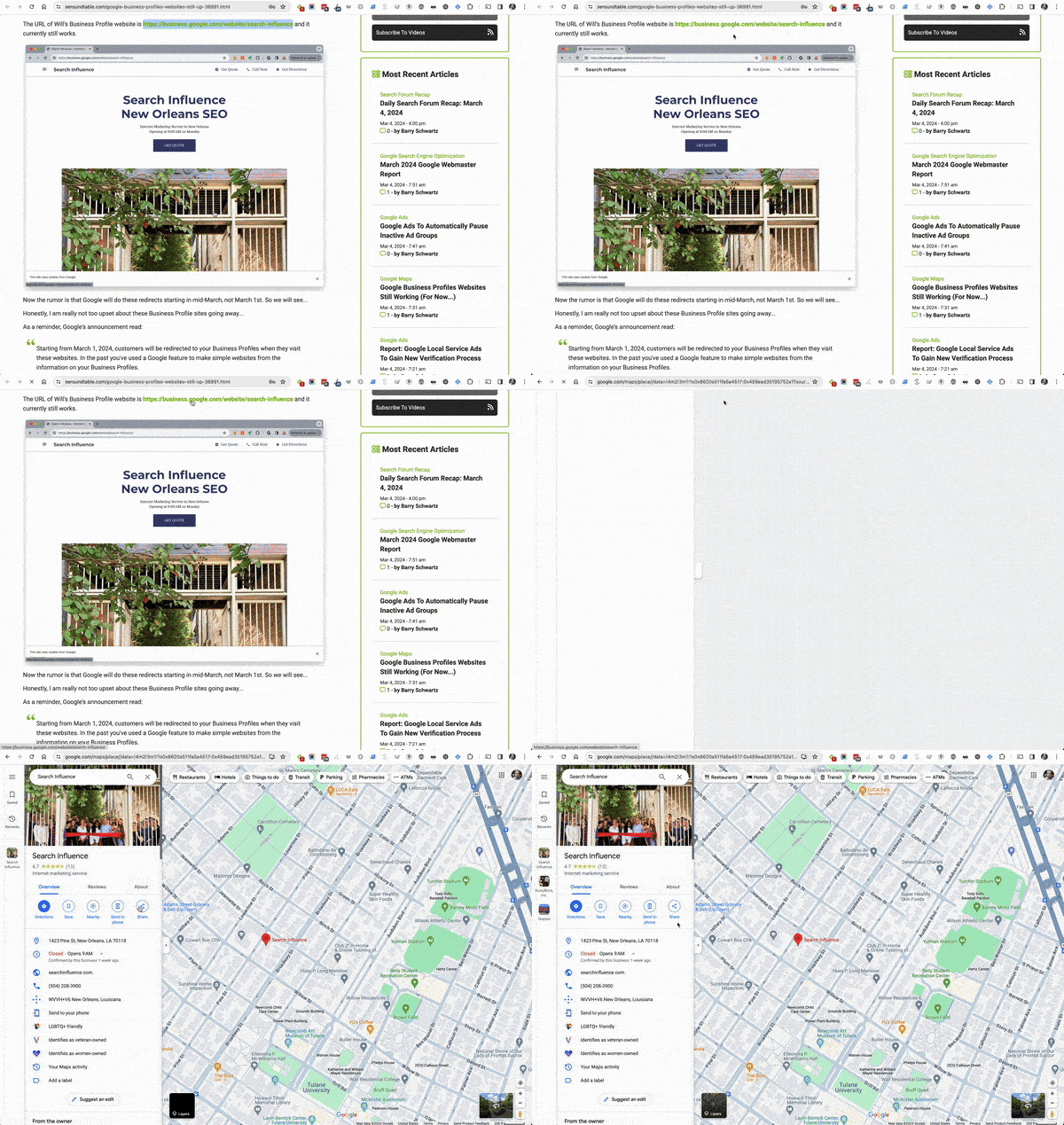
It is a 302 redirect, by the way.
Redirects will stop working. Google added, “Your customers will only be redirected to your Business Profile until June 10, 2024. After that, customers will get a “Page not found” error when they try to visit your website.”
So in a few months, those redirects will stop working as well.
Alternative tools. Google suggested using one of the following platforms to build a new website for your business:
- Wix
- Squarespace
- GoDaddy
- Google Sites
- Shopify
- Durable
- Weebly
- Strikingly
- WordPress
Why we care. By now, I hope you were aware that these Google Business Profiles websites were going offline and you created a new website using a different website builder tool. For those that did not do this yet, maybe you should jump on that right away.
Then make sure to add the new URL to your Google Business Profile.
In a few months time, those redirects for your old URLs created by Google Business Profiles will stop working completely. It is a shame, we would all wish Google would keep the redirects up indefinitely.
Courtesy of Search Engine Land: News & Info About SEO, PPC, SEM, Search Engines & Search Marketing
Tuesday, March 5th, 2024
Google’s Core Web Vitals have been a ranking signal since 2021 when Google introduced three metrics to measure the quality of user experiences on a website.
Real user monitoring data can tell you how well you do on Core Web Vitals and what you can do to improve them. This applies especially to the new Interaction to Next Paint (INP) metric that becomes one of the Core Web Vitals on March 12, 2024.
What’s the difference between lab data and real user data?
When measuring web performance, we can look at either lab data (also called synthetic data) or real user data (also called field data).
Lab data is collected in a controlled test environment. It tells you how fast your website loads from a given test location, with a given network connection and a specific test device. That makes it very consistent between tests, and the reporting can be very detailed as testing tools have full control over the test environment. Lighthouse is an example of a synthetic testing tool.
In contrast, real user data is collected from visitors when they go to your website. Each visitor will have a different experience depending on where they are located, how fast their internet connection is and what kind of device they are using. So when looking at a metric we need to look at a statistical average like the 75th percentile that is commonly used when reporting Core Web Vitals data.
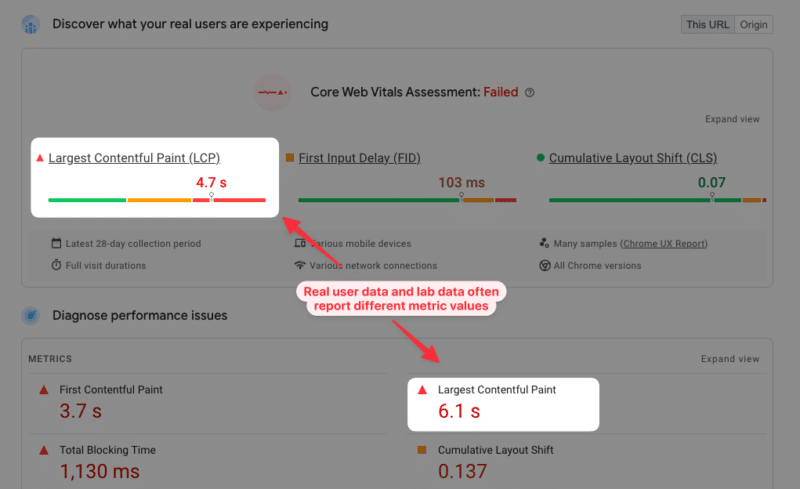
You’ll often see that the metric values don’t match between lab and field data. Ultimately what you care about is real user experience, but synthetic data can provide a lot more depth to help you understand and improve your page speed.
Why is real user data important to improve your Core Web Vitals?
Running a lab-based page speed test is great to analyze the initial load speed of your website. But other metrics depend on how users interact with the page once it’s been opened.
This applies especially to the new Interaction to Next Paint metric. Your INP score depends on what page elements users are interacting with, and at what point during the page load process these interactions happen.
While Cumulative Layout Shift (CLS) may occur during the initial page load, it often happens in response to a user interaction or when scrolling down a page. If you only collect data in a synthetic environment, you’ll miss these layout shifts that happen later on in the lifetime of a website visit.
How to collect real user Core Web Vitals data
A real user monitoring (RUM) solution like DebugBear can help you collect Core Web Vitals data on your visitors. You set up an analytics snippet on your website and this data is then aggregated and shown in a Core Web Vitals dashboard.
You can see whether any of your most visited pages are slow and how user experience varies based on the location of your visitors.
How to decide what pages to optimize
To begin with, check if any of your most popular pages are failing the Core Web Vitals assessment. You can also use Google Search Console to identify pages with poor user experience on your website.
Once you’ve identified a page you can dive more deeply into analyzing your RUM data and finding ways to improve.
Improve Largest Contentful Paint with real user data
Real user monitoring data for a page can help you understand the impact various performance optimizations would have.
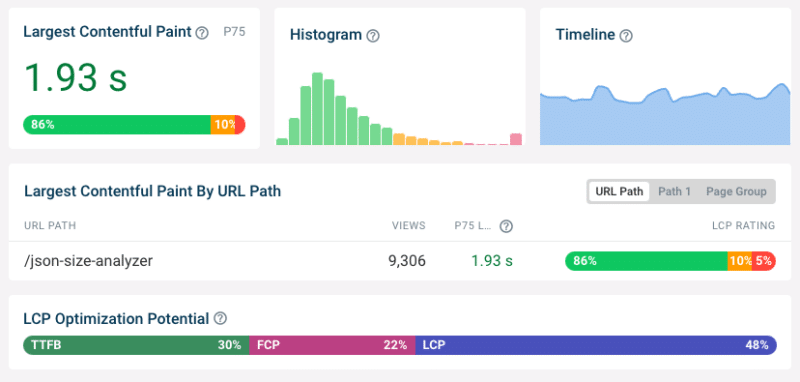
LCP Optimization Potential analysis shows what you need to optimize to improve LCP:
- Time to First Byte (TTFB): This component looks at how quickly the server responds to the HTML request.
- First Contentful Paint (FCP): This tells you whether there are render-blocking resources that prevent page content from appearing.
- LCP: This shows how long it takes for the LCP element to show up after the page first renders
See what page elements are responsible for the Largest Contentful Paint
Different visitors viewing the same page will see different content when the page first loads. The largest content element varies between desktop and mobile users and between logged-in and logged-out users.
Analyzing what page elements most often end up as the LCP element helps you understand what optimizations will help the largest number of users. It also lets you see if there are some LCP elements that result in particularly poor LCP scores.
Reduce render-blocking resources
If the First Contentful Paint component contributes a significant amount of time to your LCP score you need to see what can be done to make your website render earlier.
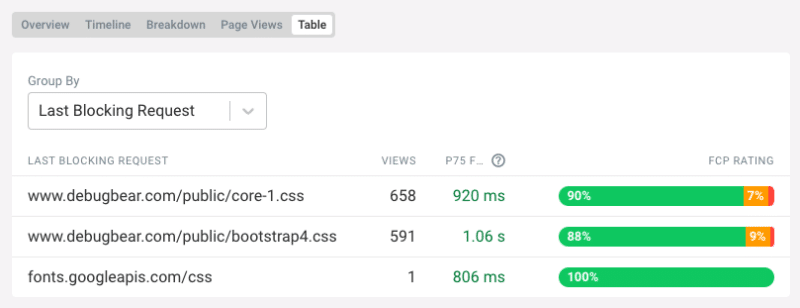
Tools like DebugBear and others tell you what the last render-blocking request is for each page view. If you load this resource more quickly then the First Contentful Paint will happen sooner.
Optimize LCP Images
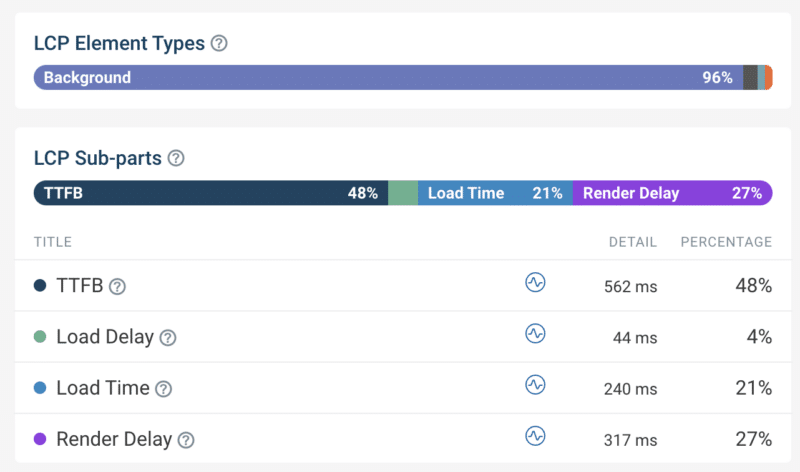
The LCP Element breakdown tells us what type of element is responsible for the LCP for different users. Here the analysis shows us that a background image is responsible for the Largest Contentful Paint 96% of the time. That means we should focus on loading that image more quickly.
The LCP sub-parts breakdown helps us optimize image loading performance by looking at components that follow the TTFB:
- Load Delay: How quickly after loading the HTML document does the browser start loading the image?
- Load Time: How long does it take to download the image?
- Render Delay: Does the browser show the image immediately after loading it or is there a delay?
In this case we can see that we need to optimize Load Time, for example by reducing download size with a more modern image format. The image also often finishes loading before the First Contentful Paint, which means it remains hidden for a few hundred milliseconds.
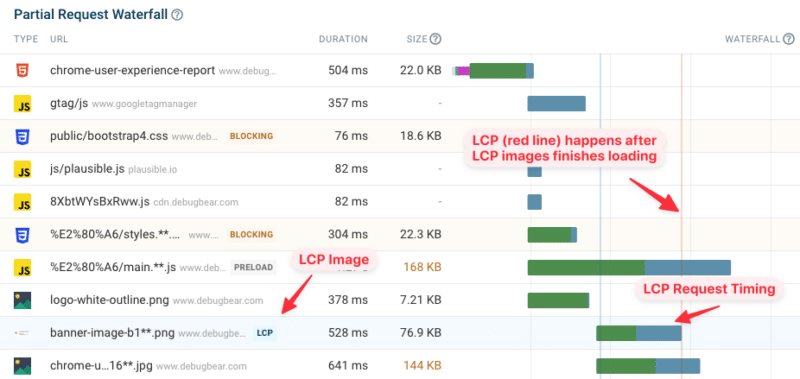
Looking at a specific page view and investigating the request waterfall visualization can help you better understand in what order different resources are loaded and how long a given request takes.
For example, here we can see what request loads the LCP image, when that request starts, and how soon after the request the LCP is recorded. Here we can see that the LCP (indicated by the red line on the right) happens right after the LCP image is loaded, which means that there is no Render Delay for this page view.
Improve Interaction to Next Paint with real user data
The INP score of your website greatly depends on what page elements users are interacting with. Clicking somewhere on a paragraph usually doesn’t trigger any code to run, and those interactions will be fast. A menu toggle or button that generates a new UI component and displays it will take a lot more time.
With real user data you can see what elements users are interacting with most often, and which of these interactions are slow.
Identifying code that’s causing slow interactions
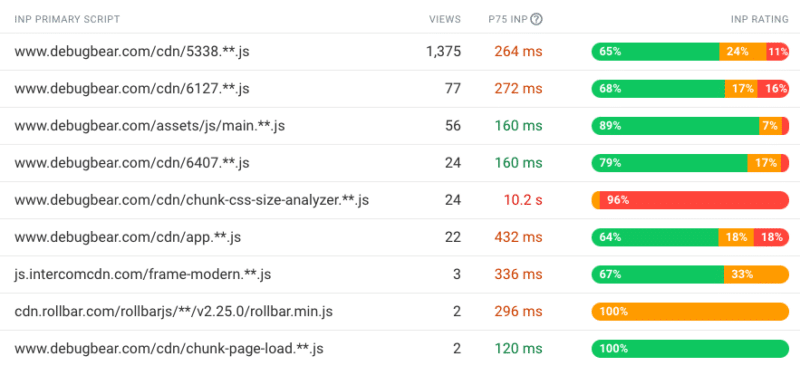
You can also see what scripts are responsible for slow interactions. JavaScript files may be part of your own website code or part of a third-party service like, whether that’s a chat widget or newsletter popup.
This is possible thanks to the new Long Animation Frames API that will be included in Chrome from mid-March 2023. This browser functionality reports what code is causing rendering delays on a page.
When you look at an individual user experience you can see what element the user interacted with and what code ran at that point, causing poor INP.
Once you’ve identified a specific script file you can then check whether that script is necessary and if there are ways to make it run faster.
When do slow interactions happen on the page?
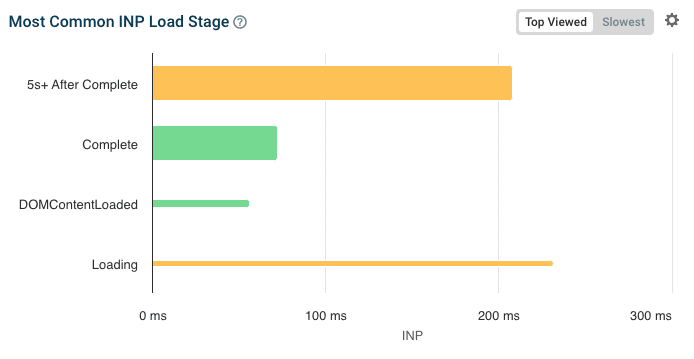
Another factor that impacts INP is the page loading stage when the interaction happens. During the very early loading stages INP is often high, as many parts of the page are initialized which requires a lot of CPU processing.
If that’s the case, you can consider different ways to optimize the initial page load logic and if more room can be left for handling user interactions during this time.
The width of the bars in this chart indicates how many users encounter poor INP at each loading stage. So, while the early “Loading” stage causes poor INP, not that many users are actually impacted here.
Improve Cumulative Layout Shift with real user data
Since layout shifts often occur following a user interaction, real user data makes it easy to identify shifts that you can’t detect in a lab-based test.
You can see what elements shift around and what user interaction led up to the layout shift. For example, an image that appears in response to a button click may push down other content on the page when the image has finished downloading.
What’s the difference between real user monitoring (RUM) and Google CrUX data?
You can use Google’s Chrome User Experience Report (CrUX) to obtain real user Core Web Vitals data for your website, without having to do any setup work.
However, real user monitoring addresses several limitations of the CrUX data:
- Regressions and improvements show up instantly with RUM data, while CrUX data is aggregated over a 28-day period.
- CrUX data is only available for high-traffic pages, while RUM data is available for any page on your website that a visitor views.
- The CrUX data only provides metric values and no debug data. You can see where your website is struggling on the Core Web Vitals but won’t know what to do about it.
Real user monitoring shows you how users are experiencing your website and what impact it has on their behavior.
Get started with real user Core Web Vitals monitoring
Looking to improve your web vitals, rank higher in Google, and deliver a better user experience? DebugBear offers a 14-day free trial – sign up now to get the data you need to optimize your website!
Courtesy of Search Engine Land: News & Info About SEO, PPC, SEM, Search Engines & Search Marketing
Tuesday, March 5th, 2024
Google confirmed it’s updating the verification process for Local Services Ads. The tech giant begun informing advertisers in specific sectors, like law services, about the update on March 4.
However, there are additional reports suggesting that a broader verification process update is in the works to address spam issues within the Local Services Ads (LSA) program.
What’s changing. Starting from the end of 2024, certain professionals featured in your Local Services Ads, such as lawyers, must undergo an identity check in addition to the license check to confirm their affiliation with your business, according to an email sent to advertisers by Google. To maintain the continuity of your Local Services Ads, the business owner or senior partner in your firm or practice must also pass an identity check. Moreover, any featured professionals will be required to undergo an identity check to continue appearing in your ads.
Why now? Google is updating its system to better protect against fake attempts to pose as licensed professionals, ensuring consumers are safe from impersonators.
Timeline. This change is being implemented gradually, starting with smaller states, and will progressively move to larger states throughout the year. Providers or featured professionals who need to take action to verify their identity should have already received an email with instructions on how to complete the verification process.
Google update emails. Anthony Higman, CEO of online advertising agency Adsquire, shared a preview of the email he received from Google on X:

Len Raleigh, President of Telapost SEO & Content Marketing, also reported receiving the same email on X.
Next steps. Affected advertisers will receive an email from Google seven days before the initiation of the identity verification process for their business. Once the identity verification starts, the business owner or senior partner and featured professionals will receive an email from Google’s verification partner, Evident, with additional instructions. If the business owner or a senior partner in the firm fails to pass the identity check within six days, their ad will cease to appear in search results. Similarly, featured professionals who do not complete identity checks within six days will no longer be featured in the ads.
More changes to come? Google began sending out verification update emails shortly after X user @coreyofthemtn wrote that “big changes” were coming to LSAs. He posted:
- “Just spoke to our rep and there’s a new verification process about to roll out and if you don’t verify within 60 days you get kicked out. No details yet. Wait to hear precise instructions.”
- “We discovered because several clients profiles suddenly had no reviews. What had happened was our GBP team had changed the address and the LSA profile address was no longer an exact match.”
- “So this caused the GBP and the LSA linkage to disconnect entirely. That in and of itself is a pretty big discovery IMO. But the major rollout of a new, additional verification process seems like it could be the answer to Spam that so many of us have been waiting for from.”
Why we care. The upgraded verification process can protect your business from impersonator scams. If left unchecked, these scams may limit your campaign’s reach, resulting in fewer leads and a lower return on ROI.
Get the daily newsletter search marketers rely on.
What Google is saying. A Google spokesperson told Search Engine Land:
- “We are launching advertiser identity verification for legal professionals who use Local Services ads in the U.S. We will ramp up this rollout gradually in 2024, so some advertisers can expect to receive notices asking them to go through the verification process.”
- “This effort is intended to protect legal professionals from impersonators and also protect consumers from working with people who are bad actors.”
- “This is the first of efforts you can expect to see this year to protect consumers and advertisers from bad actors. This is the first of several steps we’ll take this year to improve protection for consumers and advertisers in Local Services Ads.”
Courtesy of Search Engine Land: News & Info About SEO, PPC, SEM, Search Engines & Search Marketing
Friday, March 1st, 2024
Google advised advertisers to take urgent action by investing in AI as it addressed potential third-party cookie deprecation delays.
The UK’s Competition and Markets Authority (CMA) warned the tech giant last month that it could not proceed with the removal of third-party cookies unless it resolved some privacy concerns first.
However, it appears Google is confident these issues will be ironed out ahead of time as Dan Taylor, the company’s vice president of Global Advertising Strategies, confirmed it is still on track for a cookieless Chrome in the second half of 2024 as planned. With that in mind, he told advertisers that it’s “time to move” and look for long-term cookie alternatives during an interview with Campaign.
Marketers aren’t ready. Taylor claimed that just 30% of markets feel prepared for third-party cookie deprecation. He also noted that both advertisers and publishers have been reluctant to invest in cookie alternatives.
Moving forward. Advising how advertisers should navigate a cookieless world, Taylor suggested overcoming signal loss by prioritising the following:
- AI investment.
- Refined targeting.
- Measurement and ad delivery strategies.
Taylor also suggested providing more information and control to consumers. For instance, letting them know when their data is being used and explaining the value it brings. He added:
- “Reminding consumers in the moment when use of their data is actually delivering value to them is far more powerful because they can decide whether or not that data is useful to provide at that moment or whether it’s an experience they find creepy or don’t want. It’s not viable for us to just recreate the same technologies under a new guise.”
Investing in AI. Taylor reiterated the importance of using AI to reach your target audience in a cookieless environment. He concluded:
- “Digital marketing was built on the promise of precision and when that precision goes away, your predictive capabilities need to go up. Fortunately, we think AI is at a point where it’s going to take the industry into the next decade of innovation.”
- “For businesses, you can either ignore these enforced changes until it’s no longer tenable, or you can start investing in AI and become a more adaptable, versatile organisation.”
Why we care. Marketers still heavily reliant on targeted advertising through third-party cookies should act promptly to explore alternative methods for reaching high-value consumers. Failing to prepare could have catastrophic consequences for campaign performance.
Get the daily newsletter search marketers rely on.
Deep dive. Read our SEO and the future world without cookies investigation for more information.
Courtesy of Search Engine Land: News & Info About SEO, PPC, SEM, Search Engines & Search Marketing
Friday, March 1st, 2024
Google has rolled out its Ads Editor version 2.6, with eight new features and updates for advertisers to utilize to improve the efficiency of their campaigns.
Below is a breakdown of what’s new.
New Features:
- Google Display ads to Performance Max migration. Editor now supports the migration of Display campaigns to Performance Max campaigns.
- PMax migration with experiments. Editor now lets you create and manage experiments in Performance Max, so you can compare PMax campaign performance against other campaign types. There is also added support for Display to Performance Max migration. In addition, you’ll be able to create experiments for the purposes of comparing campaign performance.
- Suggested fields for “Add Responsive Display ad” recommendation. The “Add Responsive Display ad” recommendation in the Editor now provides recommended fields, making it easier for you to create responsive display ads. This recommendation automatically generates a new ad with pre-populated text and images, streamlining the ad creation process.
- Reserve CPM bidding strategy. Editor now supports Reserve cost-per-thousand-impressions (CPM), a bidding strategy similar to Target CPM. Most campaigns, excluding Video Sequence campaigns, that already support Target CPM can be upgraded to Reserve CPM with a one-time option. It’s important to note that the transition from Reserve CPM to Target CPM is not allowed in Google Ads Editor version 2.6.
- Multi-asset responsive video ads. Editor now allows multi-asset ads for video campaigns, enabling you to include up to 5 videos, headlines, long headlines, descriptions, and calls-to-action for each responsive video ad.
- Paused by system. Editor now lets you filter different “Paused by system” reasons, giving you the ability to review and potentially enable paused ad groups in bulk when necessary.
- Inline audiences. You can now use inline audiences in Editor directly on ad groups and asset groups. Instead of attaching a shared named audience from the library, you can now utilize demographic and audience signals directly on the ad or asset group.
- Third-party measurement settings. You can now easily manage and customize third-party measurement settings for your campaigns, including Video, Demand Generation, and Performance Max, at the campaign level.
Why we care. The new features have been designed to streamline ad creation, facilitate easier campaign performance reviews, and offer additional asset upload options for more effective responsive video ads.
Get the daily newsletter search marketers rely on.
Deep dive. Read Google’s announcement in full for more information.
Courtesy of Search Engine Land: News & Info About SEO, PPC, SEM, Search Engines & Search Marketing
Friday, March 1st, 2024
TikTok is providing a roundup of the latest trends gaining traction in the app with a new Trends Digest series.
The monthly updates offer content ideas and practical tips on integrating these trends into your videos to boost reach and engagement.
Why we care. TikTok’s Trends Digest series offers an easy and cost-effective way to find out what’s trending, however, the advice obviously will not be tailored to your brand or channel, and so some information may not be relevant.
Defining trends. TikTok explained that its new Trends Digest series focuses on grasping the main ideas behind trends to create more relevant content, rather than trying to follow every daily trend. A spokesperson explained in a statement:
- “When it comes to defining trends on TikTok, there’s a difference between what’s trending now and being on-trend: we refer to these as ‘Trend Moments’ versus ‘Trend Signals’.”
- “Numerous small Trend Moments make up a larger Trend Signal. Focusing on Trend Moments can be a challenge as keeping up with trending content requires a high level of reactivity.”
- “On the other hand, Trend Signals represent a more accessible entry point for brands to stay on-trend by building a solid foundation and understanding of trending content.”
Key elements. TikTok added that trends comprise four key elements:
- A trend message.
- Associated hashtags.
- A sonic identity.
- A visual narrative.
In Trend Moments, these elements are more specific, making it trickier for brands to engage swiftly. On the other hand, Trend Signals has broader elements, providing more flexibility for brands to participate, which is why, the platform says, it is concentrating its efforts on helping creators to better understand Trends Signals.
Get the daily newsletter search marketers rely on.
Deep dive. Read TikTok’s announcement in full for more information.
Courtesy of Search Engine Land: News & Info About SEO, PPC, SEM, Search Engines & Search Marketing
Friday, March 1st, 2024
Google Ads will automatically start pausing ad groups with low activity.
From March 11, ads groups created at least 13 months ago and have not had impressions in the past 13 months will be paused to improve budget efficiency for advertisers.
The rollout is expected to take just over seven weeks, with completion for all production Google Ads accounts by April 30.
Unpausing ad groups. If this change affects your ads, you can turn them back on if needed. However, Google advises reviewing your ad groups first and only unpausing ones you expect to get impressions in the coming weeks. If unpaused ad groups don’t get any impressions in the following three months, Google will automatically pause them again.
Editing. Google confirmed that you will still be able to update your ad groups and make changes while they are in a paused state in case you want to unpause them.
Why we care. Navah Hopkins, Evangelist at Optmyzr, explained this move would improve budget efficiency and campaign quality for advertisers. She said on LinkedIn:
- “I am over the moon with this update! For years I have been begging brands to pause what’s not working so budget efficiency can win the day. This is absolutely a net positive.”
- “Google sets budgets at the campaign level. If you have too many ad groups (looking at you accounts with 10+), odds are your budget won’t be able to support all of them.”
- “Ad groups with no impressions drag down the overall quality of the campaign. If you have too many keywords and ad groups doing nothing, that averages in bad data. Zero impressions is not the same as low search volume and it is confirmed low search volume keywords are not going to hurt you. However if you have an otherwise “worthy” keyword/ad group that’s just not getting any action, it’s going to average in bad data.”
- “Pausing is not the same as removing. You can always get it back. Also, that the timeline is 13 months confirms this is looking at established accounts and factoring in seasonality.”
Get the daily newsletter search marketers rely on.
Deep dive. Read Google’s announcement in full for more information.
Courtesy of Search Engine Land: News & Info About SEO, PPC, SEM, Search Engines & Search Marketing