Archive for the ‘seo news’ Category
Wednesday, October 2nd, 2024
We all know there have been many changes in the search results during the last year.
However, one key topic has been overlooked: Google’s major updates to ecommerce search results, which deserve more attention.
While these changes may seem small on their own, combined, they have a significant impact over time.
The new ecommerce search experience
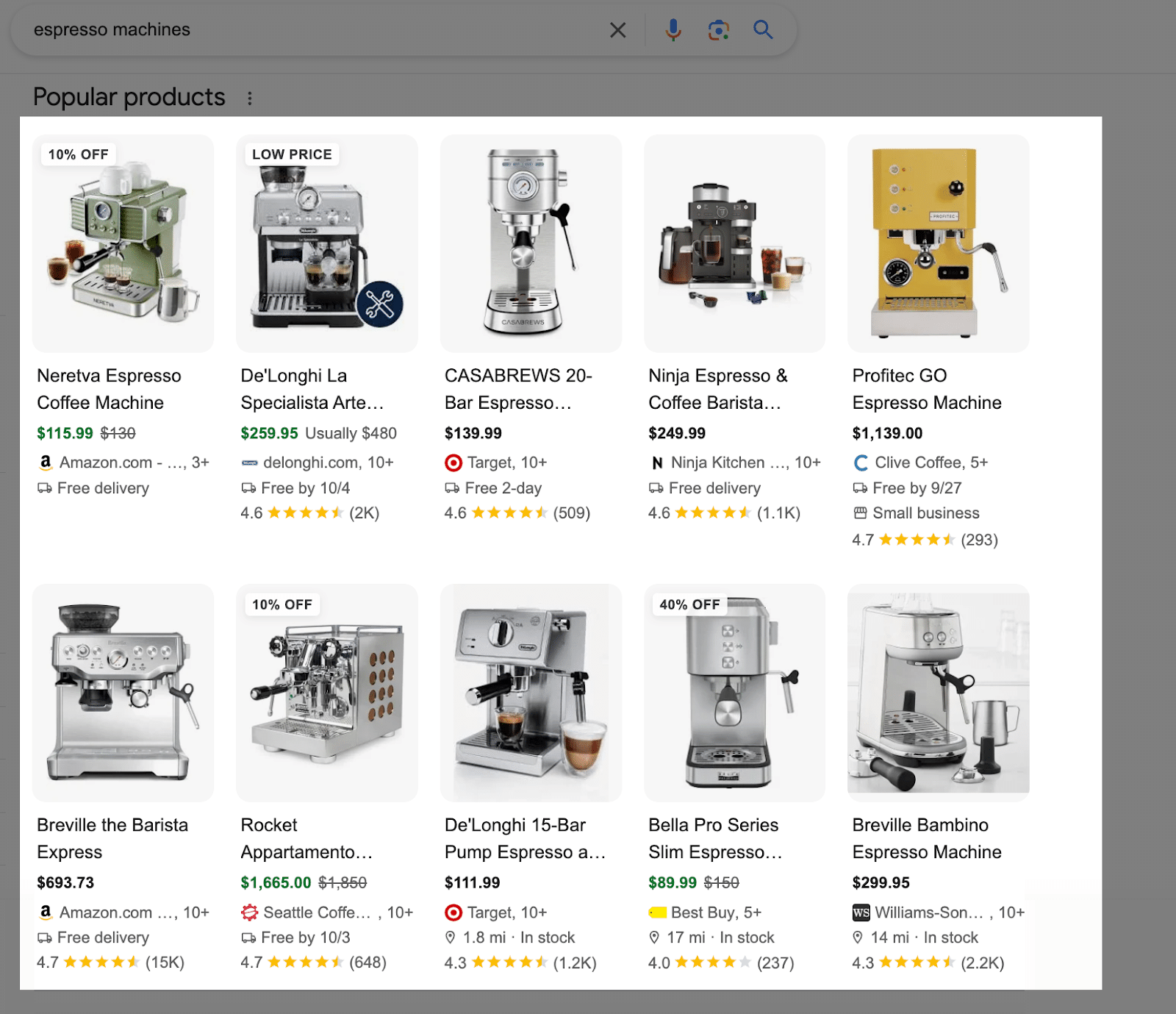
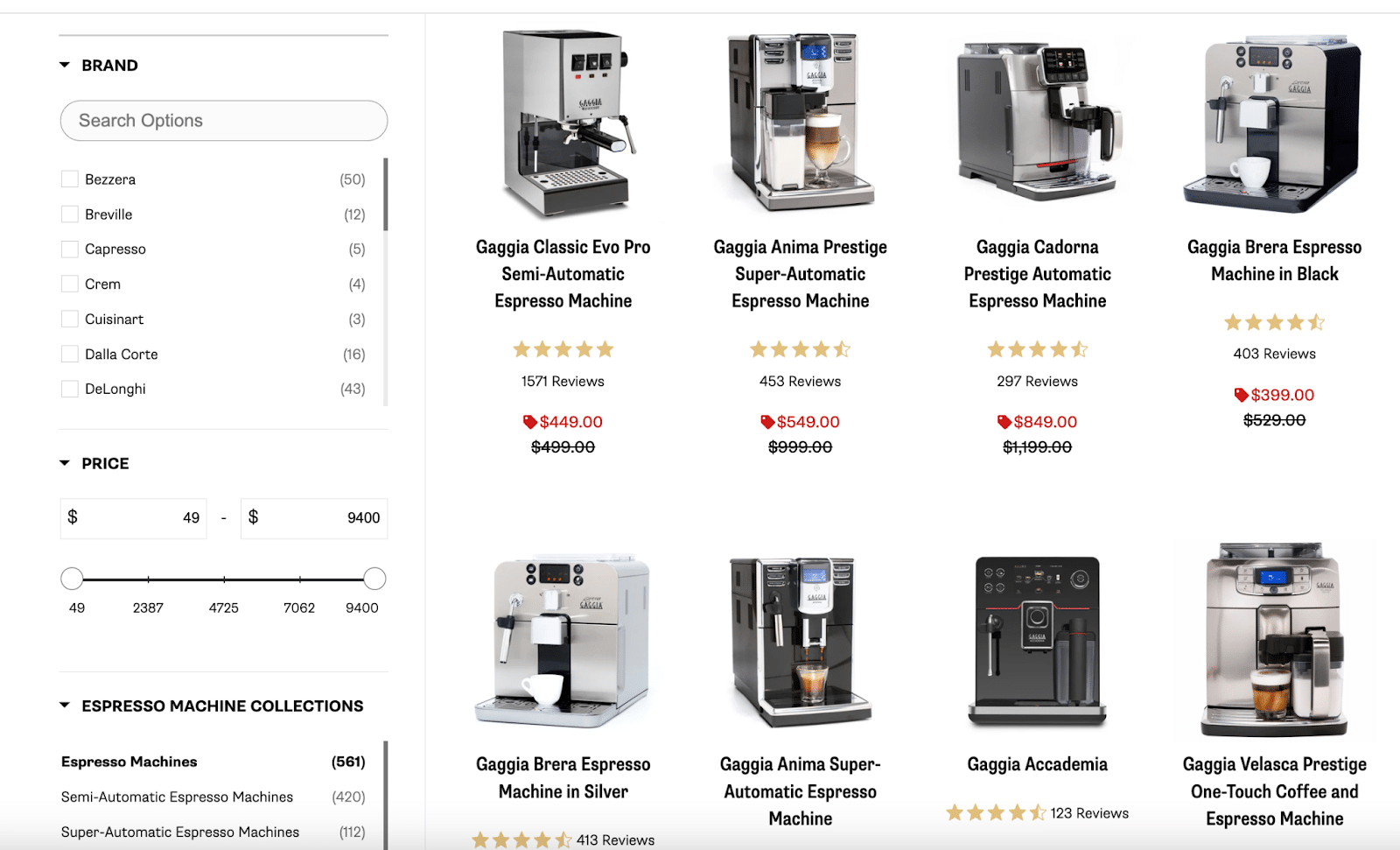
After all these changes, where does it leave us? Let’s examine a couple of search results, using the query “espresso machines” as an example.
Going down to the organic results, users see an immediate list of product grids before any of the other organic results.
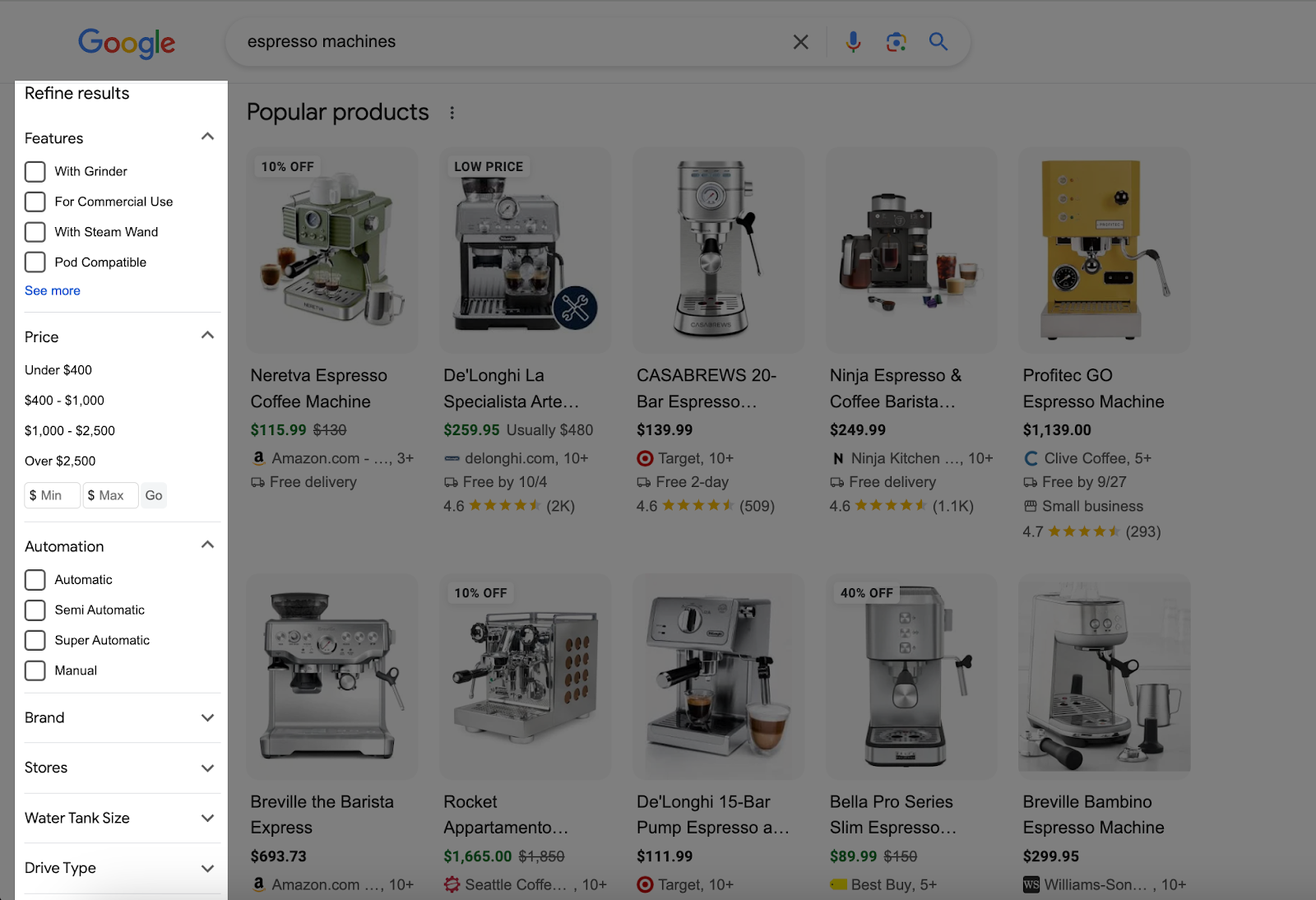
Now, that’s only half the picture. As mentioned, the Refine results section is on the left sidebar.
This section basically gives the user faceted navigation-like capabilities directly in the results themselves.
Assume users don’t scroll past the initial results. If these products aren’t what they want, they refine the search by selecting specific features.
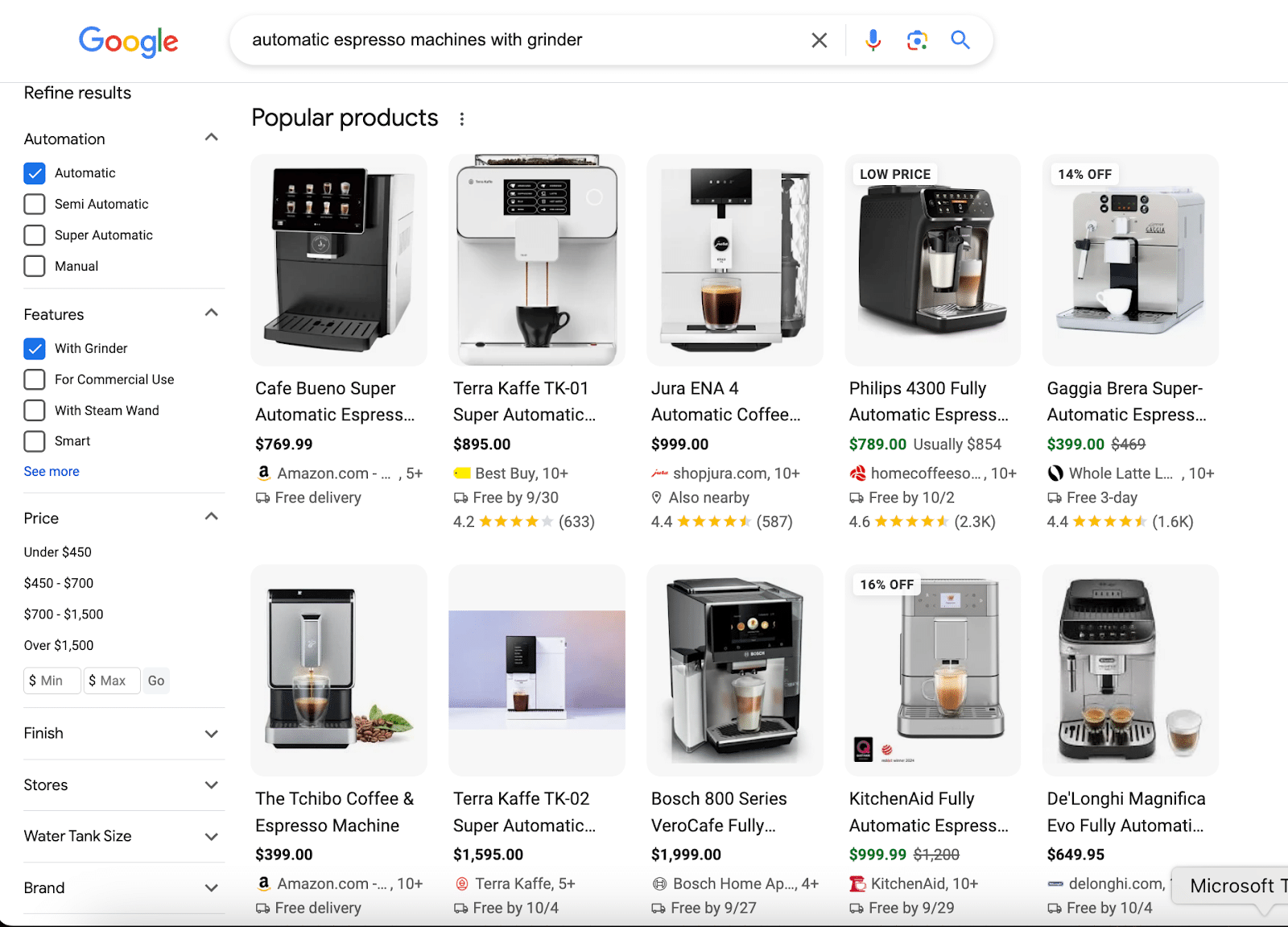
For example, choosing an “Automatic” machine “With Grinder” prompts Google to run a new search with those terms added to the original query.
What do we see when we look at these results?
Once again, here’s another result where the product grids appear before everything else in the organic result.
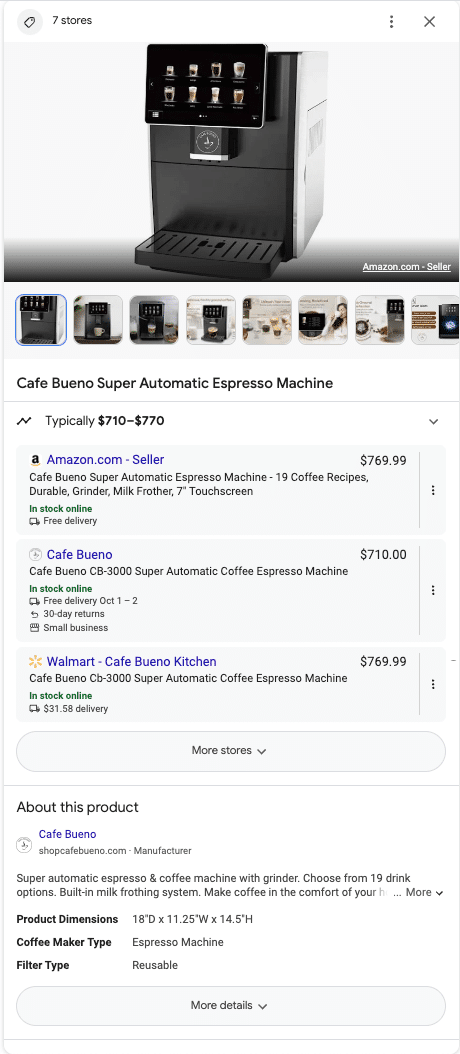
Clicking one of these results opens an expandable right-side sidebar filled with detailed information about the product.
Included directly in the SERP experience are:
- Scrollable product images.
- Pricing.
- Third-party retailers.
- Product descriptions.
- Dimensions.
- And more.
We haven’t even clicked on a website link yet.
Now, let’s look at the first ranking result for the query “espresso machine.” Notice how it feels eerily similar to what we just experienced.
The death of the category page
What do all these changes add up to?
It seems Google is trying to replicate the experience of a traditional category page directly within the search results.
By displaying products, filters, reviews, pricing and more, Google is creating an Amazon-like experience without the need to visit a third-party site.
While category pages still matter, Google’s focus is clearly shifting toward product pages rather than traditional category pages.
Why is Google doing this?
In 2021, Faisal Masud wrote a thought-provoking article, “The Last E-Commerce Duel Between Amazon and Google,” a must-read for anyone in ecommerce. He highlights:
- The long-standing competition between Google and Amazon for ecommerce market share.
- Google’s missteps and the decline in its product search market share from 54% to 46% by 2018.
- That 74% of product searches now start on Amazon.
Many of us likely still bypass Google entirely when shopping online, which represents a huge missed opportunity for Google.
This makes Amazon perhaps its biggest competitor – even more so than other search engines.
A renewed focus on product pages
In ecommerce SEO, category pages have long been the cornerstone of strategy, mapped to high-value queries and receiving the most attention.
However, with Google’s product grids, rich features and faceted search taking over, category pages are losing visibility.
To align with Google’s direction, we need to shift our SEO strategies and give equal priority to product pages, which are now featured in search results.
Previously, product pages were often overlooked.
Now, we must optimize them, updating title tags, H1s and product data and ensuring that key features users search for are clearly highlighted in the listings.
Dig deeper: Product page SEO: A complete guide
The rise of product data and SEO
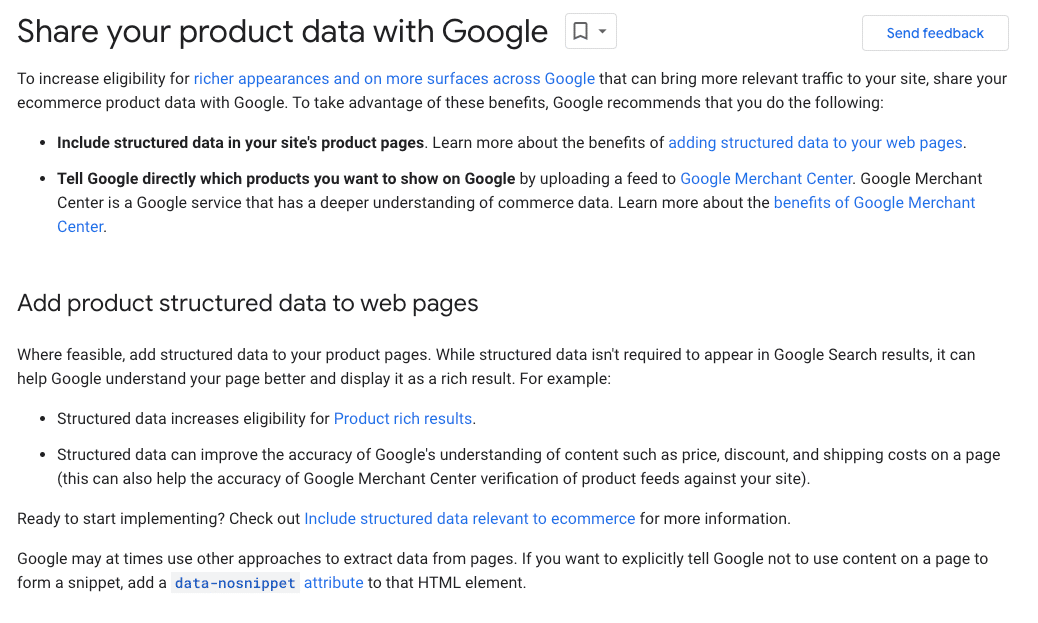
Like structured data, product data is a feed that allows search engines to quickly and efficiently understand key information about a given SKU. Traditionally, SEOs have left this to the paid media team.
What many don’t realize is that Google has its own ecommerce SEO guide, which emphasizes the importance of product data.
Google dedicates an entire page to it and highlights its significance in multiple sections throughout the guide.
Brodie Clark has conducted extensive tests on the new product grid features, often highlighting the influence of Merchant Center listings (product data feeds) on these results.
It’s evident that product feeds play a crucial role in product grids, making them something that can no longer be overlooked.
Ensuring that these feeds are submitted to Google, accurate, reflect long-tail keywords and are as complete as possible is now essential.
Dig deeper: Shopping graph optimization: The future of ecommerce SEO
An opportunity to appear for high-volume queries
Historically, we’ve prioritized category pages, especially those targeting high-volume queries.
For instance, we’d prefer to rank for a broad “jeans” category page rather than a more specific “men’s ripped jeans” page.
However, with Google now acting as a de facto category page, we need to shift our focus to long-tail queries.
This shift offers a significant opportunity, particularly for brands that aren’t dominant players.
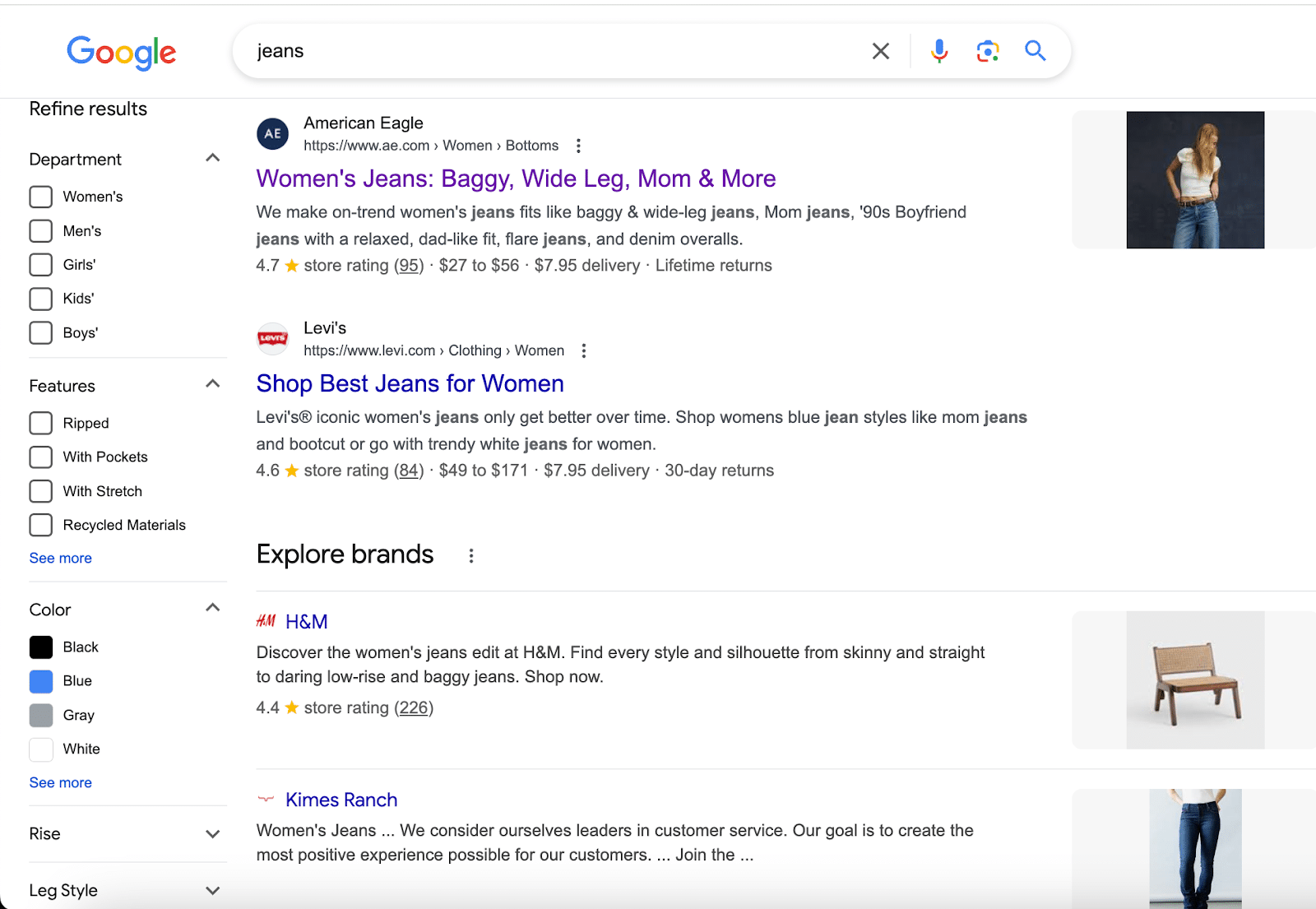
For example, searching for the highly competitive query “jeans” typically returns major brands like American Eagle, Levi’s and H&M.
Unless you’re one of these national retailers, most SEOs will tell you to ignore this query completely. It’s way too competitive to be relevant for.
However, what happens when I start filtering using the options on the side?
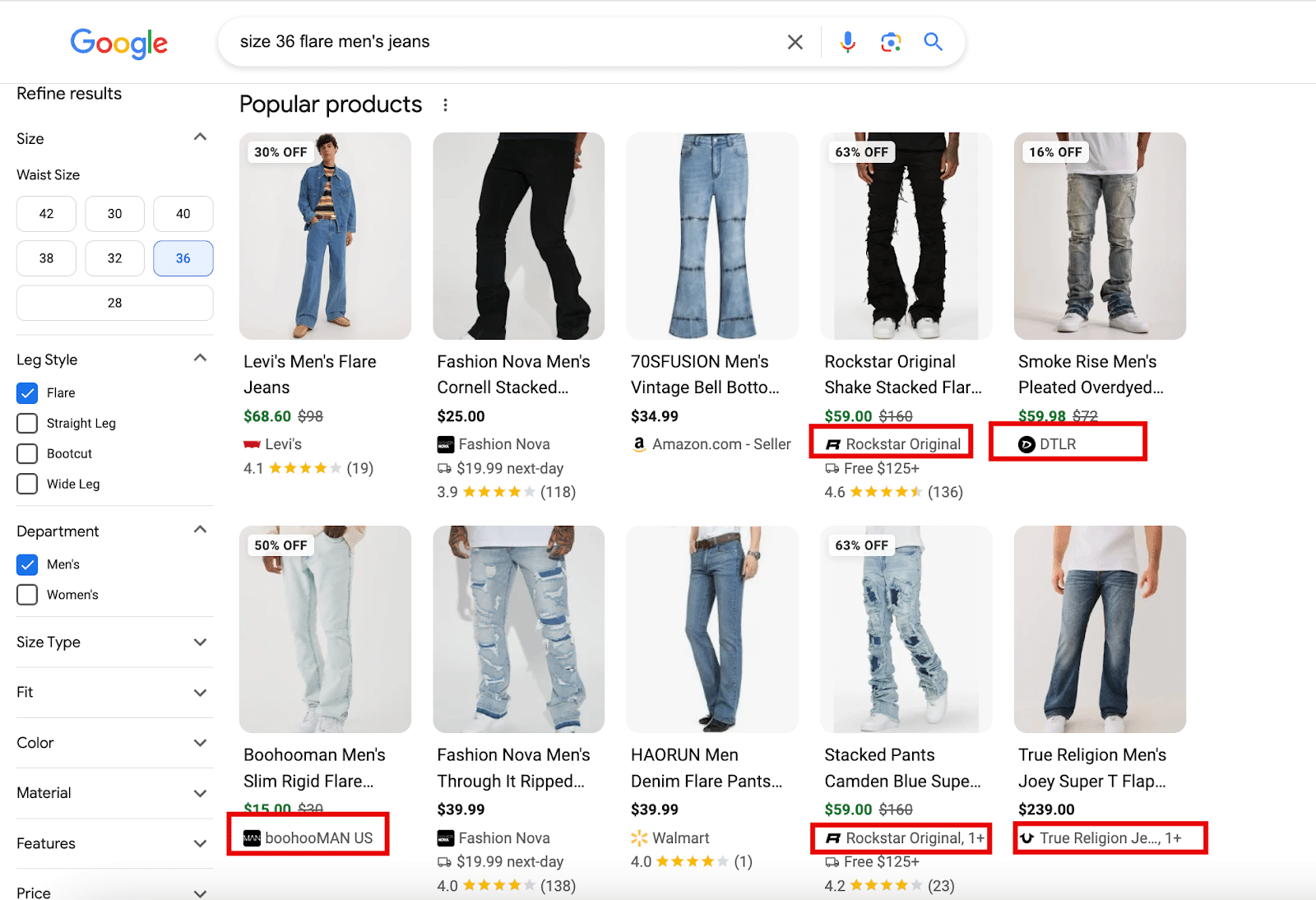
Google is now my category page, so I want to see options that suit me better. I’m looking for “size 36 flare jeans.”
I applied the filtering options, and Google adjusted my query.
Now, looking at the search results, we see that we still have some big players.
However, notice how smaller brands are eligible:
- Rockstar Original.
- boohooMAN.
- True Religion.
They’ve optimized for the long tail and are now included.
The beauty of this is that they’ve latched on the primary query, “jeans.”
By optimizing for the long tail, they now get visibility for a query that was never possible before.
A tough time for affiliate sites
Google’s change also has large implications for a completely different type of site: affiliates.
With all the products, rich features and comparisons, there is simply no room for affiliates.
Informational content doesn’t serve an Amazon-like experience, so it’s deprioritized.
Take Wirecutter as an example – the affiliate site everyone wants to be like.
Unsurprisingly, they have a “Best Coffee Makers” article.
It used to perform really well for the query “coffee machines” – generally between Positions 2 to 4. Checking today, it’s pushed down to Page 2.
The entire Wirecutter site has experienced significant traffic declines over the past year, with a drop of ~6.7 million in total monthly organic sessions.
This isn’t even factoring in Google-owned features like the product grids.
However, because Google wants to be the new category page, affiliate sites don’t figure into the mix.
Sure, we can argue that other factors are at play. Reddit’s increase in organic might be one.
However, it still showcases the downward spiral of affiliate sites in today’s product-driven SERP.
Moving forward
From a business perspective, Google’s direction becomes clear when we consider all its recent changes.
Google will continue refining the search results to mirror a category page experience.
Don’t expect Google to roll back these changes. We need to anticipate more of them.
Google hasn’t started showing these aggressively in AI Overviews yet, but I guess it will.
To compete with Amazon, Google will continue to do what it needs to make its platform more friendly for ecommerce searches.
Retailers must understand this behavior and adjust their strategies accordingly.
Dig deeper: How to make your ecommerce content more helpful
Courtesy of Search Engine Land: News & Info About SEO, PPC, SEM, Search Engines & Search Marketing
Wednesday, October 2nd, 2024
Microsoft announced a number of updates to Copilot today, specific to Bing Search, its generative search experience and Deep Search features are expanding more with this news.
Generative search. Bing said it is now expanding its Bing generative search experience for “informational queries”, such as how-to queries. Some examples include “how to effectively run a one on one” and “how can I remove background noise from my podcast recordings.”
“Whether you’re looking for a detailed explanation, solving a complex problem, or doing deep research, generative AI helps deliver a more profound level of answers that goes beyond surface-level results,” Microsoft wrote.
How to try it. Microsoft said, go to Bing in the United States and type “Bing generative search” into the search bar. “You’ll be met with a carousel of queries to select and demo, allowing you to experience how generative search can deliver more relevant and comprehensive answers for a wide range of topics,” Microsoft added.
What it looks like. Here is a screenshot:
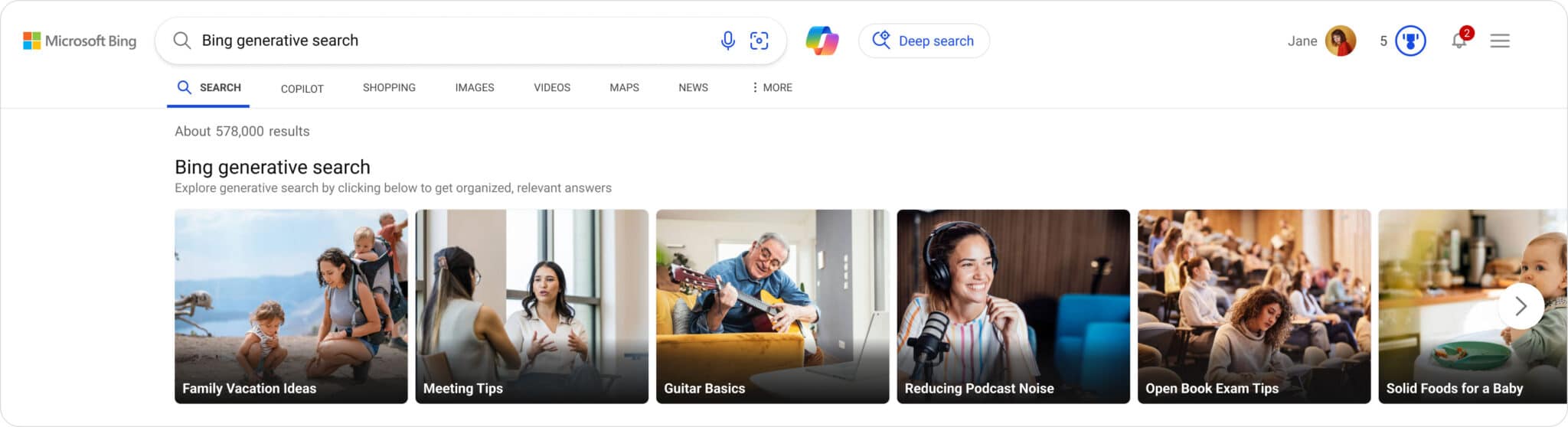
What is Bing generative search. Microsoft explained that this search “experience combines the foundation of Bing’s search results with the power of large and small language models (LLMs and SLMs).” “It understands the search query, reviews millions of sources of information, dynamically matches content, and generates search results in a new AI-generated layout to fulfill the intent of the user’s query more effectively,” Microsoft added.
Deep Search expands. While Microsoft announced Deep Search last December, it had a rocky start, but it is live to US users as of last March. Microsoft today said, “While we’re excited to give you this opportunity to explore generative search firsthand, this experience is still being rolled out in beta. You may notice a bit of loading time as we work to ensure generative search results are shown when we’re confident in their accuracy and relevancy, and when it makes sense for the given query. You will generally see generative search results for informational and complex queries, and it will be indicated under the search box with the sentence “Results enhanced with Bing generative search.”
More. Microsoft reiterated its stance on publishers, saying:
Bing generative search is just the first step in upcoming improvements to define the future of search. We’re continuing to roll this experience out slowly to ensure we deliver a quality experience before making this broadly available. We also continue to ensure there are additional citations and links that enable users to explore further and check accuracy, which in turn will send more traffic to publishers to maintain a healthy web ecosystem.
Why we care. This is another step of the evolution of AI in search and we are looking forward to future changes.
Publishers will need to keep an eye on these changes and adapt to these changes going forward.
Courtesy of Search Engine Land: News & Info About SEO, PPC, SEM, Search Engines & Search Marketing
Monday, September 30th, 2024
Google concluded its defense in the Department of Justice’s lawsuit over its advertising technology, making its case for why the DOJ’s claims miss the mark.
Even though Nobel Prize-winning economist Paul Milgrom provided supportive testimonies, it’s still easy to see that Google’s testimony could have gaps.
Here are my favorite ones:
1. “Duty to deal” argument
- Google’s stance: Google argues that it should not be required to share its ad tech tools or platforms with competitors, as there is no legal obligation for a company to do so under U.S. antitrust laws.
- Potential gap: The DOJ might argue that while there is no explicit “duty to deal” under current law, Google’s dominance in the digital ad space as a whole effectively forces advertisers and publishers to rely on its tools. This could open the door to claims that Google’s practices limit competition by creating barriers for smaller players, even if there is no formal requirement to share resources.
2. Narrow market definition
- Google’s stance: Google claims the DOJ’s market definition is too narrow, focusing on “open web display advertising” rather than a broader range of ad formats and markets.
- Potential gap: While Google highlights competition from other digital ad platforms (like Amazon, Facebook and Microsoft), the DOJ could argue that Google holds overwhelming power in the specific subset of open web display ads. If the DOJ can successfully define the market more narrowly and demonstrate Google’s dominance, it could strengthen its antitrust argument. Whether Judge Brinkemma will allow this change in definition would be critical to this potential advantage.
3. Defunct practices
- Google’s stance: Google asserts that many of the challenged practices – except for Uniform Pricing Rules (UPR) – are no longer in use, weakening the DOJ’s claims.
- Potential gap: The DOJ may counter that even if these practices are defunct, they could have had long-lasting effects on market structure and competition. Practices like Dynamic revenue, reserve prize optimisation and more would have a long-term effect. These past practices might have entrenched Google’s dominance and limited competitors’ abilities to grow, resulting in reduced competition today.
4. Self-serving justifications for integration
- Google’s stance: Google argues that its integrated tools benefit both advertisers and publishers by providing a safer, cheaper and more effective platform.
- Potential gap: The DOJ may argue that this integration, while convenient, could also be seen as self-serving and exclusionary. The integration of Google’s ad tech stack may prevent third-party companies from offering competitive services and lock users into Google’s ecosystem, making it harder for other companies to compete.
5. Control over the ad ecosystem
- Google’s stance: Google insists that publishers and advertisers have control over how ads are bought and sold, with multiple options to mix and match ad tech tools.
- Potential gap: The DOJ could argue that despite this theoretical control, Google’s overwhelming market presence effectively limits meaningful alternatives. Publishers and advertisers may be forced to use Google’s tools to stay competitive, creating a de facto monopoly in certain aspects of the ad tech market.
6. Competitive landscape
- Google’s stance: Google cites competition from other tech giants like Facebook, Amazon and Microsoft as evidence that the ad tech space is fiercely competitive.
- Potential gap: The DOJ may argue that the competition Google points to exists in adjacent markets, such as social media advertising or ecommerce ads. Within the specific market for open web display ads, Google may still hold a monopolistic position, and competition in other areas doesn’t fully mitigate its control over this segment.
7. Impact on consumers
- Google’s stance: Google frames its practices as consumer-friendly, emphasizing lower fees and improved ad performance.
- Potential gap: The DOJ could focus on the broader implications of reduced competition, such as the potential for higher prices for advertisers in the long term, fewer choices for publishers and an overall reduction in innovation. The DOJ may argue that even if short-term costs are lower, the market dominance could harm consumers and businesses in the future.
Google’s unknown fate
While Google is fixed on these defenses and seems fully convinced that it isn’t a monopoly, the DOJ may still successfully argue that Google’s practices – especially in narrow markets like open web display ads – have anti-competitive effects.
The case hinges on how well the DOJ can demonstrate that Google’s past and current actions create barriers to entry, limit competition and ultimately harm consumers or the market.
Courtesy of Search Engine Land: News & Info About SEO, PPC, SEM, Search Engines & Search Marketing
Monday, September 30th, 2024
Like it or not, 2025 is just around the corner. And with the New Year will come a slew of resolutions search marketers like you will strive to keep:
- Hitting the ground running with generative engine optimization.
- Staying top-of-mind with your increasingly distracted audience.
- Figuring out how to get indexed in an AI world.
The list goes on. Carving out a few hours to train now will set you up for a successful 2025 and beyond: Grab your free SMX Next pass today and join us online November 13-14, for free.
This is the only conference programmed by the experts at Search Engine Land, the industry publication of record – and this is your final chance in 2024 to attend. Check out what’s in store:
 Your free pass unlocks the complete program:
- Actionable tactics. Walk away with reliable, actionable, brand-safe insights you can immediately apply to your campaigns to drive measurable results.
- In-depth live Q&A. Tap directly into some of the brightest minds in search, ask them your questions, and get real-time answers during Overtime!
- Engaging discussions. Connect with and learn from like-minded search marketers and industry experts during live Coffee Talk meetups.
- Instant on-demand access. Can’t attend live? On-demand replay is included with your free pass so you can train at your own pace.
- 100% online. Log on from your cubicle, coffee shop, couch – wherever! – and skip the plane ride, hotel room, and time out of the office.
- 100% free. Continued training doesn’t have to break the bank. Leave the expense reports (and expensive in-person training experiences) behind!
- Certificate of attendance. Showcase your knowledge of the latest industry trends with a personalized certificate and digital badge, perfect for posting on LinkedIn.
Since 2006, SMX has helped more than 200,000 search marketers from around the world achieve their professional goals. Now, it’s your turn. Grab your free pass now!
Courtesy of Search Engine Land: News & Info About SEO, PPC, SEM, Search Engines & Search Marketing
Monday, September 30th, 2024
Keyword research is a cornerstone of SEO success, but many SEOs do it incorrectly. Instead of focusing on keywords that drive revenue, they only chase traffic volume.
This guide tackles a new approach to keyword research that boosts your online presence and directly contributes to your bottom line.
By the end, you’ll understand how to transform keywords into valuable assets that drive business growth and profitability.
Why most keyword research is wrong
Before writing this article, I searched for and read several keyword research guides.
They all suffered from the same problem. They only talked about how to acquire traffic from Google and not about why.
And the “why” is the most crucial part of keyword research.
As such, this article is split into two parts.
- First, we’ll examine why we use keywords and how they lead to business success.
- Then, we’ll examine the process for identifying business-relevant keywords.
Let’s start with the “why” behind keyword research.
Why are you doing keyword research?
The problem with keyword research is that people talk about how to do it but never talk about why you are doing it.
Most people, if asked this question, will talk about traffic.
But unless you are a publisher earning revenue from display advertising, this metric is too basic to be valuable for SEOs working for businesses that need leads, sales, profits and growth.
Others might use phrases like building brand awareness or talk about concepts like the ‘funnel’ and how they want to create top-of-mind awareness through content.
However, these are all essentially flawed and over-simplistic approaches that generally do not work or deliver value for clients.
To make life easier, I’ll explain why you are doing keyword research.
Revenue generation.
The goal of keyword research is to find keywords for which a brand can rank, leading to increased revenue.
So, for keyword research to be successful, we need to learn how revenue is earned online.
Dig deeper: Keyword research for SEO: 6 questions you must ask yourself
How brands make money from SEO: The fundamental rule of keyword research
Brands make money from SEO through leads and sales.
And here’s where SEO starts to unravel.
Traditionally, SEOs view their work as optimizing a website for all funnel stages. This is a strategic error. Here’s why.
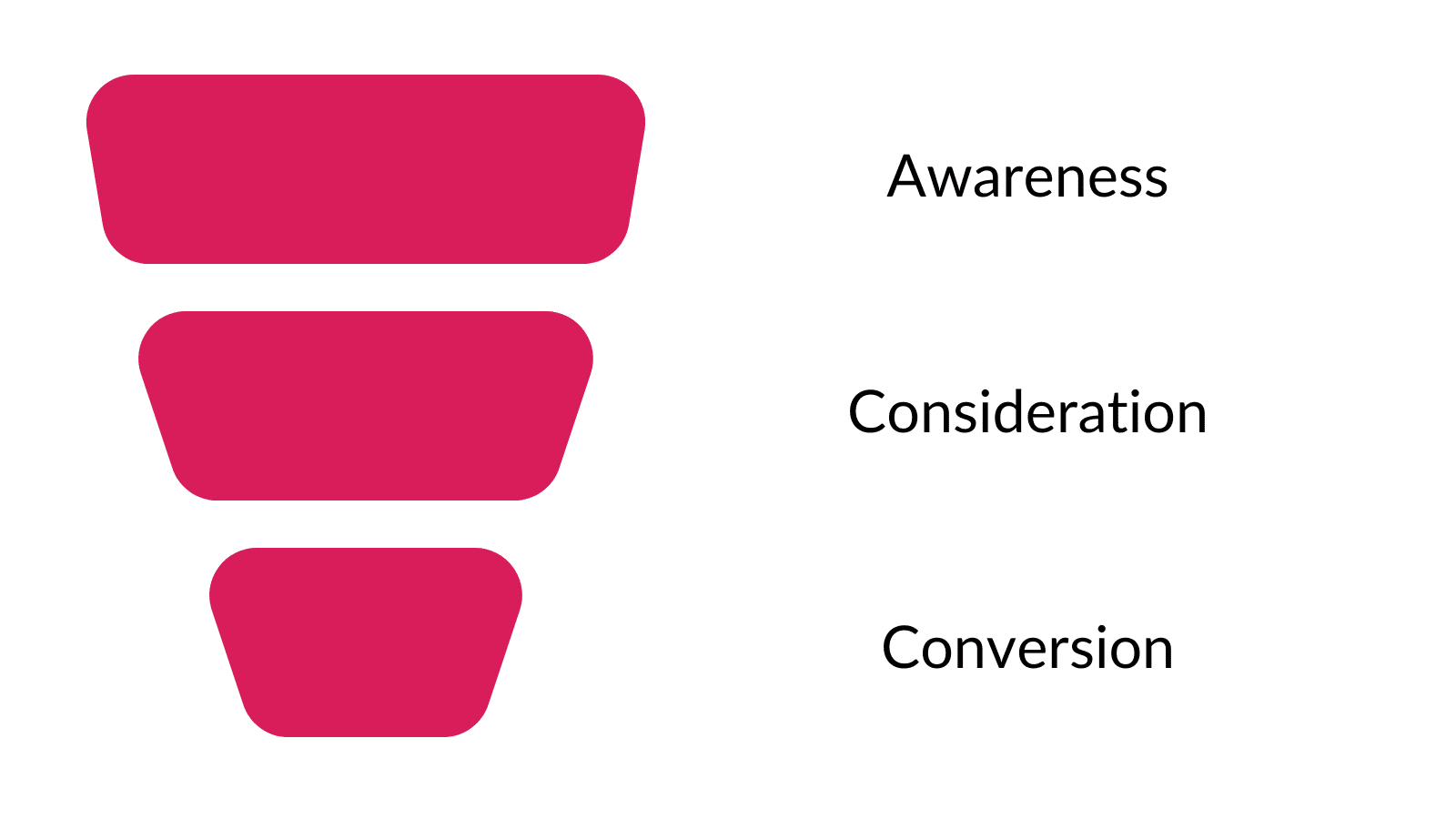
The traditional marketing funnel looks like this:
This approach leads to using SEO to rank web pages, targeted at all stages of the funnel.
- TOFU: Top-of-funnel content to build brand awareness.
- MOFU: Middle-of-funnel content to reach those considering their purchase options.
- BOFU: Bottom-of-funnel content where people buy products or services.
SEOs have sliced the funnel up in many ways, such as by renaming metrics as informational, commercial, etc.
However, the core goal has remained: to use SEO as an all-in-one marketing channel.
This has resulted in websites with huge traffic numbers and brands creating content for every keyword they can think of, believing it’s all advertising.
But most web traffic is useless.
Because it targets people at the wrong time.
SEO is product placement, not advertising: A tale of how marketing works
The argument by SEOs around keyword research is that “all traffic is good traffic.”
This makes the delivery of SEO more aligned with the “publisher model.”
SEOs will create content at scale to generate traffic and justify SEO.
This means that most SEO content is called “top of funnel.”
The argument used by SEOs is that they use SEO to create brand awareness. And through ebooks or other lead gen activities, you acquire marketing qualified leads (MQLs).
I’ve seen this justified using first-touch attribution data, where an email sign-up later becomes a customer, justifying the content.
Firstly, marketing metrics are rarely this granular. Yes, it will undoubtedly have first-touch attribution as “organic,” but so will all your organic traffic.
This includes your service and product pages.
However, significant studies show that we do not purchase or recall brands this way.
Dig deeper: 6 vital lenses for effective keyword research
We serve busy people with busy minds
When I think about keyword research strategy, I think about this line from Byron Sharp’s book “Marketing Theory, Evidence and Practice.”
“Our marketing and brand is ignored and forgotten by most people most days.”
The reason for this is the forgetting curve.
The forgetting curve is a well-established principle in memory function.
In short, we quickly lose what we don’t use regarding new information.
To demonstrate this, I often ask clients to name the last five articles they read and videos they watched online.
Followed quickly by asking them the brand or person behind them.
The answer is almost always met with difficulty.
I then ask the clients to name ten toothpaste brands. The struggle is intense, even for something as simple as toothpaste.
We have too much going on in our heads to recall the name of every brand we encounter online. We often forget things such as PINs and loved ones’ birthdays.
And yet, there is a romantic idea among SEOs and content marketers that the 3,000-word ultimate guide the prospects read 10 months ago.
They somehow embedded the brand in their memory architecture to such an extent that they can recall it and themselves easily.
This logic looks like this:
“We need to get some food for our new puppy. We’ll buy it from Pooch Love online. I read their 400 names for Daschunds article six months ago. They look great; I’ll search for them.”
OK, so that’s a little tongue-in-cheek. But this is the logic behind the vast majority of SEO strategies.
The idea is that all traffic leads to brand recall.
But it doesn’t. This is why advertising exists. To build and refresh memory structures around brands.
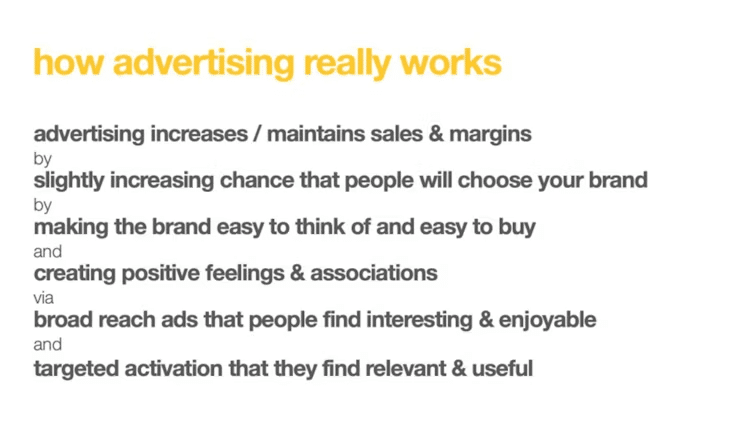 Source: Les Binet
We need to ditch the idea of using SEO to build brand awareness through top-of-funnel logic.
The articles you’re writing that are growing your traffic are forgotten minutes after being read.
Your brand isn’t remembered and your traffic graph is meaningless.
So, what matters?
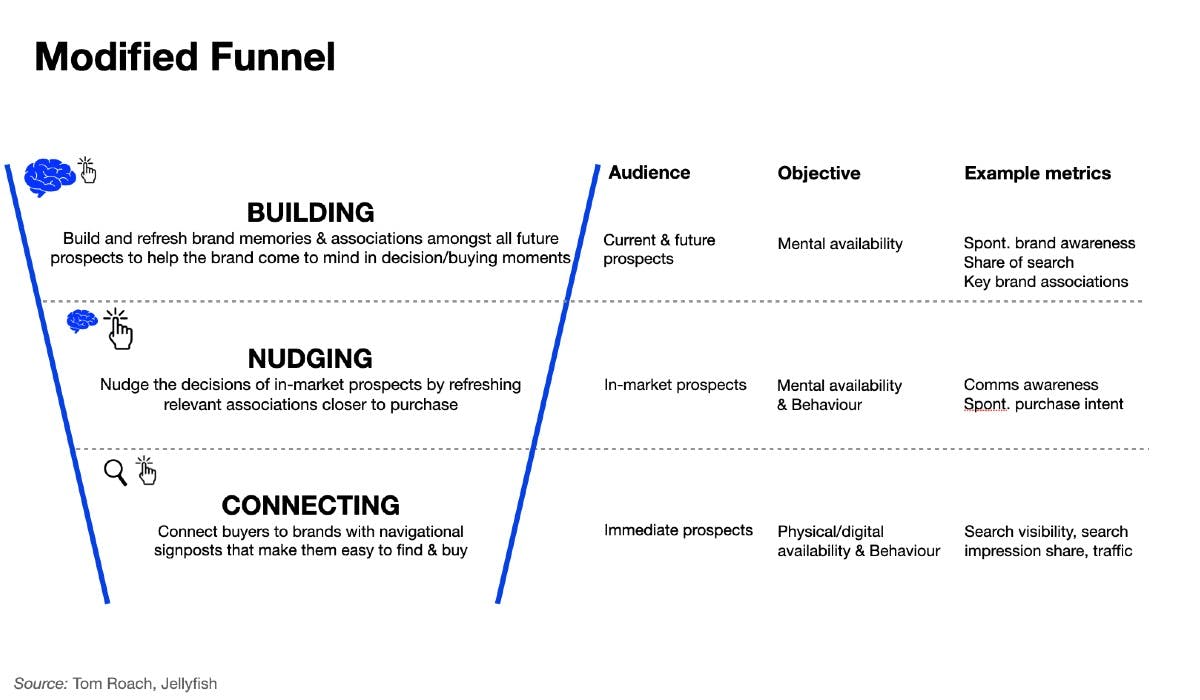
Tom Roach, VP of brand strategy at Jellyfish, wrote a compelling article about why the marketing funnel needs to change.
In his modified funnel, SEO sits as a connecting function. Connecting immediate prospects with brands.
And a bit of nudging as well.
We connect brands with buyers and show up on their purchase journey.
With this as our goal, keyword research will be more focused and revenue-driven.
Now that we’ve thoroughly covered the why of keyword research, we need to dive into the how.
Your new keyword process
The standard of keyword research will always depend on the amount of time you have to conduct it.
If you have a small retainer, the time you have to conduct keyword research will be limited.
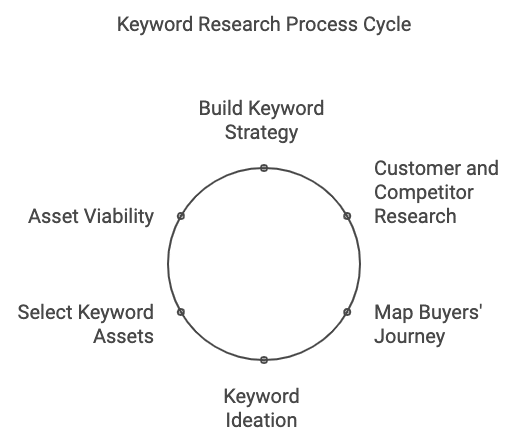
But a good keyword research process looks like this:
- Building your keyword strategy.
- Customer and competitor keyword research.
- Mapping your buyers’ keyword journey.
- Keyword ideation – identify what your customers need.
- Selecting your keyword assets.
- Asset viability (manual keyword research).
Let’s break each section down.
Building your keyword strategy
When addressing keyword research, we must start with the premise that our brands are easily and quickly forgotten.
That’s the starting point for SEO.
And so, we come to the customer or buyer journey.
The buyer’s journey is a series of touchpoints from product awareness to purchase.
Many brands are discovered online with buyer intent keywords, which is no different from how many products are discovered in stores. We walk along physical aisles, where many brands are first discovered.
Search is the digital version of this.
Our first search terms are often broad and straightforward.
Often referred to as head terms. These keywords are broad and are usually expensive for paid search.
These keywords are also often competitive to rank for.
You need to start your keyword strategy with the client and their budget in mind.
There is no point in building a huge keyword strategy if the client lacks the resources to rank for the terms.
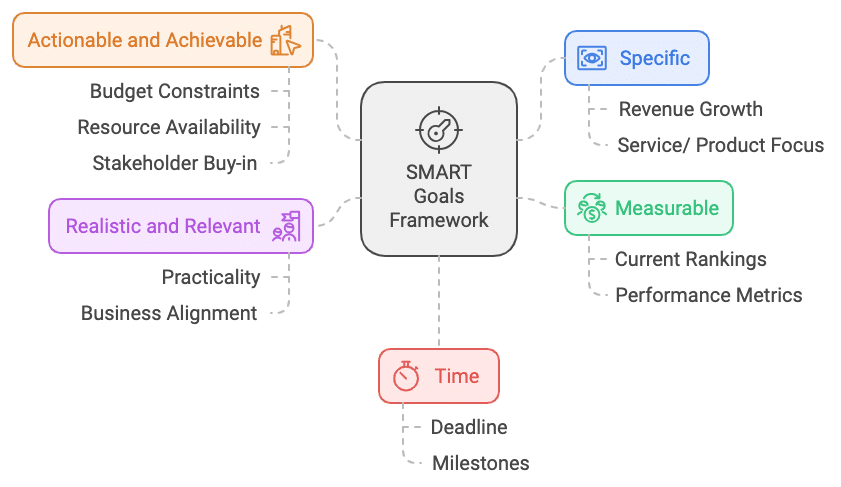
Before you take another step forward, it is useful to run through a SMART analysis at the beginning of the process to build your strategy.
- Specific: What specific results are we trying to obtain here? Are we looking to grow revenue for a particular service or all services/ products?
- Measurable: Where is the client now? What are their rankings?
- Actionable and achievable: Can we achieve the desired result with the current budget? Do we have the resources and stakeholder buy-in?
- Realistic and relevant: Are the desired results realistically achievable? Are they relevant to the business goals?
- Time: How much time do we have? When are results likely to happen?
Much of the above can be gathered with a simple client call and a gut feeling by quickly checking some data and competitors.
The above is not designed to be perfect. It’s more of a guide as you move through the process.
We can now move to the next step.
Customer and competitor keyword research
To conduct your research into customer needs, you need data.
Some sources can include:
- Customer data/ business data.
- Search console data.
- Paid search data.
- Keyword research tools.
- Google Analytics 4.
In-house teams will generally have access to more data and more time for the above, while agencies and freelancers will have less.
However, the aim of this initial stage is to gather as much data as possible about your buyer’s search journey.
What are they typing into search engines? What do they think when they are looking into buying what you sell?
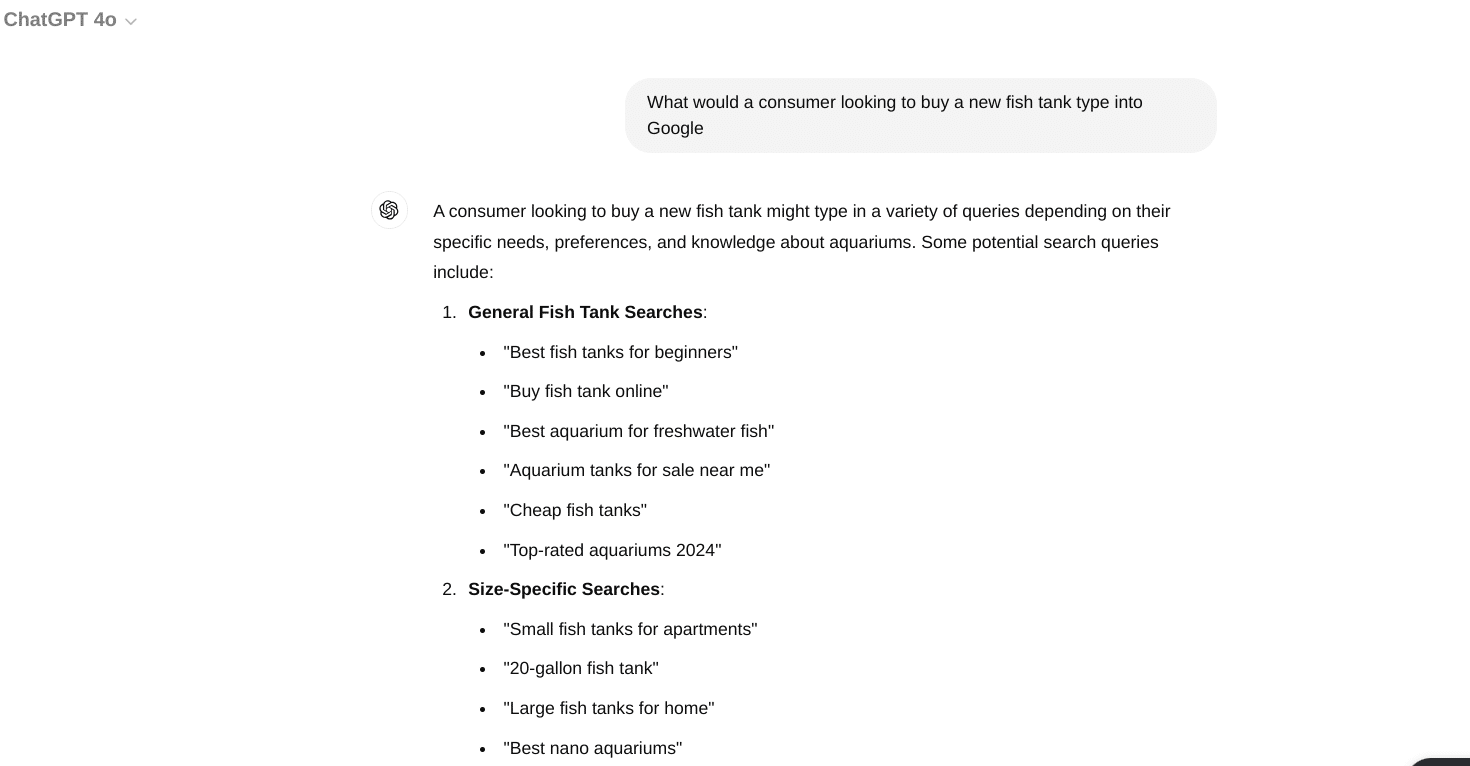
Many keyword tools can assist with this. ChatGPT is, however, surprisingly good at giving you starting points for this information:
Throw in a simple prompt and you will gain some logical searches to consider.
If we look at what a simple prompt gave me if I was looking for “in the market” keywords for people buying fish tanks.
- General fish tank searches.
- Size-specific searches.
- Type-specific searches.
- Brand-specific searches.
- Material-specific searches.
This isn’t exhaustive, but it is designed to get you thinking about a consumer.
The good thing about ChatGPT is that you can analyze markets for ideas, keyword formulas and more.
I have deliberately not used a specific search tool in this article because there are so many with their own guides.
What matters is that you gain the data from various sources. Our aim is not to study all the keywords but to make an SEO plan.
We are gathering as much data as possible about how our consumers might search for a brand like ours when they enter the market to buy.
Using this data, you can now map the buyer’s keyword journey.
Mapping your buyers’ keyword journey
To build your strategy, you need to identify the customers you want to target and the search terms they use. Then, we can map our keywords against the buyer’s journey.
For example, let’s say you are in the market for car insurance. Your 17-year-old daughter has just passed her driving test and wants a car.
You might start your car insurance journey with a term such as “cheap car insurance” or “new driver’s car insurance.”
You scroll and click the results, read the websites and leave because you must take your daughter to her fitness class.
A few weeks pass, and your daughter reminds you of the car insurance she needs for the car she has convinced you to buy.
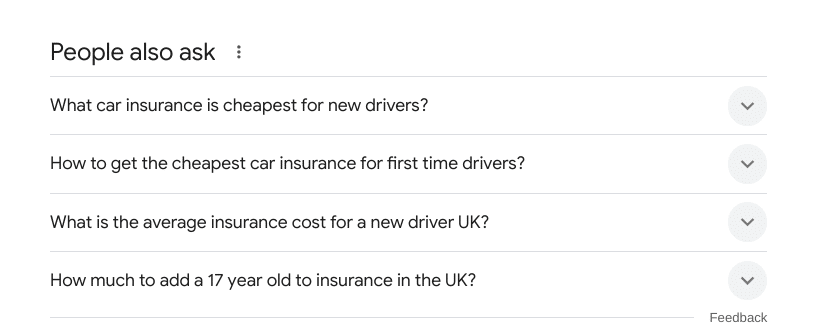
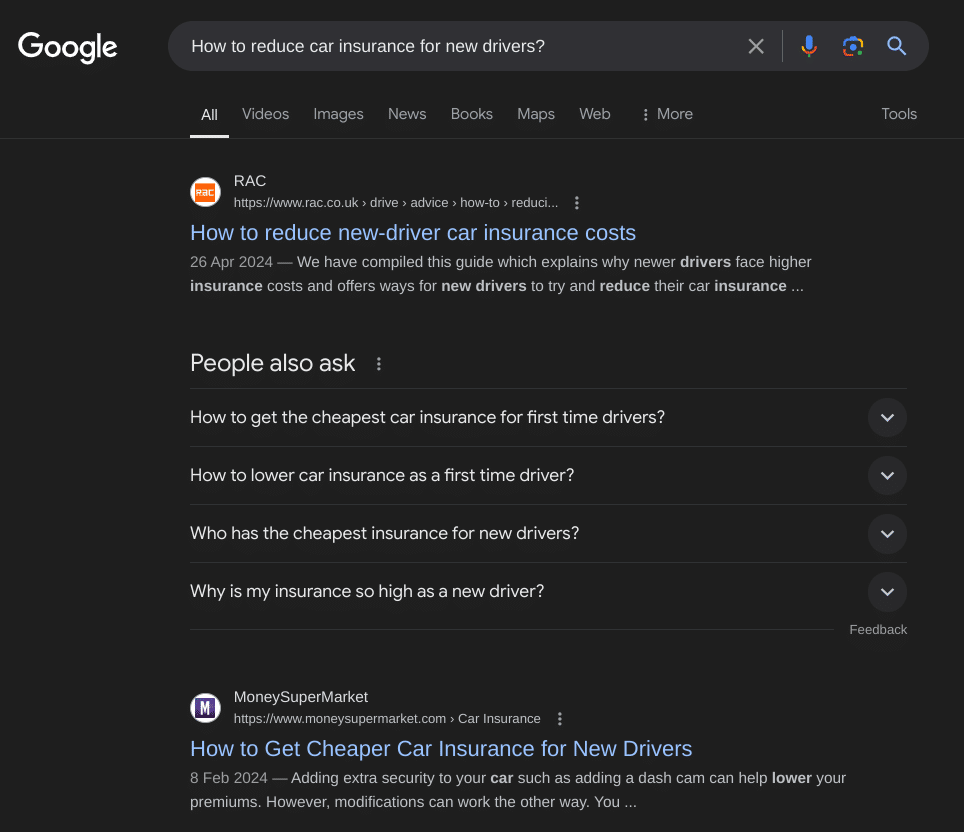
You repeat the same search, but perhaps this time, you click a few results but see Google’s PAA (people also ask) section.
You click some more and new questions such as “How to reduce car insurance for new drivers” appear.
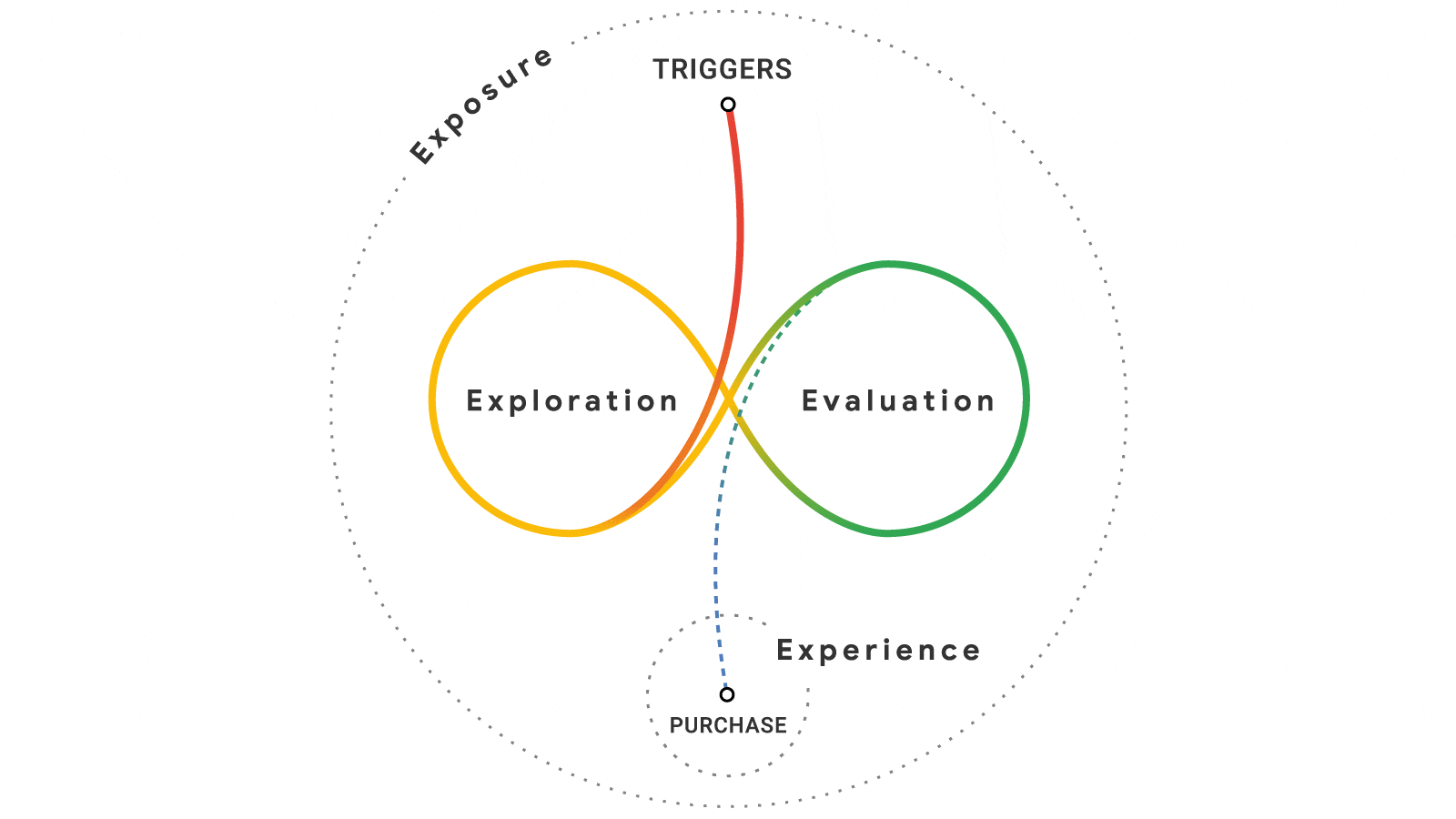
You are now in what Google calls the “messy middle of search.”
The messy middle is a world of exploration and evaluation, where brands can choose to show up and increase their chances of being selected and recalled by buyers.
We receive internal or external triggers to search.
We then explore subjects and vendors.
In the end, searchers will have a number of brands that enter their ‘consideration’ set of vendors or products they want to purchase from.
Every buyer search journey depends on the sector. Some take place in minutes, and others take over 12 months.
And this is the search journey we want to map out as best as possible.
We are trying to paint a possible picture of our consumer’s online activity in relation to purchasing.
In the car insurance example earlier, we saw how a prospect makes many searches over a period of time before building a consideration set of brands.
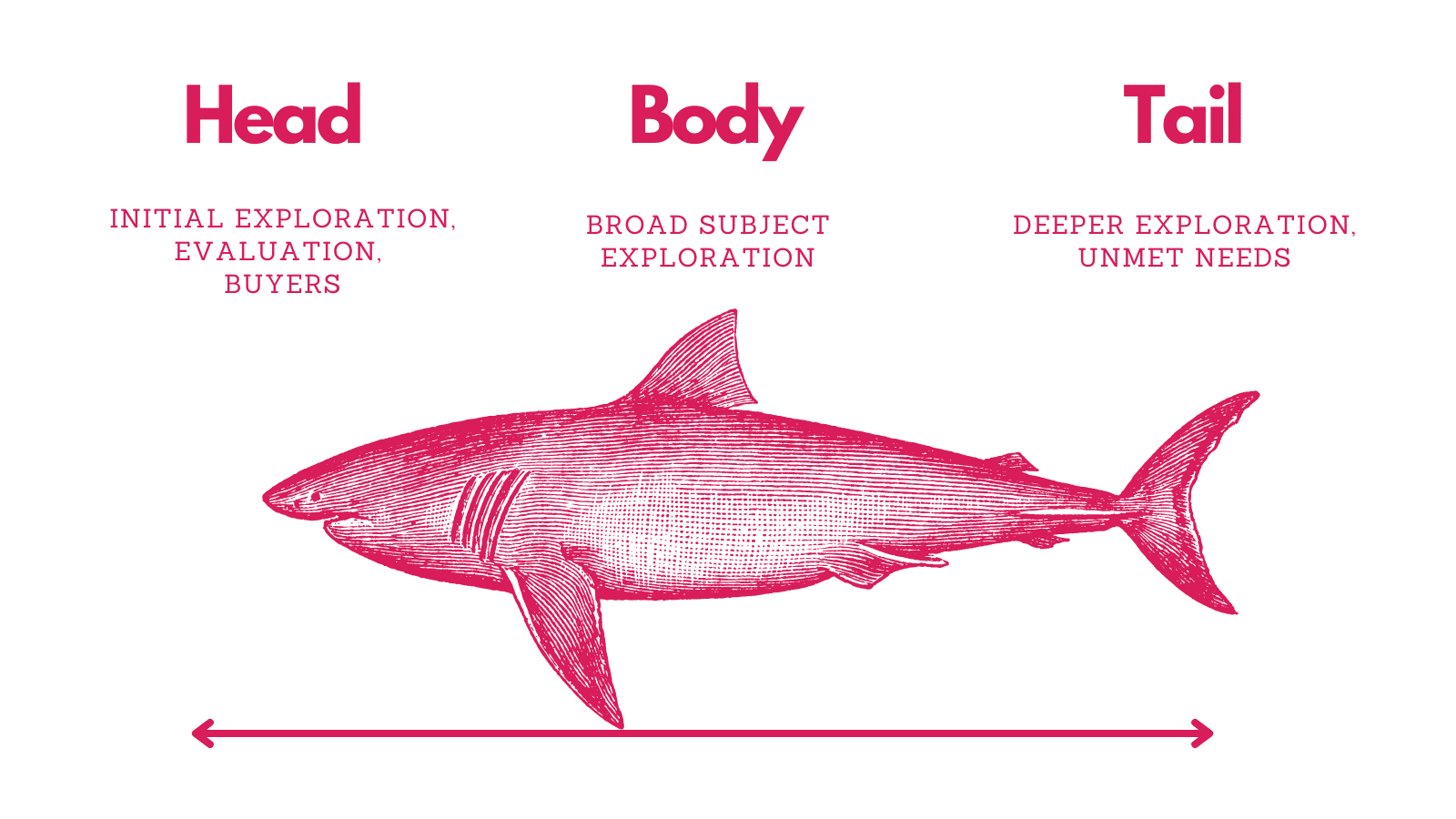
To map the keyword journey, it’s useful to split keywords into three categories:
- Head terms
- Used for initial exploration.
- Used to evaluate brands.
- Used for buying.
- Body or medium tail keywords
- Used for broad subject exploration. Often informational, when a prospect seeks more information on a subject to help them make an informed purchase decision.
- Long-tail search
- Used for deeper subject exploration and unmet needs.
- A user is trying to find a precise solution and previous searches have yet to satisfy them.
- A user has complicated product, service or informational needs.
Once you gather your data in the next step, your keyword strategy will start to take shape.
Lower budgets might mean you can’t rank for competitive keywords, but you can reach people as they explore the subject with buyer intent.
Or you may focus on a more targeted and specific group of consumers.
Now, look at your data and add this to the three areas of heady, body and tail.
You can do this via a spreadsheet with three columns.
Dig deeper: How to find high-potential keywords for SEO
Keyword ideation: Identifying what your customers need
Once you have your data, you need to address what keywords match the customer’s needs.
These are keywords that a prospect will use to help them to choose a product, service or brand.
From your research, you’ll have a lot of data, but we need to consider how humans use the web and align our keyword research with that.
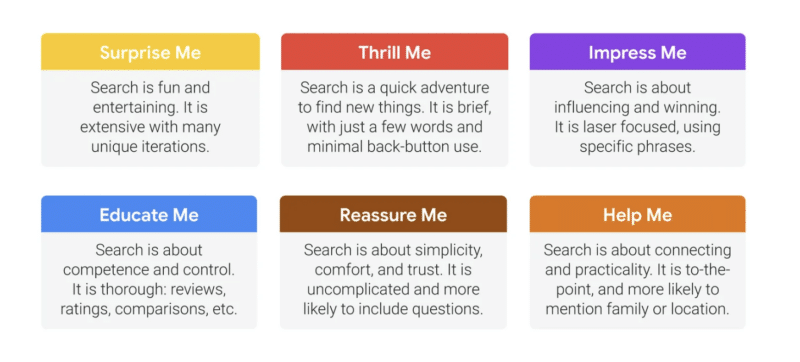
Kantar conducted research with Google to identify six needs that searchers have when they use Google.
These needs were identified as follows.
- Educate me.
- Thrill me.
- Surprise me.
- Impress me.
- Help me.
- Reassure me.
Let’s break down each one.
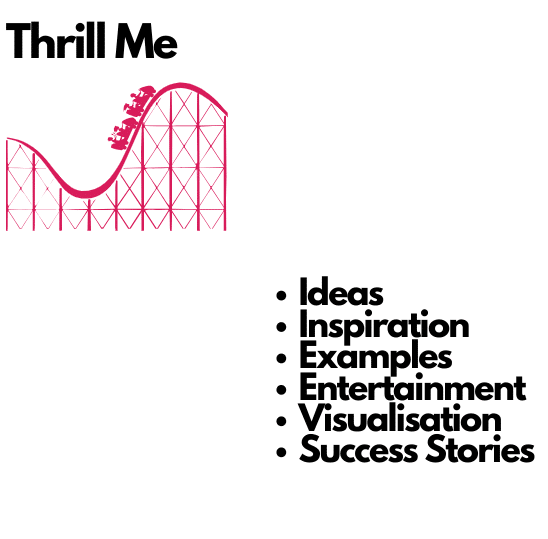
Thrill me
When people come to search engines with this need, they are often at the earliest part of their search journey.
“Search is a quick adventure to find new things. It is brief, with just a few words and minimal back-button use.”
Customers might be looking for ideas, inspiration, examples, entertainment, visualization success stories, case studies and more.
This is often where brands can use other media, such as social media, to grab the attention of consumers.
Surprise me
Searchers using Google with “surprise me” needs are looking for inspiration.
“Search is fun and entertaining. It is extensive with many unique iterations.”
It’s likely that these keywords are early on in a consumer search journey. This is similar to the “thrill me” search terms but usually more broad.
A lot of TikTok content will be consumed this way. With a consumer searching for trending products and information.
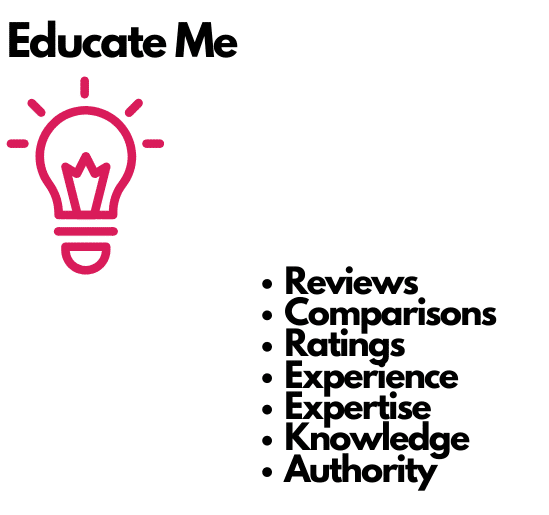
Educate me
People who are looking for education search for items such as reviews and comparisons.
“Search is about competence and control. It is thorough: reviews, ratings, comparisons, etc.”
They can seek out ratings and look for vendor experience, expertise, knowledge and authority. Which can come in the form of information and credentials.
It’s here that a brand should focus on displaying their E-E-A-T on their site and it’s likely that these keywords are used for customers who are placing brands in their consideration set.
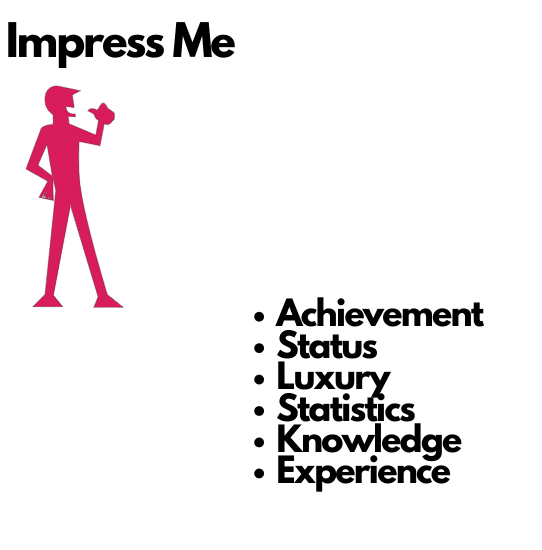
Impress me
Here, consumers look for status, knowledge and experience.
“Search is about influencing and winning. It is laser-focused, using specific phrases.”
Many searches here are where a consumer knows exactly what they want. Luxury items will live in this sector, but consumers are also seeking out higher-end goods or services.
Help me
If a searcher needs help, they often seek advice, tools, templates and answers.
“Search is about connecting and practicality. It is to-the-point and more likely to mention family or location.”
The searchers have a definite problem and possibly an urgent need. SaaS platforms often win in this range of needs. So do local ‘emergency’ vendors such as plumbers and electricians.
But content can live here too. If you’re a SaaS platform that connects plumbers to locals in need, you could create content that teaches people how to solve their own problems.
By seeing what it entails and thinking, “This looks too much like hard work,” you have framed them for the next step: using your services.
Reassure me
Finally, “reassure me” keywords are related to support, answers and aftercare.
“Search is about simplicity, comfort and trust. It is uncomplicated and more likely to include questions.”
A huge number of medical and legal searches exist for this search need.
For many, it’s easy to dismiss this part of the buyer’s journey, as you might find in your research that these types of keywords are post-purchase.
However, these keywords can have a huge business impact if you can reduce support calls and even complaints.
At this stage of the journey, we are analyzing our search data and identifying our consumers’ search needs. You will probably see a pattern emerge.
For example, if you sell garden furniture, you’ll probably see consumers looking for inspiration and ideas more.
In the beauty industry, people might focus more on cost and finding treatment locations near them.
Regardless of your niche, you have now taken your consumer and search data and placed it in the context of search needs. My advice would be to build this out on a spreadsheet or other board tool.
Run through your head, medium and tail keywords earlier and assign them to each search needs.
Once you’ve done this, it’s time to look at the assets you can create to satisfy these search needs.
Dig deeper: Rethinking your keyword strategy: Why optimizing for search intent matters
Selecting your keyword assets
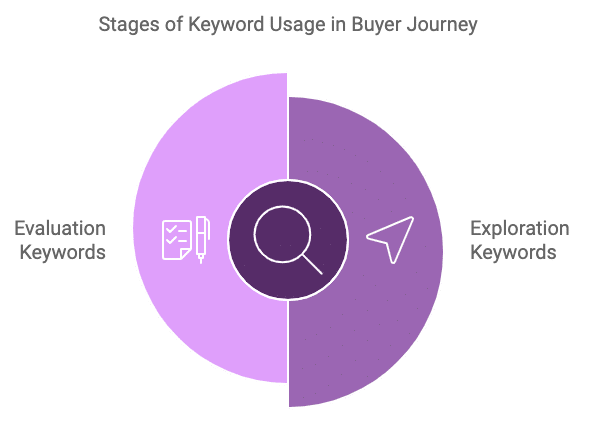
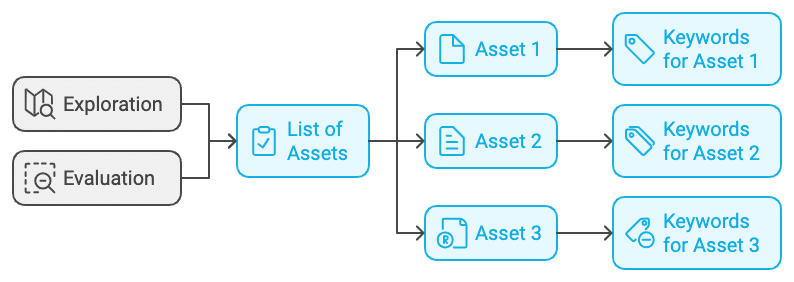
To identify and select your keyword assets, you will build two keyword lists:
- Exploration keywords
- These are the keywords that a buyer will use at the beginning of their search journey.
- Evaluation Keywords
- These are the keywords used to decided if your products or services and brand are for them.
We’ve established that:
- The messy middle consists of two key stages where we can engage.
- At each stage, users have distinct needs, which can be categorized into six main types.
Using the data we’ve gathered, we can begin developing solutions tailored to these consumer needs.
To start, we can organize these search needs into two groups: exploration and evaluation.
Keep in mind that there may be overlap between the two, and the categorization will vary depending on the specifics of each business.
Here’s an example of how this might look:
- Exploration keywords
- “Educate me” keywords (list them under)
- “Thrill me” keywords
- “Surprise” me keywords
- “Help me” keywords
- Evaluation keywords
- “Impress me” keywords
- “Educate me” keywords
- “Thrill me” keywords
- “Reassure me” keywords
Based on your data, you can start populating your buckets as you meet the search needs of your consumers.
For example, your data might show that your customers need education and you will create guides to match this search intent.
Or perhaps a dedicated review section of your website needs to be created to gather customer testimonials.
The aim here is consider the assets you could create to meet your consumer’s search needs based on your data.
Here are some ideas:
- How to guides.
- Knowledge centers.
- Landing pages.
- Tools.
- Calculators.
- Templates.
Each keyword should have a asset aligned with it.
Once you’ve done this, we move into the final stage.
The manual keyword research process
This is the part where most keyword research guides begin, and ours will end.
The reason is simple: as an SEO, you’ll use many different tools throughout your career.
It’s important to develop a keyword research process that works independently of any specific tool but can be applied to all of them.
What matters is the process and not the search tool.
Filter through your data to establish commercial viability for keywords and assets. Here’s how.
Establishing keyword viability
At this point, you should have two lists for Exploration and Evaluation.
Under each section, you will see a list of assets you have decided to create.
And for each asset, you’ll have a list of keywords that each asset targets.
Let’s say your research showed that people were searching for how much something costs.
You’ve identified that an online calculation tool would meet consumer search needs.
The purpose of your manual keyword research is to review the keyword to look from a business viability basis.
You’ll need to consider the search volume available, your internal resources and the time/ cost of ranking for that keyword. You should also consider the potential rewards for the business.
This will depend from business to business, but at the end of the process, you’ll have identified assets you can create for consumers that meet their search needs. And you’ll be better placed to gain buy in from stakeholders.
Conclusion
If you made it to the end of this article, you deserve a medal.
Establishing a revenue-focused keyword research process that aligns with consumer needs greatly stacks the odds in your favor.
Here’s a final recap of the process:
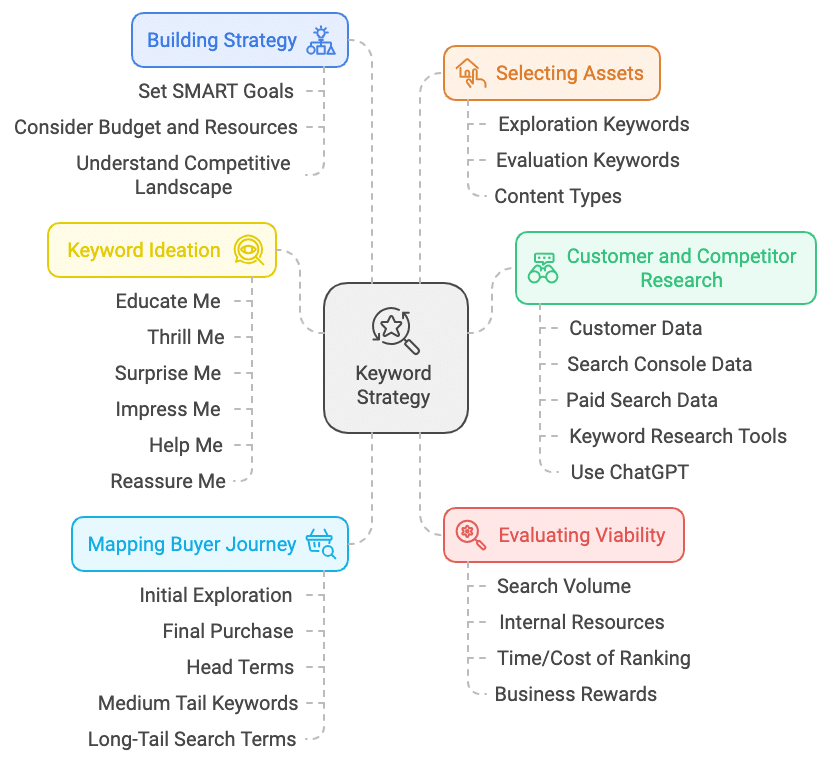
- Build your keyword strategy: This involves setting SMART goals, considering the client’s budget and resources and understanding the competitive landscape.
- Customer and competitor keyword research: Gather data from various sources, such as customer data, search console data, paid search data and keyword research tools, to understand customer search behavior and intent. Tools like ChatGPT can also be leveraged to generate keyword ideas and analyze market trends.
- Map your buyers’ keyword journey: Understand the customer’s search journey from initial exploration to final purchase, categorizing keywords into head terms, body or medium-tail keywords and long-tail search terms.
- Keyword ideation: Identify keywords that match customer needs, aligning them with the six needs identified by Kantar’s research.
- Select your keyword assets: Create two keyword lists – exploration keywords and evaluation keywords – and identify the type of content or assets that best address these needs (e.g., guides, reviews, landing pages, tools, etc.).
- Asset viability (manual keyword research): Evaluate the commercial viability of keywords and assets, considering factors like search volume, internal resources, time/cost of ranking and potential business rewards.
Do this, and you’ll have a great keyword research approach to help you generate ranking and traffic that drives revenue.
Dig deeper: B2B keyword research: A comprehensive guide
Courtesy of Search Engine Land: News & Info About SEO, PPC, SEM, Search Engines & Search Marketing
Monday, September 30th, 2024
Google Search Console performance report filters will now stick to the last setting you left it at. The “Search Console Performance report filters are now sticky,” Google announced on social. There is also a “reset filters” button to quickly clear any of those filters.
More details. The Search Console performance reports, including the Search performance report, the Discover performance report and the News performance report will keep the filters you set across each, as you navigate from one to the next.
Also, when clicking on a row in a specific tab in the Search Console performance report, the report will automatically switch to the Queries tab. If you’re already in the Queries tab, the report will automatically switch to the Pages tab, Daniel Waisberg from Google explained.
This was supposedly a very highly requested feature.
What it looks like. Here is a screenshot of those filter buttons:
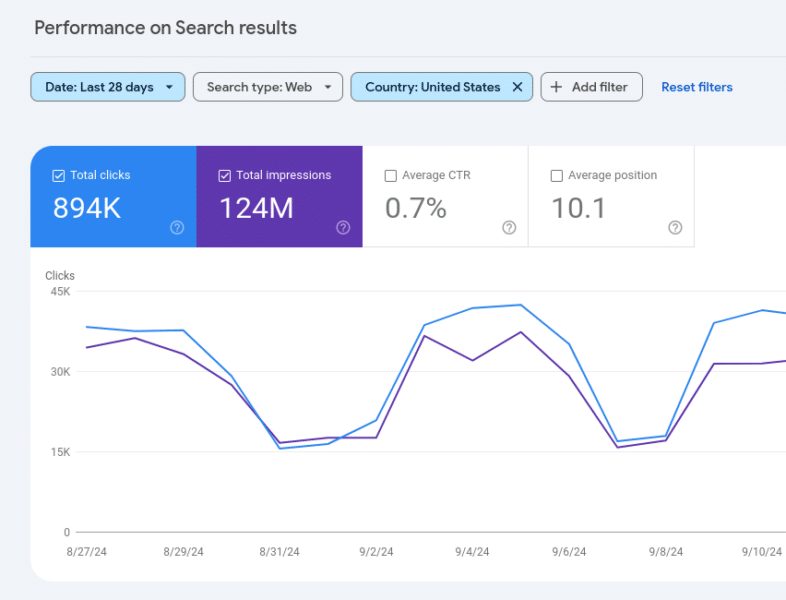
Why we care. When doing your SEO reporting, you will need to change your behavior when using Google Search Console. Now that the filters stick, you need to keep that in mind when viewing and exporting data.
This should speed things up in the long run but like any change to anything you use frequently or routinely, it may require some getting used to.
Courtesy of Search Engine Land: News & Info About SEO, PPC, SEM, Search Engines & Search Marketing
Thursday, September 26th, 2024
Let’s face it: Turning raw data into actionable insights can be as cryptic as decoding ancient hieroglyphics, especially for the SEO rookies in your crew.
That’s the challenge I addressed in my SMX Advanced 2024 session.
Didn’t catch it? No worries. I’m recapping it all in this article series, one juicy nugget at a time. This is Part 2, so if you missed Part 1, check it out.
Get ready for a quick overview of key technical SEO metrics to track in Google Search Console. Compare your list with mine – you might spot something your SEO team has missed.
Senior SEO managers: This article is for your technical SEO newcomers. It explains how I would introduce Google Search Console metrics to bridge their knowledge gaps quickly.
Top tips for looking at Google Search Console metrics
- Don’t limit comparisons to just two data points: Avoid comparing just two points in time (end of last month vs. prior month). It’s like looking at two photos and missing the whole movie – especially the drama in the middle. This is a common mistake I see when upskilling SEOs to become advanced SEOs. You need to look at the ups and downs all month.
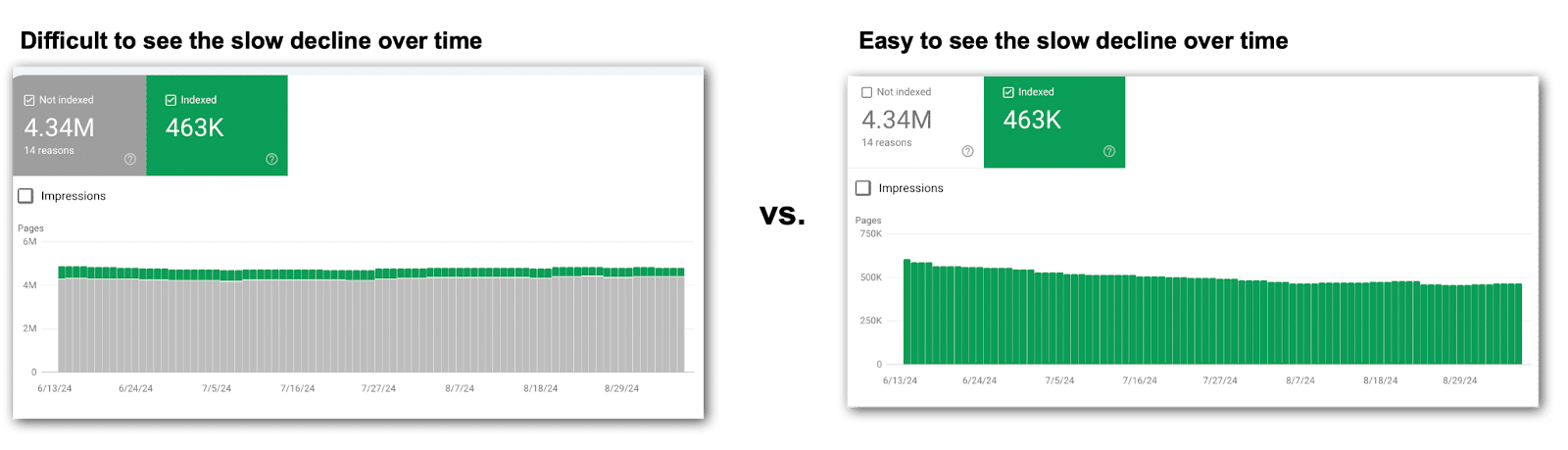
- Focus on one metric at a time: When looking at the stacked bar charts, look at each metric individually. Google likes to stack data in bar charts, often making fluctuations easier to overlook. This means you’ll turn off metrics to focus on each technical SEO metric one at a time.
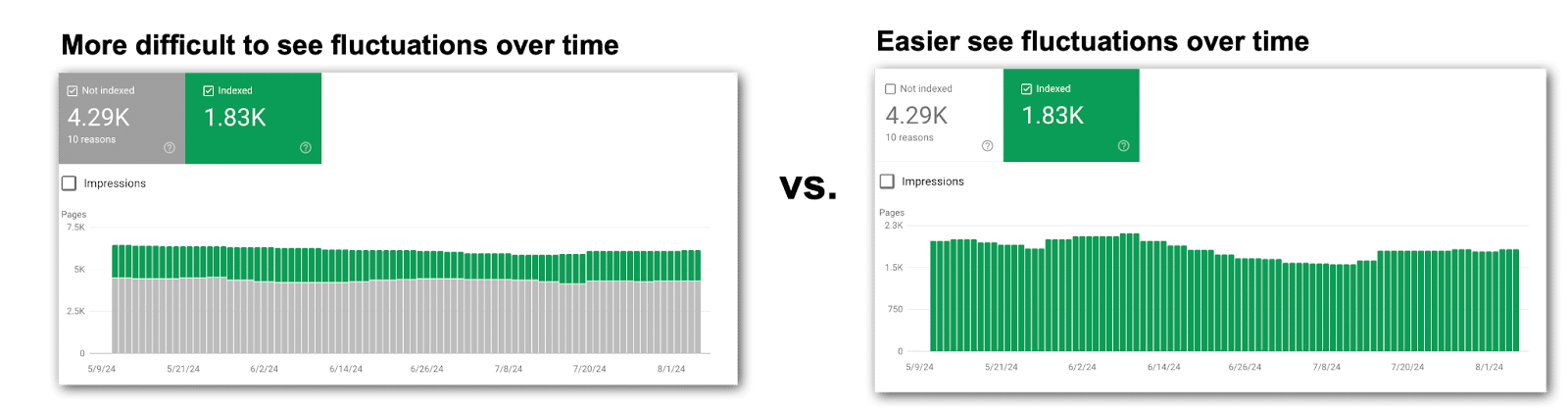
- Save charts for later: Screenshot the charts and tuck them away for future reference. Google’s data only goes back a few months, but those images may be gold down the line.
- Record data regularly: Capture metrics in a spreadsheet that can be calculated in formulas. Choose a point in time, since getting daily data isn’t realistic unless you’re using the API. Consider a date at the end of each month. It’s not ideal, but it’s something that can be used in comparison charts to look for correlations.
- Check for more metrics: Many reports show just the top 10 metrics by default. Always check the bottom right of your screen. More insights might be hiding on page two. Don’t miss out.

- Investigate changes carefully: Every major shift calls for you to play detective. Pin down what date the metrics changed and determine if it’s something to investigate, correct, overlook or monitor closely. Chances are, you’ll need to loop in product management or the dev team for answers.
- Track tickets in each website release: Knowing what went live and when will be extremely helpful for correlating changes to fluctuations in Google Search Console data. Product managers and developers can’t be bothered explaining possible causes of every little blip in the data. Stay plugged into what dev is doing and when it’s going live. This means you should join the dev standups and read the release notes.
Let’s zero in on the essential technical SEO metrics in Google Search Console.
Page indexing
These reports are the bread and butter of every technical SEO. The Page indexing section of Google Search Console tells you if your content is making it to the SERPs.
But don’t just glance at the numbers. Dig deeper than the end of the month numbers. Look for fluctuations over time, not just a snapshot of one day at the end of the month.
Pages indexed
This one seems easy, right? If your indexed pages go down, you have fewer URLs ranking over time. That’s usually a problem.
Too many SEOs miss fluctuations in these Google Search Console charts by looking at the default view.
This causes the combination of non-indexed and indexed pages in the chart muddy the waters, causing you to miss what is happening. Instead, turn off Pages not indexed to look at indexed pages alone.
Pages not indexed
This count reveals how many URLs Google knows about but hasn’t indexed. Remember to toggle off Pages indexed for a clearer view of what actually happened over time.
Why pages are not indexed
Here’s where the sleuthing kicks in because you can dive into why pages aren’t indexed. This section allows you to dig deeper and uncover why those pages aren’t getting indexed, along with a list of reasons and example URLs.
The most common culprits include:
- 404 errors.
- 5xx errors.
- Redirect errors.
- Noindex tags.
- Duplicate content.
I ignore plenty of the usual suspects – unless that fourth column trend line starts shifting.
For my clients, these metrics rarely budge. So I spend three seconds or less looking at the trend line. If things are trending well and there aren’t any fluctuations, then move on.
The metrics that only get three seconds or less reviewing for major trend line fluctuations:
- Crawled – currently not indexed.
- Discovered – currently not indexed.
- Blocked by robots.txt.
- Soft 404.
- Blocked due to other 4xx issue.
Note: Your Google Search Console might not show every possible reason for pages not being indexed because only the issues your site actually faces make it to your list of reasons why pages aren’t indexed. That said, most enterprise companies will see all (or nearly all) of the reasons above.
Videos indexed
This is where Google breaks down how many videos are indexed.
In the video mode update on Dec. 4, 2023, many videos were booted from the index for various reasons, which you will find in this section.
- Videos indexed: This tally reveals how many of your videos are in the Google index. Remember to isolate this metric in the chart – switch off Pages not indexed.
- Videos not indexed: This count shows how many videos didn’t make it into Google’s index. Remember to check this metric solo in the chart – turn off ‘Pages Not Indexed’.
Tip: If video indexing isn’t in your SEO roadmap, skip these metrics.
Why videos are not indexed
This is another place to figure out why Google has rejected your content (in this case, videos).
Google makes it very clear what must be done to get your videos indexed, and many of the reasons are technical SEO action items.
The most common culprits include:
- Video is not in the main content of the page.
- Cannot determine video position and size.
- Thumbnail is missing or invalid.
- Unsupported thumbnail format.
- Invalid thumbnail size.
- Thumbnail blocked by robots.txt.
(View Google’s complete list of reasons.)
Tip: If video indexing isn’t in your SEO roadmap, you can breeze past these metrics. Unfortunately, many companies’ video SEO efforts have been sidelined by other priorities and if this is you, then you can probably skip this section until you’re ready to take action on video SEO.
Dig deeper: How to use Google Search Console to unlock easy SEO wins
XML sitemap errors
XML sitemaps are search engine fuel, packed with crucial signals. For small sites, issues here typically don’t create problems.
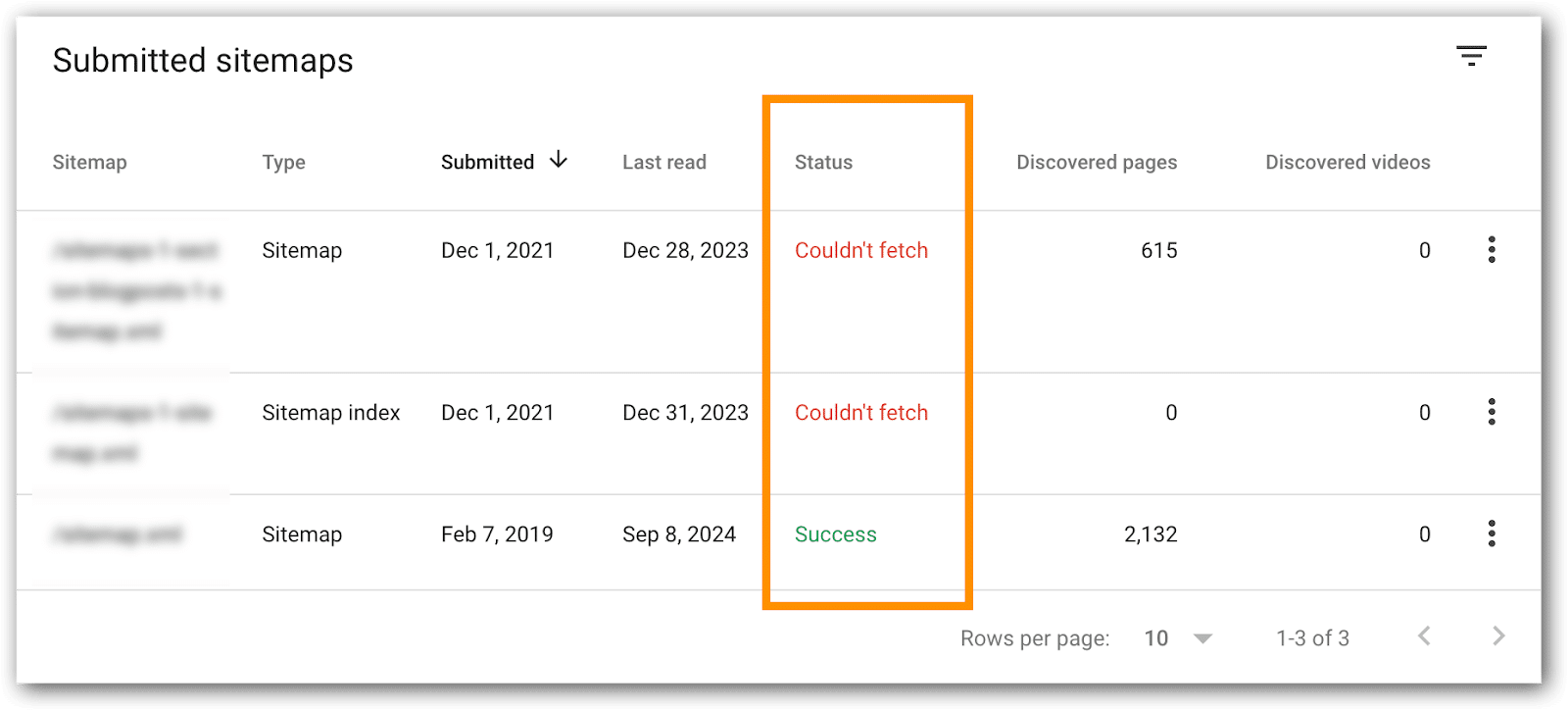
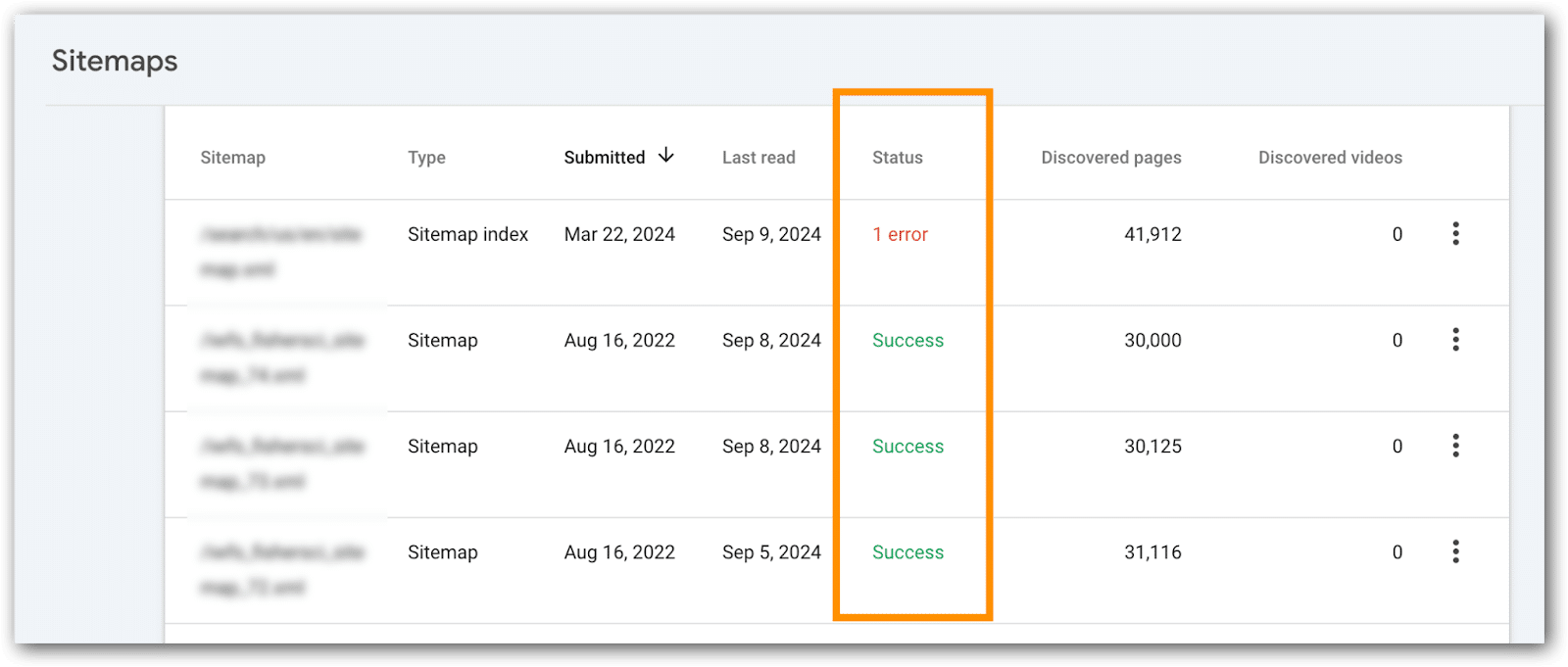
Enterprise SEOs, watch these like a hawk – any glitches can prevent new URLs from being crawled, create hreflang tag confusion for search engines and prevent search engines from catching updates and crawling fresh content.
- Confirm each XML sitemap says “Success.”
- XML sitemaps that index high priority pages, confirm all URLs are indexed.
How to do this:
- Go go the XML sitemaps page.
- Click on the XML sitemap to examine.
- Page refreshes.
- Click on the “Page Indexing” or “Video Page Indexing” link.

- Page refreshes.
- You’ll see the URLs indexed from the XML sitemap you are examining.
Tips:
- For enterprise sites with hundreds of XML sitemaps, identify bellwether XML files to monitor – those replicated across countries, languages or divisions. Since they’re templated, you may be able to skip reviewing hundreds every month.
- If the number of indexed pages drops significantly, you can use these reports to help figure out which part of the site is not indexed. This becomes particularly useful if XML sitemaps are bokeh into URLs for a particular directory, country, template, category, business line, etc.
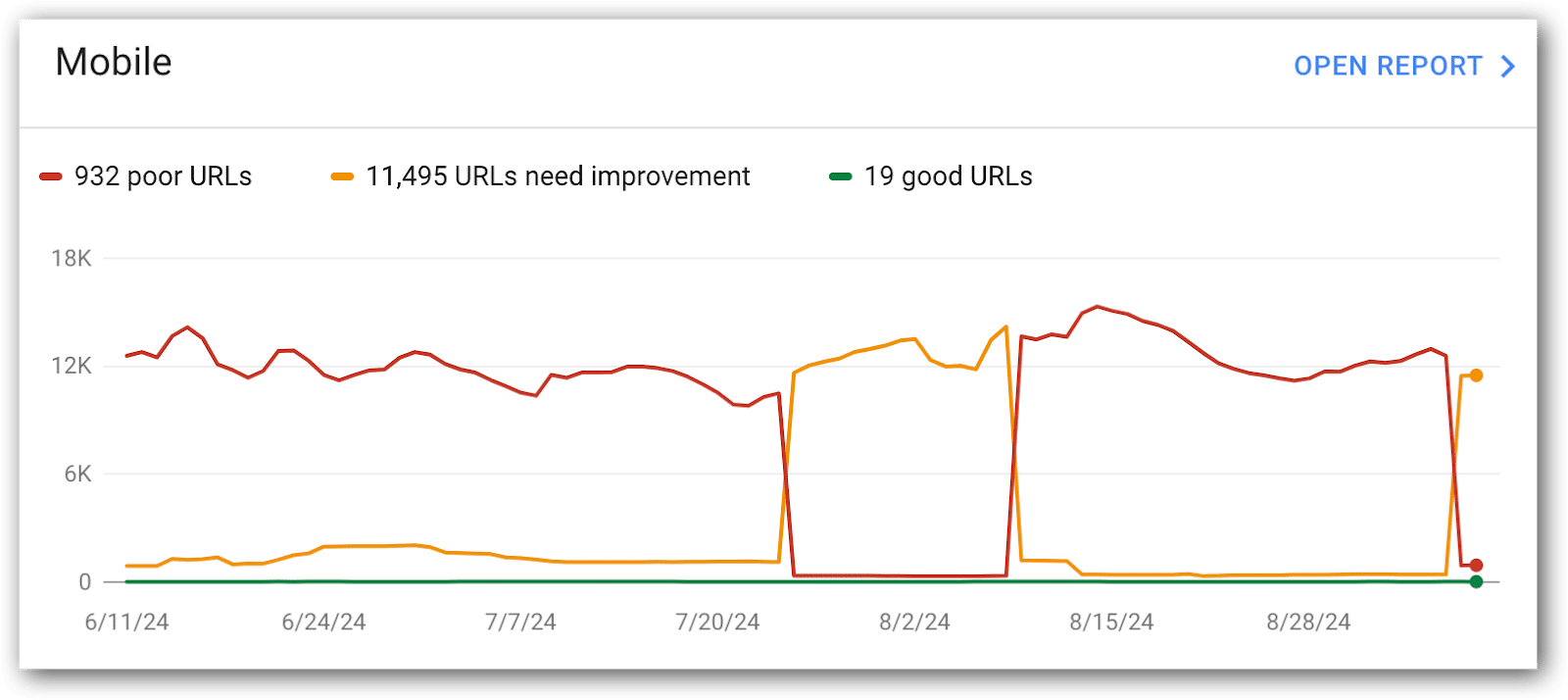
Mobile Core Web Vitals
Mobile Core Web Vitals are the most important for SEO and deserve the most attention. Google also has much higher expectations for these URLs, so this is where you’ll focus most of your Core Web Vitals attention.
This is a report I like developers to see regularly, because you can see how URLs are flipping between the metrics and on which date. This can help you troubleshoot by coordinating these dates with changes on the site, CMS, DAM, network, etc.
Metrics to monitor:
- Mobile good URLs.
- Mobile poor URLs.
- Mobile needs improvement URLs.
The historical chart is great for quick trends, but it’s limited to a short window. For the bigger picture, drop the data into a spreadsheet and build your own chart.
You’ll often find that things look fine now, but 5 or 6 months ago, the metrics were far better – don’t let that slip past you.
Tip: This is a good report for development to see on a regular basis. Consider a regular metrics readout cadence with development to discuss what’s going on and compare it with what they know is happening in releases, server maintenance, third-party code and more.
Why mobile URLs don’t have a ‘good’ Core Web Vitals score
This data explains why particular URLs aren’t considered good by Google. Unfortunately, it doesn’t tell you how to address the problem (that requires you to do a Core Web Vitals audit).
In these metrics, you’ll get:
- The count of URLs scoring low in any of the core web vitals audit.
- A handy list of example URLs, thoughtfully grouped by Google based on similar issues. Unfortunately it’s not all URLs with similar issues, bit’s enough to help you spot patterns and identify areas for improvement.
Metrics to monitor in this report:
- LCP issue: longer than 2.5s (mobile)
- LCP issue: longer than 4s (mobile)
- CLS issue: more than 0.1 (mobile)
- CLS issue: more than 0.25 (mobile)
- INP issue: longer than 200ms (mobile)
- INP issue: longer than 500ms (mobile)
Developers usually need more than just metrics. They want the full list of URLs with low scores.
Luckily, Google gives you and your devs sample URLs to evaluate, though it’s not the comprehensive list they crave. To dig deeper for more URL examples, tap into the Google Search Console API for more data.
Tips:
- Include these in your regular metrics readout with development.
- The historical chart is handy for quick trends, but it’s got a short memory. For the full picture, toss the data into a spreadsheet and chart it yourself. Don’t let those historical highs and lows slip into the shadows. Even better if you grap the chart images because your spreadsheet likely won’t have metrics showing day-to-day fluctuations throughout each month.
Desktop Core Web Vitals metrics
This is exactly the same as mobile. Usually, I give this a quick gander, but most of the time is spent on mobile core web vitals metrics.
What is often interesting in the desktop metrics is correlations between metrics improving in desktop, but getting worse on mobile devices. This is a good place for development to figure out why mobile metrics got worse, but desktop improved.
Metrics to monitor:
- Desktop Good URLs.
- Desktop Poor URLs.
- Desktop Needs Improvement URLs.
Why Desktop Core Web Vitals metrics are low
Frankly, this is not a priority for the sites I work on. Not that I never look at them, but in the grand scheme of things we prioritize fixing mobile issues, anticipating that fixing mobile issues will fix desktop issues.
For a few of my B2B enterprise clients, with a primarily desktop-focused audience, we dial up the attention on these metrics to make sure nothing slips through the cracks:
- LCP issue: longer than 2.5s (desktop)
- LCP issue: longer than 2.5s (desktop)
- CLS issue: more than 0.25 (desktop)
- CLS issue: more than 0.1 (desktop)
- INP issue: longer than 200ms (desktop)
- INP issue: longer than 500ms (desktop)
Rich results from Schema
Adding Schema markup to your site unlocks special features that enhance your organic listings, such as breadcrumb links, product information and more.
In Google Search Console, URLs with code intended to trigger these SERP enhancements are tracked in a section called “Enhancements.”
The list of “Enhancements” listed in Google Search Console will vary based, on your site’s setup. Here are the most common enhancements you’ll likely see:
- Breadcrumbs.
- FAQ.
- Review Snippets.
- Videos.
- Unparsable Structured Data.
- Product Snippets.
- Merchant Listings.
- And more.
Each of these enhancements have a report indicating the number of URLs that are valid, invalid and issues to address.
What’s next?
Now that you have the key Google Search Console metrics, make sure you track them regularly (monthly works best).
Remember to drop these metrics into a spreadsheet. Google’s limited historical data might leave you hanging when you need those insights down the road.
In the next article of this series, I’ll show you a few metrics tucked away in the “settings” section of Google Search Console that few SEOs talk about, but I like to keep an eye on.
Dig deeper: 3 underutilized Google Search Console reports for diagnosing traffic drops
Courtesy of Search Engine Land: News & Info About SEO, PPC, SEM, Search Engines & Search Marketing
Thursday, September 26th, 2024
Relying solely on content and technical SEO is no longer enough to achieve sustainable success, especially for businesses operating in multiple markets.
While these elements are crucial, they fail to fully account for the diverse factors influencing a website’s global performance.
The complexities of managing SEO across different regions, languages and market conditions add layers of challenges, many of which fall outside the direct control of local SEO teams.
To effectively navigate these hurdles, companies must adopt process changes that promote consistency, reduce friction and enhance performance across all markets.
This article will explore how integrating uniform frameworks, centralized reporting and streamlined processes can help maintain and improve SEO performance on a global scale.
1. Ensure consistent reporting
Performance reporting is the first area that begs for consistency in many global search programs.
Too many companies lack consistent reporting across their markets, making it impossible to roll up data to understand global, regional and market performance.
Finding opportunities that can be leveraged in other markets is even more challenging.
In one of my initial global team meetings with a client, I observed how search teams from various markets presented their reports in completely different formats.
Many reports included similar data points, such as keyword rankings and some Google Search Console metrics. Still, only a few mentioned organic traffic and none provided ROI metrics, such as search-influenced leads or sales.
To address this inconsistency, we created a standardized reporting template that all markets could adopt.
This template could be easily integrated into the global reporting dashboard, enabling management to assess market performance and identify areas that require additional resources.
After establishing a consistent reporting framework, the next step is to expand the data set to include additional search variables.
One of my preferred metrics to monitor is the global performance of “always on” keywords. These keywords represent the business’s core offerings across different markets and must consistently appear in search results.
For example, a global search manager at a company like Lenovo or Dell might want to track how many markets rank in the top positions for a key product category like laptop computers, helping to identify areas of focus and potential keyword cannibalization.
By centralizing data, you can spot market or regional trends to apply in other areas, adding value.
For instance, during a meeting in Japan, a global manager noted significant traffic boosts from blog posts that highlighted how their product outperformed competitors.
This strategy was successfully implemented globally. Additionally, analyzing data on a global scale and encouraging markets to report increases and anomalies can reveal new opportunities.
2. Centralize SEO development tickets
Companies with centralized web development often struggle to manage multiple, conflicting support tickets, particularly when SEO responsibilities are decentralized to local teams or agencies.
This decentralization leads to inefficiencies, as teams spend significant time consolidating and prioritizing tickets, especially when requests conflict or need further clarification.
A centralized review process minimizes ticket redundancy and ensures that changes to key SEO elements do not negatively impact other markets. For instance, there have been cases where a local SEO team or agency has requested changes based on the latest techniques or aggressive strategies, which could lead to penalties affecting all markets.
While advising on a global search project, I examined Jira tickets submitted by local SEO teams and agencies.
I found a dozen tickets, some over six months old, all requesting the same task: correcting links in the header to prevent 404 errors.
The requests varied in detail, from simple fixes like “fix the links in the header” to one that specified exact links needing revision, but only for the local market.
By reviewing these requests centrally, we developed a comprehensive solution that framed the issue as a global concern. This resulted in the ticket’s acceptance and implementation in the next sprint.
Dig deeper: How you can deal with decentralization in international SEO
3. Be consistent in your approach and philosophy
The ticket review highlighted a significant inconsistency with the organization’s SEO philosophy and best practices. Many requests included outdated techniques that could undo existing positive changes.
Companies with a Search Council have a structured process for reviewing and approving market requests.
Even without formal procedures, in-house SEOs should assess the requests for their validity, viability and impact at both local and global levels.
We’ve all encountered situations where Agency A insists on a critical action while Agency B claims it’s not essential and prioritizes other tasks.
Also, there are times when web guidelines or the CMS restrict changes. How is this reconciliation handled?
A major challenge is the lack of SEO expertise in local markets.
Often, these markets do not have a dedicated SEO agency or personnel, as SEO is just one of many responsibilities.
They could greatly benefit from shared experience and documented guidelines to clarify focus areas and CMS capabilities.
All markets can enhance their SEO strategies and maintain a unified approach by collaborating to develop consistent guidelines, processes and templates.
Dig deeper: International SEO: How to avoid common translation and localization pitfalls
Don’t forget your templates
In a centralized development structure, most markets use the same templates, particularly for product pages. When a change is made to one template, it affects all websites, making template-related tickets and optimization actions crucial.
While consistency in webpage templates and SEO presents challenges, it also offers opportunities. Focusing on templates can lead to significant improvements; once fixes are deployed globally, everyone benefits.
It’s surprising to see many multinational websites with identical templates undergoing numerous audits. If all markets share a common template, there’s less need for individual audits, allowing budgets to be allocated to unique market needs instead.
It’s beneficial to share site audits, especially when multiple markets use the same template. Auditing the template infrastructure should yield consistent results.
Agencies can check for any deviations from the template, ensuring a more efficient use of resources. This allows teams to concentrate on content, backlinks and other important areas rather than redundant audits.
4. Use centralized solutions
Many SEO activities, from analytics to tools, could be centralized at a global level or in markets with more resources. However, despite the potential efficiency, I’ve found this is often more challenging in practice.
Centralized funding and management of SEO diagnostic tools can be more effective than having each market fund various tools independently.
For example, I’ve seen mid-sized companies use an old desktop computer with a single Screaming Frog license to crawl all markets and store reports on a shared drive.
After discovering that many of their CMS-generated XML sitemaps had errors, they created validated XML sitemaps for all markets and stored them centrally.
While discussing keywords is often discouraged, collaborative teams can benefit by sharing paid search keyword lists, ad copy and negative lists.
This collaboration is crucial for same-language markets, allowing them to build on existing work and focus their time and resources on adaptation and expansion.
5. Consider global and local
Local markets may see the shift toward consistency and standardized processes as restricting their autonomy and may resist if they believe it could impact their KPIs.
They need web elements and processes unique to their markets. Still, they should recognize that adopting consistent templates, centralized task alignment and best practices can help them focus more on local activities.
Getting SEO initiatives into the development pipeline is a significant challenge at any level, but a consistent workflow and aligned markets enhance effectiveness.
This uniformity facilitates the integration of cross-market analytics and AI solutions, creating further opportunities for scaling.
Dig deeper: The best AI tools for global SEO expansion
Streamlining global SEO: Centralized strategies for sustainable success
Incorporating standardized frameworks and centralized processes into global SEO strategies promotes consistency, efficiency and scalability across markets.
Organizations can more effectively allocate resources and uncover growth opportunities by streamlining reporting, ticket management and template usage.
This holistic approach improves site performance and enables local markets to focus on region-specific initiatives, driving sustainable SEO success on a global scale.
Courtesy of Search Engine Land: News & Info About SEO, PPC, SEM, Search Engines & Search Marketing
Thursday, September 26th, 2024
The Google Ads landscape continues to evolve, with a growing emphasis on data usage that complies with strict privacy guidelines.
To support advertisers navigating this environment, Google introduced a robust toolset designed to advance their AI-driven marketing strategies.
A key part of this transformation is Ads Data Hub (ADH), a platform built on Google Cloud.
ADH allows advertisers to integrate and analyze data from Google Ads and other sources, offering deeper insights into customer journeys and ad performance while maintaining privacy compliance.
This article explores what Ads Data Hub is, how it works and tips to maximize the tool while improving your Google Ads performance.
What is Ads Data Hub?
The Ads Data Hub is a centralized repository for all your marketing data, integrating information from:
- Your Google Ads account (including search, display, video and shopping campaigns).
- Your Google Analytics account.
- Your CRM system.
- First-party data collected from your websites, apps, physical stores or directly from customers.
Designed with privacy in mind, ADH aggregates all query results to prevent the identification of individual users within the dataset.
Minimum aggregation thresholds are established to avoid accidental exposure of personally identifiable information.
You also cannot download specific user data, ensuring compliance with today’s privacy guidelines and best practices across various industries.
Ads Data Hub: Setup and architecture
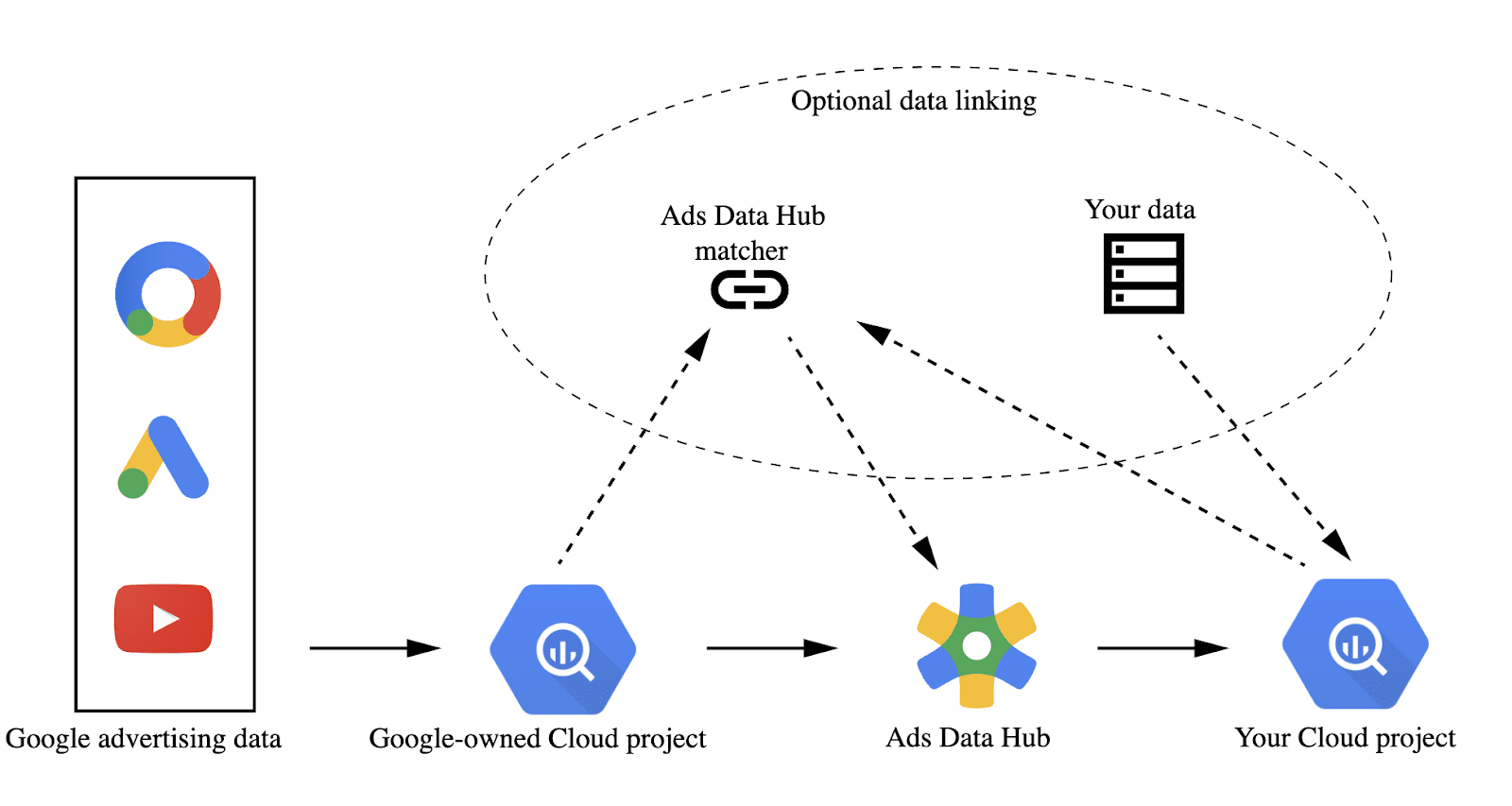
The platform’s architecture is specifically designed to securely and efficiently process large-scale advertising datasets. Let’s explore its key components and workflow in detail.
Data ingestion
Advertisers upload their first-party data to ADH, including customer interactions, website analytics and CRM information.
This data is matched with Google’s ad data (e.g., impressions, clicks, conversions) using hashed identifiers.
Cloud-based processing
The core of ADH is powered by Google Cloud’s BigQuery infrastructure.
Advertisers can write SQL queries to analyze data, joining their first-party data with Google’s advertising data.
This system allows businesses to run highly customized analyses without moving the data outside Google’s secure environment.
Querying
Users run SQL queries on aggregated datasets, with results compiled at a user level to protect personally identifiable information (PII).
ADH restricts the types of queries that can be executed to ensure individual user data remains private.
Output
Once the query is complete, ADH provides an aggregated report which can then be exported to BigQuery for further analysis or connected to other reporting tools like Looker Studio.
ADH’s limitations
Despite its robust features, Ads Data Hub has certain limitations that advertisers should be aware of.
- No real-time data access: ADH does not offer real-time data access. There is often a delay in getting campaign data into the platform, which could impact time-sensitive decisions.
- SQL expertise required: Running queries in ADH requires proficiency in SQL, making it necessary for advertisers to have data analysts or skilled marketers to extract meaningful insights.
- Limited access to raw data: Since raw user-level data is inaccessible, you might find limitations in performing deep cohort analysis or certain types of data exploration.
Get the newsletter search marketers rely on.
When to use Ads Data Hub
Ads Data Hub provides valuable insights by integrating data from various sources across customer touchpoints.
It enables advertisers to analyze purchase history across channels, identify shopping cart abandoners and create customer segments and audiences. These insights can then be used to inform ad copy, optimize landing pages and improve ROI models.
Here are some specific examples of how Ads Data Hub can be applied:
Cross-platform measurement
- ADH enables the analysis of user behavior across platforms, such as YouTube and Google Display Network.
- This cross-platform measurement capability lets you understand the complete picture of user engagement and track conversions more effectively.
First-party data enrichment
- Uploading first-party data can enrich your analysis, allowing you to gain insights into customer segments, lifetime value and conversion behaviors.
- Combining first-party data with Google Ads data helps improve targeting and retargeting strategies.
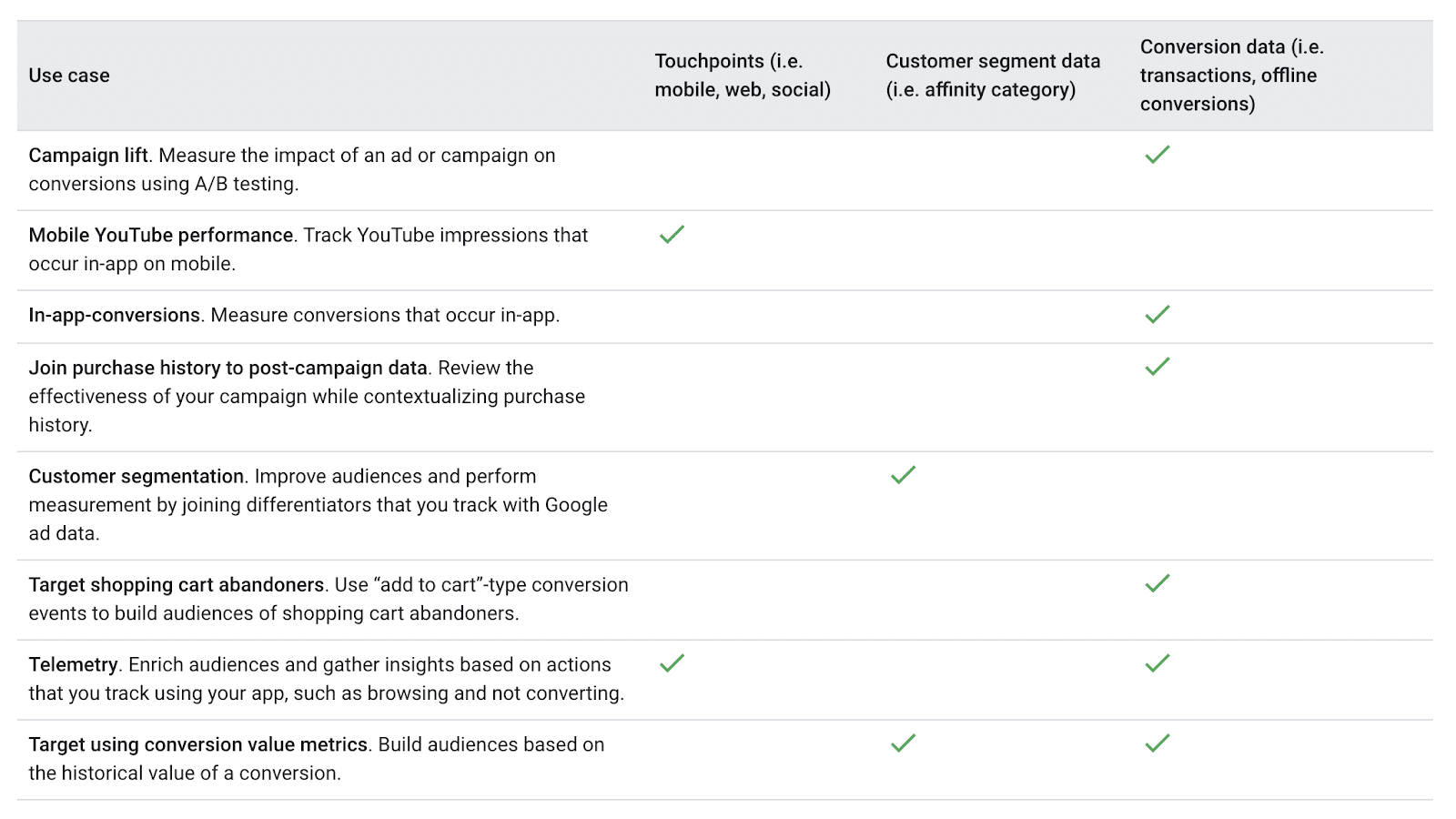
Google provides a good table of use cases to help provide some starting points:
Use case examples
Here are a few examples of how businesses have used the Google Ads Data Hub to improve their Google Ads performance.
Churn prevention through ad interaction analysis
- Identify users at risk of churning by analyzing their prior engagement with ads.
- This helps create a targeted list of potentially churn-prone users who have previously interacted with your ads, indicating some level of engagement.
- By focusing retention efforts on these users, businesses can develop personalized campaigns to re-engage them and reduce churn.
Maximizing lifetime value for high-value users
- Use your CRM data to identify high-value users who are part of your existing customer base and actively engage with your YouTube campaigns.
- By targeting these valuable users with personalized messaging and offers, you can further enhance their lifetime value, encouraging repeat purchases or deeper brand loyalty.
Geo-specific conversion propensity for affinity segments
- Analyze affinity and in-market segments by region to understand user interests and behaviors at a granular level.
- By evaluating the various interest categories users fall into, you can optimize your campaigns geographically, tailoring content to match regional preferences and increasing conversion rates within specific markets.
Optimizing retargeting with message sequencing
- Create exclusion lists for negative retargeting by identifying users who have already converted or heavily interacted with previous campaigns.
- This helps avoid over-targeting and ad fatigue, ensuring that your messaging is more relevant to potential customers who have yet to engage while efficiently managing your ad spend.
Tracking new CRM signups from ad exposure
- Identify incremental users who signed up for your CRM after being exposed to your YouTube or Google Ads campaigns.
- By analyzing the data, you can create a list of these newly enrolled users, allowing you to measure the effectiveness of your ad campaigns in driving CRM growth and optimizing future strategies for customer acquisition.
Ads Data Hub: Bridging data sources for enhanced marketing intelligence
Google’s Ads Data Hub is a powerful tool for advertisers seeking actionable insights while maintaining strict privacy standards.
By leveraging Google Cloud’s infrastructure and combining first-party and Google Ads data, the platform enables advanced analysis without compromising user privacy.
From campaign optimization to custom attribution modeling, ADH helps you succeed in a privacy-focused advertising landscape.
Courtesy of Search Engine Land: News & Info About SEO, PPC, SEM, Search Engines & Search Marketing
Thursday, September 26th, 2024
From your account reps to the interface itself, Google gives you plenty of recommendations on managing your ad campaigns. But are all of those good?
Should you ignore these recommendations and “hack” Google’s machine learning – or should you follow Google’s advice?
Two Google Ads experts – Ben Kruger and Anthony Higman – had an interesting debate on this topic at SMX Advanced.
Here are the key points from their discussion.
Performance Max (PMax) for non-ecommerce
Kruger, who was on the side of adopting, clearly took the stance that Performance Max is future and that all Google’s tools centers around it:
- “My simple answer is that PMax is clearly the future of Google. It’s where everything is heading as, you know, if you’re talking to your reps, if you’re reading documentation, if you’re watching Gmail, which which happened, recently, everything seems to center around Pmax, and it’s talked about over and over again.”
- “If you’re not learning and mastering the newest thing that Google is clearly pushing, then you’re potentially gonna get left behind when inevitably, whatever you’re used to gets sunsetted, deprecated or you’re forced to migrate over to PMax.”
PMax offers growth opportunities through AI-driven insights across various channels, but Kruger advised against relying solely on it, suggesting it should be part of a broader, strategic approach that includes learning from PMax to enhance dedicated campaigns.
Higman, who was on the side of hacking, said non-ecommerce brands, in particular, should avoid PMax. He sees “a lot of problems” with it:
- “I do understand that Google is aggressively pushing PMax, But just because Google is pushing something doesn’t mean that everybody should jump on board.
- “The more people that adopt PMax because of Google’s push for the new shiny object, the more they make it easier to deprecate certain things.
- “My main beef with PMax is, again, the lack of transparency. They clearly wanna push everybody in automation, which I disagree with because not everybody fits into that box.”
Higman emphasized the importance of maintaining control and visibility over ad spend, especially for those with smaller budgets. He also expressed concern that widespread adoption of PMax could lead to the deprecation of more transparent tools.
Best match type
Kruger said there is a place for exact match, but if he had to choose, it would be broad match:
- “Queries are getting way more, unique, specific and long tail. People are going to be conversing with Google search, asking it different ways, maybe using voice, maybe searching on Google Maps. Queries are evolving, and you’ll never be able to cover that with exact match.
- “Broad match is analyzing past searches that this user has made, their location, thousands of other signals that only Broad Match has.
- “With a growth mindset, it’s gonna find you new keywords. So with an exact match, your search terms are all your keywords, and you’re not gonna be able to move to that next frontier of growth to find new queries for you to acquire.”
Broad match is more effective in capturing the increasingly unique, specific and long-tail queries users are making, according to Kruger. It leverages Google’s AI to understand consumer intent and match ads to relevant searches by analyzing various signals, including the user’s past behavior and the content of landing pages.
Higman’s all-time favorite, of the present and past match types, is broad match modifier. But sticking to what is possible, he said he prefers exact match.
- “This is another one of those control things. As Google removes control, their revenue goes up. Advertisers kinda get a little bit watered down results.”
- “So I am a proponent of exact match, keeping things as tight as possible, and really targeting what you want to target.”
Kruger also noted that while exact match may be more expensive, it offers tighter control and more precise targeting compared to other match types. Despite still using phrase match for specific purposes, exact match is currently his preferred choice for achieving targeted campaign results.
Automation vs. control
When posed the question of automation versus control, Kruger said performance is what matters:
- “That’s a trick question. I think the answer is performance, and I don’t care how I get there. That’s that’s all that matters to me, and I’m gonna use the best tools available to get the performance and the growth”
- “That’s automation because it allows for performance at scale. I’m constantly finding new opportunities, for performance, and I’m able to find new levers of growth, to move my business along.”
While control is important, particularly for agencies focused on hitting specific targets within platforms like Google Ads, relying solely on controlled methods limits growth potential, Kruger said.
Balance is key, Kruger said, where strategic controls are combined with automation to drive significant business growth. In his experience, automation has consistently delivered the best performance outcomes.
Unsurprisingly, Higman’s stance is “1,000% control”:
- “Google is pushing everybody into automation, which, again, it does have its use cases. I’m not saying that it does not, but we need to keep control to keep results.”
- “I think that as privacy legislation meets automation, there’s gonna be a lot of problems down the road as there’s less data that can be fed to the the automation because of privacy legislation, things are gonna get wonky.”
- “I also think from an agency perspective, control is extremely important. Client’s don’t want these weird things that are gonna happen with automation that bring in different kind of things that they’re really not going after.”
Higman is concerned that automation, with its lack of transparency, could lead to undesirable outcomes and urges others to resist the push toward automated systems that reduce control.
RSA (Responsive Search Ads) strategy
Maximizes all the headlines and descriptions that RSA’s have to offer, Kruger said:
- “I completely max them out: 15 headlines, 5 descriptions, 20 images, all extensions, etc.
- “I have seen first-hand that creative is targeting. You could have two different ad groups with the same keywords in it and if you change the assets in one of the RSAs to better match that keyword, the search terms that match to that ad group will move to the one that’s more relevant.
- “Formats are completely gonna change. And by having a diverse set of assets in an RSA, you can increase your chances of landing different placements that those with an ETA definitely could not get into.”
As search engine results pages (SERPs) evolve, having a diverse set of assets in RSAs increases the chances of securing different placements, something expanded text ads (ETAs) cannot achieve, according to Kruger.
But Higman is not a fan of RSAs. He said:
- “I think that the best RSA strategy is not RSAs. We still have accounts that have expanded text ads in them, and they outperform RSAs by miles every time, and they get all of the conversions.
- “My RSA strategy is to keep RSAs as close to ETAs as possible.
- “So we will only provide the minimum required headlines and descriptions, and we will pin those into place exactly where we want them based on past performance on expanded text ads.”
While Higman acknowledged the potential of RSAs to match headlines and descriptions to searches, that hasn’t been his experience. Overall, he has found that ETAs still significantly outperform RSAs.
Both experts agreed that ad strength scores may not be indicative of performance.
Nuanced perspectives
It should be noted that with each point each expert conceded that their “opponent” made valid points:
- Higman conceded that automated solutions could benefit larger advertisers aiming for broad reach.
- Kruger suggested that control-focused strategies might be more suitable for businesses with limited capacity to handle high lead volumes
The debate highlighted the ongoing tension in the PPC community between embracing Google’s automation push and maintaining granular control over campaigns.
The key takeaway is that while Google is clearly moving toward more automated solutions, the best approach depends on an advertiser’s specific goals, budget and capacity for growth.
Watch: The great debate: Should you hack or adopt Google Ads features?
You can watch the full session from SMX Advanced here:
Courtesy of Search Engine Land: News & Info About SEO, PPC, SEM, Search Engines & Search Marketing