Archive for the ‘seo news’ Category
Wednesday, March 27th, 2024
Amazon must now share details about the ads it serves in the European Union through a public library.
The retail giant is being forced to provide more transparency about its ad operations under the EU’s Digital Services Act (DSA) after losing an appeal in the Court of Justice of the EU (CJEU) for a temporary suspension.
Why we care. The creation of an Amazon ads library will offer marketers valuable insights into how the retail giant showcases and profits from campaigns. This will empower them to optimize their ads more effectively for better performance on the platform.
What is the Digital Markets Act (DMA)? The DMA is a piece of legislation introduced in 2022 designed to ensure that large online platforms, called “gatekeepers”, behave in a fair way online to create a fair and open environment for online businesses. Only six gatekeepers have obligations under the DMA:
- Alphabet (Google’s parent company).
- Apple.
- Meta.
- Amazon.
- Microsoft.
- ByteDance.
All six companies, none of which are based in the EU, were required to ensure they fully complied with DMA obligations and submit compliance reports by March 7.
DMA violation penalties. The consequences of non-compliance with the DMA includes:
- Fines: Up to 10% of the company’s total worldwide annual turnover, or up to 20% in the event of repeated infringements.
- Periodic penalty payments: Up to 5% of a company’s average daily turnover.
- Remedies: These can include behavioral and structural remedies, such as the divestiture of (parts of) a business.
Amazon contests DSA requirements. Amazon challenged the requirement to follow the ads transparency rule in the DSA in September last year. As a result, the EU General Court temporarily halted the ads library until the issue is resolved.
Decision reversal. This week, the CJEU overturned the decision to temporarily suspend Amazon’s requirement to comply with the ads transparency provision. The court ruled that Amazon must now adhere to publishing an ads library. While the court recognized Amazon’s concerns about compliance, they emphasized the importance of upholding the intentions of EU lawmakers in passing the law. Delaying compliance could undermine the objectives of the DSA, potentially for several years.
What the CJEU is saying. The CJEU said in a statement:
- “Suspension would lead to a delay, potentially for several years, in the full achievement of the objectives of the Regulation on a Single Market for Digital Services and therefore potentially allow an online environment threatening fundamental rights to persist or develop, whereas the EU legislature considered that very large platforms play an important role in that environment. “T
- “The interests defended by the EU legislature prevail, in the present case, over Amazon’s material interests, with the result that the balancing of interests weighs in favor of rejecting the request for suspension.”
What Amazon is saying. An Amazon spokesperson told Tech Crunch:
- “We are disappointed with this decision, and maintain that Amazon doesn’t fit the description of a ‘Very Large Online Platform’ (VLOP) under the DSA, and should not be designated as such.”
- “Customer safety is a top priority for us at Amazon, and we continue to work closely with the EC with regard to our obligations under the DSA.”
Get the daily newsletter search marketers rely on.
Deep dive. Read the CJEU’s statement on its decision in full for more information.
Courtesy of Search Engine Land: News & Info About SEO, PPC, SEM, Search Engines & Search Marketing
Wednesday, March 27th, 2024
Google’s 2023 Ads Safety Report revealed that it blocked or removed 12.7 million advertiser accounts last year – nearly double the previous 12 months.
Additionally, the search engine blocked or removed 5.5 billion ads for violating its policies – slightly up from the prior year.
Why we care. Cracking down on fraudulent accounts is critical for brand safety and also helps to ensure a safer space for consumers so that they can confidently make online transactions. However, there’s also a potential risk associated with AI, as it may mistakenly suspend genuine advertisers and ads.
The report findings. In the 2023 Google Ads Safety Report, Google found:
- Google blocked or removed 206.5 million advertisements for violating our misrepresentation policy, which includes many scam tactics.
- Google blocked or removed 273.4 million advertisements for violating our financial services policy.
- Google blocked or removed over 1 billion advertisements for violating its policy against abusing the ad network, which includes promoting malware.
- Google blocked or restricted ads from serving on more than 2.1 billion publisher pages.
- Google took broader site-level enforcement action on more than 395,000 publisher sites, up markedly from 2022.
Updates. Google claimed that scams and fraud across all platforms were on the rise in 2023. To counter these threats, it deployed 31 updates to its Ads and Publisher policies, such as:
- Updating its suitability controls to make it simpler and quicker for advertisers to exclude topics that they wish to avoid across YouTube and Display inventory.
- Updating its misrepresentation policy to better enable Google to rapidly suspend the accounts of bad actors.
- Launching its Limited Ads Serving policy, which is designed to protect users by limiting the reach of advertisers with whom Google is less familiar.
- Launching the Ads Transparency Center – where users can easily search and find ads from verified advertisers across various platforms such as Search, YouTube, and Display.
AI. In the report, Google highlighted how AI is playing a crucial role in its efforts to combat bad actors. By using AI, Google claims it can identify and suspend fraudulent accounts before they even get onto its platforms, or remove them as soon as they’re detected.
Moving forward. Google did not share exact details on what future updates we can expect we move further into 2024, however, the search engine confirmed it would continue to investment in policy, detection and enforcement.
Appeals. If you disagree with Google’s decisions and do not believe your ad violated its policies, you can appeal any enforcement action. Google will review your appeal, and if it determines that it made an incorrect decision, it will use these instances to enhance its systems.
What Google is saying. Duncan Lennox, VP & GM of Ads Privacy and Safety, said in a statement:
- “Our goal is to catch bad ads and suspend fraudulent accounts before they make it onto our platforms or remove them immediately once detected. AI is improving our enforcement on all fronts.”
- “To put the impact of AI on this work into perspective: last year more than 90% of our publisher page level enforcement started with the use of machine learning models, including our latest LLMs.”
Get the daily newsletter search marketers rely on.
Deep dive. Read Google’s 2023 Ads Safety Report in full for more information.
Courtesy of Search Engine Land: News & Info About SEO, PPC, SEM, Search Engines & Search Marketing
Wednesday, March 27th, 2024
Google has confirmed an issue with the real-time analytics reports within Google Analytics, GA4. Many profiles show zero real-time traffic being reported since early this morning; some are seeing a fraction of their normal real-time traffic being reported, and some are seeing normal traffic.
Google working on a fix. Ginny Marvin, Google’s Ads Liaison, responded on X saying, “Thanks for flagging. This is a bug and the team is working on it. Apologies for the inconvenience!”
Here is that post:
Hi Barry, Thanks for flagging. This is a bug and the team is working on it. Apologies for the inconvenience!
— AdsLiaison (@adsliaison) March 27, 2024
What it looks like. Here is a screenshot of GA4 reporting zero real-time traffic:

Why we care. If you are noticing zero or a lot less real-time visitors via Google Analytics, you are not alone. This is a bug with Google and Google hopes to resolve the issue soon.
I know a lot of site owners woke up in a panic to these reports but again, this is just a bug.
Fixed now. At around 11:35pm ET, it seems like it is now resolving and was resolved by 12pm ET.
And an update: This has been resolved. Thanks for your patience!
— AdsLiaison (@adsliaison) March 27, 2024
Courtesy of Search Engine Land: News & Info About SEO, PPC, SEM, Search Engines & Search Marketing
Tuesday, March 26th, 2024
YouTube issued guidance to creators and marketers on the best times to upload videos for maximum reach.
For news, trends, or content with a shorter lifespan, it’s best to post as soon as possible. However, if you’re sharing evergreen content, the platform suggests posting at whatever time suits you prefer.
Live videos. To maximize reach with live videos, YouTube advises going live when your analytics chart indicates that most of your audience will be available to watch.
Off-hour posting. YouTube Liaison Officer Rene Ritchie mentioned on X that if you post during “off hours,” like the early morning, the initial boost in views might be slower. Therefore, it’s important to adjust your expectations. However, he pointed out that over a few weeks or a month, the total views usually even out, regardless of the initial posting time.
Why we care. This guidance provides valuable insight into easily increasing reach by posting more strategically. However, if your content isn’t time-sensitive, YouTube confirmed that you don’t need to stress about researching optimal posting times– meaning one less thing to worry about in your content strategy.
What YouTube is saying. YouTube Product Lead Todd Beaupre said in a video shared on X:
- “The way we designed the algorithm, we want to give audiences videos and other content that they’re going to be the most satisfied by. If the audience doesn’t really care whether you uploaded it at three in the morning or seven at night, then the algorithm shouldn’t care either.”
- “What I encourage creators to do is when they have some of these questions, and they immediately think about the algorithm, replace the word algorithm in their question with the word ‘audience.’ That’s going to give you a better answer because we’re aiming to serve the audience.”
- “The more you focus on understanding what your audience wants and finding the best fit with them, the algorithm is going to match that.”
Get the daily newsletter search marketers rely on.
Deep dive. Read our guide on how the YouTube algorithm works for more information.
Courtesy of Search Engine Land: News & Info About SEO, PPC, SEM, Search Engines & Search Marketing
Tuesday, March 26th, 2024

In today’s experience economy, customers expect personalized and relevant experiences at every touchpoint. But maintaining that level of personalization at scale is becoming even more challenging with third-party cookies going away.
Join our expert panel to learn how Salesforce allows marketers to unify customer data into a single view – helping you drive true omni-channel personalization without relying on third-party tracking. You’ll see how AI and real-time data activation can help you:
- Establish a comprehensive, single view of the customer by using Data Cloud
- Deliver personalized experiences across sales, service, and marketing channels through first-party data
- Use AI-driven insights to continually optimize and enhance customer experiences
Don’t miss this opportunity to learn from the experts and unlock the full potential of your customer data. Register now to save your spot!
Courtesy of Search Engine Land: News & Info About SEO, PPC, SEM, Search Engines & Search Marketing
Tuesday, March 26th, 2024
LinkedIn is launching a new solution for monitoring campaign performance without third-party cookies.
Dynamic UTMs, which will be available to all users globally by the end of March, simplify adding custom tracking elements to campaign URLs, improving tracking accuracy.
Previously, marketers had to manually create UTM parameters for their campaigns, but with Dynamic UTMs, this process is automated.
What are UTMs? UTM parameters, short for Urchin Tracking Module parameters, are small pieces of text added to the end of your ad’s destination URL that can help you track information about the source of an ad click. For example, you can add tracking parameters to help measure how many clicks to your website were from a specific campaign or placement.
Why we care. UTMs are essential for marketers to grasp a campaign’s performance, especially in a privacy-focused landscape, as they don’t rely on third-party cookies or IP addresses for ad measurement. However, creating them manually can be time-consuming, inefficient and prone to errors. This solution looks address these challenges.
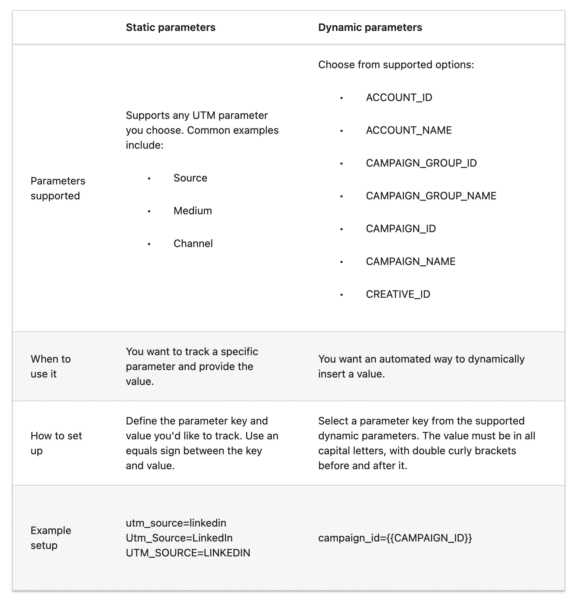
Supported URL tracking parameters. You can add both static and dynamic URL parameters to your campaigns (see the screenshot below). When adding a URL parameter, you’ll need to add both the parameter key and value.
Get the daily newsletter search marketers rely on.
Deep dive. Read LinkedIn’s announcement in full for more information.
Courtesy of Search Engine Land: News & Info About SEO, PPC, SEM, Search Engines & Search Marketing
Tuesday, March 26th, 2024
YouTube advised creators and marketers against deleting videos from the platform. Additionally, the app strongly suggested avoiding making videos private.
The Google-owned site explained that removing content from the app or restricting access could disrupt your channel’s connection to people who have watched that video and negatively impact ranking.
What YouTube is saying. YouTube Product Lead Todd Beaupre said on X:
- “YouTubers: Don’t delete videos unless you have a very, very good reason. When you delete a video, you delete your channel’s connection to the audience that watched that video.”
- “If you want to maximize your growth, keep your videos public or unlist then if you must.”
What this means. In simpler terms, YouTube’s algorithm recommends videos within its search results by connecting the dots between each upload. When you take away one of those dots (aka video on your channel), it is a bit like taking away a jigsaw piece. This means deleting or hiding content could lower your overall channel ranking and limit reach because it disrupts the pattern of your content.
Why we care. It might be tempting to delete or hide content you’re not happy with, however, unless the video is really bad or harmful, it’s best to keep it on your channel. Otherwise, you could end up hurting your channel’s overall ranking.
Get the daily newsletter search marketers rely on.
Deep dive. Read our guide on how the YouTube algorithm works for more information.
Courtesy of Search Engine Land: News & Info About SEO, PPC, SEM, Search Engines & Search Marketing
Monday, March 25th, 2024
When it comes to local SEO, it’s more important than ever that you optimize your on-site and off-site SEO strategies for clients and customers searching for your local business.
Local competition is hotter than ever, and if you’re not on top of your rankings, you can bet your competitors are.
Here are six local SEO tactics you can use to help your business rank higher for local search terms.
1. Title and description tags still matter
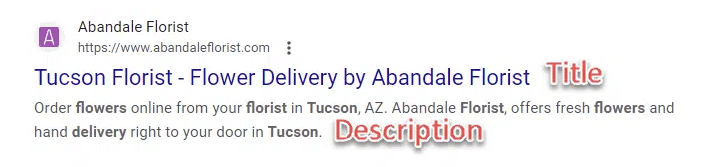
Title and description tags are HTML elements that you can customize to reflect the content of your webpages. The text of your title and description tags is displayed in search results.
Think of this text as a “mini-ad” that you need to craft carefully.
Your title and description are your one shot at grabbing a searcher’s attention and getting them to click on your link in the search results to go to your website – so put careful thought into what you put in these areas on your web pages.
If your title and description tags are missing or Google thinks they’re not good enough, Google often makes something up or “rewrites” them. (And often what Google creates can be less than compelling.)
Both should describe the content of the page and should include keywords so they stand out on the search engine result pages.
The generally acceptable length for title tags is approximately 50 to 60 characters, and description tags can be approximately 160 to 200 characters. Take advantage of this space and use it wisely.
Speak to your audience in these areas. What will stand out to them? What will make them want to click on your link versus all the other links on the page? These are important questions to ask yourself when writing title and description tags.
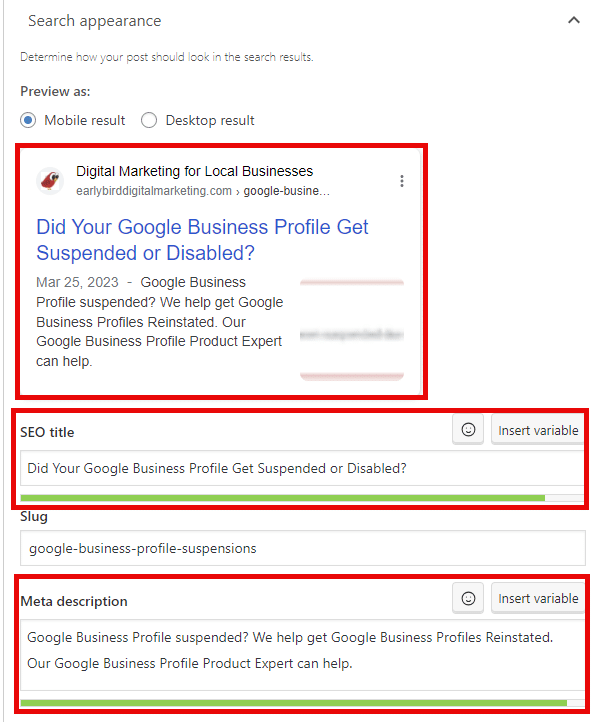
If you aren’t sure how your title and meta description tags will look or how many characters you can get away with, try using an emulator like Yoast’s SEO Plugin for WordPress, where you can see what your title and description will look like on both a mobile device and desktop:
Writing titles and descriptions is considered an art in the SEO world.
In a sea of competing search results, if this text isn’t unique, compelling and descriptive, your click-through rate will suffer (which can hurt your rankings).
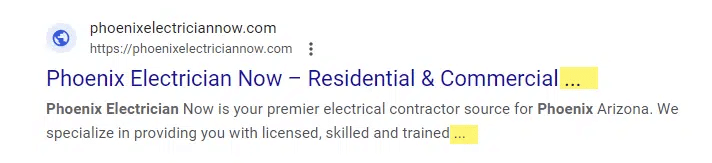
Additionally, too many words or characters could cut off your text with ellipses (…).
Now, this may not be a true tragedy. Some SEOs even encourage you to go over the recommended max character count. But I think this looks unprofessional, especially when it appears in the middle of a sentence, cutting off your thoughts mid-sentence.
The lesson? This space is precious, and every character counts. Here are some tips:
- Never waste space on page names or words that don’t provide helpful information to the searcher about what your webpage – or business – is about.
- If you want to stand out to local customers, include the name of the city your business is in and/or the area your business serves (e.g., “Serving Iowa City and Cedar Rapids”).
- Focus on using one targeted keyword and carefully place that keyword as close to the beginning of the tag as possible.
Remember, if your business shows up in the search results, you have one shot at getting that person to click on your link. Your title and description are the determining factor.
Don’t blow it by wasting characters that won’t help convince a searcher your site is worth visiting.
2. Google Business Profile: Claim and optimize
Google Business Profile (GBP) is one of the best local SEO strategies for local businesses that meet with customers face to face.
If your business qualifies for a GBP listing, you need to claim and optimize your Google Business Profile. (It’s one of the best ways to get your company to rank high on Google!)
Google Business Profile is free, and your business can get incredible exposure if you’re optimized enough to show up in Google’s local three-pack:
To claim your Google Business Profile listing, visit google.com/business. There’s a claiming and verification process you’ll need to go through.
This verification process is necessary because Google wants to confirm that your business is a legitimate, real company. The business owner should claim the GBP listing.
If you’re working with a digital marketing agency on your SEO efforts, you can grant them permission to be a manager of your Business Profile later. This way, you – as the owner of the business – remain in control of your profile if you end your relationship with the agency.
The next step is to optimize – and continue to improve – your GBP listing by:
- Selecting categories.
- Adding business hours.
- Writing a solid description.
- Uploading photos and videos.
- Creating posts/updates.
- Answering questions potential customers ask.
- Include any products or services you sell.
- Replying to reviews you receive.
- And more!
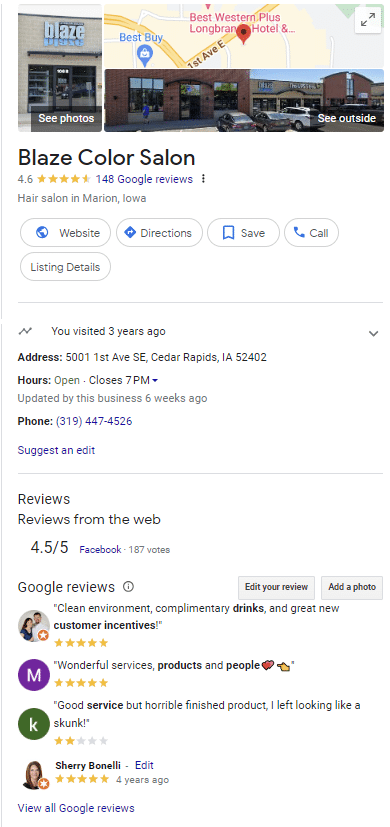
Google Business Profiles/Knowledge Panels are full of information about your business, so make sure you fully populate every relevant section to complete your Google Business Profile.
3. Online reviews matter
Up to 84% of people trust online reviews as much as personal recommendations, according to BrightLocal’s 2023 Local Consumer Review Survey.
Online reviews are like gold to a business – especially when they are 5-star reviews. Generally, you want at least 10 5-star reviews on your Google Business Profile. But your goal is not to stop there.
You want to continually ask your happy customers to leave GBP reviews. Why? Online reviews are a known ranking factor – so getting great reviews should be one of your top priorities!
“High-quality, positive reviews from your customers can improve your business visibility and increase the likelihood that a shopper will visit your location,” Google states.
Two places where you should focus on getting reviews are your Google Business Profile and your Facebook page. These are big ones.
Many people turn to social media to see what their friends and family think about a business, so having good feedback on your business’ Facebook page can help draw prospective customers.
Third-party reviews can even show up on your Google Business Profile.
Whenever a review is left about your business, positive or negative, be sure to respond to it. That shows other people reading the reviews that you, the business owner, care what your customers think.
Get the daily newsletter search marketers rely on.
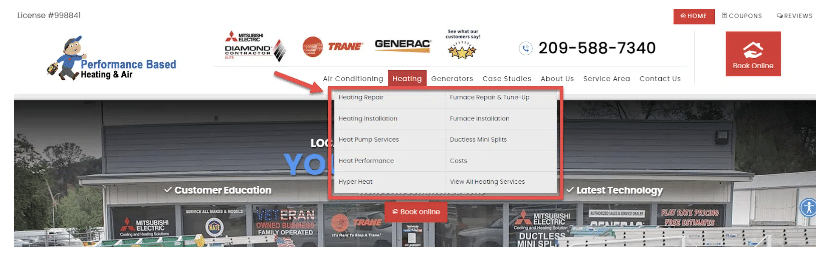
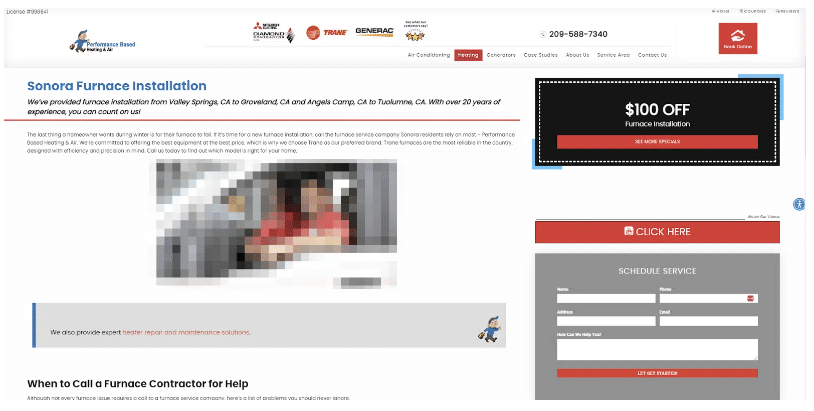
4. Build out separate service pages
If you run a service-based business, one of the best things you can do is build out individual pages for each service you offer instead of just putting a list of your services on one page.
Creating service pages allows you to optimize for the location you’re targeting and for keywords associated with the specific service you offer in a much more targeted way.
Instead of a line list or only having a short paragraph on a “Services” page, you have an entire page to talk about each service that you offer, which means you have much more room for content and ways to optimize the text to serve your readers and Google (for SEO purposes).
So spend some time creating individual pages for each service you offer – even if you only have time to create the pages one at a time. It will be worth it in the end. I promise!
5. Online directories and citations
You must get your business listed correctly and consistently on top online business directories (a.k.a. citations) like Yelp, Facebook, Merchant Circle, Citysearch, etc.
Why? Because online directories often show high organic search results.
If your business isn’t listed on these directories, when a potential customer clicks on those links in search results, they won’t find your company’s information.
You will also want to try and find high-quality local directories to get your business listed.
Check with your local newspaper’s website and your Chamber of Commerce to see if they have a local business directory you can get listed on.
You can also search for keywords like “[your city] directory” to find other local citation sites or directories.
It’s also essential to get your business’s name, address and phone number (NAP) on the major citation data aggregators like Foursquare, Data Axle and Neustar Localeze.
Data aggregators distribute your company’s information to hundreds of other online directories.
Always ensure your company’s NAP is consistent on as many of these directories and citation sites as possible.
6. Get social
If you’ve been avoiding social media until now, it’s time to get social! Google Business Profiles now allow you to add social media links to your Business Profile.
You can add one social media profile for each of the following platforms:
- Facebook
- X
- Instagram
- TikTok
- Pinterest
- LinkedIn
- YouTube
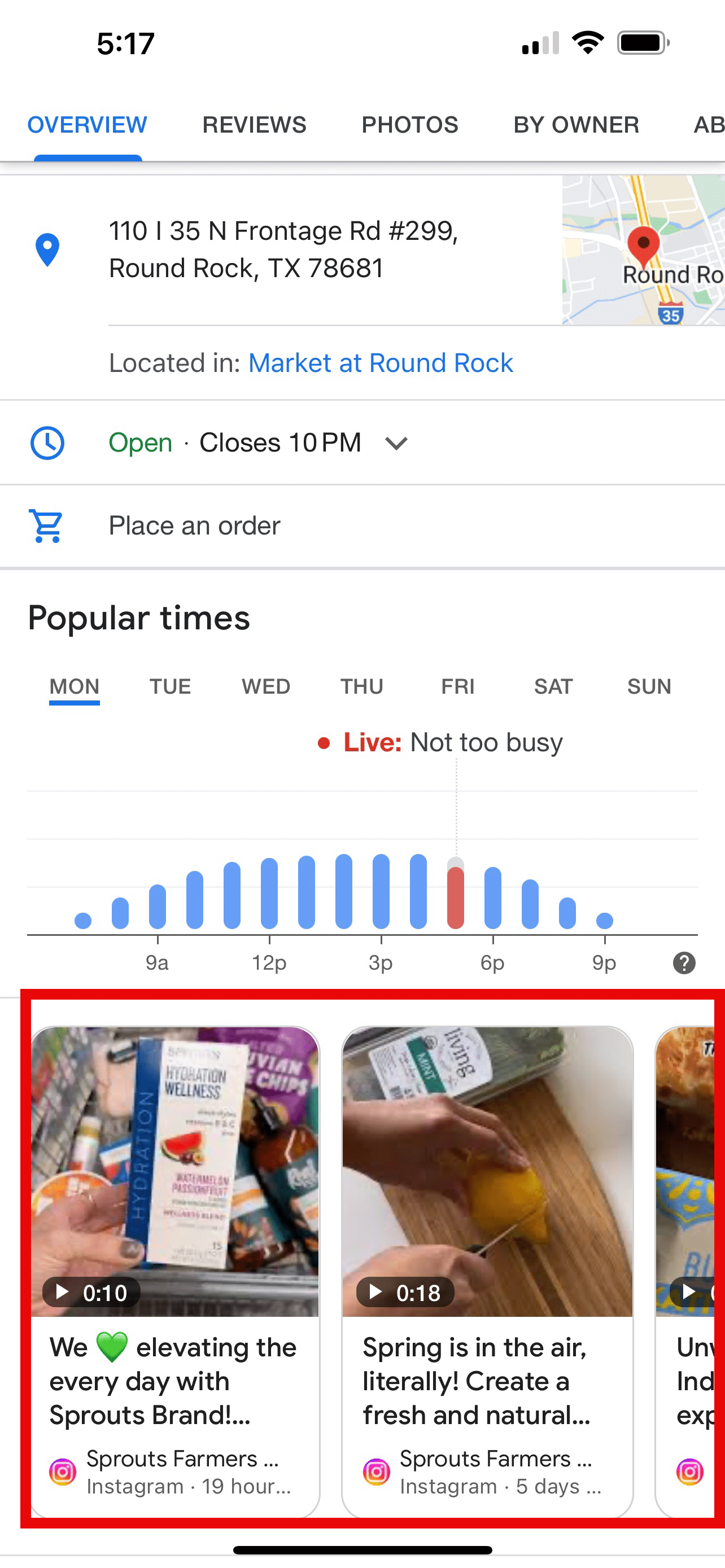
To make things even more interesting, Google recently started showing actual social media posts on Google Business Profiles! (Note: This is a brand-new feature that may not be available in your Business Profile yet.)
Having social media posts on your GBP listing helps build engagement on your Business Profile listing – and Google loves engagement!
These six local SEO strategies are just the tip of the iceberg regarding local SEO. Implementing the six local search tactics above will give you a head start on your competition. Get started today!
Courtesy of Search Engine Land: News & Info About SEO, PPC, SEM, Search Engines & Search Marketing
Monday, March 25th, 2024
Instagram updated how hashtags work for discovery. Now, when users tap on a hashtag, they’re directed to broader search results, including profiles, instead of just a “Top Posts” feed.
The platform announced this change was rolled out to encourage users to explore different parts of the platform, not just posts.
Why we care. This update represents as opportunity to get your brand’s account discovered by high-value consumers.
Action needed. Ensure you tag your target keywords in both your profile and posts to boost the visibility of your brand’s account in the Explore overview. While profiles in hashtag searches may not always include the hashtag in every post, they typically have the word in their profile name or description.
What Instagram is saying. Head of Instagram Adam Mosseri said on Threads:
- “We’re simplifying the hashtag and search experiences on Instagram to make it easier to see everything in one place.”
- “Now, when you tap on a hashtag, you’ll see the search results for that hashtag. You will still be able to follow/unfollow or report specific hashtags.”
- “Hope this makes it easier to find accounts and posts that are relevant to your search.”
Courtesy of Search Engine Land: News & Info About SEO, PPC, SEM, Search Engines & Search Marketing
Monday, March 25th, 2024
Prior to launching any PPC campaign, you must benchmark your competitors. This vital step will help you identify strategic best practices and set your account apart – which can improve performance dramatically.
On a more tactical level, benchmarking allows you to:
- Gather audience insights to better allocate budget.
- Assess ad quality and relevance to spark higher creativity levels.
- Identify ideal customer journeys that will improve conversion rates.
- Find common ground for comparison instead of using results from generic studies.
In this article, I will explore how to benchmark PPC competitors using accurate and reliable data sources.
1. Identify your PPC competitors
While in-house marketers know direct competitors and distributors by heart, online competitors may vary from real-life competitors. In practice, this means that you can identify other competitors as follows:
- Direct competitors: They offer nearly identical products or services. They are your most obvious competitors.
- Indirect competitors: They do not offer the same products or services but target the same audience. Think sleeping app vs. mattresses. Depending on the audience, they can be harmful or a mild nuisance.
- Distributors, affiliates and comparison sites: They promote your products and your competitors’. Half competitors, half partners: you should not ignore them.
Google Ads Auction Insights report
To identify indirect competitors, I recommend you start by using Google Ads Auction Insights report. It is reliable and free (as long as you run a Search/Shopping campaign).
Select a keyword (preferably exact or phrase match type) and note competitors with high Impression Shares.
In the below table, you’ll find an example for mattresses. Notice direct, indirect and distributor competitors:
Legend:
 – Direct competitors
 – Indirect competitors:
 – Distributors, affiliates, comparison sites
As you can see, there is quite a lot of pressure from distributors, so you may want to review your strategy based on your unit economics.
Does it even make sense to advertise on such a keyword? Or is the share of revenue given to distributors so high you’d rather compete with them for that click?
On the other hand, there’s only one indirect competitor. While it’s not obvious if their audiences are qualified (they “only” sell bed linen), you could still experiment and potentially find untapped audiences.
Organic results
While you want to focus on PPC competitors, you can always learn interesting bits and pieces from competitors who do not face you in terms of PPC results. So, I recommend you scan Google’s top organic results for the same keyword.
To do so, you can either Google that directly or use a dedicated tool such as Ahrefs or Semrush.
 Ahrefs result for mattresses in the U.S., March 2024.
At this step, your goal is to:
- List competitors with the most prominent reach: do they have high traffic for that keyword?
- List themes (SERP copy) that don’t get much traffic.
With those two groups of competitors (and already a bunch of useful information), you can move on to the next phase: stealing their best ideas.
2. Competitors’ PPC ad analysis
While there are plenty of PPC spying tools out there (SpyFu being the most popular I believe), I recommend using 100% reliable data sources: the ad networks’ ads libraries.
Ad libraries
You could stop at Google Ads Transparency Center. But I strongly recommend using other libraries such as:
At this step, all you want is to populate a table with your competitors and all the different ad networks you can think of. This will give you a good idea of their reach, which strongly correlates with their ad budget.
Ultimately, you don’t want to compare yourself to a behemoth. That data can help show your CEO that, maybe, they should stop comparing your small company’s results to those of much bigger competitors.
Channels and audiences
Once you find a competitor on several ad networks, notice the overall audience they address on that network. Sometimes, there won’t be any difference, but if you’re lucky, you can learn best practices without spending any money.
In the below example, Welcome to the Jungle is a job search engine. Notice how LinkedIn ads are aimed at recruiting companies and YouTube ads are aimed at recruiting job candidates.
If you were to target one or the other audience, that would be quite a best practice to steal!
 A Welcome to the Jungle LinkedIn Ads ad in France, March 2024. It reads: “75% of candidates value companies’ transparency culture. Improve your employer brand.”
 Some of Welcome to the Jungle’s Google Ads in France, March 2024. Video ads read: “Choose the company that fits you.”
Ad formats
Next stop: ad formats. Those will provide two very interesting pieces of information: the ad channel and the ad format itself.
For example, in the screenshot below of Google Ads Transparency Center, you’ll notice Samsung advertises on Search, Display, and Shopping channels.
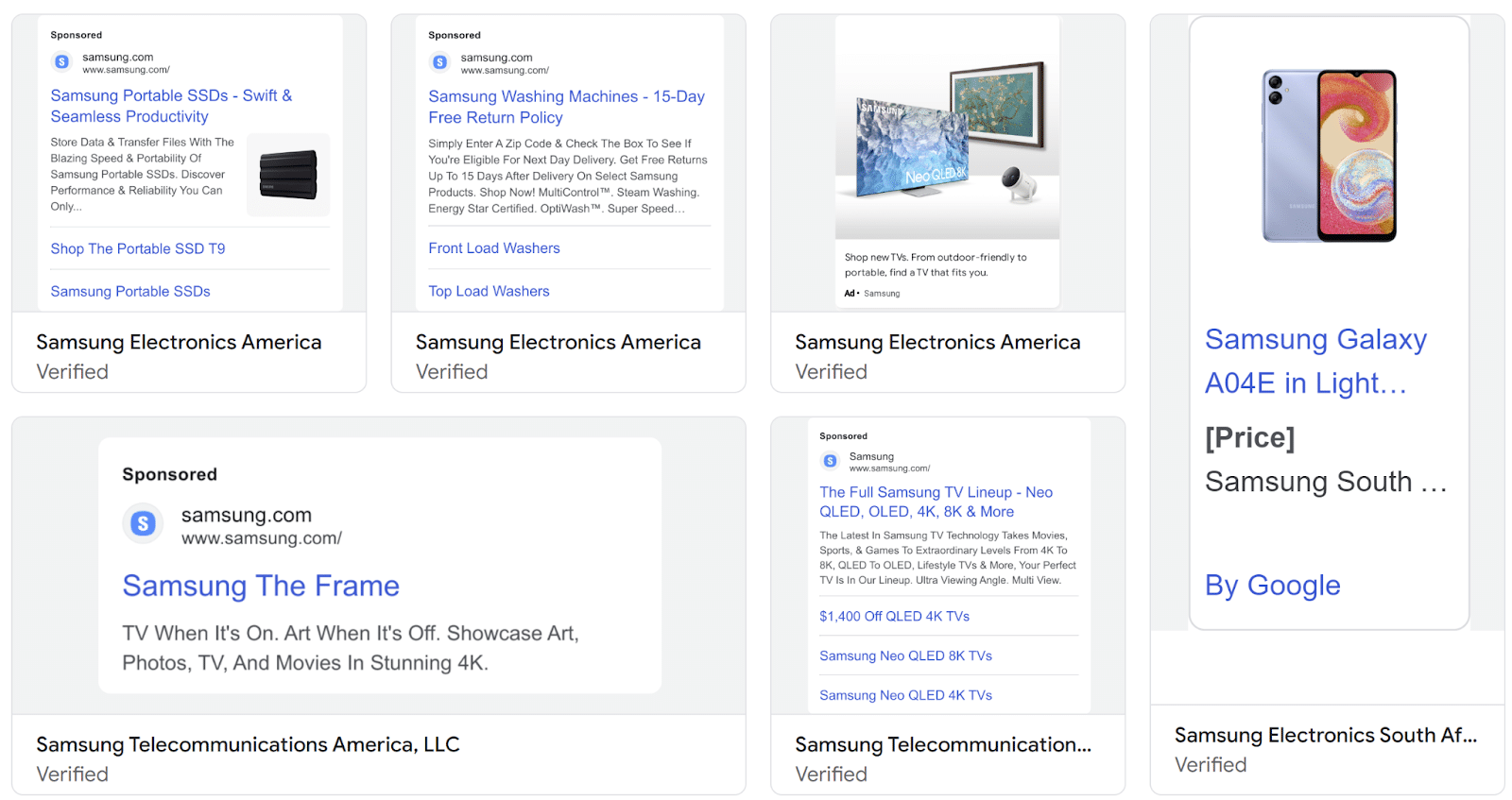 Some of Samsung’s Google Ads in the U.S., March 2024.
You can have a rough idea of their budget by looking at those two dimensions (ad channel and ad format). For example, producing video ads is often very costly. In the case of Welcome to the Jungle, there are tons of videos (see screenshot above).
Guess what their media budget looks like?
Comparatively speaking, Google Ads transparency center only shows text ads for Great Place to Work. While it’s not very scientific, it’s safe to say that such an ad format is cheaper to produce – which hints at a lower media budget.
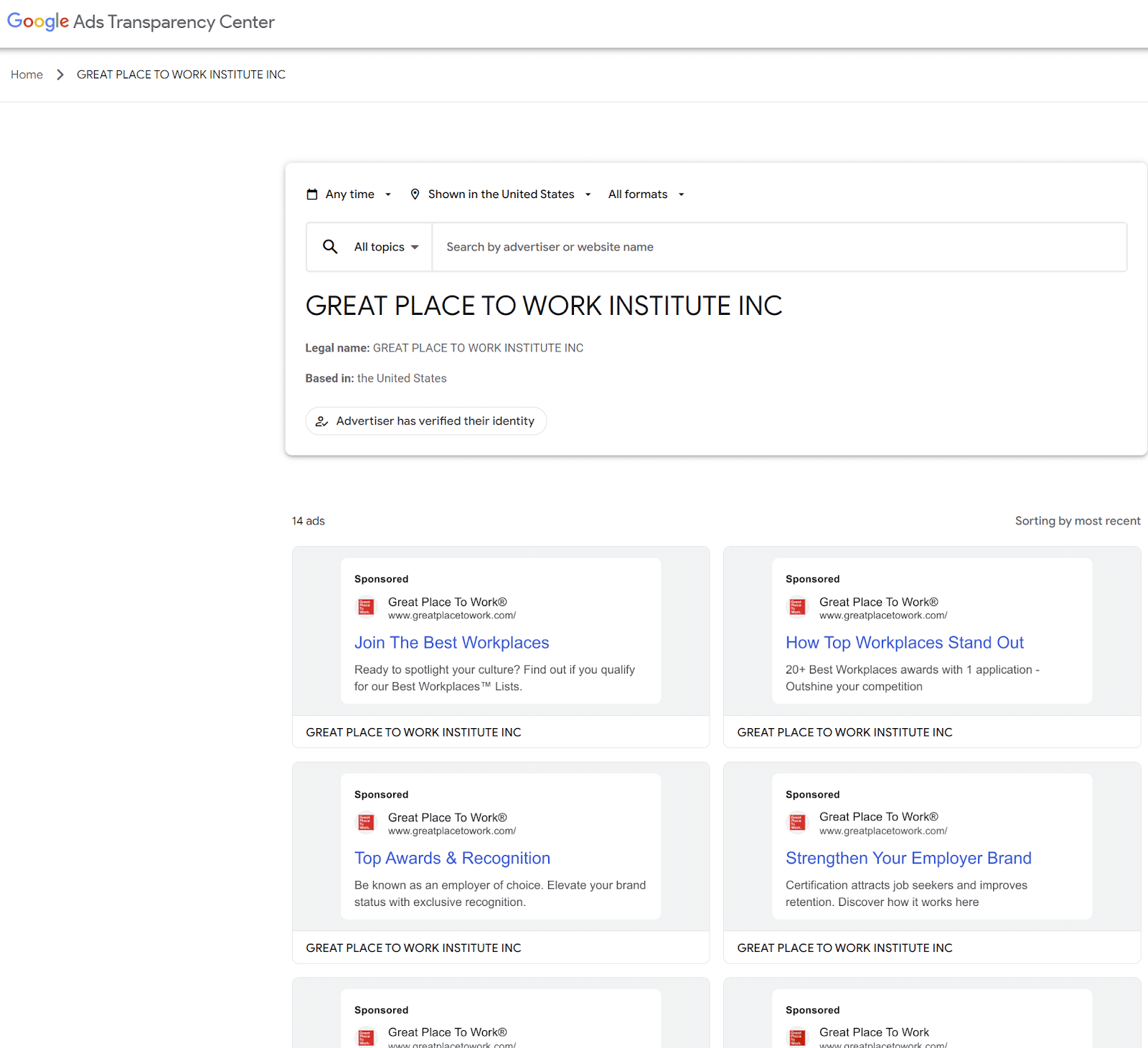 Some of Great Place to Work’s Google Ads in the U.S., March 2024.
Ad copy and creative
Final ad library stop: You want to note ad copy and creative items that stand out. Those can vary a lot depending on your industry, but here’s a list to get you started:
- Unique selling propositions (USPs): Unique technology, superior service, features, etc.
- Pricing: Discounts, promo codes, sales, etc.
- Emotion: Fear of missing out (FOMO), security, etc.
- Risk-free: Money-back, free trials, warranties, etc.
- Credibility/authority: Testimonials, user reviews, expert endorsements, awards, certifications, etc.
- Urgency/scarcity: Limited-time offers, stock, countdown timers, etc.
- Brand voice: Tone, style, personality, etc.
Again, you can use ad libraries to identify top-recurring copy and creative, which likely indicate top-performing assets.
And if they test several themes, it’s a good idea to look at those ad libraries regularly. Themes that disappear are most probably low performers. You then have two options:
- If you feel you’re a better match for that claim, then experiment with it.
- If you feel you’re not better equipped to answer that need, then discard it altogether.
In the below examples, it’s interesting to note that Suunto makes a powerful claim by linking superior battery life to pioneering since 1936. This builds authority and makes Garmin’s ad copy look bland.
 A Garmin Google Ads ad focusing on battery life in the U.S., March 2024.
 A Suunto Google Ads ad focusing on battery life in the U.S., March 2024.
Get the daily newsletter search marketers rely on.
3. Competitor customer journey analysis
Landing page types
Using Meta Ads library, you can click through to your competitors’ landing pages, using the ad’s call-to-action, as if you were on Facebook or Instagram.
For example, the below ad redirects to this landing page, which is most probably optimal: that’s the exact product page that matches the ad creative.
 A Banana Republic Meta Ads and landing page in the U.S., March 2024.
Conversely, the below ad redirects to a collection page. Is that best practice? Does it depend on product families?
Categorizing competitor landing pages by type (home, collection, product, etc.), you can answer those questions easily.
 A Salomon Meta Ads and landing page in the U.S., March 2024.
Landing page experience
Below are some items to note:
- Pop-ups: In the above Banana Republic example, we have not one but two pricing-related messages. Clearly, they’re discounting hard. Should you match that?
- Format: In the above Banana Republic example, the landing page is clearly a mobile-first page. Which is not the case for Salomon. Who do you think gets higher conversion rates?
- Load time: Look into PageSpeed Insights, which will provide reliable comparison metrics with your own page:
Funnel analysis
If you can, go to the end of the purchase experience (this is tougher for B2B competitors, but more often than not, you can sign up for a demo, free trial, etc., which is already very interesting).
What you want to pay special attention to are:
- Callouts: In the example below, they use FOMO and free shipping items. Notice how that ties in with the ad theme and landing page pop-ups.
- Cross-sell/upsell: Are they showcasing specific products? And could you use that to your own advantage? For example, can you bundle your products in a way that outsmarts competitors?
Landing page content analysis
On top of the above, I strongly recommend analyzing the overall content. While you could theoretically use SEO tools such as Ahrefs or Semrush, I often found that real-life ad landing pages aren’t indexed by them. It’s likely because those pages change too often and have relatively low SEO impact.
This means you need to revert to manual analysis. To do so, you can simply scan the page and identify your competitor’s unique value proposition. You should identify their market positioning (and how you can optimize your own to be distinct and appealing).
While it’s all fine and dandy to do so for a few landing pages, if you need to do that at scale or at least a dozen competitors, it quickly becomes cumbersome. If that’s the case, then I’d suggest extracting the landing page words using some sort of scraping technique.
An easy way to do so is to use the relatively new Excel’s Power Query web connector. If you’re not familiar with this, I strongly recommend Leila Gharani’s video, which does an excellent job of outlining what it is and how to use it.
Once that’s done, you can use Excel to identify top recurring keywords. If you’re unfamiliar with such techniques, you can simply use ChatGPT to come up with the right VBA.
Dig deeper: 5 tips for creating a high-converting PPC landing page
Further analysis
Looking outside of PPC landing pages will help provide additional insights you could leverage in your own campaigns. Here are some pieces of advice to go the extra mile:
- Sign up for your competitors’ newsletters and other email/loyalty programs to identify recurring themes, their sequence and frequency, etc.
- Visit their social media accounts and note their latest content theme, posting frequency, engagement levels and how they integrate with their PPC ads.
- Use Ahrefs or Semrush to analyze overall backlinks and organic results and note how they correlate with the above ad and landing page content analysis.
- Visit customer review sites (Maps, Yelp, etc.) to understand their strengths and weaknesses and leverage them in your own content.
At this point, you should be able to pinpoint your competitors’ top vocabulary, which strongly indicates what audience (and keywords) they target.
4. About competitor budget and industry benchmarks
About competitor budget
Information about your competitors’ paid media budget is proprietary to Google Ads, Meta Ads, etc., so no tool can provide reliable details about it.
And sure, you can estimate competitor budgets with the above items (ad networks, Auction Insights report, channels, ad volumes, landing pages, etc.). Still, I recommend not going too crazy on this.
Why? Because, in the end, it doesn’t matter much.
I once worked with a client in the mattress sector who spent millions every month. Recently, my agency started working with a much smaller mattress company. Do their PPC campaigns relate? Sure, to an extent, they do.
But at their core, they cater to very different demographics. And their core PPC KPIs and goals are vastly different.
Don’t get me wrong, we benchmarked much bigger mattress competitors. But we mainly came out with recommendations/insights that fitted with a smaller company.
And their budget wasn’t part of those insights because it did not matter.
Comparing yourself to industry benchmarks
Similarly, I won’t even link to industry-level cost per click or conversion rate benchmarks. If you’re really interested in those, you can easily find them on Google. Personally, I believe they’re misleading at best.
Even broken down by industry, they don’t paint an accurate picture. Worse, they can stir you in a direction you don’t want to take.
Think about it for a second: a conversion rate benchmark doesn’t mean anything if you don’t know what the conversion actually is. Are we talking about a sale? A lead? A quality visit? We don’t know. So, do you want to obsess over conversion rate? Perhaps there’s more pressing items to tackle.
Same for cost per lead types of benchmarks: what lead are we talking about? A simple email form? An MQL? An opportunity? Again, PPC benchmarks never have such granularity, so they don’t make sense.
Same for CPCs, CTRs, etc. You can have great CTRs (and low CPCs) by offering crazy discounts. But does it make your ad relevant from a business perspective? Perhaps not.
Benchmarking PPC competitors
Benchmarking PPC competitors involves comparing macro observable trends (channels, ad themes, customer journeys, etc.) among multiple competitors.
Your goals should be to identify best practices and identify blue oceans, not spend time pulling hairs over CPCs.
If you do that exercise regularly, you will be on a great path to outsmart your competitors and save budget. Have fun!
Courtesy of Search Engine Land: News & Info About SEO, PPC, SEM, Search Engines & Search Marketing