Archive for the ‘seo news’ Category
Friday, April 12th, 2024
TikTok is reportedly developing AI-powered virtual influencers that will be able to compete against human creators for lucrative advertising contracts.
The new AI avatars can allegeldy read scripts for video ads created from prompts submitted by brands and TikTok Shop sellers. However, this feature is still in its testing phase so everything is subject to change, reports The Information.
Impact on sales. During testing, TikTok researchers discovered that AI avatars haven’t generated as many e-commerce sales as human influencers. This is reportedly why the new feature hasn’t been made available to marketers yet. The platform suggests that this feature should complement existing human creators rather than replace them.
Concerns. Some advertisers worry that AI influencers could be used for manipulative marketing tactics. Additionally, the rise of virtual creators could steal business from real influencers, possibly leading some users to leave the platform.
Why we care. Even though using AI influencers for promoting products might seem cheaper and quicker for your campaigns, considering the lower sales and ethical concerns involved, it might not be the best choice for brands as things currently stand.
What TikTok is saying. TikTok did not immediately reply to Search Engine Land’s request for comment.
Get the daily newsletter search marketers rely on.
Deep dive. Read How Advertisers Can Leverage AI and Automation at Scale for more information on how to implement AI into your ad strategy.
Courtesy of Search Engine Land: News & Info About SEO, PPC, SEM, Search Engines & Search Marketing
Thursday, April 11th, 2024
Google Search will continue to evolve in the direction of Search Generative Experience. That’s according to Alphabet/Google CEO Sundar Pichai, who recently spoke about AI, Search and more at the 2024 Business, Government & Society Forum at Stanford University.
The future of information and answers. AI has been transforming Google Search for years. Google hasn’t been “10 blue links” for a long time, Pichai said, adding:
- “When mobile came, we knew Google Search had to evolve a lot. We call it featured snippets, but for almost 10 years now you go to Google for many questions we kind of use AI to answer them. We call it web answers internally. … We’ve always answered questions where we can. But we always felt when people come and look for information. People, in certain cases, want answers but they also want the richness and the diversity of what’s out there in the world and it’s a good balance to be had and we’ve always I think struck that balance pretty well.
- “To me all that is different is now the technology by which you can answer is progressing. We will continue doing that. But this evolution has been underway in search for a long, long time.
- “We’ve done all this in Google Search for a long time and people like it, people engage with it, people trust it. I view it as a natural continuation. With LLMs and AI, I think you have a more powerful tool to do that, which is what we are putting in Search with Search Generative Experience and so we’ll continue evolving it in that direction, too.”
Answers vs. search. Google’s mission has been to organize the world’s information and make it universally accessible and useful. Google historically has done its best to reflect what’s on the web and provide trustworthy, high-quality information.
Pichai mentioned the search rater guidelines are one way Google represents the viewpoint of its user base. And we know from Pandu Nayak’s testimony in the antitrust trial that Information Satisfaction (IS) scores from raters are a key metric for assessing search quality.
But the arrival of Google SGE and AI-generated answers has had many brands, SEOs and content creators concerned that searchers would no longer click on websites – because they got the answer directly from SGE. Since introducing various types of web answers, Google has tried to strike a balance, Pichai said.
- “There are certain times you give an answer – “what’s the population of the United States” – yes it’s an answerable question. There are times you want to surface the breadth of opinions out there on the web, which is what search does and does it well. Just because you’re saying we are summarizing it on top doesn’t mean we veer from those principles. The summary can still point you to the range of opinions out there,” Pichai said
AI improving Search. Pichai has long said AI is more profound than fire or electricity. What excites Pichai about AI is how it can help improve Search.
- “I feel the weight that people come to search at very vulnerable moments. … Trust is hard-earned, easy to lose. We have to re-earn it all the time …
- “It’s difficult to do this consistently well across the entirety of what humanity is looking for, which is what excites me about search and providing information and knowledge and is what I see as the opportunity. AI is an exciting technology which will allow us to do it better than before. But it’s a technology we have to carefully deploy in a way that we are responsible while doing so.”
Why we care. AI has radically reshaped Google Search and SEO over the past year – and we’re expecting more big changes in the coming months. It’s always good to understand where Google Search is heading, as opposed to where it is or was. Also, it can’t be left unsaid that Pichai’s interview rings a bit hollow, especially in light of the many valid criticisms of the quality of Search results and SGE answers we’re seeing at this point in time.
Dig deeper.
The interview. You can watch it here.
Courtesy of Search Engine Land: News & Info About SEO, PPC, SEM, Search Engines & Search Marketing
Thursday, April 11th, 2024
Google has updated its structured data carousels (beta) help documentation to clarify where your markup should go within summary pages that link out to other detail pages. Google also added the feature availability of this new structured data carousels (beta).
The Google structured data carousels (beta) is several weeks old, it was introduced when Google began releasing DMA changes in the European Economic Area (EEA) countries.
Summary pages. Google said “the markup must be on the summary page, and you don’t need to add markup to the detail pages in order to be eligible for this feature.” Google added this new section:
Pick a single summary page that contains some information about every entity in the list. For example, a category page that lists the “Top hotels in Paris”, with links out to specific detail pages on your site for more information about each hotel. You can mix and match different types of entities (for example, hotels, restaurants), if needed for your scenario. For example, if you have a “Things to do in Switzerland” article that lists both local events and local businesses.
Add the required properties. Based on the format you’re using, learn where to insert structured data on the page.
Add the required properties to that summary page. You don’t need to add markup to the detail pages in order to be eligible for this beta feature. Based on the format you’re using, learn where to insert structured data on the page.
Google also clarified this summary page markup throughout the document.
Feature availability. Since this is available currently only within the European Economic Area (EEA) countries, Google clarified this within the document. Google wrote, “This feature is currently only available in European Economic Area (EEA) countries, on both desktop and mobile devices. It’s available for travel, local, and shopping queries. For shopping queries, it’s being tested first in Germany, France, Czechia, and the UK.”
Google also wrote, “This feature is in beta and you may see changes in requirements or guidelines, as we develop this feature. If your business is based in EEA, or serves users in EEA, and you would like to learn more and express interest in these new experiences, you can start by filling out the applicable form (for flights queries, use the interest form for flights queries).”
Why we care. If you are based in European regions, these are changes you should be aware of. You may want to implement these new beta carousel features, where appropriate and then submit the interest forms to Google to be opted into the program.
These carousels may lead to more clicks from Google Search to your site.
Courtesy of Search Engine Land: News & Info About SEO, PPC, SEM, Search Engines & Search Marketing
Thursday, April 11th, 2024
Google is trialing a new People Also Consider badge on ads served within branded search results.
The label appears as a grey box positioned underneath the company name, logo and URL as demonstrated in the screenshot below:
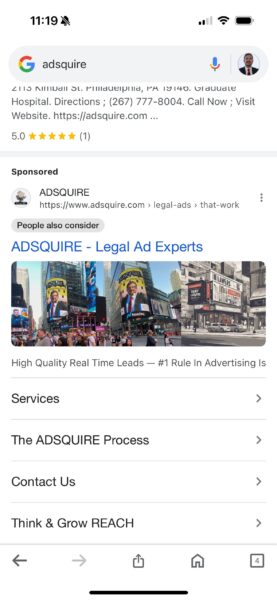
The feature is not clickable, and so the purpose of it is causing confusion amongst PPC marketers.
First spotted. The new ad badge was first spotted by Anthony Higman, CEO of online advertising agency Adsquire. He shared his thoughts on X:
- “Google Ads is getting weird AF. ‘People Also Consider’ badge on a search for our brand.”
- “What else is there for people to also consider on a search for my brand? Or is this a sign of things to come?”
- “Is this what they have been doing by matching all branded terms to keywords? Are they really about to throw all of us into our competitors’ ad auctions unsolicited and then just toss a ‘People Also Consider’ badge on those ads and call it a day?”
- “I’m thinking it’s why they have been matching brands to keywords for the last two years. If they are really about to do what I think they are going to do with these, it is NOT clever or innovative, its desperate and grimy.”
What Google is saying. Google did not immediately respond to Search Engine Land’s request for comment.
Get the daily newsletter search marketers rely on.
Why now? The new badge comes just a week after Shalom Goodman spotted Google testing a “Related to your search” badge on search ads. This label also appeared as a grey box positioned underneath the company name, logo and URL as demonstrated in the screenshot below:

Google is yet to offer any insight or further explanation around this feature.
Why we care. If Google starts forcing companies into their competitors’ ad auctions, it could be bad for business. Customers might see competitors’ ads when searching for your brand resulting in you losing a potential sale. Additionally, paying for ads on competitor brand searches are unlikely to reach high-value customers as they are looking for a specific brand, not just a service – which ultimately creates a poorer user experience.
Courtesy of Search Engine Land: News & Info About SEO, PPC, SEM, Search Engines & Search Marketing
Thursday, April 11th, 2024
TikTok introduced two new controls to give advertisers more choice regarding where their content appears:
- Category Exclusion.
- Vertical Sensitivity controls.
Additionally, the social media platform is merging account-level controls for all brand safety and suitability solutions within TikTok Ads Manager (TTAM) to make using these new tools even easier.
Why we care. Ads appearing alongside content that doesn’t align with your brand identity isn’t ideal. Not only does it conflict with their company’s message, but it also likely makes it harder to reach and engage with high-value consumers.
Category Exclusion. This new feature allows advertises to control whether their ad is served next to four non-standard categories:
- Gambling and lotteries.
- Violent video games.
- Combat sports.
- Youth content.
By managing association with these content categories, brands can ensure consistency in messaging. Category Exclusion only applies to content that doesn’t breach TikTok’s Community Guidelines – for example, although the platform does now allow the promotion of gambling services, content featuring gambling in entertainment, such as movies, is allowed.
Vertical Sensitivity. Advertisers can utilize this feature to choose their industry vertical and avoid content related to that vertical that they deem incompatible with their brand positioning, providing an extra layer of brand protection. For instance, a travel brand that typically focuses on nature-themed content may opt out of appearing alongside content about volcanoes or floods.
TikTok now offers 11 verticals to choose from:
- Pets.
- Beauty.
- Food.
- Fashion/Retail.
- Travel.
- Financial Services.
- Technology.
- Automotive.
- Gaming.
- Professional Services.
- Entertainment.
Verified third-party results. TikTok also expanded its partnerships with DoubleVerify (DV), Integral Ad Science (IAS), and Zefr to include post-campaign measurement of these new controls
Unified TikTok Ads Manager hub. Additionally, the platform has introduced the Brand Safety Hub in TikTok Ads Manager to simplify brand safety measures and provide consistency for advertisers. This hub offers advertisers a smoother process, enabling them to set brand safety and suitability preferences at the account level, which then become default settings for future campaigns. It’s designed for advertisers who have clear preferences and want them applied automatically with minimal effort.
What TikTok is saying. TikTok said in a statement:
- “Beyond brand safety, we respect that brands know their values best. As such, they may have preferences as to where they show up, especially when it comes to the content next to their ads.”
- “That’s why we’re committed to continuously innovating beyond traditional suitability standards—to build solutions that empower advertisers with even more control.”
- “The new controls go above and beyond common industry standards and guidance for protections, including the Global Alliance for Responsible Media (GARM) Brand Suitability Framework.”
Get the daily newsletter search marketers rely on.
Deep dive. Read TikTok’s announcement in full for more information.
Courtesy of Search Engine Land: News & Info About SEO, PPC, SEM, Search Engines & Search Marketing
Wednesday, April 10th, 2024
Meta advertisers claim the cost of running campaigns across it platforms has surged due to ongoing issues with its algorithm.
Brands report that sales and return-on-ad-spend have both plummeted, while cost-per-click and cost per 1,000 impressions are up by a factor of three in recent months – with no explanation from Meta as to why.
Why we care. If the reported ongoing algorithm issues continue to impact ad performance, marketers will need to take action to reduce costs by exploring rival platforms like Google and TikTok.
Details. Meta is a global leader in digital advertising with its platforms accounting for approximately 22% of the market, according to Emarketer. Small businesses in particular have traditionally been reliant on Meta to reach their target audience thanks to the efficiency of its AI-powered targeting technology. However, many advertisers claim that the social media giant’s dependable advertising system is currently experiencing significant issues, prompting some to reallocate their budgets to rival platforms.
Impact. The potential impact of this reported system issue on ad revenue is expected to become apparent by the end of the month when Meta releases its first-quarter earnings. Experts are forecasting Meta to report $36.1 billion in ad revenue.
Reaction. Cody Plofker, chief marketing officer at brand Jones Road Beauty, said on the “Operators” podcast:
- “It’s brutal out there. There is something just terribly broken about Meta right now.”
What Meta is saying. Meta admitted that there have been some technical issues impacting ads but denied that the problems were widespread. A spokesperson told Bloomberg:
- “Our ads system is working as expected for the vast majority of advertisers.”
- “We recently fixed a few technical issues and are researching a small amount of additional reports from advertisers to ensure the best possible results for businesses using our apps.”
Get the daily newsletter search marketers rely on.
Deep dive. Read our coverage of the $7 billion class-action lawsuit Facebook and Instagram advertisers filed against Meta for more insights.
Courtesy of Search Engine Land: News & Info About SEO, PPC, SEM, Search Engines & Search Marketing
Wednesday, April 10th, 2024
What if you could get your ads in front of your ideal customers for a fraction of the price?
LinkedIn Ads is well known for its high costs compared to other platforms.
Still, there’s a way to target a similar B2B audience on Meta, where advertising costs are significantly lower.
But this assumes two things are true:
- You have the fundamentals in place: a great offer and landing page backed by audience research, simple campaign structure, strong creative and conversion tracking. In other words, you approach advertising as a marketer rather than a media buyer.
- You’re willing to make the trade-off for cheaper acquisition costs. While you won’t have the precision targeting of LinkedIn, just because your target audience is browsing Instagram doesn’t mean they stop being who they are professionally. You may not be catering to them in that same environment, but they still have those needs and will pay attention to something interesting enough.
If the cost of advertising on LinkedIn is prohibitive or you can’t meet the minimum requirements for some of the targeting settings – and you meet these two criteria above – then you might want to consider this play.
HOT TAKE: Meta Ads can work amazingly well for B2B 
Think about it, the same people you can find on LinkedIn are on Facebook and Instagram.. 
It's all about putting the right message in front of the right person 
— Menachem Ani (@MenachemAni) February 29, 2024
What creative works best for B2B lead gen on Meta?
I find that you really don’t need to complicate creative since simple banner ads work well in B2B. Maybe it’s because business consumers often seek something that’ll help them advance or work more easily.
It’s different when you’re trying to get somebody to book a dentist appointment or learn about an insurance plan, where you need to convince them to make a call.
But in B2B, you’re selling something that will make somebody’s life easier without friction. It takes an investment on their part, but B2B audiences are open to that.
You can use videos as you do with B2C lead gen and ecommerce, but going after high-production values isn’t necessary.
It’s more about putting the right message in front of the right consumer. They’re on a different platform, but they’re still your target audience. And if you speak to them, they’ll take action.
Depending on the type of person you’re trying to reach, you can keep it as simple as having the right messaging.
B2B clients are always skeptical when I bring up FB. Ultimately you're marketing to people and people are on Facebook. I've even had it work for industrial clients!
— Harrison Jack Hepp (@HarrisonJHepp) February 29, 2024
We have an agency client that sells home organization products, so we try to reach contractors, developers, interior designers and other professionals. I sometimes find that even a good iPhone photo of the product with the right messaging will work better than a studio shot.
Dig deeper: Meta advertising: 5 best practices for 2024
Why B2B lead gen on Meta is easier than you think
Particularly for B2B lead gen, you likely have assets that can be repurposed quickly by resizing and making a few modifications.
Think about what’s important to the person you’re selling to and how your product will make their life easier. Try to speak to that in the creative and copy of the ad.
If this sounds like a core B2B marketing strategy, that’s because it is. It’s foundational work that successful B2B brands do before they ramp up ad spend.
Can I run B2B ads on Meta with a smaller budget?
If you’re considering this strategy because you have a smaller budget, I encourage you to consider dynamic creative: one ad unit with several ads and you let the system mix and match instead of making multiple standalone ads. I find this often works better.
Get the daily newsletter search marketers rely on.
Audience targeting on Meta: Options and framework
With ecommerce and B2C lead gen, we tend to do a lot of broad targeting. I find more success in B2B when we use customer lists and create lookalikes to target, as well as when using Meta’s interests and detailed targeting.
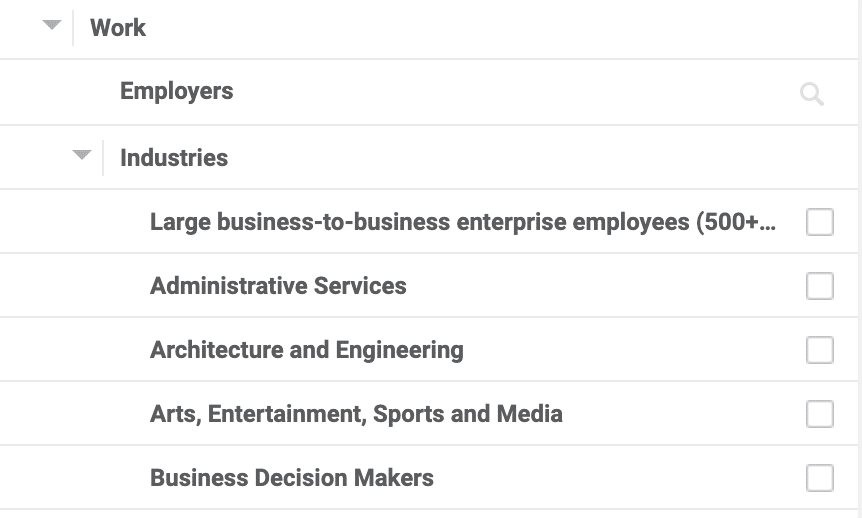
We just launched a campaign for a client selling playground equipment, so we’re targeting people who work in municipalities and schools. Similar to LinkedIn, though not as detailed or granular, Meta has the option to target people based on:
- Where they work.
- What their role is.
- Which industry they’re in.
So it’s just a matter of combing through that and building enough of an audience. We prefer not to make multiple ad sets for each one and instead stack them up into one large audience, which we find works well and brings in quality leads.
You will likely get more junk leads than if you were selling on LinkedIn. But overall, it’s still cheaper to do this on Meta, even after factoring in that difference.
We’re also running ads for a company that rents large office machinery with monthly service, toner, etc. With this, we’re targeting people who work in nursing homes or as office administrators, so it’s based on their role or the type of company they work in.
But we’re also looking at interests that could be related.
Is there an industry publication that people in that line of work tend to subscribe to? If so, you set that publication’s company as an interest.
100%! People are people. Always worth testing all channels!
— Melissa L Mackey (@beyondthepaid) February 29, 2024
At its core, targeting professional audiences on Meta is really just about customer lookalikes, lead list lookalikes, interests and profession-based targeting.
My audience targeting guidelines
Here are some additional guidelines I follow when running B2B lead gen campaigns on Facebook and Instagram. Your mileage may vary, so test as needed.
- If you’re a regional business, you’ll want to layer in specific locations.
- I prefer not to use embedded lead forms because they tend to return more junk leads. We typically send traffic to a dedicated landing page and try very hard to get that page to convert well by speaking in a language similar to the ad creative itself.
- If you are going to utilize embedded forms, add questions to add friction to the form and qualify potential leads.
- Ensure that all your ads have UTM parameters included in the landing page URL so that when a lead comes in, you know which campaign and ad it came from.
- Feed that lead data back into HubSpot, SalesForce or whatever CRM you use so that you can see where you’re getting the most valuable leads that turn into sales.
- Consider adding to your audience selection website visitors that did not convert already, or video viewers and page engagers. This way you can target anyone who showed enough interest to engage with your media but not enough to convert.
New ways to target B2B audiences on Meta
Until now, everything I’ve shared has been from the lens of using standard conversion campaigns with a lead focus.
Now, you can also use tailored campaigns with lead objectives, which is like Advantage+ shopping for lead generation. It strips away a little bit of traditional advertiser control, but it’s worth testing – especially with larger budgets.
You can also create a campaign with a call objective if you don’t want to form submissions as your primary conversions.
If you do things by phone, use this with a call tracking number so that the CTA leads to a call, and you can monitor where your inquiries come from. The system will also track this and optimize for the best calls if you feed it the right data.
Meta has also been pushing Advantage+ audiences, which basically borrows from Google’s Performance Max in that they become audience suggestions (signals).
The system will use this as a base, but it will go beyond and find whoever it believes is the target consumer for what you’re selling.
Test before you divest
I understand the skepticism around using Meta Ads for B2B lead generation advertising.
Still, the principle behind my advice remains the same: People browsing LinkedIn don’t stop being (insert profession here) when they start browsing Facebook or Instagram.
As with everything ads-related, I advise you to try things out for yourself before writing them off.
If you don’t have a dedicated budget for experiments, use a small portion of your allocated budget just to get your feet wet. You may not achieve statistical significance, but you’ll likely see whether there’s something worth exploring further.
Psychologically speaking, you may even stand a better chance of getting them to pay attention on a platform where their guard doesn’t have to be up due to the prevalence of low-quality offers and products.
Courtesy of Search Engine Land: News & Info About SEO, PPC, SEM, Search Engines & Search Marketing
Wednesday, April 10th, 2024
Google’s product data specification requirements guarantee that all product data submitted to the Merchant Center is formatted correctly to optimize success for both Shopping ads and organic Shopping listings.
Each year, the search giant updates these specifications in a bid to try and improve shopping on its platform. The updates for 2024 have now been announced – and below is a summary of all the changes you should be aware of.
Changes effective immediately
The following changes came into effect on April 9, 2024:
New product data specification attributes for AI-Generated content in Shopping ads and free listings: Google introduced new attributes that now require merchants to disclose text content created using generative AI. Moving forward, you will need to use the structured title [structured_title] attribute and the structured description [structured_description] attribute when using AI-generated titles and descriptions in your product data.
New loyalty program [loyalty_program]: You can now use the loyalty program [loyalty_program] attribute to set up member prices and loyalty points in the U.S. and Japan. Adding the attribute helps Google to accurately represent the benefits of your loyalty program (as configured on Merchant Center) across Google properties.
New minimum price [auto_pricing_min_price] attribute: You can now use the minimum price [auto_pricing_min_price] attribute to set the lowest or minimum advertised price (MAP) to which a product’s price can be reduced. Google uses this information for features such as sale price suggestions, automated discounts, and dynamic promotions.
Updated guidance on installment [installment]- based offers: Google is updating its guidance regarding the usage of the installment attribute. An offer that utilizes this attribute will be considered as one where the product can be purchased by paying the full price upfront using the price attribute or in installments. With this update, Google is expanding the installment attribute by introducing a new downpayment sub-attribute to specify if the product requires a partial upfront payment. Previously, such down payments had to be provided using the price attribute.
Additionally, Google is adding a credit type [credit_type] sub-attribute to the installment [installment] attribute specifically for Vehicle ads. This is to allow specifying whether the type of installment credit is lease [lease] or finance [finance].
New free shipping threshold [free_shipping_threshold] attribute: Marketers in all countries can now use the free shipping threshold [free_shipping_threshold] attribute to indicate the minimum order value above which shipping is free.
Updated guidance on the inclusion of government-imposed fees in the shipping [shipping] attributes: Google is updating its guidance around the usage of the shipping attribute. Don’t include government-imposed fees such as import duties, recycling fees, copyright fees, or state-specific retail delivery fees in the shipping cost.
Changes starting on July 31
Expanding the list of countries where shipping cost is required: Google is expanding the list of countries where shipping cost is required and enforced to additional countries. Offers without shipping costs will now be disapproved in these countries:
Changes starting on September 1
Pickup method [pickup_method] will be optional for Local Inventory Ads: Google is simplifying inventory handling for LIA merchants that use the pickup today or pickup later features by making pickup method [pickup_method] optional. Pickup method [pickup_method] will no longer be required to enable pickup for your offers. Learn more about the LIA inventory feed specification.
Removing energy_efficiency_class attributes: Google is deprecating the energy efficiency attributes in favor of the certification attribute certification [certification] which was launched in 2023.
Removing the use of the price [price] attribute for down payments when used in combination with the installment [installment] attribute: Google is removing support for providing downpayment using the price [price] attribute after September 1.
Why we care. Following Merchant Center guidelines, including the updates mentioned, ensures your product listings are eligible to show in search results. New attributes like loyalty programs could incentivize customers to return, while the free shipping threshold might encourage them to spend more, ultimately boosting your ROI.
Get the daily newsletter search marketers rely on.
Deep dive. Read Google’s announcement in full for more information.
Courtesy of Search Engine Land: News & Info About SEO, PPC, SEM, Search Engines & Search Marketing
Wednesday, April 10th, 2024
If you’re an advertiser with a brick-and-mortar presence, it’s more important than ever to claim and advertise your business on Google Maps.
However, cracking the code on how to serve and control Google Maps ads may feel like a moving target over the last few months. With changes to Performance Max goals, Google Business Profile (GBP) guidelines and how folks search for places, a lot is happening within Maps.
Still, you can successfully commandeer your business’ Maps presence by optimizing your GBP listing, leveraging location assets and using Performance Max for store or travel goals.
Do businesses really need to target Maps specifically?
Yes. The way users search for businesses, paired with Google’s shift to highlight Maps placements within search results, makes it imperative to have a separate Google Maps strategy.
Having sitelinks driving to your “Store Locator” page and bidding on “near me” keywords is no longer enough to get in front of your customers during their search.
The future of the search engine results page (SERP), especially as Performance Max continues to dominate Google’s engineering resources, will continue changing as the shift into an AI-forward search results page runs full steam ahead.
This year’s upcoming Google Marketing Live is expected to announce further shifts in AI, which may include how prevalent Maps are in the user journey.
In the latest version of Google, Maps results are showing above any ads in the Search Generative Experience (SGE) view. As we know, this is expected to remain standard as the SERP evolves.
Businesses must claim their storefronts within Google Business Profile to get in front of users in the most organic formats and promote them within Google Ads to see real success.
Creating and optimizing your Business Profile and data feeds
Creating and optimizing your Business Profile is the first step to establishing a footprint on Google Maps.
Maintaining up-to-date store hours, phone numbers and important business information are all massive variables in a customer’s decision-making journey.
Contact information for the business, a link to the website and sourcing/replying to reviews are also key to winning your customers’ attention (and conversions).
For hotels, restaurants or any business with multiple locations, make sure your Data Feed is up to date. Add accurate pictures, menus or other helpful visuals as applicable.
What campaign types should run?
Once your store’s information is ready to be advertised, it’s time to determine which campaign type is best for your business. This will be a combination of Search and Performance Max campaigns (with either Store or Travel goals as your optimization type).
Campaigns should be structured by KPI, like all other campaign types, and not split by location unless there are different goals by store/city or need to have location groups at the campaign level if necessary.
Get the daily newsletter search marketers rely on.
Campaign settings and location targeting
As you set up your campaigns, make sure your location targeting is set to capture where your customers are or may be searching from.
Location exclusions will be an important part of your setup if there are countries/cities you do not have a presence in or do not want to prioritize.
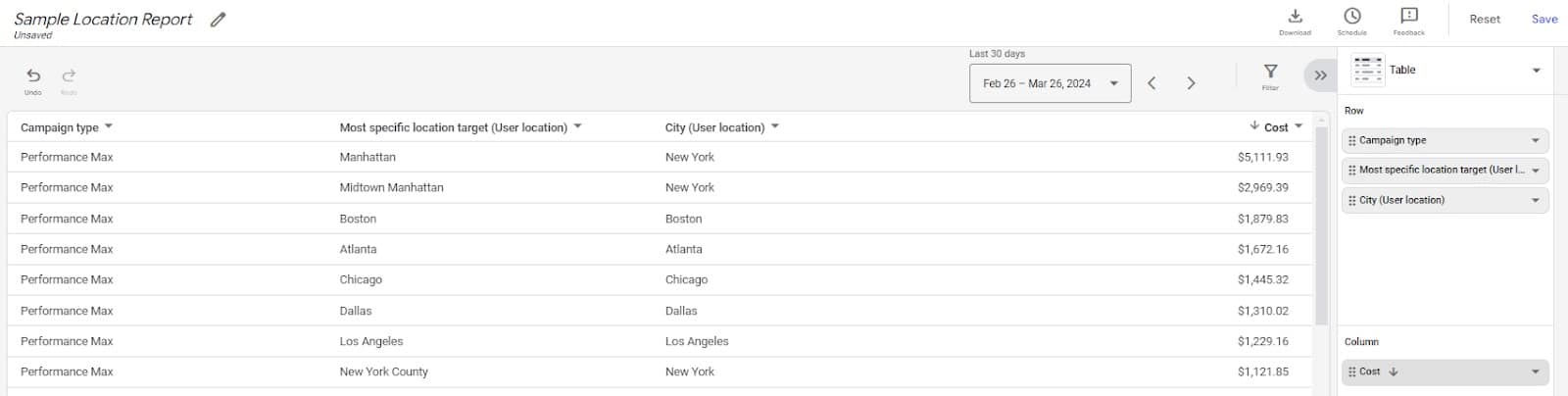
If you do not include or exclude any locations during the initial build, make sure to check your Location reports (Reports > New Report > most specific location) to identify any areas to focus on by increasing budget or potentially excluding from your campaign.
Location and business assets
Set up location assets correctly before moving into anything else. These are eligible to serve across Google Search, Search Partners, Display Network and YouTube.
Creating location assets will depend on whether or not you own the locations directly, and you can find more information about how to set them up on Google’s Support pages.
Verifying your phone number and enabling call reporting are critical to the success of your location assets so you can gauge performance.
Location assets should be added at the campaign level as an ad extension within your Google Ads account if there are regional KPIs to hit; otherwise, they can be added at the account level to ensure they are applied to every campaign.
In addition to location assets, make sure your business name and logo assets are up to date and applied at the account level. These will help boost your quality score and build brand recognition with your customer base.
Maximizing your local business’ visibility on Google Maps
Claiming and promoting your business on Google Maps significantly boosts local visibility and will attract more customers to your storefronts. Following the steps above, you can quickly and effectively leverage Google Maps to grow your business.
As Google continues to embrace AI, expect more Maps-first results in the SERP and additional features in Google Ads to make the process quicker and easier for advertisers to run ads on Maps.
Courtesy of Search Engine Land: News & Info About SEO, PPC, SEM, Search Engines & Search Marketing
Tuesday, April 9th, 2024
Google leads AI advertising with machine learning integrated across ad campaigns and types. Even with manual workarounds, results tend to suffer without the help of AI-driven algorithms.
Without AI assistance for PPC bidding and creative decisions, your conversion rate will typically be lower than that of competitors who use machine learning to their advantage.
AI is changing how ad campaigns function and SERPs look with Google’s rollout of Search Generative Experience. Below are tips for mastering the art of generative AI to keep your company or PPC clients ahead of the curve.
Best practices for using generative AI
As important as AI is, human and machine-based decisions require a careful balance. Relinquishing control to AI can set your campaigns down a path of irrelevant search queries and low-quality traffic.
Succeeding with automation starts with human guidance. As a marketer, you must ensure alignment between campaigns, brand guidelines and goals when tapping into machine learning efficiencies.
Generative AI tools like ChatGPT, Gemini and Microsoft Co-Pilot are great places to get preliminary ideas for marketing campaigns, but they require guardrails.
Never use AI for the final product
Recently, I was hiring for open positions on my team. In the application process, I included the question:
- “What is the most interesting thing about you that’s not on your resume?”
No less than 20 times, my recruiting team weeded out applicants with the same response (with slight variations each time):
- “The most interesting thing about me that’s not on my resume is my passion for astrophotography. I love capturing the beauty of the night sky and sharing it with others, as it allows me to combine my love for photography and fascination with the universe.”
While using generative AI for ideas or starting points can be a great time-saver, these tools produce the same results for everyone. In advertising, your brand must stand out from your competition.
Ensure that copy, content and designs undergo a rigorous human review process to avoid appearing generic. Never use AI to replicate copyrighted content. You don’t want your brand to land on a list of AI fails.
Use detailed prompts
Receiving useful output from generative AI requires detailed prompts. AI is only as powerful as the information you feed it and prompts may take a few iterations to get right.
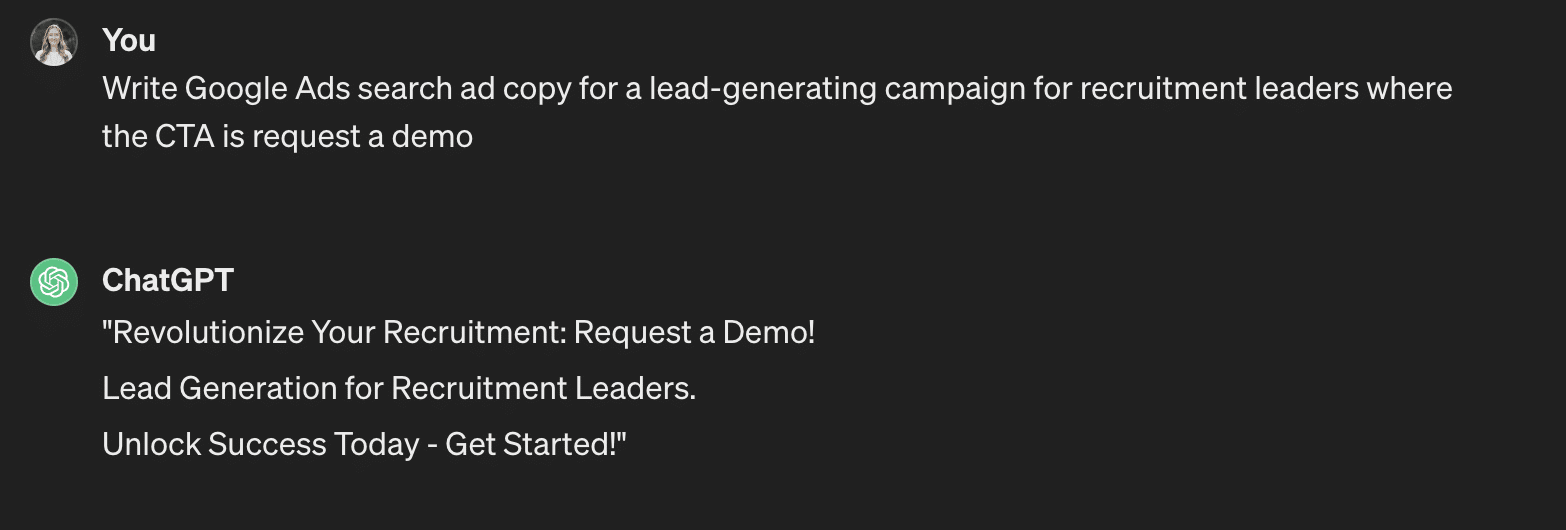
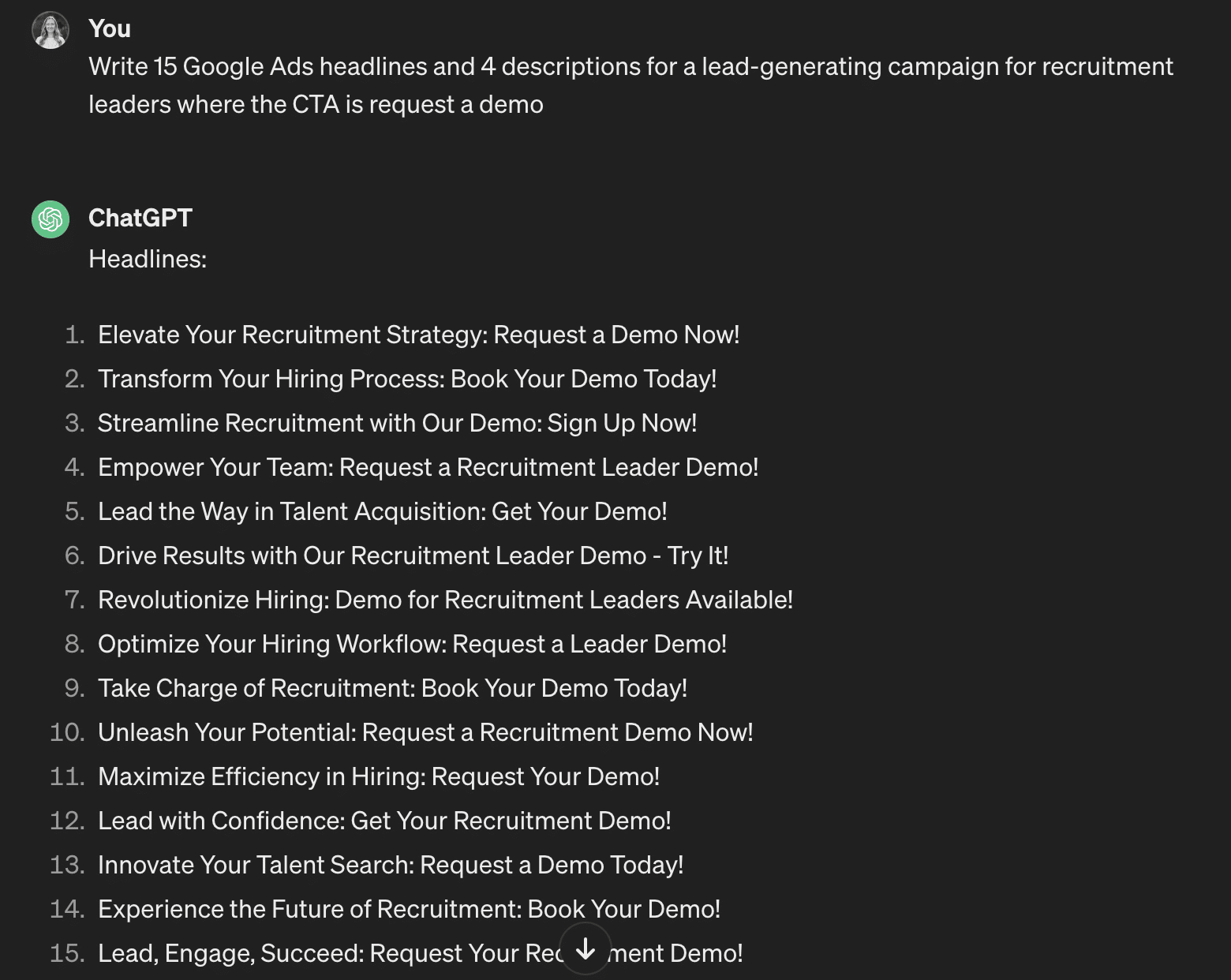
Watch the evolution of the prompts below to see how each improves to get closer to platform-ready ad copy.
This looks more like a landing page or email copy than a search copy:
This copy is generic and the CTA doesn’t align with my campaign:
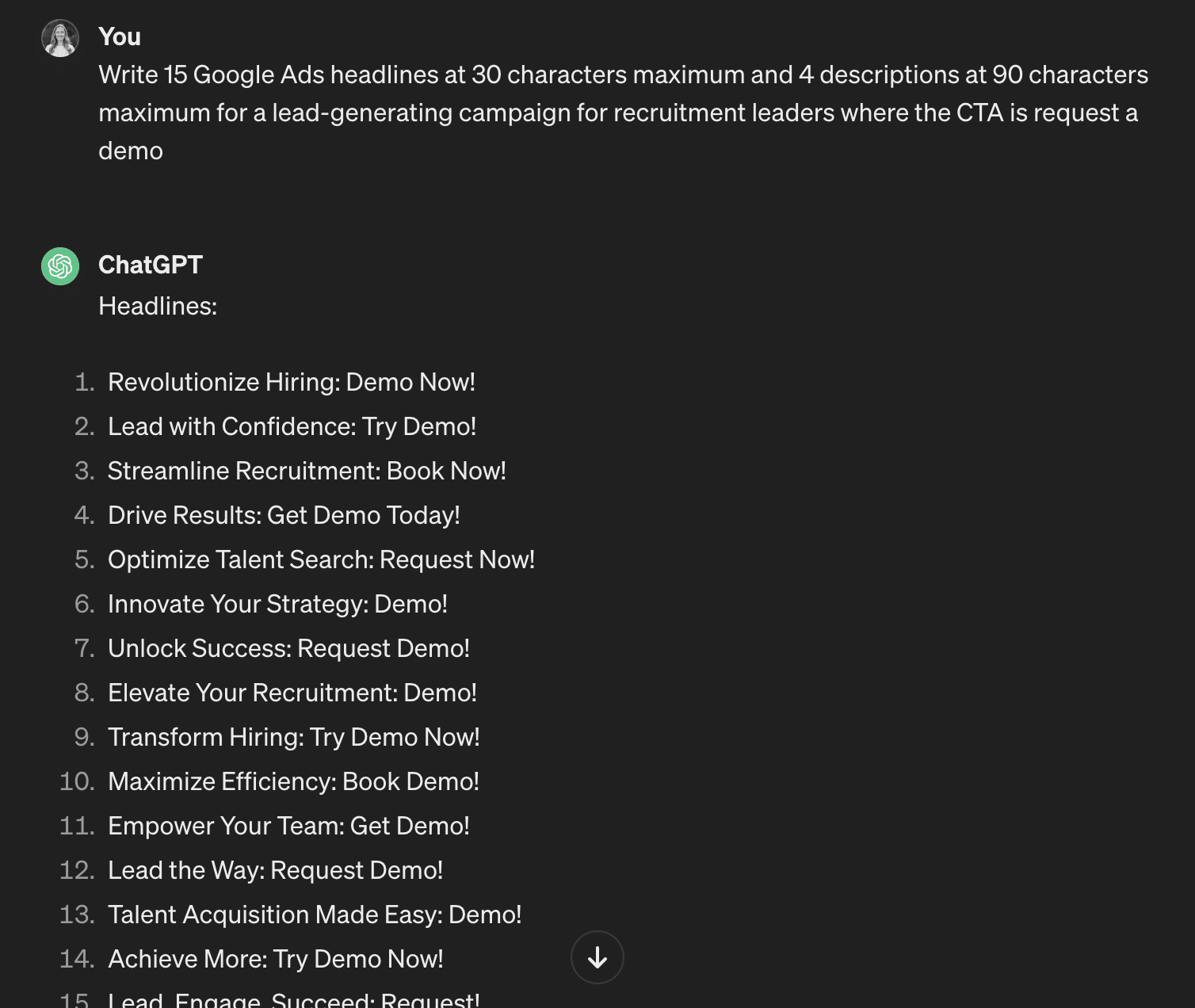
The results are improving, but I need more iterations to maximize the number of headlines and descriptions in responsive search ads to fully utilize AI potential:
These headlines don’t meet Google’s character length requirements:
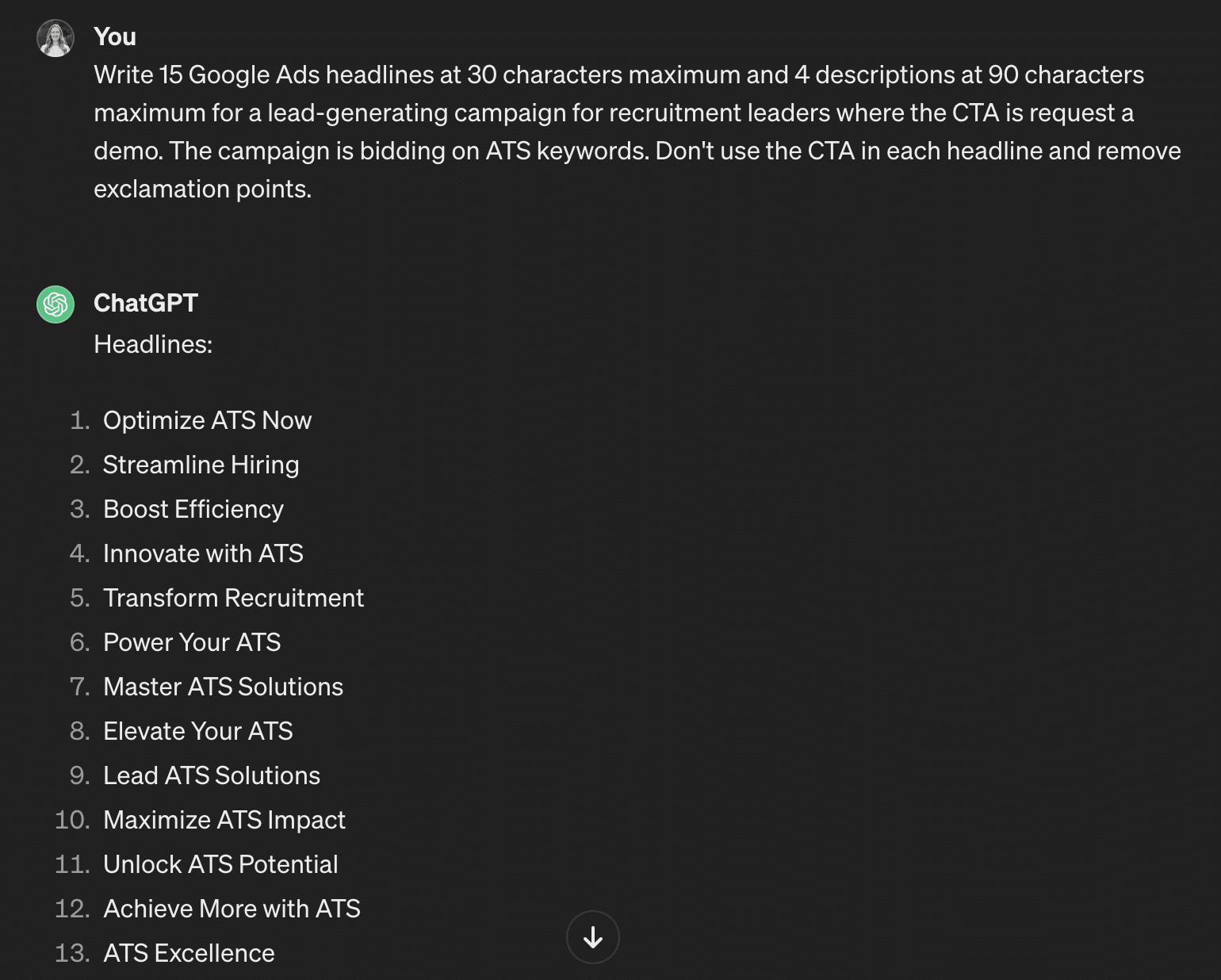
This copy is missing ad group keywords, which will lead to poor ad strength:
The repeated CTAs and exclamation points are redundant and unnecessary. There isn’t enough variety for the copy to relate to a user:
Finally, after providing the system with more details, it produces platform-ready copy.
The final step is reviewing the copy carefully and reworking as needed to include the brand name in headlines and align brand messaging before building the ads in Google Ads:
Here are some other details you might include in prompts to customize the results further:
- Link to landing page.
- Company or brand details (name, industry, etc.).
- Audience details (job titles, company size, demographic info, etc.).
- Brand tone of voice.
Dig deeper: ChatGPT for PPC marketers: 15 strategic prompts to use today
7 ways to use generative AI in search advertising
Keeping in mind the need for detailed prompts, here are seven ways to use generative AI tools in search advertising:
1. Copywriting
Take the example above for using AI to write ad copy and apply it to landing pages. This sample prompt mentions the audience, product and offer.
From here, a human can edit the copy to include more keywords and eliminate words and phrases that don’t align with brand messaging.
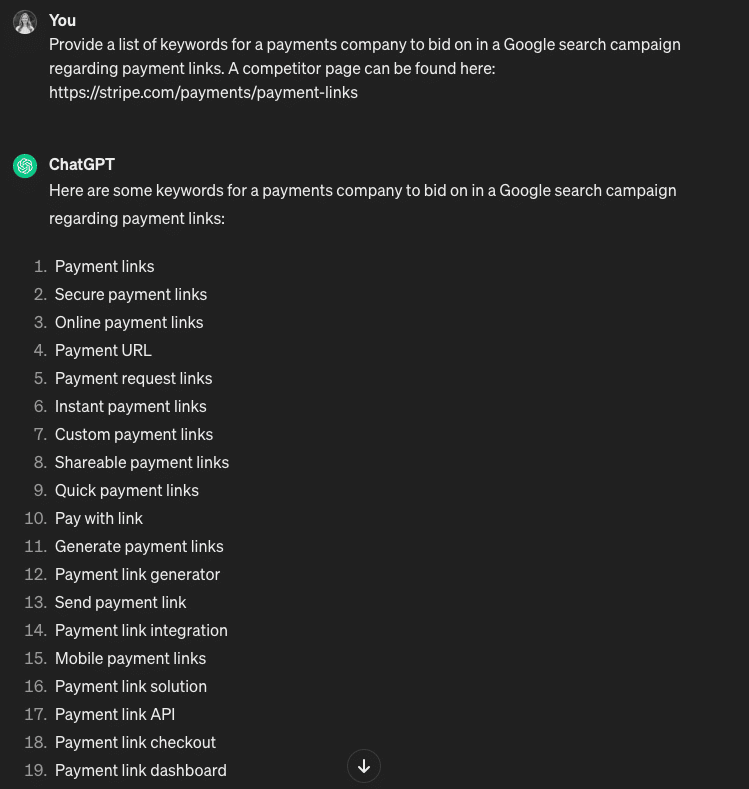
2. Keyword research
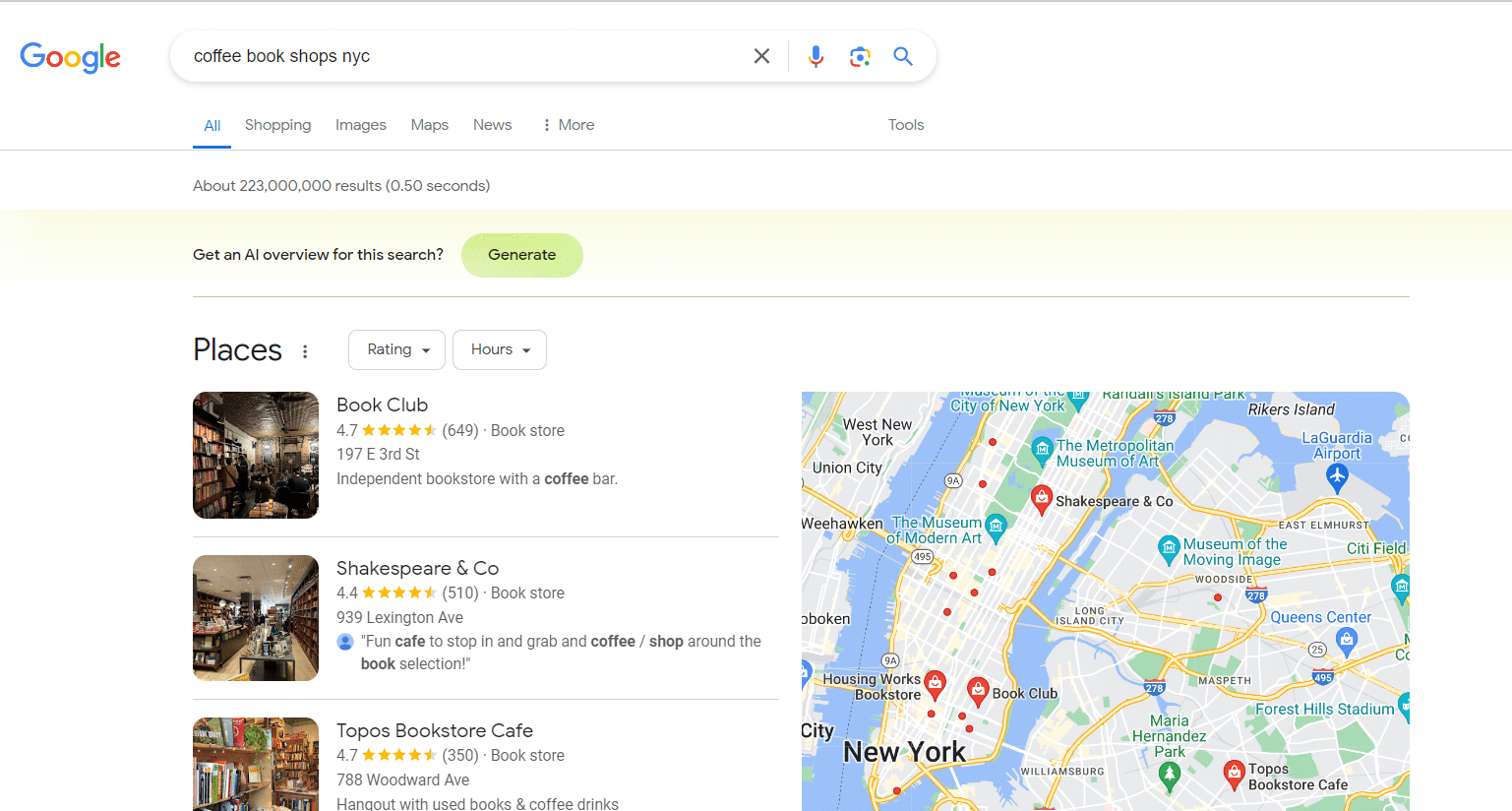
While Google Keyword Planner is a great resource for keyword research and search volume forecasting, the terms it produces may be irrelevant to your brand due to lack of context.
To account for these discrepancies, perform research in multiple ways to ensure keyword-to-audience alignment. In this example, the prompt provides the topic and a related competitor landing page.
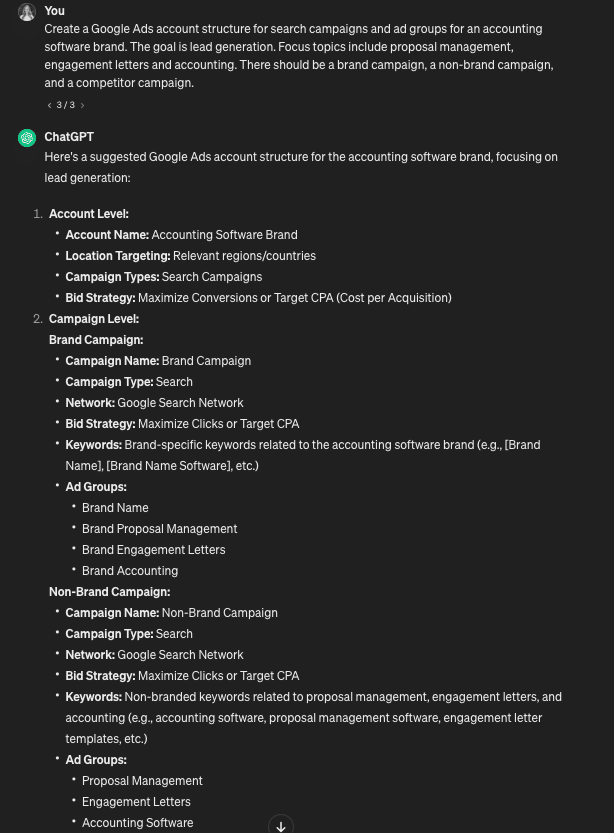
3. Building an account structure
Starting a new account from scratch or planning an account restructure? This prompt details the brand’s industry, goal and focus topics, along with additional campaigns the structure should include.
This is a good starting point to lay out campaigns and ad groups before filling in the keywords. ChatGPT gets bonus points for providing keyword ideas.
Get the daily newsletter search marketers rely on.
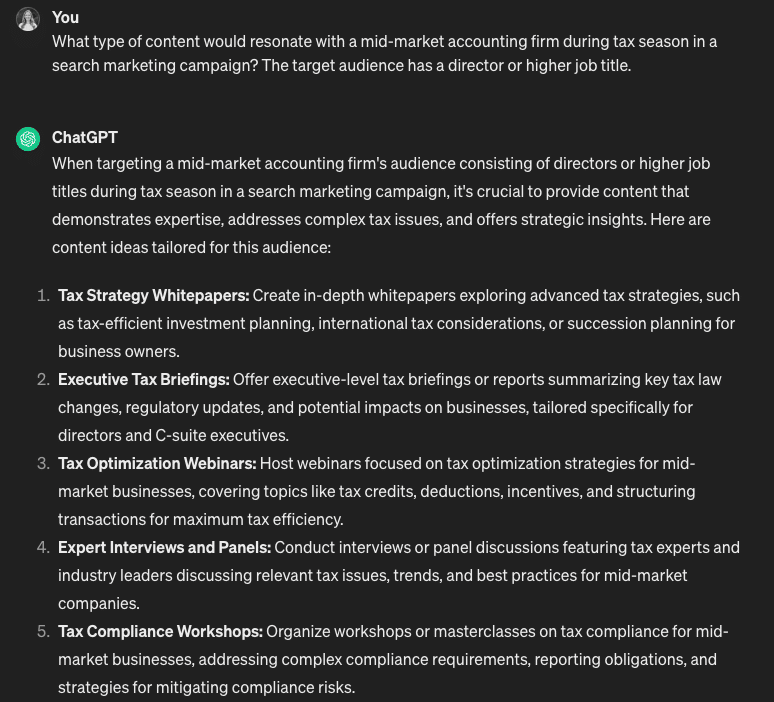
4. Content creation
Your content must stand out in a sea of messaging and creatives, as the competition for audience attention is higher than ever.
This prompt details audience job titles, company size and industry. It also mentions the campaign’s theme (tax season), which presents unique challenges for this audience.
Consider listing audience pain points, challenges, likes and dislikes to improve your AI tool’s output.
5. Language translation
Always have a human native speaker of the language review your AI tool’s translation output.
Although AI is a great time-saver in this instance, the system does not have the context for the verbiage. As a result, the translation may not align with your intended meaning.
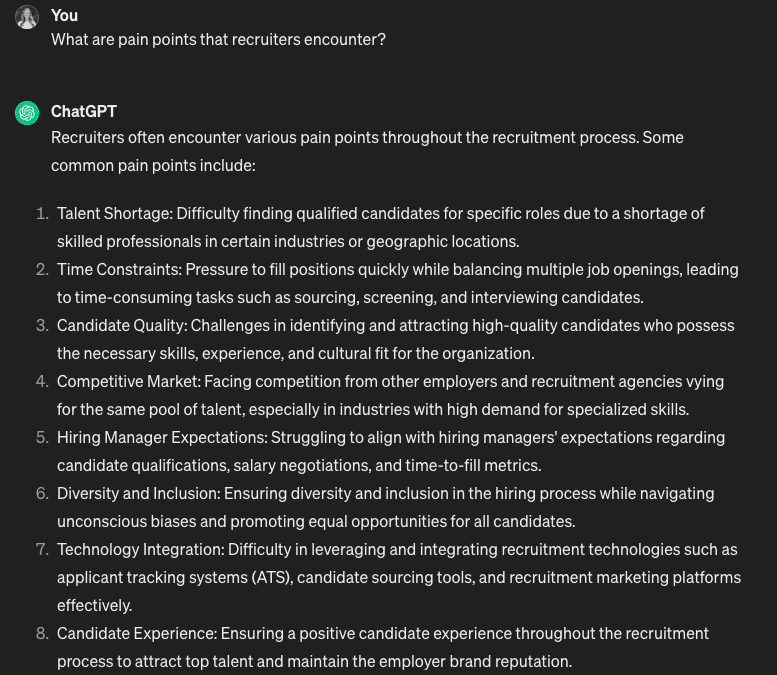
6. Audience research
Survey-based audience research tools like MRI-Simmons offer the best way to leverage real audience insights. However, generative AI can assist with getting to know your audience better.
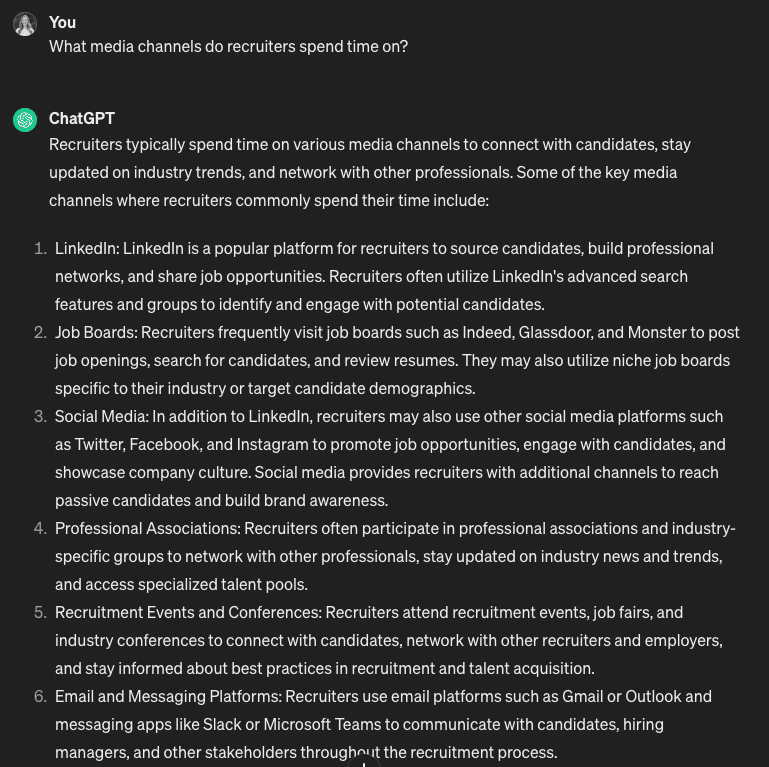
While other tools like Sparktoro or Resonate may outline further details about these channels, AI output can create a media plan for budget allocation.
This prompt asks about pain points the target audience encounters in their job. It helps align messaging to these issues for improved relevancy and CTR.
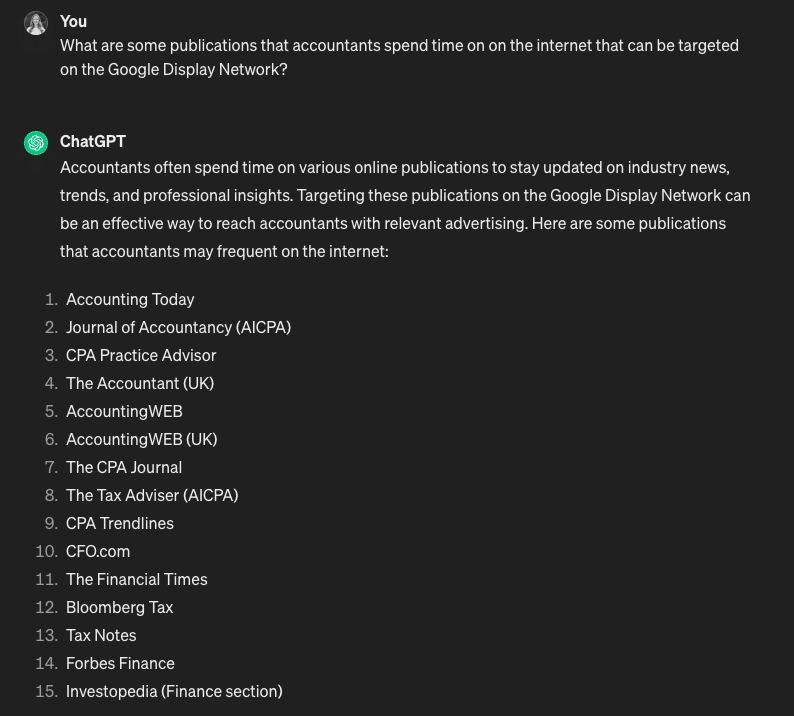
7. Display placements
Get to know your audience further with a prompt designed to find where they spend time. Then, you can focus your GDN investment on industry-specific sites.
Using generative AI in PPC
Generative AI is a game-changing tool that saves time. But remember not to rely on it for the final product. Always work alongside machine learning to guide it toward better results for your brand’s performance.
Dig deeper: Elevate your PPC with ChatGPT: The art of asking disconfirming questions
Courtesy of Search Engine Land: News & Info About SEO, PPC, SEM, Search Engines & Search Marketing