Archive for the ‘seo news’ Category
Friday, October 4th, 2024
Tucked away in the Settings section of Google Search Console is a report few SEO professionals discuss, but I like to monitor.
These reports are known as Crawl Stats.
Here, you’ll find an interesting set of metrics on Googlebot crawl activity. These metrics are especially useful for websites with thousands or millions of pages.
Googlebot ‘Crawl stats’
Long ago, Google Search Console had easy-to-find metrics on Googlebot crawl activity. Then, it seemingly disappeared.
In reality, it was tucked away in the Settings section.
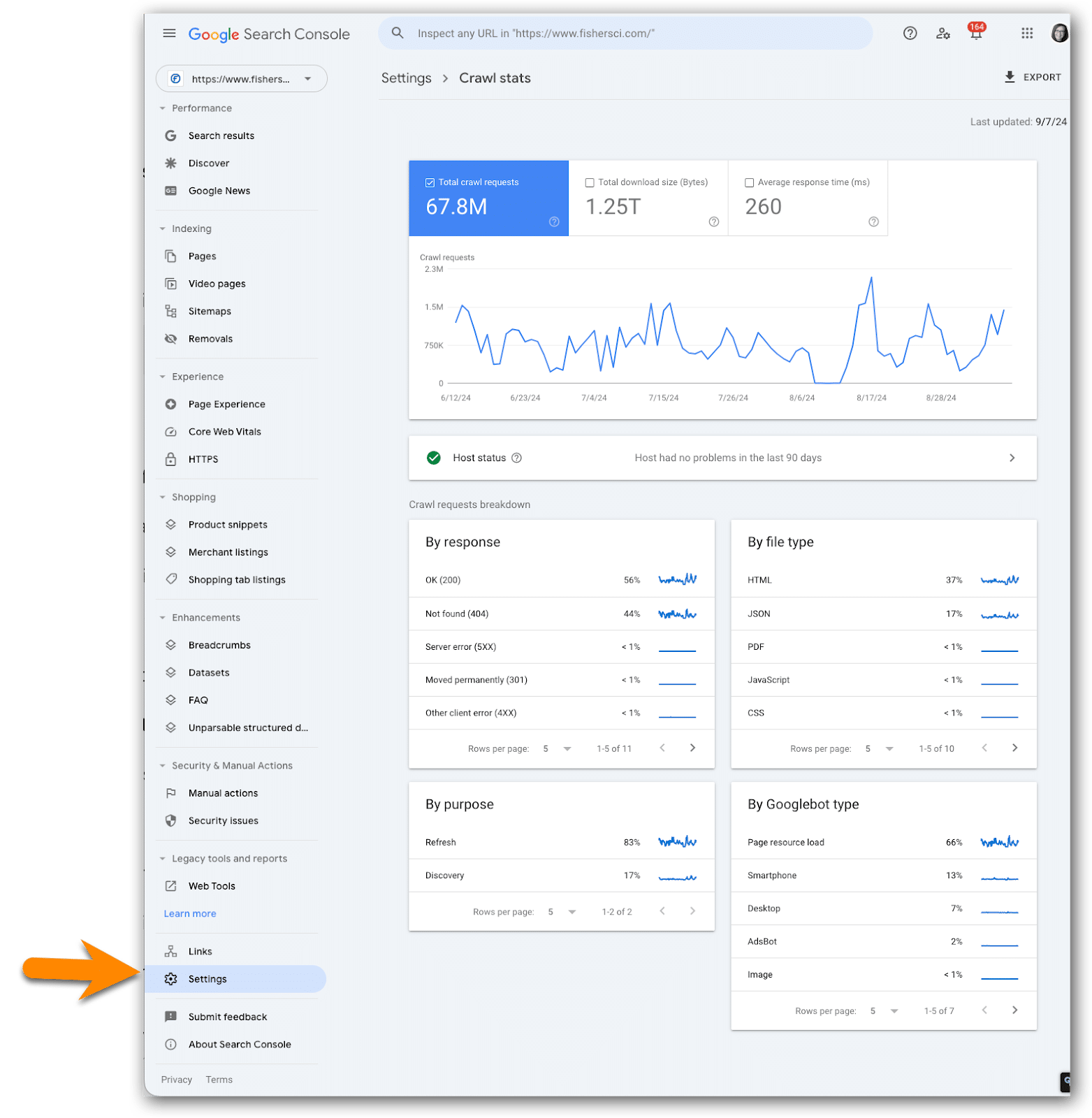
How to access the crawl stats reports:
- Click on Settings at the bottom of the left navigation.
- Go to the Crawl stats section.
- Click Open report.
About the crawl stats data
As Googlebot crawls your site, Google tracks and reports on various aspects of Googlebot’s activity and reports on it in Google crawl stats.
This is where you’ll find high-level statistics about Google’s crawling history on your website.
Google says this data is for advanced users
The Googlebot Crawl Stats data is not for the technical SEO rookies.
Google specifically says this data is aimed at “advanced users” with thousands of pages on their site, which may be why it’s located in such an unusual location, unseen by many in the SEO community.
One reason Google may perceive this as an advanced report is that so many things can influence these metrics, including network issues and cloud delivery services such as Akamai.
Who will find crawl stats most useful?
I find the Crawl Stats reports less of an “advanced” set of reports but something that’s more useful to enterprise SEOs without crawler monitoring tools such as Lumar and Botify.
When doing SEO on an enterprise website with thousands or millions of pages, crawler optimization is a vital task, and crawler activity metrics provide important insight for defining action items.
Smaller sites likely do not need to worry too much about crawler activity because there is probably enough crawl budget allocated to your site to crawl at an appropriate pace.
On the other hand, enterprise sites tend to have far more pages that need to be crawled, discovered, and/or refreshed than Google crawls their site each day.
For this reason, they must optimize for crawler activity, which is a tool to help guide next steps.
What to look for in this data
After years of reviewing this data across many sites, I have one primary rule:
- Do not spend a lot of time here unless you see fluctuations and correlations.
Often these reports are interesting but not actionable.
Example fluctuations that I tend to investigate:
- HTML requests decreased (or spiked) at the same time Bytes of JavaScript downloaded increased (or spiked).
- Average response time increased (or spiked) at the same time the number of HTML requests went down (or sudden fall).
- Total download size increased (or spiked), but the number of HTML requests did not change.
- The percent of requests for discovery (to discover new URLs) increases and the percent of requests for refresh goes down; however, you did not launch new URLs on the site.
When to look at this crawl stats
Crawl stats are good to peruse (and log) at least once a month.
They are especially good to monitor after major releases, such as a platform migration or major redesign. This will help you quickly understand how Google is responding to your newly launched changes.
Remember: If you have a bot monitoring tool such as Lumar or Botify, then this data isn’t as useful as you’ll find in the bot monitoring data provided by these tools.
Caveats about the crawl stats data
Many things can influence Google’s crawl stats metrics beyond a normal dev release.
This means the SEO team, product manager(s) and developer(s) must think outside the box when evaluating the fluctuations.
You must consider what could have caused an increase or decrease in Googlebot crawl activity, not only in your release but also within the network and tech stack.
Changes to something such as Akamai could potentially impact this data.
Log the crawl stats data in a spreadsheet
This is data I like to archive because Google reports such a small window of time.
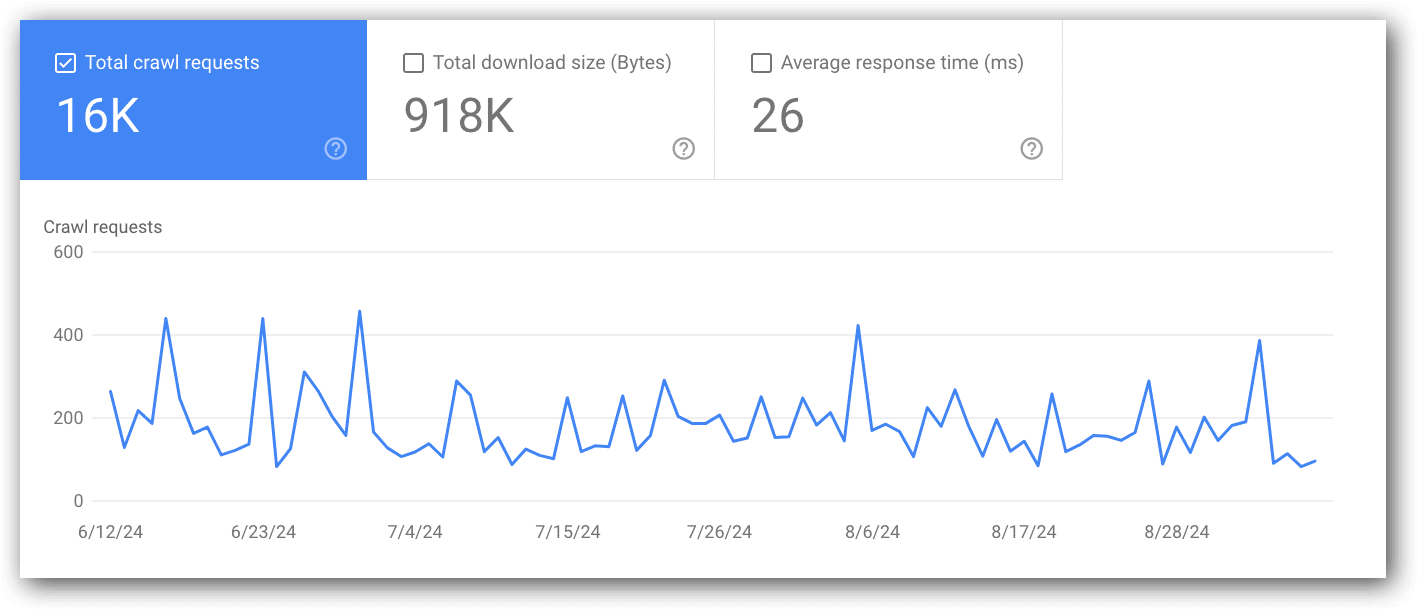
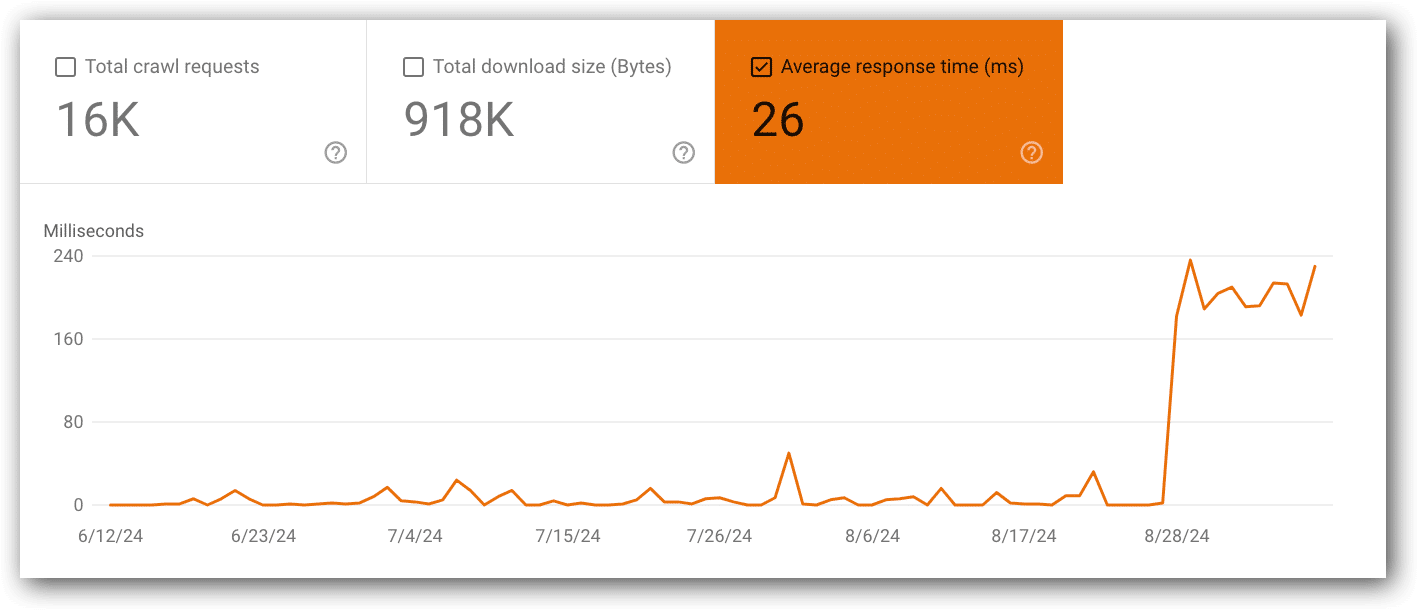
A great example of this is a challenge I’m facing now with a client. What is reported in GSC right now looks like things are improving:
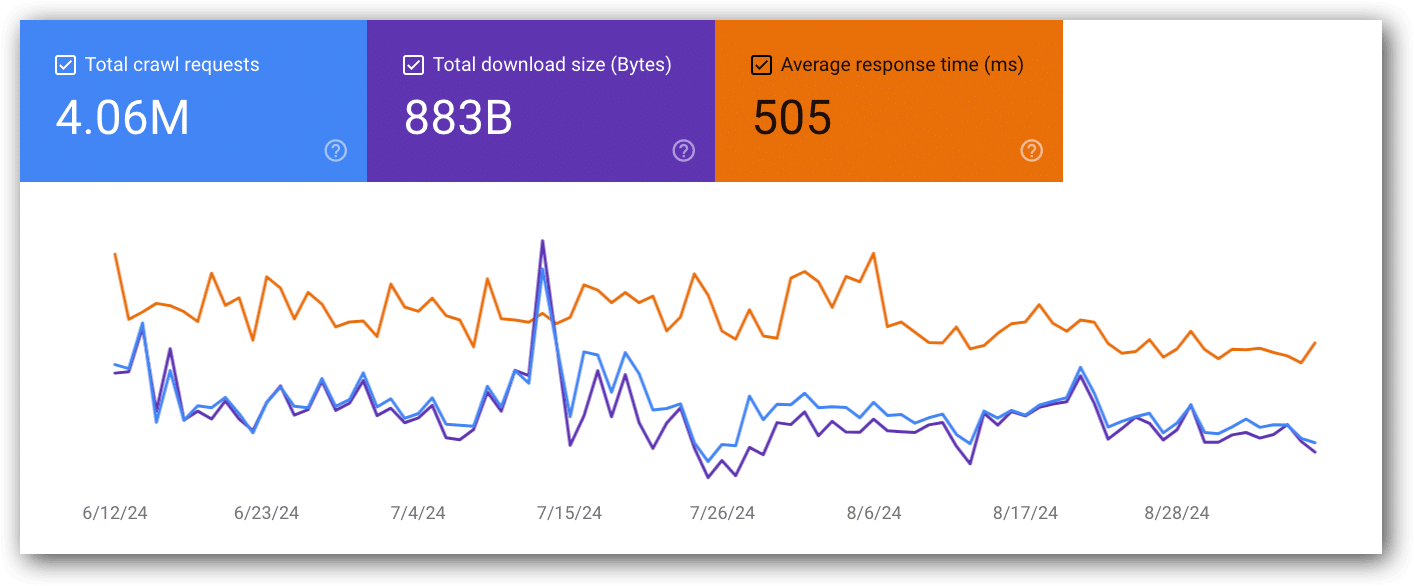 Seemingly, things are improving
However, because I have metrics from six months ago, I can say that these metrics are 40% higher than they were six months ago.
While they’re trending down, they’re still worse than they were in the past. The client’s challenge is that development has no idea why this is happening (unfortunately, solving that problem is beyond the scope of this article).
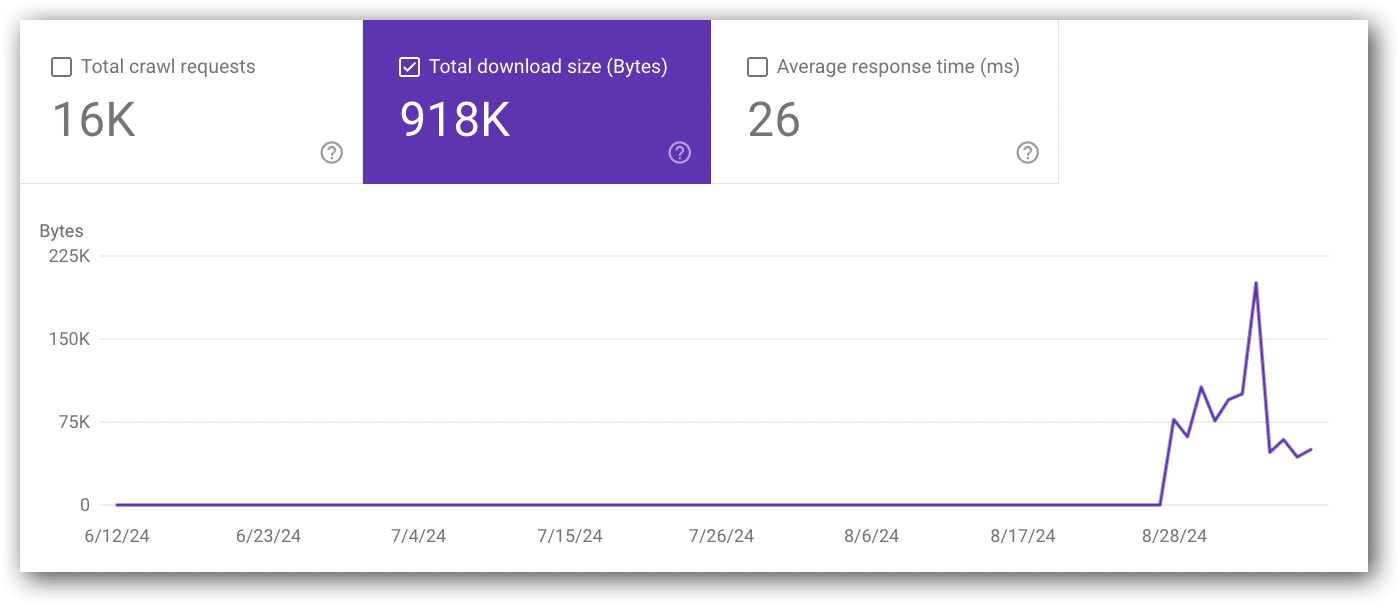
You may think to just grab a screenshot. However, it makes it very hard to compare over time.
Notice there is no left axis in the chart. You really cannot tell what the lines reflect. (Note: Numbers do appear on the left/right axis when you are only viewing two metrics in the chart)
Instead, drop this data into a spreadsheet. Then, you have actual data that can be charted over time, calculated and used to compare with other metrics, such as visits.
Having the historical data in one place is often useful when discussing major changes with development to show how much better the metrics were 4-6+ months ago.
Remember, development likes hard, specific data, so charts with actual numbers on the left/right axis (or worse, no numbers on the x-axis at all) will be more useful to you than charts with varying numbers on the x-axis.
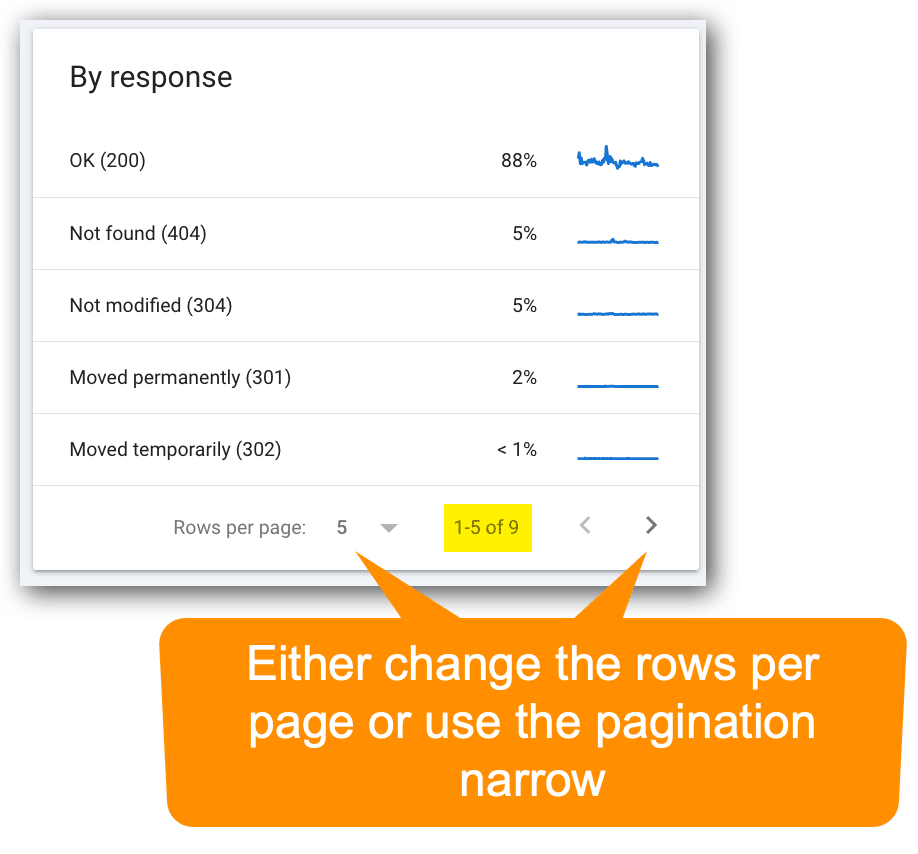
Remember, the reports boxes are paginated
Though the most important metrics you’ll need are likely visible in the default view, many of the report sections are paginated – and they’re easy to miss!
Get the newsletter search marketers rely on.
Which metrics to monitor and why
Let’s get into the primary metrics to look (very quickly) each month, along with a few tips to take away action items from the data:
Total crawl requests
- View this report in Google Search Console (located in the top chart).
- Google definition: “The total number of crawl requests issued for URLs on your site, whether successful or not.”
- If this metric goes up or down, compare it with average response time and total download size (bytes).
- An obvious reason for this metric could go up if you change a lot of code or launch a lot of new pages. However, that is by no means the only cause.
Total download size (byte)
- View this report in Google Search Console (located in the top chart).
- Google definition: “Total number of bytes downloaded from your site during crawling, for the specified time period.”
- If this metric goes up or down, compare it with average response time
- An obvious cause for this metric to increase is adding a lot of code across thousands of pages or launching a lot of new pages. However, that is by no means the only cause.
Average response time (ms)
- Google Search Console Report (located in the top chart).
- Google definition: “Average response time for all resources fetched from your site during the specified time period.”
- If this metric goes up or down, compare with with total crawl requests and total download size (bytes).
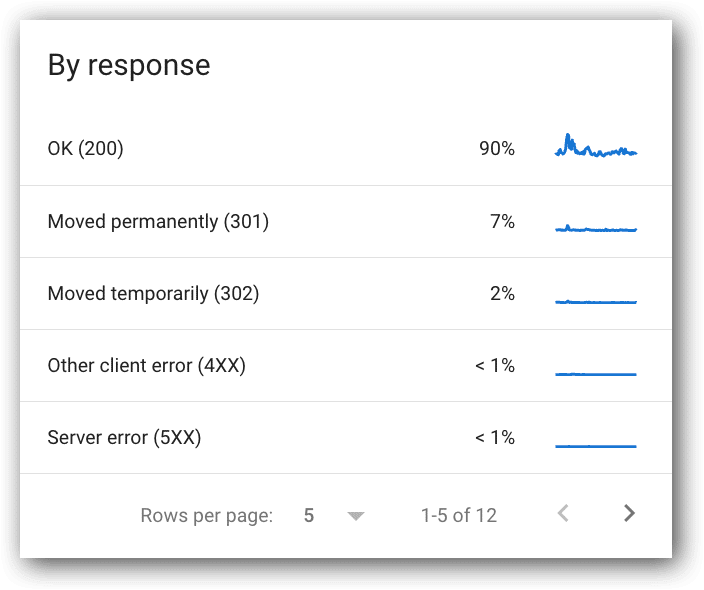
Crawl requests breakdown by response
- View this report in Google Search Console (located below the top chart).
- Google definition: “This table shows the responses that Google received when crawling your site, grouped by response type, as a percentage of all crawl responses…”
- Common responses:
- OK (200).
- Moved permanently (302).
- Server error (5xx).
- Other client error (4xx).
- Not found (404).
- Not modified (304).
- Page timeout.
- Robots.txt not available.
- Redirect error.
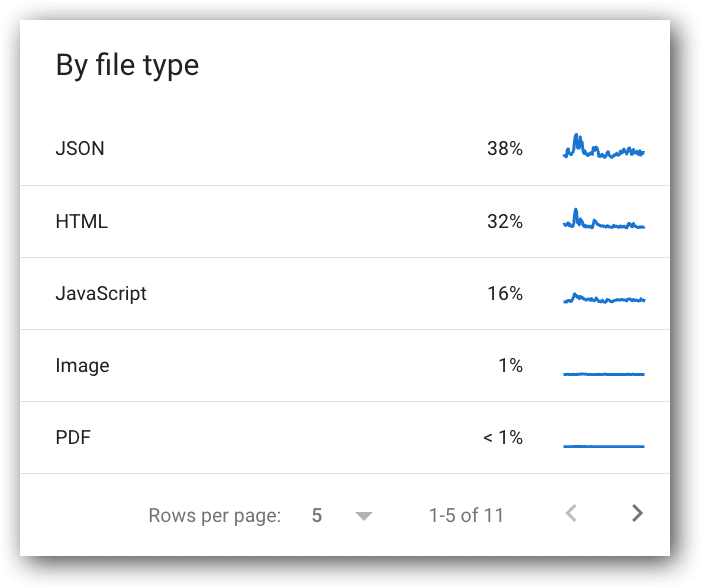
Crawl requests breakdown by file type
- View this report in Google Search Console.
- Google definition: “The file type returned by the request. Percentage value for each type is the percentage of responses of that type, not the percentage of of bytes retrieved of that type.”
- Common responses:
- JSON.
- HTML.
- JavaScript.
- Image.
- PDF.
- CSS.
- Syndication.
- Other XML.
- Video.
- Other file type.
- Unknown (failed requests).
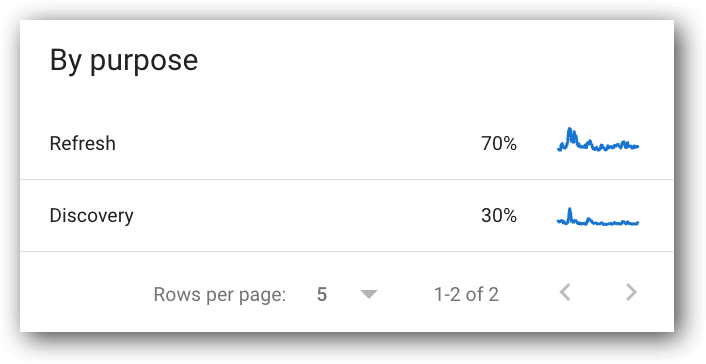
Crawl requests breakdown by crawl purpose
- View this report in Google Search Console.
- Two purposes:
- This is an interesting metric for presentations; however, it only has a few useful use cases. For example:
- If the percent of Googlebot activity that is for Discovery suddenly increases, but we’re not adding URLs to the site, then you have an action item to figure out what is being crawled that shouldn’t be crawled.
- If the percent of Googlebot activity that is for Refresh decreases significantly, but you didn’t remove pages from the site, then you have an action item to figure out why fewer existing pages are being crawled.
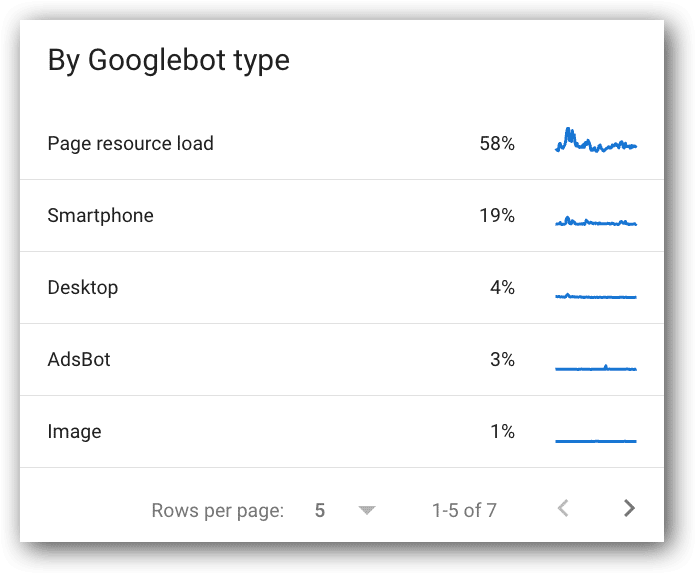
Crawl requests breakdown by Googlebot type
- View this report in Google Search Console.
- Google definition: “The type of user agent used to make the crawl request. Google has a number of user agents that crawl for different reasons and have different behaviors.”
- It’s an interesting metric, but not very useful. It just shows Google is still using their desktop crawler. Honestly, I usually ignore these metrics.
You can click into each metric for more data
Often when you present any SEO concern to product managers and developers, they often want to see example URLs. You can click on any of the metrics listed in this report and get example URLs.
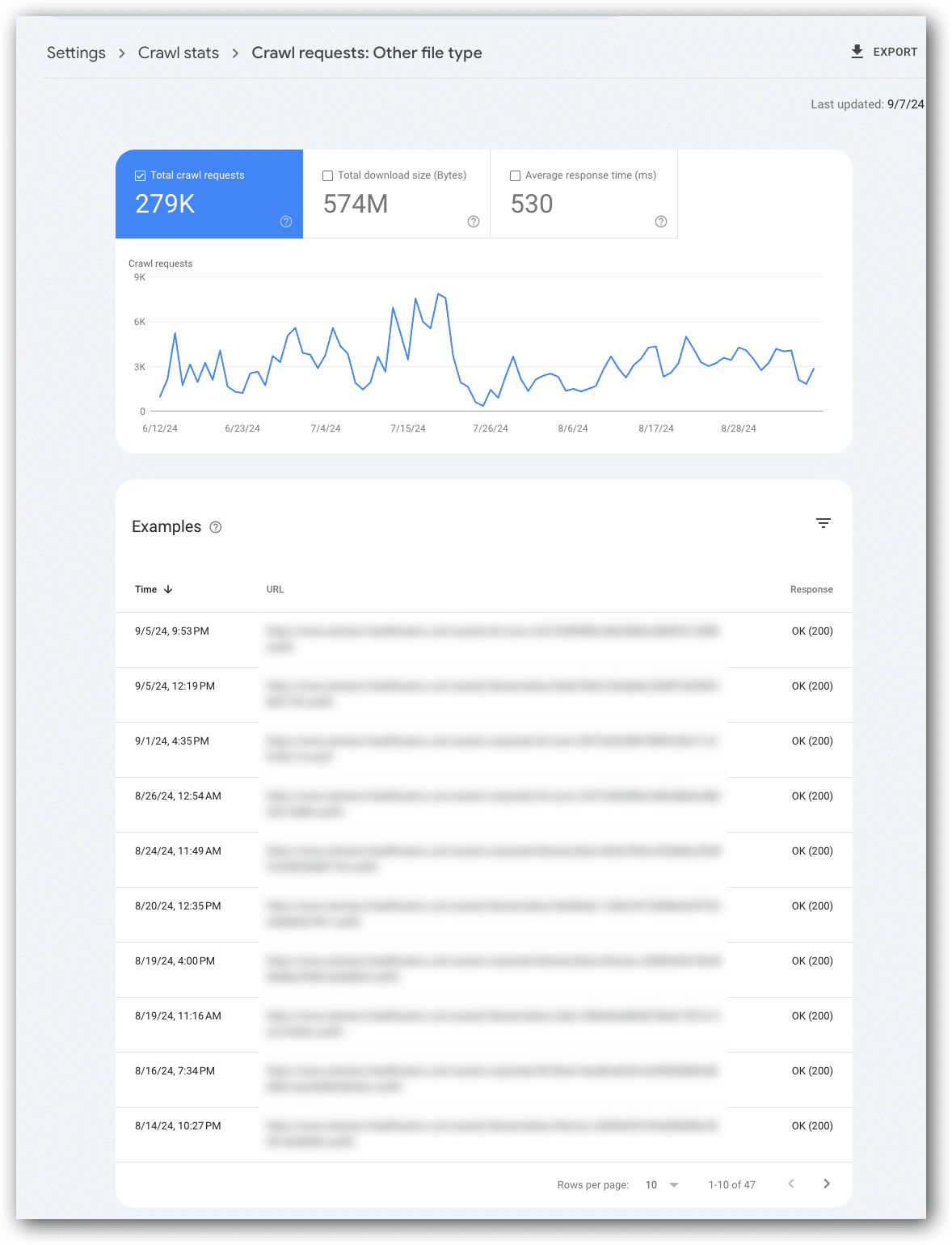
An interesting metric to look at is “other file types” because it’s not clear what’s in the “other file types” category (often it’s font files).
The screenshot below shows the examples report for “other file type.” Every file listed is a font file (blurred out for confidentiality reasons).
In this report of examples, each row reflects one crawl request. This means if a page is crawled multiple times it could be listed more than once in the “examples.”
As with all Google Search Console reports, this is a data sample and not every request from Googlebot.
Do you share these metrics with developers and product managers?
These metrics will typically generate one of two thoughts:
- “There’s nothing to look at here.”
- “What could have caused that?”
In my experience, the answers to “what caused that” tend to require the input of product managers and/or developers.
When presenting the data and your questions about potential causes for issues, remember to clearly explain that these metrics are not user activity and solely represent Googlebot’s activity and experience on the website.
I find product managers and developers often get a bit confused when discussing this data, especially if it doesn’t match up with other metrics they have seen or facts they know about the site.
By the way, this often happens for most Google Search Console data conversations.
If there are no Crawl Stats fluctuations or correlations to be concerned about, don’t bring it up to development, nor product management. It just becomes noise and prevents them from focusing on more critical metrics.
What’s next?
Check out your crawl stats to make sure there are no spikes or correlations that are concerning.
Then, determine how often you want to look at these and set up systems that prompt you to check these and other Google Search Console metrics in a systematic, analytical method each month.
While you check out your Googlebot Crawl Stats, I’ll write Part 4 in this series that will talk about how to know which URLs you should focus on for technical SEO improvements and in particular, Core Web Vitals metrics.
Dig deeper
This is the third article in a series recapping my SMX Advanced presentation on how to turn SEO metrics into action items. Below are links to the first two articles:
Courtesy of Search Engine Land: News & Info About SEO, PPC, SEM, Search Engines & Search Marketing
Friday, October 4th, 2024
Artificial intelligence (AI) is revolutionizing consumer engagement and transforming the landscape of search, according to James Murray of Microsoft Advertising, who spoke at SMX Advanced.
Here are the key points he raised in his presentation, exploring the paradigm shift in search technology and its implications for advertisers and marketers.
The expanded search box: A gateway to nuanced queries
Murray highlighted a seemingly small but significant change in search: the expansion of the search box:
- “What have we done or what has changed? Well, a lot has changed. In fact, we think that we have completely shifted the paradigm of what search means and what is possible with search.
- “And I’d say one of the biggest and most fundamental changes through AI is that we’ve changed search from this to this. We’ve made the box bigger.”
From:

To:

This physical enlargement represents a fundamental shift in how users can interact with search engines.
No longer confined to short keyword phrases, users can now express complex, nuanced queries that more accurately reflect their true intentions.

For example, instead of searching for “cheap holiday Rome,” users can now input detailed requests like:
“Could you provide a Rome weekend itinerary for a family of 2 adults and 2 children aged 6 and 4. We want a mix of historical culture and fun activities, and the kids want to eat as much pizza as possible.”
This level of detail allows AI-powered search engines like Microsoft’s Copilot to understand context and provide more relevant, comprehensive responses.
Murray said:
- “Up until very recently, it has just not been possible in the sense that whilst we have always had the capability to put in these very large, very nuanced searches, the results that we get would often be confused or or just unintelligible.
- “Now, we’re in a situation where search through AI, through these new conversational capabilities, can actually not only understand a very complex query but can give us a meaningful reply that actually answers what we’re looking for.
- “So this is an example within the Microsoft ecosystem of Copilot. And so you can see that it has taken what I’ve given it, and it’s actually started to put together an itinerary, going to the Colosseum, going to see various bits of what Rome has to offer.”

AI’s Impact on search capabilities
Murray then explored the key advancement of integration of AI into search:
- Synthesis and summarization: AI can quickly process and synthesize information from multiple sources, providing concise, relevant answers to complex queries.

Murray explained:
- “If we look at that example which I just gave (trip to Rome), we start with this very dense, rich and sort of multifaceted, query on the left.
- “Copilot is able to simulate all of that information. But in the background, this would have taken us previously, in normal search, multiple iterations, multiple searches (see right) to pull together that same information. Whether it’s looking for family activities or what to see, history tours, the best place to get pizza in Rome, and so on.
- “And so what we’re seeing is, that from a consumer perspective, this does a number of things.
- “One is that it enables people to say what’s on their mind, but it enables them to get to answers quicker.”
Understanding true intent
AI-powered search engines aim to understand the underlying question behind a query, going beyond literal interpretation to grasp context and user intent.
Current search engines often provide broad, surface-level answers, but struggle to understand the deeper intent behind user queries.
For example, when someone searches for “Cancun weather in March,” the real underlying question might be about what to pack for a trip.
Murray said that search engines should evolve to better grasp and address the true, more nuanced intent behind users’ searches, rather than just offering basic information and related suggestions:
- “Wouldn’t it just be easier if we could say, ‘can you just pack, and make me a packing list and organize it by which room in the house I’m most likely to find those items?’
- “And to showcase how that can come to life and the reality of how we can get to the underlying question where we don’t have to read between the lines anymore because when people can actually ask what’s truly on their mind, and we can give them a sensible answer.
- “It allows that freedom to be able to most relevantly match to what people are actually asking for.

- “And so, really, what we’re seeing is this evolution of people being freed to ask the questions that they’ve always wanted to but, you know, perhaps haven’t felt comfortable of being able to do and the search engines being able to respond with much deeper, and much more nuanced and relevant answers.”
Evolution of AI search usage
Murray outlined three stages in the adoption of AI search tools:

- Initial curiosity (2023): Users explored the capabilities of AI tools, testing their limits and discovering new opportunities.
- Knowledge and action: As users became more familiar with AI tools, they began to find new use cases and develop greater proficiency.
- AI in action (2024 and beyond): Users are becoming increasingly comfortable with AI tools and are extracting tangible value from them in their daily lives and work.
New possibilities for users and marketers
He then took us on the journey of how the advent of AI-powered search has opened up new avenues for users and marketers:
Expanded capabilities
Users can now perform tasks that were previously impossible or time-consuming, such as generating content, analyzing data and writing code.

- “Looking at the yellow bars here, we’re also seeing an incredible amount of new things that just previously weren’t possible.
- “So, coming up with new ideas and inspiration, summarizing content, which we’ve just seen, being able to actually generate, write and draft content. But not only that, analyzing data and writing code.
- “Actually, the list of these capabilities is expanding all the time. And we talked about that idea of value as we’ve moved from knowledge to action as the prompts that we put into some of these conversational experiences and the generative AI tools are getting more precise, we’re getting to faster task completion, and people are really starting to extract value.”
Increased efficiency
Studies show that users can complete tasks and reach decisions up to 50% faster using AI-powered search compared to traditional search methods.

- “Because we’re seeing that we’re able to ask those more complex questions, more nuanced questions, and we’re able to get to the answers quicker, what we [Microsoft] found is that on average, users take about half the time to reach a decision on Copilot compared to traditional search, and this matches up with other, tools as well.”
These are driving forward new ways of thinking and more efficient ways of being able to, you know, use engines for what we need them to do, which is ultimately get to the answers that I need, get that relevant information.
Enhanced advertising opportunities
Marketers can leverage these new search capabilities to create more targeted, relevant ad experiences for users in several ways.
- Ads have already been incorporated in AI Search: Because of AI tools rapidly growing in importance, the search tools are already AI powered.
Ads were built into the Copilot experience from day 1. Murray said if you’re optimizing for your core search experience, you’re also optimizing at the same time for the Copilot experience.
- Best Practices: Advertisers should focus on creativity, especially visually speaking ads, image extensions, product feeds and multimedia ad formats to improve click-through rates.

What Microsoft are doing is taking the same ad creatives and content that advertisers create for search, and are replicating them within the conversational experience as well.
Murray highlighted the searcher has been transformed to deeper, more rich, engaging, conversations.
The more that advertisers can make ads visual, whether that’s using image extensions or some of the product feeds, or, new sort of formats like multimedia ads.
The more visual you can make them, the more they will likely stand out and then, the better they’re likely to get in terms of your click through rate.
Examples of marketers leveraging AI
- Content simplification: AI is regularly used for rewriting complex product summaries for easier understanding. It also useful for simplifying technical information from engineers.
- Tone adjustment: AI can help change the tone of ad copy to make it more approachable making serious content about cat trees more playful and fun. AI can generate multiple headline options, showcasing an understanding of context and even wordplay (e.g., cat puns).
- Strategic analysis: Marketers can input their brand and competitors into Copilot, to get insights. AI can then perform complex tasks like SWOT analysis. This saves time and provides external perspectives on strengths and weaknesses.
- Inclusive advertising: AI can help create more inclusive ad strategies such as analyzing customer challenges in car insurance. AI can suggest adjectives to address specific customer concerns and create a sense of safety.

Implications for marketers
Murray highlighted three key implications for marketers in this new AI-driven search landscape:
1. Quality and visibility
Ensuring high-quality, crawlable content is crucial for visibility in AI-powered search results. Tools like IndexNow can help keep content fresh and discoverable.
Murray suggests “revisiting and thinking about your SEO strategy, making sure that all of your content is crawlable.”
2. Hyper-personalization
The detailed nature of AI search queries allows for unprecedented levels of personalization in ad targeting and content delivery.
Murray clarifies here that this isn’t a result of data collection, saying that being able to be detailed with answering questions is “not because we are being invasive in terms of how much data we can stack and track on what people are, doing and and the demographics of who they are.”
- “This is simply by giving people the opportunity to explain what it is that they really want in detail. Through that conversation, the richer signals that we’re able to get, the sort of depth that we are able to understand means that when we serve an ad, it is absolutely the right ad at the right moment for the right person.”
3. Creativity and efficiency
AI tools can assist marketers in various tasks, from writing headlines to conducting SWOT analysis, fostering creativity and improving efficiency. It can even “showcase some blind spots that you might have in your creative campaign,” Murray said.
The future: Multimodal AI
Looking ahead, Murray touched on the concept of multimodal AI, which can process and generate content across various formats (text, image, video, audio).
This advancement promises even more exciting possibilities for search and content creation.
- “Where we’re moving to is where we can have any output from any input,” Murray said.
He shared an example – a picture of a rocket launch. By feeding just the image and asking AI about it, AI was able to tell us the specific event depicted in the image.

Unlock new levels of creativity, efficiency and productivity
The evolution of search in the age of AI represents a significant shift in how users interact with information and how marketers can reach their audience.
Murray encourage us to notice the small things and, quoting Liz Vassey (an American actress):
- “The rewards are inversely proportional.”
Courtesy of Search Engine Land: News & Info About SEO, PPC, SEM, Search Engines & Search Marketing
Friday, October 4th, 2024
Google is introducing a new process – Change Who Pays – for transferring your client accounts to a new agency’s manager account.
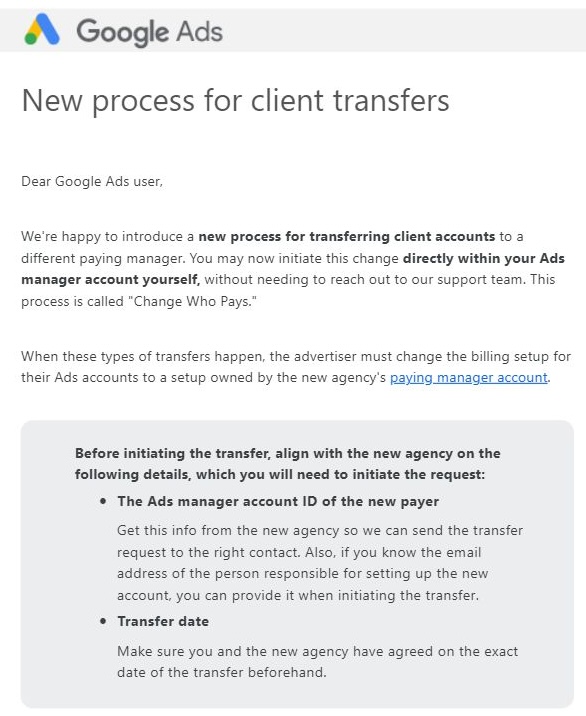
Details. Google Ads sent an email sent to users about the change:
- “We’re happy to introduce a new process for transferring client accounts to a different paying manager. You may now initiate this change directly within your Ads manager account yourself, without needing to reach out to our support team. This process is called ‘Change Who Pays.”
What to do. You will need two details to complete a transfer:
- The Ads manager account ID of the new payer.
- The transfer date.
Google Ads support page. Transfer your client account to another agency
Why we care. As Georgi Zayakov put it on LinkedIn: “Finally, advertisers may now initiate this change directly within the Google Ads manager account themselves, without needing to reach out to the support team.”
The email. Here’s a screenshot of the email, shared by Zayakov:
Courtesy of Search Engine Land: News & Info About SEO, PPC, SEM, Search Engines & Search Marketing
Friday, October 4th, 2024
Google is starting to roll out AI-organized search results today, as well as the new links and citations format in the Google AI Overviews.
AI-organized search results. The new AI-organized search results, as we covered in May, are now rolling out in the U.S. Google wrote:
- “We’re rolling out search results pages organized with AI in the U.S. — beginning with recipes and meal inspiration on mobile.”
This includes search results organized by web, including articles, videos, forums and more.
Google said in its testing, searchers “have found AI-organized search results pages more helpful. And with AI-organized search results pages, we’re bringing people more diverse content formats and sites, creating even more opportunities for content to be discovered.”
Here is what it looks like:

New links and citations in AI Overviews. In August, Google began testing new links and citations in the AI Overviews – and now that new format is going live.
Google told us they are now rolling out this new design globally to all countries where AI Overviews are available.
Google said in its tests they’ve “seen that this improved experience has driven an increase in traffic to supporting websites compared to the previous design, and people are finding it easier to visit sites that interest them.”
Here is what they may look like:
More AI news. Google also announced other news about AI and Search. Here are the highlights:
- AI Overview Ads. Ads are finally available for mobile users in the U.S. Dig deeper in Google AI Overview ads launch on mobile in U.S.
- New multimodal Lens features. Google is launching the ability to search with video in Lens and ask complex questions about moving images (available through Search Labs) and voice input in Lens, so you can ask questions out loud while snapping a photo (or recording video) to more easily search what you see.
- Shop easily with Lens. Google is now showing more helpful product information when using Lens for shopping, including a product’s price across retailers, reviews or where to buy. Dig deeper in Google Lens to add Shopping Ads this year.
Why we care. As Google and other search engines continue to innovate around AI and search, it is important to continue to watch the ongoing tests and launches of these features. AI Overviews have continued to evolve since it was announced as Search Generative Experience in May 2023. Plus, AI has been added to countless areas of Google Search and other products.
Courtesy of Search Engine Land: News & Info About SEO, PPC, SEM, Search Engines & Search Marketing
Thursday, October 3rd, 2024
Microsoft Advertising will soon change the way ads in Copilot appear to users, as well as how ads trigger. Advertisers are also about to get two new pilot features.
New Copilot ad experience. Copilot ads will appear below Copilot’s (organic) answers in a feature Microsoft is calling “ad voice.” This will include text referencing the conversation within Copilot and acts as a transitionary message from the advertiser. Fewer ad annotations and extensions will appear.
What it looks like. Here’s a screenshot Microsoft provided of the new look experience:
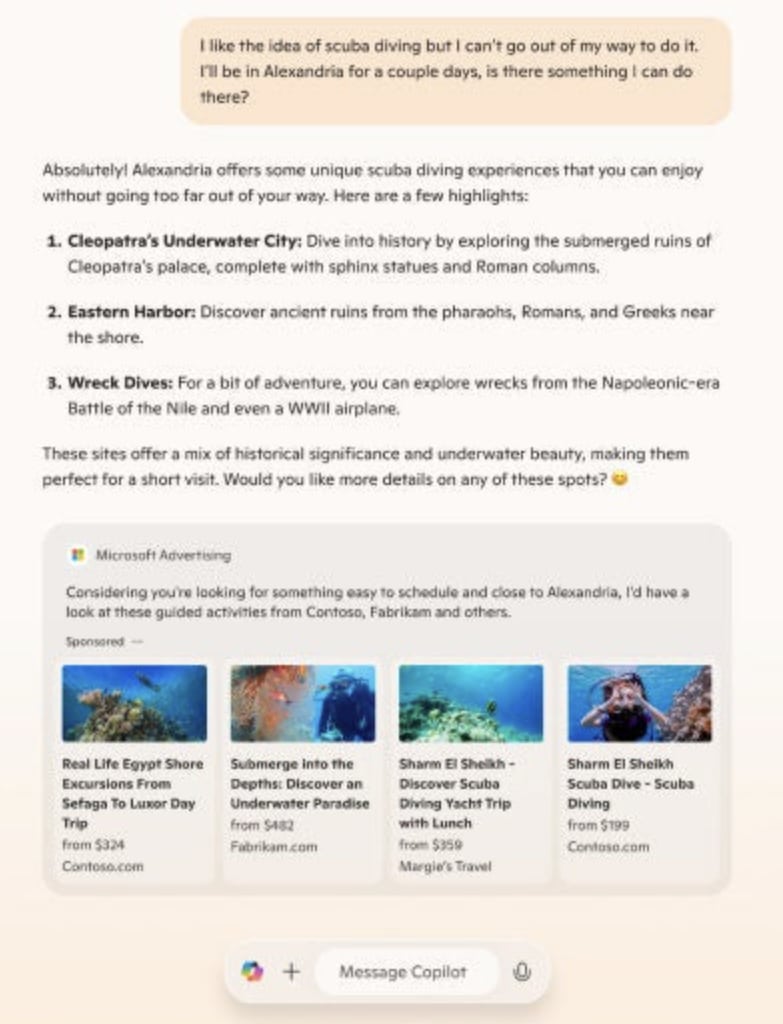
Timeline. This change will first come to copilot.microsoft.com this month and expand to more Copilot experiences – including Bing Search – “over time,” Microsoft said
New Microsoft advertising features. Microsoft will also launch two new generative AI features in pilot this month:
- Diagnostics. This “inspect campaign setup, assess account health, diagnose where attention is needed, and propose what to do next, all activated via simple conversational engagement.”
- Performance snapshot. You “can use natural language to ask Copilot in the Microsoft Advertising Platform to obtain an account or campaign-specific performance overview with a summary of key insights, trends, and anomalies.”
Why we care. Microsoft, citing internal data, said Copilot ads have “click through rates that are 69% stronger, and conversion rates are 76% higher when comparing lower funnel ad types to traditional search.” While these stats are quite vague and open to our interpretation of what they actually mean – ultimately, any changes Microsoft makes that could impact your advertising performance and ROI is one to watch and know about.
Microsoft’s blog post. Transforming audience engagement with generative AI.
Courtesy of Search Engine Land: News & Info About SEO, PPC, SEM, Search Engines & Search Marketing
Thursday, October 3rd, 2024
In August, Google rolled out one of its most significant updates of the year. Many SEOs believed it was a partial rollback of the controversial Helpful Content Update – a potential mea culpa from Google.
While some sites have benefited from the changes, others have experienced sharp declines in traffic.
This case study dives into how the update impacted our client’s site, the key metrics affected and the strategies we’re implementing to recover lost visibility and boost SEO performance.
Diagnosing the drop
I recently attended the SEO Office Hours podcast, where a participant asked:
- “We haven’t been affected by the August update, but the indexing bug that happened around the same time has decreased our traffic. How do we solve this?”
My first thought was, what confidence! How sure are you that it was the indexing error if you are looking just at traffic?
The error was resolved in a few days so how come there was no recovery of the traffic and rankings?
Yes, we should ignore drops that happened in those two days during the bug, but if they continue after this, might it impact the core update?
Diagnosing what actually happened is not always easy. We see it all the time.
Sometimes, clients don’t know where to start. Other times, they simply don’t have time to investigate closely enough. The latter was true for our new client.
Their excellent SEO team needed help auditing the website and a sounding board for solving any issues.
After a Google core update rollout is completed, you could examine multiple metrics.
Like everything in SEO, these depend on several factors, such as your key performance indicators (KPIs), the type of website you manage and the countries you target.
To diagnose the impact of the Google core update for our client, we used a simple, three-step approach:
- Understand what has happened sitewide.
- Use the sitewide indicators to segment the data for deeper analysis.
- Deep dive into the most affected pages and sections of the website.
Understand what happened sitewide
Our client has a large site. Digging into each page would take too much time. We needed to understand what happened overall to segment and prioritize.
For this, we looked at:
- Traffic and conversion trends.
- Overall content health.
- Link profile.
- Technical SEO.
- Wild card: persona-based sitewide signals.
Traffic and conversion trends
Two of the main KPIs for our client were traffic and conversions, which made it clear that our analysis needed to begin in these areas.
We examined their Google Analytics 4 (GA4) and Google Search Console (GSC) data to assess organic trends and overall traffic patterns.
This holistic approach is crucial because it establishes a baseline for our analysis. For instance, if we observe a significant drop in overall traffic, we can infer that the decline is likely not solely attributed to organic search issues.
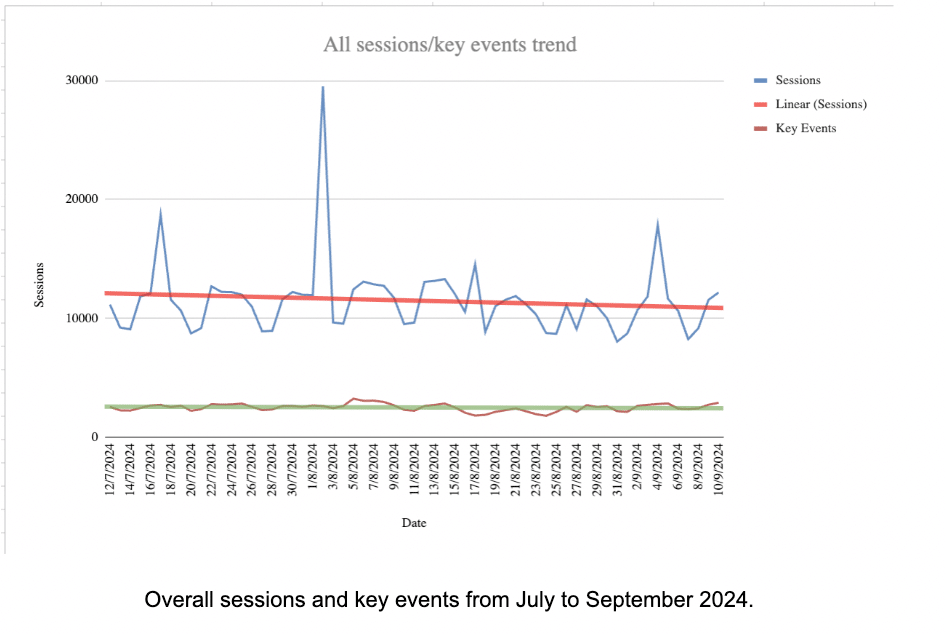
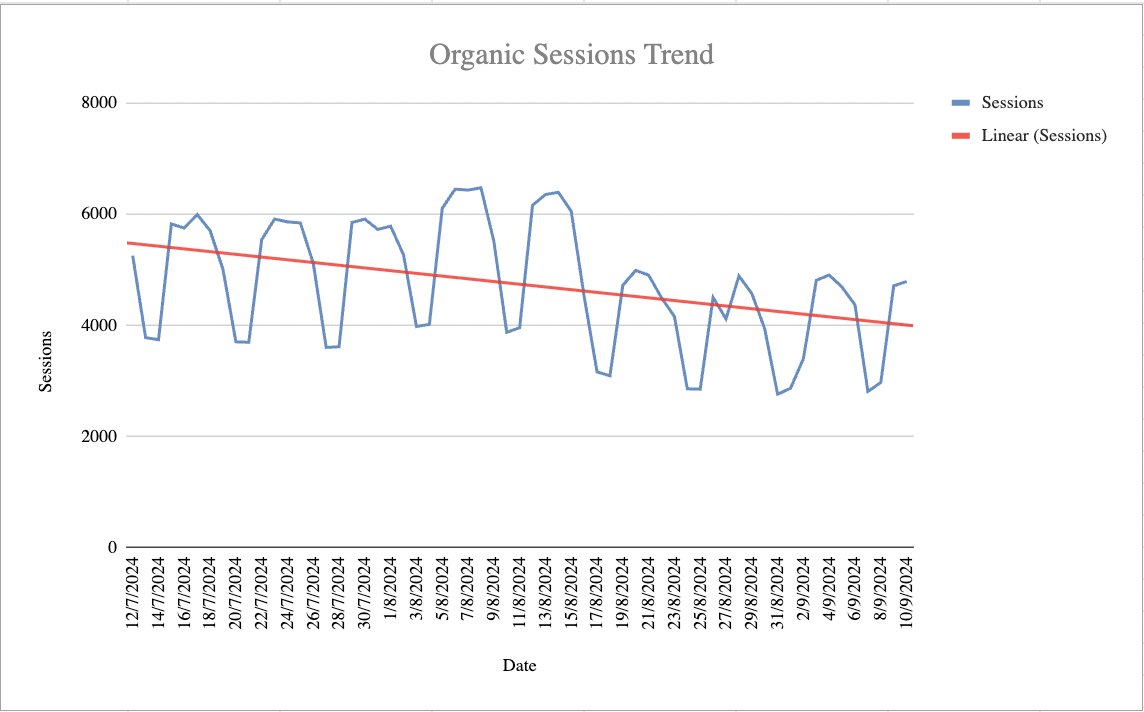
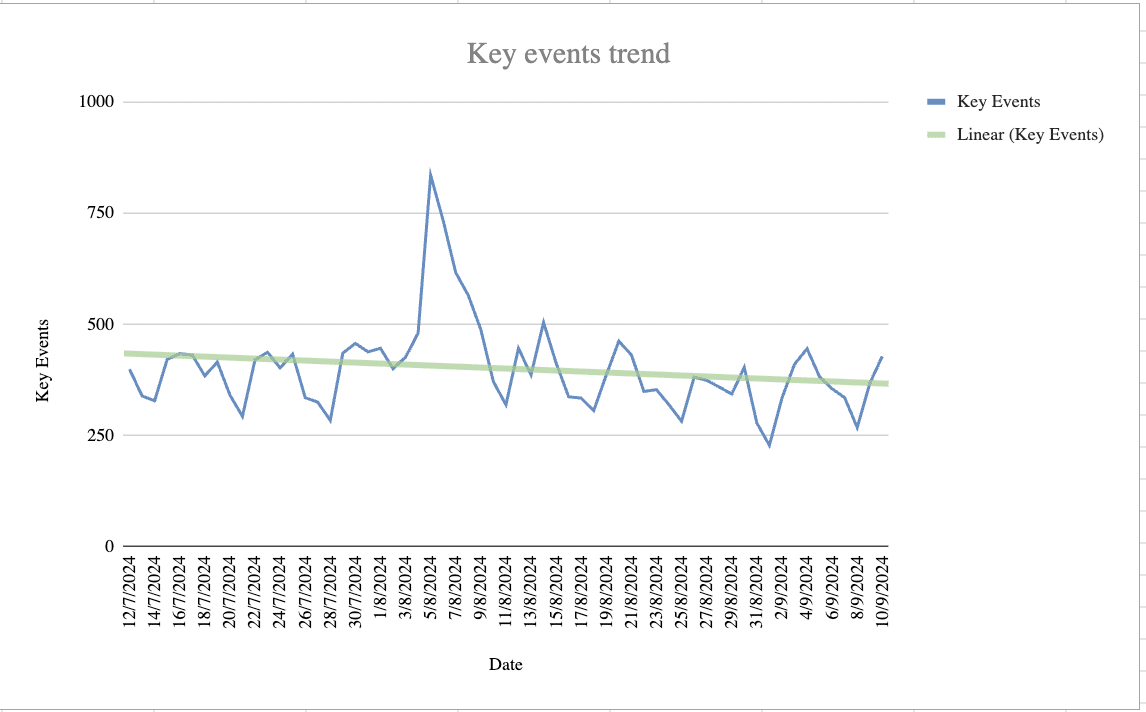
We noticed a slight decrease in sessions overall and no impact on conversions. This was particularly noticeable in August (the timing of the Google core update), suggesting the update may have played a role and the culprit was likely organic.
The hypothesis was soon confirmed by digging into organic data in both GA4 and GSC.
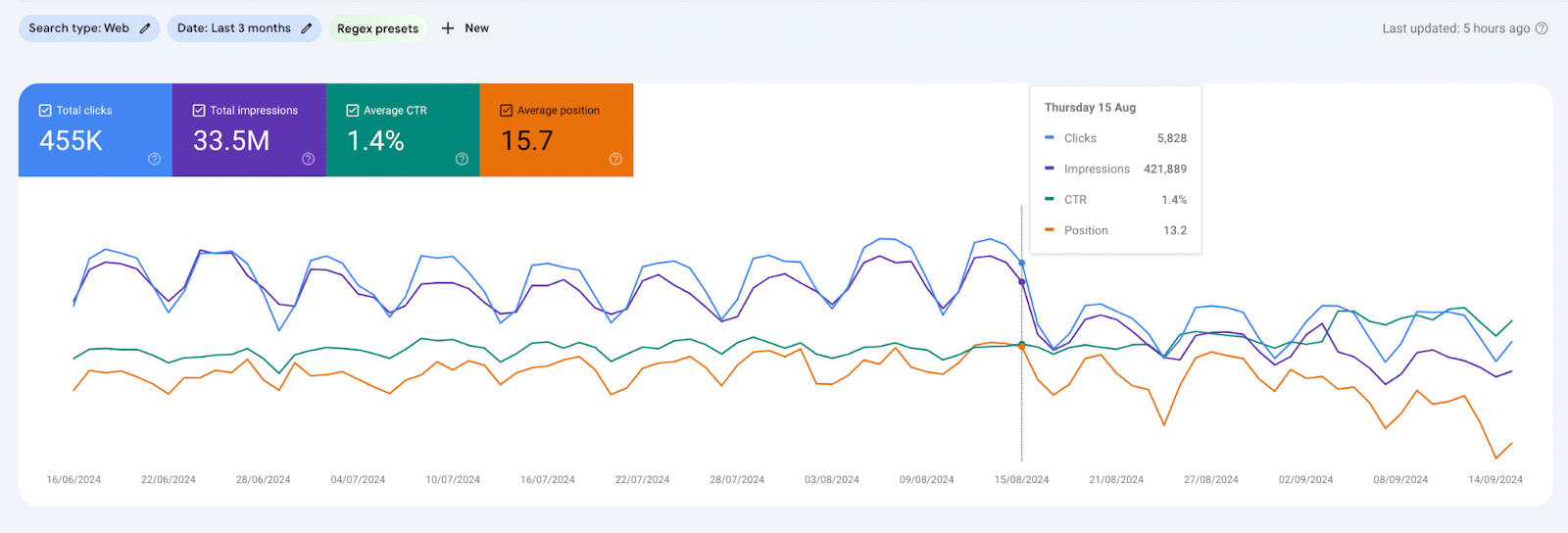
Traffic was down significantly, both looking at GSC and GA4.
Interestingly, just like overall traffic, the organic conversions were much more stable.
It was clear that the issue wasn’t the website’s relevance to its audience; those who visited it were converting. However, the overall number of users hitting the site had significantly decreased.
Before reviewing the rankings, we segmented the data by country to identify where the impact was most pronounced.
This prompted us to ask an essential question: do we care?
In our case, one of the countries most affected was India. While it would have been easy to dive into auditing this market for rankings, we recognized that the devil is in the details.
iOS is not the dominant operating system in India. In 2023, Android had a 95.17% market share, while iOS only had 3.98%.
Since our client’s solution only works with iOS, India is not the right market to focus on. Instead, we should concentrate on the U.S., which is their most relevant and larger market.
Overall content health
The second sitewide signal we explored initially is overall content health.
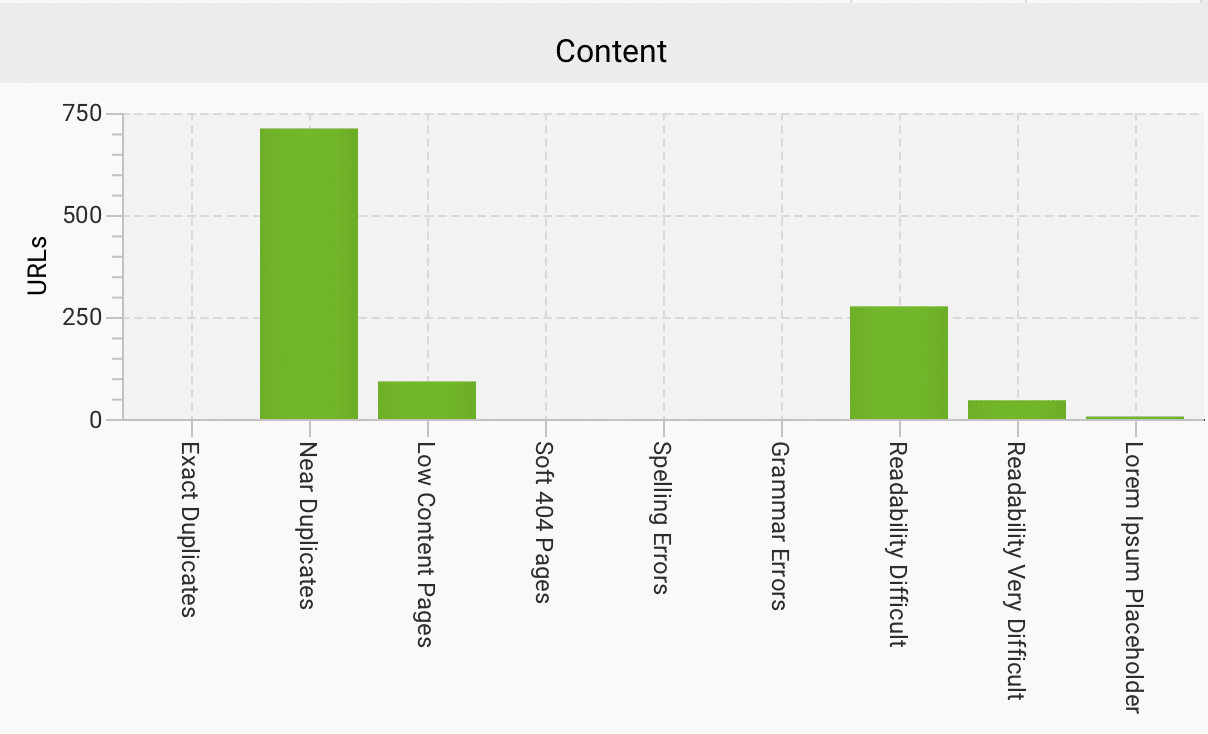
This gave us an initial understanding of possible issues with content at scale. We used Screaming Frog content analysis for this.
To use any tool effectively, it’s crucial to identify what truly matters in the vast amount of data you’re presented with.
In this case, it would be easy to focus on the wrong metric, like readability.
While some pages may have readability challenges, this aligns with our technical audience’s expectations.
The more pressing issue wasn’t readability but the significant number of near duplicates. Most of the affected pages were in the template directory. This was a key insight for segmenting the data based on website structure.
Note: This analysis differs from evaluating what Google defines as helpful content. There are ways to evaluate content at scale for helpfulness, mainly using Google’s NLP API to pick out entities and analyze sentiment. Something we currently have in the pipeline.
Link profile
The client had already said they wanted to enhance their internal linking at Stage 2 of the project.
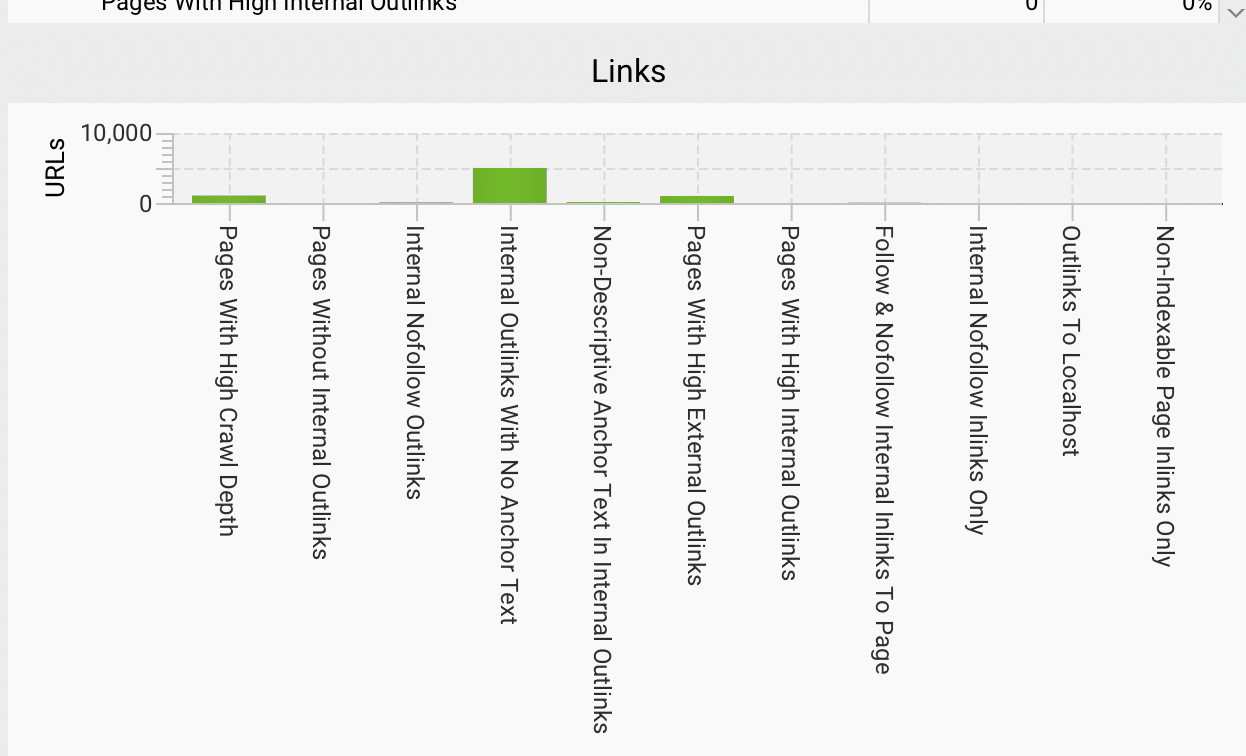
For now, our focus was on understanding the situation, which we accomplished by using Screaming Frog.
Overall, the links looked healthy. We found valuable insights for improving our SEO strategies.
For example, when we examined the issue of internal outlinks with no anchor text, we discovered it originated from a specific template. While it’s not a top priority, it’s an easy fix at the template level.
Technical SEO
Not every technical fix will affect rankings, no matter how interesting they may be.
By this point in the analysis, I suspected the real issue was in the content and changes in the SERPs.
I’ve seen many websites struggle after the latest Google updates, and we suspected that Reddit and AI Overviews were taking over the search results.
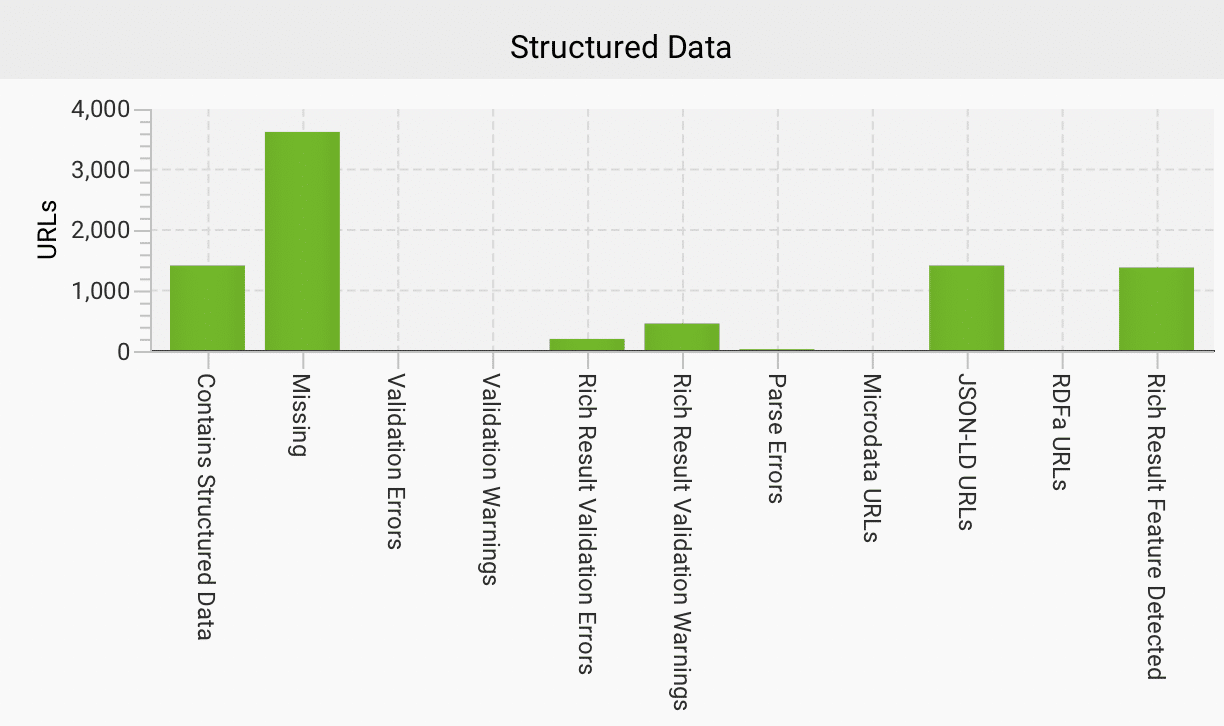
From what we’ve observed, AIO functions similarly to a featured snippet. Therefore, one area we should focus on is structured data markup.
This Screaming Frog analysis helped us identify missing structured data at the template level and reveal any obvious gaps.
Wild card: Persona-based sitewide signals
Creating well-defined personas can be beneficial for SEO and overall marketing.
The client expressed concern that their recent expansion of personas, as they shifted focus to a different market segment, may have diluted their website’s authority.
While I don’t believe proprietary metrics such as DA or AS are a ranking factor, the recent Google API leak did indicate that Google has its own understanding of domain authority.
I can see why a company might think that expanding into a new market could make Google question its target audience.
From a technical perspective, this concern aligns with how semantic SEO works – websites must focus on delivering closely related content.
To determine if our client faced challenges with this new vertical, we used a combination of tools:
- Ahrefs to export the keywords and pages ranking in the U.S.
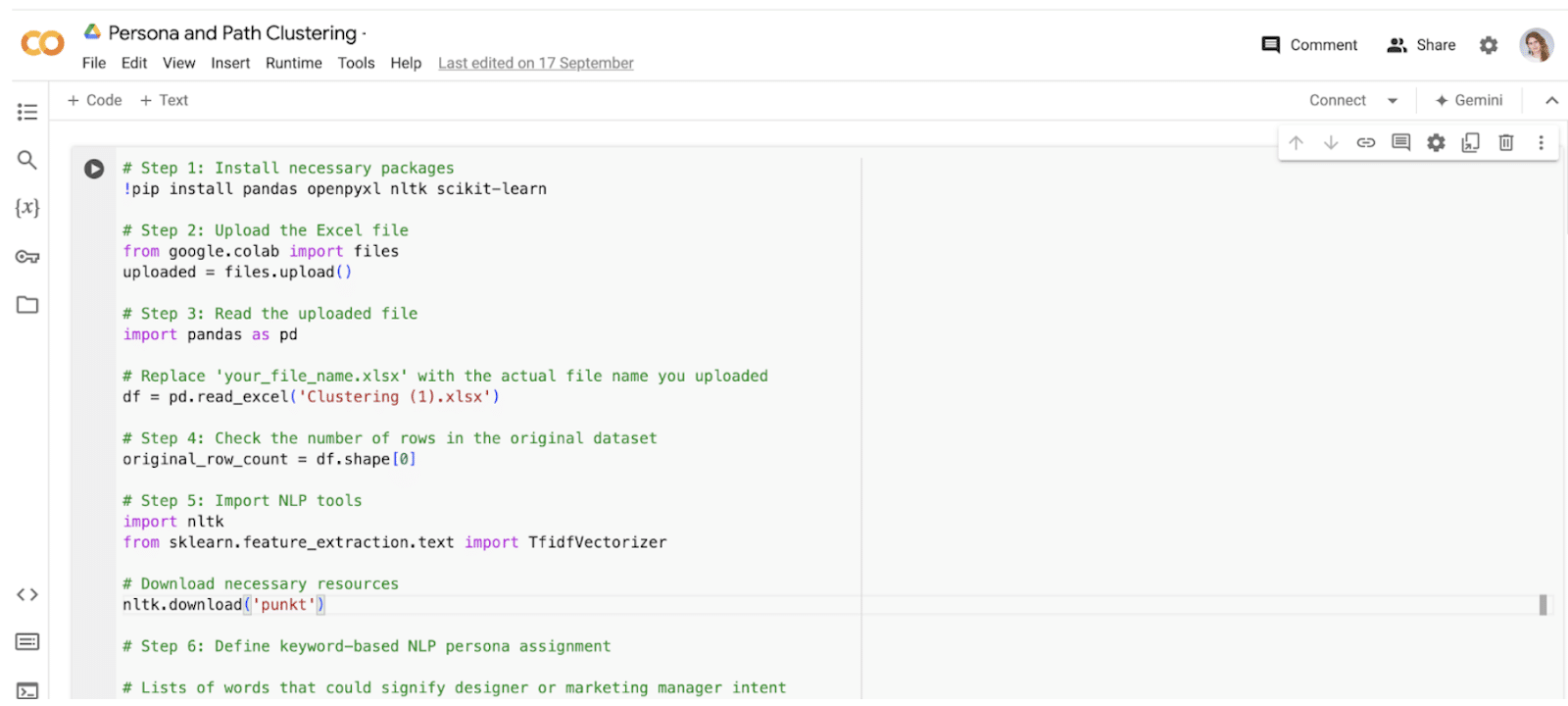
- A Python script that employed NLP to analyze the pages and assign a persona.
The findings were intriguing: most pages were assigned to both personas, indicating the content was closely aligned.
This suggested that the website didn’t have the problem of straying too far from its core topic.
Use the sitewide indicators to segment the data for deeper analysis
So far, everything suggests that the website remains valuable and that the traffic drop is not due to sitewide issues.
- We already identified some challenges linked to specific page sections, such as the template directory.
- We know that most traffic comes from the blog section.
However, with thousands of pages involved, it raises the question: where do you even start?
Using exports from various sources (GA4, GSC and the Ahrefs Top Pages report), we mapped the data to analyze the impact at the keyword level.
This was the labor-intensive part of the process. It involved extensive data wrangling with index-match functions and pivot tables.
Although it was tricky, this approach enabled us to identify priority areas for deeper analysis, including:
- Creating a label based on % drop following the core update
- For pages with a drop in session >= 20% or conversions >=20% – High
- For pages with a drop in session >= 20% or conversions >=20% – Medium
- For pages with a drop in session >= 20% or conversions >=20% – Low/None
- Key event + keyword volume
- Priority based on conversions >10 + volume
While not foolproof, this analysis provided us with an initial list of 42 pages to examine more closely.
It’s important to note that all the metrics involved depend on various factors, one of which is the publication date of the posts.
Newer blogs may not have built up enough authority, and they could have been initially boosted after publishing but later declined due to a lack of user signals, such as click behavior – something we suspect is related to NavBoost.
Conversely, knowing which pages were older helped us identify those that needed refreshing.
By default, Screaming Frog does not extract blog publish dates, so we needed to set up a custom extraction. This involved copying the selector from the date element using a tool like Google Chrome’s Inspect feature.
Once we had the publication dates alongside our list of pages, we could conduct a more in-depth analysis.
Deep dive into the most affected pages and sections of the website
This is where the process becomes manual. We examined the affected pages to identify any patterns, and it quickly became apparent that one existed.
Unfortunately, our suspicions were confirmed: the primary cause of the traffic drop was the change in the SERPs in the U.S. and U.K., driven by the rise of Reddit and the inclusion of AI Overviews.
Reddit emerged as a clear winner from the recent core update, significantly impacting many of the client’s keywords.
Additionally, the expansion of AIO to cover even more queries – particularly in the client’s sector, where research indicates over 20% coverage – has worsened the situation.
AIO tends to impact informational queries more than commercial ones, which explains the loss of visibility in the blog sections.
Like many others, our client is losing valuable traffic due to Reddit and AIO, not because their website is any less helpful. Unfortunately, this is not an easy fix.
Another area we examined closely was the templates directory. Although this section wasn’t driving much traffic or conversions, it was worth investigating for two reasons:
- The client had invested significant time in deploying it.
- The initial analysis indicated issues with its implementation.
Similar to the priority blog pages, we noticed a pattern after reviewing a few template pages.
These pages conflicted with search intent, and their content could be improved.
While search intent is typically categorized into four main groups, I believe in taking a broader and more nuanced approach to understanding it.
Someone searching for a template typically wants to see several options to choose from. They intend to find a few templates, pick one they like and use it.
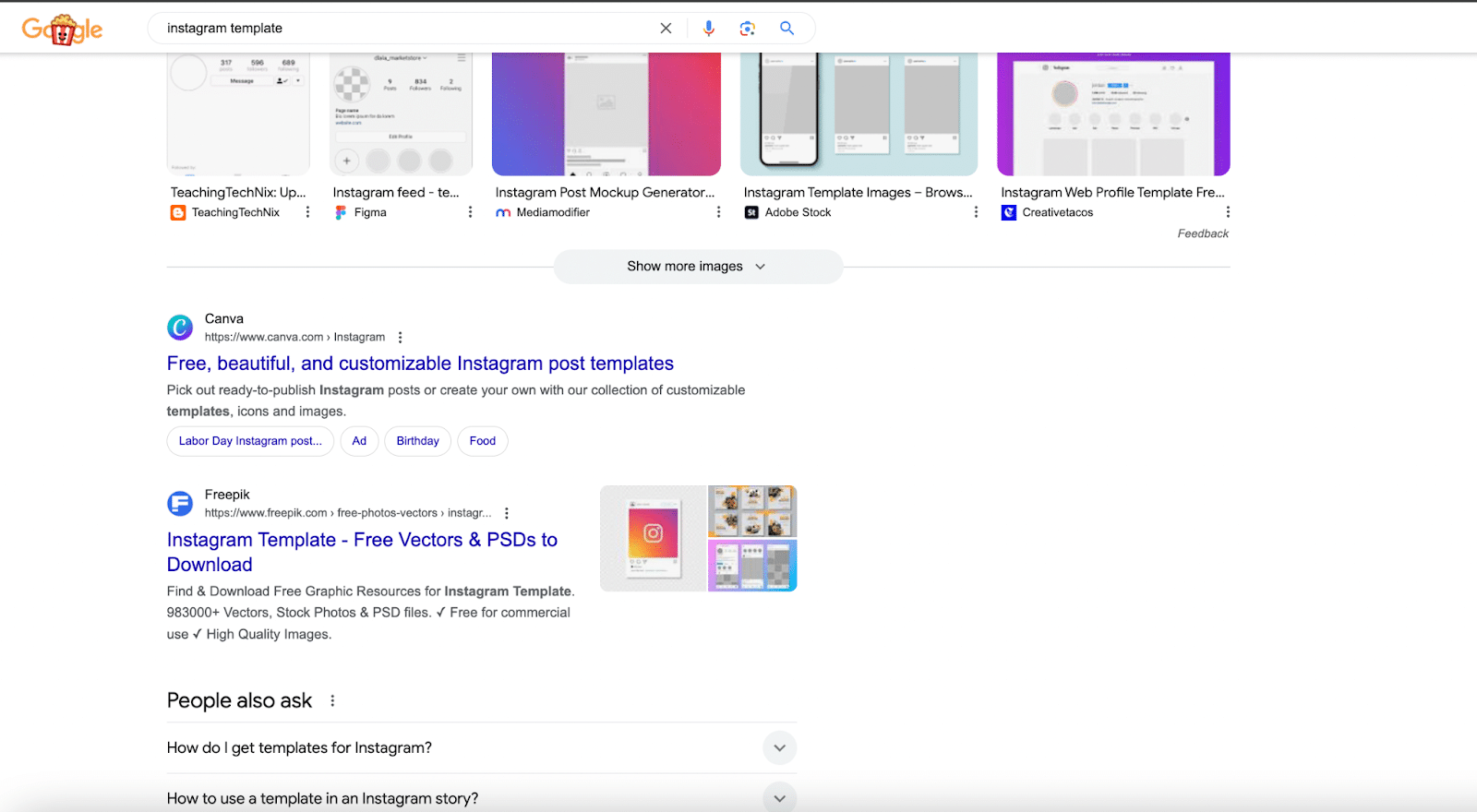
Google recognizes this. For instance, if I search for “Instagram template” or “Instagram templates,” the top results come from companies offering a collection of options.
Unfortunately, this wasn’t taken into full consideration before the pages were launched.
Rather than optimizing collection pages that speak to the intent, the client optimized the individual template pages.
Additionally, the individual pages had very sparse information for users. Not that tweaking this would make a difference in situations where the intent is not aligned.
Get the newsletter search marketers rely on.
Fixing the ‘unfixable’
It was clear that our initial recommendations to the client needed a holistic approach, as there was no quick fix for the issues we identified.
To address these challenges, we recommended:
- A few quick wins and tests.
- Developing an improved strategy that considers these shifts.
- Closely measuring AIO and rethinking SEO KPIs.
Quick wins and tests
Everyone seeks the ideal “low effort, high impact” solution. So, before tackling the complex issues, let’s focus on the quick wins.
The analysis revealed some interesting tests we could try, specific areas for improvement and several technical recommendations.
We suggested that the client optimize an initial content piece by reviewing and adjusting it to better align with E-E-A-T guidelines.
I’ve also become increasingly interested in the concept of information gain as a factor in Google’s ranking system.
This makes sense, especially in the age of AI, where new data for training models is highly valuable. We will consider all of these elements when running the test.
The audit clearly showed that the template directory needed a rethink. With a few adjustments, it could become a valuable source of traffic and conversions.
We first suggested revisiting the keyword strategy to better align with user intent, which would set the stage for optimizing those pages.
The audit also identified a few quick wins on the technical side, particularly in Schema markup.
Rather than marking up everything on the site, being strategic about which Schema to implement is key.
For instance, if you’re a SaaS product with excellent reviews, using Review Schema is essential. Our client had several opportunities to use this Schema to enhance their content.
Developing an improved strategy that considers these shifts
The client needs to rethink their strategy, though the details aren’t fully clear yet, despite some initial ideas.
One option is focusing on user-generated content (UGC). Reddit thrives on UGC and Google seems to favor it.
However, UGC is not enough for the client to compete with Reddit. It should be part of the strategy, but not the main tactic.
Another option is diversifying the keyword strategy. While expanding into less competitive search terms where Reddit and AI-generated content don’t dominate might help, it’s a short-term fix.
Even though I’m skeptical about AI hype, it’s clear AIO isn’t going away and may actually become more prominent.
The real question is whether this shift is good or bad for users and companies. Ultimately, any strategy must account for how search is evolving.
As AI plays a bigger role in the early stages of the user journey, our client – and others – will need to rethink the kind of content they produce.
Whether AIO guides searchers or they directly use chatbots like ChatGPT, many will only reach your website during the decision stage. This changes how we approach strategy and SEO overall.
While targeting commercial keywords remains important, the focus will shift more toward building a brand and creating diverse content, like video, to rank in video SERPs and on YouTube.
Some of the content that’s lost rankings for our client could perform well in video format.
I don’t see these changes as negative. Relying solely on Google was never a good strategy.
Now, strategies must go beyond SEO and integrate with broader digital marketing efforts. As someone who values full-stack marketers, I believe this shift opens up exciting opportunities.
Dig deeper: Search everywhere optimization: 7 platforms SEOs need to optimize for beyond Google
Closely measuring AIO and rethinking SEO KPIs
Our client already ranks in AIO for some terms, but we can’t measure the impact on CTR since it’s not trackable in GSC or GA4 – and likely never will be.
According to Liz Reid, the Head of Google Search:
- “And we see that the links included in AI Overviews get more clicks than if the page had appeared as a traditional web listing for that query.”
This may or may not be true overall. We know our client was losing clicks and that AIO clicks are, in any case, a different user experience.
Measuring AIO clicks has been a gray area, but it’s crucial to address.
We recommended expanding the client’s SEO tech stack to include platforms that help with tracking.
While they currently use Ahrefs, which doesn’t yet support AIO tracking (though it likely will soon), switching to a tool like Semrush would be a logistical challenge for such a large site. Instead, we suggested supplementing with ZipTie.
However, measurement goes beyond tools – it’s about rethinking KPIs.
While traffic, conversions and revenue remain important, brand KPIs and micro conversions are needed now more than ever.
With search and data privacy changes, tracking every click isn’t feasible.
Building brand resilience and focusing on smaller touchpoints, like newsletter signups and engagement rates, can help fill the gap. As the market evolves, so must our KPIs.
Courtesy of Search Engine Land: News & Info About SEO, PPC, SEM, Search Engines & Search Marketing
Thursday, October 3rd, 2024
Are you having trouble finding relevant keywords for your paid search campaigns? It’s time to move beyond only using the Google Keyword Planner and uncover fresh, relevant keywords.
Traditional keyword research tools frequently lack depth, offering only limited insights into the complexities of user search behavior. As a result, PPC managers often struggle to uncover new keyword opportunities.
This article explores 19 tools and strategies for keyword mining to help you discover new search terms and enhance your campaigns.
By the end, you’ll have an arsenal of techniques to optimize your campaigns and gain a competitive edge in your growth strategy.
Finding new opportunities beyond Google’s Keyword Planner
Although the Google Keyword Planner is valuable, exploring alternative research methods is crucial for discovering a wider array of relevant searches.
Increasing the volume of relevant searches is an effective strategy to expand your campaigns and business. A higher volume of qualified and converting traffic can lead to more sales or leads.
Here are some effective tools and strategies you can use when looking to expand your campaigns.
1. Dynamic search ads (DSAs)
These ads leverage website content to automatically generate ads and the associated keywords.
By analyzing the search terms that trigger your DSAs, you can identify valuable keywords to incorporate into your standard search campaigns.
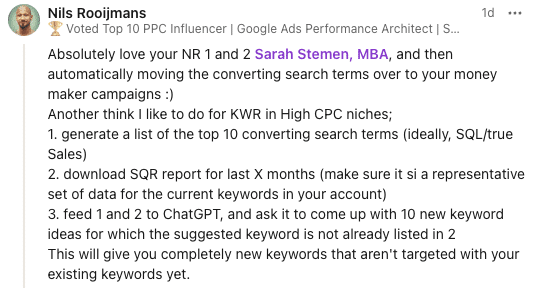
Fellow PPC expert Nils Rooijmans shared on LinkedIn that he likes using DSA campaigns, moving successful terms to revenue-generating campaigns. He also uses ChatGPT for new keyword ideas.
2. Google Search Console
GSC lets you see the search queries that led to clicks on your website. You can use these insights to identify new keywords and optimize your ads accordingly.
Dig deeper: Using search query reports to optimize PPC campaigns
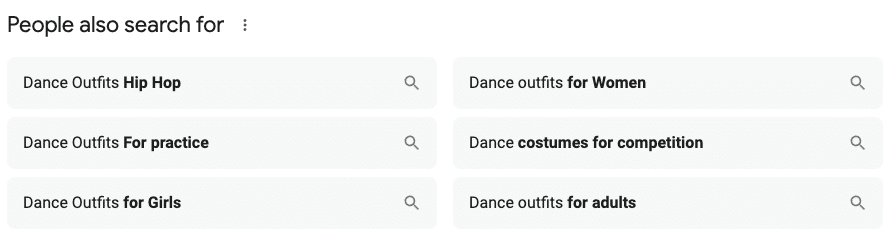
3. Related searches on Google (People also search for)
When you enter a search term into Google, scroll down to the bottom of the page for a list of related searches. These can give you ideas for new keywords or variations of existing ones.
In the example above, I was searching for dance costumes for my daughter and came across some excellent search term suggestions.
If I were managing a paid search account focused on costumes in these categories, these terms would be a fantastic addition to enhance the account’s effectiveness.
4. Competitor websites
Take inspiration from your competitors’ websites by analyzing their content and identifying relevant keywords they may be using in their paid search campaigns.
5. Google Autocomplete
Pay attention to the suggestions that appear as you type in search queries. These autocomplete options often reveal popular search terms and long-tail variations.
6. Microsoft Advertising
While Google Ads may be the dominant platform, Microsoft Ads search term reports can provide new keyword ideas.
Analyze the search terms that trigger your ads on this platform to discover additional keyword opportunities that can be added to your campaigns in Google Ads.
You can also add terms found in the Google Search Query Report and add them into your Microsoft campaigns.
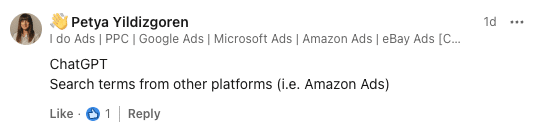
PPC specialist Petya Yildizgoren validated this tactic on LinkedIn and introduced Amazon Ads as another source for new keywords.
7. Social monitoring tools
Monitor social media platforms to identify industry-specific trends, popular topics and commonly used phrases.
These insights can help you uncover relevant keywords that align with your target audience’s interests.
For example, while managing an account, I noticed in the comments that customers favored products made in the U.S.
I added related keywords to key terms, which helped drive additional non-brand traffic for the advertiser.
8. Customer conversations
Listen closely to the conversations your customers have with your support team or sales representatives.
Capture the keywords and phrases they use to describe your products or services.
For example, while working with a client offering a call center service, I discovered that leads used “answering service” instead of “call center” when monitoring their calls.
9. Website survey
Conduct surveys on your website to collect direct feedback from your customers. Focus on the open-ended responses to identify the terms used to describe respondents’ needs and goals.
Many survey tools allow users to analyze and generate reports based on the words in surveys at scale.
10. Social comments
Analyze the comments on your social media posts, as the language used by your audience can provide valuable insights into their search intent.
Get the newsletter search marketers rely on.
11. Broad match type
Develop campaigns using broad match type terms without negative keywords to find new keywords from search term reports.
A valuable tip is to separate these campaigns to ensure your entire budget isn’t consumed by irrelevant keywords.
Dig deeper: Broad match keywords: When to test and when to avoid
12. Keyword research tools
Don’t limit yourself to one keyword research tool.
Consider using a combination of tools, such as Semrush, Ahrefs or Moz Keyword Explorer, to uncover different perspectives and insights on potential keywords for your campaigns.
13. Google Trends
Use Google Trends to identify popular search terms and their search volume over time.
This tool can also show related queries and geographic data, giving you a more comprehensive understanding of user behavior.
14. Analytics data
Dive into your website analytics data to see which organic keywords are driving traffic to your site. This can give you a good starting point for identifying relevant keywords for your paid search campaigns.
Don’t rely solely on Google Analytics. Explore other tools like Adobe Analytics, too.
15. Customer persona research
Create customer personas based on demographic, psychographic and behavioral factors.
Use these personas to guide your search for new keywords that align with their interests and behaviors.
16. Customer demographics analysis
Many customers will search in their native language and still make purchases from a website in the local language. In the U.S., for example, you’ll notice many searches in Spanish.
Bilingual customers are often tolerant of conducting business across languages. Don’t let the absence of a fully translated website prevent you from bidding on keywords in your native language.
I worked with a healthcare client who added Cantonese and Punjabi keywords and ads, which performed quite well despite the website being in English.
17. Customer reviews
Pay attention to the language used in customer reviews to identify commonly used keywords and phrases related to your products or services.
This can provide additional insights into your customers’ search behavior and help you uncover new keyword opportunities.
18. Collaborate with your team
Don’t overlook the valuable input from your team members, whether it’s colleagues in different departments or external agencies. They may have unique perspectives and ideas for relevant keywords that you may not have considered.
Dig deeper: How to maximize PPC and SEO data with co-optimization audits
19. Stay up-to-date
Regularly review industry news, updates and trends to stay current on any emerging topics or terms that could potentially be relevant for your campaigns.
This can help you stay ahead of the competition and continue to refine your keyword strategy.
Dig deeper: Top 5 ways to stay up to date on paid search trends
Leveling up your PPC query mining strategy
There are many techniques and tools available to conduct keyword research and discover new opportunities for paid search campaigns.
Additional strategies include:
- Semantic keyword research, which explores related terms and synonyms to expand your keyword list.
- Topic modeling, which uses advanced tools to identify underlying themes in your website content or customer feedback.
- Seasonal keyword research, which allows you to adjust your strategy for trends like “Black Friday” or “Cyber Monday” and capture additional traffic during peak times.
Suggestions from the paid search community include using Performance Max search categories (as noted by Guillermo Pareja) and tools like Answer the Public for question-based queries (recommended by Neelam Shahzadi).
Many experts also suggest leveraging AI tools like ChatGPT to generate new keyword ideas by seeding prompts with well-performing terms.
Traditional keyword research methods are valuable, but they only scratch the surface of potential opportunities.
By combining these techniques with AI tools, you can uncover hidden gems and optimize your campaigns for maximum ROI.
Whether you’re looking to expand or refine your campaigns, these strategies will help you create a comprehensive keyword approach that goes beyond the limitations of traditional planners and drives business growth.
Courtesy of Search Engine Land: News & Info About SEO, PPC, SEM, Search Engines & Search Marketing
Thursday, October 3rd, 2024
Amazon Ads has become a powerful platform for businesses of all sizes, both on and off the Amazon marketplace.
This article explores the various types of Amazon Ads, their features and how they can benefit different businesses.
Whether you’re a small local business or a large brand, understanding Amazon’s advertising options can help you reach new customers and grow your business.
Understanding Amazon advertising today
When most people think of Amazon advertising, they typically envision promoting products sold on Amazon through Seller Central or Vendor Central.
However, Amazon’s advertising ecosystem has expanded significantly, now offering options for service and local businesses that don’t sell physical products on the Amazon marketplace.
The scope and capabilities of Amazon ads have been growing at an exponential rate.
Amazon has been actively developing the functionality and products in its advertising suite, enhancing targeting options, expanding eligibility criteria and introducing new features like audience targeting and customer retargeting.
Amazon advertising can be broadly divided into two main categories:
- Sponsored ads
- This includes:
- Sponsored Products.
- Sponsored Brands.
- Sponsored Display.
- These ad types are specifically designed for products sold through Vendor Central, Seller Central and Kindle Direct Publishing.
- Display ads
- This category comprises two main products:
- Amazon DSP (demand-side platform).
- Sponsored Display for All Business (formerly called Non-Endemic Sponsored Display).
- Both of these display ad types are available for businesses not selling goods on the marketplace.
- These ads appear not only on Amazon-owned sites like Amazon.com, Twitch and IMDb but also on other sites with which Amazon has direct partnerships.
As we delve deeper into each ad type, we’ll explore their unique features, targeting options and best practices to help you navigate the diverse landscape of Amazon advertising.
Sponsored ads
Amazon has been aggressively expanding the targeting options and products available within its Sponsored Ads suite. Advertisers on Amazon’s marketplace have more options than ever.
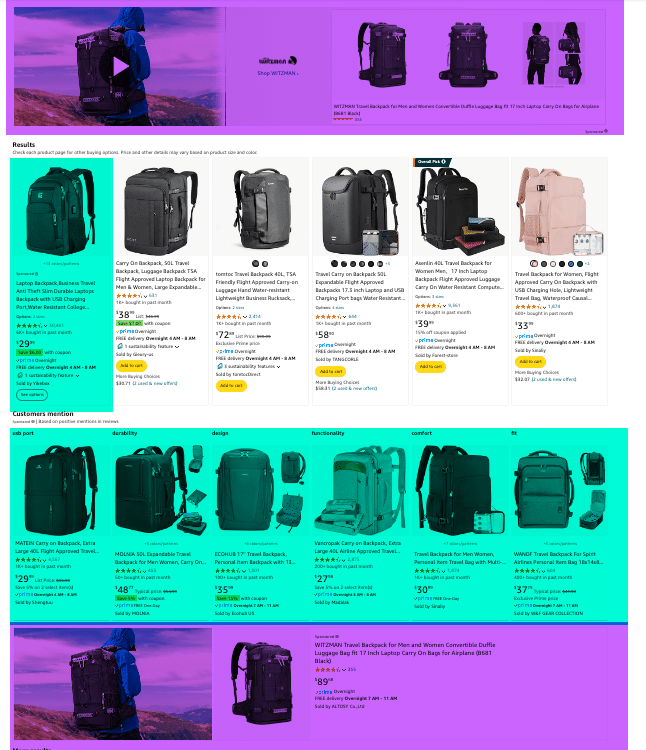 Sponsored Brand Ads in Purple, Sponsored Products Ads in Green. Most of the search engine result pages on Amazon are now dominated by ads.
Let’s walk through the primary ad types used within Amazon’s self-managed ad service for its marketplaces worldwide.
Sponsored Products
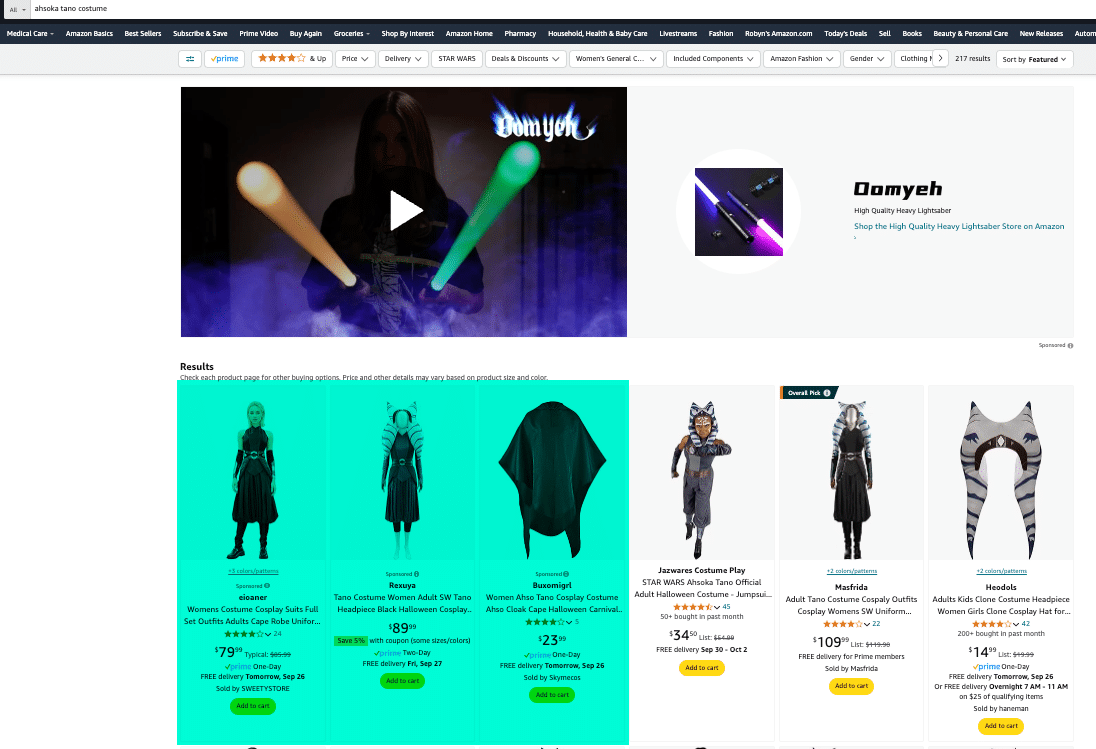 Sponsored Product Ads are made up entirely of the components of the product detail page and can show up in the search engine results as well as on product detail pages.
Available platforms:
- Vendor Central.
- Seller Central.
- Kindle Direct Publishing.
Eligibility requirements:
- Products must be in one or more eligible categories, have inventory available and be eligible for the Featured Offer to advertise.
Targeting available:
- Keyword.
- Category.
- Product.
Placement locations:
- Amazon Marketplace search results.
- Product detail pages.
Creative required:
- All creative is derived from the product listing on Amazon’s marketplace.
Sponsored Products should be the starting point for almost every Amazon ad strategy for products sold through the Amazon marketplace. It is not uncommon for this ad type to make up as much as 80% of an advertiser’s budget.
One of the primary placements for this ad type is the search engine results page, which can provide the most significant lift in sales and organic ranking.
Using keyword targeting for Sponsored Products is generally one of the primary ways advertisers increase conversions for a keyword phrase to improve the organic ranking of their products.
 Targeting for Sponsored Products can be based on keywords and product targeting. It is recommended that you always test multiple match types for each target.
Advertising on Amazon directly impacts organic results, especially for keyword-driven searches.
Sponsored Products have minimal availability for creativity, so it’s essential to optimize your product’s title, structured data and primary image for both organic search and ad conversion.
Sponsored Products campaigns have no monthly or upfront fees and are always on a cost-per-click basis.
Your ads may be displayed at the top of, alongside, or within shopping results and on product pages, on desktop and mobile. Ads are shown to shoppers based on relevant keywords or products.
At this time, adult products, political items, used products, refurbished products and products in closed categories are not eligible for advertising.
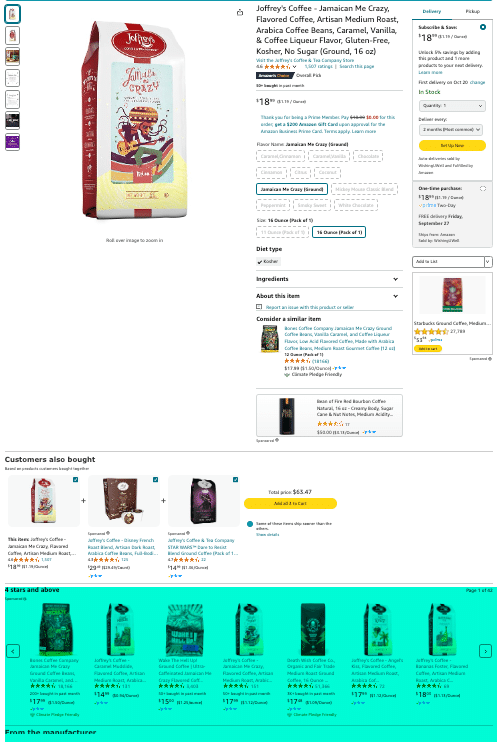 Sponsored Product Ads can also show on the product detail page. If you have a large product mix, targeting your own products to fill the digital shelf can be an effective strategy to reduce loss of marketshare to competitors.
Sponsored Brand Ads
Available platforms:
- Vendor Central.
- Seller Central.
- Kindle Direct Publishing (only when you have at least three unique titles under a single pen name).
Eligibility requirements:
- Brand Registry is required to run this ad type. However, you do not need the Buy Box for it to run.
Targeting available:
- Keyword.
- Category.
- Product.
Placement locations:
- Amazon Marketplace search results.
- Product detail pages.
Creative required:
- Creative must consist of:
- 50-character headline.
- Brand logo.
- Custom image.
- Product detail page components.
- Creative will show custom image on left with products on right that images and titles pull from detail page.
Sponsored Brands can direct customers to either product detail pages or store pages.
One advantage of these ads is that you don’t need to be the merchant holding the Buy Box for them to run, making them especially beneficial for brands that lack exclusivity on featured offers.
Typically, Sponsored Brand Ads account for 10-20% of a brand’s marketplace advertising budget and operate on a cost-per-click basis.
Originally, you could only run Sponsored Brand Ads if you had at least three products. Now, this requirement has been removed, allowing brands with just one product to use these ads.
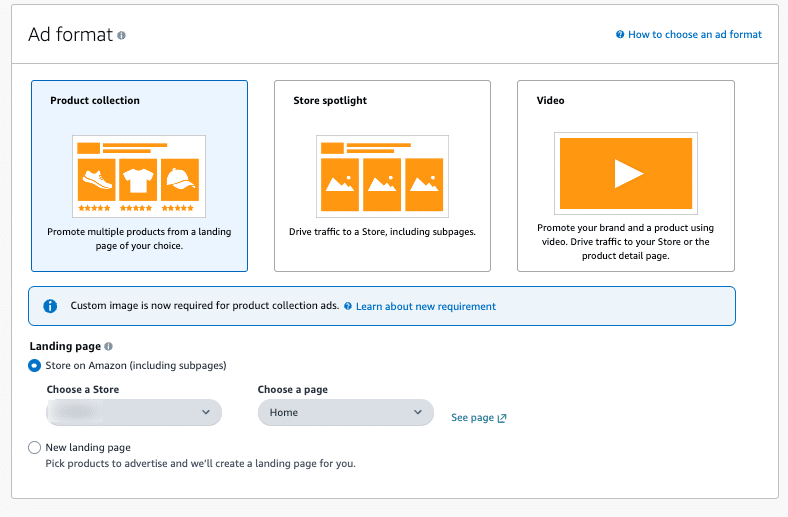 Sponsored Brand ads can feature a product collection, a store spotlight or a video. Additionally, you can direct these ads to a custom landing page.
Sponsored Brand videos are an effective way to capture visibility in search results and are among the most popular methods for utilizing Sponsored Brands. These videos yield a high return, particularly for products that fold, transform or are new to the category.
Sponsored Brands are available for vendors, book vendors, Kindle Direct Publishing (KDP) authors, agencies and professional sellers enrolled in Amazon Brand Registry.
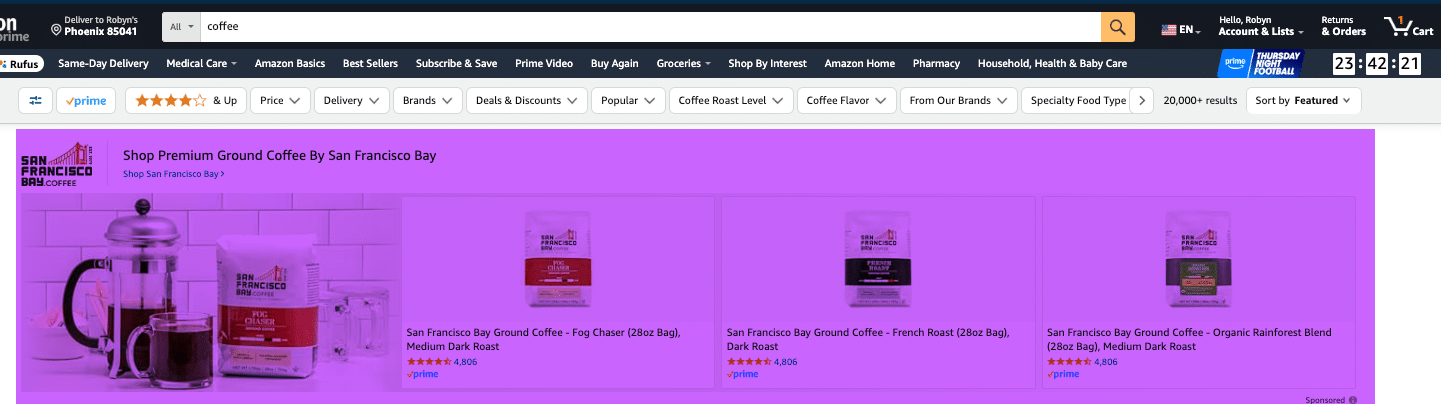 This is a Sponsored Brand Product Collection.
Dig deeper: Amazon Ads: Maximizing Sponsored Brands campaigns
Sponsored Display (Marketplace)
Available platforms:
- Vendor Central.
- Seller Central.
Eligibility requirements:
- Brand Registry is required to run this ad type. However, you do not need the Buy Box for it to run.
Targeting available:
- Category.
- Product.
- Audiences.
Placement locations:
- Detail page.
- Non-native placement in search results.
Creative required:
- Creative must consist of:
- 50-character headline.
- Brand logo.
- Lifestyle image.
- Product detail page components.
Sponsored Display is the newest type of sponsored product ad.
Over the last two years, the ability to target and retarget with sponsored display has drastically increased. This makes it a powerful tool to use Amazon audiences and retarget views and purchases of specific ASINs for your products and competitors.
This ad type usually accounts for 5-15% of the overall ad budget. However, there can be a greater variance for this ad type, with some brands using it heavily and others not.
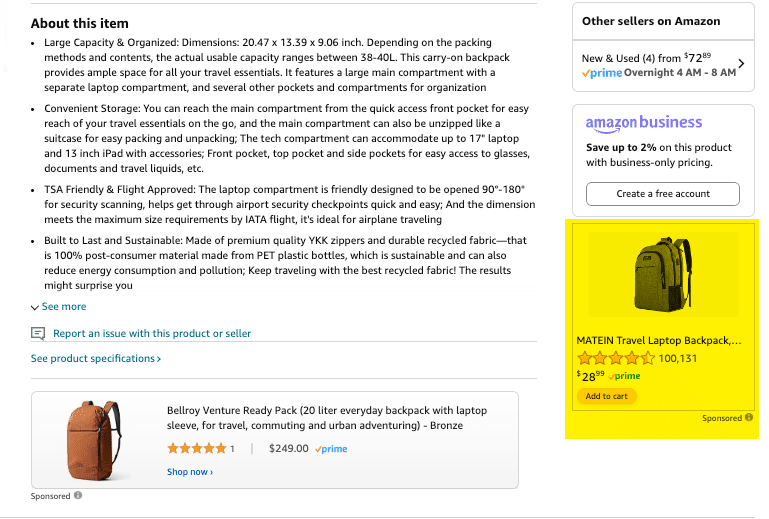 Sponsored Display Ads can be great for audience targeting and customer retargeting. You can target Amazon in-market and lifestyle images, as well as product views and purchases.
Sponsored Display supports cost-per-click (CPC) and cost-per-thousand viewable impression (vCPM) pricing options without minimum campaign spend requirements.
Ad placement can be found across the Amazon store and thousands of apps and websites.
Sponsored Display allows you to target Amazon’s first-party audiences and customers who have viewed or purchased specific products or product categories. This capability makes it particularly effective for retargeting customers.
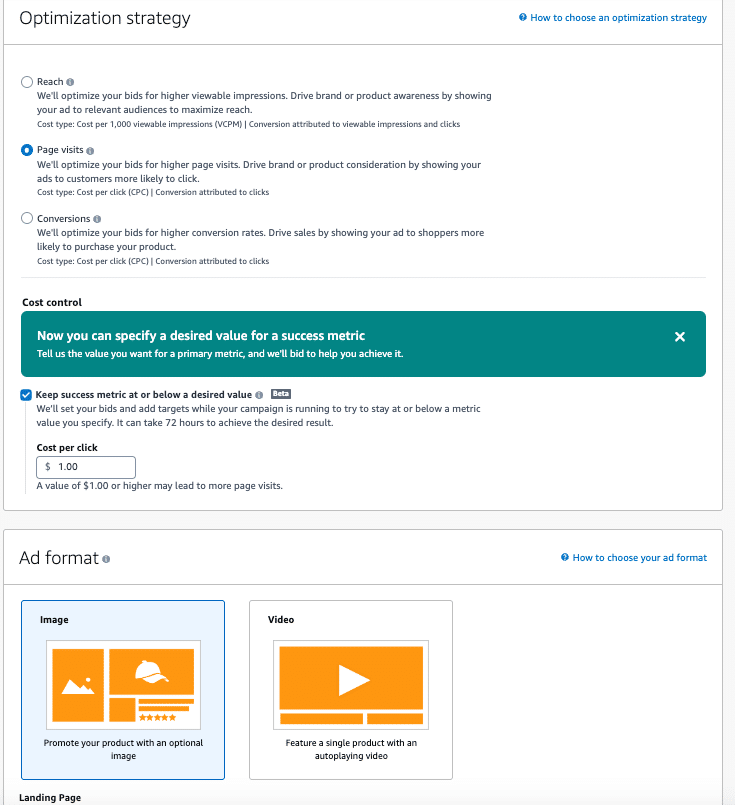 Sponsored Display has three optimization strategies and two formats to choose from.
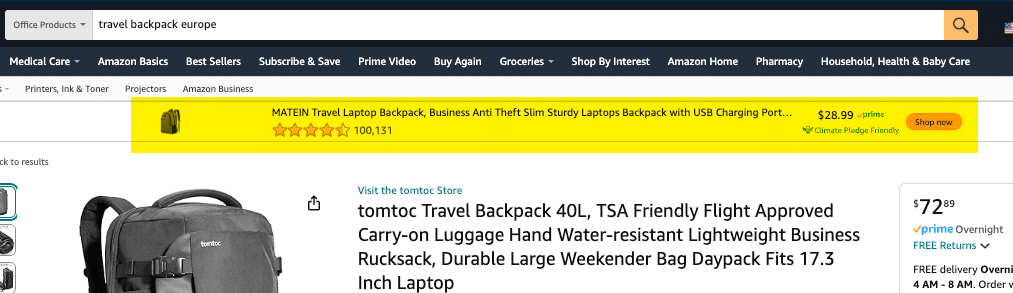 Sponsored Display ads can sometimes have similar placements to DSP
.
Keep an eye on ‘Rufus’
Amazon has also rolled out an AI shopping assistant called Rufus, but there is much debate on its usefulness and customer adoption.
At the time of this writing, Amazon specifically states that there is no reporting to show Rufus’s efficacy or even control placement.
Sponsored product ads: Best practices
- Maximize performance and budget: Maximize performance and budget with Sponsored Ad products before moving to the display and programmatic ads below.
- ROI and performance: Sponsored Ads tend to be much better for ROI and performance-based campaigns. An exception would be if you’re looking to create demand for new-to-category products.
- Funnel positioning: Sponsored Ads are generally at the bottom of the funnel and are designed to capture existing demand rather than create it. However, there are use cases for Sponsored Brands and Sponsored Display to help drive new customer awareness and acquisition.
- Full funnel approach: Amazon has increased its focus on pushing advertisers to a fuller-funnel approach. They are also working to expand Amazon Marketing Cloud (AMC) to include Sponsored Ads, giving advertisers more insight into the overall customer journey.
Dig deeper: Amazon Ads: How to boost efficiency and reduce wasted spend
Get the newsletter search marketers rely on.
Display and programmatic advertising
Until recently, the only option for display ads on Amazon was Amazon DSP.
While this has been a widely used tool for both companies with and without physical products, the high minimum spend was a deterrent for most small brands.
Amazon recently brought Sponsored Display for All Businesses (formerly called Non-Endemic Sponsored Display) out of beta as an option for brands with smaller budgets.
Amazon DSP
Amazon DSP has been a key player in programmatic advertising for many years. It offers an extensive suite of tools for analyzing customer conversion and targeting first-party audiences.
While it can effectively grow brand awareness, it tends to be less ROI-focused than Sponsored Ads.
One major drawback is the minimum ad spend requirement, which ranges from $10,000 to $35,000 per month, making it prohibitive for many small businesses.
Additionally, managed DSP services with Amazon require a minimum spend of $50,000 per month.
To assist advertisers in navigating customer journeys, Amazon provides tools like Amazon Marketing Cloud to enhance understanding and optimize strategies.
Sponsored Display for all businesses (SDFAB)
Sponsored Display for all businesses is a new product designed for small and local service-based businesses.
It allows them to leverage Amazon’s audience targeting capabilities and the views and purchases of specific products for their display ads.
Advertisers can target Amazon’s first-party audiences or focus on customers based on product views and purchases.
SDFAB does not allow targeting at the ASIN or product level; instead, targeting is available at the sub-category level.
In some sub-categories, you can further refine your targeting by factors such as age ranges, brand, reviews or pricing.
Additionally, you can target by location and optimize for specific goals, including page views, page visits or the newly launched lead form.
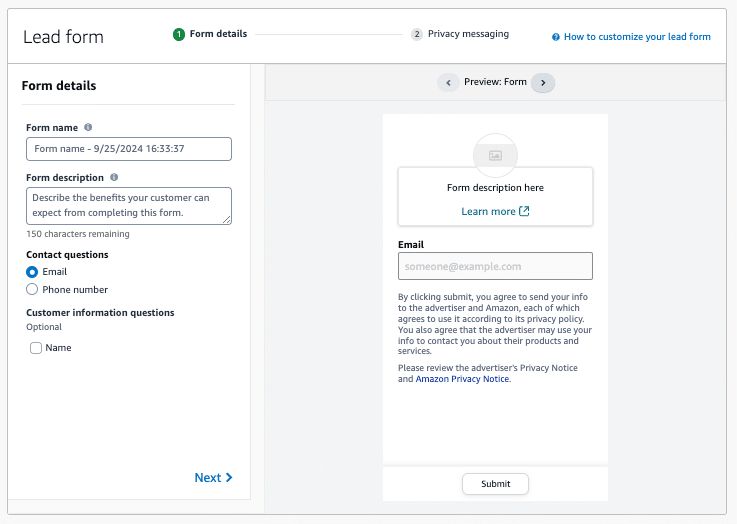 Sponsored Display for all businesses offers a lead form option. You can also optimize for reach or page visits.
This service does not require a minimum spend, allowing businesses of all sizes to use the power of Amazon’s customer data to reach highly targeted potential audiences.
It is important to note that as this is Amazon’s newest ad product, it still has some growing pains. This is something to watch as the abilities and features of this ad product continues to grow.
Dig deeper: Amazon Ads for lead generation: What advertisers need to know
Mastering Amazon Ads: Strategies for sellers and non-sellers
Amazon advertising is continually evolving, enhancing its capacity to convert and expanding the channels through which businesses can reach customers.
With its in-depth understanding of customer behavior, Amazon provides advertisers with valuable data insights that facilitate a comprehensive approach to their advertising strategies.
This evolution allows businesses to effectively engage with their target audience and optimize their marketing efforts for greater success.
Dig deeper: 5 reasons Amazon Ads is better than Google Ads for ecommerce
Courtesy of Search Engine Land: News & Info About SEO, PPC, SEM, Search Engines & Search Marketing
Wednesday, October 2nd, 2024

With third-party cookies on their way out, organizations need to start mapping out what a first-party data strategy looks like for their business. Use this checklist from OneTrust as your roadmap to cultivate trust, ensure compliance, and build stronger, data-driven relationships with your customers.
The Marketers First-Party Data Checklist covers seven essential steps: conducting a website audit, managing trackers, setting data goals, incorporating zero-party data, streamlining data collection, creating personalized experiences, and optimizing through data analysis. By following these steps, you’ll not only ensure compliance but also enhance your ability to deliver value to your customers through personalized experiences.
Visit Digital Marketing Depot to get your copy.
Courtesy of Search Engine Land: News & Info About SEO, PPC, SEM, Search Engines & Search Marketing
Wednesday, October 2nd, 2024
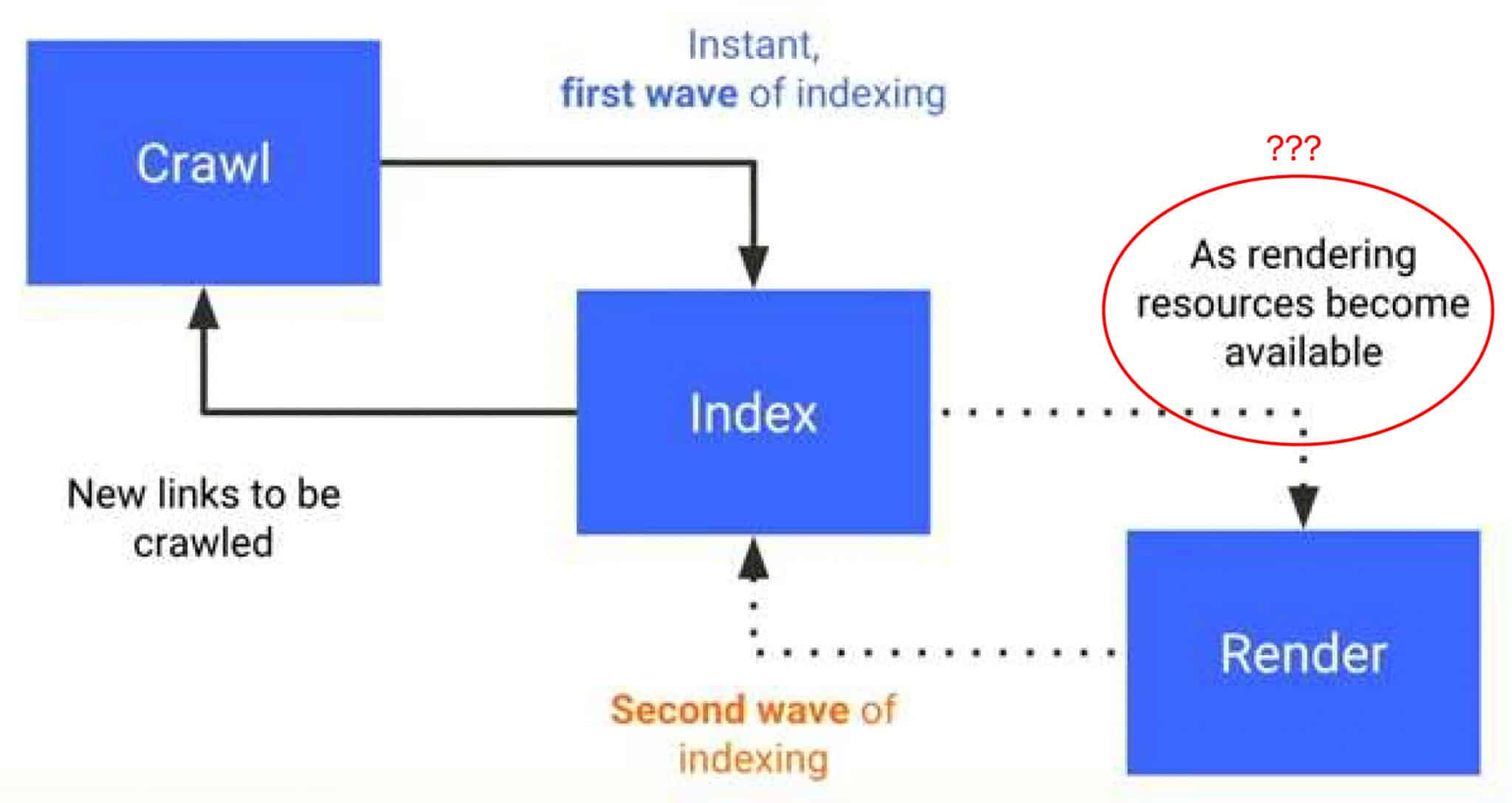
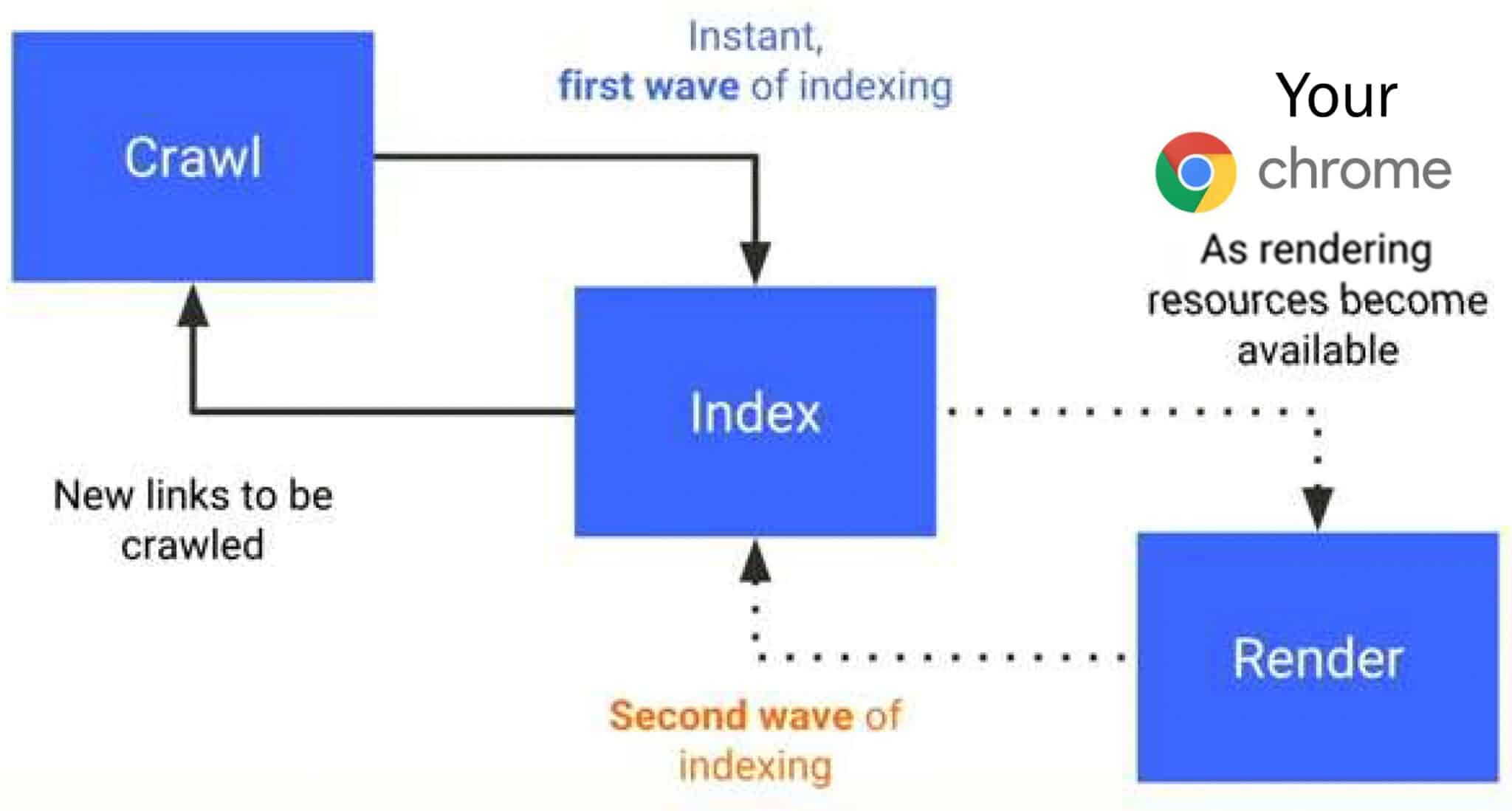
Phase two of Google’s mobile-first indexing – rendering – is Chrome and has been since 2018, according to SEO expert Cindy Krum. In a newly released video presentation, Krum said:
- “What I believe is happening here is that Google failed to tell us at this time in 2018, when it launched, that what they were using for the second phase of indexing was not a bot, per se. It was our own computers in our homes. Your Chrome being used as a rendering resource became available. That means you. As someone requested the site and executed the JavaScript, they would go and fetch that from their computer. They wouldn’t use their bot to render it. They would wait until a user rendered the page for them and then they would just go capture that full-page render so that they could process it.
- “… Google [is] using our own computers to pre-process information for indexing and our own browsers to capture information and rendering. We haven’t necessarily opted into this and we’re not knowingly getting anything back.
- “…Google is also using our rendering data and our behavior – in terms of making models like cohort models and topic models, history and engagement models – and they’re using this all taking it from our local computers without permission and passing it up to their processors. Now it’s pre-processed locally so that it can be batched and sent up and then sending it to their algorithms to be further processed and evaluated. That’s how they’re able to get the rankings that they do, but also that’s how they’re able to understand things like demographic cohorts, Journeys, where you shop, and make decisions and understanding and modeling that so that they can use that data in their advertising models in PMax, in PPC campaigns. They’re using our own behavior to market to us and to train AI that serves ads to do a better job.”
Put simply in two slides:
Connecting dots. There are a lot of claims made about other huge implications of Google’s switch to mobile-first indexing in Krum’s presentation, as well as how Chrome essentially fuels Google’s illegal search monopoly:
- User computers as resources: Google uses users’ devices to render and process JavaScript, which they then index – essentially outsourcing computational work to users. Essentially, Google is using Chrome in the same way your computer could be used for Bitcoin mining.
- Core Web Vitals: Google captures real user data to assess page load performance and interaction and feeds this data into its ranking algorithms.
- Browser updates and data collection: Frequent Chrome updates ensure data collection aligns with Google’s search and ad models, contributing to targeted advertising and AI training.
- Privacy violations: Google has been found indexing private data (e.g., private WhatsApp groups), likely due to its aggressive caching and data collection practices.
- Chrome’s role in AI: AI is very expensive, so Google could use Chrome’s processing model to help with AI development, giving them an edge in the AI arms race.
- Ad tracking and targeting: Google’s data collection extends into advertising models like cohort targeting and user behavior modeling for ad optimization.
- Cookies and privacy: Despite promising to end third-party cookies, Google continues to use them for extensive tracking and data collection.
Possible SEO implications. I reached out to Krum and asked her what the possible SEO implications are here if all of this is correct. She told me:
- If a page has links that never get clicked, Google is less likely to crawl it. We knew this, in theory, but now we have a better idea of how it works.
- Real user engagement is likely factoring in more than previously thought – we have known this since the Google Search leak.
- Manipulation of SERP and click information is a significant vulnerability, if it happens in Chrome.
- Actual user rendering is critical, so selective serving for GoogleBot might not be a great strategy.
Why we care. We know that Google collects extensive Chrome and end-user data from its other various services (Search, YouTube, Ads, etc.). That said, and to be clear, much of what she discusses is for now an unconfirmed theory (Krum does use the word “tinfoil” during her presentation and there are multiple “X-Files” themed slides).
When I first watched the video, I found it equal parts fantastical, inconceivable and entirely believable. It’s a lot to process. However, in light of all the revelations from the DOJ trial and the leak, nothing Krum discusses in the video seems like too wild of speculation. I’ll be curious to see whether Google responds.
Additional reading. Krum also referenced research by Malte Ubl, a former Googler, who said that “Google uses an up-to-date version of Chrome for rendering” and whose research found that “100% of HTML pages resulted in full-page renders, including pages with complex JS interactions.”
The presentation. Watch the video and decide for yourself (I suggest starting around 6:37): Phase II of Google’s Mobile-First Indexing is just Chrome.
Courtesy of Search Engine Land: News & Info About SEO, PPC, SEM, Search Engines & Search Marketing