Archive for the ‘seo news’ Category
Friday, May 3rd, 2024
The Inspect feature on Chrome (also called “inspect element”) lets you check under the hood of any page or website. You can use it to diagnose problems, test changes on your site and even spy on your competitors.
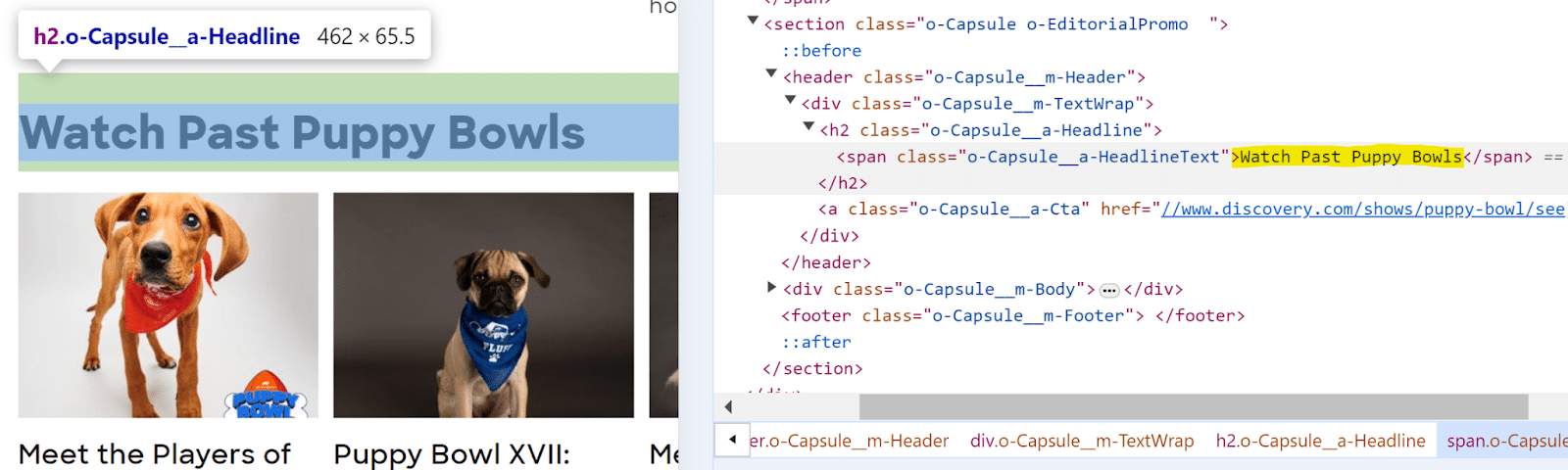
Right-click on any page and scroll down to Inspect to see the code with which the site is built.
You’ll see the page on the left window and different tabs on the right with all the site’s code. You can expand and collapse elements to browse that page’s code.
From the Elements tab, you can see what the page would look like if you edited, removed or added elements. You can also find information about how a website is set up. The Console, Sources, Network and other tabs can also help with more advanced technical audits.
It helps to know basic HTML and CSS, but you can answer many basic questions just from the Elements tab if you know what kind of code to look for.
1. What color is that?
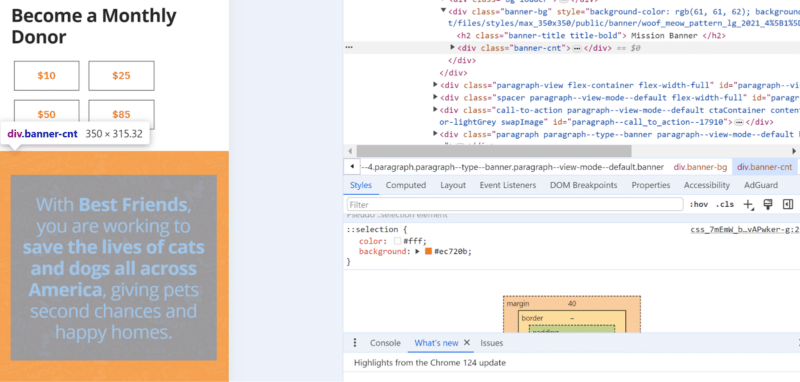
Find the unique hex code for any color on the web by using Inspect.
- Right-click on the element you want to see.
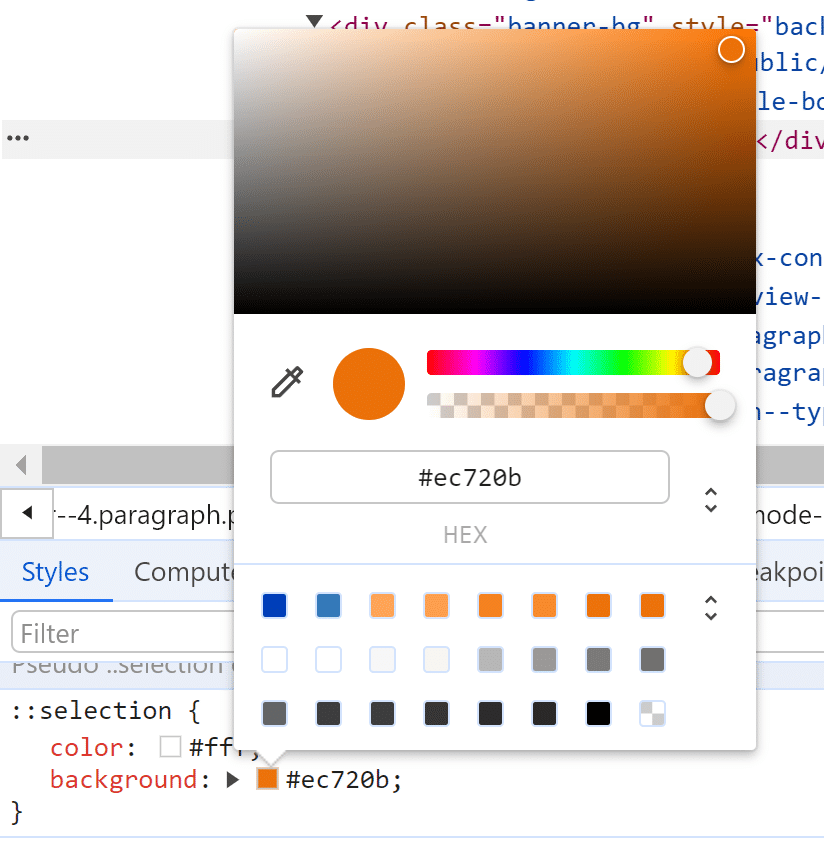
- Scroll down to find the color swatch and hex code.
- Click the swatch to play around with different colors for that element.
Every color has a unique hex code or a universal 6-digit code combo that represents the color. For example, pure white is #FFFFFF, pure black is #000000 and mint green is #98FF98.
If you don’t see the color you’re looking for, check for any parent element color settings that might override the child elements.
This is handy for solving questions like:
- What colors do users prefer? Can I find a fresh color to try?
- What color is my competitor testing for their call to action?
- Are my site colors following brand guidelines?
- Does that color combo follow usability guidelines?
2. What font is that?
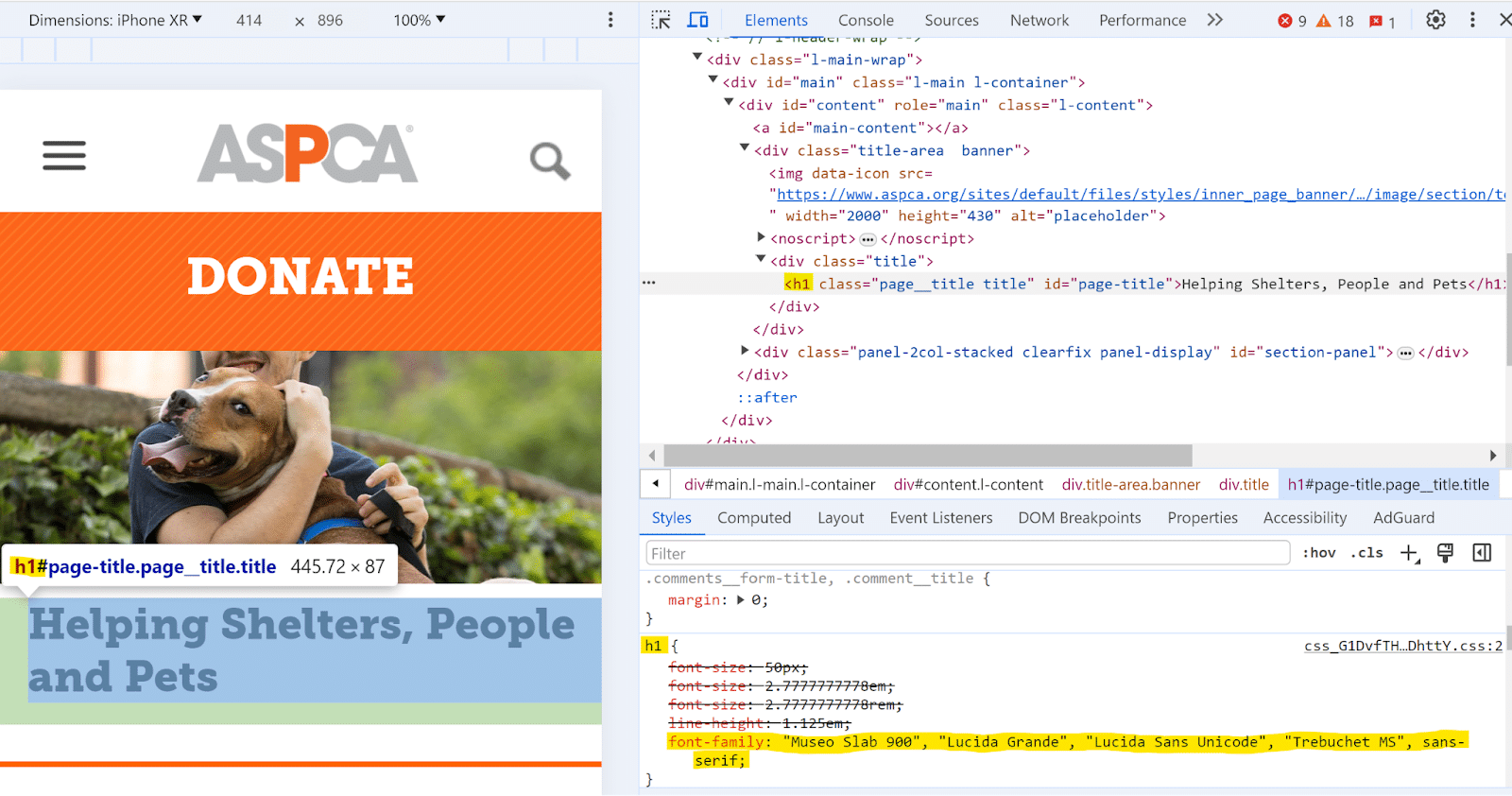
Serif fonts are hot right now. You can find new fonts on any site by right-clicking the element and looking for the font CSS.
- Right-click the copy.
- In the Styles tab at the bottom, look for the same tag.
- Scroll down to the font tags.
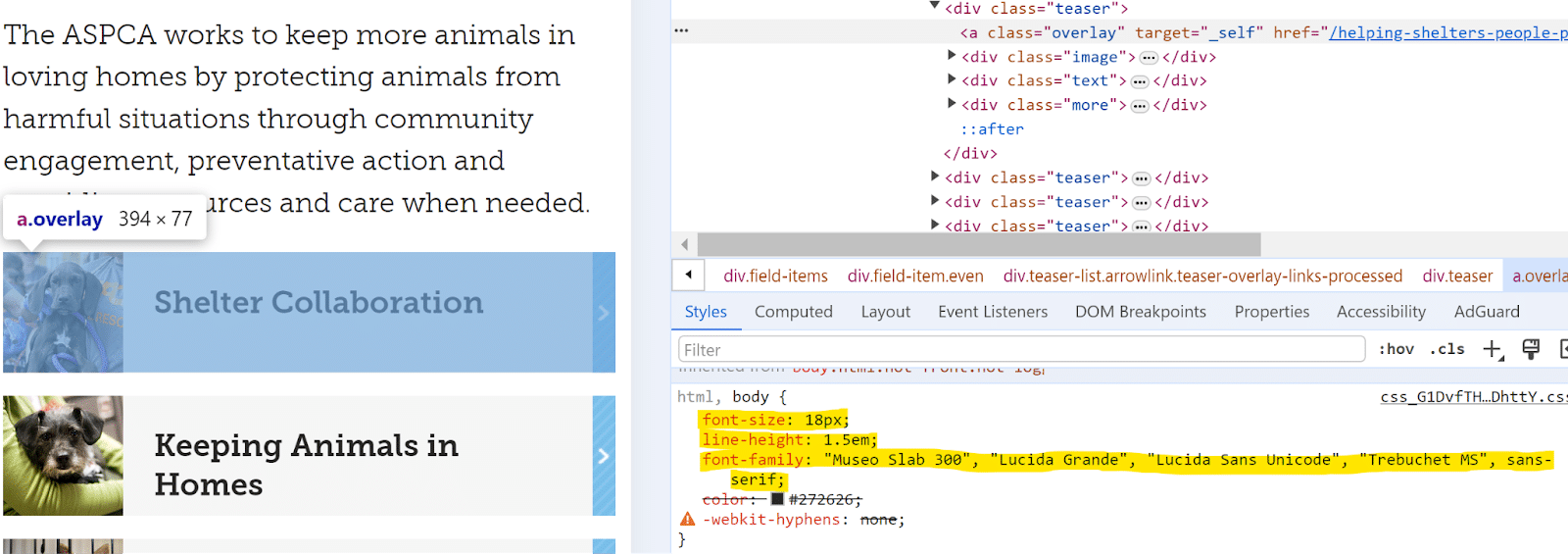
If you see multiple fonts listed in the code, those are backup fonts. The first font is the default, which will appear if the user’s browser has access to that font. If that font isn’t available for some reason, the browser will fall back to the second font listed and so on through the list.
You can also check the font size and line height too.
Choosing a good font size depends on the font, line height and boldness. A good rule of thumb is to aim for a minimum of 14 pixels for body copy and 20 pixels for header fonts.
- H1: 30-34 pixels
- H2: 28-30 pixels
- H3: 24-26 pixels
- H4: 20-22 pixels
- Body: 16-18 pixels
3. Will that content change look good?
Use Inspect to see what a change will look like before going live. This is especially helpful if you need to take a screenshot to get approval before or after you go live with a page edit or if you want to check how a change will look on desktop and mobile first.
- Inspect the element you want to change.
- Double-click the copy you want to edit.
- Edit the copy.
- Click outside the element.
- Make tweaks until you’re happy with it.
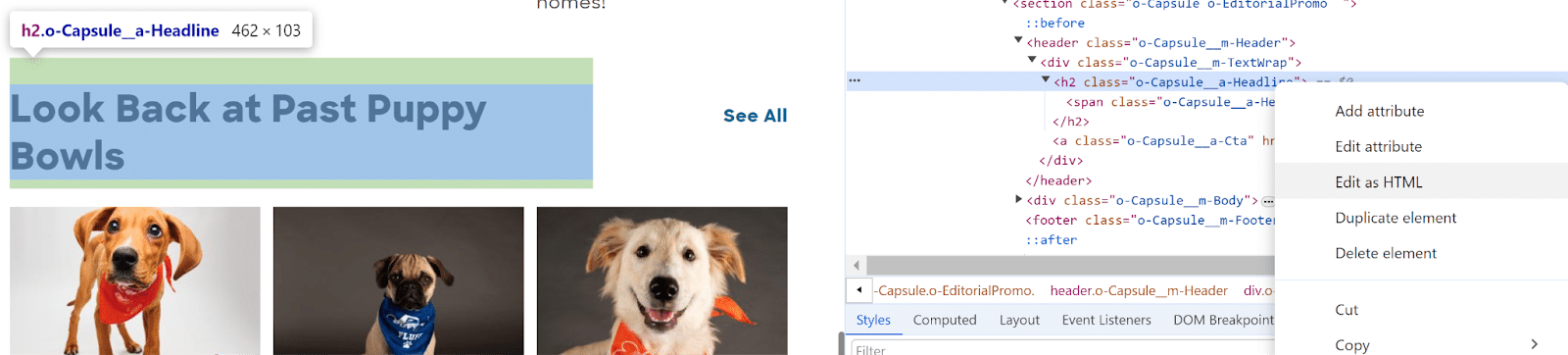
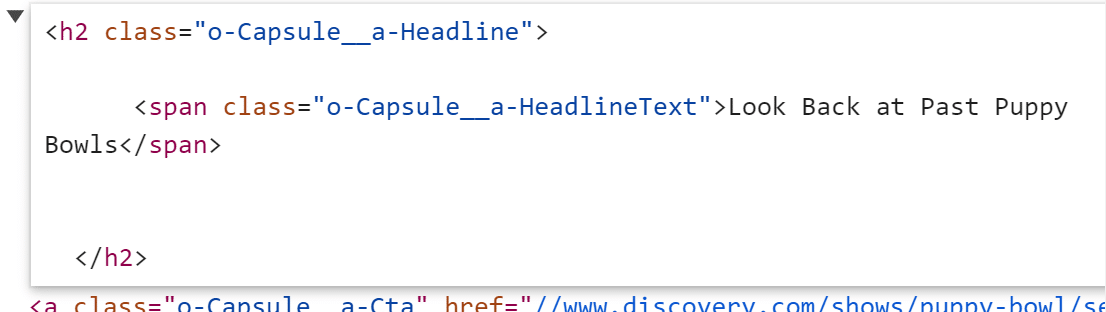
If the element you’re editing has multiple pieces of code within the element, like a link within a paragraph, you can right-click the copy and choose Edit as HTML to edit the entire selection.
Get the daily newsletter search marketers rely on.
4. What image is that?
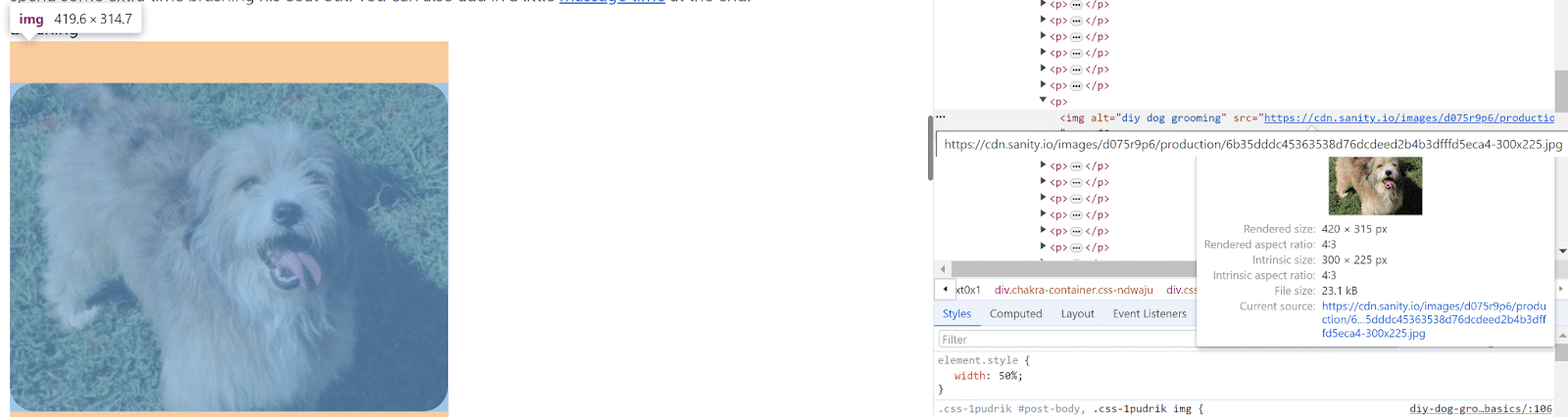
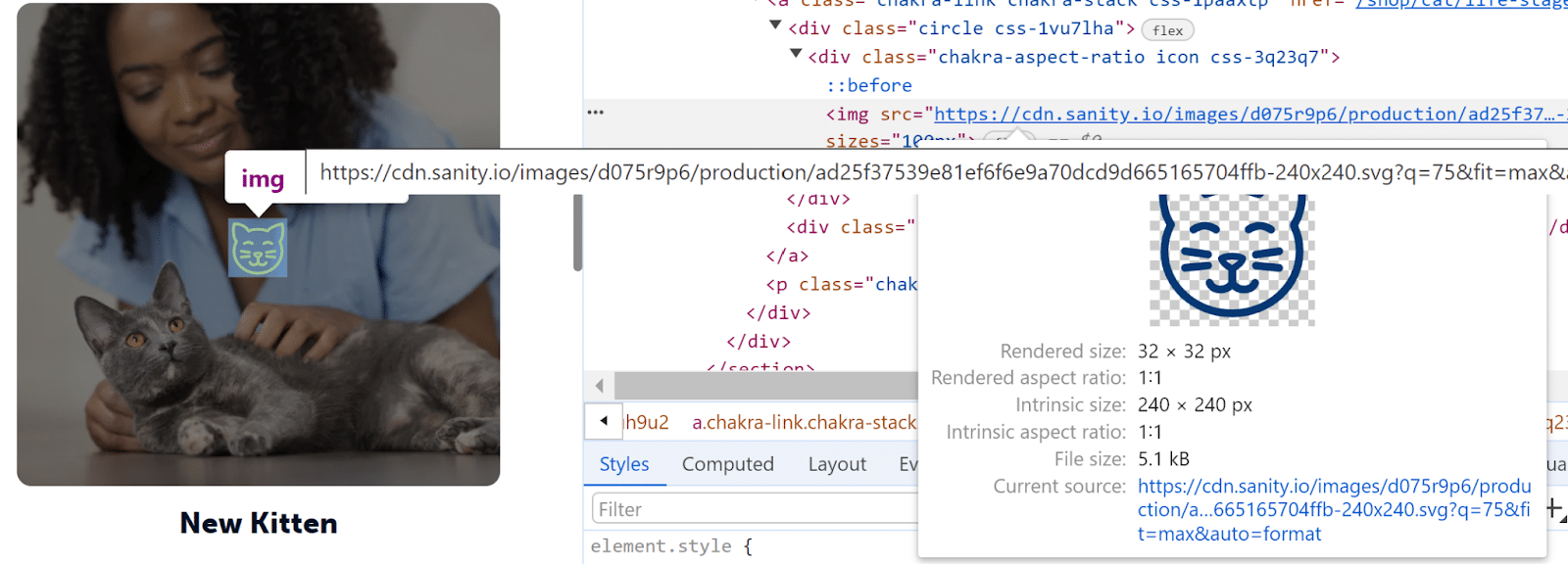
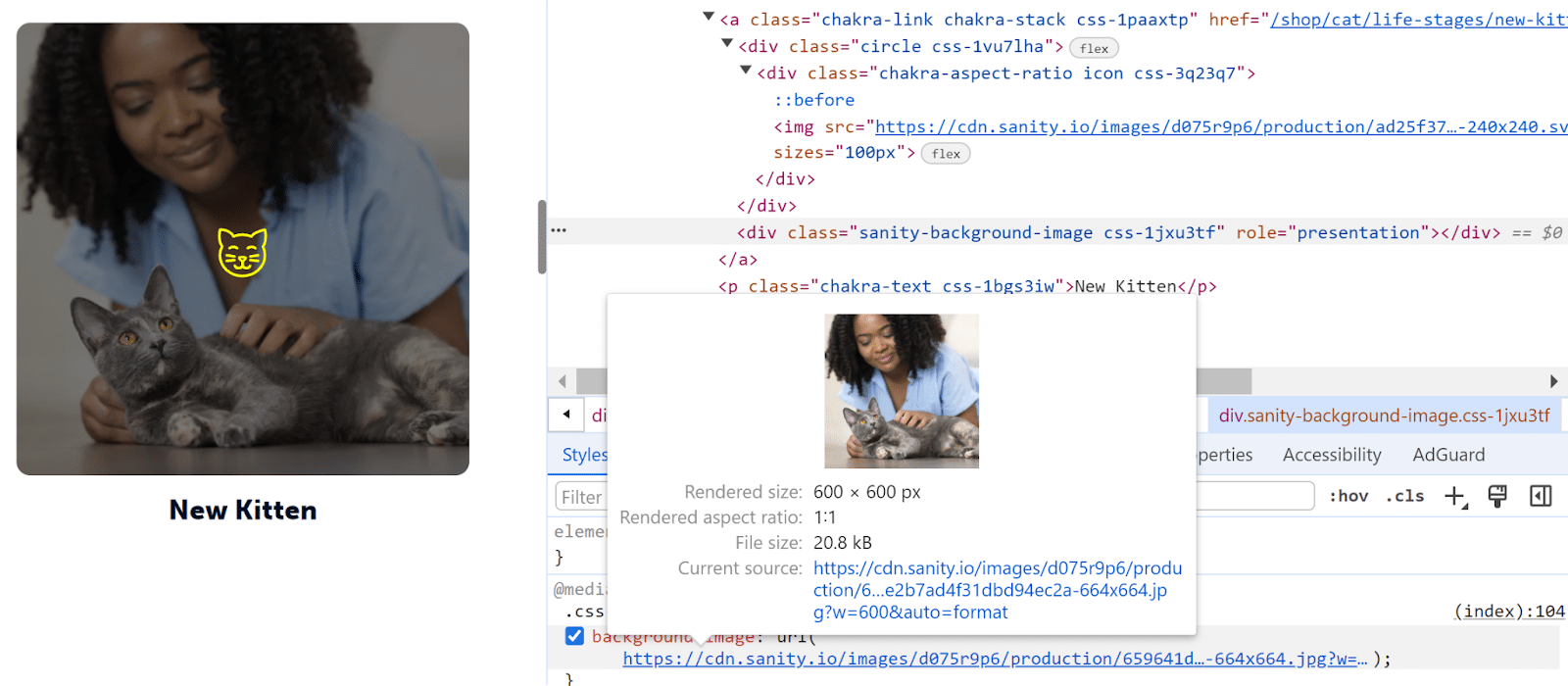
Find an image link, size and alt text by right-clicking to Inspect any image.
Answer basic technical questions about any image:
- Does my image have good alt text?
- Is that image a duplicate?
- Is the image size too large?
- Could the image size impact page speed?
- Where is the original image source?
- What kind of image is my competitor using?
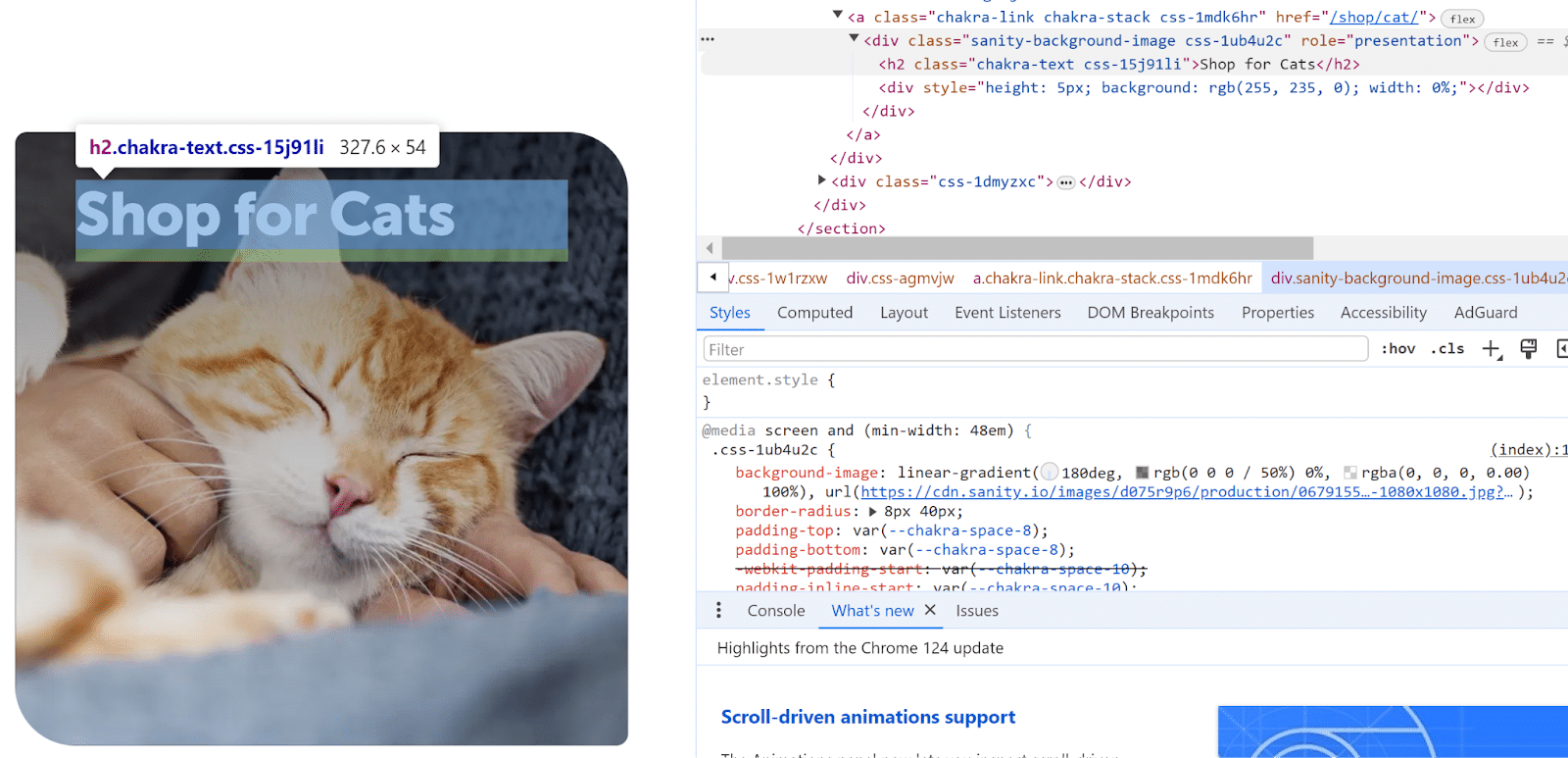
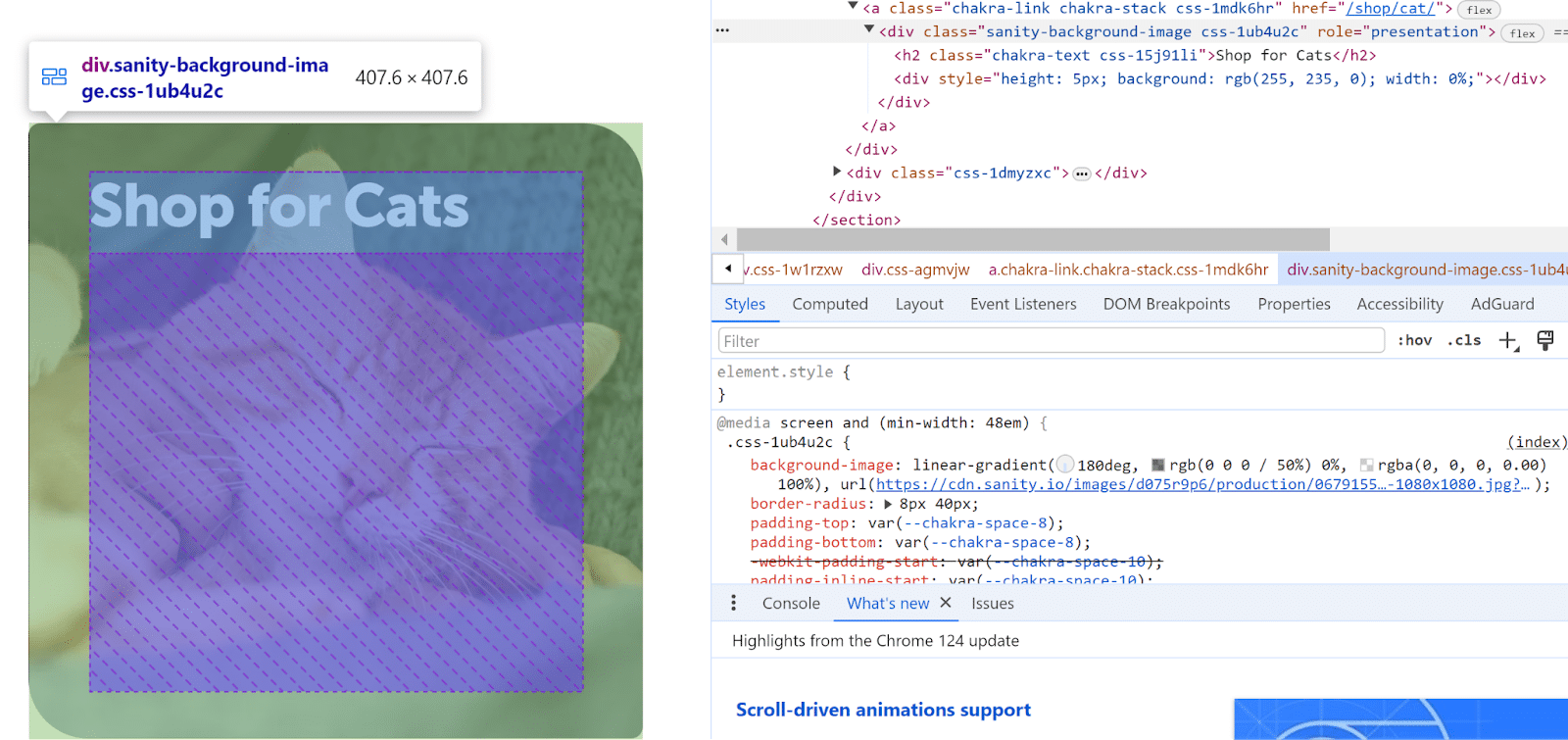
This works for any kind of image, including icons and background images. If you don’t see the image you want, look for phrases in the code like image, background, src, img, jpg, png or carousel.
5. What kind of link is that?
Use Inspect to check to see if your links are set up the way you want without actually clicking any links. Test whether links are set to nofollow or follow and if they open in the same or a different tab. Or use Inspect to find a redirect chain or 301.
- Right-click any link.
- Find the <a href> tag.
- Check what URL the target is linking to.
- Look for a tag like rel=“nofollow”, which tells Google to ignore that link for ranking purposes.
- Look for a tag like target=“_blank”, which tells the browser to open the link in a new/blank tab.
You can also confirm whether you got a new follow or nofollow backlink on another site. This is handy if you just want to check one link instead of running a check in a backlink tool like Ahrefs or Semrush.
If you check links often, you can also use browser extensions to automatically highlight different types of links depending on their tags.
6. Which piece of code is broken?
Troubleshoot issues with your site elements using Inspect. Once you figure out which piece of code is causing an issue, you can solve the problem.
If you need to work with your developers or technical team to fix the problem, it’s easier to be able to highlight exactly what you need within the code.
- Right-click anywhere on the element.
- In the Elements sidebar, hover over each HTML element to find the one you want.
- Use the arrows to expand sections to see child code elements.
- The element that the code corresponds to will be highlighted on your site in the left window. Keep hovering and expanding until you find it.
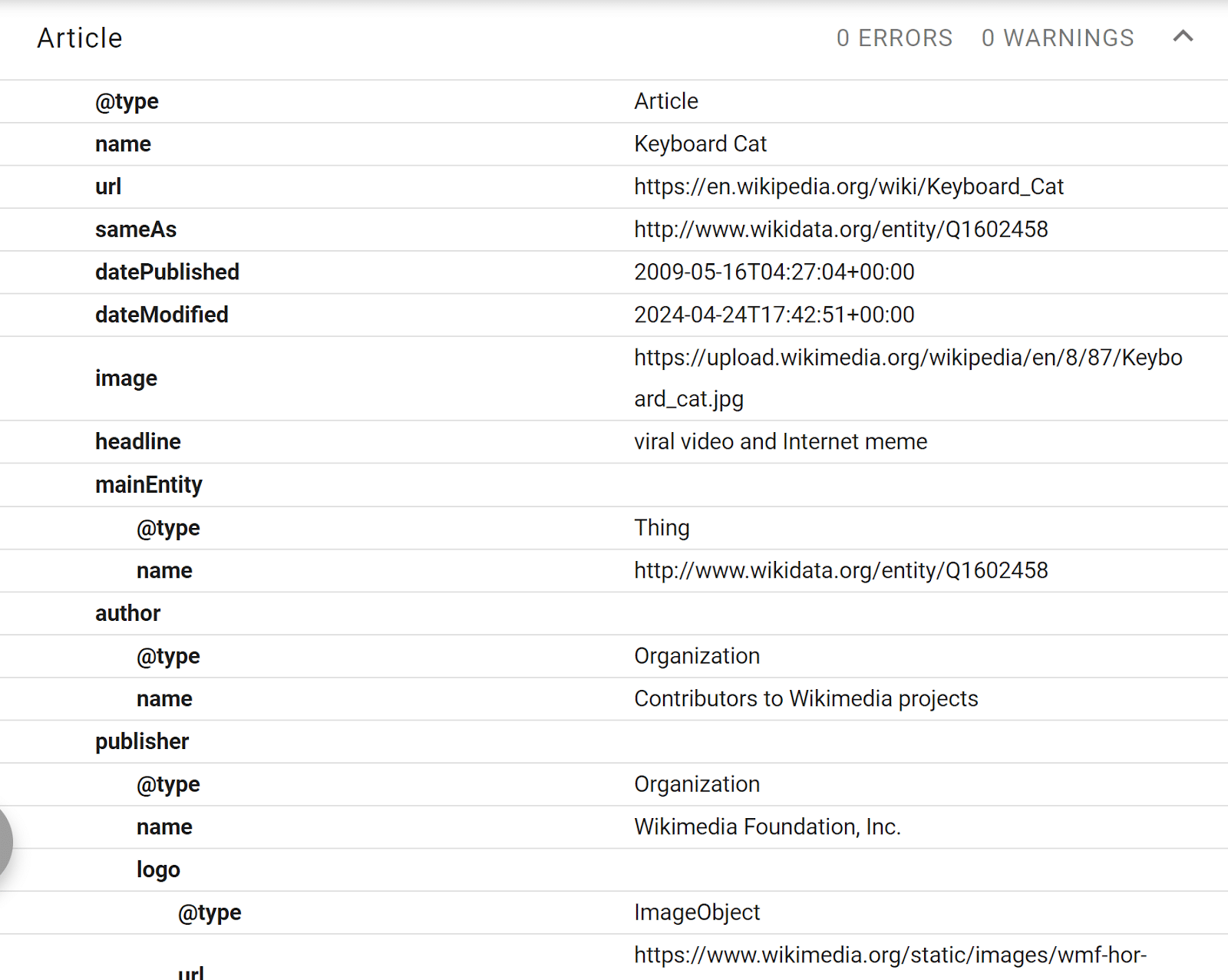
7. What kind of schema is that?
Most sites let you check their site schema using Schema Validator. However, some sites block the Schema Validator bot from using the Fetch URL option directly.
You can still check your competitors’ site schema with this tool or directly into the code.
- Go to the page you want to check.
- Right-click anywhere on the page and click View Page Source.
- Select all the page code (Ctrl+A and Ctrl+C).
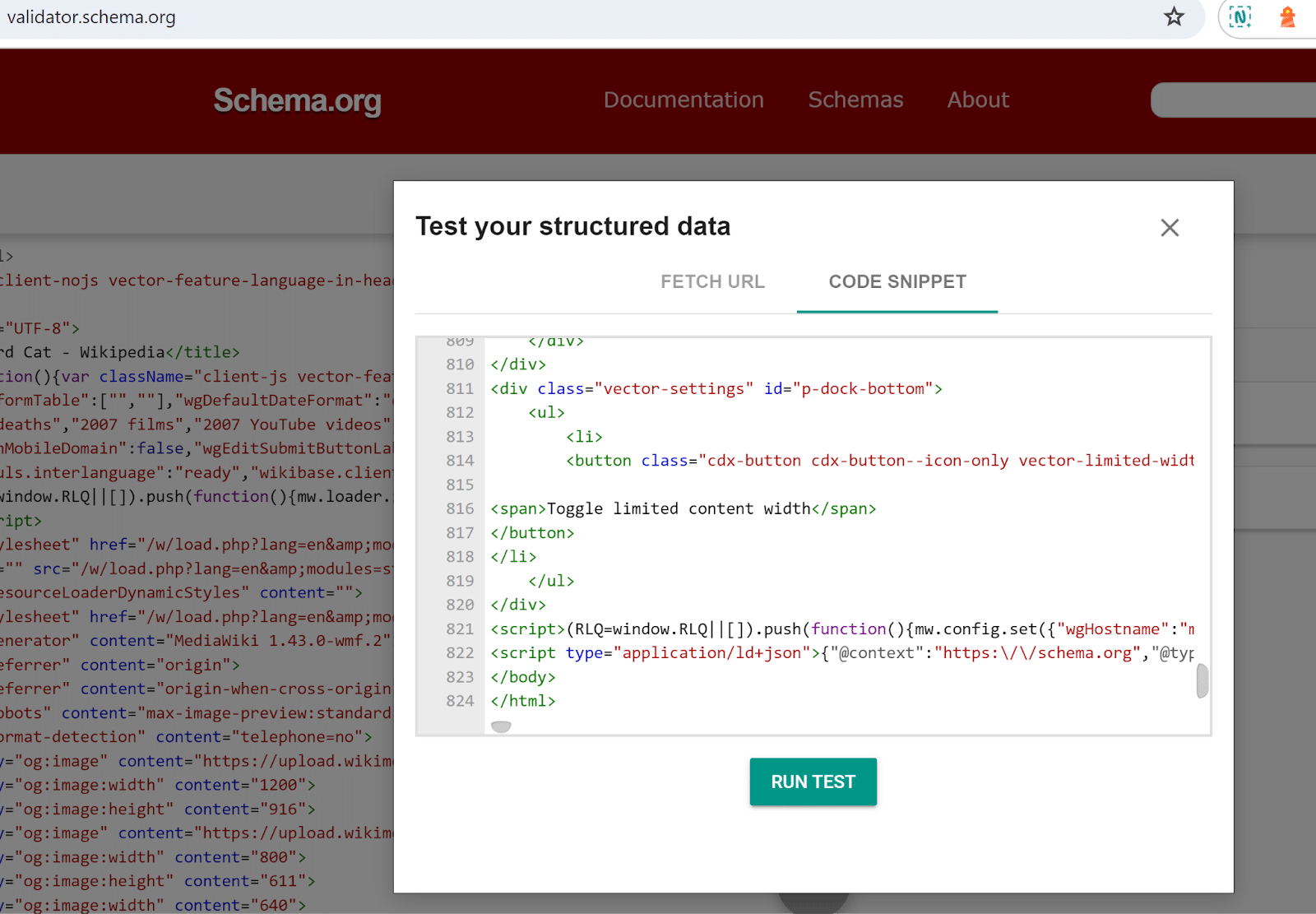
- Go to https://validator.schema.org/.
- Click Code Snippet.
- Paste all the code (Ctrl+V).
- Click Run Test.
- You’ll see all the detected schema elements for that page.
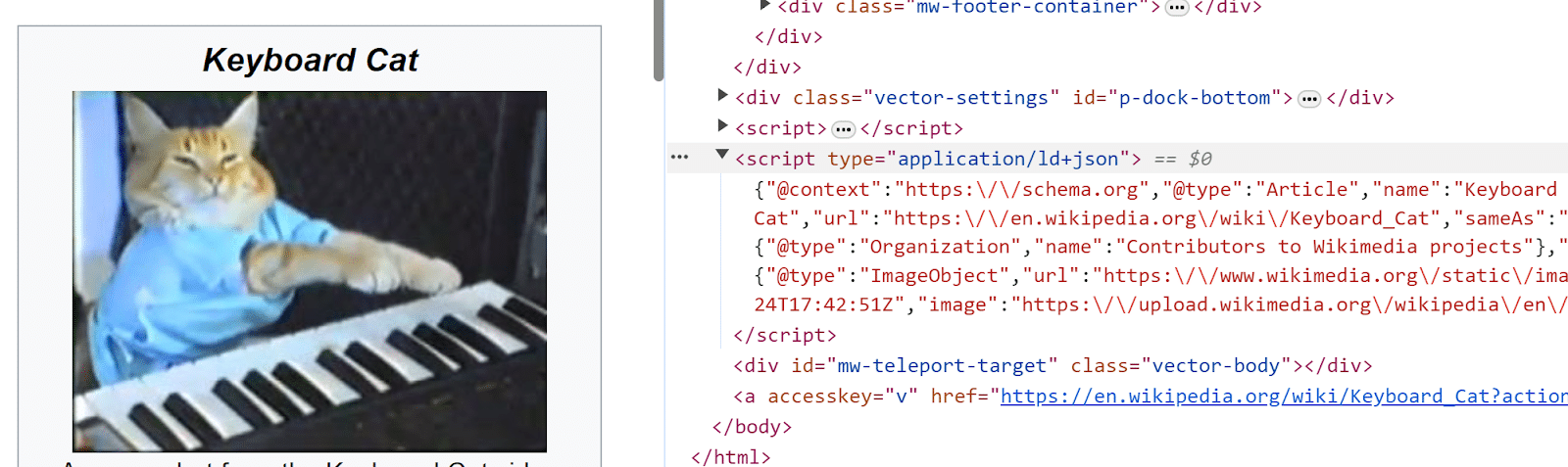
If the validator tool seems incorrect or flags broken schema, you can check for any schema-like code directly in the markup. This is helpful if you’re trying to troubleshoot schema fields or discover why your schema isn’t appearing in the SERP.
- Right-click anywhere on the page.
- Expand sections in the Elements tag until you find the schema.org tags. Schema is usually contained somewhere in the <body> tag.
- If it’s not organized cleanly, right-click and edit as HTML, then copy the whole block into a Notepad program.
- If you still don’t see it, right-click on the page to View Page Source, then search for “schema” in the page code (Ctrl+F).
Courtesy of Search Engine Land: News & Info About SEO, PPC, SEM, Search Engines & Search Marketing
Friday, May 3rd, 2024
Google introduced new restrictions on deep fake sexual content for Shopping ads. Google also updated its general content policy prohibiting promoting synthetic content that has been altered or generated to be sexually explicit or contain nudity
Why we care. Google will issue a warning to advertisers if they violate this policy. Continued violations could result in an account suspension.
What changed. Google advertisers can no longer use Shopping ads to:
- Promote services that generate, distribute or store synthetic sexually explicit content or synthetic content containing nudity. This includes services that create “deepfakes” and other manipulated imagery.
- Create ads for content that provides instructions on the creation of synthetic sexually explicit content or synthetic content with nudity.
Enforcement. The enforcement started yesterday (May 1) for Shopping ads. For all other ad types, advertisers have until May 30 to make all necessary changes to ensure their ads fall within the scope of the policy.
Courtesy of Search Engine Land: News & Info About SEO, PPC, SEM, Search Engines & Search Marketing
Wednesday, May 1st, 2024
Statcounter has updated its search engine market share stats for April – and the results are shocking. If they’re true. I’m doubtful – but hoping Statcounter will confirm whether these numbers are indeed accurate.
By the numbers. Google’s U.S. search market share in the U.S. fell to 77.52% in April, down from 86.94% in March and down from 88.8% in April 2023. Meanwhile:
- Microsoft Bing grew to 13.05% in April, up from 8.04% in March.
- Yahoo (!) grew to 7.3%, up from 2.48% in March.
See why I’m skeptical yet? How are Microsoft Bing and Yahoo growing that much in one month?
But wait, there’s more.
Google’s global search engine market share dropped from 91.38% in March to 86.99% in April. Meanwhile:
- Microsoft Bing grew to 5.8% in April, up from 3.35% in March.
- Yahoo grew to 3.06% in April, up from 1.1% in March.
There are other unexplainable swings – some bigger than others – found in other regions as well, based on Statcounter’s data.
But. Before you start cheering, the data seems suspect. Some are expecting Statcounter to “correct” these figures because these sorts of big swings seem impossible and unprecedented.
About the data. How does Statcounter get this data? According to its About page:
Stats are based on aggregate data collected by Statcounter on a sample exceeding 5 billion pageviews per month collected from across the Statcounter network of more than 1.5 million websites. Stats are updated and made available every day, however are subject to quality assurance testing and revision for 45 days from publication.
Based on this explanation, it’s entirely possible that at some point in the next 45 days Statcounter’s search market share data could change.
Why we care. My first thought after seeing these numbers was: they seem wrong. User behavior doesn’t change this rapidly. While SEOs and others have been heavily critical of Google over the past few years, often with good reason, I’ve never seen market share figures swing like this in one month unless there was a change to how the data was collected or there is some sort of issue with the data.
What Statcounter is saying. I’ve emailed the company to get some insight into whether these numbers are accurate. I’m told their staff is “checking things out.”
Courtesy of Search Engine Land: News & Info About SEO, PPC, SEM, Search Engines & Search Marketing
Wednesday, May 1st, 2024
As the paid search advertising landscape evolves, AI and language model tools are gaining traction in streamlining and optimizing campaign restructuring processes.
Some paid search specialists are no longer content with the status quo. Others argue that our industry has been using AI all along and that the AI revolution is only a shift in terminology.
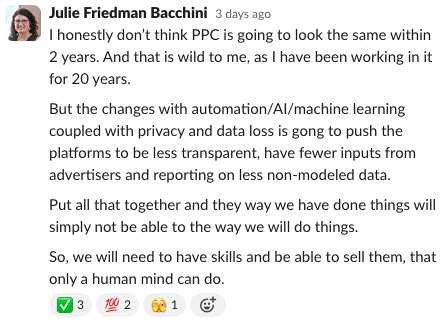
Many favor chatbots for answers, driven by a quest for efficiency, creativity and staying current. Julie F. Bacchini, managing director of the PPC Chat community, emphasized the last point during her weekly Slack chat on “Diversification in PPC.”
One area where AI shines is streamlining the often tedious and time-consuming process of account restructuring.
Below are six practical ways AI can assist PPC managers when restructuring ad accounts.
1. Finding new keyword ideas for accounts
Keywords are the cornerstone of an ads account.
To reorganize ad accounts effectively, you need to analyze the search term reports and identify fresh keywords to incorporate into ad groups or campaigns.
While necessary, this process can be time-consuming in large accounts. It’s especially confusing for B2B accounts, where separating consumer intent from commercial intent is key.
Here’s where AI can assist. There are tools in the market to help you:
- Analyze datasets: AI can identify new and valuable keywords that might have been overlooked.
- Surface statistically significant opportunities: Some search terms need more data before they are actionable.
AI tools don’t just identify new terms; they also assess statistical significance. This ensures you focus on terms with a proven track record of driving conversions.
Consider Optmyzr, a popular AI-powered tool that seamlessly integrates with platforms like Google Ads and Microsoft Advertising and automatically analyzes your search terms report.
Based on its analysis, it recommends relevant keywords for inclusion in existing ad groups or the creation of new ones.
This eliminates the need for manual data downloads, spreadsheet analysis and filtering.
Most importantly, Optmyzr utilizes statistical significance to ensure its recommendations are impactful.
2. Categorizing keywords by theme
Effective paid search campaigns rely on well-organized ad groups with thematically related keywords.
Another reason to restructure is if a previous ad manager accidentally added thousands of keywords from auto-recommendations or didn’t understand the importance of keeping ad groups tightly themed.
Grouping keywords by theme ensures your ads resonate with user search terms. This is where large language models like ChatGPT and Google’s Gemini come into play.
Imagine this:
You can effortlessly paste thousands of keywords in a chatbox and ask the tool to organize all the keywords by theme.
Manually grouping thousands of keywords by theme can be an overwhelming task.
Enter large language models. By feeding these models your keyword list (even exceeding 2,000 keywords), they can identify and categorize themes with remarkable speed and accuracy.
Checking for duplicates is crucial because ad groups often have overlapping keywords. Keep refining the themed keyword list until it’s more manageable to reduce redundancy.
Get the daily newsletter search marketers rely on.
3. Tailoring ads more closely to the user’s search query
This translates to improved ad relevance, higher quality scores and increased campaign effectiveness.
Once you have thematically grouped keywords, writing ad copy becomes a necessity.
You need to tailor your ad copy to the specific theme of each ad group, ensuring a more relevant and impactful message for users.
Restructuring often involves creating new ad groups.
Writing responsive search ads (RSAs) can be arduous because of the many headlines and descriptions needed. However, AI can help.
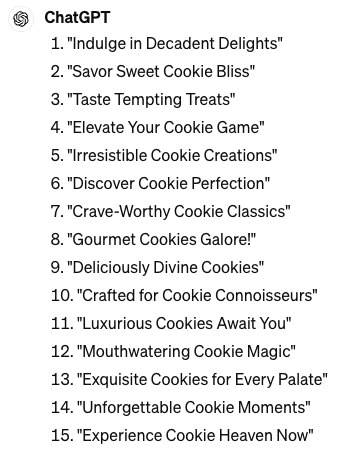
Let’s consider ChatGPT and the following prompt:
- “Write me 15 different headlines that are 30 characters or less for a Google Search Ad for my gourmet cookie business.”
Remember that human oversight is still important. While AI can certainly spur creativity, the human factor remains irreplaceable. In the example above, some AI-generated headlines might exceed the character limit or lack the desired punch.
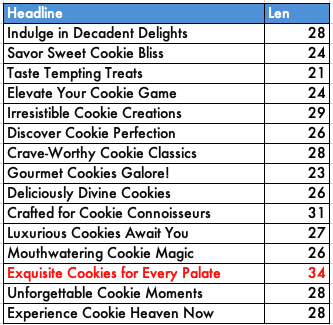 This example highlights the importance of human oversight and refinement.
The best approach is to leverage AI for initial brainstorming and then refine the generated content with your unique human touch.
4. Assisting with image creation
Google Ads’ AI-powered image generation tool accelerates the testing process and economizes time and resources by generating fresh imagery.
Reducing time and cost is particularly impactful for brands operating on limited budgets competing in a platform where images are an important tool.
Also, there’s a theory that platforms might prioritize content created with new features like AI generation. This could temporarily boost your ads while the platform gathers data on its tool.
While the exact impact is unclear, some advertisers can benefit from AI-generated images.
Take an online-only gourmet soup shop, for example. Unlike clothing with distinct styles, soup bowls can look similar across brands. This is where AI shines.
It can create unique and appetizing visuals for your soup, freeing you from reliance on seasonal photoshoots.
These images can offer variety for testing in an account that otherwise wouldn’t have many images.
Dig deeper: Creating Google Ads campaigns with Gemini conversational AI: How good is it really?
5. Predictive modeling in Google’s Performance Planner
Google’s Performance Planner is an example of AI-driven predictive modeling.
It allows advertisers to forecast how changes in campaigns could affect key metrics like conversions and clicks.
Leveraging the Google Performance Planner both before and after an account reorganization is an excellent method to showcase scalability.
It helps make informed decisions about budget adjustments and optimize campaigns for better results.
6. Automatic bidding in ad platforms
When reorganizing ad campaigns and centralizing data, the reasoning is often to allow campaigns to leverage larger datasets and automatic bidding strategies to work effectively.
Bid strategies are not always considered AI but rather machine learning.
However, bid strategies use machine learning to automatically adjust bids based on various factors, such as the likelihood of a conversion or the competitiveness of an auction. So, in that sense, bid strategies can be considered a form of AI.
Dig deeper: How each Google Ads bid strategy influences campaign success
AI-powered PPC optimization: Boosting efficiency and strategy
Despite being available for years, AI tools like Optimzr and various in-platform features frequently go unrecognized as AI, largely because the prevailing perception equates AI with chatbots.
However, AI encompasses more than just chatbots; it involves computers making decisions rapidly.
These technologies offer options for advertisers, encompassing everything from keyword research and ad group organization to writing RSA ad copy and generating images.
Predictive modeling and automatic bidding strategies enhance campaign optimization and save paid search managers valuable time, fitting perfectly within the broad definition of AI tools.
AI integration enables paid search managers to be more effective in building campaigns and changing accounts. This lets you transition into a more strategic role, moving beyond merely executing tasks to shaping strategies and outcomes.
Courtesy of Search Engine Land: News & Info About SEO, PPC, SEM, Search Engines & Search Marketing
Wednesday, May 1st, 2024

Is your social media strategy keeping pace with the latest industry trends and innovations?
Deloitte’s comprehensive “State of Social Media” report reveals that social-first brands are achieving remarkable outcomes – including an average 10.2% revenue increase – by repositioning social at the core of their entire brand and customer experience.
In this can’t miss MarTech webinar, attendees will learn directly from two of Deloitte’s top social media and innovation experts who will share eye-opening insights from the “State of Social Media” report, including:
- The new “Share of Culture” approach driving vibrant social communities
- How leading brands are unleashing the power of creator partnerships through “Co-Creation”
- Why the future of search – and commerce – is inherently social
RSVP today for “Social Means Business, Serious Business–Driving Resilience Through Social Business Transformation” and get up to date on the latest trends and tactics driving real results.
Courtesy of Search Engine Land: News & Info About SEO, PPC, SEM, Search Engines & Search Marketing
Wednesday, May 1st, 2024
Personalization is rapidly becoming essential for businesses to drive engagement, loyalty and revenue growth.
With declining website traffic from search and the phase-out of third-party cookies, companies must find new ways to maximize every visitor interaction.
Consumers now expect personalized, tailored experiences across all touchpoints, just as they receive on social media.
This article explores the foundational pillars of effective personalization, the role of AI in identifying segments and predicting journeys and real-world examples of how brands have boosted conversions through location-based, channel-based, behavioral and customer data-driven personalization tactics.
Why personalization is vital for marketing strategies
Two primary contributing factors are making personalization a vital component of the marketing strategy for businesses:
- As click-through rates from organic search drop – especially from top-of-the-funnel information-seeking queries – website traffic likewise declines. You need to engage every visitor because website visitors are even more important now than before.
- The pending deprecation of third-party cookies has significantly challenged marketers to offer personalized experiences. Marketers should focus on first-party data collection and activation and onboarding a CDP to remove data silos and create a single unified view of the customer.
Google CEO Sundar Pichai said last year that search will be much more personalized and ultimately about understanding what users want and helping them accomplish it. He also said AI has been transforming Google Search for years.
It is not about 10 blue links but the most meaningful, rich answers. Two-thirds of consumers prefer these tailored interactions, indicating a trend toward more intimate and user-centric search experiences.
Consumers today are already used to content tailored to their interests. Social media feeds respond to what engaged users in the past. As search also gets more personalized, consumers will expect personalized experiences at every touchpoint – even the websites they visit.
Personalizing the experience is complex. It necessitates a comprehensive customer data platform (CDP) that maintains unified and actionable customer profiles.
Brands must urgently connect their CDP with their CRM and CMS to create personalized experiences. For meaningful personalization, three things need to come together.
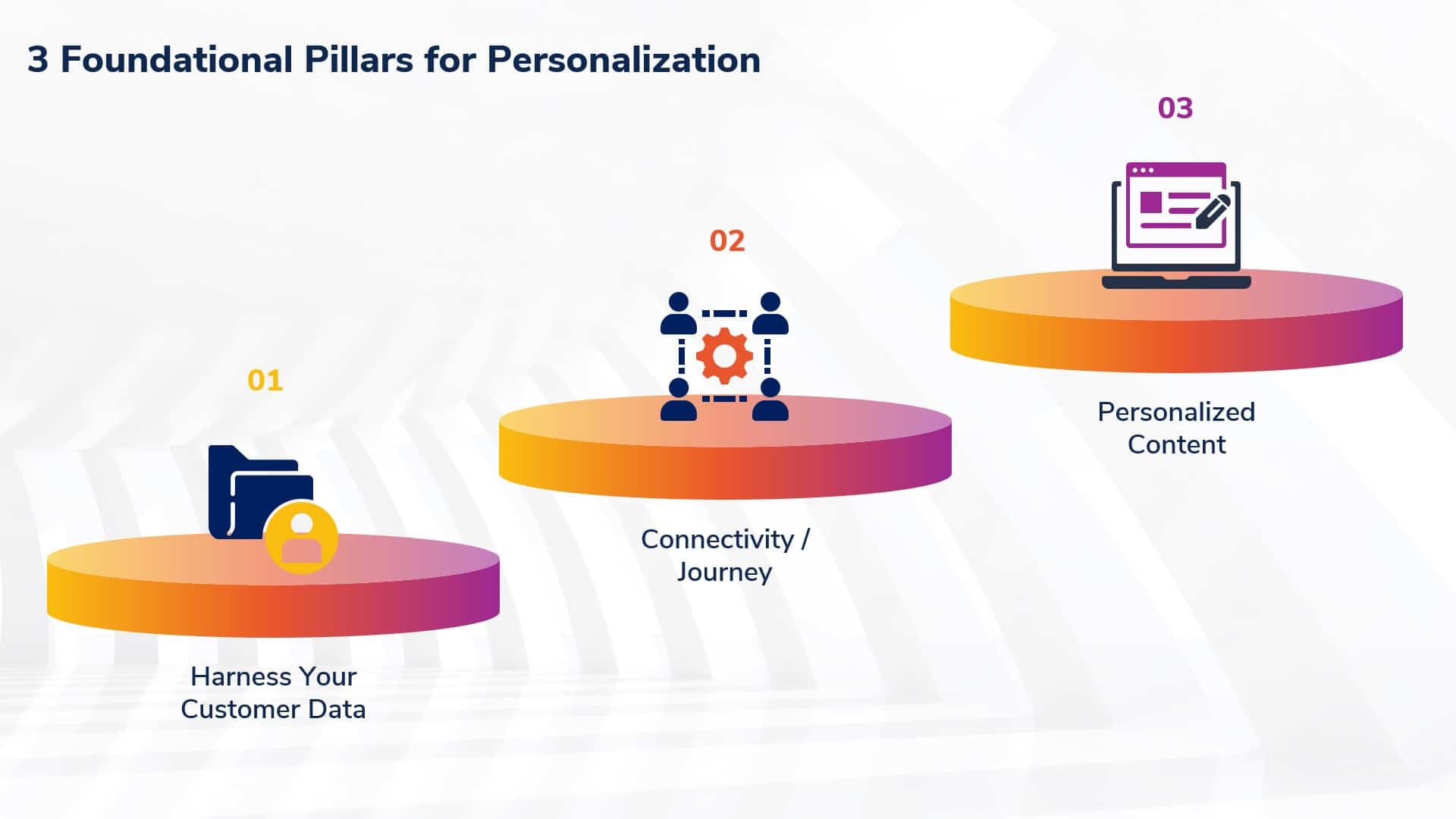
3 foundational pillars of personalization
1. Harness your customer data
Implementing data-driven personalization can be challenging. Harnessing data effectively requires a sophisticated CDP capable of processing real-time information to craft diverse personalized experiences across the site. It also requires specialized data analysis skills and the creation of a comprehensive, unified customer profile.
With sophisticated data processing capabilities, you can collect real-time data and leverage it to deliver diverse personalized experiences that matter most to your customers.
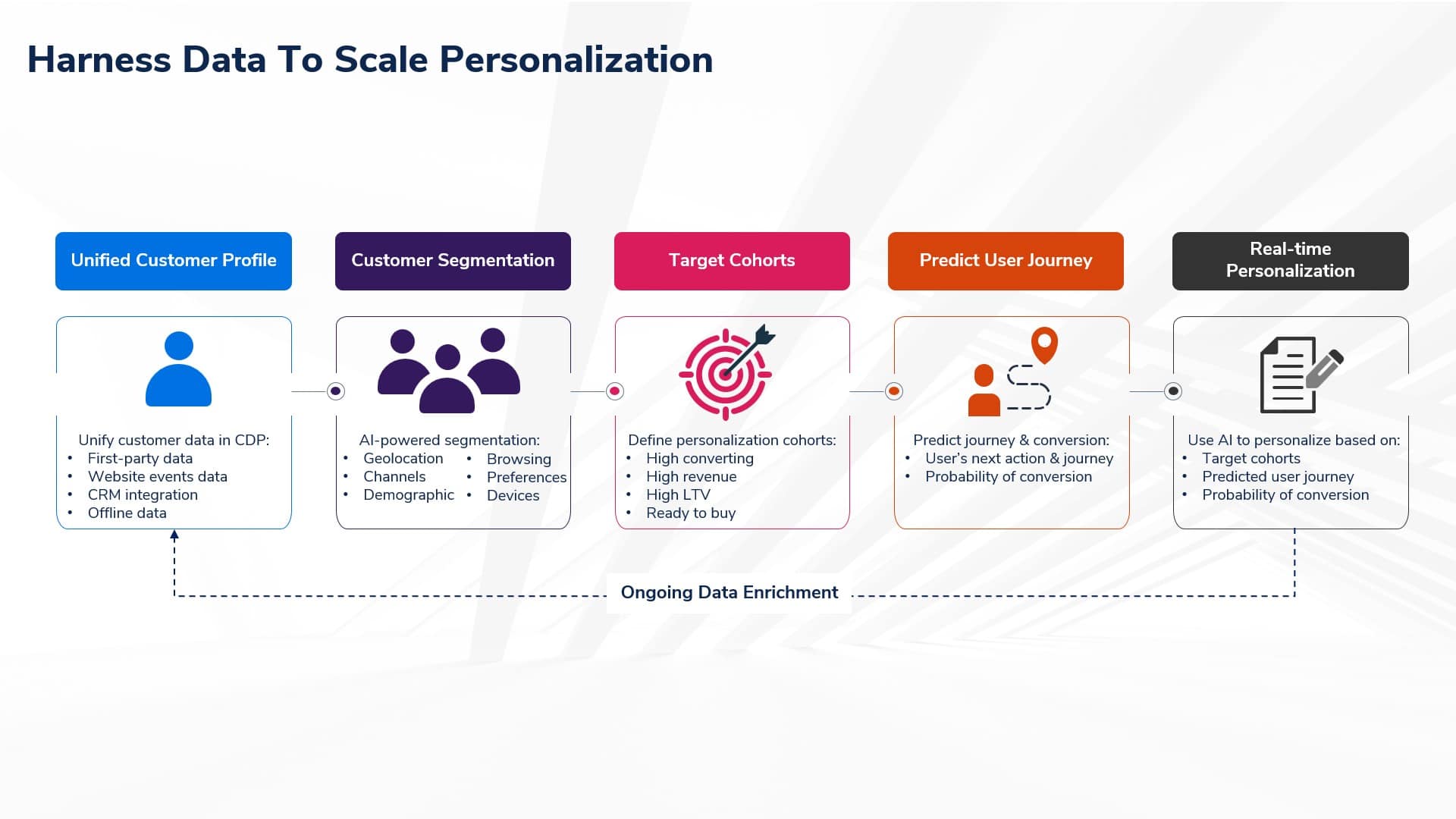
- Unify customer profile: Unify data from various sources, creating a single, comprehensive profile for personalized experiences in the Customer Data Platform (CDP).
- Customer segmentation: Segment your customers by analyzing geolocation, browsing behavior and demographic data stored in the CDP.
- Target cohorts: Identify cohorts to target out of the segmentation, such as high-converting, high-revenue and high-LTV segments to target for personalization campaigns.
- Predict user journey: Predict users’ next actions and journey based on past actions for the target cohort. Analyze the probability of conversion for these users.
- Real-time personalization: Create personalized content for each target cohort based on the predicted user journey and conversion probability to deliver real-time personalization.
- Enrich customer data: Continue to enrich customer profiles in the CDP with real-time personalization data. This helps optimize segments and journey predictions.
2. Connectivity/journey
Connecting the omnichannel purchase journey with customer data and intent is challenging. However, ensuring a seamless, tailored experience across all channels, both now and in the future, is essential for keeping customers happy.
This requires fluid connections across various touchpoints to foster loyalty and revenue growth. As brands, we must ensure that simple workflows are defined for the most common use cases.
3. Personalizing content and distribution workflows
Content strategy is a major hurdle for many organizations, with 90% finding it challenging to produce content that aligns with user intent. Brands must define content creation and distribution workflows to ensure the content reflects customers’ intentions.
Establishing streamlined workflows, utilizing design systems, centralizing digital assets and deploying AI for content customization are key steps toward achieving this. Aligning imagery across touchpoints and using analytics to capture genuine insights are vital for meaningful engagement.
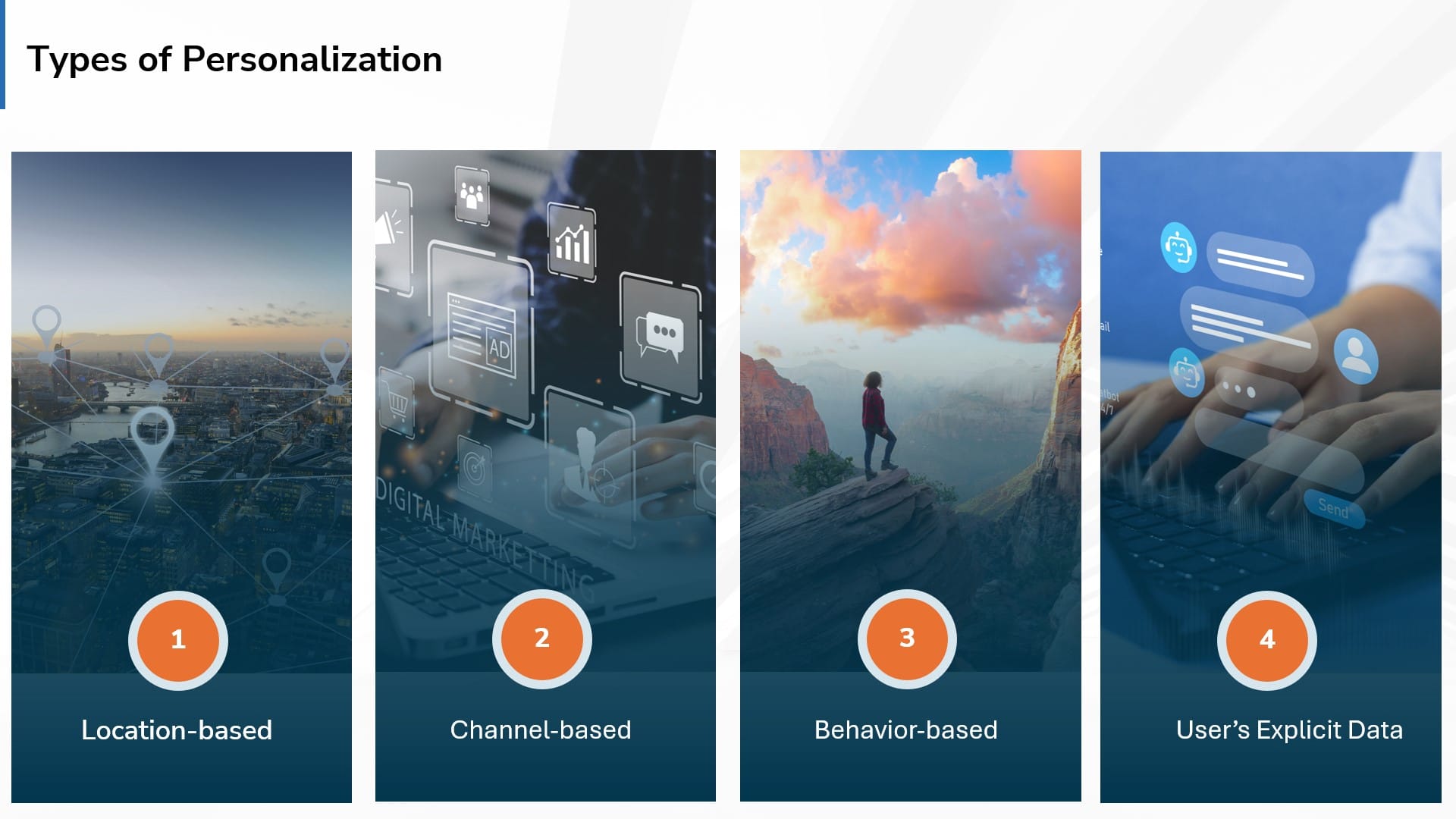
Types of personalization to consider
There are typically four types of personalization, all enhanced by AI-driven strategies and insights.
Location-based personalization
- Refers to the customization of content, services or offers based on the user’s physical location.
- Utilizes geographic data such as GPS coordinates, IP addresses or user-provided location information to deliver relevant and tailored experiences to individuals in specific locations.
- Enables businesses to target users with location-specific content, promotions or recommendations, enhancing user engagement and satisfaction.
Channel-based personalization
- Involves tailoring content, campaigns, promotions or experiences to suit specific communication channels or platforms where users interact with a business.
- Encompasses optimizing content for various channels such as websites, mobile apps, email, social media or messaging platforms to deliver a consistent and seamless experience across different touchpoints.
- Aims to cater to the unique preferences and behaviors of users on each channel, ultimately enhancing engagement and driving desired actions.
Behavioral personalization
- Refers to customizing content, recommendations or experiences based on the past behaviors and interactions of users with a website, app or brand.
- Utilizes data such as browsing history, purchase behavior, search queries and engagement patterns to deliver tailored content and recommendations that align with the user’s interests and preferences.
- Aims to anticipate the needs and desires of users based on their actions, ultimately enhancing user engagement, satisfaction and conversion rates.
Explicit, customer data-based personalization
- Relies on information voluntarily provided by users, including user preferences, interests, demographics and past interactions with the brand.
- Involves leveraging the direct input and explicit consent of users to tailor content, offers and experiences to their specific needs and preferences.
- Utilizing first-party data lets you create highly targeted and relevant messaging that resonates with your audience, leading to improved engagement, loyalty and conversion rates.
Get the daily newsletter search marketers rely on.
AI’s role in personalization
AI-driven personalization tailors experience for everyone by analyzing their interactions and preferences, avoiding the one-size-fits-all approach.
AI personalization significantly improves decision-making, reduces business risks and fosters brand loyalty. Here are three use cases for AI and how it plays a significant role.
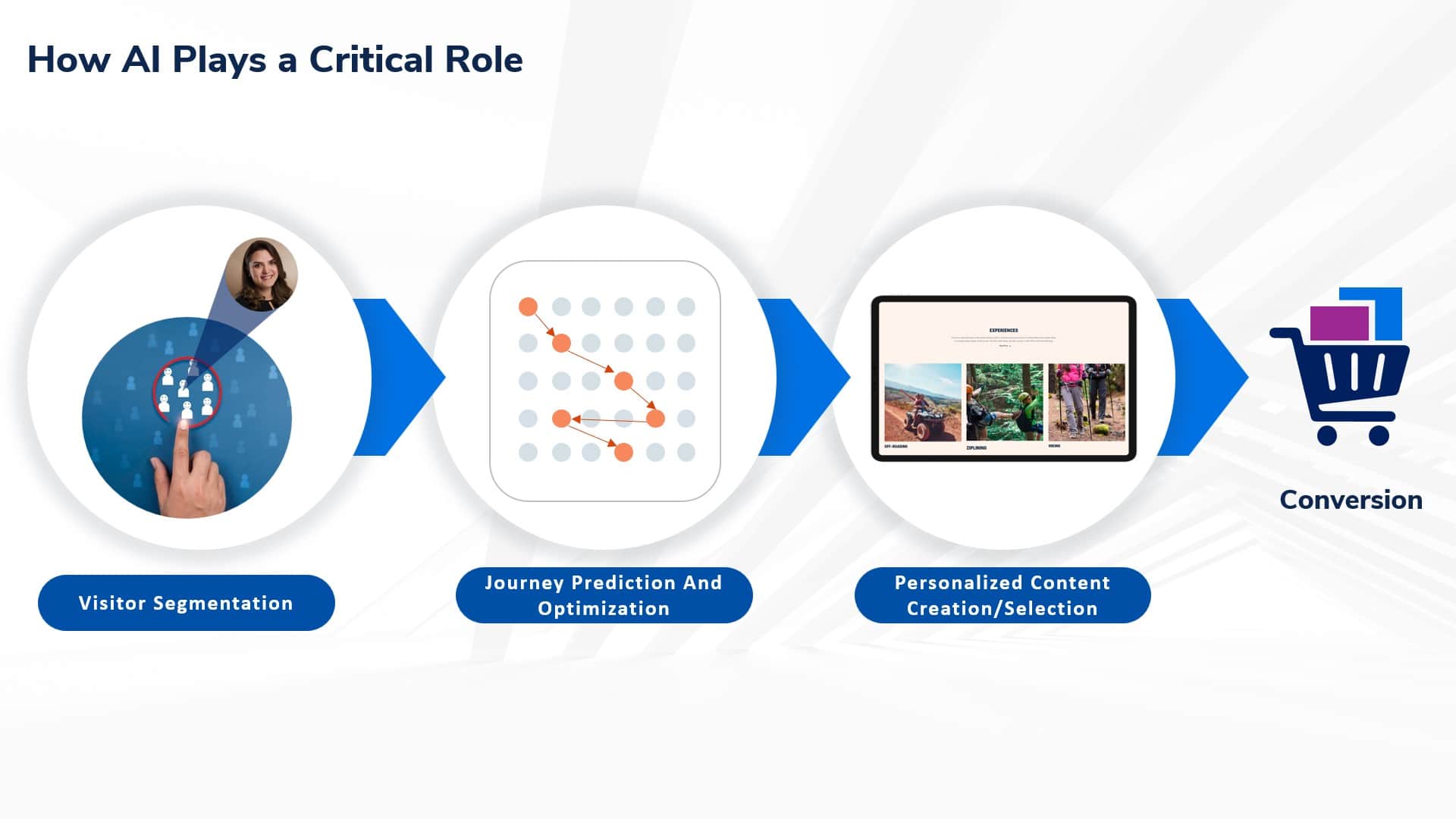
Identifying visitor segments to target
AI plays a pivotal role in dissecting visitor data to uncover meaningful segments. By analyzing visitors’ locations, devices, channels, browsing behaviors and interactions, AI models automatically group visitors into meaningful clusters.
Brands can then target these segments for personalized experiences and connected journeys. AI-driven segmentation empowers businesses to allocate resources effectively, optimize marketing efforts and enhance customer experiences.
Use AI for visitor journey prediction and optimization
Visitor journey stages represent the sequence of interactions a user has with a brand, from initial awareness to conversion and beyond. AI models meticulously analyze user behavior data, including website visits, clicks and session duration.
By discerning patterns, these models categorize visitors into relevant stages, such as “Ready to buy,” “High LTV” (Lifetime Value) or “Dormant.” Brands can then strategically deliver personalized content tailored to each visitor’s specific journey stage.
AI-powered content creation/selection
AI dynamically creates personalized content, ensuring relevance. It continuously learns from user interactions and precisely selects content for visitor segments. A/B testing and sentiment analysis aid in iterative learning and content optimization.
Ultimately, AI-driven content personalization ensures that each visitor receives relevant, engaging, timely information, fostering stronger connections and driving conversions.
How brands can leverage personalization to boost revenue
Here are two real-life examples where behavioral and channel-based personalization helped increase RFP submissions and conversions for a brand:
Goal: Increase ROI from the paid and email ‘spring campaign’
How we solved with channel-based personalization:
- Created a segment to identify visitors who are landing on the Spring campaign page from specific paid and email campaigns.
- Personalized the homepage to highlight the spring campaign details and send visitors to the spring campaign page.
Impact: 2X conversion rate for visitors from paid/email spring campaign.
Goal: RV resort wanted to drive more bookings from customers interested in long-term stays
Steps we deployed:
- Analyzed user flow on the website and identified visitor touchpoints to book long-term stays.
- Created a segment to identify visitors who are interested in long-term stays by looking at their page views on long-term stay pages.
- Personalized the homepage to highlight long-term stay-related content.
Impact: The customer witnessed 55% increase in conversion rate within a month from implementing behavioral personalization for the visitors interested in long-term stay.
Personalization, connectivity and data: The triad strategy for boosting revenue
AI is here to stay. Platforms will continue to leverage AI to deliver personalized experiences to their customers. By extension, personalization could soon become as essential as having a website.
Early movers that invest in the trifecta of personalization, connectivity and data will have the advantage over their competitors today and beyond.
Courtesy of Search Engine Land: News & Info About SEO, PPC, SEM, Search Engines & Search Marketing
Tuesday, April 30th, 2024
Are you ready to unlock an awesome training experience absolutely stacked with actionable tactics on the latest in SEO, PPC, AI, and more?
The SMX programming committee – including your friendly neighborhood Search Engine Land editors Barry Schwartz, Danny Goodwin, and Anu Adegbola – plus search experts Brad Geddes, Greg Finn, Eric Enge, and more – are putting the finishing touches on the SMX Advanced agenda.
The complete program will be live next week, but in the meantime, here’s your final preview of what’s to come. If you’re ready to secure your free pass, get started here: events.searchengineland.com/smx-advanced-2024
- Day 1 keynote – Insights from Google’s latest search quality updates: A keynote conversation. Join Google’s Director of Product Mangagement, Elizabeth Tucker, and Search Engine Land’s Barry Schwartz for a candid conversation about Google’s recent updates and how we as content creators can best position ourselves for success.
- Day 2 keynote – Embracing AI and the future of paid search. Join Aaron Levy, former VP of Paid Search at Tinuiti, as he reveals how to put the “marketing” back in “search engine marketing,” and prepares for the future of paid search, whatever it may hold.
- The importance of Retrieval Augmented Generation (RAG) – with Mike King, iPullRank
- Inside the 2024 SEO Periodic Table: Orchestrating a symphony of search elements – with Search Engine Land’s Danny Goodwin and Jeff Ferguson, Amplitude Digital
- Maximizing Performance Max: Advanced campaign structures for optimal ROI – with Andrew Lolk, SavvyRevenue
- Unlocking AI’s potential for digital advertising creative – with Kerri Amodio, Closed Loop
- Prompt and circumstance: Your guide to AI wizardry (an interactive, live clinic!) – with Marc Sirkin, Third Door Media, Amy Hebdon, Paid Search Magic, and more special guests
Check out more details here: searchengineland.com/smx/advanced/agenda
Remember – your free SMX Advanced pass unlocks everything, including all keynotes, sessions, live Q&As, meetups, platform demos, instant on-demand access – even a personalized certificate of attendance. The agenda will be live next week… stay tuned for more details!
P.S. The 2024 Search Engine Land Awards are open for entry! Learn more about how to apply here: awards.searchengineland.com/2024/
Courtesy of Search Engine Land: News & Info About SEO, PPC, SEM, Search Engines & Search Marketing
Tuesday, April 30th, 2024
Google Ads will automatically pause low-activity keywords, starting in June, according to an email sent to advertisers by the Google Ads team.
What is low activity? Campaigns that were created more than 13 months ago and that have had zero impressions in the past 13 months.
Why we care. Navah Hopkins explained it well on LinkedIn: “Keywords with no impressions in your account are dragging down your account performance. We’ve seen documentation from the DOJ trial highlighting an account Quality Score – what do you think having hundreds/thousands of zero impression keywords does to the account?”
Unpausing paused keywords. If you unpause a paused keyword in Google Ads, Google will automatically pause it again if it receives no impressions over the next three months.
Why the change. So advertisers “focus on keywords that drive results,” Google said.
Ad group pause. As a reminder, Google Ads began automatically pausing ad groups with low activity in March.
Courtesy of Search Engine Land: News & Info About SEO, PPC, SEM, Search Engines & Search Marketing
Tuesday, April 30th, 2024
Google’s new Search spam policy around reputation abuse – or what SEOs have referred to as “parasite SEO” – will take effect “after May 5,” according to Google. May 5 is this Sunday.
We knew this was coming. Google told us this change was coming in March, when Google announced multiple search enhancements, which also included the March 2024 core update (which completed April 19) and spam updates (which completed March 20).
Google’s reminder. Google Search Central posted on X:
What is site reputation abuse? When third-party sites host low-quality content provided by third parties to piggyback on the ranking power of those third-party websites. As Google told us in March:
- “A third party might publish payday loan reviews on a trusted educational website to gain ranking benefit from the site.”
- “Such content ranking highly in Search can confuse or mislead visitors who may have vastly different expectations for the content on a given website.”
Under Google’s new policy, site reputation abuse is defined as “third-party content produced primarily for ranking purposes and without close oversight of a website owner” and “intended to manipulate Search rankings” will be considered spam.
But. Not all third-party content will be considered spam, as Google explained:
- “Many publications host advertising content that is intended for their regular readers, rather than to primarily manipulate Search rankings. Sometimes called ‘native advertising’ or ‘advertorial,’ this kind of content typically wouldn’t confuse regular readers of the publication when they find it on the publisher’s site directly or when arriving at it from Google’s search results.”
Google said in March that it would start to take both automated and manual actions on this abuse starting May 5. Now that time is just a few days away.
Why we care. Many SEO have been complaining about the harm and unfairness that comes from parasite SEO. With so many complaints about the quality of Search results lately, we’ll see whether this helps deal with the problem.
Courtesy of Search Engine Land: News & Info About SEO, PPC, SEM, Search Engines & Search Marketing
Tuesday, April 30th, 2024
If you’ve ever tried using avatars or buyer personas to write a Google Ads headline, you know it can be frustrating and fruitless.
You try to define your target market, only to be told, “Our audience is anyone who wants our product – we don’t exclude anyone.” Persist a bit and you might refine it to “Ages 25-45 in metropolitan areas.”
Eventually, you craft a detailed persona: Alex, 37, from Chicago, who enjoys protein smoothies, drives a Lexus and dreams of traveling to Asia.
The problem is that going ultra-deep in a psychographic profile doesn’t actually help you craft a 30-character headline for fleet management software.
This article tackles the steps to successfully transform your PPC ads just by focusing on the people who click them.
Your ad shouldn’t be for everyone
Targeting a specific client avatar, like “Alex from Chicago,” doesn’t translate to an effective headline. Aiming your ad at everyone interested in fleet management software isn’t the solution either.
What you really need is an ad that smartly qualifies each click.
You want your ad to attract and convert your ideal clients while encouraging everyone else to pass by your ad.
Not only does this approach prevent unnecessary clicks – saving you money – it also boosts your conversion rates by focusing on those most likely to convert.
Here’s how to create headlines that attract the right audience and repel the rest:
- Identify who should and shouldn’t click your ad using target and anti-audiences.
- Tailor your ads for these specific groups, directly addressing your ideal clients’ needs and desires while subtly deterring others.
- Measure your success using the right metrics to know if your ads are effective.
Ready to refine your approach? Let’s dive in.
Step 1: Decide who’s in and who’s out
In this first step, we’ll go through several exercises to help you identify and distinguish between your audience segments.
It might feel new at first – most marketers were never taught this – but it’s a skill that will help you throughout your career.
Know your TAM, SAM and SOM
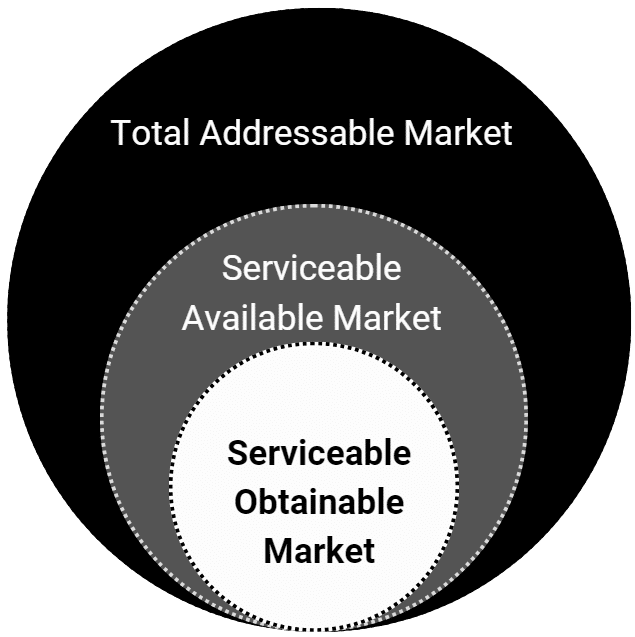
When you target “everyone” interested in fleet management software, you’re addressing your total addressable market (TAM) – this includes all potential buyers in the category.
Here’s a simple diagram to illustrate TAM, SAM and SOM:
We’re not using this framework to estimate market sizes but to clarify who we are and aren’t targeting.
Your TAM is much larger than the segment of the market that will actually choose your company, and it’s certainly larger than you’d want to target in terms of pay-per-click costs. The same applies to your serviceable available market (SAM), the segment of the TAM you can actually serve.
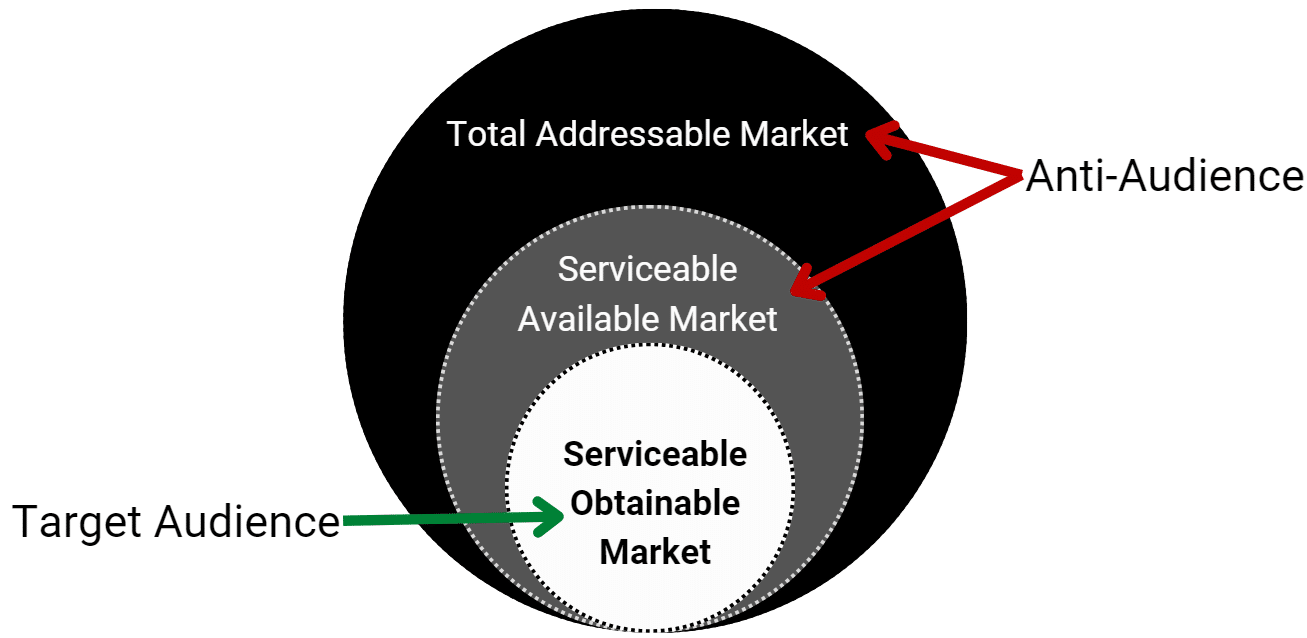
Your serviceable obtainable market (SOM) includes prospects who are most likely to convert and who you should be targeting.
Identify your target audience and anti-audience
- Target audience (SOM): People actively seeking the specific benefits, price points and features your product offers. You want this audience to engage with your ads.
- Anti-audience (TAM and SAM): Everyone who’s left becomes your anti-audience. They are searching within your keyword category but aren’t looking for what you’re specifically offering. Your anti-audience will click your ad but won’t convert.
To define your anti-audience, think about who’s least likely to say “yes” to your offer:
- Who doesn’t resonate with your unique selling points?
- Who clicks your ads but doesn’t become a lead or make a purchase?
- Who fills out a form but never follows through to become a client or customer?
Most businesses running ads already know who the “problem clicks” are from.
A high-end art print company attracts visitors looking for cheap movie posters, the last-mile delivery service receives more job applications than customer leads and so on.
If you’re stuck, an AI tool like ChatGPT can help identify who’s in your category but not an ideal prospect for you, given the specifics of your offer.
Compile your target and anti-audience lists
Once you understand who to target and who to dissuade from clicking your ads, it’s time to create detailed audience lists.
These two lists will essentially be mirror opposites.
Your target audience list includes attributes of your ideal customers, while your anti-audience list includes attributes of people who won’t convert.
Include qualities that relate to your offer, such as:
- Location
- Scope of service
- Compatibility
- Requirements
- Style
Consider a Japan-based real estate investment company using Google Ads to attract investors. They realize many of their leads come from people looking to buy their first home, not from potential investors.
To combat this, they craft their audience lists to differentiate between those they want to attract and those they’d rather avoid:
| Target audience |
Anti-audience |
| Real estate investors |
Looking for low-cost housing |
| Interest in properties in Japan |
Looking for properties outside of Japan |
| Wants real property |
Wants REITs |
If your lists feel obvious and even redundant, you’re doing it right! Once your audience distinctions feel self-evident, writing effective headlines and ads becomes much easier.
Step 2: Tailor your ads to attract and repel
How do you write a headline that discourages the wrong clicks?
Don’t worry, I’m not suggesting you write a headline that says:
“If you don’t have the budget for our services, don’t click this ad.”
Fortunately, there are ways to make your ad specific without being off-putting.
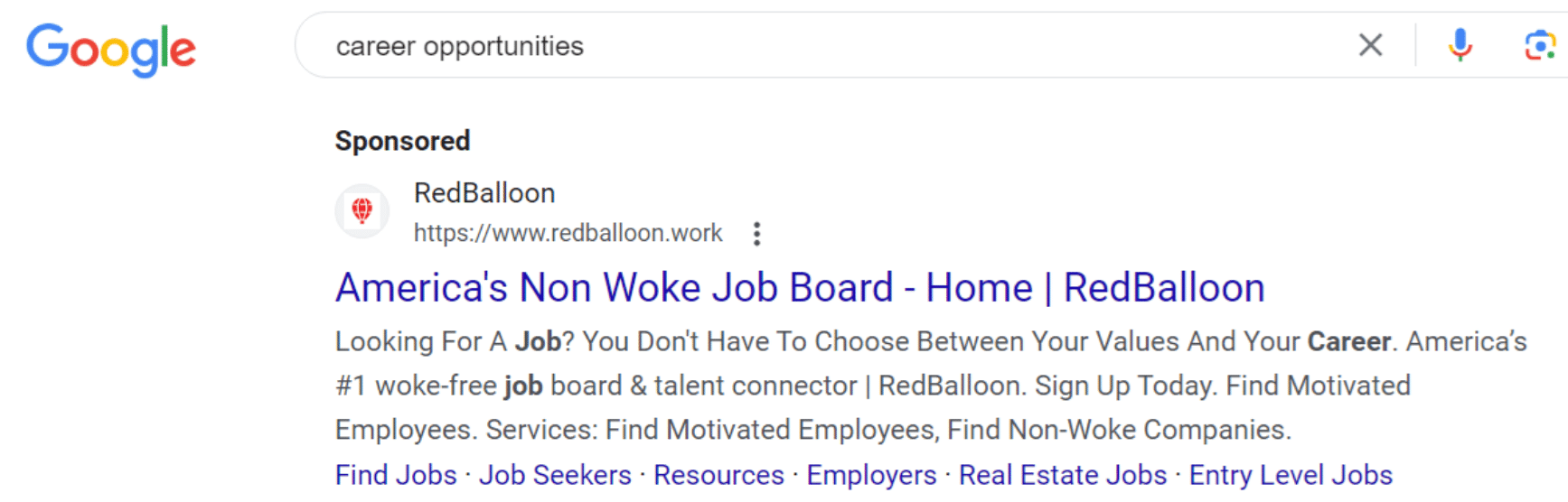
Example 1: America’s ‘non-woke’ job board
This ad shows for the keyword “career opportunities,” targeting job seekers disillusioned with “woke culture.”
The headline is straightforward: “America’s Non Woke Job Board.” It appeals directly to its target audience while naturally deterring those not aligned with this perspective.
- Target audience: People upset about “woke culture.”
- Anti-audience: People who aren’t looking for “non-woke companies.”
What if, instead, they had used the headline:
“Find a good job that respects your values.”
Interestingly, that’s the headline on their homepage.
It might work well there, where visitors know the context and ethos of the company. However, for a Google Ad, including “wokeness” is a better filter to pique the interest of the right job seekers while keeping click costs down.
Example 2: Only for accredited investors
In finance, advertising to the right audience isn’t just a matter of efficiency – it’s often a legal requirement.
- Target audience: Accredited investors.
- Anti-audience: Anyone who’s not an accredited investor.
A headline clearly stating “Only For Accredited Investors” immediately clarifies who the ad is for, discouraging ineligible investors from engaging with content they legally cannot access.
Example 3: Binge-watch your way to fluency
For a language learning service, standing out in a crowded market requires a unique approach.
- Target audience: People looking for an edu-tainment learning style.
- Anti-audience: People in a rush or who want an academic experience.
Lingopie’s ad, “Bingewatch your way to Fluency,” perfectly promotes its offering. It attracts learners who prefer a more entertainment-based method, while those in a rush or seeking a rigorous academic structure look elsewhere.
Take your ad through two passes to make sure your headlines are:
- Uniquely appeal to your target audience.
- Discourage clicks from your anti-audience.
Get the daily newsletter search marketers rely on.
Step 3: Know your metrics
Are you trapped in the “one job” fallacy of advertising? It’s a common misconception:
“An ad’s only job is to get clicked. It’s the landing page’s job to convert.”
Many marketers and their clients subscribe to this view.
The problem is clicks and click-through rates (CTR) are poor metrics for determining an ad’s effectiveness.
If an ad pulls in the wrong audience, it may generate more clicks, but this could lead to increased costs while sales decline.
This isn’t just theoretical; data from WordStream shows this is exactly what happened to the average Google Ads account last year:
According to these year-over-year stats:
- Average CTR: Increased (+3%)
- Conversion rate: Decreased (-10%)
- Lead costs: Increased (+20%)
A higher CTR doesn’t correlate with business growth.
Conversely, attracting fewer but more targeted clicks can significantly enhance performance.
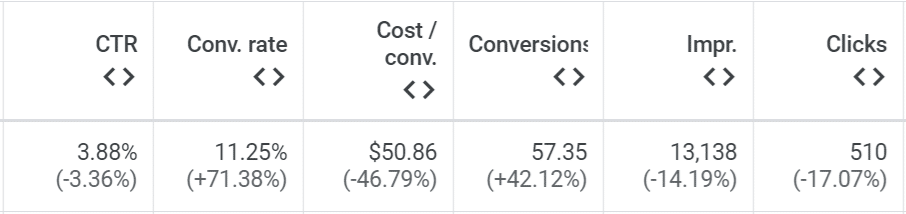
Here are the results from a client after we refined their ads to better target their audience:
- Average CTR: Decreased (-3%)
- Conversion rate: Increased (+71%)
- Lead costs: Decreased (-47%)
Despite fewer impressions and clicks, actual leads went up 42%.
Does this mean you should aim for a lower CTR?
Nope! It just means that if your goal is to increase leads and sales, you should measure your ad against its ability to drive leads and sales, not its ability to drive more clicks.
Instead of only tracking click activity, prioritize post-click metrics:
- Conversions and conversion rates: Measure how effectively your clicks are driving leads and sales.
- Cost per lead (CPL) and return on ad spend (ROAS): Evaluate your ads’ cost efficiency.
These indicators give you a clearer picture of your ad’s true impact, so you know if your ads are reaching and resonating with your intended audience.
Walkthrough: Optimize Google Ads with anti-audiences
Now that you’re familiar with the concept of anti-audiences, let’s put it into practice by optimizing an ad from start to finish. This exercise is adapted from Magnetic RSAs, my course on crafting effective responsive search ads.
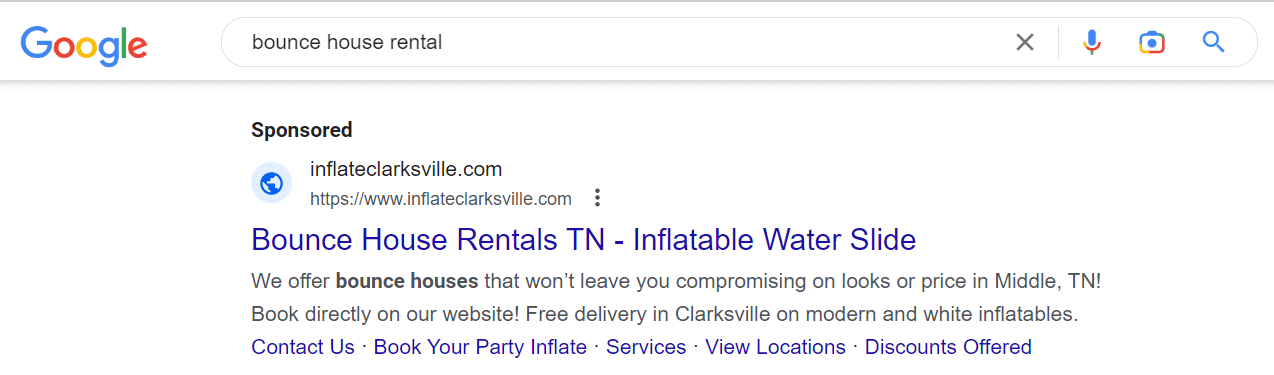
We’ll analyze an ad from Inflate Clarksville, a local business (not a client) specializing in stylish bounce houses and inflatable party decor rentals in Middle Tennessee.
Here’s a screenshot of one of their ads:
Define the audiences
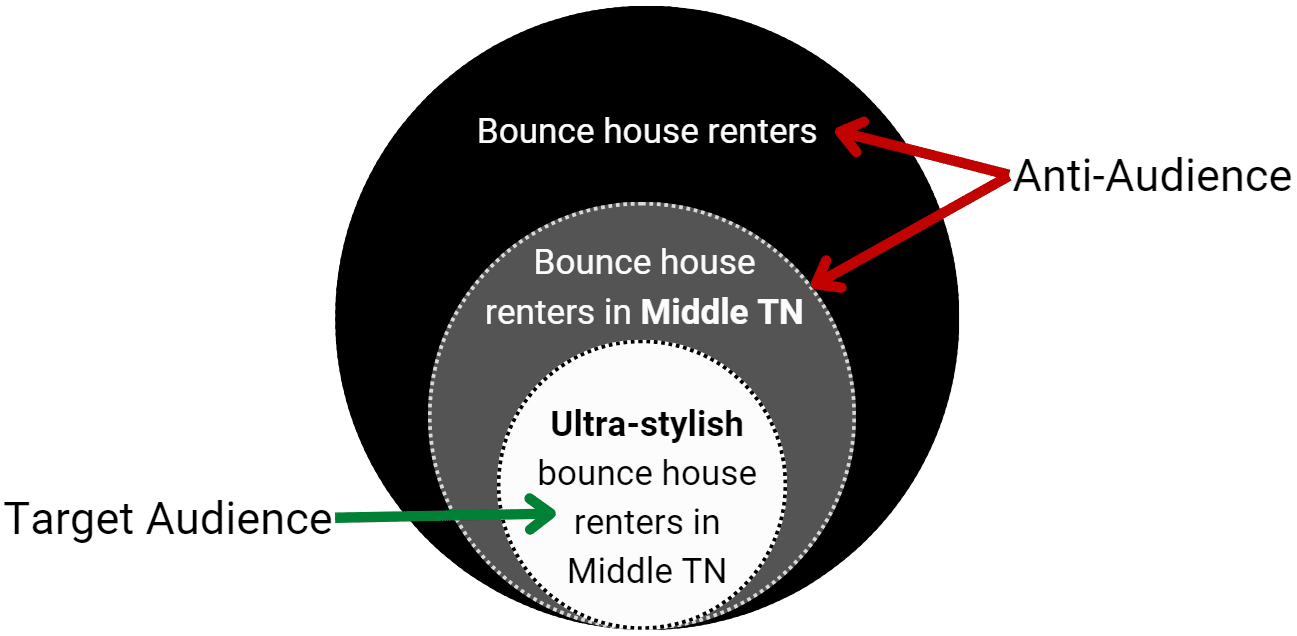
If the total addressable market (TAM) is all bounce house renters, the serviceable available market (SAM) could be defined as bounce house renters in Middle Tennessee, which is who the ad’s headline is targeting.
However, this ad should target a more niche market.
Inflate Clarksville’s offerings are distinct, with an upscale aesthetic suited for stylish events, setting them apart from typical neon-colored children’s inflatables.
The ad must emphasize these upscale options while deterring those seeking traditional styles.
Here’s a simple TAM/SAM/SOM diagram for visual aid:
Using this model, we define the target and anti-audiences by aesthetic preference and location.
Here are the specific traits and attributes that could appear in the audience lists:
| Target audience |
Anti-audience |
| Heavily engaged with social media, potentially influencers |
Bargain hunters looking for discounts |
| Locals in the middle Tennessee area |
Out-of-area prospects |
| Seeks elevated aesthetic for parties for children or adults |
Prefers traditional, neon-themed children’s party styles |
With clear target and anti-audience lists, we can fine-tune the ad.
Optimize the headlines and message
Optimizing an ad involves enhancing what works and minimizing ineffective elements.
The current ad effectively notes the service (bounce house rentals) and location. It misses the unique value proposition (UVP) of the upscale bounce houses. It also highlights water slide rentals, which don’t specifically appeal to the ideal customer base.
A revised ad should spotlight Inflate Clarksville’s high-end inflatables, appealing to local, style-conscious consumers and subtly deterring those looking for conventional or economical options.
Google Ads headlines: Before and after roundup
Before: “Bounce House Rentals TN – Inflatable Water Slides”
- Fails to differentiate
- Does not target the specific audience
- Gives no reason for the anti-audience to avoid clicking
After: “Aesthetic Bounce House Rentals – Stylish Middle TN Inflatables”
- Incorporates “aesthetic” and “stylish” to set clear expectations
- Attracts customers looking for upscale bounce houses
- Deters those seeking basic or discount options
This focused rewrite helps to attract the ideal customer, reduce irrelevant clicks and improve the ad’s efficiency.
Time for action
To further refine your skills in crafting Google ad headlines:
- Review existing ads: Assess whether your current ads clearly identify and communicate with the target and anti-audiences. Edit or create new versions to sharpen their focus.
- Craft new ads: When starting new campaigns, define your target and anti-audiences upfront to guide your ad creation process.
- Practice material: If you lack a product or service to advertise, use existing Google ads as practice material. Analyze, critique and rewrite ads to better specify their target audiences.
Happy writing!
Courtesy of Search Engine Land: News & Info About SEO, PPC, SEM, Search Engines & Search Marketing