Archive for the ‘seo news’ Category
Wednesday, May 15th, 2024
Reddit named Jyoti Vaidee as its first VP of Ads Product, a newly created role overseeing the platform’s monetization engine.
Vaidee joins from Google, where she spent over 11 years leading ads products and monetization, most recently as product lead for Google’s Display Ads business. She also served stints working at Microsoft on Xbox and Outlook.
The new role underscores Reddit’s focus on scaling its ads business globally following its March IPO.
Why we care. Reddit Ads fans that love the platform and use it will be encouraged to learn of Vaidee’s hiring. It demonstrates Reddit’s commitment to improve the platform and add much needed functionality – especially when it comes to AI ad creation.
Reddit has been eyeing entering the search market after achieving 1 billion monthly searches, due at least in part to it’s content licensing agreement with Google. They’ve even introduced Dynamic Product Ads that connect users with products they are looking for or may be interested in.
What Reddit advertisers are saying. Reddit advertisers said the platform needs improvement.
Kyle Golembiewski, Founder at 4Chord Marketing, told Search Engine Land:
“If you want to compare performance/ease of use to that of Meta or Google, it’s heavily lacking in AI creative optimization, which appears to be the future. I’ve found the only way around bots/click farms on Reddit is by breaking an ad group out for each subreddit I’m targeting. That’s unfortunate but not unlike the “hacks” we used to use on other platforms.”
He added, “Reddit, in general, is lower CPC with lower conversion rates. The audiences are quite engaged with organic conversations but less receptive to sponsored ads.”
Gil Gildner, Co-Founder at Discosloth said, “I am a big fan of Reddit Ads in terms of targeting subreddits (very similar to intent-focused searches like Google Ads offers) but the platform itself is very crude and doesn’t offer a lot of fine-tuning or insight. Reddit still has a lot of work to do in terms of branding. Many of our advertisers want to be super cautious with their placements, and Reddit etiquette is notoriously low.”
The intrigue. Vaidee replaces Shariq Rizvi, who built Reddit’s ads platform from scratch over the past five years as EVP of Ads Monetization. Rizvi is leaving the company.
What they’re saying. “Jyoti’s two decades of product management and engineering experience make her uniquely poised to lead Reddit’s Ads products as our business continues to scale globally,” said COO Jen Wong when announcing Vaidee’s hiring.
Get the daily newsletter search marketers rely on.
Vaidee will be responsible for driving the product strategy, execution, and management of the Ads Product organization at Reddit. She will report to Roelof van Zwol, the VP of Ads Product and Engineering.
Courtesy of Search Engine Land: News & Info About SEO, PPC, SEM, Search Engines & Search Marketing
Wednesday, May 15th, 2024
Google is rolling out a new search filter to show only text-based links in the search results. The filter is named “Web”. Clicking it removes images, videos, or other forms of search results; only classic blue links are displayed.
Web filter. You can find the web filter next to the other filters in the menu. Sometimes that means it is on the same line as the video filter, news filter and so on. Other times it is under the “more” menu.
Here are some screenshots Google posted on X:


More. Google Search Liaison Danny Sullivan apparently championed creation of Web filter. He wrote, “Since I joined Google, I’ve just been a boy standing in front of the search group asking it to love a Web filter. So happy to see it’s arrived – congrats to the hard-working team on this project that through their own efforts made it a reality!”
He added, “We’ve launched a new “Web” filter that shows only text-based links, just like you might filter to show other types of results, such as images or videos. The filter appears on the top of the results page alongside other filters or as part of the “More” option, rolling out today and tomorrow globally. We’ve added this after hearing from some that there are times when they’d prefer to just see links to web pages in their search results, such as if they’re looking for longer-form text documents, using a device with limited internet access, or those who just prefer text-based results shown separately from search features. If you’re in that group, enjoy!”
Google tested this in the form of “web results” back in February of this year.
Why we care. Now if you want to remove forums, videos, news, images or other forms of search results you can. You can just filter by text-links, and go back to the pre-2007 universal search days.
Courtesy of Search Engine Land: News & Info About SEO, PPC, SEM, Search Engines & Search Marketing
Wednesday, May 15th, 2024
Google is adding new AI-powered search features to Google Search and in Google Search Labs, in addition to rolling out AI Overviews to searchers in the U.S. this week.
The new AI-powered features include the ability to adjust AI Overviews, multistep reasoning capabilities, planning capabilities, AI-organized search results and a new Google Lens ask-with-video feature. The new capabilities require users to opt-in.
Adjusting AI Overviews
Coming to Search Labs is the ability to adjust the AI Overviews to “simplify the language or break it down in more detail,” Liz Reid, the head of Google Search, explained. Clicking on “Simpler” will give users a more basic AI Overview response; clicking on “Break it down” will provide a much more detailed response.
This functionality refines search results without requiring multiple searches in the same search session.
Here is how it looks:
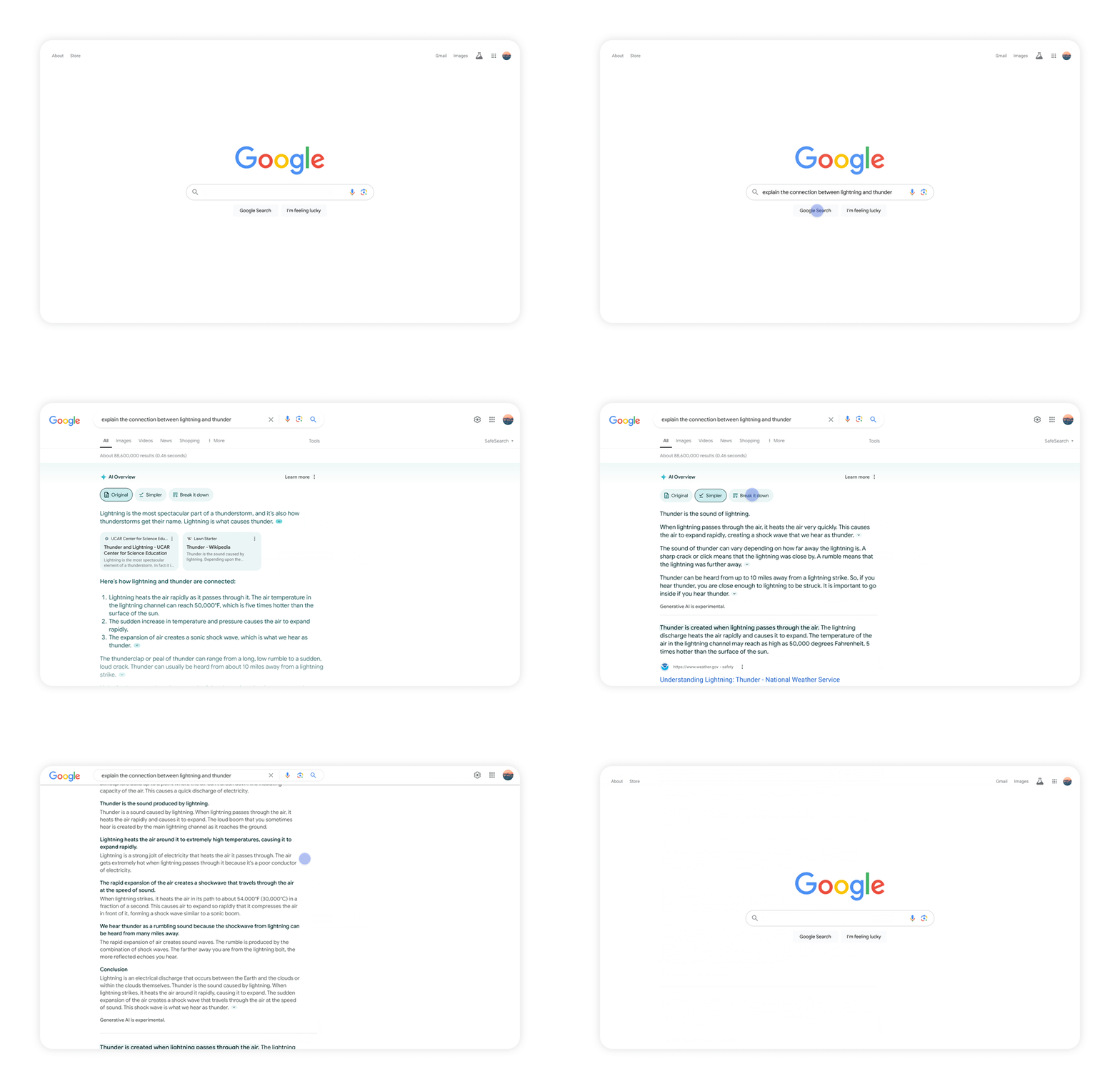
Refining AI Overviews is coming soon to Search Labs for English-language queries in the U.S.
Multistep reasoning capability
Google Search can now provide multistep reasoning using Gemini step-by-step reasoning logic. “Rather than breaking your question into multiple searches, you can ask your most complex questions, with all the nuances and caveats you have in mind, all in one go,” Reid wrote.
The example provided by Google below demonstrates how multistep reasoning works. The example shows when you’re searching for a new yoga or pilates studio, that is popular in your community, conveniently located for your daily commute, and that also offers a discount for new members. You can ask Google Search to “find the best yoga or pilates studios in Boston and show details on their intro offers and walking time from Beacon Hill.”
Here is how it looks:

Multistep reasoning is also coming soon to Search Labs, for English queries in the U.S.
Planning capabilities
The planning capabilities feature gives you the ability to plan what you need directly in Google Search. This will give you choices and the ability to co-create plans with others, it will show you links to recipes across the web, you can export those results, and replace specific plan details with another option within the various plan set. Plus it is not just showing you search results but planning them with you along the way with you.
For example, you can search for “create a 3 day meal plan for a group that’s easy to prepare,” and you’ll get a starting point with a wide range of recipes from across the web. You can swap out parts of the plan, as you wish and then export them to Google Docs or Gmail.
Here is how it looks:
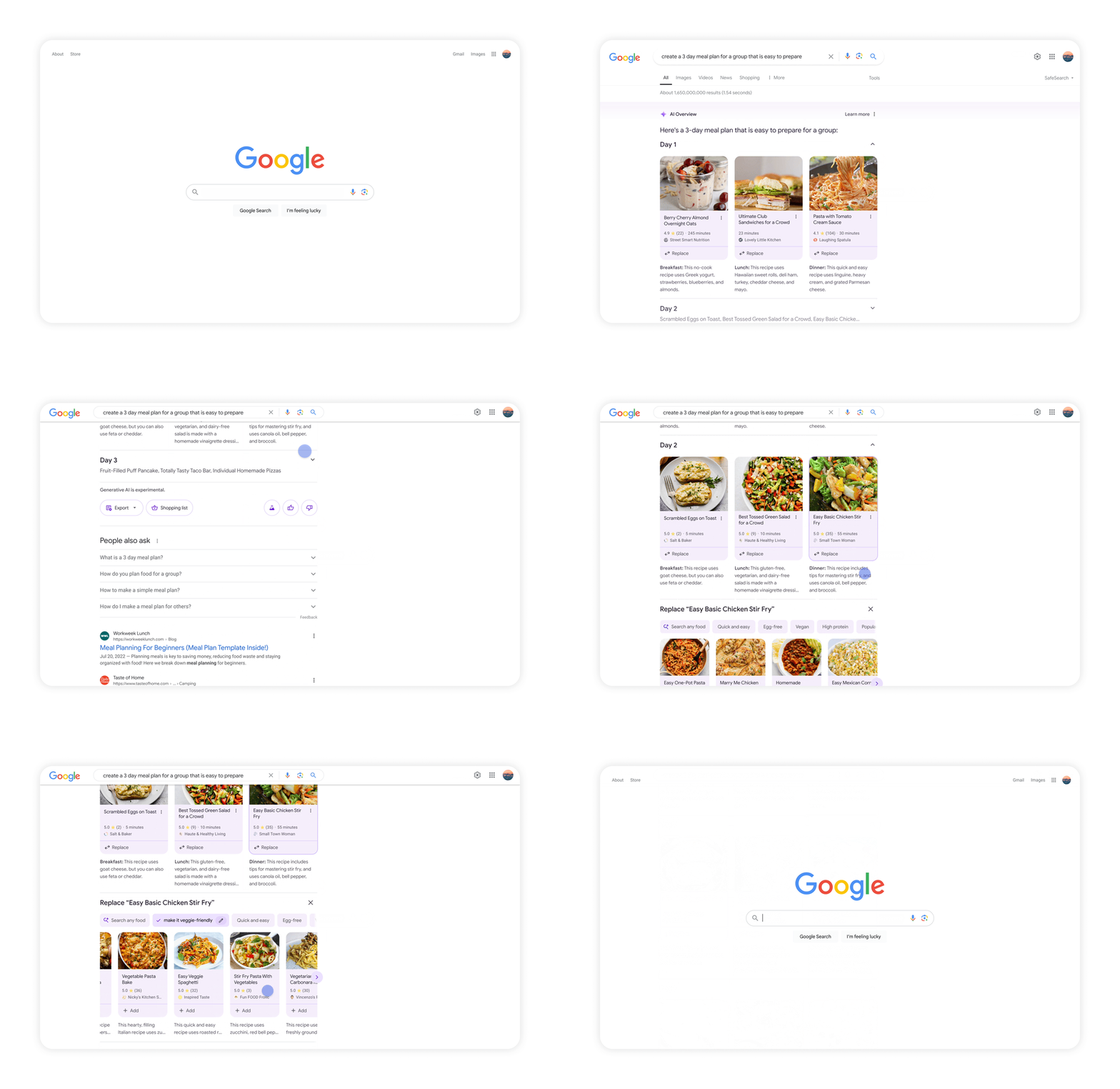
Planning is coming to parties, date night and workouts in Search Labs later this year within the U.S.
AI-organized search results
Google Search will use AI to group the search results into specific categories. This will help you brainstorm options for your query, Hema Budaraju, the Senior Director of Product, Search Generative Experience, Google told us. You will be given search results “categorized under unique, AI-generated headlines, featuring a wide range of perspectives and content types,” Google wrote.
Here is how AI-organized search results will appear:

This functionality will roll out for dining and recipes, followed by movies, music, books, hotels, shopping and more later this year directly in Google Search for U.S. English results. It is not available as a Google Search Labs opt-in feature.
Lens search with video
Lens search with video enables users to record a video and ask questions while recording; Google will respond to based on the questions asked. “We’re able to take visual search to a whole new level, with the ability to ask questions with video,” Reid said.
This reminds me of Multisearch with images and Circle to search but with video.
Here is how this will work when it goes live later this year.

Searching with video will be available soon for Search Labs users in English in the U.S.
Courtesy of Search Engine Land: News & Info About SEO, PPC, SEM, Search Engines & Search Marketing
Tuesday, May 14th, 2024
A new era of customized AI models is emerging. Known as custom GPTs (generative pre-trained transformers), these tools enable SEO professionals to harness the capabilities of language models like ChatGPT and tailor them to their unique processes and philosophies.
This article covers the benefits of custom GPTs and provides a step-by-step guide to building your own “Striking Distance Keyword Opportunity Analyzer” – a GPT specifically designed to identify high-potential keyword opportunities that align with your website’s existing rankings.
From plugins to custom GPTs
The arrival of GPT-4, available in ChatGPT Plus, ushered in a new era with the introduction of plugins. These add-ons extended the functionalities of the already robust language model, integrating it with third-party tools.
This integration allowed ChatGPT to perform previously unachievable tasks, such as syncing with Google Sheets for extensive keyword data analysis or using Noteable for data manipulation in shared databases.
However, ChatGPT plugins had their limitations. They offered one-size-fits-all approaches that often struggled to handle the intricacies of specific niches and complex SEO activities.
With the sunsetting of ChatGPT’s plugins, custom GPTs took center stage. Unlike plugins, GPTs are standalone AI models, each designed from the ground up to meet specific requirements. These models are not just about extending functionality; they create unique solutions finely tuned to the tasks at hand.
Imagine having a dedicated SEO GPT that can understand industry jargon and best practices while leveraging built-in features like DALL-E image generation or Advanced Data Analysis to consume and analyze large data sets. This level of customization unlocks a whole new realm of possibilities in SEO workflows.
Building your competitive edge: Why SEOs need custom GPTs
Pre-built GPTs can be both impressive and powerful. The GPT library is filled with GPTs built by SEOs and designed to handle complex initiatives like keyword ideation and analysis, content brief creation, on-page analysis and more. But here’s the secret sauce: SEO isn’t just about automation; it’s an art form honed by your unique approach.
That’s where custom GPTs come in. Imagine having an AI partner specifically designed to understand your SEO philosophy. You’ve poured years into crafting your niche expertise; now, a custom GPT can leverage that knowledge. It becomes an extension of your strategic thinking, analyzing data through the lens of your unique approach to SEO.
This isn’t about replacing your expertise; it’s about amplifying it. Custom GPTs become tireless assistants, automating mundane tasks and freeing you to focus on the strategic nuances that make you a standout SEO.
Dig deeper: 9 of the best custom GPTs for SEO in the GPT store
From theory to practice: Building a real-world GPT
Imagine a custom GPT specifically designed to identify high-potential keyword opportunities within striking distance of your website’s rankings.
This “striking distance” keyword opportunity analyzer would be a powerful tool, saving you time and effort in uncovering hidden SEO gems. Better yet, you can build this tool based on your unique approach to SEO and you don’t need to be a programmer to do it.
Here’s a glimpse into how we might build this custom GPT using ChatGPT’s conversational GPT builder. This innovative platform takes the complexity out of custom GPT development. ChatGPT’s builder has a user-friendly interface that feels more like a conversation than coding.
You simply interact with the platform, providing clear instructions and training data and the builder guides you through the process step-by-step.
This intuitive approach makes building custom GPTs accessible to SEO professionals of all technical backgrounds, allowing you to harness the power of AI regardless of your coding experience.
Get the daily newsletter search marketers rely on.
1. Identifying the goal: Setting your sights
We begin by clearly defining the GPT’s purpose. In this case, we want it to analyze your website’s existing keyword rankings and identify keywords where you’re already ranking on the second or third page of search results (striking distance).
These keywords represent low-hanging fruit with the potential to drive significant traffic by boosting rankings to the top of the SERPs with focused SEO efforts.
2. Naming and appearance: A touch of personality
Next, we choose a name that reflects the GPT’s function – Striking Distance Keyword Opportunity Analyzer. We can even leverage DALL-E to generate a creative image visually representing this concept.
3. Training the knowledge vault: Feeding the machine
This is where our expertise comes into play. We’ll provide the GPT with a curated set of training data, including:
Sample datasets
We’ll feed the GPT a sample Semrush ranking data export to train it on the inputs to expect and what to do with them. Define position, volume, URL and other fields the GPT will need to analyze in the uploaded datasets.
Specific SEO expertise
This is our secret sauce. What makes our GPT unique is the expertise we add to it. We’ll share our distinct approach to SEO analysis as it relates to striking distance exploration.
Make sure your training data includes:
- Your unique SEO perspective.
- How you define striking distance keywords.
- Why striking distance keywords are a good SEO opportunity.
Expected output
By providing details on the exact output we expect (e.g., .csv file, table format, specific columns), the GPT can perform the analysis as intended, delivering actionable insights from the start.
Be as detailed as possible – outline every column you want included, how the GPT should calculate or analyze data and how you want the results prioritized.
For example, if your site has 200 pages with striking distance opportunities, define how the GPT should prioritize them.
Remember, the quality and relevance of your training data are paramount. While providing enough data is important, focus on curated high-quality information that aligns with your specific SEO approach and your expected outcome.
Configuration tweaks
By default, the GPT builder does not activate Advanced Data Analysis, which is necessary for reading and analyzing .csv files.
Once you have closed your training data, click the Configure tab and select Advanced Data Analysis as a capability.
4. Refining your GPT through testing
The GPT Builder utilizes a conversational interface to build on the left side, with a test environment on the right side. This allows you to iterate on your GPT while testing.
You may need to refine your training data based on the GPT’s performance. View this as an ongoing conversation with your GPT, constantly refining its knowledge to maximize its potential as your SEO superpower. It took me 20+ iterations to get the output to match my expectations.
Also, consider comparing the GPT’s output with your own analysis. This will allow you to adjust its training data until it meets your expectations.
5. Unleashing your SEO superpower: The power of ‘like-minded’ analysis
Congratulations! You’ve built a custom-trained Striking Distance Keyword Opportunity Analyzer to reflect your unique SEO approach.
This GPT becomes your SEO partner, identifying high-potential keywords that might fly under the radar of traditional tools. It analyzes data through the lens of your expertise, saving you time and effort in uncovering hidden SEO gems.
Now, the power is in your hands. You can choose to publish your GPT to the library for all users to benefit from, keep it for yourself, or make it available to anyone who has the direct link.
Efficiency and expertise combined
Custom GPTs are powerful because they supercharge your SEO workflow, combining the efficiency of automation with the power of your unique SEO expertise.
Sure, you could recreate this analysis with a complex spreadsheet, but it would be time-consuming and error-prone. The custom GPT, however, has freed you from the tedious task of building the analysis, allowing you to focus on strategic SEO implementation.
This doesn’t replace your expertise; it amplifies it, making you a more efficient and effective SEO. Don’t fear the “robot revolution” – embrace it as a tool to empower your SEO skills and achieve greater results.
Bonus: The Striking Distance Keyword Opportunity Analyzer we built here is now live in the GPT library within ChatGPT.
Dig deeper: GPT-4 vs. Google Cloud: Performance comparison on 9 SEO tasks
Courtesy of Search Engine Land: News & Info About SEO, PPC, SEM, Search Engines & Search Marketing
Tuesday, May 14th, 2024
Clean rooms are becoming essential for today’s marketers, offering access to critical advertising data and powerful customer insights. But not all clean rooms are created equal.
Join the upcoming LiveRamp webinar Sweet Success: Hershey’s Recipe to Improve Advertising Effectiveness to hear how Hershey’s drives growth with data clean rooms as a key ingredient for unified measurement and insights. You’ll learn how Hershey’s uses data clean rooms to:
- Build templated queries and visualizations to scale distributed analytics across walled garden clean rooms – optimizing reach, media spend, and sales
- Gain secure access to high-value datasets across retail media, social, and CTV partners for smarter insights, activation, and measurement
- Seamlessly connect to any partner, across any cloud – unifying measurement across its advertising network
Webinar: Sweet Success: Hershey’s Recipe to Improve Advertising Effectiveness
Date: May 22, 2024
Time: 11 am PT / 2 pm ET
Save your spot now
Courtesy of Search Engine Land: News & Info About SEO, PPC, SEM, Search Engines & Search Marketing
Tuesday, May 14th, 2024
Responsive search ads (RSAs) are the bread and butter of Google Ads search campaigns. Launched in 2018 and originally a beta ad format, RSAs became the default ad format for search campaigns on June 30, 2022, when Google sunsetted Expanded Text Ads (ETAs).
The magic behind RSAs is that by providing multiple headlines and descriptions, Google Ads will test different combinations and determine which combinations work best. These combinations are also tailored to better match the search term of the individual searcher, providing ad content flexibility and improving relevancy.
Most PPC advertisers have transitioned away from using ETAs, and RSAs have become standard practice. However, there have been updates to RSAs you must be aware of. Here’s a rundown of everything you should know about RSAs in 2024.
3 headlines and 2 descriptions: A thing of the past
The concept of your RSAs displaying three headlines and two descriptions has gone out the window, with Google Ads recently shaking up how RSAs can appear in search results.
Single-headline ads are popping up more frequently in search results, and the system sometimes chooses to add a headline and the beginning of the description line.
What assets appear and where are based on whether or not the system predicts that performance will be improved by moving away from the “original” three headlines and two description format.
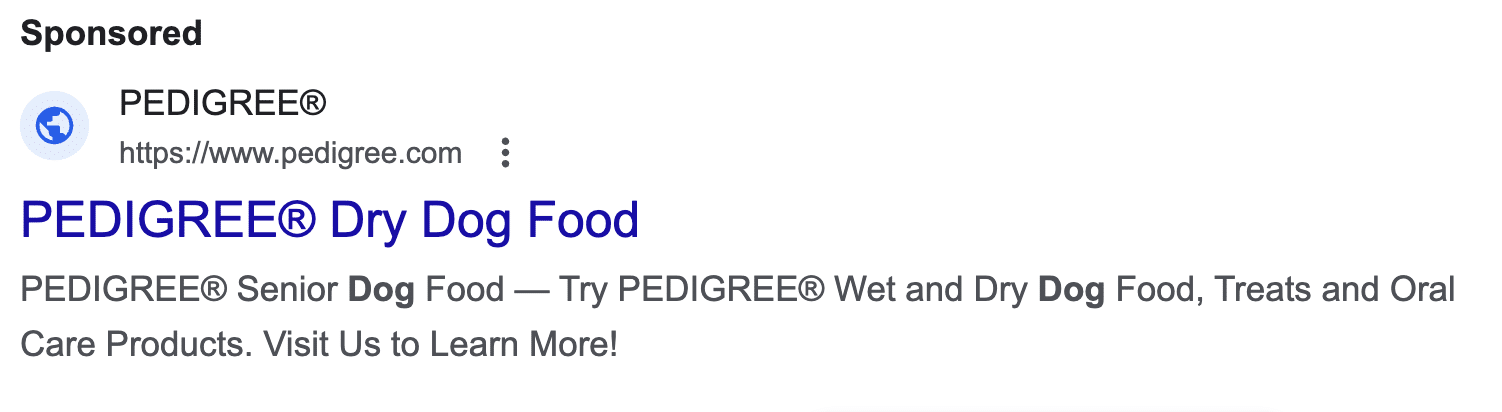 Above: An example of a Search ad with only one Headline and a headline featuring at the beginning of the description line.
This takes more control away from the advertiser, as how RSAs appear can never be guaranteed. The responsive nature of this ad format means you don’t control which combinations are shown either.
As such, make sure your ads are coherent in any order and with any number of headlines and descriptions. For example, a sentence should not need to be covered over two descriptions, which would mean that both would need to appear and in the right order for it to make sense.
Dig deeper: Craft winning paid search ads: 4 best practices
Ad strength: The great debate
Ad strength is a diagnostic tool for advertisers to see how their RSA scores in terms of relevance, diversity of assets and quality. It can be found either by adding the Ad Strength column to your ads page, or in a blue box at the top of the box when creating or editing a RSA.
 Above: When creating or editing a RSA, an Ad Strength score will show at the top of the box
.
Ad strength provides a score (either Incomplete, Poor, Average, Good or Excellent); the higher the score, the more likely the system thinks the ad will be effective.
Google also provides recommendations and ideas on optimizing your ads to improve the score, such as including popular keywords and adding additional headlines.
After much online discussion, in April 2024, Google’s Ginny Marvin confirmed that Ad Strength is not used by Ad Rank, meaning that a low-scoring ad could still perform well. This was following concerns that a low Ad Strength would impact Ad Rank and, therefore, reduce visibility.
While Ad strength is not used for Ad Rank, improving the relevance and diversity of assets facilitates more combination creations, which opens up the opportunity to show more relevant ads in more auctions.
Get the daily newsletter search marketers rely on.
To pin or not to pin
There’s been an ongoing debate about whether pinning headlines and descriptions helps or hurts RSA performance. Case studies offer differing opinions, with some saying pinning boosts performance, while others report decreased visibility and CTR when they try it.
However, the general consensus is that pinning can impact the system’s ability to create effective asset combinations. The system is being instructed to put certain assets in certain positions, reducing its flexibility and responsiveness. Remember to pin sparingly and strategically whenever possible.
Advertisers might choose to pin assets despite the limitations it imposes because they want their company name in every ad, need to include a legal disclaimer or have strong historical data showing that an asset performs well for the account.
Campaign-level RSA assets
Another update from the beginning of 2024 is the ability to apply up to three headlines and two descriptions at a campaign level. This means these assets will be eligible to appear in any RSA within that campaign.
 Above: Headlines and Descriptions can now be added at a campaign level
You can also pin these assets in certain positions and give them a start and end date, making them perfect for promotional periods or seasonal content.
Asset and combination performance report
While sadly not as thorough as most advertisers would like them to be, there are performance reports available for both individual assets and combinations.
To locate them, go to Campaigns > Ads > View asset details (Please note these instructions are based on the new interface design.)
Under the Assets section, you can find information including:
- How many impressions an asset has had during the set time.
- A Performance column, which compares how the asset performs compared to others of the same type within that ad group and rates it either Low, Good or Best.
If the rating is Learning, then that means that it still needs to receive more impressions to be ranked, usually around the 2,000-impression mark.
This report can help you identify which assets need to be improved or replaced based on your impression performance.
Under the Combinations section, you can see what types of asset combinations have been created and how many Impressions they have had.
This is a great opportunity to check your assets, as it allows you to see how they may be appearing in searches — and sometimes, the results can be unexpected.
Google Ads RSAs: The latest updates and best practices
While the foundation of responsive search ads hasn’t changed since they were launched, there have been plenty of developments in the background regarding reporting and best practices.
As Google Ads continues to emphasize the importance of AI-powered search, it will be interesting to see what the next few years will hold for search ads.
Dig deeper: 7 ways to elevate your responsive search ads
Courtesy of Search Engine Land: News & Info About SEO, PPC, SEM, Search Engines & Search Marketing
Tuesday, May 14th, 2024
Google is rolling out restrictions for suspended Google Ads accounts, limiting the actions advertisers can take while their accounts are suspended. Restrictions will be implemented in June 2024.
Why we care. The restrictions could frustrate some advertisers wanting full access during suspension periods.
What’s new? The functionality of suspended accounts will be narrowed to a few key areas like billing, appeals/verification, security settings and account navigation. Other actions like editing campaigns, creating new assets or making changes to suspended entities will be disabled.
Why it matters. The change gives Google more control over suspended accounts, while still allowing advertisers limited access to make payments, download reports and dispute suspensions.
Get the daily newsletter search marketers rely on.
Only these actions are permitted for suspended accounts:
- Billing (make payments, download tax docs, update payment method)
- Account settings (cancel account, claim refunds)
- Appeals and verification processes
- Update security settings
- Navigate the account, read info, download reports
Courtesy of Search Engine Land: News & Info About SEO, PPC, SEM, Search Engines & Search Marketing
Friday, May 10th, 2024
Google is encouraging merchants to enable “conversion annotations” – social proof badges that highlight a product’s purchase popularity when displayed in Google Shopping ads.
What’s new. Conversion annotations like “best selling” or “1K shopped here recently” provide visual cues about a product’s sales performance directly in the ad unit.

Why we care. Conversion annotations incentivize advertisers to share valuable purchase data with Google for visibility boosts. But they’ll have to weigh the benefits against data privacy concerns.
The pitch. Google claims conversion annotations can:
- Enhance the shopping experience by showcasing top products.
- Build trust and social proof by highlighting customer interactions.
- Ultimately, drive more purchases by making listings stand out.
Behind the feature. The annotations rely on merchants sharing aggregated conversion data from their sales.
- Merchants must have conversion tracking enabled in Google Merchant Center to qualify.
- Google says the data allows it “to be more creative and innovative to help you stand out.”
The requirements. To display conversion annotations, merchants need:
- Conversion tracking activated in the Merchant Center.
- To opt-in to share purchase history for annotation use.
Courtesy of Search Engine Land: News & Info About SEO, PPC, SEM, Search Engines & Search Marketing
Friday, May 10th, 2024
Alphabet, the parent company of Google, is making significant strides in discussions to acquire HubSpot, a leading marketing and CRM software provider, according to a new report.
The potential deal: “Alphabet has engaged in talks with HubSpot to discuss terms for a potential acquisition, though no agreement has been reached yet”, sources told Bloomberg (subscription required).
- HubSpot’s market value stands around $30 billion.
Why we care: This update has the potential to reshape the landscape of advertising and CRM software, offering new data integration opportunities and challenges that could impact their strategies and outcomes.
The strategic rationale. Acquiring HubSpot, which focuses on smaller business customers, could help fill a gap in Alphabet’s offerings as it aims to better compete against rivals like Microsoft, Oracle and Salesforce in the CRM software space.
What we know. While the discussions are in progress, it’s important to note that a deal is not a certainty, and other potential suitors could emerge for HubSpot.
- Representatives for both Alphabet and HubSpot declined to comment on the discussions.
Antitrust concerns. There has been no update on whether the recent talks on Google’s antitrust case with the DOJ have affected the possibility of this deal going ahead.
What’s next? With talks progressing, investors and industry watchers will closely monitor for any formal announcements or bids from Alphabet or other tech giants looking to bolster their marketing software arsenals.
Dig deeper. HubSpot’s reported $617.4 million in revenue for the first quarter of the year. HubSpot earnings stay hot amid reports of sale to Google
Courtesy of Search Engine Land: News & Info About SEO, PPC, SEM, Search Engines & Search Marketing
Friday, May 10th, 2024
Receiving negative reviews from former employees is never fun.
Getting this sort of detrimental feedback online can feel like a sucker punch.
But get this:
Poor online feedback is not the end of the world, regardless of whether it comes from a former employee or a current customer.
How you navigate negative reviews reveals a lot about what type of business you are.
This article covers the importance of navigating negative reviews from past employees, learning from these reviews and ensuring your company doesn’t take a reputational hit.
Indeed, Glassdoor and employer review websites
Negative reviews from customers on Google and Yelp are one thing, but employer reviews are another matter entirely.
Before diving into how one can navigate negative employer reviews, it’s important to discuss these reviews and where they circulate.
Employer review websites provide a safe space for former or current employees to review their experience at a company. These employees can discuss salaries and wages, company culture, other staff members, the onboarding experience and a whole host of other matters.
Glassdoor and Indeed are the most well-known employer websites. Aside from being the most well-known, Glassdoor and Indeed also tend to rank highly in Google’s search results.
That means if your company has poor ratings on either website, the results will likely show up early when someone on the job hunt searches for your organization on Google. (The same goes for if you have good reviews.)
A higher rating on either of these sites indicates a solid company reputation, whereas a lower rating must be navigated accordingly.
Dig deeper: How to repair your Google search results and reclaim your online reputation
Dealing with negative reviews as an employer
Let’s start with three absolute core tenets to adopt when navigating negative reviews.
1. Addressing concerns
Employees (both past and prospective) like to feel acknowledged by a company. They want to know a company is seriously addressing concerns, showing empathy toward its staff and not just letting the same issues persist.
So, take the issue head-on. Mention that you have thoughtfully considered the negative review(s) and that you are doing everything in your power to shore up company culture.
Be thoughtful and specific. Get to the root of the issue and devise strategies to fix it.
(If, on the other hand, you disagree with employee feedback or feel it is false or fake, you can take steps to remove negative employer reviews. We’ll discuss this process later on.)
2. Rebuilding trust
Make tangible changes.
Showing prospective and current employees that you’re working toward fixing the issue will lead to a renewed relationship. In turn, you’ll start to rebuild that trust you might’ve feared you were losing.
Trust is essential in the workplace. It is not something you should ever take for granted.
3. Maintaining transparency
Throughout this entire process, it’s critical to be open and honest. Inform your employees that you are working toward fixing the negative feedback you’ve received in the past.
Better yet, consult them. Your employees (both past and present) are the ones who know your company culture best. They can tell you what must be fixed.
Developing a transparent culture will help strengthen your bond with your employees. They will then be more likely to leave you positive reviews on sites like Glassdoor and Indeed.
Get the daily newsletter search marketers rely on.
How does negative feedback lead to improvement and growth?
Again, negative reviews are not always bad. If you believe employer reviews are genuine and have come from wanting to help, they might represent an opportunity for you to improve company culture.
For instance, perhaps a review mentions a lack of communication, how competing companies offer better benefits or how an abundance of digital meetings reduces staff mental well-being.
Solve the issue by Implementing sturdier communication pathways, looking at alternative benefit options or cutting down on virtual meetings. No matter the complaint, you can and should use it to your benefit.
Perhaps you can even use information from negative employer reviews to poll your current staff and ask them what changes they would like to see
Always look at negative employer reviews as a place to learn and grow. Learning from your mistakes can help you foster a healthier, more attractive company culture.
The impact of negative employer reviews on recruiting
Speaking of company culture – negative reviews can impact your ability to recruit new employees.
People on the job hunt tend to research the companies they interview with. They want to know if they’re stepping into a culture that values their mental health or one that couldn’t care less.
Here’s a simple question: If you were on the job hunt, would you want to work at a company with a 3.7-star rating on Glassdoor or one with a 4.7-out-of-5 rating?
The answer is easy. You’d choose the latter company. You might even choose them if the salary at the former company is slightly higher.
For this reason, dealing with and navigating negative employer reviews is crucial. It will contribute to more fluid and healthy recruiting and interviewing processes.
What options do employers have for removing negative, false and/or fake reviews?
Not all negative reviews come from an honest place and not all reviews help your company grow.
While some former employees want to help, others merely wish to harm their old bosses and bring down the company.
It’s unfortunate to say, but some companies end up dealing with the following:
- Fake reviews from competitors.
- “Review bombing” from former employees.
- Negative, false and defamatory reviews from former employees.
If any of these are the case, knowing how to remove negative reviews is crucial.
The first step in such an instance is to contact either Glassdoor or Indeed’s employer help center. They can occasionally help you get to the bottom of the matter and remove the review.
But sometimes that simple procedure doesn’t work. In such instances, it might be beneficial to reach out to an online reputation management firm.
Online reputation management firms specialize in managing a company or individual’s reputation and ensuring that negative, unfair reviews are permanently removed. They handle the ugly matters, so you don’t have to.
Several instances in which these firms can help you remove negative employer reviews. For instance, reviews can be removed if:
- They violate guidelines.
- They are deemed bullying or harassment.
- They are defamatory or libelous.
- They are not relevant to your company.
Hiring an online reputation firm can be much easier than going about it yourself, as a team of experts will analyze everything for you.
Navigating negative reviews from former employees
It’s never pleasant receiving a negative review from a former employee. But it’s also not the end of the world.
Negative reviews can serve as an opportunity to grow and learn. Address the concerns, work toward rebuilding healthy relationships with your workers and maintain transparency throughout the process.
If you feel the online feedback is defamatory or untrue, you can always work with an online reputation firm to remove negative employer reviews.
Courtesy of Search Engine Land: News & Info About SEO, PPC, SEM, Search Engines & Search Marketing